Extension pointers #14: Extend end-user benefits and allow personalization by implementing extensions with custom actions
From our earlier post on custom actions, we know that we can create templated actions, share them with end users, and allow them to reuse those actions to achieve personalized outcomes. In this post, we'll look at how custom actions make it easy for users to carry out these templated tasks to get customized results.
Consider the following scenario: a hardware company that already uses Zoho CRM then utilizes Zoho Projects to implement and work on the deals they've won. Assume that the Zoho Projects portal has two projects: one for handling smaller revenue deals that require minimum development and less time, and the other for managing larger revenue dealsthat will eventually demand more time and resources for execution.
As an end user processing deals in Zoho CRM, it would be extremely convenient for the company to have the deals automatically fall into the appropriate projects, such as a task based on the expected revenue. Furthermore, it would be ideal to send emails to the customer with whom they have made the deal to request anything needed from their end in order to move forward with the implementation of the deal. Let's see how we can achieve this with the help of custom actions.
We have detailed posts on the steps to create a custom action along with a live example. Now, let's reiterate and go over the steps to achieving the above use case.
Developer activities
1. Create a connector for Zoho Projects.
2. Create a custom user interface (widget-connected app) that allows the user to select the project where the deal should be created as a task, as well as add the personalized email subject and body that will be sent to the user.
3. Create a custom action in the Zoho Developer console.
- Associate the custom user interface to the custom action.
- Define an action that creates a task in the selected project and also sends an email to the customer based on the values entered by the end user in the custom UI.
Extension/end-user activities
4. Create workflows as an end-user (i.e., set criteria on expected revenue; provide personalized values for email subject and body, and choose the project in which the deal fulfilling the set criteria should be created as a task) and assign a custom action to them.
Developer activities
1. Creating a connector
- Create a new connector in your extension for Zoho Projects using the Connectors feature under Utilities in the left panel of the Zoho Developer console.
Note: Zoho Projects follows the OAuth 2.0 protocol for its authentication mechanism. You can refer to this post to learn more about the steps to register Zoho Projects and retrieve your client credentials.
- Add the necessary connector APIs for your functionality.
- The Zoho Projects REST APIs added for our example are mentioned below.
Connector API Name | Method type | URL |
Get Projects | GET | https://projectsapi.zoho.com/restapi/portal/${portalid}/projects/ |
Create project task | POST | https://projectsapi.zoho.com/restapi/portal/${portalid}/projects/${projectid}/tasks/?name=${name}&description=${description} |
2. Create a custom user interface:
1. Create a custom user interface that allows the end user to select the project in which they want to create the deal as a task, as well as enter the email subject and body that should be sent to the contact associated with the deal.
2. You can find the HTML code for the custom UI as an attachment to the post.
- In the HTML code, we have two text fields to get the user inputs for the email subject and body.
- We have also invoked the connector API to get projects from a portal. The response is then populated and displayed as a dropdown list to allow the user to select the project in which they want the deal to be created as a task.
- In the HTML code snippet, we have hard coded a static value for the Zoho Projects portal.
Note: Depending on your business use case requirements, you can create custom variables to prompt the user to input their Zoho Project portal ID, or you can create a setting widget that displays the user's portals, allowing the user to choose the portal in which they want to have the deals created as tasks as well.
- ZOHO.CRM.ACTION.setConfig - In this example, we have utilized the setConfig method. This method can be used to set values to variables which can be retrieved later through the widget's page load response.
➤ For our example, we have used the setConfig method to set various Zoho CRM deal and email (subject and body) user input values to variables. We have later obtained these saved values through the widget's page load response, which contains a configdata key with these set data as its values.➤ Sample page load response when ZOHO.CRM.ACTION.setConfig is used in our example:
"module": "Deals", "configdata": { DealTest: "Sample Digital Marketing Project" Dealdescription: "${!Deals.Description}" Dealname: "${!Deals.Deal_Name}" Message: "Sample Message" Subject: "Deal Won!" To: "${!Deals.Contact_Name.Email}" |
➤ We have then used the preset saved values available in the configdata key to prepopulate the widget UI every time it loads.
3. Create a custom action
- Go to the Zoho Developer console and select the extension in which you want to create the custom action.
- Create a custom action by navigating through Automate - > Custom Actions, under the Build section in the left panel. Click Create Action.
- Enter the Custom Action Name and Description. Click Next.
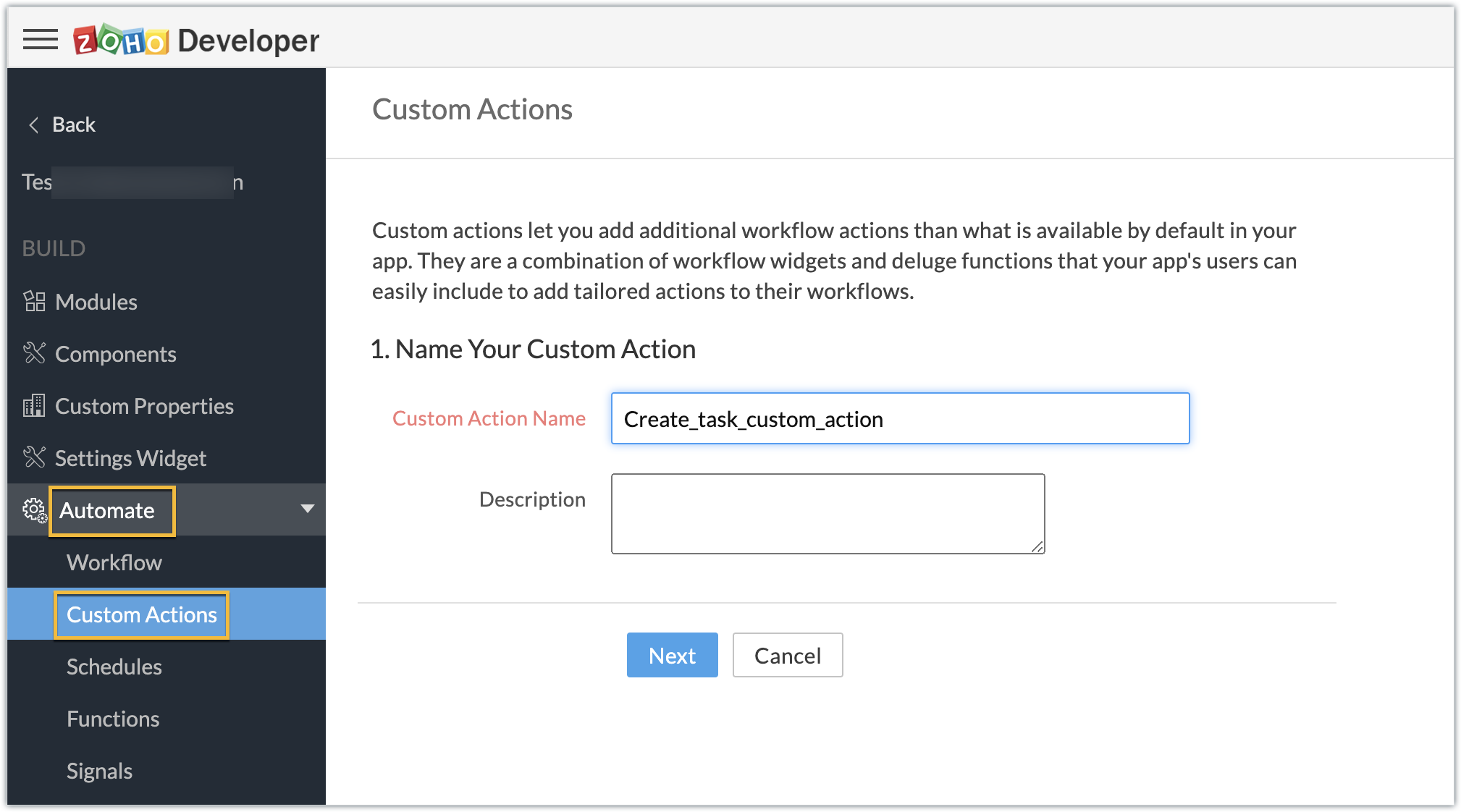
- Provide the location of the html file (widget UI) to complete the resource path. Click Next, then click Create Function.
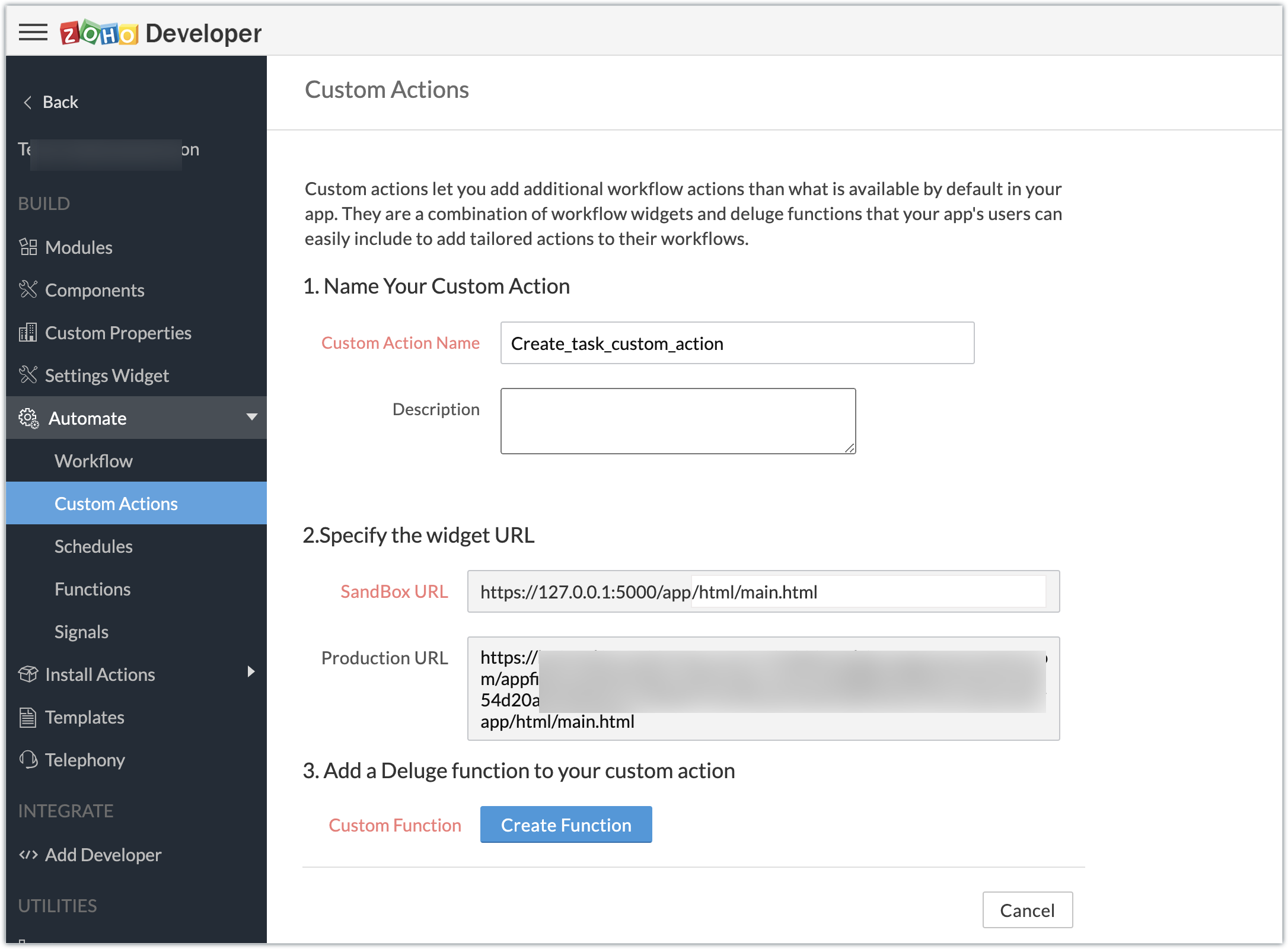
- Enter the Deluge function to perform our use case functionality.
- Click Save & Close, then click Save.
Deluge function code snippet:
dynamic_map = Map(); dynamic_map.put("portalid","xxxxxx"); dynamic_map.put("projectid",input.config.get("Dealproject")); dynamic_map.put("name",input.config.get("Dealname")); dynamic_map.put("description",input.config.get("Dealdescription")); response = zoho.crm.invokeConnector("xxxxx.zohoprojects.createprojecttask",dynamic_map); sendmail [ from :zoho.adminuserid to :input.config.get("To") subject :input.config.get("Subject") message :input.config.get("Message") ] |
- In the above Deluge code, we have performed the functionality of creating the deal as a task in Projects and sending an email to the deal's contact with the input provided by the end user in their CRM account while associating the custom action to a workflow.
Custom action in effect (End-user):
Create workflows:
- As an end user who has the extension which features the custom action installed in the Zoho CRM account, go ahead and create workflows to define criteria and associate the custom action.
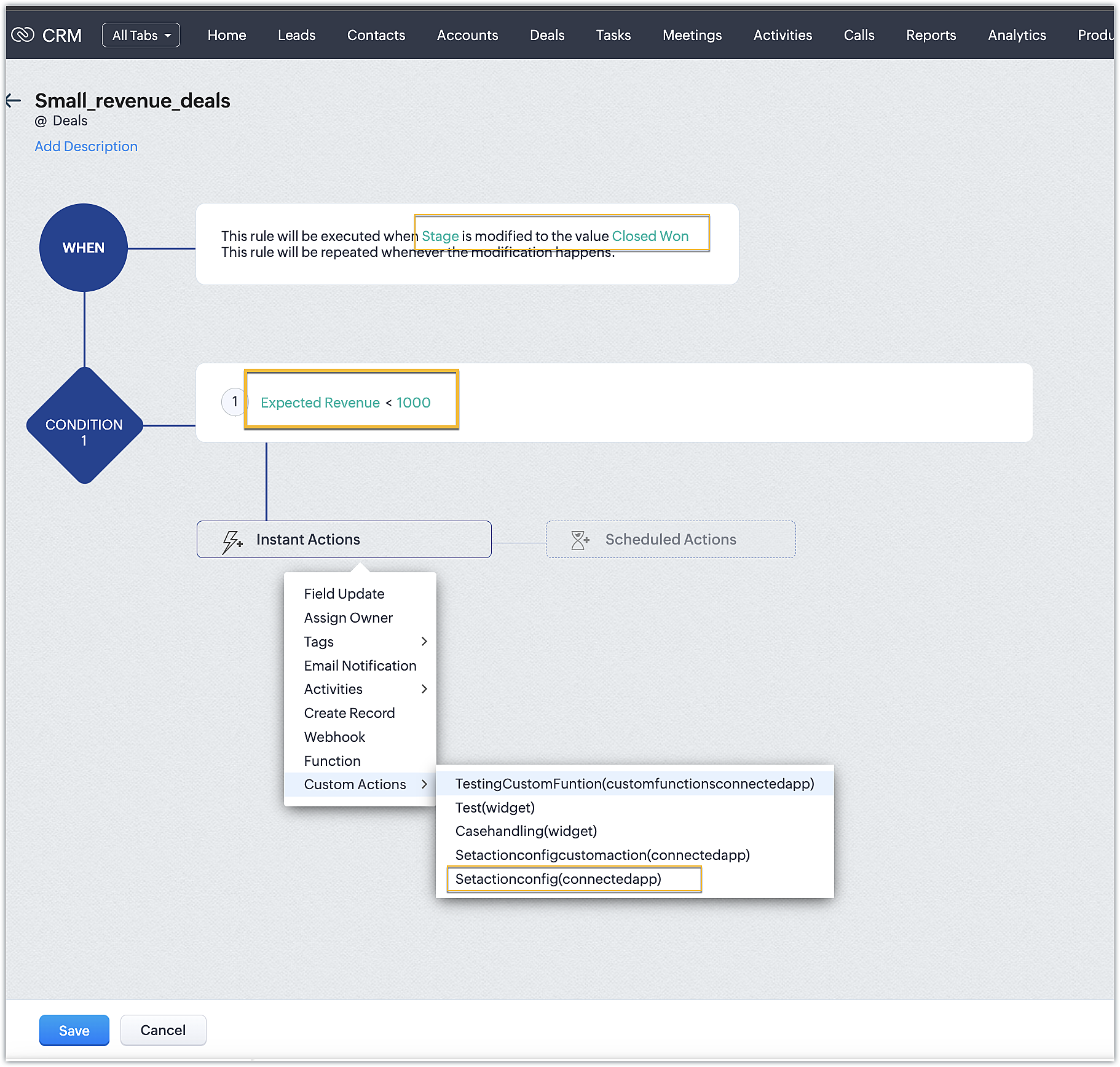
- In our case, we have two workflows:
➤ One for smaller deals where the expected revenue is less than 1000 USD
➤ One for larger deals where the expected revenue is greater than or equal to 1000USD
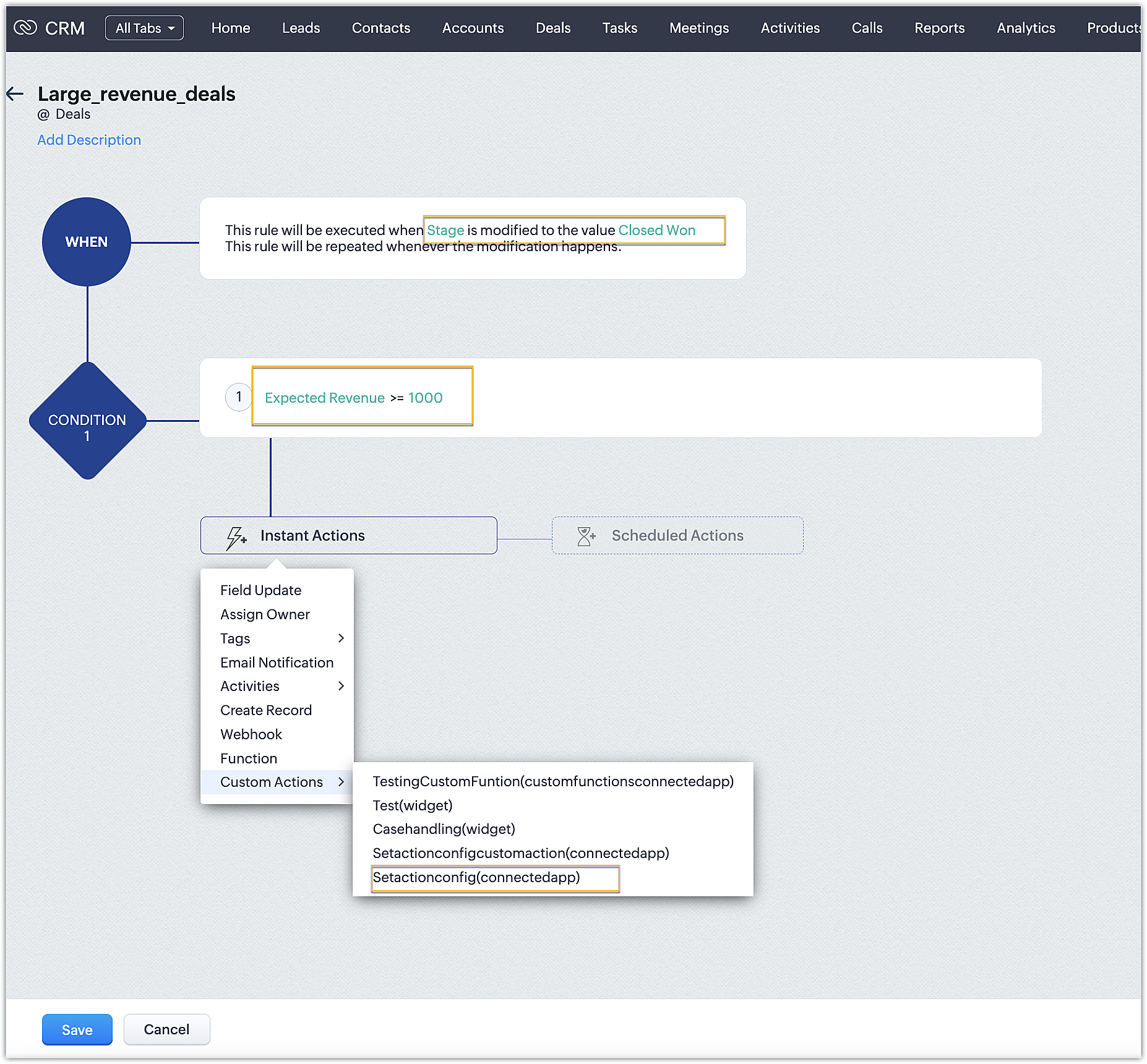
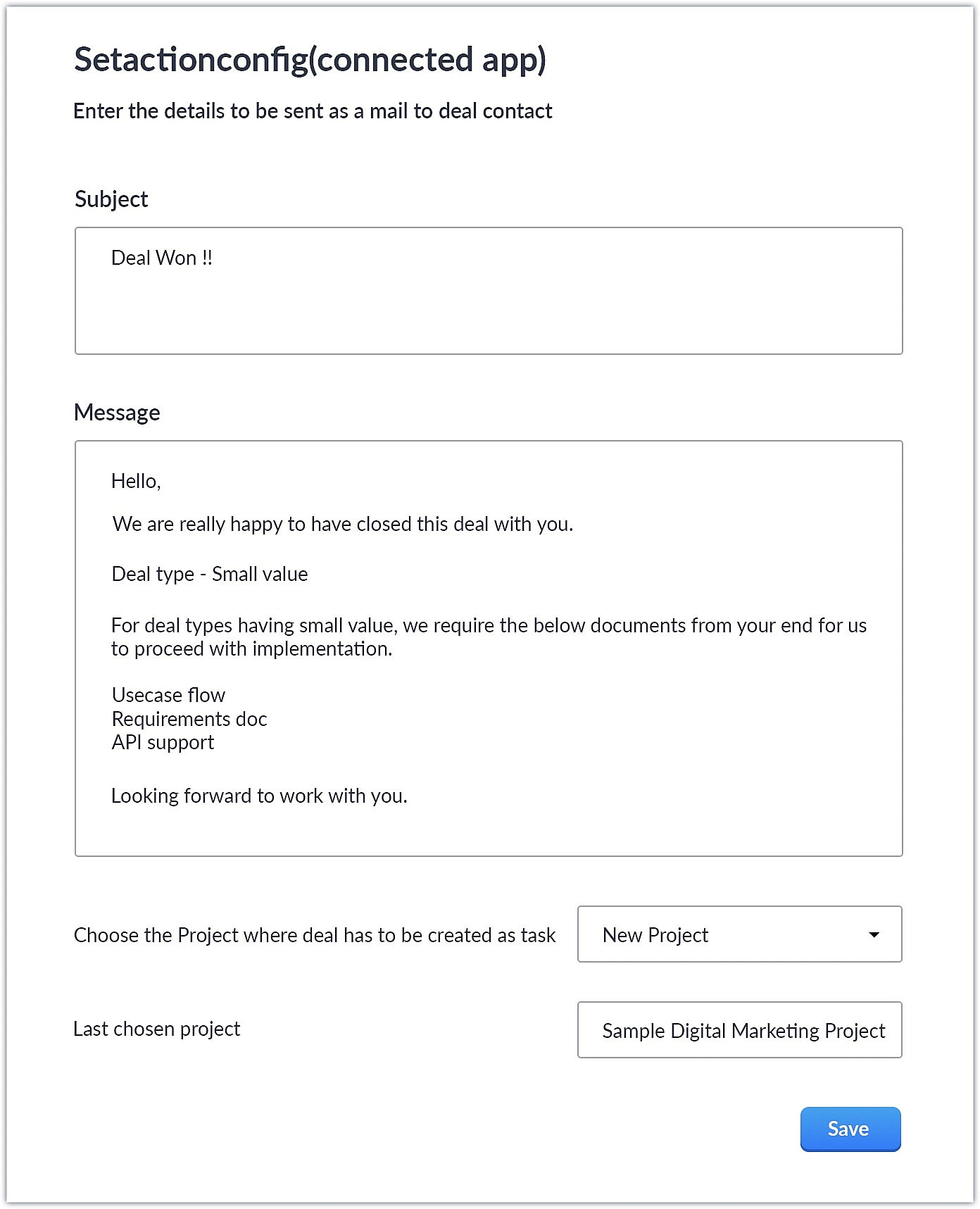
- Upon choosing the custom action, the custom UI appears where-in you can provide user specific input for email body and subject and also choose the project where you want deal to be created as a task in Zoho Projects.
Smaller revenue deals:
Larger revenue deals:
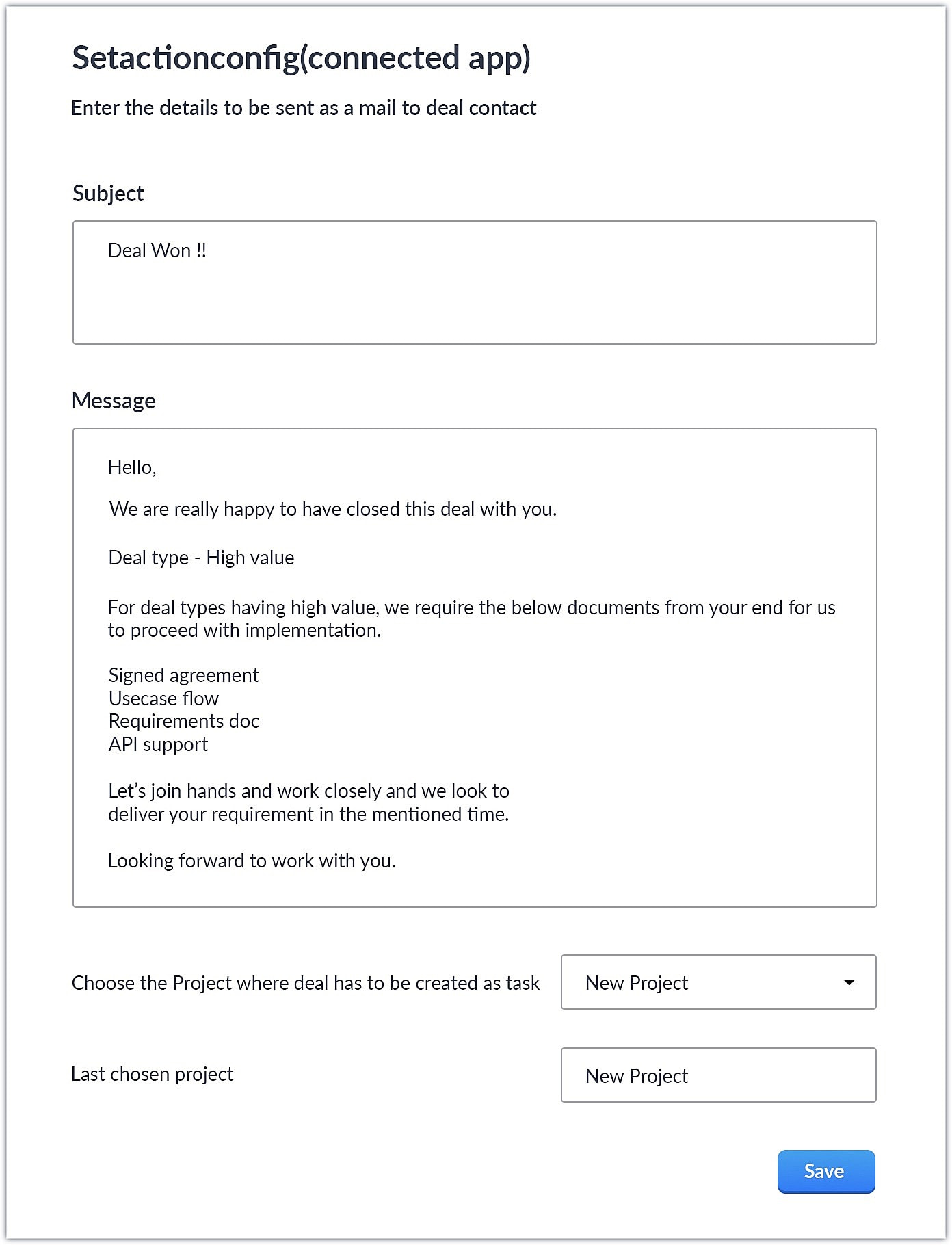
- When a deal with the necessary criteria is satisfied, an email is sent out to the deal's contact with the subject and body provided by the end user. A task is also created in Zoho Projects with some specific deal details.
This is one business case where you can use custom action. As a parallel use case to the above example itself, say you have multiple projects in Zoho Projects, each used to work on different case categories (bugs, issues, feature request, etc.). You could develop the same kind of template and allow end users to configure the criteria and outcomes accordingly.
You could also use custom actions feature to perform templated actions to obtain personalized outcomes depending on your business needs. We hope you found this information helpful. Keep following this space for more information!
SEE ALSO:
Access your files securely from anywhere
Centralize Knowledge. Transform Learning.
All-in-one knowledge management and training platform for your employees and customers.
New to Zoho Recruit?

Zoho Developer Community
New to Zoho LandingPage?
Zoho LandingPage Resources
New to Zoho Survey?
New to Zoho CRM Plus?
Deliver unforgettable customer experiences
New to Zoho CRM Plus?
Deliver unforgettable customer experiences
New to Zoho Marketing Plus?
Everything you need to run your marketing
New to Zoho Marketing Plus?
Everything you need to run your marketing
New to Bigin?





Topic Participants
Nanditha Somasundaram Somasundaram
Sticky Posts
Kaizen #198: Using Client Script for Custom Validation in Blueprint
Nearing 200th Kaizen Post – 1 More to the Big Two-Oh-Oh! Do you have any questions, suggestions, or topics you would like us to cover in future posts? Your insights and suggestions help us shape future content and make this series better for everyone.Kaizen #226: Using ZRC in Client Script
Hello everyone! Welcome to another week of Kaizen. In today's post, lets see what is ZRC (Zoho Request Client) and how we can use ZRC methods in Client Script to get inputs from a Salesperson and update the Lead status with a single button click. In thisKaizen #222 - Client Script Support for Notes Related List
Hello everyone! Welcome to another week of Kaizen. The final Kaizen post of the year 2025 is here! With the new Client Script support for the Notes Related List, you can validate, enrich, and manage notes across modules. In this post, we’ll explore howKaizen #217 - Actions APIs : Tasks
Welcome to another week of Kaizen! In last week's post we discussed Email Notifications APIs which act as the link between your Workflow automations and you. We have discussed how Zylker Cloud Services uses Email Notifications API in their custom dashboard.Kaizen #216 - Actions APIs : Email Notifications
Welcome to another week of Kaizen! For the last three weeks, we have been discussing Zylker's workflows. We successfully updated a dormant workflow, built a new one from the ground up and more. But our work is not finished—these automated processes are
New to Zoho TeamInbox?
Zoho TeamInbox Resources
Zoho CRM Plus Resources
Zoho Books Resources
Zoho Subscriptions Resources
Zoho Projects Resources
Zoho Sprints Resources
Qntrl Resources
Zoho Creator Resources
Zoho CRM Resources
Design. Discuss. Deliver.
Zoho Show Resources

Get Started. Write Away!
Writer is a powerful online word processor, designed for collaborative work.
Zoho CRM コンテンツ
-
オンラインヘルプ
-
Webセミナー
-
機能活用動画
-
よくある質問
-
Ebook
-
-
Zoho Campaigns
- Zoho サービスのWebセミナー
その他のサービス コンテンツ
Nederlandse Hulpbronnen

ご検討中の方
Recent Topics
Transaction Locking with the dynamic date
Is it possible to dynamically update dates on transaction locking. We want to lock transaction x days from todayUnable to change sales_order status form "not_invoiced" to "invoiced"
I am automating process of creating of invoice from sales_orders by consolidated sales_orders of each customer and creating a single invoice per customer every month. I am doing this in workflow schedule custom function where i create invoice by gettingApply Vendor Credits Automatically
We are bulk importing Vendor credits in Zoho Books!!! Is there a way to apply vendor credits automatically to the first UNPAID bill of the Vendor?Apply Vendor Credit Automatically
Hello!!! Is there a way where in we can apply vendor credits automatically on the FIRST OUTSTANDING BILL of the vendor?? We have lots of VENDOR CREDITS ISSUES mostly!!! Applying it manually is a pain for us. Would be great if we have a way to apply theNeed Easy Way to Update Item Prices in Bulk
Hello Everyone, In Zoho Books, updating selling prices is taking too much time. Right now we have to either edit items one by one or do Excel export/import. It will be very useful if Zoho gives a simple option to: Select multiple items and update pricesCreator problem: Edit form View not displaying whole form
I'm having problems with the form in my database. The edit view is not showing the whole form: This is how it looks in the normal view: As you can see, there is a whole section in the bottom right of the form which is not displaying in the Edit View. This means that I can't change or delete any of these fields... Anybody had a similar problem or know a solution? Any help would be appreciated. Cheers,Vendor Master Enhancements for Faster Purchase Entry
I’d like to suggest a few features that will improve accuracy and speed during purchase voucher entry: Automated Item Tax Preference in Vendor Master Add an option to define item tax preference in the vendor master. Once set, this preference should automaticallyQuick Item Search & Auto-suggestion for Invoices
Hi Team, I am facing an issue while creating invoices in Zoho Books. Currently, I have to type the full item name in the correct sequence and spelling for it to appear. For example, my item name is: "Distemper Acri Silk Special White 10kg" If I type somethingIntegrating Chatbot with Zoho Creator Application
Is it possible to integrate a chatbot with a Zoho Creator application?Average Costing / Weighted Average Costing
Hello fellow maadirs. I understand Zoho Books uses FIFO method of dealing with inventory costing, but do you guys have any plans to introduce average costing? We indians need average costing. It's part of our culture. Please. I beg thee. Thanks.'Add Tax To Amount' not reflected in Invoice
Hi Zoho Support, I'm experiencing an issue with tax calculation display in my invoice template. Despite having "Add tax to amount" box checked in the template settings, the Amount column is not showing the tax-inclusive total for line items. Current behaviour:"Subject" or "Narration"in Customer Statement
Dear Sir, While creating invoice, we are giving in "Subject" the purpose of invoice. For Example - "GST for the month of Aug 23", IT return FY 22-23", "Consultancy", Internal Audit for May 23". But this subject is not coming in Customer Statement. OnlyA real WYSIWYG field instead of the limited rich text
Hi to everyone A "real" WYSIWYG or HTML field that outputs good HTML code when accessed through the API would be excellent. I tried to use the rich text field, but the styling options are limited. For example, there are no heading tags (h1 to h6), andDelete my store of Zoho commerce
Hi Team, I want to delete my stores of commerce. Please help me asap. Looking for the positive response soon. Thanks Shubham Chauhan Mob: +91-9761872650Delete Inactive Zoho Accounts - Access Cleanup_User Id: 60001640923
As part of our Zoho access hygiene, we’ve reviewed and deactivated several inactive user accounts. These accounts have not been used in the past year and are no longer tied to active operations. All access rights have been revoked, and records retainedInappropriate Removal of Features
It's the first with any software where I am experiencing that an existing customer has some of his exiting features removed. Moreover, new Zoho One users are paying less than us. Is this going to be Zoho's "normal behaviour". If so, it is going to beFiltering report embeded in page
Right now we are using a page variable to filter a report on a page. However, it being a page variable makes it reset if you go to another report/form, we want the filter to be kept the same. I tried using an application variable according to zoho youZia summarizes your IM bot chats in real time
Hello everyone! Let's say you’re an agent taking over a chat where a customer was booking a flight through a bot on WhatsApp. They've already shared key details, like their destination, travel date, and number of passengers. You need to understand theMegamenu
Finally! Megamenu's are now available in Zoho-Sites, after waiting for it and requesting it for years! BUT ... why am I asked to upgrade in order to use a megamenu? First: Zoho promised to always provide premium versions and options for all included Zoho-applicationsCancel and refund
Hi, Yesterday I paid for the Zoho email subscription. Within a few minutes, I realized that the subscription counts one email ID as one user. To make another email ID for the same domain name, I'd have to pay for another user. I emailed right away toKaizen# 209 - Answering Your Questions | All About Client Script
Hello everyone! Welcome back to another exciting Kaizen post! Thanks for all your feedback and questions. In this post, let's see the answers to your questions related to Client Script. We took the time to discuss with our development team, carefullyTo Do: shareable task links without login
Hi! I’m using Zoho Mail and ToDo in my daily work, and I’ve run into one limitation that’s a real blocker for me. Right now, to share tasks with managers or directors, they need to have a Zoho account and be added to a group. In practice, many of themAbility to turn off "Would you like this amount to be reflected in the Payment field?" message
Team, Is there any way to turn off the message" Would you like this amount to be reflected in the Payment field?" when I make a payment? This is so annoying. This happens EVERY TIME I put an amount in the Payment Made field.Unlock agreement intelligence with Zoho Sign's latest AI updates
Hello! If you've been struggling with long, complex agreements and spending way too much time on them, here's exactly what you'll want to hear: Zoho Sign now integrates with OpenAI's ChatGPT to make agreement management smarter and simpler. Acting likeCurrency abbreviations
Hello, Im stuck, and need help. I need the currency fields for example, opportunity value, or total revenue, to be abbreviated, lets say for 1,000 - 1K, 1,000,000 - 1M, and so on, how should I do this?Embed Sign Document
Has anyone tried embedding a document in a webpage? I'm building a webpage (using PowerPage) and I'm trying to embed it using an iframe then I got this error: Refused to display 'https://sign.zoho.com/' in a frame because it set 'X-Frame-Options' toWe’re transitioning from Zoho ShowTime to TrainerCentral
Hello everyone, Zoho ShowTime was originally built as a training platform to serve training agencies, HR teams, and individual trainers. As the platform grew, we realized that more creators and businesses could benefit from its capabilities. That’s whyEmails Are Not Being Delivered to My Inbox
Hello Zoho Support Team, I am experiencing an issue with my Zoho Mail account. The most important problem is that emails are not being delivered to my inbox. Details: My Zoho Mail address: info@coreforcelife.com What happens: I am not receiving any incomingRadar In Focus: Track customer support metrics using Radar's static reports
Hello everyone, Welcome back to the Radar In Focus series, where we explore how Radar features can add value to your business. In this episode, we're looking at Radar static reports. The help desk is filled with vast amounts of data that can be analyzedMail ToDo & Tasks Webhooks
Our company uses Zoho ToDo inside Mail to manage our tasks. When I create a task and assign it to a team member it does not notify them unless I add a reminder via mail. I'm trying to create a webhook for when a task is created to send a cliq messageImproved UI for a Seamless User Experience - Calls, Tasks, and Meetings
Hello all, We are making UI unification across CRM so that the UI experience is seamless across the product. As part of that effort, we have made changes to the details page of activity-based module records—Meetings, Calls, and Tasks. Let's look at theseWhere can I find rejected inbound mails and their reason for rejection
Hi, I was recently made aware by a mailing list which I am subscribed to (ffmpeg-devel@ffmpeg.org) that my Zoho mail Mail account is rejecting some emails. If I look under Admin Panel > Security & Compliance > Quarantine > Incoming, the list there isRefund
Hi There, Please refund me asap possible, because of no support given. Thank youتغيير عمله الدفع"Change payment currency"
ما هى طريقه تغيير عمله الدفع "ما هي طريقة تغيير عملة الدفع؟"Attention API Users: Upcoming Support for Renaming System Fields
Hello all! We are excited to announce an upcoming enhancement in Zoho CRM: support for renaming system-defined fields! Current Behavior Currently, system-defined fields returned by the GET - Fields Metadata API have display_label and field_label propertiesZia's ability to generate and improve content extended to Desk mobile app (iOS and Android)
In support, agents will have to understand customers' pain points completely to provide empathetic personalized solutions and a positive experience. However, at times, agents might find it challenging to comprehend the customer issues and connect withBANK FEED - MAYBANK , provider from YODLEE IS NOT WORKING
As per topic, the provider YODLEE is not working for the BANK FEED. It have been reported since 2023 Q3, and second report on 2023 Q4. now almost end of 2024 Q1, and coming to 2024 Q2. Malaysia Bank Maybank is NOT working. can anyone check on this issue?Zoho Sign product updates - Q3 2025
Hello everyone! Q3 was all about AI. Here's the list of features and enhancements that have gone live, along with a list of what we have in pipeline for the last quarter: AI-powered agreement management Sending documents and authenticating recipientsZoho sites header
Good day, Im stuck with this situation. I choose a template for my website creation. I have tweaked every instance of the visual editor, regarding the header, I have created created customize fonts presets... I have followed every single step. and myKaizen #152 - Client Script Support for the new Canvas Record Forms
Hello everyone! Have you ever wanted to trigger actions on click of a canvas button, icon, or text mandatory forms in Create/Edit and Clone Pages? Have you ever wanted to control how elements behave on the new Canvas Record Forms? This can be achievedNext Page