Extension pointers #14: Extend end-user benefits and allow personalization by implementing extensions with custom actions
From our earlier post on custom actions, we know that we can create templated actions, share them with end users, and allow them to reuse those actions to achieve personalized outcomes. In this post, we'll look at how custom actions make it easy for users to carry out these templated tasks to get customized results.
Consider the following scenario: a hardware company that already uses Zoho CRM then utilizes Zoho Projects to implement and work on the deals they've won. Assume that the Zoho Projects portal has two projects: one for handling smaller revenue deals that require minimum development and less time, and the other for managing larger revenue dealsthat will eventually demand more time and resources for execution.
As an end user processing deals in Zoho CRM, it would be extremely convenient for the company to have the deals automatically fall into the appropriate projects, such as a task based on the expected revenue. Furthermore, it would be ideal to send emails to the customer with whom they have made the deal to request anything needed from their end in order to move forward with the implementation of the deal. Let's see how we can achieve this with the help of custom actions.
We have detailed posts on the steps to create a custom action along with a live example. Now, let's reiterate and go over the steps to achieving the above use case.
Developer activities
1. Create a connector for Zoho Projects.
2. Create a custom user interface (widget-connected app) that allows the user to select the project where the deal should be created as a task, as well as add the personalized email subject and body that will be sent to the user.
3. Create a custom action in the Zoho Developer console.
- Associate the custom user interface to the custom action.
- Define an action that creates a task in the selected project and also sends an email to the customer based on the values entered by the end user in the custom UI.
Extension/end-user activities
4. Create workflows as an end-user (i.e., set criteria on expected revenue; provide personalized values for email subject and body, and choose the project in which the deal fulfilling the set criteria should be created as a task) and assign a custom action to them.
Developer activities
1. Creating a connector
- Create a new connector in your extension for Zoho Projects using the Connectors feature under Utilities in the left panel of the Zoho Developer console.
Note: Zoho Projects follows the OAuth 2.0 protocol for its authentication mechanism. You can refer to this post to learn more about the steps to register Zoho Projects and retrieve your client credentials.
- Add the necessary connector APIs for your functionality.
- The Zoho Projects REST APIs added for our example are mentioned below.
Connector API Name | Method type | URL |
Get Projects | GET | https://projectsapi.zoho.com/restapi/portal/${portalid}/projects/ |
Create project task | POST | https://projectsapi.zoho.com/restapi/portal/${portalid}/projects/${projectid}/tasks/?name=${name}&description=${description} |
2. Create a custom user interface:
1. Create a custom user interface that allows the end user to select the project in which they want to create the deal as a task, as well as enter the email subject and body that should be sent to the contact associated with the deal.
2. You can find the HTML code for the custom UI as an attachment to the post.
- In the HTML code, we have two text fields to get the user inputs for the email subject and body.
- We have also invoked the connector API to get projects from a portal. The response is then populated and displayed as a dropdown list to allow the user to select the project in which they want the deal to be created as a task.
- In the HTML code snippet, we have hard coded a static value for the Zoho Projects portal.
Note: Depending on your business use case requirements, you can create custom variables to prompt the user to input their Zoho Project portal ID, or you can create a setting widget that displays the user's portals, allowing the user to choose the portal in which they want to have the deals created as tasks as well.
- ZOHO.CRM.ACTION.setConfig - In this example, we have utilized the setConfig method. This method can be used to set values to variables which can be retrieved later through the widget's page load response.
➤ For our example, we have used the setConfig method to set various Zoho CRM deal and email (subject and body) user input values to variables. We have later obtained these saved values through the widget's page load response, which contains a configdata key with these set data as its values.➤ Sample page load response when ZOHO.CRM.ACTION.setConfig is used in our example:
"module": "Deals", "configdata": { DealTest: "Sample Digital Marketing Project" Dealdescription: "${!Deals.Description}" Dealname: "${!Deals.Deal_Name}" Message: "Sample Message" Subject: "Deal Won!" To: "${!Deals.Contact_Name.Email}" |
➤ We have then used the preset saved values available in the configdata key to prepopulate the widget UI every time it loads.
3. Create a custom action
- Go to the Zoho Developer console and select the extension in which you want to create the custom action.
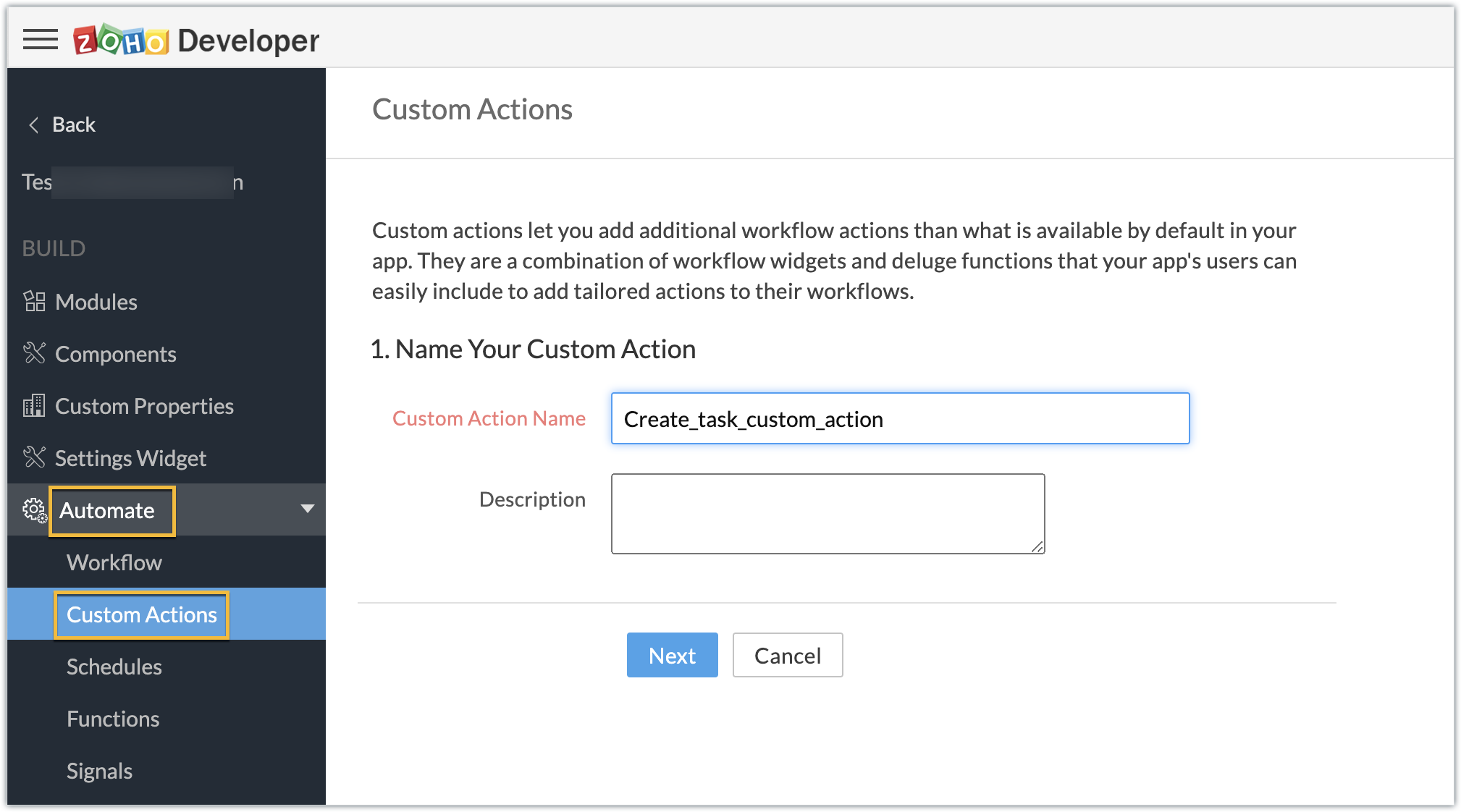
- Create a custom action by navigating through Automate - > Custom Actions, under the Build section in the left panel. Click Create Action.
- Enter the Custom Action Name and Description. Click Next.
- Provide the location of the html file (widget UI) to complete the resource path. Click Next, then click Create Function.
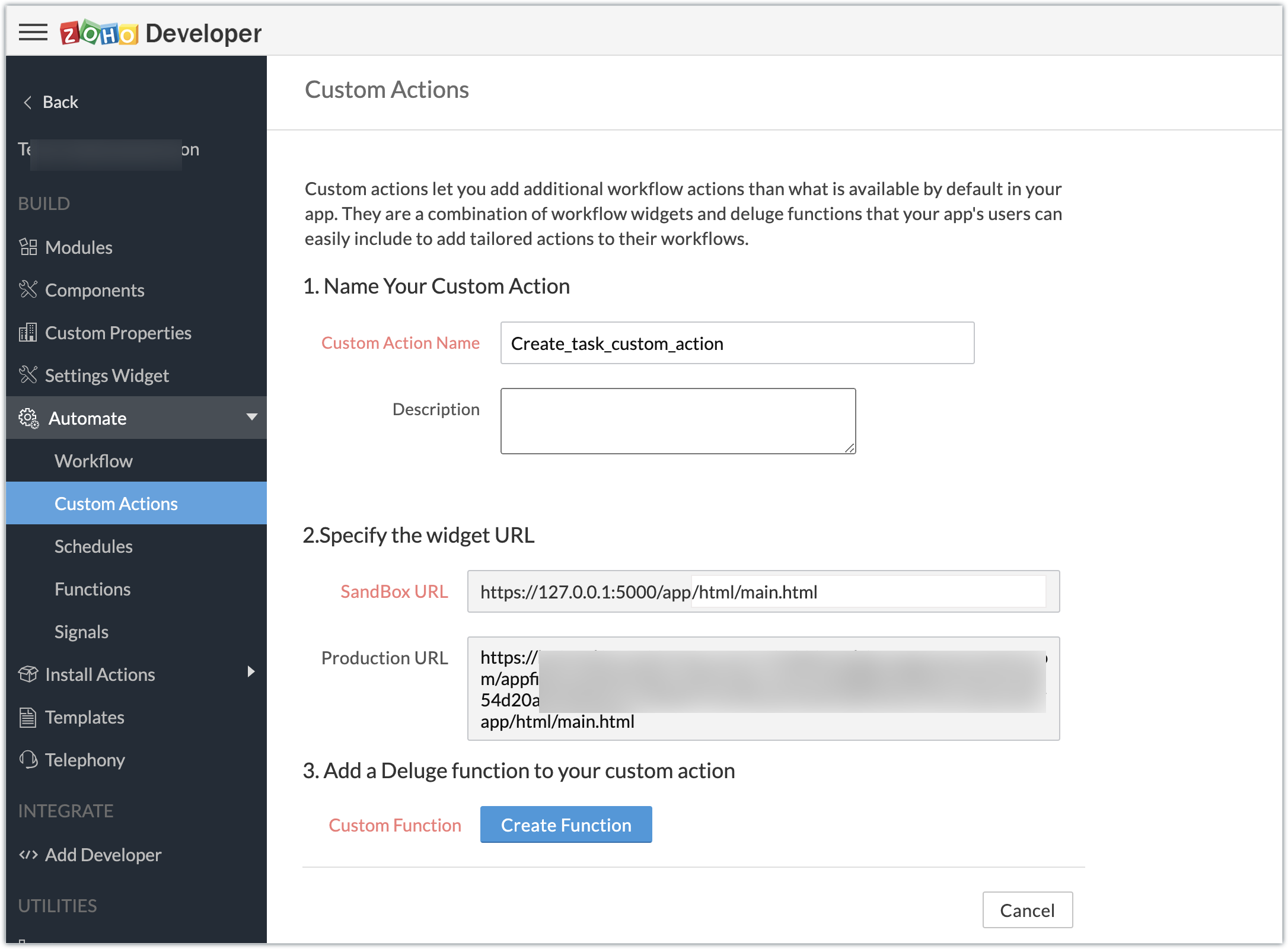
- Enter the Deluge function to perform our use case functionality.
- Click Save & Close, then click Save.
Deluge function code snippet:
dynamic_map = Map(); dynamic_map.put("portalid","xxxxxx"); dynamic_map.put("projectid",input.config.get("Dealproject")); dynamic_map.put("name",input.config.get("Dealname")); dynamic_map.put("description",input.config.get("Dealdescription")); response = zoho.crm.invokeConnector("xxxxx.zohoprojects.createprojecttask",dynamic_map); sendmail [ from :zoho.adminuserid to :input.config.get("To") subject :input.config.get("Subject") message :input.config.get("Message") ] |
- In the above Deluge code, we have performed the functionality of creating the deal as a task in Projects and sending an email to the deal's contact with the input provided by the end user in their CRM account while associating the custom action to a workflow.
Custom action in effect (End-user):
Create workflows:
- As an end user who has the extension which features the custom action installed in the Zoho CRM account, go ahead and create workflows to define criteria and associate the custom action.
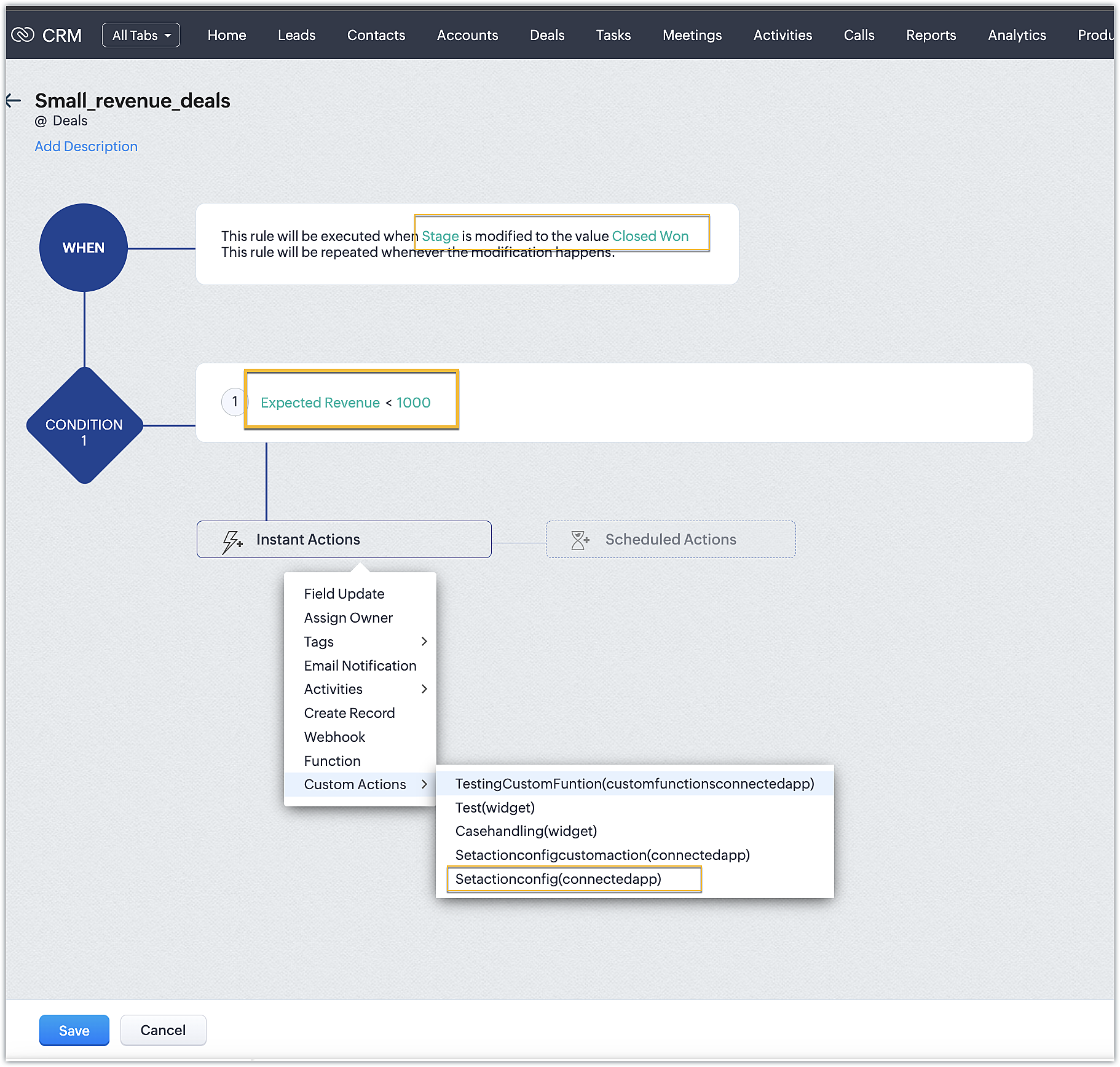
- In our case, we have two workflows:
➤ One for smaller deals where the expected revenue is less than 1000 USD
➤ One for larger deals where the expected revenue is greater than or equal to 1000USD
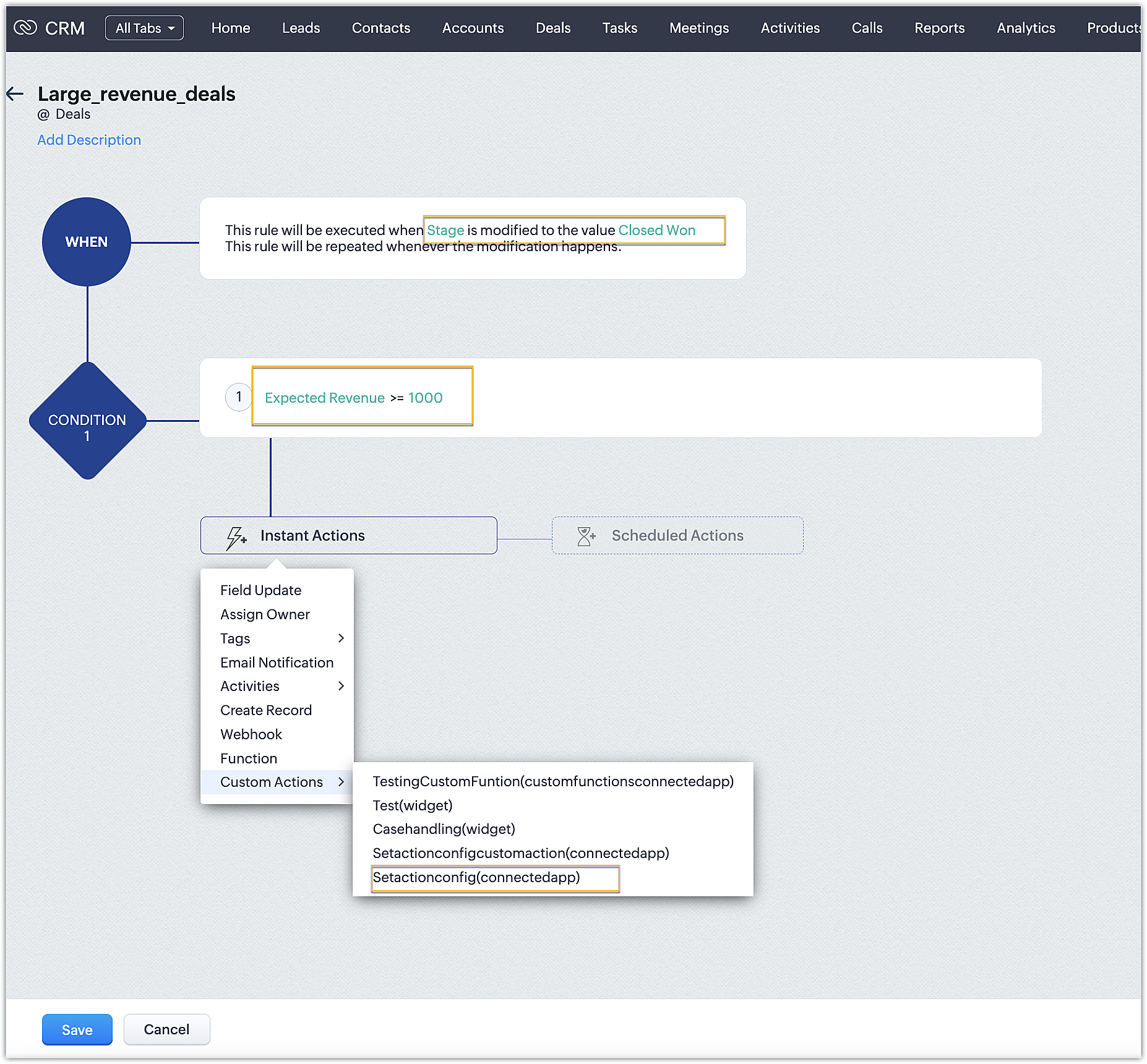
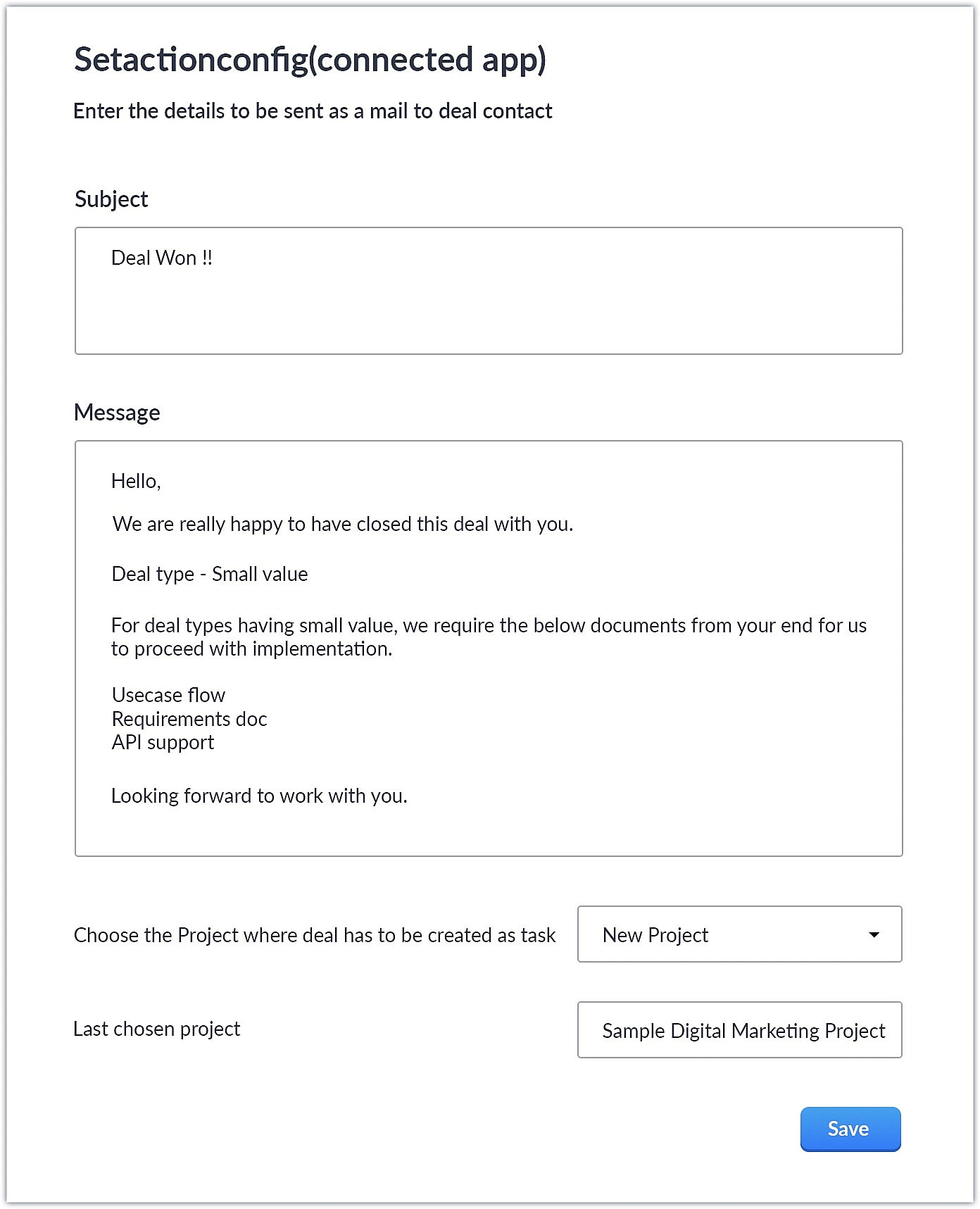
- Upon choosing the custom action, the custom UI appears where-in you can provide user specific input for email body and subject and also choose the project where you want deal to be created as a task in Zoho Projects.
Smaller revenue deals:
Larger revenue deals:
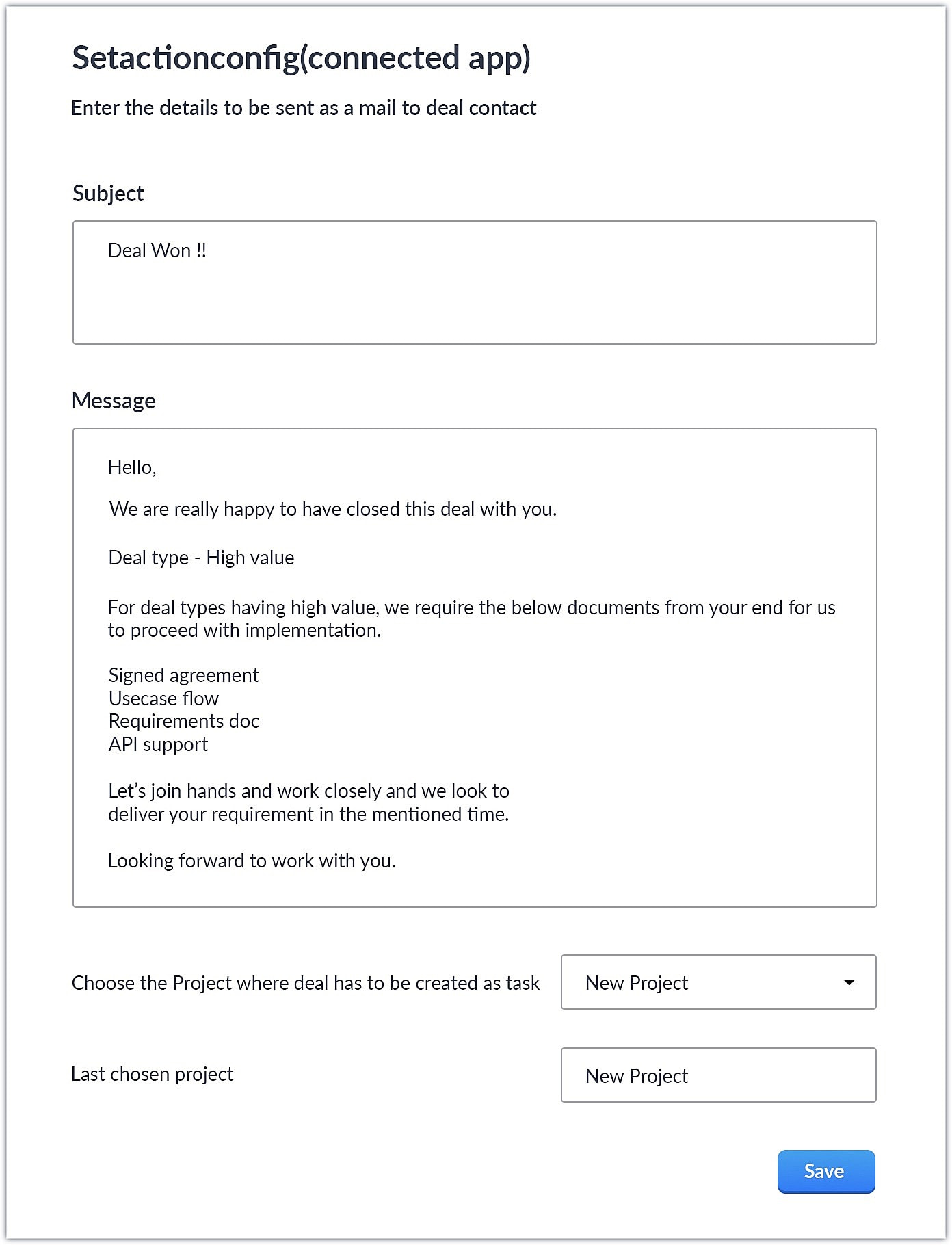
- When a deal with the necessary criteria is satisfied, an email is sent out to the deal's contact with the subject and body provided by the end user. A task is also created in Zoho Projects with some specific deal details.
This is one business case where you can use custom action. As a parallel use case to the above example itself, say you have multiple projects in Zoho Projects, each used to work on different case categories (bugs, issues, feature request, etc.). You could develop the same kind of template and allow end users to configure the criteria and outcomes accordingly.
You could also use custom actions feature to perform templated actions to obtain personalized outcomes depending on your business needs. We hope you found this information helpful. Keep following this space for more information!
SEE ALSO:
Access your files securely from anywhere
Centralize Knowledge. Transform Learning.
All-in-one knowledge management and training platform for your employees and customers.
New to Zoho Recruit?

Zoho Developer Community
New to Zoho LandingPage?
Zoho LandingPage Resources
New to Zoho Survey?
New to Zoho CRM Plus?
Deliver unforgettable customer experiences
New to Zoho CRM Plus?
Deliver unforgettable customer experiences
New to Zoho Marketing Plus?
Everything you need to run your marketing
New to Zoho Marketing Plus?
Everything you need to run your marketing
New to Bigin?





Topic Participants
Nanditha Somasundaram Somasundaram
Sticky Posts
Kaizen #198: Using Client Script for Custom Validation in Blueprint
Nearing 200th Kaizen Post – 1 More to the Big Two-Oh-Oh! Do you have any questions, suggestions, or topics you would like us to cover in future posts? Your insights and suggestions help us shape future content and make this series better for everyone.Kaizen #226: Using ZRC in Client Script
Hello everyone! Welcome to another week of Kaizen. In today's post, lets see what is ZRC (Zoho Request Client) and how we can use ZRC methods in Client Script to get inputs from a Salesperson and update the Lead status with a single button click. In thisKaizen #222 - Client Script Support for Notes Related List
Hello everyone! Welcome to another week of Kaizen. The final Kaizen post of the year 2025 is here! With the new Client Script support for the Notes Related List, you can validate, enrich, and manage notes across modules. In this post, we’ll explore howKaizen #217 - Actions APIs : Tasks
Welcome to another week of Kaizen! In last week's post we discussed Email Notifications APIs which act as the link between your Workflow automations and you. We have discussed how Zylker Cloud Services uses Email Notifications API in their custom dashboard.Kaizen #216 - Actions APIs : Email Notifications
Welcome to another week of Kaizen! For the last three weeks, we have been discussing Zylker's workflows. We successfully updated a dormant workflow, built a new one from the ground up and more. But our work is not finished—these automated processes are
New to Zoho TeamInbox?
Zoho TeamInbox Resources
Zoho CRM Plus Resources
Zoho Books Resources
Zoho Subscriptions Resources
Zoho Projects Resources
Zoho Sprints Resources
Qntrl Resources
Zoho Creator Resources
Zoho CRM Resources
Design. Discuss. Deliver.
Zoho Show Resources

Get Started. Write Away!
Writer is a powerful online word processor, designed for collaborative work.
Zoho CRM コンテンツ
-
オンラインヘルプ
-
Webセミナー
-
機能活用動画
-
よくある質問
-
Ebook
-
-
Zoho Campaigns
- Zoho サービスのWebセミナー
その他のサービス コンテンツ
Nederlandse Hulpbronnen

ご検討中の方
Recent Topics
No practical examples of how survey data is analyzed
There are no examples of analysis with analytics of zoho survey data. Only survey meta data is analyzed, such as number of completes, not actual analysis of responses, such as the % in each gender, cross-tabulations of survey responses. One strange characteristicZoho Creator as LMS and Membership Solution
My client is interested in using Zoho One apps to deploy their membership academy offer. Zoho Creator was an option that came up in my research: Here are the components of the program/offer: 1. Membership portal - individual login credentials for eachAdding Chargebee as a Data Connector
Is it possible to get Chargebee added as a Zoho Analytics data connector?Dropbox to Workdrive
Namaste, Trust you all are doing well. Wanted to check how this can be done with Zoho flow. I typically receive dropbox links from my clients. Is there a way where I can provide the link to Zoho flow and it downloads the files from dropbox link to a workDeals by Stages Funnel not showing in correct order
Using the Stage-Probability Mapping for the Deals module we have created a steps our deals will pass through, RFQ, Closed/Lost, Declined/No-Go, Pricing, Submitted, Negotiations, Won. However when I view the Deal By Stages Funnel it does not show in theConfirmation prompt before a custom button action is triggered
Have you ever created a custom button and just hoped that you/your users are prompted first to confirm the action? Well, Zoho knows this concept. For example, in blueprint, whenever we want to advance to the next state by clicking the transition, it isHow to create auto populate field based on custom module in Zoho CRM?
Hello, i'm still new to Zoho CRM and work as administrator in my company. Currently, I'm configuring layout for Quotes Module. So, the idea is, I've created a read-only field in Quotes called "Spec". I want this field automatically filled with SpecificationOffice 365 and CRM mail integration: permission required
Has anyone run into this weird problem? My email server is Office 365. When I try to configure Zoho CRM to use this server, a Microsoft popup window opens requesting user and password. After entering that, I get a message in the Microsoft window sayingDeluge - Can't get phone number SalesIQ
Hey folks, I’m building a custom plug for SalesIQ that’s supposed to register leads into Zoho CRM. The SalesIQ chat is being implemented on WhatsApp, and in my plug I’m using this line: mobile_clean = session.get("phone").get("value"); From what I understand,Zoho Desk - Community
As a regular user of Zoho Cares Community I would really love to see the publish date of articles. For example, when I look at Announcements, it would be very beneficial to see which ones were posted recently, over those which have just and a recent comment.access to quartz for my customers
Hi how can I have access to the application quartz you use for us to send you screen rocording, this feature would be immensely useful for our customers support https://quartz.zoho.com/Issue with Inline Images in Email Reply via Zoho Desk API
Hi, I am attempting to send inline images in an email reply using the Zoho Desk API, but the images are not being displayed inline for the recipient. I have followed this documentation: https://desk.zoho.com/DeskAPIDocument#Uploads https://desk.zoho.com/DeskAPIDocument#Threads#Threads_SendEmailReplyHow to search a value stored in a subform?
Hello, We store serial numbers in subforms but now we would like to be able to search the values to be able to easily find the record with the serial number. I saw that it's not possible to search such values through global search but is it possible to do it an other way? Thank you,Field Dependency Not Working on Detail Page in Zoho Desk
Hi Support Team, I’ve created field dependencies between two fields in Zoho Desk, and they are working correctly on the Create and Edit layouts. However, on the Detail page, the fields are not displaying according to the dependencies I’ve set — they appearHow do the keyword critera work?
Hi, I'm working on automated assignment of tickets based on keywords. How does this feature work? Where does this criteria look for keywords - email address, subject, email body? Can you please clarify this as I want to avoid overlapping with criteriaError: Unsupported content type: text/html;charset=UTF-8 after tryeing to get the token for n8n automation
I am working on ZOHO Desk automation and need to get the ZOHO auth token for n8n I have created the app in ZOHO Desk API, got client id and client secret. Added all data required to get a token in n8n. After I sign in with my ZOHO credentials in ZOHOImproving Collaboration Features in Zoho Portal
Hello Zoho Community, I’ve recently started exploring Zoho services and I’m really impressed with the wide range of features. However, I feel there is still room for improvement in the collaboration area. For example, it would be really helpful if weAutomated Shopify Emails Not Being Delivered
I have an ecommerce store with Shopify. I recently set up my email to be served through Zoho. Since doing this, customers are not receiving some of our automated emails from Shopify itself. Our initial email that confirms their purchase goes through but our Shipping Notification that is automatically sent out upon fulfillment is not going through. Sometimes we get a notice that it's been classified as spam, sometimes nothing. I can send/receive email via Outlook on my desktop and I can send/receiveSend a campaign to one recipient.
Very often I speak to a customer and they say they didn't see my email (maybe it went in Junk, maybe they deleted it). Anyway, I just want to go into the Campaign and send it to one person. You already have a feature very close to this - when sending a Test. While developing a campaign, I can send tests to anyone. Why can't we have this AFTER the campaign has been sent? I know, there's a caveat, and that's in the use of merge tags. Most of the time I only use FNAME, but maybe you could check ifTry FSM again for our business
We already have our customers individual equipment in CRM with serial numbers, install dates, warranty length and importantly next service which is generally 2 years. a month before the service date is due we get get a report and send out service reminders.Issue with Zoho Help Portal – Tickets Missing or Not Answered
Hi, How are you? I think there may be an issue with the Zoho Help Portal. I opened a few tickets directly in the help portal a some time ago but never received any response I also opened ticket 148356451 by email. I did receive a reply to it, but theDUNS & Bradstreet and Credit risk monitoring integration with Zoho books
Small businesses not being paid by bigger clients and clients of all sizes is a huge problem. It will be nice if Zoho develops integration with DUNS & Bradstreet(D&B) and Credit risk monitoring integration with Zoho books. That have small businesses canZoho Forms - Form Rules based on attachment fields
Many businesses use forms to collect documents and images from customers. In many cases, you may want to trigger a notification or other automation based on whether or not an attachment was added. I've noticed that attachment fields do not appear in RulesCan't open draft email for editing
Last night I started composing an email and I let it save in drafts. This morning I want to continue working on the email. It is in my Drafts folder but it will not open. The only option there is to delete it. This is not the first time it has happened. On previous occasions I have just deleted the draft and started afresh, but I really want this one back. Windows 10 with Pale Moon 28.10.0 browser.Open filtered deals from campaign
Do you think a feature like this would be feasible? Say you are seeing campaign "XYZ" in CRM. The campaign has a related list of deals. If you want to see the related deals in a deal view, you should navigate to the Deals module, open the campaign filter,Change scheduling emails time
When sending an individual email there is a great feature to schedule them to send later. I could only use the one time that is suggested. Is there a way to select another time? Regards, GlennZoho CRM: how can I control which contacts to sync with Outlook?
I was just playing around syncing contacts from Zoho to MS Outlook (MS365 account.) The problem is our firm has hundreds of thousands of contacts and I don't want to bury my contacts list in outlook. Any help with this is greatly appreciated.How to overcome limitations in meetings
As a company, one of our deliverables is a meeting between two other companies, where we act as facilitators. So, if we recorded this meeting in Zoho CRM, it should be connected to 2 accounts, 2 contacts, and 1 campaign (a campaign, in our use, is theAdd a 'Log a Call' link to three dot icon in Canvas
Hi, There's a three dot element when creating a canvas called 'More'. I would like to modify this to add a link that says 'Log a Call' in order to quickly record the details of a cellphone call. I'd also like this to be a simple 'contact' selection andSyncing Zoho Forms with Bigin - Embedding issue?
Hello everyone, I created a Zoho Form for a page on my GoDaddy website to collect leads, which then transfers the data to Bigin. However, I'm facing an issue where it doesn't seem to work properly. I've integrated Zoho Forms with Bigin and tried embeddingCan not add fields to a Section
I feel like I'm missing something obvious: I can add new Sections to my form but I can not add fields to the Sections. I've tried fields already on the form as well as dragging and dropping new fields into the Section but nothing will go into it. WhatRecord Logged in User while using CRM lookup field
Is it possible, while using the Zoho CRM lookup field, to automatically use the user account logged into Zoho CRM in a hidden field? I was hoping to add employee accounts to my current plan. But would like a record on the Form submission of who submittedForm Rules for Suburb Categories to alternate landing pages or Making a Fields Contents ALL CAPS
I need to send differentform submissions to two to three different thank-you URLs (for Meta/Google pixels) depending on which suburb a user selects in a form. I have ~400 suburbs split into two categories (A and B, based on business value). Current challenges:Collaps Notes
There are times when long/large notes are added to a record i.e. Accounts or Deals etc. Currently, the full note is displayed in the notes related list section. It would be great if by default only 5 to 10 rows of the note are displayed when the noteZoho Down
I have a drop in my Zoho One services.Runing RPA Agents on Headless Windows 11 Machines
Has anyone tried this? Anything to be aware of regarding screen resolution?Problem for EU users connecting Zoho CRM through Google Ads for Enhanced conversions
Has anyone else experienced this problem when trying to connect Zoho CRM through Google Ads interface to setup enhanced conversions? Did you guys get it fixed somehow? The Problem: The current Google Ads integration is hardcoded to use Zoho's US authenticationWhy am I getting event Pop-up Notification for events that have been cancelled?
Why is Calendar Notification still popping up for events that have been cancelled or changed? Each time events are cancelled or changed, I have observed that I am still getting notifications for them. Below is a sample pop-up notification for one of theCreate a draft in reply to an email via Emails API
Hi, I’d like to use the outgoing webhook to automatically create a draft reply to incoming mail. How can I use the Emails API to create a draft reply that is linked to an existing email thread? I couldn’t find the relevant method in the documentation.India Tech Support
Is there no phone tech support number for India? And no chat facility either?Next Page