Solution of the Week: Financial Reports with Impactful Visuals
Finance reporting is a critical part of understanding an organization’s financial health. With Zoho Analytics, you can easily create dynamic reports such as Balance Sheets, Budget Statements, and Profit and Loss Statements.
Now, with the release of Zoho Analytics 6.0, the platform offers even more advanced tools to optimize the financial report view. While Zoho Analytics has always enabled comprehensive financial reporting (through its integration connectors for Zoho Books, QuickBooks, Xero), the latest version enhances this with powerful visual features like Data Bars, which provide clearer insights into performance trends.
This document outlines how these reports can be generated using simple drag-and-drop functionality and customizable features in Zoho Analytics.
Creating a Balance Sheet Using Finance Data
Generating a Balance Sheet in pivot using Zoho Analytics allows you to visualize your organization’s financial position in a comprehensive and structured way.
- Drag and Drop the Data: Start by selecting the Balance sheet base type, Account group, Balance Sheet Account Type, and Balance Sheet Account Name from the Accounts table and drop them into the Rows shelf. Drag and drop the Credit Amount, Debit Amount, and Balance Sheet Total from the Accrual Transactions table into the Data shelf.
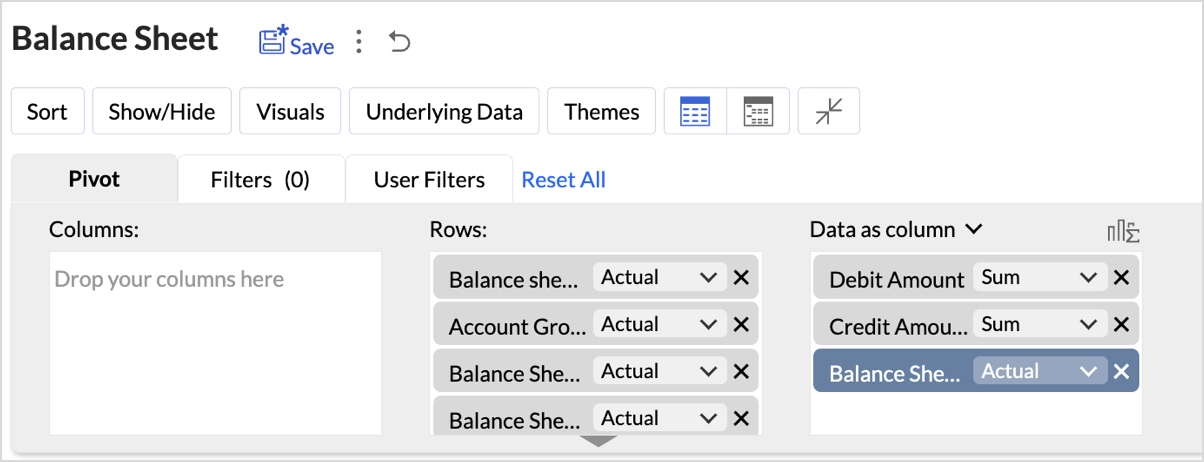
- Layout Adjustments:
- Navigate to Settings > Layout.
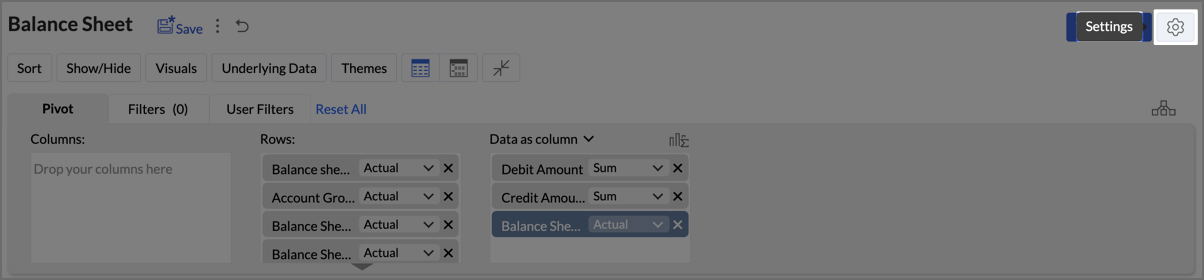
- Change the Layout to Compact.
- Check Increase Font Size for each higher group in Rows.
- Uncheck Show row numbers.
- Uncheck Show vertical lines between them.
- Set Column Width to Fit to Screen.
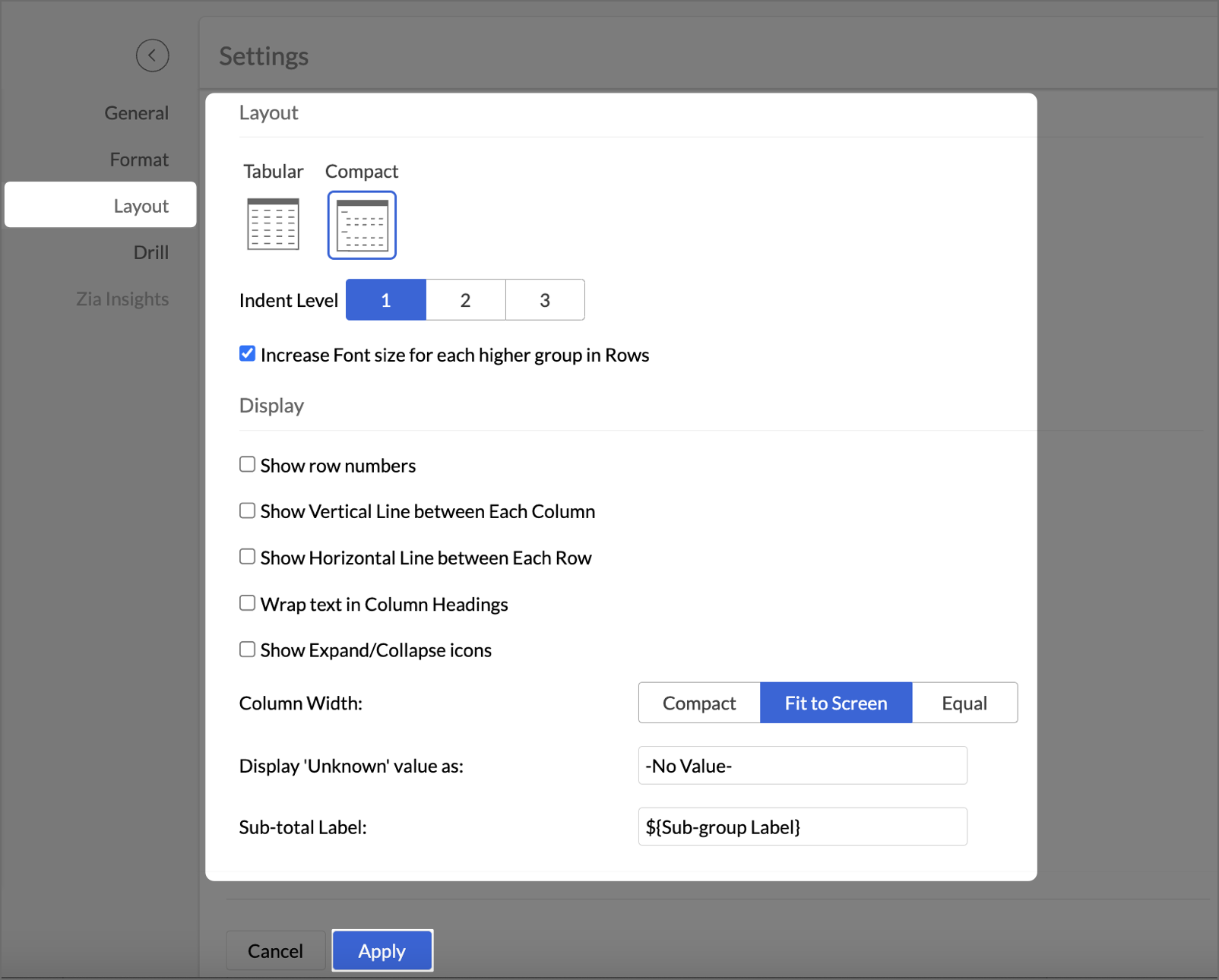
- After making layout adjustments, click Apply to finalize the formatting.
- Go to Visuals and select Data Bars With Data to improve the presentation of financial data, making it easier to interpret key insights visually.
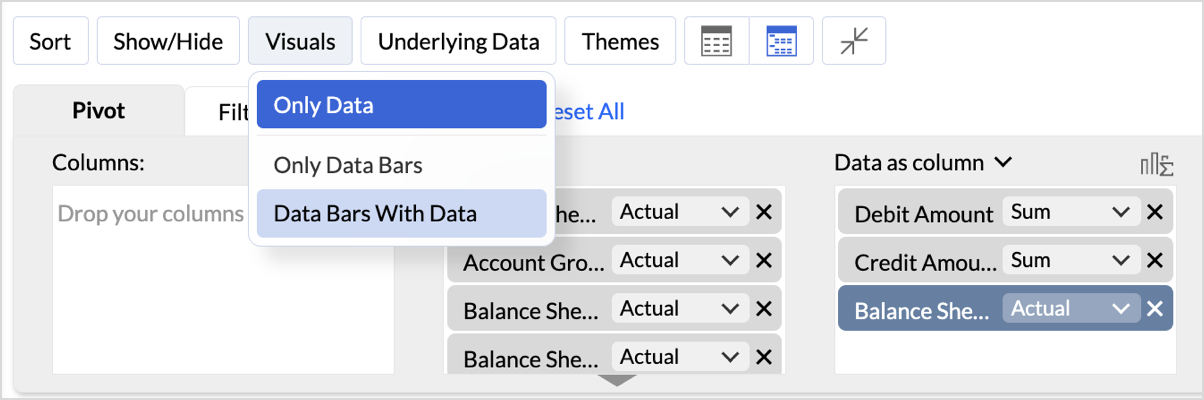
By following these steps, you will generate a clear and structured Balance Sheet that highlights your organization's assets, liabilities, and equity.
Key Features of the Balance Sheet Report
- Increased Font Size for Key Categories
Emphasizes important financial categories like Assets, Equity, and Liabilities, improving readability and focus. - Compact Layout
Ensures a clear, organized display of financial data, enabling efficient consumption of the report. - Line Removal for Clean Aesthetics
Removal of vertical and horizontal lines results in a cleaner visual presentation, improving the user experience. - Data Bars for Quick Insights
Visual data bars provide a quick snapshot of financial status, allowing users to identify key trends at a glance. - Timeline Filter for Flexibility
Filters allow users to view financial data across different periods, making it easier to analyze financial trends over time.
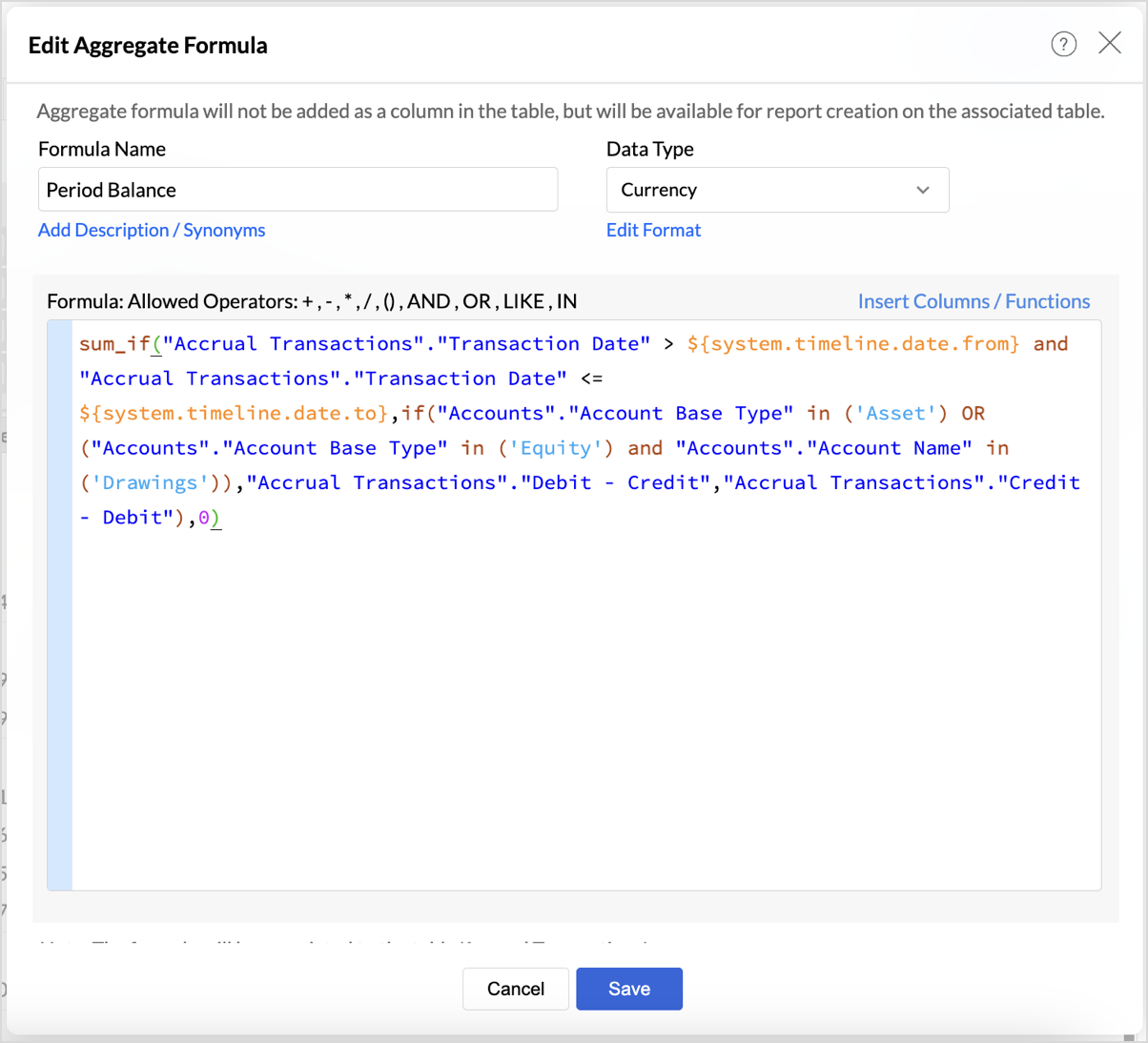
In Zoho Analytics, utilizing the Timeline Filter allows users to transform static financial data into a time-based, dynamic report. The formulas used in creating this filter enable detailed insights into financial performance over a selected period. Below, we explain the key aggregate formulas and how they enable users to achieve greater flexibility and customization, going beyond the typical app potential.
- Opening Balance Formulasum_if("Accrual Transactions"."Transaction Date" < ${system.timeline.date.from},if("Accounts"."Account Base Type" in ('Asset') OR ("Accounts"."Account Base Type" in ('Equity') and "Accounts"."Account Name" in ('Drawings')),"Accrual Transactions"."Debit - Credit","Accrual Transactions"."Credit - Debit"),0)
This formula calculates the Opening Balance for a selected period by summing transactions that occurred before the specified date (timeline.date.from).
This approach allows users to view the Opening Balance as of a given date, making it highly flexible for periods that differ across user's datasets.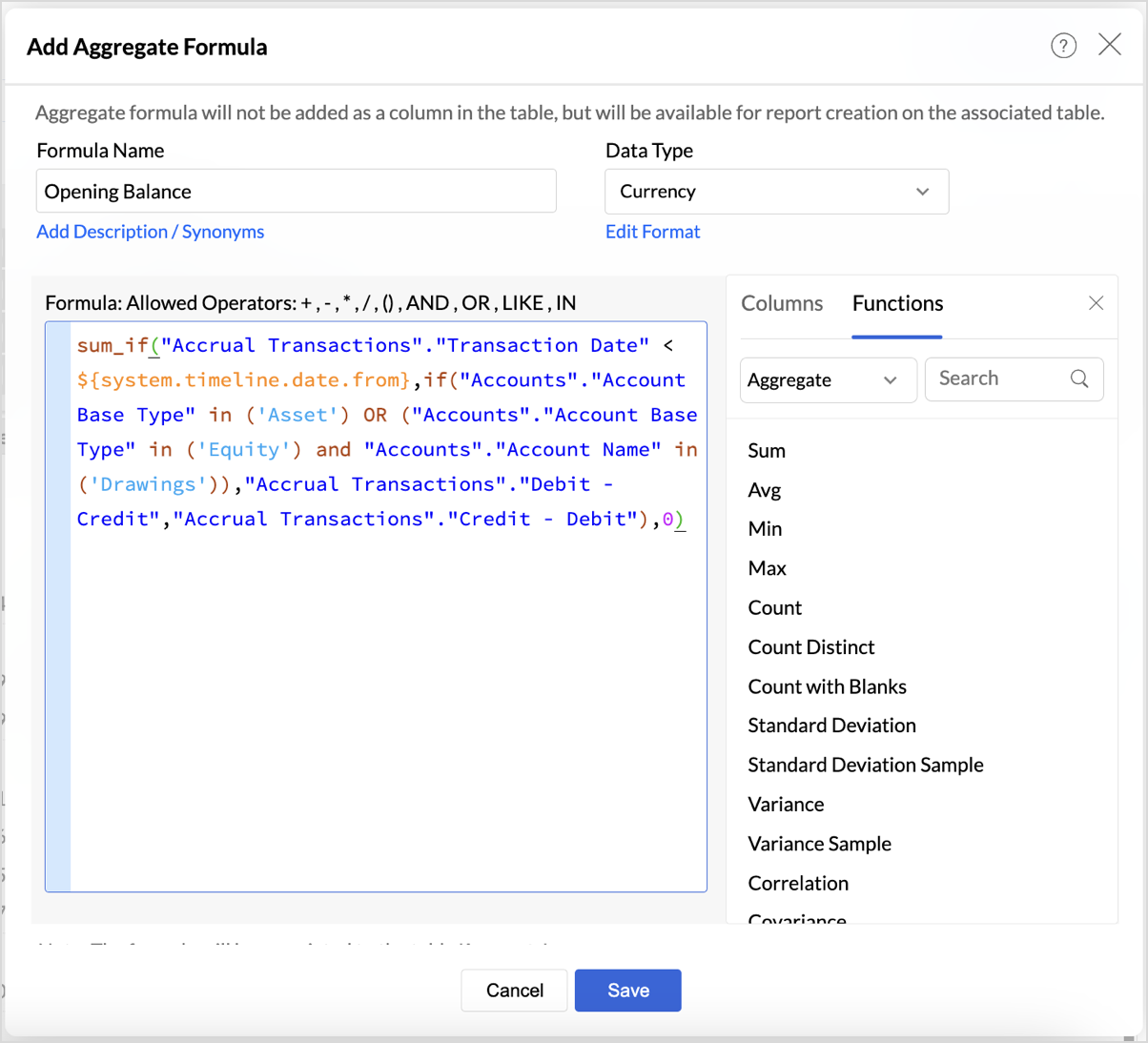
|
if("Accounts"."Account Base Type" in ('Asset') OR ("Accounts"."Account Base Type" in ('Equity') and "Accounts"."Account Name" in ('Drawings')),"Accrual Transactions"."Debit - Credit","Accrual Transactions"."Credit - Debit")
|
- Period Balance Formulasum_if("Accrual Transactions"."Transaction Date" > ${system.timeline.date.from} and "Accrual Transactions"."Transaction Date" <= ${system.timeline.date.to},if("Accounts"."Account Base Type" in ('Asset') OR ("Accounts"."Account Base Type" in ('Equity') and "Accounts"."Account Name" in ('Drawings')),"Accrual Transactions"."Debit - Credit","Accrual Transactions"."Credit - Debit"),0)
- Closing Balancesum_if("Accrual Transactions"."Transaction Date" <= ${system.timeline.date.to},if("Accounts"."Account Base Type" in ('Asset') OR ("Accounts"."Account Base Type" in ('Equity') and "Accounts"."Account Name" in ('Drawings')),"Accrual Transactions"."Debit - Credit","Accrual Transactions"."Credit - Debit"),0)
The Closing Balance formula calculates the final balance as of a selected date (timeline.date.to). It works by summing all transactions up until the specified date, following the same account type distinctions used in the previous formulas.
This formula is essential for determining the financial standing of an organization at the end of a reporting period, such as the end of a quarter or year.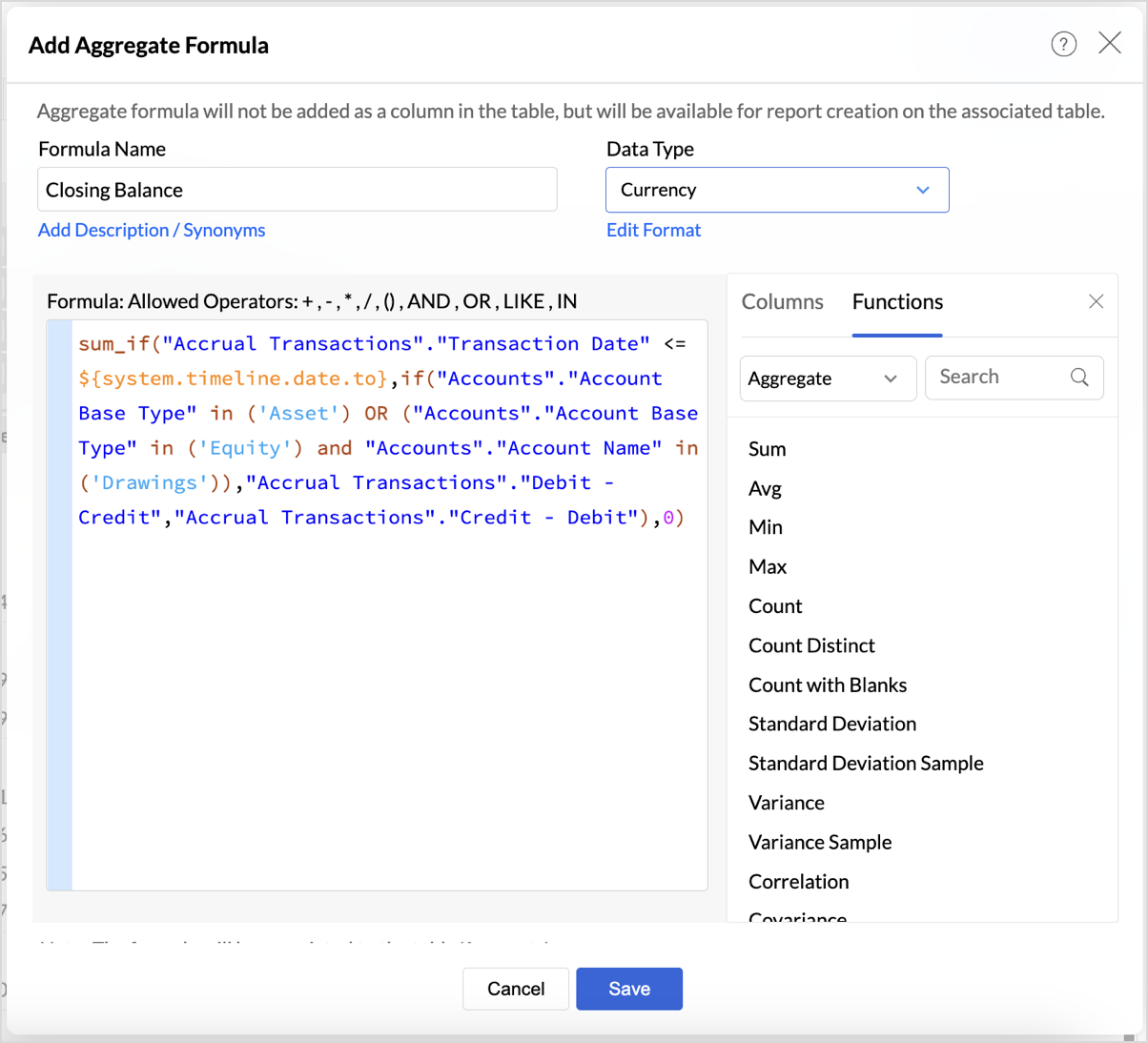
Follow the below steps to create opening and closing balances with timeline filters:
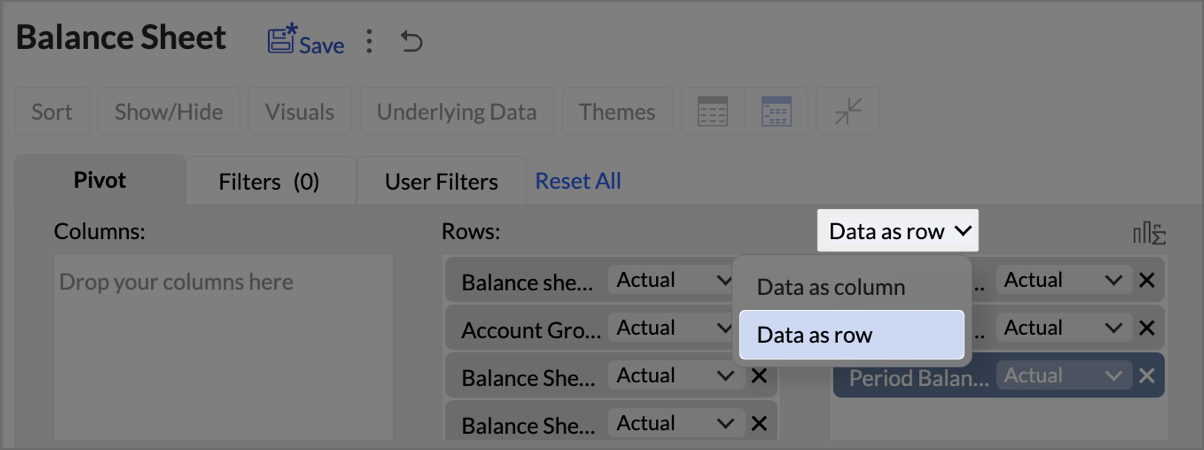
- Drag and drop the created aggregate formulas into the data shelf.
- Select Data as row from the drop-down.
- Click on Show/Hide, then select Totals.
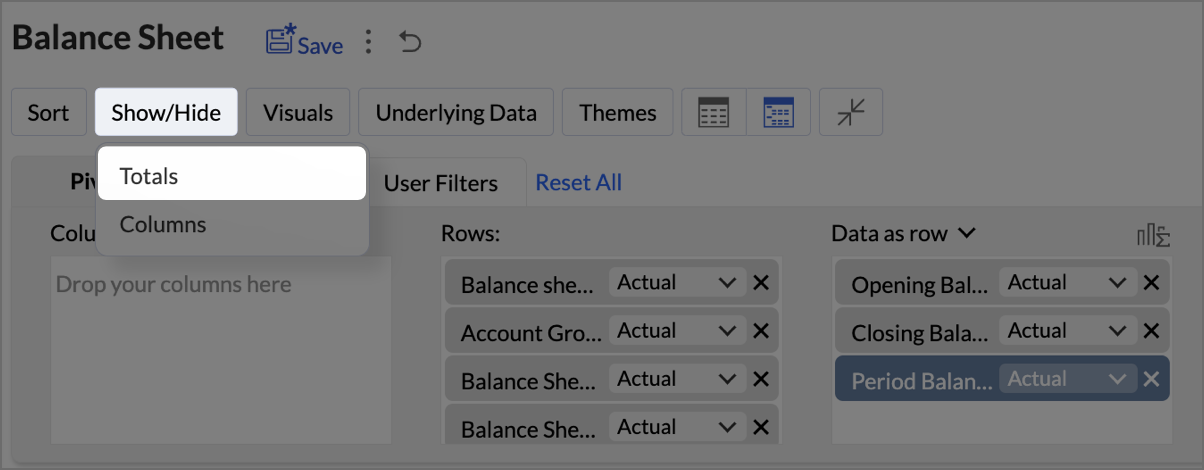
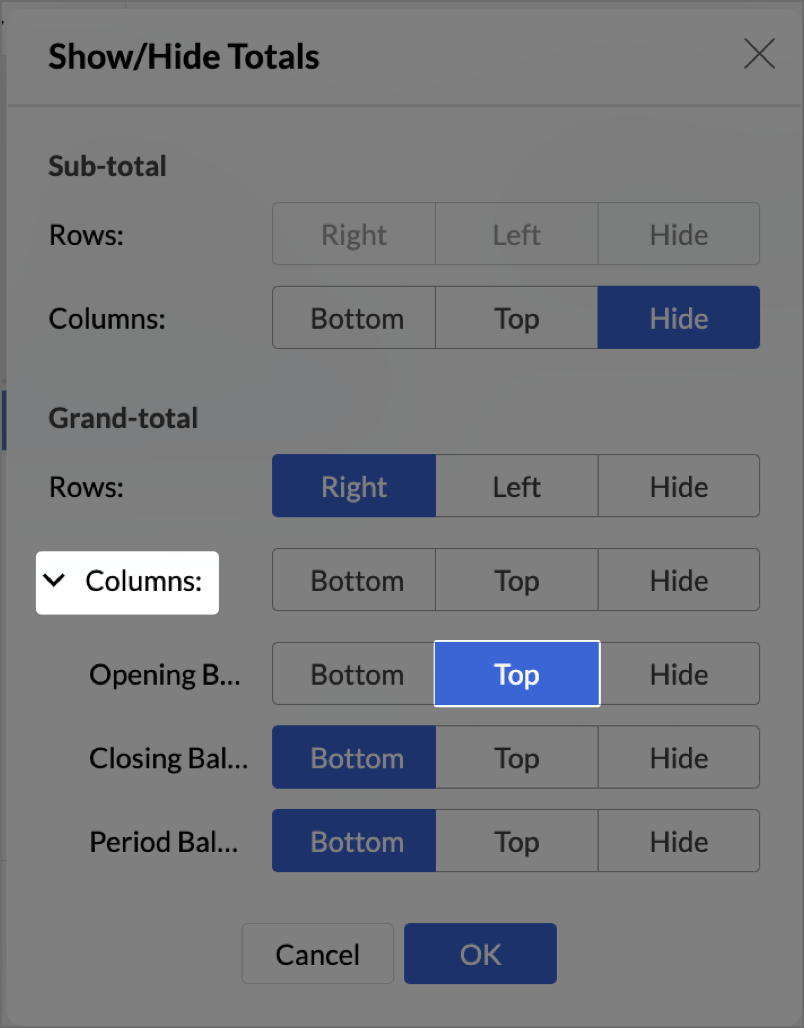
- Click on Columns drop-down, then set the Opening Balance as Top.
- Navigate to Settings > Layout and set Column Width as Equal. Provide Width value as required in px.
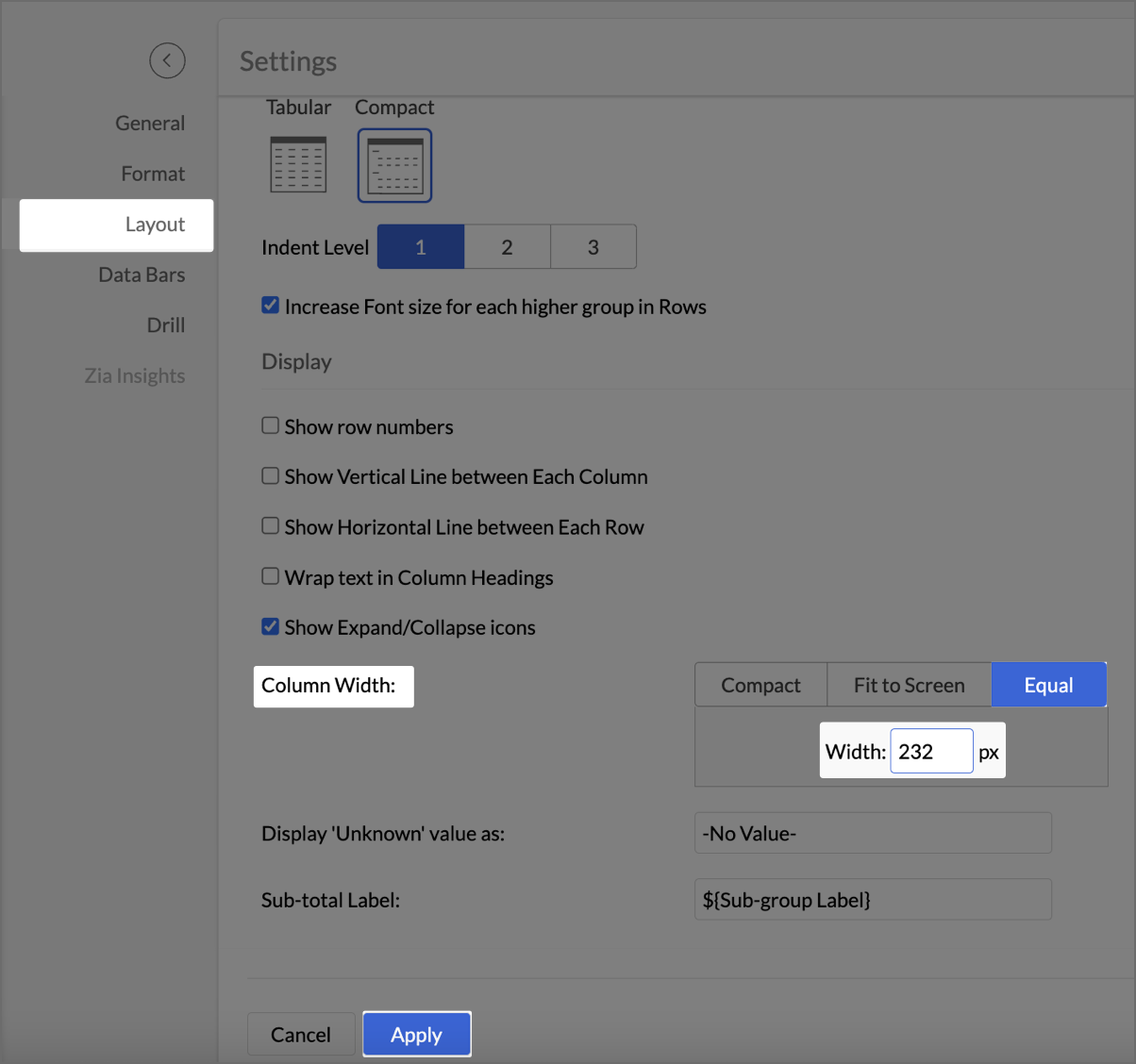
- Click Apply.
- Check Include Timeline Filter.
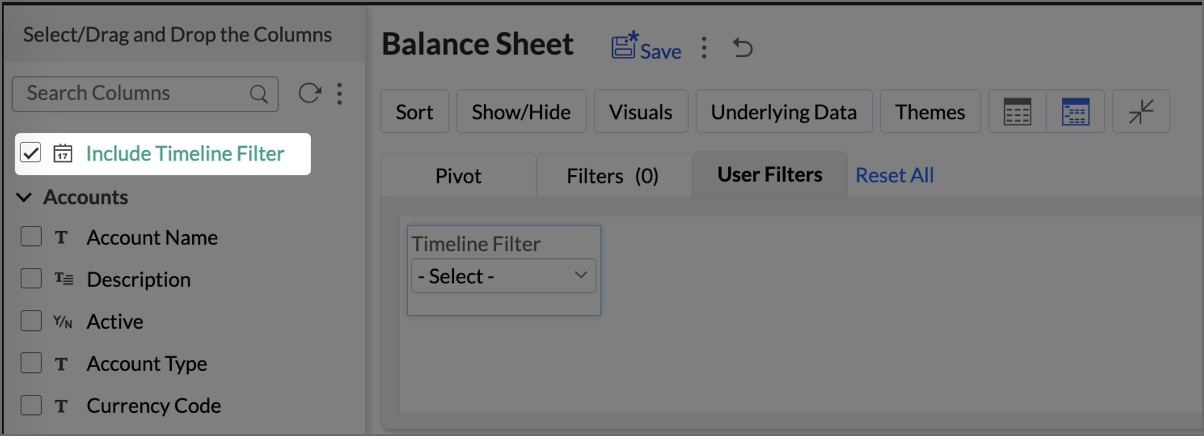
The Timeline Filter is now enabled, and users can apply time-based filters to their data.
Creating a Budget Statement
A Budget Statement helps compare actual financial performance against projected budgets, identifying variances and areas of concern. This visually enhanced report is designed to help businesses quickly assess deviations between expected and real expenditures, allowing for better budget management and financial decision-making.
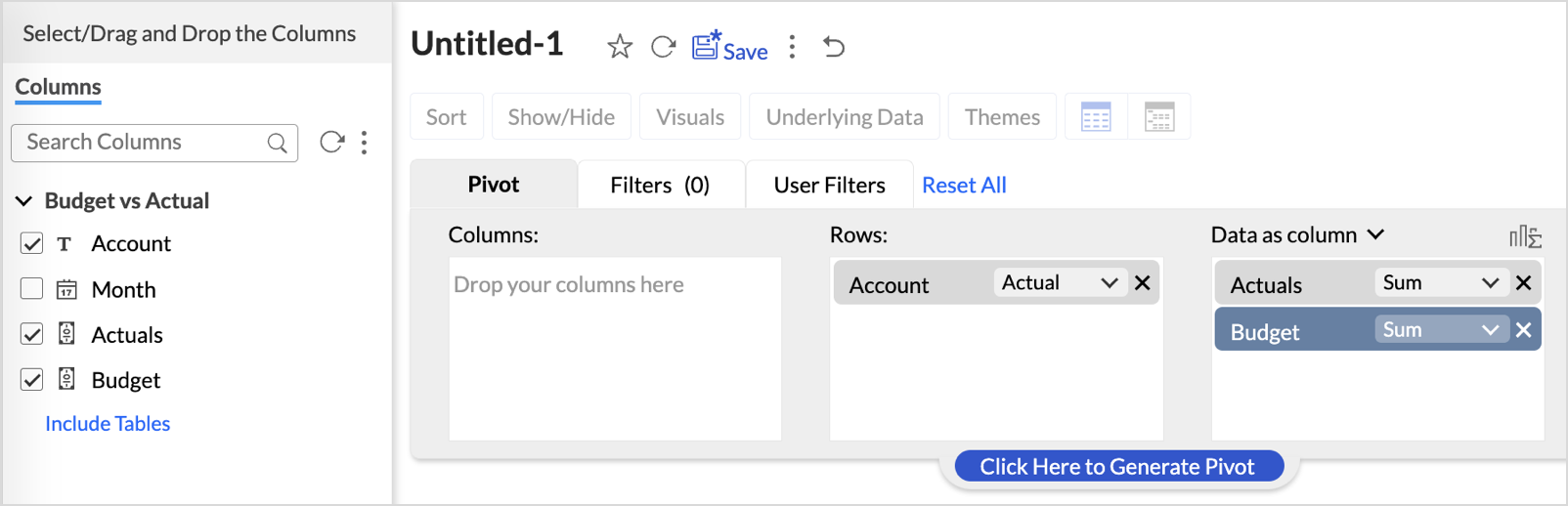
- Drag and drop Account into the Row shelf, and Actuals and Budget into the Data shelf from the Budget vs Actual table.
- Add Report Formula:
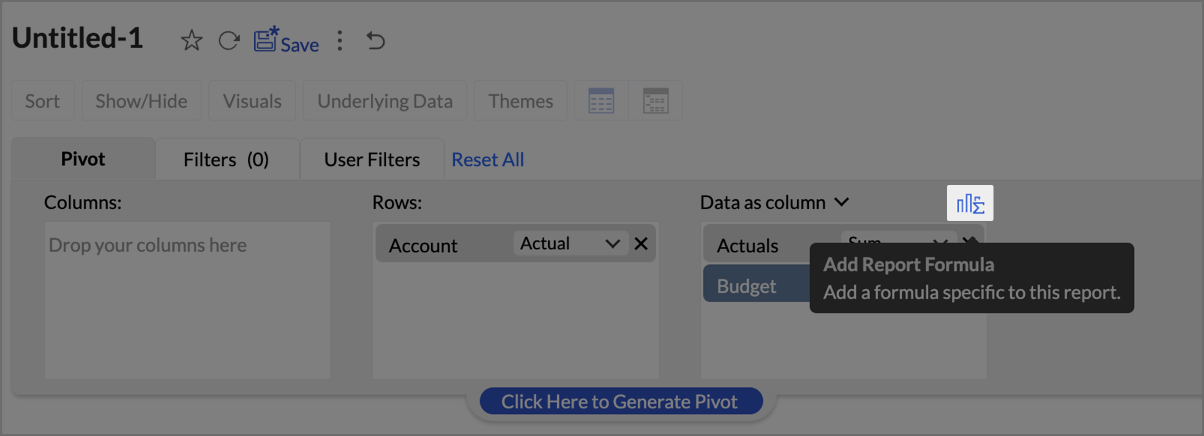
- Click Add Report Formula to create custom calculations.
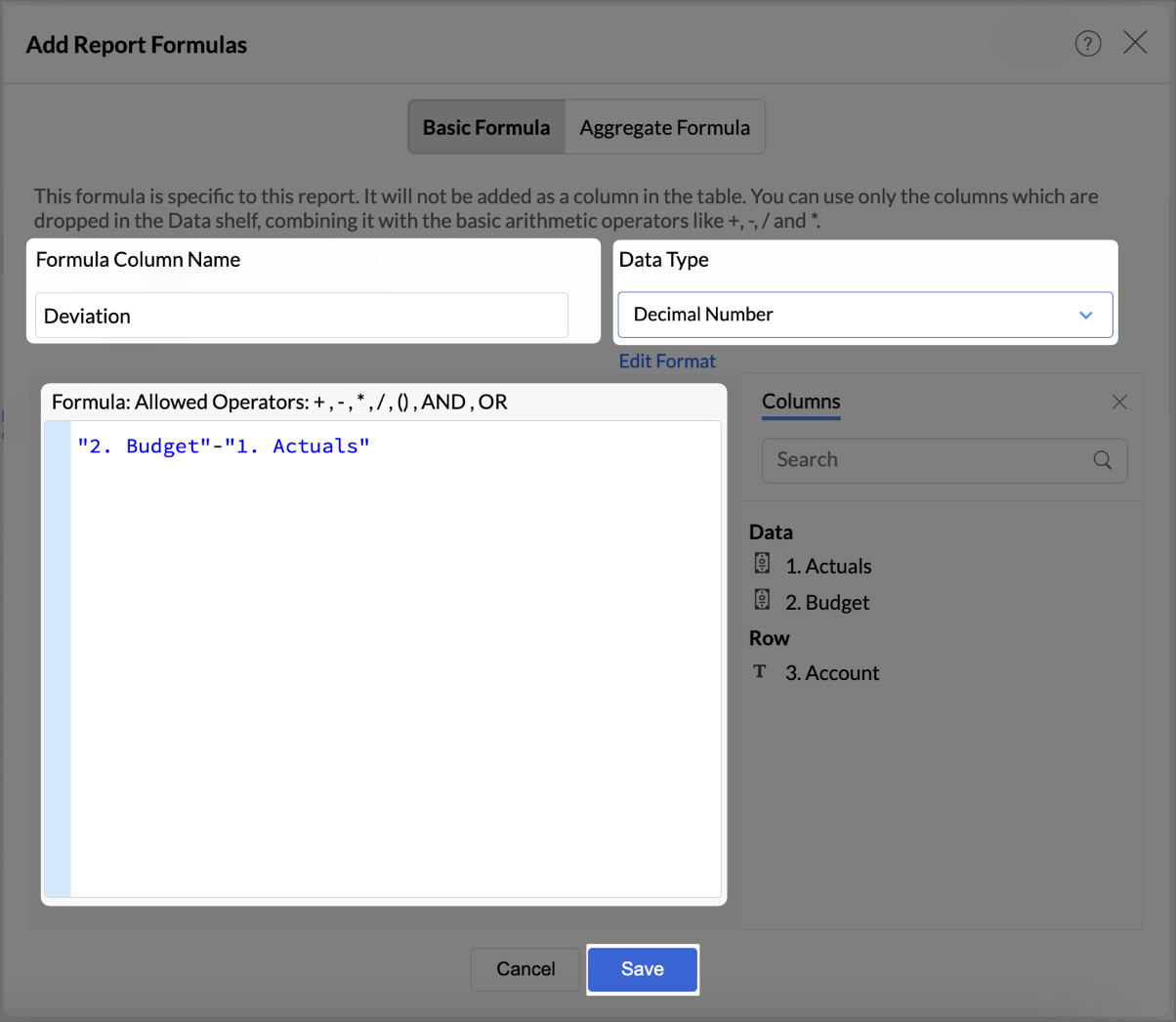
- Name the formula column appropriately (e.g., “Deviation”).
- Set Data Type as Decimal Number
- Create a formula to calculate the difference between actuals and budget as shown in the image.
- Click Save.
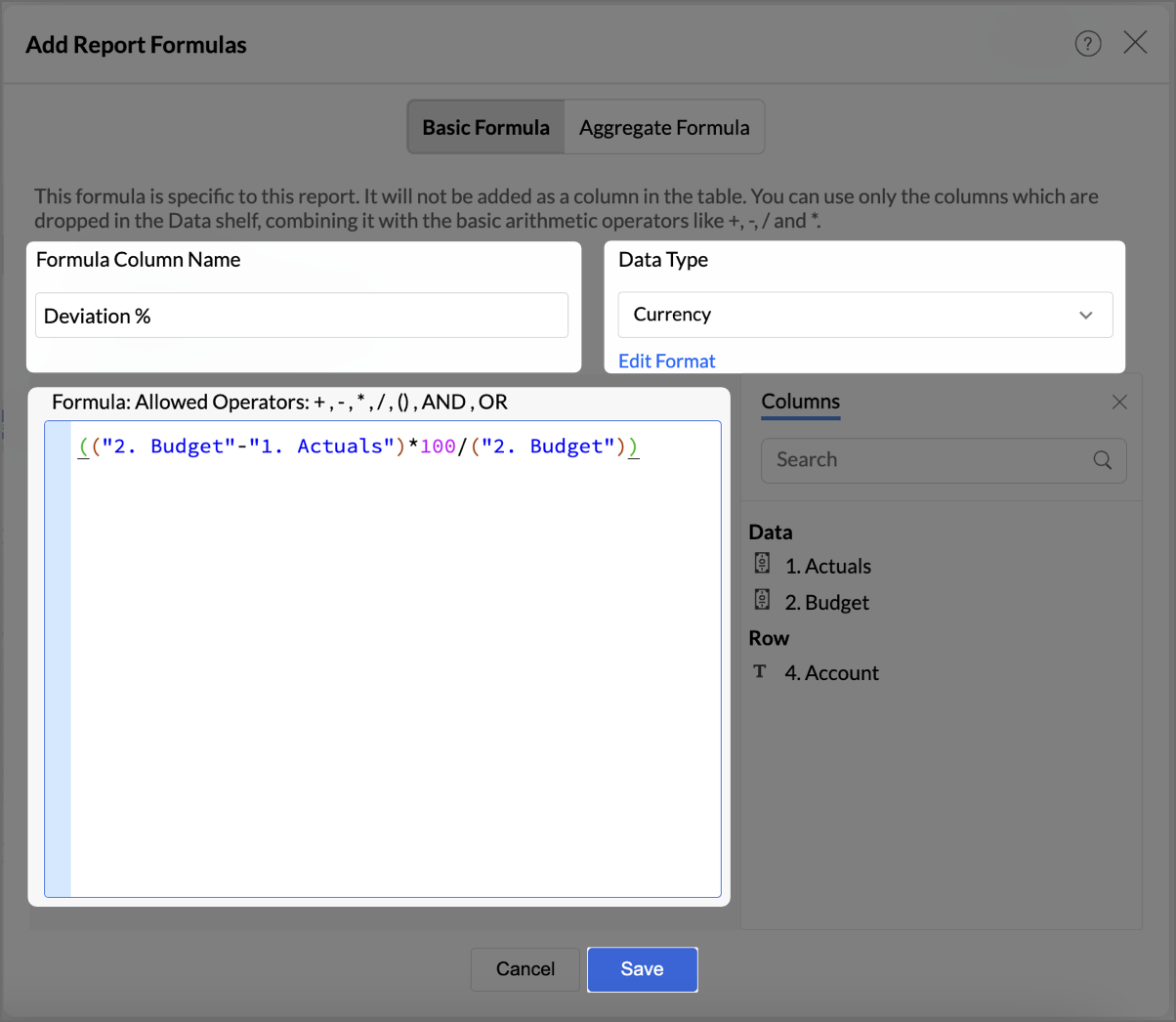
- By following the same steps mentioned above, create one more formula to calculate the percentage difference between actuals and budget as shown in the image.
- Click Save.
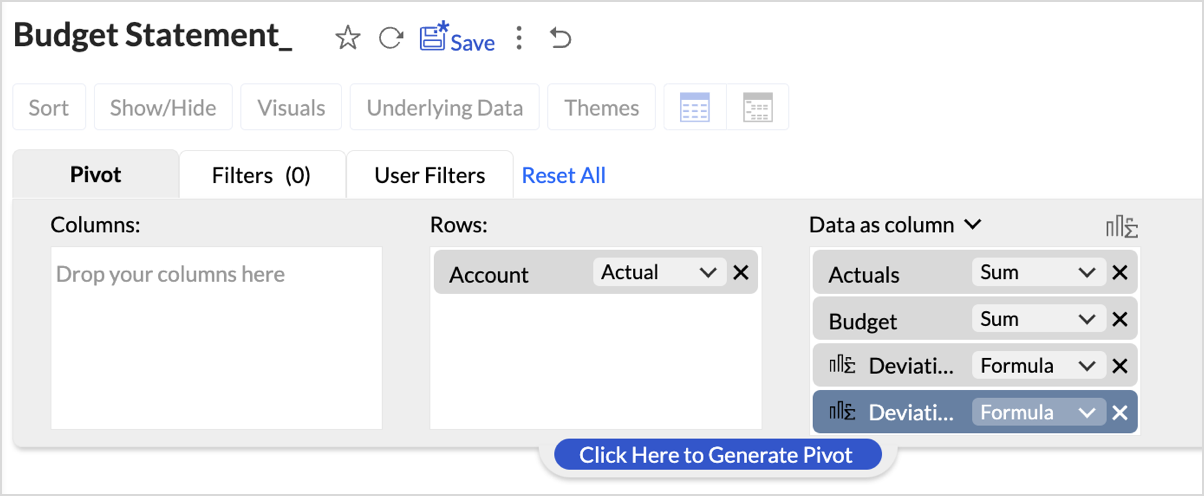
The created formulas will appear in your data shelf and columns, reflecting in the report. - Go to Visuals and choose Data Bars With Data for a more intuitive understanding of budget performance.
By following these steps, you will have a detailed Budget Statement that compares actual spending to the budget, highlighting deviations.
Report Structure and Visuals
- Account Breakdown
The report is organized by account categories, such as Bank Fees, Cost of Goods Sold, and more, showing both Budgeted and Actual amounts for each category. - Key Columns
The report includes the following key columns: - Total Budget - Displays the budget allocated for each account.
- Total Actuals - Shows the actual amount spent or earned for each account.
- Variance (Deviation) - Represents the difference between the budgeted amount and the actuals.
- Variance Percentage (Deviation %) - This column shows the percentage difference between the budgeted and actual amounts, highlighting under- or over-expenditure.
- Data Bars for Clarity
- Green Bars indicate favorable performance (within or under budget).
- Red Bars highlight overspending or budget deviations (e.g., Office Expenses or Rent).
Key Features of the Budget Statement Report
- Visual Representation of Deviations
Data bars visually indicate how spending aligns or deviates from the budget, enabling quick identification of problem areas. - Concise Overview of Financial Performance
The report provides a clear overview of actual versus budgeted performance, allowing decision-makers to assess financial health efficiently. - Enhanced Usability with Percent Deviations
Percentage-based deviation columns allow users to understand the scale of over- or under-performance relative to the budget, making it easy to identify areas that are significantly off track.
Creating Profit and Loss report
A Profit and Loss (P&L) report in Zoho Analytics helps businesses assess their revenue, expenses, and profitability over a specific period. By following these steps, you can create a detailed and visually engaging P&L report.
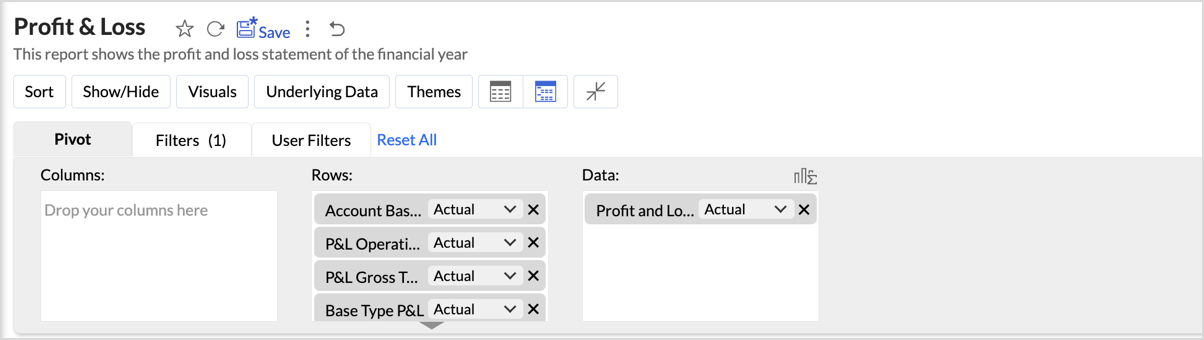
- Drag and drop Account base type, P&L Operating Profit Type, P&L Gross Type, Base type P&L, and Account Name into the Columns shelf from the Accounts table and Profit and Loss Balance into the Rows from Data shelf from the Accrual Transactions table.
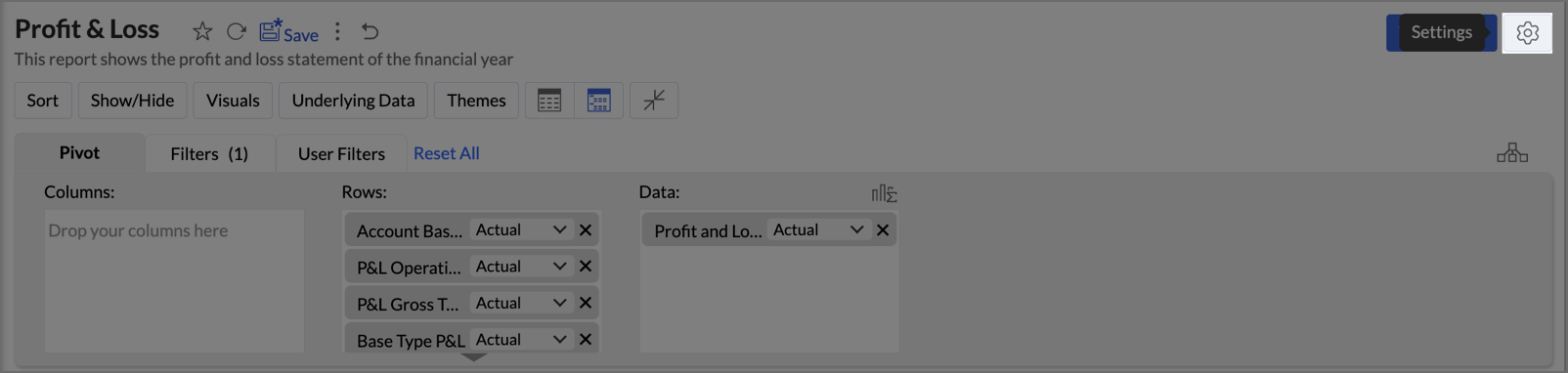
- Layout Adjustments:
- Navigate to Settings > Layout.
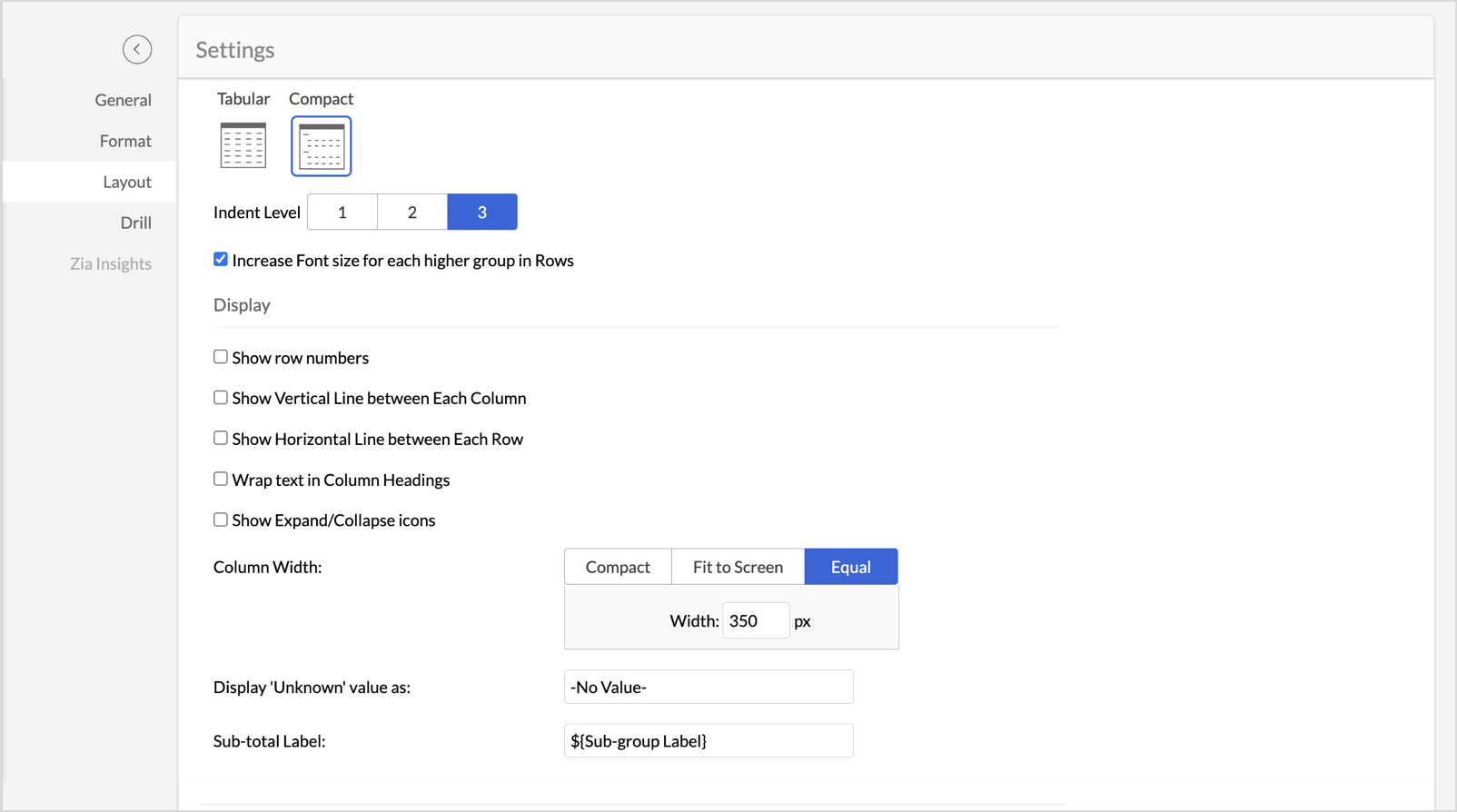
- Change the layout to Compact.
- Set Indent Level to 3.
- Check Increase Font Size for each higher group in Rows to make key categories more visible.
- Uncheck Show row numbers for a cleaner report.
- Uncheck Show Vertical Line between Each Column to streamline the visual presentation.
- Set Column Width to Equal and specify the width as required in px.
- Navigate to Settings > Layout.
- Once the layout adjustments are made, click Apply to lock in the formatting.
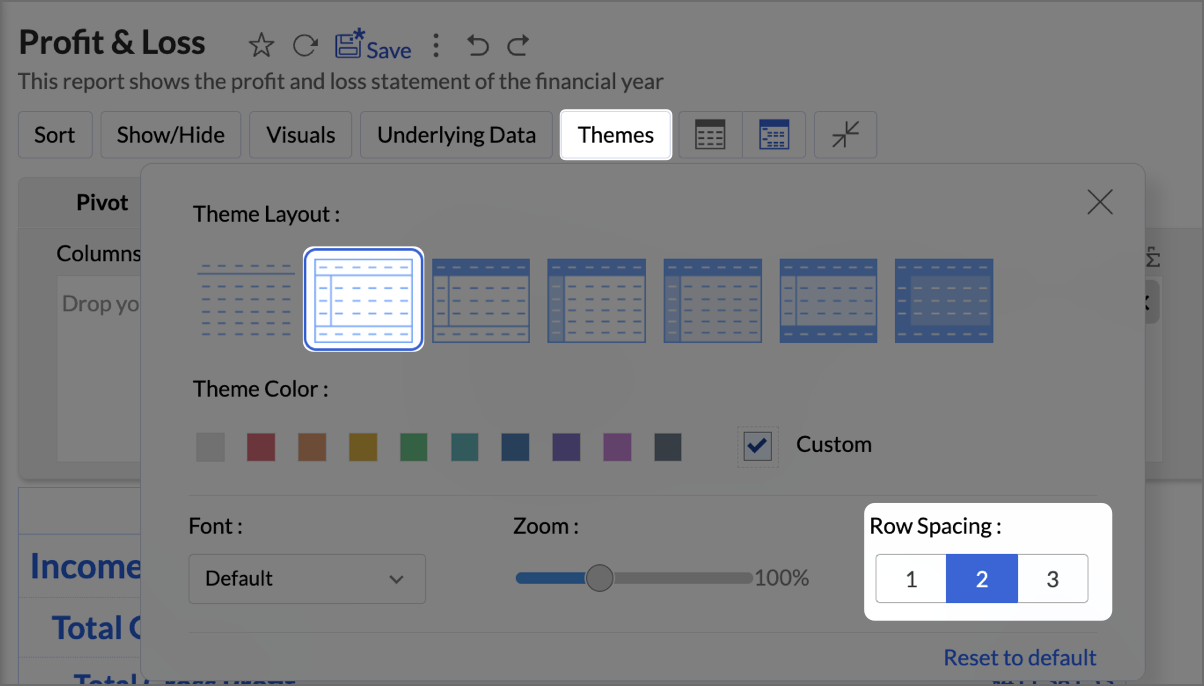
- Click Themes, and select the second theme. Set Row Spacing as 2.
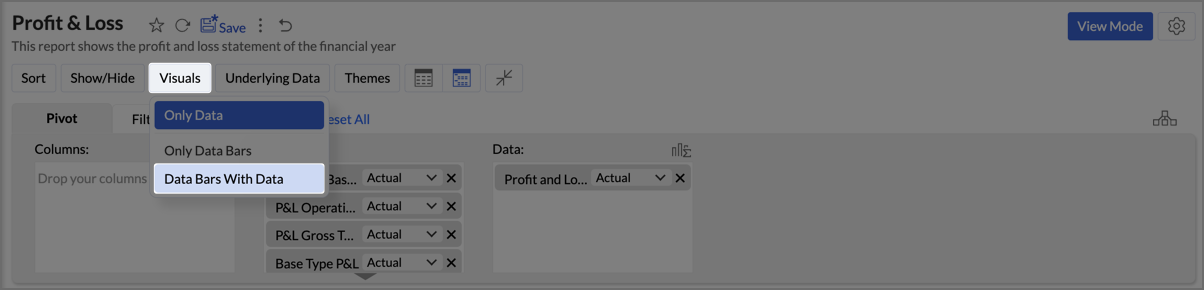
- Navigate to Visuals and select Data Bars With Data to provide a quick and clear visual representation.
By following the above steps, you will create aProfit and Loss report which provides a concise and structured view of your business’s financial performance, making it easy to track profitability over time and identify key financial trends.
Zoho Analytics provides an intuitive and customizable platform for generating comprehensive Balance Sheets, Budget Statements, and Profit & Loss reports. With its drag-and-drop functionality and powerful visual tools, Zoho Analytics transforms finance reporting into a data-driven process that improves decision-making, forecasting, and resource management.
Start leveraging Zoho Analytics today to create reports that provide actionable insights, helping your organization thrive financially!
Access your files securely from anywhere

Zoho Developer Community





Topic Participants
Pradeepkumar R
Storytelling BeanCounter - www.storytellingbeancounter.com
Inform
Pradeepkumar R
Sticky Posts
Tip of the Week - Spot Risky Sales with Conditional Formatting
In Zoho Analytics, small tweaks can lead to big insights. One such feature is Conditional formatting based on other columns, your key to instantly spotting where sales success is overshadowed by product returns. Our tip this week shows you how to apply
Zoho TeamInbox Resources
Zoho CRM Plus Resources
Zoho Books Resources
Zoho Subscriptions Resources
Zoho Projects Resources
Zoho Sprints Resources
Qntrl Resources
Zoho Creator Resources
Zoho CRM Resources
Design. Discuss. Deliver.
Zoho Show Resources

Get Started. Write Away!
Writer is a powerful online word processor, designed for collaborative work.
-
オンラインヘルプ
-
Webセミナー
-
機能活用動画
-
よくある質問
-
Ebook
-
-
Zoho Campaigns
- Zoho サービスのWebセミナー
その他のサービス コンテンツ
Nederlandse Hulpbronnen

ご検討中の方
Recent Topics
How to apply customized Zoho Crm Home Page to all users?
I have tried to study manuals and play with Zoho CRM but haven't found a way how to apply customized Zoho CRM Home Page as a (default) home page for other CRM users.. How that can be done, if possible? - kipi Moderation Update: Currently, each user hasPlease can the open tasks be shown in each customer account at the top.
Hi there This has happened before, where the open tasks are no longer visible at the top of the page for each customer in the CRM. They have gone missing previously and were reinstated when I asked so I think it's just after an update that this featureHow to Customize Task Creation to Send a Custom Alert Using JavaScript in Zoho CRM?
Hello Zoho CRM Community, I’m looking to customize Zoho CRM to send a custom alert whenever a task is created. I understand that Zoho CRM supports client scripts using JavaScript, and I would like to leverage this feature to implement the alert functionality.Send Whatsapp with API including custom placeholders
Is is possible to initiate a session on whatsapp IM channel with a template that includes params (placeholders) that are passed on the API call? This is very usefull to send a Utility message for a transactional notification including an order numberConfigurable Zoho Cliq Notifications for Zoho People Alerts
Hello Zoho People Product Team, Greetings and hope you are doing well. We would like to request an enhancement to Zoho People notifications, enabling a native delivery via Zoho Cliq with admin-level control, similar to the notification settings availableAdd Israel & Jewish Holidays to Zoho People Holidays Gallery
Greetings, We hope you are doing well. We are writing to request an enhancement to the Holidays Gallery in Zoho People. Currently, there are several holidays available, but none for Israel and none for Jewish holidays (which are not necessarily the sameKeep Zoho People Feature Requests in the Zoho People Forum
Hello Zoho People Product Team, Greetings. We would like to submit a feature request regarding the handling of feature requests themselves, specifically for Zoho People. Issue: Feature Requests Being Moved to Zoho One Zoho People feature requests areZO25: The refreshed, more unified, and intelligent OS for business
Hello all, Greetings from Zoho One! 2025 has been a remarkable year, packed with new features that will take your Zoho One experience to the next level! From sleek, customizable dashboards to an all-new action panel for instant task management, we’veIntroducing Multi-Asset Support in Work Orders, Estimates, and Service Appointments
We’re excited to announce a highly requested enhancement in Zoho FSM — you can now associate multiple assets with Work Orders, Estimates, and Service Appointments. This update brings more clarity, flexibility, and control to your field service operations,[Product Update] Locations module migration in Zoho Books integration with Zoho Analytics
Dear Customers, As Zoho Books are starting to support an advance version of the Branches/Warehouses module called the Locations module, users who choose to migrate to the Locations module in Zoho Books will also be migrated in Zoho Analytics-Zoho BooksIntroducing Schedules for smarter availability management
Greetings from the Zoho Bookings team! We’re excited to introduce Schedules, a powerful enhancement to manage availability across your workspace. Schedules are reusable working-hour templates that help you define and maintain consistent availability acrossWhy Zoho Contracts Prefers Structured Approvals Over Ad-hoc Approvals
Approvals are one of the most important stages in a contract’s lifecycle. They determine whether a contract moves forward, gets revised, or needs further discussion. The approval process also defines accountability within the organization. Zoho ContractsWhatsapp Connection Status still "Pending" after migration
Hello, I migrated my WhatsApp API to Zoho from another provider a day ago. So far the connection status is still “Pending”. There is a problem? How long does it usually take?Kaizen #226: Using ZRC in Client Script
Hello everyone! Welcome to another week of Kaizen. In today's post, lets see what is ZRC (Zoho Request Client) and how we can use ZRC methods in Client Script to get inputs from a Salesperson and update the Lead status with a single button click. In thisSearch Bar positioning
Why is the Search bar on the far right when everything is oriented towards the left?How to use Rollup Summary in a Formula Field?
I created a Rollup Summary (Decimal) field in my module, and it shows values correctly. When I try to reference it in a Formula Field (e.g. ${Deals.Partners_Requested} - ${Deals.Partners_Paid}), I get the error that the field can’t be found. Is it possibleHow to Filter timewise question to check uploaded one month or two months before in these community question ?
i want to find the question that is asked some month or before any particular year, so how can i filter it ?Proposal for Creating a Unique "Address" Entity in Zoho FSM
The "Address" entity is one of the most critical components for a service-oriented company. While homeowners may change and servicing companies may vary, the address itself remains constant. This constancy is essential for subsequent services, as it providesWorkflow Down/Bug
We have a workflow that sends an email to one of our internal departments 10 minutes after a record is created in a custom module. The workflow actually works correctly. However, we have now noticed that on January 8, between 3:55 p.m. and 4:33 p.m.,Service Locations: Designed for Shared Sites and Changing Customers
Managing service addresses sounds simple—until it isn’t. Large facilities, shared sites, and frequently changing customers can quickly turn address management into an operational bottleneck. This is where Service Locations deliver clarity and control.Can I re-send the Customer Satisfaction Survey after a ticket closure?
Hello, Some customers does not answer the survey right after closure, is it possible to re-send after a few days or weeks? Best Regards!Filter contacts based on selected category in Zoho Desk ticket
Hello community, I’m setting up the Tickets module in Zoho Desk and I need help implementing the following: When a category is selected in a ticket, I want the Contact field to be filtered so that it only displays contacts that are related to that category.Mapping a new Ticket in Zoho Desk to an Account or Deal in Zoho CRM manually
Is there any way for me to map an existing ticket in Zoho desk to an account or Deal within Zoho CRM? Sometimes people use different email to put in a ticket than the one that we have in the CRM, but it's still the same person. We would like to be ableAssign Income to Project Without Invoice
Hello, Fairly new user here so apologies if there is a really obvious solution here that I am just missing... I have hundreds of small deposits into a bank account that I want to assign to a project but do not want to have to create an invoice every timeTracking Non-Inventory Items
We have several business locations and currently use zoho inventory to track retail items (sales and purchase orders). We were hoping to use zoho inventory to track our non-inventory items as well (toilet paper, paper towels, etc). I understand that weProfile Page View Customization
I need to change the fields, sections from the profile view of an emplyoyee.Zoho Desk Android app update: Filter, Sort and Saved filters Enhancements
Hello everyone! We are excited to introduce the below features on the Android version Zoho Desk mobile app: 1. Filter & Sort support has been introduced for the Contacts and Accounts modules. 2. Sort options is now available in Custom Modules as well.Accessing shared mailboxes through Trident (Windows)
Hi, I have a created a couple of shared mailboxes. The mailboxes are showing up on the browser based Zoho workplace, but I cannot seem to figure out how to access my shared inboxes through Trident (Windows). Am I missing something or is this feature notFeature Request: Ability to set Default Custom Filters and apply them via URL/Deluge
I've discovered a significant gap in how Zoho Creator handles Custom Filters for reports, and I'm hoping the Zoho team can address this in a future update. This limitation has been raised before and continues to be requested, but remains unresolved. TheClosing the Loop: Why Lookup Asymmetry is Harming Data Integrity in Creator
TL;DR: Lookup fields allow users to add new related records inline via the "+" icon, but there's no equivalent ability to edit an existing related record without navigating away and losing form context. Adding a native "Edit" icon—with automatic Userfiltering lookup field options based on information in another module.
In our CRM system. We have the standard Accounts and Deals modules. We would like to introduce the ability to classify Accounts by Sector. Our desired functionality is to have a global list of all sectors that an Account can select, with the ability toReally want the field "Company" in the activities module!
Hi team! Something we are really missing is able to see the field Company when working in the activities module. We have a lot of tasks and need to see what company it's related to. It's really annoying to not be able to see it.🙈 Thx!Service op locatie organiseren met Zoho FSM: waar lopen organisaties tegenaan?
Bij organisaties met service teams op locatie merken we vaak dat de complexiteit niet zozeer in de planning zelf zit, maar in wat er rond die planning gebeurt. Denk aan opvolging na interventies, consistente servicerapporten, en het bijhouden van installatiesIntroducing Assemblies and Kits in Zoho Inventory
Hello customers, We’re excited to share a major revamp to Zoho Inventory that brings both clarity and flexibility to your inventory management experience! Presenting Assemblies and Kits We’re thrilled to introduce Assemblies and Kits, which replaces theDoes the ability exist to make tax on the customer profile mandatory?
I am reaching out to inquire about the possibility of making the "Customer Tax" field mandatory when creating a new customer in Zoho. We want to ensure that all customers have their tax information recorded to maintain compliance with our internal processes.How to integrate XML with Zoho CRM
Hi, I have an eCom service provider that gives me a dynamic XML that contains order information, clients, shipments... The XML link is the only thing I have. No Oath or key, No API get... I want to integrate it into Zoho CRM. I am not a developer noremail association with CRM
Why is it 2024 (almost 2025) and Zoho has not figured out how to integrate email with CRM? It is so inconsistent at associating emails within CRM. I am an attorney. I have clients and work with other attorneys. Attorney John Doe is associated with multipleFix the speed
It takes ages to load on every step even though my dataset is quite small.Credit Note for Shipped and Fatoora pushed invoices
We have shipped a Sales Order and created an Invoice. The Invoice is also pushed to Fatoora Now we need to create a credit note for the invoice When we try it, it says we need to create a Sales Return in the Zoho Books, we have already created a SalesFSM - Timesheet entires for Internal Work
Hi FSM Team, Several of my clients have asked how they can manage internal timesheets within Zoho FSM. Since their technicians already spend most of their day working in FSM, it would be ideal if they could log all working hours directly in the FSM app.Next Page