Introduction of Canvas for Zoho CRM
All industries function in a way that is very different in many aspects. There is no one size fits all approach. The companies should be able to modify the CRM design to suit their needs after a purchase has been made. This is where customers can control their experience completely. Zoho CRM is a giant that has created a new benchmark for customization.
With Canvas, Zoho plans to offer the best possible consumer experience that there is. The customers can create their own experience using Canvas. Zoho introduces Canvas as a design so that the customers can redesign the visual interface of Zoho CRM services to suit their requirements.
Using Canvas, users can remodel the look and feel of their CRM without writing even a single line of code since a simple drag and drop interface is used. Canvas creations can immensely improve the end user’s experience that helps in increasing productivity and morale. It sets the precedent for users to experience autonomy where the user can control the experience with the product.
In this blog, we will get to know all about Canvas and everything it can do for CRM.
What is Canvas?
Canvas is a design studio that is built into the Zoho CRM. The customers can redesign the user interface from an entirely blank canvas using Canvas. It offers a better CRM user interface and supports a wide range of formatting options that help companies to re-imagine the look and feel of any module down to small details. This is how the data meets design.
The use of Canvas is similar to photoshop for databases but it is much more nuanced. Canvas completely understands how the modules, fields, buttons, and related lists in the interface get created. Hence, it offers a much more thoughtful and contextual designing experience for the customers.
You can think of Canvas as a unique tool by Zoho CRM, something that no other CRM vendor has ever considered creating. Zoho has actually pioneered the design autonomy movement allowing the customers to curate the user experience that they are looking for. With the use of Canvas, Zoho CRM has become the most customizable CRM in the market.
Canvas as a no-code design platform is one of the most powerful things to change your Zoho CRM user experience from a visual and a functional perspective. It is a simple user interface management platform that is created into the native CRM system and is applicable in various ways of the CRM. The UI can be customized with the following CRM pages using Canvas.
A unified user experience can be created at various engagement points across platforms with internal CRM, partner portals, and self-service customers. Finally, regardless of the fact if they are your customers, partners or employees, all of the groups that work with a consistent UI when it comes to page design, look and feel, yet the data organized in all layouts can be customized based on various functions and requirements.
Working of Canvas
Canvas helps companies create a custom view that is readily available as an option along with the default views. The customers can click to create a new Canvas view from a listing page or the record page so that a blank canvas is opened as the powerful editor. Some of the things that are responsible for making Canvas stand out are:
1. Right Information in the Right Place
Customers can look for all the related lists, fields, and buttons available on the left side of the menu in editor mode. This actually means that no information is lost and all associations will remain intact just the way they are.
Canvas plays the role of helping users change the appearance of Zoho CRM with multiple design variants.
2. Drag-and-drop Interface
There is no need to become a programmer or even a designer for using Canvas. You just need to have good design taste. Canvas is the first CRM design studio that also comes with a drag and drop interface to offer a much-simplified design experience for everyone.
With the editor, users can easily choose some components from the left menu, drag them on the interface, drop them at the desired location, and then finally click to see available formatting options. It only takes a couple of clicks to create a new design.
3. Formatting Options
Canvas provides many formatting options for playing around with so that the companies can find the exact style that fits their team the best.
Right from changing the shape of the contact image or the color of a button to changing the padding, the shadow, and the width, Canvas enables the users to make sure that all details are suitable for a personal view.
4. Templates
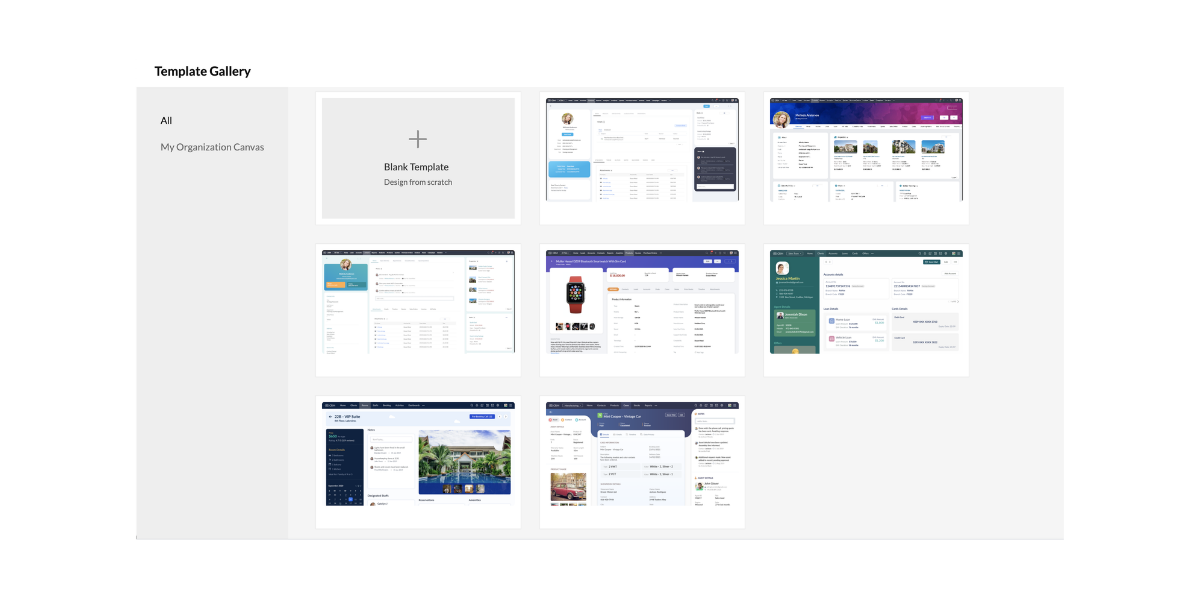
Canvas also comes with a set of templates that the customers can choose in case they want a good start with their design or in case they are looking for inspiration.
The templates can be easily customized to a wide range of industries and they can also be changed to suit the customers in an improved way.
5. Uniform Design All Over Modules
Canvas is a no-code design platform that can be easily copied to other modules for maintaining a uniform design and color style.
Almost any detail that is not associated with the new module can be easily reconfigured at any time. This leads to a uniform design across all possible modules.
How Does Canvas Help Users?
Canvas plays an excellent role in helping companies experiment seamlessly with multiple designs taking input from the salespeople and other end users. These are the people who end up spending a large amount of time using the Zoho CRM.
The admins can easily remodel the list page and detail page of all modules so that everyone’s needs are solved on the basis of suggestions. Canvas can effectively solve important challenges that businesses face in the present day including lack of personalization, employee experience, and complex implementations.
Canvas is the first CRM design studio that helps the users in the following ways:
1. Creating Personalized Instances:
Canvas is responsible for helping companies design a version of CRM that suits the industry and the working culture. Administrators can easily design views with fields, buttons, lists, and labels that are relevant to business so that the end-users can get the maximum results out of Zoho CRM. The customers can also enjoy tailored experiences of a vertical CRM that comes with all possible capabilities of a general-purpose CRM.
2. Enhanced Employee Experience
Using Canvas as a no-code design platform, companies can easily build a CRM that is easy to work with. The users can create views with a minimal design and great colors that are soothing for the eye and the mind. The customers can also highlight, record, hide, and reposition fields, lists, and buttons for helping salespeople work much better.
3. Removes Complexity
Canvas makes it very simple for businesses to get started with the Zoho CRM. The implementation phases including extensive training, data prep, and onboarding experiences need less time and effort all thanks to a simple and customized design. Successful implementation is necessary for reducing any complexity of the system while ensuring that there is high usage and streamlined ROI.
Canvas Serves the Purpose of Everyone
Canvas is literally for everyone. It helps in the following things.
1. Collaborative Selling
 The companies can effectively share their Canvas views with the vendors, consultants, and partners with the use of various portals. The sales process can also become increasingly collaborative where different parties need to get involved at various stages of a sale. Canvas helps in facilitating this collaboration.
2. Superior Self-Service
It is a well known fact that millennial customers are highly protective of their data and the option of self-service is appreciated much more. The customers can fill in important information and review it directly in the company’s very own custom Canvas creation which improves the overall experience considerably.
3. Thriving Community
 Canvas is a one of a kind first CRM design studio where the customers can create new Canvas views and share them with the community. In this way, other businesses can use them as well. With Canvas, Zoho CRM works to create a community of designers who can submit, edit, and implement templates very similar to the community WordPress created for websites.
Canvas sets the precedence of UX Rich Autonomy
Zoho plans to introduce Canvas to the entire Zoho CX suite and finally to complete the product range. In this way, the companies can enjoy the Zoho environment with a design all across the board. When the companies have greater control over the user experience, the results are incredibly beneficial for the end-user, organization, and even the vendor.
Conclusion
Zoho CRM is on a mission to make sure that the specific needs of all industries, companies, and teams are met with the use of Canvas. As Zoho CRM continues its journey to pioneer the new era of personalized CRM, continuous work is being done on user experience enhancements focused on making it simple for end-users to keep using Zoho CRM. Canvas – the first CRM design studio is an example of that.
Zoho claims that this is a journey that never ends and it is in it for a long time. This is one of the major milestones of Zoho for creating a high standard of CRM experience and the company continues making changes.
I hope that you learned something new today :)
Stay Tuned for more!
Cheers!
Abhi
(Seasoned Zoho Authorized and Certified Partner)
Feel free to contact me if you have any queries
Email: abhishek(@)encaptechno(dot)com
Call: +1-416-405-8185
Access your files securely from anywhere
New to Zoho Recruit?

Zoho Developer Community
New to Zoho LandingPage?
Zoho LandingPage Resources
New to Zoho Survey?
New to Zoho CRM Plus?
Deliver unforgettable customer experiences
New to Zoho CRM Plus?
Deliver unforgettable customer experiences
New to Zoho Marketing Plus?
Everything you need to run your marketing
New to Zoho Marketing Plus?
Everything you need to run your marketing
New to Bigin?





Topic Participants
Abhishek - Zoho Partner
Sticky Posts
Presenting ABM for Zoho CRM: Expand and retain your customers with precision
Picture this scenario: You're a growing SaaS company ready to launch a powerful business suite, and are looking to gain traction and momentum. But as a business with a tight budget, you know acquiring new customers is slow, expensive, and often deliversGood news! Calendar in Zoho CRM gets a face lift
Dear Customers, We are delighted to unveil the revamped calendar UI in Zoho CRM. With a complete visual overhaul aligned with CRM for Everyone, the calendar now offers a more intuitive and flexible scheduling experience. What’s new? Distinguish activitiesCreate and populate a record in an instant: Introducing zero-shot field prompting to Zia's ICR
A couple of months ago, we upgraded our in-house AI image detection and validation tool, Zia Vision, with intelligent character recognition (ICR). By training Zia with sample images, you could create and enrich CRM records with data extracted from standardIn-person ZUG Meetups for Real Estate Professionals - US Q1 2026
The Real Estate Zoho User Group is going on a multi-city, in-person meetup tour across the US, and we’d love to see you there! These meetups are a great opportunity to: Connect with fellow real estate professionals using Zoho Share challenges and discoverNimble enhancements to WhatsApp for Business integration in Zoho CRM: Enjoy context and clarity in business messaging
Dear Customers, We hope you're well! WhatsApp for business is a renowned business messaging platform that takes your business closer to your customers; it gives your business the power of personalized outreach. Using the WhatsApp for Business integration
New to Zoho TeamInbox?
Zoho TeamInbox Resources
Zoho CRM Plus Resources
Zoho Books Resources
Zoho Subscriptions Resources
Zoho Projects Resources
Zoho Sprints Resources
Qntrl Resources
Zoho Creator Resources
Zoho CRM Resources
Design. Discuss. Deliver.
Zoho Show Resources

Get Started. Write Away!
Writer is a powerful online word processor, designed for collaborative work.
Zoho CRM コンテンツ
-
オンラインヘルプ
-
Webセミナー
-
機能活用動画
-
よくある質問
-
Ebook
-
-
Zoho Campaigns
- Zoho サービスのWebセミナー
その他のサービス コンテンツ
Nederlandse Hulpbronnen

ご検討中の方
Recent Topics
Zia Competitor Alerts made easy with Zia's suggestions
Hi everyone, In addition to the existing manually added competitors, Zia will now find your competitors for you - instantly. Earlier, you had to identify competitors through research manually, support tickets, or tradeshows—a time-consuming process thatAdd Custom Field Inside Parts Section
How to Add Custom Field Inside Parts Section in Workorder like Category and Sub- CategoryZoho CRM Community Digest October 2025 | Part 2
Hello Everyone! From new mobile capabilities and smarter integrations to real-world workflow fixes and developer insights, all the highlights from the second half of October is covered right here. Let’s dive in. Product Updates: Zoho CRM Mobile Updates:Understanding Zoho Contracts
Effective contract management relies on systems that are structured, organized, and reliable. Every feature, workflow, rule, and restriction in Zoho Contracts are designed the way they are to ensure consistency, compliance, and control across every stageTip of the Week #76– Automate your inbox during vacation in Zoho TeamInbox
When you're on vacation or away from your desk, the last thing you want is for important emails to be missed or left unanswered. The good news is, you can easily set up rules in Zoho TeamInbox to assign incoming messages automatically to a teammate who'sDomain restriction for User Management actions in Zoho One
Greetings, Zoho One Admins! To strengthen account security further and safeguard user management settings, we are imposing domain-based restrictions for user account-focused admin actions in Zoho One. In addition to password reset of user, organizationZoho Mail iOS app update: Signature
Hello everyone! In the latest version(3.1.7) of the Zoho Mail app update, we have brought in support to create, edit and remove signature within the app. You can create signature from the compose screen as well as from within the Settings module(insideDesktop app doesn't support notecards created on Android
Hi, Does anybody have same problem? Some of last notecards created on Android app (v. 6.6) doesn't show in desktop app (v. 3.5.5). I see these note cards but whith they appear with exclamation mark in yellow triangle (see screenshot) and when I try toApproval Button in Subform
Hi Team, I’m working on a subform-based requirement where users will submit requests, and these requests must go through approval by multiple team managers. Each line item in the subform needs to be individually approved or declined based on the user'sSetting checkbox value on template in Sign from Creator
Good day, Please help me understand how do I set a tick from a checkbox in Creator into a checkbox on a Sign template. Below is the only values on the Sign template and the code from Creator, "field_boolean_data": {}, "field_date_data": {}, "field_radio_data":Zoho Projects - Unread Comment Icon
Hi Projects Team, It would be great if there was a notification I con on the comments icon so it's easy to see which tasks have new comments. Something like a red circle with a number of unread comments would be great. Thanks for considering my feedZoho Projects - Update Feed via API
Hi Projects Team, Please consider adding an API to allow update and retrieval of messages to the Feed. Thank youAutomated log-out/session end
I'm concerned about security of our data. Is it possible to set an automatic time-out for user sessions on Zoho CRM, after a certain period of inactivity or when the session reaches a certain duration (12 hours perhaps)?Subform auto populate values
Hi Team, I’m trying to retrieve values from Zoho People using API functions and dynamically populate them into a subform. For example, I’ve created a form with several fields that users will fill out. Based on their input, I need to fetch records fromWhat is New in CRM Functions?
What is New in CRM Functions? Hello everyone! We're delighted to share that Functions in Zoho CRM have had a few upgrades that would happen in phases. Phase 1 An all new built-in editor for better user experience and ease of use. ETA: In a couple of days.Gantt Chart - Zoho Analytics
Are there any plans to add Gantt Charts capabilities to Zoho Analytics?WhatsApp Calling Integration via Zoho Desk
Dear Zoho Desk Team, I would like to request a feature that allows users to call WhatsApp numbers directly via Zoho Desk. This integration would enable sending and receiving calls to and from WhatsApp numbers over the internet, without the need for traditionalIdentify long running sync jobs/tables
My sync process causes strain on my production database and I'd love some tools/alerts to help me identify which tables are taking the longest. The current screen only shows 3 tables at a time and truncates the last fetch time so that it is very cumbersomeTemporarily rate limited due to IP reputation.
We have suddenly started receiving the following Mail Delivery Status Notification: Diagnostic-Code: 4.7.650 The mail server [136.143.184.12] has been temporarily rate limited due to IP reputation. For e-mail delivery information, see https://aka.ms/postmasterAutomatically CC an address using Zoho CRM Email Templates
Hi all - have searched but can't see a definitive answer. We have built multiple email templates in CRM. Every time we send this we want it to CC a particular address (the same address for every email sent) so that it populates the reply back into ourSolution to Import PST File into Office 365.
MailsDaddy OST to Office 365 Migration Tool is an outstanding solution to recover OST files and migrate them into Office 365 without any hassle. Using this software users can multiple OST files into Office 365 with complete data security. It offers usersAssociate emails from both primary and secondary contacts to deal
We need to associate emails from multiple contacts to a deal. Please advise how this can be achieved. At present, only emails from primary contacts can be associated. ThanksNew integration: Zoho Sign for Zoho Projects
Hey there! We’re excited to announce the brand-new Zoho Sign integration for Zoho Projects! With this integration, users can now send documents for signatures, track their progress, and manage approvals—all without leaving Zoho Projects. This bridgesUpdate to attachment display in ticket threads
This enhancement will provide faster access for support teams and end-users, significantly boosting productivity for everyone. Get ready for a more efficient and satisfying experience! Immediate benefits Faster ticket rendering reduces wait times andNarrative 15: Blueprint - Automate, guide, and transform your support processes
Behind the scenes of a successful ticketing system: BTS Series Narrative 15: Blueprint - Automate, guide, and transform your support processes Even organizations that deliver quality products and services can face low customer satisfaction when theirDifferent MRP / Pricing for same product but different batches
We often face the following situations where MRP of a particular product changes on every purchase and hence we have to charge the customer accordingly. This can't be solved by Batch tracking as of now so far as I understand Zoho. How do you manage it as of now?Batch/lot # and Storage bin location
Hi I want to ask for a feature on Zoho inventory I own a warehouse and I've gone through different management software solutions with no luck until I found Zoho, it has been a game changer for my business with up to the minute information, I'm extremely happy with it. It's almost perfect. And I say Almost because the only thing missing for me (and I'm sure I'm not alone) is the need of being able to identify the lot number of my inventory and where it is located in the warehouse. Due to the natureZOHO BOOKS - RECEIVING MORE ITEMS THAN ORDERED
Hello, When trying to enter a vendor's bill that contains items with bigger quantity than ordered in the PO (it happens quite often) - The system would not let us save the bill and show this error: "Quantity recorded cannot be more than quantity ordered."Good news! Calendar in Zoho CRM gets a face lift
Dear Customers, We are delighted to unveil the revamped calendar UI in Zoho CRM. With a complete visual overhaul aligned with CRM for Everyone, the calendar now offers a more intuitive and flexible scheduling experience. What’s new? Distinguish activitiesSync desktop folders instantly with WorkDrive TrueSync (Beta)
Keeping your important files backed up and accessible has never been easier! With WorkDrive desktop app (TrueSync), you can now automatically sync specific desktop folders to WorkDrive Web, ensuring seamless, real-time updates across devices. Important:Writer update results in BitDefender blocking it as malware
After updating Writer to latest update, Bitdefender blocked the app and writer no longer runs.Connecting email for each department in ZohoDesk
Hi! Could someone help me to go through connecting emails for each department?Refresh frequency
Dear Zoho Team, I really, truly appreciate that Zoho Books gets frequent updates. As a matter of fact this is how a good SaaS company should stay on top. However, I feel that I have to hit refresh almost every day. This was exciting at the beginning butRefund
My plan expired today, and I updated my payment details with a new credit card. At the same time, I wanted to downgrade, but the system wouldn’t allow the downgrade until the payment details were updated. As a result, I was charged for the same plan beforeCalling Function via REST API with API Key gives 401 using Zoho Developer
Hi, I created a couple of functions using the one month trial of Enterprise edition, which I was able to call using the API Key method from Postman and from an external site. Now that my trial has expired, I have created the same functions in the DeveloperError due to - 'Internal Exception' when uploading Sign-generated PDF file to workdrive via Deluge in Zoho CRM
Hi I wasnt getting this error a few days ago and my code had not changed, so I'm wondering if there's a Zoho bug somewhere? I am downloading a PDF file from a Zoho Sign url using invokeurl and then uploading it to a Workdrive folder using zoho.workdrive.uploadFile.Embed CRM record images in email templates
I have email templates that I want to embed dynamic images in their body - not as an attachment. For the context, the image is a QR code individual to each contact. So there are couple of challenges for which I think there is no solution in CRM: 1/ IAssign multiple departments to multiple helpcenters
Hi there! I have a reseller company for a software and I'm using Zoho Desk as my helpcenter and ticket management system. The software is great and I would like to make a suggestion! With multi-branding activated, your departments that visible in helpZoho Desk Training
Hello, We've had Zoho desk for a while now, but we run into issues occasionally, and I was wondering if there was a customer who currently uses it and really enjoys the functionality, that would be wiling to chat with us?Edit default "We are here to help you" text in chat SalesIQ widget
Does anyone know how this text can be edited? I can't find it anywhere in settings. Thanks!Next Page