Kaizen #103 - Bulk Write API using PHP SDK (v5) - Part I
Hi everyone and welcome to another amazing Kaizen week!
This week, we will discuss and explore Bulk Write API in detail, and how to implement the same using Zoho CRM PHP SDK. Please note that the information in the article holds true for Zoho CRM PHP SDK supporting version 5 of Zoho CRM APIs.
What is Bulk Write API?
The Bulk Write API enables you to efficiently insert, update, or upsert a large dataset into your CRM account. As this is an asynchronous API, the records will not be added immediately, instead a job will be scheduled to do so. You will receive a notification at the specified callback URL or you can periodically check the job status.
The Bulk Write API allows you to insert, update, or upsert up to 25,000 records in a single API call. This is much more than the maximum of 100 records that you can insert, update, or upsert using the Insert, Update, and Upsert Records API.
When to use Bulk Write API?
- When you want to schedule a job to import a huge volume of data in your CRM account.
- When you want to insert, update, or upsert more than 100 records in a single API call.
- When you want to perform background processes like migration and initial data sync between Zoho CRM and external services.
However, the Bulk Write API consumes 500 credits per job, while the Insert, Update, and Upsert records API consumes 1 credit per 10 records. So, if you only need to insert, update, or upsert a small number of records (5,000 or less), it is economical to use the Records API as it will consume fewer credits.
Here are the major differences between Record APIs and Bulk Write API.
Insert, Update, Upsert Records API | Bulk Write API |
You can insert, update, or upsert only up to 100 records per API call. | You can insert, update, or upsert 25000 records per API call. |
The response is available instantly. | The response to the Bulk Write API request will not be available immediately. You can check the status of the job by polling for it, or you can wait for the status to be available in the callback URL after the job has completed. |
The API consumes 1 credit per 10 records. | Bulk Write API consumes 500 credits per API call. |
Bulk Write API
To insert, update, or upsert records in bulk, follow the below steps:
- Prepare your CSV file
- Upload your file in zip format
- Create a bulk write job
- Check the job status
- Download the result
1. Prepare the CSV file
To use the Bulk Write API, you must first create a CSV file containing the data you want to import to Zoho CRM. The first row of the CSV file must contain the field API names, and each subsequent row must contain the data. You can insert, update, or upsert records in a single module using one Bulk Write API call.
Input format for each data type:
Datatype | Description |
Single Line | Accepts up to 255 characters. Accepts alphanumeric and special characters. Ex: Mike O'Leary |
Multi-Line | Small - accepts up to 2000 characters. Large - accepts up to 32000 characters. Ex: This is a sample description. |
Email | Accepts valid email IDs. |
Phone | Accepts up to 30 characters. This limit may vary based on the value configured in 'Number of characters allowed' in the properties pop-up of the field, in UI. Accepts only numeric characters and '+' (to add extensions). Ex: 9800000099 |
Picklist | You can pass an existing pick list value. If you give a new one, it is automatically added to the pick list set. The pick list value accepts all alphanumeric and special characters. Ex: auto mobile |
Multiselect Picklist | You can either pass the existing pick list values separated by a semicolon(;) or add a new one. The pick list value accepts all alphanumeric and special characters. Ex: Analytics;Bigdata |
Date | Accepts date in different formats as mentioned here. Ex: 2023-05-03 |
DateTime | Accepts date in different formats as mentioned here. Ex: 2023-05-03T20:39:19+05:30 |
Number | Accepts numbers up to 9 digits. This limit may vary based on the value configured in 'Maximum digits allowed' in the properties pop-up of the field, in UI. The accepted formats are mentioned here. Accepts numeric values. Ex1: 350 Ex2: 123,344 |
Currency | Before decimal point - accepts numbers up to 16 digits. This limit may vary based on the value configured in 'Maximum digits allowed' in the properties pop-up of the field, in UI. After decimal point - accepts precision up to 9 digits. This limit may vary based on the value configured in 'Number of decimal paces' in the properties pop-up of the field, in UI. Please note that comma separated digits are accepted. Ex1: 250000.90 Ex2: 123,456.657483 |
Decimal | Before the decimal point - accepts numbers up to 16 digits. This limit may vary based on the value configured in 'Maximum digits allowed' in the properties pop-up of the field, in UI. After the decimal point - accepts precision up to 9 digits. This limit may vary based on the value configured in 'Number of decimal places' in the properties pop-up of the field, in UI. Accepts comma separated numeric values. Ex1: 250000.50 Ex2: 123,235.345 |
Percent | Accepts numbers up to 5 digits. Accepts only numeric values. Ex: 25 |
Long Integer | Accepts numbers up to 18 digits. This limit may vary based on the value configured in 'Maximum digits allowed' in the properties pop-up of the field, in UI. Accepts only numeric values. Ex: 0012345600012 |
Checkbox | Accepts only Boolean values(true,false). Ex: true |
URL | Accepts valid URLs. |
Lookup | Use the dot(.) operator to link the record. For instance, if there is an account lookup in the Contacts module, you can give the column name as - Account.id Ex: Account.id : 4150868000001136302 |
User | This is a default look-up field for users in Zoho CRM. Accepts the unique ID of the user, which you can get through the get users API. Ex: User.id |

Note:
- To give multiple values for a multi-select pick list field, enclose them in double quotes("") and separate each value with the semicolon(;).
- If your multi-line field has more than one line, input them directly by enclosing them in double quotes("").
- You can only zip one CSV file to upload for bulk write. Adding more than one CSV file into the zip file will result in an error.
- You can specify a specific format for your number, currency, decimal, date and datetime fields using format key.
Subform Data in Bulk Write API:
The Bulk Write API allows you to import and update records with subforms. To insert or update records with subforms, you must import the parent records first with Bulk Write API, and then the subform records with another Bulk Write API.
For example, consider an instance where you have a subform named "Contact Details" in the Account module. The subform has the following fields - Contact_Name, Contact_Email and Contact_Phone. You must first create a csv file with the parent records, compress it as a zip file, upload it, and create a bulk write job.
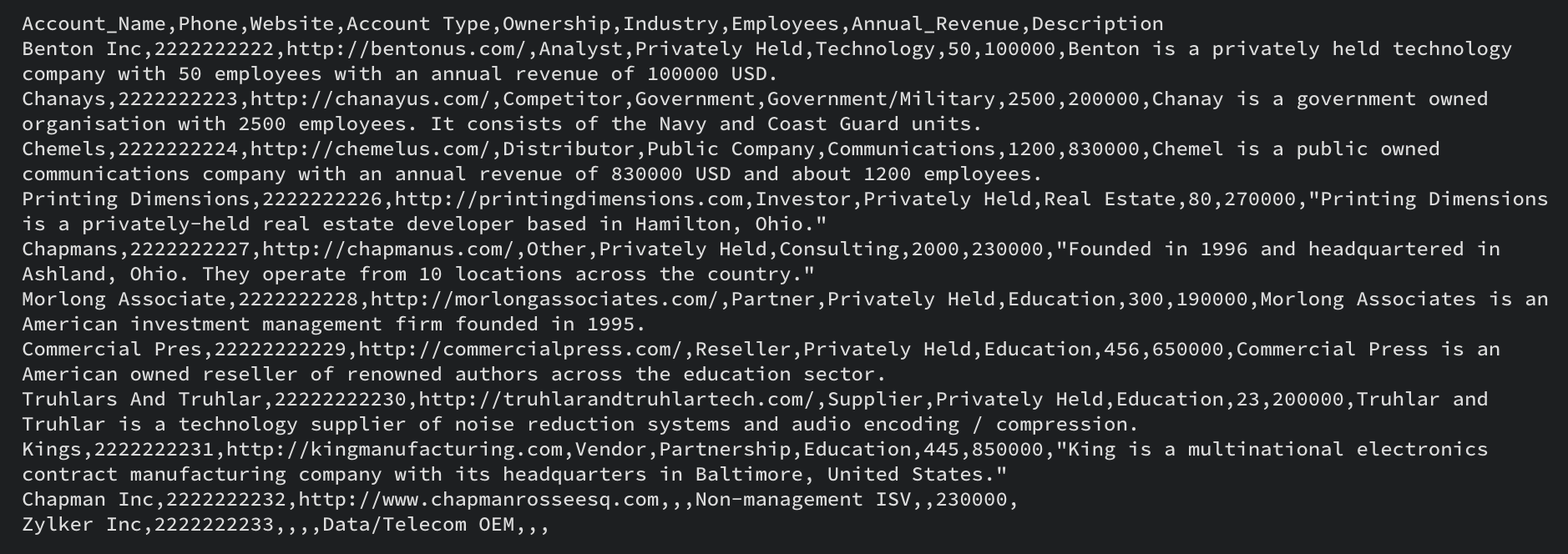
This is an example csv file. Note the Field API names are in the first row, and the record data is in the subsequent rows.
Once you have imported the parent records, you can upload the subform data CSV. When you prepare the subform data CSV file, it is mandatory to have the parent record ID in the subform data file, along with the subform data.

This is a sample CSV file for the subform data. The subform data in each row will be added to the corresponding parent record.
Multiselect Lookup Fields in Bulk Write API
To upload records with multiselect lookup fields, you can follow the same steps as for subforms. First, import the parent records. Then, import the multiselect lookup field data. The CSV file should contain both the parent record ID and the multiselect lookup field data. Please note that this method does not work for line items.
User Lookup in Bulk Write API
To import records with user lookup fields, you can include them in the same CSV file as the parent records. Use the field API name of the user lookup field in the CSV header, and add the unique IDs of the lookup records in the data column for each record.
Once you have prepared the CSV file, compress it as a zip file to upload in the next step. We will add examples of how to add subform data, user lookup and multiselect lookup field data in subsequent sections.
2. Upload your zip file
Once you have your csv file ready and compressed into a zip file, you should upload the same using a POST request. Use the following code snippet to upload the file.
<?php namespace bulkwrite; use com\zoho\crm\api\bulkwrite\FileBodyWrapper; use com\zoho\crm\api\bulkwrite\BulkWriteOperations; use com\zoho\crm\api\util\StreamWrapper; use com\zoho\crm\api\bulkwrite\UploadFileHeader; use com\zoho\crm\api\HeaderMap; require_once "vendor/autoload.php"; class UploadFile { public static function initialize() { // Add init code here. // Refer to this post for more details } public static function uploadFile1(string $orgID, string $absoluteFilePath) { $bulkWriteOperations = new BulkWriteOperations(); $fileBodyWrapper = new FileBodyWrapper(); $streamWrapper = new StreamWrapper(null, null, $absoluteFilePath); $fileBodyWrapper->setFile($streamWrapper); $headerInstance = new HeaderMap(); //To indicate that this a bulk write operation $headerInstance->add(UploadFileHeader::feature(), "bulk-write"); $headerInstance->add(UploadFileHeader::XCRMORG(), $orgID); //Call uploadFile method that takes FileBodyWrapper instance and headerInstance as parameter $response = $bulkWriteOperations->uploadFile($fileBodyWrapper, $headerInstance); // Add your code to handle the response received in the $response. } } UploadFile::initialize(); $orgID = "add_your_org_id_here"; // add your zgid which you can obtain using Get Organization API. $absoluteFilePath = "/Users/test/bulk-write.zip"; //add the absolute file path of your zip file here. UploadFile::uploadFile1($orgID, $absoluteFilePath); |
The uploadFile() method takes two parameters: the organization ID ($orgID) and the absolute file path ($absoluteFilePath) of the file to be uploaded. Within the uploadFile() method, an instance of BulkWriteOperations is created to call the Bulk Write API. This API is used to upload files to the Zoho File System. The HeaderMap instance is created to hold the necessary headers for the API request. The UploadFileHeader::feature() and UploadFileHeader::XCRMORG() methods are used to set the feature and organization ID headers, respectively. These headers are required to identify the type of operation being performed and the organization that the file is being uploaded.
The uploadFile() method is called on the BulkWriteOperations instance, passing the FileBodyWrapper and HeaderMap as parameters. The response from the API call will be stored in the $response variable, which contains the file ID as well. We will use this file ID in the next step, creating a bulk write job.
We hope you found this post on the Bulk Write API useful. In next week's post, we will cover how to create a bulk write job, including lookup and user lookup fields and subform data. We will also show you how to check the job status and download the job result.
If you have any specific questions about the Bulk Write API, please leave a comment below, or reach out to us at support@zohocrm.com. We are happy to help!
Thank you for reading! Stay tuned for more useful posts in the series. See you all next week!
Access your files securely from anywhere
Centralize Knowledge. Transform Learning.
All-in-one knowledge management and training platform for your employees and customers.
New to Zoho Recruit?

Zoho Developer Community
New to Zoho LandingPage?
Zoho LandingPage Resources
New to Zoho Survey?
New to Zoho CRM Plus?
Deliver unforgettable customer experiences
New to Zoho CRM Plus?
Deliver unforgettable customer experiences
New to Zoho Marketing Plus?
Everything you need to run your marketing
New to Zoho Marketing Plus?
Everything you need to run your marketing
New to Bigin?





Topic Participants
Anu Abraham
Sticky Posts
Kaizen #198: Using Client Script for Custom Validation in Blueprint
Nearing 200th Kaizen Post – 1 More to the Big Two-Oh-Oh! Do you have any questions, suggestions, or topics you would like us to cover in future posts? Your insights and suggestions help us shape future content and make this series better for everyone.Kaizen #226: Using ZRC in Client Script
Hello everyone! Welcome to another week of Kaizen. In today's post, lets see what is ZRC (Zoho Request Client) and how we can use ZRC methods in Client Script to get inputs from a Salesperson and update the Lead status with a single button click. In thisKaizen #222 - Client Script Support for Notes Related List
Hello everyone! Welcome to another week of Kaizen. The final Kaizen post of the year 2025 is here! With the new Client Script support for the Notes Related List, you can validate, enrich, and manage notes across modules. In this post, we’ll explore howKaizen #217 - Actions APIs : Tasks
Welcome to another week of Kaizen! In last week's post we discussed Email Notifications APIs which act as the link between your Workflow automations and you. We have discussed how Zylker Cloud Services uses Email Notifications API in their custom dashboard.Kaizen #216 - Actions APIs : Email Notifications
Welcome to another week of Kaizen! For the last three weeks, we have been discussing Zylker's workflows. We successfully updated a dormant workflow, built a new one from the ground up and more. But our work is not finished—these automated processes are
New to Zoho TeamInbox?
Zoho TeamInbox Resources
Zoho CRM Plus Resources
Zoho Books Resources
Zoho Subscriptions Resources
Zoho Projects Resources
Zoho Sprints Resources
Qntrl Resources
Zoho Creator Resources
Zoho CRM Resources
Design. Discuss. Deliver.
Zoho Show Resources

Get Started. Write Away!
Writer is a powerful online word processor, designed for collaborative work.
Zoho CRM コンテンツ
-
オンラインヘルプ
-
Webセミナー
-
機能活用動画
-
よくある質問
-
Ebook
-
-
Zoho Campaigns
- Zoho サービスのWebセミナー
その他のサービス コンテンツ
Nederlandse Hulpbronnen

ご検討中の方
Recent Topics
How to create a new Batch and update Stock via Inventory?
Hi everyone, We are building an automation where a user enters batch details (Batch Number, Mfg Date, Expiry, and Quantity) into a Custom Module. I need this to trigger an API call to Zoho Inventory to: Create the new batch for the item. Increase theOAuth2 Scope Error - Incorrectly defaulting to CRM instead of Analytics.
Hello Zoho Team, I am trying to connect n8n to Zoho Analytics API V2 for a simple automation project. Despite using the correct Analytics-specific scopes, my OAuth handshake is failing with a CRM-related error. The Problem: The authorization screen shows:Archive Option in Conversation View
Hello, I have a suggestion\request to add an "Archive Thread" button in conversation view of Zoho Mail. The best suggestion I have is to put an "Archive Thread" button next to the "Label Entire Thread" button in conversation view. Most users don't justIs it possible to create a meeting in Zoho Crm which automatically creates a Google Meet link?
We are using Google's own "Zoho CRM for Google" integration and also Zoho's "Google Apps Sync" tools, but none of them provide us with the ability to create a meeting in Zoho CRM that then adds a Google Meet link into the meeting. Is this something thatTrigger a Workflow Function if an Attachment (Related List) has been added
Hello, I have a Case Module with a related list which is Attachment. I want to trigger a workflow if I added an attachment. I've seen some topics about this in zoho community that was posted few months ago and based on the answers, there is no triggerEmail Field Validation Incorrectly Rejects RFC-Compliant Addresses (Forward Slashes)
I've encountered a validation issue with Zoho Creator's Email field that rejects RFC-compliant email addresses containing forward slashes, and I'm hoping the Zoho team can address this in a future update. The Issue When entering an email address containingCall result pop up on call when call ends
I’d like to be able to create a pop up that appears after a call has finished that allows me to select the Call Result. I'm using RingCentral. I have seen from a previous, now locked, thread on Zoho Cares that this capability has been implemented, butZOHO.CRM.UI.Record.open not working properly
I have a Zoho CRM Widget and in it I have a block where it will open the blocks Meeting like below block.addEventListener("click", () => { ZOHO.CRM.UI.Record.open({ Entity: "Events", RecordID: meeting.id }).catch(err => { console.error("Open record failed:",Payment system for donations management
I manage an organization where we receive donations from payers. Hence, there is no need to first create invoices and then create payments received against the invoices. What are the recommended best practices to do this in ZohoBooks?Recording the deducted TDS on advance received from Customer (Zoho Books India)
Hi, How can we record the tds that has been deducted by my customer for the advance that he has paid to me. 1) My customer has paid Rs 10000 to me as advance (Rs 9800 as cash and deducted Rs 200 as TDS). I am not able to record the tds that has been deductedChanging Account Type in Chart of Accounts
Does anyone know how to change/edit the account type for an Account name in Chart of Accounts. Zoho will not let me do this for some reasonBulk bank rule creatioin
Hi team, I am exploring Option to create a multiple bank rule. Could please suggest the option to implement this?Zoho books aide
Bonjour, je rencontre un problème avec Zoho Books. J’ai effectué une demande de support via l’interface prévue à cet effet, mais je n’ai jamais de retour. Je ne reçois ni email de confirmation, ni information concernant la prise en charge de ma demande,Smart Data, Smarter Contracts — Ensuring Consistency Between Metadata and Documents
In contract management, data accuracy is not just a nice-to-have—it is essential. A single mismatch between what your system shows and what is written in the contract can ripple into approval delays, compliance risks, and broken trust in your data. ImagineJoin Zoho Meeting only via Web browser and not with Zoho Meeting App
Dear Zoho team, according to the documentation [1], Zoho Meeting only offers web view for Chrome and Firefox on a desktop. For other browsers and devices, participants can only join a Zoho Meaning with the Zoho Meeting App installed. This is a big hurdleManage control over Microsoft Office 365 integrations with profile-based sync permissions
Greetings all, Previously, all users in Zoho CRM had access to enable Microsoft integrations (Calendar, Contacts, and Tasks) in their accounts, regardless of their profile type. Users with administrator profiles can now manage profile-based permissionsAnalytics & Reporting Improvements + Export Bug
Hello, I would like to raise several important product suggestions and issues regarding Zoho Expense: 1. Filter in Admin View → Analytics → Expense Details → Receipt Is it possible to add a filter that allows us to prioritize or sort reports that haveAI Search and Record Retrieval Inside Zoho Creator – Is This Possible?
Is it possible to integrate an AI assistant into Zoho Creator that can intelligently search, retrieve, and analyze records within the application’s forms and reports? Can AI access and query existing Creator data securely using Deluge or APIs to provideI have a requirement to integrate Zoho Books with Zoho Projects at both project and task levels.
Currently, when i create transactions in Zoho Books (Expenses, Invoices, Bills), we can only map them at the project level. However, our requirement is to: Map records at both project and task levels Sync these transactions back to Zoho Projects underScheduled AU Data Center Database Version Upgrade for Zoho Forms
Dear Zoho Forms' users, We would like to update you on a scheduled AU Data Center database version upgrade for Zoho Forms. Find the schedule below: Migration window: Sunday, 22nd February 2026 12.00 AM to 12.30 AM AEDT This migration is a part of ourCannot get code to work with v2.mergeAndStore!
Please can someone help me pass subform items into a repeating mail merge table row using v2.mergeAndStore? I have a mail merge template created in Writer and stored in Workdrive. This template is referenced by a custom CRM function which merges all ofHotmail is blocking the zoho mail IP
Greetings, Since last Tuesday (5 days ago today) I wrote to Zoho support and I still haven't received a single response (Ticket ID: 2056917). Is this how you treat people who pay for your email service? I am making this public so that those who want toZoho Bookings and Survey Integration through Flow
I am trying to set up flows where once an appointment is marked as completed in Zoho Bookings, the applicable survey form would be sent to the customer. Problem is, I cannot customise flows wherein if Consultation A is completed, Survey Form A would beZoho CRM Community Digest - December 2025 | Part 2
Hello Everyone! During the final weeks of December, Zoho CRM introduced updates that not only enhanced product capabilities but also offered deeper guidance through Kaizen posts. This section highlights what was released and shared in the last two weeksCRUD actions for Resources via API
Hello, is it possible to perform CRUD actions through the API for Resources? We want to create a sync from Zoho CRM Car record to Bookings resources to create availabilities for Car bookings. For Test drives, not only the sales person needs to be available,Kaizen #186 : Client Script Support for Subforms
Hello everyone! Welcome back to another exciting Kaizen post on Client Script! In this edition, we’re taking a closer look at Client Script Support for Subforms with the help of the following scenario. " Zylker, a manufacturing company, uses the "Orders"オンライン勉強会のお知らせ Zoho ワークアウト (2/19 参加無料)
ユーザーの皆さま、こんにちは。コミュニティチームの中野です。 2月開催のZoho ワークアウトについてお知らせします。 今回はZoomにて、オンライン開催します。 ▶︎参加登録はこちら(無料) https://us02web.zoom.us/meeting/register/6AyVUxp6QDmMQiDGXGkxPA ━━━━━━━━━━━━━━━━━━━━━━━━ Zoho ワークアウトとは? Zoho ユーザー同士で交流しながら、サービスに関する疑問や不明点の解消を目指すイベント「Zohodoubts about customer happiness in zoho desk
Good afternoon, Desk community. The reason for my message is that I have a question regarding the customer satisfaction surveys we can ask our clients to rate our service. I know that in Desk, you can activate Customer Happiness to send a survey to theCOQL API in JS Widget only pulling 200 records
Hello! We've been building a custom homepage widget using the Zoho JS SDK, and it seems that this https://help.zwidgets.com/help/latest/ZOHO.CRM.API.html#.coql only allows 200 records. I thought the limit was 2000 for COQL queries, but am I mistaken?Standard Description Field - Can I change label or add dd tooltip
Is there a way fo you guys to allow the customer to change the label name for the description field in the customer portal when submitting tickets. Or at least allow us to add a tooltip to clarify what description we need from them. I know I can create my own separate multi line description field but if I do that, it doesn't have the nice toolbar with Bold, Italic, Underline, color, font, indent, etc. Can you please allow us to add a tooltip to the zoho standard description field?Compensation | Salary Packages - Hourly Wage Needed
The US Bureau of Labor Statistics says 55.7% of all workers in the US are paid by the hour. I don't know how that compares to the rest of the world, but I would think that this alone would justify the need for having an hourly-based salary package option.Customizing Helpcenter texts
I’m customizing the Zoho Desk Help Center and I’d like to change the wording of the standard widgets – for example, the text in the “Submit Ticket” banner that appears in the footer, or other built-in widget labels and messages. So far, I haven’t foundAbility to Edit Ticket Subject when Splitting a Ticket
Often someone will make an additional or new request within an existing ticket that requires we split the ticket. The annoying part is that the new ticket maintains the subject of the original ticket after the split so when the new ticket email notificationProblem applying batch operation error keeps looping that error
Problem applying batch operation error keeps looping that error an wont loginAutomatically Update Form Attachment Service with Newly added Fields
Hi, When I have a Form Setup and connected to a 3rd Party Service such as OneDrive for Form Attachments, when I later add a new Upload Field I have to remove and redo the entire 3rd Party Setup from scratch. This needs to be improved, such as when newUnable to produce monthly P&L reports for previous years
My company just migrated to Books this year. We have 5+ years financial data and need to generate a monthly P&L for 2019 and a monthly P&L YTD for 2020. The latter is easy, but I'm VERY surprised to learn that default reports in Zoho Books cannot createReopen ticket on specific date/time
Is there a way that we can close a ticket and setup a reopen of that ticket on a specific date and time? (without using the "on hold" ticket option)API credit COQL COUNT
The docs describe API credits in COQL from the LIMIT perspective: https://www.zoho.com/crm/developer/docs/api/v8/COQL-Overview.html When using aggregate functions such as `COUNT` or `SUM`, is that billed as 1 API credit?Anyone Building AI-Based SEO Dashboards in Zoho Analytics?
Hey everyone, I’m currently working on an SEO reporting dashboard in Zoho Analytics and looking to enhance it with AI-based insights—especially around AI visibility, keyword trends, and traffic sources. The goal is to track not just traditional metricsRemove 'This is an automated mail from Zoho Sign' in footer
Hi there, Is it possible to remove or change the text under the e-mail templates? I can't figure out how to do that: Would love to hear from you. Kind regards, TristanNext Page