Kaizen #94 - PHP SDK V4 - Configuration and Initialization
Hello and welcome to another Kaizen week!
In previous Kaizen posts, we have covered in detail how to configure and initialize PHP SDKs for Zoho CRM v2.1 APIs. We have since released SDKs for v4 and v5 APIs. However, starting from v4, there are some changes in the configuration and initialization process. In this post, we will discuss you how to configure and initialize PHP SDK v4 and v5.
The PHP Software Development Kit (SDK) simplifies the integration of client PHP applications with Zoho CRM. Acting as a wrapper for the REST APIs, it streamlines the usage of Zoho CRM services.
Before proceeding with the configuration, make that your client application meets the prerequisites. This includes having PHP 7 or above installed, along with the cURL extension, which is necessary for connecting and communicating with Zoho CRM APIs.
I. Register your application with Zoho CRM
Registering your application with Zoho CRM is a mandatory step in order to authenticate and authorize API calls using the OAuth2.0 standards.
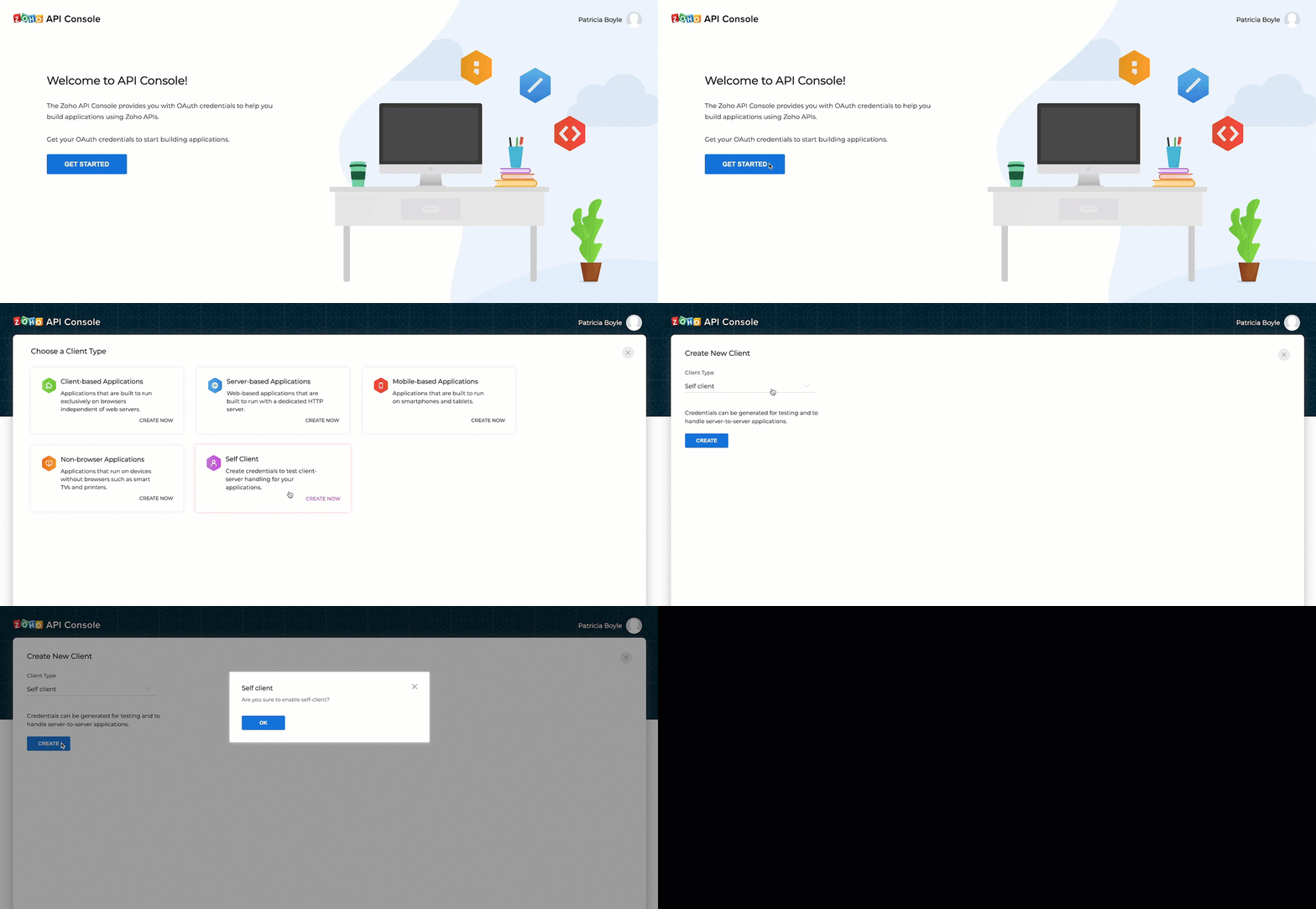
- Go to https://api-console.zoho.com
- Click on Get Started or +ADD CLIENT.
- Choose the Client Type as Self-Client or Server based Applications depending on your application.
- Fill in the necessary details and click CREATE. Once you successfully register your self-client, you will receive a Client ID and Client Secret.
II. Installing the PHP SDK
- If not already installed, follow the instructions provided at the corresponding link to install Composer.
Mac/Linux curl -sS https://getcomposer.org/installer | php (terminal command)Windows https://getcomposer.org/doc/00-intro.md#installation-windows - Install PHP-SDK using Composer
- Navigate to the workspace of your client app.
- Run the following command in the workspace. Upon successful installation, the system will create a package named vendor in the workspace of your client app.composer require zohocrm/php-sdk-4.0 (for v4 APIs)composer require zohocrm/php-sdk-5.0 (for v5 APIs)
- To use the SDK in your project, add the following line in your project PHP files. This loads and includes our PHP-SDK library in your project. If you skip this step, you will get a fatal error in response due to the missing libraries.
require 'vendor/autoload.php';
III. Token Persistence
Token persistence refers to storing and utilizing authentication tokens provided by Zoho, enabling the SDK to refresh the access tokens without user intervention. The SDK offers three types of persistence - File, DB, and Custom - with file persistence being the default method.
The persistence is achieved by writing an implementation of the inbuilt TokenStore interface, which has the following callback methods.
| Methods | Description |
| findToken(Token $token) | Invoked before firing a request to fetch the saved tokens. This method returns an implementation of Token interface object for the library to process it. |
| saveToken(Token $token) | Invoked after fetching access and refresh tokens from Zoho. This method saves the token details. |
| deleteToken($id) | This method is used to delete the given token details. |
| getTokens() | The method is used to retrieve all the stored tokens. |
| deleteTokens() | The method to delete all the stored tokens. |
| findTokenById($id) | This method is used to retrieve the user token details based on the unique ID. |
Here, $token is an instance of the Token interface.
Token Persistence using a Database
In Database persistence, tokens are stored and retrieved from a database (e.g., MySQL).
Create a table in your database with the following required columns. For example, if you want to persist your tokens in a table named token in database named zoho, use this:
CREATE DATABASE zoho; // use this to create database named zoho // use this to create a table named token, with the following necessary columns CREATE TABLE token ( id varchar(10) NOT NULL, user_name varchar(255) NOT NULL, client_id varchar(255), client_secret varchar(255), refresh_token varchar(255), access_token varchar(255), grant_token varchar(255), expiry_time varchar(20), redirect_url varchar(255), primary key (id) ); |
Note that the columns are different for API v2.1. Please refer to this post for more details. .
File Persistence
File Persistence allows storing and retrieving the authentication tokens from the given file path. The file contains id, user_name, client_id, client_secret, refresh_token, access_token, grant_token, expiry_time and redirect_url.
Custom Persistence
Custom Persistence refers to a technique where users can create their own method of storing and retrieving authentication tokens. To use this method, users need to implement the TokenStore interface and override its methods according to their own logic.
IV. Configuration
The configuration step involves setting up various details in the SDK, such as user authentication, token persistence, logging, API call timeout settings, and more. The following keys are defined during this process:
- environment (mandatory): The API environment which decides the domain and the URL to make API calls, in Domain::Environment pattern.
Domains : USDataCenter, EUDataCenter, INDataCenter, CNDataCenter, AUDataCenter
Environments : PRODUCTION(), DEVELOPER(), SANDBOX() - Token (mandatory): This key contains the user token details. Create an instance of OAuthToken with the information that you get after registering your Zoho client. Depending on the available tokens, you can select one of the following flows:Note : You need to generate the tokens (grant/access/refresh) beforehand to use them in the respective flows.a) grantToken flow - You should use the grant Token for configuration.$token = (new OAuthBuilder())->clientId("clientId")->clientSecret("clientSecret")->userSignature($user) //optional->grantToken("grantToken")->redirectURL("redirectURL") //optional->build();b) refreshToken flow - Utilize the refresh token in this flow.$token = (new OAuthBuilder())->clientId("clientId")->clientSecret("clientSecret")->userSignature($user) //optional->refreshToken("refreshToken")->build();c) accessToken flow - You can use the access token to configure in this flow. Please note that the token will not be persisted in this case, and the access token will be directly used to make the API calls.$token = (new OAuthBuilder())->userSignature($user) //optional->accessToken("accessToken")->build();d) id flow - You can use the id from the persisted token file/DB to make API calls. The id is a unique system generated value for each token details entry in the file/DB.$token = (new OAuthBuilder())->id("id")->build();
- logger (optional) : Create an instance of Logger Class to log exception and API information. You can set the level you want to log (FATAL, ERROR, WARNING, INFO, DEBUG, TRACE, ALL, OFF), and also configure the file path and file name for the log file. The default level is OFF.$logger = (new LogBuilder())->level(Levels::INFO)->filePath("/Documents/php_sdk_log.log")->build();
- store (optional) : Configure your token persistence using this method. If this is skipped, the SDK creates the sdk_tokens.txt in the current working directory to persist the tokens by default. For more details, refer here.
- SDKConfig (optional) : The additional SDK configurations are taken care of with this method.Configuration KeyDescriptionautoRefreshFieldsDefault Value : FalseA boolean configuration key to enable or disable automatic refreshing of module fields in the background. If set to true, fields are refreshed every hour, and if set to false, fields must be manually refreshed or deleted.pickListValidationDefault Value : TrueThis field enables or disables pick list validation. If enabled, user input for pick list fields is validated, and if the value does not exist in the pick list, the SDK throws an error. If disabled, the input is not validated and the API call is made.enableSSLVerificationDefault Value : TrueA boolean field to enable or disable curl certificate verification. If set to true, the SDK verifies the authenticity of certificate. If set to false, the SDK skips the verification.connectionTimeoutDefault Value : 0The maximum time (in seconds) to wait while trying to connect. Use 0 to wait indefinitely.timeoutDefault Value : 0
The maximum time (in seconds) to allow cURL functions to execute. Use 0 to wait indefinitely. - requestProxy (optional) : Contains the proxy properties of the user. Configure this only if you're using a proxy server to make the API calls.$requestProxy = (new ProxyBuilder())->host("proxyHost")->port("proxyPort")->user("proxyUser")->password("password")->build();
- resourcePath (optional) : Configure the absolute directory path to store user specific files containing module fields information. If skipped, the files will be stored in the project directory itself.
V. Initilization
After completing the configuration, you can proceed with initializing the SDK, and begin making API requests.
Here is a sample code to initialize the SDK, using refresh token flow and DB Persistence.
<?php use com\zoho\api\authenticator\OAuthBuilder; use com\zoho\api\authenticator\store\DBBuilder; use com\zoho\crm\api\InitializeBuilder; use com\zoho\crm\api\UserSignature; use com\zoho\crm\api\dc\USDataCenter; use com\zoho\api\logger\LogBuilder; use com\zoho\api\logger\Levels; use com\zoho\crm\api\SDKConfigBuilder; use com\zoho\crm\api\ProxyBuilder; require_once "vendor/autoload.php"; class Initialize { public static function initializeSDK() { $user = new UserSignature("patricia@zoho.com"); $environment = USDataCenter::PRODUCTION(); $token = (new OAuthBuilder()) ->clientId("1000.xxxxxxxxxxxxxxxx") ->clientSecret("554a9xxxxxxxxxxxxxxxxx") ->userSignature($user) //optional ->refreshToken("1000.xxxxxxxxxxxxxxxxxxxx") ->redirectURL("www.zoho.com") //optional ->build(); $logger = (new LogBuilder()) ->level(Levels::INFO) ->filePath("/Documents/php_sdk_log.log") ->build(); $tokenstore = (new DBBuilder()) ->host("insert_your_hostname_here") ->databaseName("insert_your_database_name_here") ->userName("insert_your_db_username_here") ->password("insert_your_db_password_here") ->portNumber("insert_your_portnumber_here") ->tableName("insert_your_table_name_here") ->build(); $autoRefreshFields = false; $pickListValidation = false; $connectionTimeout = 2; $timeout = 2; $enableSSLVerification = false; $configInstance = (new SDKConfigBuilder()) ->autoRefreshFields($autoRefreshFields) ->pickListValidation($pickListValidation) ->sslVerification($enableSSLVerification) ->connectionTimeout($connectionTimeout) ->timeout($timeout) ->build(); $resourcePath = "/Documents/phpsdk-application"; $requestProxy = (new ProxyBuilder()) ->host("proxyHost") ->port("proxyPort") ->user("proxyUser") ->password("password") ->build(); (new InitializeBuilder()) ->environment($environment) ->token($token) ->store($tokenstore) //optional ->SDKConfig($configInstance) //optional ->resourcePath($resourcePath) //optional ->logger($logger) //optional ->requestProxy($requestProxy) //optional ->initialize(); } } Initialize::initializeSDK(); ?> |
You are now set to use the PHP SDK and make API calls.
If you have any queries, let us know the comments below, or send an email to support@zohocrm.com. We would love to hear from you!
Cheers!
Cheers!
Access your files securely from anywhere
Centralize Knowledge. Transform Learning.
All-in-one knowledge management and training platform for your employees and customers.
New to Zoho Recruit?

Zoho Developer Community
New to Zoho LandingPage?
Zoho LandingPage Resources
New to Zoho Survey?
New to Zoho CRM Plus?
Deliver unforgettable customer experiences
New to Zoho CRM Plus?
Deliver unforgettable customer experiences
New to Zoho Marketing Plus?
Everything you need to run your marketing
New to Zoho Marketing Plus?
Everything you need to run your marketing
New to Bigin?





Topic Participants
Anu Abraham
Sticky Posts
Kaizen #198: Using Client Script for Custom Validation in Blueprint
Nearing 200th Kaizen Post – 1 More to the Big Two-Oh-Oh! Do you have any questions, suggestions, or topics you would like us to cover in future posts? Your insights and suggestions help us shape future content and make this series better for everyone.Kaizen #226: Using ZRC in Client Script
Hello everyone! Welcome to another week of Kaizen. In today's post, lets see what is ZRC (Zoho Request Client) and how we can use ZRC methods in Client Script to get inputs from a Salesperson and update the Lead status with a single button click. In thisKaizen #222 - Client Script Support for Notes Related List
Hello everyone! Welcome to another week of Kaizen. The final Kaizen post of the year 2025 is here! With the new Client Script support for the Notes Related List, you can validate, enrich, and manage notes across modules. In this post, we’ll explore howKaizen #217 - Actions APIs : Tasks
Welcome to another week of Kaizen! In last week's post we discussed Email Notifications APIs which act as the link between your Workflow automations and you. We have discussed how Zylker Cloud Services uses Email Notifications API in their custom dashboard.Kaizen #216 - Actions APIs : Email Notifications
Welcome to another week of Kaizen! For the last three weeks, we have been discussing Zylker's workflows. We successfully updated a dormant workflow, built a new one from the ground up and more. But our work is not finished—these automated processes are
New to Zoho TeamInbox?
Zoho TeamInbox Resources
Zoho CRM Plus Resources
Zoho Books Resources
Zoho Subscriptions Resources
Zoho Projects Resources
Zoho Sprints Resources
Qntrl Resources
Zoho Creator Resources
Zoho CRM Resources
Design. Discuss. Deliver.
Zoho Show Resources

Get Started. Write Away!
Writer is a powerful online word processor, designed for collaborative work.
Zoho CRM コンテンツ
-
オンラインヘルプ
-
Webセミナー
-
機能活用動画
-
よくある質問
-
Ebook
-
-
Zoho Campaigns
- Zoho サービスのWebセミナー
その他のサービス コンテンツ
Nederlandse Hulpbronnen

ご検討中の方
Recent Topics
Client Portal ZOHO ONE
Dear Zoho one is fantastic option for companies but it seems to me that it is still an aggregation of aps let me explain I have zoho books with client portal so client access their invoice then I have zoho project with client portal so they can access their project but not their invoice without another URL another LOGIN Are you planning in creating a beautiful UI portal for client so we can control access to client in one location to multiple aps at least unify project and invoice aps that wouldThe Social Wall: February 2026
Hello everyone, This month, we’re bringing you a mix of exciting toolkit enhancements and a few improvements across the web and iOS app, all designed to make your social media management simpler and smoother. File converter Images come in different formats,Zoho Mail and SalesInbox doesn't link to CRM record using Reply-To
Hi, I've just set up SalesInbox, with the intention of using it for sales enquiries (instead of Desk, which I have been using until now). I've noticed that, unlike Desk, SalesInbox only uses the 'From' email address to attempt to link to a CRM contactPoor Search Results on Zoho CRM
The search on Zoho CRM is quite poor. Salesforce has now published a new search, when will get this on Zoho? https://help.salesforce.com/s/articleView?id=data.c360_a_hybridsearch_index.htm&type=5How to use filters on all products page? Or even a category page?
Hello, I am trying to create some filters so users can use filters to find products they are looking for. So what i am trying is to create a filter according to price lets say. So if i define it this way i am expecting to see this filter option on categoryCapture Last check-in date & days since
I have two custom fields on my Account form, these are "Date of Last Check-In" and "Days Since Last Contact" Using a custom function how can I pull the date from the last check-in and display it in the field "Date of Last Check-In"? and then also display the number of days since last check-in in the "Days SInce Last Contact" field? I tried following a couple of examples but got myself into a bit of a muddle!Archiving Contacts
How do I archive a list of contacts, or individual contacts?Every time an event is updated, all participants receive an update email. How can I deactivate this?
Every time an event is updated in Zoho CRM (e.g. change description, link to Lead) every participant of this meeting gets an update email. Another customer noticed this problem years ago in the Japanese community: https://help.zoho.com/portal/ja/community/topic/any-time-an-event-is-updated-on-zohocrm-calendar-it-sends-multiple-invites-to-the-participants-how-do-i-stop-that-from-happening3/18 オンライン勉強会のお知らせ Zoho ワークアウト (無料)
ユーザーの皆さま、こんにちは。コミュニティチームの中野です。 3月開催のZoho ワークアウトの開催が決定しましたのでご案内します。 今回はZoomにて、オンライン開催します。 ▶︎参加登録はこちら(無料) https://us02web.zoom.us/meeting/register/BoNTN7zYR8OvOPGShqBY0A ━━━━━━━━━━━━━━━━━━━━━━━━ Zoho ワークアウトとは? Zoho ユーザー同士で交流しながら、サービスに関する疑問や不明点の解消を目指すイベントです。Conversion Rate – Won Deals over Assigned Prospects
Hello, I would like assistance configuring a KPI in Zoho Analytics titled: Objective of the calculation: Number of Won Deals divided by Total number of assigned prospects (not only converted prospects). Important clarification: The denominator must includeFeature Request – Conditional Visitor Information Request in Zoho SalesIQ
We would like to request the ability to conditionally ask for visitor details based on the communication channel used in Zoho SalesIQ. Specifically: When a visitor initiates a conversation through the live chat widget on the website, we want to continueApple Messages for Business in Omnichannel communications?
Hello, Apple launched "Apple Messages for Business" but Zoho CRM or Zoho Desk don't appear in the list of possible integrators. Zoho already promotes https://www.zoho.com/crm/omnichannel.html Omni Channel integration, but Apple Messages does not yet appear.Admin asked me for Backend Details when I wanted to verify my ZeptoMail Account
Please provide the backend details where you will be adding the SMTP/API information of ZeptoMail Who knows what this means?Cliq iOS can't see shared screen
Hello, I had this morning a video call with a colleague. She is using Cliq Desktop MacOS and wanted to share her screen with me. I'm on iPad. I noticed, while she shared her screen, I could only see her video, but not the shared screen... Does Cliq iOS is able to display shared screen, or is it somewhere else to be found ? RegardsZOHO.CRM.UI.Record.open not working properly
I have a Zoho CRM Widget and in it I have a block where it will open the blocks Meeting like below block.addEventListener("click", () => { ZOHO.CRM.UI.Record.open({ Entity: "Events", RecordID: meeting.id }).catch(err => { console.error("Open record failed:",【Zoho CRM】通貨機能のアップデート:為替レートの自動更新やデータ更新オプションなど
ユーザーの皆さま、こんにちは。コミュニティチームの藤澤です。 今回は「Zoho CRM アップデート情報」の中から通貨機能のアップデートをご紹介します。 CRMの複数通貨機能を使うと、地域ごとに通貨を管理し、顧客の現地通貨で記録したデータを自国通貨に自動換算して分析やレポートに活用できます。 従来は、為替レートを管理者が手動で定期更新する必要があり、各データには作成時点のレートが固定されるため、その後の市場変動は反映されませんでした。 本記事では、この問題を解消する「為替レートの自動更新」をはじめ、さまざまな新機能をご紹介します。AI Bot and Advanced Automation for WhatsApp
Most small businesses "live" on WhatsApp, and while Bigin’s current integration is helpful, users need more automation to keep up with volume. We are requesting features based on our customer Feedbacks AI Bot: For auto-replying to FAQs. Keyword Triggers:Can we add zoho sign to a custom module?
i understand out of the box it works with 8 modules. is it possible to add it to a custom module?This domain is not allowed to add in Zoho. Please contact support-as@zohocorp.com for further details
Selected date present employees roster
=CHOOSECOLS(FILTER(A2:E5;(INDEX(C2:E5;0;MATCH(VALUE(B8);INDEX(VALUE(C1:E1));0))<>"OFF")*(INDEX(C2:E5;0;MATCH(VALUE(B8);INDEX(VALUE(C1:E1));0))<>"EL"));1;2;2+MATCH(VALUE(B8);INDEX(VALUE(C1:E1));0)) This way sheet looks lCredit Card Terminal for Zoho Books
Hello, Instead of punching the credit card number manually for customer payment, do you have a third-party hardware credit card reader that works with Braintree? Thank YouFiltering in Help Center
Hi, our ticket system is based on a set of structured status categories. The customer must be able to filter by these status. How can we add "Status" as filter to the help center. In the same moment we do not need filters e.g. as "channel". How can weGoogle Fonts Integration in Pagesense Popup Editor
Hello Zoho Pagesense Team, We hope you're doing well. We’d like to submit a feature request to enhance Zoho Pagesense’s popup editor with Google Fonts support. Current Limitation: Currently, Pagesense offers a limited set of default fonts. Google FontsCan multiple agents be assigned to one ticket on purpose?
Is it possible to assign one ticket to two or more agents at a time? I would like the option to have multiple people working on one ticket so that the same ticket is viewable for those agents on their list of pending tickets. Is something like this currentlyWhere is the settings option in zoho writer?
hi, my zoho writer on windows has menu fonts too large. where do i find the settings to change this option? my screen resolution is correct and other apps/softwares in windows have no issues. regardsWhen Does WorkDrive integrate with Books?
When Does WorkDrive integrate with Books?CRM gets location smart with the all new Map View: visualize records, locate records within any radius, and more
Hello all, We've introduced a new way to work with location data in Zoho CRM: the Map View. Instead of scrolling through endless lists, your records now appear as pins on a map. Built on top of the all-new address field and powered by Mappls (MapMyIndia),Zoho Sign Not Delivering
I have sent several contracts out via Zoho Sign. They do not seem to be getting delivered. I had one person receive it, but the others have not. I had one person tell me they sent it back to me and never got it and doesn't show as signed. I've sentBank Feeds Breaking Constantly
Hey Everyone, I have already reached out to support about this issue but I am wondering if anyone else is having the same issue. My bank feeds keep breaking within days of me fixing them by updating the credentials. Its been happening for a while andAutomatic Matching from Bank Statements / Feeds
Is it possible to have transactions from a feed or bank statement automatically match when certain criteria are met? My use case, which is pretty broadly applicable, is e-commerce transactions for merchant services accounts (clearing accounts). In theseZoho Payroll's USA and KSA editions are available in Zoho One!
Greetings! We’re excited to share that Zoho Payroll, currently available only in India and the UAE, is now introducing the KSA (Kingdom of Saudi Arabia) edition and the USA (United States of America) edition, and these editions are now available in ZohoTip #63- Exploring Technician Console: Elevate to Admin Mode (Windows & Mac)- 'Insider Insights'
Hello Zoho Assist Community! Ever been in a remote support session where you couldn’t complete a task because you didn’t have admin privileges? Maybe installing software, accessing secure system areas, or rebooting into Safe Mode just didn’t work becausePrevent accidental duplicate entry of Customer Ordersome
Zoho Support has confirmed that Zoho currently does not have any method (using Deluge, flow or any other method) to alert a user when a sales order has been entered twice using the same customer reference number (i.e. a duplicate). Most ERP platformsPermissões granulares por usuário além do modelo baseado exclusivamente em perfis
Atualmente, o modelo de segurança do Zoho CRM é fortemente baseado em perfis. Embora funcional, esse modelo apresenta limitações quando equipes possuem variações individuais de acesso dentro do mesmo grupo operacional. Em cenários reais, é comum que usuáriosEvolução do modelo de ambientes: Dev, Homologação e Produção com pacotes versionados
Hoje o Zoho CRM já oferece Sandbox, o que é um avanço importante para organizações que trabalham com customizações mais complexas. No entanto, na prática, o modelo atual ainda apresenta limitações significativas quando múltiplas equipes ou consultoriasZoho Mail - Email Reminder template (default)
Zoho Mail Users, Does anybody here use the email reminder template? I'm asking Zoho to allow and add us to select which one of our many templates will be our default. It allows us to operate more efficiently. It's a Checkbox. If you feel this can benefitWindows Desktop App - request to add minimization/startup options
Support Team, Can you submit the following request to your development team? Here is what would be optimal in my opinion from UX perspective: 1) In the "Application Menu", add a menu item to Exit the app, as well as an alt-key shortcut for these menusCanva Integration
Hello! As many marketing departments are streamlining their teams, many have begun utilizing Canva for all design mockups and approvals prior to its integration into Marketing automation software. While Zoho Social has this integration already accomplished,Announcement integration between Zoho People and Zoho Connect
As we're using these 2 products, there're areas of overlapping especially in the Announcement. When there's a new announcement in Zoho People, can it push to the company wall in Zoho Connect?Does Zoho Mail Have Popout windows?
I recently switched my work email over to Zoho and everything I read said that you can popout the draft email as you're writing, however, all the pictures or info I've seen show the typical popout arrow in the top right, which I can not for the life ofNext Page