Nouvelle fonctionnalité Zoho Bigin : découvrez Team Pipelines
Bonjour à tous !
Il y a quelques jours, nous vous avions annoncé l'arrivée de la nouvelle version de Bigin.
Dans cet article nous avions fait le tour des nouvelles fonctionnalités développées pour booster la croissance de votre petite entreprise.
Aujourd'hui, nous abordons plus en détail la fonctionnalité la plus attendue de cette update : Team Pipelines.
Quel est l'intérêt de cette nouvelle mise à jour ?
Toute entreprise, petite ou grande, est caractérisée par de multiples opérations en contact avec la clientèle, telles que les ventes, le marketing ou le succès client.
En tant que propriétaire d'une petite entreprise, vous avez soit une équipe où chacun s'occupe de plusieurs opérations, soit des membres individuels qui s'occupent d'opérations spécifiques.
Idéalement, chaque élément d'information recueilli auprès de vos clients doit être ajouté à votre CRM afin que vous et votre équipe puissiez y accéder chaque fois que nécessaire.
En fin de compte, l'unification des informations sur les clients et la rationalisation de chaque élément de vos opérations quotidiennes deviennent la clé pour obtenir une vue panoramique sur vos clients et atteindre l'objectif difficile qui consiste à obtenir une source unique de vérité pour les données clients.
Actuellement, la plupart d'entre vous utilisent Bigin pour gérer leurs opérations de vente. Vous pouvez également renommer les modules, personnaliser les champs et les étapes de vos pipelines pour gérer des opérations autres que les ventes, comme l'accueil des clients, les études de cas marketing, la livraison des produits, etc.
Mais que se passe-t-il lorsque vous voulez gérer simultanément vos affaires, l'accueil des clients et la mise en œuvre, le tout dans le même compte Bigin ?
Ce que nous avons remarqué avec le système de pipeline actuel, c'est que la plupart des clients créent plusieurs comptes Bigin ou ont recours à d'autres outils tels que des feuilles de calcul, des logiciels d'assistance, etc. pour gérer les opérations de contact avec les clients autres que les ventes.
Mais dans de telles situations, les données de vos clients sont dispersées entre plusieurs outils, ce qui entraîne un manque de coordination entre les membres de votre équipe, avec pour conséquence un retard global dans les opérations et une expérience client amoindrie.
C'est pour remédier à ce manque d'unification que nous avons conçu Team Pipelines.
Présentation de Team Pipelines
Au cours du processus d'achat, vos clients s'adressent au service commercial, ce qui est généralement suivi dans le pipeline Deals. Si un contrat légal est impliqué dans la vente, il peut être géré par l'équipe juridique dans le pipeline juridique. Une fois l'affaire conclue, la livraison du produit peut être saisie dans le pipeline Delivery, et à chaque étape de ce pipeline, les clients peuvent être informés automatiquement de l'état de la livraison.
De même, une fois le produit livré, il peut y avoir d'autres étapes comme l'installation et l'activation qui peuvent être suivies dans les pipelines respectifs par les équipes.
Dans le parcours que nous venons de voir, au moins cinq personnes différentes travaillent ensemble pour offrir une excellente expérience aux clients.
Comment la nouvelle mise à jour va-t-elle vous aider ?
Avant Team Pipelines, aucun des membres de votre équipe n'aurait eu la visibilité des tâches et des opérations effectuées par les autres équipes. Ils auraient été obligés de s'appeler, de discuter ou de s'envoyer des e-mails, ce qui aurait rendu le parcours chaotique et inefficace pour vos clients.
À présent, avec Team Pipelines, les opérations de chaque équipe sont désormais visibles et accessibles à partir d'un seul compte Bigin. Il vous suffit de cliquer sur un contact pour connaître l'état de chaque activité associée à ce contact.
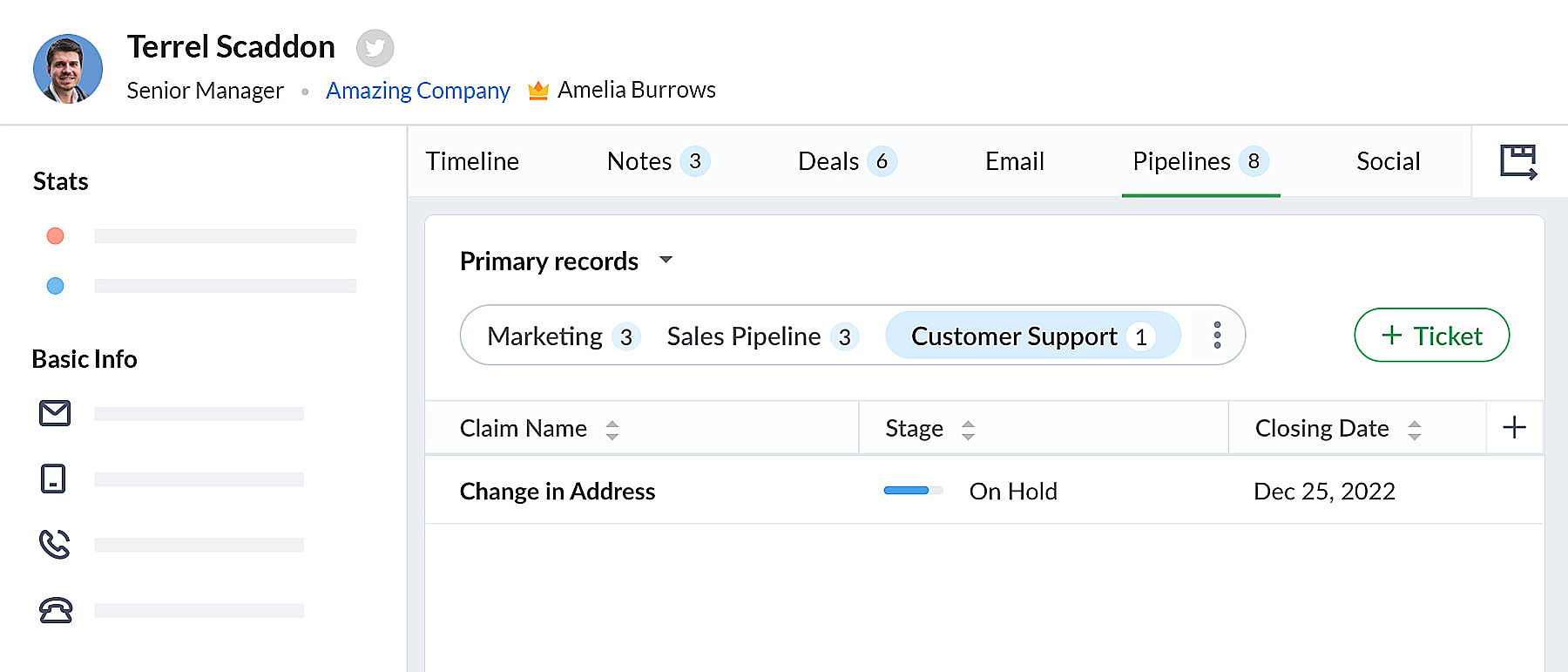 bigin pipeline
Team Pipelines et sous-pipelines : L'équipe idéale pour gérer les opérations uniques de vos clients
Au sein de chaque Team Pipelines, vous pouvez également créer différents sous-pipelines. Les sous-pipelines au sein d'un Team Pipelines ne diffèrent que par les étapes. Ainsi, au sein d'un Team Pipelines, si vous avez besoin de différents ensembles d'étapes pour différentes opérations, vous pouvez créer des sous-pipelines.
En d'autres termes, les sous-pipelines dans Bigin ne sont rien d'autre que la fonctionnalité multi-pipeline actuelle dont vous disposiez déjà.
Votre compte Bigin devient maintenant la source unique d'informations fiables sur vos clients. Il donne à tous les membres de votre équipe une vue à 360 degrés des informations sur les clients, leur permettant de gérer les relations et les interactions avec succès.
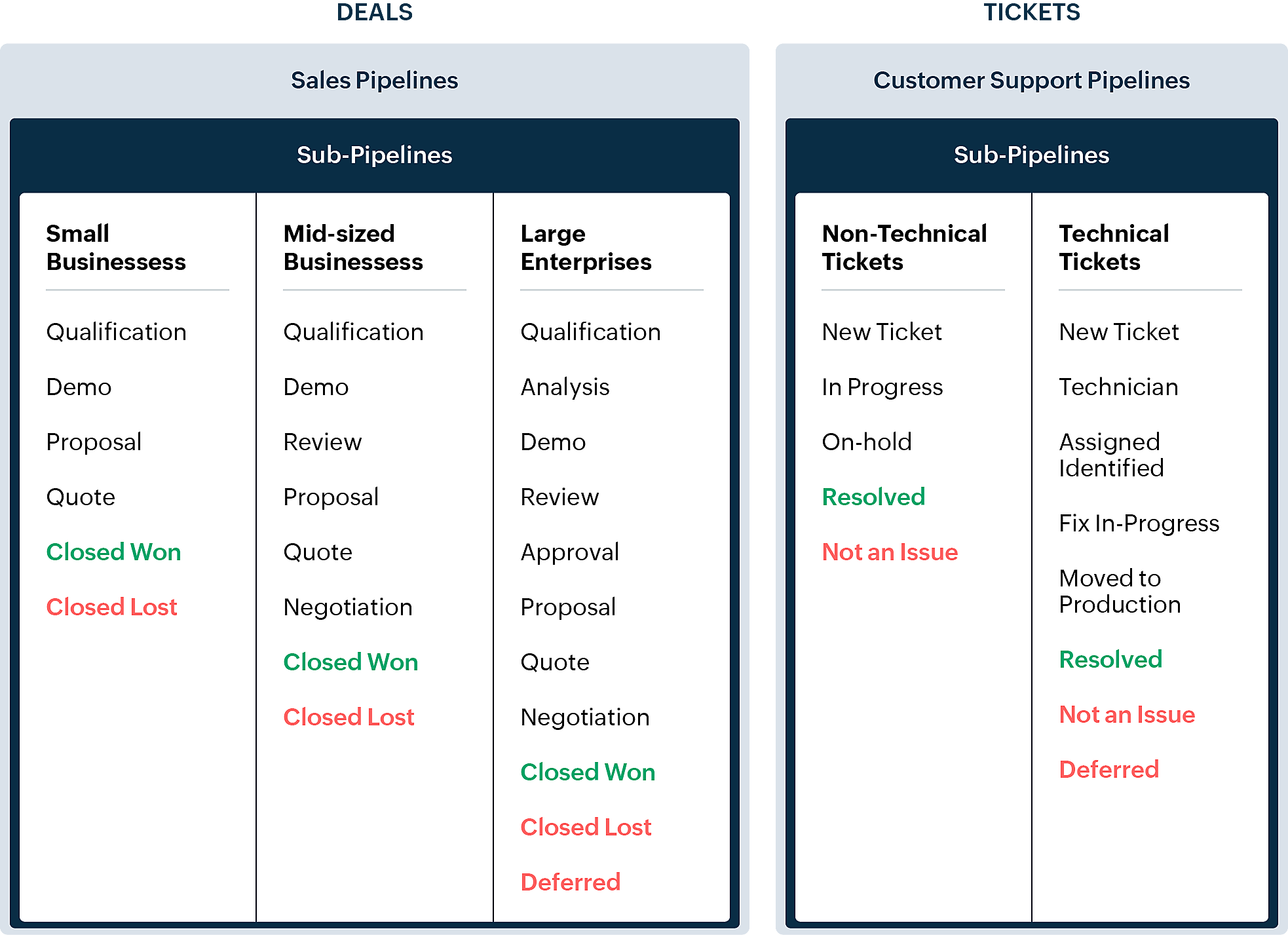
En quoi la nouvelle version est-elle différente de l'interface utilisateur Bigin existante ?
Pipelines est maintenant un module séparé dans Bigin. Là où il y avait auparavant les affaires/opportunités, vous avez maintenant les pipelines. Dans ce module, vous pouvez gérer plusieurs types d'enregistrements tels que les transactions, les tickets, les demandes, etc.
- Les anciennes versions des pipelines que vous avez créés précédemment seront disponibles en tant que sous-pipelines en bas à l'intérieur de chaque pipeline d'équipe.
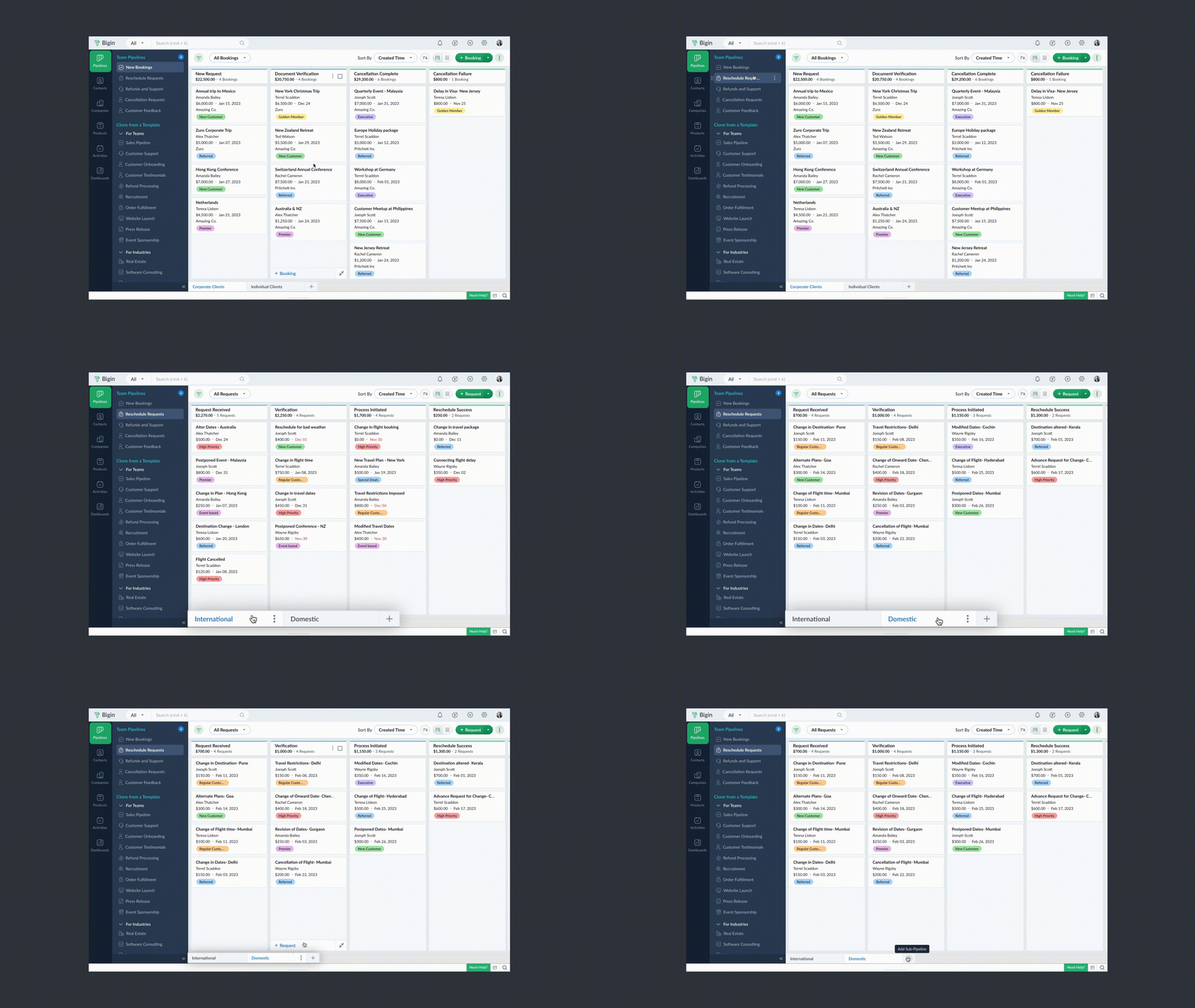
- Chaque pipeline d'équipe peut gérer un type d'enregistrement différent. Par exemple, vous pouvez gérer des transactions dans un pipeline de vente, des tickets dans un pipeline de support client, et ainsi de suite.
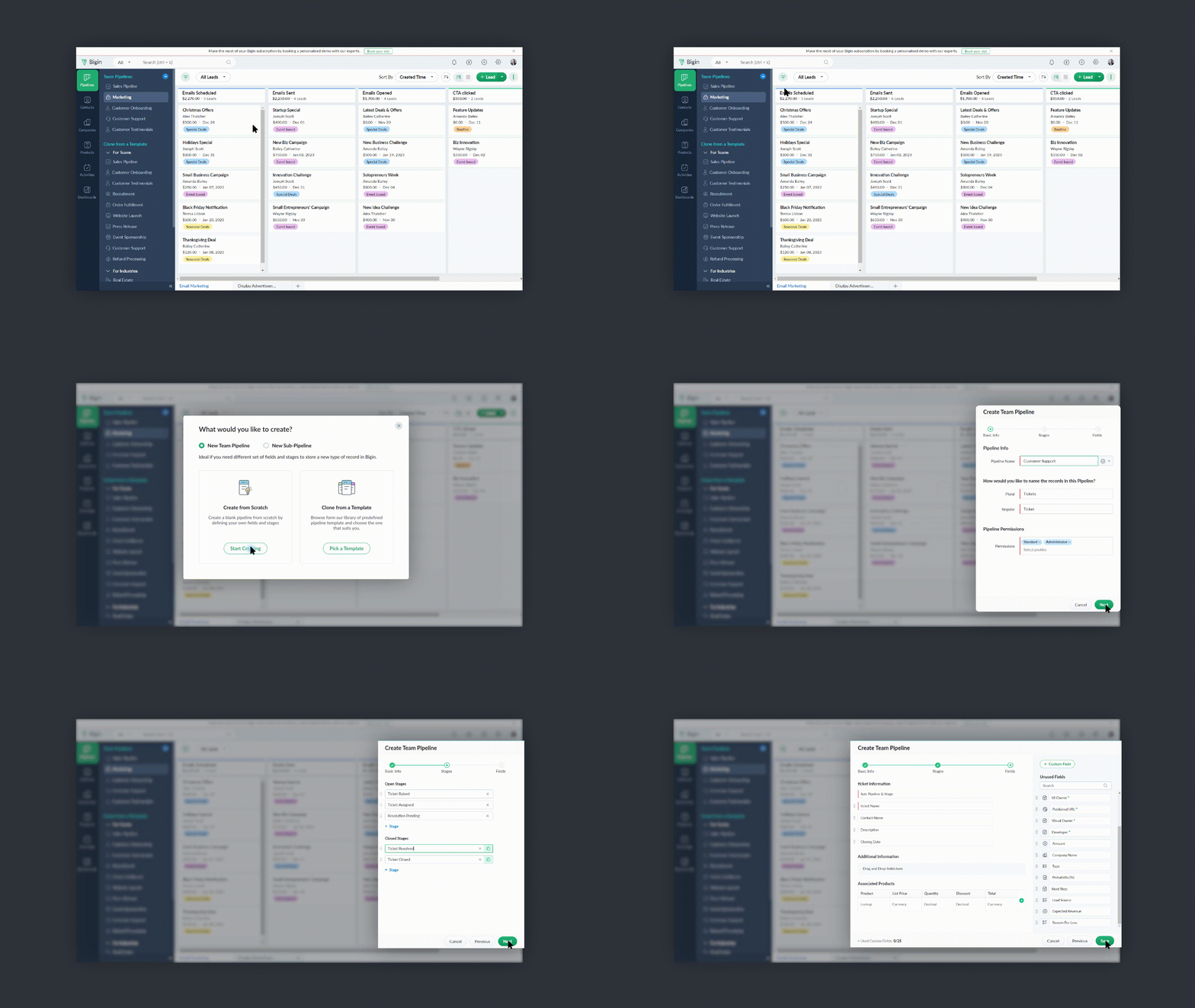
- Vous pouvez créer des pipelines à partir de zéro ou utiliser l'un des modèles proposés par Bigin.
- Vous pouvez rendre vos pipelines d'équipe extrêmement spécifiques aux opérations en leur donnant des noms pertinents, en choisissant les champs nécessaires, en ajoutant des étapes appropriées et en attribuant les bons profils d'utilisateurs pour accéder aux pipelines.
- Vous pouvez réduire le panneau Pipelines d'équipe lorsque vous n'en avez pas besoin en cliquant sur l'icône de la flèche de réduction en bas à gauche.
Comment accéder à cette nouvelle fonctionnalité ?
La fonctionnalité Team Pipelines est désormais accessible à tous nos clients directement depuis l'application Bigin. Il suffit de cliquer sur l'interface comme visible sur la photo ci-dessous :

Vous pouvez nous écrire à l'adresse support@eu.bigin.com à tout moment pour nous faire part de vos commentaires et de vos réactions.
PS : Je serai là si vous avez besoin d'aide pour la nouvelle mise à jour. Il vous suffit de laisser un commentaire dans cet article pour obtenir une réponse à vos questions.
Passez une bonne journée et à très bientôt pour découvrir les nouvelles fonctionnalités Bigin !
Access your files securely from anywhere

Zoho Developer Community





Topic Participants
Antoine Perrault
Sticky Posts
Bigin - Astuce #5 : Comment transférer le statut Super Admin ?
Bonjour Community France, Découvrons comment transférer le statut de Super Administrateur. Sachez que le statut de super administrateur ne peut être transféré à un autre utilisateur administrateur que par le super administrateur lui même. Pour transférerNouveau forfait Bigin Premier : Multi-devises, flux de travail avancés et plus encore !
Bonjour à tous, Nous sommes ravis d'annoncer une toute nouvelle édition de Bigin qui contient plusieurs nouvelles fonctionnalités comme la multidevise, des flux de travail avancés, des champs de recherche personnalisés et plus encore : l'édition Premier.Nouveauté Bigin : associez plusieurs contacts à une même affaire!
Bonjour à tous, Une transaction implique souvent plusieurs décideurs. Prenons l'exemple de l'entreprise Zylker qui utilise Bigin pour gérer ses pipelines de vente. Ils souhaitent acheter des meubles. Pour valider la vente, différents employés, de différentsPack débutant : vos premiers pas sur Zoho Bigin
Dans cet article nous verrons comment paramétrer votre CRM Bigin en 4 étapes : renseigner vos informations, gérer vos utilisateurs ainsi que leurs rôles et profils. Renseigner les informations de votre organisation Vous venez de vous inscrire à Zoho Bigin,Anniversaire Bigin : le CRM pour les petites entreprises évolue
Bonjour à tous ! Nous sommes de retour avec quelques annonces passionnantes. Mais d'abord, joyeux anniversaire à nous ! Bigin a eu un an récemment et nous avons un nouvel ensemble de fonctionnalités que nous sommes impatients de partager avec vous. Nous
Zoho TeamInbox Resources
Zoho CRM Plus Resources
Zoho Books Resources
Zoho Subscriptions Resources
Zoho Projects Resources
Zoho Sprints Resources
Qntrl Resources
Zoho Creator Resources
Zoho CRM Resources
Design. Discuss. Deliver.
Zoho Show Resources

Get Started. Write Away!
Writer is a powerful online word processor, designed for collaborative work.
-
オンラインヘルプ
-
Webセミナー
-
機能活用動画
-
よくある質問
-
Ebook
-
-
Zoho Campaigns
- Zoho サービスのWebセミナー
その他のサービス コンテンツ
Nederlandse Hulpbronnen

ご検討中の方
Recent Topics
Autosaving of Form Field
HI can anyone suggest a way of autosaving or simulating an autosave function for a specific field in a form. The story is as follows. I have a bunch of technicians who write notes on how they do a repair. Sometimes they write for a couple of hours the troubleshooting process. If they click incorrectly, press ESC, Cancel or the browser crashes the information is lost which can be heartbreaking so my guys use notepad and then copy the information in. The only way around this is to click submit on theAsk the Experts 26: Brighten every customer interaction with Zoho Desk all year long
Hello everyone, Greetings and welcome to Ask the Experts 26. As we wrap up 2025, we are excited to invite you to the 26th episode of our Ask the Expert series. 🎄The Merry Metrics Edition = Best of Zoho Desk [Best Practices + Holiday Automation + Year-EndPricing calculator
Alright, so I'm trying to create a pricing calculator/pricing report generator to use in a cabinet shop. I did all the logic and such, and the calculator works. I have a few other things that I would need it to be able to do though, I'll do my best toBug Details
In the Bug detail the milestoneid is missingStop completed task lists from disappearing?
Is there any way to stop projects from making tasks lists disappear when all the tasks in the list are completed? That's one of those little things where we're constantly fighting the product. For instance we have some projects which are ongoing - no start and end date. We use Kanban view to show the various task lists. We don't want the kanban list to disappear every time the items on it happen to be closed out. ThanksAllow customers to choose meeting venue and meeting duration on booking page
My business primarily involves one-to-one meetings with my clients. Given the hybrid-work world we now find ourselves in, these meetings can take several forms (which I think of as the meeting "venue"): In-person Zoom Phone call I currently handle theseBooking outside of scheduled availability
Is there a way for staff (such as the secretary) to book appointments outside of the scheduled availability? Right now to do this special hours must be set each time. There should be a quicker way. Am I missing something?Operation Questions.
Hello, I hope you are well. To explain a little, we are a company that sells services and products with a technical team responsible for installation and maintenance. Zoho FSM can be useful for the technical team, namely for the technical coordinatorDirect Access and Better Search for Zoho Quartz Recordings
Hi Zoho Team, We would like to request a few enhancements to improve how Zoho Quartz recordings are accessed and managed after being submitted to Zoho Support. Current Limitation: After submitting a Quartz recording, the related Zoho Support ticket displaysUpdate date & time when a cell is edited
Hi All, I am desiring to have a cell update with the current date and time when another cell is edited. Any ideas? Thank youAdd "Groups" to "Share With" on Reports & All Entries
Hi, On Forms we can share Publicly, with Specific Users And/Or Specific Groups or All Users. With Reports and All Entries we lack the "Groups" option, please add this as with many users this saves a lot of work. Thanks DanAdd Pause / Resume Option to Zoho Quartz Recordings
Hi Zoho Team, We would like to request an enhancement to Zoho Quartz recordings: the ability to pause and resume an ongoing recording. Current Limitation: At the moment, when recording an issue with Zoho Quartz, the recording continues even when we areCustom Fields Not Showing Up in Invoice PDF Template Document Information
I have added 2 custom fields under Sales > Invoices > Manage Custom Fields. They are set to show in all PDFs. However when I am editing my Invoice PDF template, i do not see the custom fields under Document Information.ZOHO Books
Hi there, Why after I upgrade my Zoho invoice > Books then i wanted to add plugin which i cannot do. Please advise.How is Your eCommerce Experience w/Zoho Inventory?
First off, I'm SUPER grateful for the advent of Zoho Inventory and now the Zoho Commerce Suite. Overall, Inventory is a great product, especially for customers without an eCommerce presence. For eCommerce companies (especially those shipping more than ~10 packages/day), however, there are certain drawbacks that keep my clients from moving over to Zoho Inventory: Cons: 1. Invoice + Package Creation from Shopify/Other eCommerce Integrations: Zoho Inventory makes the somewhat perplexing decision toSimplify Mass Replies with Predefined Templates and Snippets
Hello everyone, We are happy to introduce a new enhancement to Mass Reply that helps agents respond to customers quickly and consistently. With the addition of Email Templates and Snippets in the reply window, agents can use predefined messages whileMapping custom fields from one module to another
I have a custom field, "Subscription Period" that appears as a required field in every Opportunity (Potential). I want that field to appear on any Quotes derived from that Opportunity (and have created a custom field of the same name in Quotes for thatThe Social Wall: November 2025
We’re nearing the end of the year, and the holiday season is officially kicking in! It’s that time when sales peak and your social media game needs to be stronger than ever. We’re back with exciting new updates across AI, analytics, and the mobile appItem name special charaters <>
Im trying to input speical characters such as < and > into item name and item description but comes up with following error: Invalid value passed for Item Name and Invalid value passed for Item Description How do i allow speical characters?How to update Multi File upload field
Assume that i have a multi file upload field,how can i update the same field again?Customer Address Not on Standard Invoice when Address is on Contact Record
Hi, I entered the customer billing and shipping address in Zoho CRM. I created an invoice in Zoho Books with the same customer contact. The contact is correctly in Zoho Books with the billing and shipping address. The invoice for the customer does notApply partial payments to invoices from the Banking Module
We need this! Why is this not possible?Welcome to the Zoho Show Community Forums page!
Hello everyone, The Zoho Show community is a place for you to discuss and share anything and everything related to Zoho Show Presentations, our online presentation software. It includes users from all over the globe and all walks of life. Our community helps answer your Zoho Show questions with responses from other knowledgeable community members to give you the best experience creating and designing exciting presentations. Along the way, you'll meet recognized experts from our software team andHow can I convert an existing contact into a lead?
I imported many contacts into ZOHO CRM. In order to select a few of them as leads, I want to mark or convert a few hundred as Leads. Who can I do that?Price book functionality enhancement
A common use of price books is to create a price book for a given customer level or contract with a specific company. Given that this is done at a company/customer level it would be great to see a way to associate a price book to a given customer andCan we have 24x7 live support for Zohobooks ?
Can we have 24x7 live support for Zohobooks ?Important update about notification security in Business Messaging SDK
As part of our ongoing effort to strengthen the security of notification data, we have enhanced how notifications are processed and protected in our applications. These improvements ensure that all notification related data follows the most up-to-dateSync Zoho Marketing Automation with Zoho Forms
I can't find a section where the integration between Zoho Marketing Automation and Zoho form is explained. And how form subscription works with opt-in and consents.What is the difference between Zoho Campaigns and marketing hub?
Zoho Campaigns is a permission-based email marketing tool for sending marketing emails and mass emails. Marketing Automation is a multichannel marketing automation tool that caters to organizations looking for tools to engage their users across multipleWebhook not firing.
I created a webhook using the Web UI, it looks very nice and the testing worked without an issue, but when i save/ update a ticket, the webhook is not firing. Here are the details of the web-hook i get from using the API "modifiedTime": "2019-10-22T09:23:37.380Z",Duplicate customers being created in Desk
Hi I've trying to work out why I've getting duplicated customers being created in my desk. I have an external booking system that generates an email when I get a customer booking a job. A booking email gets sent to Desk where I manage the booking andCreating a custom CSV file using deluge script/
I have an application I have developed and the client wants us to place an export file in csv onto an ftp server daily. Now I don't see au options in creator to change the separator to anything else. The client wants the separator to be the pipe symbol "|" I think i would be able to create schedule with some code to create the appropriate data in a string using deluge script but I haven't seen any functionality that would allow me to deposit that data as a file anywhere or attach it to an emailCan we add custom fields to portal community profiles?
How do we add custom fields to our profile pages in our portal community? If we have the ability to add custom fields, will we be able to access those fields via API? We want to use our Desk community in our help portal as our primary community and wouldE-Invoicing in Belgium with Zoho Billing
Starting January 1, 2026, Belgium is introducing mandatory electronic invoices (e-invoicing) for all B2B transactions between VAT-registered businesses. Invoices and credits notes must be exchanged in a prescribed digital format. How E-Invoicing worksdelayed: host mx2.zoho.com (136.143.183.44): Network error: Unexpectedly disconnected (STARTTLS)
Hi Team, I'm not receiving any email. Seems to be an issue. Sender sent me the error message they received: "delayed: host mx2.zoho.com (136.143.183.44): Network error: Unexpectedly disconnected (STARTTLS)" Please advise.Additional Address - Company Name
It would be very helpful to have a "Company Name" field in the Additional Address shipping section. In a situation where you drop-ship orders to a different address or different company entirely, it may be necessary to list the company name of the receiver. I understand that the Attention field can be used for that purpose, but that's not really the intended purpose of that field.Incorrect Email Notifications for Product Reviews
Dear Zoho Commerce Support Team, I am writing to report a technical issue that occurs frequently on our platform. Problem Description: We regularly receive email notifications informing us of new product reviews awaiting approval. However, when we accessHow to Rank Tables by Row Count in Descending Order
I am trying to understand the consume of lines that grow up so fast in the last week. Is there any way to create a pivot table or query to get TABLE NAME LINES in descending order?Can we do Image swatches for color variants?
We want to do something like the attached screenshot on our new zoho store. We need image swatches instead of normal text selection. We want to user to select an image as color option. Is this doable? I don't see any option on zoho backend. Please hannualy customer report
we need a report per customer that looks like this invoic number cleaning laundry repair management 01 january xxx euro xx euro xx euro xxx euro 02 february xxx euro xxx euro x euro xxxx euro and so on the years 12 months is that possible to make andNext Page