Optimiser les groupes dans votre réseau Zoho Connect

Les groupes sont l'espace idéal où les équipes peuvent partager des informations au sein de groupes particuliers ou à travers l'organisation, selon la nature desdits groupes dans Zoho Connect. Cette fonction vous permet de créer trois types de groupes.
Ouvert : tous les membres du réseau peuvent rejoindre le groupe, voir les conversations et publier des messages ou des commentaires et accéder à des modules tels que les fichiers, manuels, et événements.
Public : tous les membres du réseau peuvent voir les conversations, publier des messages et des commentaires dans le groupe. Cependant, ils n'ont pas accès aux applications intégrées et seul l'administrateur peut ajouter des membres.
Privé : seuls les membres peuvent voir le groupe et y accéder.
Le type de groupe peut être modifié à tout moment à partir de "Paramètres du groupe".
Créer un nouveau groupe
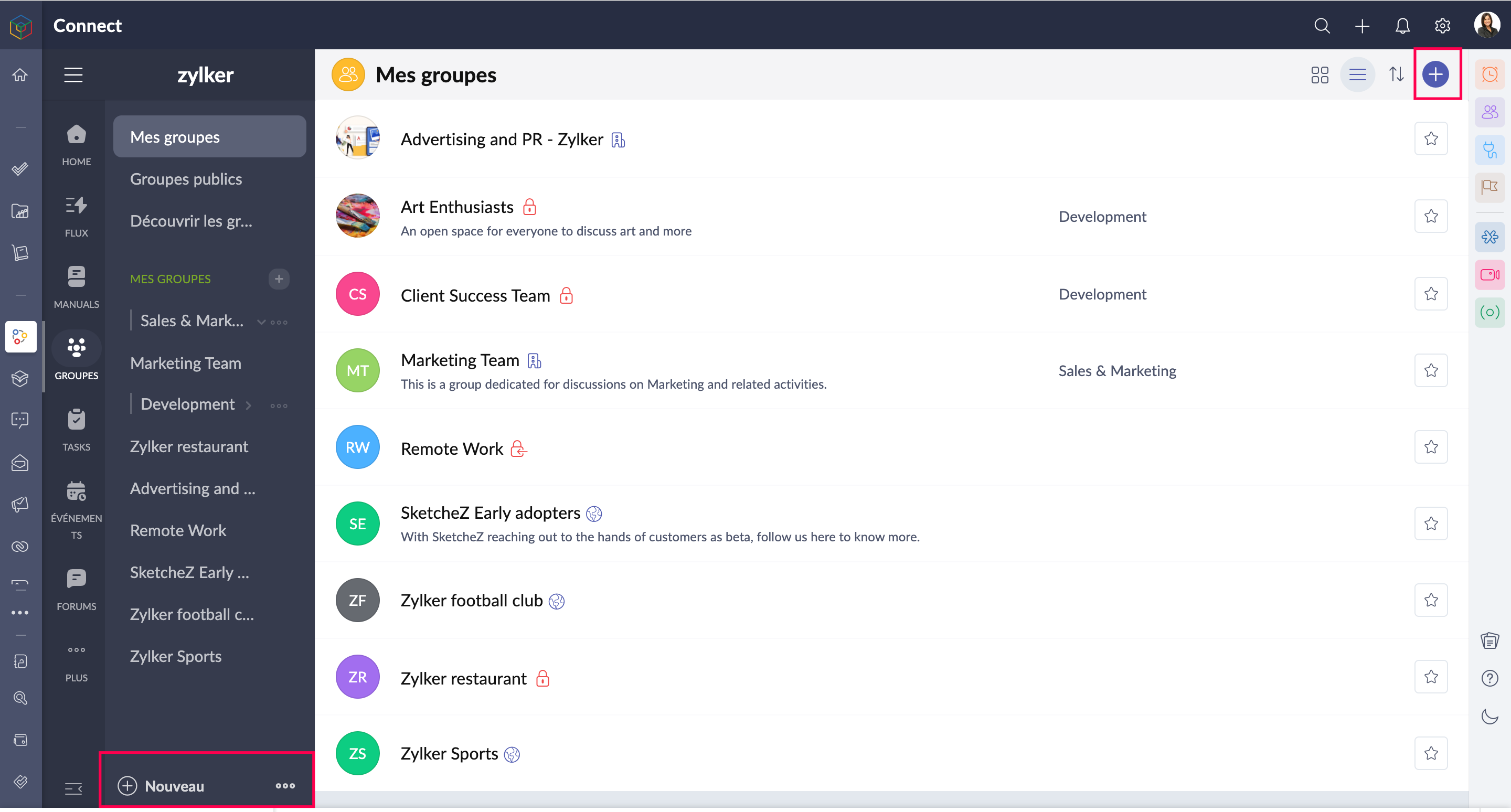
- Accédez à l'onglet "Groupes" depuis le panneau à gauche.
- Depuis le "+" en haut à droite, vous pouvez créer de nouveaux groupes.
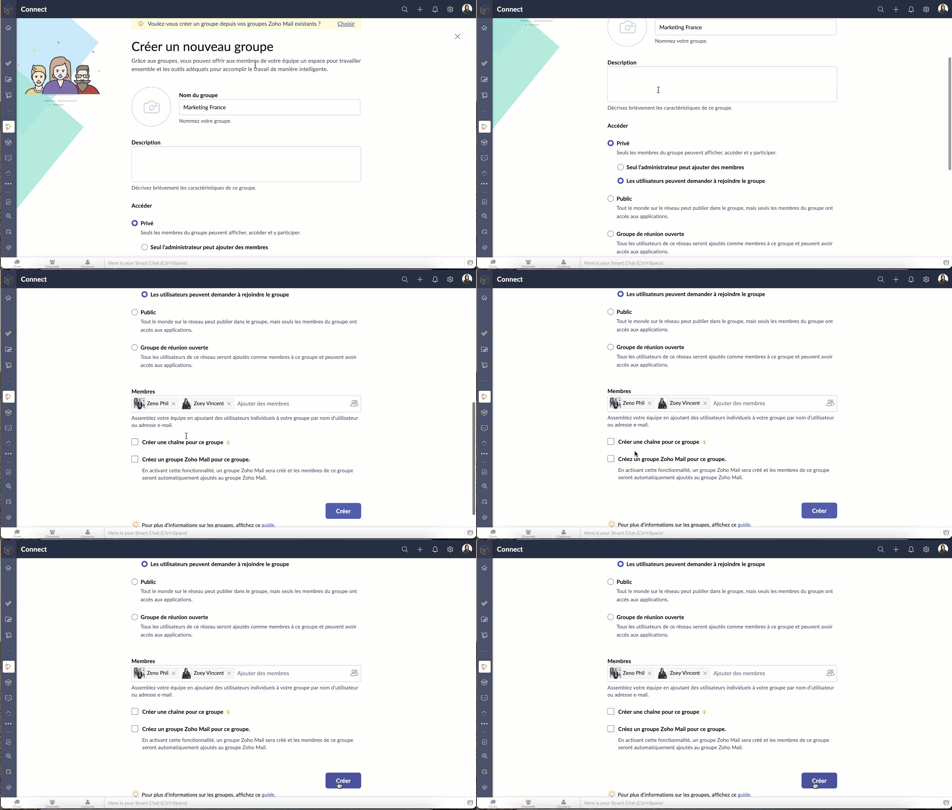
- Saisissez les informations demandées.
- Pour un groupe privé, sélectionnez une des options demandées.
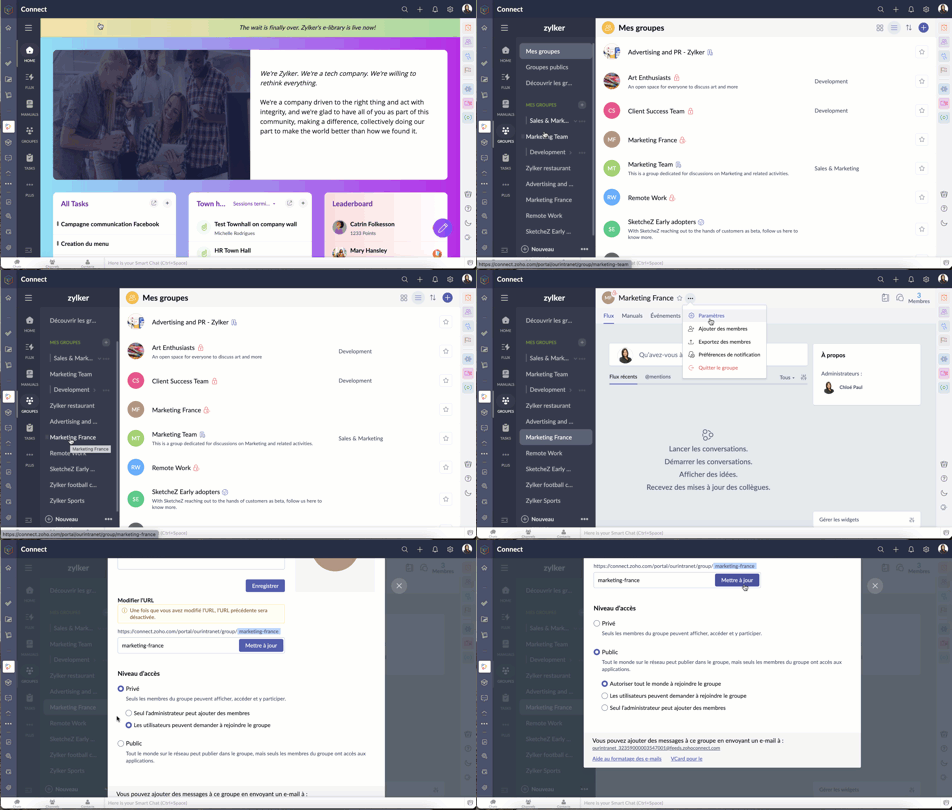
- En cas de modification ultérieure du choix ci-dessus
- Sélectionnez un groupe >> Paramètres >> Niveau d'accès.
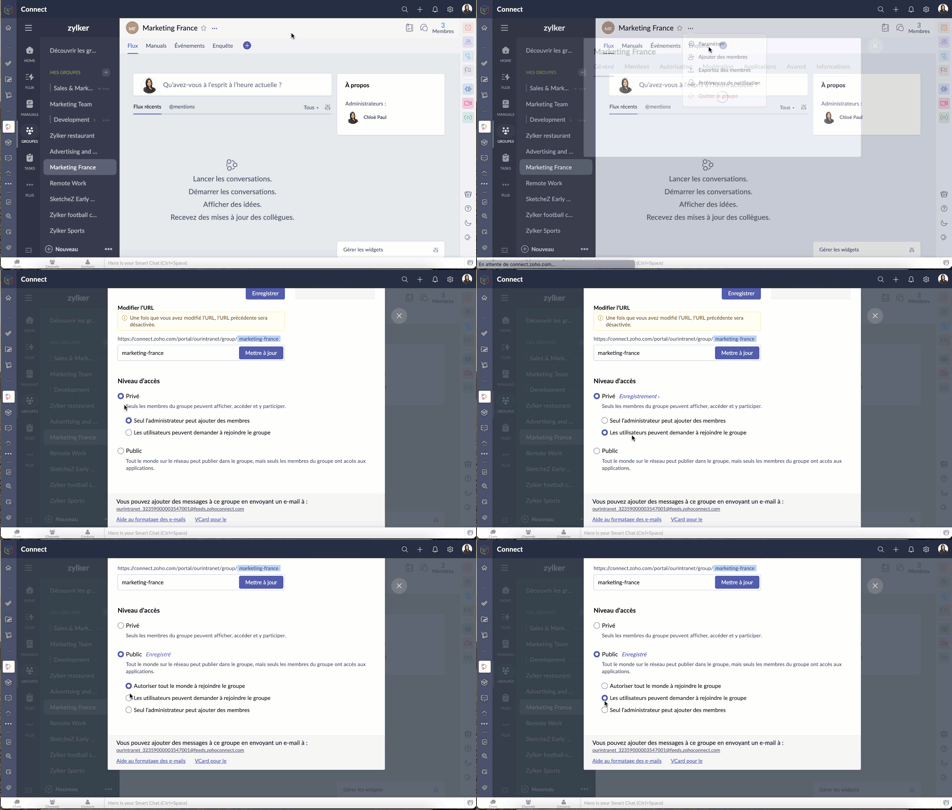
- Modifiez le niveau d'accès selon les besoins.
- Selon les politiques établies par l'administrateur, les membres du réseau peuvent ou non être autorisés à créer des groupes.
Demander à rejoindre un groupe
Pour pouvoir rejoindre un groupe, il faut que l'administrateur ait sélectionné "Les utilisateurs peuvent demander à rejoindre le groupe" lors de la création du groupe.
- Une fois cette fonction activée, les utilisateurs peuvent demander à rejoindre un groupe privé à partir de la page du groupe.
- Afin d'approuver ou de rejeter une demande de se rejoindre, les administrateurs peuvent se rendre dans l'onglet modération depuis les boutons à droite.
Créer des catégories de groupes
La création de catégories de groupes permet une navigation facile et rapide. Par exemple, vous pouvez créer une catégorie telle que "fréquemment utilisé" et y placer les groupes auxquels vous accédez le plus souvent.
- Accédez à "Groupes" à partir du panneau à gauche.
- Cliquez sur l'icône "+" à côté de la liste "Mes groupes".
- Sur la fenêtre secondaire, saisissez les informations demandées.
- Ajoutez les groupes nécessaires sous la catégorie créée et enregistrez.

Modérer les messages et les commentaires dans un groupe
Une fois que vous avez activé la modération dans le groupe, tous les messages et commentaires publiés dans le groupe devront être approuvés par le modérateur avant d'être visibles par tous. Par défaut, tous les administrateurs de groupe sont des modérateurs.
Activer la modération
- Activer la modération depuis l'onglet "Modération" qui se trouve sous le nombre de membres d'un groupe particulier.
- Lorsque vous activez la modération, vous pouvez également sélectionner les utilisateurs.
- Vous pouvez aussi ajouter les utilisateurs sur la liste verte. Elle est un ensemble d'utilisateurs à contourner la modération et partager directement des publications et commentaires.

Rôles des utilisateurs dans un groupe
Les rôles des utilisateurs dans un groupe sont les suivants : administrateur, modérateur et membre.
Administrateur : la personne qui crée le groupe est par défaut l'administrateur du groupe. Les administrateurs peuvent ajouter ou supprimer des membres à tout moment, activer ou désactiver des applications intégrées, modérer les messages et les commentaires publiés dans le groupe, et verrouiller, archiver ou supprimer le groupe.
Modérateur : le modérateur vérifie les messages et les commentaires avant qu'ils n'apparaissent sur le mur du groupe. Il peut approuver, modifier ou supprimer les messages et les commentaires publiés dans le groupe avant qu'ils ne soient visibles par tous les autres membres. Par défaut, tous les administrateurs du groupe sont modérateurs, mais n'importe quel membre du groupe peut également être ajouté en tant que modérateur.
Membres : les membres sont ajoutés au groupe par l'administrateur. Ils peuvent publier et commenter dans le groupe et accéder à toutes les applications intégrées activées.
Rétablir un groupe supprimé
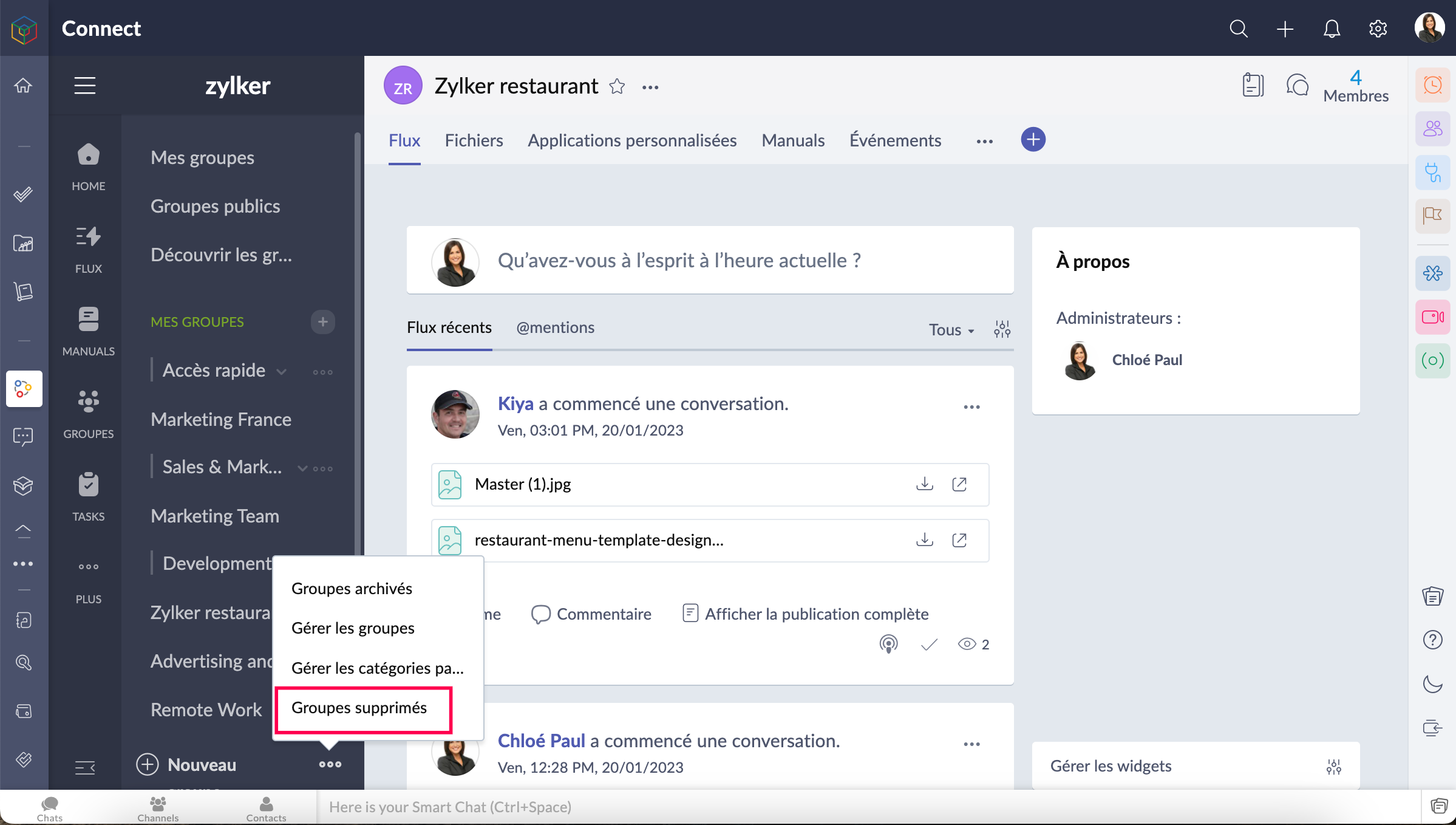
- Seuls les administrateurs de réseau peuvent restaurer un groupe supprimé.
- Les groupes supprimés sont conservés dans la corbeille pendant 90 jours. Les administrateurs pourront restaurer un groupe et son contenu pendant cette période. Après 90 jours, le groupe sera définitivement supprimé.
- Allez sur l'onglet "Groupes supprimés" depuis le panneau à gauche et restaurez le groupe selon votre besoin.
Nous espérons que ces astuces vous aideront à mieux configurer les différents groupes dans Zoho Connect.
N'hésitez pas à nous faire part de vos questions dans les commentaires
L'équipe Zoho France
Access your files securely from anywhere
New to Zoho Recruit?

Zoho Developer Community
New to Zoho LandingPage?
Zoho LandingPage Resources
New to Zoho Survey?
New to Zoho CRM Plus?
Deliver unforgettable customer experiences
New to Zoho CRM Plus?
Deliver unforgettable customer experiences
New to Zoho Marketing Plus?
Everything you need to run your marketing
New to Zoho Marketing Plus?
Everything you need to run your marketing
New to Bigin?





Topic Participants
Kinjal Lodaya
Sticky Posts
Collaboration sans faille avec Zoho One
Bonjour à tous, Dans cet article nous allons voir comment Zoho One permet une collaboration à différents niveaux . La façon dont nous travaillons évolue. À mesure que les entreprises se mondialisent, la plupart des activités sont menées en équipe.
New to Zoho TeamInbox?
Zoho TeamInbox Resources
Zoho CRM Plus Resources
Zoho Books Resources
Zoho Subscriptions Resources
Zoho Projects Resources
Zoho Sprints Resources
Qntrl Resources
Zoho Creator Resources
Zoho CRM Resources
Design. Discuss. Deliver.
Zoho Show Resources

Get Started. Write Away!
Writer is a powerful online word processor, designed for collaborative work.
Zoho CRM コンテンツ
-
オンラインヘルプ
-
Webセミナー
-
機能活用動画
-
よくある質問
-
Ebook
-
-
Zoho Campaigns
- Zoho サービスのWebセミナー
その他のサービス コンテンツ
Nederlandse Hulpbronnen

ご検討中の方
Recent Topics
Tip #55- Accessibility Controls in Zoho Assist: Exploring Vision Settings- 'Insider Insights'
As we approach the end of the year, it’s a good moment to reflect on how we can make our tools more inclusive and easier to use for everyone. Remote support often involves long hours in front of screens, varied lighting conditions, and users with differentZoho Recruit Slow and Freezing on all screens
We have had an issue with Zoho Recruit for weeks being extremely slow and at times freezing. We have 100 mega internet, and I went into each computer and updated the virtual memory so there is more available. Also restarted all computers daily. Still having the issues. Almost unable to work.Credit Management: #2 Configuring Right Payment Terms for Credit Control
Think about the last time you ordered something online and saw that little note at the checkout, "Pay on Delivery" or "Pay later". It's simple, but it actually sets the tone. As a business owner, you know exactly when payment is expected. Now, imagineDependent (Conditional) Fields in Zoho Bookings Forms
Hello Zoho Bookings Team, Greetings, We would like to request the ability to create dependent (conditional) fields in Zoho Bookings registration forms. Current Limitation: There is currently no way to make one field’s available options depend on the valueBug Report: Search fails to find existing notes after Evernote import
Hello, I recently migrated from Evernote (~2600 notes across 23 notebooks), but the search functionality is currently broken. The Issue: I can manually browse to a specific note and see it exists. However, when I type the exact or partial title of thatMarketing Tip #13: Win repeat customers with post-purchase emails
The relationship with your customer doesn’t end after the sale; that’s when it begins. A thoughtful post-purchase message shows customers you appreciate them, keeps your brand top of mind, and can even lead to another sale. You can thank them, ask forZoho Form
I have problem with Zoho Form. One of form i don't received the PDF version. Others okay except this one. W904533Create & Update Zoho Vault Passwords via Zoho Flow
Hi Zoho Flow / Zoho Vault Team, We’d like to request an enhancement to the Zoho Vault integration in Zoho Flow. Current Limitation: At the moment, Zoho Flow supports only the following selected Zoho Vault actions, such as: Fetch passwords, Share passwordsIs Zoho Communityspaces now part of Zoho One?
Is Zoho Communityspaces now part of Zoho One?Streams/Shared email doesn't show up in windows trident app. It works fine on MAC. Is there any difference between 2 install ?
I can see streams/share email boxs on my MAC version of trident app but i can't see them in windows version of trident app. Is there any difference between 2 install? I try to find setting but not able to see any setting to add stream/share email boxes.Credit Note for Shipped and Fatoora pushed invoices
We have shipped a Sales Order and created an Invoice. The Invoice is also pushed to Fatoora Now we need to create a credit note for the invoice When we try it, it says we need to create a Sales Return in the Zoho Books, we have already created a SalesCliq iOS can't see shared screen
Hello, I had this morning a video call with a colleague. She is using Cliq Desktop MacOS and wanted to share her screen with me. I'm on iPad. I noticed, while she shared her screen, I could only see her video, but not the shared screen... Does Cliq iOS is able to display shared screen, or is it somewhere else to be found ? RegardsCustom Related List Inside Zoho Books
Hello, We can create the Related list inside the zoho books by the deluge code, I am sharing the reference code Please have a look may be it will help you. //..........Get Org Details organizationID = organization.get("organization_id"); Recordid = cm_g_a_data.get("module_record_id");Features, Feedback and Votes
We’re launching the Feedback Forum for our customers. This is 'THE' place where you can add everything you’d like to see in Zoho Books. If you don't find the specific feature you need, simply add it so others can also vote for it. While we cannot promiseadd zoho account
How to add a zoho mail to previous zoho account? I have twoThere Might Be A Glitch in Determining If A String Represents A URL
I suspect there might be a glitch in determining if a string represents a URL or not. For example, I cannot embed the following URL. Perhaps the exclamation mark or parentheses are the culprit? https://en.wikipedia.org/wiki/How_the_Grinch_Stole_ChriCustomer Management: #4 Enhance Customer Journey
When Neha started DefineOps, a growing IT support and consulting firm, most of her work was straightforward. A client would sign up for a free version, decide whether the service works for them, and then either continue or discontinue. Billing was simple,Pipeline.Company Name field shows up as numbers! [Bigin Developer Console > Component > URL]
Hi there, I am setting up to invoke URL to send infromation zoho bigin > zoho forms with company name pre-fill in the form. however when I use : ${Pipelines.Company Name} field it shows up as a string of number instead of words. Help.Marketing Tip #1: Optimize item titles for SEO
Your item title is the first thing both Google and shoppers notice. Instead of a generic “Leather Bag,” go for something detailed like “Handcrafted Leather Laptop Bag – Durable & Stylish.” This helps your items rank better in search results and instantlyTerritory Assignment Issues (Lead to Account + Contact)
1. Lead → Account & Contact Territory Assignment on Conversion A Lead is automatically assigned one or more territories using a workflow and Lead Assignment Rules. This works as expected, and we are able to assign multiple territories to a Lead automatically.Marketer's Space: Proven tips to improve open rates – Part II
Hello Marketers! Welcome back to another post in Marketer's Space! We're continuing from where we left off a fortnight ago. We ended the previous post discussing the subject line, and we'll continue from there. Let's dive right in. Pre-header Pre-headerSQL Table slowed to a crawl
Hi all - I seem to have noticed an update. Now whenever I am typing in the script field for the SQL tables there is a huge delay and it is all very slow. This has never been the case for me in over 5 years of using Analytics - I really hope it's fixedDeluge Events/search API works in user environment but not in sandbox – why?
I am creating an Extension for Zoho CRM using Zoho Sigma Platform I’m using the following Deluge code to search Events in Zoho CRM based on Start_DateTime: criteria = "(Start_DateTime:greater_than:2025-12-20T00:00:00+00:00)"; url = "crm/v8/Events/search?criteria="Ensure Consistent Service Delivery with Comprehensive Job Sheets
We are elated to announce that one of the most requested features is now live: Job Sheets. They are customizable, reusable forms that serve as a checklist for the services that technicians need to carry out and as a tool for data collection. While onWhat are Zoho Meeting capabilities included in Zoho Workplace Standard?
I am evaluating using Zoho Meeting for my organization, but it is not clear what Zoho Meeting capabilities are already included in Zoho Workplace Standard. - Are meeting recordings included in Workplace Standard? - Can we invite external meeting participantsCreate static subforms in Zoho CRM: streamline data entry with pre-defined values
Last modified on (9 July, 2025): This feature was available in early access and is currently being rolled out to customers in phases. Currently available for users in the the AU, CA, and SA DCs. It will be enabled for the remaining DCs in the next coupleHow can I get the participant list of a reoccurring meeting afterwards?
I'm trying to use the Meeting Participant Report from the API docs but when I call it on a reoccurring meeting it returns that there are no participants because it thinks I'm talking about the meeting in the future. Is there a way to use webhooks or someFunction #50: Send Mass emails to your customers
Hello everyone, and welcome back to our series! We have reached a milestone of 50 Functions, which means that we have automated 50 different tasks in Zoho Books. Every Friday, we have shared a nifty function aimed at either automating a task or streamliningFull Hebrew Language Support for Client-Side Zoho Assist Interface
Dear Zoho Assist Team, We would like to request an enhancement to Zoho Assist's client-side interface to support full Hebrew language customization, including all popups, notifications, and session-related messages. Current Limitation The Join page allowsAdd Hebrew & RTL Support to Feedback Widget
Hello Zoho Desk Team, How are you? We are using Zoho Desk and would like to utilize the Feedback Widget. While Zoho Desk itself supports Hebrew and RTL, the Feedback Widget unfortunately does not. We kindly request that Hebrew and full RTL support beMerge Tickets Directly from Contact Page in Zoho Desk
Dear Zoho Desk Support Team, We are writing to request a new feature that would allow users to easily merge tickets directly from the contact page in Zoho Desk. Currently, the only option to merge tickets is from the Tickets list view page, which canDifferent languages for users
Hello, Do you plan to enable individual users to select their languages for interface? Currently language can be changed for everyone - it looks like a settings for a whole portal, which is not good when you are working internationally. Best regards,Kaizen #222 - Client Script Support for Notes Related List
Hello everyone! Welcome to another week of Kaizen. The final Kaizen post of the year 2025 is here! With the new Client Script support for the Notes Related List, you can validate, enrich, and manage notes across modules. In this post, we’ll explore how2025年 Zoho コミュニティ 活動の振り返り 🎉
ユーザーの皆さん、こんにちは!コミュニティチームの中野です。 2025年も多くの学びと出会いがあったZoho コミュニティ。 本記事では今年の活動を振り返りながら、フォーラムの投稿・参加者の皆さん・イベントのハイライトをご紹介していきます。 目次 フォーラム:注目の投稿 フォーラム:多くの貢献をしてくださった方々 ユーザー交流会振り返り ワークアウト振り返り その他のトピックス 1. フォーラム:注目の投稿 本フォーラムでは様々な議論と知識の共有が行われました。 ユーザーの皆さんが日々の業務で直面する課題を投稿し、経験豊富なユーザーさん達が実践的な解決策を提供してくださいました。Customer Management: #3 Giving Customers Control & Privilege
Rio, the founder of RenoTech Solutions, a fast-growing digital service company, found itself juggling a dozen different services for its clients. They handled one-time setup fees, recurring monthly invoices, and custom milestone-based billing for projects.Can I use a Standalone CRM Function as the Callback URL For Async Export Data API?
I am creating an export job using this API https://www.zoho.com/analytics/api/v2/bulk-api/export-data-async/create-export/view-id.html There is a "callbackUrl" key in the CONFIG object. I tried copying the URL for a standalone function in CRM which canBooks Api: listing expenses created after certain dates
Is there any parameter I can add to the List Expenses endpoint that will let me look up expenses by when they were created?Add RTL (Right-to-Left) Text Direction Support Across All Zoho Learn Editing Interfaces
Hi Zoho Learn Team, Hope you're doing well. We would like to request an important enhancement to Zoho Learn regarding support for right-to-left (RTL) languages such as Hebrew and Arabic. 🔹 Current Issue While the Knowledge Base Article editor providesAdd Hebrew Support for Meeting Transcripts Provided by ZIA in Zoho Cliq
Hi Zoho Cliq Team, Hope you're doing well. We would like to request the addition of Hebrew language support for the Meeting Transcript and Summary feature in Zoho Cliq. Currently the transcript and summary feature is available for recorded meetings andRemote Control Functionality During Screen Sharing in Zoho Cliq
Hello Zoho Cliq Team, We would like to request the addition of remote control functionality during screen sharing sessions in Zoho Cliq. Currently, while screen sharing in Cliq is very useful, it lacks the ability for another participant to take controlNext Page