Présentation des pipelines connectés, pour une transition fluide des données entre les pipelines
Bonjour à tous !
Nous avons récemment présenté les Pipelines d'Équipes - la dernière mise à jour majeure de Bigin pour transformer et unifier les opérations clients pour les petites entreprises. L'un des retours que nous avons reçus de nos premiers utilisateurs est que lorsqu'un enregistrement atteint un certain stade dans un Team Pipeline, ils souhaitent qu'un nouvel enregistrement soit créé dans un autre Team Pipeline avec les informations reportées du pipeline précédent. Pour répondre à cette demande, nous introduisons les Pipelines connectés, une nouvelle fonctionnalité qui automatise le transfert transparent des enregistrements d'un pipeline à l'autre.
Comment les pipelines connectés peuvent-ils aider votre entreprise ?
Prenons l'exemple d'une entreprise de décoration d'intérieur - Zylker Interiors - qui propose des espaces de travail intérieurs pour les bureaux. Elle a mis en place 3 Team Pipelines différents à Bigin.
Pipeline de ventes | Pipeline de production | Pipeline d'installation |
L'équipe de vente de Zylker utilise ce pipeline pour entrer en contact avec des prospects à la recherche d'intérieurs de bureaux et les convertir en clients. | Une fois qu'un nouveau client a rejoint l'entreprise, l'unité de production de Zylker utilise ce pipeline pour gérer les ordres de production du client. | Après l'achèvement d'un ordre de production, l'expédition vers le site du client et le processus d'installation qui s'ensuit sont gérés dans ce pipeline. |
Dans le cas de Zylker, chaque fois que l'équipe de vente conclut une affaire dans le pipeline de vente, il serait idéal qu'une nouvelle commande soit instantanément créée dans le pipeline de production. De même, une fois la commande terminée dans le pipeline de production, l'idéal serait de créer automatiquement une demande d'installation correspondante dans le pipeline d'installation.
Les pipelines connectés peuvent vous aider à automatiser l'ensemble de ce processus, éliminant ainsi le travail manuel et les erreurs liées à l'intervention humaine.

Comment cela fonctionne-t-il ?
Pour réaliser des pipelines connectés, nous introduisons une nouvelle action dans les flux de travail : "Créer des enregistrements connectés".

1. Avec cette mise à jour, vous pouvez configurer un Workflow qui se déclenche chaque fois que l'étape d'une Offre est modifiée. Vous pouvez spécifier l'étape exacte dans la section Conditions.
2. Dans la section Actions, vous pouvez cliquer sur l'action "Créer des enregistrements connectés" et choisir le prochain pipeline d'équipe dans votre processus d'entreprise. Dans le cas de Zylker, il s'agira du pipeline de production après la conclusion d'une affaire dans le pipeline de vente.
3. Dans l'écran Créer un enregistrement connecté qui s'affiche, vous pouvez mapper les champs entre les deux pipelines afin que les informations de l'enregistrement de l'affaire soient correctement reportées dans l'enregistrement de la commande lorsqu'elle atteint le pipeline de production.
Désormais, chaque fois que l'équipe de vente conclut une affaire dans le pipeline de vente, une nouvelle commande est automatiquement créée dans le pipeline de production. Cela permet d'éviter les efforts manuels et de gagner du temps, car l'étape suivante du parcours du client démarre instantanément dès que l'équipe a terminé l'étape précédente.
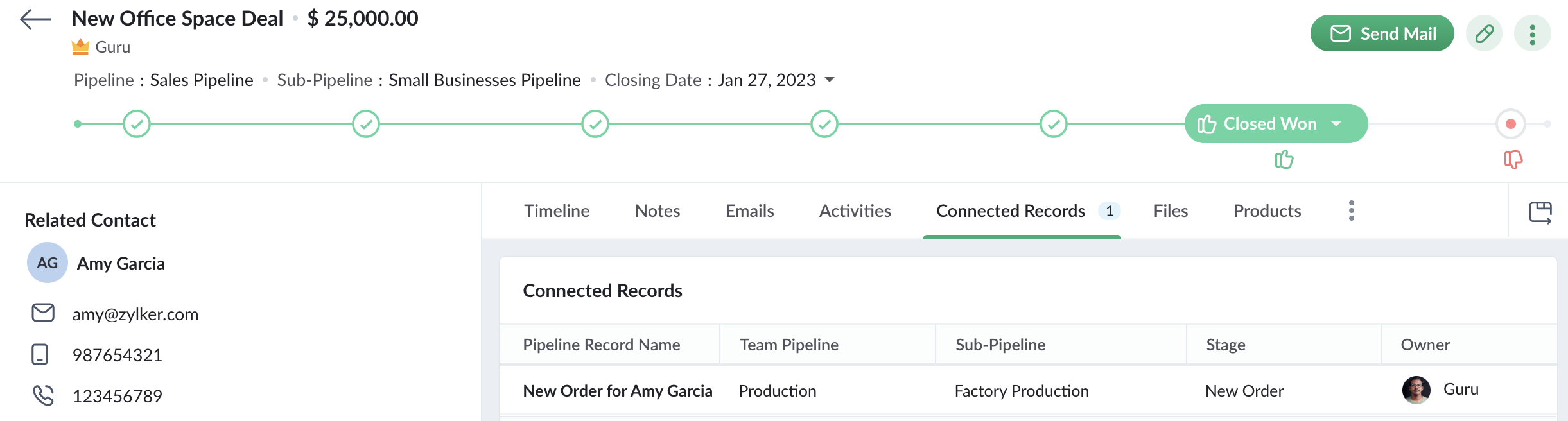
De plus, lorsqu'un commercial ouvre un enregistrement d'affaire qui a déclenché le workflow pour créer une nouvelle commande, il peut également voir l'enregistrement de la commande dans l'onglet Enregistrements connectés. Le commercial peut ainsi suivre l'état de la commande. Ainsi, Connected Pipelines permet à vos équipes de rester unies grâce à la boucle d'information connectée à travers Team Pipelines.
Disponibilité
Si vous utilisez déjà la version Team Pipelines de Bigin, alors Connected Pipelines sera déjà disponible pour vous. Vous pouvez vous en assurer en vérifiant si vous voyez l'action "Créer des enregistrements connectés" lorsque vous créez un flux de travail.
Nous avons publié un guide d'aide détaillé pour vous aider à démarrer avec Connected Pipelines.
Essayez cette nouvelle amélioration et faites-nous part de vos réactions dans les commentaires ci-dessous.
Pour ceux qui n'ont pas encore essayé Team Pipelines, nous vous suggérons de remplir ce formulaire et nous activerons Team Pipelines pour votre compte. Nous vous conseillons de passer à Team Pipelines le plus tôt possible car nous nous préparons à le déployer pour tous les utilisateurs de Bigin.
Sur quoi d'autre travaillons-nous ?
Nous avons écouté activement vos demandes de fonctionnalités et nous travaillons sur un grand nombre d'améliorations, notamment l'intégration de Whatsapp, l'affichage du calendrier pour les activités, les pages de réservation en ligne, les formulaires Web pour Team Pipelines et bien d'autres encore.
Restez à l'écoute pour de nouvelles mises à jour !
Access your files securely from anywhere
All-in-one knowledge management and training platform for your employees and customers.

Zoho Developer Community





Topic Participants
Antoine Perrault
Sticky Posts
Bigin - Astuce #5 : Comment transférer le statut Super Admin ?
Bonjour Community France, Découvrons comment transférer le statut de Super Administrateur. Sachez que le statut de super administrateur ne peut être transféré à un autre utilisateur administrateur que par le super administrateur lui même. Pour transférerNouveau forfait Bigin Premier : Multi-devises, flux de travail avancés et plus encore !
Bonjour à tous, Nous sommes ravis d'annoncer une toute nouvelle édition de Bigin qui contient plusieurs nouvelles fonctionnalités comme la multidevise, des flux de travail avancés, des champs de recherche personnalisés et plus encore : l'édition Premier.Nouveauté Bigin : associez plusieurs contacts à une même affaire!
Bonjour à tous, Une transaction implique souvent plusieurs décideurs. Prenons l'exemple de l'entreprise Zylker qui utilise Bigin pour gérer ses pipelines de vente. Ils souhaitent acheter des meubles. Pour valider la vente, différents employés, de différentsPack débutant : vos premiers pas sur Zoho Bigin
Dans cet article nous verrons comment paramétrer votre CRM Bigin en 4 étapes : renseigner vos informations, gérer vos utilisateurs ainsi que leurs rôles et profils. Renseigner les informations de votre organisation Vous venez de vous inscrire à Zoho Bigin,Anniversaire Bigin : le CRM pour les petites entreprises évolue
Bonjour à tous ! Nous sommes de retour avec quelques annonces passionnantes. Mais d'abord, joyeux anniversaire à nous ! Bigin a eu un an récemment et nous avons un nouvel ensemble de fonctionnalités que nous sommes impatients de partager avec vous. Nous
Zoho TeamInbox Resources
Zoho CRM Plus Resources
Zoho Books Resources
Zoho Subscriptions Resources
Zoho Projects Resources
Zoho Sprints Resources
Qntrl Resources
Zoho Creator Resources
Zoho CRM Resources
Design. Discuss. Deliver.
Zoho Show Resources

Get Started. Write Away!
Writer is a powerful online word processor, designed for collaborative work.
-
オンラインヘルプ
-
Webセミナー
-
機能活用動画
-
よくある質問
-
Ebook
-
-
Zoho Campaigns
- Zoho サービスのWebセミナー
その他のサービス コンテンツ
Nederlandse Hulpbronnen

ご検討中の方
Recent Topics
sync two zoho crm
Hello everyone. Is it possible to sync 2 zoho crm? what would be the easiest way? I am thinking of Flow. I have a Custom Module that I would like to share with my client. We both use zoho crm. Regards.Showing the map along with mileage expense
When you use the GPS to track mileage, it shows you the map of the actual path travelled. It would be very useful and practical to save that map with the mileage expense, so that when the report is created, it provides a map of each mileage expense associatedImport MSG to Yandex Mail Account | Fast & Reliable Solution
If you are facing problem to import MSG files to Yandex Mail account can be challenging if done manually, especially when handling multiple files. A reliable solution is using the MacGater Mac MSG Converter, which simplifies the entire process with accuracyCopy all reports in a folder
I currently have a database that I need to create multiple charts filtered by market. All of the charts are identical, I just change to of the filters and then I have the next market's set of charts. The only way I've been able to copy charts (reports)OpenURL working Intermittently
Never had this issue before, everything was working fine up to a few days ago. We have a buttons on reports to open forms with pre-filled fields. Now, there are instances where it will throw and error and gives no feedback. What is really strange is notTrigger workflows from SLA escalations in Zoho Desk?
Hey everyone, I’m currently working with SLA escalation rules in Zoho Desk and ran into a limitation that I’m hoping someone here has solved more elegantly. As far as I can tell, SLA escalations only support fairly limited actions (like changing the ticketZoho Recruit mailserver get blocked by Microsoft!
Hi, We have experienced this issue twice now, where Zoho Recruit outbound IP addresses are being blocked by Microsoft. We are confident that Microsoft is the blocking party, as all outbound emails to candidates with @hotmail.com, @live.com, and @outlook.comCalculate Hours Minutes Sec in Zoho Creator Using Deluge
check_In = "8-Aug-2023 10:00:00".toDateTime().toLong(); checkout = "8-Aug-2023 18:00:00".toDateTime().toLong(); //difference = start.timeBetween(end); check_In = "8-Aug-2023 17:56:50".toDateTime().toLong(); checkout = "8-Aug-2023 18:00:00".toDateTime().toLong();Build Smarter Apps with AI in Zoho Creator
Build Smarter Apps with AI in Zoho Creator This is truly the era of AI, and businesses that adapt now will lead tomorrow. Zoho is already moving ahead in this direction, continuously evolving its platform with powerful AI capabilities. With Zoho Creator,Zia Dashboard Insights : turn your dashboard into decisions
When you look at a chart or KPI in a dashboard, you would possibly see something like: Revenue: $2.4M ↓ 18% vs last month. It can be a positive growth or a negative one, or a dip in revenue, a spike in deals, a slowdown in renewals—all you usually seeTickets without registration
Hi, would it be possible to give customers the opportunity to be able to read their tickets without registration?Zoho Desk Answer Bot vs. Zia Agents – Knowledge Base & Ticket Access
Hi everyone, I’m currently evaluating AI options in Zoho Desk and ran into some limitations with the Answer Bot: Answer Bot limitations Only uses Knowledge Base articles No access to tickets Limited control over sources: Either one Help Center or allComo estruturar automações eficientes no Zoho Creator
Como estruturar automações eficientes no Zoho Creator Introdução No contexto de aplicações empresariais, automação não é apenas uma conveniência, é um fator crítico para ganho de produtividade, redução de erros e escalabilidade operacional. O Zoho CreatorChanging the status of a work-order
Is there a way to change the status of a work-order?Online Payment Fees
We don't take many online credit card payments so the merchant service provider (PayPal) charges us the 2.9% fee for processing the amount. I would like the ability for the fee to be automatically added to the total amount for "ease of payment". We'dWhat is a realistic turnaround time for account review for ZeptoMail?
On signing up it said 2-3 business days. I am on business-day 6 and have had zero contact of any kind. No follow-up questions, no approval or decline. Attempts to "leave a message" or use the "Contact Us" form have just vanished without a trace. It stillZia Agents in Zoho CRM: a better way to set up digital employees
Hello everyone, If you've been using Zia Agents in Zoho CRM, so far using Connections was the only deployment method you're familiar with. You create an agent in Zia Agents (define its objective, write instructions, use tools, add knowledge base) andBank Feeds
Since Friday my bank feeds wont work. I have refreshed feeds, deactivate and reactivate and nothing is workingLogged out
Hi, just been working on a sheet when a pop up box appeared telling me I'm going to be logged out in x number of seconds and if I reload I may lose any edits, or words to that effect. It did indeed log me out and I did indeed lose my last edits. Any ideaZoho API
I have little experience with API. I'm trying to get a Custom API working with Zoho creator. I have created a Custom API and created an Endpoint URL, but i get a 9400 error code "The provided HTTP method is not valid for this custom API". Based off the#157127950
Where did my initial question go?Zoho writer unable to merge documents to PDF with basic fonts in Hebrew or fonts from my computer
I created several forms that will be merged into PDF files through Zoho Writer and I am unable to receive the PDF in the basic fonts of the Hebrew language or in the fonts I have on my computer. The writer exports to PDF an exchange font that looks veryHow I Implemented Subscription-Based Access Control and Expiry Handling in Zoho Creator
I recently worked on a use case where users come into the application to request a service, but they should only be able to continue the process after completing a subscription. The challenge was not just controlling access, but also making sure thatZoho Forms API
Is there any way to get all form entry list using API? Looking forward to hear from youZoho Projects : Task should auto-update to 'In Progress' if timer started
Namaskaram. Right now, if a Task's timer is started, the Task stays in 'Not Started' status. One has to manually update it to 'In Progress'. From a #uxdesign standpoint, it is an unnecessarily two step process to start working on a task. It would be better that, if I start the timer on a task, it should automatically change to 'In Progress' status. Crafted with ❤️ Zoho Gurus | Zoho One Practice Team @ CubeYogi Zoho Authorised Partner | 7+ Yrs | 200+ Projects | 100+ CustomersLaatste facturen en betalingen niet zichtbaar in mijn account
Wij gebruiken ZOHO invoice al jaren, maar sinds afgelopen week is mijn laatst verzonden factuur niet zichtbaar in mijn account, en tevens de laatst betaalde facturen zie ik niet. Hoe kan dit? Ik heb de pagina al diverse keren gerefreshed.Undelivered Mail uncategorized-bounce errors when sending invoices
Recently we have been getting Undelivered Mail bounce notification when sending invoices. Reason: uncategorized-bounce Some go through no problem some bounce back. We recently sent 10 invoices, 6 received bounce notifications. After reaching out to theOption to Delete Chats in IM
Currently, there is no option to delete any chats in IM, regardless of their source.Can I import MSG files into Microsoft 365 without Outlook?
Yes, absolutely. You do not need Outlook installed to import MSG files into Microsoft 365. Aryson MSG file Converter is a dedicated tool that eliminates the Outlook dependency entirely, making the migration process simple and efficient for all users.Introducing Radio Buttons and Numeric Range Sliders in Zoho CRM
Release update: 1. 2 March 2026: Currently out for CN, JP, AU and CA DCs (Free and standard editions). For other DCs, this will be released by mid-March. 2. 26 March 2026: CA, SA, AU, JP, CN DCs - Free, Standard, Professional, Enterprise, Ultimate, CRMFeature Request - A Way To Search Item Groups
Hi Inventory Team, I can't find any way to filter or search by fields of Item Groups. It would be great to see that functionality added. I have a use case where a single product might come from 5 or more suppliers and each supplier's item is an Item inZoho Books/Inventory - Update Marketplace Sales Order via API
Hi everyone, Does anyone know if there is a way to update Sales Orders created from a marketplace intigration (Shopify in this case) via API? I'm trying to cover a scenario where an order is changed on the Shopify end and the changes must be reflectedTicket id issues
When I reply a ticket from desktop, it doesn't have ticket id in the subject and it's great. When I reply a ticket from Zoho desk mobile, Zoho adds ticket id in the subject and I don't want that. Please help in this matter.Advanced email configuration - agent's name vs. department name
We currently have all four Advanced Configuration options turned ON at the Global-level (Channels > Email > Advanced Configuration) - including the "Show Agent name in Ticket replies and outgoing emails" option. We also had that same option turned ONAdd Bounced as an Email Action / Notification for Bounced Emails
This is one of the hard requirements for the clients we're servicing. They want to get an internal email notification whenever the email they sent to their contacts have bounced, so that they can look into it and update the email address. Currently, theFiles Uploaded to Zoho WorkDrive Not Being Indexed by Search Engines
Hello, I have noticed that the files I upload to Zoho WorkDrive are not being indexed by search engines, including Google. I’d like to understand why this might be happening and what steps I can take to resolve it. Here are the details of my issue: Filenot able to convert pdf to jpg and other forms and vice versa.
i want to change my pdf to jpg, word, etc and some times jpg to pdf. i don't know how to do in this.What’s New in Zoho Analytics - March 2026
Hello Users! In this month's update, we bring improvements across integrations, security, reporting, and analytics capabilities to help you work with your data more efficiently and with greater control. Explore what’s new and see how these enhancementsZoho People > Performance Management > Appraisal cycle
Hello All I am using this 2 users to test out how it work on Performance Management User 1 - Reportee User 2 - Reporting Manager : Li Ting Haley User 1 : Self Appraisal Error How do i fix this error?SalesIQ Tip for Admins: Guide Operators in Real-time Without Interrupting the Chat
Consider this. You're a supervisor and you're looking through the active conversations. An associate is mid-chat with a high-value prospect. The prospect asks something unexpected, maybe about a tailor-made subscription plan or a bulk discount that’sNext Page