Présentation des pipelines connectés, pour une transition fluide des données entre les pipelines
Bonjour à tous !
Nous avons récemment présenté les Pipelines d'Équipes - la dernière mise à jour majeure de Bigin pour transformer et unifier les opérations clients pour les petites entreprises. L'un des retours que nous avons reçus de nos premiers utilisateurs est que lorsqu'un enregistrement atteint un certain stade dans un Team Pipeline, ils souhaitent qu'un nouvel enregistrement soit créé dans un autre Team Pipeline avec les informations reportées du pipeline précédent. Pour répondre à cette demande, nous introduisons les Pipelines connectés, une nouvelle fonctionnalité qui automatise le transfert transparent des enregistrements d'un pipeline à l'autre.
Comment les pipelines connectés peuvent-ils aider votre entreprise ?
Prenons l'exemple d'une entreprise de décoration d'intérieur - Zylker Interiors - qui propose des espaces de travail intérieurs pour les bureaux. Elle a mis en place 3 Team Pipelines différents à Bigin.
Pipeline de ventes | Pipeline de production | Pipeline d'installation |
L'équipe de vente de Zylker utilise ce pipeline pour entrer en contact avec des prospects à la recherche d'intérieurs de bureaux et les convertir en clients. | Une fois qu'un nouveau client a rejoint l'entreprise, l'unité de production de Zylker utilise ce pipeline pour gérer les ordres de production du client. | Après l'achèvement d'un ordre de production, l'expédition vers le site du client et le processus d'installation qui s'ensuit sont gérés dans ce pipeline. |
Dans le cas de Zylker, chaque fois que l'équipe de vente conclut une affaire dans le pipeline de vente, il serait idéal qu'une nouvelle commande soit instantanément créée dans le pipeline de production. De même, une fois la commande terminée dans le pipeline de production, l'idéal serait de créer automatiquement une demande d'installation correspondante dans le pipeline d'installation.
Les pipelines connectés peuvent vous aider à automatiser l'ensemble de ce processus, éliminant ainsi le travail manuel et les erreurs liées à l'intervention humaine.

Comment cela fonctionne-t-il ?
Pour réaliser des pipelines connectés, nous introduisons une nouvelle action dans les flux de travail : "Créer des enregistrements connectés".

1. Avec cette mise à jour, vous pouvez configurer un Workflow qui se déclenche chaque fois que l'étape d'une Offre est modifiée. Vous pouvez spécifier l'étape exacte dans la section Conditions.
2. Dans la section Actions, vous pouvez cliquer sur l'action "Créer des enregistrements connectés" et choisir le prochain pipeline d'équipe dans votre processus d'entreprise. Dans le cas de Zylker, il s'agira du pipeline de production après la conclusion d'une affaire dans le pipeline de vente.
3. Dans l'écran Créer un enregistrement connecté qui s'affiche, vous pouvez mapper les champs entre les deux pipelines afin que les informations de l'enregistrement de l'affaire soient correctement reportées dans l'enregistrement de la commande lorsqu'elle atteint le pipeline de production.
Désormais, chaque fois que l'équipe de vente conclut une affaire dans le pipeline de vente, une nouvelle commande est automatiquement créée dans le pipeline de production. Cela permet d'éviter les efforts manuels et de gagner du temps, car l'étape suivante du parcours du client démarre instantanément dès que l'équipe a terminé l'étape précédente.
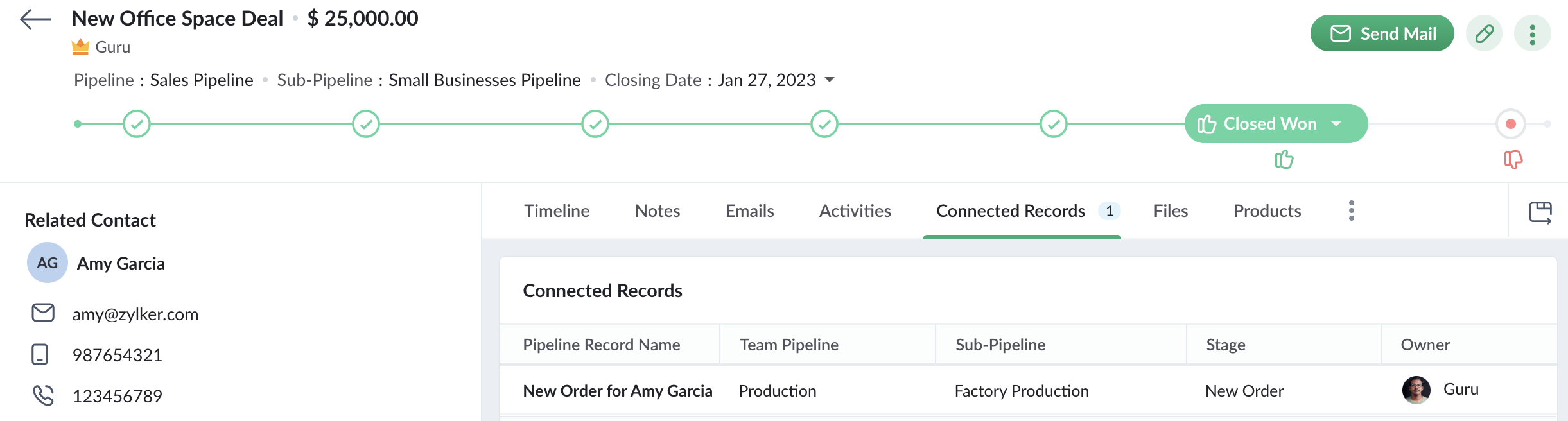
De plus, lorsqu'un commercial ouvre un enregistrement d'affaire qui a déclenché le workflow pour créer une nouvelle commande, il peut également voir l'enregistrement de la commande dans l'onglet Enregistrements connectés. Le commercial peut ainsi suivre l'état de la commande. Ainsi, Connected Pipelines permet à vos équipes de rester unies grâce à la boucle d'information connectée à travers Team Pipelines.
Disponibilité
Si vous utilisez déjà la version Team Pipelines de Bigin, alors Connected Pipelines sera déjà disponible pour vous. Vous pouvez vous en assurer en vérifiant si vous voyez l'action "Créer des enregistrements connectés" lorsque vous créez un flux de travail.
Nous avons publié un guide d'aide détaillé pour vous aider à démarrer avec Connected Pipelines.
Essayez cette nouvelle amélioration et faites-nous part de vos réactions dans les commentaires ci-dessous.
Pour ceux qui n'ont pas encore essayé Team Pipelines, nous vous suggérons de remplir ce formulaire et nous activerons Team Pipelines pour votre compte. Nous vous conseillons de passer à Team Pipelines le plus tôt possible car nous nous préparons à le déployer pour tous les utilisateurs de Bigin.
Sur quoi d'autre travaillons-nous ?
Nous avons écouté activement vos demandes de fonctionnalités et nous travaillons sur un grand nombre d'améliorations, notamment l'intégration de Whatsapp, l'affichage du calendrier pour les activités, les pages de réservation en ligne, les formulaires Web pour Team Pipelines et bien d'autres encore.
Restez à l'écoute pour de nouvelles mises à jour !
Access your files securely from anywhere

Zoho Developer Community





Topic Participants
Antoine Perrault
Sticky Posts
Bigin - Astuce #5 : Comment transférer le statut Super Admin ?
Bonjour Community France, Découvrons comment transférer le statut de Super Administrateur. Sachez que le statut de super administrateur ne peut être transféré à un autre utilisateur administrateur que par le super administrateur lui même. Pour transférerNouveau forfait Bigin Premier : Multi-devises, flux de travail avancés et plus encore !
Bonjour à tous, Nous sommes ravis d'annoncer une toute nouvelle édition de Bigin qui contient plusieurs nouvelles fonctionnalités comme la multidevise, des flux de travail avancés, des champs de recherche personnalisés et plus encore : l'édition Premier.Nouveauté Bigin : associez plusieurs contacts à une même affaire!
Bonjour à tous, Une transaction implique souvent plusieurs décideurs. Prenons l'exemple de l'entreprise Zylker qui utilise Bigin pour gérer ses pipelines de vente. Ils souhaitent acheter des meubles. Pour valider la vente, différents employés, de différentsPack débutant : vos premiers pas sur Zoho Bigin
Dans cet article nous verrons comment paramétrer votre CRM Bigin en 4 étapes : renseigner vos informations, gérer vos utilisateurs ainsi que leurs rôles et profils. Renseigner les informations de votre organisation Vous venez de vous inscrire à Zoho Bigin,Anniversaire Bigin : le CRM pour les petites entreprises évolue
Bonjour à tous ! Nous sommes de retour avec quelques annonces passionnantes. Mais d'abord, joyeux anniversaire à nous ! Bigin a eu un an récemment et nous avons un nouvel ensemble de fonctionnalités que nous sommes impatients de partager avec vous. Nous
Zoho TeamInbox Resources
Zoho CRM Plus Resources
Zoho Books Resources
Zoho Subscriptions Resources
Zoho Projects Resources
Zoho Sprints Resources
Qntrl Resources
Zoho Creator Resources
Zoho CRM Resources
Design. Discuss. Deliver.
Zoho Show Resources

Get Started. Write Away!
Writer is a powerful online word processor, designed for collaborative work.
-
オンラインヘルプ
-
Webセミナー
-
機能活用動画
-
よくある質問
-
Ebook
-
-
Zoho Campaigns
- Zoho サービスのWebセミナー
その他のサービス コンテンツ
Nederlandse Hulpbronnen

ご検討中の方
Recent Topics
Zoho Forms - Improved Sub-Forms
Hi Forms team, I'm helping a client move from JotForms to Zoho Forms and I've found another opportunity for improvement. In the below screenshot, JotForm left and Zoho Forms right. The Zoho Forms Sub-Form is quite a poor visually. There is no way to makeWhat's New in Zoho Billing | Q3 2025
Hello everyone, We are excited to share the latest set of updates and enhancements made to Zoho Billing in Q3 2025. From the latest GST updates to multi-level discounting, Zia-powered report summaries, and customizable web forms, these updates are designedHow to Delete Personal Account Linked with My Mobile Number in past or by someone else
How to Delete Account Created with My Mobile Number in past or by someone else This is creating issues in making or sync with my credentials mobile and email address..WhatsApp Business Calling API
Dear Zoho SalesIQ Team, I would like to request a feature that allows users to call WhatsApp numbers directly via Zoho SalesIQ. This integration would enable sending and receiving calls to and from WhatsApp numbers over the internet, without the needDoes Zoho Learn integrate with Zoho Connect,People,Workdrive,Project,Desk?
Can we propose Zoho LEarn as a centralised Knowledge Portal tool that can get synched with the other Zoho products and serve as a central Knowledge repository?Marketer's Space - Going beyond basics: Smarter ecommerce marketing with Zoho Campaigns
Hello Marketers, Welcome back to this week's Marketer's Space. In the last post, we discussed the basics of email marketing and how to get started with email marketing in ecommerce. In this part, we'll dive much deeper into some other advanced featuresConnecting two modules - phone number
Hi, I’d like some guidance on setting up an automation in Zoho CRM that links records between the Leads module and a custom module called Customer_Records whenever the phone numbers match. Here’s what I’m trying to achieve: When a new Lead is createdZoho Marketing Automation 2.0 - Landing Page function not working
Dear Zoho Team, I am working on implementing Zoho Marketing Automation 2.0, and am now looking into the section "Lead Generation". If I open the "Landing Pages" section, I immediately get an Error code: Error: internal error occurred. Can you help meUnable to use Sign "You have entereed some invalid characters"
Unable to use Sign "You have entered some invalid characters" I do not see any invalid characters. The text in "Leave a Note" is plain text which I entered directly into the field. See attached screenshotElevate your CX delivery using CommandCenter 2.0: Simplified builder; seamless orchestration
Most businesses want to create memorable customer experiences—but they often find it hard to keep them smooth, especially as they grow. To achieve a state of flow across their processes, teams often stitch together a series of automations using WorkflowMessages not displayed from personal LinkedIn profile
Hello. I connected both our company profile and my personal profile to Zoho social. I do see all messages from our company page but none from my private page. not even the profile is being added on top to to switch between company or private profile,"Performed changes in the query is not allowed due to following reason" when adding columns or reordering data
I'm trying to make changes to a query but every time i try to save it i get this error message. I'm not touching the data it's flagging. All I've tried to do is reorder a couple of fields and add a new one. Why won't it let me do this? It's a core queryOnboard new users easily with native screen recording in Zoho Projects Plus
Communication involving both visual and audio elements tends to capture more interest among the audience. Whenever we onboard new employees to the organization, the task of engaging them in the induction sessions, and keeping the spark going in theirRequest to Add Support for PDF Templates and More Flexibility in Email Editor
Hi Zoho Campaigns Team, I hope you're doing well. I wanted to share some feedback and request a few improvements in the Email Template feature of Zoho Campaigns. Right now, we can create email templates using the HTML editor, which is helpful. But we’reCan you stop Custom View Cadences from un-enrolling leads?
I'm testing Cadences for lead nurture. I have set un-enroll properties to trigger on email bounce/unsubscribe, and do NOT have a view criteria un-enroll trigger. However, help documents say that emails are automatically un-enrolled from a Cadence whenZoho Desk Android and iOS app update: Agent detail overview
Hello everyone! We’ve introduced agent detail overview on the Zoho Desk Android and iOS app update. With this feature, you can get a complete view of agent’s tickets, response times, logged hours (for both tickets and activities), customer happiness ratingsBlog Widget: Show recent blog posts on my homepage
Hey there I am using the Zoho Sites Blog feature. On my homepage, on the bottom I'd like to have a featured content section where I show some of my blog posts (selected, most recent, filtered by category and so on...). It would be nice to have a blogHow to iterate through excel data using zoho rpa
I wanted to iterate or loop through excel data ( datatable). How can i do thatZoho Commerce
Hi, I have zoho one and use Zoho Books. I am very interested in Zoho Commerce , especially with how all is integrated but have a question. I do not want my store to show prices for customers that are not log in. Is there a way to hide the prices if notMass (Pull back) (Close WOs) (Close APs)
Hi develop team. Just idea because Zoho FSM is great but its too manual. we have a lot of task to do every day and the system needs to have more features to automatic our tasks. I need to close several WOs, APs and Pull Back per day. Please we need massCustomising Zohidesk portal default widgets
Hello, I'm wondering how could I customise the default widgets such as "popular topics", "popular articles" using CSS or to make the tiles at the bottom match the ones that I made in the picture attached. I have made some custom widgets and edited themIf there’s a batch at the end, the ‘mark as inactive’ function doesn’t work.
when my batch has a date to batch end and I "mark as inactive" he batch does not obey the status and reactivates the batch.Seamless multilingual messaging and tone control in Zia IM Composer
Hello everyone! Managing customer conversations across multiple languages can be time-consuming. Using Zia in the Instant Messaging (IM) Composer helps you overcome this by providing tools to translate content, adjust your tone, and refine your messagesAdvanced Deluge help needed with custom function and COQL limits
I have a scheduled function that takes a snapshot of specific metrics and saves them to a custom module. However I'm struggling with the limits of COQL. I attach my full code, but an example of the issues I'm having is that it's erroring with a 'LimitTip of the Week - Conditional Formatting Chart
Conditional formatting allows you to highlight your data series based on a pattern or a trend in your data. This makes it easy for you to identify when your data reaches certain values or when it deviates from the trend. Zoho Analytics allows you toZoho Learn - AI Translate
Hi Learn team, I had a situation today where I was providing training to a client team and I had written articles into their Zoho Learn to support their learning. I realised that one of the team members was a non-native English speaker and they were strugglingPayroll In Canada
Hi, When can we expect to have payroll in Canada with booksPower of Automation :: Auto-Sync Custom Date Field Between Related Tasks via Blueprint Transition
Hello Everyone, A custom function is a software code that can be used to automate a process and this allows you to automate a notification, call a webhook, or perform logic immediately after a workflow rule is triggered. This feature helps to automateIntroducing auto-upgrade in Zoho LandingPage
Hi everyone, We’re excited to share an upcoming update to help you get the most out of your landing pages — the auto-upgrade option, launching on October 22, 2025. Your landing pages are designed to bring in leads, and we want to make sure you never missWorkdrive comment links stopped working.
I have marked a PDF file with 95 comments, they have worked for a while. When i clicked on them they brought me to the correct page and showed me the outline that i had drew on the plans. The comments included the page number of the outline, but now itHow to Bulk-Update Sales Orders in CRM
Hi - I need to bulk update existing sales orders with dates from our ERP of when the sales orders were created. I made a date field on the Sales Order module where I want to insert that data. I can't Mass Update because I am not updating the fields toZoho ToDo in Cliq
Our organization utilizes Zoho ToDo in the Zoho Mail Desktop app. Is there a way for these to show up in Cliq Desktop app as well?【Zoho CRM】サンドボックス機能のアップデート:カスタムビューが利用可能になりました。
ユーザーの皆さま、こんにちは。コミュニティチームの中野です。 今回は「Zoho CRM アップデート情報」の中から、サンドボックス機能のアップデートをご紹介します。 目次 1. カスタムビューとは 2. 今回の機能アップデートについて 1. カスタムビューとは カスタムビューは、ユーザーが設定した条件に基づいてデータをフィルタリング・整理し、 重要な情報へ効率的にアクセスできるようにする機能です。 「過去15日間の見込み客」や「受注間近の商談」、「特定の優先度レベルが設定された案件」など 条件を指定してわずか数クリックで設定できます。Changing an agents email address
How do you change an agent's email address? I keep getting a red circle even though I am an admin. And on one of my agents he has two email addresses? How is that possible?Zoho CRM - Potentials Tab
Hi! When I create a Deal (Potentials tab) the header looks like this: After a refresh on the page it looks like this: What should I do so that it is displayed like in the second pic without refresh? Also I have a user that as of recently, cannot see thisIs there a way to automatically add Secondary Contacts (CCs) when creating a new ticket for specific customers?
Some of our customers want multiple contacts to receive all notifications from our support team. Is there a way to automatically add secondary contacts to a ticket when our support team opens a new ticket and associates it with an account? This wouldUnable to create embed code for resource of workdrive using API
Hello Team, I am trying to create embed code for a resource using workdrive api in powershell, however facing some issues with injecting data in body. Followed Doc: https://workdrive.zoho.com/apidocs/v1/filefoldersharing/shareeveryone Please help, belowFeature Request - Insert URL Links in Folders
I would love to see the ability to create simple URL links with titles in WorkDrive. or perhaps a WorkDrive extension to allow it. Example use case: A team is working on a project and there is project folder in WordDrive. The team uses LucidChart to createnot able to convert pdf to jpg and other forms and vice versa.
i want to change my pdf to jpg, word, etc and some times jpg to pdf. i don't know how to do in this.Enable / show scroll bar when Mega Menu is opened
Hey there I am using the mega menu add-on and experience a "flicker" whenever the mega menu opens. The reason is, that the scrollbar, which has a width of a few pixels, stops showing when the mega menu opens. As the scrollbar disappears the whole pageNext Page