Revamped forecasting in Zoho CRM
Forecasting is an important part of a business's strategy to help set meaningful targets, optimize their sales strategies to help users achieve said target and drive revenue for the business.
With this in mind, we've brought a number of different enhancements to Zoho CRM's forecasting capabilities to help businesses understand their pipeline better, make accurate forecasts, set realistic targets, and help sales teams achieve them. Earlier in December, we briefed about these enhancements in forecasts in our Winter '21 announcement. We are thrilled to talk about these changes in detail here.
Create multiple and condition based forecasts across different periods
Businesses were limited to just a single forecast that encompasses all deals, but now you can create multiple forecasts, which can include all your deals or deals that match specified conditions, with a greater control of the forecast periods.
Forecasts can be created for all the available hierarchy:
- Role/Reporting to
- Territory
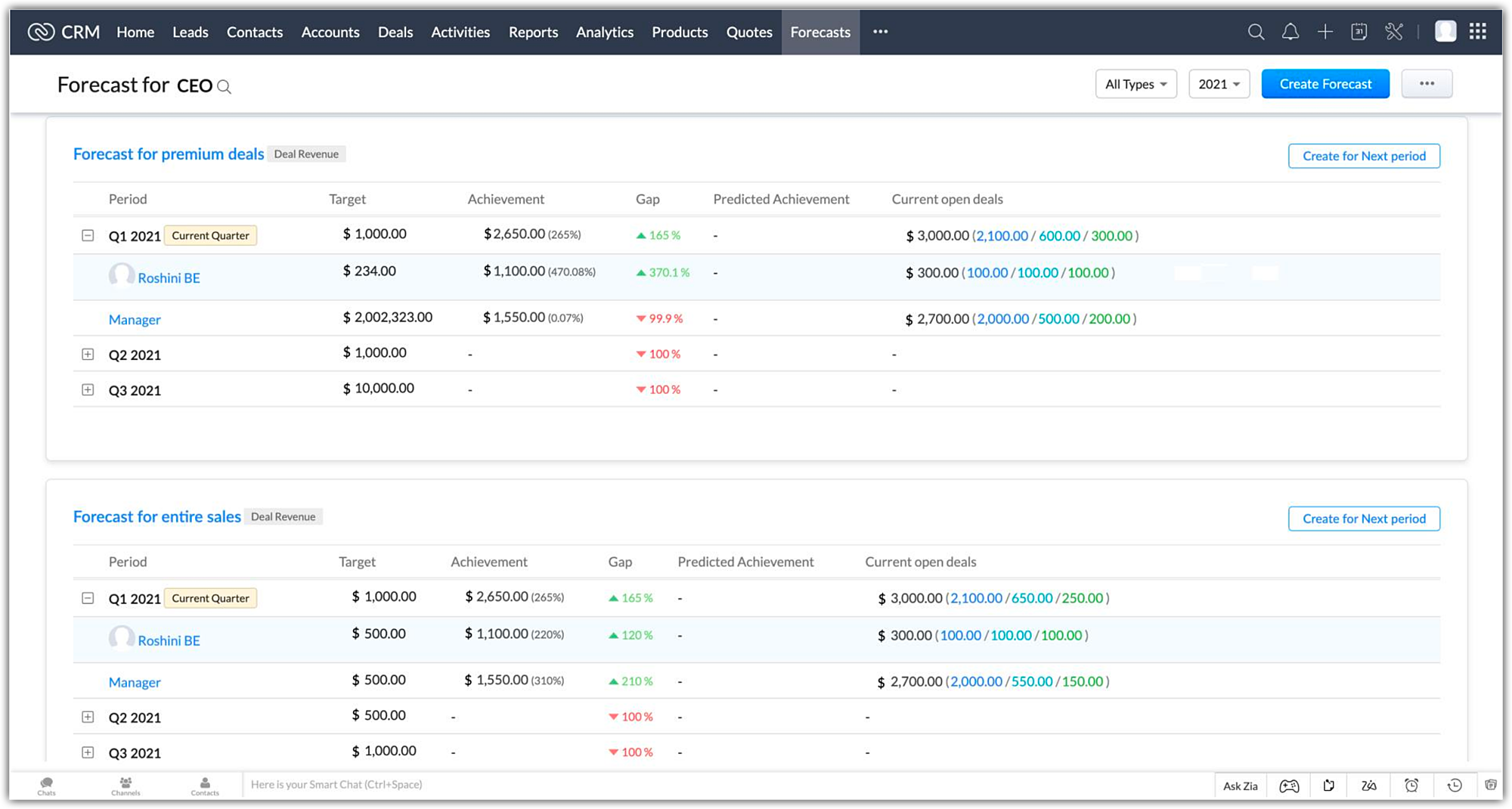
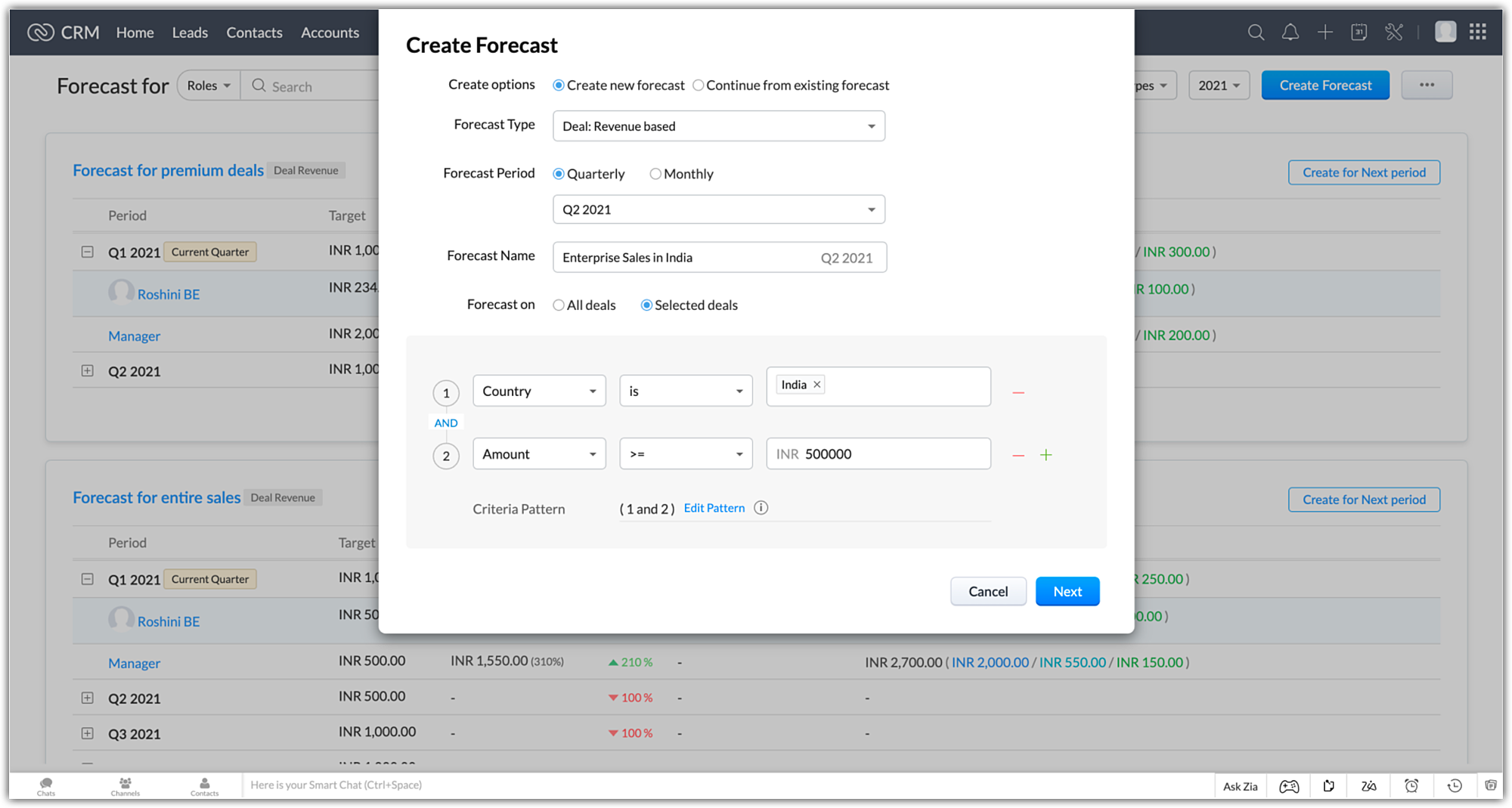
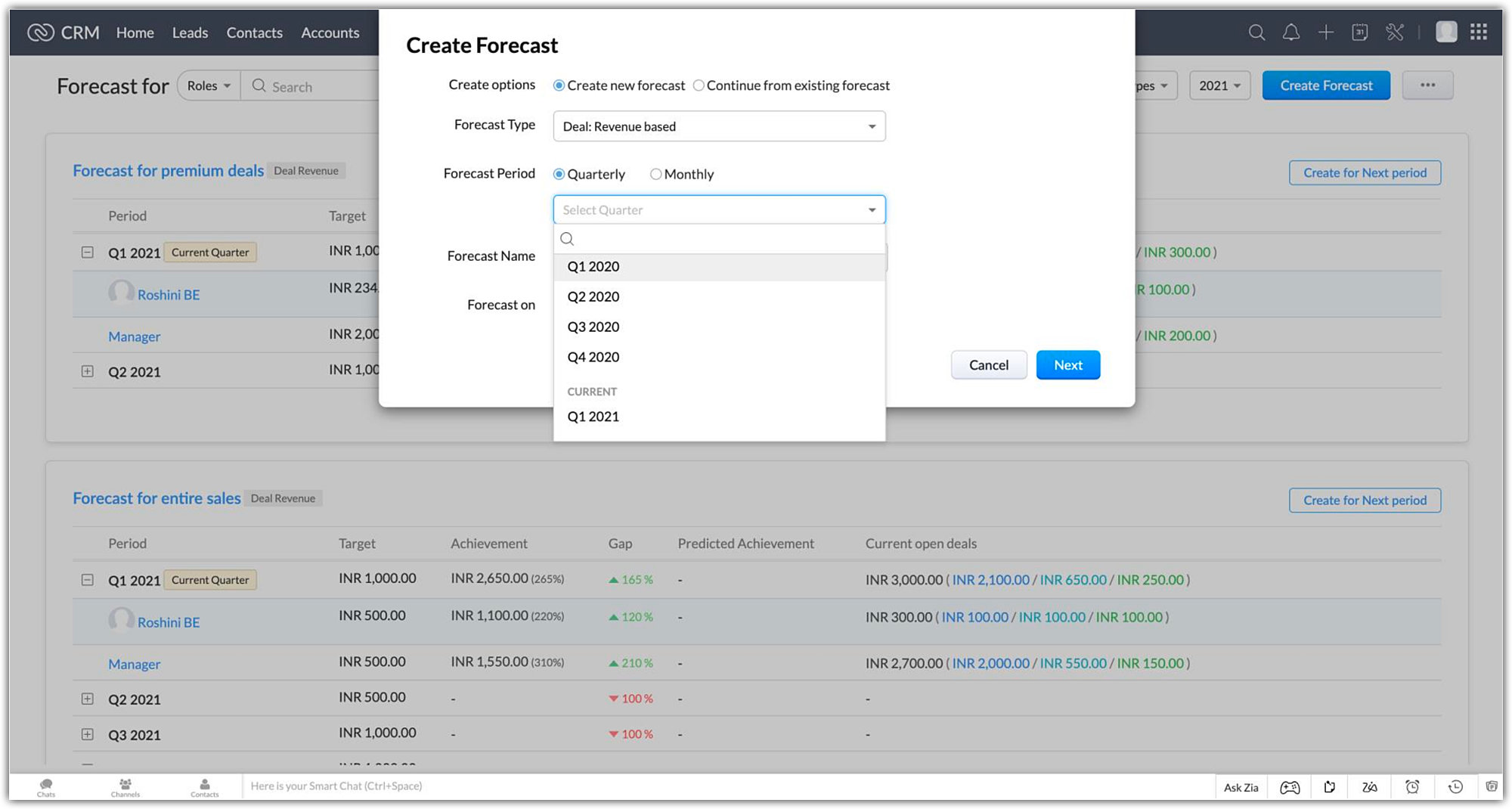
Forecasts can be created monthly or quarterly for the following forecast periods.
- Current - 4 Quarters / 12 months of current fiscal year
- Future - 4 Quarters / 12 months of the next fiscal year
- Completed - The previous 2 fiscal years
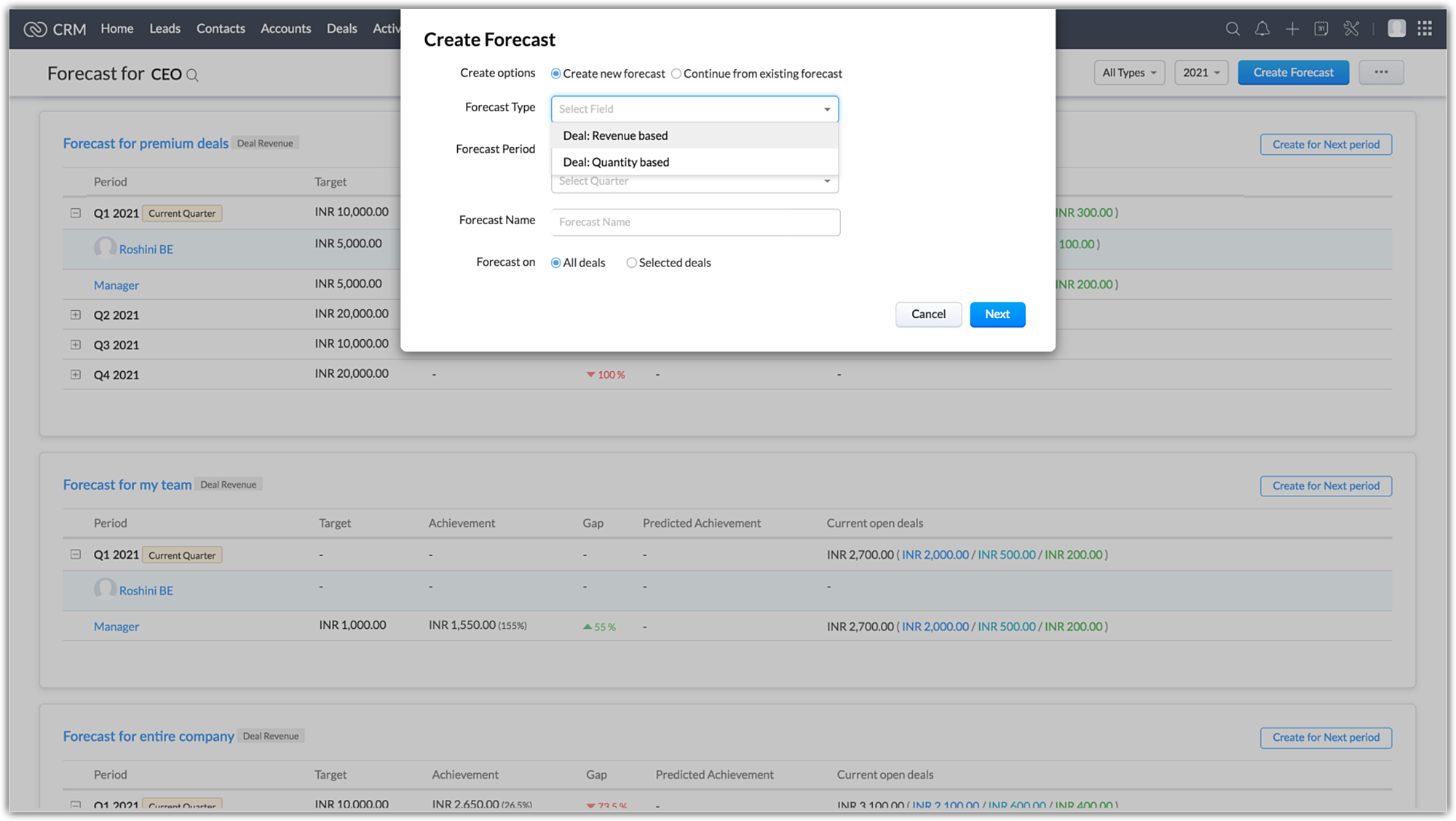
Forecast types
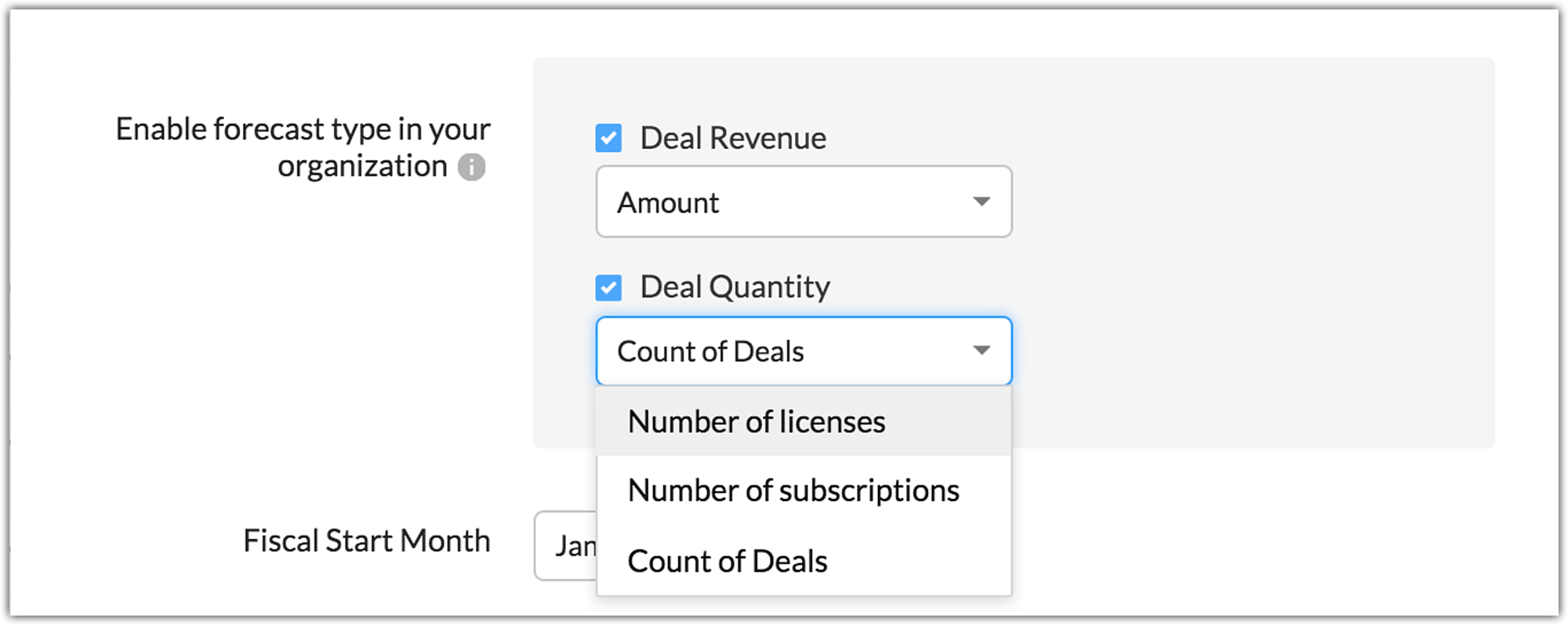
Two forecasts types can be created which are based around the attribute that is used to set targets for your users:
- Deal Revenue based forecasts - These are forecasts where the targets are based on currency fields like deal amount, expected revenue or other custom currency fields defined the deals module
- Deal Quantity based forecasts - These are forecasts where the targets are based on system defined fields like "count of deals" and other custom number fields
Introducing Best Case and Committed deals under "Forecast Category"
In the current forecasting, deals only had three forecast categories that were associated with them.
- Closed won - Deal was marked "Won"
- Closed lost - Deal was marked "omitted"
- Open - Deal was marked "Pipeline"
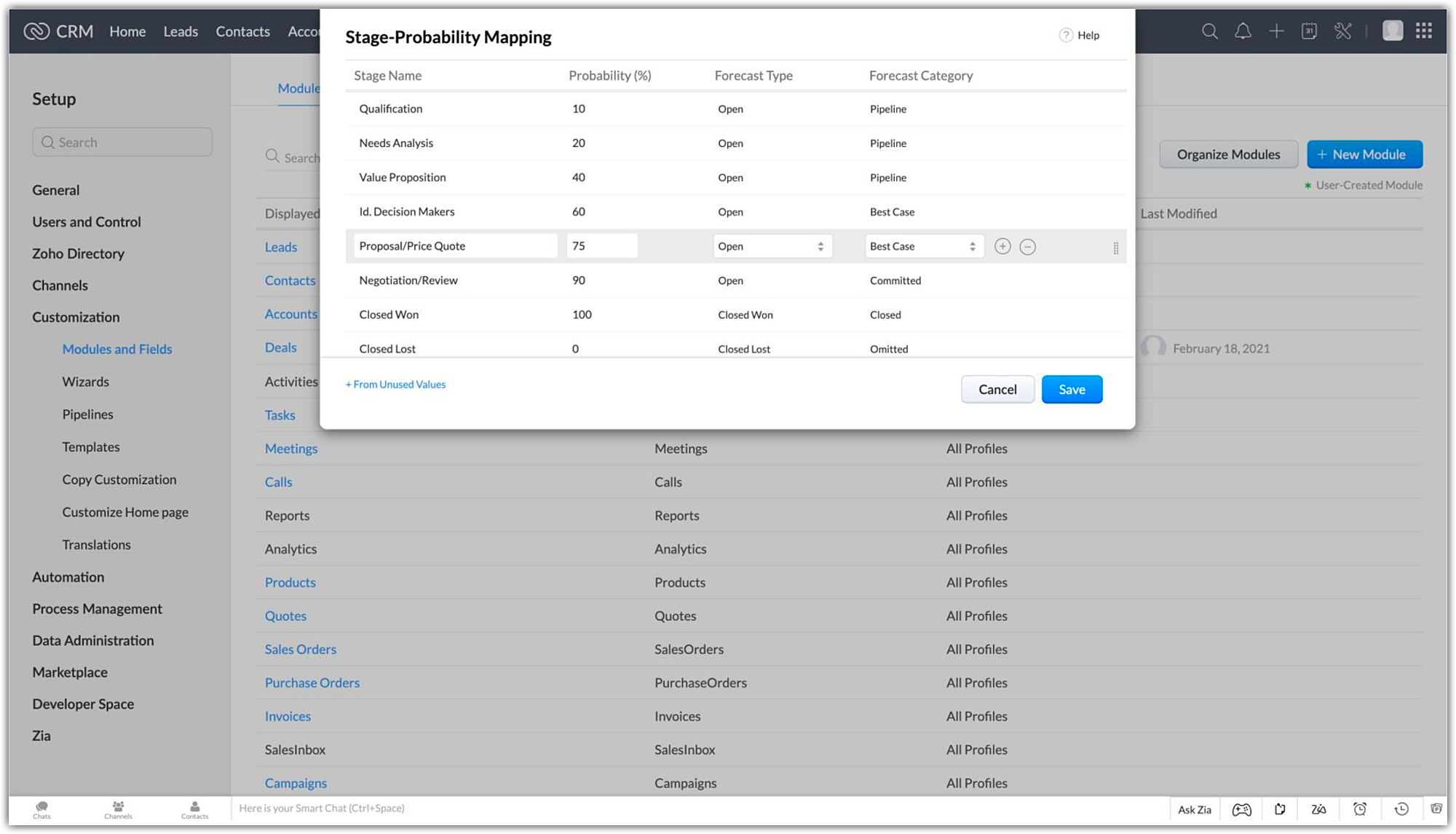
Now open deals can be tagged with new options under the forecast category:
- Best case - Open deals that have a high chance of being won
- Committed - Open deals that sales reps commit to winning
Instead of generalising all open deals as pipeline deals, this split gives a better picture as to where a particular sales rep stands in terms of the deals in their pipeline. This allows the administrator to make a more informed decision when setting targets for a particular user.
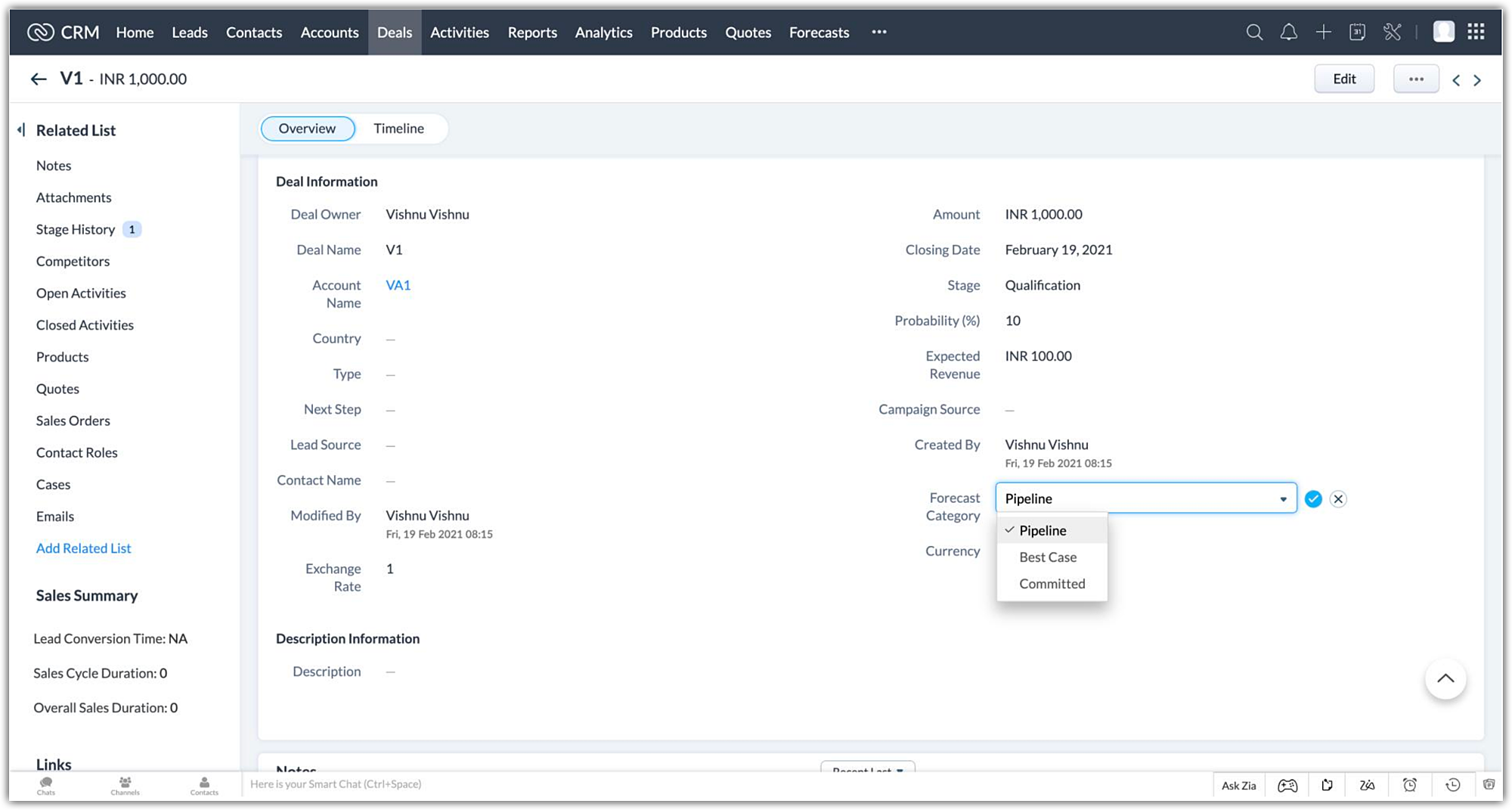
Sales reps also have the option to update the forecast category in a specific deal manually, to the appropriate option when the situation calls for it. The deal amount will then be updated in your forecast during its next sync
Transparent split of deals in your pipeline for optimal targets
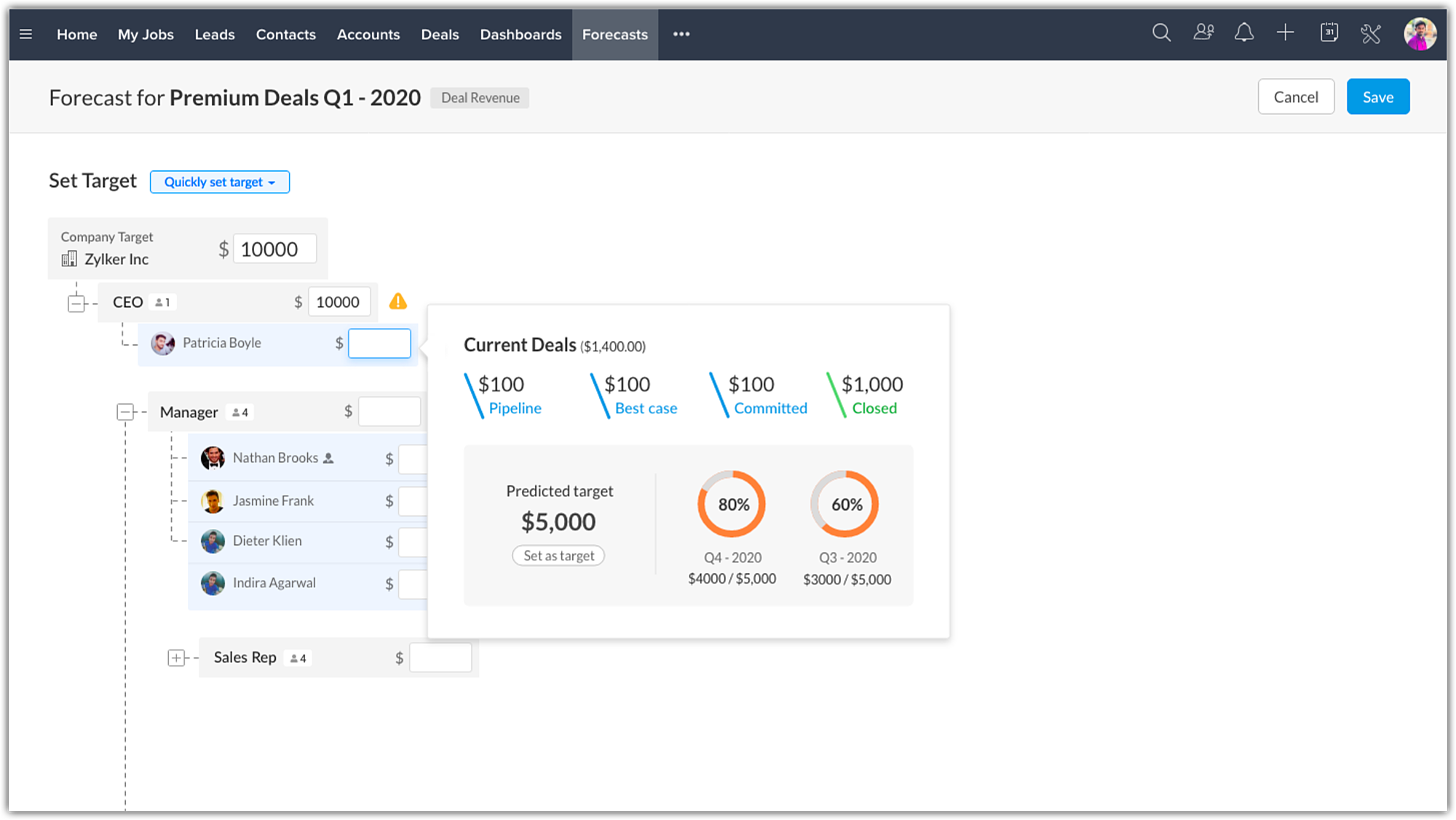
When setting targets for your users, a popup with your pipeline data shows the split of deals to give you a better picture of where each user stands in-terms of sales numbers.
The deals are split into open and closed won deals, with the open deals being further split into best cases, committed and pipeline deals.
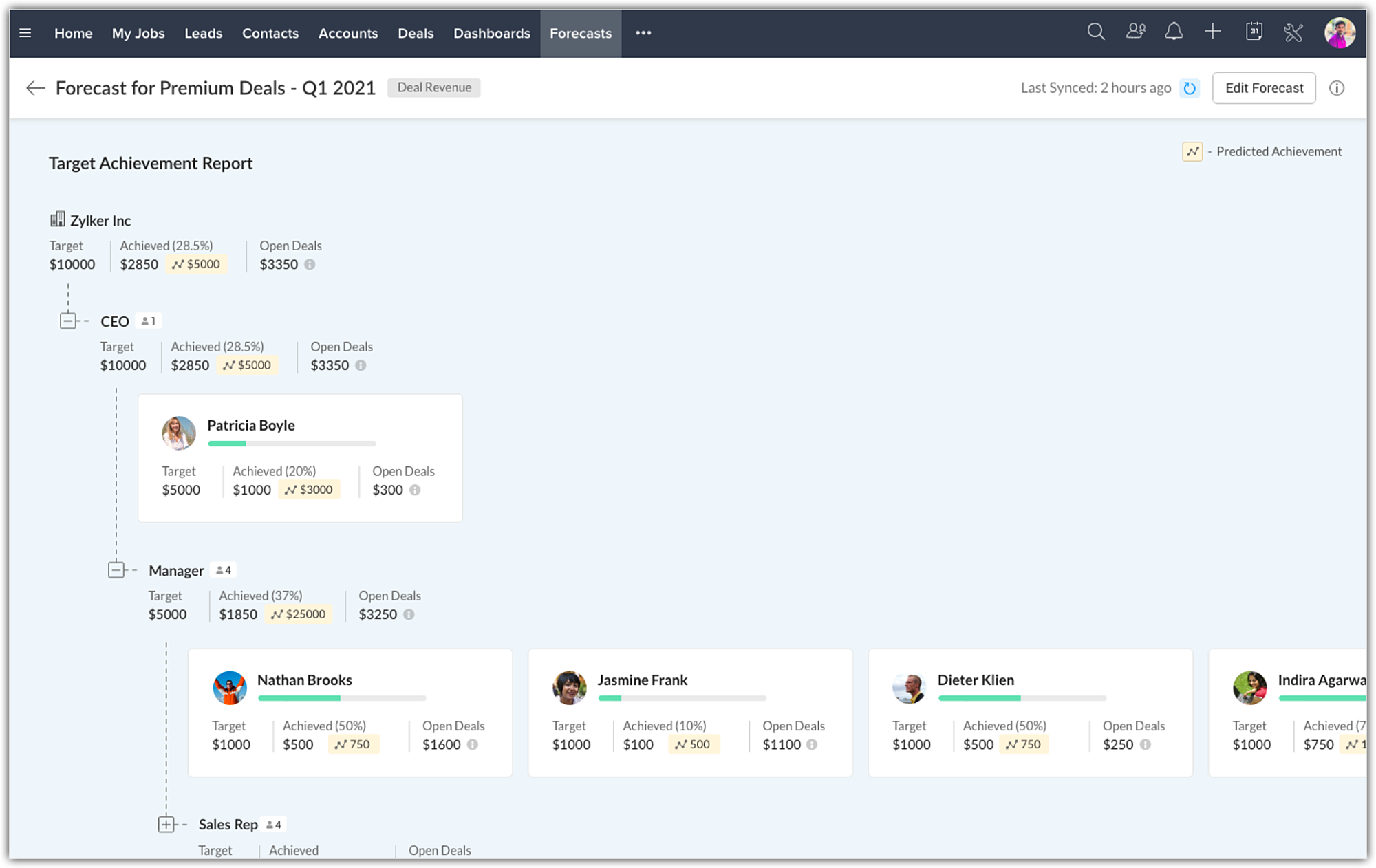
Zia offers target suggestions and predicts target achievement
When creating forecasts, there are two choices. They can be built from the ground up as a completely new forecast, or they can be linked and created from an existing forecast.
When creating a continuous forecast, Zia will calculate and suggest targets based on the historical data of your selected forecasts. This will be available in the forecast create page when setting targets.
The historical and current deal closure pattern of users will be analysed as well to give you the predicted target achievement for the users. Achievement predictions will be available in the target achievement report.
Compare your performance across different forecast periods
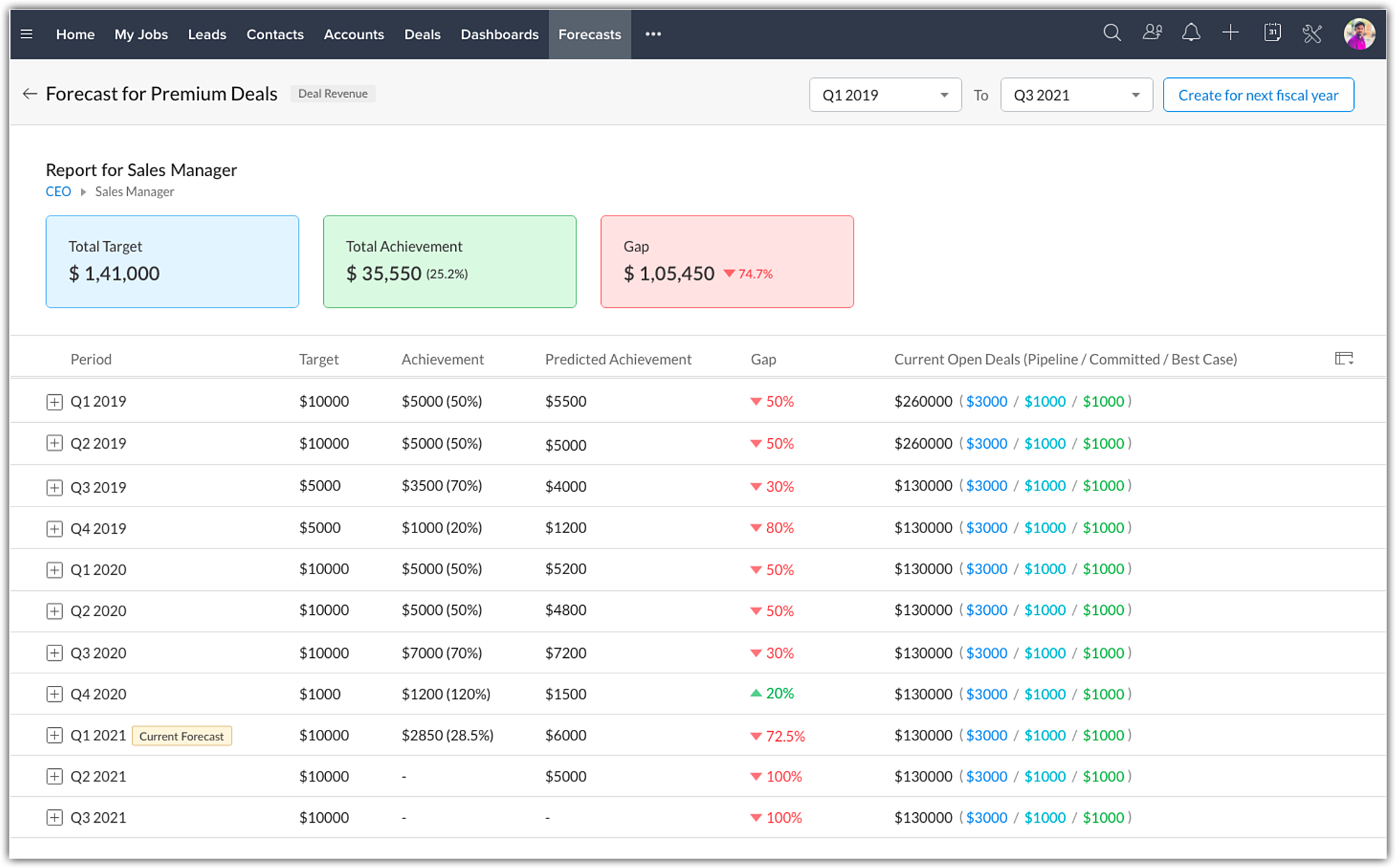
All your created forecasts will be available in a list view under the forecast module. You can now drill down into a particular forecast and compare how your business performance fared across the years.
Depending on the duration selected in the filter, the following data will be consolidated and shown at the top :
- Total target
- Achievement
- Gap
Under the consolidated data, the forecast data for each quarter/month for the selected duration will be listed for a bird's eye view analysis. You can then drill down further to analyse the performance of individual users or roles if required.
Archived Forecast
The purpose of having forecasts is to keep track of the company's performance on various levels of the organization. Thus far, the forecast list view page shows data only for the completed two years, the current year, and one future year. So, as your business continues, you would be losing forecast records beyond two previous years. This clearly beats the purpose of having forecasts as the past data might still be significantly important. Hence, we have introduced archived forecasts as our latest enhancement.
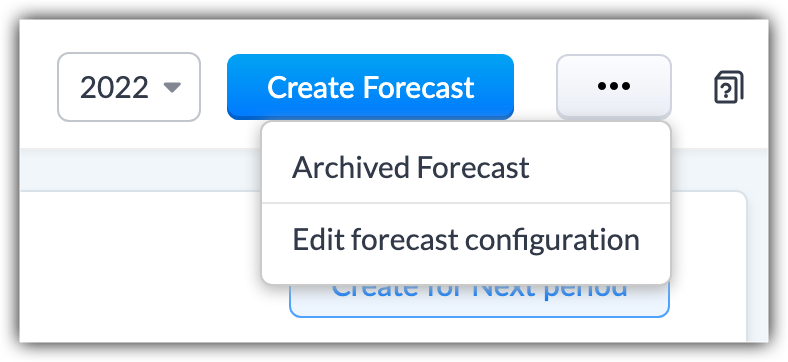
- The forecast list view displays up to 2 completed years' data. Now, the forecasts created beyond these two years will be archived automatically.
For example, suppose the current forecast is for Q3 2021. The list view has records for completed forecasts since Q1 2019. The forecasts before Q1 2019 would be archived. - If a forecast configuration is edited, the current and future forecasts based on old configuration will be deleted while the completed forecasts will be archived.
For the above example of point 1, if you edit the hierarchy or any other configuration, the completed forecasts will be archived, and the current forecast for Q3 2021 will be deleted along with any future forecasts created.
When will forecasts be archived?
- Completed forecasts over two years from the current year will be archived. For example, if the current year is 2022, forecasts of 2021, and 2019 will be available on the forecast list view page. Forecasts older than 2019 will be archived.
- Forecasts will be archived automatically upon editing forecast configuration- changing either the hierarchy or forecast type.
For example if the Hierarchy is Reporting To, and its changed to Territory, or edit the forecast type, the existing forecasts would be archived. - Forecast will be archived if the hierarchy preferences are modified in Company Details.
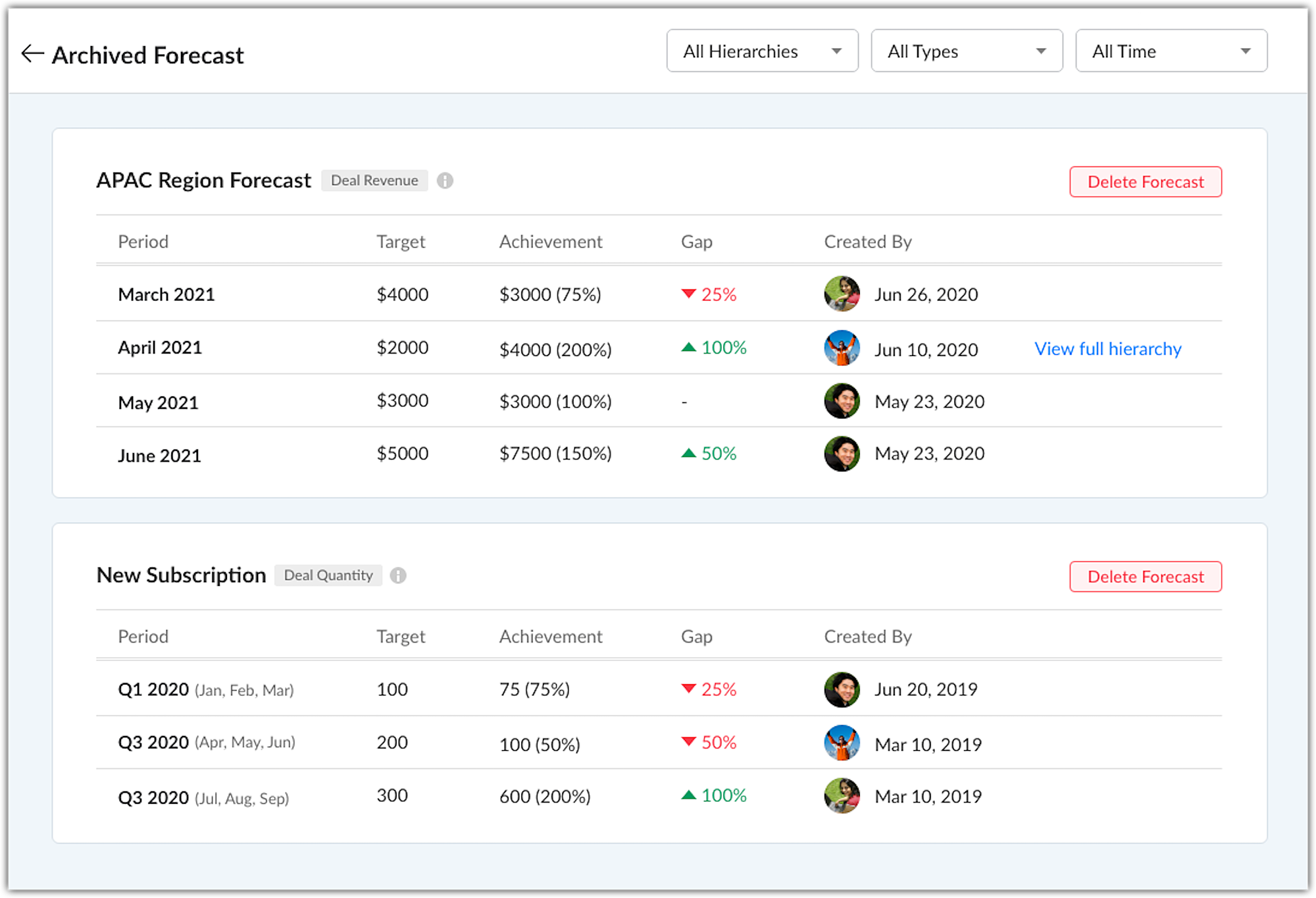
In the archived forecast page, the forecasts are listed in chronological order. You can also filter them based on Hierarchy, Forecast Type, and Time.
Notes
- The archived forecasts cannot be edited, they are just for viewing purposes. Users can delete a forecast.
- Up to 5 years of forecasts records would be available as archive.
- Changing when the Fiscal Year of your org begins, say changing it from January to April, will delete all the existing forecasts as well as the archived forecasts.
Empowering forecast managers
Forecast managers can now build their own forecasts and assign targets to their role, their own target, their peers and sub roles & users. Individual teams can have their own distinct forecasts and targets which can be focused on. These forecasts will be visible for the Admin, CEO and the forecast manager of a higher role who can monitor these forecasts and update them when needed.
If a forecast manager's target has been modified by the CEO, admin or a forecast manager from a higher role, the modified target is locked and cannot be changed by the forecast manager.
That's all about the enhancements. For more details check out our help page Creating and Working with Forecasts.
We have opened this new forecast for all users subscribed to the paid editions of Zoho CRM, in all DCs. For users who are currently using the old forecasts, they will have the option to switch to new forecast till June end. Post which, it will be mandatory to switch to the new forecasts to access the forecast module.
Looking forward to hearing from you.
Access your files securely from anywhere
New to Zoho Recruit?

Zoho Developer Community
New to Zoho LandingPage?
Zoho LandingPage Resources
New to Zoho Survey?
New to Zoho CRM Plus?
Deliver unforgettable customer experiences
New to Zoho CRM Plus?
Deliver unforgettable customer experiences
New to Zoho Marketing Plus?
Everything you need to run your marketing
New to Zoho Marketing Plus?
Everything you need to run your marketing
New to Bigin?





Topic Participants
Nizamuddin Sohel SK
gavinpereira
Ishwarya SG
Jackie Koehler
Sunderjan Siddharth
Sticky Posts
Good news! Calendar in Zoho CRM gets a face lift
Dear Customers, We are delighted to unveil the revamped calendar UI in Zoho CRM. With a complete visual overhaul aligned with CRM for Everyone, the calendar now offers a more intuitive and flexible scheduling experience. What’s new? Distinguish activitiesVoC in Zoho CRM is now data savvy: Explore response drilldown, summary components and participation in CRM criteria
VoC has all the goods when it comes to customer intelligence—which is why we're constantly enhancing it. We recently added the following: A customer drilldown component that shows you the list of prospects and customers behind a chart's attribute ExpandedWrapping up 2025 on a high note: CRM Release Highlights of the year
Dear Customers, 2025 was an eventful year for us at Zoho CRM. We’ve had releases of all sizes and impact, and we are excited to look back, break it down, and rediscover them with you! Before we rewind—we’d like to take a minute and sincerely thank youPresenting ABM for Zoho CRM: Expand and retain your customers with precision
Picture this scenario: You're a growing SaaS company ready to launch a powerful business suite, and are looking to gain traction and momentum. But as a business with a tight budget, you know acquiring new customers is slow, expensive, and often deliversCreate and populate a record in an instant: Introducing zero-shot field prompting to Zia's ICR
A couple of months ago, we upgraded our in-house AI image detection and validation tool, Zia Vision, with intelligent character recognition (ICR). By training Zia with sample images, you could create and enrich CRM records with data extracted from standard
New to Zoho TeamInbox?
Zoho TeamInbox Resources
Zoho CRM Plus Resources
Zoho Books Resources
Zoho Subscriptions Resources
Zoho Projects Resources
Zoho Sprints Resources
Qntrl Resources
Zoho Creator Resources
Zoho CRM Resources
Design. Discuss. Deliver.
Zoho Show Resources

Get Started. Write Away!
Writer is a powerful online word processor, designed for collaborative work.
Zoho CRM コンテンツ
-
オンラインヘルプ
-
Webセミナー
-
機能活用動画
-
よくある質問
-
Ebook
-
-
Zoho Campaigns
- Zoho サービスのWebセミナー
その他のサービス コンテンツ
Nederlandse Hulpbronnen

ご検討中の方
Recent Topics
Getting Attachments in Zoho Desk via API
Is there a way to get attachments into Zoho Desk via an API? We have a process by which a zoho survey gets sent to the user as a link in a notification. The survey has several upload fields where they can upload pdf documents. I've createdPincode based Product Restriction
we have different types of products. 1) Very bulky items like plywood. 2) Too delicate items like glass These type of products we want to sell to local customers. Other products we want to supply all over India. There should be an option to restrict productsRelated Lists filter
I have Contacts showing in our Accounts module. I customized the Contacts module with an Employment Status field, with the following picklist options: "Primary Contact", "Secondary Contact", "Active Staff(not a main contact)", and "No longer employed".Standalone custom function not generating logs
Why dont't standalone custom functions generate logs when the're called from another function? I have some functions (workflow, buttons and blueprint) that have common parts, so I put that part in a standalone function which is called from the others.Add "Reset MFA" Option for Zoho Creator Client Portal Users
Hello Zoho Creator Team, We hope you are doing well. We would like to request an important enhancement related to Multi-Factor Authentication (MFA) for client portal users in Zoho Creator. Currently, Creator allows us to enforce MFA for portal users,Urgent Security Feature Request – Add MFA to Zoho Projects Client Portal Hello Zoho Projects Team,
Hello Zoho Projects Team, We hope you are doing well. We would like to submit an urgent security enhancement request regarding the Zoho Projects Client Portal. At this time, as far as we are aware, there is no Multi-Factor Authentication (MFA) availableCreator HTML page refresh
Hi, I have added around 5 different html snippets in single creator page. I understand, I can refresh the entire page from page script using Navigational URLs https://help.zoho.com/portal/en/kb/creator/developer-guide/others/url-patterns/articles/navigational-urlsZoho Desk - Custom Module Related List Columns on Tickets
I have a custom module in Zoho Desk called Asana Tasks, each task has a lookup to a Ticket. On the Ticket I want to see the columns of the Asana Tasks in the related list . Is there a way to do this? Right now it just has the name of the record and IWhat is your opinion of the new UI?
Hi Everyone, I would like to see what everyone thinks of the new Zoho One Dashboard. I don't get it, but perhaps I'm missing something. What are your thoughts?What are the OAuth scopes needed to access the Zoho MCP server?
I think I'm authenticating with the MCP server endpoint successfully using a bearer token but I can't successfully initialize an MCP session. I'm using the official MCP Python sdk (https://github.com/modelcontextprotocol/python-sdk). I get as far as here"Temporary Error" in Zoho CRM Data Source sync
I edited my setup for the Zoho CRM to Zoho Analytics Data Source Import configuration to add some new fields. After I saved the changes, I clicked the (Sync Now) link. After a few minutes I got a Sync failure error. The only reason given is "A temporaryAccount blocked for IMAP use
Hello, My email client (Evolution) can't sync mail anymore. It gives the error: "Your account is temporarily blocked for IMAP use. This may happen if you exceed the maximum number of simultaneous IMAP connections allowed. Kindly try again after some time."Is SMTP included in the free plan?
My client has a Zoho Mail Free 14 day trial that ends tomorrow. She has set up a domain email address with SMTP on a third party app and is wondering if it will continue working once her plan downgrades to the free forever plan. ThanksZoho mail issue.
I have verified my domain ohhoexpress.online by adding necessary TXT and MX records. But when I am sending email to any external email id, it is showing as zohomail.com. Also while I am sending mail to internal mail id, it is saying user not found whereasMy email is blocked from sending
I get this message when I try to send any message .. > Unable to send message, Reason 554 5.1.8 Email Outgoing Blocked We have urgent emails to send and the issue continues to persist from yesterday. Please help us with this issue as soon as possibl[WEBINAR] Smooth year-end closure with Zoho Books (KENYA)
Hello there, This webinar is for all Kenyan businesses looking to wrap up their financial year smoothly! Join our free session to learn how Zoho Books can simplify your year-end process. What to expect from this webinar: - All the latest updates in Zohocannot recieve or send emails
we are not recieving or cannot send emails.Shows sysytem errorZoho Sites - contact us form
I have added a contact us form to my website. I wanted to change the layout so I deleted the section of Contact Us form. When I again try to add the section of Contact Us form, it shows error that "This form already exists on this page." I am unableswitching from POP3 to IMAPI do I need to change settings in Web email?
hi so I am using Outlook with My Zoho mail, also have Verizon email /AOL. they no longer support POP3 and said imapi is much better, so I want to switch my ZoHo to imapai. I googled and it said i need to change it in my account....i looked at my accountWhat functionality is new in the Z025 Spaces UI dashboard compared to the previous Zoho One dashboard?
My company is interested in creating a revamped dashboard this coming year, and are trying to weigh different platform options. The new Spaces UI is said to be a more "feature-rich" dashboard experience than the previous. Could a developer please explainCollections Management: #5 Convenience on Offer, using Self-Checkout
"Is this the right page? Oh, now, it wants my address again. Why am I being redirected?" These were the exact thoughts running through Karan's mind as he tried to subscribe to an application he genuinely liked. He clicked "Buy Now", expecting a quickTip #50- A Closer Look at the Unattended Access Dashboard- 'Insider Insights'
Having complete visibility and quick access to everything you need certainly makes managing multiple remote devices a lot easier, and that is precisely what the Unattended Access Dashboard in Zoho Assist is designed to offer. Once you go to the UnattendedHow to update custom multi-user field in Zoho Projects?
I'm trying to update custom multi-user fields in Zoho Projects via a Deluge function in CRM. The code I have so far is below. It works for updating standard project fields and single-line custom fields, but it does not work to update multi-user fields.Tip of the Week #75– Manage your social media messages from a single shared inbox.
Are you tired of jumping between apps or browser tabs to reply to your business's Facebook and Instagram DMs? Handling customer messages on social media might seem simple, but switching between multiple platforms can easily lead to lost messages, duplicateZoho Map integration tasks have changed - you need to "Locate all instances of Zoho Map integration tasks in your Deluge scripts by searching for the v1 marker... before 16 January 2026"
The Zoho Map deluge integration task has been changed (as at 21 October 2025) to provide a more structured, JSON-like response. This change affects all three Zoho Map integration tasks (Geocode, Reverse Geocode, and Distance Between). More details canUsing files from Zoho CRM in Gemini/ChatGPT/Claude
Hi all, I’ve got subscriptions to Gemini and a few other AI tools which I use for tasks like data enrichment, email composition, etc. In our workflow, we often receive various documents from clients — such as process workflows, BRDs/requirement documentsZoho Analytics & Zoho Creator - Modified Time value
I'm trying to use the Zoho Creator system field 'modified time' in Zoho Analytics, but it's consistently showing 12 hours 'out' In Zoho Creator In Zoho Analytics Is this a constant difference that I just need to correct with a timezone change - or isZoho CRM - Option to create Follow-Up Task
When completing a Zoho CRM Task, it would be very helpful if there was an option to "Complete and Create Follow-Up Task" in the pop-up which appears. It could clone the task you are closing and then show it on the screen in edit mode, all the user wouldPortal For Different Apps
I found some older threads on this but didn't see anything very recent. I'm new to Zoho One so forgive me if my terminology is off a bit. I was hoping set up a single point of entry into Zoho One. So, many of the apps could be found in one single placeCalls undetected
Zoho Voice records indicate my last call ended at 6:00 PM. All incoming and outgoing calls occurred between 6:00 PM and 7:00 PM.Unable to Select Authenticated Domain as Sender
We’ve already authenticated our domain, but it’s still not appearing in the sender list when we try to run a campaign. Could you please check what might be causing this issue?Zoho Projects - Show Task List as dropdown field on Task records
Hi Project's Team, I noticed today that there is no field on a task record related to the task list it belongs to. A dropdown would be helpful for quickly moving tasks between lists while in a task. I know that you can go to "Other Actions" and chooseMy followed tickets extension is not working under the All departments view
Hi. I've installed the My followed tickets extension. However, when I try to open the extension under the all departments view, I get the following message: 'Sorry, this extension is not supported in the All Departments view.' How can I solve this pTicket Time Entry to Timesheet
The title just about sums it up. I have searched here and not found anything relevant, but If I overlooked, then please set me straight. We have staff that do nothing but close tickets in desk all day long. These tickets represent their timesheet. Is there a way to have this information sync or for a tech to go into their timesheet themselves and sync it with their tickets of the same timeframe?? We waste a ton of time doing timesheets and the old "Clock in/Clock out" isnt detailed enough for us!!Calls undetected.
The call is not showing on the call log.Calls undetected
Zoho is not reading calls made.Missing information data Zoho inventory
there some missing data in Zoho inventory connection. pick list stock counts bin location we have requested it via mail and the support team doesn’t gove feedback. has anyone achieve to get these info or to ask other ya lesCalendar Events Issues
Not able to view scheduled events on my calendarExtensions 101 webinar series: Build, integrate, and monetize with extensions
Attention developers! Are you ready to take your extension development skills to the next level? We're excited to bring back the Extensions 101 webinar series with an expanded lineup of Zoho products and an introduction to more platform features. LastWhere are recordings stored?
I have hosted a couple of test meeting, used the "record" button to start and stop the recording but I am unable to find where are those recordings saved? Can anybody help? ThanksNext Page