Tip#66: Export your Qntrl data
To discuss a few business metrics, you might occasionally need to share your Qntrl data with external users. Using the
Export
option in Qntrl, you can download your Qntrl data in XLS or CSV format onto your computer and share the data with external users.
For instance, Lydia, the manager of an organization's sales team, often meets with clients to discuss sales stats. In this situation, Lydia wishes to download all of the sales data from Qntrl to her computer and share it with the clients in order for them to view the sales statistics in an excel spreadsheet. The export option in Qntrl will help with this.
You can export your data in Qntrl either from within the
Cards
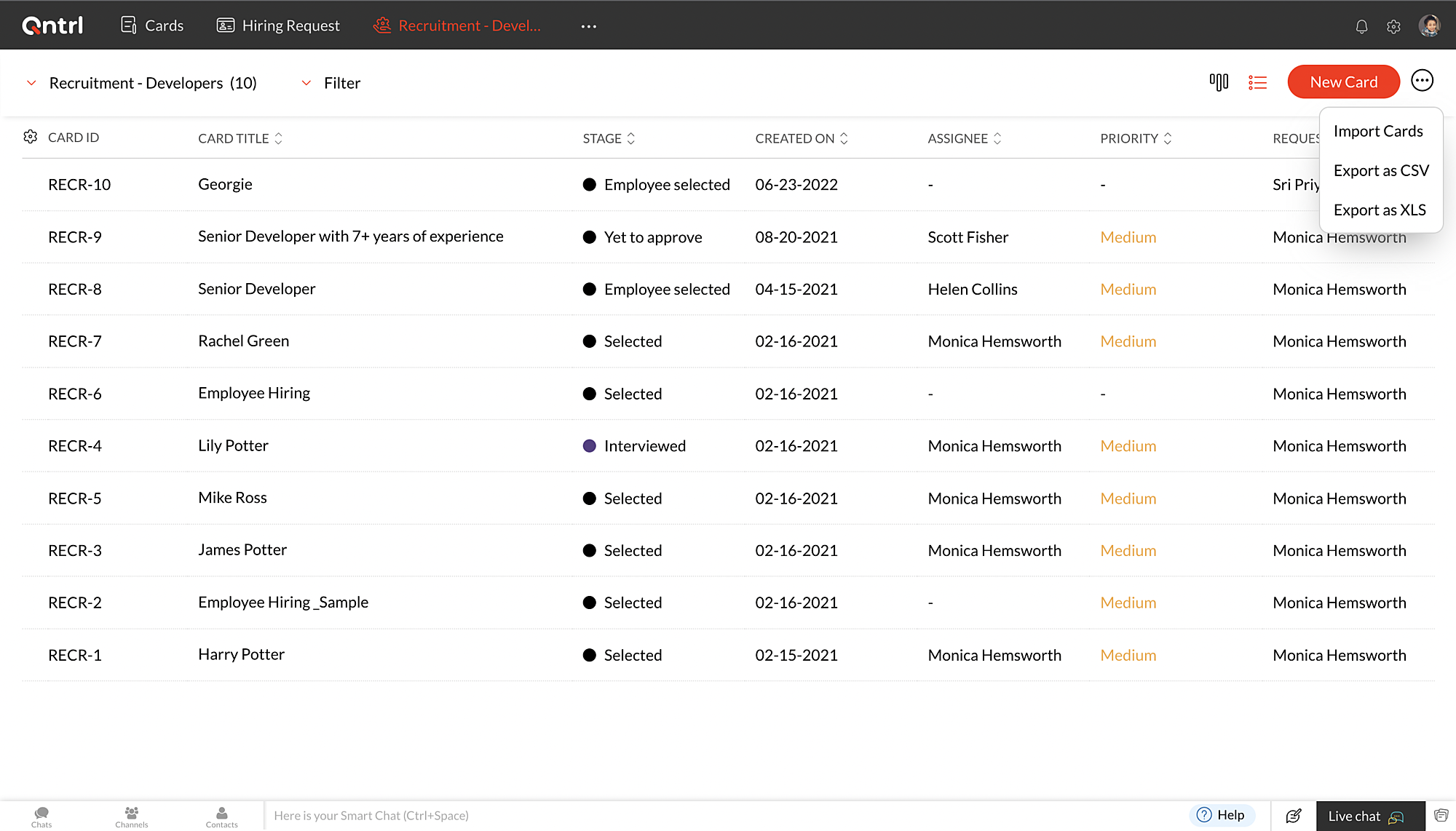
tab or from within the respective Orchestrations. Navigate to the Cards tab or Orchestration and click the
 icon at the top right corner to choose
Export as CSV
or
Export as XLS
. You'll be prompted to encrypt your file. Click
Yes
, if you opt for encryption. Else, click
No
. Your data will now be exported and stored locally on your computer.
icon at the top right corner to choose
Export as CSV
or
Export as XLS
. You'll be prompted to encrypt your file. Click
Yes
, if you opt for encryption. Else, click
No
. Your data will now be exported and stored locally on your computer.
icon at the top right corner to choose
Export as CSV
or
Export as XLS
. You'll be prompted to encrypt your file. Click
Yes
, if you opt for encryption. Else, click
No
. Your data will now be exported and stored locally on your computer.
In case you attempt to export more than 3000 cards, a URL to download the exported data will be emailed to you. Please keep in mind that the link will only be active for the next 7 days. and it will only be available to you for the next 7 days.
Note
: Data available in the Advanced fields will not be exported.
We hope this update is helpful to you. If you have any questions or suggestions, please leave a comment below or email us at
support@qntrl.com.
Access your files securely from anywhere
New to Zoho Recruit?

Zoho Developer Community
New to Zoho LandingPage?
Zoho LandingPage Resources
New to Zoho Survey?
New to Zoho CRM Plus?
Deliver unforgettable customer experiences
New to Zoho CRM Plus?
Deliver unforgettable customer experiences
New to Zoho Marketing Plus?
Everything you need to run your marketing
New to Zoho Marketing Plus?
Everything you need to run your marketing
New to Bigin?





Topic Participants
Sri Priya RK
Sticky Posts
Tip #21: Increase user engagement using dynamic email content and attachments in Orchestly
Businesses often send out bulk emails like weekly newsletters, monthly event updates, promotional emails, surveys, beta access emails, product reviews, seasonal greetings, and so on. Even as the gist of these emails remain constant for all recipients, personalizations capture the audience’s attention and help brands connect with them. Orchestly’s email templates allows you to draft and send dynamic emails with personalized content and attachments to internal and external users. Email templatesQntrl's 2023 year in review
This year has been all about analyzing our customer feedback and building a resilient and solution-driven product from it. As a result of this work, we're happy to announce that a whole new version of Qntrl is getting ready for release soon. This newTip #61: 5 different ways to create Cards in Qntrl
Qntrl supports an array of features that covers everything required for business orchestration, from process automation to business advancement. Cards, being the elemental feature of Qntrl, record all the details of a particular task from the beginningTip #17: Stay informed of significant business impact using Orchestly
With remote working becoming the new norm, leaders across sectors need to stay updated of their business performance in the market to aid business decisions. Instead of awaiting virtual meetings from sales and finance heads to put forth the business status, organization leaders can themselves dig into the system to keep an eye on their revenue generating customers or set up notifications to monitor major updates. Orchestly recognizes such requirements and provides adaptable solutions for all businessOnboard faster with Orchestly's Tutorials
We are actively rolling out new learning materials to assist our customers onboard at ease and automate their processes effortlessly. On that front, we recently launched Tutorials for Orchestly. Tutorial is a step-by-step guide to help users familiarize the concepts of Orchestly and automate simple processes right from scratch. We’ve documented 3 such business processes viz. Order Manufacturing, Product Implementation, and Change Management. We're looking forward to document more customer-centric
New to Zoho TeamInbox?
Zoho TeamInbox Resources
Zoho CRM Plus Resources
Zoho Books Resources
Zoho Subscriptions Resources
Zoho Projects Resources
Zoho Sprints Resources
Qntrl Resources
Zoho Creator Resources
Zoho CRM Resources
Design. Discuss. Deliver.
Zoho Show Resources

Get Started. Write Away!
Writer is a powerful online word processor, designed for collaborative work.
Zoho CRM コンテンツ
-
オンラインヘルプ
-
Webセミナー
-
機能活用動画
-
よくある質問
-
Ebook
-
-
Zoho Campaigns
- Zoho サービスのWebセミナー
その他のサービス コンテンツ
Nederlandse Hulpbronnen

ご検討中の方
Recent Topics
Zoho Creator as LMS and Membership Solution
My client is interested in using Zoho One apps to deploy their membership academy offer. Zoho Creator was an option that came up in my research: Here are the components of the program/offer: 1. Membership portal - individual login credentials for eachAdding Chargebee as a Data Connector
Is it possible to get Chargebee added as a Zoho Analytics data connector?Webform & spam
Hi, We set up 2 webform on our website, fowarding the content to Zoho CRM. Since it has been opened up, we are getting lot of spam message (for now about 20 a day). To lower the amount of false new leads we added the captcha field and new enquieries are send to the Approval Leads list. However we still get some spam. Is there any "anti spam" mechanism built in Zoho CRM, or how is the best way to avoid these kind of spam ? ThanksDropbox to Workdrive
Namaste, Trust you all are doing well. Wanted to check how this can be done with Zoho flow. I typically receive dropbox links from my clients. Is there a way where I can provide the link to Zoho flow and it downloads the files from dropbox link to a workDeals by Stages Funnel not showing in correct order
Using the Stage-Probability Mapping for the Deals module we have created a steps our deals will pass through, RFQ, Closed/Lost, Declined/No-Go, Pricing, Submitted, Negotiations, Won. However when I view the Deal By Stages Funnel it does not show in theConfirmation prompt before a custom button action is triggered
Have you ever created a custom button and just hoped that you/your users are prompted first to confirm the action? Well, Zoho knows this concept. For example, in blueprint, whenever we want to advance to the next state by clicking the transition, it isHow to create auto populate field based on custom module in Zoho CRM?
Hello, i'm still new to Zoho CRM and work as administrator in my company. Currently, I'm configuring layout for Quotes Module. So, the idea is, I've created a read-only field in Quotes called "Spec". I want this field automatically filled with SpecificationRich Text For Notes in Zoho CRM
Hello everyone, As you know, notes are essential for recording information and ensuring smooth communication across your records. With our latest update, you can now use Rich Text formatting to organize and structure your notes more efficiently. By usingOffice 365 and CRM mail integration: permission required
Has anyone run into this weird problem? My email server is Office 365. When I try to configure Zoho CRM to use this server, a Microsoft popup window opens requesting user and password. After entering that, I get a message in the Microsoft window sayingDeluge - Can't get phone number SalesIQ
Hey folks, I’m building a custom plug for SalesIQ that’s supposed to register leads into Zoho CRM. The SalesIQ chat is being implemented on WhatsApp, and in my plug I’m using this line: mobile_clean = session.get("phone").get("value"); From what I understand,Zoho Desk - Community
As a regular user of Zoho Cares Community I would really love to see the publish date of articles. For example, when I look at Announcements, it would be very beneficial to see which ones were posted recently, over those which have just and a recent comment.access to quartz for my customers
Hi how can I have access to the application quartz you use for us to send you screen rocording, this feature would be immensely useful for our customers support https://quartz.zoho.com/Issue with Inline Images in Email Reply via Zoho Desk API
Hi, I am attempting to send inline images in an email reply using the Zoho Desk API, but the images are not being displayed inline for the recipient. I have followed this documentation: https://desk.zoho.com/DeskAPIDocument#Uploads https://desk.zoho.com/DeskAPIDocument#Threads#Threads_SendEmailReplyHow to search a value stored in a subform?
Hello, We store serial numbers in subforms but now we would like to be able to search the values to be able to easily find the record with the serial number. I saw that it's not possible to search such values through global search but is it possible to do it an other way? Thank you,Field Dependency Not Working on Detail Page in Zoho Desk
Hi Support Team, I’ve created field dependencies between two fields in Zoho Desk, and they are working correctly on the Create and Edit layouts. However, on the Detail page, the fields are not displaying according to the dependencies I’ve set — they appearHow do the keyword critera work?
Hi, I'm working on automated assignment of tickets based on keywords. How does this feature work? Where does this criteria look for keywords - email address, subject, email body? Can you please clarify this as I want to avoid overlapping with criteriaError: Unsupported content type: text/html;charset=UTF-8 after tryeing to get the token for n8n automation
I am working on ZOHO Desk automation and need to get the ZOHO auth token for n8n I have created the app in ZOHO Desk API, got client id and client secret. Added all data required to get a token in n8n. After I sign in with my ZOHO credentials in ZOHOImproving Collaboration Features in Zoho Portal
Hello Zoho Community, I’ve recently started exploring Zoho services and I’m really impressed with the wide range of features. However, I feel there is still room for improvement in the collaboration area. For example, it would be really helpful if weAutomated Shopify Emails Not Being Delivered
I have an ecommerce store with Shopify. I recently set up my email to be served through Zoho. Since doing this, customers are not receiving some of our automated emails from Shopify itself. Our initial email that confirms their purchase goes through but our Shipping Notification that is automatically sent out upon fulfillment is not going through. Sometimes we get a notice that it's been classified as spam, sometimes nothing. I can send/receive email via Outlook on my desktop and I can send/receiveSend a campaign to one recipient.
Very often I speak to a customer and they say they didn't see my email (maybe it went in Junk, maybe they deleted it). Anyway, I just want to go into the Campaign and send it to one person. You already have a feature very close to this - when sending a Test. While developing a campaign, I can send tests to anyone. Why can't we have this AFTER the campaign has been sent? I know, there's a caveat, and that's in the use of merge tags. Most of the time I only use FNAME, but maybe you could check ifTry FSM again for our business
We already have our customers individual equipment in CRM with serial numbers, install dates, warranty length and importantly next service which is generally 2 years. a month before the service date is due we get get a report and send out service reminders.Get Cliq Meetings in my O365 calendar
Hi, we are currently evaluating to replace the Teams Messaging and Meetings with Cliq. We currently still have all our email and calendars in O365. What i want to achieve is, to create a (ZOHO) meeting from Cliq and have this meeting added to my Outlook/O365Issue with Zoho Help Portal – Tickets Missing or Not Answered
Hi, How are you? I think there may be an issue with the Zoho Help Portal. I opened a few tickets directly in the help portal a some time ago but never received any response I also opened ticket 148356451 by email. I did receive a reply to it, but theDUNS & Bradstreet and Credit risk monitoring integration with Zoho books
Small businesses not being paid by bigger clients and clients of all sizes is a huge problem. It will be nice if Zoho develops integration with DUNS & Bradstreet(D&B) and Credit risk monitoring integration with Zoho books. That have small businesses canZoho Forms - Form Rules based on attachment fields
Many businesses use forms to collect documents and images from customers. In many cases, you may want to trigger a notification or other automation based on whether or not an attachment was added. I've noticed that attachment fields do not appear in RulesCan't open draft email for editing
Last night I started composing an email and I let it save in drafts. This morning I want to continue working on the email. It is in my Drafts folder but it will not open. The only option there is to delete it. This is not the first time it has happened. On previous occasions I have just deleted the draft and started afresh, but I really want this one back. Windows 10 with Pale Moon 28.10.0 browser.Open filtered deals from campaign
Do you think a feature like this would be feasible? Say you are seeing campaign "XYZ" in CRM. The campaign has a related list of deals. If you want to see the related deals in a deal view, you should navigate to the Deals module, open the campaign filter,Change scheduling emails time
When sending an individual email there is a great feature to schedule them to send later. I could only use the one time that is suggested. Is there a way to select another time? Regards, GlennZoho CRM: how can I control which contacts to sync with Outlook?
I was just playing around syncing contacts from Zoho to MS Outlook (MS365 account.) The problem is our firm has hundreds of thousands of contacts and I don't want to bury my contacts list in outlook. Any help with this is greatly appreciated.How to overcome limitations in meetings
As a company, one of our deliverables is a meeting between two other companies, where we act as facilitators. So, if we recorded this meeting in Zoho CRM, it should be connected to 2 accounts, 2 contacts, and 1 campaign (a campaign, in our use, is theAdd a 'Log a Call' link to three dot icon in Canvas
Hi, There's a three dot element when creating a canvas called 'More'. I would like to modify this to add a link that says 'Log a Call' in order to quickly record the details of a cellphone call. I'd also like this to be a simple 'contact' selection andSyncing Zoho Forms with Bigin - Embedding issue?
Hello everyone, I created a Zoho Form for a page on my GoDaddy website to collect leads, which then transfers the data to Bigin. However, I'm facing an issue where it doesn't seem to work properly. I've integrated Zoho Forms with Bigin and tried embeddingCan not add fields to a Section
I feel like I'm missing something obvious: I can add new Sections to my form but I can not add fields to the Sections. I've tried fields already on the form as well as dragging and dropping new fields into the Section but nothing will go into it. WhatRecord Logged in User while using CRM lookup field
Is it possible, while using the Zoho CRM lookup field, to automatically use the user account logged into Zoho CRM in a hidden field? I was hoping to add employee accounts to my current plan. But would like a record on the Form submission of who submittedForm Rules for Suburb Categories to alternate landing pages or Making a Fields Contents ALL CAPS
I need to send differentform submissions to two to three different thank-you URLs (for Meta/Google pixels) depending on which suburb a user selects in a form. I have ~400 suburbs split into two categories (A and B, based on business value). Current challenges:Collaps Notes
There are times when long/large notes are added to a record i.e. Accounts or Deals etc. Currently, the full note is displayed in the notes related list section. It would be great if by default only 5 to 10 rows of the note are displayed when the noteZoho Down
I have a drop in my Zoho One services.Runing RPA Agents on Headless Windows 11 Machines
Has anyone tried this? Anything to be aware of regarding screen resolution?Problem for EU users connecting Zoho CRM through Google Ads for Enhanced conversions
Has anyone else experienced this problem when trying to connect Zoho CRM through Google Ads interface to setup enhanced conversions? Did you guys get it fixed somehow? The Problem: The current Google Ads integration is hardcoded to use Zoho's US authenticationWhy am I getting event Pop-up Notification for events that have been cancelled?
Why is Calendar Notification still popping up for events that have been cancelled or changed? Each time events are cancelled or changed, I have observed that I am still getting notifications for them. Below is a sample pop-up notification for one of theNext Page