Unveiling Zoho CRM's New User Interface - The NextGen UI
Hello Everyone,
Last Wednesday, May 14th,2025, we announced the public release of Zoho CRM For Everyone, our most significant update yet. This release brings a modernized CRM experience with a redesigned user interface, new capabilities for cross-functional collaboration, and greater flexibility for users across your organization.
Read our PR announcement, our forum announcement, and the blog post to know more about this release.
To help you get the most out of these updates, we’ll be publishing a series of announcements that walk you through the major enhancements now available to all Zoho CRM users.
We’re kicking off this series by spotlighting one of the most noticeable changes — the new and improved user interface, Zoho CRM's Nextgen UI.
What’s New in the NextGen UI?
- A reorganized menu option
- The sidebar
- Teamspaces
- Additional Module Views
- Interactions Tab
- Enhanced Themes and
- Night Mode
Watch this video to get an idea of how your CRM could look!
Let's dive into each of these features in detail :
Reorganization of menu options from the top band to the left-hand side vertical sidebar.
Previously, Zoho CRM housed the menu bar on the top where most of the navigation took place, as shown below.

Now, We moved the top bar to the left with a vertical sidebar that is expandable as shown below. This not only declutters the top space but also makes it easier to access your modules and features with minimal clicks.

The Sidebar
The new sidebar is now an extremely functional piece of the UI with contextual shortcuts for quick settings, neat folders for better organization of modules, and more. Learn more.
The top portion of the Sidebar houses icons to view and work with Modules, Reports, Dashboards, Requests, Marketplace, and Global Search.

The bottom portion of the sidebar now contains intuitive utility icons such as Quick create record, Mail magnet, Calendar, and more. (originally located on the top right corner of the UI).

Expanding the sidebar opens up quick-controls contextual to what you've chosen to work on. This is collapsible in order to allow you to maximize your right-hand side work area.

Contextual Shortcuts through the sidebar
You have contextual shortcuts to Setup options from here, like creating new modules or folders. While the backend Setup is still intact, these options from the sidebar options offer a quick shortcut.
Create Modules
You can create either org modules or team modules from the sidebar. This option makes it easy for users to quickly create their own modules and
configure processes instead of navigating to the setup menu every time.
Create folders
You can create modules or folders right from this location without having to navigate to the backend Setup. Folders are a great way to organize or group modules in different categories. Say you are part of the Sales teamspace and you have certain sales activities that you need to perform to touch base with customers like creating tasks, scheduling calls or meetings. So you can group Tasks, Meetings, Calls into a "Sales Activities" folder for easy access and a clutter free side bar. Learn more.

You can also directly create layouts, webforms, wizards, canvas pages, etc from the sidebar.

Organized Teamspaces for Focused Work
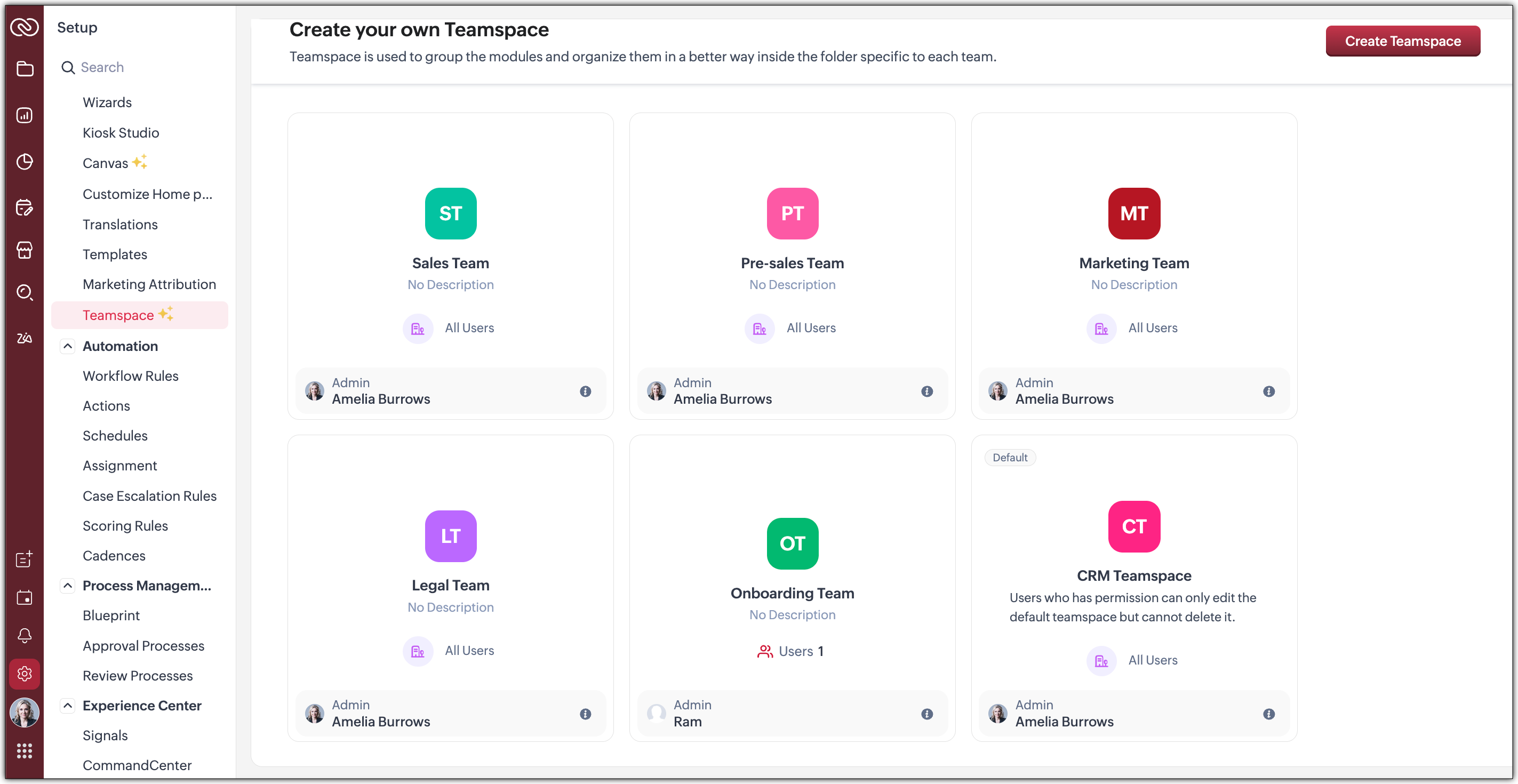
Tab Groups have been transformed into what we now call Teamspaces. If your CRM is used by multiple teams, organizing and managing their work and data can quickly become complex.
We offer a solution by giving each team a dedicated, folder-like space where all their related modules are grouped together. This setup ensures clear separation between teams, making collaboration more focused, and preventing the risk of teams crossing over or accessing modules that are not meant for them.
Hence, Teamspaces are dedicated workspaces for each department or function to organize their work. Whether you're in sales, support, or marketing, Teamspaces help reduce noise and keep your workspace relevant to your role. Learn more.

You have the option to create teamspaces from the bottom of the sidebar or from the Setup menu. The org admin would generally be the one who creates teamspaces, assigns users as teamspace admins and adds users to a teamspace.
Note : Users with the Manage teamspace permission enabled will be able to create and manage teamspaces in an org.
Teamspace Admin
A teamspace admin is generally the head of a department or a team. For example, a Sales Director could be assigned as the Sales Teamspace's Admin. Once a user becomes a teamspace admin, they can add or remove users, allow reports and dashboards to be created for modules within a teamspace.
Note : If a user is a Teamspace admin but does not have the "Manage Teamspace" permission enabled, they can only manage the specific Teamspace they’ve been assigned to as an admin. They won't be able to create new Teamspaces or manage any others.
Features offered as part of this enhanced UI
- Additional Module Views have been added to provide you with more flexibility, better insights, and improve productivity when working with module data. Thee view added are :
--> Chart View : Get a visual representation of your module data with this View
--> Grid View : Convert your module data into a spreadsheet-like interface where you can edit and manage records directly without having to open each record individually.
--> Timeline View : Look at how your module is created by viewing data plotted over a specific period of time.
--> Split View : Split your module data based on picklist fields /users or criteria to segment them for further inferences. - Interaction tab : This feature displays a timeline of a customer's journey and their engagements across different channels within your CRM.
 We will post individual announcements for each of the above features in the upcoming days.
Themes
The new UI introduces a refreshed theming experience with 13 vibrant colour options to personalize your workspace. These themes go beyond just cosmetic changes: the selected theme isn't limited to the sidebar; it flows throughout the product interface.
Once you choose a theme, the colour is consistently applied across key areas of the CRM, including buttons, tabs, menus, and other interactive elements. This cohesive design enhances visual clarity and gives your team a more engaging, unified experience tailored to their preferences.
If you want to match your brand colours or give your CRM tool a refreshed appearance, the new themes bring both customization and character to your work environment.
Dark-Mode
With the new UI, we’re excited to bring Dark Mode to your CRM experience. This feature was designed with both comfort and usability in mind.
Dark Mode offers a visually soothing alternative to the standard light interface, reducing eye strain during long hours of work, especially in low-light environments. It's not just a cosmetic change; it’s about enhancing usability and making your workspace more comfortable.
Once enabled, Dark Mode is applied consistently across the entire product, including the new UI elements like the left sidebar, buttons, forms, and interaction panels. Whether you're viewing records, managing tasks, or collaborating within Teamspaces, the darker interface ensures clarity without compromising on aesthetics or function.
This addition is part of our effort to make Zoho CRM more adaptable to user preferences and modern work styles. You can switch to Dark Mode at any time from your profile settings and choose what works best for you. Learn more.
What can you choose in this implementation?
Day : Prefer a brighter interface? Day Mode offers a clean, crisp, and classic appearance of your CRM, making it not just functional but also visually pleasing.

Night : Enjoy a sleek, modern look with reduced eye strain, especially in low-light environments. Darker UI minimizes glare and helps reduce fatigue, making it easier to work for longer periods.

Auto : Let the system decide! Auto Mode automatically switches between dark and light themes based on your device settings.

Resources
We invite you to explore these exciting updates and see how productivity increases in your CRM journey. Stay tuned for our upcoming announcements where we’ll dive deeper into each feature, helping you make the most of everything the NextGen UI has to offer.
Regards,
Serena Woolridge
Access your files securely from anywhere
Centralize Knowledge. Transform Learning.
All-in-one knowledge management and training platform for your employees and customers.
New to Zoho Recruit?

Zoho Developer Community
New to Zoho LandingPage?
Zoho LandingPage Resources
New to Zoho Survey?
New to Zoho CRM Plus?
Deliver unforgettable customer experiences
New to Zoho CRM Plus?
Deliver unforgettable customer experiences
New to Zoho Marketing Plus?
Everything you need to run your marketing
New to Zoho Marketing Plus?
Everything you need to run your marketing
New to Bigin?





Topic Participants
Serena Woolridge
Andréa Kérébel
Andrew
Ishwarya SG
K'an Thomas
Sticky Posts
Introducing Multiple Sandbox Types and Support for Module's Data Population
Register here for the upcoming Focus Group webinar on Multiple Sandbox | Help documentation to learn more about the new enhancements Hello everyone, Sandbox in CRM is a testing environment for users to create and test new configurations like workflowGood news! Calendar in Zoho CRM gets a face lift
Dear Customers, We are delighted to unveil the revamped calendar UI in Zoho CRM. With a complete visual overhaul aligned with CRM for Everyone, the calendar now offers a more intuitive and flexible scheduling experience. What’s new? Distinguish activitiesVoC in Zoho CRM is now data savvy: Explore response drilldown, summary components and participation in CRM criteria
VoC has all the goods when it comes to customer intelligence—which is why we're constantly enhancing it. We recently added the following: A customer drilldown component that shows you the list of prospects and customers behind a chart's attribute ExpandedWrapping up 2025 on a high note: CRM Release Highlights of the year
Dear Customers, 2025 was an eventful year for us at Zoho CRM. We’ve had releases of all sizes and impact, and we are excited to look back, break it down, and rediscover them with you! Before we rewind—we’d like to take a minute and sincerely thank youPresenting ABM for Zoho CRM: Expand and retain your customers with precision
Picture this scenario: You're a growing SaaS company ready to launch a powerful business suite, and are looking to gain traction and momentum. But as a business with a tight budget, you know acquiring new customers is slow, expensive, and often delivers
New to Zoho TeamInbox?
Zoho TeamInbox Resources
Zoho CRM Plus Resources
Zoho Books Resources
Zoho Subscriptions Resources
Zoho Projects Resources
Zoho Sprints Resources
Qntrl Resources
Zoho Creator Resources
Zoho CRM Resources
Design. Discuss. Deliver.
Zoho Show Resources

Get Started. Write Away!
Writer is a powerful online word processor, designed for collaborative work.
Zoho CRM コンテンツ
-
オンラインヘルプ
-
Webセミナー
-
機能活用動画
-
よくある質問
-
Ebook
-
-
Zoho Campaigns
- Zoho サービスのWebセミナー
その他のサービス コンテンツ
Nederlandse Hulpbronnen

ご検討中の方
Recent Topics
Is SMTP included in the free plan?
My client has a Zoho Mail Free 14 day trial that ends tomorrow. She has set up a domain email address with SMTP on a third party app and is wondering if it will continue working once her plan downgrades to the free forever plan. ThanksZoho mail issue.
I have verified my domain ohhoexpress.online by adding necessary TXT and MX records. But when I am sending email to any external email id, it is showing as zohomail.com. Also while I am sending mail to internal mail id, it is saying user not found whereasMy email is blocked from sending
I get this message when I try to send any message .. > Unable to send message, Reason 554 5.1.8 Email Outgoing Blocked We have urgent emails to send and the issue continues to persist from yesterday. Please help us with this issue as soon as possibl[WEBINAR] Smooth year-end closure with Zoho Books (KENYA)
Hello there, This webinar is for all Kenyan businesses looking to wrap up their financial year smoothly! Join our free session to learn how Zoho Books can simplify your year-end process. What to expect from this webinar: - All the latest updates in Zohocannot recieve or send emails
we are not recieving or cannot send emails.Shows sysytem errorZoho Sites - contact us form
I have added a contact us form to my website. I wanted to change the layout so I deleted the section of Contact Us form. When I again try to add the section of Contact Us form, it shows error that "This form already exists on this page." I am unableswitching from POP3 to IMAPI do I need to change settings in Web email?
hi so I am using Outlook with My Zoho mail, also have Verizon email /AOL. they no longer support POP3 and said imapi is much better, so I want to switch my ZoHo to imapai. I googled and it said i need to change it in my account....i looked at my accountWhat functionality is new in the Z025 Spaces UI dashboard compared to the previous Zoho One dashboard?
My company is interested in creating a revamped dashboard this coming year, and are trying to weigh different platform options. The new Spaces UI is said to be a more "feature-rich" dashboard experience than the previous. Could a developer please explainCollections Management: #5 Convenience on Offer, using Self-Checkout
"Is this the right page? Oh, now, it wants my address again. Why am I being redirected?" These were the exact thoughts running through Karan's mind as he tried to subscribe to an application he genuinely liked. He clicked "Buy Now", expecting a quickTip #50- A Closer Look at the Unattended Access Dashboard- 'Insider Insights'
Having complete visibility and quick access to everything you need certainly makes managing multiple remote devices a lot easier, and that is precisely what the Unattended Access Dashboard in Zoho Assist is designed to offer. Once you go to the UnattendedHow to update custom multi-user field in Zoho Projects?
I'm trying to update custom multi-user fields in Zoho Projects via a Deluge function in CRM. The code I have so far is below. It works for updating standard project fields and single-line custom fields, but it does not work to update multi-user fields.Tip of the Week #75– Manage your social media messages from a single shared inbox.
Are you tired of jumping between apps or browser tabs to reply to your business's Facebook and Instagram DMs? Handling customer messages on social media might seem simple, but switching between multiple platforms can easily lead to lost messages, duplicateZoho Map integration tasks have changed - you need to "Locate all instances of Zoho Map integration tasks in your Deluge scripts by searching for the v1 marker... before 16 January 2026"
The Zoho Map deluge integration task has been changed (as at 21 October 2025) to provide a more structured, JSON-like response. This change affects all three Zoho Map integration tasks (Geocode, Reverse Geocode, and Distance Between). More details canUsing files from Zoho CRM in Gemini/ChatGPT/Claude
Hi all, I’ve got subscriptions to Gemini and a few other AI tools which I use for tasks like data enrichment, email composition, etc. In our workflow, we often receive various documents from clients — such as process workflows, BRDs/requirement documentsZoho Analytics & Zoho Creator - Modified Time value
I'm trying to use the Zoho Creator system field 'modified time' in Zoho Analytics, but it's consistently showing 12 hours 'out' In Zoho Creator In Zoho Analytics Is this a constant difference that I just need to correct with a timezone change - or isPortal For Different Apps
I found some older threads on this but didn't see anything very recent. I'm new to Zoho One so forgive me if my terminology is off a bit. I was hoping set up a single point of entry into Zoho One. So, many of the apps could be found in one single placeCalls undetected
Zoho Voice records indicate my last call ended at 6:00 PM. All incoming and outgoing calls occurred between 6:00 PM and 7:00 PM.Unable to Select Authenticated Domain as Sender
We’ve already authenticated our domain, but it’s still not appearing in the sender list when we try to run a campaign. Could you please check what might be causing this issue?Zoho Projects - Show Task List as dropdown field on Task records
Hi Project's Team, I noticed today that there is no field on a task record related to the task list it belongs to. A dropdown would be helpful for quickly moving tasks between lists while in a task. I know that you can go to "Other Actions" and chooseMy followed tickets extension is not working under the All departments view
Hi. I've installed the My followed tickets extension. However, when I try to open the extension under the all departments view, I get the following message: 'Sorry, this extension is not supported in the All Departments view.' How can I solve this pTicket Time Entry to Timesheet
The title just about sums it up. I have searched here and not found anything relevant, but If I overlooked, then please set me straight. We have staff that do nothing but close tickets in desk all day long. These tickets represent their timesheet. Is there a way to have this information sync or for a tech to go into their timesheet themselves and sync it with their tickets of the same timeframe?? We waste a ton of time doing timesheets and the old "Clock in/Clock out" isnt detailed enough for us!!Calls undetected.
The call is not showing on the call log.Calls undetected
Zoho is not reading calls made.Missing information data Zoho inventory
there some missing data in Zoho inventory connection. pick list stock counts bin location we have requested it via mail and the support team doesn’t gove feedback. has anyone achieve to get these info or to ask other ya lesCalendar Events Issues
Not able to view scheduled events on my calendarExtensions 101 webinar series: Build, integrate, and monetize with extensions
Attention developers! Are you ready to take your extension development skills to the next level? We're excited to bring back the Extensions 101 webinar series with an expanded lineup of Zoho products and an introduction to more platform features. LastWhere are recordings stored?
I have hosted a couple of test meeting, used the "record" button to start and stop the recording but I am unable to find where are those recordings saved? Can anybody help? ThanksZoho Desk's integration with Microsoft PowerBI delivers advanced analytics insights
Hello everyone, Gaining advanced insights through reports and dashboards is one of the critical requirements of every business. In addition to key metrics tracked in Zoho Desk, such as agent performance, SLA adherence, and ticket lifecycle, businessesIMAP error message in Zoho mail
I cannot send emails today. Everything fine for years until today. Get a message: "You are yet to enable IMAP for your account. Please contact your administrator". Does anyone know how to correct this?IMAP stopped working today
Hello! I've been a paid customer for more than 10 years, IMAP was always working fine. But today this is the error I've got on my iPhone: I've tried toggling the IMAP for my account (Mail -> Settings -> Mail accounts) off and on again, but that did notMultiple columns in a form
I am evaluating Zoho Creator. However, I am seeing almost no layout control on a form. Just a basic 1 or 2 column format that is then imposed on the entire form. That's not going to work for many, many real world cases. We need multiple columns per line, and we need each line/section to occupy a single column or be able to span the columns. Someone please tell me that I'm missing something and the capability is actually there.Global search
Hi! I think it would be great to have a global search that would give you results from all records of a database, no only for a single field of a single form as we have now. Thanks!Any insights about API/v2? Having problem for a while.
I don't know why it is throwing a 404 error, my report name is correct. Has someone had this issue and how you fix it?Edit QR code with redirect to form
Guten morgen, wir haben ein Formular Reklamation_erstellen. Dort soll ein QR Code erstellt werden, der im Lieferschein angezeigt wird. Beim Scannen auf dem soll das jeweilige Formular zum BEARBEITEN geöffnet werden. Leider bekomme ich es nur so hin, dassGetting all the ingredients together for baking an app
Good day everyone. After reading a lot of the help docs and watching videos, I now started on my app. To prevent hours and hours wasted on going down the wrong track, I would like some clarification on the following. But first some background: I haveHelp Needed with Configuring ZC Microservice
I'm attempting to create a simple microservice, but am running into problems with scope and auth. Using Custom API Builder, here's my setup: 1. Method: GET 2. Auth: OAuth2 3. User Scope: All users 4. Response: Standard 5. Function: A function that returnsCreator Simplified #10: Predefine Form Field Values and Make Them Read-Only for Users
Hey Creators, Ready for this week's tip in the Creator Simplified series? Today, we will explore how to have read only fields in a form. Use Case: Assume a scenario where the default value for a Department field needs to be English Literature, but youZoho Mail : Email Outgoing Blocked
I suddenly received the following message yesterday. I cannot send any mail. Please resolve as soon as possible, I cannot work without sending email. Dear User, We regret to inform you that your email outgoing has been blocked and you will not be ableCreator and Tables
Good day. I am trying to create my first application. I have imported my data into Tables and am creating my app in Creator. I do not see my tables and cannot see how to write forms data to a table. Even the Workflow just uses the form. In one of thecustomer Name and address details
i created one application there is no customer details in that . how to add customer details andNext Page