What's New in Zoho Expense: July 2023
Hello users,
We're delighted to present our monthly roundup of updates to help you stay informed and experience hassle-free expense management with Zoho Expense. From real-time budget insights to effective date configuration for policy rules and per diem rates, we've tailored our features to meet your unique business needs. Let's dive right in and read everything about them.
Effective date for policy rules
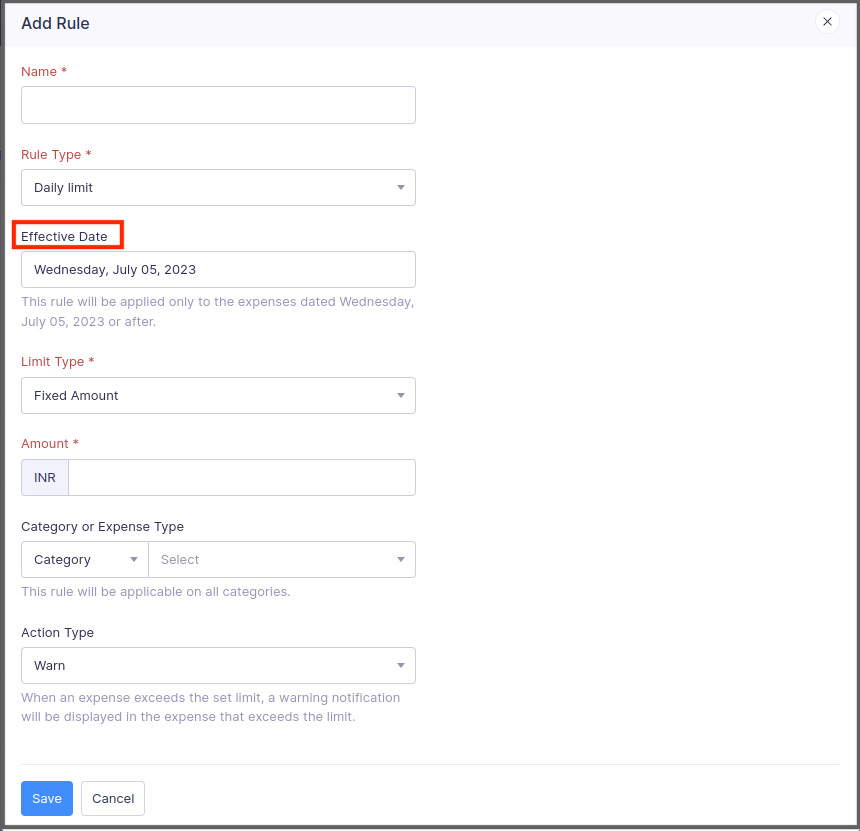
Now, you can add the date from which the rules you configure in policies can be made effective. Once you set up an effective date for a rule, the rule will be applied only to the expenses that are dated on or after the effective date. If you don't set up an effective date, the rules will be applied to all the expenses.
To add an effective date for a rule: Go to Admin View > Settings > Policies. Select a policy and navigate to the Rules tab. Click a rule, enter the effective date, and click Save.
View actual amounts spent while editing budgets - Early access
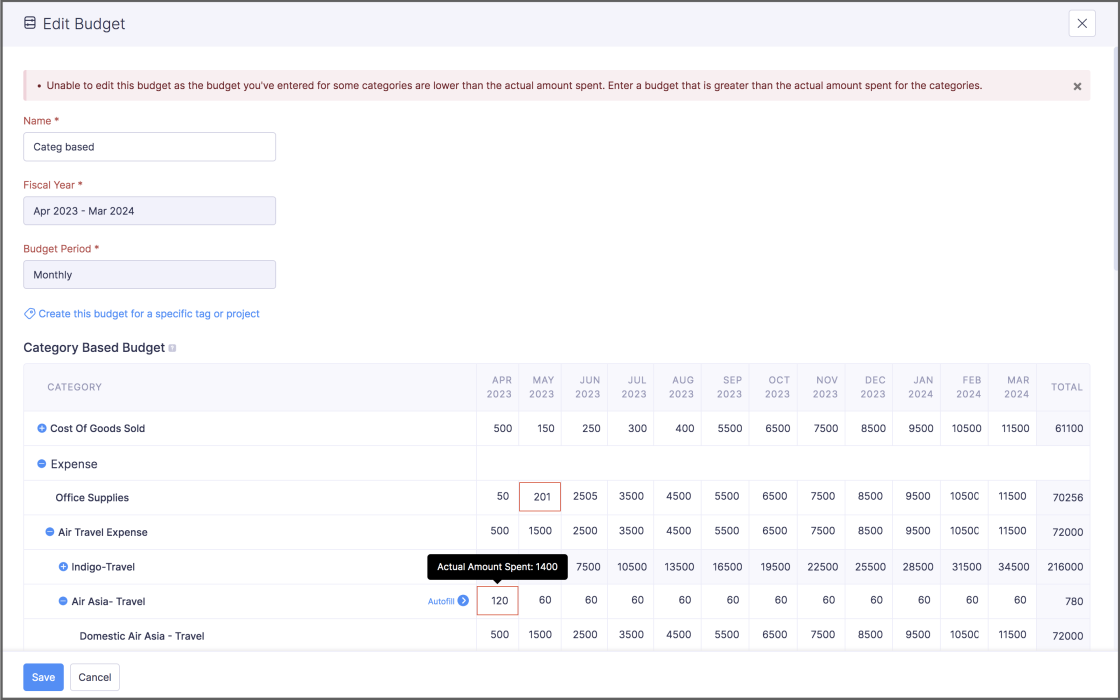
While editing a budget, if you enter a budget lesser than the actual amount that was spent by the users in that category or expense type, Zoho Expense will display the actual amount spent by the users and will restrict you from saving the budget. This real-time visibility lets you make data-driven decisions and allocate funds strategically. This feature is still in early access. Contact support@zohoexpense.com to enable it for your organization.
To do this: Go to Admin View > Budgets. Click a budget and click the Edit icon in the top-right corner. You can view the actual amount spent if you enter a budget greater than the actual amount spent.
New preference for purchase request and expense association
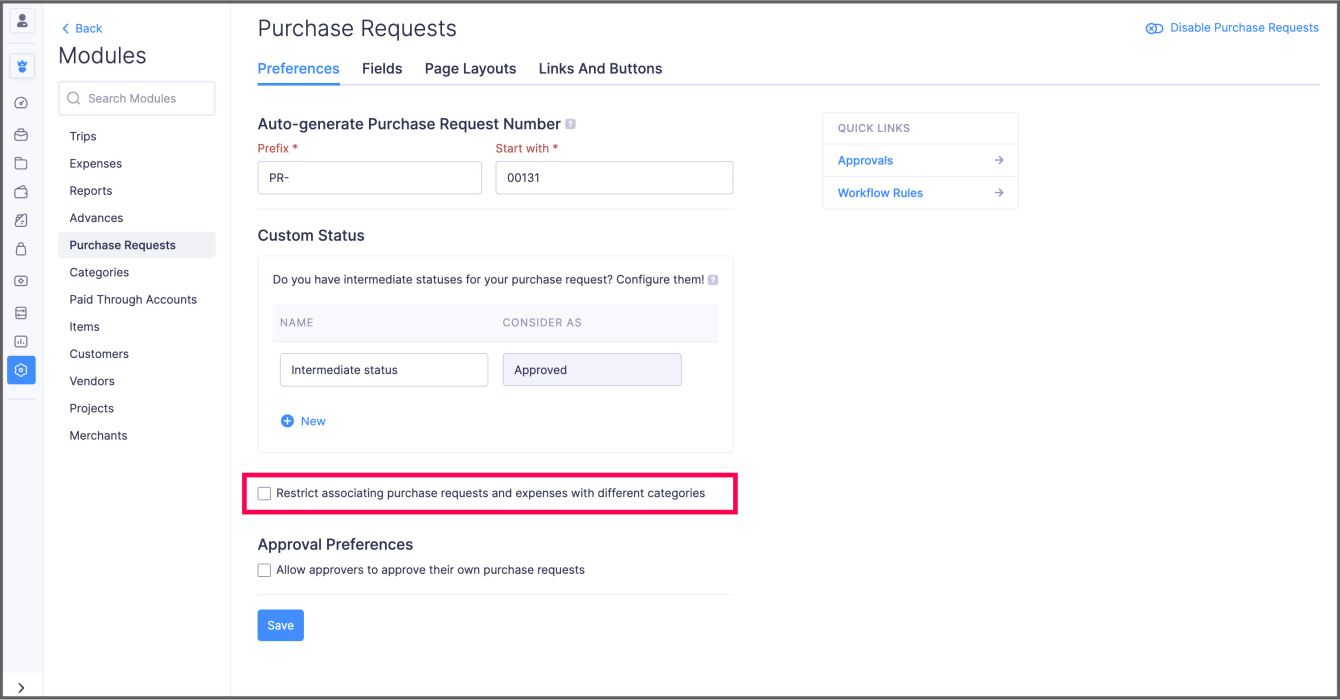
We've introduced a new preference for Purchase Requests, wherein you can restrict users from creating an expense with a category different from that of the associated purchase request item. For instance, if the category of the expense is "Meals and Entertainment," then the purchase request item you're associating with the expense should also have "Meals and Entertainment" as the category. In this way, you can ensure your users associate appropriate purchase request items with their expenses.
To enable this preference: Go to Admin View > Settings > Modules > Purchase Requests. Enable the option and click Save.
Effective date for per diem default rates
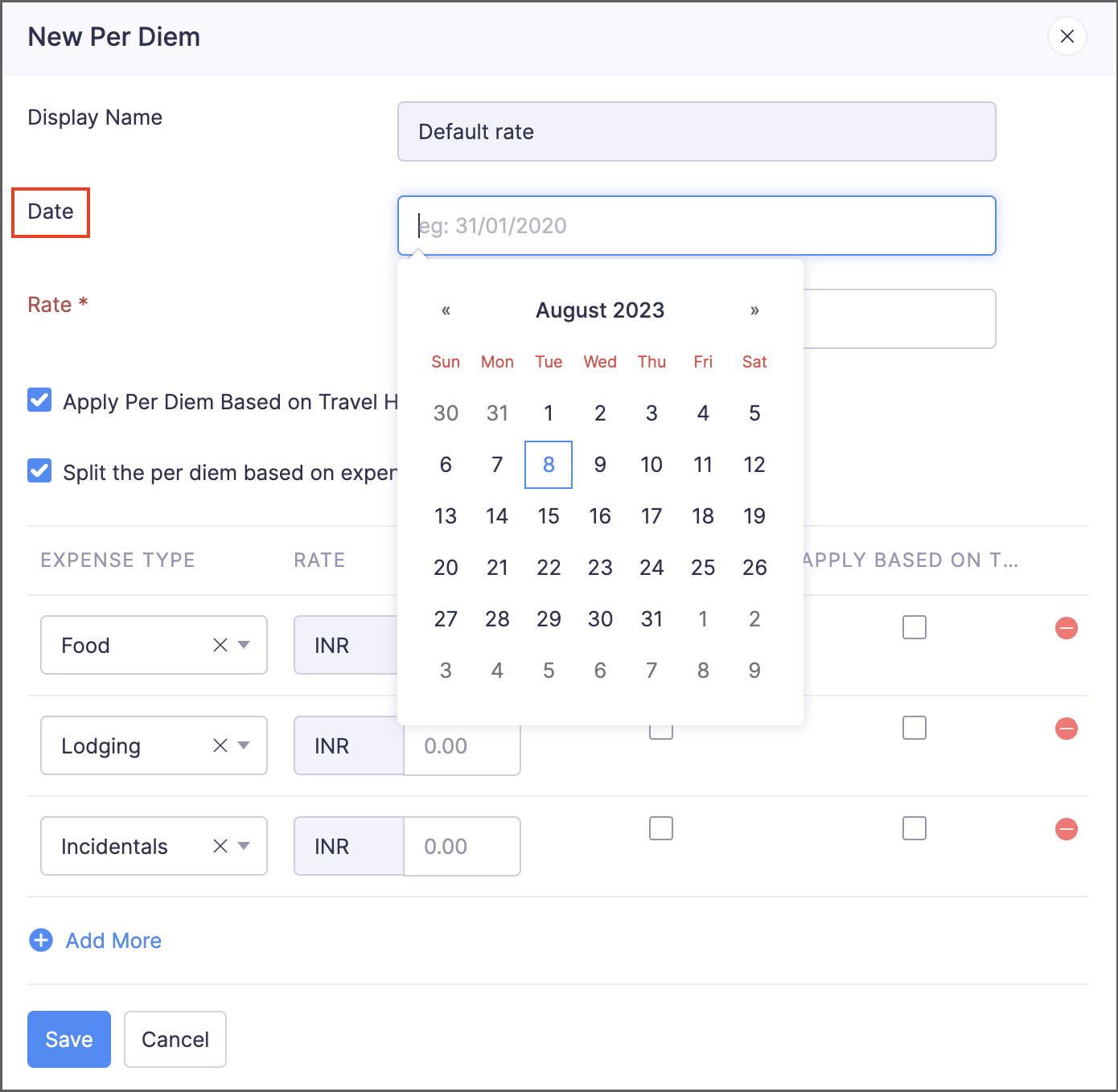
In addition to configuring effective dates for per diem rates you've configured for each location, you can now configure effective dates for default per diem rates, as well. If you have multiple default rates, this feature will come in handy by applying the default rate based on its effective date.
To add an effective date for a default rate: Go to Admin View > Settings > Policies. Select a policy and navigate to the Per Diem tab. Click the More icon in the right corner of a default rate and select Edit. Enter the date and click Save.
View expired travel documents inside trips
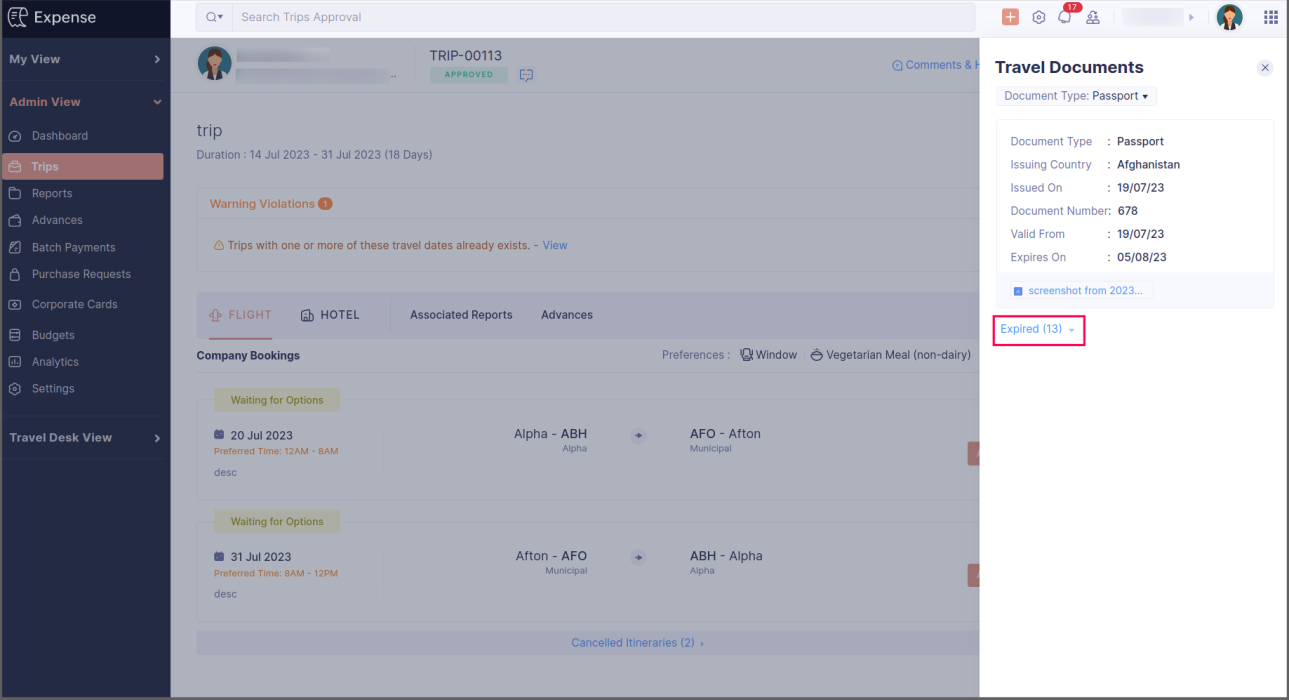
Currently, admins can view an employee's travel documents directly within the employee's trip requests in the admin view. They can also filter documents based on their type and view them inside the trip. In addition to displaying all travel documents, to ensure full compliance, we've now introduced a dedicated section to display expired travel documents. This will keep admins informed about the validity of each employee's travel documentation.
To view the expired travel documents: Go to Admin View > Trips. Click the trip for which you want to view the documents and click Travel Documents on the right side of the screen. Click Expired to view the expired documents.
Android app updates
- Users can now autoscan receipts from the report details screen to create new expenses that will be added to the report.
- Users can now switch to the free plan using the Android app.
iOS app updates
- You can now request free-of-cost items in your purchase requests using the iOS app.
We hope you're excited to try these new features. Let us know what you think in the comments below. Be sure to keep an eye out for more updates and enhancements in the coming months. If you have any questions, please contact support@zohoexpense.com.
Regards,
Zoho Expense
Access your files securely from anywhere
New to Zoho Recruit?

Zoho Developer Community
New to Zoho LandingPage?
Zoho LandingPage Resources
New to Zoho Survey?
New to Zoho CRM Plus?
Deliver unforgettable customer experiences
New to Zoho CRM Plus?
Deliver unforgettable customer experiences
New to Zoho Marketing Plus?
Everything you need to run your marketing
New to Zoho Marketing Plus?
Everything you need to run your marketing
New to Bigin?





Topic Participants
Vidhya G S
Sticky Posts
Zoho Finance Workshop 2023 is coming to the USA. Meet the experts, get exclusive training on Zoho Finance apps and more.
Hello all, We'd like to invite you to our biggest Zoho Finance workshop in the United States. After a brief break, we are excited to be back. This year, we're bringing together our customers and community members for two days of curated hands-on sessions,
New to Zoho TeamInbox?
Zoho TeamInbox Resources
Zoho CRM Plus Resources
Zoho Books Resources
Zoho Subscriptions Resources
Zoho Projects Resources
Zoho Sprints Resources
Qntrl Resources
Zoho Creator Resources
Zoho CRM Resources
Design. Discuss. Deliver.
Zoho Show Resources

Get Started. Write Away!
Writer is a powerful online word processor, designed for collaborative work.
Zoho CRM コンテンツ
-
オンラインヘルプ
-
Webセミナー
-
機能活用動画
-
よくある質問
-
Ebook
-
-
Zoho Campaigns
- Zoho サービスのWebセミナー
その他のサービス コンテンツ
Nederlandse Hulpbronnen

ご検討中の方
Recent Topics
Set Custom Icon for Custom Modules in new Zoho CRM UI
Portals-Adjust Column Sizes
I am trying to adjust the column widths in Portals tabs. Columns that don't need to be wide are wide and longer ones are very short. I thought adding more to the digits box in Edit would widen them, but it doesn't. Anyone know how to adjust these?All new Address Field in Zoho CRM: maintain structured and accurate address inputs
The address field will be available exclusively for IN DC users. We'll keep you updated on the DC-specific rollout soon. It's currently available for all new sign-ups and for existing Zoho CRM orgs which are in the Professional edition. Latest updateis there any way to change the "chat with us now" to custom message?
is there any way to change the "chat with us now" to custom message? I want to change this textNotes badge as a quick action in the list view
Hello all, We are introducing the Notes badge in the list view of all modules as a quick action you can perform for each record, in addition to the existing Activity badge. With this enhancement, users will have quick visibility into the notes associatedIs Zoho Live Chat compatible with WordPress CMS?
Hello, I have a website called www.jjrlab.com and I'm interested in using Zoho Chat on it. Does it support WordPress CMS? Thanks.Introducing spam detection for webforms: An additional layer of protection to keep your Zoho CRM clean and secure
Greetings all, One of the most highly anticipated feature launches—Spam Detection in webforms—has finally arrived! Webforms are a vital tool for record generation, but they're also vulnerable to submissions from unauthenticated or malicious sources, whichBring your CRM and Desk app inside SalesIQ with widgets
Have you ever been confused and frustrated with multiple open tabs and switching back and forth from SalesIQ to other apps to perform your business-specific operations? How effective would it be to have all the required tools and data of the apps youSpeak Your Customers' Language: SalesIQ's chatbots now support 30 languages 🤖
We're unveiling some major upgrades to our chatbot that are set to revolutionize your experience! Now SalesIQ support 30 languages for both Zobot and Answer bot. By speaking your customers' language, you can enhance engagement, improve customer satisfaction,record submitted from creator and invoice is creating in books , but the workflow of books is not tiggering on create of record in books
record submitted from creator and invoice is creating in books , but the workflow of books is not tiggering on create of record in books headermap = Map(); headermap.put("X-ZOHO-Execute-CustomFunction","true"); response_inv = invokeurl [ url :"https://www.zohoapis.com/books/v3/invoices/fromsalesorder?salesorder_id="Repeat Column merge in ZOHO writer columns doesn't allow to set max columns per row
I'm using ZOHO writer to merge data from a ZOHO CRM subform and I want it to make a table. We're using Insert Table for Column Repeat, because this is what we need. (Name of column (Teamname) and underneath that a list of names of teammembers). It worksPersisting email signals to contact timeline?
Hello there. Regarding the email signals that are logged when a contact opens an email, am I correct that these signals are not logged to a contact's timeline? Ideally, I would like to have this context available for future follow-ups, if the contactTrouble with using Apostrophe in Name of Customers and Vendors
We have had an ongoing issue with how the system recognizes an apostrophe in the name of customers and vendors. The search will not return any results for a name that includes the mark; ie one of our vendors names is "L'Heritage" and when entering theReally want the field "Company" in the activities module!
Hi team! Something we are really missing is able to see the field Company when working in the activities module. We have a lot of tasks and need to see what company it's related to. It's really annoying to not be able to see it.🙈 Thx!Unable to Assign Multiple Categories to a Single Product in Zoho Commerce
Hello Zoho Commerce Support Team, I am facing an issue while assigning categories to products in Zoho Commerce. I want to assign multiple categories to a single product, but in the Item edit page, the Category field allows selecting only one categoryUpcoming update to Google Drive integration in Zoho Creator
Hello everyone, We're writing to inform you about an upcoming update to how Zoho Creator integrates with Google Drive. In Zoho Creator, during actions like importing files to create an app or attaching files to fields, you can choose files directly fromManaging Scheduled Replies
Communication is most effective when the intended message reaches the right person at the right time. However, this can be challenging when communication occurs across different time zones. By scheduling replies, businesses can ensure that responses reachShow price book list price
When using price books, once you add products to the price book in the Products related list you can display the Unit price which is the default list price; however, there is no option to show the price book list price. To see the price book list priceAllow Attaching Quartz Recordings to Existing Zoho Support Tickets
Hi Zoho Team, We would like to request an enhancement to how Zoho Quartz recordings integrate with Zoho Support tickets. Current Behavior: At the moment, each Quartz recording automatically creates a new support ticket. However, in many real-world scenarios:Issue with open-rate reporting in Zoho Campaigns
Hello, Since yesterday I’ve been experiencing an issue with the open-rate reports in Zoho Campaigns. The campaigns I send appear in the reports as if none of the emails have been opened, even though I know they have. To verify this, I replicated the campaignCan I hide empty Contact fields from view?
Some contacts have a lot of empty fields, others are mostly filled. Is there a way I can hide/show empty fields without changing the actual Layout? I would like to de-clutter my view, and also be able to add information later as I am able. I would beManage user roles and profiles from the Bigin app (iOS and macOS)
Hello everyone! We're happy to announce that you can manage user roles and profiles from the Bigin mobile app. The Users & Controls section has three subsections: Users, Profiles, and Roles. Users Employees who belong to your Bigin organization are calledSupport Bots and Automations in External Channels
Hello Zoho Cliq Team, How are you? We actively use Zoho Cliq for collaboration, including with our external developers. For this purpose, external channels are a key tool since they work seamlessly within the same interface as all of our other channelsZoho Books Sandbox environment
Hello. Is there a free sandbox environment for the developers using Zoho Books API? I am working on the Zoho Books add-on and currently not ready to buy a premium service - maybe later when my add-on will start to bring money. Right now I just need aForm to PDF template
I am looking to create a Form and when information is inputted, it will merge it into a PDF template we already have. There could be multiple lines in the form and each line inputs information into a new page of a PDF template.Please verify my account
Hi, We have just launched our website and received media coverage in our country. Hundreds of users are signing up for our platform every day. We would like to send them a welcome email, but we are unable to do so because our ZeptoMail account has notSubject character limit increase
We have an occasional user case where subject lines exceed 500 characters which is the ZeptoMail imposed limit. While I understand long subject lines are not "best practice", these are particular notification emails with specific information for clientAccount blocked
Yesterday I got my Zeptomail account blocked due to too many hard bounces. My account is used exclusively for sending transactional emails (eg. your order has been shipped, a form has been filled, etc) and the sudden blocking impacted hundreds of websitesNested notebooks
Dear Sir/Madam, I would like to know if it is possible to nest notebooks. It would be very helpful when there are too many, as it would improve organization. Thank you for your response. Best regards.Whats that
Price?Proactive Alert for Existing Open Tickets per Contact / Account
Hello Zoho Desk Team, Greetings, and hope you’re doing well. We would like to submit a feature request aimed at improving agent awareness and efficiency when handling tickets in Zoho Desk. Use case When an agent opens a ticket (new or existing), it isShift-Centric View for Assigning and Managing Shifts in Zoho People
Hello Zoho People Product Team, Greetings and hope you are doing well. This feature request is related to Zoho People - please don't move it to zoho one! We would like to submit a feature request regarding the shift assignment and management view in ZohoAdd the ability to Hide Pages in Page Rules
Hi, We have Field Rules to show and hide fields and we have page Rules, but we can't hide a page in Page Rules so it isn't completed before the previous page (And then have the Deny Rules to prevent submitting without both pages completed), we can onlyTicket resolution field - can you add links, video, and images?
Seems like the ticket resolution fields is just a text field. Any plans to add the ability to add links, images...the same functionality in the problem description box? I would like to send the customer a link to a KB article, a link to our Wiki, embedTicket Resolution - Add rich formatting, screenshots and attachments
The resolution field only allows plain text at the moment. Many of our resolutions involve posting screenshots as evidence, it would be great for us to be able to have rich text formatting, be able to paste screenshots and add attachments in the solutionDeprecation Notice: OpenAI Assistants API will be shut down on August 26, 2026
I recieved this email from openAI what does it means for us that are using the integration and what should we do? Earlier this year, we shared our plan to deprecate the Assistants API once the Responses API reached feature parity. With the launch of Conversations,CRUD actions for Resources via API
Hello, is it possible to perform CRUD actions through the API for Resources? We want to create a sync from Zoho CRM Car record to Bookings resources to create availabilities for Car bookings. For Test drives, not only the sales person needs to be available,Feature Request - The Ability to Link A Customer with a Vendor
Hi Finance Suite Team, Many businesses buy and sell products from the same companies or individuals. For example, a car sales business may buy a car from a member of the public, and that member of the public may also buy a new car from us. This makesKaizen #140 - Integrating Blog feed scraping service into Zoho CRM Dashboard
Howdy Tech Wizards! Welcome to a fresh week of kaizen. This week, we will look at how to create a dashboard widget that displays the most recent blog post of your preferred products/services, updated daily at a specific time. We will leverage the potentialDeluge Learning Series – Client functions in Deluge | January 2026
We’re excited to kick-start the first session of the 2026 Deluge Learning Series (DLS) with Client functions in Deluge. For those who are new to DLS, here’s a quick overview of what the series is all about: The Deluge Learning Series takes place on theNext Page