What's New in Zoho Inventory - January - May 2024
Hello, users!
We are back with the latest features and enhancements we've made to Zoho Inventory in the last few months. Let's take a quick look at what's new:
Customer and Vendor Portal Domain Change
We are updating the Customer and Vendor Portal's default domain from inventory.zoho.com/portal to inventory.zohosecure.com/portal for enhanced security. Starting June 5, 2024, users will automatically be redirected to the new domain. This change will not affect your users' data on the portal, including transactions, comments, and more. They will be able to access their portal as usual.
UPS v2.0 Shipping Integrations
We're excited to announce the new and improved UPS v2.0 integration, which leverages OAuth 2.0 for a more secure and seamless user experience in authentication. We've already started migrating our existing integration users to ensure a smooth and uninterrupted transition. UPS will stop providing new licenses starting from June 6, 2024.
Manually Push E-Invoices [India Edition]
You can now manually push your e-invoices to the IRN. If you wish to make any changes to the manually pushed e-invoices, you can delete the e-invoice from IRN, make the changes to the transaction in Zoho Inventory, and push it again. Once the associated e-invoice details are deleted from the IRN, the transaction's status will revert to Yet To Be Pushed.
Note: You can only delete e-invoices that are manually pushed.
Klarna Payment Method for Stripe [Global Edition]
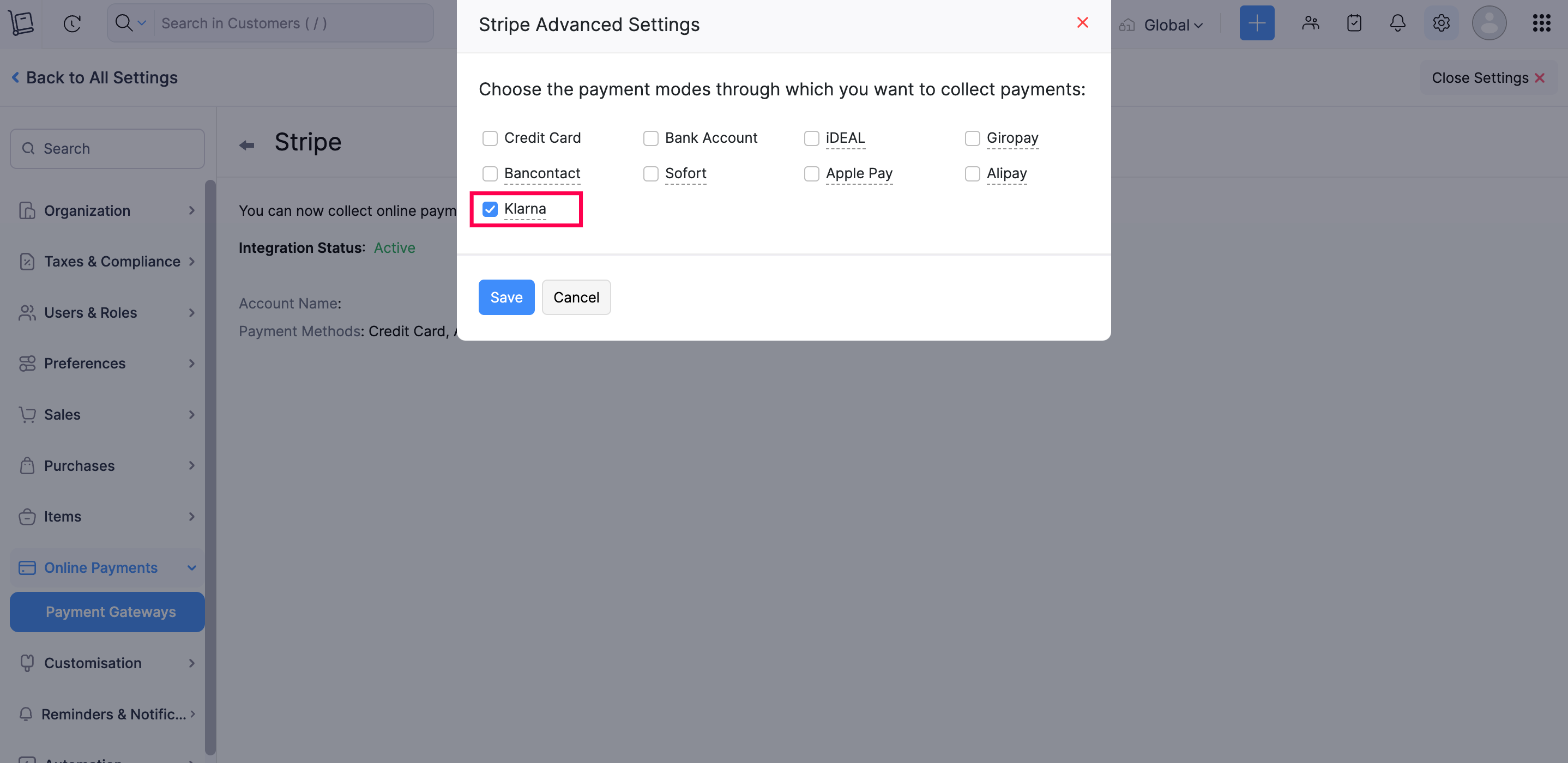
Introducing Klarna, a global payment method now available in Zoho Inventory through Stripe. With Klarna, you can make payments immediately or split them in instalments. This offers your customers greater flexibility and convenience in managing their payments.
To enable Klarna: Navigate to Settings > Online Payments > Payment Gateways, and click Edit Settings under Stripe. Then, select the Edit icon next to Payment Methods, and choose Klarna from the list of payment methods.
Alipay Payment Method for Stripe [All Editions except India]
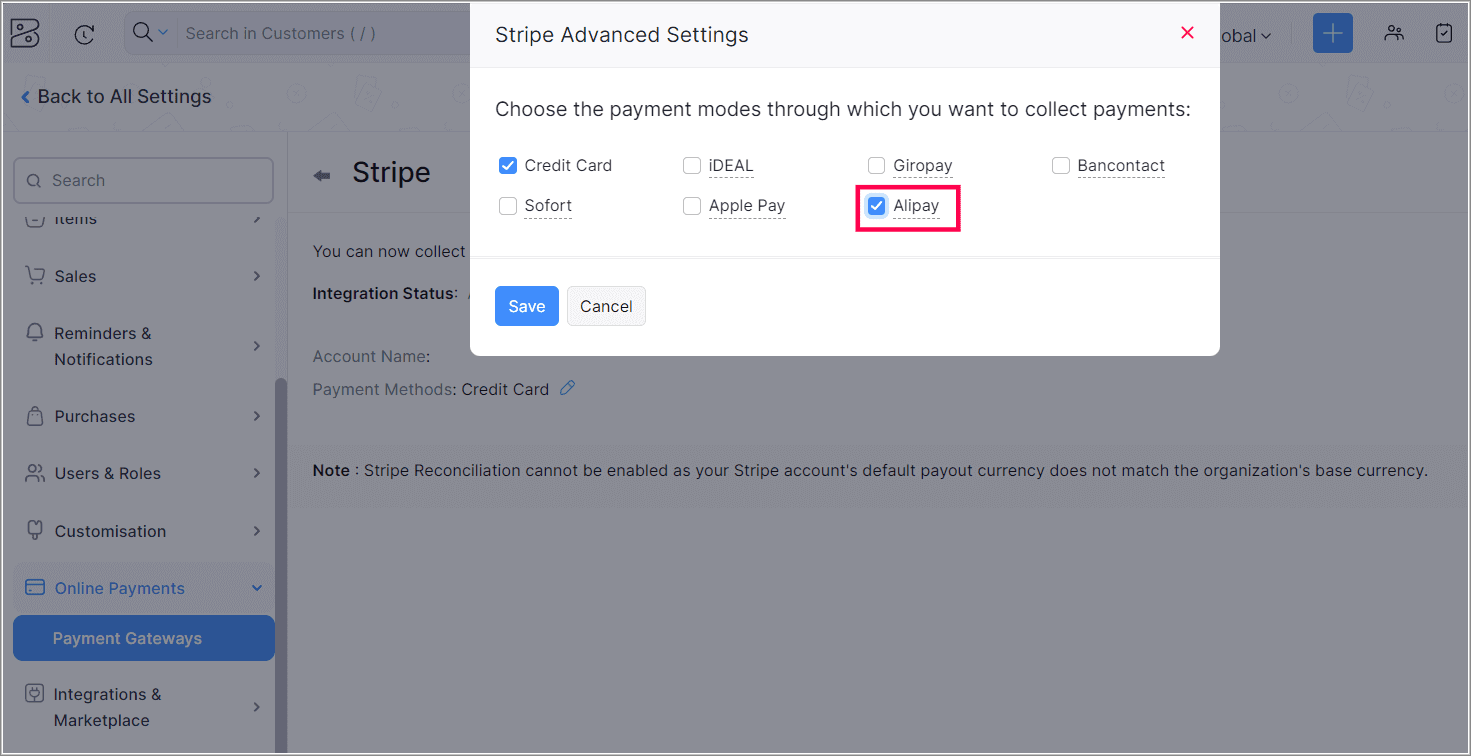
Alipay, a popular digital wallet in China, is now available as a payment method for Stripe payments in Zoho Inventory. With Alipay, you can securely make payments online. You can collect payments in Chinese Yuans from any location. Additionally, based on your Stripe account's location, you can receive payments in AUD, CAD, EUR, GBP, HKD, JPY, SGD, MYR, NZD, and USD.
To enable Alipay, navigate to > Online Payments > Payment Gateways, and click Edit Settings under Stripe. Then, select the Edit icon next to Payment Methods, and choose Alipay from the list of payment methods.
UPI ID Option for Invoice QR Codes
We have introduced the UPI ID option for your invoice QR codes. You can include your UPI ID as a QR code in the PDF of your invoices. This allows your customers to scan the QR code with their device and make payments directly to your UPI ID.
To use this feature, go to Settings > Sales > Invoices > General and select UPI ID as the QR code type in the Invoice QR Code section.

WhatsApp Integration
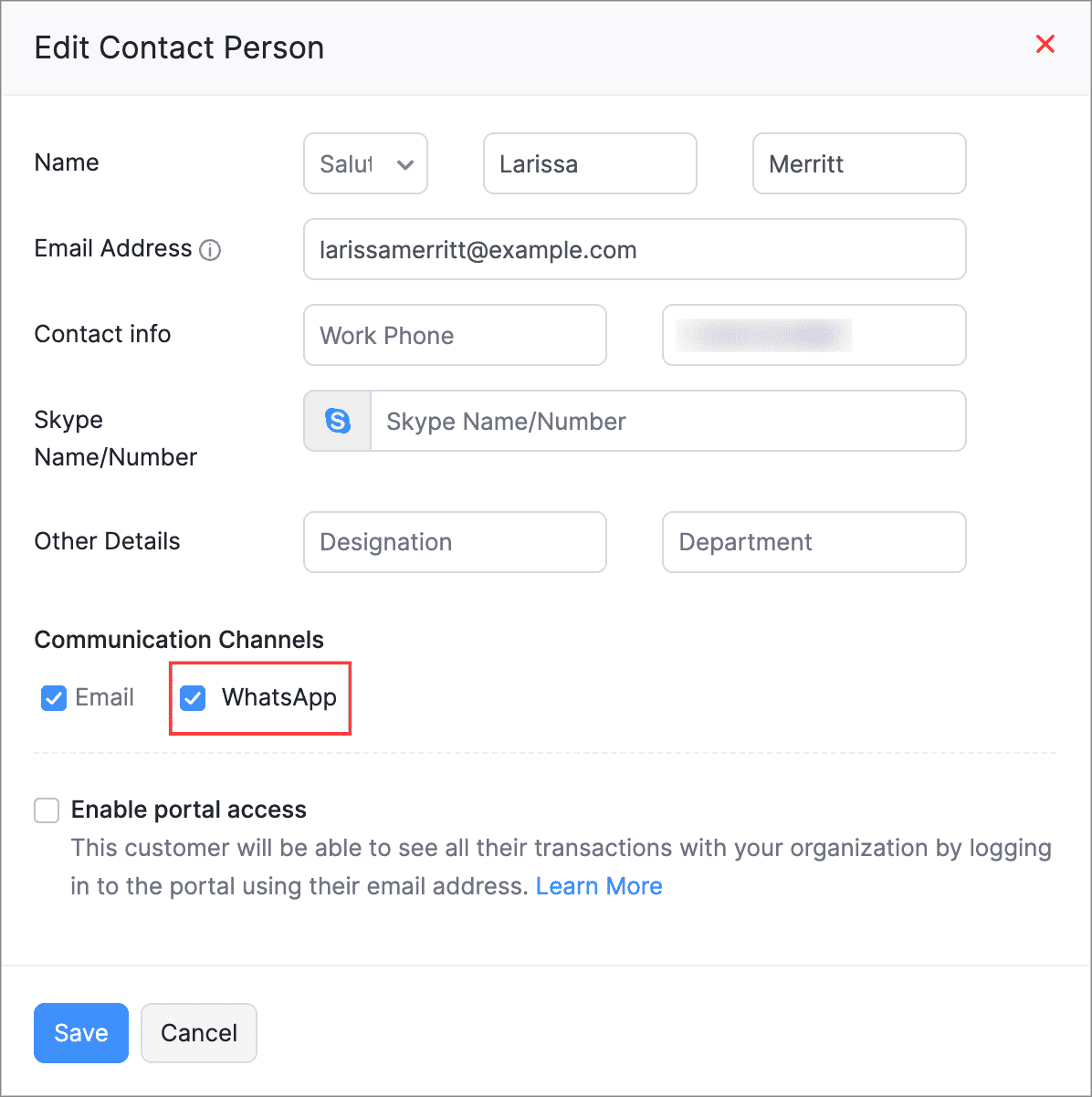
You can now link your WhatsApp to your Zoho Inventory organization, which enables direct notifications of payments and sales transactions to your customers. You can customize it for marketing and sales templates for each module to send notifications, as well as directly initiate conversations with your customers from your Zoho Inventory organisation
To enable WhatsApp for your customers: Navigate to Sales > Customers, select a customer, and edit their Primary Contact or Contact Person details on the overview page. Then, mark WhatsApp as their Communication Channel.
New Unique Quantity Codes for Items
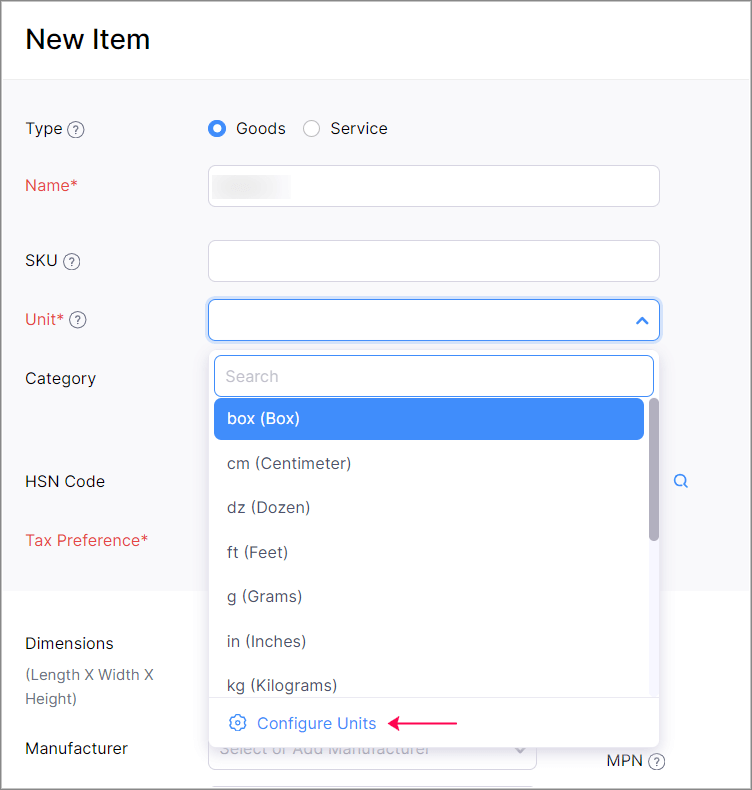
We have added two new unit codes to the Unique Quantity Codes: BAL (Bale) and TGM (Ten Gross). A Bale refers to materials packaged together, while Ten Gross represents a quantity of 1,440 items. These units are especially useful for businesses dealing with wholesale goods.
To access this option: Click Configure Units from the Unit dropdown in the Item creation or edit page.
Bulk Export Option for Two Reports
We have introduced a bulk export option that allows you to export over 50,000 rows of the Inventory Aging Summary and Inventory Valuation Summary reports. You can choose to export the report in sections or as a full report. These reports are in early access and available only in the Premium and higher plans. You can contact support@zohoinventory.com to enable it in your organisation.
Send Item Identification Codes for Electronic Invoicing [Mexico Edition]
You can now include unique codes, such as the Stock Keeping Unit (SKU), when sending item details to SAT for e-invoicing. By default, no code will be shared with SAT, however, you can configure it under item setting when needed. Once configured, the code will be visible in the item table of the transactions. Additionally, you can choose to send a single code for all items in your organization.
You can also include codes such as the Universal Product Code (UPC), European Article Number (EAN), International Standard Book Number (ISBN), and Manufacturer Part Number (MPN).
To configure this preference: Go to Settings > Taxes & Compliance > Electronic Invoicing> Edit icon next to Item Information.

Additional VAT Treatment Options [UK Edition]
We've introduced VAT Exempt and Out of Scope VAT treatment options for items. These options are available only for customers whose VAT treatment is set as United Kingdom or Overseas Customer. VAT Exempt can be applied only to items that are classified as services.
Safaricom M-PESA Integration [Kenya Edition]
The Safaricom M-PESA integration is now available in Zoho Inventory. M-PESA is a digital mobile payments service in Kenya that lets you seamlessly process payments using e-wallets. You can set up the integration and receive payments in Kenyan Shillings from your customers.
To enable Safricom M-PESA: Go to Settings > Payment Gateway > Alternate Modes > Set Up Now near Safricom M-PESA.

Give these features a try and let us know your thoughts in the comments section below. If you have any queries, send an email to support@zohoinventory.com. We'll be happy to help.
Regards,
The Zoho Inventory Team
Access your files securely from anywhere
New to Zoho Recruit?

Zoho Developer Community
New to Zoho LandingPage?
Zoho LandingPage Resources
New to Zoho Survey?
New to Zoho CRM Plus?
Deliver unforgettable customer experiences
New to Zoho CRM Plus?
Deliver unforgettable customer experiences
New to Zoho Marketing Plus?
Everything you need to run your marketing
New to Zoho Marketing Plus?
Everything you need to run your marketing
New to Bigin?





Topic Participants
Akshin Eniyavel S
Deanna
ted
r.prasad
John Legg
New to Zoho TeamInbox?
Zoho TeamInbox Resources
Zoho CRM Plus Resources
Zoho Books Resources
Zoho Subscriptions Resources
Zoho Projects Resources
Zoho Sprints Resources
Qntrl Resources
Zoho Creator Resources
Zoho CRM Resources
Design. Discuss. Deliver.
Zoho Show Resources

Get Started. Write Away!
Writer is a powerful online word processor, designed for collaborative work.
Zoho CRM コンテンツ
-
オンラインヘルプ
-
Webセミナー
-
機能活用動画
-
よくある質問
-
Ebook
-
-
Zoho Campaigns
- Zoho サービスのWebセミナー
その他のサービス コンテンツ
Nederlandse Hulpbronnen

ご検討中の方
Recent Topics
Is there a way to update all the start and end dates of tasks of a project after a calendar change?
Hi! Here's my situation. I've built a complete project planning. All its tasks have start dates and due dates. After completing the planning, I've realized that the project calendar was not the right one. So I changed the project calendar. I now haveHow to update task start date when project start date changes?
Hi there, When the start date of a project changes, it's important to update the start dates of the tasks associated with that project to reflect the new timeline. Is there a way to shift the start date of all project tasks when the start date of a projectIssue with Picklist Dropdown Not Opening on Mobile
Hello I am experiencing an issue with picklist values on mobile. While the arrow is visible, the dropdown to scroll through the available values often does not open. This issue occurs sporadically, it has worked occasionally, but it is very rare and quiteusing the client script based on the look up filed i wnat to fetch the record details like service number , service rate
based on selected service look up field iwant to fetch the service serial number in the serice form how i achive using client script also how i get the current date in the date field in the on load of the formZoho Books/Square integration, using 2 Square 'locations' with new Books 'locations'?
Hello! I saw some old threads about this but wasn't sure if there were any updates. Is there a way to integrate the Square locations feature with the Books locations feature? As in, transactions from separate Books locations go to separate Square locationsAdd zoho calendar to google calendar
Hi I keep seeing instructions on how to sync Zoho CRM calendar with google calendar but no instructions on how to view Zoho calendar in my google calendar.Zoho Commerce - How To Change Blog Published Date and Author
Hi Commerce Team, I'm discussing a project with a client who wants to move from Woo Commerce / Wordpress to Zoho Commerce. They have around 620 blog posts which will need to be migrated. I am now aware of the blog import feature and I have run some tests.Add RTL and Hebrew Support for Candidate Portal (and Other Zoho Recruit Portals)
Dear Zoho Recruit Team, I hope you're doing well. We would like to request the ability to set the Candidate Portal to be Right-to-Left (RTL) and in Hebrew, similar to the existing functionality for the Career Site. Currently, when we set the Career SiteDoes zoho inventory need Enterprise or Premium subsrciption to make Widgets.
We have Zoho One Enterprise and yet we can't create widgets on inventory.Writing by Hand in "Write" Notes
Hi there! I just downloaded this app a few moments ago, and I was wondering if there was a way to write things by hand in "Write" mode instead of just typing in the keyboard. It would make things a bit more efficient for me in this moment. Thanks!Remove the “One Migration Per User” Limitation in Zoho WorkDrive
Hi Zoho WorkDrive Team, Hope you are doing well. We would like to raise a critical feature request regarding the Google Drive → Zoho WorkDrive migration process. Current Limitation: Zoho WorkDrive currently enforces a hard limitation: A Zoho WorkDriveHow do I add todays date to merge field
I don't see any selection of todays date when creating a letter. Surely the date option of printing is standard? JohnHandling Agent Transfer from Marketing Automation Journey to SalesIQ WhatsApp
We are currently using Marketing Automation for WhatsApp marketing, and the features are great so far We have a scenario where, during a campaign or journey, we give customers an option to chat with our sales team. For this, we are using SalesIQ WhatsAppComment to DM Automation
Comment to DM automation feature in Zoho Marketing Automation, similar to what tools like ManyChat offer. Use case: When a user comments on a social media post (Instagram / Facebook), the system should automatically: Send a private DM to the user CaptureZMA shows as already connected to Zoho CRM, but integration not working
When I try to connect ZMA with Zoho CRM, it shows as already connected, but the integration doesn’t seem to be working. I’ve attached the screen recording for reference.Automatic Email Alerts for Errors in Zoho Creator Logs
Hello, We would like to request a feature enhancement in Zoho Creator regarding error notifications. Currently, Zoho Creator allows users to view logs and errors for each application by navigating to Zoho Creator > Operations > Logs. However, there isCan you default reports/charts to report the current week?
Our data table maintains two years of data. Management wants certain report to automatically filter the report to the latest calendar week. I know I can do this manually with filters but I want the report to automatically default to the latest calendarHow can I check all announce?
Hiii, May I ask how can I check all the announce based on broadcast date instead of reply date based So that I will not will miss out any new functionRecurring Automated Reminders
Hi, The reminders feature in Zoho Books is a really helpful feature to automate reminders for invoices. However, currently we can set reminders based on number of days before/after the invoice date. It would be really helpful if a recurring reminder featureZobot Execution Logs & Run History (Similar to Zoho Flow)
Dear Zoho SalesIQ Team, We would like to request an enhancement for Zoho SalesIQ Zobot: adding an execution log / run history, similar to what already exists in Zoho Flow. Reference: Zoho Flow In Zoho Flow, every execution is recorded in the History tab,Password Assessment Reports for all users
I'm the super admin and looking at the reporting available for Zoho Vault. I can see that there is a Password Assessment report available showing the passwords/weak and security score by user. However I'm confused at the 'report generated on' value. MonitorAllow people to sign a zoho form by using esign or scanned signature
Allow people to sign a zoho form by using esign or scanned signatureCan't change form's original name in URL
Hi all, I have been duplicating + editing forms for jobs regarding the same department to maintain formatting + styling. The issue I've not run into is because I've duplicated it from an existing form, the URL doesn't seem to want to update with the newSetting certian items to be pickup only
How do we have some items that are pickup only? I have several items in my item's list that I do not ship. But they need to be on the website to be sold, and picked up in store. Need to be able to do this as one of these products is a major seller forUsing gift vouchers
We would like to be able to offer a limited number of gift vouchers, of varying values, to our customers, and are looking for the best way to do this. We have looked at Coupons and Gift Certificates, but neither seem to fit the bill perfectly. Coupons:Automatically updating field(s) of lookup module
I have a lookup field, which also pulls through the Status field from the linked record. When the lookup is first done, the Status is pulled through - this works perfectly. If that Status is later updated, the lookup field does not update as well. AsZoho Commerce and Third-party shipping (MachShip) API integration
We are implementing a third-party shipping (MachShip) API integration for our Zoho Commerce store and have made significant progress. However, we need guidance on a specific technical challenge. Current Challenge: We need to get the customer input toAdding custom "lookup" fields in Zoho Customization
How can I add a second “lookup” field in Zoho? I’m trying to create another lookup that pulls from my Contacts, but the option doesn’t appear in the module customization sidebar. In many cases, a single work order involves multiple contacts. Ideally,Can you import projects into Zoho Projects yet?
I see some very old posts asking about importing project records into Zoho Projects. But I can't find anything up to date about the topic. Has this functionality been added? Importing tasks is helpful. But we do have a project where importing projectsOutlook - Zoho CRM Calendar Integration
I'm facing an issue integrating Outlook with Zoho CRM. Has anyone successfully connected their Outlook to Zoho, and are all your meetings and emails being captured correctly in the CRM? Any insights or troubleshooting tips would be appreciatedAllocating inventory to specific SO's
Is there a way that allocate inventory to a specific sales order? For example, let's say we have 90 items in stock. Customer 1 orders 100 items. This allocates all 90 items to their order, and they have a back order for the remaining 10 items which couldZoho Inventory. Preventing Negative Stock in Sales Orders – Best Practices?
Dear Zoho Inventory Community, We’re a small business using Zoho Inventory with a team of sales managers. Unfortunately, some employees occasionally overlook stock levels during order processing, leading to negative inventory issues. Is there a way toAutomation #10 - Auto Assign Ticket based on Keywords
This is a monthly series designed to help you get the best out of Desk. We take our cue from what's being discussed or asked about the most in our community. Then we find the right use cases that specifically highlight solutions, ideas and tips on optimizingAutomate attendance tracking with Zoho Cliq Developer Platform
I wish remote work were permanently mandated so we could join work calls from a movie theatre or even while skydiving! But wait, it's time to wake up! The alarm has snoozed twice, and your team has already logged on for the day. Keeping tabs on attendanceTracking Emails sent through Outlook
All of our sales team have their Outlook 365 accounts setup with IMAP integration. We're trying to track their email activity that occurs outside the CRM. I can see the email exchanges between the sales people and the clients in the contact module. ButReusable Custom Functions Across Department Workflows
Dear Zoho Desk Team, We appreciate the powerful workflow automation capabilities in Zoho Desk, particularly the ability to create and use custom functions within workflows. However, we have encountered a limitation that impacts efficiency and maintainability.Feature Request - Gift Cards or Gift Voucher Capability in Zoho Commerce
Hi Zoho Commerce team, I'm comming accross more and more retail businesses who sell gift cards. As there is currently no way to manage this in Zoho Commerce, it is a blocker to addoption. This is particularly popular in Europe and North America. I recentlyDon't Allow Customer to Edit Values After Submitting Ticket
After a customer submits a ticket through the customer portal, they can go into the ticket and see some of the values from the questions they answered in the sidebar. Currently, a customer can edit these values even after they submitted them. This makes no sense. We ask very specific questions that we don't want customers to later change! Please disable the ability for customers to edit the values to their submission questions in the portal. Screenshot attached.Analytics <-> Invoice Connection DELETED by Zoho
Hi All, I am reaching out today because of a big issue we have at the moment with Zoho Analytics and Zoho Invoice. Our organization relies on Zoho Analytics for most of our reporting (operationnal teams). A few days ago we observed a sync issue with thetext length in list report mobile/tablet
Is there a way to make the full text of a text field appear in the list report on mobile and tablet? With custom layouts, the text is always truncated after a certain number of characters.Next Page