WorkDrive - TrueSync
La fonctionnalité TrueSync de Zoho WorkDrive permet à ses utilisateurs de reproduire leurs documents WorkDrive web sur leur bureau et d'y accéder localement. Cela permet d'économiser votre espace de stockage sur l'ordinateur. TrueSync vous permet également de synchroniser les fichiers de Zoho WorkDrive web avec votre ordinateur, et vice versa.
Avec TrueSync, les données de votre ordinateur sont disponibles soit en ligne uniquement, soit hors ligne. Toute modification apportée à vos fichiers sera automatiquement synchronisée avec l'application web WorkDrive.
En ligne uniquement
Les fichiers et dossiers en ligne uniquement n'occupent pas d'espace sur le disque dur. Vous pouvez voir la liste des fichiers et dossiers disponibles dans le lecteur virtuel, mais ils ne sont pas réellement téléchargés tant que vous ne les ouvrez pas pour les afficher ou les modifier.
Disponible hors ligne
Les fichiers et dossiers dans cet état sont téléchargés et disponibles sur votre disque dur. Vous pouvez travailler directement dessus et les changements effectués sont automatiquement synchronisés avec la version web.
Bon à savoir
- L'installation ne peut être effectuée qu'avec le droit d'administrateur.
- L'application TrueSync est actuellement disponible uniquement pour les systèmes d'exploitation Windows et Mac.
- Versions d'OS supportées :
- Pour Windows : Windows 7 et supérieur
- Pour Mac : OS X 10.14 et supérieur
Icônes d'état de WorkDrive TrueSync
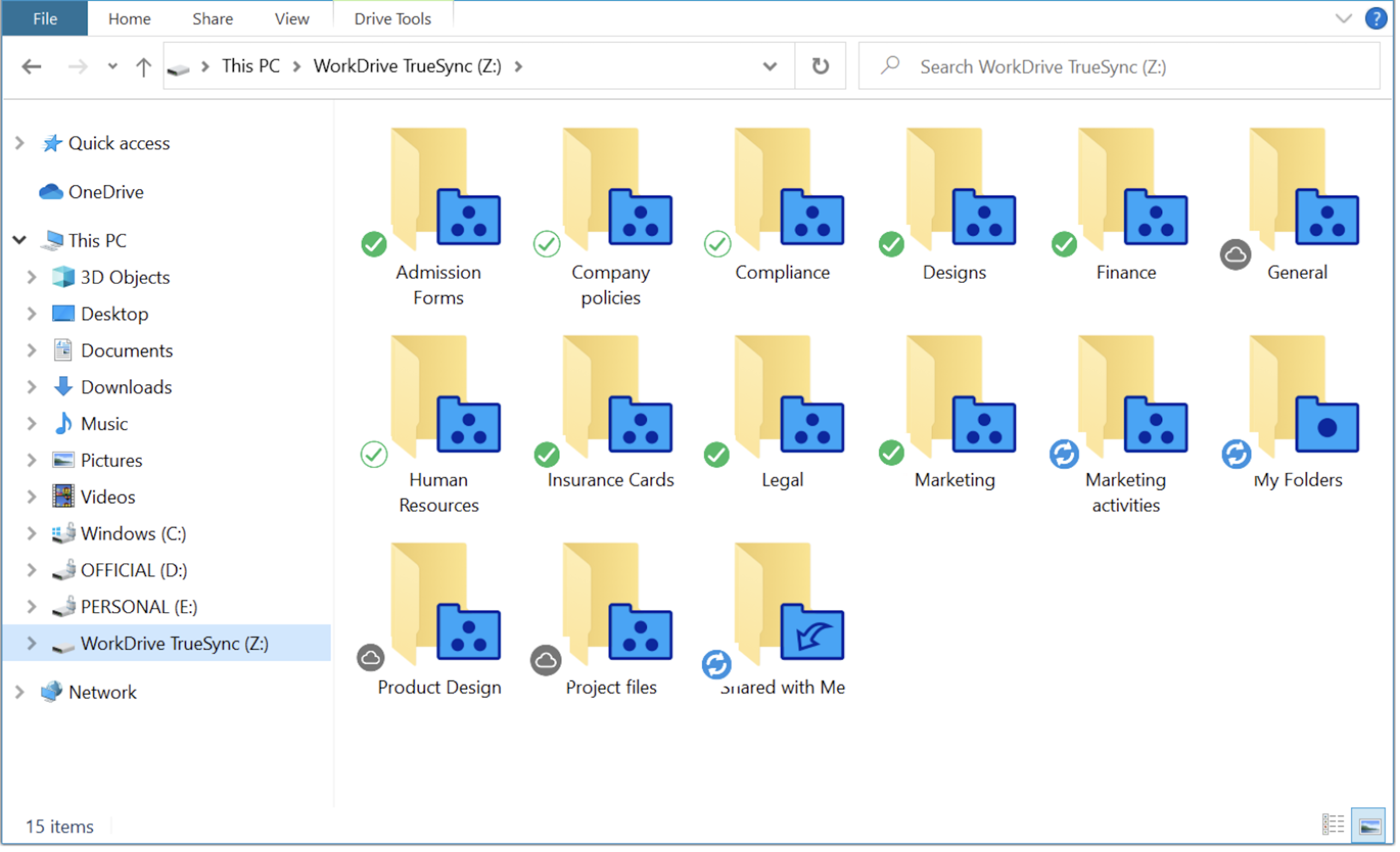
Dans le dossier WorkDrive TrueSync, les icônes d'état montrent l'état de synchronisation de tous vos fichiers et dossiers.
Les différentes icônes d'état sont :

En ligne uniquement : les fichiers sont uniquement disponibles en ligne. Lorsque vous ouvrez un fichier, il est téléchargé sur votre ordinateur pour être visualisé. Une fois que vous aurez fermé le fichier, il ne sera plus disponible sur votre ordinateur.

Disponible hors ligne : les fichiers ont été téléchargés sur votre ordinateur et sont disponibles hors ligne. Les fichiers téléchargés occuperont l'espace requis sur le disque dur.

Synchronisation partielle : lorsqu'un dossier contient une combinaison de fichiers en cloud uniquement et hors ligne, l'icône de synchronisation partielle s'affiche comme état.

Synchronisation en cours : lorsque vous synchronisez ou mettez hors ligne certains fichiers dans le lecteur virtuel, l'icône de progression s'affiche comme état jusqu'à ce que les fichiers soient téléchargés sur votre ordinateur.

Erreur de synchronisation : lorsqu'il y a une erreur dans la synchronisation ou le téléchargement des fichiers dans votre lecteur virtuel, l'icône d'état d'erreur de synchronisation s'affiche au-dessus des fichiers. Une fois le problème résolu, le fichier sera synchronisé et l'icône d'état appropriée s'affichera.
Icônes d'état manquantes dans WorkDrive TrueSync
Au sein du dossier WorkDrive TrueSync, tous les fichiers et dossiers synchronisés seront affichés. Vous pouvez vérifier ici si les icônes d'état fonctionnent ou non. Dans certains cas, les icônes d'état n'apparaissent pas sur les fichiers et dossiers du dossier TrueSync.
Les icônes d'état n'apparaîtront pas sur les fichiers et les dossiers si elles ont été désactivées dans les préférences de l'application de synchronisation.
Restrictions spécifiques à l'OS
- Windows : l'explorateur Windows ne peut charger que 11 icônes d'état à partir des applications installées sur votre système. Les icônes d'état de WorkDrive doivent figurer parmi les 11 premières afin d'être chargées par l'explorateur Windows dans le dossier de synchronisation.
- MAC : si les icônes d'état n'apparaissent pas dans le dossier WorkDrive TrueSync, assurez-vous que les extensions "Finder" pour WorkDrive sont activées.
Déplacer votre cache WorkDrive TrueSync vers un autre drive (Windows)
Votre dossier cache stocke les données des fichiers et dossiers récemment ouverts, vos données hors ligne et les données des éléments qui doivent encore être synchronisés.
Vous pouvez parfois avoir besoin de libérer de l'espace sur votre lecteur principal (C:\) pour installer d'autres programmes. Avec la fonction de déplacement du cache de WorkDrive TrueSync, il est facile de déplacer vos fichiers WorkDrive vers un autre drive de votre machine en toute sécurité afin de libérer suffisamment d'espace pour installer des applications sur votre drive primaire.
Déplacer vos fichiers cache téléchargés vers un autre drive
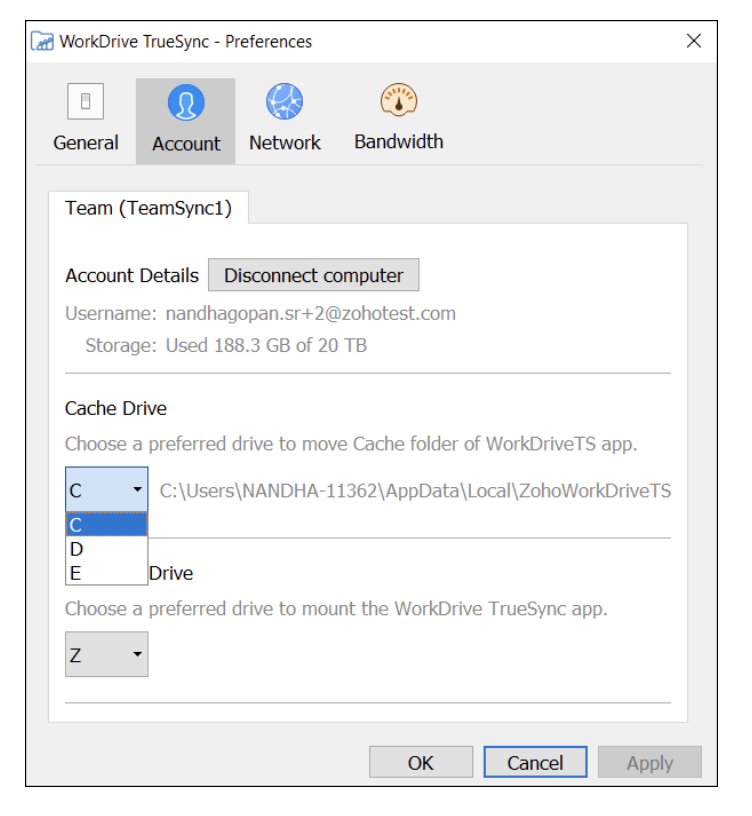
- L'application TrueSync >> Paramètres >> Préférences >> Compte.
- Sélectionnez le drive dans lequel vous voulez déplacer votre dossier de cache à partir du menu déroulant dans la section Cache Drive.
Bon à savoir
- Assurez-vous que vous avez la permission et l'accès au drive cible où vous voulez déplacer votre cache WorkDrive TrueSync.
- Vérifiez que vous disposez de suffisamment d'espace de stockage pour transférer votre cache sur un lecteur.
N'hésitez pas à nous faire part de vos questions dans la partie commentaires ci-dessous.
L'équipe Zoho France
Access your files securely from anywhere
Centralize Knowledge. Transform Learning.
All-in-one knowledge management and training platform for your employees and customers.
New to Zoho Recruit?

Zoho Developer Community
New to Zoho LandingPage?
Zoho LandingPage Resources
New to Zoho Survey?
New to Zoho CRM Plus?
Deliver unforgettable customer experiences
New to Zoho CRM Plus?
Deliver unforgettable customer experiences
New to Zoho Marketing Plus?
Everything you need to run your marketing
New to Zoho Marketing Plus?
Everything you need to run your marketing
New to Bigin?





Topic Participants
Kinjal Lodaya
Sticky Posts
Collaboration sans faille avec Zoho One
Bonjour à tous, Dans cet article nous allons voir comment Zoho One permet une collaboration à différents niveaux . La façon dont nous travaillons évolue. À mesure que les entreprises se mondialisent, la plupart des activités sont menées en équipe.
New to Zoho TeamInbox?
Zoho TeamInbox Resources
Zoho CRM Plus Resources
Zoho Books Resources
Zoho Subscriptions Resources
Zoho Projects Resources
Zoho Sprints Resources
Qntrl Resources
Zoho Creator Resources
Zoho CRM Resources
Design. Discuss. Deliver.
Zoho Show Resources

Get Started. Write Away!
Writer is a powerful online word processor, designed for collaborative work.
Zoho CRM コンテンツ
-
オンラインヘルプ
-
Webセミナー
-
機能活用動画
-
よくある質問
-
Ebook
-
-
Zoho Campaigns
- Zoho サービスのWebセミナー
その他のサービス コンテンツ
Nederlandse Hulpbronnen

ご検討中の方
Recent Topics
Ability to Use Both AND and OR When Creating Rules (Advanced Conditions)
I'd like to be able to use more complicated logic when setting up rules. E.g. in Zoho Mail, I can choose "Advanced conditions (AND/OR) to create a rule that can be applied to multiple subject lines from the same sender. But in Zoho TeamInbox, I will haveFacturation électronique 2026 - obligation dès le 1er septembre 2026
Bonjour, Je me permets de réagir à divers posts publiés ici et là concernant le projet de E-Invoicing, dans le cadre de la facturation électronique prévue très prochainement. Dans le cadre du passage à la facturation électronique pour les entreprises,Zoho Desktop App- Unable to Minimize/Freezes
I'm having issues with my Zoho Mail desktop app (PC). When go on my desktop and open the app this is what happens: - Unable to minimize and close app (in the screenshot attached you can see at the top right there is no option to minimize/close) - UnableZoho Invoice Zapier Integration
Is there still a way to use Zapier with Zoho Invoice? I've read online that that migrated to Zoho Books or Billing but since I am just using Invoice I can not find a Zapier Connection anymore.Conect chat of salesiq with zoho cliq
Is there any way to answer from zoho cliq the chat of salesiq initiated by customers?Bug: OAuth 2.0 State Parameter fails with Pipe Delimiters (RFC 6749 Non-Compliance)
I've discovered a bug in how Zoho's API Console handles the OAuth 2.0 authorization flow when the state parameter contains pipe characters (|), and I'm hoping the Zoho team can address this in a future update. The Issue Zoho's OAuth 2.0 implementationZobot with Plugs
Hello, I am having a problem with Zobot using Plugs. Here is my current flow: When I run the flow, I should immediately see the messages from the initial cards (Send Message cards), then after running the plug, and finally, see the messages after thePrint a document from Zoho Writer via Zoho Creator
If i use the code below i can get writer to create a new document or email it to me but i want to be able to print it directly from the browser and not have to send it via email and then print. Below is the code im using. Attached options form zoho writerTraining for How can i Operate the Software Features
need to Help for Training of the ZOHO Billing SoftwareAutomating Vendor Contract Management between Zoho Contracts and Zoho Books using Zoho Flow
Managing vendor agreements across procurement and finance systems often requires manually downloading executed contracts and attaching them to vendor records. This can become time-consuming and difficult to manage when dealing with a large number of contracts.VIEW HEADERS PARAMETERS
A function was created in zoho creator. In the microservices “https://creator.zoho.com/userhome/<adminuser>/admindashboard#/microservices”. A custom API was created and associate the function. In the postman I send some data, how can I visualize whatProblem applying batch operation error keeps looping that error
Problem applying batch operation error keeps looping that error an wont loginShared Email Sending Duplicate Copies of Emails
Hi there, We recently have moved our info@ email to Team Inbox to trial. We set this channel up using the Microsoft setup which works fine and have 3 users. I am wanting to know: 1. When I send a new email, it will create a copy of that email and sendmerhaba
merhaba sosyal medya paketimiz mevcut ama yorumları göremiyoruz ve o yüzden cevap veremiyoruz destek rica ediyoruz.Teaminbox not working
We couldn't send or receive any mail within the team inbox. Displaying error 'Unable to process this request.'Related lists New option in missing
hi I have created quite a few modules and added as related lists to my main module. Some have new, some dont I can not see why?Cliq and ToDo integrations?
I'm a bit surprised not to find any way to open a Cliq chat for the current thread, or to create a Zoho Mail ToDo from a thread. Are these on the roadmap?Reply-to names are mangled
Hello, I'm seeing an odd behavior in replies. Steps to reproduce: 1. Click reply to an email from "John Doe <doe.john@example.com> in TeamInbox Expected outcome: TO field pre-filled with "John Doe <doe.john@example.com>" Actual outcome: TO field pre-filledI CANT UPGRADE MY FREE ACCOUNT
I TRY TO UPGRADE MY FREE ACCOUNT AND I COULD NOT UPGRADE IT CAN SOMEBODY TELL ME WHY? AND I HAVE THE MONEY SO.Level up your ASO game with tags & categories in store reviews
Introducing tags and categories in Apptics' store reviews Dear Apptics community, If your app is listed on the Play Store or App Store, you already know how important store reviews and ratings are. They’re one of the most direct signals of user sentimentIncluding attachments with estimates
How can attachments be included when an estimate is sent/emailed and when downloaded as a .pdf? Generally speaking, attachments should be included as part of an estimate package. Ultimately, this is also true for work orders and invoices.Adding VENDOR SKU to PURCHASE ORDERS
how can we add the Vendor SKU when issuing a Purchase Order , so the PO shows the Supplier SKU and our own Internal SKU , which is what we want to receive into the system .Possible to freely prompt/query CRM data using Zia?
Is it possible to prompt Zia to query on any information stored in the CRM, especially on the data stored in custom text fields? My use case is the people in my organisation have entered lots of text in custom text fields to capture information from anRestrict employees to take only one day holiday from a multi-day festival holiday
Hi everyone, I have a requirement related to Optional/Festival Holidays in Zoho People. For example, in the month of May there are three optional holiday dates: May 11, May 12, and May 13. Employees can choose one of these days as their optional holiday.Cannot modify colours in invoice email template
I have tried switching browsers... but I cannot change the (pretty horrible) default colours in the preset email when sending an invoice... the blue banner, red outstanding total and the bright green button... I can change other things but not the colours?Cannot find zpuid for Zoho Projects user
I'm using the Zoho Projects v3 API to create a task. The task is created successfully, but in order to assign the task owner, the "Create a Task" API also requires the zpuid of the task owner. Unfortunately I cannot find any user-related API calls thatPrint a document from Zoho Writer via Zoho Creator
If i use the code below i can get writer to create a new document or email it to me but i want to be able to print it directly from the browser and not have to send it via email and then print. Below is the code im using. Attached options form zoho writerAllow styling for specific Subform fields in Zoho Creator
Sometimes in forms we need to visually highlight a specific field inside a Subform (for example Sanctioned Amount, Approved Value, Critical Fields, etc.) so that users immediately notice it while entering data. Currently there is no direct UI option toPlaceholder format in Number field does not reflect Max Digits configuration
When the Max Digits (Maximum digits of number) property is set to a smaller value (for example, 2 digits), the placeholder in the input field still displays a 7-digit format (#######). The same behavior can also be observed in Decimal and Currency fieldHow does SKU work when selling products in parts in Zoho Inventory
Hello everyone, Zoho Inventory does not understand the physical cutting of the piece.. It only tracks quantities of the unit (like feet ). So when you sell part of an item, the system simply reduces quantity for that SKU. Assume that i have a 50 ft longCRM Cadences - working timesThe Friday afternoon? The next Monday morning? Not at all?
I think I’m writing saying that cadence emails are only sent during the organisations set working hours in CRM. So if a particular email is set to send for example in three days and that lands on a Sunday (when working hours are not operational) whenCRM Cadences - working times
I think I’m right in saying that cadence emails are only sent during the organisations set working hours in CRM. So if a particular email is set to send for example in three days and that lands on a Sunday (when working hours are not operational) whenPush Notification for New Bookings in Zoho Bookings App
when a someone schedules an appointment through the booking page, is there any option to receive a push notification in the mobile app?Add the same FROM email to multiple department
Hi, We have several agents who work with multiple departments and we'd like to be able to select their names on the FROM field (sender), but apparently it's not possible to add a FROM address to multiple departments. Is there any way around this? Thanks.Zoho Desk View Open Tickets and Open Shared Tickets
Hi, I would like to create a custom view so that an agent can view all the open tickets he has access to, including the shared tickets created by a different department. Currently my team has to swich between two views (Open Tickets and Shared Open Tickets).Zoho Expense - Bi-Weekly Report Automation
Hi Zoho Expense Team, My feature request is to please include an option to automate creation of reports bi-weekly (every 2 weeks)How to Fetch data from Sales Order and Insert into Purchase Order with Deluge
Hello, I am wanting to write a Deluge script that would take the shipping address on a Sales Order and upon conversion to a Sales Order automatically insert it into that corresponding PO. I am new to Deluge but understand that it has great capabilities.Arquitetura de Aplicações no Zoho Creator: Por que pensar nisso desde o início
Muitas empresas começam a utilizar o Zoho Creator criando formulários simples para automatizar processos internos. Isso é natural — a plataforma é extremamente acessível e permite construir aplicações rapidamente. O problema começa a aparecer quando aDark Mode - Font Colors Don't Work
When editing a document in Dark Mode and selecting font colors, they don't show up on screen. Viewing/editing the same document in Light Mode shows them just fine.How to Customize & Reorder Spaces in Zoho One 25 (Spaces UI) — Admin Tips Not in the Docs
Hey Zoho Community, After digging around in the new Spaces UI, I found a couple of admin features that aren't well documented yet but are really useful. Sharing here in case others are looking for the same things. 🔁 How to Change the Default Space UsersNext Page