Zoho CRM connector's export functionality enables end-to-end CRM data pipeline
We're thrilled to announce an update to our Zoho CRM connector that will enable you to create data pipelines to Zoho CRM.
The public beta of "export to Zoho CRM" is now available, and can be enabled for users requesting it via email.
Using the feature, you’ll be able to build a data pipeline: Zoho CRM (schedule data import) > Zoho DataPrep (prepare data) > Zoho CRM (schedule prepared data export).
An end-to-end data pipeline creates multiple advantages.
Eliminating invalid/duplicate entries
Blending data from different sources
Standardizing data
Optimizing data for downstream processes like analytics
On eliminating erroneous/duplicate data: Your Zoho CRM data can be captured from multiple sources, and sometimes involving manual data entry. This makes it prone to some errors at the time of capturing data. For example, your lead forms might contain duplicate or invalid entries. If left unchecked and unvalidated, this can lead to problems.
The enhanced Zoho CRM connector's "export to Zoho CRM" functionality gives organizations the power to eliminate errors.
Users can use the tightly integrated CRM connector to import data from Zoho CRM, use DataPrep's powerful transformations to cleanse, transform and standardize data and export it back into CRM records.
Some transforms that will help you “prepare” your CRM data
Deduplicate transform
Use the Deduplicate transform to eliminate duplicates from your imported Zoho CRM records. For example, if you’ve imported the leads module of Zoho CRM, you’ll be able to identify and eliminate all of the duplicate entries within a batch.
Watch this video to learn how Zoho DataPrep can help with cleansing Zoho CRM data.
You can use the Cluster and Merge transform when you find inconsistencies in your CRM records, and want to standardize them. For example, let’s say the country value has been recorded as United States of America, USA, US, etc. You can use "Cluster and Merge" to change it to "United States" consistently across records. This standardization will help you in downstream processes—for example, if you want to quickly analyze sales figures across the United States demographic.
Append transform
Granular controls help with setting up a data pipeline
DataPrep is a tool to democratize data management. Our easy to drag-and-drop functionality makes data preparation an enjoyable activity for non-technical business users.
We know that setting up a data pipeline and scheduling regular data preparation can be an unnerving task for some of you, especially when production data—like CRM—comes into play.
Which is why, with DataPrep, you’ll be in control every step of the way.
DataPrep will give you:
Granular control of how an export is executed via a preview.
Target matching to prevent errors.
Rollback sync in case of partial export failures.
Review records being added/Assess changes to system
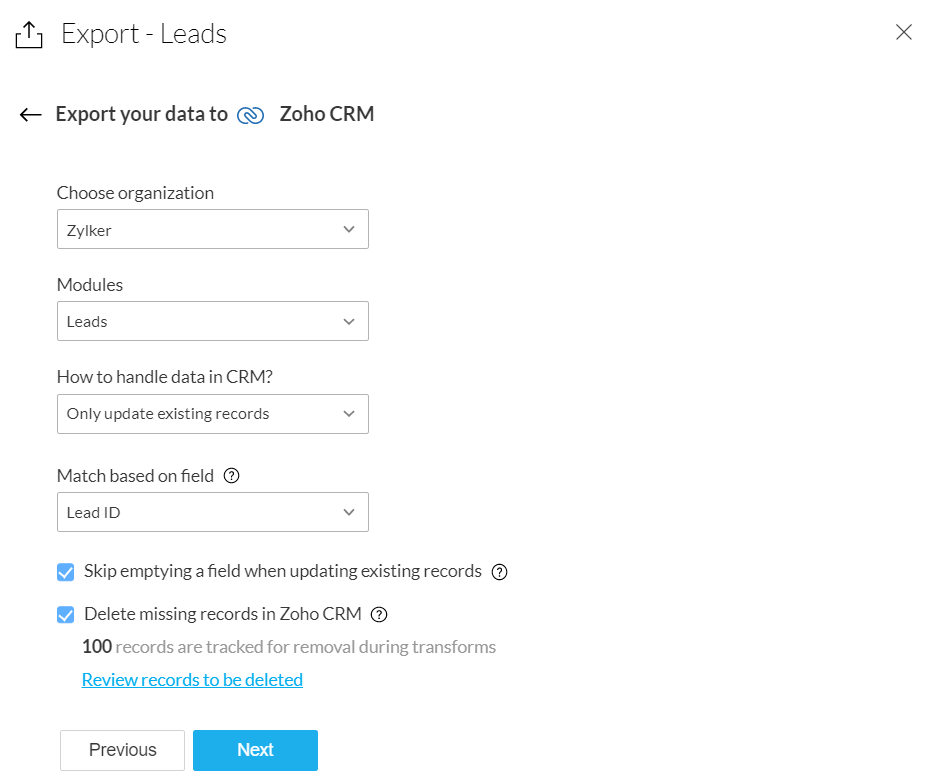
At the time of export to Zoho CRM, you can choose one of three options: only add new records, only update existing records, or add and update records.
This flexibility will help CRM admins determine the context in which the data preparation is being done.
If you’ve imported records from the Leads module for deduplication and cleansing, and you’re exporting the records back to the same CRM module, you can choose to delete the duplicate records.
At the time of export, you’ll be prompted to review the records that might be deleted, so you can rest assured that only the records you no longer want get deleted.
Refer to our knowledge base to learn more.
Use target matching to eliminate errors
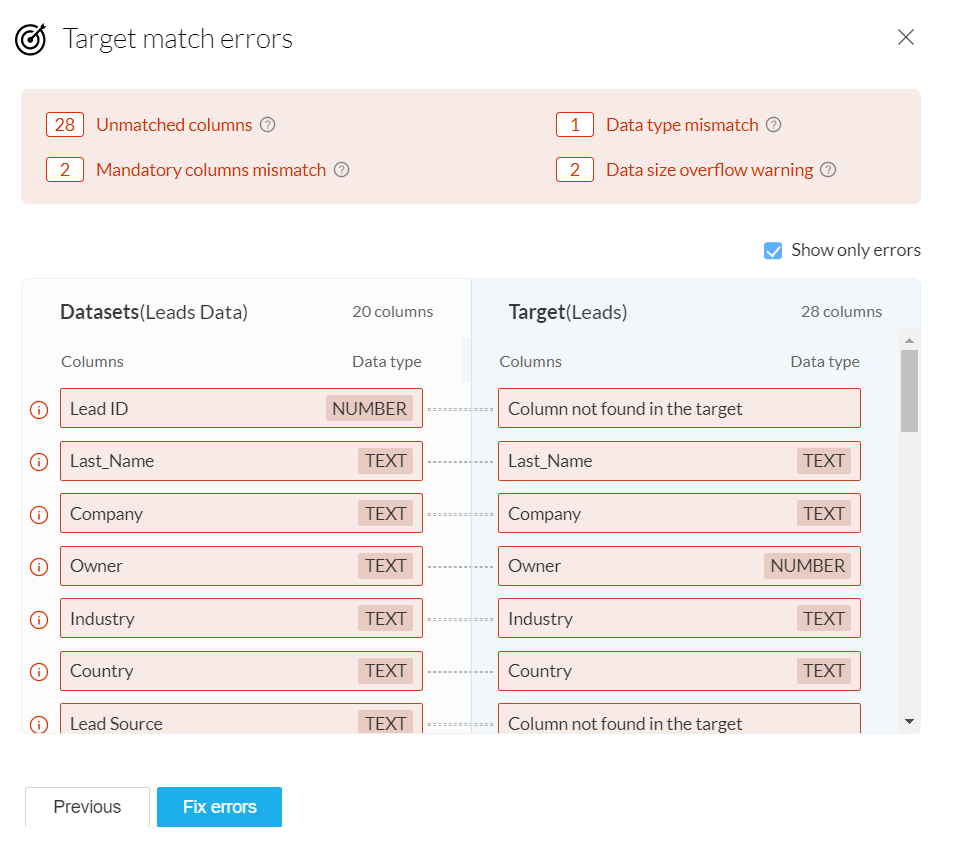
Target matching is a powerful feature that helps you match your data's schema to that of the CRM module you're exporting the data to. This will highlight errors such as unmatched columns, data type errors, and data format errors, before exporting the data.
Learn more about target matching.
You can view the error details for a detailed summary of target-matching errors. These errors could potentially fail the export when it happens, so you’ll have a chance to view them and fix them beforehand.
Sometimes an export can partially fail. This can happen due to extraneous reasons, like network connectivity problems.
In these cases, you have the option to rollback the export and restore the records back to their previous state.
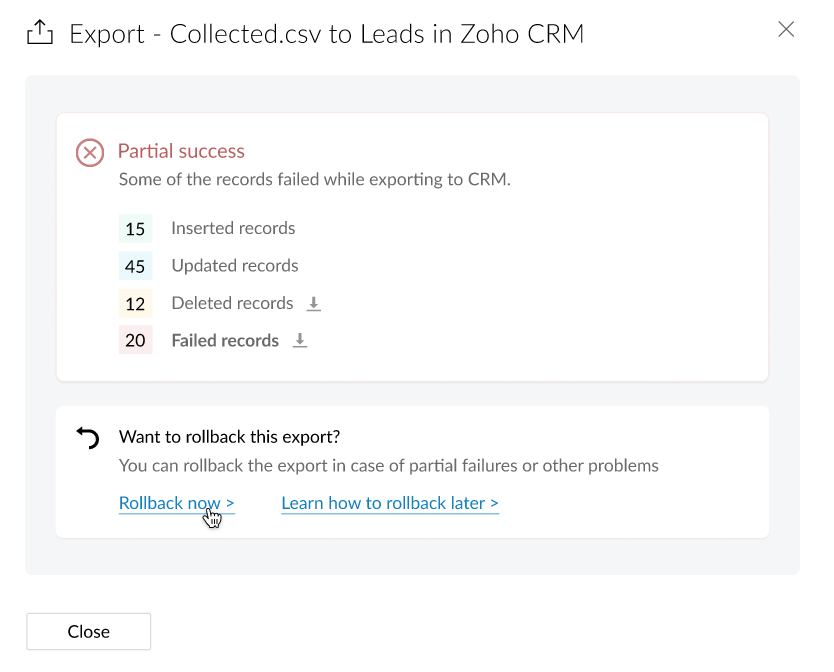
Learn more about Rollback from our Knowledge Base.
You can also refer to DataPrep's solution guide for Zoho CRM for more use case-related details.
The features outlined here are now available for beta access. We invite you to try these features and share your feedback with us.
Also, because this is still in the beta stage, we urge you not to run critical DataPrep features on production data. Please try it on sample/test data only.
Access your files securely from anywhere
All-in-one knowledge management and training platform for your employees and customers.

Zoho Developer Community





Topic Participants
Karthik Subramanian
Sticky Posts
Announcement: Zoho DataPrep to Deprecate Password-Only Authentication for Snowflake Connections on July 31, 2025
As part of our ongoing commitment to security and in alignment with Snowflake's pledge to the Cybersecurity and Infrastructure Security Agency (CISA) Secure by Design initiative, Zoho DataPrep will no longer support single-factor password authentication.Announcement: Zoho DataPrep 1.0 will be deprecated on April 15, 2026
We'd like to inform you that the Zoho DataPrep 1.0 version will be officially deprecated as of April 15, 2026. This aligns with our efforts to streamline and improve your overall experience with Zoho DataPrep 2.0 which was released in Sep 2024 . To ensureAnnouncement: Migrate your workspaces to Zoho DataPrep 2.0
Zoho DataPrep 2.0 was recently launched with exciting new updates to the platform. You can read more about the new updates in the previous announcement. To take full advantage of the new data pipeline features, migrate your existing workspaces from theAnnouncing Zoho DataPrep 2.0: An AI-Powered Data Management Platform
Originally launched in 2021, Zoho DataPrep started as an efficient self-service data preparation solution. We are excited to launch our new version 2.0, with significant enhancements to our platform to help you manage your end-to-end data needs with theAnnouncing DataPrep 2.0 Beta!
Being data-driven is an important end goal for all organizations, because when businesses can manage, analyze, and make actionable decisions based on data, they have a competitive advantage. With that said, how confident are you in making business decisions
Zoho TeamInbox Resources
Zoho CRM Plus Resources
Zoho Books Resources
Zoho Subscriptions Resources
Zoho Projects Resources
Zoho Sprints Resources
Qntrl Resources
Zoho Creator Resources
Zoho CRM Resources
Design. Discuss. Deliver.
Zoho Show Resources

Get Started. Write Away!
Writer is a powerful online word processor, designed for collaborative work.
-
オンラインヘルプ
-
Webセミナー
-
機能活用動画
-
よくある質問
-
Ebook
-
-
Zoho Campaigns
- Zoho サービスのWebセミナー
その他のサービス コンテンツ
Nederlandse Hulpbronnen

ご検討中の方
Recent Topics
Applications built with Zoho Creator
Hi, I’m really interested in seeing how others have built their application using Zoho Creator, especially those designed for external users (clients, vendors, or the public). If you’ve developed something along those lines and don’t mind sharing, I’dIs it posssible to add Asap Widget on Wordpress?
I have tried to add the ASAP widget so users could iniciate chats and see the KB information but nothings seems to work. I have tried to add the script using a php snippet that adds the to the footers and also tried one for the header in the functioRequire ticket resolution
Hi Zoho team, Is there a way to require resolution even if an agent did not use a blueprint? for example, our blueprint has a "resolve" transition but what if agent revoked blueprint and manually set the status of ticket to closed? Is there a way whereTables from ZohoSheets remove images when updated from source
I have a few tables from a ZohoSheet in a ZohoWriter document that will remove the images in the cells when I refresh from the source. The source still has the images in the table when I go to refresh. After updating from the source, as you can see theAPI Pagination Error: 'from' Parameter Limit
Hello, I am encountering an error while paging through the Zoho Desk API results: Status code: 422 - {"errorCode":"UNPROCESSABLE_ENTITY","message":"The value passed for field 'from' exceeds the range of '0-4999'."} Is 5000 the maximum number of recordsHow to go to the next open ticket in the queue when agents closes ticket
Zoho Desk When agent closes a ticket - eg when they choose 'Send and Close" - where is the setting that automatically redirects them to the next open ticket in the queue?CRM verify details pop-up
Was there a UI change recently that involves the Verify Details pop-up when changing the Stage of a Deal to certain things? I can't for the life of me find a workflow or function, blueprint, validation rule, layout rule ect that would randomly make itCustom templates for calendar report
What about being able to design custom templates for the calendar report, as well as for other types of reports? I think more users are waiting for this.Disable payment thank-you emails
Hello, can someone please tell me how to disable sending of the "Payment Thank-You" emails?Maximum tags possible in Contacts Records
I read in some documentation that Zoho allows a total of 200 tags across all records. Is this correct? So is it not possible to have one tag per record for 500 records?Any way to "Pay with Check" or "Refund with Check" for Credit Notes?
When we have a Bill in Zoho Books, we can select the "Pay with Check" option which then allows us to print/cut the check directly out of Zoho Books. When we created a Credit Note and want to refund the customer, is there any way to Refund with Check,CRM Mobile reports
When our engineers finish a job they like to email the customer a job report. This is best done todate as an email template but we can find no way to include an image field from that module. Is there any other options?¿How to integrate Zoho Inventory to Zoho SalesIQ?
Is it possible to integrate Zoho Inventory with SalesIQ? I want to integrate it because I have a bot in Zoobot that uses a ChatGPT assistant. I need it to check the inventory of our items so it can determine whether or not our items are available.When Zoho Tables Beta will be open to EU data center
Hello all, We in EU are looking at you all using and testing and are getting jealous :) When we will be able to get into the beta also? We don't mind testing and playing with beta software. Thank you!Start Form on a different page (i.e., hide form pages)?
I have a Zoho form that uses the `Field Alias - Prefill URL` feature. My goal is to have a pre-filled field that directs the user to a specific starting page in the form. For example: The URL will have a field alias that will auto-populate a field withHow can we disable "My Requests"?
We are not using this functionality in our system at all and our users get confused.PayPal payment received recording problem
Hi, A little while back one of our customers used the PayPal payment option to pay an invoice For some reason though the payment is showing up twice within the Payments section of the invoice! Instead of setting the invoice value to ZERO, it now shows a negative value Anyone else face this problem? I've checked PayPal and there is only 1 payment in reality... A bug? Actonia ps: for anyone from Zoho Customer Service or tech team, its Invoice 785 in our accountserver response: 451.4.7.1
Good day. Some email clients of our domain receive an error about sending and receiving letters. while for the rest everything works fine. access to the mail made by pop protocol. Bless the mistakes: "server response: 451.4.7.1 System error".string(87) "{"code":"INVALID_TOKEN","details":{},"message":"invalid oauth token","status":"error"} " grtting this error
Using access token i am trying to add sales orders through api but it is throwing errors like the above i have mentioned. Please help me for thatHow to mute chat notification sound by default in Zoho SalesIQ?
We’ve recently embedded the Zoho SalesIQ chatbot on our website, and we’ve noticed that notification sounds sometimes play even when the visitor hasn’t interacted with the chat widget yet. We’re trying to understand two things: Why do these sounds occurKanban View for Projects.
At our organization, we describe active projects with various statuses like "In Proofing" or "Printing" or "Mailing". In the Projects view, one can set these project statuses by selecting from the appropriate drop-down. While this works, it's difficult to view and comprehend the progress of all of your projects relative to each other in a table. Creating a Kanban view for projects where I can move them from one status to another allows me to see where each project is in the order of our workflow.How to Hide Article Links in SalesIQ Answer Bot Responses
I have published an article in SalesIQ, and the Answer Bot is fetching the data and responding correctly. However, it is also displaying the article link, which I don’t want. How can I remove the link so that only the message is shown?Add RECURRING option when adding email to calendar events
When you add an email to a calendar event, there is no option to make that new calendar event into a recurring event. It is counterproductive to make an event from your email to then have to go to your calendar, find the event, and make it recurring.LINE Auto Message Connect to Zoho
When I integrated LINE into the CRM, I was prompted to disable “Chat,” “Auto Response,” and “Greeting Messages,” and to enable the webhook. However, since I have already set up some auto-reply features in LINE, including Rich Messages and greeting automation,Option to block bookings from specific email address or ip adresss in zoho booking
Sometime few of our client keep booking irrelevant booking service just to resolve their queries and they keep booking it again and again whenever they have queries. Currently its disturbing our current communication process and hierarchy which we haveThreaded conversations for emails sent via automation
Hi Guys, I hope you are doing well. Don't you guys think we should have an option in a workflow to notify users either as a new email or the previous email thread. For example, if you have one deal in the process and there are 10 different stages duringCreate folder is fetch fails
coming from zapier... zapier has a google drive task that searches for a specific folder in google drive, and if it fails to find the folder it will create a folder based on the search criteria, and contine along the singluar path of the flow. TryingMeetups de Usuarios de Zoho - Noviembre 2025
¡Hola, Comunidad! Durante el mes de noviembre celebraremos los Meetups de usuarios de Zoho, encuentros presenciales pensados para quienes queráis mejorar vuestras estrategias de lead nurturing y aprender a sacar el máximo partido a herramientas como ZohoIntroducing 8 New Connectors in Zoho DataPrep!
We’ve just made data management even easier - Zoho DataPrep now supports 8 new external connectors to help you build more robust, scalable ETL pipelines. Why it matters: ✅ Broader data access ✅ More automation, less manual work ✅ Smarter pipelines, betterFirst day of trying FSM in the field.
What we found. 1. with out a network connection we were unable to start a service call? 2. if you go to an appointment and then want to add an asset it does not seem possible. 3. disappointed not to be able to actually take a payment from within the appHow to Automate Email Sequence
I'm having trouble trying to set up a workflow to automate an email sequence. Once a group of emails in a Task has been tagged by a certain tag, I want an instant email template to be sent. After 7 days with no response, another email template would beZoho Sprints Android v2.0.4 app update: Item reminders, archive Epics, Kanban projects, Epic progress
Hello everyone! In the latest version(v2.0.4) of the Zoho Sprints Android app update, we have introduced various new features. Let's take a look at what's new! Item Reminder Stay organized and never miss an important date with the all-new Item ReminderCredit Management: #3 Setting Credit Limit for Customers
Think about that one familiar customer of yours who always buys on credit. They usually pay on time, maybe a little late here and there, but not alarming. So, you are fine saying, "Sure, pay later." Then, one day, they place a significantly bigger orderUpdate on the client portal URL for Guest users
We’re updating the way Guest users access their Connect network. As part of this change, all client organization portals used by Guest users will now be accessible through a dedicated domain specific to each data center. The access URLs mentioned hereUnable to see Zoho contacts in Zoho app on ios
Hi Support Team, I am a new user, I have created my account and installed zohomail app on iOS 16 which works. I was also able to import my Gmail contacts into Zoho Contacts, which I can see. The problem is that I can’t see these imported cobalts in ZohomailTask Due Date greater than 10 years.
We use recurring tasks in Projects where every week, month, year etc Some of our projects are greater than 10 years and we are unable to set a new due date because the difference between start date and due date is greater than 10 years. As an exampleExternal User onboarding for zoho connect is not really intuitive.
So the external user is sent an invite, which has a button that directs them to login to zoho to view the invite, but if they don't have a zoho account, they cannot access that invite, which seems kinda silly, as there is not real way on for them to createHosting external websites on Zoho?
How can I host my external website on zoho? Do we have that option? I am currently with hostinger and am looking to switch to zoho. Kindly help. Thanks.How to Add Time Formula Duration (hh:mm)
Hi everyone — I’m trying to create a formula field in Zoho CRM that calculates the difference between a “Call Start Time” and “Call End Time” and displays the duration in HH:MM format (for example: 1:04 for one hour and four minutes). My current setupHow can I calculate the physical stock available for sale?
Hey Zoho Team, I've tried to calculate the physical stock on hand in various ways - but always receive a mismatch between what's displayed in Zoho Inventory & analytics. Can you please let me know how the physical stock available for sale is calculated?Next Page