Zoho CRM : de nouveaux modules Tâches, Appels et Réunions !
Ces modifications seront bientôt disponibles pour toutes les entreprises.
Bonjour à tous !
Les activités de vente ont besoin de contexte pour accompagner les commerciaux dans la conclusion d'une l'affaire. C'est pourquoi il est essentiel de capturer toutes les activités et d'en surveiller les résultats, car cela vous permet d'améliorer votre process de vente.
Le module Activités de Zoho CRM vous aide à capturer les tâches, les appels et les réunions en un seul et même endroit. Au fur et à mesure que vos besoins en matière de vente augmentent, vous aurez besoin d'une personnalisation approfondie, de l'automatisation du flux de travail, de l'administration des données, d'intégrations et de rapports détaillés pour les tâches, les appels et les réunions.
Mais plus ces nouvelles fonctionnalités sont ajoutées, plus le module Activités deviendra complexe et inutilisable. S'il est plus simple de continuer à ajouter ces nouvelles options, cela nuira à l'expérience utilisateur. C'est pourquoi nous introduisons de nouveaux onglets pour la gestion des tâches, des appels et des réunions, en supprimant le module Activités à terme.
Bien que ce changement implique quelques changements pour les utilisateurs existants, ils peuvent bénéficier des avantages suivants :
Masquer les modules dont vous n'avez pas besoin en fonction du profil de l'utilisateur.
Un utilisateur peut avoir accès à des modules individuels (Tâches, Appels ou Réunions) en fonction des activités qu'il effectue. Par exemple, vous pouvez masquer le module des tâches pour les représentants commerciaux de votre organisation. Ils peuvent avoir accès uniquement aux modules Appels et Réunions.
Mise à jour ou suppression en masse des enregistrements
Comme les modules Tâches, Appels et Réunions seront répertoriés séparément, vous pourrez activer/désactiver la fonction de mise à jour ou de suppression en masse pour des modules spécifiques.

Contrairement à la configuration précédente, lorsque l'accès à un module était désactivé pour un profil spécifique, les utilisateurs ne pouvaient pas mettre à jour/supprimer en masse des enregistrements dans les autres modules, car les modules Tâches, Appels, Réunions étaient combinés sous Activités.
Créer des rapports associés à une activité de vente spécifique
Les tâches, les appels et les réunions seront répertoriés séparément dans la liste des modules associés du module principal que vous avez sélectionné lors de la création des rapports.
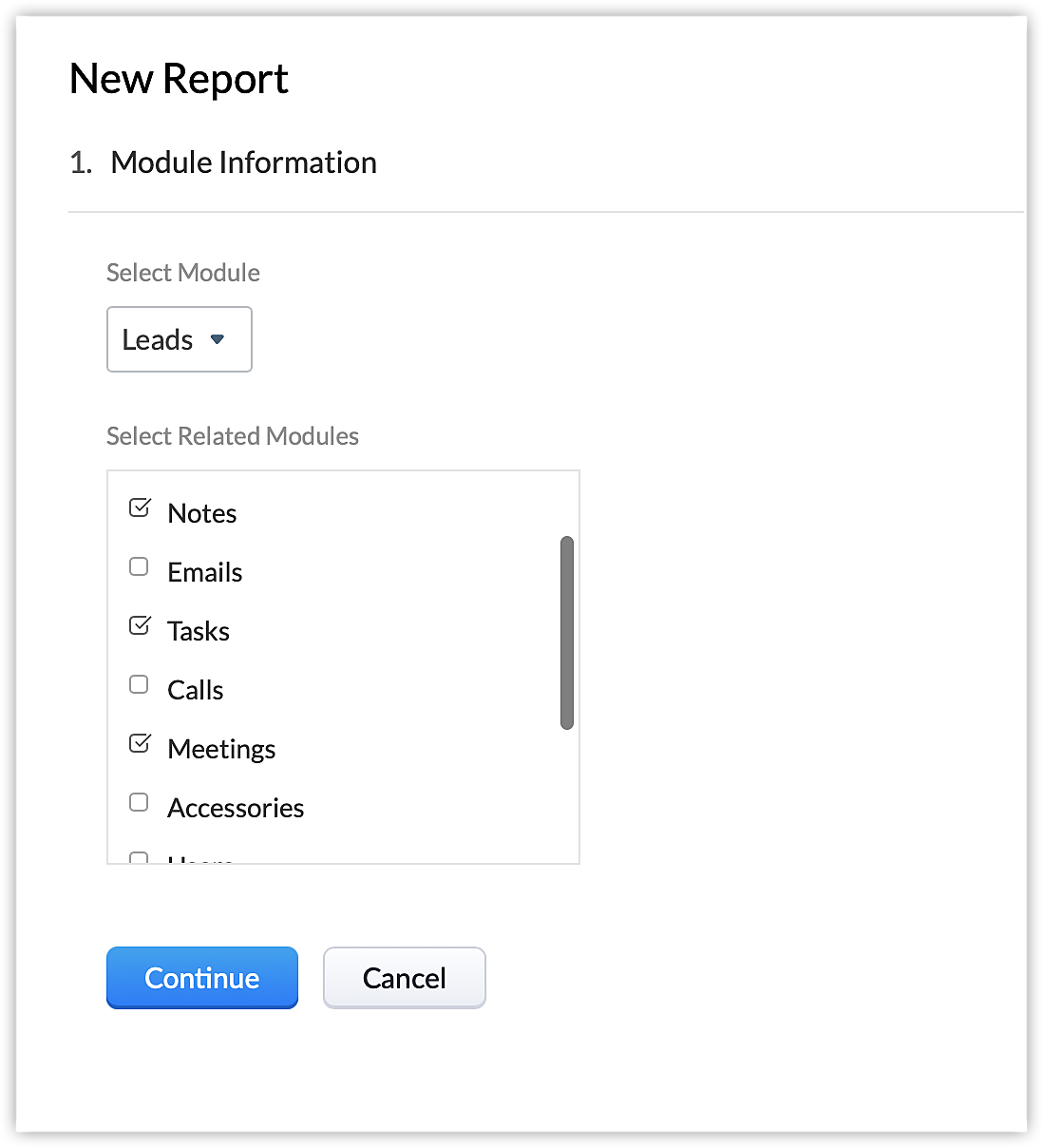
Auparavant, seul le module Activités était répertorié ici et les utilisateurs devaient créer un filtre pour personnaliser le rapport en fonction du type d'activité. Vous pouvez maintenant créer un rapport pour le module Affaires montrant directement les tâches associées à chaque affaire.
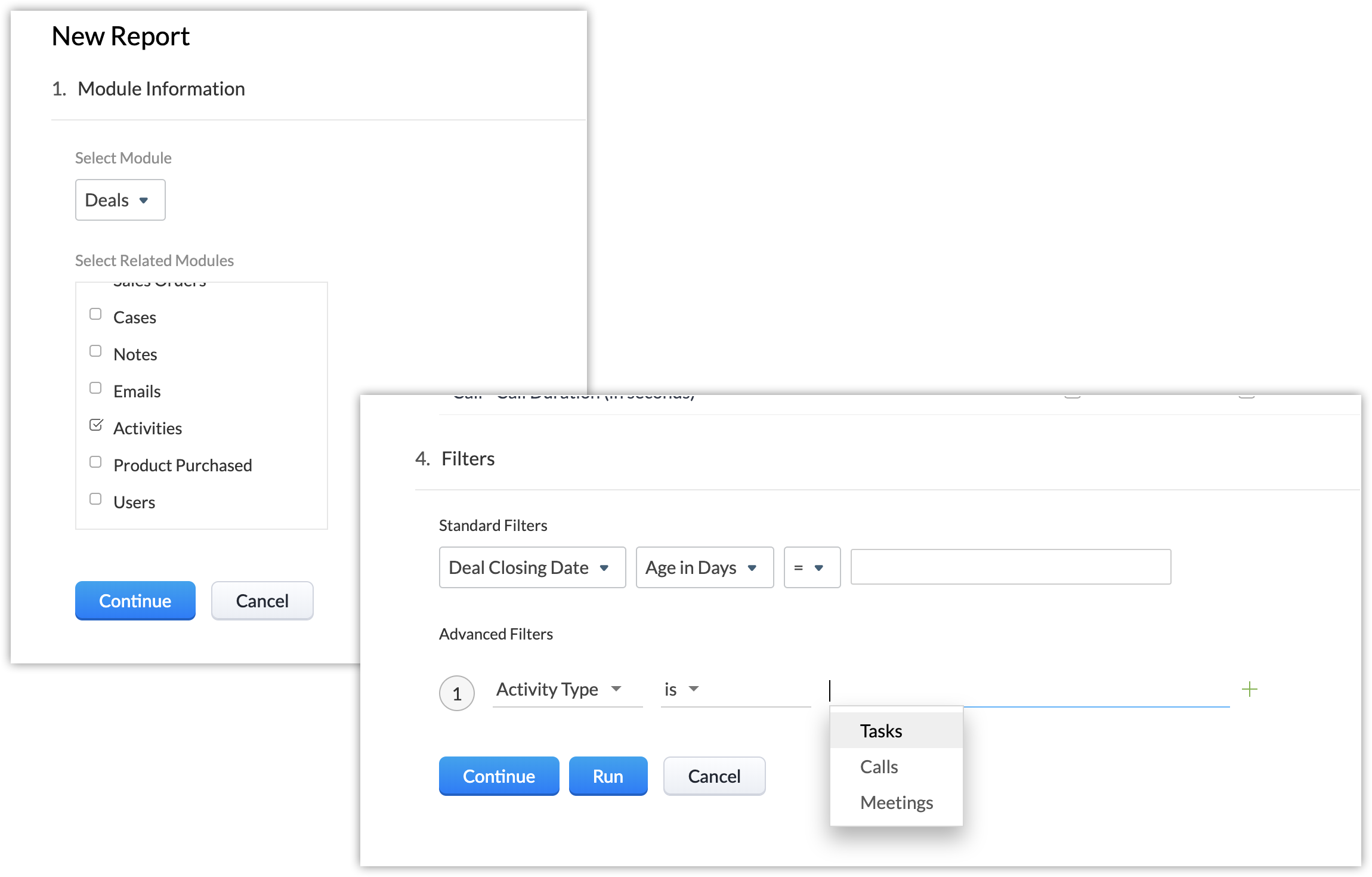
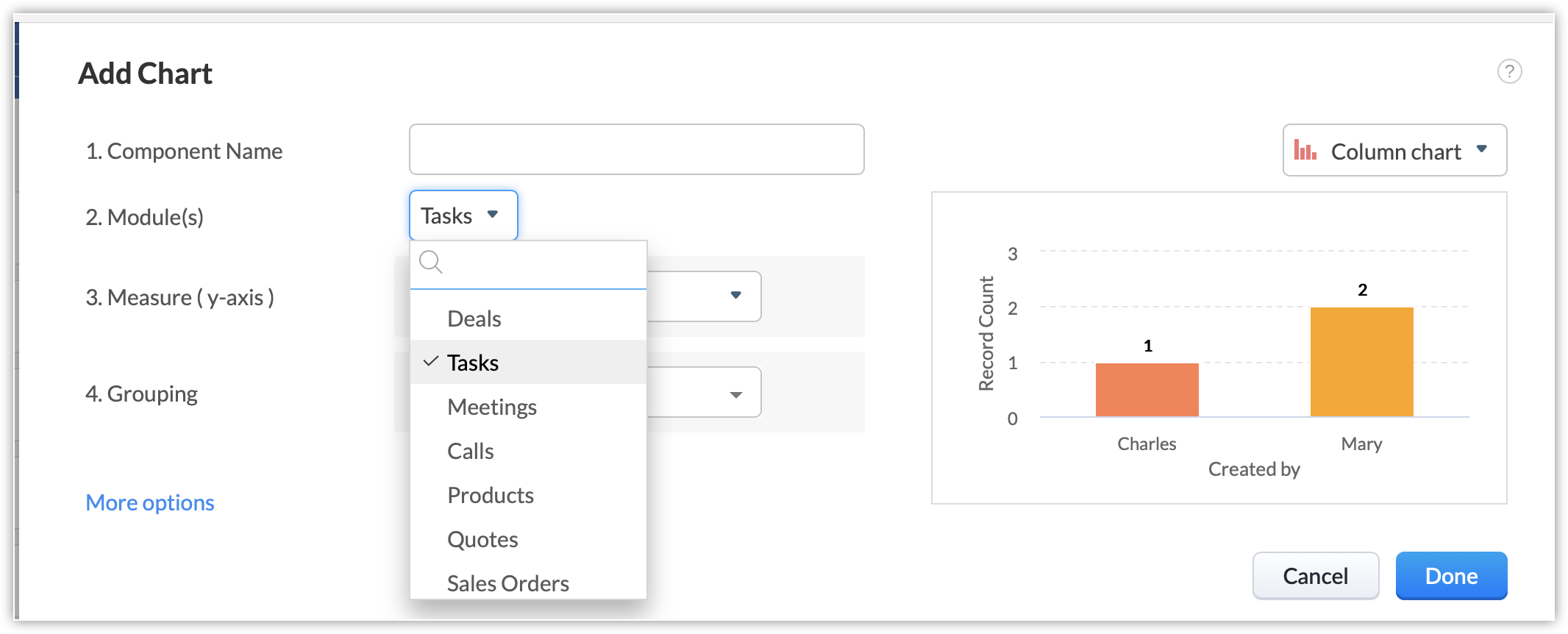
Créer des tableaux de bord
Créez des tableaux de bord pour les modules Tâches, Appels et Réunions séparément.
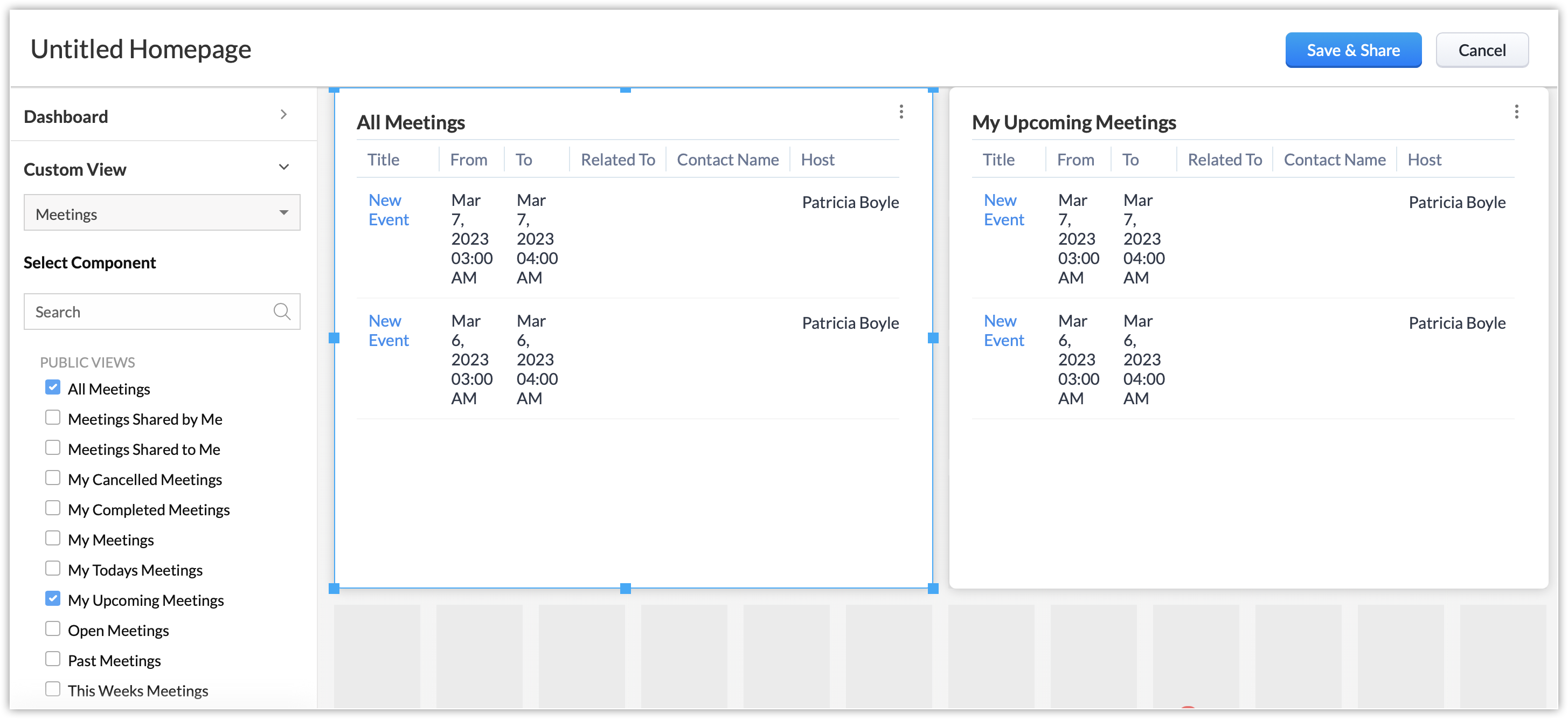
Ajouter des composants à votre page d'accueil
Dans la page d'accueil, les utilisateurs peuvent ajouter des composants personnalisés pour les modules Appels, Réunions et Tâches individuellement.
Ajouter des composants à la vue Canvas
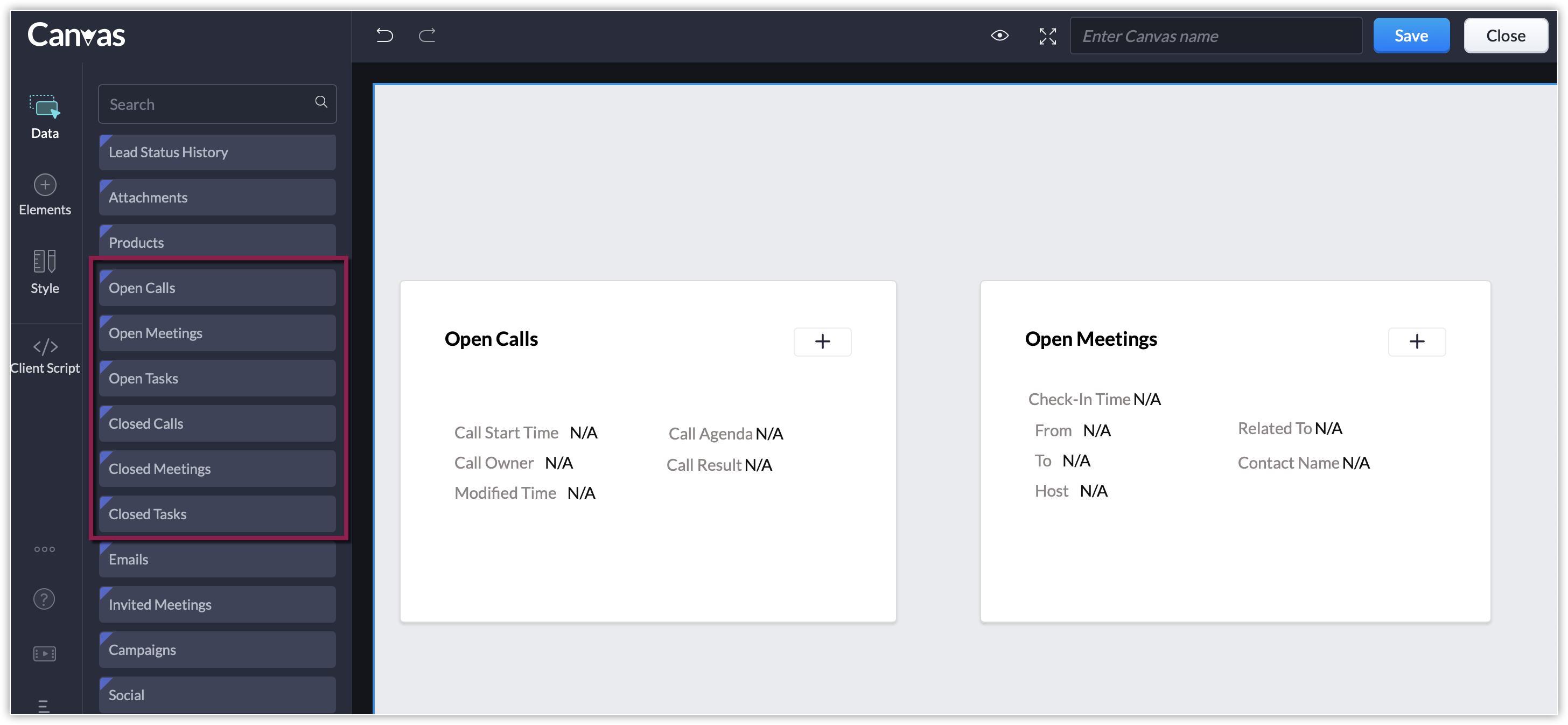
Les composants individuels de liste liée tels que les appels ouverts ou fermés, les réunions ouvertes ou fermées, les tâches ouvertes ou fermées sont disponibles dans la vue Canvas en plus de la liste liée des activités ouvertes ou fermées. Cela vous permet de personnaliser la page de détails de votre enregistrement et d'afficher uniquement les listes liées aux activités que vous suivez.
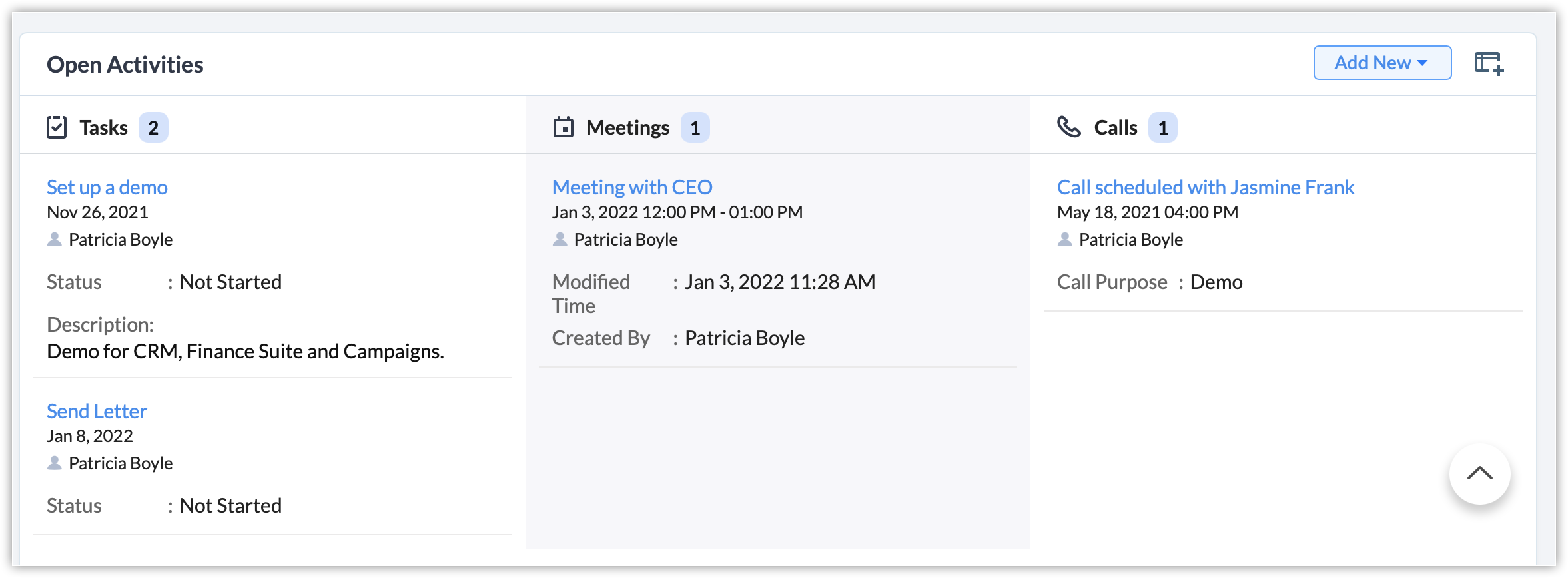
La liste des activités ouvertes/fermées fait peau neuve.
i. Les activités sont maintenant classées selon le type d'activité.

ii. La liste associée peut être personnalisée pour afficher les champs spécifiques aux modules Tâches, Appels et Réunions.
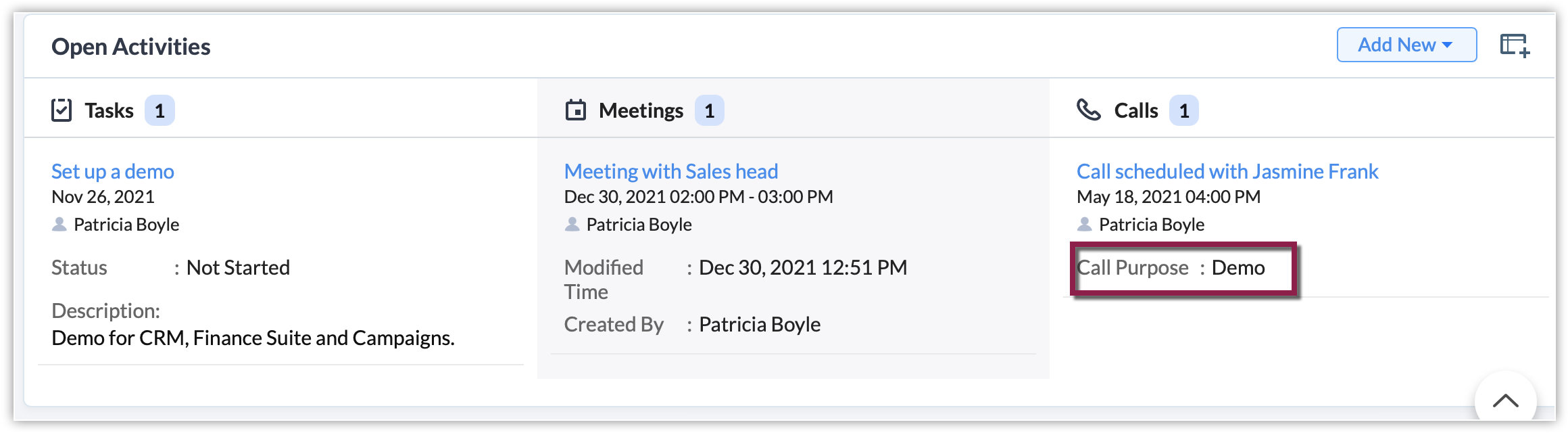
iii. Les utilisateurs n'ont plus besoin de faire défiler la liste horizontalement pour voir tous les champs de la liste liée. Désormais, les données sont répertoriées sous chaque type d'activité.
Alors, qu'adviendra-t-il du module Activités existant ?
Pour les organisations qui se sont inscrites avant le 10 septembre 2021
Nous conserverons le module Activités et présenterons également les modules Tâches, Appels et Réunions afin que les clients aient suffisamment de temps pour s'adapter aux changements et s'habituer à utiliser ces modules individuellement. À terme, le module Activités sera supprimé (nous annoncerons la date ultérieurement). Vos données ne seront pas perdues et elles seront disponibles dans les modules Tâches, Appels et Réunions. Vous serez informé bien à l'avance de la suppression du module Activités.
Pour les organisations qui se sont inscrites après le 10 septembre 2021
Seuls les modules Tâches, Appels et Réunions seront disponibles. Le module Activités ne sera pas affiché.
Merci de votre attention et bonne journée,
L'équipe Zoho France
L'équipe Zoho France
Access your files securely from anywhere
Centralize Knowledge. Transform Learning.
All-in-one knowledge management and training platform for your employees and customers.
New to Zoho Recruit?

Zoho Developer Community
New to Zoho LandingPage?
Zoho LandingPage Resources
New to Zoho Survey?
New to Zoho CRM Plus?
Deliver unforgettable customer experiences
New to Zoho CRM Plus?
Deliver unforgettable customer experiences
New to Zoho Marketing Plus?
Everything you need to run your marketing
New to Zoho Marketing Plus?
Everything you need to run your marketing
New to Bigin?





Topic Participants
Florence Barbier
Sticky Posts
CRM - Astuce #5 : Effectuer des actions en masses
Bonjour à tous, Au programme du jour : éviter les répétitions grâce à la fonction "en masse". Gagnez du temps sur ces actions simples pour vous concentrez sur votre entreprise. Allez dans le module concerné et cliquer sur les : (...) Suppression enZoho CRM - Il y a du nouveau chez les modèles d'e-mails
Bonjour à tous, Nous sommes ravis d'annoncer que les modèles d'email dans Zoho CRM sont désormais adaptés au design pour tous les ordinateurs et mobiles. Le responsive design désigne une méthode selon laquelle les pages sont conçues pour s'afficherNouveautés Zoho CRM : la page d'accueil et le tableau de bord actualisés !
Bonjour à tous, Nous avons apporté quelques améliorations à la page d'accueil des utilisateurs et à l'onglet Tableau de bord, en voici un aperçu. Des composants supplémentaires dans la page d'accueil pour les nouveaux inscrits : Dans l'onglet Accueil,CRM Blueprint #5: Glossaire
Bonjour à tous, Voici le dernier volet de notre série sur les Blueprints : un glossaire pour comprendre tous les termes nécessaire à l'automatisation de votre process. État : fait référence à chaque étape de votre processus. Par exemple : qualification,CRM : Ajoutez de la couleur à vos balises CRM
Bonjour à tous, Les tags sont des identifiants uniques qui peuvent être associés à différents enregistrements ce qui permet de rechercher, trier, catégoriser, filtrer et segmenter efficacement les enregistrements. Cette nouvelle amélioration a pour but
New to Zoho TeamInbox?
Zoho TeamInbox Resources
Zoho CRM Plus Resources
Zoho Books Resources
Zoho Subscriptions Resources
Zoho Projects Resources
Zoho Sprints Resources
Qntrl Resources
Zoho Creator Resources
Zoho CRM Resources
Design. Discuss. Deliver.
Zoho Show Resources

Get Started. Write Away!
Writer is a powerful online word processor, designed for collaborative work.
Zoho CRM コンテンツ
-
オンラインヘルプ
-
Webセミナー
-
機能活用動画
-
よくある質問
-
Ebook
-
-
Zoho Campaigns
- Zoho サービスのWebセミナー
その他のサービス コンテンツ
Nederlandse Hulpbronnen

ご検討中の方
Recent Topics
Where can I configure the notifications for everything KB-related?
Hi all, I'm receiving notifications for some actions happening in our Knowledge Base (e.g. someone leaving a feedback) and I would like to customise the template or have the choice to enable/disable such notifications like it is possible for ticket notificationSelf Client Authorization Code Flow for Mail returns 404
Hello, I'm having trouble getting the Zoho mail api setup and want a sanity check. I am trying to follow this guide to get an access token for the mail api: https://www.zoho.com/accounts/protocol/oauth/self-client/authorization-code-flow.html UnfortunatelyZoho Knowledgebase Help Center Categories linkages are wrong
Greetings, I am build a help center in zoho desk, based on the additional custom brand I have paid for. My knowledge base has 4 main categories. I have this setup this way in my knowledgebase customization theme area. The page layout is like this: HereCan Answer Bot read private articles if I have ChatGPT activated?
I've uploaded an article that is basically a data dump of our website. I want Answer Bot to be able to look through that article and find answers via OpenAI. I've connected with OpenAI API and all seems well, however it doesn't seem to find anything.Zoho Social integration with Zoho Flow
Is there any plans for Zoho Social integration with Zoho Flow?Connecting Learn to a Custom GPT
Hi all! I am attempting to connect a Learn Space and all it's articles into a custom GPT. Has anyone successfully done this? I have worked on it with no success so far.Tip 12: How can you customize the display name while sending emails from Zoho Creator.
Hi folks, Usually when you send emails to your users, the display name defaults as your From email address. Most often, you would like to set a custom display name to represent your organization or the context of the email. You can mask or customize the display name (From Address) using Deluge script as long as the From email address has been verified. This would be very useful to you if you want to send bulk emails to a large audience. Let's say you have a Student Registration form for your danceImporting Data to update and not add
I'm very new to Zoho created and tried searching the forums for the answer. Nothing I found has helped me make sense of how to do this. I created a app based on an excel spreadsheet but no matter what I do, whenever I import data it duplicates the record. I have a field I would like to use as a unique identifier, but I'm not sure how to tell my app that. Any assistance, even a link to a tutorial on creating functions in the workflow of the app, would be very helpful. Unfortunately I can't shareAllow me to duplicate a field
Hi, Many times I need to create new field with slightly change compare to an existing one. So when I click an existing field, can you add one more option "duplicate"? That'd be very helpful. You mayc heck wufoo.com to see this feature. Thanks, Li lhong1Community Digest Noviembre 2024 - Todas las novedades en Español Zoho Community
¡Hola, Español Zoho Community! Wow, ya termina el año, ¡gracias a vuestra participación se nos ha pasado volando! Por eso mismo estamos preparando sorpresas para todos los que participáis en la Español Zoho Community para el próximo año, ¡estad atentosZoho Mail iOS app - Complete revamp of the UI including insert image option, toolbar customization, calendar widgets and more!
Hello everyone! The new Zoho Mail iOS app introduces a fresh look, blending native iOS features with a refined UI and UX to make email management more intuitive. The updated design focuses on simplicity, ensuring smoother navigation throughout the app.Adding a work order for Assets vs. changing the contact person
When adding a work order for an existing Assets (e.g. service), the assigned contact cannot be changed (deleting the contact deletes the selected Assets). This results in such an illogical operation that if you want to change the person to be contacted,DOMIN NME
How many email account do zoho supportsAssign admins to the application
I want to know who to assign admins to UAE Payroll application. I tried from inside the application, and from one.zoho.com >> directory and nothing is happening, knowing that I have enabled zoho people integration with payroll. Can someone help me?Zoho Marketing Campaign
I want a details report of marketing API . which API i can use to get a full flexed detail of email campaign , sms , social media ,and all other campaigns ?¿Puedo migrar mi sitio desde WordPress a Zoho? ¿Zoho admite herramientas con código personalizado?
¡Hola comunidad! Estoy evaluando la posibilidad de migrar mi sitio web https://calculadoradenotas.cl/ desde WordPress a una solución Zoho, y tengo algunas dudas técnicas que espero puedan aclararme. Mi sitio no es solo informativo: es una herramientaAutomating SharePoint Folder Creation based on Equipment Module
Dear Team, I would like to seek your valuable advice on one of my requirements. My objective is to automatically create a SharePoint folder whenever a record is created in the Equipment module. The folder should be named based on the equipment name. OnceCan I view a gallery of attachments related to an Account, Contact, or Subscription
It is often useful to review photos related to an account or contact by service type. It would be nice to be able to see the photos collected through workorders or appointments all associated.Language Field on Contact Person-level
Dear at Zoho Books, would it be possible for you to have a Field for 'Language' for the Contact Persons under a Company. In CRM and Bigin we could create a Custom Field (Dropdown) for this effect but without any present in Zoho Books we could never syncCustomise Zoho FSM Work Order Name
Hi there, is there a way for us to customise the work order number? For example - I want to add auto look up for company name or dates at the end of the work order number. WO4 - Company ABCIntroducing Dynamic Display in Zoho CRM mobile apps
Hello everyone, We're happy to announce that Dynamic Display is now available in the Zoho CRM mobile app for both iOS and Android devices. Mobile apps have become synonymous with convenience and flexibility. As more and more businesses rely on mobileHow we can integrate pdf attachments in zoho crm with xero
when i tried to integrate the data and attchment from zoho crm to to xero only the data get integrated with xero how we can integrate the pdf attachment as well nb zoho apis are not working via functionsDelete user profile
Hello, How can I delete a User Profile?Send emails directly via Cases module
Greetings all, The ability to send emails from the Cases module, which users have been eagerly anticipating, is now available, just like in the other modules. In Zoho CRM, Cases is a module specifically designed for managing support tickets. If your organizationIntroducing delegate signing in Zoho Sign
Hi everyone! We are happy to announce a new feature in Zoho Sign — Delegate Signing! Whether you're tied up in meetings, away on vacation, or managing multiple responsibilities, you can now assign a delegate to sign documents on your behalf. This ensuresZoho Voice VS in Zoho CRM for logging calls
I don't understand the differences between logging calls in Zoho Voice VS in Zoho CRM. Why the 2 separate platforms? Seems confusingUpdates to Auto-Upgrade in Zoho Campaigns
Hello everyone, We've rolled out a new update that slightly modifies how the auto-upgrade option in Zoho Campaigns works. Even if you hit the contact limit, this update ensures that your account is upgraded and that contacts are imported smoothly—withoutAdding Sub-Forms to Merge Documents
I am setting up a Mail Merge, which includes sub-form table data. I've done it before but now I am having issues: 1. The headings don't show. I had to enter these manually 2. The table lines are separated. I want them together. Anyone know how to fixZoho Bookings Online Training | July 31, 2025
Hi everyone! We’re back with the second session of our Zoho Bookings training series! This time, we’ll show you how to automate your scheduling, manage appointments more efficiently, and explore advanced features for your industry. Join our free, two-hourCREATE button is grayed
On Android adding new notes to notebooks with collections is impossible because the CREATE button is grayed. What can be done?Can Zoho Creator Apps have multiple actors and steps? Example
Mortgage Application App- Outside party fills out form via published website form, Inside party approves for additional documentation, outside party recieved requests for x, y, and z documents. Outside party submits x, y and z but z is wrong. InsideRe-Apply SLA When Ticket Reopened from Closed Status?
If you have an SLA applied, timers are deactivated when going to "On Hold" status type and reactivated when going back to an Open status type. What we discovered is when a customer replies to a closed case and it reopens, the SLA is not applied and timersZoho Expense Reimbursement
I am using Zoho Expense for employee expenses. At year end I accounted for reimbursement for the founders' expenses by doing a manual entry between employee reimbursements and shareholder loan. All is correct in the balance sheet, but in Zoho expense the expense report totals are showing as owing still. It doesn't impact the books, but I don't want to see amounts owing. How can I zero these out? The only way I can see it is by creating a transaction in Books that pays the employee via a bankRequest to Delete Mistakenly Created Zoho Desk Account – Access Blocked to Company Directory
Dear Zoho Support Team, I hope this message finds you well. I am writing to request assistance regarding a Zoho Desk account I mistakenly created using my company email address. I created the account before being officially onboarded by my company, andIntroducing an AI-driven CAPTCHA for Help Center that offers improved accessibility and enhanced security | Zoho Desk | Product Update
Captcha protects your help center from fraud and abuse without creating friction. What is a CAPTCHA? CAPTCHA is a test used in computing to verify that a user is human by requiring them to complete a challenge. It helps prevent bot attacks and reduceAnnouncing new features in Trident for Windows (v.1.29.4.0)
Hello Community! Trident for Windows just got better! It’s packed with new features designed to enhance communication, manage important information securely, and give you a smoother, more productive experience. Let’s dive into what’s new! Access ZohoExporting Ticket Threads/Comments and Attachments in Reports
Hi, I would like to know is it possible for Ticket Comments and/or Attachments to be displayed in Reports?Product management across integrated apps
Hi everyone, I’m setting up my business for selling products and integrating CRM, Inventory/Books, Ecommerce, and other apps. Where should I load products for the first time so they reflect across all apps? And for updating prices or adding new products—whereCalculate Number of Days Between Two Dates
Can someone help me with how to create a field using the formula function to calculate the number of dates between a campaign start date and end date? The closest I have gotten is using the "Datecomp" function but it gives you the dates in minutes, ratherZoho Writer Docx files not able to be converted into Google Docs
Since July 23rd, I've encountered an issue where DOCX files exported from Zoho Writer no longer convert properly into Google Docs when uploaded to Google Drive. My workflow relies on generating merged DOCX documents from Zoho Forms using Zoho Writer templates,Next Page