Zoho Desk's Instant Messaging Feature Update - Increase customer engagement with WhatsApp's Interactive Message Templates.
Coming Soon! A messaging feature to take your business to the next level by adding WhatsApp Interactive Message Templates to your customer conversations.
One of the latest features of WhatsApp business is the introduction of Interactive Template Replies and Quick buttons. This feature helps businesses connect customers to relevant content and resources directly from their preferred communication channels.
Let's learn about WhatsApp Interactive Message Templates.
One of the latest features of WhatsApp business is the introduction of Interactive Template Replies and Quick buttons. This feature helps businesses connect customers to relevant content and resources directly from their preferred communication channels.
Let's learn about WhatsApp Interactive Message Templates.
What are Interactive Message Templates?
Interactive Message Templates are prebuilt messages that can be sent through a communication channel, such as a chatbot tool or messaging app. These templates support interactive experiences by displaying buttons, menus, and other elements users can click or tap. They are designed to make it easier for businesses to automate customer conversations and provide a more engaging experience. Plus, they help ensure businesses send messages that adhere to WhatsApp's guidelines. This reduces the risk of WhatsApp flagging or blocking businesses for sending spam or unsolicited messages. Users can deploy templates to initiate new conversations with customers or start a conversation after a 24-hour window.
Why use Interactive Message Templates?
WhatsApp's Interactive Message Templates include buttons that help you guide your customers through a logical and automated conversation flow.
- Tailored experiences: Compared to text-based lists, interactive messages make it easier for individuals to identify and select the options that best address their needs.
- Higher response rate: When WhatsApp chat bots were tested using interactive messaging features, Meta recorded much higher response rates and conversions than with regular text-based messages.
- Personalized interactions: Interactive buttons can be customized using media files that resonate with a specific customer segment.
When to use Interactive Message Templates
Template buttons can be attached to text messages or media messages. Once your Interactive Message Templates have been created and approved, you can use them in notification messages as well as customer service and customer care messages.
The two types of predefined buttons
1. WhatsApp Call-to-Action Button: When tapped, this button initiates a call or launches a website.
- You can display buttons under your chat, which redirect end users to a website or phone call.
- Button text is restricted to 20-characters per button.
- The header is optional. If you include one, it must be text or media.

2. WhatsApp Quick Reply Button: These buttons allow customers to instantly respond to your business' messages. The response will be sent as a simple text message after the customer selects an option. You can present up to three buttons to encourage speedy replies.
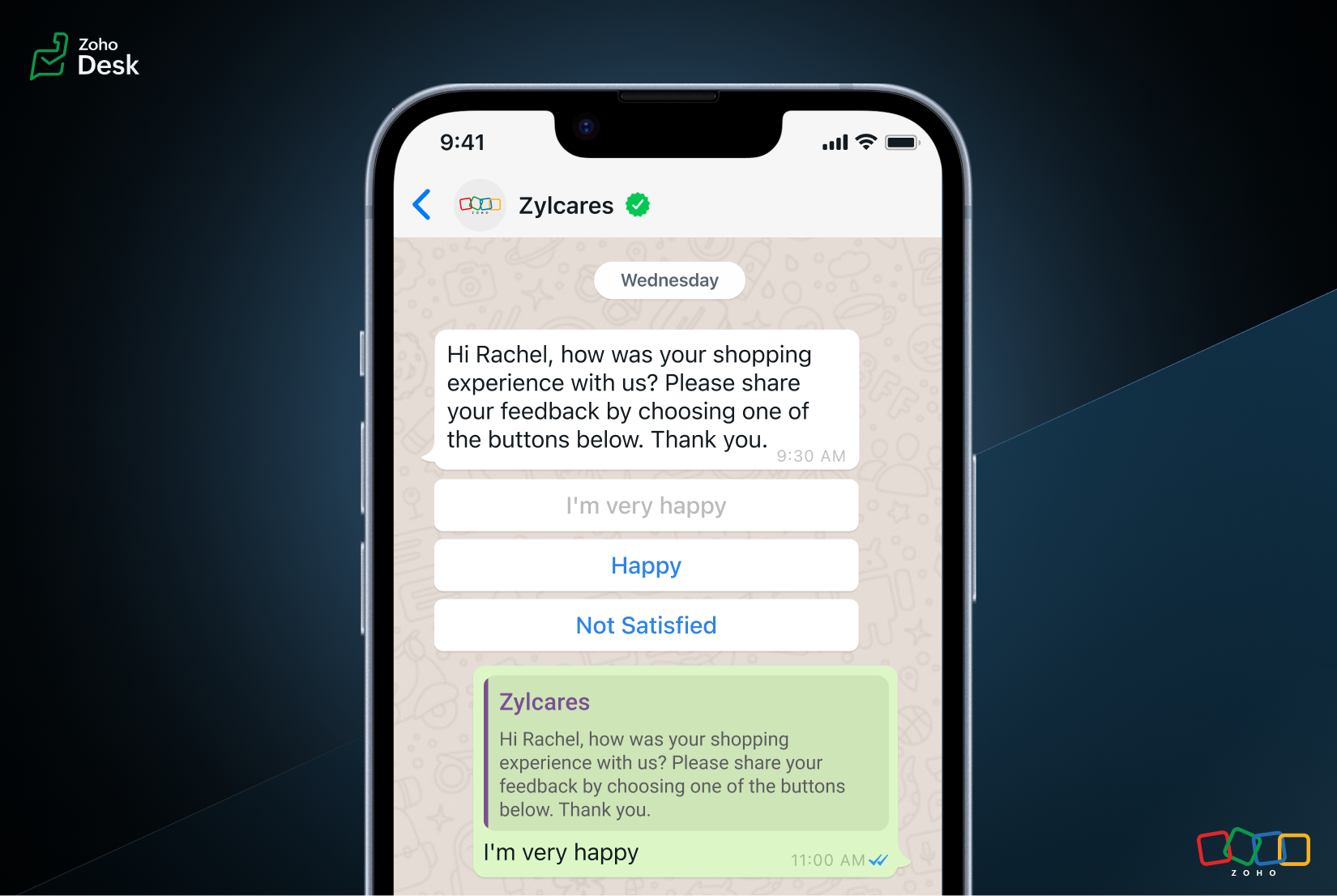
Constraints
- For Call-to-Action templates, you can add a maximum of two buttons, but only one of each type (Ex: call a phone number and visit a website).
- For Quick Reply templates, you can add a maximum of three buttons.
How businesses can use Interactive Message Templates
- Reduce cart abandonment and lost revenue by sending automated WhatsApp cart reminders.
- Sell more by sending product catalogs through WhatsApp to showcase your products and services.
- Confirm COD orders with a single clickable message, which can streamline the order confirmation process and reduce delivery delays.
- Send timely and automated invoices, orders, and shipping notifications to help keep customers informed and improve the overall buyer journey.
- Enjoy comprehensive features that help improve customer engagement, increase sales, and simplify business operations.
Regards,
Kavya
The Zoho Desk Team
Access your files securely from anywhere
Centralize Knowledge. Transform Learning.
All-in-one knowledge management and training platform for your employees and customers.
New to Zoho Recruit?

Zoho Developer Community
New to Zoho LandingPage?
Zoho LandingPage Resources
New to Zoho Survey?
New to Zoho CRM Plus?
Deliver unforgettable customer experiences
New to Zoho CRM Plus?
Deliver unforgettable customer experiences
New to Zoho Marketing Plus?
Everything you need to run your marketing
New to Zoho Marketing Plus?
Everything you need to run your marketing
New to Bigin?





Topic Participants
Kavya Rao Addepalli
Mohit
Ash | Zoho Desk
Teera
Kavya - Zoho Desk
Sticky Posts
Zoho Desk Partners with Microsoft's M365 Copilot for seamless customer service experiences
Hello Zoho Desk users, We are happy to announce that Zoho Desk has partnered with Microsoft's M365 to empower customer service teams with enhanced capabilities and seamless experiences for agents. Microsoft announced their partnership during their keynoteWhatsApp pricing changes: Pay per message starting July 1, 2025
Starting July 1, 2025, WhatsApp is shifting from conversation-based pricing to per-message billing. That means every business-initiated message you send will count. Not just the first one in a 24-hour window. Pricing updates on the WhatsApp Business PlatformLive Webinar - Work smarter with Zoho Desk and Zoho Workplace integration
Hello customers! Zoho Desk and Zoho Workplace are coming together for a webinar on 14th May, 2024. Zoho Workplace is a suite of productivity apps for email, chat, docs, calls, and more at one single place. Zoho Desk is closely integrated with a few toolsApple iOS 17 and iPadOS 17 updates for Zoho Desk users
Hello Zoho Desk users! Apple recently announced the release of iOS 17 and iPad OS 17. These latest OS updates will help you stay productive and efficient, through interactive and seamless user experiences. Zoho Desk has incorporated the updates to helpZoho Desk Cheat Sheet For The Year-End
Check out these Zoho Desk best practices to end this year on a high and have a great one ahead! #1 Set Business (Holiday) Hours - If you have limited working hours, please make sure you restrict your business hours or set them as holidays for the coming days. Let your customers know when you will, and won't, be available. #2 Update the Annual Holiday List - Check the holidays for the new year and update the holiday schedule. Usually, holidays from the current year will be carried over for the next
New to Zoho TeamInbox?
Zoho TeamInbox Resources
Zoho CRM Plus Resources
Zoho Books Resources
Zoho Subscriptions Resources
Zoho Projects Resources
Zoho Sprints Resources
Qntrl Resources
Zoho Creator Resources
Zoho CRM Resources
Design. Discuss. Deliver.
Zoho Show Resources

Get Started. Write Away!
Writer is a powerful online word processor, designed for collaborative work.
Zoho CRM コンテンツ
-
オンラインヘルプ
-
Webセミナー
-
機能活用動画
-
よくある質問
-
Ebook
-
-
Zoho Campaigns
- Zoho サービスのWebセミナー
その他のサービス コンテンツ
Nederlandse Hulpbronnen

ご検討中の方
Recent Topics
Power of Automation :: Dynamically generate Tasklists based on values selected in Task Custom Fields
Hello Everyone, A custom function is a software code that can be used to automate a process and this allows you to automate a notification, call a webhook, or perform logic immediately after a workflow rule is triggered. This feature helps to automateWhatsApp Enhancements to Boost Customer Engagement
We're excited to introduce a series of powerful enhancements to the WhatsApp integration in Zoho FSM, making customer interactions faster, smarter, and more actionable—right from your Zoho FSM interface. Here’s a quick rundown of what’s new: Try It OutStore reviews module just got smarter in Zoho Apptics
Hello, Apptics community! Every app deserves better visibility in the marketplace, and reviews play a crucial role in improving your app's App Store Optimization (ASO), rankings, and credibility across stores. That's why we've rolled out a set of enhancementsTry CRM for everyone button in the way of workflow
Please consider using the bottom bar for offers. Using the top bar for offers like "Try CRM for everyone" really gets in the way of my day to day workflow.Include EVERYTHING in Language Files
Hey, we are building out a system, that needs to be translated. The language files lack a few things though. 1. Blueprint names 2. Canvas View elements like tab names Please include everything into these files, otherwise it's not really a multi languageA way to create kits (groups of items) that do not require bundling and are added to an order as the individual items
We are evaluating moving off of Sage BusinessWorks (which handles accounting, order entry, inventory control, accounts receivable, etc) to Zoho Books/Inventory. One of the things we heavily use is a feature called Kits, which allows creating a group ofAllocating Salesman To Customer
Hello, please add a feature to allocate a salesman to a particular business customer/account. RegardsShipment
I have 70 shipments Out of which 40 delivery date are updated( since it is live tracked) 30 numbers i need to update manually. How to do it in bulk?arabic not printing
Qatar has a legal requirement to have invoices in English and Arabic. When writing invoice fields in Arabic, they don't print. Why?How to show Order Number/SO Ref on Invoice emails
When creating a sales order or invoice we have an option to input an order number or ref# (see attached images). For the Sales Order email template we can add a placeholder for the SO_REF. However, for the Invoice email template there's no option to referenceSpecify in-line image size in question
I have an image inserted into a file upload type question. I can click and drag the corner of the image to make it larger or smaller, but I would like to manually input the dimensions I need. No matter what size I make the image in photoshop before uploadingCan you limit who creates tags?
Hi there, I'd like to find out if it's possible to limit which Agents create tags on Zoho desk. Thank you.Sudden Layout Issue After Last CSS Update for ZML (Temporary Fix Inside)
Hi, Our clients have noticed today that every section laid out with ZML suddenly shows an unwanted top padding/blank space that interrupts the user screens. It appears that Zoho has changed the default CSS for the .zcp-col.zcp-panel-rowtype-auto element.Customer paid excess. How do I record payment?
A customer has paid me Rs. 7150 which is in excess. The amount due is Rs. 5388 I owe them Rs. 1762 back which I will be transferring to their account tomorrow. How do I get this entered into Zoho Books? I'm a little lost. :) RishiTabular View Report | Scale To Fit Screen
Please add the option to scale Tabular View reports to fit the screen. I constantly have to adjust the column size of Tabular View reports to fit various screen sizes and it just looks messy. You can see in the screenshot below there is a blank gap afterWhy Server error in creatiing Landing Pages
Hi Zoho Team, pls see my screenshot and tell me, what's wrong. ThxTip 31: How to make a field in a Zoho Creator form mandatory based on criteria
Hi folks, I'm sure most of you are familiar with the Mandatory property available in our form builder. It enables you to ensure that your users enter an input in a required field. If they don't enter an input in that field, they'll be unable to submitBulk update account type when adding a bill
Hi I've only been using Zoho Books for a short while but I'm impressed so far, keep up the great work. One minor issue I'm coming up against is when creating a new bill from a scanned document (supplier invoice). In some cases, the supplier invoice couldHow to start fresh after many years of using Zoho Books without deleting everything and creating a new organisation?
Hi, I have used Books since 2016, but never reconciled with my bank account. I was thinking of trying to go back and fix that, but I don't just don't have the time it would take. Instead, I'd like back up my old records and start anew. What is the bestHow do I modify the the incoming/current call popup? I can modify other call pages but not that one.
I want to modify the incoming and active call popup on the crm to include customer relevant information, such as purchase history or length of relationship. Under modules and fields, I don't seem to see active call as a choice to modify, only the mainCanvas: Add Sections to Detail View
Currently it is only possible to add fields to a canvas detail view. This makes Canvas hard to maintain, because everytime we add a field to our system, someone needs to go into the canvas view and add it there as well. This leads to additional work andCannot delete old accounts
Hello, I try to delete old accounts from CRM, but it won't permit, saying documents are still linked to them. I searched in CRM and BOOKS, found some documents and deleted them, but still CRM won't delete them. Any idea how to do that ? I have a lot ofOffline mode on Android TV app?
Hello! Is there a way to use Zoho Show offline in the Android TV app? I have an Android TV based projector, and I travel with it, and don't want to have to rely on a steady internet connection when giving a presentation.Choice-based Field Rules on Global Lists
Hi, The new Choice-based Field Rules should also be able to work with Global Lists not just local lists. Thanks DanTip #36- How to use Survey in Zoho Assist to capture valuable feedback from remote sessions- 'Insider Insights'
The survey feature allows technicians and customers to share their valuable feedback, contributing to the improvement of remote service quality. After the completion of a remote session, technicians and customers are prompted to fill out a survey form,Narrative 3 - Comprehending User Management
Behind the scenes of a successful ticketing system - BTS Series Narrative 3 - Comprehending User Management User management in a ticketing system includes important aspects of how administrators oversee user access, roles, and permissions. This processProduct Details's Description is lost
Hi CRM lost its description in Product details subform. Can you make some test before deploy any update?Sent items with shared folders
Hello, this is in some way in between a problem and an idea. When sharing folders (which is actually not any close to a shared mailbox...) the person which the folder has been shared with can access that folder and can send emails when delegation isZoho Bookings Issues We are facing
Hi team, Here are list of issues we are facing with Zoho Bookings when migrating from other platforms. Sorry there is a lot but the bookings app need to be functional and practical for people to actually use it and not-cause MORE problems by being so basic and not customisable to each business. 1: SMS reminders for staff There should be time limits on these reminders to make them useful. EG. if a new booking comes in more than 4 hours from now we don't really need to get a reminder, however ifRun workflow on data import in Creator 6
How to run a workflow on data import in Creator 6?Multi Day booking for resources
I have following business-case: Rental for Tablets. Customer should be able to select how many device for how many days he'd like to rent. Same as a car rental for multiple days. Is this possible with Bookings on the current version?Zoho AI Translate Task as Rest API
I cant find any docs on how to use Zoho AI Translate Task from a rest api call https://www.zoho.com/deluge/help/ai-tasks/translate.html I am working on a custom Widget and I dont think I can execute zoho deluge ai translate task from a custom widget.Add Usage & Voting Analytics for Knowledge Base Articles in Zoho SalesIQ
Dear Zoho SalesIQ Team, We appreciate the current integration between Zoho Desk and Zoho SalesIQ that allows knowledge base articles to be synced and displayed to users directly within the SalesIQ chat interface. One valuable feature already availableReal-Time Alert or Status Indicator for WhatsApp Connection Issues in SalesIQ
Hi Zoho Team, We’d like to request a feature enhancement in Zoho SalesIQ related to WhatsApp integration stability and visibility. Recently, we encountered a critical issue where our WhatsApp bot stopped responding to messages without any warning or alertCustomization of Chat Transcript Emails in Zoho SalesIQ
Hi Zoho SalesIQ Team, I hope you're doing well. We would like to request the ability to customize the email template that is sent to clients when they request a chat transcript from SalesIQ. Currently, when a client clicks the button to receive theirImport from Linkedin
Please provide a way to enable importing contact information for Contacts and Companies from Linkedin? ThanksThe ability to format text fields, ie when data is number or currency
Hello, I have spent some time trying to determine how to accomplish this but it appears to be impossible. I want to merge a currency field from CRM into a PDF document. The CRM data shows $1,234, but when zSign gets the data it shows 1234 in the textTip of the Week #64– Customize your sidebar for a more focused workflow.
When your shared spaces start filling up with too many views, it gets a little harder to zoom in on what really matters. You find yourself scrolling more than working, and the things that need your attention? They’re often buried down below. Custom sidebarSales IQ FAQ duplicating
Hey, We have multiple departments. How do I export all the FAQ questions or duplicate all the FAQ questions to associate with another department. We have 393 questions so I am trying to find the best way to take all these questions and associate themZoho Social - Queries about GST invoices and subscription
Hi, I am going to purchase the Zoho Social tool with a yearly subscription. So, can you please help me with my below queries: 1. How I get the monthly GST Invoices? 2. What is the process of subscription? 2. How to cancel a subscription?Next Page