Zoho Projects - Rapports

Suite à l'article précédent, nous continuons la découverte des différents modules dans Zoho Projects. Dans cet article, découvrons les variétés de données en termes de diagrammes de Gantt et de rapports pour les tâches, les bugs et les feuilles de temps afin de vous aider à mesurer efficacement la productivité et la progression du travail.
Intérêt
- Garder la trace de toutes les tâches d'un projet.
- Gérer les activités qui se chevauchent et la surcharge des ressources.
- Gérer les dépendances des tâches.
Les différents types de rapports disponibles dans Zoho Projects comprennent :
- Les diagrammes de Gantt
- L'utilisation des ressources
- Planifié contre réel
- Les rapports de projet
- Les rapports de tâche
- Les rapports de feuilles de temps
Les diagrammes de Gantt
Un diagramme de Gantt est une représentation visuelle du déroulement du projet. Il affiche des informations sur la progression, le propriétaire, le statut de la tâche et d'autres données liées à cette tâche. Dans Zoho Projects, vous pouvez visualiser le diagramme de Gantt par deux moyens :
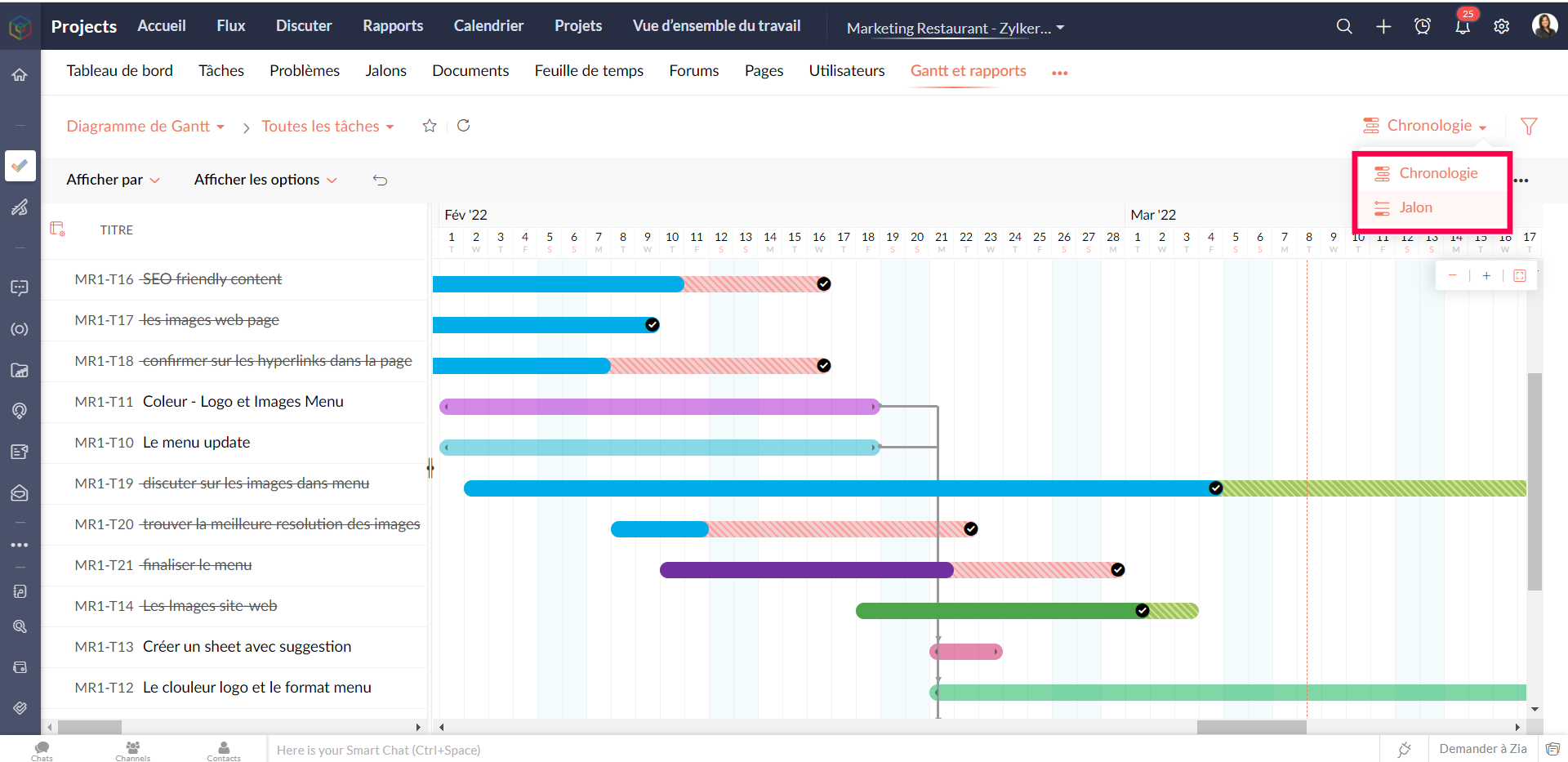
Gantt des jalons : Les jalons, les listes de tâches et les tâches sont affichés en fonction de leur hiérarchie dans le projet. Les jalons sont représentés par un panneau, les listes de tâches par des barres horizontales noires et les tâches de différentes couleurs par des barres de Gantt horizontales.
Que pouvez-vous faire avec le Gantt des jalons ?
- Modifiez n'importe quelle tâche dans le jalon de Gantt lui-même.
- Faites défiler l'écran vers la droite pour afficher d'autres détails sur les tâches, comme le pourcentage d'achèvement, la durée, la date de début, la date de fin, le propriétaire et la priorité. Vous pouvez également voir le pourcentage d'achèvement des jalons et des listes de tâches.
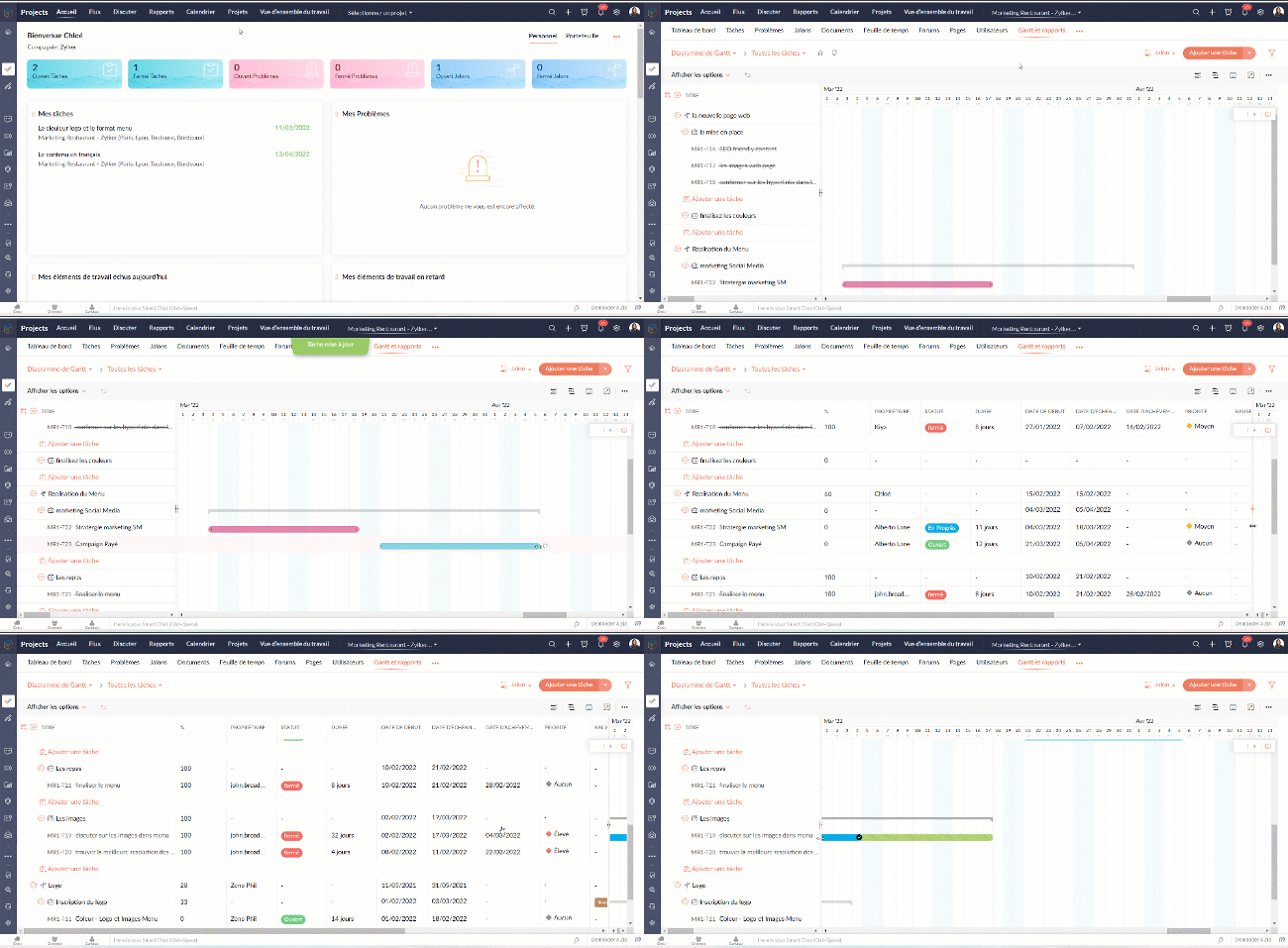
- Définissez la dépendance entre les tâches.

- Sur l'axe vertical, les jours fériés sont affichés en rouge et les week-ends en bleu.
- Pour accéder au jalon de Gantt à travers les projets, naviguez vers Accueil >> Rapports >> Jalon de Gantt. Dans cette section, vous pouvez consulter les jalons de Gantts pour tous les projets de votre entreprise. Si vous souhaitez afficher les résultats d'un projet spécifique ou d'un ensemble spécifique de projets, cliquez dans le coin en haut à droite pour filtrer les données en fonction du projet.
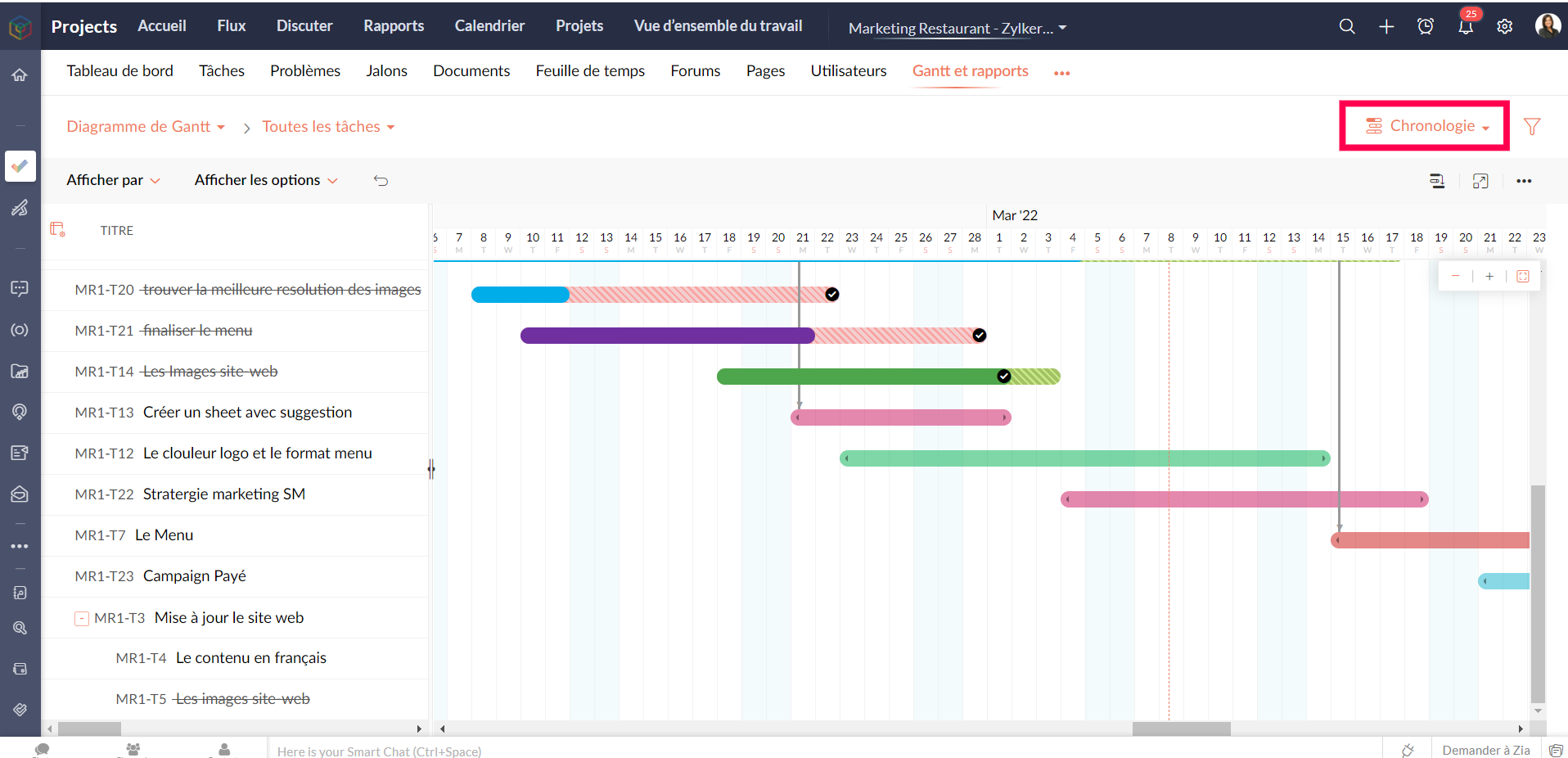
Gantt chronologique : Les barres de Gantt sont affichées en fonction de l'ordre de la date de début dans le projet. Les tâches et sous-tâches sont représentées par des barres de Gantt horizontales dans des couleurs différentes.
Personnaliser le diagramme de Gantt
Vous pouvez personnaliser les colonnes de Gantt depuis le bouton "Personnaliser colonne". Vous pouvez réorganiser l'ordre des colonnes ou même activer ou désactiver les champs à partir de ce bouton.

Pour personnaliser la couleur de la barre des tâches, survolez une barre de tâches, cliquez sur l'icône de personnalisation des couleurs et sélectionnez la couleur. La couleur de la barre est modifiée.
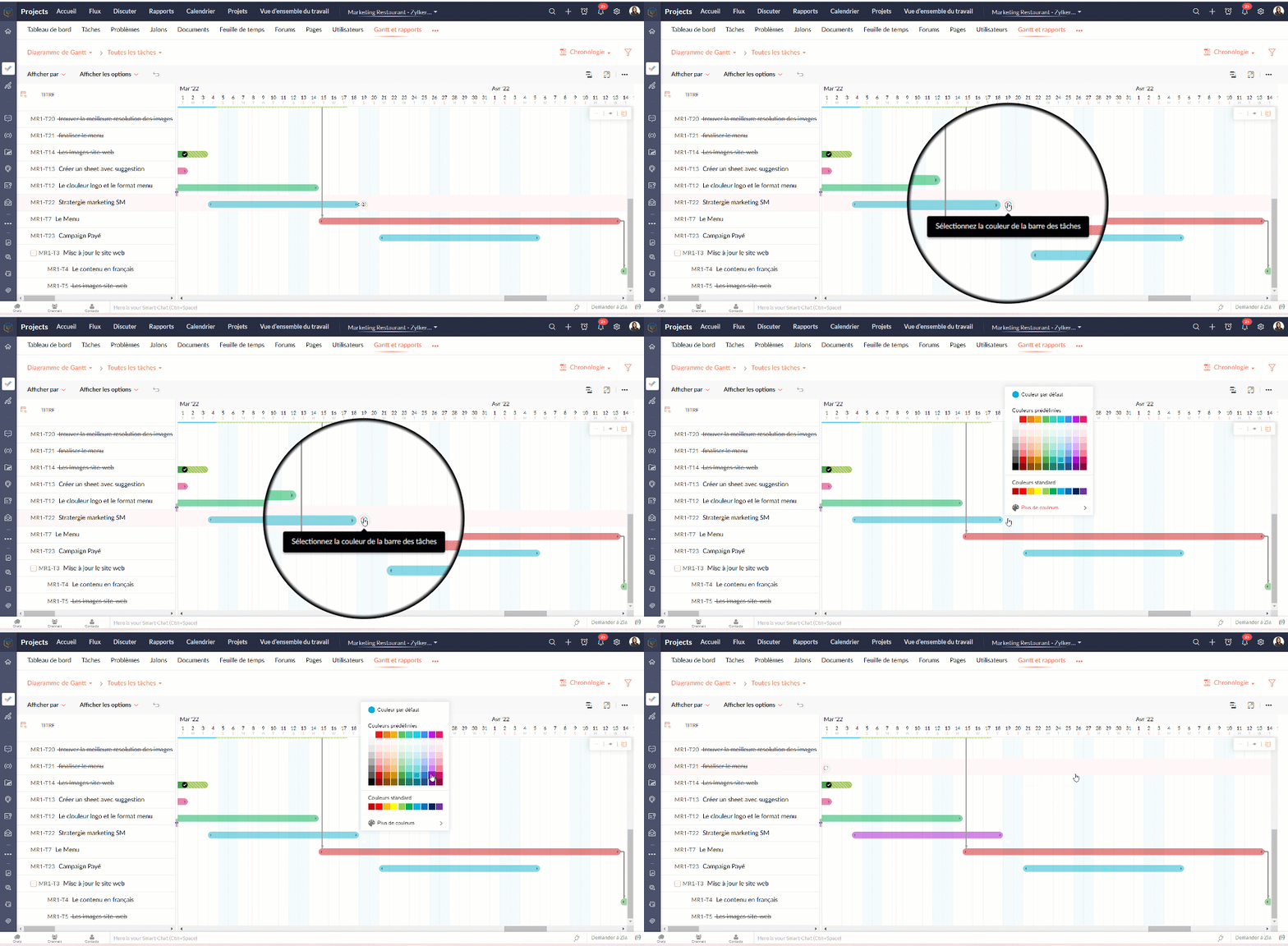
Tableau d'utilisation des ressources
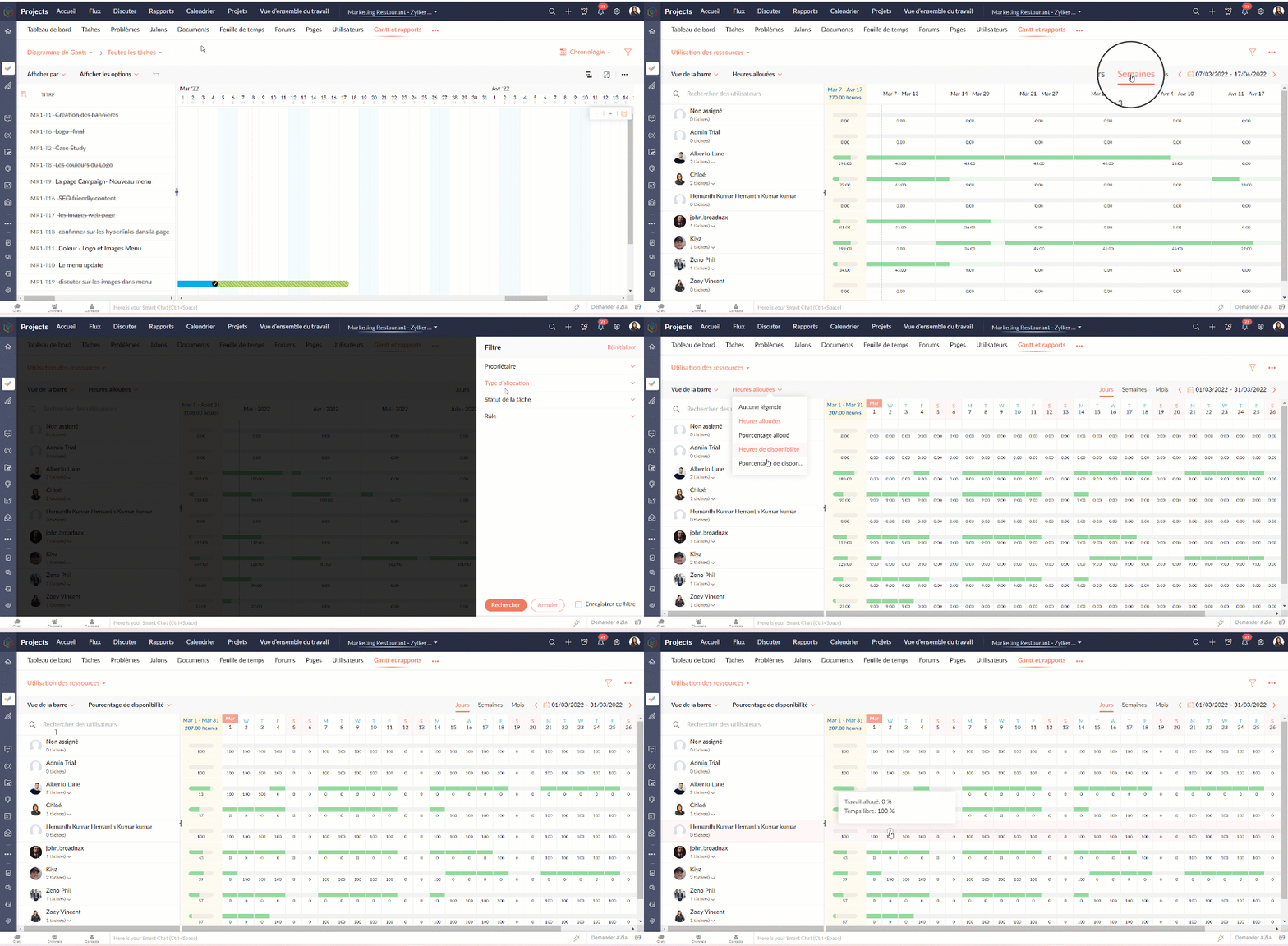
Le graphique d'utilisation des ressources montre visuellement le travail réparti en heures et en pourcentage. Le temps d'inactivité est reflété. Lorsqu'une ressource est surchargée, vous pouvez la reprogrammer soit vers une autre ressource, soit vers un autre jour avec des heures de travail disponibles. Vous pouvez ajouter directement des tâches sur le graphique pour tout usager sélectionné.
Attribuer les tâches à partir du tableau d’utilisation des ressources
- Allez dans "Rapports"
- Sélectionnez "Utilisation des ressources" dans la liste déroulante du graphique.
- Cliquez sur la barre de planification des tâches dans le graphique pour ouvrir la fenêtre pop-up "Attribuer un utilisateur".
- Sélectionnez les heures de travail standards ou flexibles dans la fenêtre pop-up "Attribuer un utilisateur".
- Remplissez les détails demandés.
- Cliquez sur "Soumettre" pour mettre à jour le propriétaire de la tâche.
Heures planifiées vs. réelles pour les tâches
Planifié vs Réel est une fonctionnalité qui indique la progression du travail de l'utilisateur en fonction de la différence entre ses heures planifiées et ses heures réelles. Vous pouvez visionner à la fois le total des heures planifiées d'un utilisateur et les heures réelles passées par l'utilisateur dans un projet. La différence entre les heures planifiées et les heures réelles indique la progression de l'utilisateur du projet.
Rapports de tâche
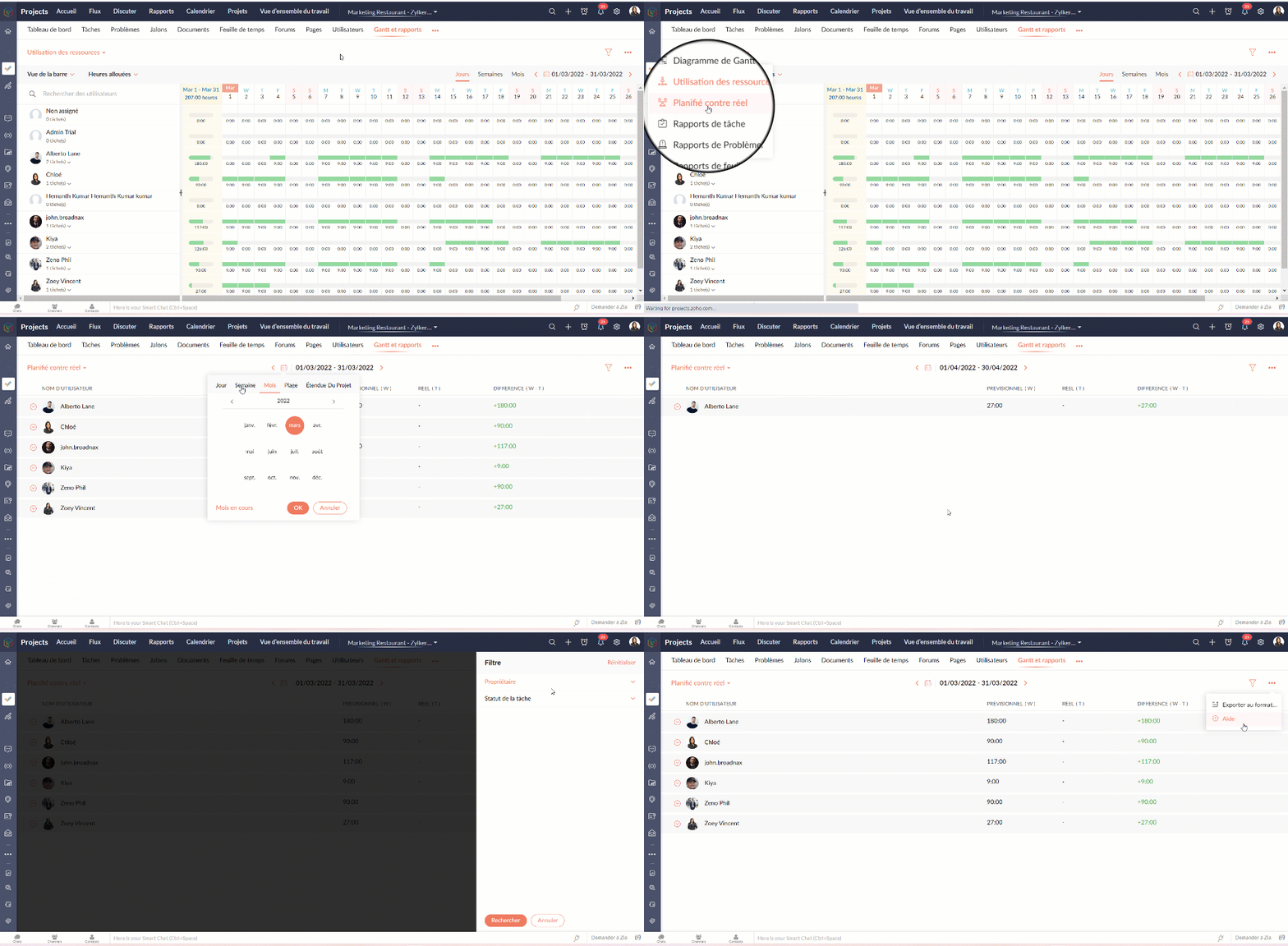
La vue des rapports de tâches fournit une vue consolidée de toutes les tâches d'un projet en fonction de leur statut, de leur jalon, de leur priorité, de leur propriétaire et de leur pourcentage d'achèvement.
Avantages
- Obtenir le nombre de tâches en fonction du pourcentage d'achèvement.
- Visualiser les tâches de chaque utilisateur en fonction du pourcentage d'achèvement.
- Créer des rapports sur mesure en comparant deux critères et en générant un rapport sur les tâches.
Types de rapports de tâches
Les rapports de base
Les rapports de base vous donnent le nombre de tâches par rapport à cinq critères différents : statut, priorité, balises, propriétaire, ou pourcentage de réalisation.
- Statut - Rapport généré pour afficher le nombre de tâches basé sur le statut des tâches.
- Propriétaire - Rapport généré pour afficher le nombre de tâches en fonction du propriétaire.
- Priorité - Rapport généré pour afficher le nombre de tâches en fonction de la priorité des tâches.
- Pourcentage de réalisation - Rapport généré pour afficher le nombre de tâches en fonction du pourcentage d'achèvement des tâches.
- Balises - Rapport généré pour afficher le nombre de tâches en fonction des balises.
- Projet - Rapport généré pour afficher le nombre de tâches dans chaque projet.
Les rapports avancés
Les rapports avancés vous donnent le nombre de tâches par propriétaire selon le statut, la priorité ou la réalisation. Vous pouvez également créer des rapports de tâches personnalisés basés sur différents critères.
- Owner-wise Task Status - Rapport généré pour afficher le nombre de tâches en fonction du statut défini par le propriétaire.
- Achèvement des tâches par le propriétaire - Rapport généré pour afficher le nombre de tâches en fonction du pourcentage d'achèvement défini par le propriétaire.
- Priorité de la tâche par le propriétaire - Rapport généré pour afficher le nombre de tâches en fonction de la priorité définie par le propriétaire.
- Rapport de tâche personnalisé - Rapport généré pour visualiser le nombre de tâches en comparant deux critères quelconques.
Vous pouvez changer le type de graphique à partir de la liste déroulante dans le coin supérieur droit. Cliquez pour personnaliser vos critères de filtrage et obtenir les résultats en conséquence.

Rapports sur les problèmes
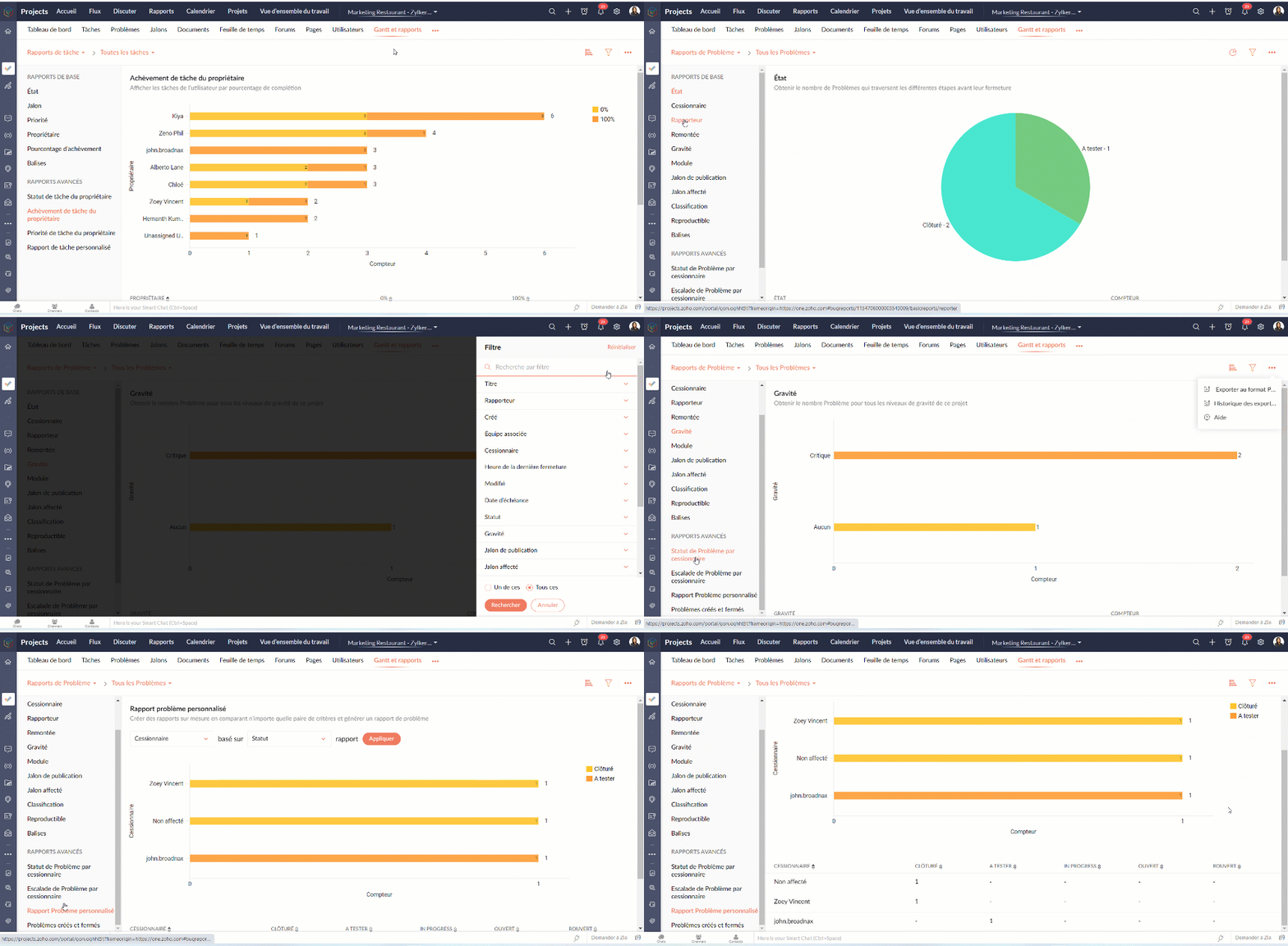
Les rapports sur les problèmes donnent un aperçu détaillé de l'état des problèmes. Les problèmes peuvent être analysés en fonction de nombreux paramètres.
Rapports de base
Les rapports de base montrent l'état des problèmes en utilisant les paramètres les plus courants tels que le statut, la gravité, la balise, le rapporteur, renvoi à l'échelon supérieur, etc
Rapports avancés
Les rapports avancés répondent à des questions telles que "Combien de problèmes un propriétaire a-t-il à chaque étape ?" ou "Combien de problèmes ont été remontés et à quel niveau ?".
Rapports sur les feuilles de temps
Les rapports sur les feuilles de temps vous aident à suivre les heures enregistrées pour les tâches et les problèmes. Les rapports avancés montrent les heures approuvées, rejetées et en attente pour chaque utilisateur. Le rapport sur les feuilles de temps facturables et non facturables montre, bien entendu, combien d'heures sont facturables et non facturables par utilisateur.
Nous continuerons d'en découvrir dans nos prochains articles. En attendant, n'hésitez pas à poser vos questions en commentaire.
L'équipe Zoho France
Access your files securely from anywhere
Centralize Knowledge. Transform Learning.
All-in-one knowledge management and training platform for your employees and customers.
New to Zoho Recruit?

Zoho Developer Community
New to Zoho LandingPage?
Zoho LandingPage Resources
New to Zoho Survey?
New to Zoho CRM Plus?
Deliver unforgettable customer experiences
New to Zoho CRM Plus?
Deliver unforgettable customer experiences
New to Zoho Marketing Plus?
Everything you need to run your marketing
New to Zoho Marketing Plus?
Everything you need to run your marketing
New to Bigin?





Topic Participants
Kinjal Lodaya
Sticky Posts
Collaboration sans faille avec Zoho One
Bonjour à tous, Dans cet article nous allons voir comment Zoho One permet une collaboration à différents niveaux . La façon dont nous travaillons évolue. À mesure que les entreprises se mondialisent, la plupart des activités sont menées en équipe.
New to Zoho TeamInbox?
Zoho TeamInbox Resources
Zoho CRM Plus Resources
Zoho Books Resources
Zoho Subscriptions Resources
Zoho Projects Resources
Zoho Sprints Resources
Qntrl Resources
Zoho Creator Resources
Zoho CRM Resources
Design. Discuss. Deliver.
Zoho Show Resources

Get Started. Write Away!
Writer is a powerful online word processor, designed for collaborative work.
Zoho CRM コンテンツ
-
オンラインヘルプ
-
Webセミナー
-
機能活用動画
-
よくある質問
-
Ebook
-
-
Zoho Campaigns
- Zoho サービスのWebセミナー
その他のサービス コンテンツ
Nederlandse Hulpbronnen

ご検討中の方
Recent Topics
Cannot give public access to Html Snippet in Zoho Creator Page
Hi, I created a form in Zoho Creator and published it. The permalink works but I want to override the css of the form. (style based URL parameters is not good enough) So I created a page and added an Html snippet. I can now override the css, which isHow can Outlook 365 link back into Zoho Projects so meetings and events in Outlook calendar show in Zoho?
We use Outlook 365 for our emails and diaries and have integrated Zoho Projects with Office 365. One challenge we face is getting Zoho Projects to recognise when we have meetings and events in Outlook and not allow project managers to assign tasks over that period. Is there a way to resolve this? ThanksOn Edit Validation Blueprint
Hello, I have a notes field and a signature field. When the Approve button is clicked, the Signature field will appear and must be filled in. When the Reject button is clicked, the Notes field will appear and must be filled in. Question: Blueprint willZoho Invoice en Navarra (Spain)
Hola, ¿Alguien usa Zoho Invoice en la Comunidad Foral de Navarra? En Navarra tenemos un sistema tributario diferente y no aplica Verifactu (la Hacienda Foral de Navarra ha anunciado su alternativa, NaTicket, pero no ha informado cuándo entrará en vigor).Emails from Zoho are getting blocked due to Zoho IP address being blacklisted
This is the info I got from my hosting provider – please address this issue immediately. I don’t expect this from such a big household name. Every single invoice I have sernt it not being received by my clients, all being blocked. All of a sudden. Asagentid : Where to find?
I've been looking around for this agenId to check for the total ticket assigned on a specific agent url :"https://desk.zoho.com/api/v1/ticketsCountByFieldValues?departmentId=351081000000155331&agentId=35108xxxxxx132009&field=statusType,status" type :GETZoho DataPrep integration with OpenAI (beta)
We are thrilled to announce Zoho DataPrep's integration with OpenAI. The public beta roll-out opens up three features. Users who configure their OpenAI Organizational ID and ChatGPT API key (Find out how) will be able access the features. The featuresAI Bot and Advanced Automation for WhatsApp
Most small businesses "live" on WhatsApp, and while Bigin’s current integration is helpful, users need more automation to keep up with volume. We are requesting features based on our customer Feedbacks AI Bot: For auto-replying to FAQs. Keyword Triggers:Setting total budget hours for a specific project
Hi there, I work on a lot of projects that have fixed budget hours. Is there a way to enter the total budgeted hours so i can track progress and identify when hours have been exceeded. I see in the projects dashboard there is a greyed out text sayingClone entire dashboards
If users want to customize a dashboard that is used by other team members, they can't clone it in order to customize the copy. Instead they have to create the same dashboard again manually from scratch. Suggestion: Let users copy the entire dashboardIntroducing Formula Fields for performing dynamic calculations
Greetings, With the Formula Field, you can generate numerical calculations using provided functions and available fields, enabling you to derive dynamic data. You can utilize mathematical formulas to populate results based on the provided inputs. ThisGetting started with Zoho PDF Editor
Hello users, If you are new to Zoho PDF Editor or aren't sure of its full potential, then this article is for you. Zoho PDF Editor is a free online PDF editing tool, that allows you to upload and edit PDFs, insert text and images, add fillable and e-signatureMercury Bank Integration
Mercury Bank is a fintech company in the US that is quite popular with startups, e-com companies, and other businesses. https://docs.mercury.com/reference/welcome-to-mercury-api Unlike most traditional banks, they have a full-featured API that allowsZoho Projects - Cloning a task does not trigger task workflow when created
Hello! I have a Project where my team uses a set of tasks from a tasklist as templates, so we could simply clone it and drag it to another list in kanban view to avoid creating a new one from scratch. The process works well, but after cloning it the newPurchase Orders not in sequence
I am unable to sort by Purchase Order Numbers. I can only sort by date; however, the PO numbers aren't in the order they were entered. This was not the case prior to today.Date/time displayed in ZohoCRM does not match date/time of entries in ZohoForm
Hello there, we use a ZohoForm as a worksheet, i.e. users use it to track start time, break and stop time for every working day. The ZohoCRM org time zone is set on GM -4, so is the Time Zone in the Date&Time section in ZohoForm (see attachment). DespiteUpdate Existing Records greyed out in Free Version
Trying to update records from an Excel sheet, and not getting the option to update. Only option is to add as new accounts. All documentation I can see says update should be an option! Accounts, Leads, Contacts, all the same.Dynamically Populate Picklist Values from Another Module Using Client Script
I am working in Zoho CRM and trying to dynamically populate a picklist field in the Partners module using values stored in another custom module. I have two modules: 1. Partners Module Field: Partner_Type_Pick Field Type: Picklist 2. Partners_Type ModuleAdd zoho calendar to google calendar
Hi I keep seeing instructions on how to sync Zoho CRM calendar with google calendar but no instructions on how to view Zoho calendar in my google calendar.Zoho Community Digest : Jan 2026 | Part 1
Hello Everyone! Staying in the loop with Zoho's latest product updates and features across the vast Zoho Community Forums can be a real challenge. We get it. With over 50+ applications, each with its dedicated forum, it's easy to miss out on importantWorld date & time format
Hello, Is there a timeline to get the worldwide used date and time format ? I mean not the american one... I mean day month year, and 24 hours clock. RegardsNimble enhancements to WhatsApp for Business integration in Zoho CRM: Enjoy context and clarity in business messaging
Dear Customers, We hope you're well! WhatsApp for business is a renowned business messaging platform that takes your business closer to your customers; it gives your business the power of personalized outreach. Using the WhatsApp for Business integrationConditional layouts - support for multi-select picklists
Hi, The documentation for conditional layouts says the following: "Layout Rules cannot be used on the following field types: Auto Number Lookup Multi Select Lookup User Lookup Formula File Upload Multi Line" I have a custom module with a multi-pick listClient Script Not Working When Field is Set by Workflow
Problem Context: I have implemented a client script in the Cases module that automatically assigns commands based on the value of the Priority field. The script functions correctly when the Priority field is manually set by a user through the form. ObservedIntegration of CRM and Recruit
hi team, Is it possible to sync deals <> job openings from only 1 pipeline? My configuration of CRM has pipeline for each business unit, so I will have all data in the CRM system. body leasing and recruitment is one BU (hence 1 pipeline) - can I syncintegrating Zoho CRM vendors with Zoho projects
In most of our projects we collaborate with our Vendors. Being able to integrate only Accounts and not Vendors from CRM, is a huge limitation for our perspective and needs. We would really love to see this feature in the CRM-Projects integration.Zoho Creator Workshops 2026—Europe & UK | Coming to a city near you!
Hello everyone! We're excited to announce the Zoho Creator Workshop Series 2026, coming to cities across Europe and the United Kingdom this year! Whether you're looking to explore the intermediate-to-advanced capabilities of Creator or you're a seasonedNumber 9 envelopes for invoice printing
I email and print invoices. Being new to Zoho and coming from QB, we did both as we have a more traditional So in Zoho i want to do the same using Number 9 envelopes. These have both a return window and mail to windoow see attached image. Im just looking for best suggestions on how to get a ZOHO invoice to work, so I can mail my invoices...Zoho Books/Square integration, using 2 Square 'locations' with new Books 'locations'?
Hello! I saw some old threads about this but wasn't sure if there were any updates. Is there a way to integrate the Square locations feature with the Books locations feature? As in, transactions from separate Books locations go to separate Square locationsOpen Sans Font in Zoho Books is not Open Sans.
Font choice in customising PDF Templates is very limited, we cannot upload custom fonts, and to make things worse, the font names are not accurate. I selected Open Sans, and thought the system was bugging, but no, Open Sans is not Open Sans. The realAdd Reporting feature to display variance/change columns when comparing periods
When running reports to compare periods (for example, Profit and Loss comparing current year to previous), I would like to be able to display variance columns in both (a) amount or (b) percentage.Payroll and BAS ( Australian tax report format )
Hello , I am evaluating Zoho Books and I find the interface very intuitive and straight forward. My company is currently using Quickbooks Premier the Australian version. Before we can consider moving the service we would need to have the following addressed : 1.Payroll 2.BAS ( business activity statement ) for tax purposes 3.Some form of local backup and possible export of data to a widely accepted format. Regards Codrin MitinInvalid scope choice: Workdrive integration in CRM
Bug: There is an invalid option in the permission choices for Workdrive integration in CRM. If the entry "WorkDrive.teamfolder.CREATE" is selected, it will return a message indicating invalid OAuth scope scope does not exist.What's New - February 2026 | Zoho Backstage
February 2026 brings a major new addition and a collection of enhancements across Zoho Backstage. We thought about writing a long introduction, but the updates in this release make a strong case on their own. So we’ll skip the buildup and dive straightAttaching files to emails within CRM Deals.
Hello, We have recently started using the extension "Workdrive for CRM" (Related List) to view/store our documents for each Deal, instead of using Attachments. Overall it feels like a better way to go but the user experience is not so great when it comesAnyone worked out how to export or screengrab a full heatmap?
I'd love to be able to include a copy of a heatmap in a report but can't work out how to grab the whole thing as there doesn't appear to be an export function? Thanks in advance.Establishing Relationships among contacts/leads with Reciprocal
Is there any way to create a relationship between contacts and leads and be able to go into just one of the files and have it reciprocate the entry in the other file? For example, if I have two people say John and Jane Smith who are husband and wife.Placeholder for Agent Signature in Email Templates
Dear Zoho Team, I hope this message finds you well. We currently face a limitation when designing email templates in Zoho Desk. While we can create email templates and include a footer at the end, the agent signature is always appended by default at theCustom View and Custom Fields on Zoho Books
Hi, I have some custom fields on Estimates and Invoices. I also use Custom Views so I can have a lot of information at a glance. I want to include my custom fields as columns in my custom views of estimates / invoice, but it looks like is not possible.%PaymentLink%
Does not work. Software creates a BAD link. ....and yes payment options are turned on. Link on the invoice pdf once opened will work but this template is a joke.Next Page