File Consent: Opt-In & Opt-Out | Help | Files | Zoho People 5.0

File Consent: Opt-In & Opt-Out

File Consent Feature - Employee Consent Management for Organization Files

The file consent feature in Zoho People allows organizations to mandate consent for important documents. It enables organizations to share files that require employees to opt in to confirm their consent. 
If an employee opts in and confirms their consent, they can continue accessing Zoho People. However, if they decline, their access will be revoked shortly.
Alert
IMPORTANT POINTS

✧ Zoho People also provides a similar document acknowledgement feature. Organizations may choose between Consent or Document Acknowledgement; only one feature can be active at any given time for a particular file. 

✧ Consent feature can be used for files uploaded from your device or for files uploaded from a cloud service. However, consent feature cannot be used for files uploaded from Zoho Workdrive.

✧ Supported file formats: .docx, .doc, .ppt, .pps, .pptx, .pdf.
To enable and use the consent feature, follow the steps below:
  1. From your Zoho People home page, navigate to Operations and select the Files service.
  2. Select the Add Organization File option.

  3. Upload a file and fill in the corresponding details, such as the name and description.
  4. Specify the organization entities the file needs to be shared with, such as departments and locations.

  5. Select the folder where the file is to be placed.
  6. Set an expiration date if required.
  7. If the uploaded file is to be considered as an organization policy document, you can enable the corresponding "Mark as organization policy document" option. If enabled, the policy files will be easily accessible for employees in the Policies page within Home > Organization.
  8. Now enable the Acknowledgement and Consent option and proceed with choosing the Consent radio button.
  9. Next, you will be prompted to select a date to enforce a mandatory consent deadline.

  10. Additional options to allow employees to download the file and send automated notifications are also available. Once the setup is completed, click Save.
Now that the file is shared and the consent requirement is enabled, this will be indicated in the organization files list view. Based on the status of the file, the color of the icon and tool-tip will be updated to the show the status. 


Opting In and Opting Out

On accessing Zoho People, in the event of an organization file requiring consent, the user will see a popup informing them that there are mandatory policies that require their consent:
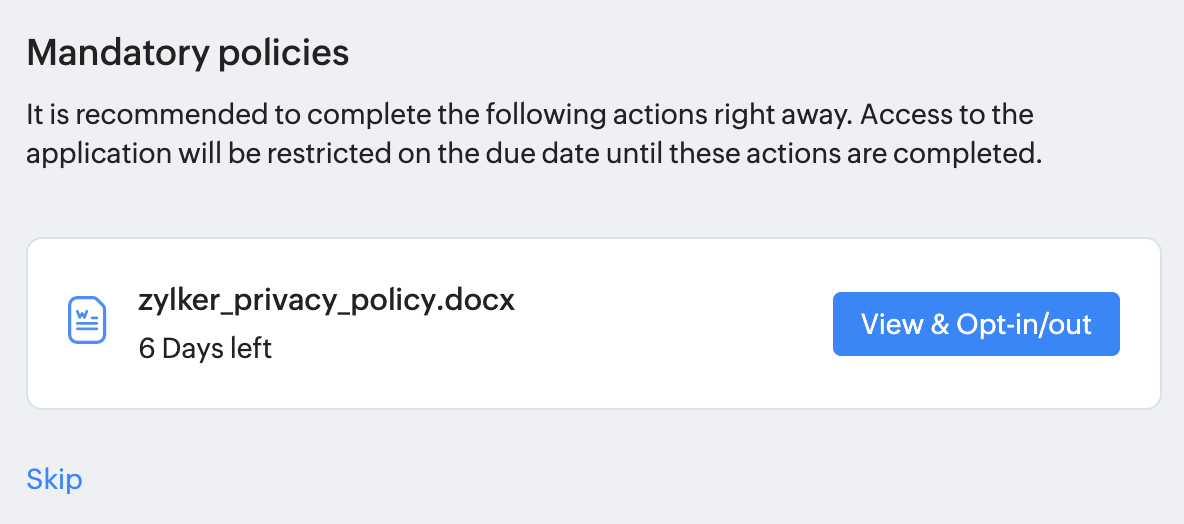


However, if it's the due date already. Access to Zoho People will be restricted until the user chooses to opt-in. Their screen will look like this:



The "Skip" option will be available until the due date. Users can click on the View & Opt-in/out button to access the document. 
On accessing the document, the user can read through the document and click on the Opt-in or Opt-out button at the bottom of the screen.
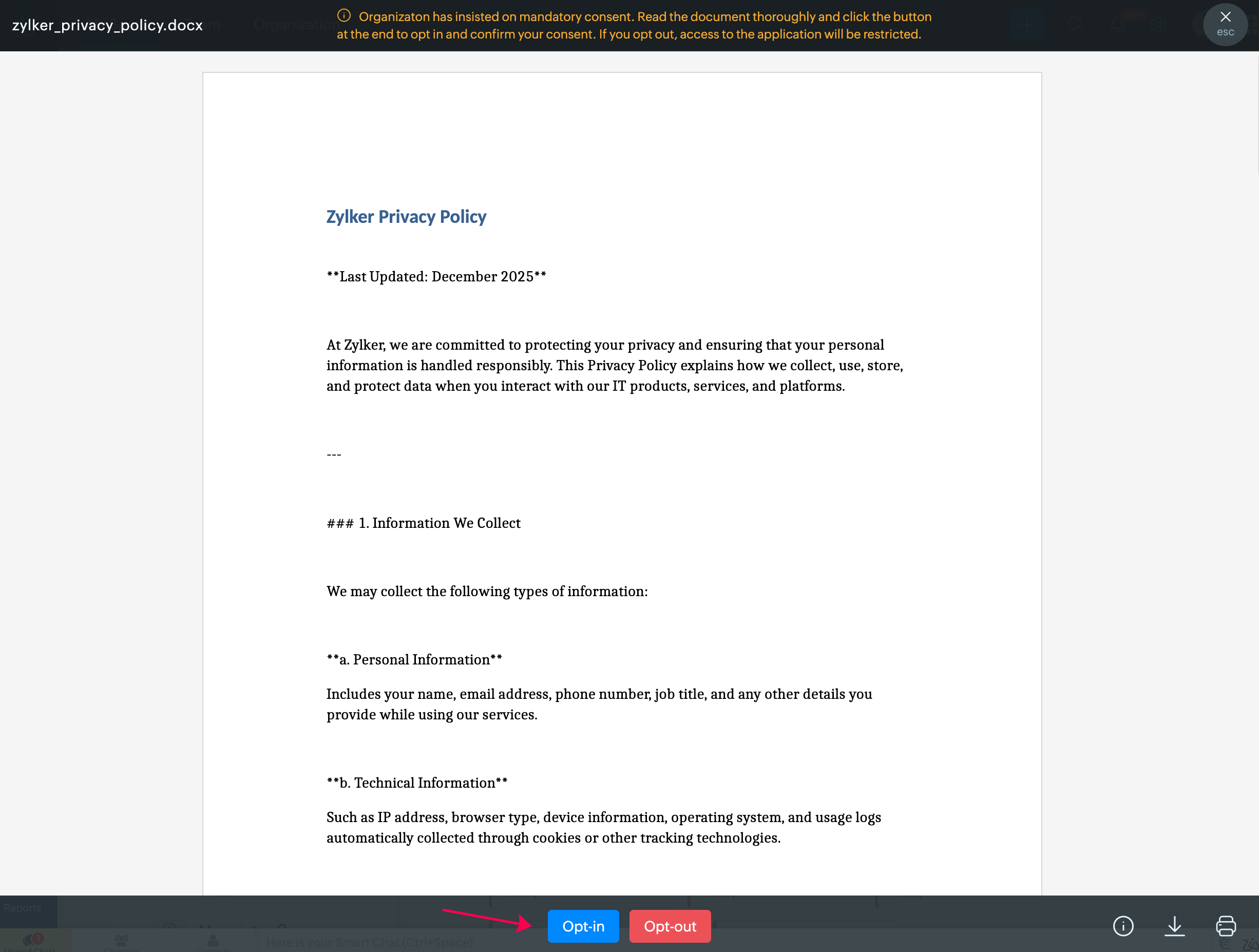


If a user has accidentally skipped or wishes to access the file later (before the due date), they can find the file in their Activities tab (within Home) or navigate to Files (user service) > Organization tab. 


After the user has provided their consent, the status will be updated to indicate "Opted-in." 


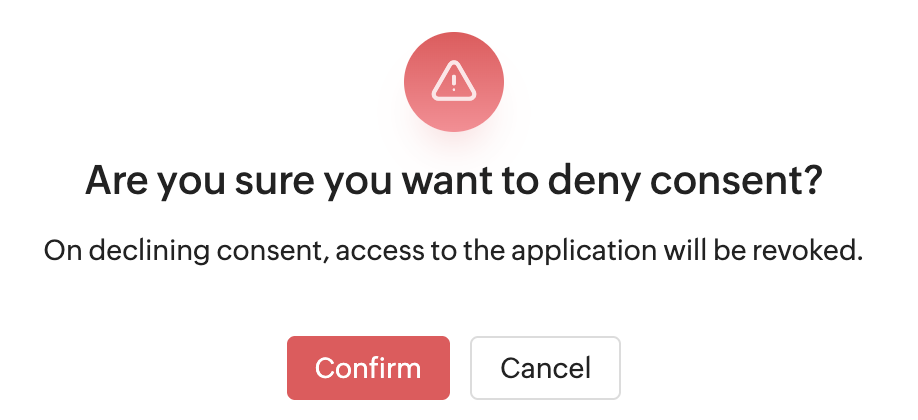
If in case the user chooses to opt out they will be warned by the system. They will be allowed to change their decision until the due date. 
To view the file consent reports, navigate to Reports > Organization Reports > Consent Receipts. All the files that have consent requirement enabled will be listed. Select a particular file for detailed stats. Use the provided drop-down to see a list of employees who have opted-in, opted-out and are yet to register their consent.


You will also be able to view a detailed log when clicking on an individual record.

Specific roles in Zoho People can be exempt from consent requirements by adding the corresponding role to the "Exempt mandatory document acknowledgement and consent" option available in Settings > Files > General tab. (Scroll down to the very end.)

Email Alerts for the Administrator

By default, when an employee clicks on the Opt Out button denying consent, the Administrator of the organization will be notified via e-mail:


Similarly, if an employee who previously opted out changes their decision and clicks Opt In to confirm their consent, the administrator will be notified again:


      Create. Review. Publish.

      Write, edit, collaborate on, and publish documents to different content management platforms.

      Get Started Now


        Access your files securely from anywhere

          Zoho CRM Training Programs

          Learn how to use the best tools for sales force automation and better customer engagement from Zoho's implementation specialists.

          Zoho CRM Training
            Redefine the way you work
            with Zoho Workplace

              Zoho DataPrep Personalized Demo

              If you'd like a personalized walk-through of our data preparation tool, please request a demo and we'll be happy to show you how to get the best out of Zoho DataPrep.

              Zoho CRM Training

                Create, share, and deliver

                beautiful slides from anywhere.

                Get Started Now


                  Zoho Sign now offers specialized one-on-one training for both administrators and developers.

                  BOOK A SESSION


                              Quick LinksWorkflow AutomationData Collection
                              Web FormsEnterpriseOnline Data Collection Tool
                              Embeddable FormsBankingBegin Data Collection
                              Interactive FormsWorkplaceData Collection App
                              CRM FormsCustomer ServiceAccessible Forms
                              Digital FormsMarketingForms for Small Business
                              HTML FormsEducationForms for Enterprise
                              Contact FormsE-commerceForms for any business
                              Lead Generation FormsHealthcareForms for Startups
                              Wordpress FormsCustomer onboardingForms for Small Business
                              No Code FormsConstructionRSVP tool for holidays
                              Free FormsTravelFeatures for Order Forms
                              Prefill FormsNon-Profit

                              Intake FormsLegal
                              Mobile App
                              Form DesignerHR
                              Mobile Forms
                              Card FormsFoodOffline Forms
                              Assign FormsPhotographyMobile Forms Features
                              Translate FormsReal EstateKiosk in Mobile Forms
                              Electronic Forms
                              Drag & drop form builder

                              Notification Emails for FormsAlternativesSecurity & Compliance
                              Holiday FormsGoogle Forms alternative GDPR
                              Form to PDFJotform alternativeHIPAA Forms
                              Email FormsFormstack alternativeEncrypted Forms

                              Wufoo alternativeSecure Forms

                              TypeformWCAG


                                          Create. Review. Publish.

                                          Write, edit, collaborate on, and publish documents to different content management platforms.

                                          Get Started Now


                                                            You are currently viewing the help pages of Qntrl’s earlier version. Click here to view our latest version—Qntrl 3.0's help articles.


                                                                Manage your brands on social media


                                                                  • Desk Community Learning Series


                                                                  • Digest


                                                                  • Functions


                                                                  • Meetups


                                                                  • Kbase


                                                                  • Resources


                                                                  • Glossary


                                                                  • Desk Marketplace


                                                                  • MVP Corner


                                                                  • Word of the Day


                                                                  • Ask the Experts


                                                                    Zoho Sheet Resources


                                                                        Zoho Forms Resources


                                                                          Secure your business
                                                                          communication with Zoho Mail


                                                                          Mail on the move with
                                                                          Zoho Mail mobile application

                                                                            Stay on top of your schedule
                                                                            at all times


                                                                            Carry your calendar with you
                                                                            Anytime, anywhere


                                                                                  Zoho Sign Resources

                                                                                    Sign, Paperless!

                                                                                    Sign and send business documents on the go!

                                                                                    Get Started Now


                                                                                            Zoho TeamInbox Resources


                                                                                                      Zoho DataPrep Demo

                                                                                                      Get a personalized demo or POC

                                                                                                      REGISTER NOW


                                                                                                        Design. Discuss. Deliver.

                                                                                                        Create visually engaging stories with Zoho Show.

                                                                                                        Get Started Now


                                                                                                                            • Related Articles

                                                                                                                            • Actions in Organization Files

                                                                                                                              You can perform following operations in Organanization Files: Copy file URL View Acknowledgement Setup / Edit Signature template Send for signature View Signature Report Edit file Delete file Copy / Move Files Export Files To do the above operational ...
                                                                                                                            • Employee Files

                                                                                                                              Any HR person would have to deal with a lot of sensitive files that contain crucial information regarding employees. Such documents containing sensitive information and files specific to employees can be stored under Employee Files with increased ...
                                                                                                                            • Personal Uploads

                                                                                                                              This space is exclusively for employees' documents. The personal uploads can be accessed only by employees. Admins do not have access to employees personal files. An organization is given 1 GB of personal upload space. This space is divided amongst ...
                                                                                                                            • Continuous Review Cycle Import

                                                                                                                              This feature allows you to import KRAs, goals, competency ratings, and review question feedback for current or past continuous review cycles. The overall rating/score for the cycle is calculated based on the ratings given for all applicable ...
                                                                                                                            • Actions in Employee Files

                                                                                                                              You can perform following operations in Employee Files: Send for signature Import Files Export Files Edit / Delete File Send for Signature You can send files specific to employees and get them signed from them. Go to Operations > View all > Files > ...
                                                                                                                              Wherever you are is as good as
                                                                                                                              your workplace

                                                                                                                                Resources

                                                                                                                                Videos

                                                                                                                                Watch comprehensive videos on features and other important topics that will help you master Zoho CRM.


                                                                                                                                eBooks

                                                                                                                                Download free eBooks and access a range of topics to get deeper insight on successfully using Zoho CRM.


                                                                                                                                Webinars

                                                                                                                                Sign up for our webinars and learn the Zoho CRM basics, from customization to sales force automation and more.


                                                                                                                                CRM Tips

                                                                                                                                Make the most of Zoho CRM with these useful tips.


                                                                                                                                  Zoho Show Resources