Bidirectional sync between Zoho Bookings and Zoho CRM - Part 1
Hey, community members!
The default integration between Zoho CRM and Zoho Bookings is unidirectional, which means that any appointments booked, rescheduled, or deleted in Zoho Bookings will be reflected in Zoho CRM. However, any modifications made to events in Zoho CRM that originated from Zoho Bookings will not be reflected back in Zoho Bookings. Hence, as we're announcing in this community post, we've made the sync bidirectional.
This community post will cover the process of configuring appointment bookings from Zoho CRM in Zoho Bookings, as well as managing appointment statuses such as Canceled, No Show and Completed. We have addressed the rescheduling action in a separate post. To view it, please click on the following link: Reschedule Action
This community post will be beneficial for active Zoho CRM users who handle all their meetings within Zoho CRM. Additionally, you can use this community post as a reference to explore various automation possibilities tailored to your business requirements. For instance, with this post's guidance, when you update a booking's status field to "Completed" in Zoho CRM, it will automatically sync with Zoho Bookings and trigger an automated "Mark as completed" email to customers. This enhancement will improve your Zoho Bookings and Zoho CRM synchronization experience, making appointment management easier.
Prerequisites of bidirectional sync:
- Zoho Bookings Premium subscription
- Zoho CRM paid subscription
- Enable Zoho CRM integration within Zoho Bookings
The purpose of enabling the Zoho CRM integration within Zoho Bookings is to transfer booking details from Zoho Bookings to Zoho CRM. In this configuration, the mandatory field is the Booking ID, which is passed from Zoho Bookings to Zoho CRM through the integration. Whenever an appointment is booked, customer details will be sent to the designated CRM module, and a corresponding record will be created in the Meetings module within Zoho CRM, which will help in automating the workflow.
Here's the complete demo video that covers all the configurations discussed in the community post below:
Timestamps for your reference:
0:35 - Purpose of this community post
Here's the complete demo video that covers all the configurations discussed in the community post below:
Timestamps for your reference:
0:35 - Purpose of this community post
1:26 - Zoho CRM plugin installation
4:43 - Custom field creation
7:20 - Function creation
9:22 - Connection creation
10:24 - Configuring arguments
11:06 - Workflow creation
13:33 - Argument mapping
14:41 - Output verification
17:41 - Conclusion
How we're approaching this bidirectional sync
1. Booking an appointment from Zoho CRM
Install the Zoho Bookings for Zoho CRM plugin within your Zoho CRM application. This plugin enables the creation of a "New Appointment" button within the Zoho CRM Leads and Contacts module, which enables you to select the desired booking page you wish to open. You can choose from various workspace, service, or staff booking pages. After configuration, you can initiate the process of scheduling bookings directly from within your Zoho CRM account.
- Guide on Zoho Bookings and Zoho CRM plugin installation: Booking page selection for Zoho CRM plugin
2. Booking status: Completed or No Show
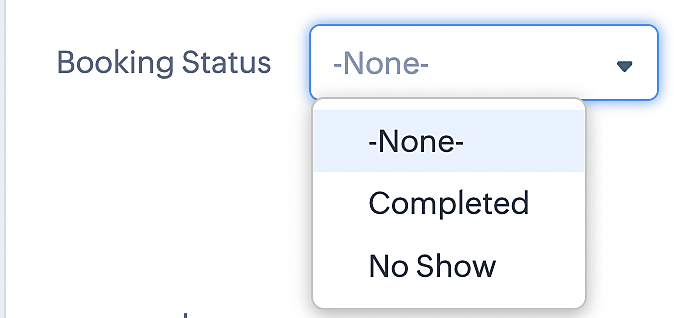
To update a booking's status (Completed or No Show), we've added a new picklist properties field named "Booking Status" in the Meetings module and configured it with two options: "completed" and "no show". Depending on the booking status chosen, the corresponding booking in Zoho Bookings will be updated.
- Details on how to add a custom field to the Meetings module : Customizing modules
- Here's a video that demonstrates how to add a field to a module in Zoho CRM: Adding fields
Reference:
3. Booking status: Canceled
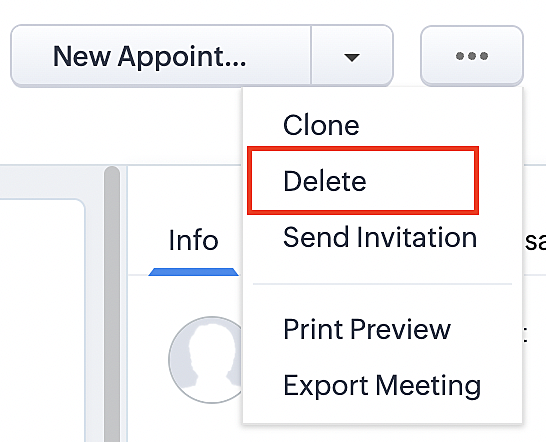
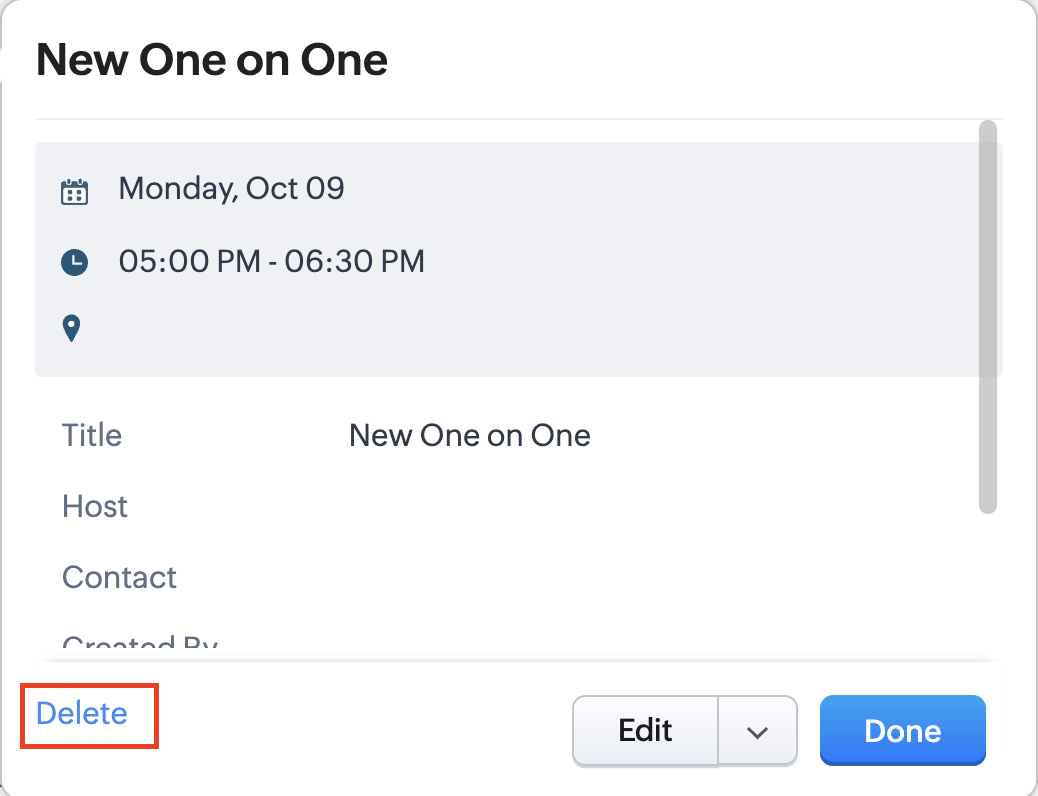
Whenever a meeting is deleted from the Meetings module, the corresponding booking in the Zoho Bookings app will also be canceled automatically. The meeting can be deleted either from the Meetings module or directly from the calendar.
To enable bidirectional sync between Zoho CRM and Zoho Bookings
Complete these steps in Zoho CRM.
Step 1: Creating connections
You first need to establish a connection between Zoho CRM and Zoho Bookings. Zoho Bookings is listed as one of the default connections in Zoho CRM, making it simple to set up. Select the Zoho Bookings connection, define the connection name and scope, and you'll be all set. This connection will enable you to link both applications and facilitate the seamless transfer of data.
Read here for more details on how to create connection in Zoho CRM: Connections
Step 2: Creating functions
In this context, we'll be creating three functions: one for marking appointments as completed, another for canceling appointments, a third for marking appointments as no shows, and a fourth for rescheduling appointments. For each function, we must also configure arguments, which pass values or data into a function when making a call. Here, we'll pass the booking ID to the function as an argument to update the necessary booking status.
i. To create a function for marking appointments as completed:
1. Go to Setup > Developer Space > Functions.
2. In the Functions page, click + Create New Function.

3. Configure the function name, display name, and description.
4. Set the category as automation.
This opens the Deluge script page.
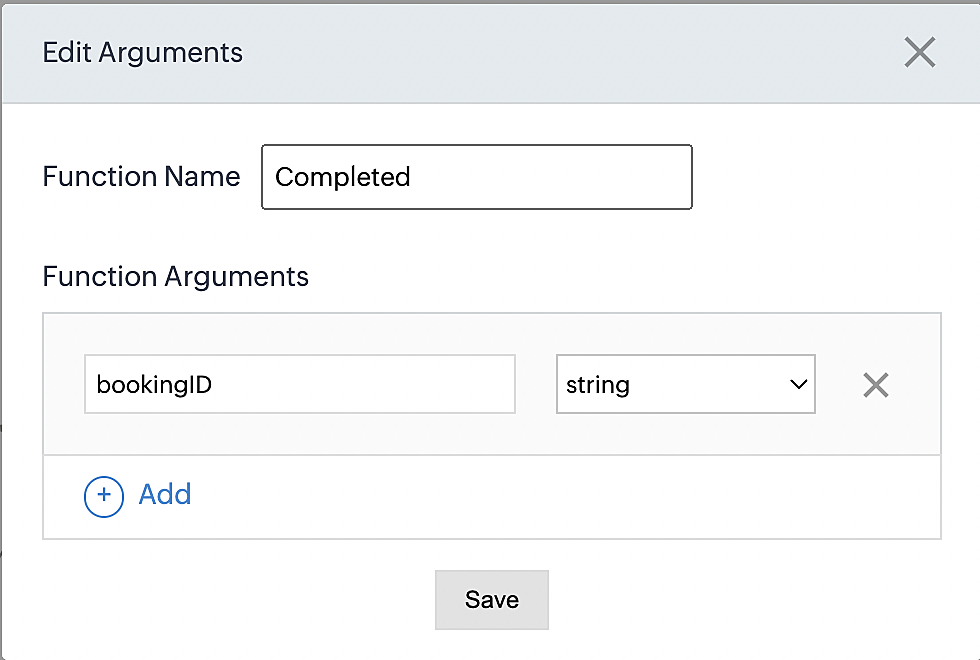
5. Next, configure the function's arguments:
A. Click on Edit Arguments on the Deluge script page.

B. Set the Parameter Name as bookingID. (Please note that the "bookingID" value is case sensitive and must match
the term used in the code).
C. Set the type as string.
Reference:
Please configure the below code in the Deluge script page.
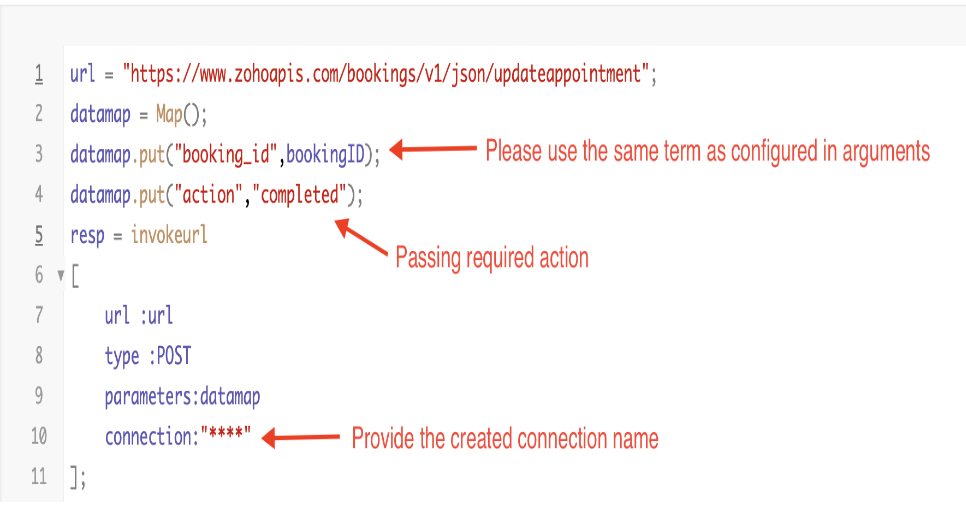
By completing these steps, we've configured a function that will mark appointments as completed.
ii. To create a function for marking appointments as no shows
1. Go to Setup > Developer Space > Functions.
2. In the Functions page, click + Create New Function.

3. Configure the function name, display name, and description.
4. Set the category as automation.
This opens the Deluge script page.
5. Next, configure the function's arguments:
A. Click on Edit Arguments on the Deluge script page.

B. Set the Parameter Name as bookingID. (Please note that the "bookingID" value is case sensitive and must match
the term used in the code).
C. Set the type as string.
Reference:
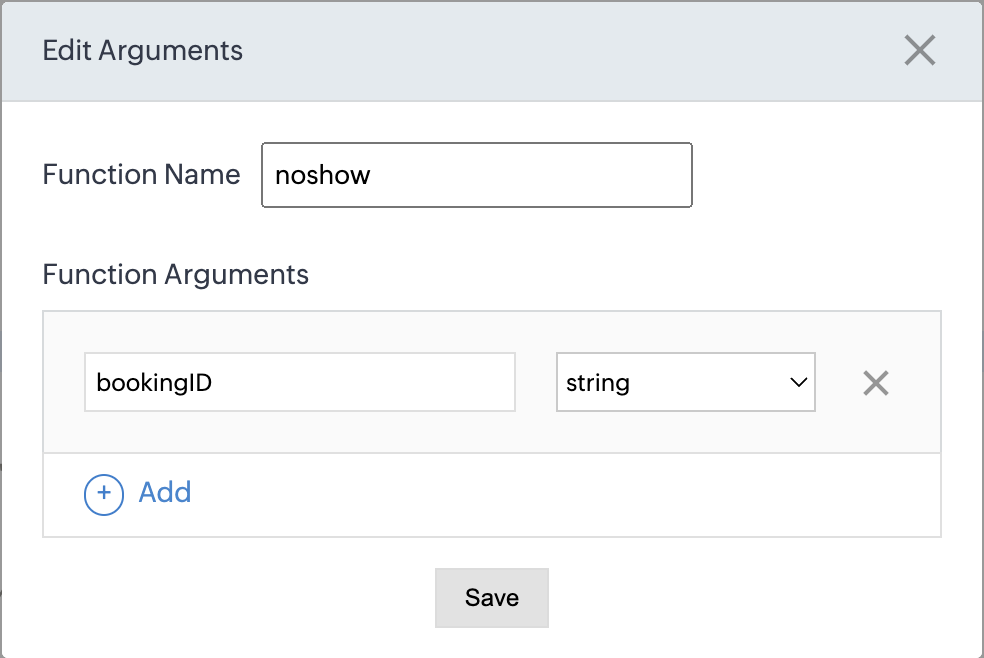
Please configure the below code on the Deluge script page.
Code link: No show
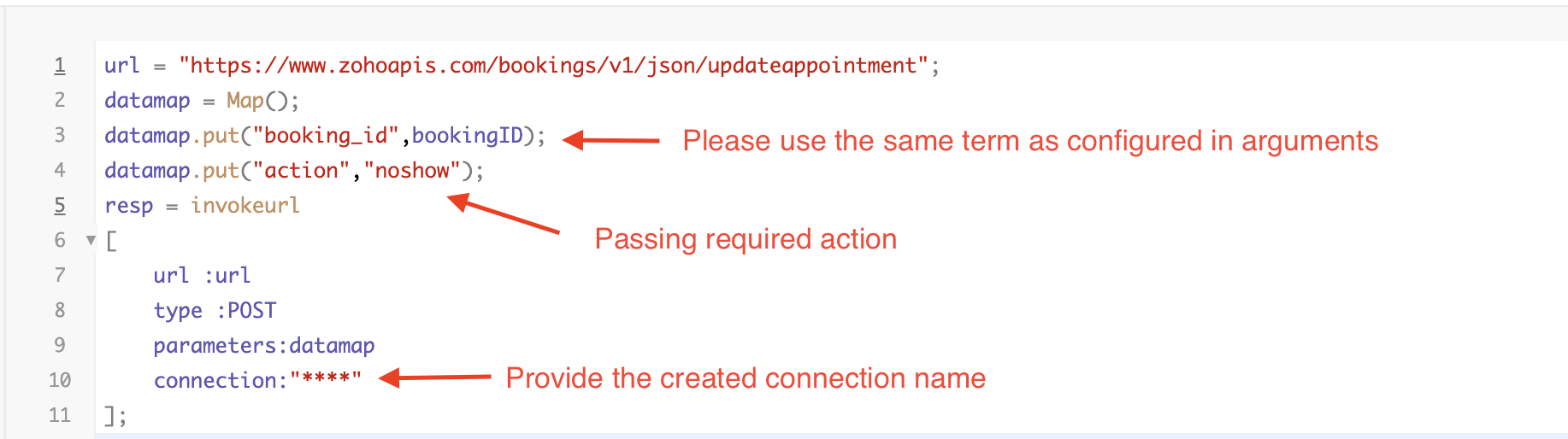
By completing these steps, we've configured a function that marks appointments as no shows.
iii. To create a function for marking appointments as canceled
1. Go to Setup > Developer Space > Functions.
2. In the Functions page, click + Create New Function.

3. Configure the function name, display name, and description.
4. Set the category as automation.
This opens the Deluge script page.
5. Next, configure the function's arguments:
A. Click on Edit Arguments on the Deluge script page.

B. Set the Parameter Name as bookingID. (Please note that the "bookingID" value is case sensitive and must match
the term used in the code).
C. Set the type as string.
Reference
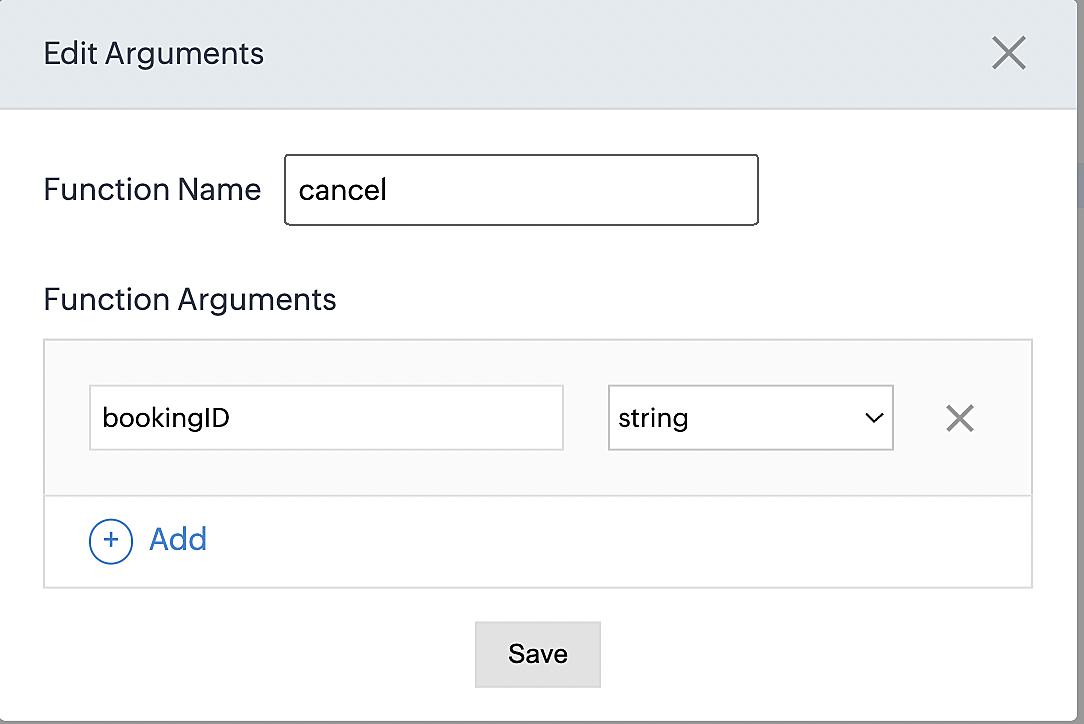
Please configure the below code on the Deluge script page.
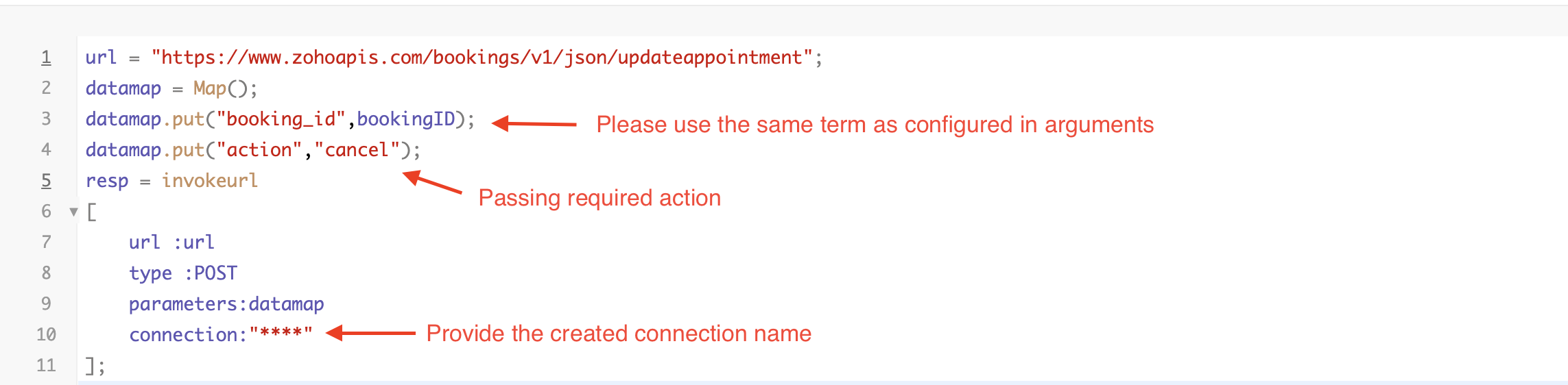
By completing these steps, we've configured a function that marks appointments as canceled.
Code explanation
Below is an explanation of the code that covers all the configurations present in the three functions mentioned above (cancel, mark as completed, and mark as no show).
Line 1: Based on the Zoho Bookings account's data center, we're setting up the API endpoint URL configuration.
Lines 2 - 4: To update appointments, we utilize the Zoho Bookings API. Within the update appointment API, there are two mandatory fields that need to be included: BookingID and action (completed/cancel/noshow).
Lines 5 - 10: We use the invokeURL task for API calls. To learn more about the invokeURL task, please refer to the following document: InvokeURL task for API calls
Now, let's proceed and learn about the process of creating a workflow and linking the established functions to it. This will enable us to automate the entire appointment status updating process.
Step 3: Creating a workflow
Workflow rules are sets of actions (email notifications, tasks and field updates) that are executed when specified conditions are met. Here, we'll generate workflow rules for each action to activate the respective function, thereby automating the appointment status updating process.
i. Creating a workflow for "canceling" appointments in Zoho Bookings when a meeting is deleted in Zoho CRM
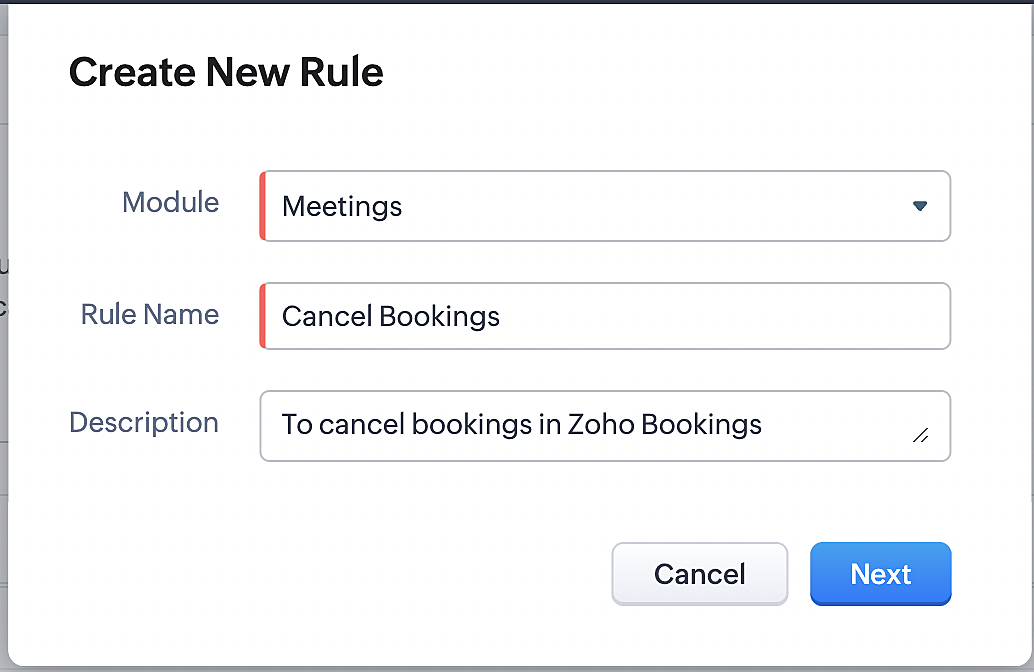
Part 1: Creating the rule
1. Go to Setup > Automation > Workflow Rules.
2. In the Workflow Rules page, click Create Rule.

3. Select "Meetings" under Module and configure rule name and description as required.
More details: Create Rule
Reference:
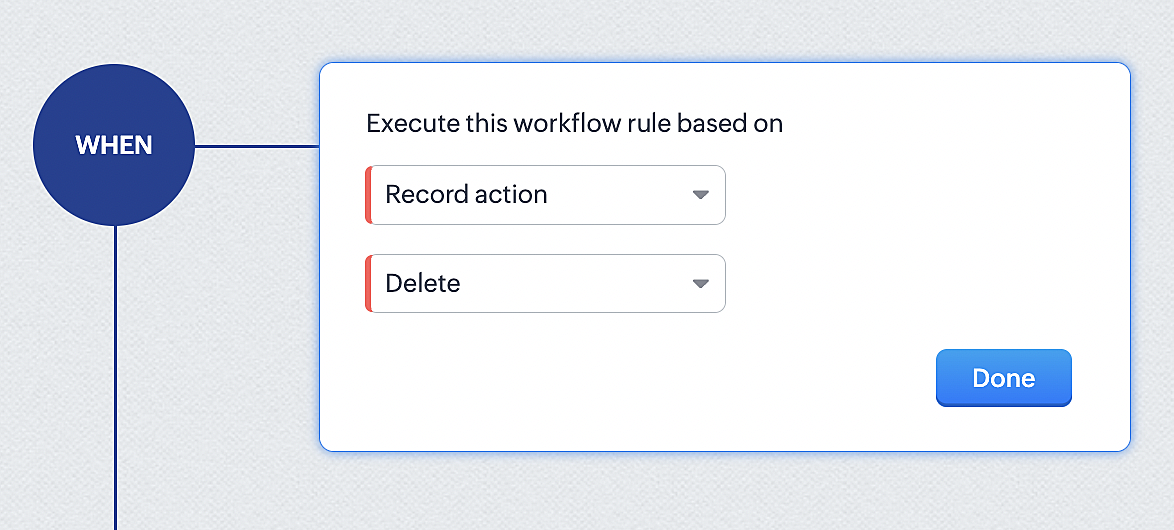
1. Select Record Action > Delete > Done to execute the rule when meetings are deleted.
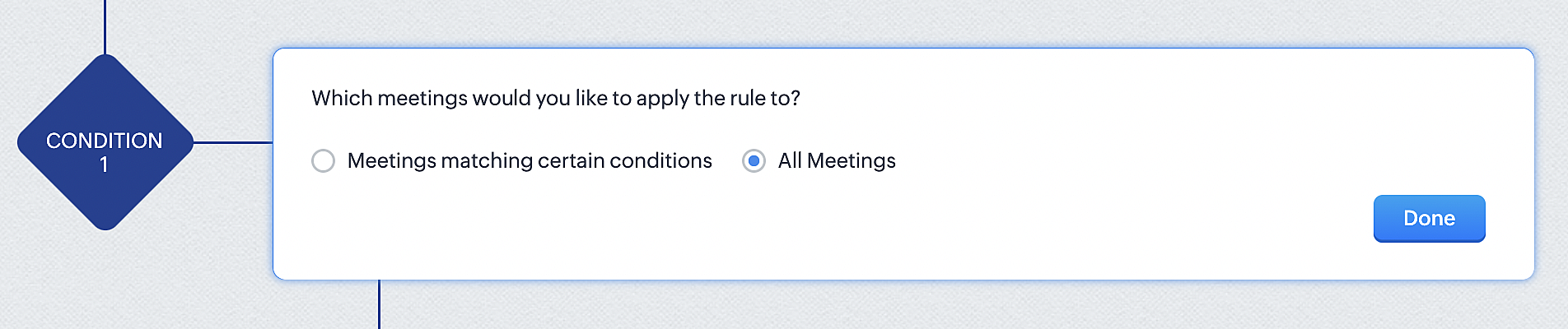
2. Configure condition > All Meetings.
3. Instant Actions > Function.
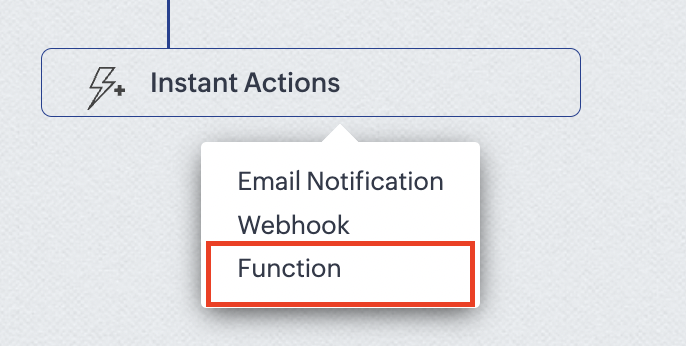
4. Click the New Function button.

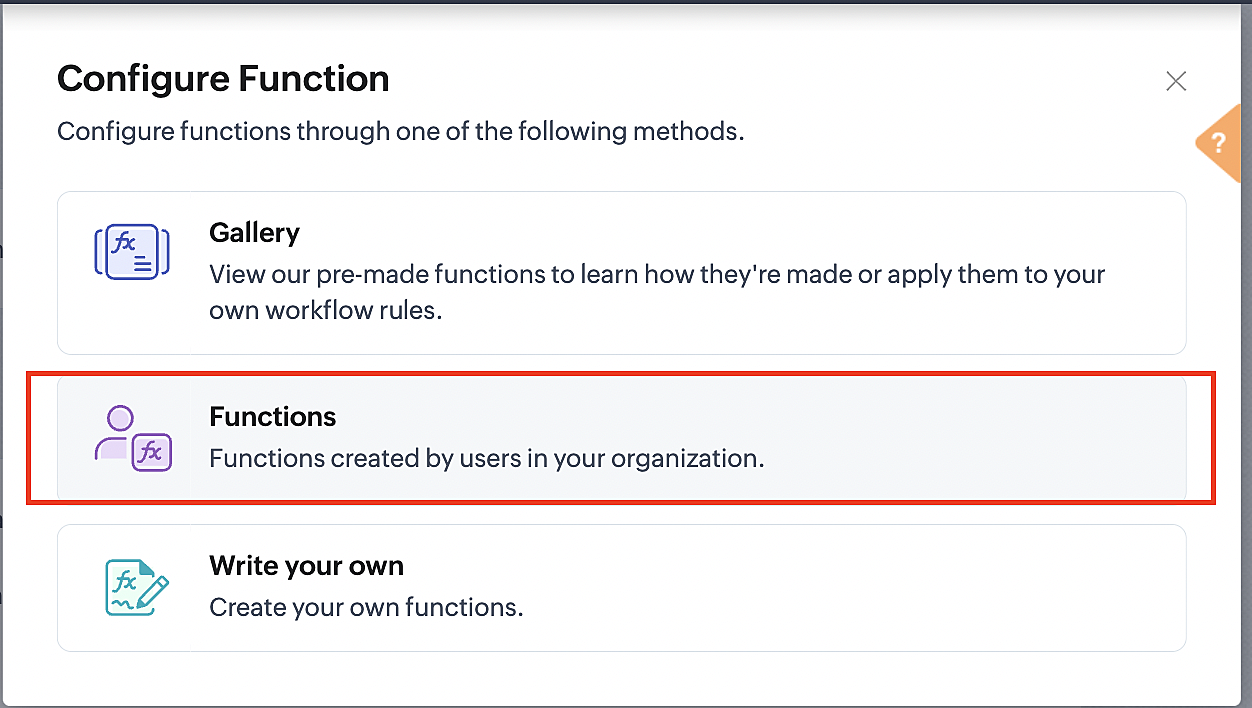
5. In the Configure custom function page, select the "cancel" function you created from among the functions users in your organization have created.
Part 3: Argument mapping
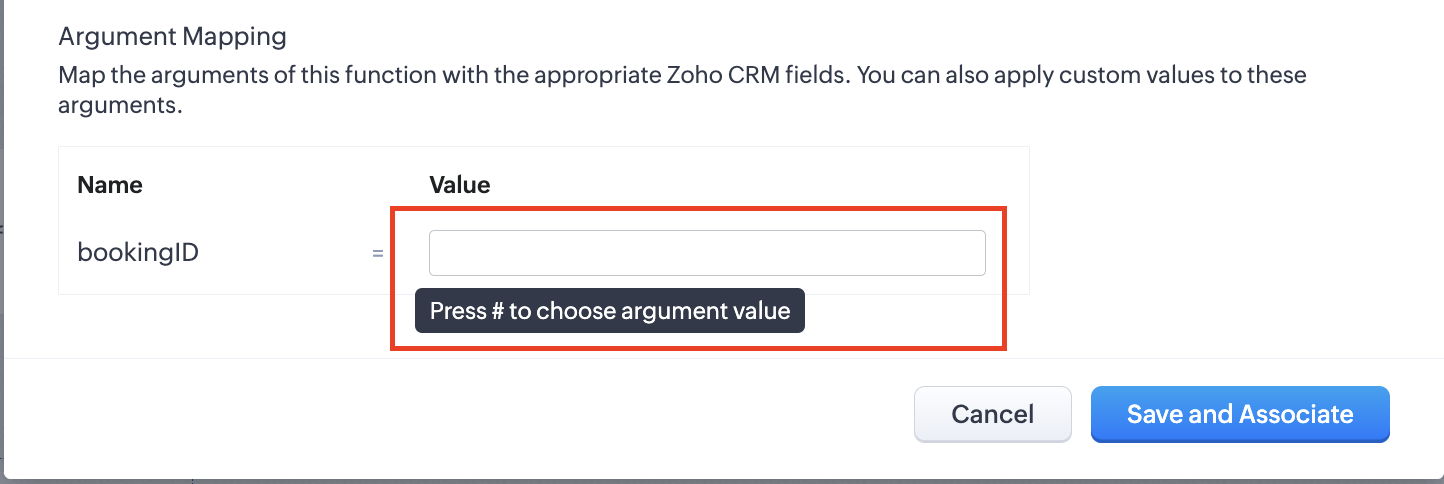
1. Press # to choose an argument value.
2. Select Meetings under Module and BookingId in the field.
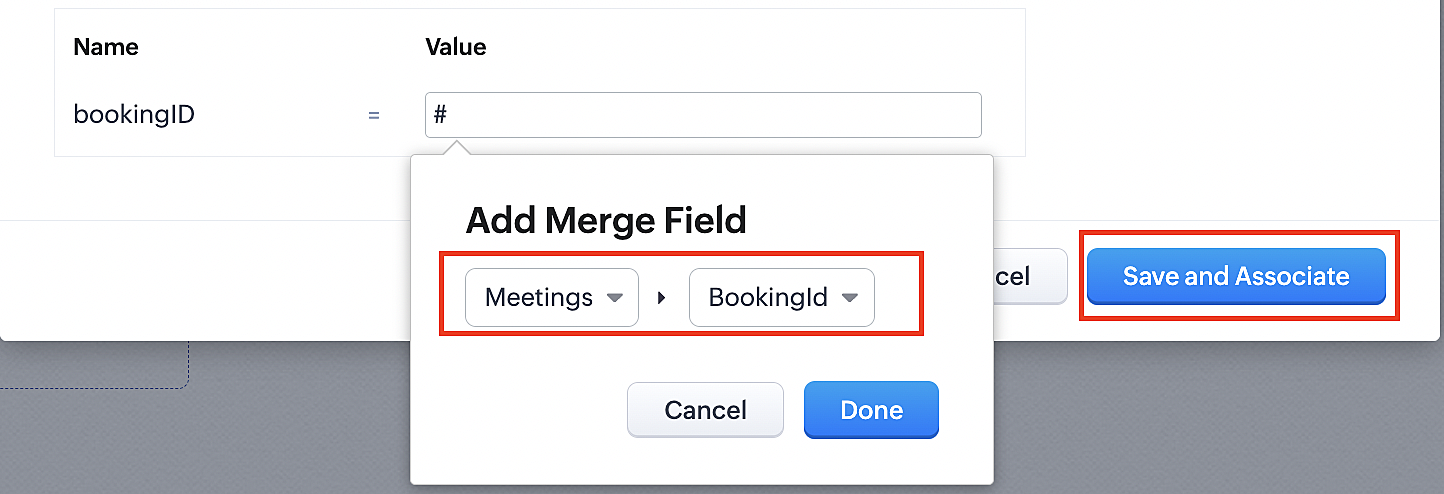
3. Click the Save and Associate button.
Reference:
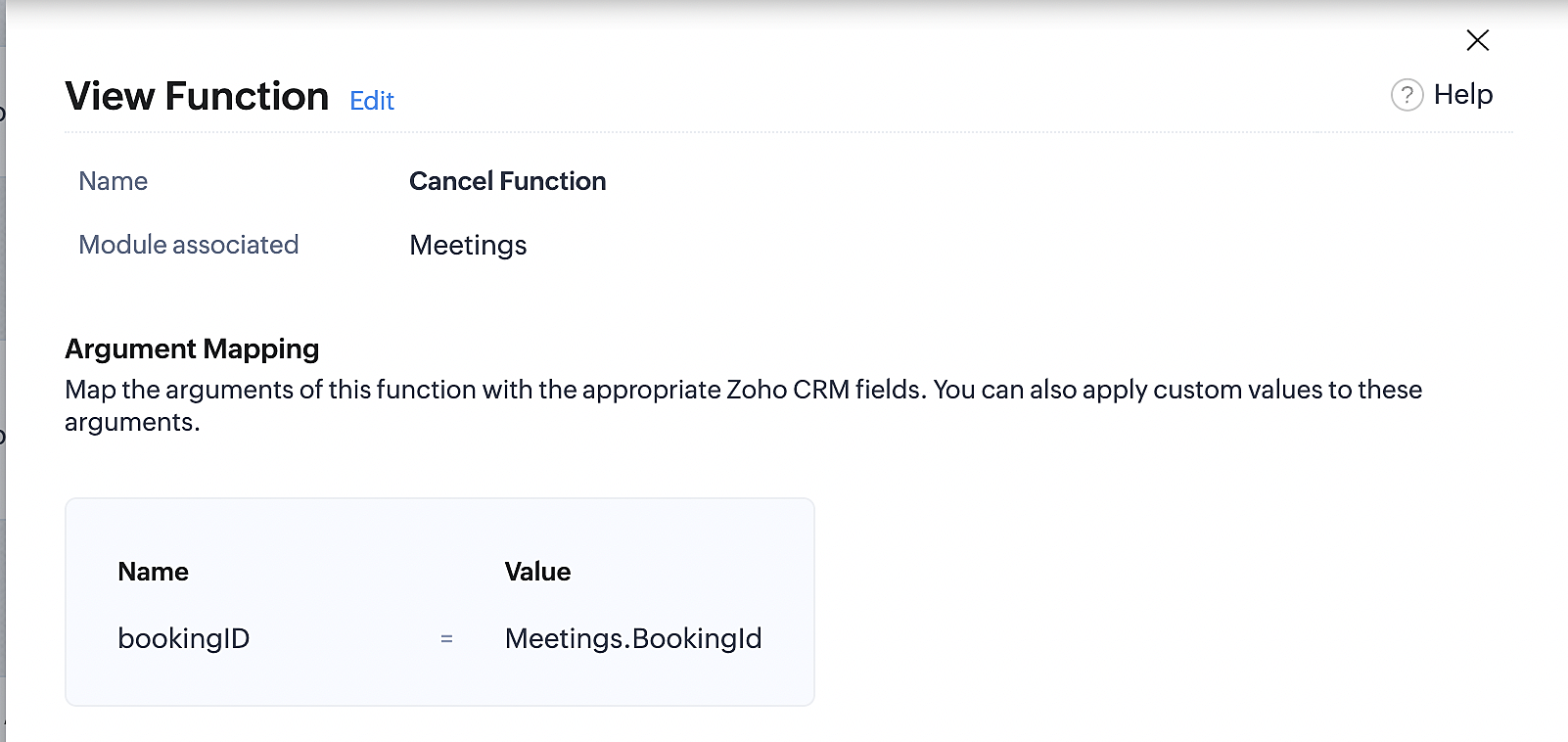
Below is the final flow of the cancel booking workflow:
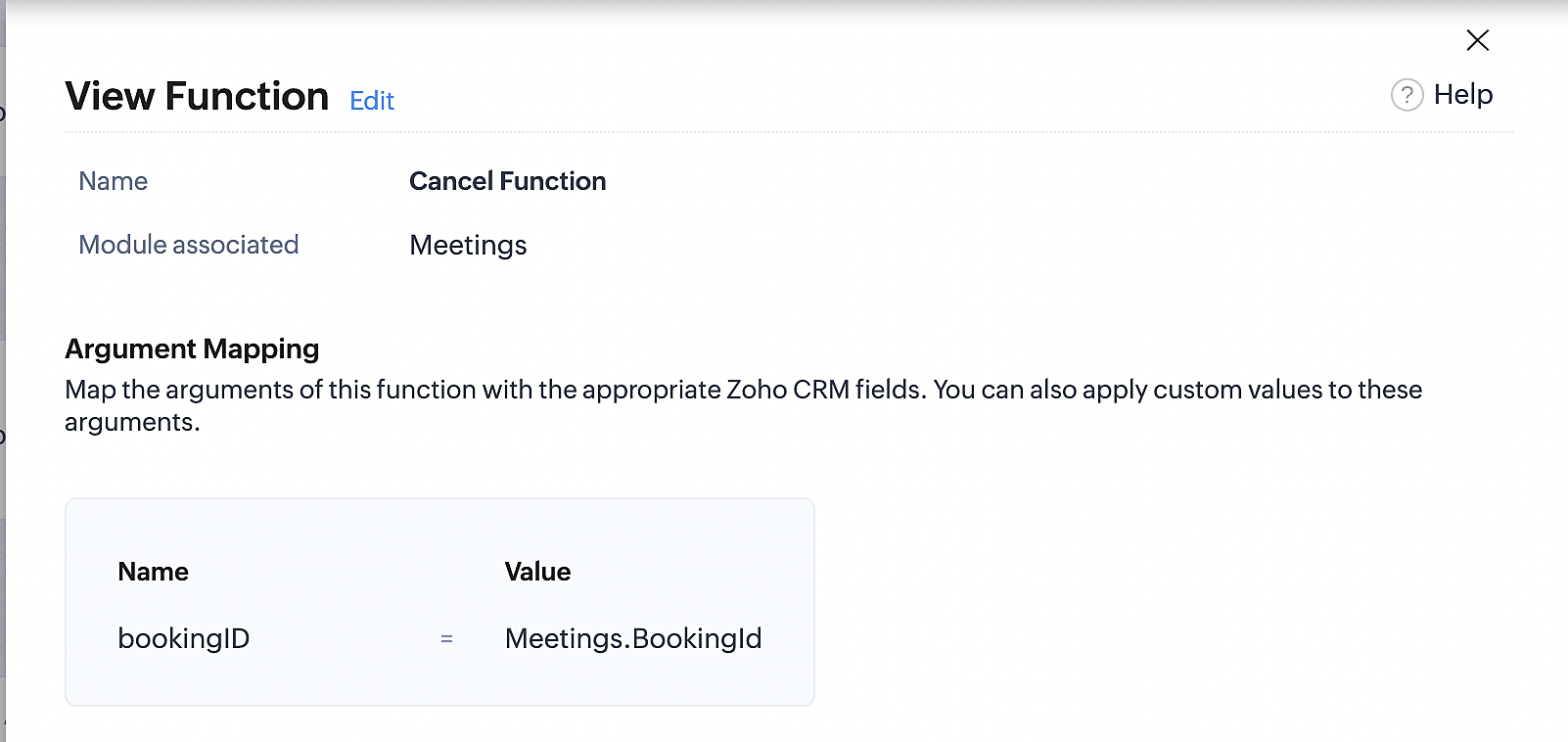
At the end of Part 3, we will have created a workflow that will be executed automatically when meetings are deleted in Zoho CRM. Simultaneously, the bookings associated with the meeting will also be canceled in Zoho Booking.
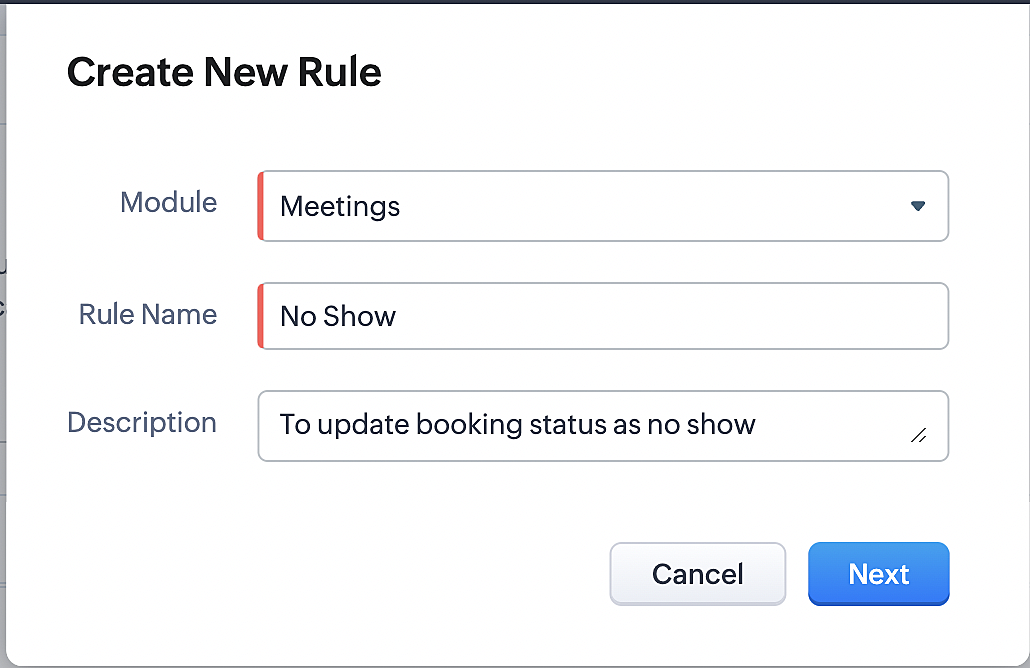
ii. Creating workflow for updating an appointment's status as "no show" in Zoho Bookings when the meeting's booking status is marked as no show in Zoho CRM
Part 4: Creating the rule
1. Go to Setup > Automation > Workflow Rules.
2. In the Workflow Rules page, click Create Rule.

3. Select Meetings under Module and configure the rule name and description as required.
Reference:
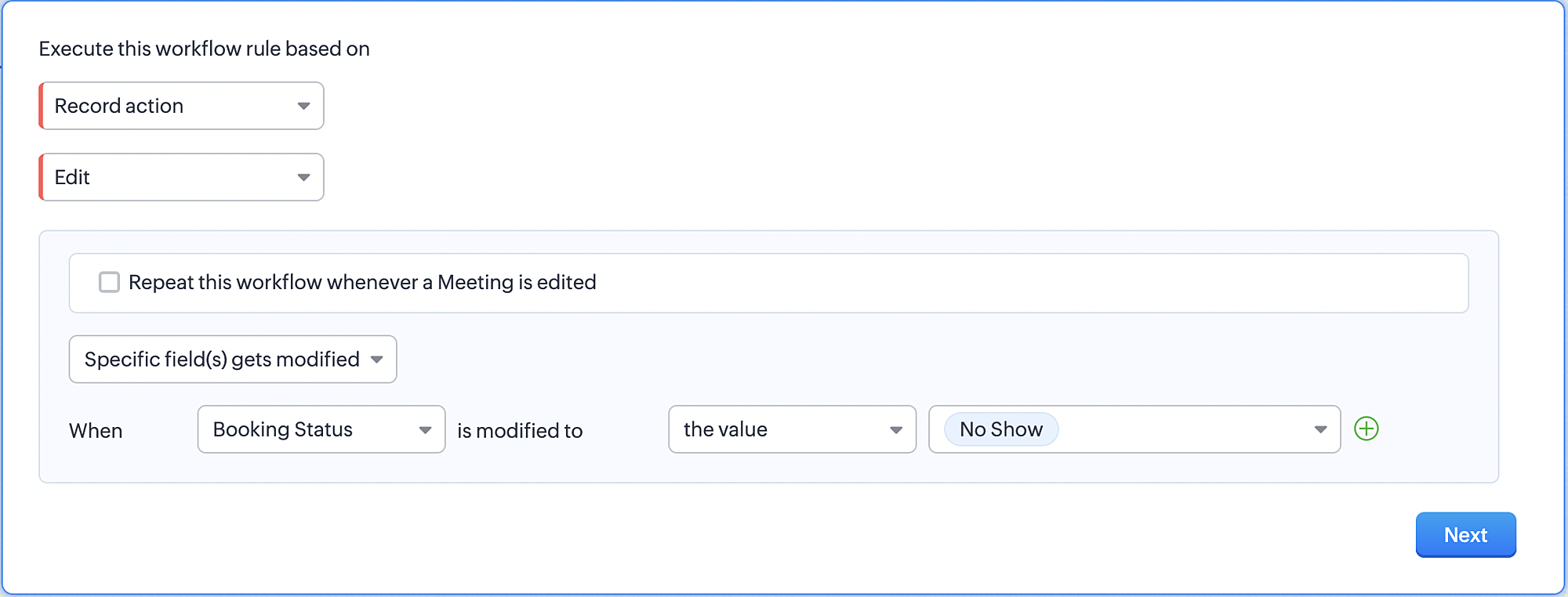
Part 5: Specifying the rule trigger
If you encounter difficulties while navigating through the steps mentioned below, please refer to Part 2 above, where we have provided step-by-step screenshots for clarification.
1. Record Action > Edit.

2. Enable the Specific field(s) gets modified and configure it per the screenshot below.
a. This is to ensure that the workflow is executed only when the booking status under the meeting module is
updated to "No Show".
updated to "No Show".
3. Configure condition > All Meetings.
4. Instant Actions > Function > New Function.
5. In the Configure custom function page, select the "no show" function you created from among the functions
users in your organization have created.
users in your organization have created.
Part 6: Argument mapping:
If you encounter difficulties while navigating through the steps mentioned below, please refer to Part 3 above, where we have provided step-by-step screenshots for clarification.
1. Press # to choose an argument value.
2. Select Meetings under Module and configure the field as "BookingId".
3. Click Save and Associate button.
Reference:
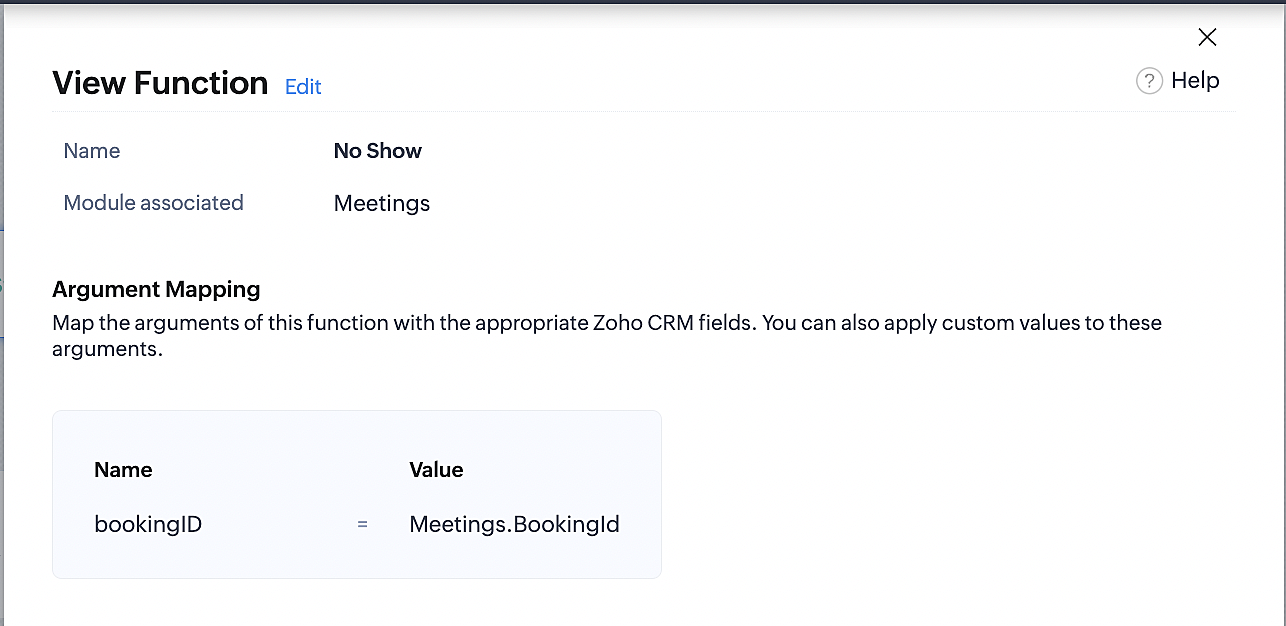
Below is the final flow of the "No Show" booking status workflow:
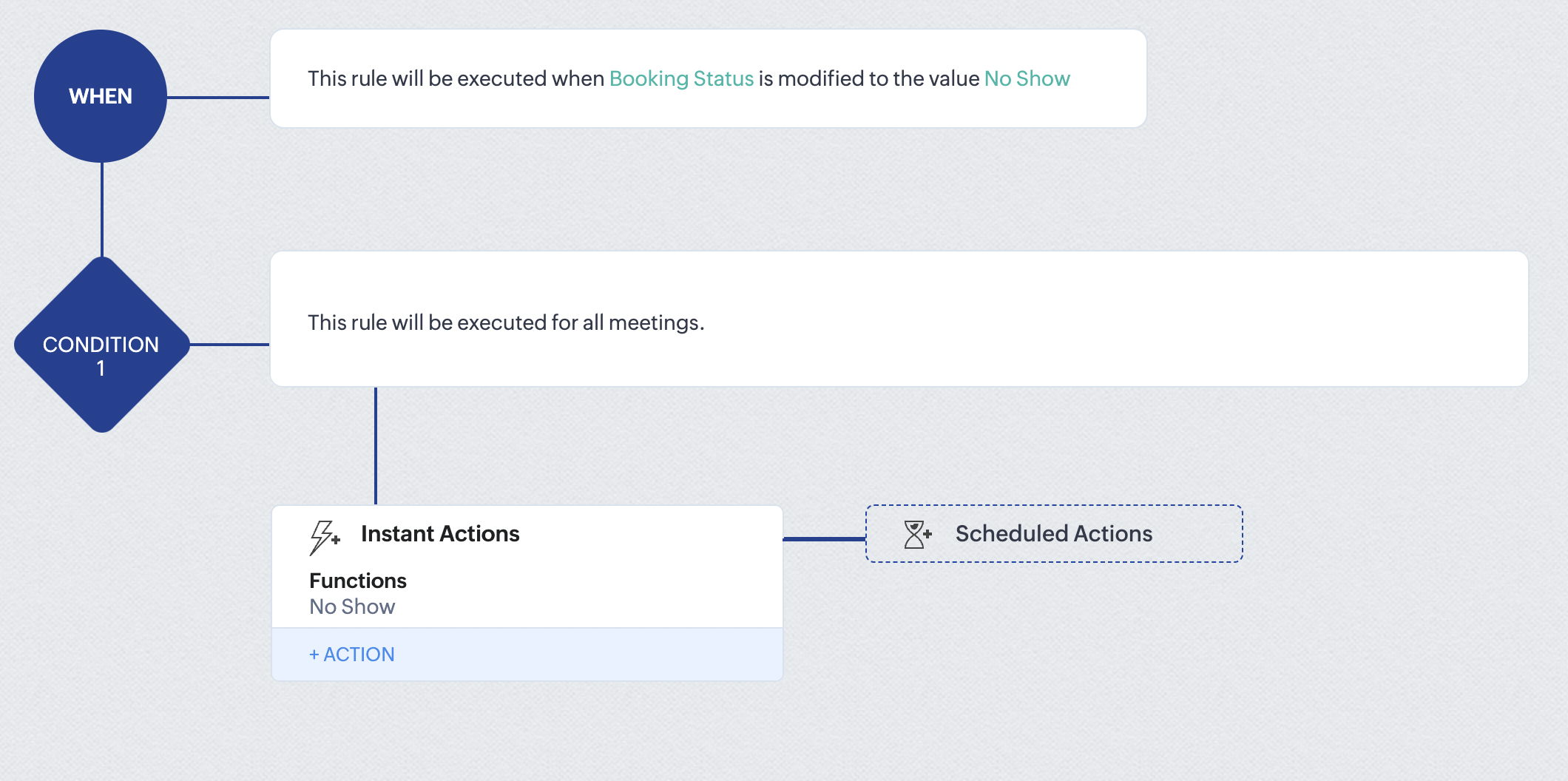
At the end of part 6, we will have created a workflow that automatically executes when the booking status field within the Zoho CRM Meetings module is updated to "No Show." This action will result in the associated bookings for that meeting also being marked as "No Show" in Zoho Bookings.
iii. Creating workflow for updating appointment status as "Completed" in Zoho Bookings when the booking status field of the meeting is marked as completed in Zoho CRM.
Part 7: Creating the rule
1. Go to Setup > Automation > Workflow Rules.
2. In the Workflow Rules page, click Create Rule.

3. Select Meetings under Module and configure rule name and description as required.
Reference:
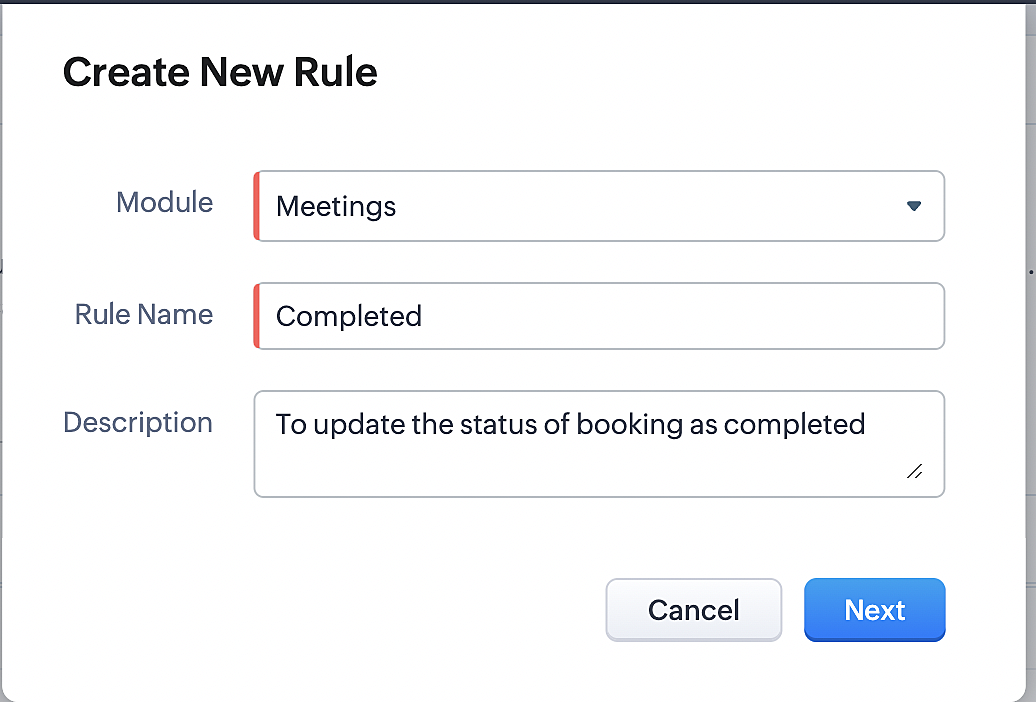
Part 8: Specifying the rule trigger
If you encounter difficulties while navigating through the steps mentioned below, please refer to Part 2 above, where we have provided step-by-step screenshots for clarification.
1. Record Action > Edit.

2. Enable the Specific field(s) gets modified setting and configure it per the screenshot below.
a. This serves to ensure that the workflow is executed only when the booking status under the Meetings module is
updated to "Completed".
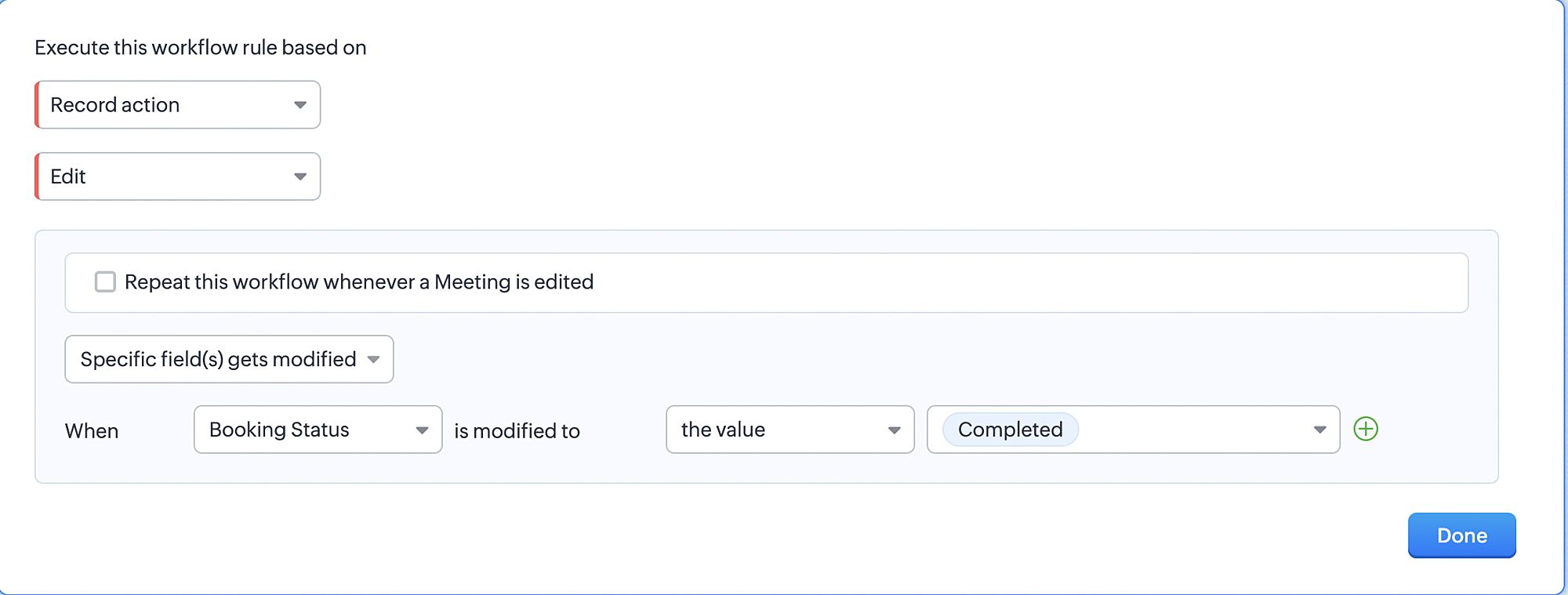
3. Configure condition > All Meetings.
4. Instant Actions > Function > New Function.
5. In the Configure custom function page, select the "completed" function you created from among the functions users
in your organization have created.
Part 9: Argument mapping:
If you encounter difficulties while navigating through the steps mentioned below, please refer to Part 3 above, where we have provided step-by-step screenshots for clarification.
1. Press # to choose an argument value.
2. Select Meetings under Module and configure the field as "BookingId".
3. Click Save and Associate button.
Reference:
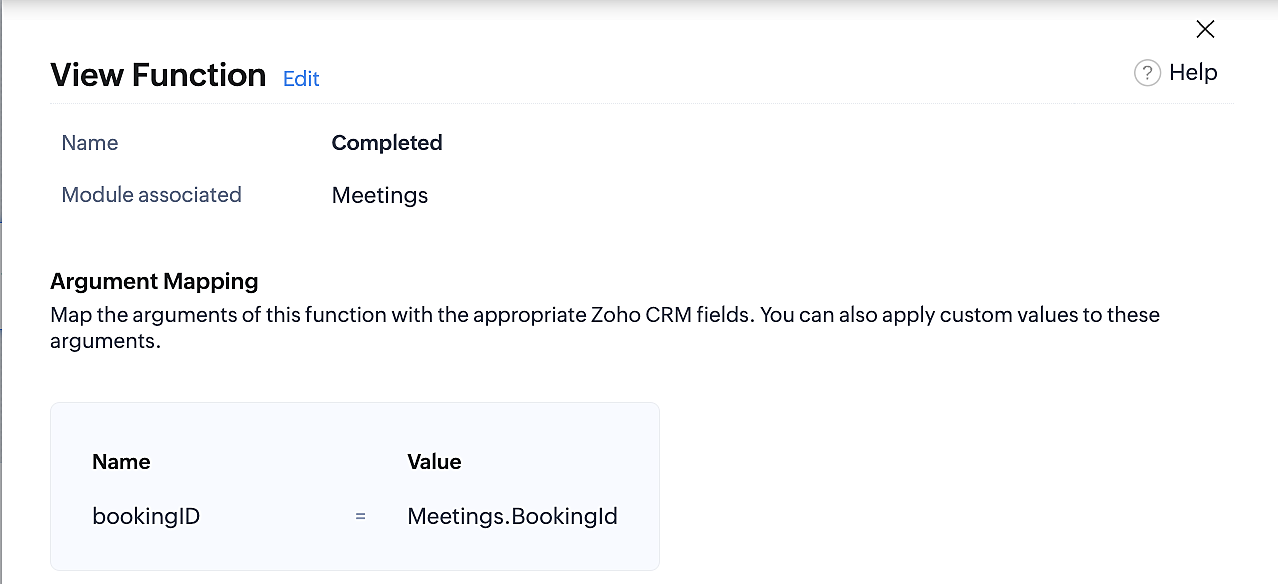
Below is the final flow of the "Completed" booking status workflow:
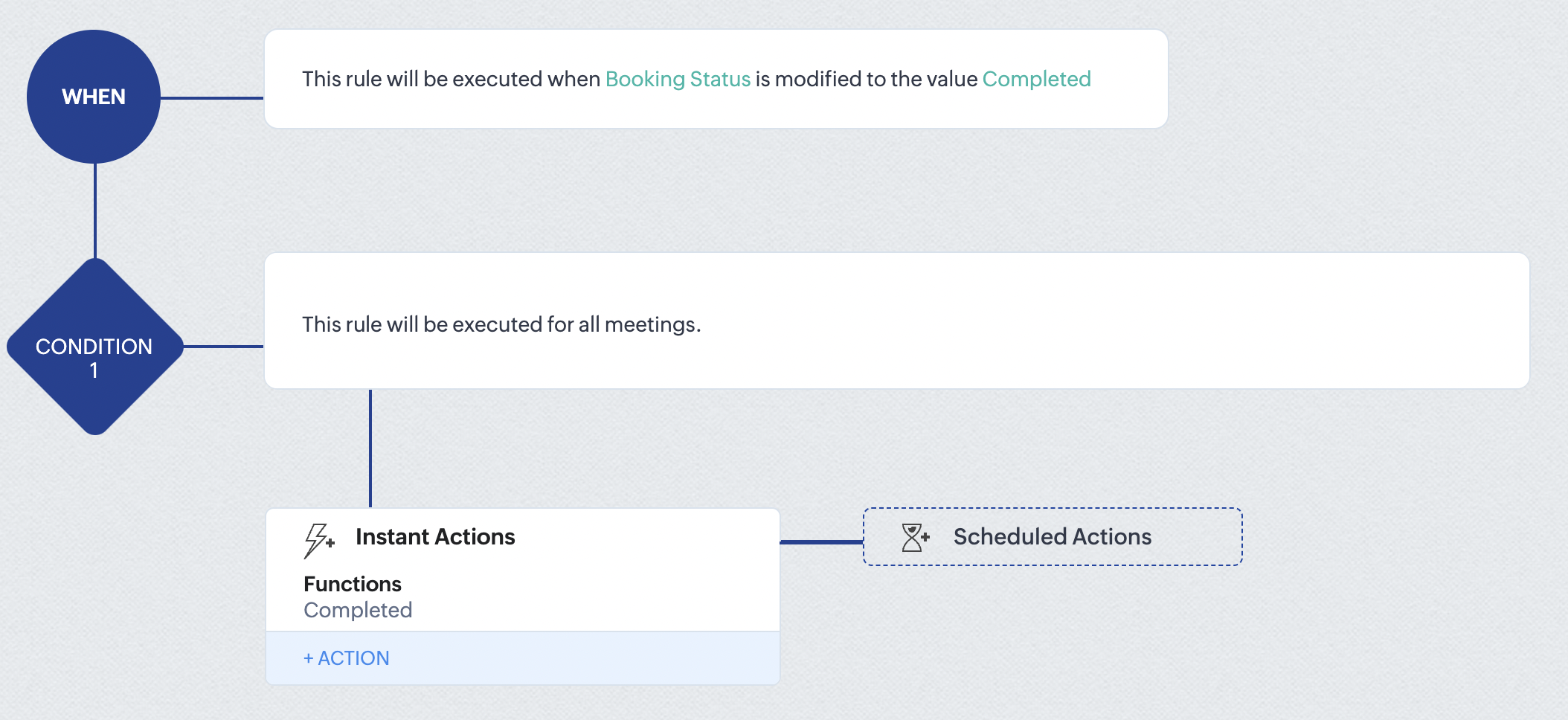
At the end of part 9, we will have created a workflow that is automatically executed when the booking status field within the Zoho CRM Meetings module is updated to "Completed." As a result, the associated bookings for that meeting will also be marked as "Completed" in Zoho Bookings.
Conclusion
We've reached the end of this community post. With the integration mentioned above in place, you'll be able to book, cancel, and update the status of appointments in Zoho Bookings directly from your Zoho CRM application. This will help you effectively manage your appointments in one place. As mentioned above, we've covered the rescheduling action in a separate post, which you can access by clicking on the following link: Reschedule Action
Furthermore, we've outlined a method for automating appointment statuses in detail. You can use this document as a reference to explore the various possibilities that suit your needs.
If you have any questions or need assistance with your configuration, please email us at hello@zohobookings.com or support@zohobookings.com.
Access your files securely from anywhere
New to Zoho Recruit?

Zoho Developer Community
New to Zoho LandingPage?
Zoho LandingPage Resources
New to Zoho Survey?
New to Zoho CRM Plus?
Deliver unforgettable customer experiences
New to Zoho CRM Plus?
Deliver unforgettable customer experiences
New to Zoho Marketing Plus?
Everything you need to run your marketing
New to Zoho Marketing Plus?
Everything you need to run your marketing
New to Bigin?





Topic Participants
Kaushik S
bruce
Ishwarya SG
PrismaNote Support
Sticky Posts
Presenting ABM for Zoho CRM: Expand and retain your customers with precision
Picture this scenario: You're a growing SaaS company ready to launch a powerful business suite, and are looking to gain traction and momentum. But as a business with a tight budget, you know acquiring new customers is slow, expensive, and often deliversGood news! Calendar in Zoho CRM gets a face lift
Dear Customers, We are delighted to unveil the revamped calendar UI in Zoho CRM. With a complete visual overhaul aligned with CRM for Everyone, the calendar now offers a more intuitive and flexible scheduling experience. What’s new? Distinguish activitiesCreate and populate a record in an instant: Introducing zero-shot field prompting to Zia's ICR
A couple of months ago, we upgraded our in-house AI image detection and validation tool, Zia Vision, with intelligent character recognition (ICR). By training Zia with sample images, you could create and enrich CRM records with data extracted from standardIn-person ZUG Meetups for Real Estate Professionals - US Q1 2026
The Real Estate Zoho User Group is going on a multi-city, in-person meetup tour across the US, and we’d love to see you there! These meetups are a great opportunity to: Connect with fellow real estate professionals using Zoho Share challenges and discoverNimble enhancements to WhatsApp for Business integration in Zoho CRM: Enjoy context and clarity in business messaging
Dear Customers, We hope you're well! WhatsApp for business is a renowned business messaging platform that takes your business closer to your customers; it gives your business the power of personalized outreach. Using the WhatsApp for Business integration
New to Zoho TeamInbox?
Zoho TeamInbox Resources
Zoho CRM Plus Resources
Zoho Books Resources
Zoho Subscriptions Resources
Zoho Projects Resources
Zoho Sprints Resources
Qntrl Resources
Zoho Creator Resources
Zoho CRM Resources
Design. Discuss. Deliver.
Zoho Show Resources

Get Started. Write Away!
Writer is a powerful online word processor, designed for collaborative work.
Zoho CRM コンテンツ
-
オンラインヘルプ
-
Webセミナー
-
機能活用動画
-
よくある質問
-
Ebook
-
-
Zoho Campaigns
- Zoho サービスのWebセミナー
その他のサービス コンテンツ
Nederlandse Hulpbronnen

ご検討中の方
Recent Topics
Zoho Books/Square integration, using 2 Square 'locations' with new Books 'locations'?
Hello! I saw some old threads about this but wasn't sure if there were any updates. Is there a way to integrate the Square locations feature with the Books locations feature? As in, transactions from separate Books locations go to separate Square locationsBooks/Square integration with multiple bank accounts
Hello, I need some workaround ideas! We have two parts of our business which have their own bank accounts and customers. We use 'locations' in Square to allocate the payments to the correct place and we use 'branches' in Zoho Books to define which transactionsIntergrating multi location Square account with Zoho Books
Hi, I have one Square account but has multiple locations. I would like to integrate that account and show aggregated sales in zoho books. How can I do that? thanks.[Webinar] Deluge Learning Series - Deluge Learning Series Built-in Functions in Deluge
We’re excited to welcome you to the next session in our Deluge Learning Series – Built-in Functions in Deluge – Part 1. In this focused 1-hour live session, we will explore the practical use of built-in functions in Deluge scripting, with a spotlightZoho Hilfe in NRW für Kundenprojekt gesucht!
Hallo, wir sind auf der Suche für ein Kundenprojekt, wer die Implementierung von Zoho übernehmen kann. Unsere Stärke liegt im Onlinemarketing, bzw. der Automatisierung mit Klick-Tipp und den Tools drum herum. In dem Projekt können wir dem Kunden mit dem jetzigen CRM nicht weiter helfen, bzw. ihn nicht auf die nächste Stufe bringen. Leider komme ich mit meiner Suche in Foren, SocialMedia und sonst wo nicht weiter. Der Idealfall ist ein gemeinsamer Besuch vor Ort beim Kunden und hier eine PräsentationGaps in Core HR Functionalities in Zoho People
Hello People team, We've been using Zoho People for quite some time now and truly appreciate its flexibility and customizability. That said, I wanted to share some feedback based on our experience implementing core HR processes within the platform. SeveralProduct and Service
Hi guys, there is a difference between layout of product and service if Long Description field have some kind of text. Please see screenshot 1 for Service here: https://prnt.sc/7xWwPKd29nWP for Product here: https://prnt.sc/LGmtVd_U6H7q As you can seeAnyone Building AI-Based SEO Dashboards in Zoho Analytics?
Hey everyone, I’m currently working on an SEO reporting dashboard in Zoho Analytics and looking to enhance it with AI-based insights—especially around AI visibility, keyword trends, and traffic sources. The goal is to track not just traditional metricsPhone Number Integration
I would like to be able to track my cell phone calls in the CRM. So if a contact calls my cell phone number, a note of that phone call will be made in the CRM so that I don't have to remember to go back in and add the call manually. Is there a way to connect the CRM and my cell phone via a 3rd party? Such as Google Voice, Skype, etc. Its important that my clients don't have to call a new or different number and that sent calls use the same number as well. So if there is a way to connect my phoneWoocommerce Line Item Information
I'd like to add each line item from a Woocommerce order to a zoho creator form record. The line items are found within the line items array, but I'm not sure how to get each item out of the array? Any help would be much appreciated.Create Encrypted Zoho Forms URL for SMS Pre-Population forms using zfcrm_entity=
Hello Zoho Forms Community and Zoho Team, I’m trying to send a Zoho Forms URL via SMS with pre-populated CRM contact data, inspired by a post from four years ago by GlennP (https://help.zoho.com/portal/en/community/topic/passing-the-crm). Our form isSales IQ - Bot Builder - Forward to Operator Action Card Improvement
Hi team, It would be a great improvement to have an additional branch out of the Forward to Operator Action Card. I would like to allow 10 seconds for an operator to pick up the chat, if they don't or if they reject the chat I would like the Bot to continueImportant notice: Migration is needed from the legacy ASAP to the latest ASAP Zoho Desk flow
We recommend upgrading to the latest version, as the older version will eventually be discontinued and will no longer receive any further enhancements or bug fixes. We are announcing an important update concerning the ASAP help widget in Zoho Desk. TheNFC Support
Hi, I would like NFC Support like Zoho Creator, to pre-fill field values by scanning an RFID device. Zoho Creator NFC here: https://www.youtube.com/watch?v=F4JoMWnF82I Both on a Field's User Input (Mobile Apps), in additon to QR Code & Barcode today,Live webinar: Building brand consistency using Zoho Show
Getting people to remember your brand isn’t easy. And if your branding isn’t consistent, it becomes almost impossible. One place where consistency really matters? Presentations. Whether it’s a sales pitch, an event deck, or a team update, your slidesGetting an error "Not able to connect server. Verify your network connection" during proforma invoice converting to invoice.
Getting an error "Not able to connect server. Verify your network connection" during proforma invoice converting to invoice.calendar I created in Zoho Creator not being imported to Google calendar any longer
A calendar that I created in my Zoho Creator app is no longer updating (or showing up at all) in my google calendar. It used to export appointments I set up in my app to google calendar. I cannot figure out how to correct this.Quoting Subscriptions with one Time costs
Hello all, We sell a subscription SaaS service for which we provide one-time services for implementation and customization. Using CRM quotes i was able to create customized total fields to show the total one-time costs, monthly cost, total subscriptionAutomatisez efficacement avec le nouveau concepteur de workflows flexibles
Auparavant, l'automatisation dans les modèles de fusion de Writer se limitait à des actions simples comme « fusionner et stocker », « fusionner et envoyer par e-mail » ou « fusionner et envoyer pour signature ». En revanche, il était jusqu’à présent impossibleMore context, fewer tabs: View lookup modules' data within a CRM Canvas page
Hello everyone, How often do your users juggle multiple browser tabs just to piece together the full context of a record? This update can make their lives easier. You can now add lookup modules' fields to a Canvas detail view page and a Canvas list viewOn click of the Blueprint transition (Qualified or Not Qualified), the 'Convert' option should be enabled in the Lead module.
On click of the Blueprint transition (Qualified or Not Qualified), the 'Convert' option should be enabled in the Lead module. console.clear(); let convertButton = ZDK.Page.getButton('convert'); let leadStatus = ZDK.Page.getField('Lead_Stage').getValue();Show all items making up the composite item in transactions
Dear Zoho, Currently, when we select a composite item in Zoho Inventory for a transaction, we do not receive a breakdown of the individual items that make up the composite. This makes it challenging for our team to accurately pick, pack, and ship theCustom Roles & Granular Permission Control in Zoho SalesIQ
Hello Zoho SalesIQ Team, We appreciate the functionalities offered by Zoho SalesIQ, but we would like to request a crucial enhancement regarding user roles and permissions. Current Issue: At present, Zoho SalesIQ provides fixed roles—Admin, Supervisor,Condition to skip recipient signature
Is there a way, alone or with a Zoho Form integration, to skip a recipient signature when a condition is set? This happens because in this template, not always all the recipients need to sign it. Sometimes its just a few. We are using a Zoho Form integrationWich version of Backstage is included in Zoho One
Hello I am in the event business and i am considering Zoho One to replace my current tools. I will need Backstage to manage my events but I am wondering wich version of backstage will I get if I subscribe to Zoho One. Thank you GuillaumeHow to restore deleted campaigns?
I accidentally deleted my first campaign that went out today (08/21/18). How do I restore it?Organize and Clone Task Custom Views
We have rolled out two new enhancements to task custom views: Custom View Groups and Custom View Clone. Custom View Groups Similar to predefined view groups, we have introduced groups for custom views to help organize and categorize them. My Custom Views:Kits: Option to Hide Associate Items on Documents
The new Kit type of Composite Item is very helpful, and we're already using it in several different ways. One problem is that there seems to be no way to hide the components on some documents, including Package Slips. There is an option given in settingsZoho Books CREDIT LIMIT is completely USELESS due to a BUG!!! Please fix it ASAP!!
Credit Limit should not be taken into account if payment terms on the Invoice are without credit. If selected Credit 0 days (Prepayment) why in this world would a notification pop up saying credit limit is exceeded and not allowing to create an invoice?Configure ChatGPT in Zoho Cliq | Now with GPT-4!
Updated for GPT-4 Support: The post and scripts has been revised to take advantage of the new GPT-4 model's capabilities. Please use the updated version for enhanced performance and accuracy. If you have been on the internet for the past few months, youHave completed Zoho Sign documents attach automatically to contact and/or account
Hello, Just used ZohoSign for the first time to get an e-signature on an important document. Setting up the template was nice and easy and configuring the request to go to the right people and training a member of staff was also very easy. HOWEVER WhyUsing email "importance" as workflow-criteria
I'd like to set up a workflow that triggers if an incoming email has been flagged as "high importance" but I'm not seeing any way to do that. Hopefully I'm just missing something obvious...?Update Lead Status in Zoho CRM When a Meeting is Booked via Microsoft Bookings
Hi everyone, I’m trying to streamline our lead management process and would like to automatically update the Lead Status in Zoho CRM whenever a meeting is booked through Microsoft Bookings. Has anyone successfully implemented this kind of integrationKaizen #199: FAQs on Multi-Select Lookup (MxN) Field in Zoho CRM
Nearing 200th Kaizen Post – We want to hear from you! Do you have any questions, suggestions, or topics you would like us to cover in future posts? Your insights and suggestions help us shape future content and make this series better for everyone. GotZoho Desk Android app update: Enhanced UI of the History tab.
Hello everyone! In the latest Android version(v2.9.10) of the Zoho Desk mobile app, we enhanced the UI of the 'History' tab within a ticket. Also, we have introduced a filter option to easily search the history based on the actions performed on the ticket.Is Zoho Marketing Plus part of Zoho One?
Hi, Is the new fancy Zoho Marketing Plus part of the Zoho One package? Is there any benefit in using this rather than the standalone products? Many thanks JonIs it possible to Bulk Update 'Product Name' in Zoho Desk?
Is it possible to Bulk Update 'Product Name' in Zoho Desk? I cannot see that option now. Kindly help how we can do it.Change visable Subform fields
I have a form with 4 subforms in it. I added another field to each of the subforms in my main form. Now, how do I update the subforms to show the new fields that I added?Trial Extenstion/ 2nd Go!
Hi, Recently trialed FSM bit didnt get a chance to try out the most recent features is it possible to get another trial to try the new features and see if I can make it work for me?Weekly Tips : Take Control of Your Sent Emails using Outbox Delay
Ever clicked “Send” on an email, then instantly realized you forgot something—like a file, an attachment, or even made a small typo? It happens more often than you'd think. Wouldn’t it be helpful if your email waited a little before actually going out?Next Page