Bidirectional sync between Zoho Bookings and Zoho CRM - Part 1
Hey, community members!
The default integration between Zoho CRM and Zoho Bookings is unidirectional, which means that any appointments booked, rescheduled, or deleted in Zoho Bookings will be reflected in Zoho CRM. However, any modifications made to events in Zoho CRM that originated from Zoho Bookings will not be reflected back in Zoho Bookings. Hence, as we're announcing in this community post, we've made the sync bidirectional.
This community post will cover the process of configuring appointment bookings from Zoho CRM in Zoho Bookings, as well as managing appointment statuses such as Canceled, No Show and Completed. We have addressed the rescheduling action in a separate post. To view it, please click on the following link: Reschedule Action
This community post will be beneficial for active Zoho CRM users who handle all their meetings within Zoho CRM. Additionally, you can use this community post as a reference to explore various automation possibilities tailored to your business requirements. For instance, with this post's guidance, when you update a booking's status field to "Completed" in Zoho CRM, it will automatically sync with Zoho Bookings and trigger an automated "Mark as completed" email to customers. This enhancement will improve your Zoho Bookings and Zoho CRM synchronization experience, making appointment management easier.
Prerequisites of bidirectional sync:
- Zoho Bookings Premium subscription
- Zoho CRM paid subscription
- Enable Zoho CRM integration within Zoho Bookings
The purpose of enabling the Zoho CRM integration within Zoho Bookings is to transfer booking details from Zoho Bookings to Zoho CRM. In this configuration, the mandatory field is the Booking ID, which is passed from Zoho Bookings to Zoho CRM through the integration. Whenever an appointment is booked, customer details will be sent to the designated CRM module, and a corresponding record will be created in the Meetings module within Zoho CRM, which will help in automating the workflow.
Here's the complete demo video that covers all the configurations discussed in the community post below:
Timestamps for your reference:
0:35 - Purpose of this community post
Here's the complete demo video that covers all the configurations discussed in the community post below:
Timestamps for your reference:
0:35 - Purpose of this community post
1:26 - Zoho CRM plugin installation
4:43 - Custom field creation
7:20 - Function creation
9:22 - Connection creation
10:24 - Configuring arguments
11:06 - Workflow creation
13:33 - Argument mapping
14:41 - Output verification
17:41 - Conclusion
How we're approaching this bidirectional sync
1. Booking an appointment from Zoho CRM
Install the Zoho Bookings for Zoho CRM plugin within your Zoho CRM application. This plugin enables the creation of a "New Appointment" button within the Zoho CRM Leads and Contacts module, which enables you to select the desired booking page you wish to open. You can choose from various workspace, service, or staff booking pages. After configuration, you can initiate the process of scheduling bookings directly from within your Zoho CRM account.
- Guide on Zoho Bookings and Zoho CRM plugin installation: Booking page selection for Zoho CRM plugin
2. Booking status: Completed or No Show
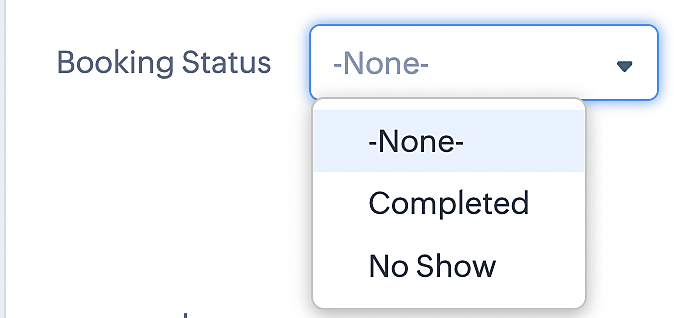
To update a booking's status (Completed or No Show), we've added a new picklist properties field named "Booking Status" in the Meetings module and configured it with two options: "completed" and "no show". Depending on the booking status chosen, the corresponding booking in Zoho Bookings will be updated.
- Details on how to add a custom field to the Meetings module : Customizing modules
- Here's a video that demonstrates how to add a field to a module in Zoho CRM: Adding fields
Reference:
3. Booking status: Canceled
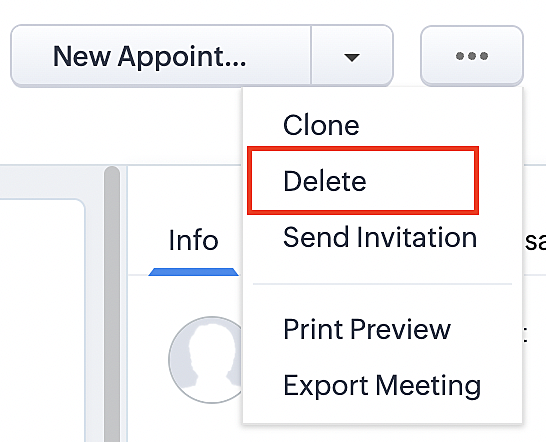
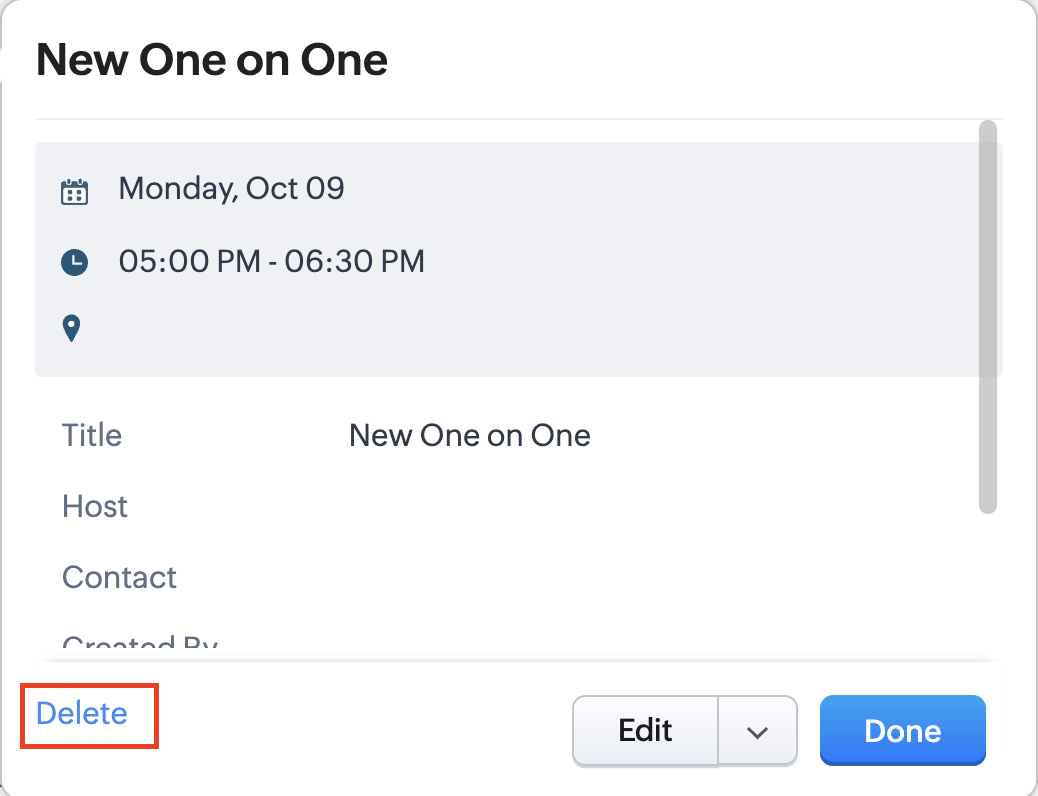
Whenever a meeting is deleted from the Meetings module, the corresponding booking in the Zoho Bookings app will also be canceled automatically. The meeting can be deleted either from the Meetings module or directly from the calendar.
To enable bidirectional sync between Zoho CRM and Zoho Bookings
Complete these steps in Zoho CRM.
Step 1: Creating connections
You first need to establish a connection between Zoho CRM and Zoho Bookings. Zoho Bookings is listed as one of the default connections in Zoho CRM, making it simple to set up. Select the Zoho Bookings connection, define the connection name and scope, and you'll be all set. This connection will enable you to link both applications and facilitate the seamless transfer of data.
Read here for more details on how to create connection in Zoho CRM: Connections
Step 2: Creating functions
In this context, we'll be creating three functions: one for marking appointments as completed, another for canceling appointments, a third for marking appointments as no shows, and a fourth for rescheduling appointments. For each function, we must also configure arguments, which pass values or data into a function when making a call. Here, we'll pass the booking ID to the function as an argument to update the necessary booking status.
i. To create a function for marking appointments as completed:
1. Go to Setup > Developer Space > Functions.
2. In the Functions page, click + Create New Function.

3. Configure the function name, display name, and description.
4. Set the category as automation.
This opens the Deluge script page.
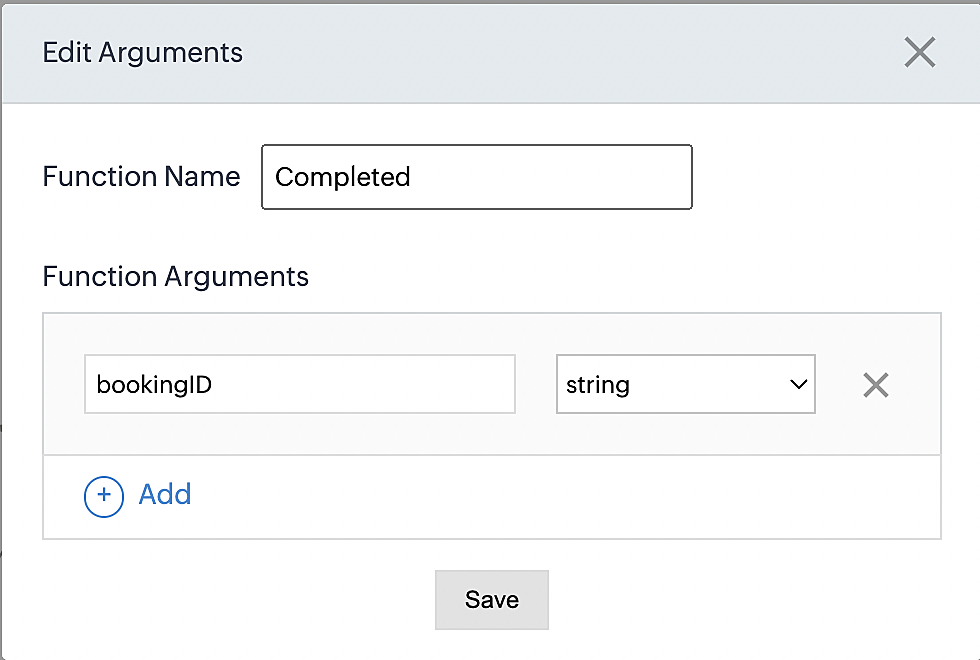
5. Next, configure the function's arguments:
A. Click on Edit Arguments on the Deluge script page.

B. Set the Parameter Name as bookingID. (Please note that the "bookingID" value is case sensitive and must match
the term used in the code).
C. Set the type as string.
Reference:
Please configure the below code in the Deluge script page.
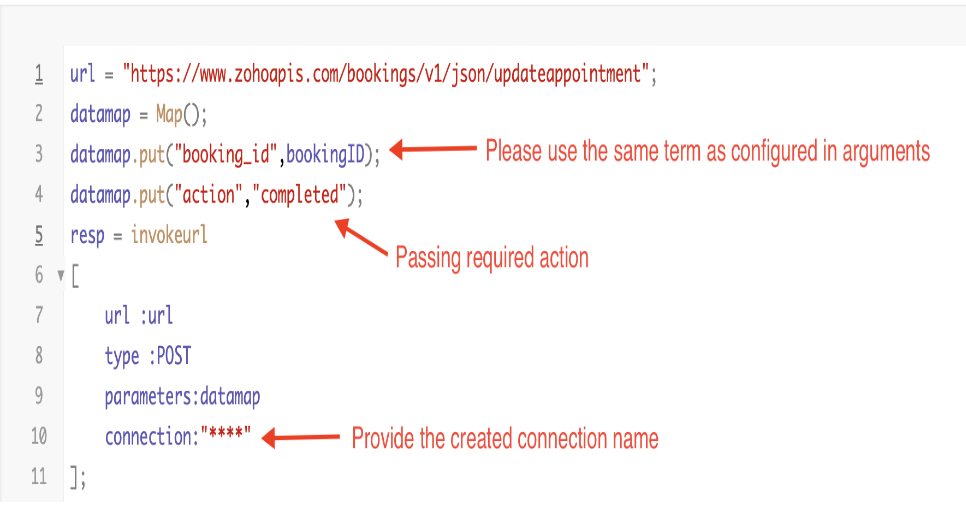
By completing these steps, we've configured a function that will mark appointments as completed.
ii. To create a function for marking appointments as no shows
1. Go to Setup > Developer Space > Functions.
2. In the Functions page, click + Create New Function.

3. Configure the function name, display name, and description.
4. Set the category as automation.
This opens the Deluge script page.
5. Next, configure the function's arguments:
A. Click on Edit Arguments on the Deluge script page.

B. Set the Parameter Name as bookingID. (Please note that the "bookingID" value is case sensitive and must match
the term used in the code).
C. Set the type as string.
Reference:
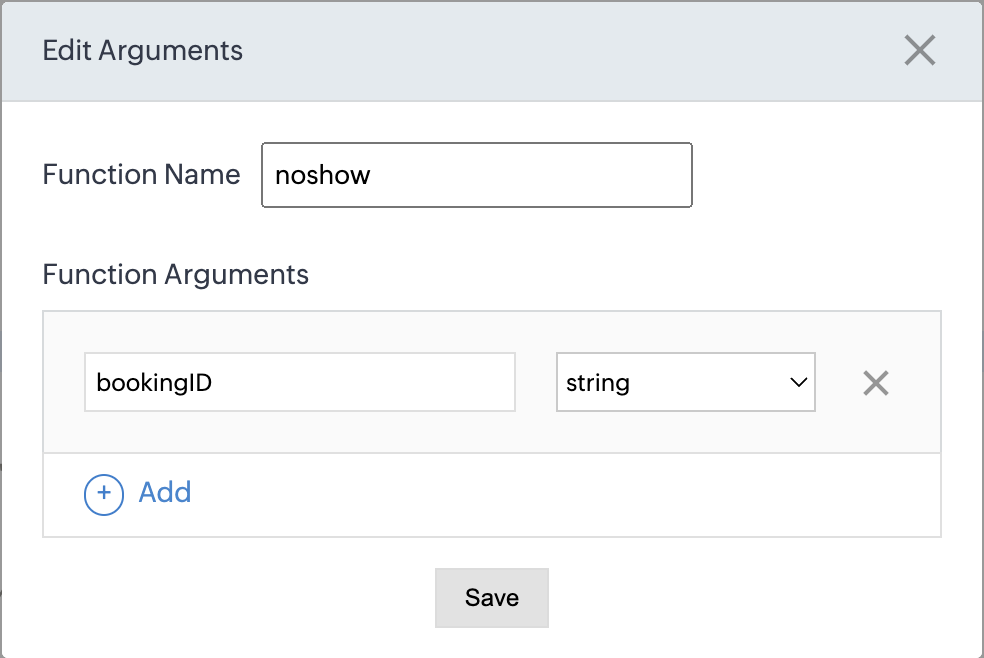
Please configure the below code on the Deluge script page.
Code link: No show
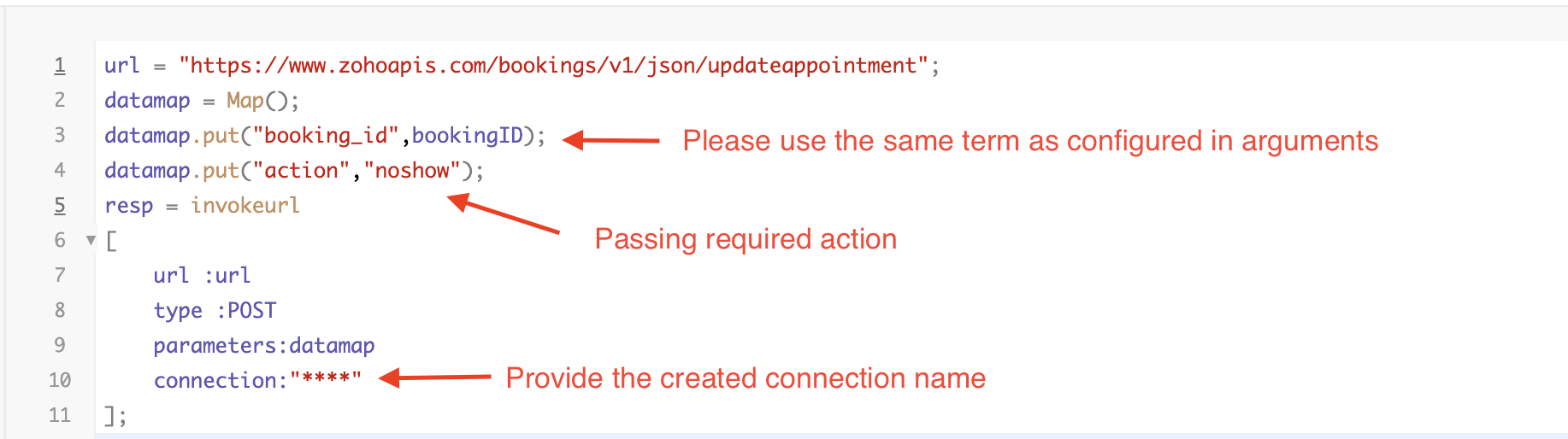
By completing these steps, we've configured a function that marks appointments as no shows.
iii. To create a function for marking appointments as canceled
1. Go to Setup > Developer Space > Functions.
2. In the Functions page, click + Create New Function.

3. Configure the function name, display name, and description.
4. Set the category as automation.
This opens the Deluge script page.
5. Next, configure the function's arguments:
A. Click on Edit Arguments on the Deluge script page.

B. Set the Parameter Name as bookingID. (Please note that the "bookingID" value is case sensitive and must match
the term used in the code).
C. Set the type as string.
Reference
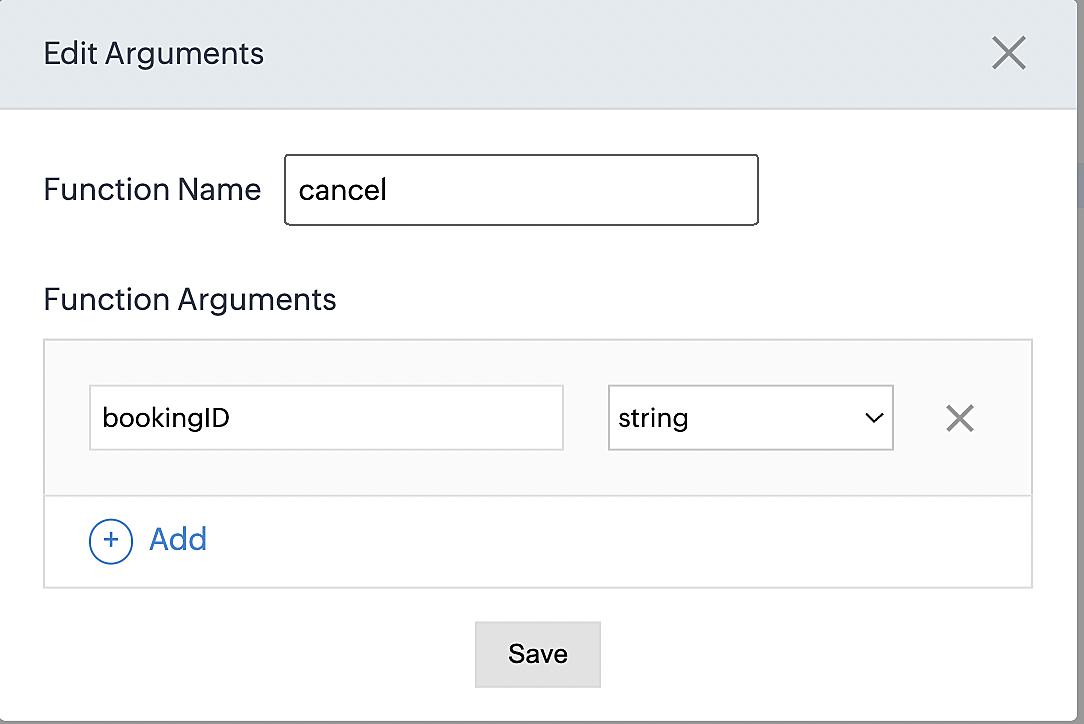
Please configure the below code on the Deluge script page.
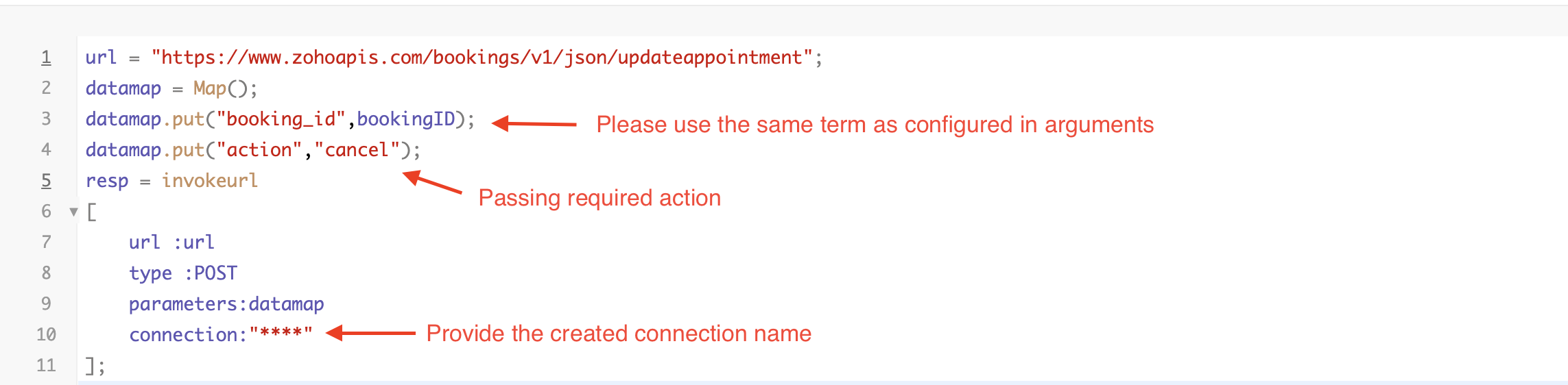
By completing these steps, we've configured a function that marks appointments as canceled.
Code explanation
Below is an explanation of the code that covers all the configurations present in the three functions mentioned above (cancel, mark as completed, and mark as no show).
Line 1: Based on the Zoho Bookings account's data center, we're setting up the API endpoint URL configuration.
Lines 2 - 4: To update appointments, we utilize the Zoho Bookings API. Within the update appointment API, there are two mandatory fields that need to be included: BookingID and action (completed/cancel/noshow).
Lines 5 - 10: We use the invokeURL task for API calls. To learn more about the invokeURL task, please refer to the following document: InvokeURL task for API calls
Now, let's proceed and learn about the process of creating a workflow and linking the established functions to it. This will enable us to automate the entire appointment status updating process.
Step 3: Creating a workflow
Workflow rules are sets of actions (email notifications, tasks and field updates) that are executed when specified conditions are met. Here, we'll generate workflow rules for each action to activate the respective function, thereby automating the appointment status updating process.
i. Creating a workflow for "canceling" appointments in Zoho Bookings when a meeting is deleted in Zoho CRM
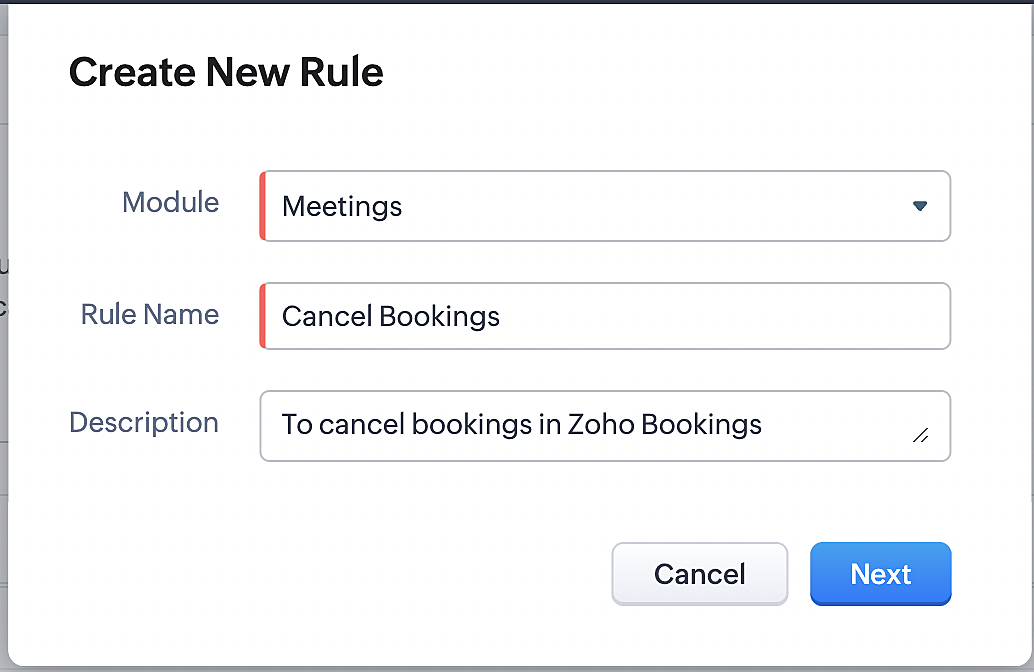
Part 1: Creating the rule
1. Go to Setup > Automation > Workflow Rules.
2. In the Workflow Rules page, click Create Rule.

3. Select "Meetings" under Module and configure rule name and description as required.
More details: Create Rule
Reference:
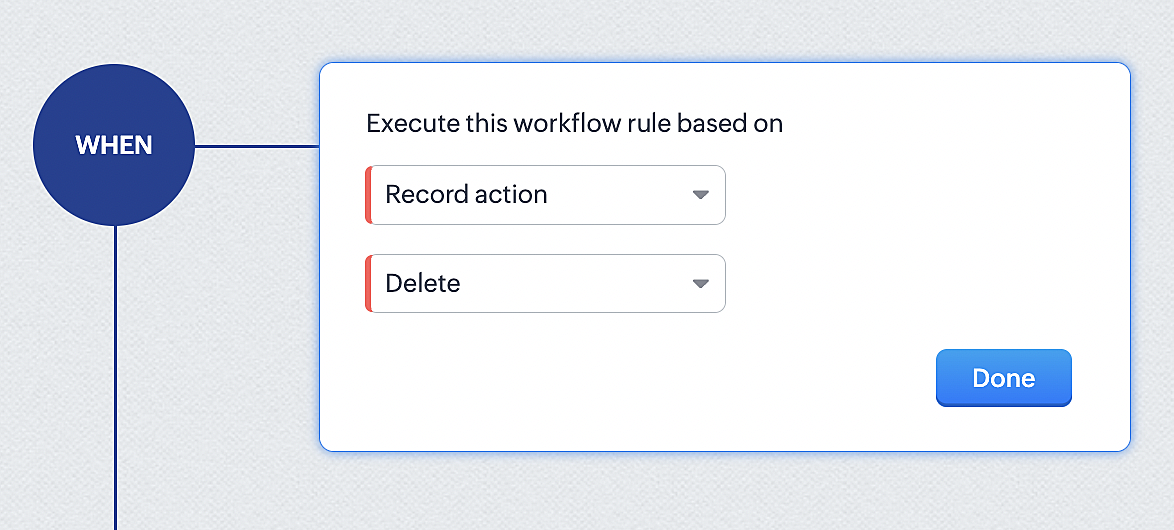
1. Select Record Action > Delete > Done to execute the rule when meetings are deleted.
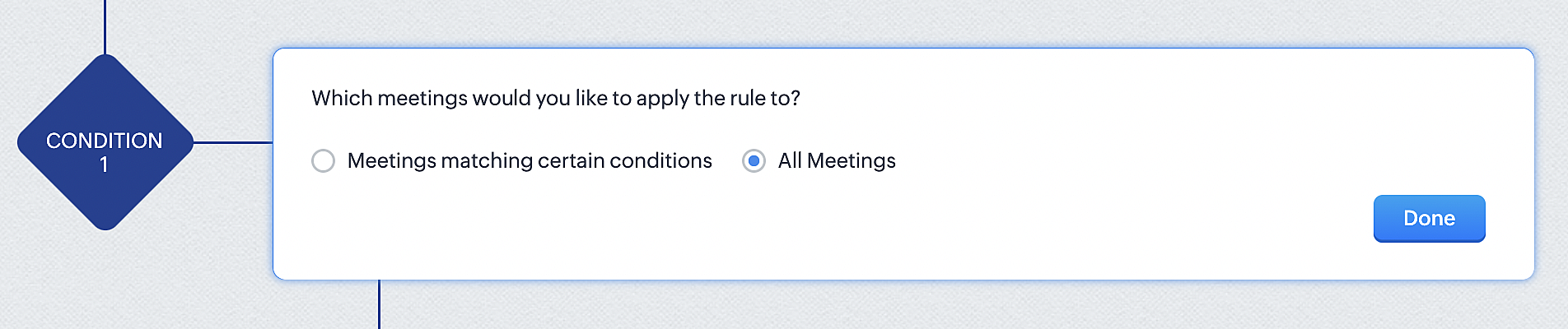
2. Configure condition > All Meetings.
3. Instant Actions > Function.
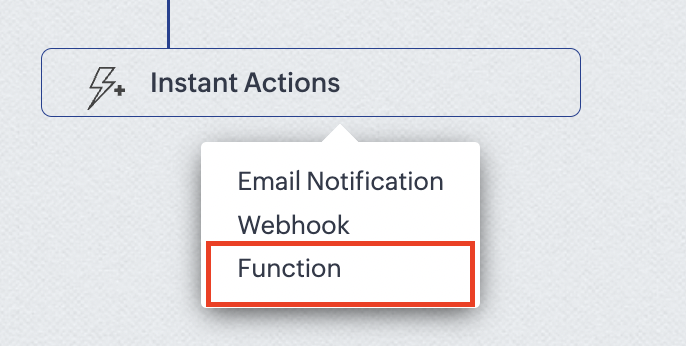
4. Click the New Function button.

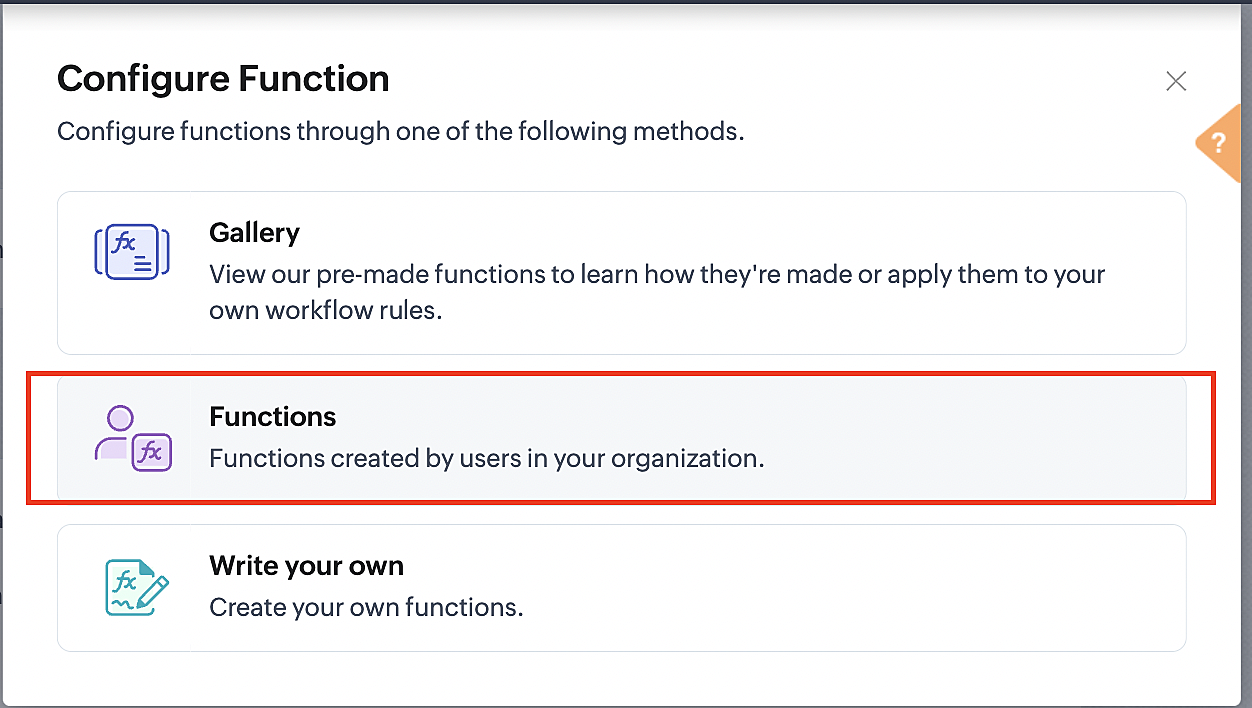
5. In the Configure custom function page, select the "cancel" function you created from among the functions users in your organization have created.
Part 3: Argument mapping
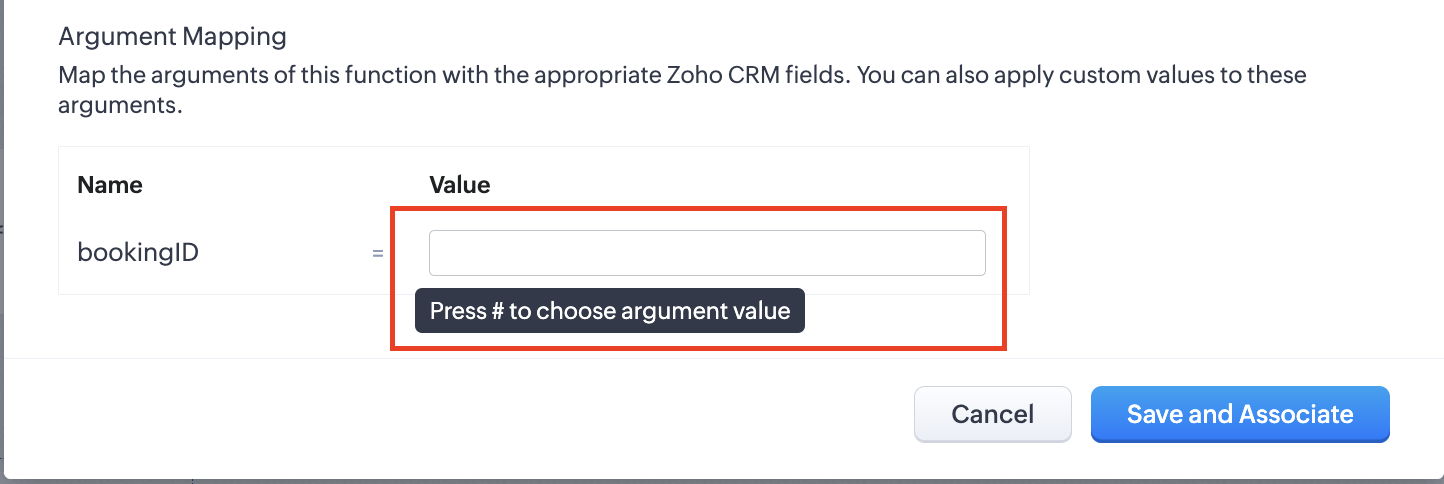
1. Press # to choose an argument value.
2. Select Meetings under Module and BookingId in the field.
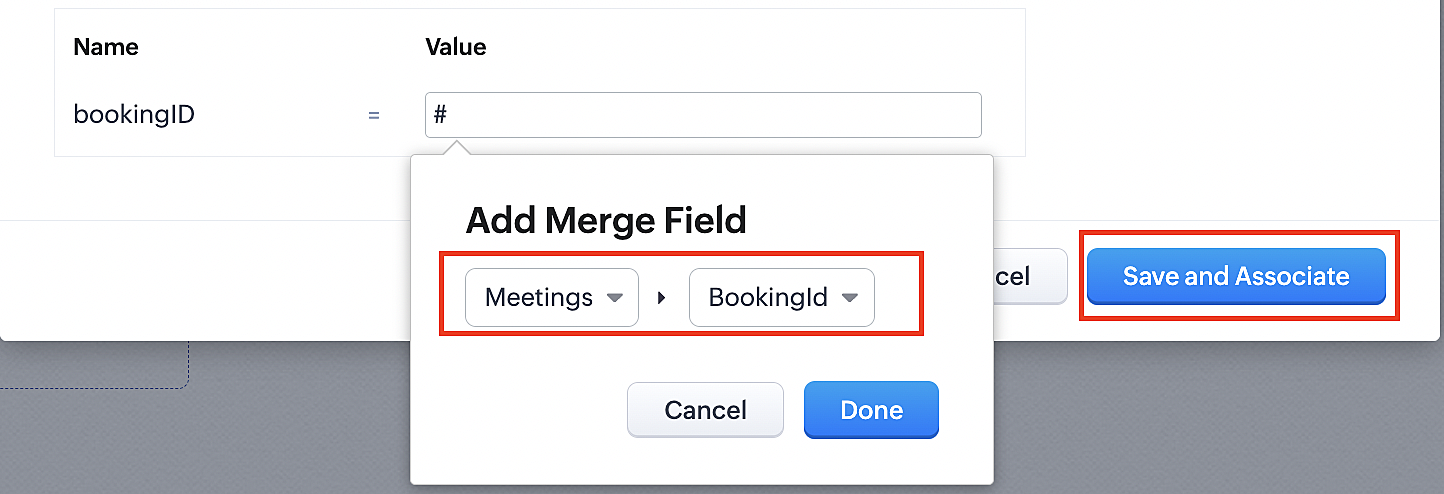
3. Click the Save and Associate button.
Reference:
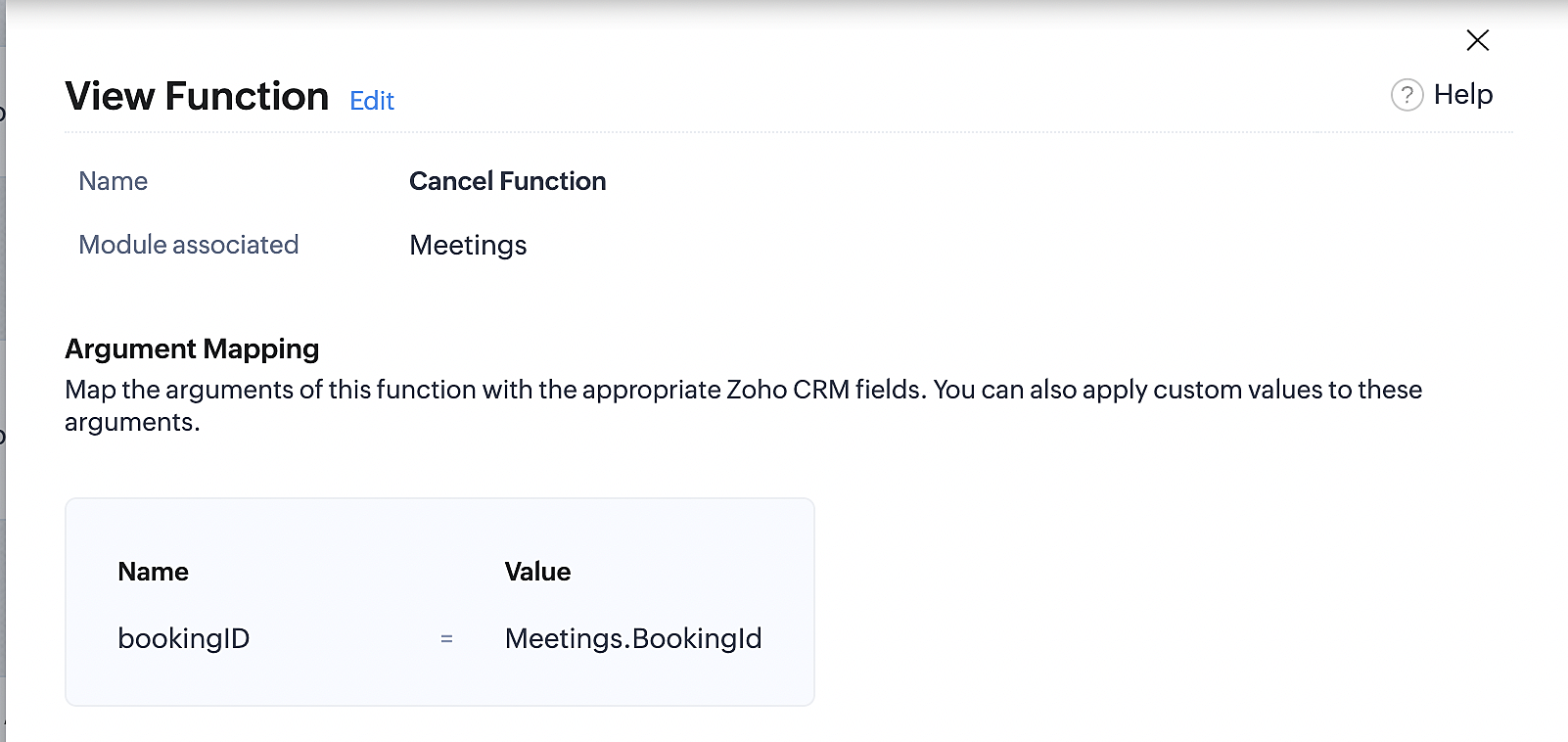
Below is the final flow of the cancel booking workflow:
At the end of Part 3, we will have created a workflow that will be executed automatically when meetings are deleted in Zoho CRM. Simultaneously, the bookings associated with the meeting will also be canceled in Zoho Booking.
ii. Creating workflow for updating an appointment's status as "no show" in Zoho Bookings when the meeting's booking status is marked as no show in Zoho CRM
Part 4: Creating the rule
1. Go to Setup > Automation > Workflow Rules.
2. In the Workflow Rules page, click Create Rule.

3. Select Meetings under Module and configure the rule name and description as required.
Reference:
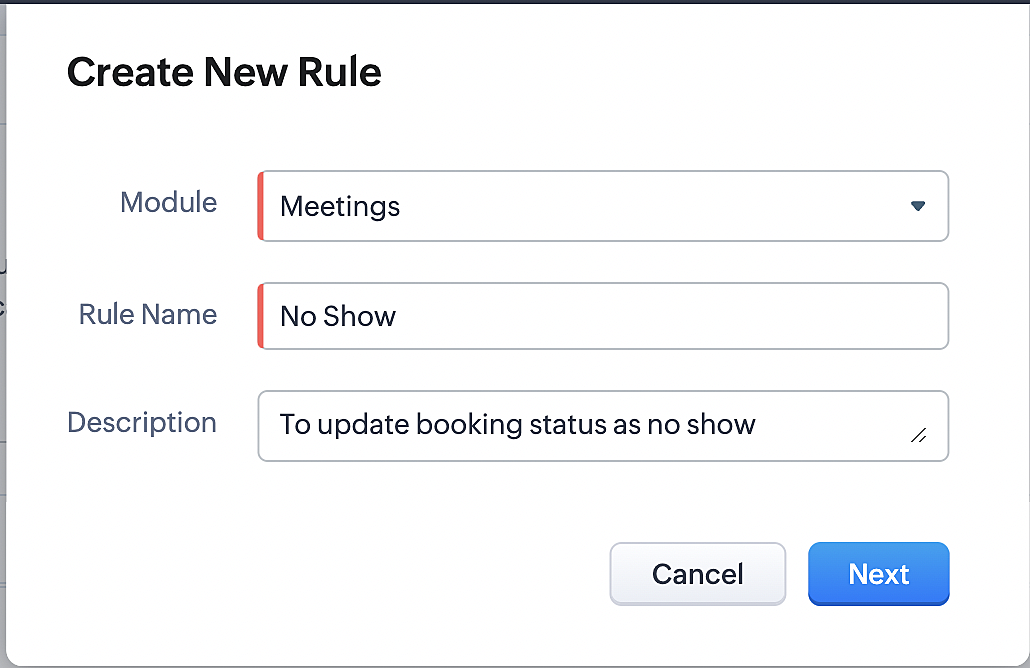
Part 5: Specifying the rule trigger
If you encounter difficulties while navigating through the steps mentioned below, please refer to Part 2 above, where we have provided step-by-step screenshots for clarification.
1. Record Action > Edit.

2. Enable the Specific field(s) gets modified and configure it per the screenshot below.
a. This is to ensure that the workflow is executed only when the booking status under the meeting module is
updated to "No Show".
updated to "No Show".
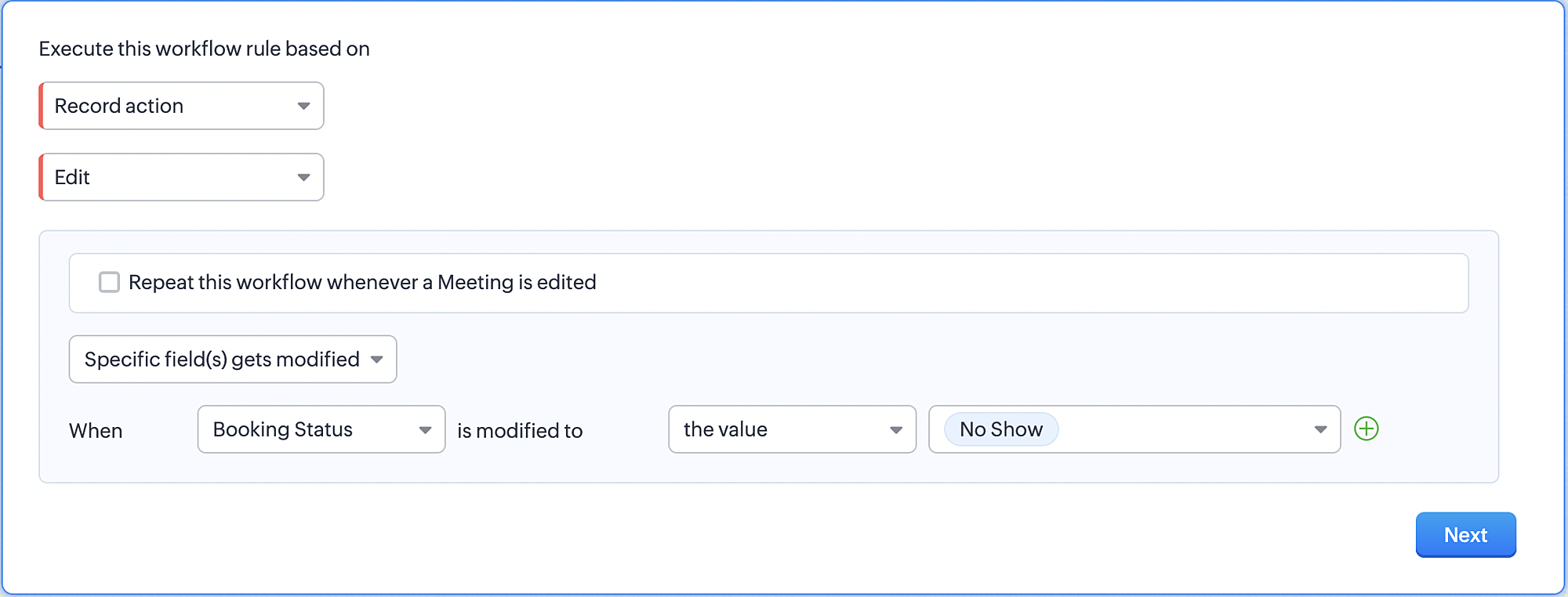
3. Configure condition > All Meetings.
4. Instant Actions > Function > New Function.
5. In the Configure custom function page, select the "no show" function you created from among the functions
users in your organization have created.
users in your organization have created.
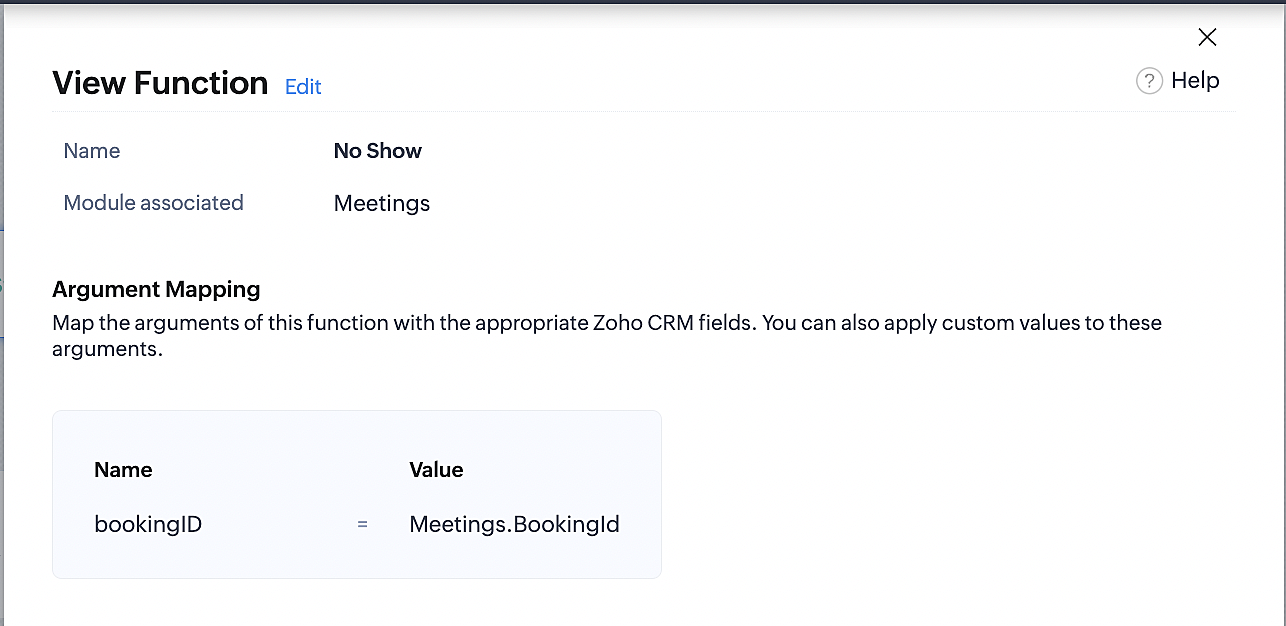
Part 6: Argument mapping:
If you encounter difficulties while navigating through the steps mentioned below, please refer to Part 3 above, where we have provided step-by-step screenshots for clarification.
1. Press # to choose an argument value.
2. Select Meetings under Module and configure the field as "BookingId".
3. Click Save and Associate button.
Reference:
Below is the final flow of the "No Show" booking status workflow:
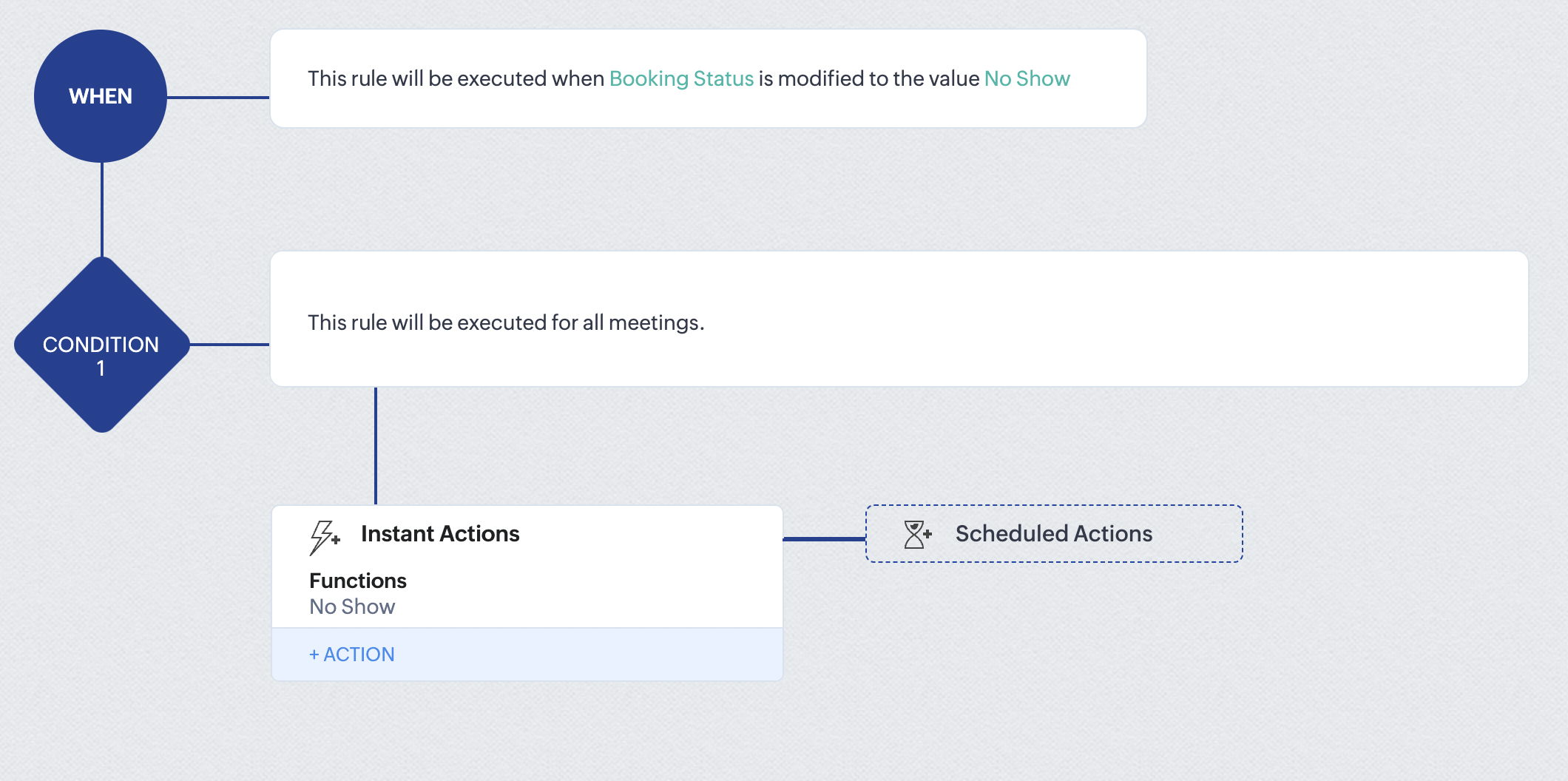
At the end of part 6, we will have created a workflow that automatically executes when the booking status field within the Zoho CRM Meetings module is updated to "No Show." This action will result in the associated bookings for that meeting also being marked as "No Show" in Zoho Bookings.
iii. Creating workflow for updating appointment status as "Completed" in Zoho Bookings when the booking status field of the meeting is marked as completed in Zoho CRM.
Part 7: Creating the rule
1. Go to Setup > Automation > Workflow Rules.
2. In the Workflow Rules page, click Create Rule.

3. Select Meetings under Module and configure rule name and description as required.
Reference:
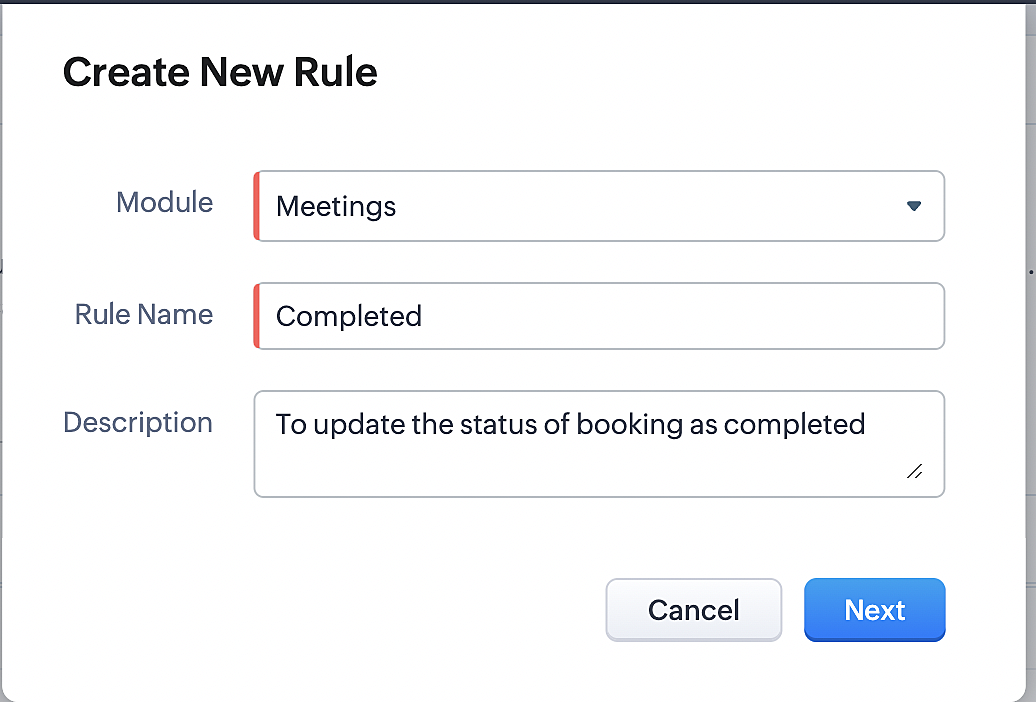
Part 8: Specifying the rule trigger
If you encounter difficulties while navigating through the steps mentioned below, please refer to Part 2 above, where we have provided step-by-step screenshots for clarification.
1. Record Action > Edit.

2. Enable the Specific field(s) gets modified setting and configure it per the screenshot below.
a. This serves to ensure that the workflow is executed only when the booking status under the Meetings module is
updated to "Completed".
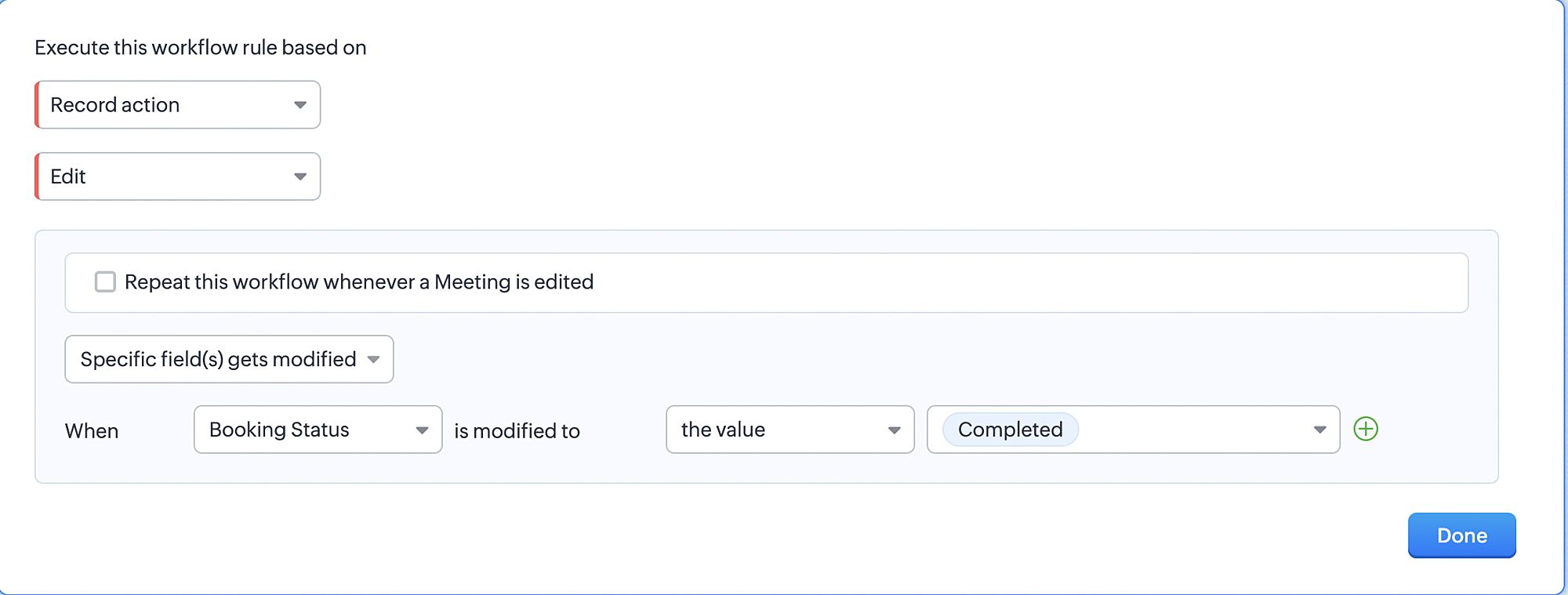
3. Configure condition > All Meetings.
4. Instant Actions > Function > New Function.
5. In the Configure custom function page, select the "completed" function you created from among the functions users
in your organization have created.
Part 9: Argument mapping:
If you encounter difficulties while navigating through the steps mentioned below, please refer to Part 3 above, where we have provided step-by-step screenshots for clarification.
1. Press # to choose an argument value.
2. Select Meetings under Module and configure the field as "BookingId".
3. Click Save and Associate button.
Reference:
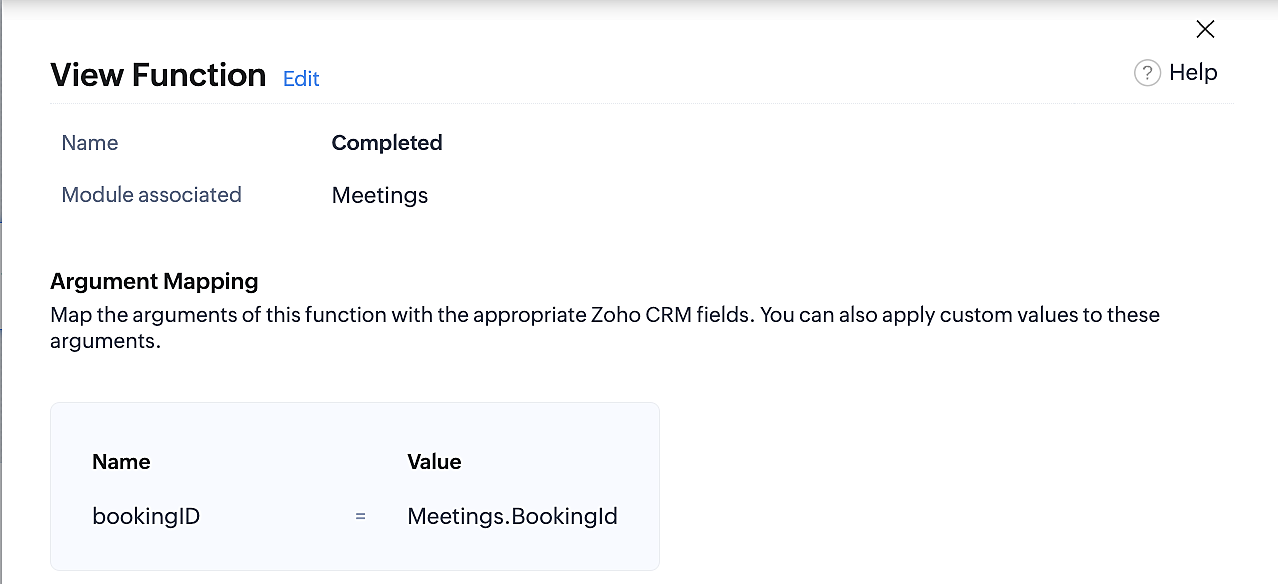
Below is the final flow of the "Completed" booking status workflow:
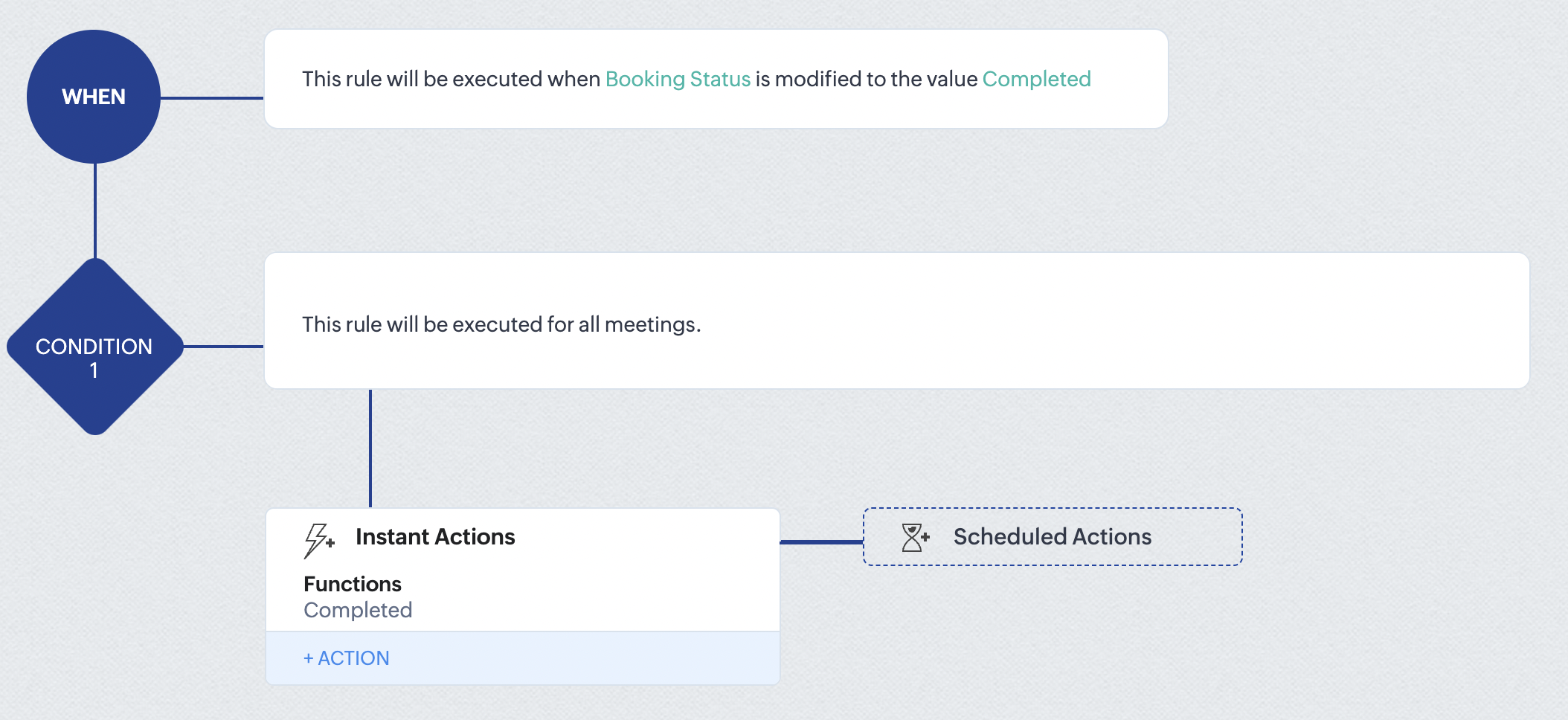
At the end of part 9, we will have created a workflow that is automatically executed when the booking status field within the Zoho CRM Meetings module is updated to "Completed." As a result, the associated bookings for that meeting will also be marked as "Completed" in Zoho Bookings.
Conclusion
We've reached the end of this community post. With the integration mentioned above in place, you'll be able to book, cancel, and update the status of appointments in Zoho Bookings directly from your Zoho CRM application. This will help you effectively manage your appointments in one place. As mentioned above, we've covered the rescheduling action in a separate post, which you can access by clicking on the following link: Reschedule Action
Furthermore, we've outlined a method for automating appointment statuses in detail. You can use this document as a reference to explore the various possibilities that suit your needs.
If you have any questions or need assistance with your configuration, please email us at hello@zohobookings.com or support@zohobookings.com.
Access your files securely from anywhere
New to Zoho Recruit?

Zoho Developer Community
New to Zoho LandingPage?
Zoho LandingPage Resources
New to Zoho Survey?
New to Zoho CRM Plus?
Deliver unforgettable customer experiences
New to Zoho CRM Plus?
Deliver unforgettable customer experiences
New to Zoho Marketing Plus?
Everything you need to run your marketing
New to Zoho Marketing Plus?
Everything you need to run your marketing
New to Bigin?





Topic Participants
Kaushik S
bruce
Ishwarya SG
PrismaNote Support
Sticky Posts
Presenting ABM for Zoho CRM: Expand and retain your customers with precision
Picture this scenario: You're a growing SaaS company ready to launch a powerful business suite, and are looking to gain traction and momentum. But as a business with a tight budget, you know acquiring new customers is slow, expensive, and often deliversGood news! Calendar in Zoho CRM gets a face lift
Dear Customers, We are delighted to unveil the revamped calendar UI in Zoho CRM. With a complete visual overhaul aligned with CRM for Everyone, the calendar now offers a more intuitive and flexible scheduling experience. What’s new? Distinguish activitiesCreate and populate a record in an instant: Introducing zero-shot field prompting to Zia's ICR
A couple of months ago, we upgraded our in-house AI image detection and validation tool, Zia Vision, with intelligent character recognition (ICR). By training Zia with sample images, you could create and enrich CRM records with data extracted from standardIn-person ZUG Meetups for Real Estate Professionals - US Q1 2026
The Real Estate Zoho User Group is going on a multi-city, in-person meetup tour across the US, and we’d love to see you there! These meetups are a great opportunity to: Connect with fellow real estate professionals using Zoho Share challenges and discoverNimble enhancements to WhatsApp for Business integration in Zoho CRM: Enjoy context and clarity in business messaging
Dear Customers, We hope you're well! WhatsApp for business is a renowned business messaging platform that takes your business closer to your customers; it gives your business the power of personalized outreach. Using the WhatsApp for Business integration
New to Zoho TeamInbox?
Zoho TeamInbox Resources
Zoho CRM Plus Resources
Zoho Books Resources
Zoho Subscriptions Resources
Zoho Projects Resources
Zoho Sprints Resources
Qntrl Resources
Zoho Creator Resources
Zoho CRM Resources
Design. Discuss. Deliver.
Zoho Show Resources

Get Started. Write Away!
Writer is a powerful online word processor, designed for collaborative work.
Zoho CRM コンテンツ
-
オンラインヘルプ
-
Webセミナー
-
機能活用動画
-
よくある質問
-
Ebook
-
-
Zoho Campaigns
- Zoho サービスのWebセミナー
その他のサービス コンテンツ
Nederlandse Hulpbronnen

ご検討中の方
Recent Topics
Request to Customize Module Bar Placement in New Zoho CRM UI
Hello Support and Zoho Community, I've been exploring the new UI of Zoho CRM "For Everyone" and have noticed a potential concern for my users. We are accustomed to having the module names displayed across the top, which made navigation more intuitiveSending campaigns from other server
Hi, Is it possible to send campaigns from another server so customers can see mail direct from our company (Corrata) and not from ZCSend.net? Thanks, TimEdit a previous reconciliation
I realized that during my March bank reconciliation, I chose the wrong check to reconcile (they were for the same amount on the same date, I just chose the wrong check to reconcile). So now, the incorrect check is showing as un-reconciled. Is there any way I can edit a previous reconciliation (this is 7 months ago) so I can adjust the check that was reconciled? The amounts are exactly the same and it won't change my ending balance.Admin and Dispatcher Users show as Field Technicians in Dispatch Module?
Hi Zoho, Our Admin and Dispatch user both show up as Fied Technicians / Field Agents in the Dispatch module, but they most certainly should not be assigned to any of the work orders and service appointments. These users are NOT service resources. HowZoho Payroll: Product Updates - June 2025
This June, we’re taking a giant step forward. One that reflects what we’ve heard from you, the businesses that power economies. For our customers using the latest version of Zoho Payroll (organizations created after Dec 12, 2024) in the United States,View Products (items) in Contact and Company
Hi, I would like to know if there is an option to view all the products /(items) that were inserted in the pipeline deal stage for exemple "Win Pipeline" within the company and contacts module section? For instance, view with the option filter for theUpdate subform dropdown field choices - on load workflow
Hi, I have a "Check In" form that has "Contacts" subform and a "Tickets" subform. When the form is loaded, I want to populate one contact and the number of tickets. I want the "Contact" field in the "Tickets" subform to have the choice of "Contacts."Upload Zoho Inventory Item Image by API
itemID = item.get("item_id"); organizationID = organization.get("organization_id"); resvp = zoho.inventory.getRecordsByID("items",organizationID,itemID,"zoho_inventory_conn"); info resvp; image_file = invokeurl [ url: "https://t4.ftcdn.net/jpg/03/13/59/81/360_F_313598127_M2n9aSAYVsfYuSSVytPuYpLAwSEp5lxH.jpg"Salesforce to Zoho One Migration
HI, I am about to start a migration from Salesforce to Zoho One I would like to know the best practise for this, my current thoughts to the approach is 1) Create fields, modules as required for migrating data 2) migrate Data 3) go live Will this approachZoho Expense Integration with Zoho Books
I want to know what flexibility do i have in selecting the chart of accounts which get a hit whenever we are posting any expense or advance in zoho expense?Custom Function to Update Ticket based on Subject of Ticket
This may be pretty simple but I'm having issues with getting a custom function to fill out custom fields based on the subject of a ticket and not the body of a ticket. Basically we need to fill in the PO number and Item ID custom fields, both of thisIncoming 'Message' data via WhatsApp appears empty
the Incoming 'Message' data via WhatsApp appears empty; instead of customer messages, I only see CRM system notification messages are being displayed. I have seen 3 messages like this since yesterday it seems that in 'All Message' the message snippetHandling Automatic Replies in Desk
We send out email campaigns (currently via Klaviyo) and naturally we receive "Automatic Replies" to these mass email campaigns. These responses are all being routed to Zoho Desk. We get two types of "Automatic Replies" Type 1) Customer is out of the office/holidayZoho Mail API Error EXTRA_KEY_FOUND_IN_JSON
I have a workflow set up in Pipedream that uses the Zoho Mail API to send emails from my account. It's worked without issue for months but today I'm getting the following 404 error for every email I try to send: { "data": { "errorCode": "EXTRA_KEY_FOUND_IN_JSON"How to search (web API) for a Calls record by phone number?
Using v8 /Calls/search web api I'm unable to to complete a search request no matter how I use the api: When I try using "criteria=" I get: response: <Response [400]> response_json: { "code": "INVALID_QUERY", "details": { "reason": "the field is not available[Free Webinar] Product Release Updates - Creator Tech Connect
Hello Everyone! We welcome you all to the upcoming free webinar on the Creator Tech Connect Series. The Creator Tech Connect series is a free monthly webinar that runs for around 45 minutes. It comprises technical sessions in which we delve deep intoZoho GenAI API Error Not a valid response from zia.
Zoho GenAI API Error Not a valid response from zia.Help me to retreive my Document
Please help me to retrieve my documents from any date between 1st February, 2025 to 20th,March 2025 .it got mistakenly deleted on the 21 of March 2025 due to phone screen malfunction I earnestly await your positive response .thank youhow to change the page signers see after signing a document in zoho sign
Hello, How can I please change the page a signer sees after signing a document in Zoho Sign? I cannot seem to find it. As it is now, it shows a default landing page "return to Zoho Sign Home". Thanks!Look Up Field Type not available for events and tasks?
Look Up Field Type not available for events and tasks?I cannot check out to Zoho People.
When I tried to check out today, there's prompt that inhibits me to check out: To add entry in Attendance, log time for any of your jobsDigest Juin - Un résumé de ce qui s'est passé le mois dernier sur Community
Bonjour à toutes et à tous, Ce mois-ci encore, tout s’est enchaîné à toute vitesse ! On vous fait un petit récap de ce qui a marqué ces dernières semaines. Zoho RPA est une solution robuste d’automatisation des processus, conçue pour s’intégrer aux systèmesDifferent Transaction Series for Different Types of Sales
Is there any way I can create multiple transaction series for different type of Sales? Say B2B-001 and B2C -001 for respective type of Sales.?Unable to charge GST on shipping/packing & Forwarding charges in INDIA
Currently, tax rates only apply to items. It does not apply tax to any shipping or packing & forwarding charges that may be on the order as well. However, these charges are taxable under GST in India. Please add the ability to apply tax to these charges.Customer Advance Zoho Book API
All I could find was Customer Payment API, it does not have facility to add customer advances, where those are not linked to any invoice as such. How to do it?Even though the received amount+tax is equal to or lesser than the invoice value, zoho doesnt allow to record
Even though the received amount+tax is equal to or lesser than the invoice value, Zoho mentioned the error- you've recorded more payment than the actual invoice balance. please check again. screenshot also attached. You've recorded more payment thanMultiple deductions in invoice
I issue invoices to a customer that include multiple deductions that I would like to track in different expense accounts. But that is not possible in Zoho Books as there is only one Deduction field and even that I don't have control over to assign it#BiginnersTips | How to bulk update closing dates for multiple deals in Bigin
Hello Biginners! Keeping your CRM data accurate is crucial for any business- big or small. One key aspect is ensuring that closing dates for deals are always up to date. Why? Because if a deal is closed but not updated, your dashboards and reports would采购里出现付款通知 的错误
采购里面出现付款通知错误,怎么调整,我找不到路径,好像是ZOHO 自动生成的,请问怎么调整{"code":1002,"message":"Statement of Accounts does not exist."}
Hello Zoho team, I faced an issue while trying to POST a sales order from sap to zoho books, using the below data packet: { "customer_id": "4322967000027451968", "line_items": [ { "item_id": "2154170000010847685", "rate": "752.00",Add Custom Fields only in Customer module and not on supplier module!? Is not there a way to do that!?
I am trying to create custom fields on clients module but it also gets created on suppliers module; which of course does not make sense at all as a lot of custom fields are client or supplier specific but never both. I am missing something? This seemsLogging website service fees
Hello, I do a lot of freelance work on sites like Upwork and Wyzant and others and those companies take a small cut from what I pay or what I earn and I am wondering what is the correct way to log this in my books. For example if I charge $55 per hourHow do i clear a liability account without making a payment?
I have a liability account with a provision for an expected bill from previous years. However the bill never arrived and the provision/liability account with Cr balance has been carried forward for many years now. How do i know clear the provision made2 Transactions for single Expense
I have make 2 payments and have 1 Invoice containing both the items. My Bank Feeds show 2 Transactions, How can i associate them with Single Expense? I tried adding them to Advance Payment, but advance payment I can only apply to Bills It seems. Why cantEverything AI in Zoho Recruit – Webinar Recording Available!
AI is transforming the way recruiters find, engage, and hire top talent. In our latest webinar, we explored how Zoho Recruit’s AI-powered features can help streamline hiring, automate workflows, and improve decision-making. Missed the session? No worriesIntroducing the FTP task in Deluge
Hello everyone, We're excited to announce the launch of the FTP task, a powerful addition to Deluge that enables you to effortlessly transfer files between various Zoho apps and your own servers. Unlike the invokeUrl task, which supports various HTTPCustom widgets on Zoho one dashboard
Is it possible to create custom widgets on the Zoho One dashboard? I see there is a widget name My Open Tickets to display open tickets in my view, but I would also like to have a widget to display unassigned tickets. A widget to display unfinished projectsData privacy concerns
Does Zoho team have access to my data in the database e.g. Balance Sheet, Bank account transactions, Profit & Loss statement etc.Ability to Remove/Change Zoho Creator Admins via Zoho One Interface
Dear Zoho One Team, Greetings, We would like to request a feature enhancement in Zoho One. Currently, it is not possible to remove or downgrade a user with the Admin role in Zoho Creator from the Zoho One admin interface. Unlike other Zoho apps whereZoho Sheets
Are they ever going to set up the feature "where I left off" just as you can do in Microsoft Excel online ? For me that is the only feature missing from Zoho sheets other than that I think they are terrific and use them every day. I only occasionallyNext Page