Bidirectional sync between Zoho Bookings and Zoho CRM - Part 1
Hey, community members!
The default integration between Zoho CRM and Zoho Bookings is unidirectional, which means that any appointments booked, rescheduled, or deleted in Zoho Bookings will be reflected in Zoho CRM. However, any modifications made to events in Zoho CRM that originated from Zoho Bookings will not be reflected back in Zoho Bookings. Hence, as we're announcing in this community post, we've made the sync bidirectional.
This community post will cover the process of configuring appointment bookings from Zoho CRM in Zoho Bookings, as well as managing appointment statuses such as Canceled, No Show and Completed. We have addressed the rescheduling action in a separate post. To view it, please click on the following link: Reschedule Action
This community post will be beneficial for active Zoho CRM users who handle all their meetings within Zoho CRM. Additionally, you can use this community post as a reference to explore various automation possibilities tailored to your business requirements. For instance, with this post's guidance, when you update a booking's status field to "Completed" in Zoho CRM, it will automatically sync with Zoho Bookings and trigger an automated "Mark as completed" email to customers. This enhancement will improve your Zoho Bookings and Zoho CRM synchronization experience, making appointment management easier.
Prerequisites of bidirectional sync:
- Zoho Bookings Premium subscription
- Zoho CRM paid subscription
- Enable Zoho CRM integration within Zoho Bookings
The purpose of enabling the Zoho CRM integration within Zoho Bookings is to transfer booking details from Zoho Bookings to Zoho CRM. In this configuration, the mandatory field is the Booking ID, which is passed from Zoho Bookings to Zoho CRM through the integration. Whenever an appointment is booked, customer details will be sent to the designated CRM module, and a corresponding record will be created in the Meetings module within Zoho CRM, which will help in automating the workflow.
Here's the complete demo video that covers all the configurations discussed in the community post below:
Timestamps for your reference:
0:35 - Purpose of this community post
Here's the complete demo video that covers all the configurations discussed in the community post below:
Timestamps for your reference:
0:35 - Purpose of this community post
1:26 - Zoho CRM plugin installation
4:43 - Custom field creation
7:20 - Function creation
9:22 - Connection creation
10:24 - Configuring arguments
11:06 - Workflow creation
13:33 - Argument mapping
14:41 - Output verification
17:41 - Conclusion
How we're approaching this bidirectional sync
1. Booking an appointment from Zoho CRM
Install the Zoho Bookings for Zoho CRM plugin within your Zoho CRM application. This plugin enables the creation of a "New Appointment" button within the Zoho CRM Leads and Contacts module, which enables you to select the desired booking page you wish to open. You can choose from various workspace, service, or staff booking pages. After configuration, you can initiate the process of scheduling bookings directly from within your Zoho CRM account.
- Guide on Zoho Bookings and Zoho CRM plugin installation: Booking page selection for Zoho CRM plugin
2. Booking status: Completed or No Show
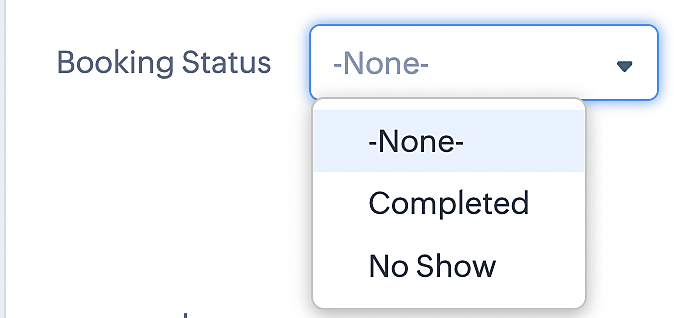
To update a booking's status (Completed or No Show), we've added a new picklist properties field named "Booking Status" in the Meetings module and configured it with two options: "completed" and "no show". Depending on the booking status chosen, the corresponding booking in Zoho Bookings will be updated.
- Details on how to add a custom field to the Meetings module : Customizing modules
- Here's a video that demonstrates how to add a field to a module in Zoho CRM: Adding fields
Reference:
3. Booking status: Canceled
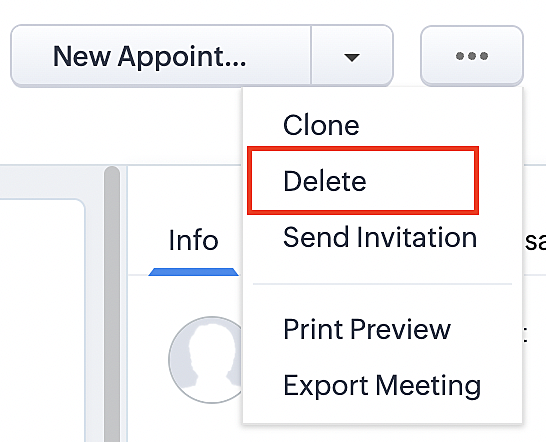
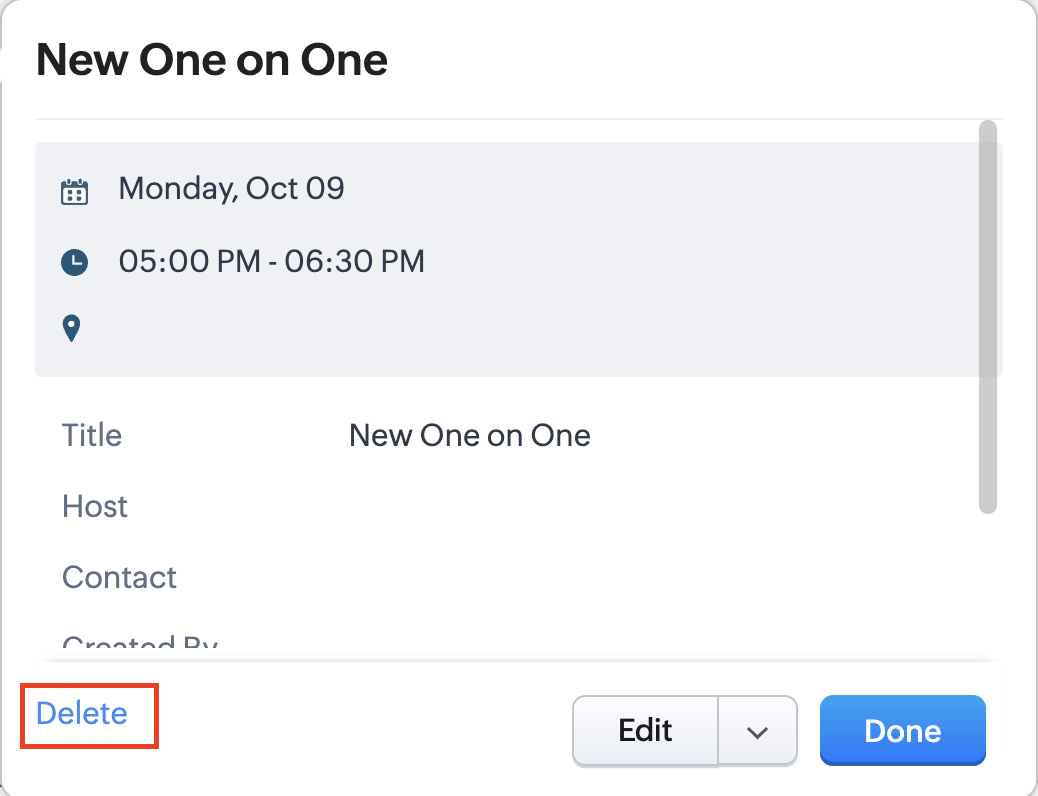
Whenever a meeting is deleted from the Meetings module, the corresponding booking in the Zoho Bookings app will also be canceled automatically. The meeting can be deleted either from the Meetings module or directly from the calendar.
To enable bidirectional sync between Zoho CRM and Zoho Bookings
Complete these steps in Zoho CRM.
Step 1: Creating connections
You first need to establish a connection between Zoho CRM and Zoho Bookings. Zoho Bookings is listed as one of the default connections in Zoho CRM, making it simple to set up. Select the Zoho Bookings connection, define the connection name and scope, and you'll be all set. This connection will enable you to link both applications and facilitate the seamless transfer of data.
Read here for more details on how to create connection in Zoho CRM: Connections
Step 2: Creating functions
In this context, we'll be creating three functions: one for marking appointments as completed, another for canceling appointments, a third for marking appointments as no shows, and a fourth for rescheduling appointments. For each function, we must also configure arguments, which pass values or data into a function when making a call. Here, we'll pass the booking ID to the function as an argument to update the necessary booking status.
i. To create a function for marking appointments as completed:
1. Go to Setup > Developer Space > Functions.
2. In the Functions page, click + Create New Function.

3. Configure the function name, display name, and description.
4. Set the category as automation.
This opens the Deluge script page.
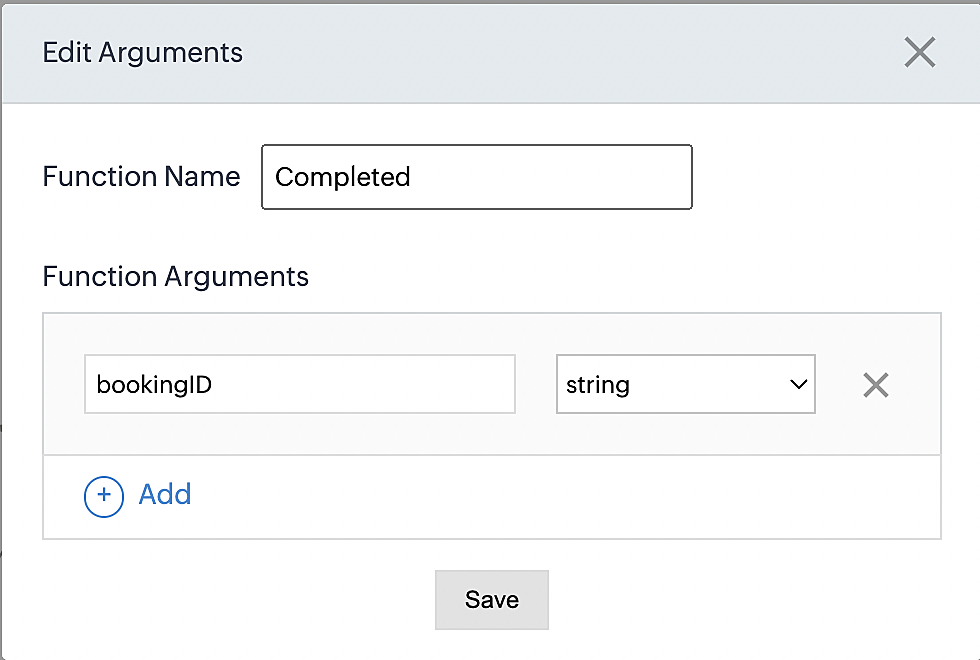
5. Next, configure the function's arguments:
A. Click on Edit Arguments on the Deluge script page.

B. Set the Parameter Name as bookingID. (Please note that the "bookingID" value is case sensitive and must match
the term used in the code).
C. Set the type as string.
Reference:
Please configure the below code in the Deluge script page.
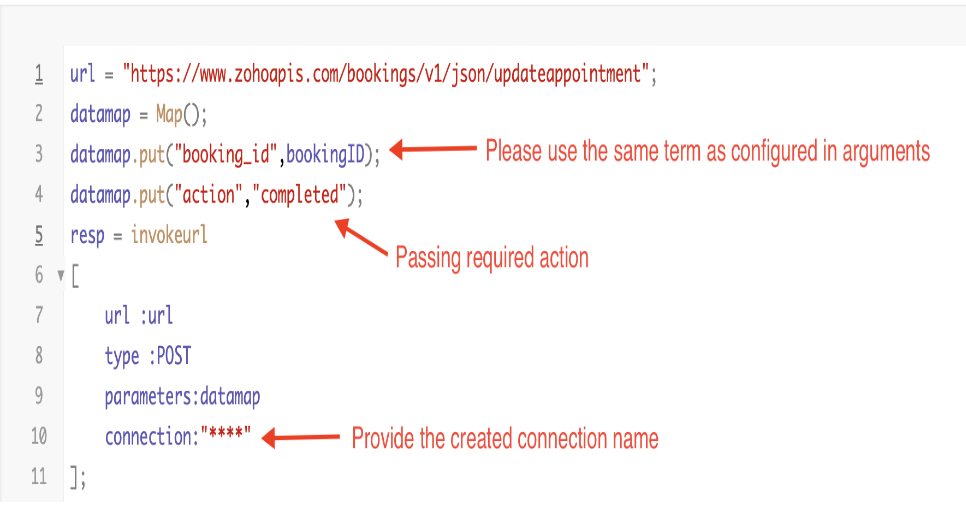
By completing these steps, we've configured a function that will mark appointments as completed.
ii. To create a function for marking appointments as no shows
1. Go to Setup > Developer Space > Functions.
2. In the Functions page, click + Create New Function.

3. Configure the function name, display name, and description.
4. Set the category as automation.
This opens the Deluge script page.
5. Next, configure the function's arguments:
A. Click on Edit Arguments on the Deluge script page.

B. Set the Parameter Name as bookingID. (Please note that the "bookingID" value is case sensitive and must match
the term used in the code).
C. Set the type as string.
Reference:
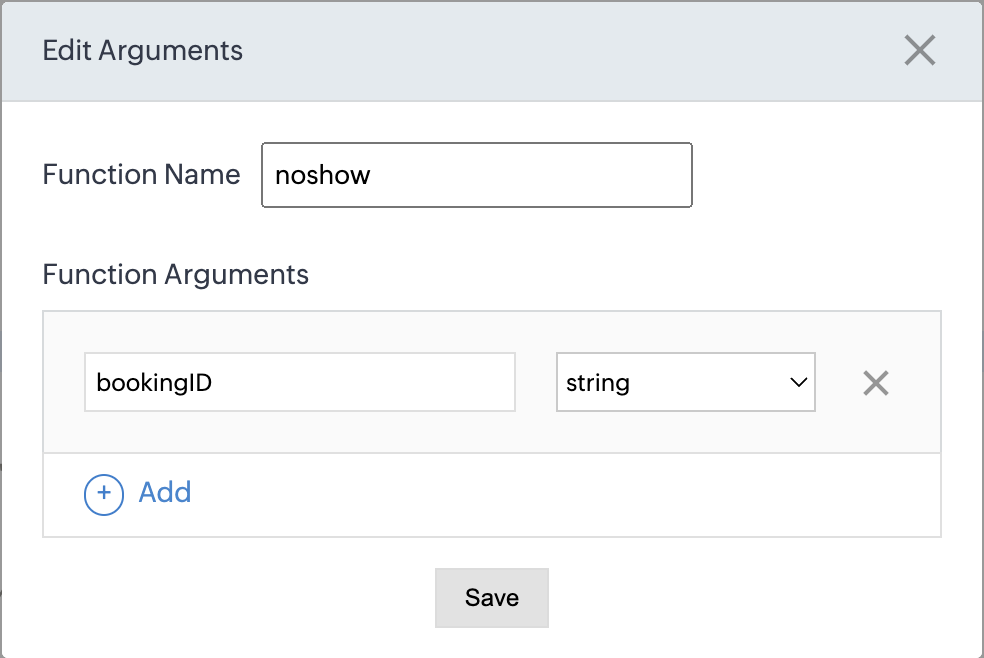
Please configure the below code on the Deluge script page.
Code link: No show
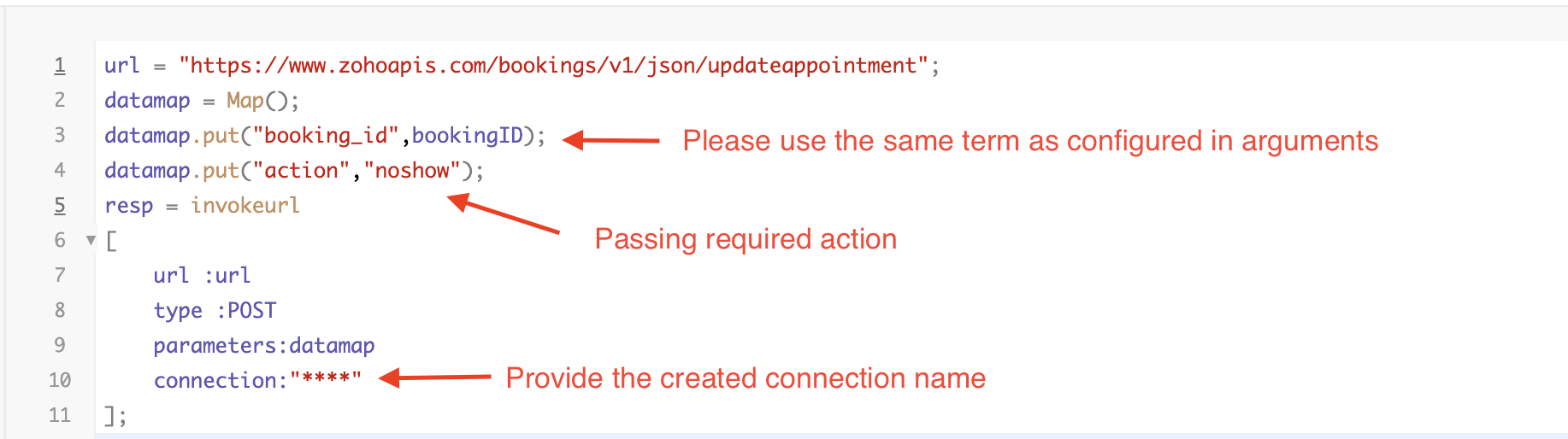
By completing these steps, we've configured a function that marks appointments as no shows.
iii. To create a function for marking appointments as canceled
1. Go to Setup > Developer Space > Functions.
2. In the Functions page, click + Create New Function.

3. Configure the function name, display name, and description.
4. Set the category as automation.
This opens the Deluge script page.
5. Next, configure the function's arguments:
A. Click on Edit Arguments on the Deluge script page.

B. Set the Parameter Name as bookingID. (Please note that the "bookingID" value is case sensitive and must match
the term used in the code).
C. Set the type as string.
Reference
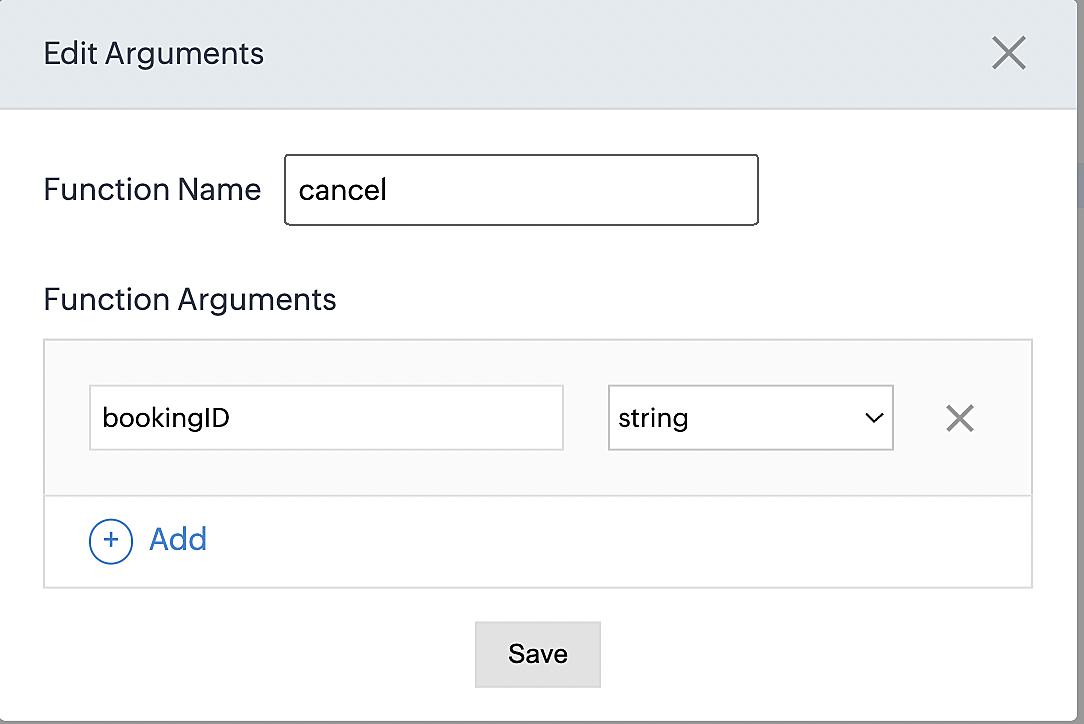
Please configure the below code on the Deluge script page.
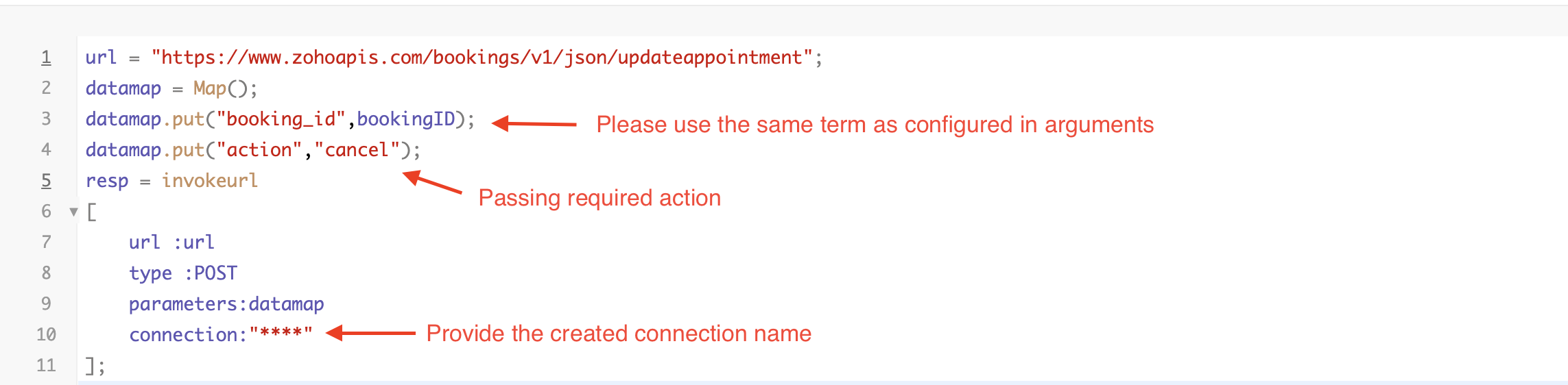
By completing these steps, we've configured a function that marks appointments as canceled.
Code explanation
Below is an explanation of the code that covers all the configurations present in the three functions mentioned above (cancel, mark as completed, and mark as no show).
Line 1: Based on the Zoho Bookings account's data center, we're setting up the API endpoint URL configuration.
Lines 2 - 4: To update appointments, we utilize the Zoho Bookings API. Within the update appointment API, there are two mandatory fields that need to be included: BookingID and action (completed/cancel/noshow).
Lines 5 - 10: We use the invokeURL task for API calls. To learn more about the invokeURL task, please refer to the following document: InvokeURL task for API calls
Now, let's proceed and learn about the process of creating a workflow and linking the established functions to it. This will enable us to automate the entire appointment status updating process.
Step 3: Creating a workflow
Workflow rules are sets of actions (email notifications, tasks and field updates) that are executed when specified conditions are met. Here, we'll generate workflow rules for each action to activate the respective function, thereby automating the appointment status updating process.
i. Creating a workflow for "canceling" appointments in Zoho Bookings when a meeting is deleted in Zoho CRM
Part 1: Creating the rule
1. Go to Setup > Automation > Workflow Rules.
2. In the Workflow Rules page, click Create Rule.

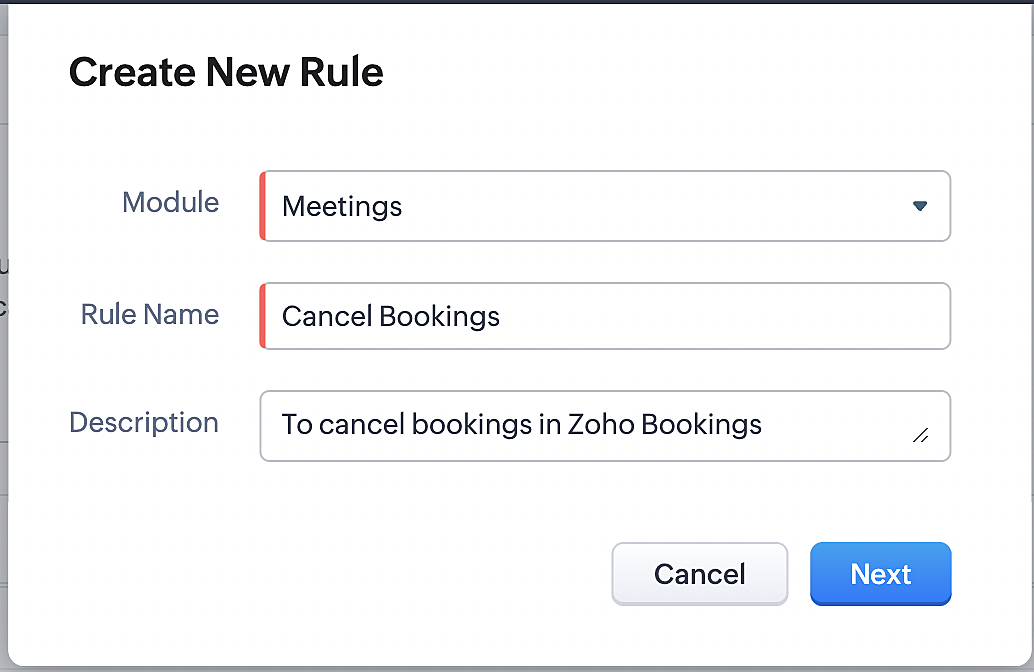
3. Select "Meetings" under Module and configure rule name and description as required.
More details: Create Rule
Reference:
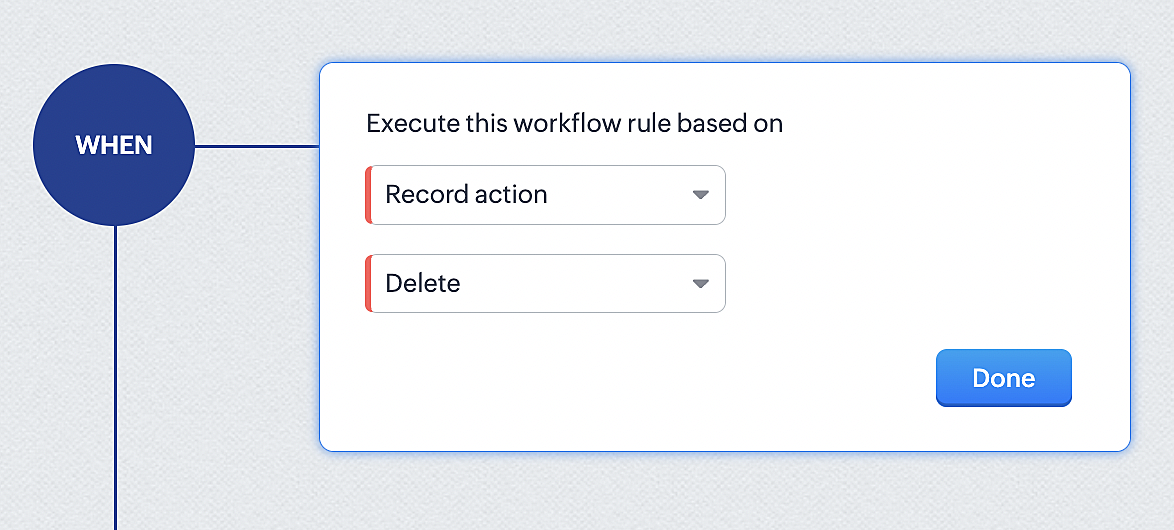
1. Select Record Action > Delete > Done to execute the rule when meetings are deleted.
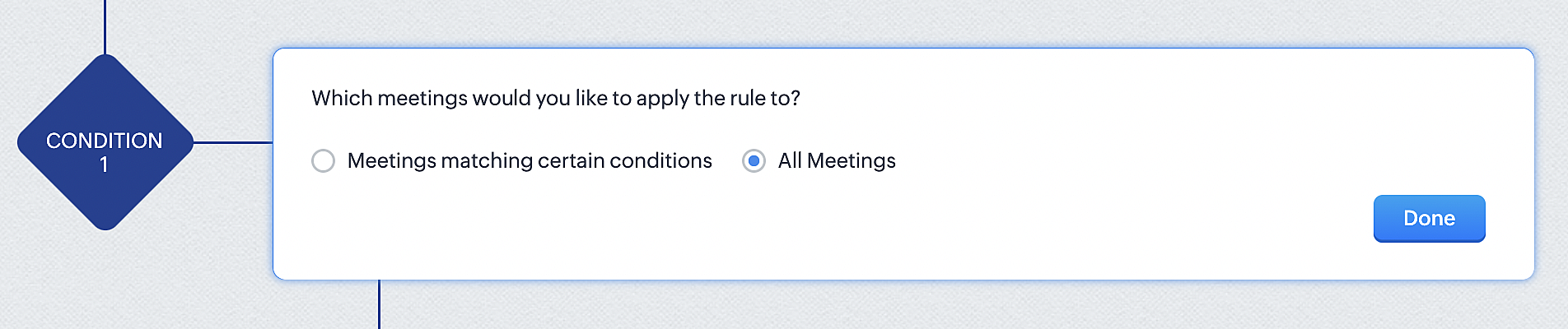
2. Configure condition > All Meetings.
3. Instant Actions > Function.
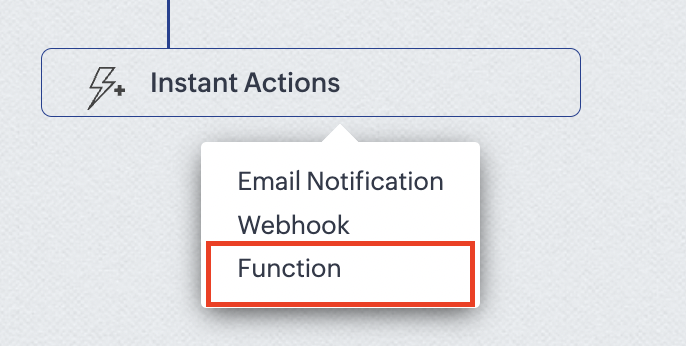
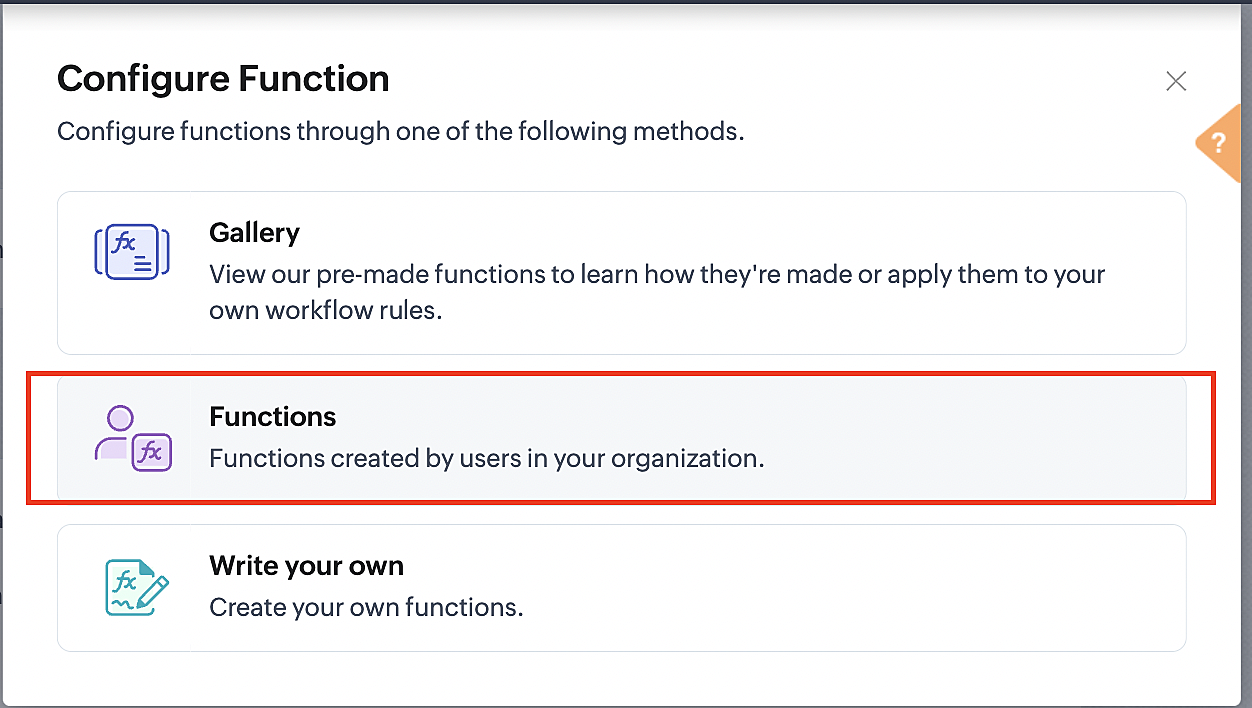
4. Click the New Function button.

5. In the Configure custom function page, select the "cancel" function you created from among the functions users in your organization have created.
Part 3: Argument mapping
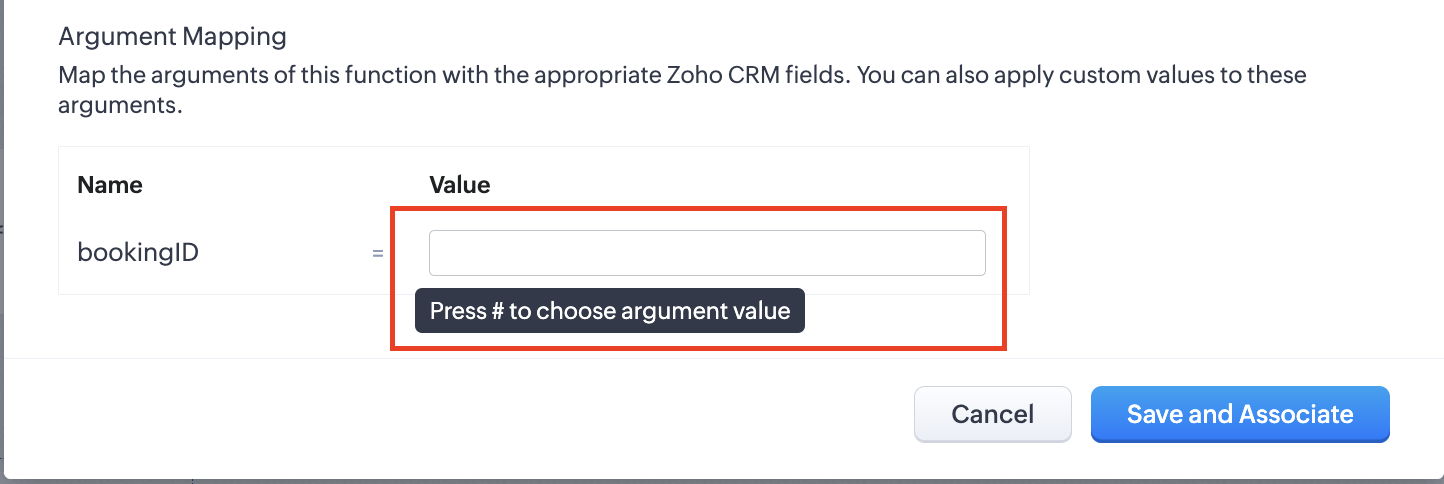
1. Press # to choose an argument value.
2. Select Meetings under Module and BookingId in the field.
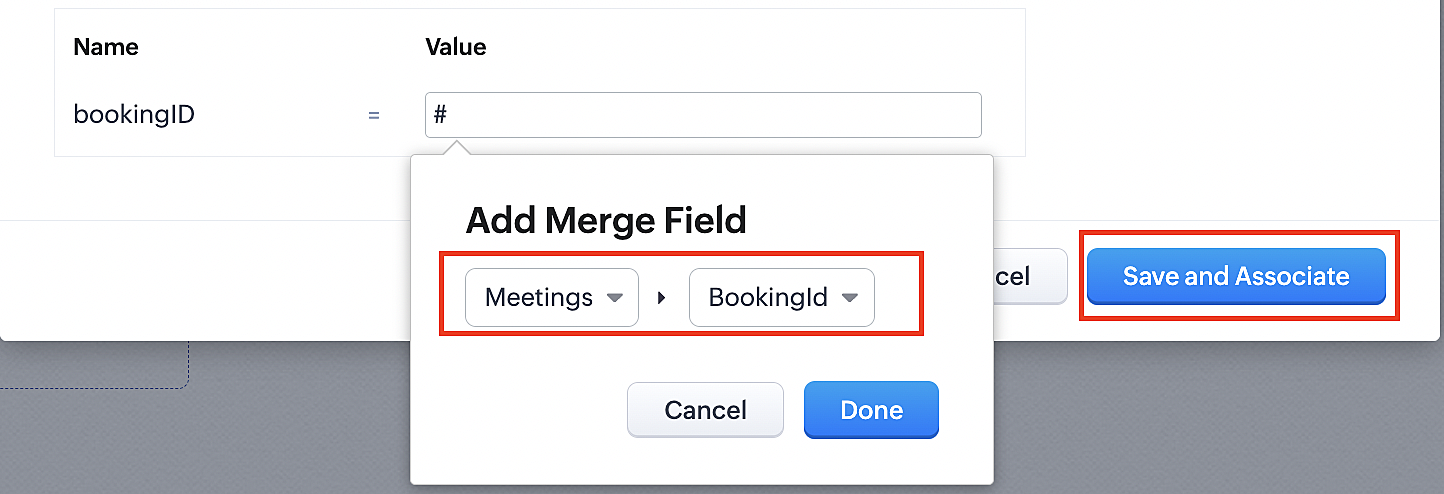
3. Click the Save and Associate button.
Reference:
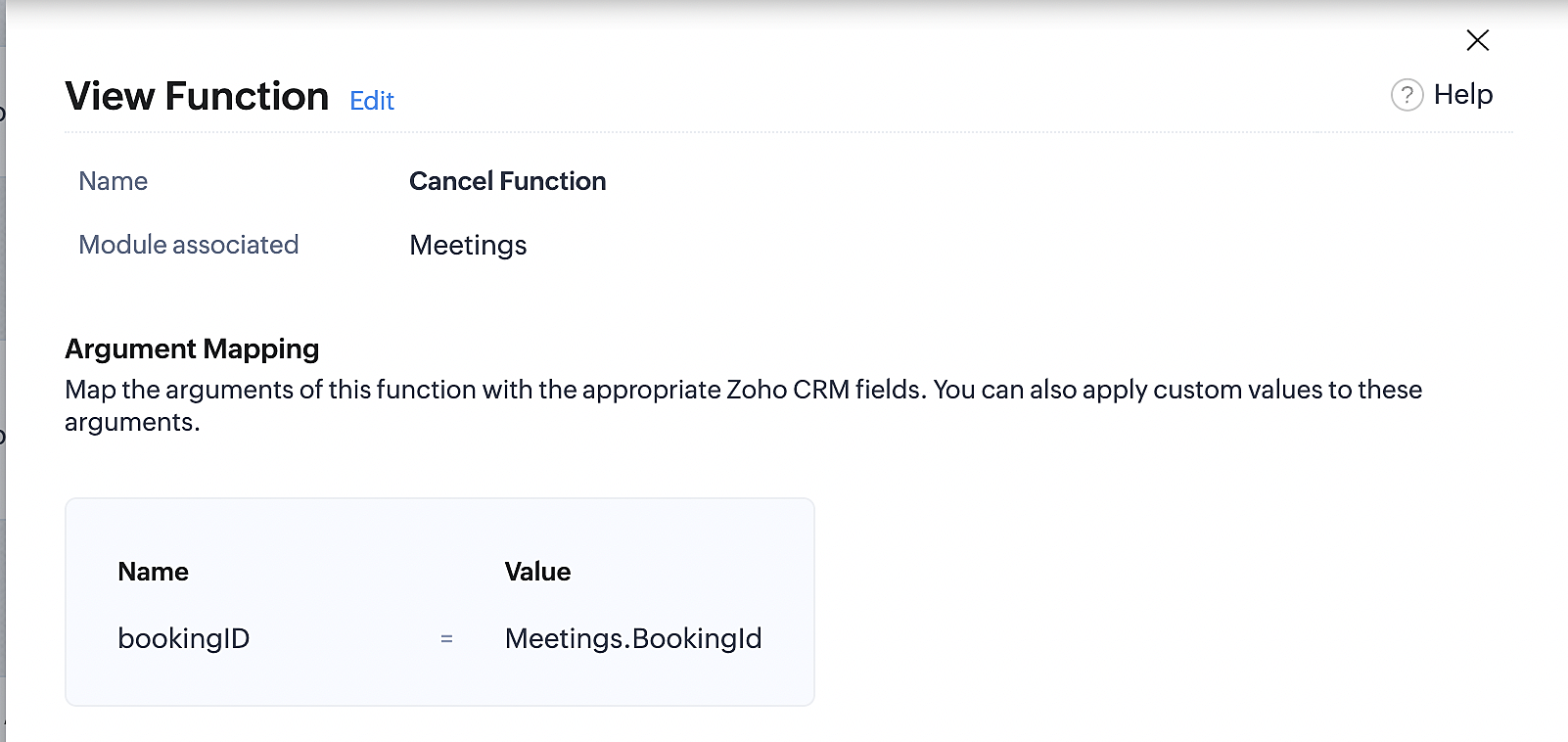
Below is the final flow of the cancel booking workflow:
At the end of Part 3, we will have created a workflow that will be executed automatically when meetings are deleted in Zoho CRM. Simultaneously, the bookings associated with the meeting will also be canceled in Zoho Booking.
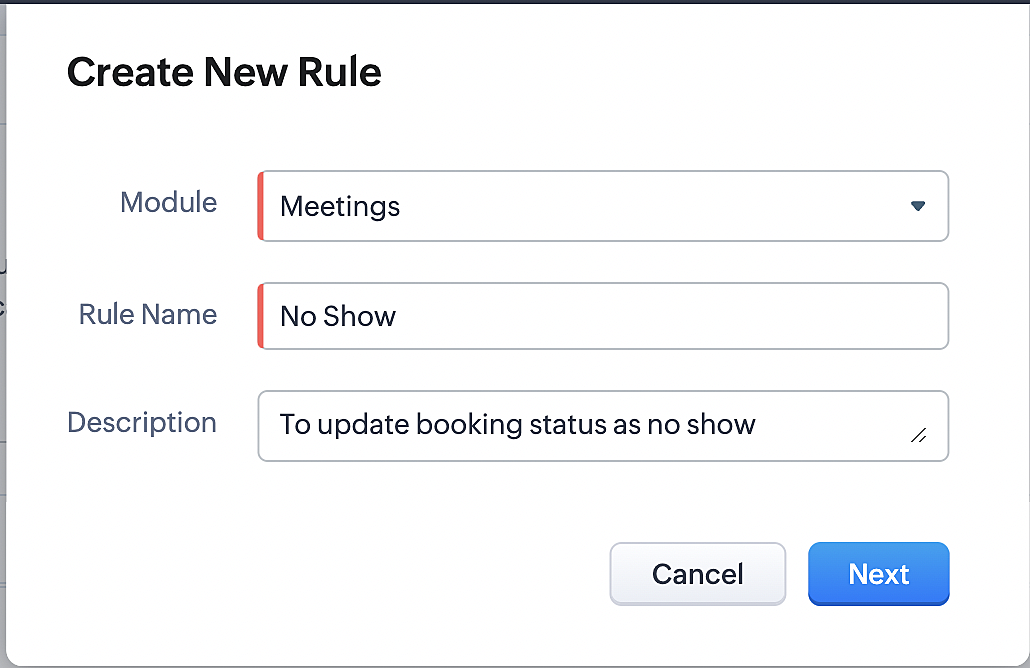
ii. Creating workflow for updating an appointment's status as "no show" in Zoho Bookings when the meeting's booking status is marked as no show in Zoho CRM
Part 4: Creating the rule
1. Go to Setup > Automation > Workflow Rules.
2. In the Workflow Rules page, click Create Rule.

3. Select Meetings under Module and configure the rule name and description as required.
Reference:
Part 5: Specifying the rule trigger
If you encounter difficulties while navigating through the steps mentioned below, please refer to Part 2 above, where we have provided step-by-step screenshots for clarification.
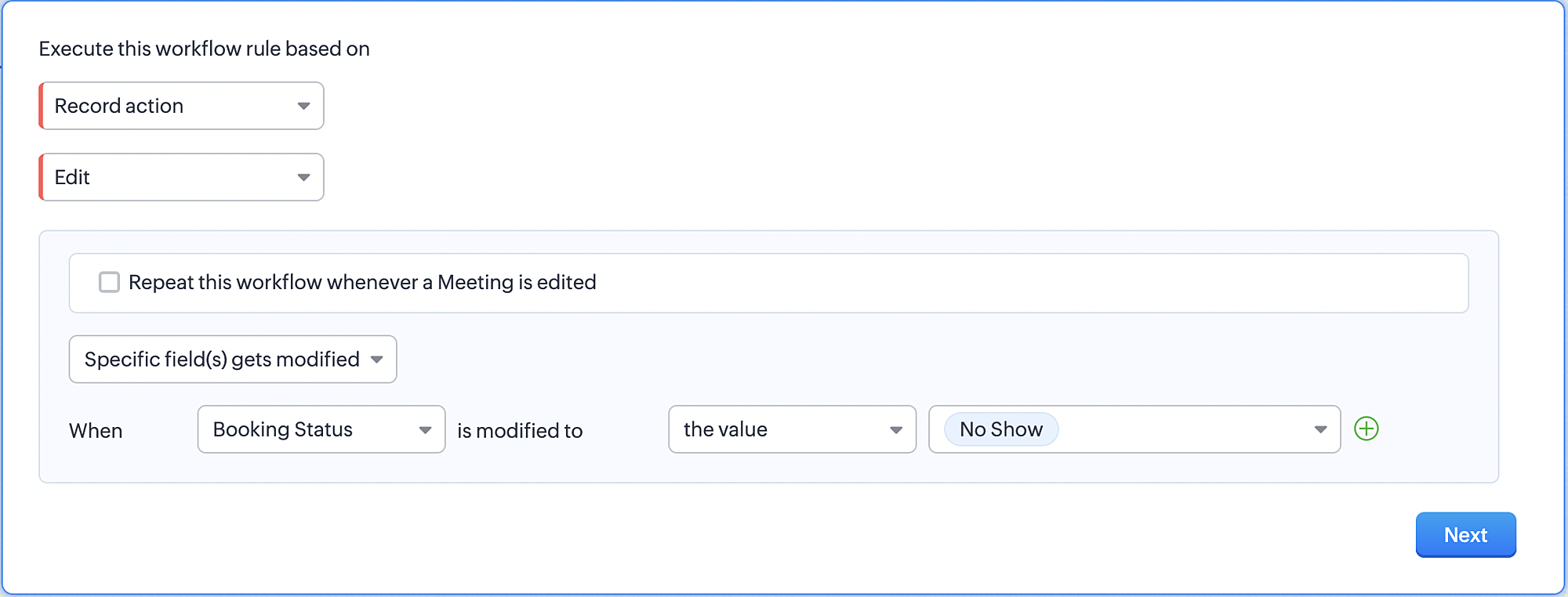
1. Record Action > Edit.

2. Enable the Specific field(s) gets modified and configure it per the screenshot below.
a. This is to ensure that the workflow is executed only when the booking status under the meeting module is
updated to "No Show".
updated to "No Show".
3. Configure condition > All Meetings.
4. Instant Actions > Function > New Function.
5. In the Configure custom function page, select the "no show" function you created from among the functions
users in your organization have created.
users in your organization have created.
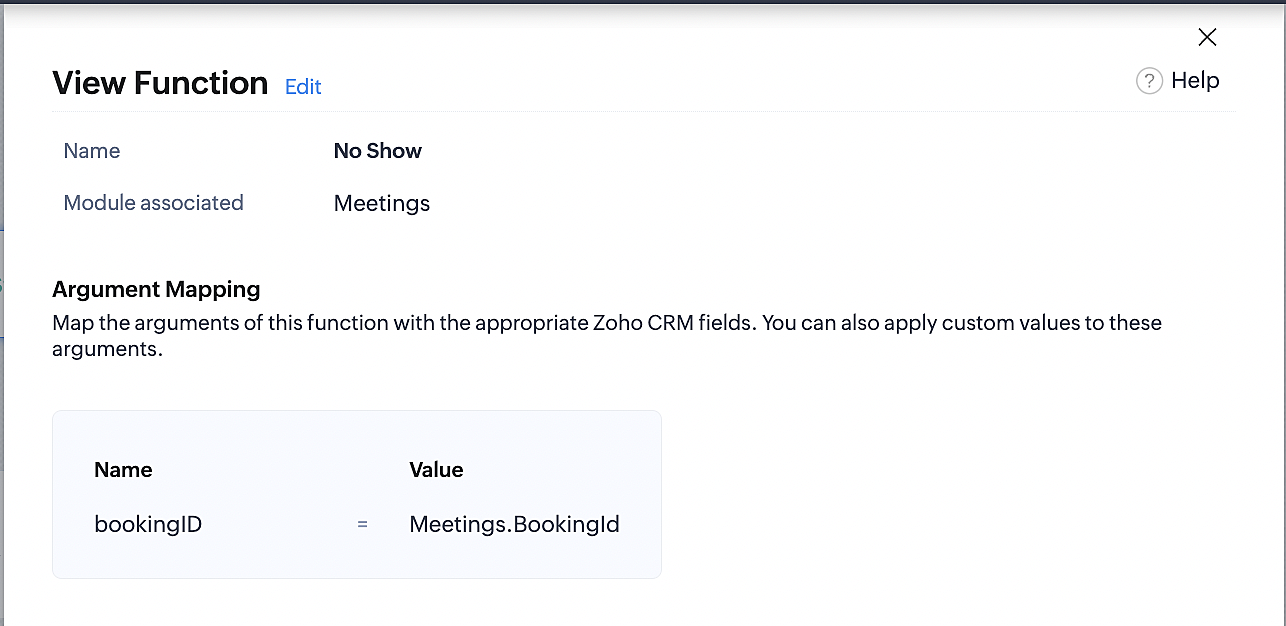
Part 6: Argument mapping:
If you encounter difficulties while navigating through the steps mentioned below, please refer to Part 3 above, where we have provided step-by-step screenshots for clarification.
1. Press # to choose an argument value.
2. Select Meetings under Module and configure the field as "BookingId".
3. Click Save and Associate button.
Reference:
Below is the final flow of the "No Show" booking status workflow:
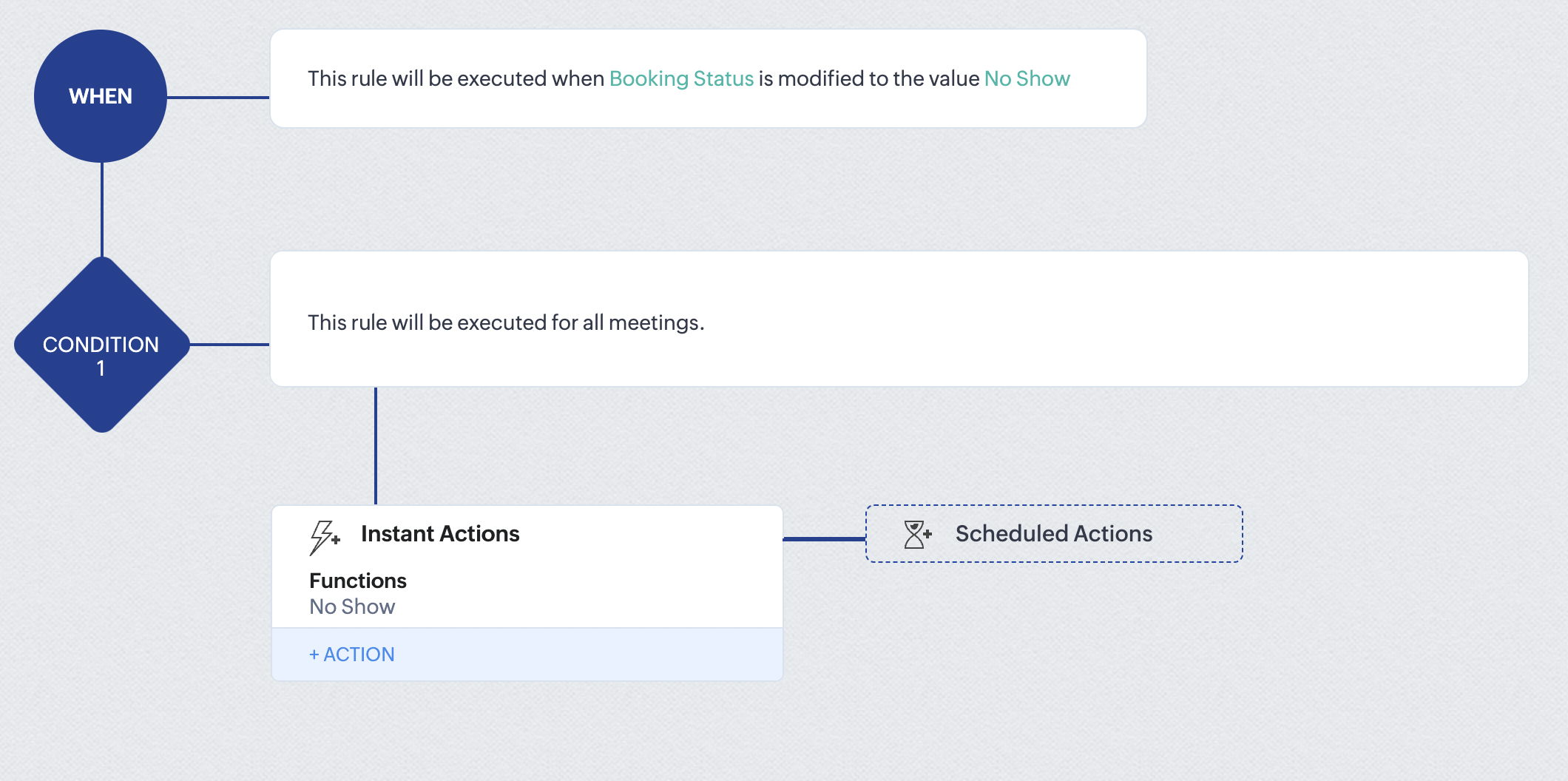
At the end of part 6, we will have created a workflow that automatically executes when the booking status field within the Zoho CRM Meetings module is updated to "No Show." This action will result in the associated bookings for that meeting also being marked as "No Show" in Zoho Bookings.
iii. Creating workflow for updating appointment status as "Completed" in Zoho Bookings when the booking status field of the meeting is marked as completed in Zoho CRM.
Part 7: Creating the rule
1. Go to Setup > Automation > Workflow Rules.
2. In the Workflow Rules page, click Create Rule.

3. Select Meetings under Module and configure rule name and description as required.
Reference:
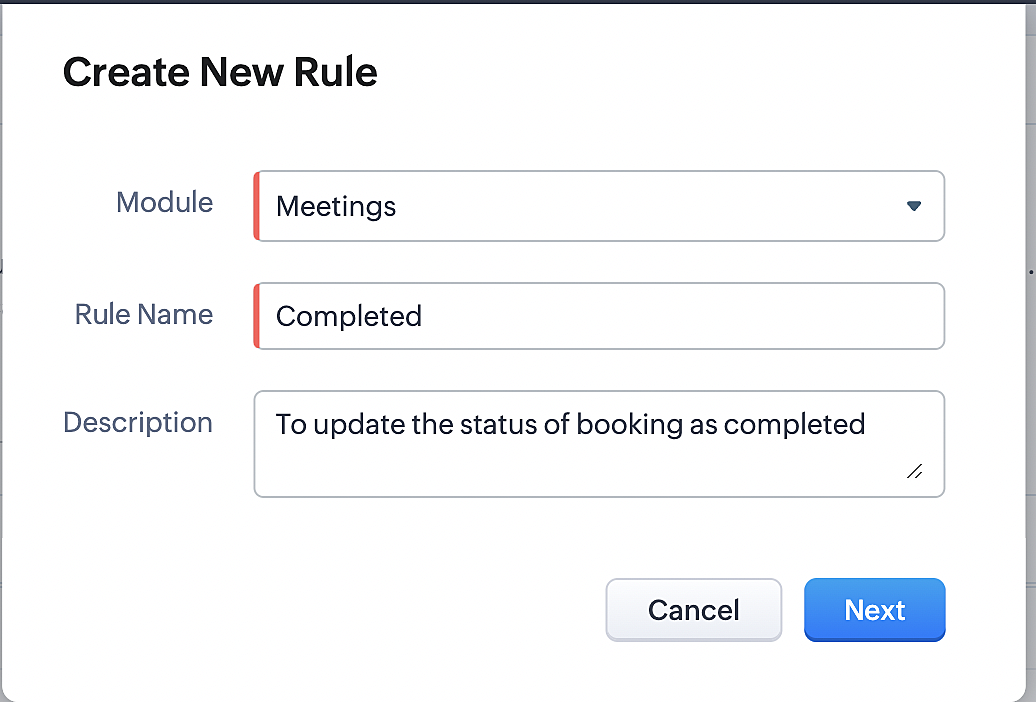
Part 8: Specifying the rule trigger
If you encounter difficulties while navigating through the steps mentioned below, please refer to Part 2 above, where we have provided step-by-step screenshots for clarification.
1. Record Action > Edit.

2. Enable the Specific field(s) gets modified setting and configure it per the screenshot below.
a. This serves to ensure that the workflow is executed only when the booking status under the Meetings module is
updated to "Completed".
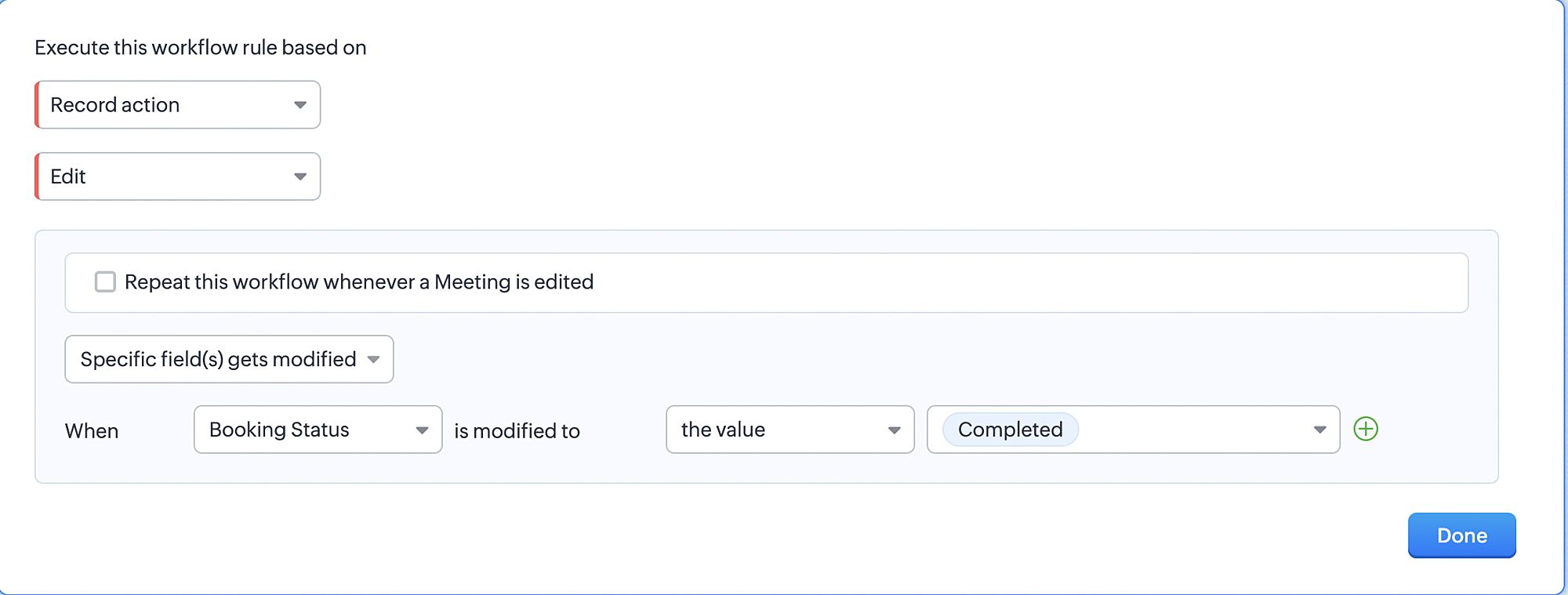
3. Configure condition > All Meetings.
4. Instant Actions > Function > New Function.
5. In the Configure custom function page, select the "completed" function you created from among the functions users
in your organization have created.
Part 9: Argument mapping:
If you encounter difficulties while navigating through the steps mentioned below, please refer to Part 3 above, where we have provided step-by-step screenshots for clarification.
1. Press # to choose an argument value.
2. Select Meetings under Module and configure the field as "BookingId".
3. Click Save and Associate button.
Reference:
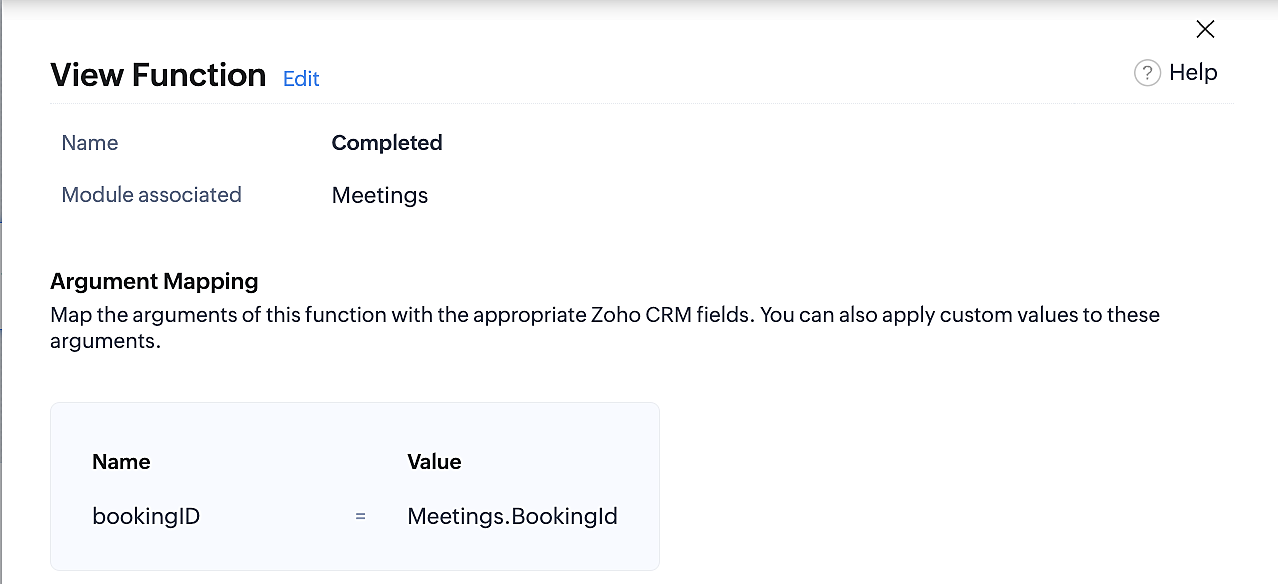
Below is the final flow of the "Completed" booking status workflow:
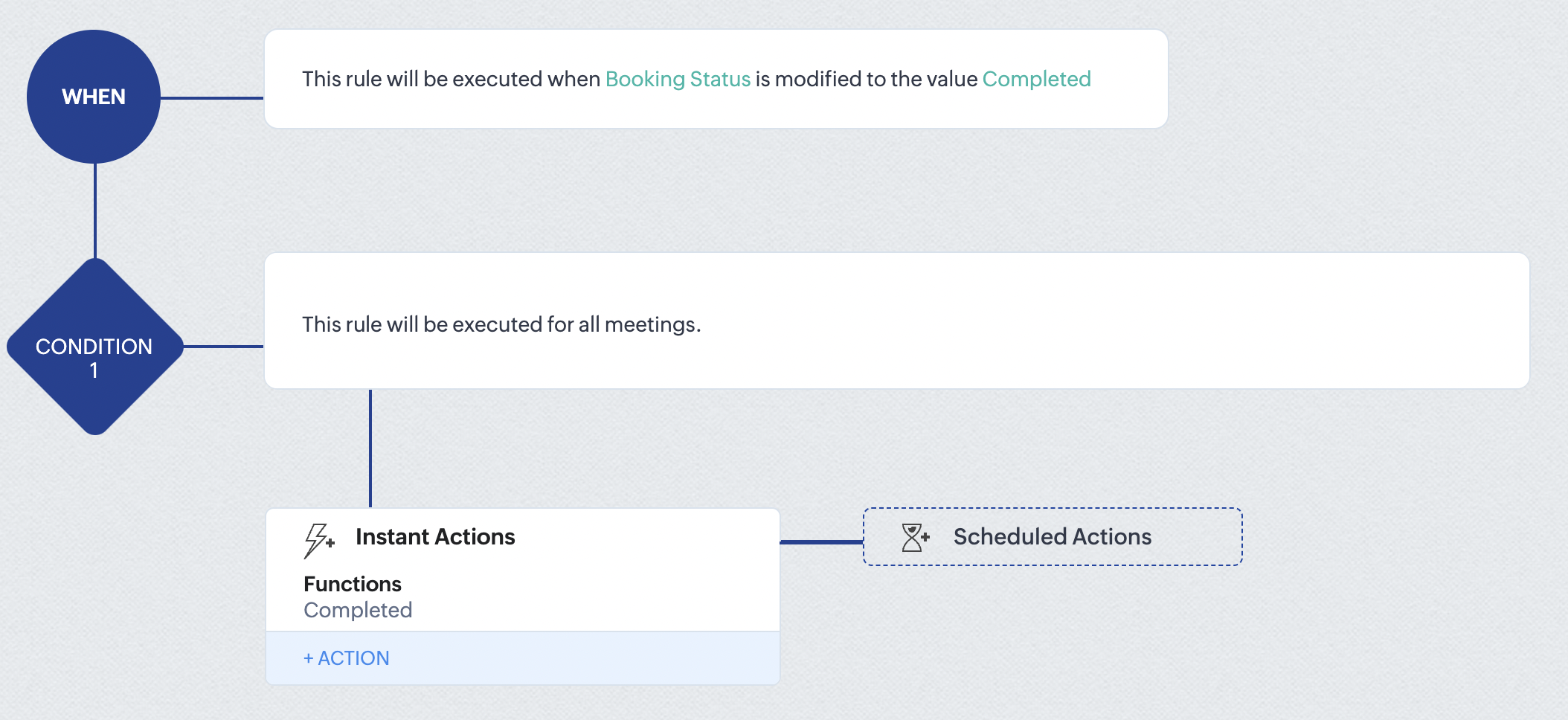
At the end of part 9, we will have created a workflow that is automatically executed when the booking status field within the Zoho CRM Meetings module is updated to "Completed." As a result, the associated bookings for that meeting will also be marked as "Completed" in Zoho Bookings.
Conclusion
We've reached the end of this community post. With the integration mentioned above in place, you'll be able to book, cancel, and update the status of appointments in Zoho Bookings directly from your Zoho CRM application. This will help you effectively manage your appointments in one place. As mentioned above, we've covered the rescheduling action in a separate post, which you can access by clicking on the following link: Reschedule Action
Furthermore, we've outlined a method for automating appointment statuses in detail. You can use this document as a reference to explore the various possibilities that suit your needs.
If you have any questions or need assistance with your configuration, please email us at hello@zohobookings.com or support@zohobookings.com.
Access your files securely from anywhere
New to Zoho Recruit?

Zoho Developer Community
New to Zoho LandingPage?
Zoho LandingPage Resources
New to Zoho Survey?
New to Zoho CRM Plus?
Deliver unforgettable customer experiences
New to Zoho CRM Plus?
Deliver unforgettable customer experiences
New to Zoho Marketing Plus?
Everything you need to run your marketing
New to Zoho Marketing Plus?
Everything you need to run your marketing
New to Bigin?





Topic Participants
Kaushik S
bruce
Ishwarya SG
PrismaNote Support
Sticky Posts
Presenting ABM for Zoho CRM: Expand and retain your customers with precision
Picture this scenario: You're a growing SaaS company ready to launch a powerful business suite, and are looking to gain traction and momentum. But as a business with a tight budget, you know acquiring new customers is slow, expensive, and often deliversGood news! Calendar in Zoho CRM gets a face lift
Dear Customers, We are delighted to unveil the revamped calendar UI in Zoho CRM. With a complete visual overhaul aligned with CRM for Everyone, the calendar now offers a more intuitive and flexible scheduling experience. What’s new? Distinguish activitiesCreate and populate a record in an instant: Introducing zero-shot field prompting to Zia's ICR
A couple of months ago, we upgraded our in-house AI image detection and validation tool, Zia Vision, with intelligent character recognition (ICR). By training Zia with sample images, you could create and enrich CRM records with data extracted from standardIn-person ZUG Meetups for Real Estate Professionals - US Q1 2026
The Real Estate Zoho User Group is going on a multi-city, in-person meetup tour across the US, and we’d love to see you there! These meetups are a great opportunity to: Connect with fellow real estate professionals using Zoho Share challenges and discoverNimble enhancements to WhatsApp for Business integration in Zoho CRM: Enjoy context and clarity in business messaging
Dear Customers, We hope you're well! WhatsApp for business is a renowned business messaging platform that takes your business closer to your customers; it gives your business the power of personalized outreach. Using the WhatsApp for Business integration
New to Zoho TeamInbox?
Zoho TeamInbox Resources
Zoho CRM Plus Resources
Zoho Books Resources
Zoho Subscriptions Resources
Zoho Projects Resources
Zoho Sprints Resources
Qntrl Resources
Zoho Creator Resources
Zoho CRM Resources
Design. Discuss. Deliver.
Zoho Show Resources

Get Started. Write Away!
Writer is a powerful online word processor, designed for collaborative work.
Zoho CRM コンテンツ
-
オンラインヘルプ
-
Webセミナー
-
機能活用動画
-
よくある質問
-
Ebook
-
-
Zoho Campaigns
- Zoho サービスのWebセミナー
その他のサービス コンテンツ
Nederlandse Hulpbronnen

ご検討中の方
Recent Topics
how to add new line in Deluge?
I want to make string with line separation like this: this is the first line second line third line I have tried to use \n <br> or </br> inside the string but I can't achieve the result like the example above. I want to create a task by using custom functionHow to pause a subscription/recurring order ?
Hello, I'm evaluating Zoho Subscriptions for a food co-op where members order a box of produce every week. The software that we're currently using allows members to set up a recurring order. Members can pause the recurring order when they don't want a box for a while and then resume it later. Is it possible to pause/resume a subscription ? Thanks JohnHosted Payment Pages - how to update the address in zoho billing
I"m playing around with the muti-page hosted payment pages which have places for customers to enter their addresses when paying. Why does this not update their address in Zoho Billing after payment? What can I do to make this happen?Tracking training certification expirations
Hi Zoho Community! I'm looking for some input on the best and most efficient ways to track training expirations in Zoho CRM. I have a very specific workflow that I am looking for - my company offers trainings, and the certification expires every 2 toKaizen #164 : Client Credentials
Hello everyone, Welcome back to Kaizen. In this post, we will discuss Client Credentials Flow and when it can be used. What is Client Credentials Flow? According to RFC6749, the official specification for the OAuth 2.0 authorization framework, "The clientCRM Email Template Align Left Instead of Center
Is there a way to make a basic template align to the left instead of center? I know I'm likely forced to the 600px wide with the basic templates but I would REALLY like to set the email to the left instead of center. The basic templates make all the emailsClient Script - "Click' Button on Purchase Order - Specify "To Contact" or "To Supplier"
The send email button is unique on the purchase order in that is has an additional submenu to send email "To Contact" or "To Supplier" It appears that the "click" event in Client script doesn't work correctly, probably because the button click didn'tAdd Client Credentials Flow to Python SDK
The Zoho CRM API supports a client credentials flow to automatically generate ephemeral access tokens, and this can be done programatically. The Python SDK however requires you to provide a grant token, refresh token, or access token when initializingConditional display of fields in Zoho Books Custom modules based on another field
We're currently working with a Custom Module in Zoho Books and have a question about improving data entry efficiency and user experience. Our module includes a "Client Type" dropdown field, which determines the type of information to be collected. EachBackground Image for page in Zoho Creator
Is it possible to use an image as the background in a page in Zoho Creator? I see it is possible to use an image as the background within a panel, but about about the page itself?Zoho IP address blocked by Microsoft
Today I tried to send emails to Outlook email addresses and all of them failed. The log displays like this: Reporting-MTA: dns; mx.zohomail.jp Arrival-Date: Fri, 27 Jun 2025 12:52:30 +0800 Original-Recipient: rfc822; ######@outlook.com Final-Recipient:Request to Enable Full DNS Management Access for My Domain
Hello Zoho Support Team, I have purchased the domain "digimarts365.online" through Zoho, and I need to add A and CNAME records to connect it with my Shopify store. However, DNS Toolkit is not allowing me to edit or add any records. Kindly enable fullBackup flow, see change log / history
Hello, I would like to know, how flows can be saved, copied and tracked. If I work on a Flow with multiple other colleagues we need to see the Changes made by others. Is there a history, changelog or something else? Also we need to backup/import flowsProblème de validation du domaine spelam.ma
Bonjour équipe Zoho, J’ai l’honneur de vous contacter car je rencontre un problème technique au niveau de la validation de mon compte ou de mon domaine spelam.ma. En effet, j’ai déjà acheté le domaine, mais la validation ne semble pas être correctementCritical:- Eneble TDS filing for 26Q from the zoho book
We currently extract TDS data from Zoho Books and manually input it into a separate TDS software to generate the FUV file and file returns. Previously, while using Tally, we benefited from an integrated feature that seamlessly recorded transactions andAdd a way of clearing fields values in Flow actions
It would be great if there was an option to set a field as Null when creating flows. I had an instance today where I just wanted to clear a long integer field in the CRM based on an action in Projects but I had to write a custom function. It would beWriter loads as a blank page.
Hi, I'm new to zoho but I liked the idea of an online wordprocessor that I can use from multiple computers. I signed up a few hours ago while at work where our computers use Linus Ubuntu and a Firefox browser and the Writer came up fine. Now I'm home and using my Windows machine with Norton Firewall and Firefox and the writer opens as a blank page. I've checked my security options in both Firefox & Norton and I have received all the cookies from Zoho. What gives?Ensure Consistent Service Delivery with Comprehensive Job Sheets
We are elated to announce that one of the most requested features is now live: Job Sheets. They are customizable, reusable forms that serve as a checklist for the services that technicians need to carry out and as a tool for data collection. While onJOB Sheet can not send PDF as service rapports and more info needed other topic
Goedendag, - Jullie hebben nu job sheet erin gedaan en dar is echt super goed, enkel kunnen we de werkbon ( JOB sheet) nu niet verzenden als PDF als een service rapport naar onze hoofdaannemer hoe we dat nu doen als bewijs van de levering van het werkPublish a single Sheet stopped working
I used to have a published sheet on my Zoho Spreadsheet and that stopped working. If I want to publish it again, I only get the message that says "Published externally", but that does nothing, and if I change tabs and come back, the sheet gives me theDoes Zoho Contracts support white-labeling?
As the title says, do you provide us white-labeling solution?Constantly getting error 429 "Too Many Requests" despite not sending many requests.
I am currently working on developing an integration between our company's app and our zoho books setup using the api. When testing new functionality, I am very often having the calls fail with Error 429 'You have made too many requests continuously. PleaseNot receiving emails
I'm able to send emails, but I can't receive any. Please helpCapturing knowledge across many channels
We actively use Cliq for client discussions, product management etc. Often there are great answers to questions or key announcements. We have no way to tag or capture them along the way. Pinning only gets us so far. For example, imagine a product channelPrepayment of a sales order
How does everyone handle this common (at least it is common for us!) situation? We require all our orders to be fully prepaid before shipment since we manufacture made to order, custom products. Since ZOHO does not allow a sales order to be prepaid, we are forced to create an invoice at the time an order is placed to allow the customer to pay it. Our sales category is therefore skewed, since the sale was actually booked at the time an order was placed, rather then at the time it is shipped, whichZoho Campaigns Account Keeps Shutting Down
Hey hey, I am completely at a loss here. For months we have been back and forth with Zoho Campaigns Support on Spam Trap hits. Each time they can never provide us with a full list of emails, only 1 here or there. So internally we have setup a integrationNeed a way to run a client script longet than 10 seconds
By The Grace of G-D. Hi, Currently, Client Scripts are Timing out at 10 seconds. We have complex logics that needs more time. Can you add a feature request to increase the timeout?What’s New in 2025 (So Far)
Hey Recruiters, We’ve wrapped up the first half of 2025 with a few focused enhancements in Zoho Recruit—all aimed at simplifying your day-to-day recruitment tasks. Here’s a quick video that walks you through what’s new so far this year: Here’s a briefMulti-Department Approval for a Single Bill in Zoho Books
Hello everyone, Hope you're all doing well. I’d like to ask if anyone has found a good workaround for the following scenario in Zoho Books: Let’s say a corporate credit card bill or vendor invoice covers multiple purchases across different projects orZoho Landing Page "Something went wrong" Error
Hello, Every time I try to create a new landing page, I receive a "Something went wrong" error with no explanation. I cannot create any new pages, which means we cannot use this application. I did create one landing page successfully over a month ago,Composite items are not seen in zoho commerce
Composite items are not seen in zoho commerce. Are you scheduled to fix this error?not able to access Zoho from home WIFI
for some reasone i am not able to access Zoho on my laptop or my iphone while i am connected to my home Wifi, i am able to access these sites both on laptop as well as Iphone and associated apps on any other Wifi as well as when I am on my 4G connectionZoho Books for Service Enterproses
I would like to know how to use Zoho Books for services such as car rental, travel agency, and hotel services. I notice that Zoho Books is good for goods, but for services, it's very difficult to track the profit or loss on each invoice. I need to captureEmail Relay in Zoho Books
I have set up the email relay in Zoho books and the SMTP test was successful. However, I can't figure out how to sent the POs and invoices via the relay so the copy of the message shows in google workspace sent mail. Any guidance is appreciatedE-invoicing/Facturacion Electronica in Peru, SUNAT authority
Hi Zoho, you are promoting your product very actively in south america as well as in Peru, but since few years there is an obligation for e-invoicing, transmitting information directly to peruvian tax authority SUNAT. Do you have any solution for this?Project Accounting
Hello Zoho, Can we also bring project accounting in Zohobooks as a ne feature in upcoming developments? This will be helpful for specific business and industries. ThanksAccounts Payable
hi there i am using the free version to trial the software. I am working on the acrual basis. When i received a vendor invoice, it gets keyed into the systems as an unpaid invoice as the payment to from the vendor is 14 days. the unpaid invoice doesApproval Processes "Record Modification"
I didn't find any information about the "Record Modification" item in Zoho articles and Tutorials. I see that this item didn't exist a year ago. Help understand how it works, I tested it and didn't see any difference between "all fields" and "no fieHow do i add another purchase information heading?
i would like to add another section right here to enter an amount which then link directly to the cost of goods sold accountHelp with Zoho CRM API Integration in C# WinForms (Token Generation Issue)
Hi everyone, I need your help with integrating the Zoho CRM API into a C# desktop application. My goal is to build a WinForms app in Visual Studio that does the following: Fetch the full list of client projects (module: Deals) and display them in a searchableNext Page