Approve or deny appointments based on criteria

Approve or deny appointments based on criteria

Hey, community members!


Have you ever wondered how to automatically approve or deny appointments?


While we're still working on building that feature, we've got an alternative method to cancel appointments if they don't meet your specific criteria.

Let me share a recent client request as an example: Our customer has two types of services that are similar: One is for grown-ups and the other is for children. However, often adults mistakenly book these services without realizing that they are not intended for them. This results in unnecessary confusion for our customers, as they have to contact those who accidentally booked appointments and reschedule them, causing a significant amount of administrative work.

Here's how we helped our customer: We added a criteria field to the booking page (e.g., "What is your age?") Then, we automatically cancel appointments where the input age is greater than 15 and we'll even notify the grown-up client that their appointment has been canceled and guide them to book the appropriate service.


To make this happen, you'll need Zoho Bookings and the Zoho Flow Standard Plan.


Here's a simplified breakdown of the process in three steps:  

  • Zoho Bookings will collect the criteria data and pass it to Zoho Flow.

  • In Zoho Flow, we'll configure a workflow to verify the validity of the data.

  • If the data is invalid, Zoho Flow will trigger a cancellation request to Zoho Bookings, resulting in the appointment being canceled.


Don't forget these additional steps: Edit the booking confirmation page and notification email to proactively inform customers that their booking maybe subject to cancellation.

Let's dive into the details together!!!

STEP 1: TO BE FOLLOWED IN ZOHO BOOKINGS APPLICATION:


1. Create a mandatory field in Zoho Bookings Forms.

     A. For service booking form: Add Field

     B. For workspace booking form: Add Field


NOTE: Workspace-level settings apply to group and resource bookings, while for One-on-One bookings, you will need to make the necessary changes within the specific One-on-One service settings.

At the end of step 1, let's say we have created a mandatory field called "What is your age?". Now the customers on the booking page will have to provide their age to book an appointment.

Additional Step:

Canceling an appointment without the customer's knowledge might affect the customer experience. Therefore, we should acknowledge the customers in every possible way.


Here are some tips:


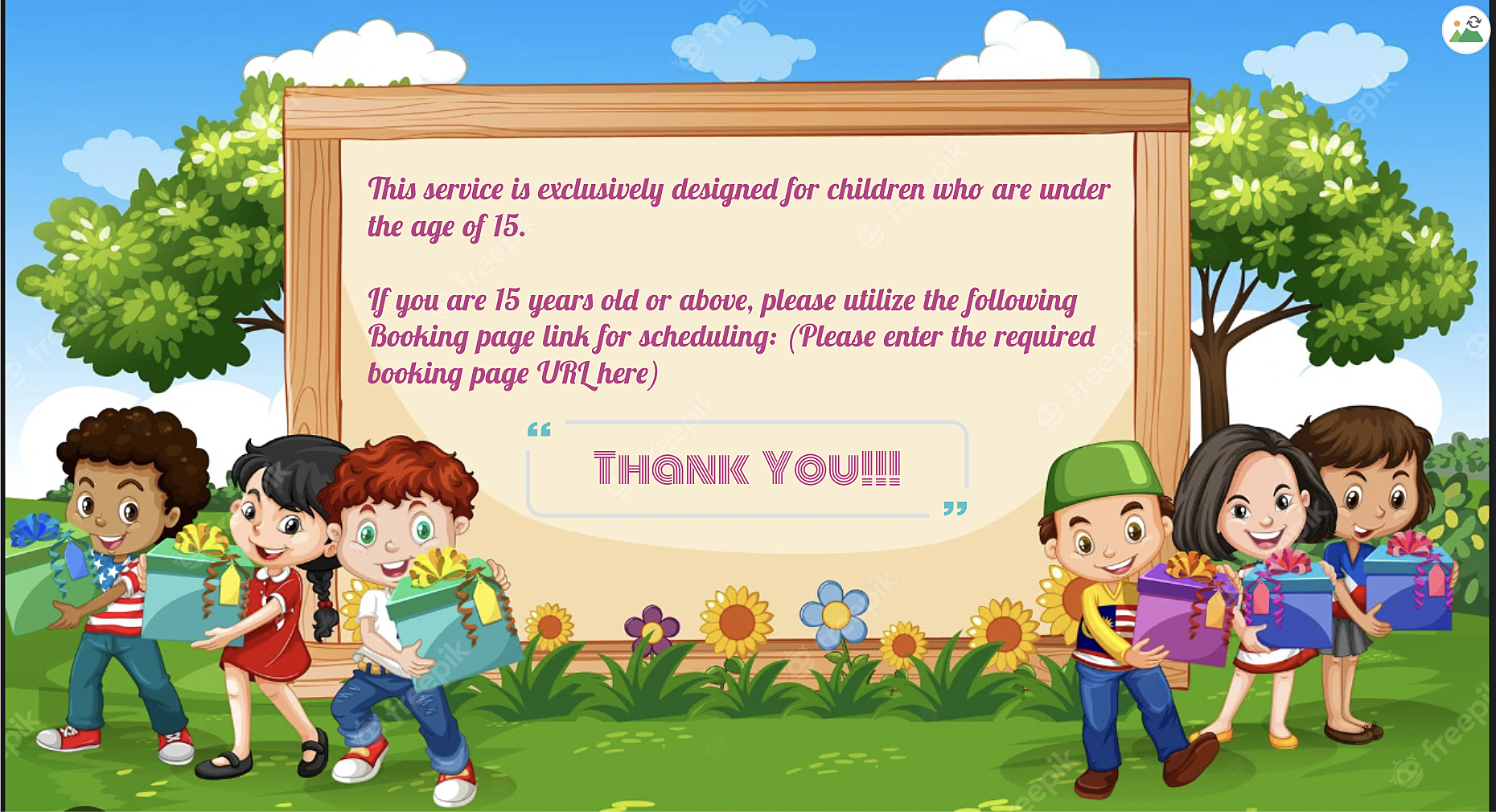
A. We can use the 'Custom Redirection' feature to redirect customers to a custom page after they book an appointment, instead of the default booking confirmation page.

Here is how to change booking confirmation page: Booking Confirmation Page


Here is the sample custom page:


B. By using the "
Terms and Conditions" check box, you can include the following message in the box: "This service is specifically designed for children under the age of 15. Bookings made by individuals above the age of 15 may be subject to cancellation". Customers will then need to check the box to confirm their agreement before completing their bookings, ensuring that they are aware of this policy.

More details: 

STEP 2: TO BE FOLLOWED IN ZOHO FLOW APPLICATION

A: Log in and search the template

  • Sign in to Zoho Flow application and create a new flow using the create flow option.

  • Select App > search for Zoho Bookings in the search bar.

  • Select the "Appointment Booked" trigger.

  • Select "Connection" and "Variable" > Done.


How to create a flow in Zoho Flow: Create a flow from scratch

How to create connection in Zoho Flow application: Create a Connection


At the end of step A, we have created a new flow including Zoho Bookings application.


B: Set Variable

  • In the Logic option > Flow Control > Set Variable > Edit the variable

  • Name the variable and in the value provide the input in following format "${trigger.customer_more_info.get("What is your age?")} " > Click on done.
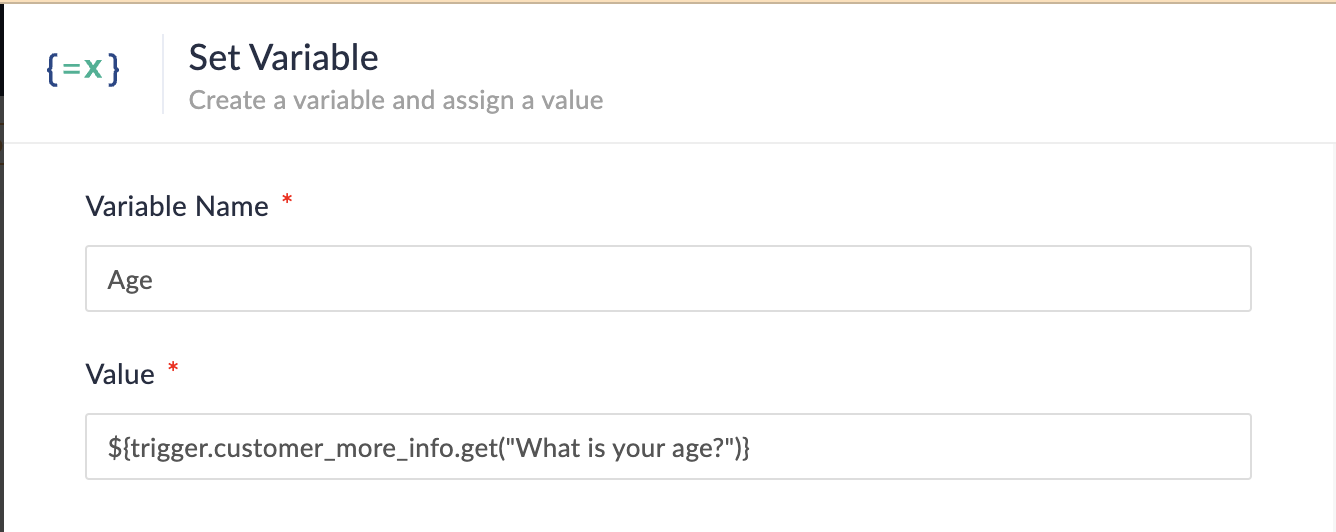


NOTE: In Step 1, we created a multi-line field named "What is your age?" If you have instead created a single-line field without spaces (e.g., "Age?") on the booking page, the format for the field would be as follows:

  • Single line field format: ${trigger.customer_more_info.fieldname}

  • Multiple line field format: ${trigger.customer_more_info.get("fieldname")}

At the end of step B, we are fetching the output of the "Age" field from the Zoho Bookings form.


C: Create Condition

  • In the Logic option > Flow Control > Decision.

  • In the condition 1, configure as Set Variable(Age) > is not null. 
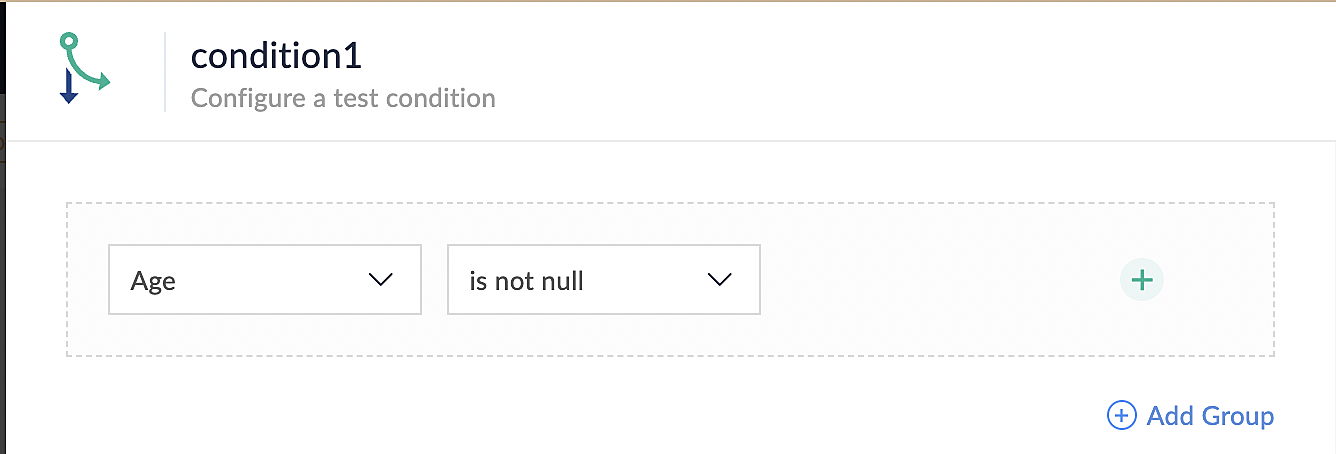

At the end of step C, we set up conditions to ensure that all bookings made through the Zoho Bookings application meet the requirements specified in the above conditions.


D: Custom Function

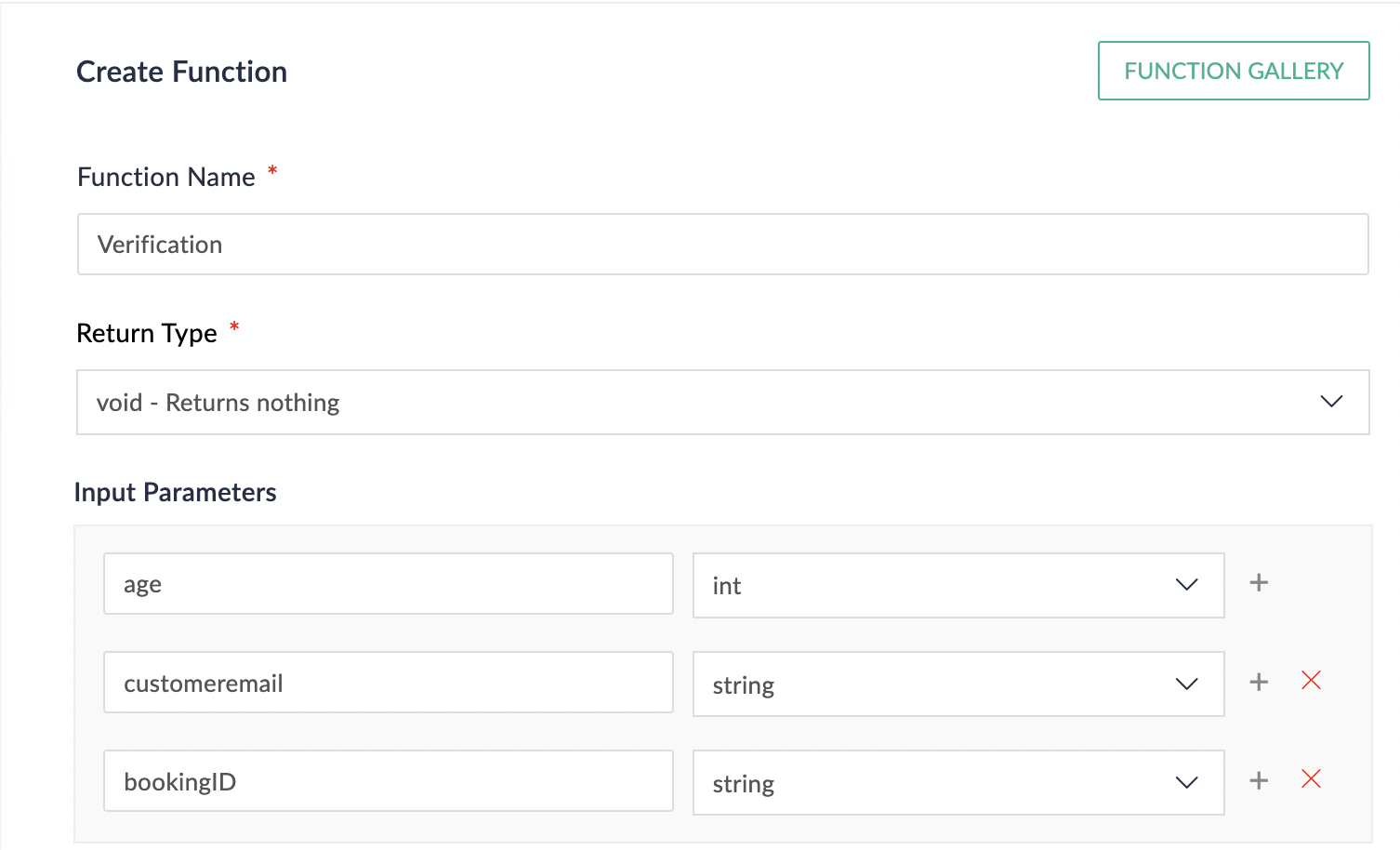
  • In the Logic option > Custom Functions > Create Function.

  • Configure function name, return type and input parameter.

  • Details on custom function: Custom Function
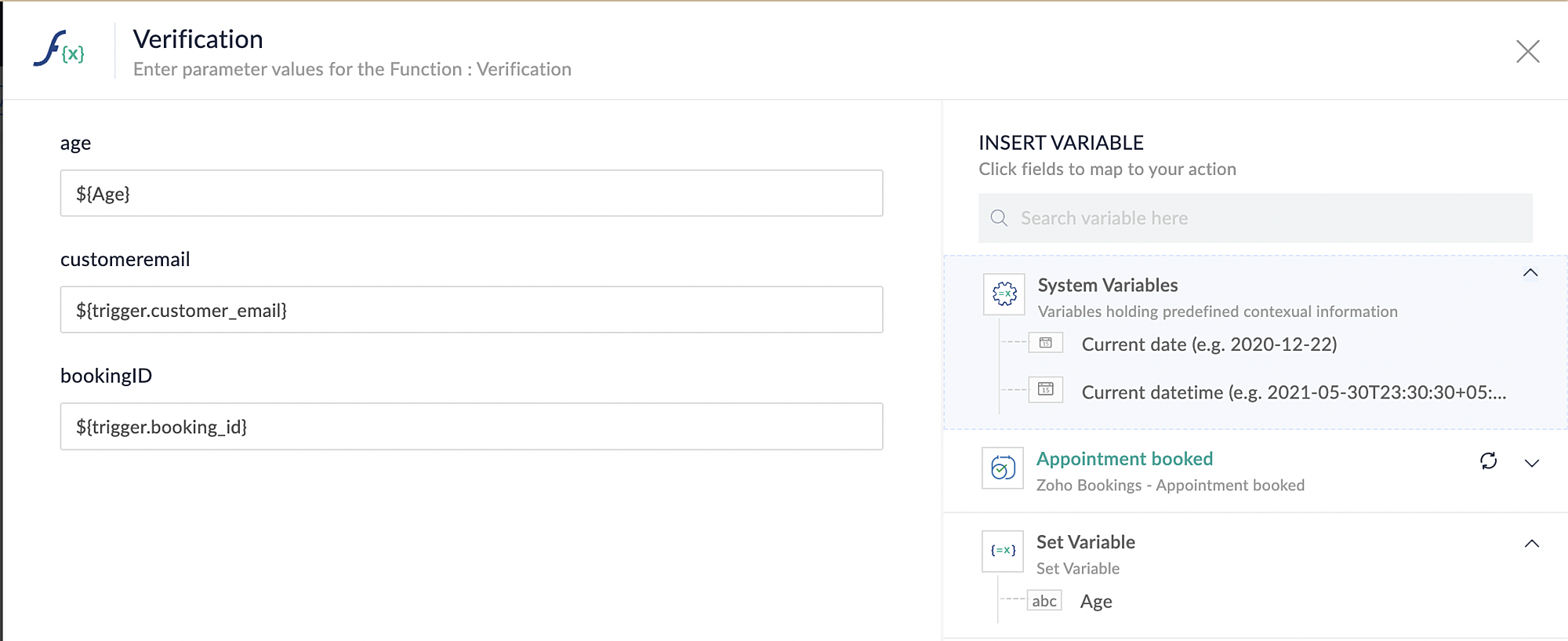
Reference below: 


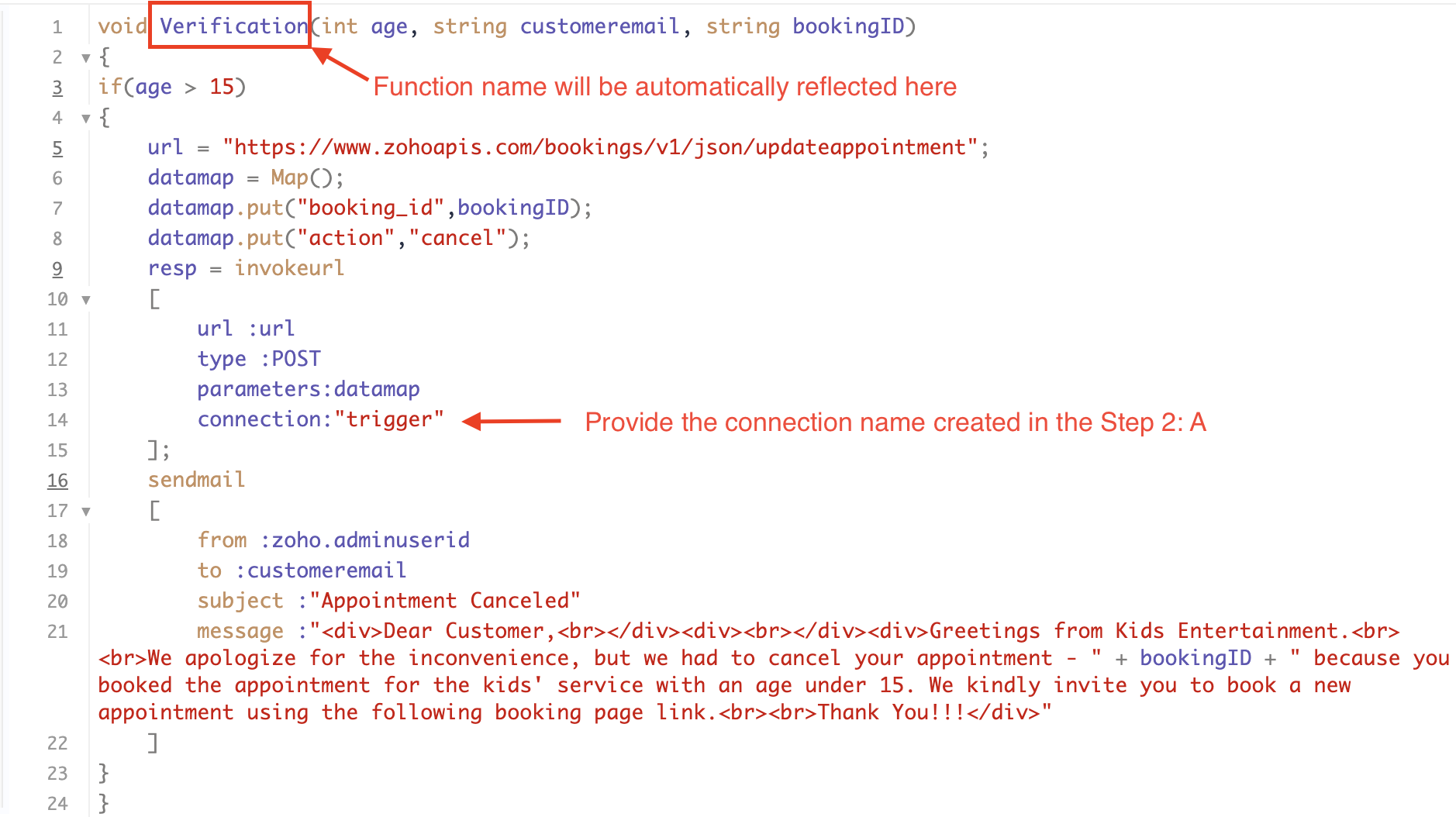
Below is the sample code which you can have for reference. You can configure and modify the code according to your specific requirements.


Code Explanation:


Line 1: To pass the input data below to the code

  • Age: This is used to verify and analyze the customer's input.

  • Customer Email: This is required to send an email notification to the customer in the event of an appointment cancellation.

  • Booking ID: This serves the purpose of identifying the specific booking that needs to be canceled using its unique booking ID.

Line 3: We are implementing an "if condition" to verify the customer's input. In this case, we will check if the entered age is greater than 15. If it meets this condition, the following loop will be executed.

Line 5 - 8: To update appointments, we are utilizing the Zoho Bookings API. Within the update appointment API, there are two mandatory fields that need to be included: BookingID and action (completed/cancel/noshow). In cases where the criteria are not met and an appointment needs to be canceled, we will pass the action field as "cancel".

Line 9 - 14: We are using invokeURL task for API calls. To know more about invokeURL task please refer to the following document: InvokeURL task for API calls

Line 16 - 21: We utilize the sendmail task to send an email to the customer when their appointment is canceled. Additionally, the Zoho Bookings application automatically sends a cancellation email to the customer in such cases. Therefore, you have the option to either use the sendmail task or rely on the default notification system to inform the customer about the cancellation of their booking.

More details on send mail task: Send Mail Task

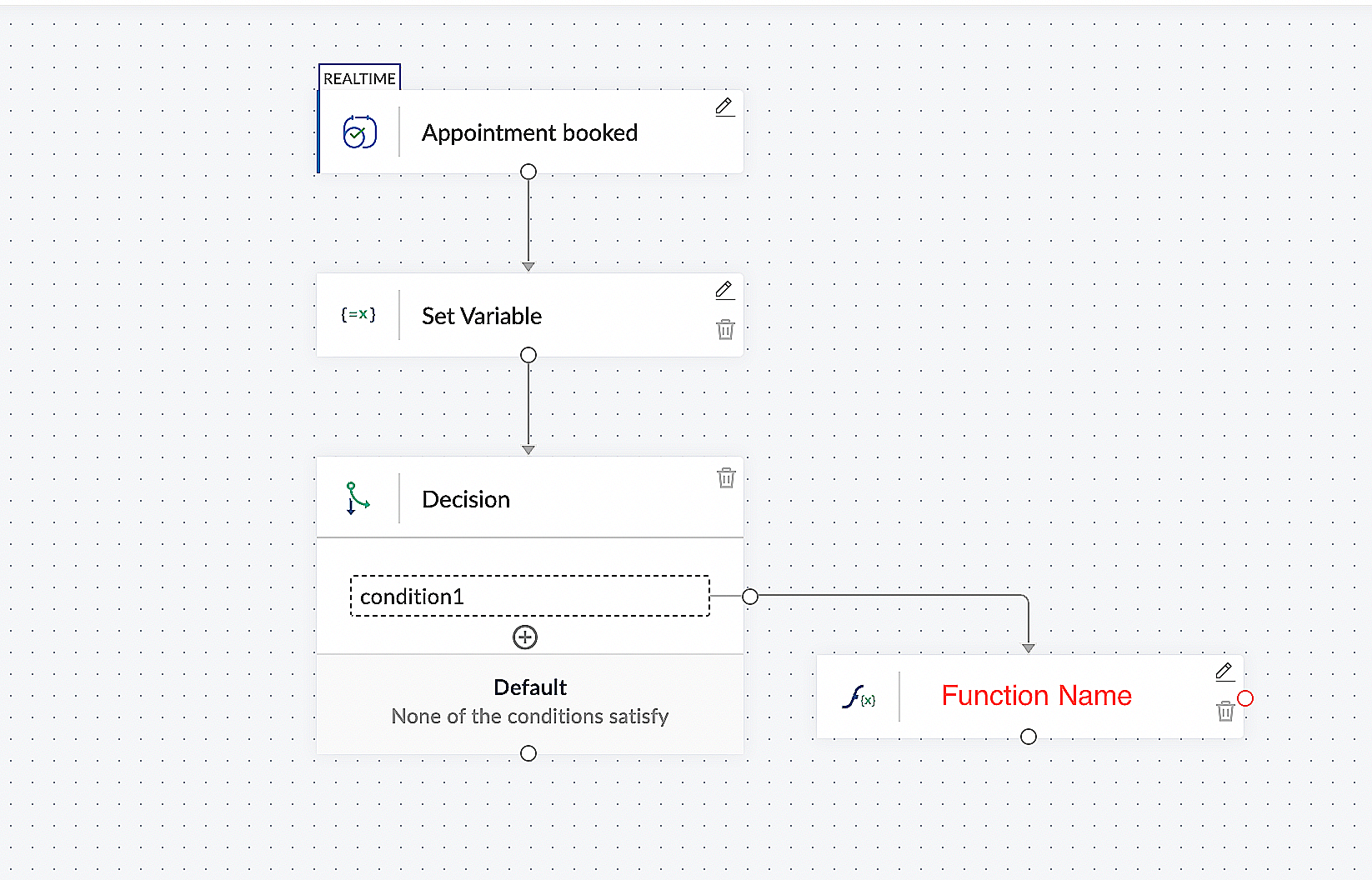
This is what the final flow will look like:


Here is the demo video:  In this demo video, we have showcased the behaviour of our setup configuration for different inputs from customers. One input satisfies the configured condition, while the other input does not meet the configured condition.


CONCLUSION:


In the preceding discussion, we have outlined a method for automatic appointment cancellation. You can use this document as a reference to explore the various possibilities that suit your needs.

In the upcoming posts, we will explore various scenarios and methods for updating the appointment status. Furthermore, we have covered the process of canceling an appointment after it has been booked.If you are wondering whether there is a way to verify customer inputs before booking an appointment, the answer is yes. We will delve into that topic in the next series.

As the above configuration may differ based on individual business requirements, we have provided a generic example for reference. If you have any questions or need assistance with configuration to align with your specific business needs, please email us at hello@zohobookings.com or support@zohobookings.com.

    Access your files securely from anywhere


                            Zoho Developer Community


                                                  • Desk Community Learning Series


                                                  • Digest


                                                  • Functions


                                                  • Meetups


                                                  • Kbase


                                                  • Resources


                                                  • Glossary


                                                  • Desk Marketplace


                                                  • MVP Corner


                                                  • Word of the Day


                                                  • Ask the Experts


                                                            • Sticky Posts

                                                            • Approve or deny appointments based on criteria

                                                              Hey, community members! Have you ever wondered how to automatically approve or deny appointments? While we're still working on building that feature, we've got an alternative method to cancel appointments if they don't meet your specific criteria. Let


                                                            Manage your brands on social media


                                                                  Zoho TeamInbox Resources


                                                                      Zoho CRM Plus Resources

                                                                        Zoho Books Resources


                                                                          Zoho Subscriptions Resources

                                                                            Zoho Projects Resources


                                                                              Zoho Sprints Resources


                                                                                Qntrl Resources


                                                                                  Zoho Creator Resources


                                                                                      Zoho CRM Resources

                                                                                      • CRM Community Learning Series

                                                                                        CRM Community Learning Series


                                                                                      • Kaizen

                                                                                        Kaizen

                                                                                      • Functions

                                                                                        Functions

                                                                                      • Meetups

                                                                                        Meetups

                                                                                      • Kbase

                                                                                        Kbase

                                                                                      • Resources

                                                                                        Resources

                                                                                      • Digest

                                                                                        Digest

                                                                                      • CRM Marketplace

                                                                                        CRM Marketplace

                                                                                      • MVP Corner

                                                                                        MVP Corner


                                                                                          Design. Discuss. Deliver.

                                                                                          Create visually engaging stories with Zoho Show.

                                                                                          Get Started Now


                                                                                            Zoho Show Resources

                                                                                              Zoho Writer

                                                                                              Get Started. Write Away!

                                                                                              Writer is a powerful online word processor, designed for collaborative work.

                                                                                                Zoho CRM コンテンツ


                                                                                                  Nederlandse Hulpbronnen


                                                                                                      ご検討中の方


                                                                                                              • Recent Topics

                                                                                                              • Download Google Drive Shared Image/File Using Deluge – Complete Guide

                                                                                                                Download Google Drive Shared Image/File Using Deluge – Complete Guide When working with Google Drive share links inside Deluge, many developers face a common challenge: 👉 How can we download a Google Drive file directly using Deluge? This article explains
                                                                                                              • How to update Acuity appointment fields from Zoho Flow?

                                                                                                                Hi, I need help with Zoho Flow → Acuity Scheduling integration. What I’m doing Appointment created in Acuity Zoho Flow creates a Zoho Calendar event I want to send the Zoho Calendar Event UID back into Acuity (into a custom form field) This is so that
                                                                                                              • No horizontal scroll bar in reports

                                                                                                                Hi support team, I created a pivot table report which contains many columns (in my application about 15). The problem is that there is no bottom scroll bar to display colums that does not fit within the browser page. I saw that it was possible to resize colums, but colums sizes are not saved within the session. So could you add scroll bar, and eventually make colums sizes stored in the user session ? Best regards,
                                                                                                              • Zoho Map integration tasks have changed - you need to "Locate all instances of Zoho Map integration tasks in your Deluge scripts by searching for the v1 marker... before 16 January 2026"

                                                                                                                Details of an issue specific to Zoho CRM + Deluge Functions (originally posted in this forum) can be found here: https://help.zoho.com/portal/en/community/topic/zoho-map-integration-tasks-have-changed-you-need-to-locate-all-instances-of-zoho-map-integration-tasks-in-your-deluge-scripts-by-searching-for-the-v1-marker
                                                                                                              • filter broke my data

                                                                                                                I uploaded a file recently from Sheets and it has top 2 rows frozen, with table headers in second row and each one is filterable. somehow my first 2 columns became unfiltered and no matter what I do I cannot reapply the filter?? also didn't realize they
                                                                                                              • Request to remove domain "greentechcoatings.vn" from previous Zoho account

                                                                                                                Hello Zoho Support, I would like to register the domain "greentechcoatings.vn" in my new Zoho Mail account, but I receive the message "This domain is already associated with another account". Please remove the domain from any previous/unknown account
                                                                                                              • Trigger actions in third-party apps using Zoho Flow

                                                                                                                Greetings, I hope you're all doing well. We're excited to share an enhancement to Bigin's workflow capabilities. Zoho Flow Actions are now available in Bigin, enabling you to automate tasks across third-party applications directly from your workflow and
                                                                                                              • Enroll, Script, Win: Hackathon 2025!

                                                                                                                Hello CRM Developers! Are you ready to create some magic with Client Script, Widgets and Functions in Zoho CRM? Let’s make Hackathon 2025 an unforgettable adventure! The Zoho Developer Community Hackathon 2025 is here, and it’s your time to shine! REGISTER
                                                                                                              • Zoho Help Desk - Not receiving emails

                                                                                                                Hello… I am on your trial version of help desk… and I am having trouble getting emails from Zoho Help Desk to my MS Outlook Exchange Server… So when a customer sends ticket request I am not getting an email with a notification? I have read your articles
                                                                                                              • Almost all Flows are being queued

                                                                                                                A few days ago I saw one of my Flows status was Queued. This was the first time this had ever happened. Now, almost every Flow that triggers is Queued for at least a few minutes. If I re-trigger the Flow (which causes separate problems) they sometimes
                                                                                                              • Employment Contract / HRMS Documents - Zoho People

                                                                                                                How do I create customized HR documents for disbursal from Zoho People ? Example, say offer letters ? appointment letters ? Memos ? We want to be able to preset these in one or ther other form and issue them to employees who are in Zoho People.
                                                                                                              • Live webinar: Craft and deliver impactful slides with Show’s desktop apps

                                                                                                                If you love the comfort of working on your desktop and want a setup that keeps you focused and uninterrupted, this session is made for you. We’re excited to invite you to our upcoming live webinar: "Craft and deliver impactful slides with Show's desktop
                                                                                                              • Enhancements to Bigin's forms

                                                                                                                Greetings, I hope all of you are doing well. We're happy to announce a few recent enhancements we've made to Bigin's forms. We'll go over each one in detail. Merge field support in auto-filled forms The auto-fill option in Bigin's forms lets you predefine
                                                                                                              • Table dimensions

                                                                                                                I try changing the dimensions of the table on my computer but it doesn't change. Do I have to be a premium member or does it only work on the app?
                                                                                                              • Direct link to Record Summary

                                                                                                                Hi everyone, In one of my reports, I have built a Record Summary template to display the details of one record. I would like to be able to link directly to this Record Summary once I submit a new record, without having to go to the list of records first and click on View. Is there a possibility to do so ?  Should I use the URL by passing some parameters ? Thank you very much for your help ! Guillaume
                                                                                                              • Verifying Zoho Mail Functionality After Switching DNS from Cloudflare to Hosting Provider

                                                                                                                I initially configured my domain's (https://roblaxmod.com/) email with Zoho Mail while using Cloudflare to manage my DNS records (MX, SPF, etc.). All services were working correctly. Recently, I have removed my site from Cloudflare and switched my domain's
                                                                                                              • API Support for Creating Invoices with Batch-Tracked Items

                                                                                                                Hi Zoho Community, I am working on an integration where we create invoices in ERPNext and push them to Zoho Books. I need to send batch-tracked items (batch numbers) when creating invoices. I could not find any reference in the Zoho Books API documentation.
                                                                                                              • Amendment effective date

                                                                                                                Hi everyone, I noticed that the amendment effective date mentionned in my amendment is not right. Indeed, when a contract is amended several times, it states the previous amendment and their effective date. However, the effective date stated is always
                                                                                                              • STOCK history in zohosheets

                                                                                                                is it possible to get historical stock value using stock function in zoho sheets? i could not see from and to period in the helper document.
                                                                                                              • Auto sync Photo storage

                                                                                                                Hello I am new to Zoho Workdrive and was wondering if the is a way of automatically syncing photos on my Android phone to my workdrive as want to move away from Google? Thanks
                                                                                                              • Agent password reset

                                                                                                                Hi Zoho support, I would like to ask if there is a way the admin can reset a password of an agent? Regards
                                                                                                              • Can receive but not send messages in Zoho Mail

                                                                                                                Hello! I was able to configure my email client successfully in that I can receive messages just fine. However, when I send messages out, they seem to go out fine (I don't receive any errors or anything), but the recipient does NOT receive those messages.
                                                                                                              • Mail is sent twice!

                                                                                                                Been using Zoho for a while now. Installed Zoho for someone else and some weird things are happening. Mails are being sent twice. He is using Thunderbird as an email client. I already read about email being duplicated in the sent folder. But in my case
                                                                                                              • Can't login IMAP suddenly

                                                                                                                Since this evening I'm getting the error: You are yet to enable IMAP for your account. Please contact your administrator... IMAP always been enabled in my account and was workign fine for the past 7 years. Already tried turning IMAP off and on again.
                                                                                                              • Sending of username did not succeed: Mail server pop.zoho.com responded: User already specified

                                                                                                                I am having issues receiving emails from Zoho in Thunderbird. I am getting the above error. The first error tells me Authentication failed, and prompts me to enter in my password. Then I get the above error. I can receive emails when I log in online to
                                                                                                              • Bug tracking

                                                                                                                Hi, does anyone know how to track errors during picking or packing? This way I can keep track and see how to improve and prevent errors in this area.
                                                                                                              • Migration of corporate mail environment from Yandex 360 to Zoho mail

                                                                                                                I have to migrate a corporate mail environment with an existing domain from Yandex 360 to Zoho mail. It is vital to migrate all users with all the data. I have read the article on this topic using MacMister Email Backup Software just now and have some
                                                                                                              • I'm unable to send mail pthrough Zoho SMTP programmatically

                                                                                                                This has been working for years, but today it's been offline all day long. I see nothing anywhere on your site about this. I'm not the only one experiencing this. Downdetector has a spike of reports today
                                                                                                              • Can no longer send email via Django site

                                                                                                                This was working fine as of 11/7/25. Now I am unable to send user verification emails from a Django site on a AWS lightsail sever. When a user attempts to register the following error occurs. I have also attempted to send a test email via the shell and
                                                                                                              • unable to send email but able to receive email

                                                                                                                my email address is info@securityforceservices.ca
                                                                                                              • Login to server failing

                                                                                                                When trying to retrieve my mail, I am getting this error message -- Login to server pop.zoho.com with username (my email address) failed. It gives me the option to retry, enter password, or cancel. Then I get this message -- Sending of username did not
                                                                                                              • Configuration failed: 200 response not received for POST request.

                                                                                                                Hello, I am trying to set up a webhook to connect with an Salesforce but I receive the following error from Zoho: Configuration failed: 200 response not received for POST request I have tried testing it on webhook.site as well and receive the same error
                                                                                                              • Zoho Migration Assistant not working

                                                                                                                Hello, I am trying to use you Migration assistant to migrate emails from Rediff to Zoho. I am stuck in the first step. After downloading the migration tool, I copied the link to verify user credentials, however, after pasting the link in the browser,
                                                                                                              • Paid Support Plans with Automated Billing

                                                                                                                We (like many others, I'm sure) are designing or have paid support plans. Our design involves a given number of support hours in each plan. Here are my questions: 1) Are there any plans to add time-based plans in the Zoho Desk Support Plans feature? The
                                                                                                              • Scheduled Reports - Do not send empty report

                                                                                                                Hello, We are intensively using reports in the CRM, especially for sales managers.  When data is empty, they still receive an email. Can you add an option to avoid sending the report when data is empty?
                                                                                                              • Contacts Missing — PeopleSync/Zoho Mail

                                                                                                                English: In our company we use ManageEngine Mobile Device Manager (MDM), Free edition, to manage corporate mobile devices. Our usage policy does not allow personal Google accounts on these devices; therefore, Google account sync is blocked through MDM.
                                                                                                              • Best way to integrate Zoho with mobile app for managing customer requests with real-time notifications?

                                                                                                                Hello, I'm building a solution for a travel company where customers submit requests through a website, and the sales team manages these requests through a mobile app. The Requirement: Customers fill a form on the website (name, email, number of children,
                                                                                                              • Kaizen #57 - Mass Update API in Zoho CRM

                                                                                                                Hello everyone! Welcome back to yet another post in the Kaizen series. This week, we will discuss the Mass Update API in Zoho CRM. In this post, we will cover the following: 1. Introduction 2. Mass Update Records API  3. Schedule Update and Get Status
                                                                                                              • Getting Attachments in Zoho Desk via API

                                                                                                                Is there a way to get attachments into Zoho Desk via an API?      We have a process by which a zoho survey gets sent to the user as a link in a notification.    The survey has several upload fields where they can upload pdf documents.    I've created
                                                                                                              • Multiple currencies - doesn’t seem to work for site visitors / customers

                                                                                                                I am trying to understand how the multiple currency feature works from the perspective of the website visitor who is shopping on my Zoho Commerce site. My site’s base currency is US Dollars (USD) but my store is for customers in Costa Rica and I would
                                                                                                              • Next Page