Did you know?#3: How to target and run your experiment based on custom audience segments in PageSense
Whatever kind of online business you're running, defining your target audience is the key factor to delivering relevant messages and further positioning your brand in the industry. Most marketing efforts revolve around this basic strategy of segmenting people who have similar needs, values, or characteristics and later targeting them with products or services meant to appeal to these ideal audience groups.
Luckily, the same concept applies to website testing and optimization processes. By choosing a target audience for your experiment, you get to decide whom you should focus on and where you should run your experiments on your site. This method of audience targeting helps you reach the right consumers interested in your products or services with relevant messaging rather than entire audience groups who are less likely to convert on your website.
So, how do you target the right audience for your experiment?
Using Zoho PageSense's audience targeting, you can both target basic audience segments (for instance, visitors coming to your site for the first time, visitors from a social media platform, and more) and tailor your own segments using the custom audience feature.
In today's post, we'll learn about what custom targeted audience segments are and how to successfully build your own custom audience condition in PageSense to boost your website's conversions.
A custom audience in PageSense is a more refined approach of audience targeting. This feature lets you target and run your experiment to more precise subgroups or subsets of audiences based on visitor parameters like their geography, age, gender, browser used, purchase behavior, language, or industry type, which cannot be done using the preset audience segmentation options available in PageSense. Furthermore, the option allows you to create a more powerful combination of audience groups using the ‘AND’ and ‘OR’ operations.
Say, for example, you run an ecommerce website and you want to A/B test the revamped product pages to visitors coming only from the United States region AND who access your website using Desktop devices. This could easily be done by manually creating custom audience conditions in PageSense as explained below:
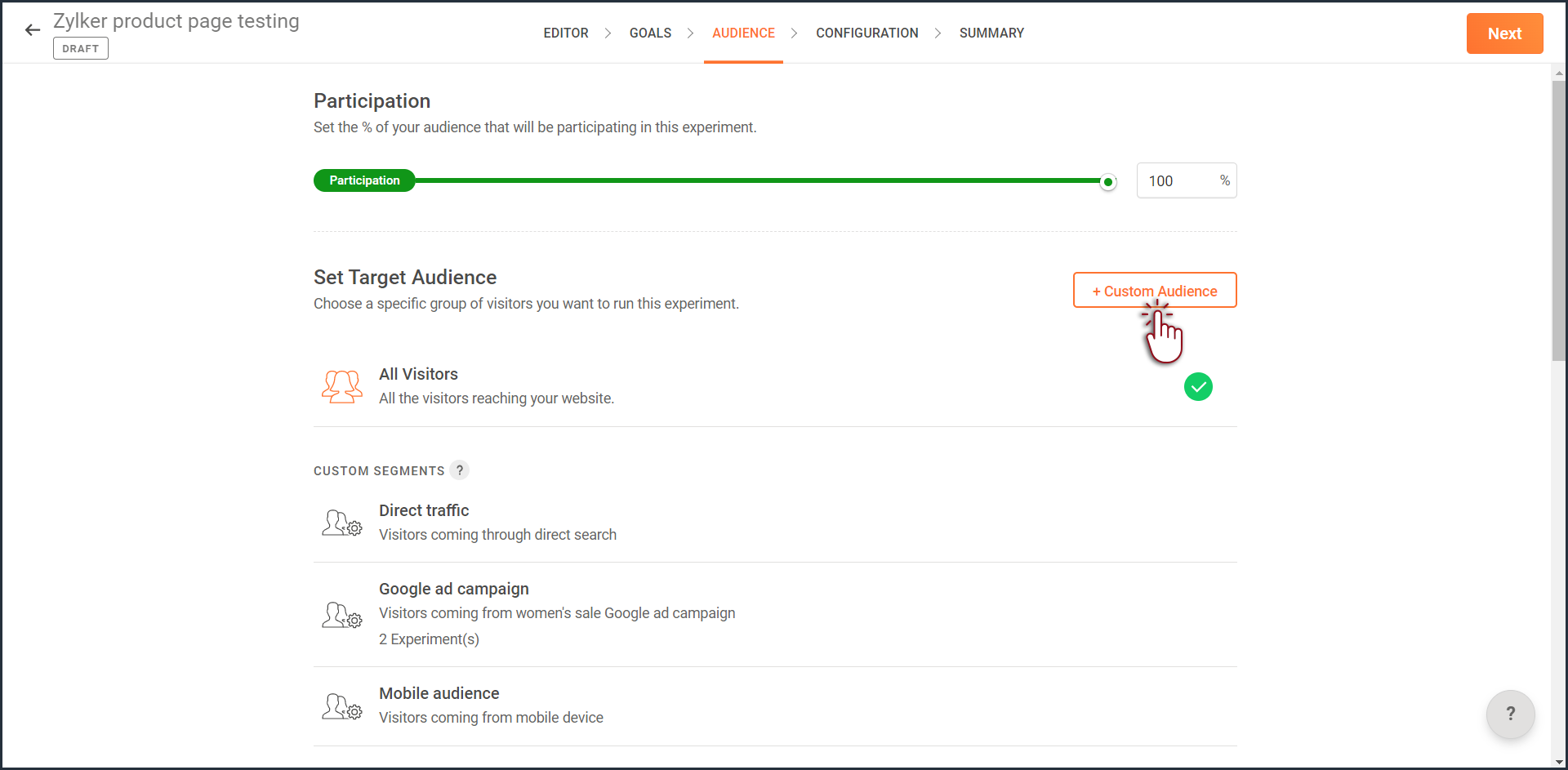
- Click the +Custom Audience button on the AUDIENCE page of your experiment.
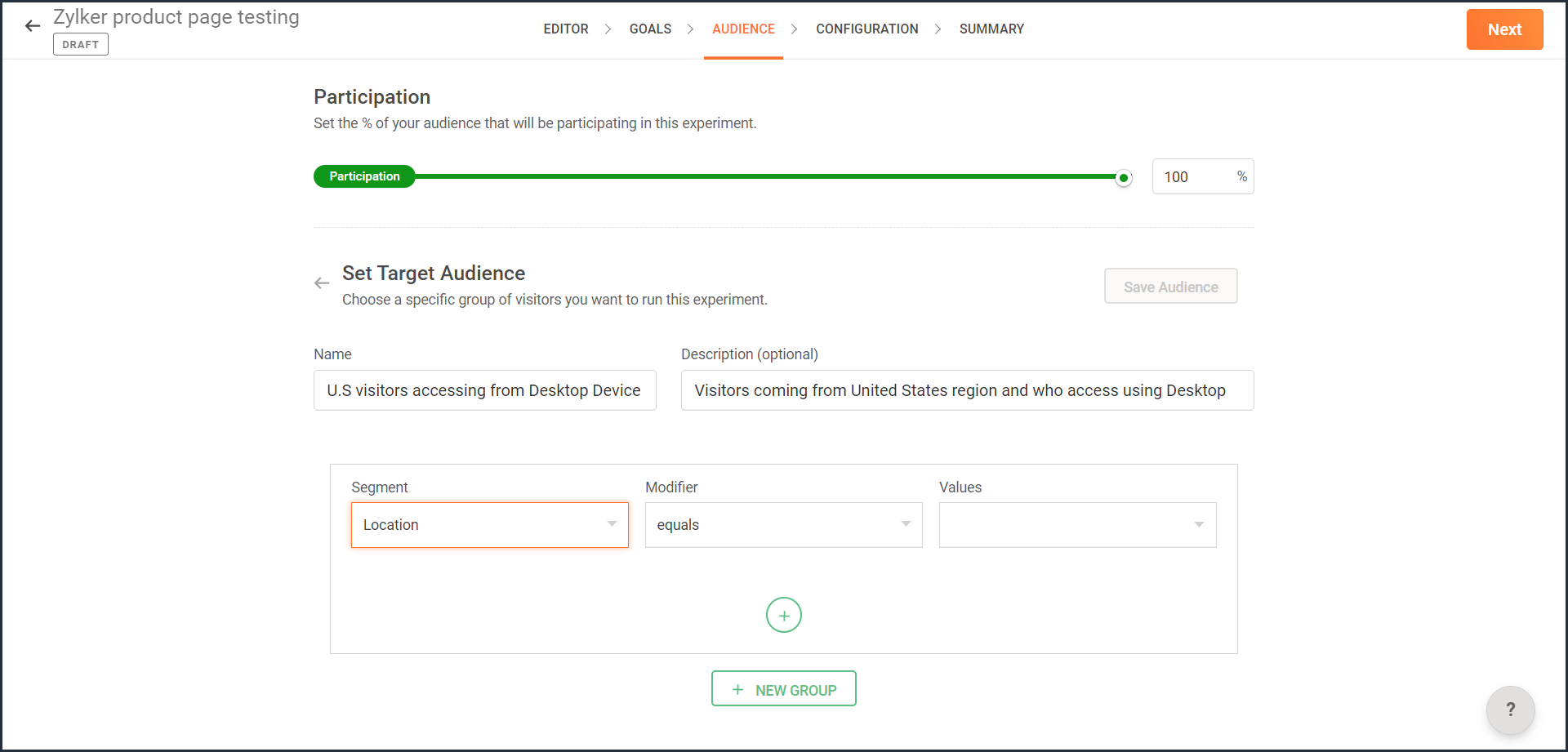
- Enter a title and description for the custom segment you want to create.
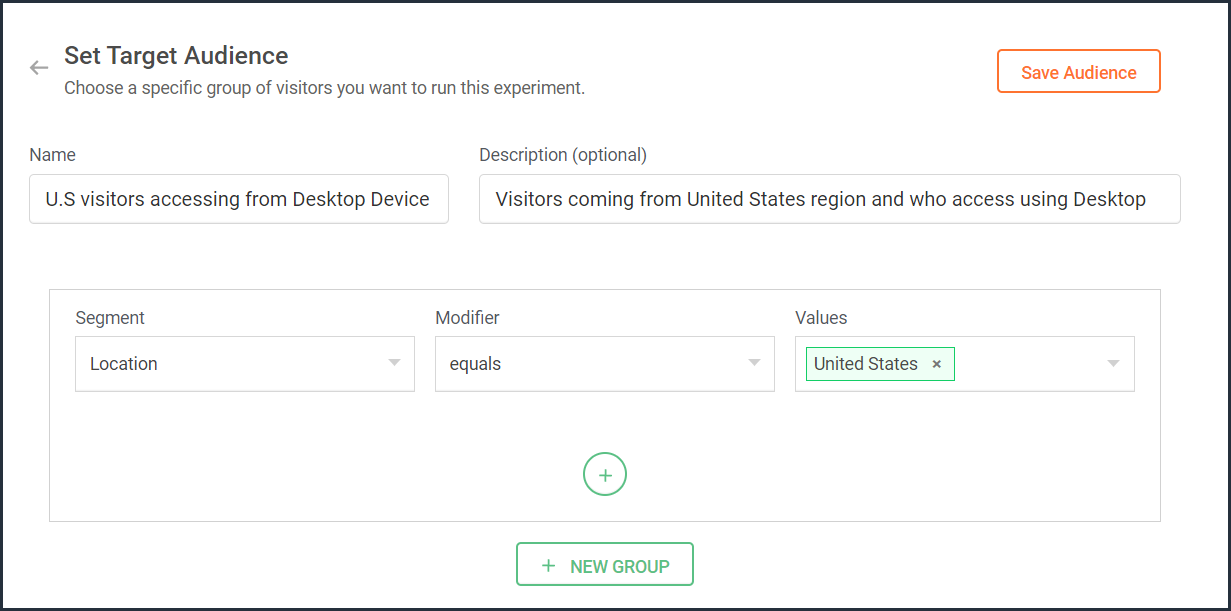
- From the Segment dropdown, choose the modifier and value for the selected audience segment as shown in the screenshot. Learn more about the different types of custom audience segments and the modifier conditions available in PageSense.
- Ensure you choose the condition as ‘AND’ or 'OR' depending on the segment you want to create.
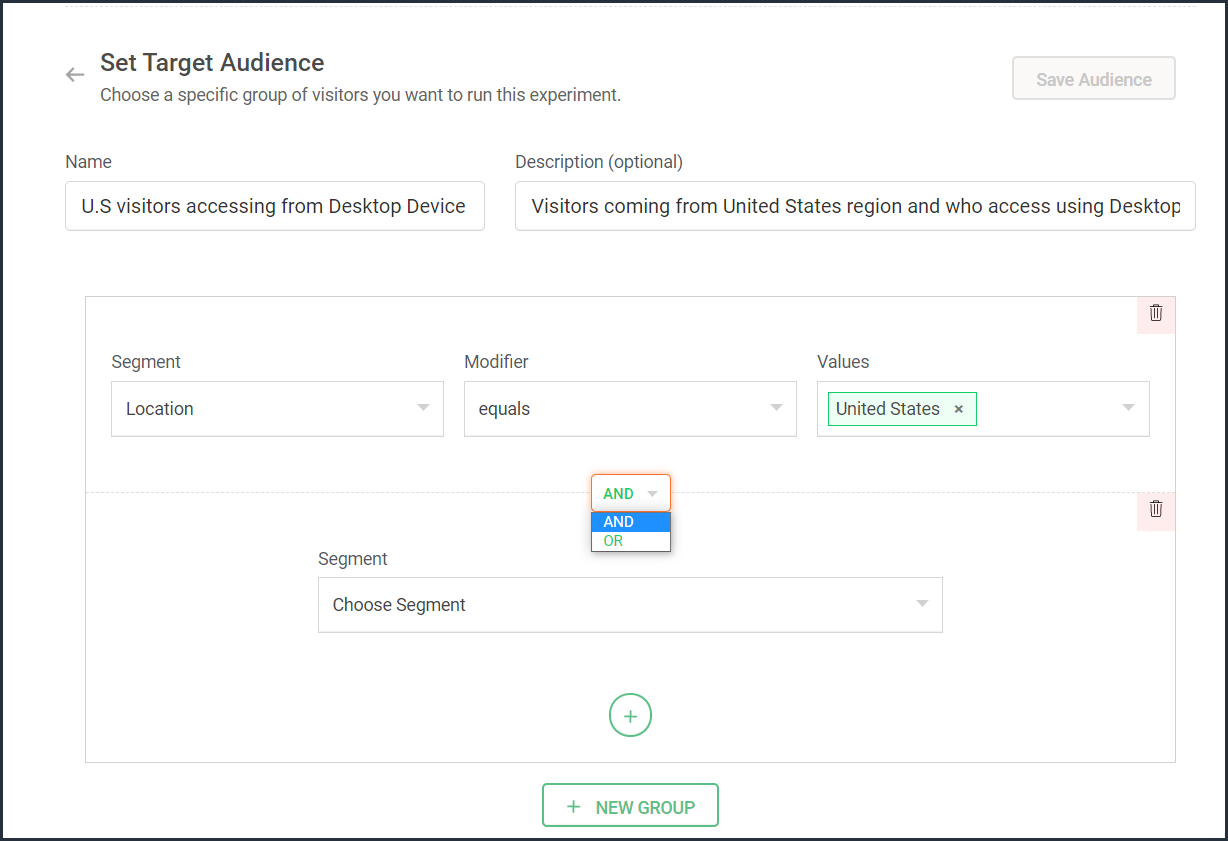
- From the Segment dropdown, choose the second modifier and value for the selected audience segment as shown in the screenshot.
The final selection looks like: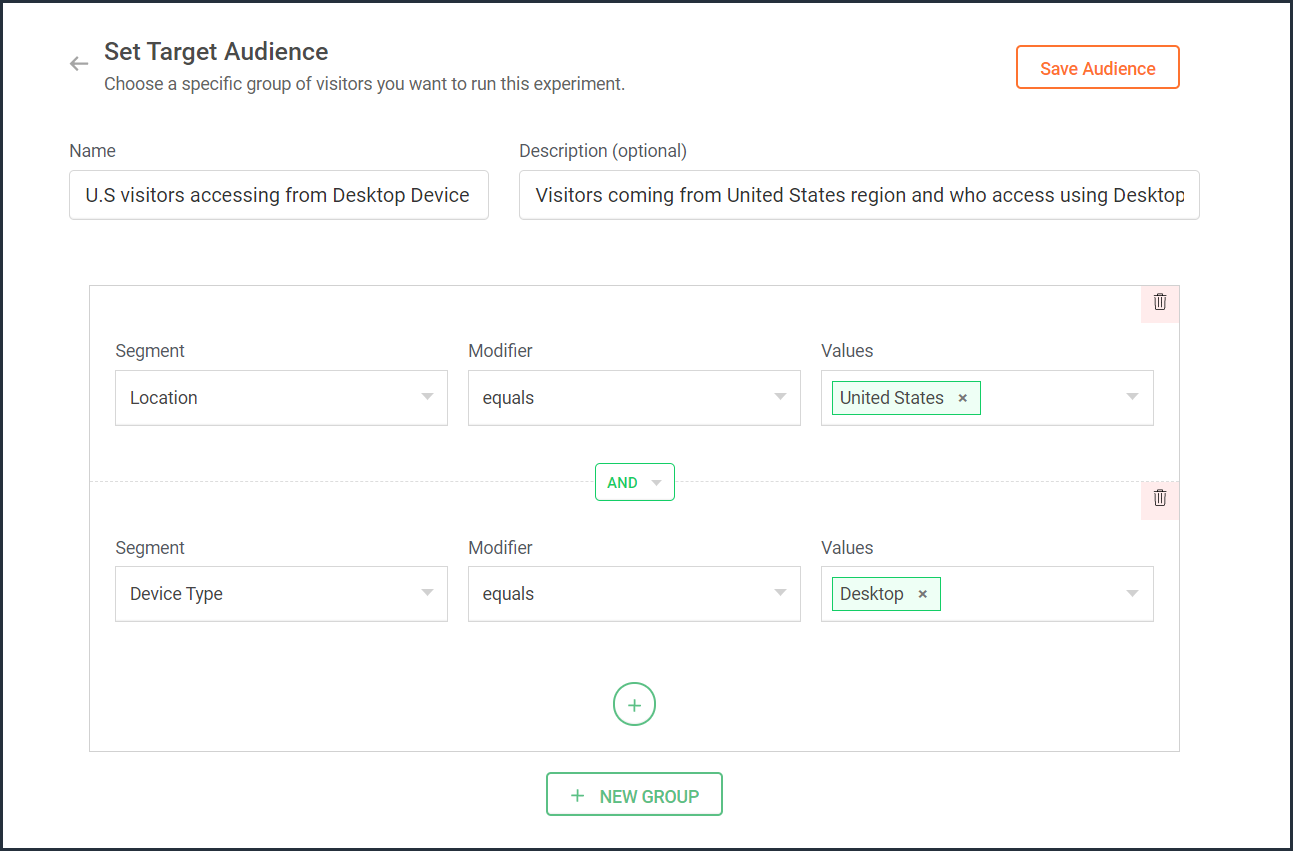
- Click the Save Audience button.
The saved segment will appear under the Custom Segments section across all of your experiments in PageSense and you can apply the same for any experiment.
Below are a few examples that show you the most effective ways to define custom audiences in PageSense for running your experiments better:
Target your experiment by geographical location
If you're looking to expand your online business to international audiences and want to understand which city or country markets are good for your business, choose to target your experiments to audiences based on the location.
Targeting your experiment by your visitors' geographic location, such as country, city, or region, is a powerful option when you want to show personalized web page content or run advertisement campaigns that match the interest of audiences from specific areas. This type of targeting is driven by factors like local festivals celebrated, popular regional news, tourism attractions, or business events happening in a region.
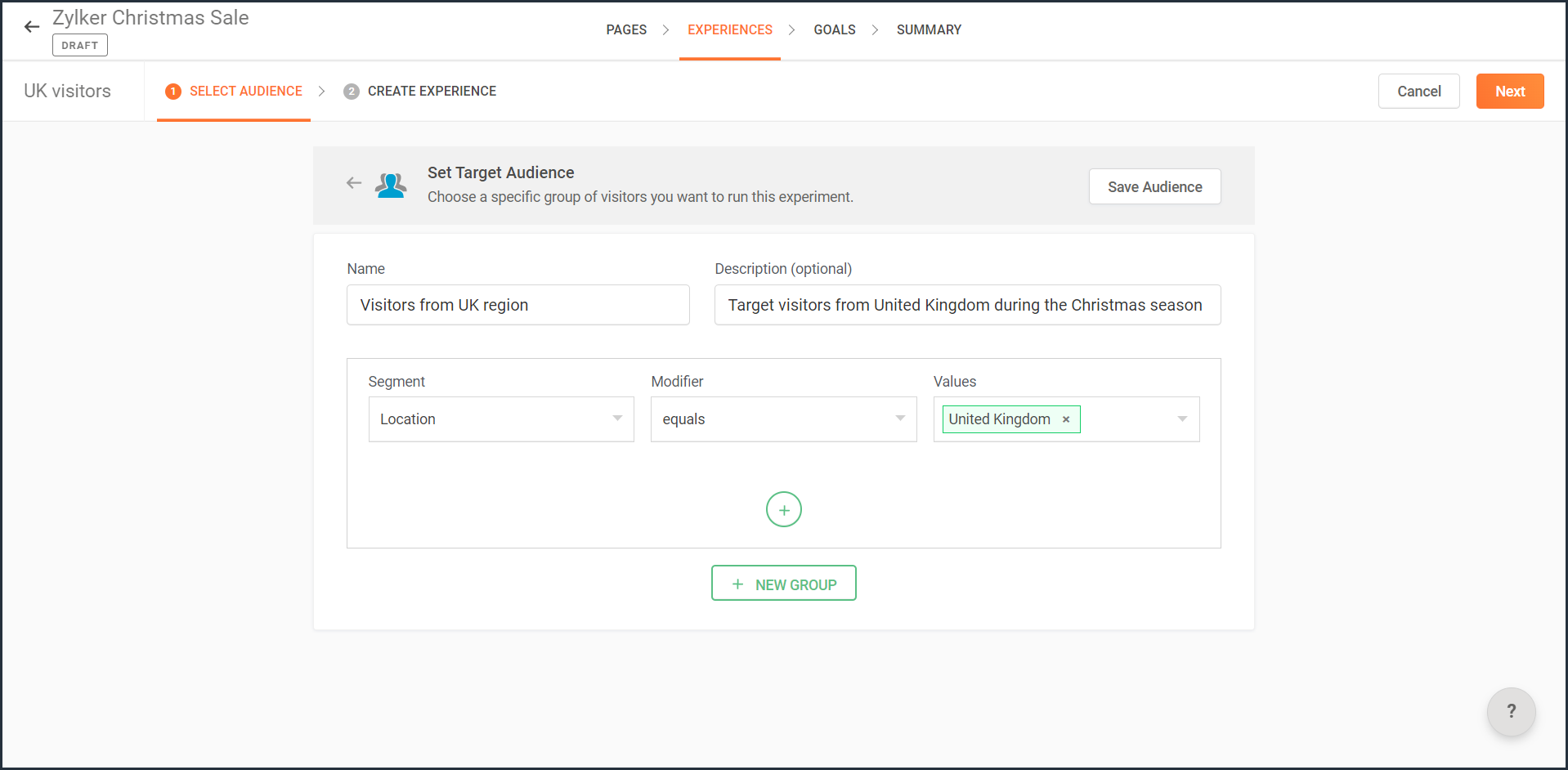
For example, say you own an ecommerce site, and you want to show personalized product recommendations to visitors from United Kingdom during the Christmas season. In this case, you can create a custom audience segment that targets your experiment page to visitors from this particular location as shown in the screenshot below.
Note: You can also use this option to target your experiment based on the languages spoken by visitors in different countries.
Target your experiment by query parameters
While running ad campaigns, it's important to both target the right consumers and provide the most relevant information to them on your website. If you find the right user who clicks on your ad, but the landing page for that ad isn’t customized, that conversion could be lost.
Targeting your experiment to visitors who reach your website pages that include (or exclude) a certain query string in their URLs could be useful when you want to understand the effectiveness of different ad campaigns on your website. This is usually tied to audiences who come through a specific utm_source like Facebook or Google and utm_campaigns like paid ads, Google Adwords, and more.
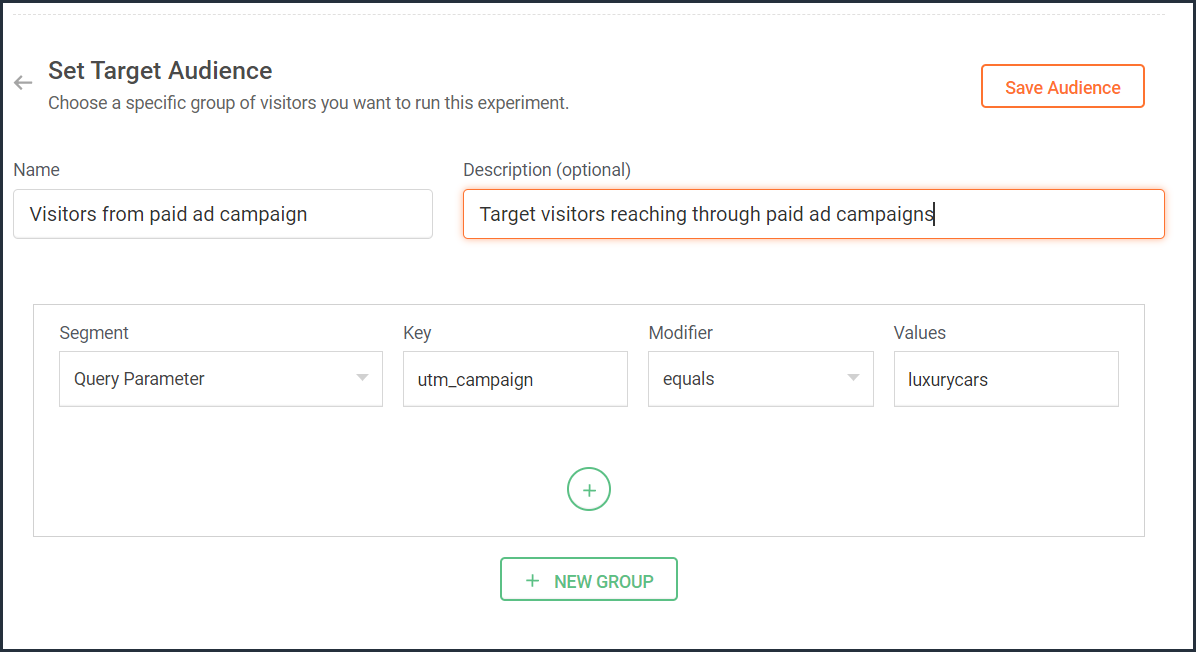
For example, say you own an online car dealership website and you want to redirect customers who click on a paid ad campaign with the utm_campaign=luxurycars to a landing page displaying luxury vehicles with prices and offers. For this, you can create a custom audience segment that explicitly targets your landing pages to visitors who contain this particular query string as shown in the screenshot below.
Target your experiment by user information
To achieve a specific goal or purpose of your online business, you will sometimes need to target your experiment to visitors with exact custom attributes such as age, email address, subscription plan, fields of interest, gender, marital status, or job role on your website. These attributes or visitor information can be collected when a user completes a form on your website, such as a signup, contact, purchase, or any other sort.
Targeting your experiment to visitors based on specific user attributes can help deliver the right message to the right audience and improve brand experience with ease. This is also considered the most precise method of audience targeting as it makes visitors stand out from the wide segment of users on your site.
For example, let's say you run a SaaS business and you want to show a personalized pricing page that offers an additional 30-day period to visitors who are subscribed to the Premium plan. In this case, you can create a custom audience segment to target your experiment to visitors who match this specific user attribute and value as shown in the screenshot below.
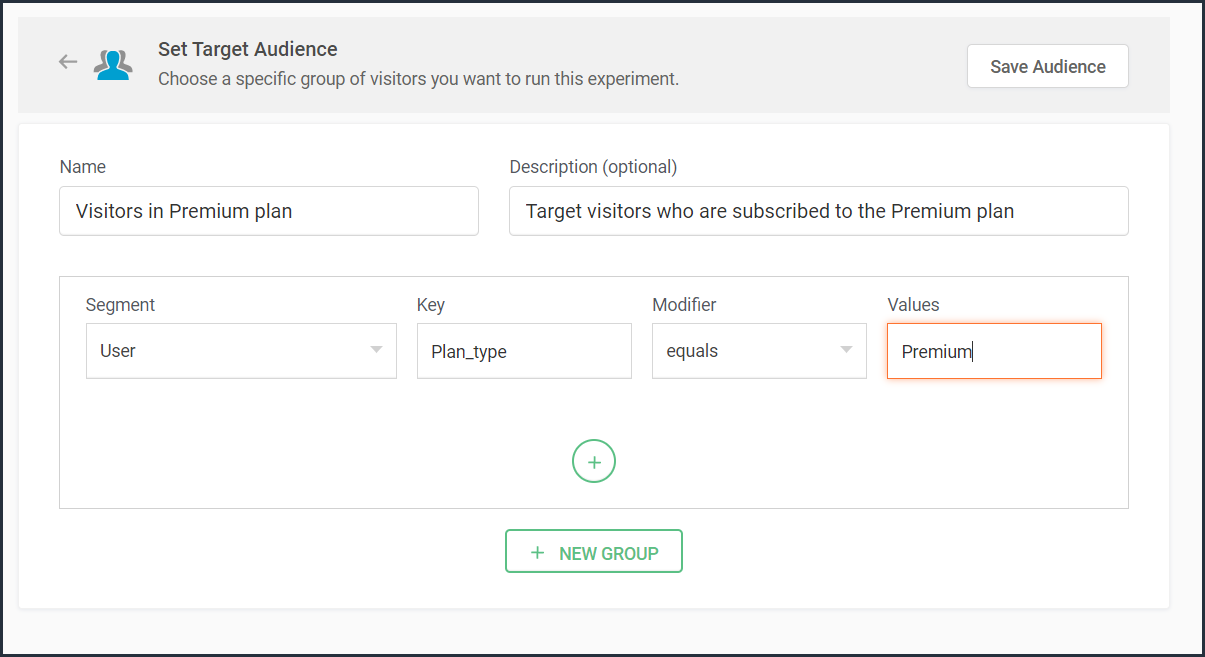
Note that to use 'user information' in audience targeting, you need to add an additional code snippet to your experiment page as explained in the steps here.
Target your experiment by weather/climatic conditions
Do you see your website sell more products when the temperature rises? Or does your tourism business attract more new bookings during cooler seasons?
Targeting your experiment based on the local weather of the visitors coming to your website is another modern technique used by marketers to craft influential website content, product pages, and ad campaigns. Weather-based audience targeting allows businesses to anticipate patterns of demand and tap into the needs and purchase intentions of customers during different seasons of the year. It's also a great way to gain a competitive advantage and increase the average value of orders and conversions on a website.
For example, say you run an ecommerce site and want to create a personalized homepage title for visitors living in climatic zones with temperatures below 41°F/5°C. In this case, you can create a custom audience segment to target your personalization experience based on audience's local weather as shown in the screenshot below.
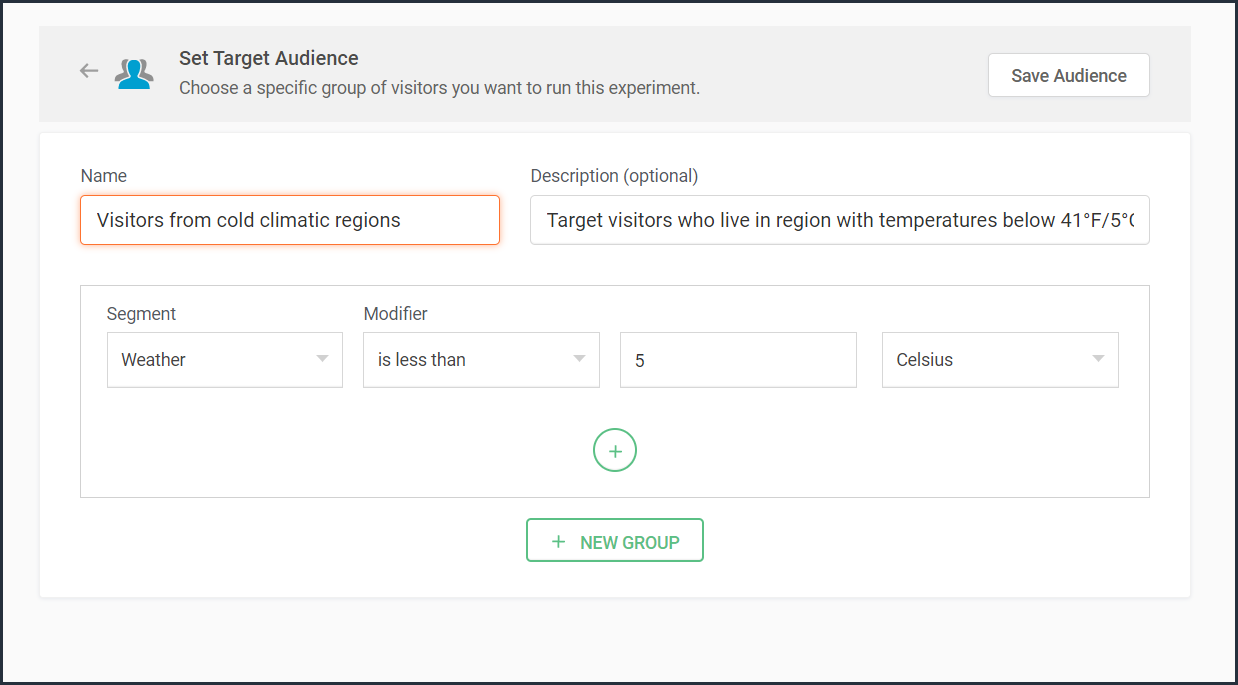
Target your experiment by visitor activity
Visitors coming to your website will have different intentions and behaviors. For example, some might be looking to subscribe to your newsletter, some might be checking out new product releases, and others might just be there for window shopping or research purposes. If you're going to show the same home/landing page content to all visitors, you're definitely going to lose conversions and sales.
Targeting your experiment based on what pages your visitor interacts with on your site and what actions they take (or do not take) can be a great way to provide a personalized website experience during their next visit. This includes buttons clicked, products viewed, items bought, and other actions your visitor performs, revealing what your audience wants, avoids, and purchases.
Using such specific visitor metrics, you can learn why specific actions or events on the site were not successful and later reach customers with more apt content or product offers based on their current activity.
Visitors coming to your website will have different intentions and behaviors. For example, some might be looking to subscribe to your newsletter, some might be checking out new product releases, and others might just be there for window shopping or research purposes. If you're going to show the same home/landing page content to all visitors, you're definitely going to lose conversions and sales.
Targeting your experiment based on what pages your visitor interacts with on your site and what actions they take (or do not take) can be a great way to provide a personalized website experience during their next visit. This includes buttons clicked, products viewed, items bought, and other actions your visitor performs, revealing what your audience wants, avoids, and purchases.
Using such specific visitor metrics, you can learn why specific actions or events on the site were not successful and later reach customers with more apt content or product offers based on their current activity.
For example, say you run an online tourism website and want to provide customized tourist packages with attractive coupon codes to customers who viewed the Adventure tourism package but exited your web page without completing a booking. In this case, you can create a custom audience segment to target your experiment for these segments of visitor interest and behavior as shown in the screenshot below.
Note that to use 'visitor activity' in audience targeting, you need to add an additional code snippet to your experiment page as explained in the steps here.
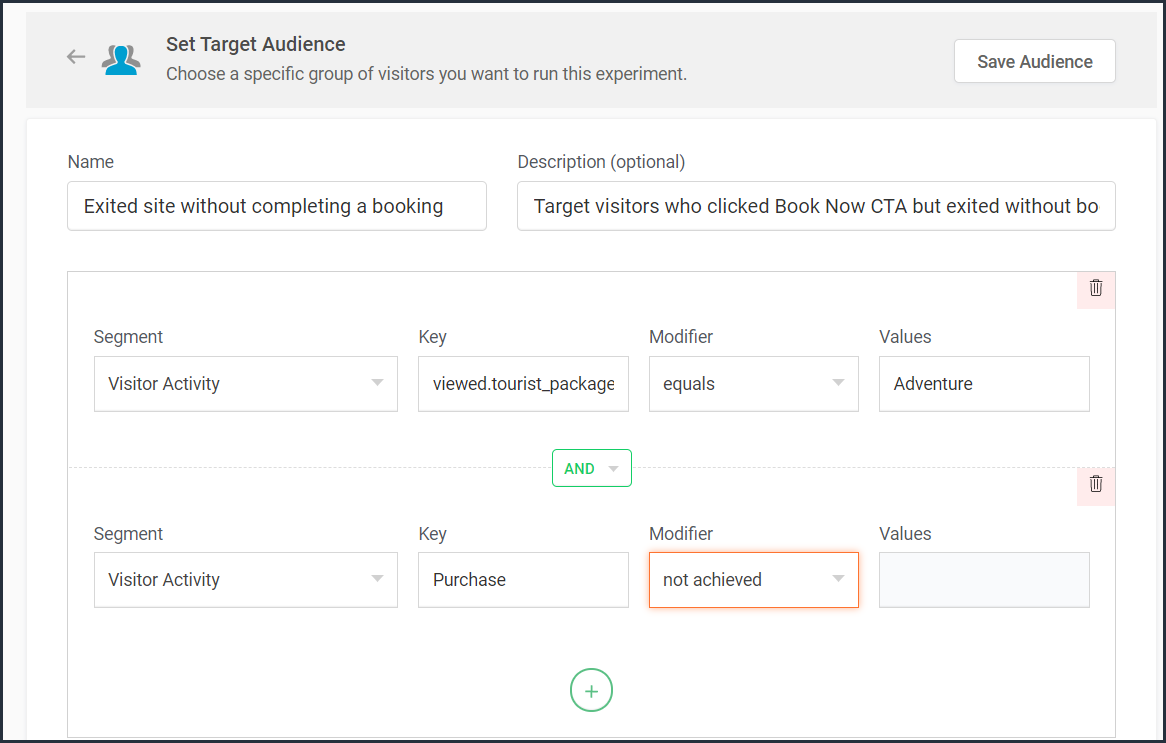
Currently, weather-, user-, and visitor-activity-based audience targeting options are only available for personalization experiments in PageSense. However, the user and visitor activity(custom dimensions) based segmentation option is available under report filtering across all of the experiments in PageSense except for push notifications. Learn how to filter reports based on custom dimensions.
Target your experiment by specific referral site URLs
Note that to use 'visitor activity' in audience targeting, you need to add an additional code snippet to your experiment page as explained in the steps here.
Currently, weather-, user-, and visitor-activity-based audience targeting options are only available for personalization experiments in PageSense. However, the user and visitor activity(custom dimensions) based segmentation option is available under report filtering across all of the experiments in PageSense except for push notifications. Learn how to filter reports based on custom dimensions.
Target your experiment by specific referral site URLs
Depending on the ways you market your website online, you'll likely have numerous different referral sources. Analyzing which source brings in more traffic and revenue to your business is a surefire way to get more traffic from multiple channels. Targeting your experiment based on referral URLs—sources that your visitors came from, such as Facebook, Google, Twitter, Quora, influencer blogs, and other external sites—can help you promote your website and products on these specific channels.
For example, say you own an ecommerce site, and you want your experiment to only target visitors referred by 'facebook.com'. In this case, you can create a custom audience segment to target visitors from this specific Referral site as shown in the screenshot below.
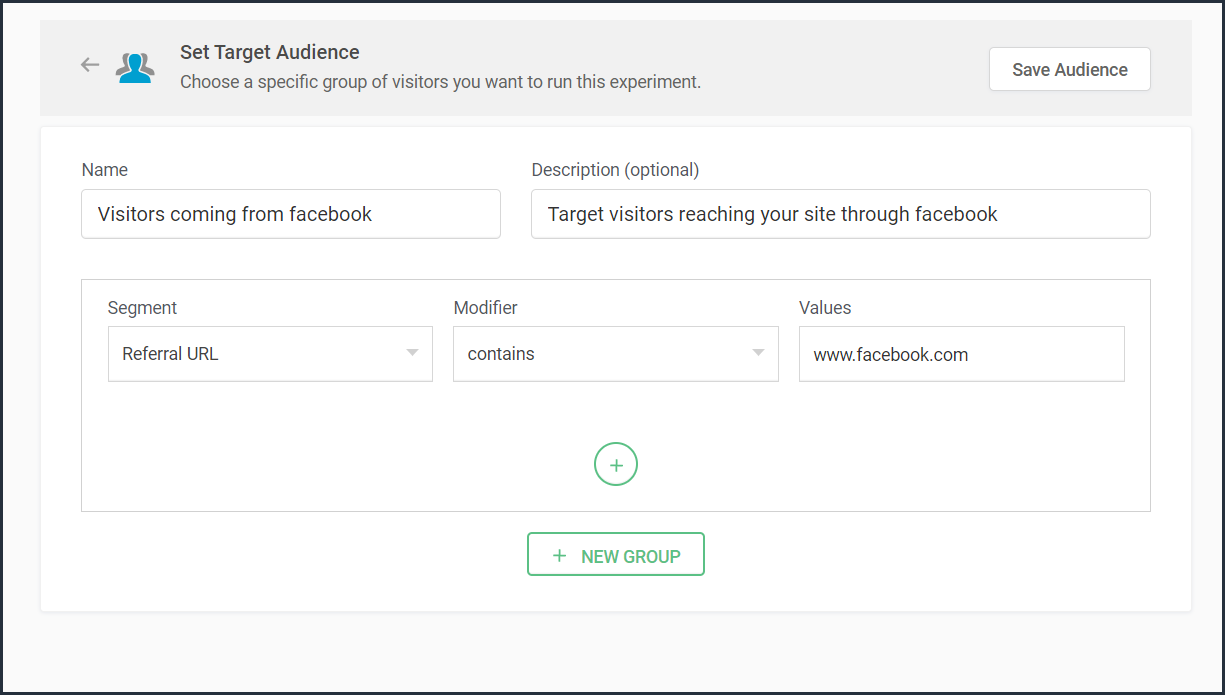
Bonus tip: Have no clear target audience in mind to run your experiments? Or don't know how to decide where to start when segmenting a target customer audience? Consider these points in choosing the right target audience segments:
- Do you have seasonal-only customers or customers who are only interested in certain types of products, services, or events?
- Are you an organization that needs to send different content to partners, sponsors, users, or other patrons?
- Does it matter if your contacts are local, domestic, or international?
- Have you thought about the requirements of users based on different weather conditions?
Was that useful? Please leave us your comment/feedback in the comment box below.
Are you looking to create a new custom audience segment to target in your experiment but aren't sure how to implement it? Just write to us at support@zohopagesense.com and we will be happy to guide you.
Are you looking to create a new custom audience segment to target in your experiment but aren't sure how to implement it? Just write to us at support@zohopagesense.com and we will be happy to guide you.
Start learning. Start customizing!
Access your files securely from anywhere
New to Zoho Recruit?

Zoho Developer Community
New to Zoho LandingPage?
Zoho LandingPage Resources
New to Zoho Survey?
New to Zoho CRM Plus?
Deliver unforgettable customer experiences
New to Zoho CRM Plus?
Deliver unforgettable customer experiences
New to Zoho Marketing Plus?
Everything you need to run your marketing
New to Zoho Marketing Plus?
Everything you need to run your marketing
New to Bigin?





Topic Participants
Balarohini Paulraj
Sticky Posts
[Live Webinar] How to maximize your conversions using existing website traffic
Hello all, Did you know that on an average only 0.1% of your traffic converts? The rest are either heading towards your competitors or dropping off without being able to find what they came for. When you want to increase your conversions, it's naturalA/B Testing Idea #2: Make your headlines sound super cool.
Hello everyone, We're back with our second post in the CRO testing idea series. If you missed the first post, please check it out here: "Place irresistible and clear CTAs." In today's post, we'll look at how to effectively A/B test your headline content.A/B Testing Idea #1: Place irresistible and clear CTA buttons
Are you wasting much of your time and effort A/B testing every single idea that pops into your head, yet you're not generating sufficient traffic to your website? Don't worry—we've got you. We'd like to introduce you to the A/B Testing Ideas learningDid you know?#3: How to target and run your experiment based on custom audience segments in PageSense
Whatever kind of online business you're running, defining your target audience is the key factor to delivering relevant messages and further positioning your brand in the industry. Most marketing efforts revolve around this basic strategy of segmentingDid you know?#2: How to filter your report by custom date range in PageSense
Do you want to quickly view your experiment analysis or responses over different time periods? Want to effortlessly compare the performance of your website by specific weeks, months, or years? Also, see whether your new marketing strategies or efforts
New to Zoho TeamInbox?
Zoho TeamInbox Resources
Zoho CRM Plus Resources
Zoho Books Resources
Zoho Subscriptions Resources
Zoho Projects Resources
Zoho Sprints Resources
Qntrl Resources
Zoho Creator Resources
Zoho CRM Resources
Design. Discuss. Deliver.
Zoho Show Resources

Get Started. Write Away!
Writer is a powerful online word processor, designed for collaborative work.
Zoho CRM コンテンツ
-
オンラインヘルプ
-
Webセミナー
-
機能活用動画
-
よくある質問
-
Ebook
-
-
Zoho Campaigns
- Zoho サービスのWebセミナー
その他のサービス コンテンツ
Nederlandse Hulpbronnen

ご検討中の方
Recent Topics
Cropping Photos for Zoho Sites
Hi, I'm wondering if there is a built in crop tool for zoho sites for my photos so I can crop them and see what the crop looks like on the site?Deluge scripts
Why is there not a search function to make it easier to find the script of interest when modifications are required.bulk edit records and run internal logic
hi there is few logics in manner "it this than that" logics work well when i edit entry openning it one by one (via workflow "on add/edit - on success" , for custom field "on update/on user input") but when i try bulk edit records - logic does not work. how can i turn on logic to work as programmed - for mass editing records via bulk edit?WebDAV / FTP / SFTP protocols for syncing
I believe the Zoho for Desktop app is built using a proprietary protocol. For the growing number of people using services such as odrive to sync multiple accounts from various providers (Google, Dropbox, Box, OneDrive, etc.) it would be really helpfulPossible for first Signer of Sign Form to specify the next signer in the sequence
We have many use cases where multiple signers need sign the same document. We'd love to be able to use sign forms, where the a signer who uses the Sign Form link can specify the name and email address for the next person in the sequence.BUG: Can't copy-paste data outside Sheet
Currently I can't paste data copied from inside any of my Zoho Sheet files to any other app. Copy-paste works inside the sheet It does NOT work between two different sheets These sheets are built from automation templates Everything works fine if I createZoho CRM Community Digest - November 2025 | Part 1
Hello Everyone! Here’s what came through in the first half of November: new updates and a few helpful community discussions with real, notable solutions. Product Updates: Android App Update: Inctroducing Swipe Actions You can now swipe left or right onUpload own Background Image and set Camera to 16:9
Hi, in all known online meeting tools, I can set up a background image reflecting our corporate design. This doesn't work in Cliq. Additionally, Cliq detects our cameras as 4:3, showing black bars on the right and left sides during the meeting. WhereTruesync for Linux
Is Truesync available on linux ?Question about upgrade and storage space Zoho Notebook
After upgarding my Zoho Notebook plan, I am running into the following issue. I just upgraded from a free Zoho Notebook subscription to Pro Lite after I got a notification in my Window Zoho Notebook desktop app saying that I had run out of space. However,Hidding/excluding specific picklist options from filter
Hi. Is it possible to hide/exclude specific picklist options from this filter? I don't want them to be shown when someone tries to filter in the leads moduleSubforms to Capture Multi-Row Data in Job Sheets
Subforms transform your job sheets from simple checklists to powerful, data-rich forms. In field service work — whether maintenance, inspection, installation, or repair — a single job can involve multiple repeatable entries: readings, parts used, activitiesAdd "Fetch Composite Item" Action for Inventory
I want to make a Flow that uses information returned in the GET call for Composite Items, and it's not currently available in Zoho Flow. Please consider adding this functionality.Adress Labels for sending of the oder und barcode
We want to print with my address labels to stick on the order of the ware can. there are these options?printing individual labels - Dymo LabelWriter
I am trying to print individual labels to my Dymo LabelWriter - has anyone done this? Latest Update (December 2025): The Canvas Print View is now available! We encourage you all to try it out and share your feedback with us. Learn more here: Zoho CRMZoho Creator for Agriculture
Greetings, I am starting to work on Zoho Creator specifically for the agricultural field, any recommendations, tips or ideas that might be helpful ? Also, if you are interested by any means in working on such project, kindly contact me. The project isCustom Print Layout
I would like to create a custom print layout of a Lead or Contact. Is there a way to do that? What I mean is that if I'm viewing a specific lead or contact I'd like to be able to print or export that lead/contact and only print and/or export certain information.Print View
Nothing happens when I'm in a module , ie; Contacts, and I hit the Print View Button. Even when it does come up and say "loading", nothing loadsGet Holiday ready with Zoho Mail's Offline mode
With the holiday season right around the corner, this is the perfect time to get ready to unplug, relax, and enjoy a well-deserved break. In addition to preparing yourself, you can also make sure your organization members are set for their time away fromZoho CRM Kiosk issues
Firstly this is for a system on the AU servers if that makes a difference. Issues are as follows (For Kiosk): 1. Re-ordering fields in the screen builder is broken. The fields seem to be re-ordering themselves, unless you order everything by moving theZoho Books emails suddenly going to Spam since 11 Nov 2025 (Gmail + now Outlook) — anyone else?
Hi everyone, We migrated to Zoho Books in July 2025 and everything worked fine until 11 Nov 2025. Since then, Zoho Books system emails are landing in customers’ Spam (first Gmail, and now we’re seeing Outlook/Office 365 also starting to spam them). ImpactedEmail Template Edits Not Saving
I can make an edit, click save, and see the blue bar annimation at the top, but the edits don't actually save. Important, because my email templates are now broken and clients are receiving bad emails. Tried on Chrome, Firefox and IE.Default Ticket View - Table?
Guys, We mostly use the table view to queue tickets. Maybe I am missing it - but how can I set that view as 'default" for all our agents? Thanks JVCan I have different users see different pick list values for Potential Stage?
We have some users focusing on new business and others focusing on existing business, and they follow different sales processes/cycles, so we would like them to see different pick list values for Stage (eventually leading up to Closed Won/Lost in both cases). And just to keep it interesting - some of these users will of course do a combination, so would need to see one pick list for their New business potentials and a different pick list for their Existing business ones. Salesforce does thisTracking Snippet not working in Zoho Marketing Automation!
First off, the fact that you have to wait about 12-24 hours for every response is terrible. How are we supposed to conduct business? Second, we have been trying for several days to get the Tracking Code Snippet in marketing automation to work, to no avail.Is there any way to send an Excel received by email to Dataprep?
Every day I receive an email alert with an Excel file that I want to process through a Dataprep pipeline. To do this, I need to: -Save the file to disk -Open the pipeline -Run the pipeline -Update the source -Several clicks to select and open the savedRead webpage - MSXML2.ServerXMLHTTP
I have the following VBA script, put together from various sources (mainly zoho forum/help/support, so it once worked, I guess): private Sub GetListOfSheets() Dim url As String Dim xmlhttp As Object Dim parameters As String Dim html As String range("B1").valueZoho Creator Form Search
I'm new to Zoho Creator and so far i do like it but im shocked there seems to be no easy way to add a search function and/or navigation to there forms as this readily available in every platform i have used in the past. Anyway i have a form which i haveHow to setup DKIM / SPF in Zoho Mail
Hello there! I'm having a hard time understanding how to setup the TXT records for SPF and DKIM with Zoho Mail. I'm following the instructions here: https://www.zoho.com/campaigns/help/setup-spf-dkim.html Specifically, when it comes to the value for theMass update cant trigger a workflow?
Hello there, Is this a normal Creator behaviour? In a report, if I manually edit each data row, it will pass those changes to all other reports. However, if I perform a Mass Update on a few data rows at once, the new data is not pushed to other reports.search and Smart Bar both missing in Mail
One of the users on my account does not have the search bar at the top right or the Smart Bar at the bottom left of the desktop Mail app. Any ideas how to get those back?"Wrong password or login" Problem to configure Zoho on MAIL App on my Macbook
Hi, I'm having problems to configure my e-mail on my MAIL App(Macbook pro). My e-mail is hari@trespontoum.net Actually was working perfectly, and still working on my Iphone. My MAIL App prompt me that my login or password is wrong. I tried to change 3Remote Control Functionality During Screen Sharing in Zoho Cliq
Hello Zoho Cliq Team, We would like to request the addition of remote control functionality during screen sharing sessions in Zoho Cliq. Currently, while screen sharing in Cliq is very useful, it lacks the ability for another participant to take controlLet us add Lookup fields in the Blueprint Transitions
We are unable to add Lookup Fields in the blueprint transitions in Zoho Desk, we wanted to make it a requirement for our workflow but since it's not available in the transition we cannot. The lookup field exists in the Layout: But it cannot be added/selectedZoho Projects API Scope for Issue Attachments
I try to download issue attachments via the API, unfortunately I always get the following error code when trying to download the file from the supplied URL: {"ERROR_MESSAGE":"INVALID_OAUTHSCOPE","ERROR_CODE":401} indicating an auth scope error. I've triedHow to fetch custom fields for time entries in Zoho Project API v3
In the previous Zoho Projects REST API, we were able to retrieve custom field details for time entries, including picklist options, using the endpoint: GET /restapi/portal/[PORTAL_ID]/timesheetcustomfields In the new Zoho Projects API v3, we tried usingZoho Survey Enhancements
We love Survey. We use it a ton. It needs some enhancements. Maybe some of these are already on the roadmap? API - this is crucial. We have some complex surveys that take place and need to update records, trigger other functions/automations, etc. I wouldImages Don't Display on Blog
Hi, I've just posted a new blog entry, but regardless of format (png or jpeg) Images that display in Preview mode do not display on any browser in the published post. I've not done anything different with this post than others regarding images, please advice. Thanks! Edit: I've discovered that moving the image files from a my sub directory folder "Pics for Blog" to the top level of the "Files" folder on my site allows the images to display live. This, even though my other blog posts are correctlyCheckbox Field Mapping Zoho Forms to Zoho Sign
I have an application that will be filled out via Forms that I am mapping into a PDF Filler on Zoho Sign. I need to have a series of checkboxes mapped to the corresponding fields in Sign and I only see single checkboxes available via the mapping, thoughBooks P&L by Customer
Lately, we have found that the Customer field filter for the Profit & Loss report in Zoho Books is no longer available. We have several projects with the same customer and look at the P&Ls by project AND by Customer (overall). Can you please add back in this field selection alongside the Project field to the P&L report filter? Thanks! -GinaNext Page