Extension pointers #14: Extend end-user benefits and allow personalization by implementing extensions with custom actions
From our earlier post on custom actions, we know that we can create templated actions, share them with end users, and allow them to reuse those actions to achieve personalized outcomes. In this post, we'll look at how custom actions make it easy for users to carry out these templated tasks to get customized results.
Consider the following scenario: a hardware company that already uses Zoho CRM then utilizes Zoho Projects to implement and work on the deals they've won. Assume that the Zoho Projects portal has two projects: one for handling smaller revenue deals that require minimum development and less time, and the other for managing larger revenue dealsthat will eventually demand more time and resources for execution.
As an end user processing deals in Zoho CRM, it would be extremely convenient for the company to have the deals automatically fall into the appropriate projects, such as a task based on the expected revenue. Furthermore, it would be ideal to send emails to the customer with whom they have made the deal to request anything needed from their end in order to move forward with the implementation of the deal. Let's see how we can achieve this with the help of custom actions.
We have detailed posts on the steps to create a custom action along with a live example. Now, let's reiterate and go over the steps to achieving the above use case.
Developer activities
1. Create a connector for Zoho Projects.
2. Create a custom user interface (widget-connected app) that allows the user to select the project where the deal should be created as a task, as well as add the personalized email subject and body that will be sent to the user.
3. Create a custom action in the Zoho Developer console.
- Associate the custom user interface to the custom action.
- Define an action that creates a task in the selected project and also sends an email to the customer based on the values entered by the end user in the custom UI.
Extension/end-user activities
4. Create workflows as an end-user (i.e., set criteria on expected revenue; provide personalized values for email subject and body, and choose the project in which the deal fulfilling the set criteria should be created as a task) and assign a custom action to them.
Developer activities
1. Creating a connector
- Create a new connector in your extension for Zoho Projects using the Connectors feature under Utilities in the left panel of the Zoho Developer console.
Note: Zoho Projects follows the OAuth 2.0 protocol for its authentication mechanism. You can refer to this post to learn more about the steps to register Zoho Projects and retrieve your client credentials.
- Add the necessary connector APIs for your functionality.
- The Zoho Projects REST APIs added for our example are mentioned below.
Connector API Name | Method type | URL |
Get Projects | GET | https://projectsapi.zoho.com/restapi/portal/${portalid}/projects/ |
Create project task | POST | https://projectsapi.zoho.com/restapi/portal/${portalid}/projects/${projectid}/tasks/?name=${name}&description=${description} |
2. Create a custom user interface:
1. Create a custom user interface that allows the end user to select the project in which they want to create the deal as a task, as well as enter the email subject and body that should be sent to the contact associated with the deal.
2. You can find the HTML code for the custom UI as an attachment to the post.
- In the HTML code, we have two text fields to get the user inputs for the email subject and body.
- We have also invoked the connector API to get projects from a portal. The response is then populated and displayed as a dropdown list to allow the user to select the project in which they want the deal to be created as a task.
- In the HTML code snippet, we have hard coded a static value for the Zoho Projects portal.
Note: Depending on your business use case requirements, you can create custom variables to prompt the user to input their Zoho Project portal ID, or you can create a setting widget that displays the user's portals, allowing the user to choose the portal in which they want to have the deals created as tasks as well.
- ZOHO.CRM.ACTION.setConfig - In this example, we have utilized the setConfig method. This method can be used to set values to variables which can be retrieved later through the widget's page load response.
➤ For our example, we have used the setConfig method to set various Zoho CRM deal and email (subject and body) user input values to variables. We have later obtained these saved values through the widget's page load response, which contains a configdata key with these set data as its values.➤ Sample page load response when ZOHO.CRM.ACTION.setConfig is used in our example:
"module": "Deals", "configdata": { DealTest: "Sample Digital Marketing Project" Dealdescription: "${!Deals.Description}" Dealname: "${!Deals.Deal_Name}" Message: "Sample Message" Subject: "Deal Won!" To: "${!Deals.Contact_Name.Email}" |
➤ We have then used the preset saved values available in the configdata key to prepopulate the widget UI every time it loads.
3. Create a custom action
- Go to the Zoho Developer console and select the extension in which you want to create the custom action.
- Create a custom action by navigating through Automate - > Custom Actions, under the Build section in the left panel. Click Create Action.
- Enter the Custom Action Name and Description. Click Next.
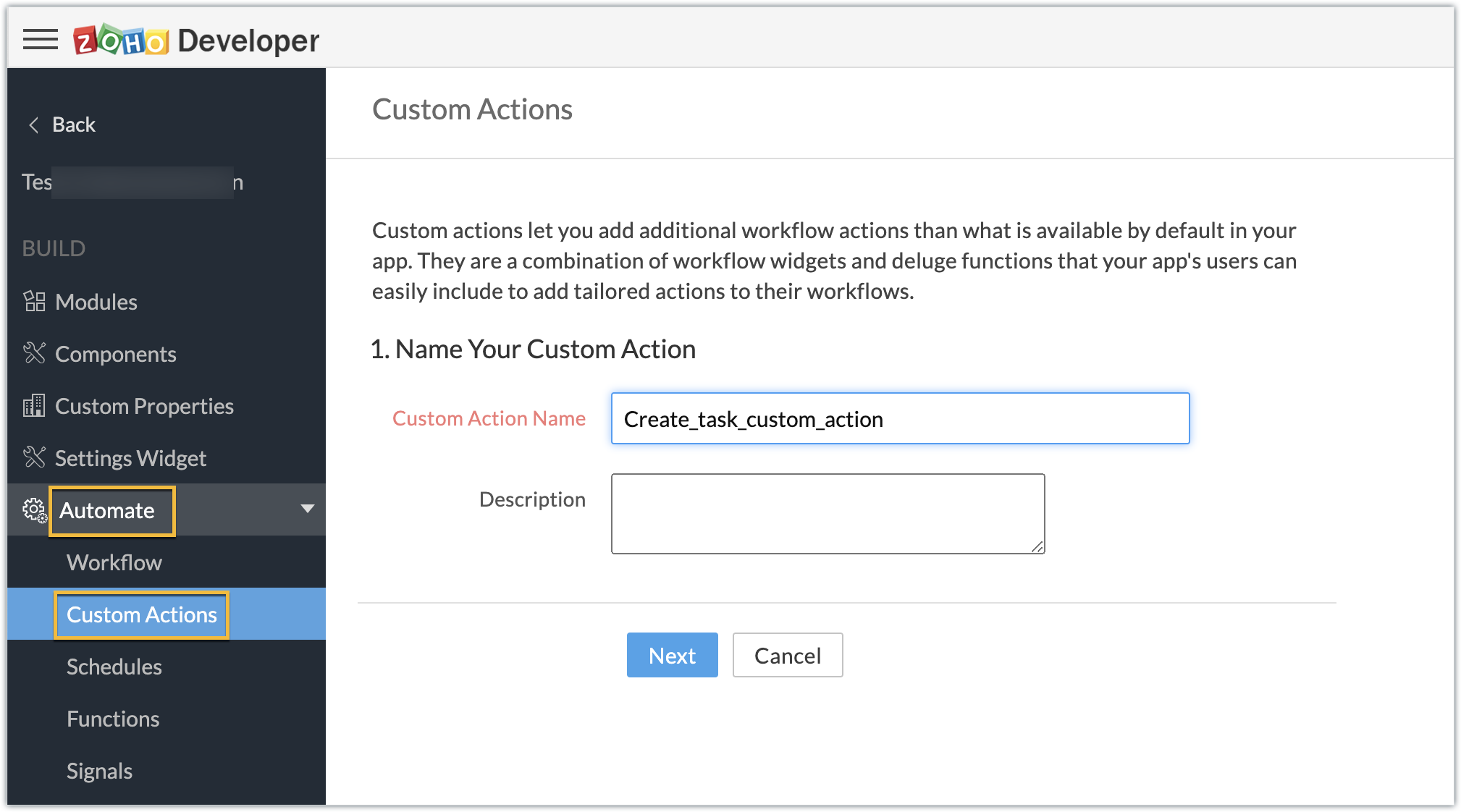
- Provide the location of the html file (widget UI) to complete the resource path. Click Next, then click Create Function.
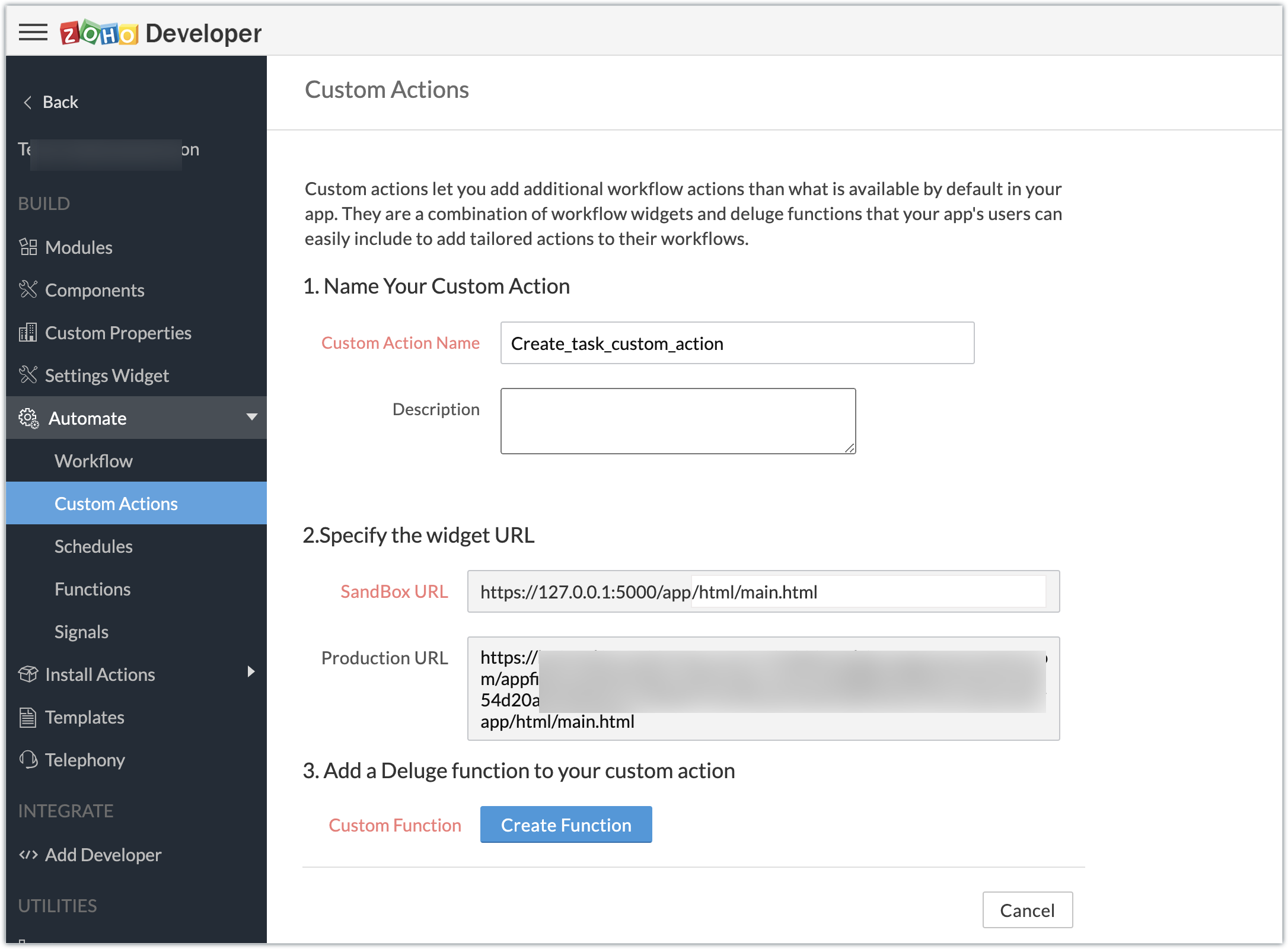
- Enter the Deluge function to perform our use case functionality.
- Click Save & Close, then click Save.
Deluge function code snippet:
dynamic_map = Map(); dynamic_map.put("portalid","xxxxxx"); dynamic_map.put("projectid",input.config.get("Dealproject")); dynamic_map.put("name",input.config.get("Dealname")); dynamic_map.put("description",input.config.get("Dealdescription")); response = zoho.crm.invokeConnector("xxxxx.zohoprojects.createprojecttask",dynamic_map); sendmail [ from :zoho.adminuserid to :input.config.get("To") subject :input.config.get("Subject") message :input.config.get("Message") ] |
- In the above Deluge code, we have performed the functionality of creating the deal as a task in Projects and sending an email to the deal's contact with the input provided by the end user in their CRM account while associating the custom action to a workflow.
Custom action in effect (End-user):
Create workflows:
- As an end user who has the extension which features the custom action installed in the Zoho CRM account, go ahead and create workflows to define criteria and associate the custom action.
- In our case, we have two workflows:
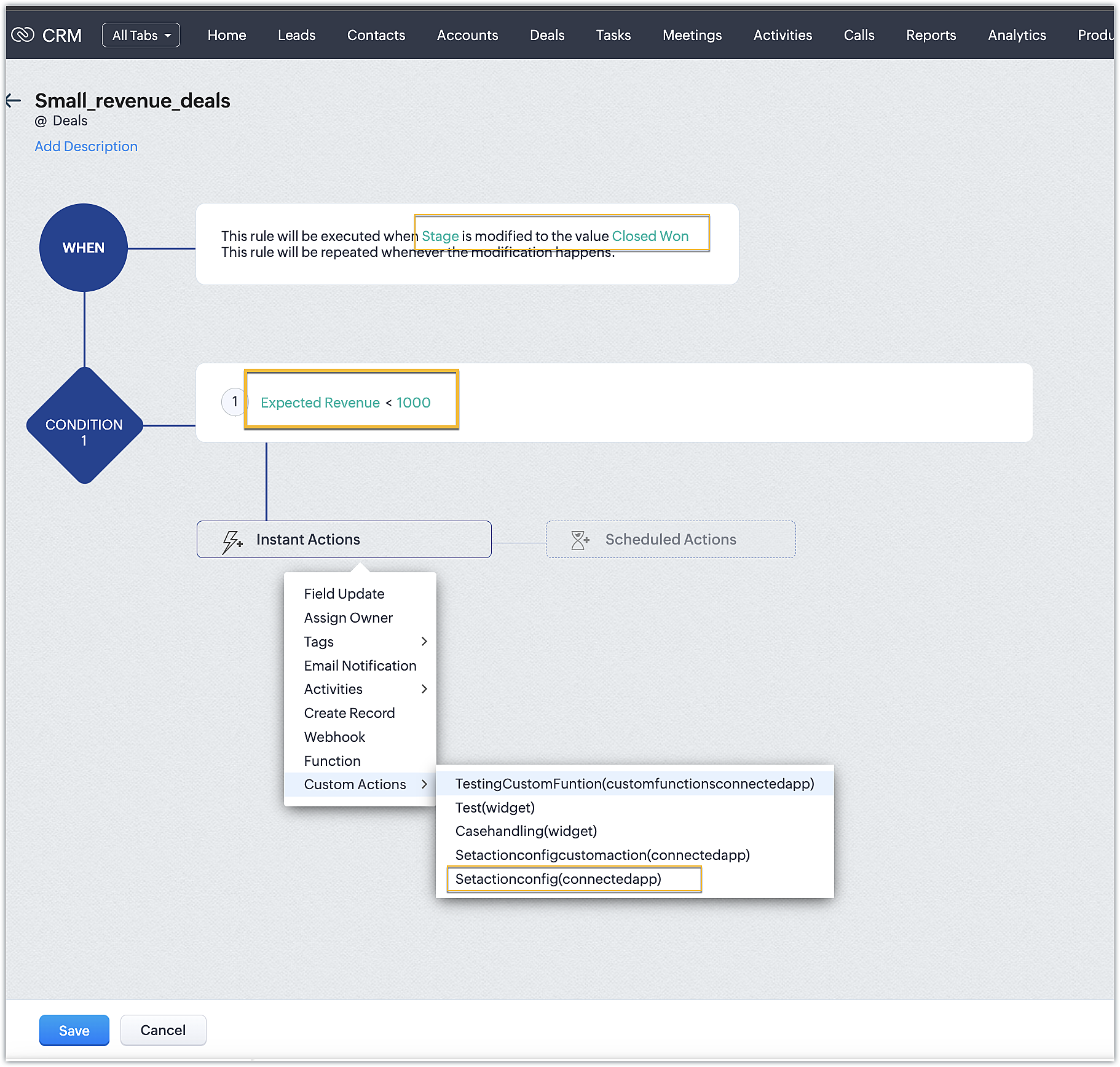
➤ One for smaller deals where the expected revenue is less than 1000 USD
➤ One for larger deals where the expected revenue is greater than or equal to 1000USD
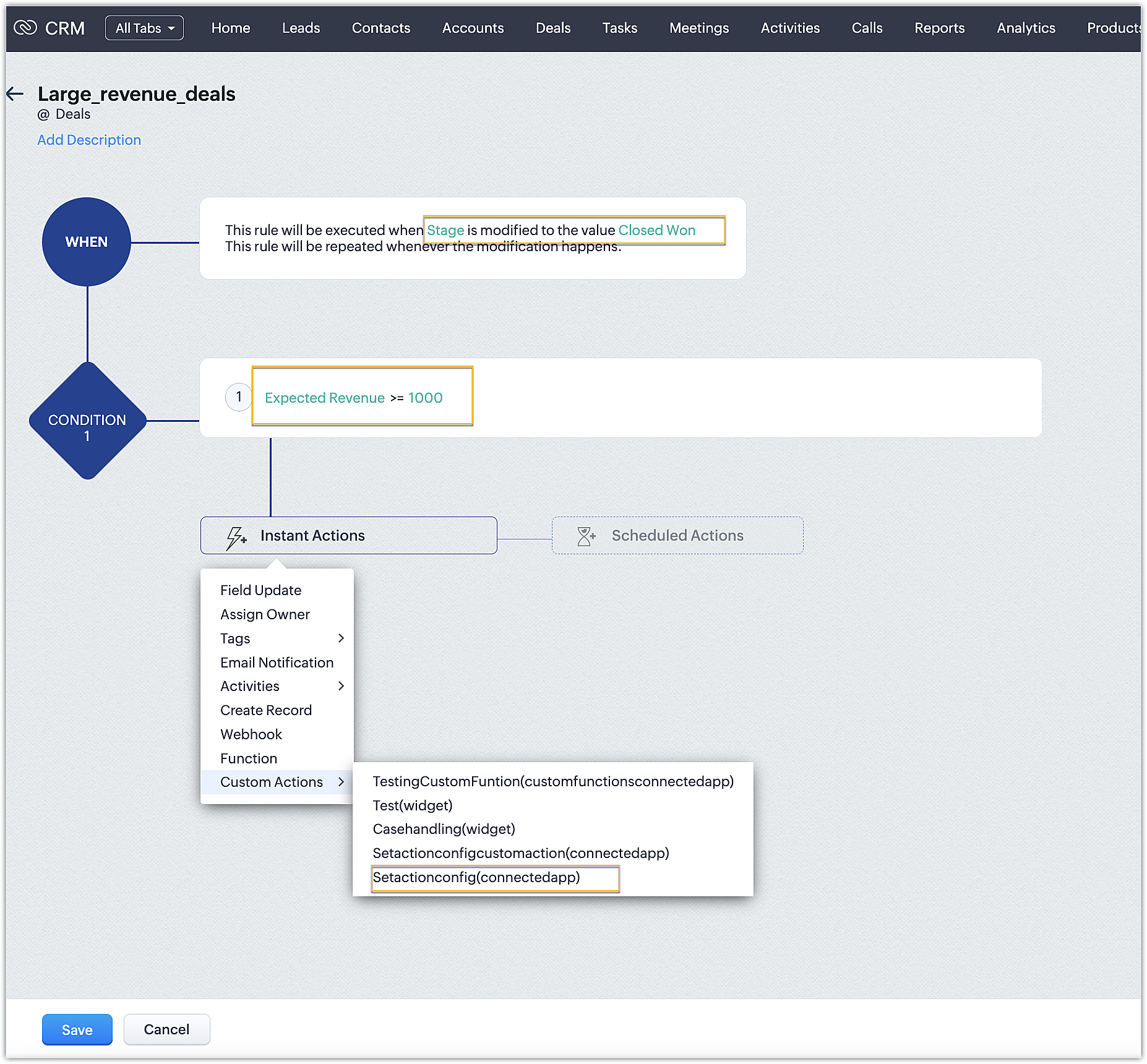
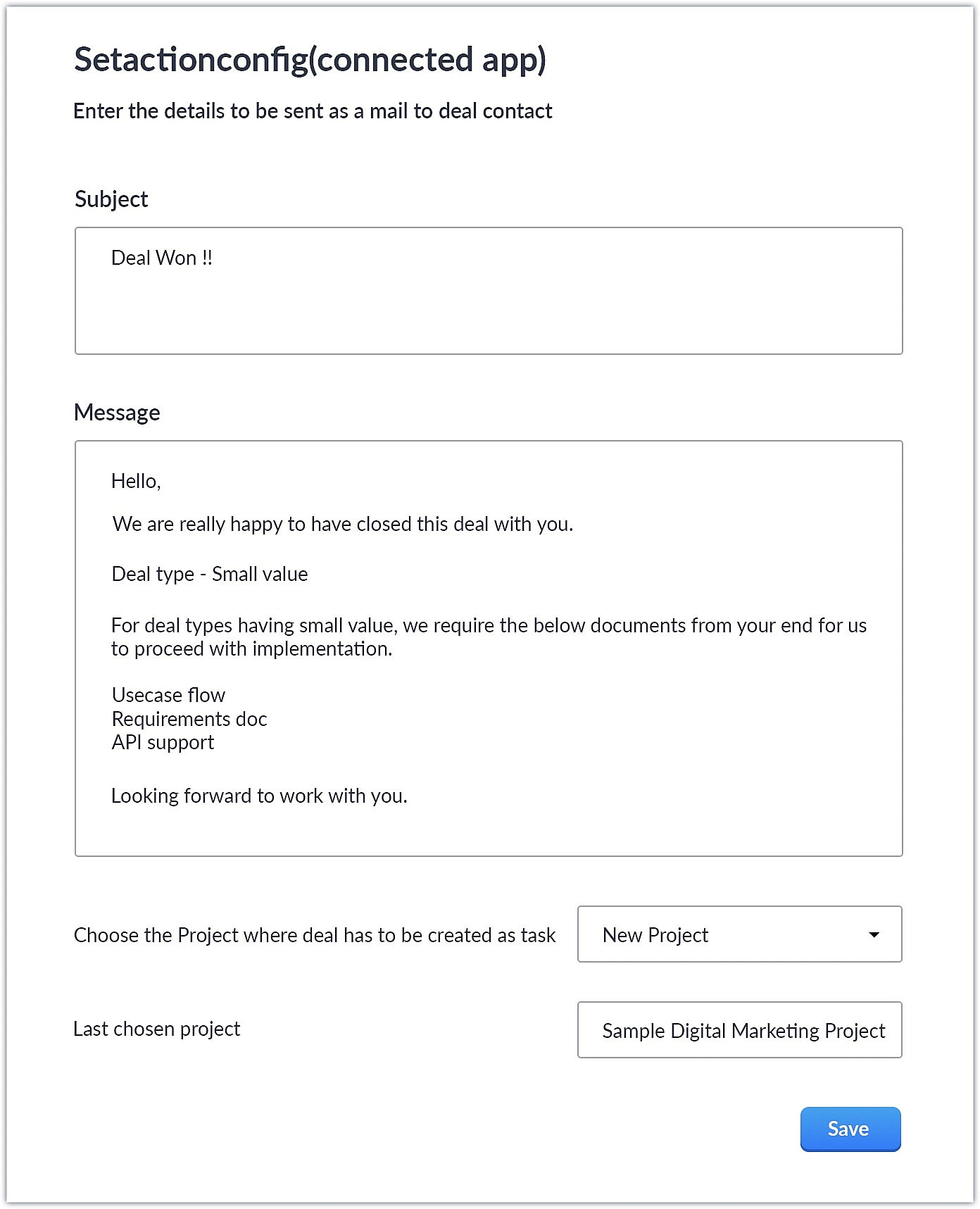
- Upon choosing the custom action, the custom UI appears where-in you can provide user specific input for email body and subject and also choose the project where you want deal to be created as a task in Zoho Projects.
Smaller revenue deals:
Larger revenue deals:
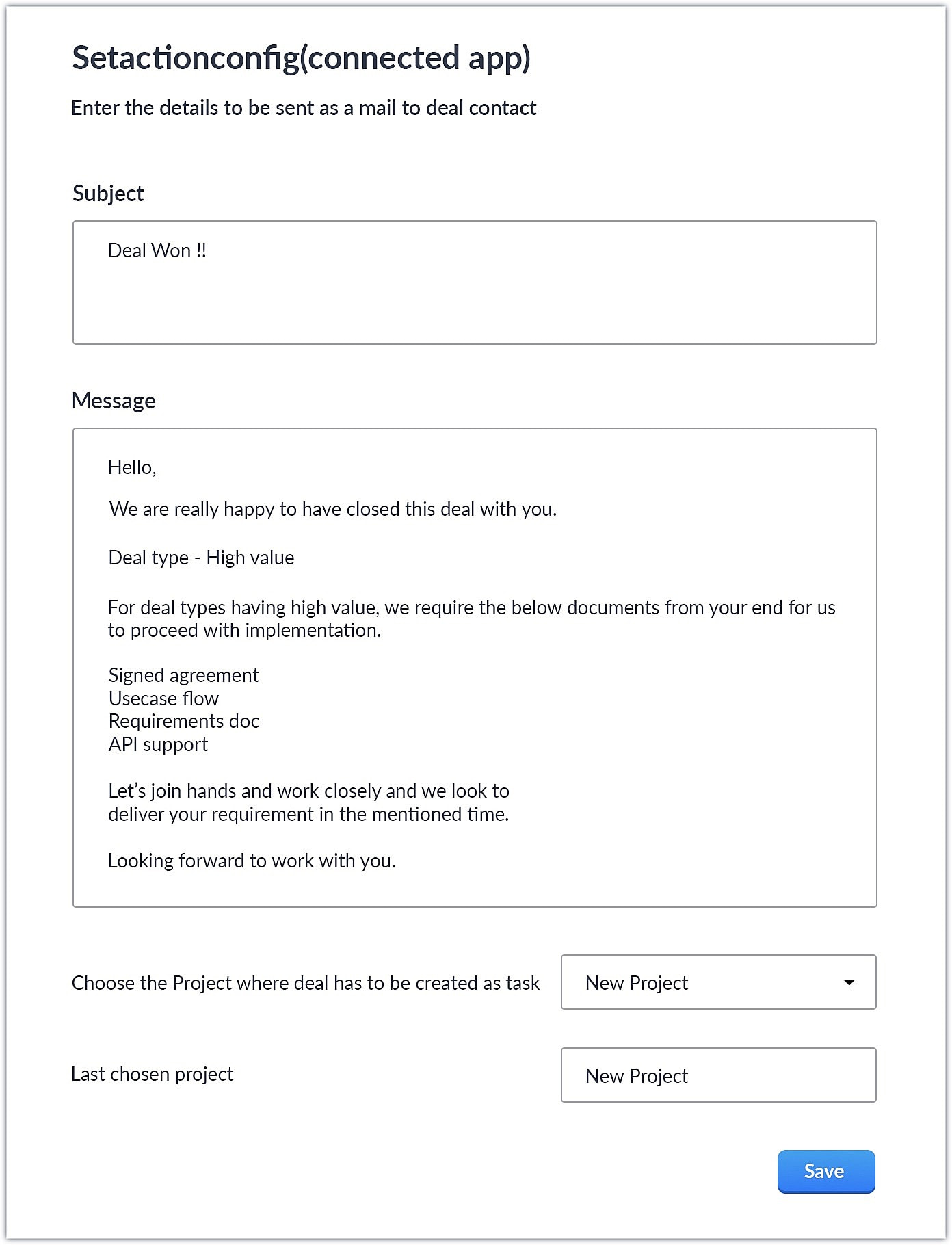
- When a deal with the necessary criteria is satisfied, an email is sent out to the deal's contact with the subject and body provided by the end user. A task is also created in Zoho Projects with some specific deal details.
This is one business case where you can use custom action. As a parallel use case to the above example itself, say you have multiple projects in Zoho Projects, each used to work on different case categories (bugs, issues, feature request, etc.). You could develop the same kind of template and allow end users to configure the criteria and outcomes accordingly.
You could also use custom actions feature to perform templated actions to obtain personalized outcomes depending on your business needs. We hope you found this information helpful. Keep following this space for more information!
SEE ALSO:
Access your files securely from anywhere
Centralize Knowledge. Transform Learning.
All-in-one knowledge management and training platform for your employees and customers.
New to Zoho Recruit?

Zoho Developer Community
New to Zoho LandingPage?
Zoho LandingPage Resources
New to Zoho Survey?
New to Zoho CRM Plus?
Deliver unforgettable customer experiences
New to Zoho CRM Plus?
Deliver unforgettable customer experiences
New to Zoho Marketing Plus?
Everything you need to run your marketing
New to Zoho Marketing Plus?
Everything you need to run your marketing
New to Bigin?





Topic Participants
Nanditha Somasundaram Somasundaram
Sticky Posts
Kaizen #198: Using Client Script for Custom Validation in Blueprint
Nearing 200th Kaizen Post – 1 More to the Big Two-Oh-Oh! Do you have any questions, suggestions, or topics you would like us to cover in future posts? Your insights and suggestions help us shape future content and make this series better for everyone.Kaizen #226: Using ZRC in Client Script
Hello everyone! Welcome to another week of Kaizen. In today's post, lets see what is ZRC (Zoho Request Client) and how we can use ZRC methods in Client Script to get inputs from a Salesperson and update the Lead status with a single button click. In thisKaizen #222 - Client Script Support for Notes Related List
Hello everyone! Welcome to another week of Kaizen. The final Kaizen post of the year 2025 is here! With the new Client Script support for the Notes Related List, you can validate, enrich, and manage notes across modules. In this post, we’ll explore howKaizen #217 - Actions APIs : Tasks
Welcome to another week of Kaizen! In last week's post we discussed Email Notifications APIs which act as the link between your Workflow automations and you. We have discussed how Zylker Cloud Services uses Email Notifications API in their custom dashboard.Kaizen #216 - Actions APIs : Email Notifications
Welcome to another week of Kaizen! For the last three weeks, we have been discussing Zylker's workflows. We successfully updated a dormant workflow, built a new one from the ground up and more. But our work is not finished—these automated processes are
New to Zoho TeamInbox?
Zoho TeamInbox Resources
Zoho CRM Plus Resources
Zoho Books Resources
Zoho Subscriptions Resources
Zoho Projects Resources
Zoho Sprints Resources
Qntrl Resources
Zoho Creator Resources
Zoho CRM Resources
Design. Discuss. Deliver.
Zoho Show Resources

Get Started. Write Away!
Writer is a powerful online word processor, designed for collaborative work.
Zoho CRM コンテンツ
-
オンラインヘルプ
-
Webセミナー
-
機能活用動画
-
よくある質問
-
Ebook
-
-
Zoho Campaigns
- Zoho サービスのWebセミナー
その他のサービス コンテンツ
Nederlandse Hulpbronnen

ご検討中の方
Recent Topics
Revenue Management: #6 Revenue Recognition in Professional Services Industry
If you run a consulting firm, agency, or any service-based business, you have a situation where you have signed the contract, maybe even sent the invoice, and have received some initial payments. So, can you consider this as revenue? What if the projectZoho fsm scheduled maintenance dispatch
Hi, I'm reaching out regarding an issue I'm encountering with the Scheduled Maintenance feature in Zoho FSM. I’m trying to configure it so that it automatically dispatches all maintenance jobs scheduled within the next 150 days, starting from today. However,zoho.inventory.getRecords returns no records
I running a custom function (Deluge) in Zoho Flow with a connection to Zoho Inventory. To debug the problem, I created the test function below. It returns "Number of contacts fetched: 0". This confirms that there's no issue with the org ID or connectionFeature announcement - Simplifying document creation with Zoho Sign
Hi there, We are pleased to announce the release of our document creation feature, enabling you to create, edit, and finalize documents like agreements, purchase orders, and contracts without relying on external tools or applications. <br> ThisIntegrating File Attachments in Zoho Flow Email Notifications
Hi, I would like to be able to send an email once an entry is made in a form, and in this email, I would like to attach a file that has been added to the form using the ImageUpload (or FileUpload) widget. So, I started by creating a flow that will triggerZoho project purchases
Hi Folks, I think having a purchase module in projects will help in putting together a project p and L. Project wise purchases and expenses. Do let me know your thoughts.How can I restore all the deleted Time entries of a Task in Zoho Projects
How can I restore all the deleted Time entries of a Task in Zoho Projects? Query: In Zoho Projects, I cloned a task and deleted the time entries from the cloned task. However, this also deleted the time entries from the original task. How can I restoreIs there a way to make an account inactive in ZoHo Desk
We have a few Clients "Accounts" that we no longer do business with. It would be beneficial for them to not show up in lists. However, we want to go back and view tickets, time, etc.How to set the value of the Phone field importing contacts in Zoho Desk
Hi everyone, i'm new in Zoho Desk, we're setting up the environment and i'm importing contacts from another CRM using a file CSV and i'm getting a problem with phone numbers (italian): the leading zero is cut away, also if the value is inside double quotes.How to center a field inside a section?
I’ve been trying to center a field inside a section in Zoho Canvas. When I align it visually, it looks centered in the editor, but after clicking Save, the field appears misaligned on the actual canvas. I also tried setting the field to full width, butEnable Validation Rule for Multi-Select Picklist Field
Zoho, Please allow validation rules for multi-select fields.CRM Custom function updating a module record shows the Super Admin user as the record modifier
Dear Zoho CRM Team, Is there any way to update this so that when a custom function has updated a record the Super Admin user doesn't become the modifier? This happens on the record as a modifier and shows up in the audit logs. It would be more usefulBest way to fetch employee names from Zoho People into Zoho Creator Inventory Stock Form field Employee Name Lookup
Hi Team, I have a requirement in my Zoho Creator application (Inventory Stock Adjustment) where I need to fetch employee names from Zoho People and use them as a lookup in a form. Currently, I am considering using an integration field to fetch this dataget file api is returning Junk data
I am working on extension development where at one point I need to retrieve attachments on records I found out I can use only invokeconnection and not invokeurl in extension development The invoke connection returns the image in raw binary format. WhenNeed help with message box
End user updates many records at once. Each have unique serial number. They want a confirmation box that says starting number, ending number and qty. Is there any way to do this? I been searching and asking support but seems like no great solution.[Webinar] The Transformative Power of Gen BI
Traditional decision-making tools are no longer enough. The integration of generative AI into business intelligence (BI) is proving to be a true game changer—enabling businesses to make faster, smarter, and better informed decisions. Early adopters ofBackorder process review - Automating Removal of Sales Order from "On Hold" When PO is Received
Hello Zoho Inventory Team, Currently, sales orders in On Hold status are released only when the bill for the purchase order is created. In our workflow, it would be much more efficient if the sales order could automatically move out of On Hold as soonHow to access the saved Query using API?
I have created a query in setting. Is it possible to access it from a API? What's the endpoint? I tried /v8/queries/important_deals but didnt' work.création d'une base de données
base de donnee d'un lycéeUser Session variables to recall after form submit & redirect to menu
Hey, Forgive me if this is a simple answer I have overlooked. I have built a big onboarding process for my SAAS platform which is built and managed by an external Dev team. I am hoping to embed my new creator app on the SAAS platform. I have a menu pageZoho Writer Merge Template with data from Zoho Analytics Views
Hello, Is there any way to pull information from Zoho Analytics and put it into a Merge Template? I am trying to create a bulk export of one report that filters on a field to create a single document for each of the filter fields.Having to enter bill before stock shows as available.
Hi, Am I right in thinking you must create a bill from the purchase order receipt before the goods are available for shipping?Agent Availability Report
From data to decisions: A deep dive into ticketing system reports Businesses need to track when their support agents check in and check out from work. This report, titled Agent Availability, is one of the static reports that helps managers track the numberAI-driven construction analytics using Zoho Projects Plus
Construction projects thrive on timelines; if a project is completed on or before the expected time, it makes headlines, but if it gets delayed, the company’s credibility will be at risk. Such projects require precise planning and constant monitoring,Canadian payroll
Hello ZOHO, is any updates on when payroll for Canada will be available?Unified customer view: Bringing product intelligence into your CRM data
For businesses today, applications and digital interfaces are the main touch points in the customer journey. While Zoho CRM data already tells who your customers are and what they buy, Zoho Apptics tells you how they interact and engage with your product.Zoho Creator SaaS app with multiple client AND multiple users
I am close to finalizing a Zoho Creator app that will be used by different companies to manage sale info, and each company can have multiple users using the app. Things were going perfectly until I tried a search on a report. I use a database field in each table to separate the data for each company, which works great. BUT when I do a search, I get to see ALL the data. This means that Company A could easily see the data from Companies B and C via the built-in search. Is there a way to set up thePossible to send Zoom AI Companion transcripts and summaries to contacts in CRM?
Title says it all. Is it possible to send Zoom AI Companion transcripts and summaries to contacts in Zoho CRM?Clarity on extended contract status
Clarity on “extended” status- How does Zoho “extend” a contract? E.g. if client extends by 1 month, can the “end date” be adjusted accordingly in Zoho and tagged as “Extended” with a clear audit trail that also captures the client’s email? Note- EmailCustomizing contract status
Can we customize/add/remove status on Zoho contracts ourselves or does Zoho needs to do this? Context- There is a long list of status on Zoho but not all of them are relevant for us . There are few status which are missing and needs to be added. E.g-Set Custom Business Calendars and Holidays for Global Teams
Managing a project across diverse teams means accounting for more than just tasks and deadlines; it means acknowledging how and when each team actually works. Users might follow different working days or observe region-specific holidays that cannot be[Integration edition] Deluge learning series - Integrations between Zoho apps and Third-party services with Deluge | 28 August 2025
We’re excited to welcome you to the Deluge learning series: Integration edition! The Integration edition will run for three months: Session 1 – Integrating Zoho Apps with Deluge using inbuilt integration tasks Session 2 – Integrating Zoho Apps with DelugeCritical Vulnerability in all major password manager plugins - is Zoho Vault affected?
Hi Zoho, a security researcher found a critical clickjacking vulnerability in all major browser password managers: DOM-based Extension Clickjacking: Your Password Manager Data at Risk | Marek Tóth Is Zoho Vault affected as well? Apparently the Vault extensionNeed Your Insights
Hi Zoho, I'm confused why the flow only sends to one output. setVariable15 is from a list. It doesn't consider the 2nd entry. Any thoughts?Map Dependency Fields - How can can I limit picklist values from a multi-select Parent field?
I know the "Map Dependency Fields" feature doesn't allow a multi-select parent field. However, I need the functionality. Can I do it through a deluge function, and would it still support color coding picklists? We need the color coding for quick scanningDYK 1 - Color Palette for Enhanced Visual Identification of Status
Introducing the Did You Know series of posts. The goal of this series is to familiarize users with certain features or enhancements in Zoho Projects that may not be evident at first glance. The first post in this series deals with color palettes for indicatingInvalid field in the COQL query
Dear Zoho Support! I believe that you already helped me with a similar problem a few years ago. One of my clients has a custom field named "LOB" in the "Deals" Module (see the field's metadata below). The COQL query using this field: : "select id, Deal_Name,Transferring domain registration to new registrar and switching email hosting at the same time?
I need to transfer an existing domain uv cure adhesive that's currently with SiteGround to Porkbun. I also need to move the existing custom email addresses from SiteGround to Zoho Mail. I'm not sure if I should transfer the domain first and then tackleSplit deposits
Can Zoho do split deposits. One deposit, two checks for two separate invoices from different customers. This is one of the most common tasks I can imaging. When I mark the two invoices paid, there are two deposits in bank register. When I try to match,Deactivate Desk Contact without Deleting Contat
We have a client who has multiple tenants for regulatory purposes, and as such, has a few users that have email addresses in both tenants. They've then emailed into the ticketing system, so we have multiple contacts (no big deal, we want to keep theirNext Page