Extension pointers #14: Extend end-user benefits and allow personalization by implementing extensions with custom actions
From our earlier post on custom actions, we know that we can create templated actions, share them with end users, and allow them to reuse those actions to achieve personalized outcomes. In this post, we'll look at how custom actions make it easy for users to carry out these templated tasks to get customized results.
Consider the following scenario: a hardware company that already uses Zoho CRM then utilizes Zoho Projects to implement and work on the deals they've won. Assume that the Zoho Projects portal has two projects: one for handling smaller revenue deals that require minimum development and less time, and the other for managing larger revenue dealsthat will eventually demand more time and resources for execution.
As an end user processing deals in Zoho CRM, it would be extremely convenient for the company to have the deals automatically fall into the appropriate projects, such as a task based on the expected revenue. Furthermore, it would be ideal to send emails to the customer with whom they have made the deal to request anything needed from their end in order to move forward with the implementation of the deal. Let's see how we can achieve this with the help of custom actions.
We have detailed posts on the steps to create a custom action along with a live example. Now, let's reiterate and go over the steps to achieving the above use case.
Developer activities
1. Create a connector for Zoho Projects.
2. Create a custom user interface (widget-connected app) that allows the user to select the project where the deal should be created as a task, as well as add the personalized email subject and body that will be sent to the user.
3. Create a custom action in the Zoho Developer console.
- Associate the custom user interface to the custom action.
- Define an action that creates a task in the selected project and also sends an email to the customer based on the values entered by the end user in the custom UI.
Extension/end-user activities
4. Create workflows as an end-user (i.e., set criteria on expected revenue; provide personalized values for email subject and body, and choose the project in which the deal fulfilling the set criteria should be created as a task) and assign a custom action to them.
Developer activities
1. Creating a connector
- Create a new connector in your extension for Zoho Projects using the Connectors feature under Utilities in the left panel of the Zoho Developer console.
Note: Zoho Projects follows the OAuth 2.0 protocol for its authentication mechanism. You can refer to this post to learn more about the steps to register Zoho Projects and retrieve your client credentials.
- Add the necessary connector APIs for your functionality.
- The Zoho Projects REST APIs added for our example are mentioned below.
Connector API Name | Method type | URL |
Get Projects | GET | https://projectsapi.zoho.com/restapi/portal/${portalid}/projects/ |
Create project task | POST | https://projectsapi.zoho.com/restapi/portal/${portalid}/projects/${projectid}/tasks/?name=${name}&description=${description} |
2. Create a custom user interface:
1. Create a custom user interface that allows the end user to select the project in which they want to create the deal as a task, as well as enter the email subject and body that should be sent to the contact associated with the deal.
2. You can find the HTML code for the custom UI as an attachment to the post.
- In the HTML code, we have two text fields to get the user inputs for the email subject and body.
- We have also invoked the connector API to get projects from a portal. The response is then populated and displayed as a dropdown list to allow the user to select the project in which they want the deal to be created as a task.
- In the HTML code snippet, we have hard coded a static value for the Zoho Projects portal.
Note: Depending on your business use case requirements, you can create custom variables to prompt the user to input their Zoho Project portal ID, or you can create a setting widget that displays the user's portals, allowing the user to choose the portal in which they want to have the deals created as tasks as well.
- ZOHO.CRM.ACTION.setConfig - In this example, we have utilized the setConfig method. This method can be used to set values to variables which can be retrieved later through the widget's page load response.
➤ For our example, we have used the setConfig method to set various Zoho CRM deal and email (subject and body) user input values to variables. We have later obtained these saved values through the widget's page load response, which contains a configdata key with these set data as its values.➤ Sample page load response when ZOHO.CRM.ACTION.setConfig is used in our example:
"module": "Deals", "configdata": { DealTest: "Sample Digital Marketing Project" Dealdescription: "${!Deals.Description}" Dealname: "${!Deals.Deal_Name}" Message: "Sample Message" Subject: "Deal Won!" To: "${!Deals.Contact_Name.Email}" |
➤ We have then used the preset saved values available in the configdata key to prepopulate the widget UI every time it loads.
3. Create a custom action
- Go to the Zoho Developer console and select the extension in which you want to create the custom action.
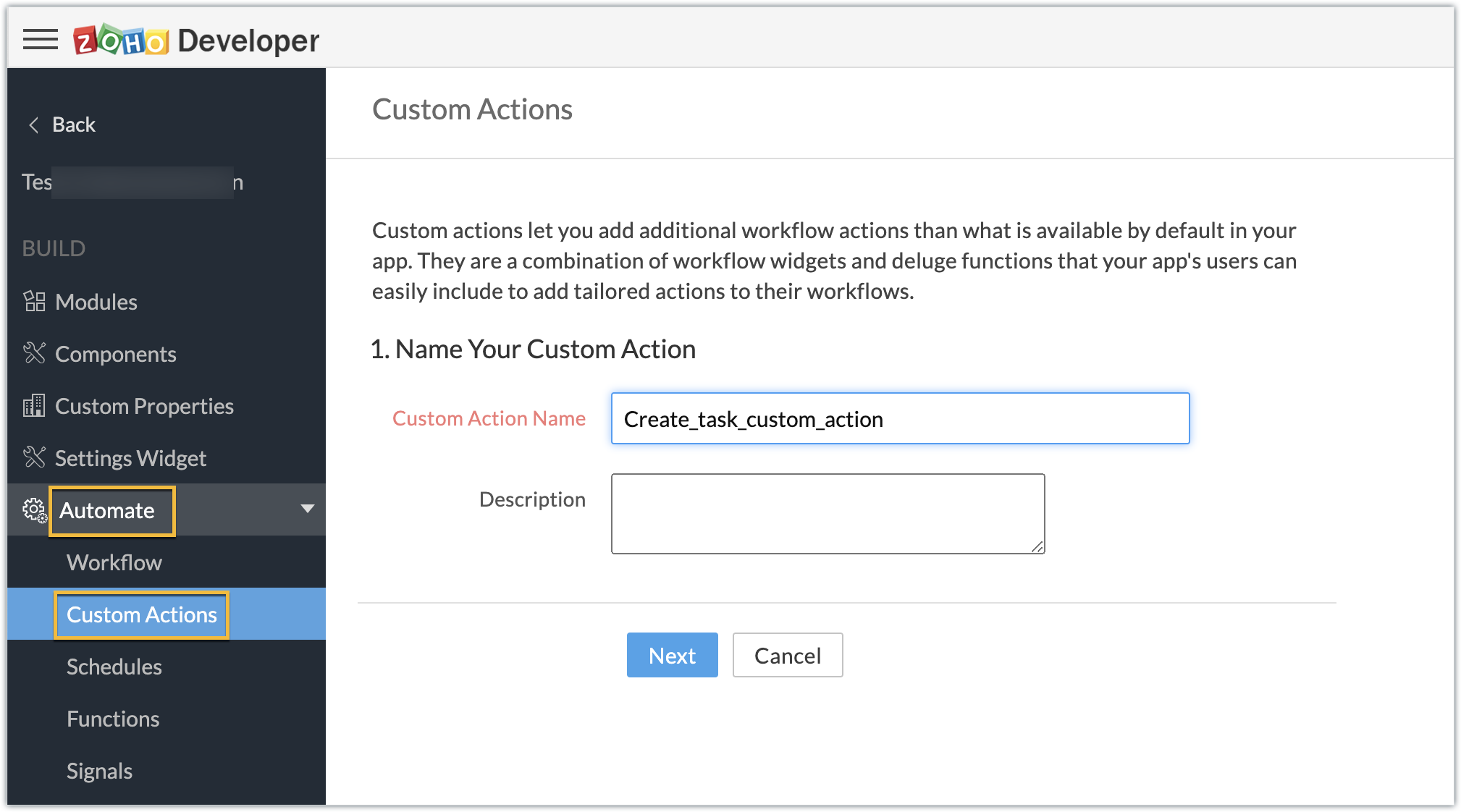
- Create a custom action by navigating through Automate - > Custom Actions, under the Build section in the left panel. Click Create Action.
- Enter the Custom Action Name and Description. Click Next.
- Provide the location of the html file (widget UI) to complete the resource path. Click Next, then click Create Function.
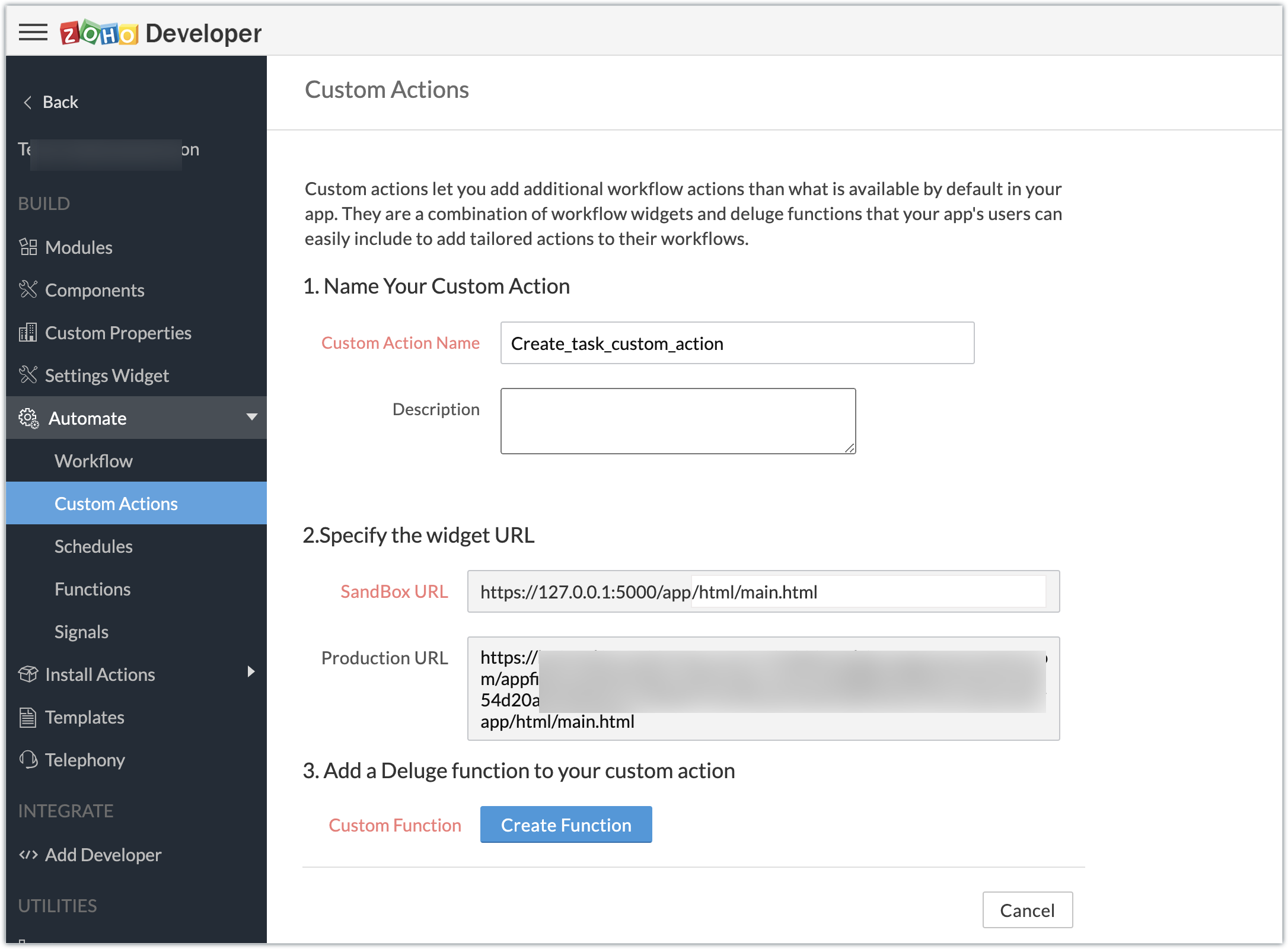
- Enter the Deluge function to perform our use case functionality.
- Click Save & Close, then click Save.
Deluge function code snippet:
dynamic_map = Map(); dynamic_map.put("portalid","xxxxxx"); dynamic_map.put("projectid",input.config.get("Dealproject")); dynamic_map.put("name",input.config.get("Dealname")); dynamic_map.put("description",input.config.get("Dealdescription")); response = zoho.crm.invokeConnector("xxxxx.zohoprojects.createprojecttask",dynamic_map); sendmail [ from :zoho.adminuserid to :input.config.get("To") subject :input.config.get("Subject") message :input.config.get("Message") ] |
- In the above Deluge code, we have performed the functionality of creating the deal as a task in Projects and sending an email to the deal's contact with the input provided by the end user in their CRM account while associating the custom action to a workflow.
Custom action in effect (End-user):
Create workflows:
- As an end user who has the extension which features the custom action installed in the Zoho CRM account, go ahead and create workflows to define criteria and associate the custom action.
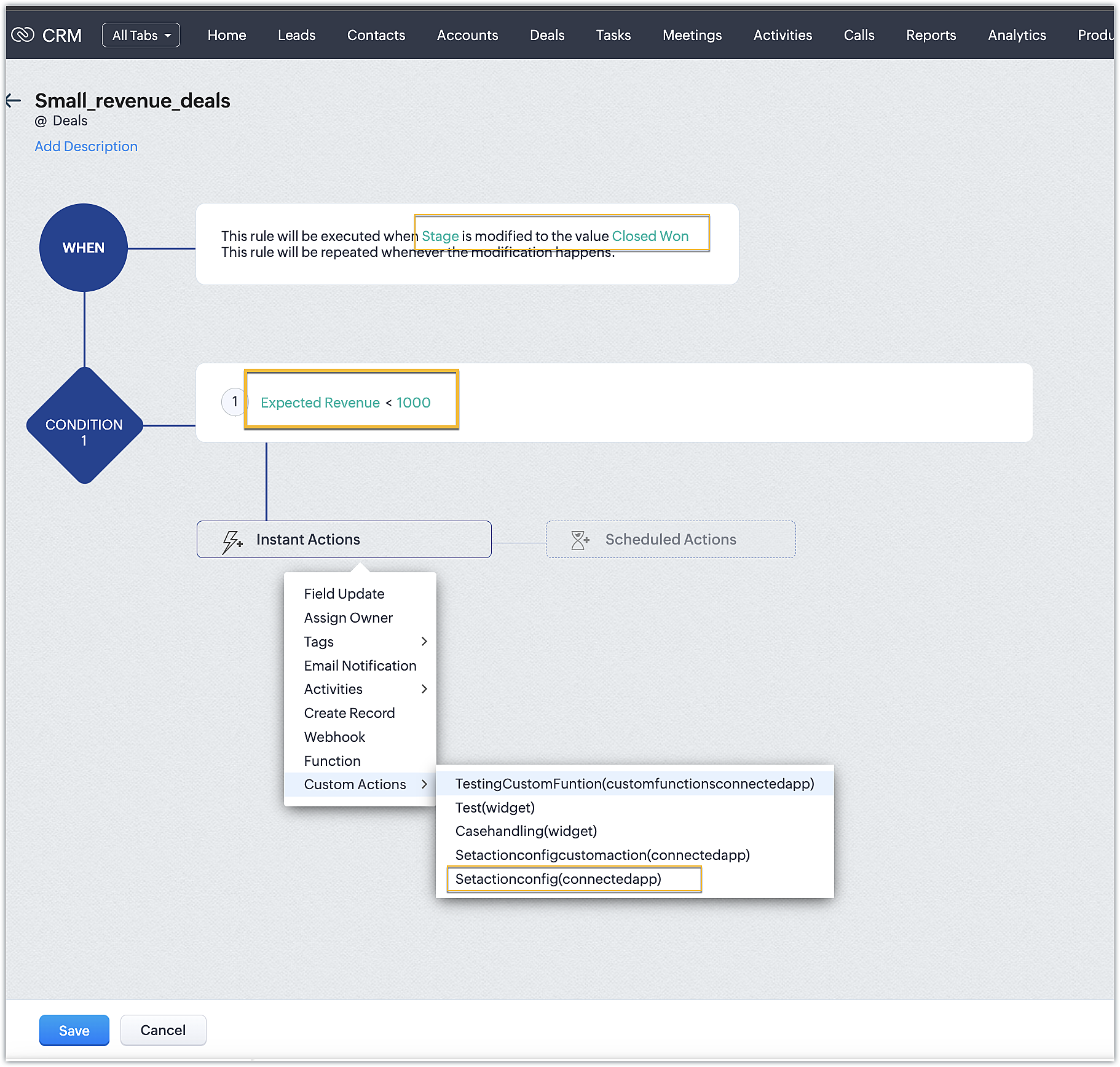
- In our case, we have two workflows:
➤ One for smaller deals where the expected revenue is less than 1000 USD
➤ One for larger deals where the expected revenue is greater than or equal to 1000USD
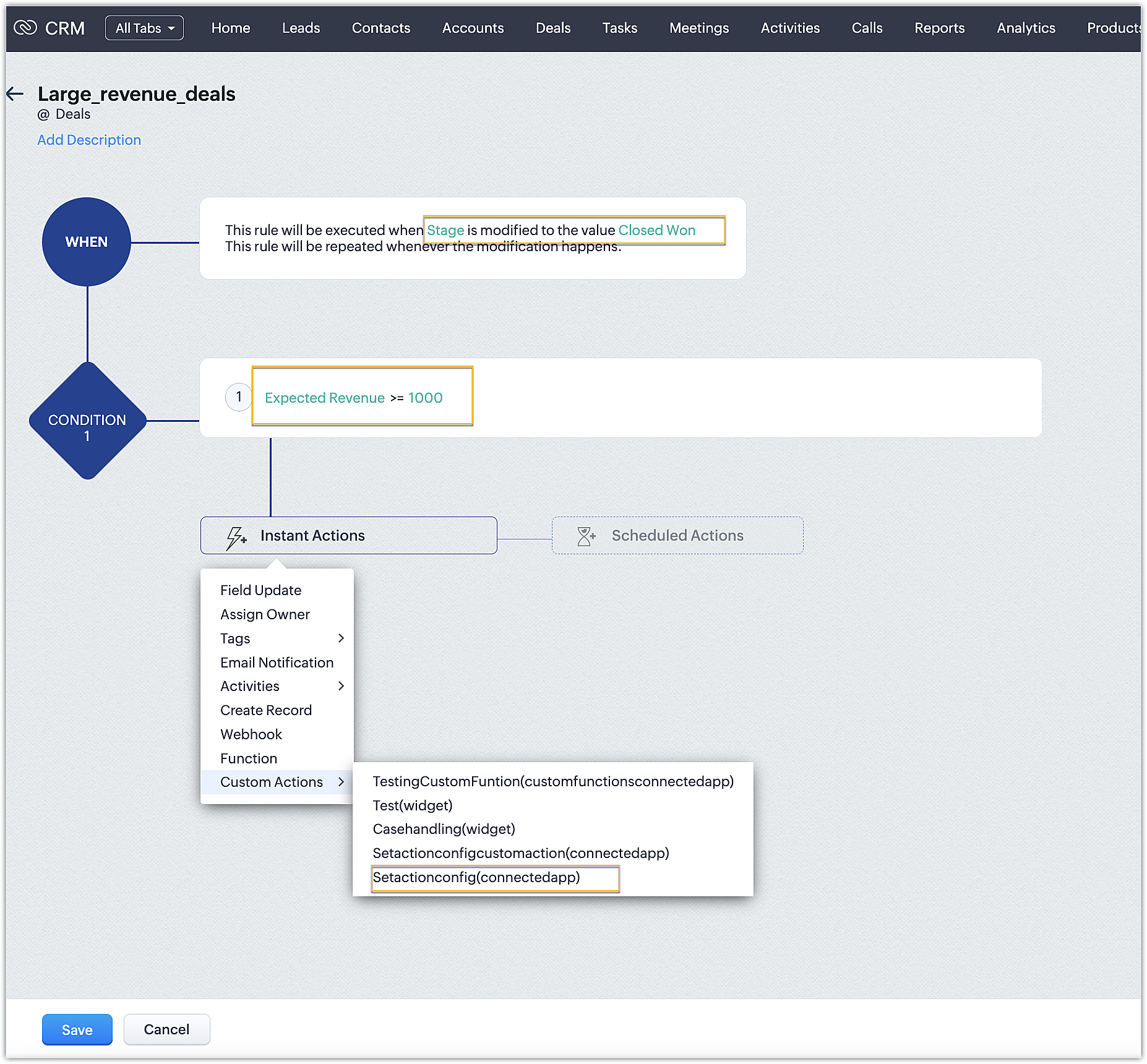
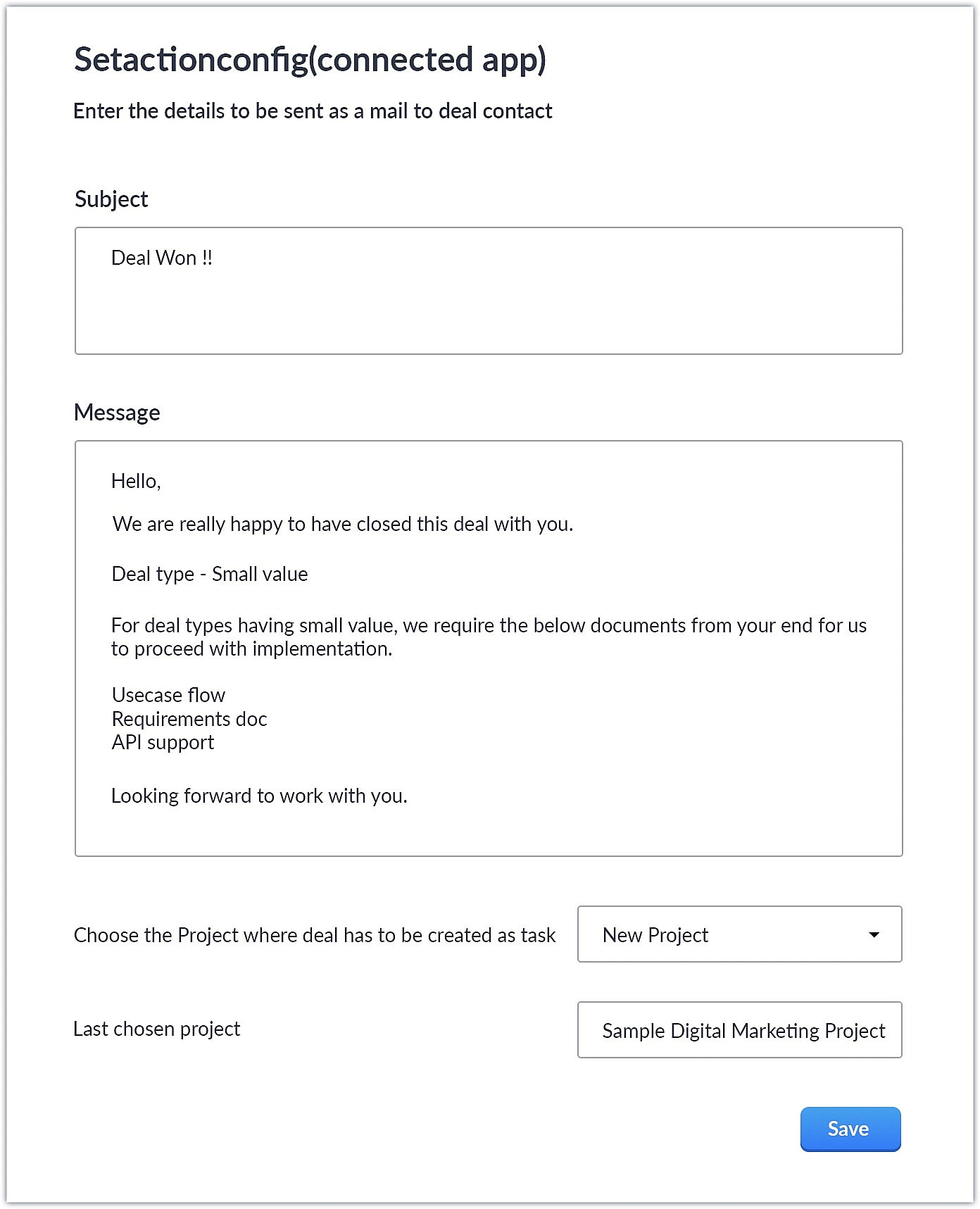
- Upon choosing the custom action, the custom UI appears where-in you can provide user specific input for email body and subject and also choose the project where you want deal to be created as a task in Zoho Projects.
Smaller revenue deals:
Larger revenue deals:
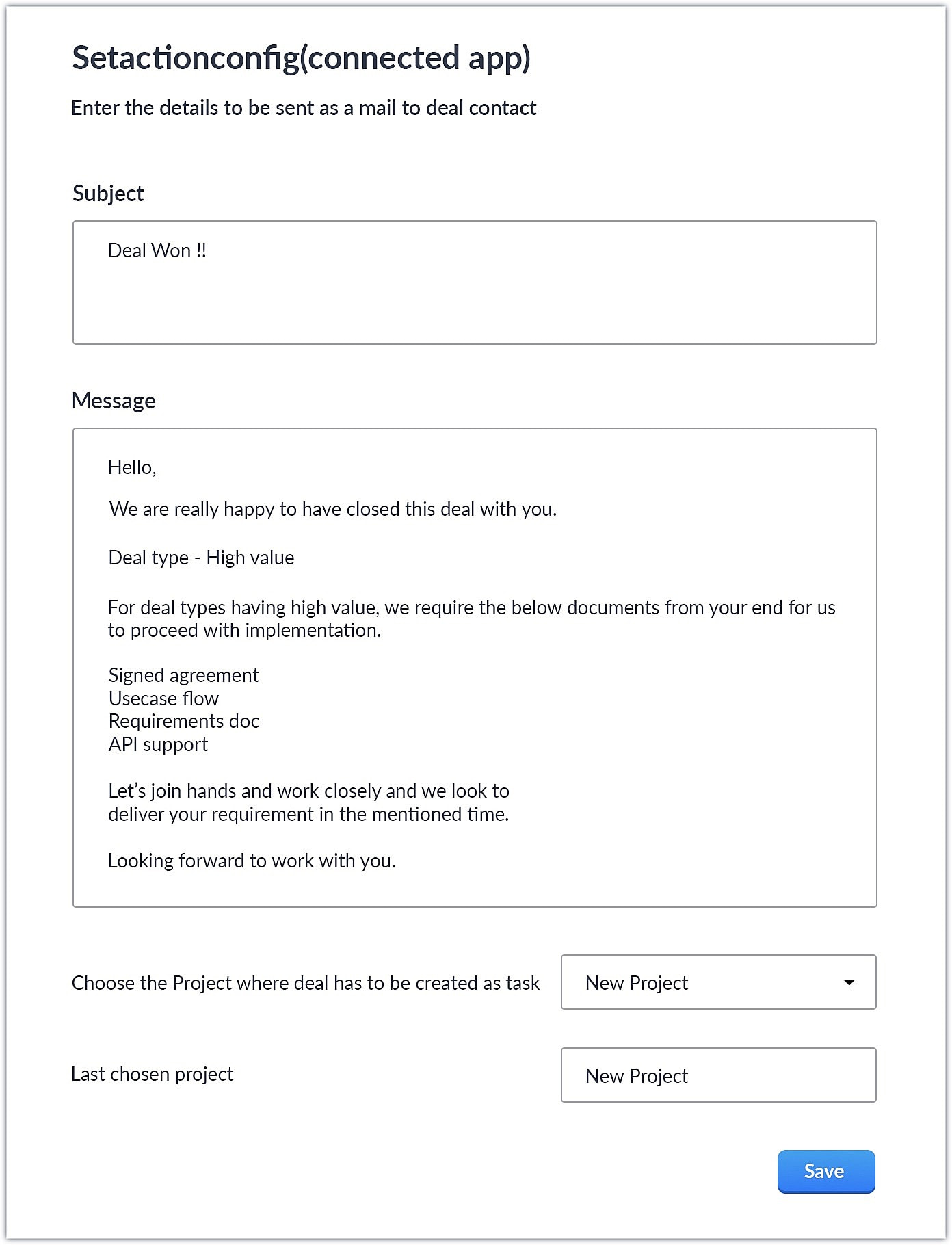
- When a deal with the necessary criteria is satisfied, an email is sent out to the deal's contact with the subject and body provided by the end user. A task is also created in Zoho Projects with some specific deal details.
This is one business case where you can use custom action. As a parallel use case to the above example itself, say you have multiple projects in Zoho Projects, each used to work on different case categories (bugs, issues, feature request, etc.). You could develop the same kind of template and allow end users to configure the criteria and outcomes accordingly.
You could also use custom actions feature to perform templated actions to obtain personalized outcomes depending on your business needs. We hope you found this information helpful. Keep following this space for more information!
SEE ALSO:
Access your files securely from anywhere
Centralize Knowledge. Transform Learning.
All-in-one knowledge management and training platform for your employees and customers.
New to Zoho Recruit?

Zoho Developer Community
New to Zoho LandingPage?
Zoho LandingPage Resources
New to Zoho Survey?
New to Zoho CRM Plus?
Deliver unforgettable customer experiences
New to Zoho CRM Plus?
Deliver unforgettable customer experiences
New to Zoho Marketing Plus?
Everything you need to run your marketing
New to Zoho Marketing Plus?
Everything you need to run your marketing
New to Bigin?





Topic Participants
Nanditha Somasundaram Somasundaram
Sticky Posts
Kaizen #198: Using Client Script for Custom Validation in Blueprint
Nearing 200th Kaizen Post – 1 More to the Big Two-Oh-Oh! Do you have any questions, suggestions, or topics you would like us to cover in future posts? Your insights and suggestions help us shape future content and make this series better for everyone.Kaizen #226: Using ZRC in Client Script
Hello everyone! Welcome to another week of Kaizen. In today's post, lets see what is ZRC (Zoho Request Client) and how we can use ZRC methods in Client Script to get inputs from a Salesperson and update the Lead status with a single button click. In thisKaizen #222 - Client Script Support for Notes Related List
Hello everyone! Welcome to another week of Kaizen. The final Kaizen post of the year 2025 is here! With the new Client Script support for the Notes Related List, you can validate, enrich, and manage notes across modules. In this post, we’ll explore howKaizen #217 - Actions APIs : Tasks
Welcome to another week of Kaizen! In last week's post we discussed Email Notifications APIs which act as the link between your Workflow automations and you. We have discussed how Zylker Cloud Services uses Email Notifications API in their custom dashboard.Kaizen #216 - Actions APIs : Email Notifications
Welcome to another week of Kaizen! For the last three weeks, we have been discussing Zylker's workflows. We successfully updated a dormant workflow, built a new one from the ground up and more. But our work is not finished—these automated processes are
New to Zoho TeamInbox?
Zoho TeamInbox Resources
Zoho CRM Plus Resources
Zoho Books Resources
Zoho Subscriptions Resources
Zoho Projects Resources
Zoho Sprints Resources
Qntrl Resources
Zoho Creator Resources
Zoho CRM Resources
Design. Discuss. Deliver.
Zoho Show Resources

Get Started. Write Away!
Writer is a powerful online word processor, designed for collaborative work.
Zoho CRM コンテンツ
-
オンラインヘルプ
-
Webセミナー
-
機能活用動画
-
よくある質問
-
Ebook
-
-
Zoho Campaigns
- Zoho サービスのWebセミナー
その他のサービス コンテンツ
Nederlandse Hulpbronnen

ご検討中の方
Recent Topics
Collections Management: #6 Realign Customers who gets back In-Term
Arun stared at the subscription list on his dashboard. Another account had just been moved to Cancelled status after completing the whole dunning process. Nothing unusual, just that payment failures happen, retries fail, and cancellation is the expectedZoho Mail IP Blacklist
I need problems with send mails: Error: junk mail rejected - sender4-op-o10.zoho.com 136.143.188.10, is in RBL. Spamcop. Please remove FQDN for blacklist. Regards.I can receive but not send emails
Hello, I've been not able to send emails for almost a year now. I been using alternate email to do this. I want to know how to fix this so I can use my zoho account normally again.The challenge of 24/7 connectivity: Being present and meeting customer expectations
Before television entered our homes, radio was our window to the world. We had to tune carefully to catch voices from distant places. When television arrived, the world began to grow smaller. We can watch rocket launches, see the goal that wins our favoriteHow to download all attachments from inbox, send, other folders in one go
Hi All, Appreciate if anyone could help me with steps for below requirement. How to download all attachments from inbox, send, other folders in one go. Even mapping to new folder will help me. Thanks in advance.Cannot connect mail accounts to Thunderbird
Hi Support - I'm attempting to add my mail accounts to Thunderbird but I'm getting an unable to login to server error. I tried to use the password associated with my account I received the unable to login error. So I went into Zoho Accounts and generateAlias Email Id already exists
Hi, I just verified my domain sesque (dot) com and now I am trying to create the admin account using admin (at) sesque (dot) com, but I am getting an error saying "Alias Email Id already exists". I used to have another Zoho account with this email address,Unable to connect to smtp server, connection timed out
Hi Team, I am facing below issue, while sending out emails from thunderbird client. It used to work, facing this issue from morning. Error: Sending of the message failed. The message could not be sent because the connection to Outgoing server (SMTP) smtp.zoho.comKaizen #217 - Actions APIs : Tasks
Welcome to another week of Kaizen! In last week's post we discussed Email Notifications APIs which act as the link between your Workflow automations and you. We have discussed how Zylker Cloud Services uses Email Notifications API in their custom dashboard.DKIM Verification Failed (Namecheap)
Hi! I have already set up the TXT records in Namecheap but I keep getting the "Verification Failed" pop up. Was wondering if I'm the only one who has this problem and can anyone help me with this? Thanks!Emails stuck in Queue
Hi there, Since yesterday I have a few out going emails stuck in a queue. It say it will auto retry sending however nothing is happening. It seems to be affecting roughly 50% of my outgoing emails. Please help ThanksSoft Bounce from transational emails from BREVO (Sendinblue)
I manage the website of a client who uses your EMAIL service for the domain floranativadobrasil.com. And I use the BREVO email service, previously called SendinBlue, to send transactional emails about events specific to the website. All emails sent toGetting an error Address not found Your message wasn't delivered
Hey, I'm trying to configure zoho mail for my website https://businessentity.org/ The email is meredith.karter@businessentity.org I'm able to successfully send the mails but when someone sends an email to above mail, this error shoots up: Address notSupport Uploading YouTube Videos Longer Than 60 Minutes
Hi Zoho Social Team, How are you? We would like to request support for uploading YouTube videos longer than 60 minutes directly through Zoho Social. Your support team informed us that Zoho Social currently cannot upload videos over 60 minutes due to “APINeed Faster Help? Try Live Chat Support
Hello there, We understand that sometimes, whether you’re facing an issue, exploring a feature, or need quick clarification, sending an email and waiting for a response just doesn’t cut it. You need answers, and you need them now. That’s exactly why weCan't deactivate Spell Check
Hi Community, right now I'm using the Zoho Mail Desktop-Software. So far, so good.. many possibilities. Overall very nice. What is extremely annoying right now, is that we are not able to deactivate the Spell Check feature. And we are barely able to focusZoho Toolkit Email Signature Generator
I'm having real issues with the email signature generator with no matter where I host the photo, Zoho doesn't seem to show the photo on the link provided?Company Policy Upload - Request All EE to review and sign
How can I upload policies into Zoho People and have the employees review them and sign off saying they agree, etc.? Also, if I make a revision to a policy, I would like that changed or updated policy to be distributed or have the employees notified thatZoho Sign Global Settings vs. Template and Document
Hello, We are running into an issue on a current use case. We already use Zoho Sign. Now that KBA is available, we want to begin using it in our tax delivery process, by allowing clients to sign electronically, but also download a copy of their returnZoho Mail Desktop Crashes on Linux - Ubuntu 24 LTS
Hi, I have been trying to run the desktop app on Ubuntu for the past few day with no luck. I have tried both the .deb package and the appImage. When I attempt to open the app. It just crashes immediately. The crash error dialog appeared once and I cantZoho IP blocked by SpamCop
Hi, Many of my emails are blocked and I receive this: INVALID_ADDRESS, ERROR_CODE :550, ERROR_CODE :spamcop.mimecast.org Blocked - see https://www.spamcop.net/bl.shtml?136.143.188.51. - https://community.mimecast.com/docs/DOC-1369#550 [DGwIYPPSOfWIServer error when trying to Data > Sort > Custom Sort
Been using Data > Sort > Custom Sort for a while, now it has suddenly stopped working. When selecting the same data range and trying to execute, I get "Sorry! There was a problem saving your last edit. Please try again."To Assign a genrated pdf to a file upload field using delug
content = "<html><body>HTML Content on page One <div style='page-break-after:always'></div> HTML Content on page Two </body></html>"; file = zoho.file.convertToPDF(content); file.setFileName("Name of the file"); <variableName> = <FormLinkName>[ID == input.ID];TArgets To Accounts (Modules)
How can i set sale target to Customers (Accounts Module)Breaking barriers with multilingual WhatsApp templates in IM
Ever wondered what it feels like to be greeted in your own language by a brand you love? A “Welcome!” feels nice, but a “¡Bienvenido!” or “स्वागत है!” feels personal. In today’s global world, conversations often need to cross both time zones and crossHow to share private Opportunities with whole org at an account level
Opportunities are currently set to private, so our sales team only sees their own opportunities, along with their manager and upper leadership. The need is the ability for the rest of the Org to see the opportunities at an account level, not within theProblema Verificacion con proveedor NIC.AR
No puedo realizar la verificación del correo, he seguido los pasos indicados y configurado los MX. Y no puedo verificar el correo. He leido en el foro que otros han tenido el mismo problema. Alguno pudo solucionarlo?How to remove some users in zoho accounts
How to remove some users in Zoho accounts.Unified Inbox for all, including fetched mails
I fetch mails from different third-parties mailboxes. But I need to switch mailbox too see fetched mails. It's strange. All mailboxes have one shared disk space for own mail and fetched mail, but why do we need to switch mailbox (on the left bottom) toWhatsapp Limitation Questions
Good day, I would like to find out about the functionality or possibility of all the below points within the Zoho/WhatsApp integration. Will WhatsApp buttons ever be possible in the future? Will WhatsApp Re-directs to different users be possible basedUsers Not Automatically Being Added To WorkDrive Team
I have already created a ticket for this issue, but the support team doesn't seem to understand what's happening. Our organization started with a trial of Zoho Workplace around November 10, 2025. I created 10 users, including myself. I sent out the invites,Synchronization between Gmail and Zoho Mail
Hello! I am using Zoho Mail within the Zoho One platform. I have completed the basic setup and added all the required DNS records with our domain provider. Our goal is to set up two-way synchronization between our current Gmail inbox and Zoho Mail, butIMAP login problem
I have my domain hosted with zoho @wilson.ie I have added a new user and have enabled IMAP access to this user account The user can login to zoho mail on the web. When we enter the server settings into Outlook as per below, Outlook cannot login to theChanges to subform in Zoho CRM Portal Timeline History Unavailable
Hi Support Team, We have noticed a feature limitation in the Zoho CRM portal. We created a portal for our vendors to edit records directly, but when vendors make updates, the Modified Time and Date fields are not being updated. Additionally, these updatesThis mobile number has been marked spam. Please contact support.
Hi Support, Can you tell me why number was marked as spam. I have having difficult to add my number as you keep requesting i must use it. My number is +63....163 Or is Zoho company excluding Philippines from their services?Duplicating report but custom layout does not
Dear Zoho Creator, I need to duplicate a report into 10 copies, but unfortunately the custom layout (detail view) doesn’t copy along with it. I tried exporting and importing the custom layout, but the field mappings are incorrect. I believe everyone areCredit Card Readers?
We would like to use our commerce website at conferences (and eventually in store) to swipe credit cards to pay for orders. How would we accomplish this? Does Zoho have anything available for a developer write code to integrate something like Stripe TerminalStock count by bin location
Is there a configuration to make a stock count by bin or area and not by product. these is useful to manage count by area RegardsAdd Prebuilt "Partner Finder" Template with Native Zoho CRM Integration in Zoho Sites To: Zoho Sites Product Team
Hi Zoho Team, We hope you're doing well. We would like to request a prebuilt "Partner Finder" template for Zoho Sites, modeled after your excellent implementation here: 🔗 https://www.zoho.com/partners/find-partner-results.html ✅ Use Case: Our organizationHow Do I Refund a Customer Directly to Their Credit Card?
Hi, I use books to auto-charge my customers credit card. But when I create a credit note there doesn't seem to be a way to directly refund the amount back to their credit card. Is the only way to refund a credit note by doing it "offline" - or manually-Next Page