Kaizen#135 : Third Party Integration using Client Script
Hello everyone !
Welcome back to another enlightening Kaizen post! In this Kaizen post, we'll explore how to invoke a Third-Party API through Client Script. This enables you to seamlessly connect to external services and fetch dynamic data. Stay tuned to discover the step-by-step process of invoking a Third-Party API withi your client-side scripts. This post will answer the question on Importing data from third party API.
Welcome back to another enlightening Kaizen post! In this Kaizen post, we'll explore how to invoke a Third-Party API through Client Script. This enables you to seamlessly connect to external services and fetch dynamic data. Stay tuned to discover the step-by-step process of invoking a Third-Party API withi your client-side scripts. This post will answer the question on Importing data from third party API.
In this Kaizen post,
- Overview
- What are Connections?
- How to invoke a Connection in Client Script?
- Use Case
- Solution
- Create a Connection.
- Add to Trusted Domain.
- Invoke the connection in Client Script and populate the field using Client Script.
- Summary
- Recommended Reads
1. Overview
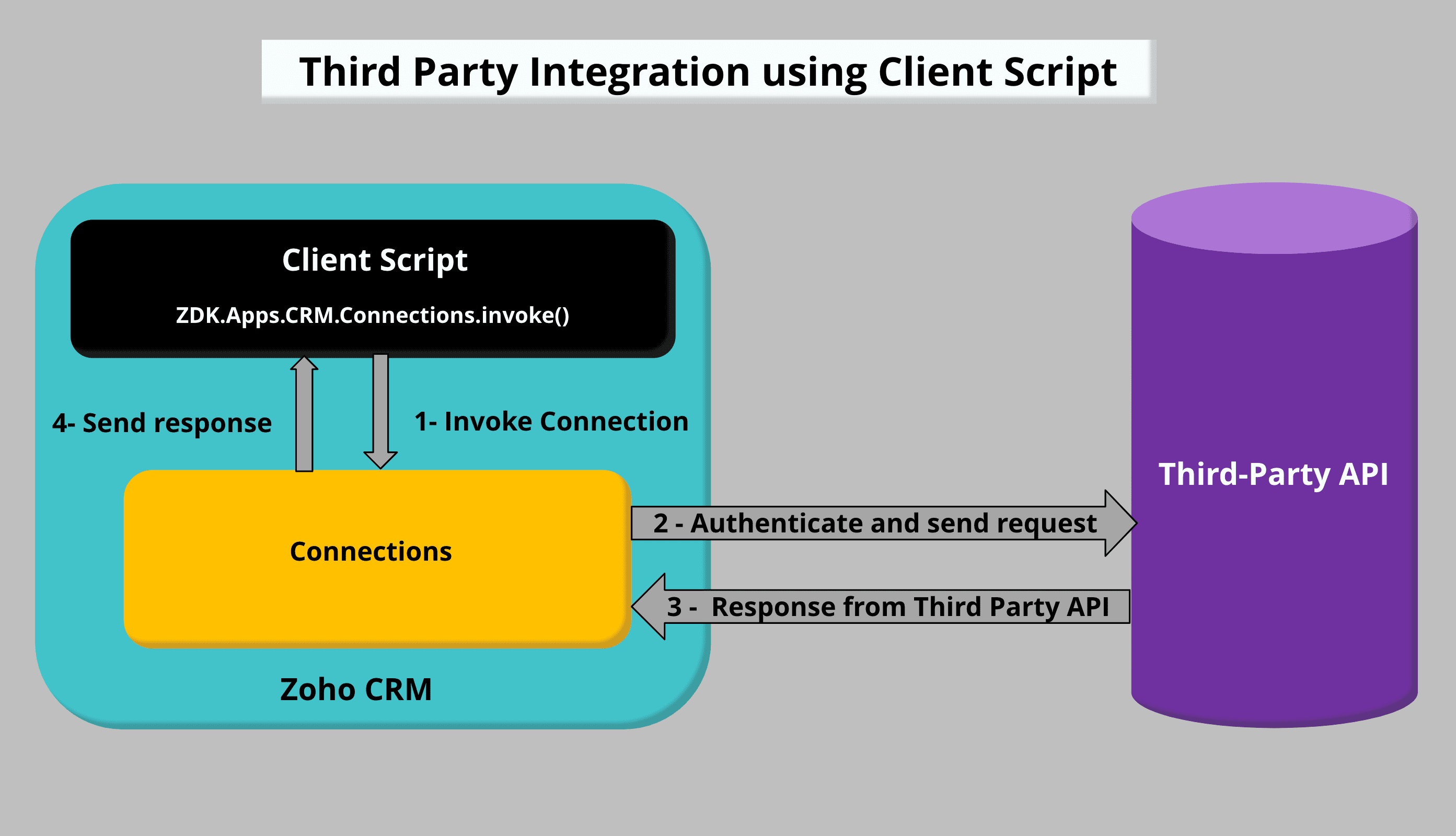
To accomplish Third Party Integration using Client Script, you need to create a Custom service Connection and invoke the connection in Client Script. Once you get the response from the Third Party API call, you can populate or display the required data using Client Script.
2. What are Connections?
Connections in Zoho CRM is used to establish authentication with other Zoho or third-party services to perform integration with them. Check this Kaizen post to know more about Connections and Authentication types.
3. How to invoke a Connection in Client Script?
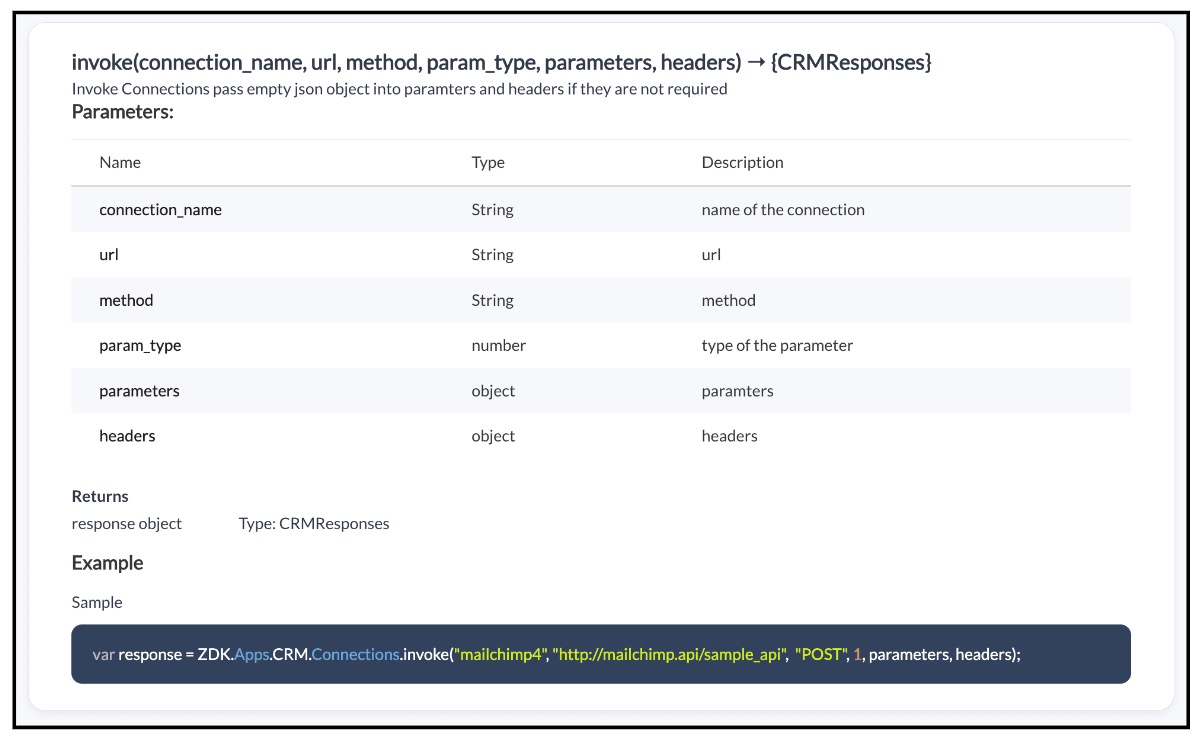
To invoke a Connection using Client Script, you need to use the invoke method with the required parameters.
Syntax : invoke(connection_name, url, method, param_type, parameters, headers)

Note:
Whenever you want to make third party API calls, you need to whitelist them by adding the third party domain to Trusted Domain.
4. Use Case :
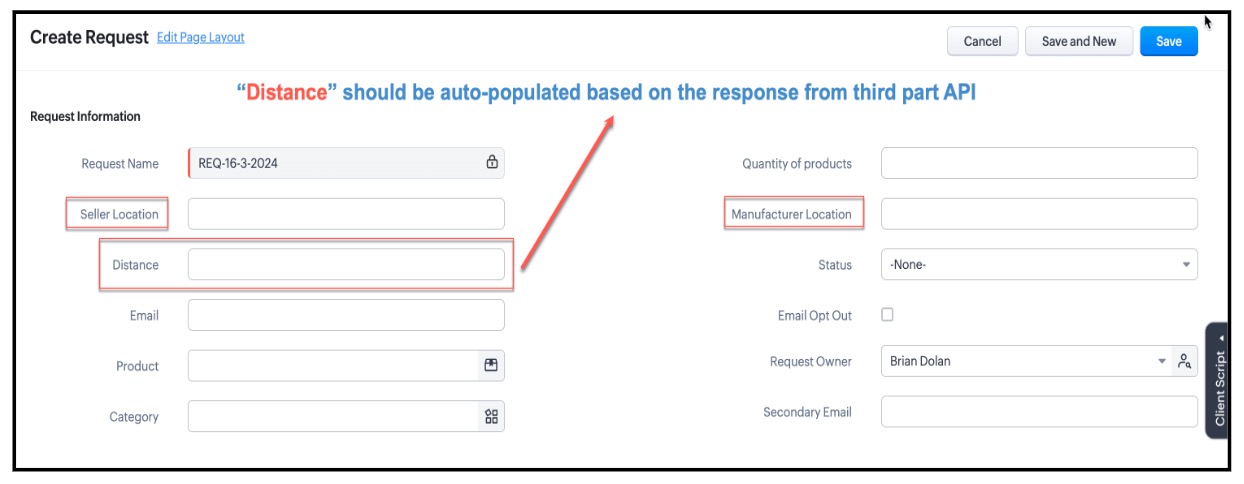
Zylker is a manufacturing organisation. Orders will be placed by the Salesperson by creating a record in the custom module "Requests" . The Admin wants to populate the distance between Manufacturer Location and Seller Location in the "distance" field using the Distance Matrix API.
5. Solution :
To populate the field "Distance" based on the response recevied from the third party API call using Client Script you need to follow the below steps.
- Create a Connection.
- Add to Trusted Domain.
- Invoke the connection in Client Script and populate the field using Client Script.
1. Create a Connection :
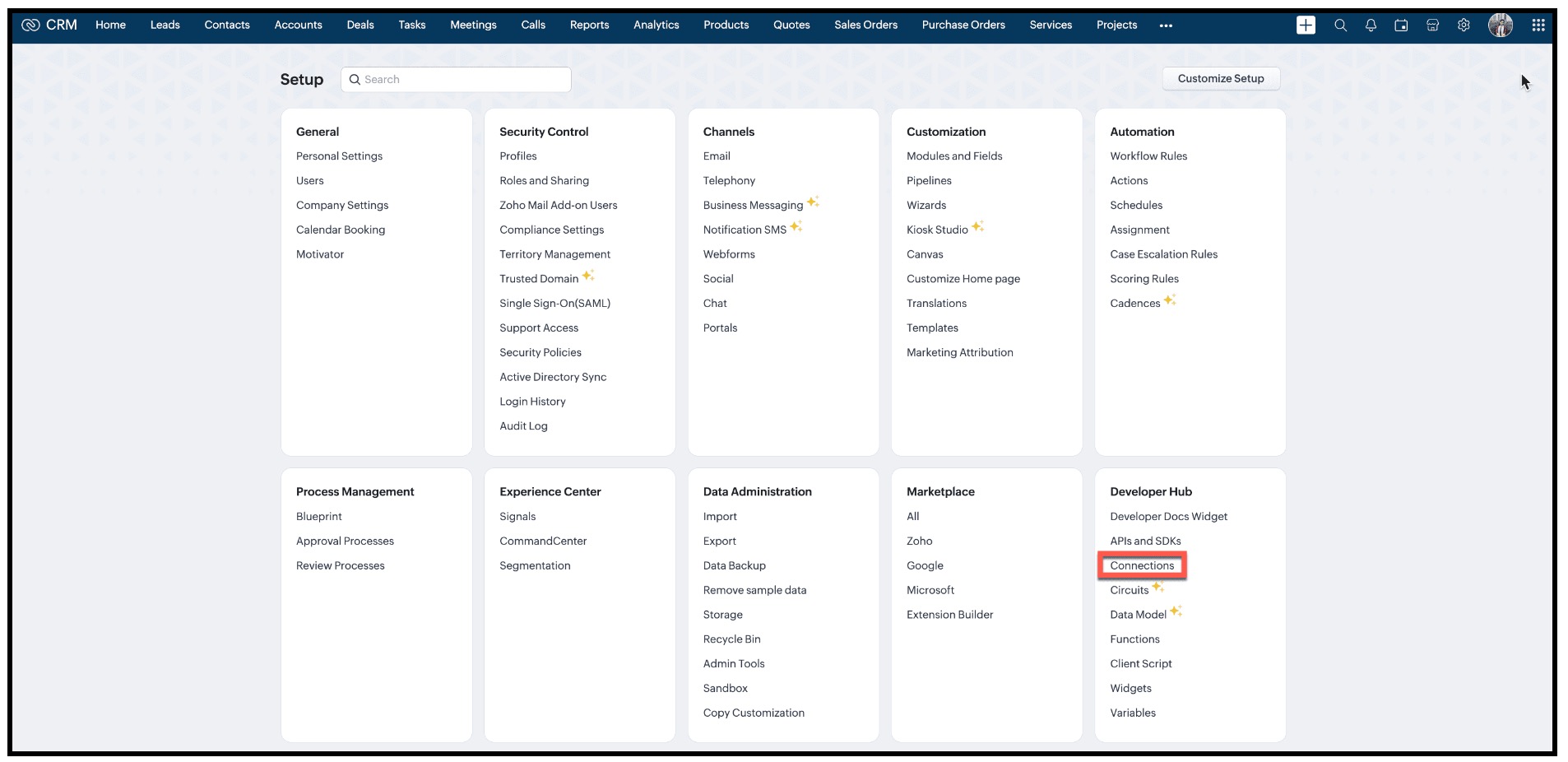
- In Zoho CRM, go to Setup → Developer Hub → Connections and click "Create Connection"
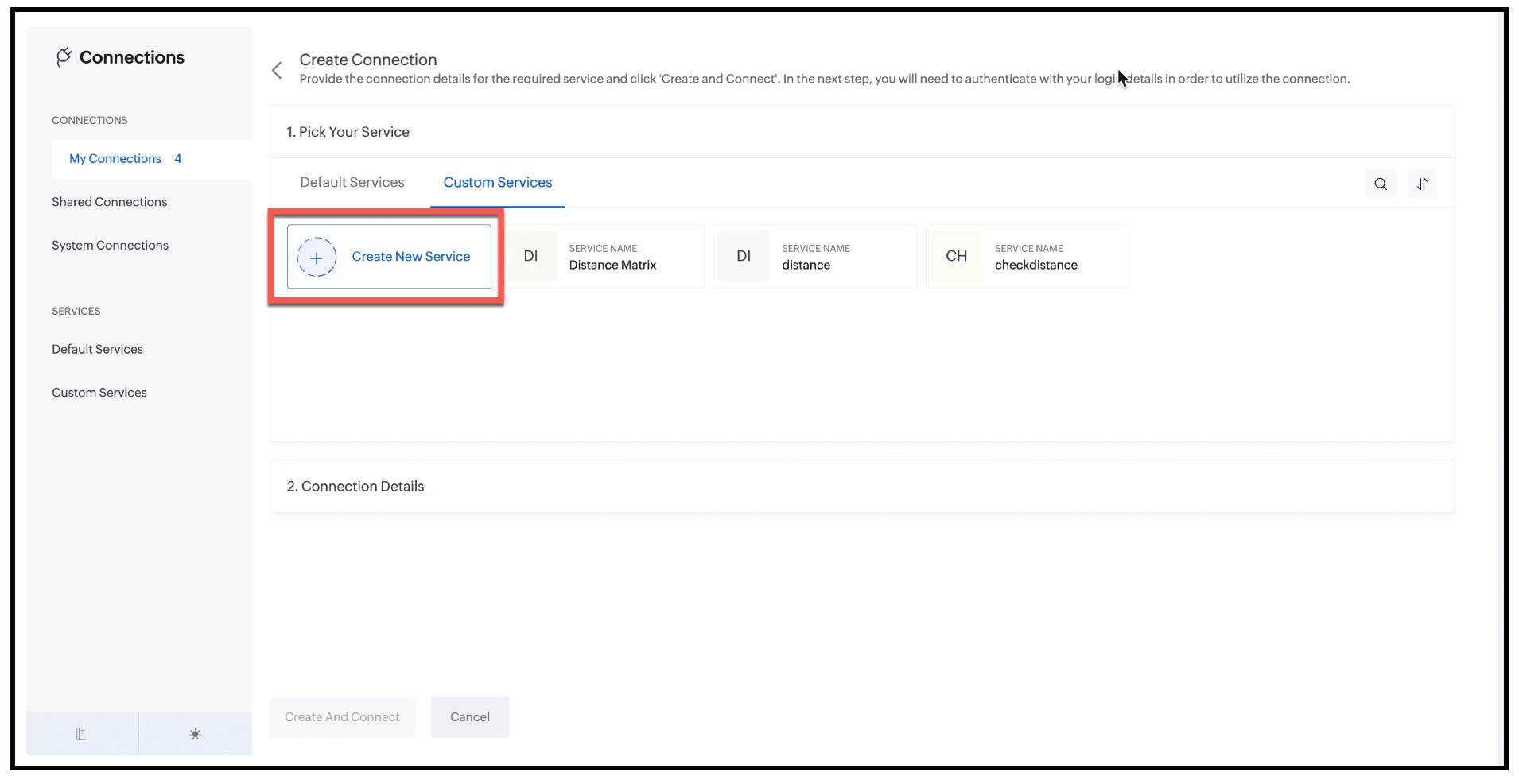
- Under "1. Pick Your Service" , select "Custom Services" and click "Create New Service".
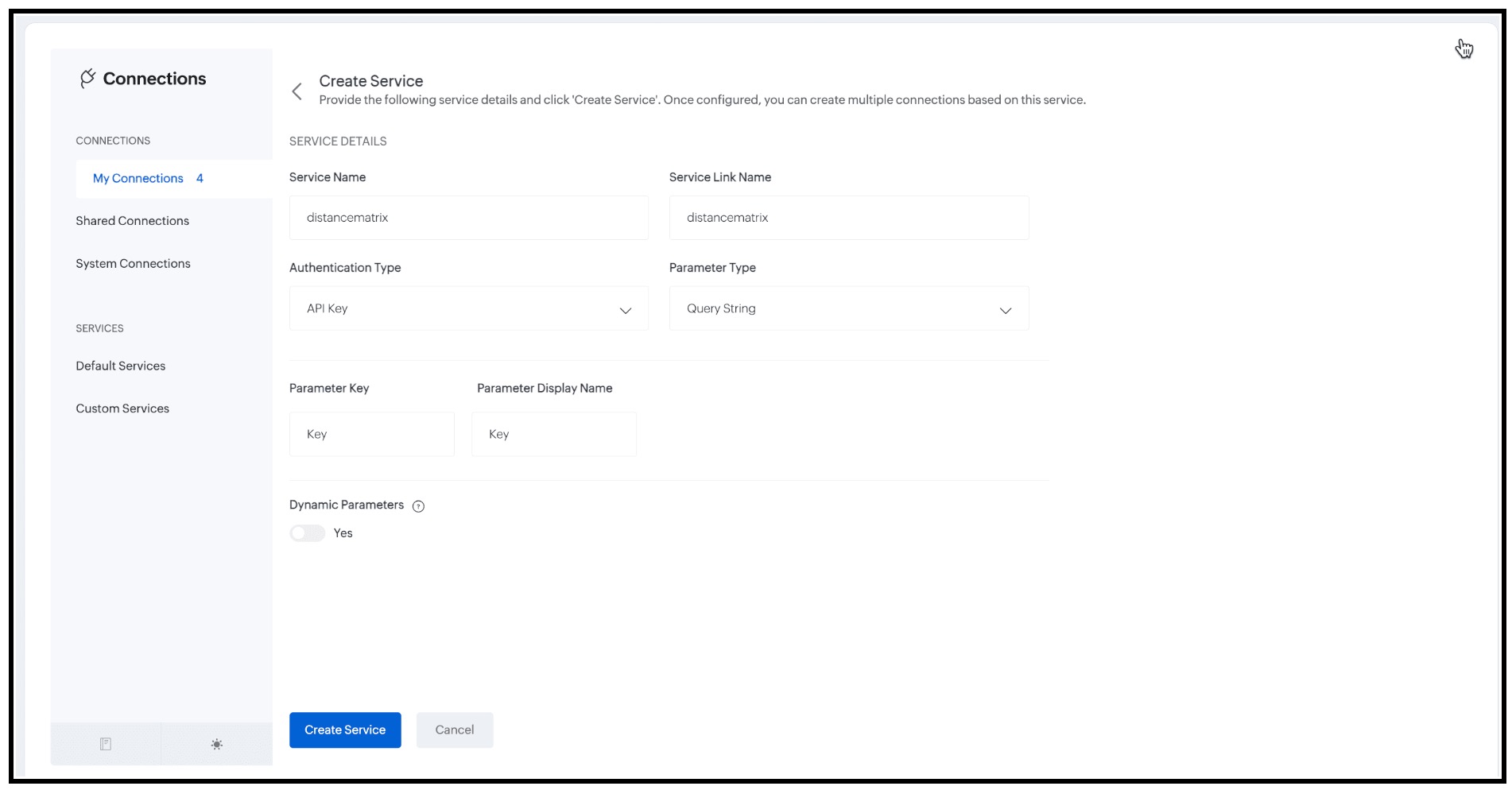
- Enter the following details and click "Create Service".
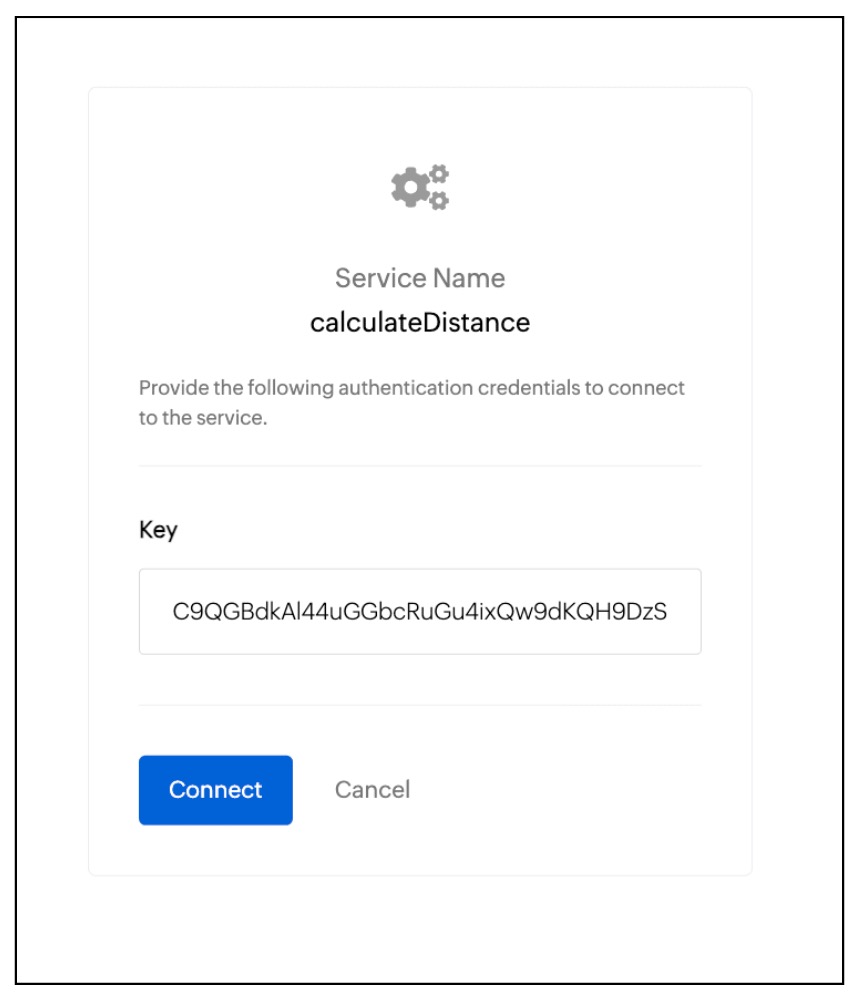
- Now, you will be prompted to enter the authentication credentials, Here it is the API Key. Enter the value and click "Connect".
2. Add to Trusted Domain:
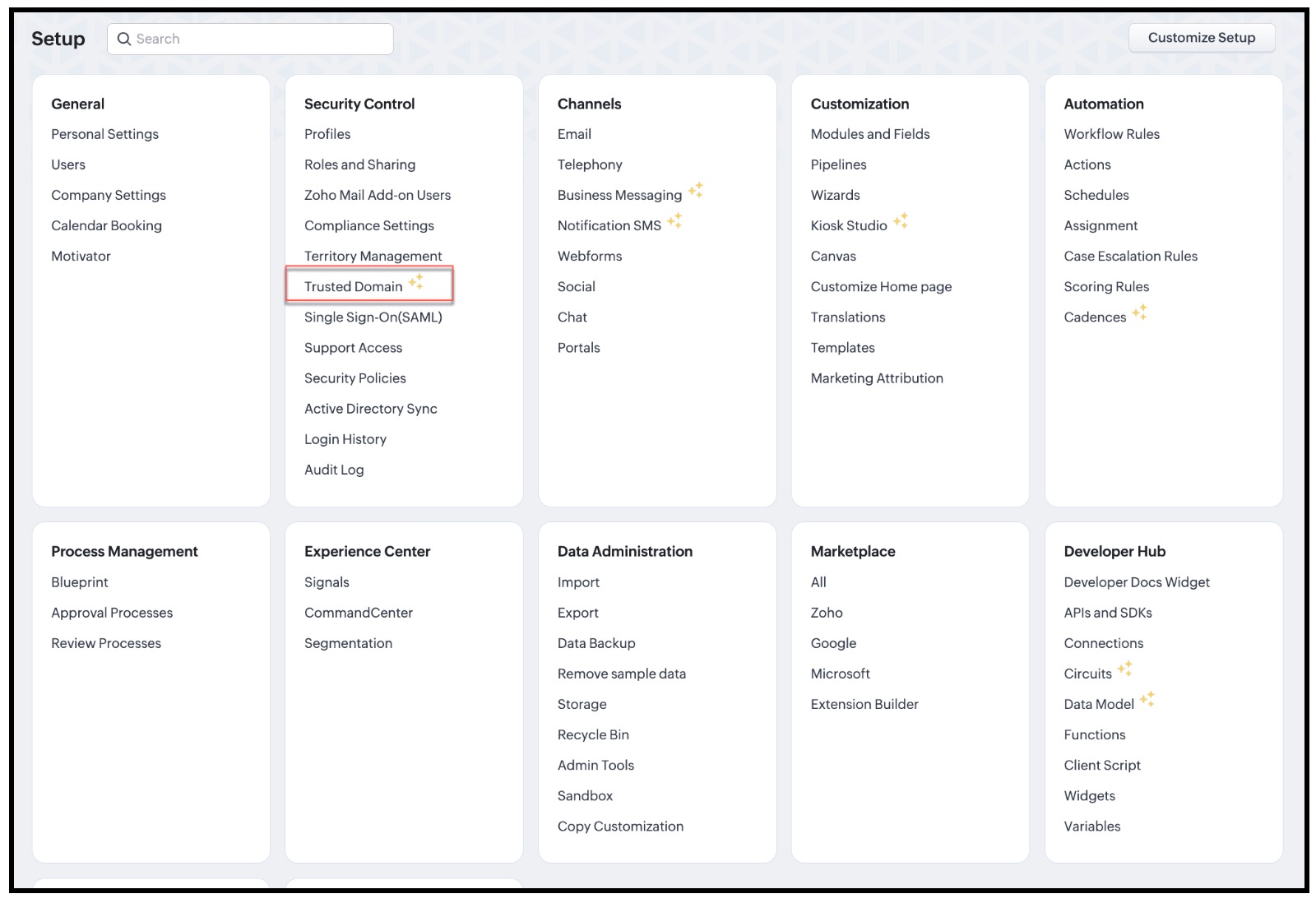
- Whenever you want to make third party API calls, you need to whitelist them by adding the third party domain to Trusted Domain.
- To do this go to Setup → Security Control → Trusted Domain.
- Click New Trusted Domain.
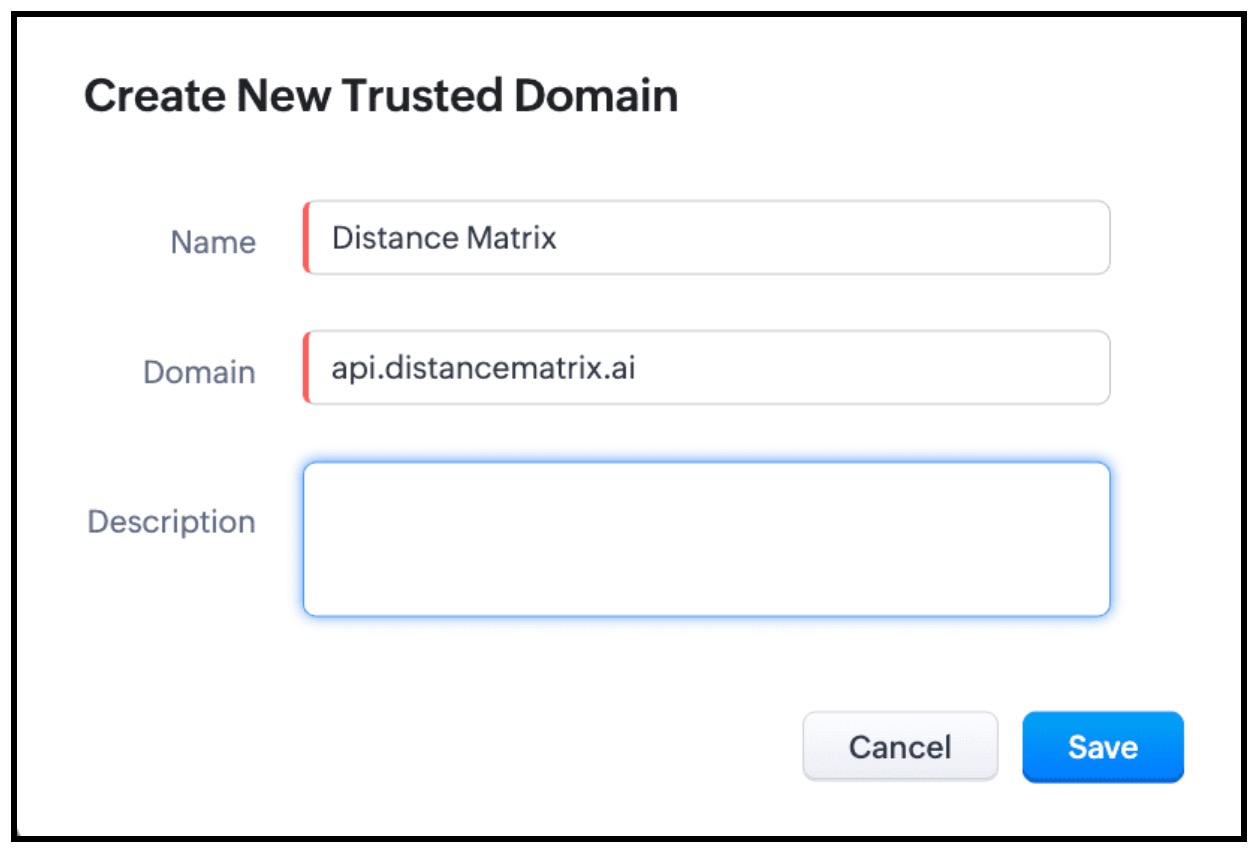
- Enter the Name and Domain details and click Save.
3. Invoke the connection in Client Script and populate the field using Client Script.
- The next step is to invoke the connection using Client Script using the invoke method.
- For this, create a Client Script on Create Page of "Requests" custom module and specify the event as onChange Page event as follows and click Next.
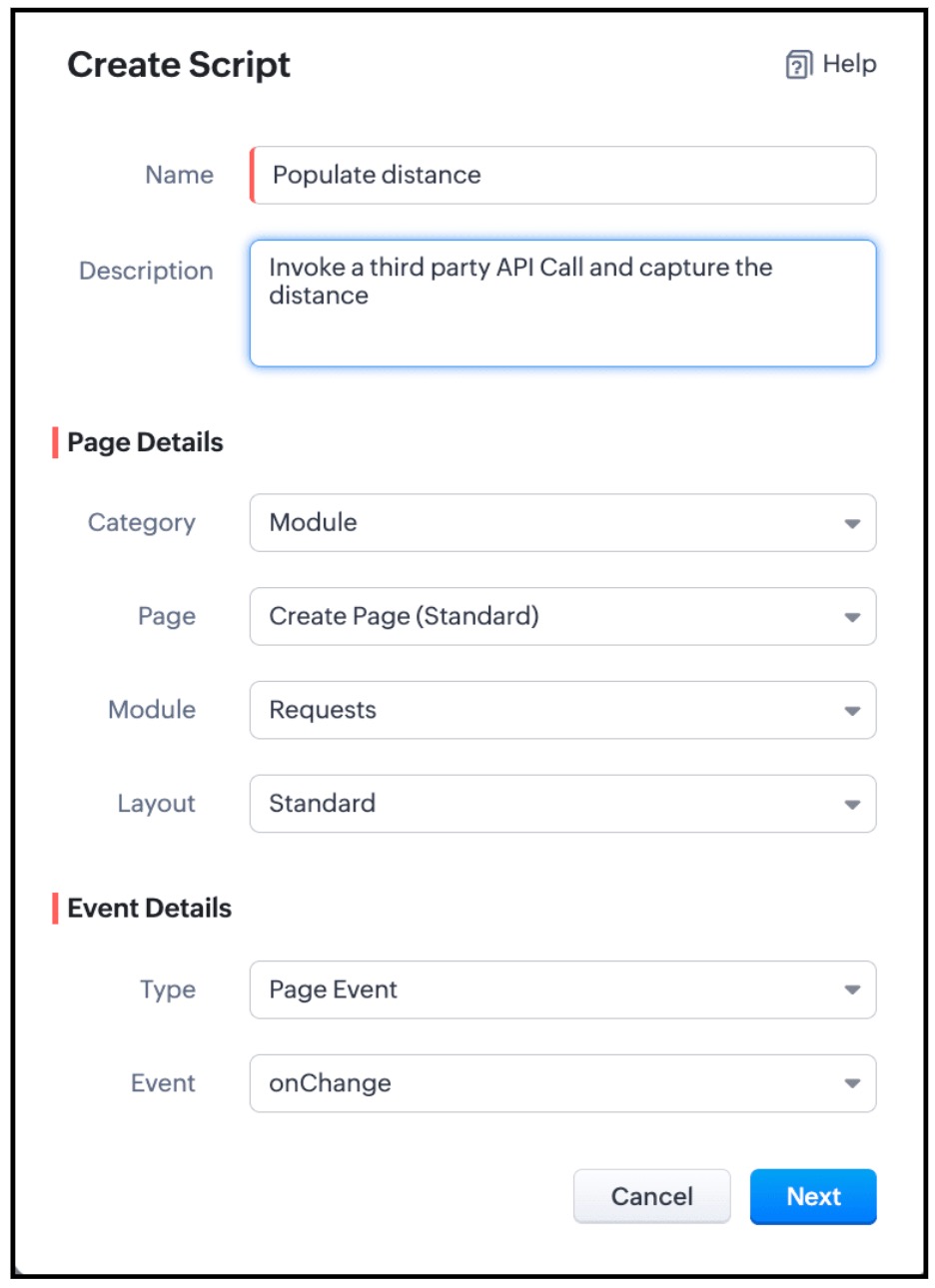
- Enter the below script and click Save.
Script :
- if (field_name == "Seller_Location" || field_name == "Manufacturer_Location") {
- let origins = ZDK.Page.getField('Manufacturer_Location').getValue();
- let destinations = ZDK.Page.getField('Seller_Location').getValue();
- let dist = ZDK.Page.getField('Distance');
- dist.setReadOnly(true);
- var response = ZDK.Apps.CRM.Connections.invoke("measuredistance", `https://api.distancematrix.ai/maps/api/distancematrix/json?`, "GET", 1, { "origins": origins, "destinations": destinations }, {});
- let distance = response._details.statusMessage.rows[0].elements[0].distance.text;
- dist.setValue(distance);
- }
- Here the values of the fields Seller_Location and Manufacturer_Location are captured using getValue() and are stored in origins and destinations respectively. The Third Party API - Distance Matrix returns the distance between origins and detstinations. So you need to pass these two parameters in the invoke() method and capture the response and populate the distance to the "Distance" field using setValue() method.
- As per the following syntax, you should pass the required parameters.
Syntax : invoke(connection_name, url, method, param_type, parameters, headers)
- The connection_name is "distanceMatrix".
- The URL is https://api.distancematrix.ai/maps/api/distancematrix/json?&key=${key}Note that the "key" is represented as ${key} as it is a variable. This is the variable name that you mentioned while creating the Connection.
- GET is the method as we are fetching data.
- For URL parameters , you should mention 1.
- Parameters are { "origins": origins, "destinations": destinations }
- {} represents that there are no headers.
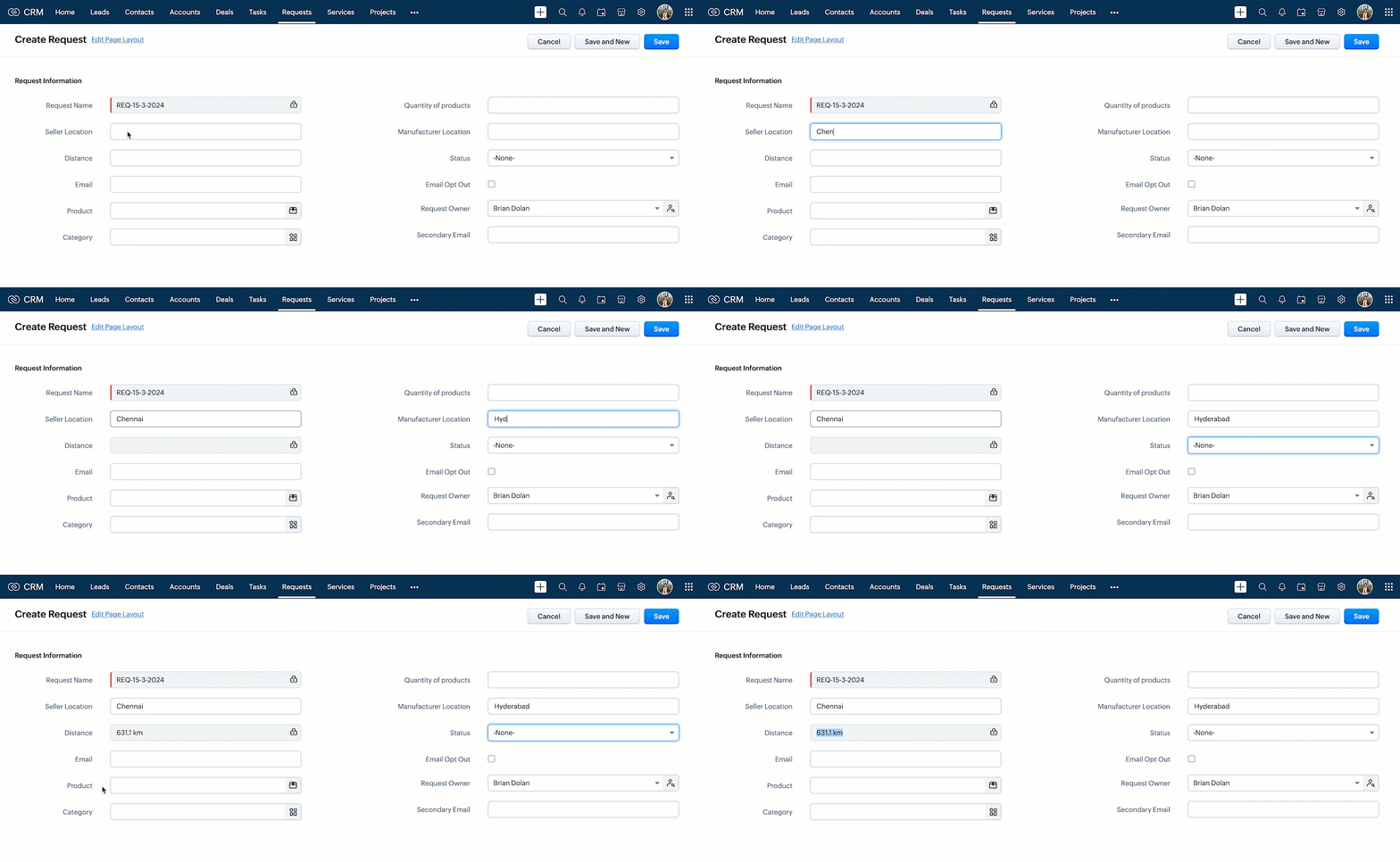
- Now, create a record in Requests and enter the location details. You can see the "Distance" field getting populated as shown below.
- Here is how the Client Script works.
6. Summary :
In this post we have discussed,
- How to invoke a third-party API call in Client Script
- How to create a Custom Service Connection
- How to use Connections in Client Script.
- How to add a new Trusted Domain
- How to populate a field with the response of a third-party API call.
7. Recommended Reads :
- Client Script Overview
- Creating a Client Script
- Client Script Events
- Client Script IDE
- Use cases of Client Script
______________________________________________________________________________________________________________________________________
 Previous post : Kaizen #134 : Manipulating Rich Text Field (RTF) using Zoho CRM APIs | Kaizen Collection : Home.
Join us for our upcoming Zoho CRM Developer Series: Zoho CRM APIs, where you can explore more about Zoho CRM APIs. Register Now!
Cheers!
Maadhari M
Access your files securely from anywhere
New to Zoho Recruit?

Zoho Developer Community
New to Zoho LandingPage?
Zoho LandingPage Resources
New to Zoho Survey?
New to Zoho CRM Plus?
Deliver unforgettable customer experiences
New to Zoho CRM Plus?
Deliver unforgettable customer experiences
New to Zoho Marketing Plus?
Everything you need to run your marketing
New to Zoho Marketing Plus?
Everything you need to run your marketing
New to Bigin?





Topic Participants
Maadhari M
Haiku Technical Support
Sticky Posts
Kaizen #217 - Actions APIs : Tasks
Welcome to another week of Kaizen! In last week's post we discussed Email Notifications APIs which act as the link between your Workflow automations and you. We have discussed how Zylker Cloud Services uses Email Notifications API in their custom dashboard.Kaizen #216 - Actions APIs : Email Notifications
Welcome to another week of Kaizen! For the last three weeks, we have been discussing Zylker's workflows. We successfully updated a dormant workflow, built a new one from the ground up and more. But our work is not finished—these automated processes areKaizen #152 - Client Script Support for the new Canvas Record Forms
Hello everyone! Have you ever wanted to trigger actions on click of a canvas button, icon, or text mandatory forms in Create/Edit and Clone Pages? Have you ever wanted to control how elements behave on the new Canvas Record Forms? This can be achievedKaizen #142: How to Navigate to Another Page in Zoho CRM using Client Script
Hello everyone! Welcome back to another exciting Kaizen post. In this post, let us see how you can you navigate to different Pages using Client Script. In this Kaizen post, Need to Navigate to different Pages Client Script ZDKs related to navigation A.Kaizen #210 - Answering your Questions | Event Management System using ZDK CLI
Hello Everyone, Welcome back to yet another post in the Kaizen Series! As you already may know, for the Kaizen #200 milestone, we asked for your feedback and many of you suggested topics for us to discuss. We have been writing on these topics over the
New to Zoho TeamInbox?
Zoho TeamInbox Resources
Zoho CRM Plus Resources
Zoho Books Resources
Zoho Subscriptions Resources
Zoho Projects Resources
Zoho Sprints Resources
Qntrl Resources
Zoho Creator Resources
Zoho CRM Resources
Design. Discuss. Deliver.
Zoho Show Resources

Get Started. Write Away!
Writer is a powerful online word processor, designed for collaborative work.
Zoho CRM コンテンツ
-
オンラインヘルプ
-
Webセミナー
-
機能活用動画
-
よくある質問
-
Ebook
-
-
Zoho Campaigns
- Zoho サービスのWebセミナー
その他のサービス コンテンツ
Nederlandse Hulpbronnen

ご検討中の方
Recent Topics
I want to create a mailing list, NOT a group.
Can I create a mailing list in Zoho mail? I just want to be able to make a list of email addresses and give the list a name. Then when I type the list name, the list of email addresses will be automatically listed. When I create a group it sends an emailERROR CODE :554 - Your access to this mail system has been rejected due to poor reputation of a domain used in message transfer
This message was created automatically by mail delivery software. A message that you sent could not be delivered to one or more of its recipients. This is a permanent error. *****, ERROR CODE :554 - Your access to this mail system has been rejected dueno me llegan los correos a Zoho mail
No puedo recibir correos pero sí enviarlos, ya hice la modificación de MX y la verificación de teléfonos, qué es lo que ocurre? graciasGroup Calendar as Default for adding new events, etc?
Hi, I want to make the group calendar (that I created, if that makes a difference) the default for anything new I add to the calendar. How can I do that? thanks.Bookmark Loading is Buffering
Hi, i clicked on the bookmark tab, around yesterday and since then it's been constantly buffering and doesn't allow me to access the mail's i have tried login in and out but of no help also trying to share a screenshot of the issue around 232 kb size,Zoho Webinar custom registration fields into Zoho CRM
I am pushing webinar registrations into zoho crm as leads and this is working fine. I have added a few custom fields to my webinar registration and I wish for these fields values to get mapped into the resulting CRM lead record. I am not seeing anywhereGitLab Extension for Zoho Desk: Connecting support and development for faster resolutions
Hello everyone! We’re excited to introduce the GitLab Extension for Zoho Desk, an integration that bridges the gap between support and development teams. This allows tickets to be converted into actionable GitLab issues for faster resolutions, betterDownload Google Drive Shared Image/File Using Deluge – Complete Guide
Download Google Drive Shared Image/File Using Deluge – Complete Guide When working with Google Drive share links inside Deluge, many developers face a common challenge: 👉 How can we download a Google Drive file directly using Deluge? This article explainsHow to update Acuity appointment fields from Zoho Flow?
Hi, I need help with Zoho Flow → Acuity Scheduling integration. What I’m doing Appointment created in Acuity Zoho Flow creates a Zoho Calendar event I want to send the Zoho Calendar Event UID back into Acuity (into a custom form field) This is so thatNo horizontal scroll bar in reports
Hi support team, I created a pivot table report which contains many columns (in my application about 15). The problem is that there is no bottom scroll bar to display colums that does not fit within the browser page. I saw that it was possible to resize colums, but colums sizes are not saved within the session. So could you add scroll bar, and eventually make colums sizes stored in the user session ? Best regards,Zoho Map integration tasks have changed - you need to "Locate all instances of Zoho Map integration tasks in your Deluge scripts by searching for the v1 marker... before 16 January 2026"
Details of an issue specific to Zoho CRM + Deluge Functions (originally posted in this forum) can be found here: https://help.zoho.com/portal/en/community/topic/zoho-map-integration-tasks-have-changed-you-need-to-locate-all-instances-of-zoho-map-integration-tasks-in-your-deluge-scripts-by-searching-for-the-v1-markerfilter broke my data
I uploaded a file recently from Sheets and it has top 2 rows frozen, with table headers in second row and each one is filterable. somehow my first 2 columns became unfiltered and no matter what I do I cannot reapply the filter?? also didn't realize theyRequest to remove domain "greentechcoatings.vn" from previous Zoho account
Hello Zoho Support, I would like to register the domain "greentechcoatings.vn" in my new Zoho Mail account, but I receive the message "This domain is already associated with another account". Please remove the domain from any previous/unknown accountTrigger actions in third-party apps using Zoho Flow
Greetings, I hope you're all doing well. We're excited to share an enhancement to Bigin's workflow capabilities. Zoho Flow Actions are now available in Bigin, enabling you to automate tasks across third-party applications directly from your workflow andEnroll, Script, Win: Hackathon 2025!
Hello CRM Developers! Are you ready to create some magic with Client Script, Widgets and Functions in Zoho CRM? Let’s make Hackathon 2025 an unforgettable adventure! The Zoho Developer Community Hackathon 2025 is here, and it’s your time to shine! REGISTERZoho Help Desk - Not receiving emails
Hello… I am on your trial version of help desk… and I am having trouble getting emails from Zoho Help Desk to my MS Outlook Exchange Server… So when a customer sends ticket request I am not getting an email with a notification? I have read your articlesAlmost all Flows are being queued
A few days ago I saw one of my Flows status was Queued. This was the first time this had ever happened. Now, almost every Flow that triggers is Queued for at least a few minutes. If I re-trigger the Flow (which causes separate problems) they sometimesEmployment Contract / HRMS Documents - Zoho People
How do I create customized HR documents for disbursal from Zoho People ? Example, say offer letters ? appointment letters ? Memos ? We want to be able to preset these in one or ther other form and issue them to employees who are in Zoho People.Live webinar: Craft and deliver impactful slides with Show’s desktop apps
If you love the comfort of working on your desktop and want a setup that keeps you focused and uninterrupted, this session is made for you. We’re excited to invite you to our upcoming live webinar: "Craft and deliver impactful slides with Show's desktopEnhancements to Bigin's forms
Greetings, I hope all of you are doing well. We're happy to announce a few recent enhancements we've made to Bigin's forms. We'll go over each one in detail. Merge field support in auto-filled forms The auto-fill option in Bigin's forms lets you predefineTable dimensions
I try changing the dimensions of the table on my computer but it doesn't change. Do I have to be a premium member or does it only work on the app?Direct link to Record Summary
Hi everyone, In one of my reports, I have built a Record Summary template to display the details of one record. I would like to be able to link directly to this Record Summary once I submit a new record, without having to go to the list of records first and click on View. Is there a possibility to do so ? Should I use the URL by passing some parameters ? Thank you very much for your help ! GuillaumeVerifying Zoho Mail Functionality After Switching DNS from Cloudflare to Hosting Provider
I initially configured my domain's (https://roblaxmod.com/) email with Zoho Mail while using Cloudflare to manage my DNS records (MX, SPF, etc.). All services were working correctly. Recently, I have removed my site from Cloudflare and switched my domain'sAPI Support for Creating Invoices with Batch-Tracked Items
Hi Zoho Community, I am working on an integration where we create invoices in ERPNext and push them to Zoho Books. I need to send batch-tracked items (batch numbers) when creating invoices. I could not find any reference in the Zoho Books API documentation.Amendment effective date
Hi everyone, I noticed that the amendment effective date mentionned in my amendment is not right. Indeed, when a contract is amended several times, it states the previous amendment and their effective date. However, the effective date stated is alwaysShow both Vendor and Customers in contact statement
Dear Sir, some companies like us working with companies as Vendor and Customers too !!! it mean we send invoice and also receive bill from them , so we need our all amount in one place , but in contact statement , is separate it as Vendor and Customer,STOCK history in zohosheets
is it possible to get historical stock value using stock function in zoho sheets? i could not see from and to period in the helper document.Auto sync Photo storage
Hello I am new to Zoho Workdrive and was wondering if the is a way of automatically syncing photos on my Android phone to my workdrive as want to move away from Google? ThanksAgent password reset
Hi Zoho support, I would like to ask if there is a way the admin can reset a password of an agent? RegardsCan receive but not send messages in Zoho Mail
Hello! I was able to configure my email client successfully in that I can receive messages just fine. However, when I send messages out, they seem to go out fine (I don't receive any errors or anything), but the recipient does NOT receive those messages.Mail is sent twice!
Been using Zoho for a while now. Installed Zoho for someone else and some weird things are happening. Mails are being sent twice. He is using Thunderbird as an email client. I already read about email being duplicated in the sent folder. But in my caseCan't login IMAP suddenly
Since this evening I'm getting the error: You are yet to enable IMAP for your account. Please contact your administrator... IMAP always been enabled in my account and was workign fine for the past 7 years. Already tried turning IMAP off and on again.Sending of username did not succeed: Mail server pop.zoho.com responded: User already specified
I am having issues receiving emails from Zoho in Thunderbird. I am getting the above error. The first error tells me Authentication failed, and prompts me to enter in my password. Then I get the above error. I can receive emails when I log in online toBug tracking
Hi, does anyone know how to track errors during picking or packing? This way I can keep track and see how to improve and prevent errors in this area.Migration of corporate mail environment from Yandex 360 to Zoho mail
I have to migrate a corporate mail environment with an existing domain from Yandex 360 to Zoho mail. It is vital to migrate all users with all the data. I have read the article on this topic using MacMister Email Backup Software just now and have someI'm unable to send mail pthrough Zoho SMTP programmatically
This has been working for years, but today it's been offline all day long. I see nothing anywhere on your site about this. I'm not the only one experiencing this. Downdetector has a spike of reports todayCan no longer send email via Django site
This was working fine as of 11/7/25. Now I am unable to send user verification emails from a Django site on a AWS lightsail sever. When a user attempts to register the following error occurs. I have also attempted to send a test email via the shell andunable to send email but able to receive email
my email address is info@securityforceservices.caLogin to server failing
When trying to retrieve my mail, I am getting this error message -- Login to server pop.zoho.com with username (my email address) failed. It gives me the option to retry, enter password, or cancel. Then I get this message -- Sending of username did notConfiguration failed: 200 response not received for POST request.
Hello, I am trying to set up a webhook to connect with an Salesforce but I receive the following error from Zoho: Configuration failed: 200 response not received for POST request I have tried testing it on webhook.site as well and receive the same errorNext Page