Kaizen #187 - Building a Timer and Worklog Widget (Part 1)

Howdy Tech Wizards!
Welcome back to a fresh week of Kaizen!
This time, we are diving into a two-part series where you will learn how to build a Timer and Worklog Widget for Zoho CRM. This widget helps track active work time and log multitasking sessions using Zoho CRM APIs, Client Script, Functions, and Workflows.
Why It Matters?
Zoho CRM effectively captures stage/status transitions, like tracking when a case moves from Open to In Progress or On Hold. However, in dynamic work environments, employees juggle multiple work items and engage in impromptu tasks or conversations.
Let’s take the On Hold status as an example.
While it can be used to indicate pauses in progress, it does not always align with real-world workflows. Consider these scenarios:
Not all interruptions justify a status change
Moving the case to On Hold for every minor detour (to clarify something with a colleague or respond to another emergency work item) would be impractical and could lead to under reporting actual work hours. Over time, this untracked effort adds up, creating a gap in visibility.
Frequent status changes may dilute their meaning
In many teams, On Hold signifies a legitimate blocker like waiting on customer input or an external dependency. Using it frequently to reflect quick shifts in attention could compromise that clarity.
A timer widget solves this by:
- Capturing hands-on work items.
- Logging context switches (unrelated tasks) with descriptive entries.
- Feeding structured entries into a custom module for reporting and subform sync.
Business Scenario: IT Service Desk & Ticket Resolution
A tech support team uses the Cases module to resolve customer issues. Some tickets are straightforward; others require follow-ups, escalations, or cross-team coordination. While CRM timestamps (like stage transitions or picklist tracking) track when changes happen, they do not reflect how long someone actively worked on a case.
This Timer Widget can be the ultimate solution to track down the active time spent on each case through out the day.
What are we Building?
By the end of this two-part guide, you will know how to:
- Build a timer widget to track time per task or any CRM record.
- Log work sessions into a custom module every time the timer is started/stopped.
- Automatically populate a subform in the corresponding record module using workflows and Deluge functions.
- Leverage the Reports module to analyze work patterns, SLA adherence, and productivity trends.
In Part I, we will focus on:
-> Building and configuring the Timer Widget.
-> Capturing each timed session as a record in a custom module.
Prerequisites
1. Create a Custom Module
Create a custom module named Timer Entries to log work details and generate reports from the Reports module. A new record will be added to this module each time a timer is started.
Set up the following custom fields in the Timer Entries module:
Custom Fields | Data Type |
Start Time | DateTime |
End Time | DateTime |
Total Duration (in mins.) | Formula DateBetween(${Timer Entries.Start Time},${Timer Entries.End Time},'Minutes') |
Related to Case | Lookup to Cases module |
Work Description | Multi Line |

2. Add a custom picklist option
Add a custom picklist option called In Progress to the Status picklist field in the Cases module for precisely identifying the status of the cases.
Follow this Add/Remove Picklist Values help section for more details.

3. Setup Custom Views for Contextual Filtering
To streamline the widget experience and ensure users only see relevant records to associate while tracking time, set up two smart custom views—one in the Cases module and another in the Timer Entries module.
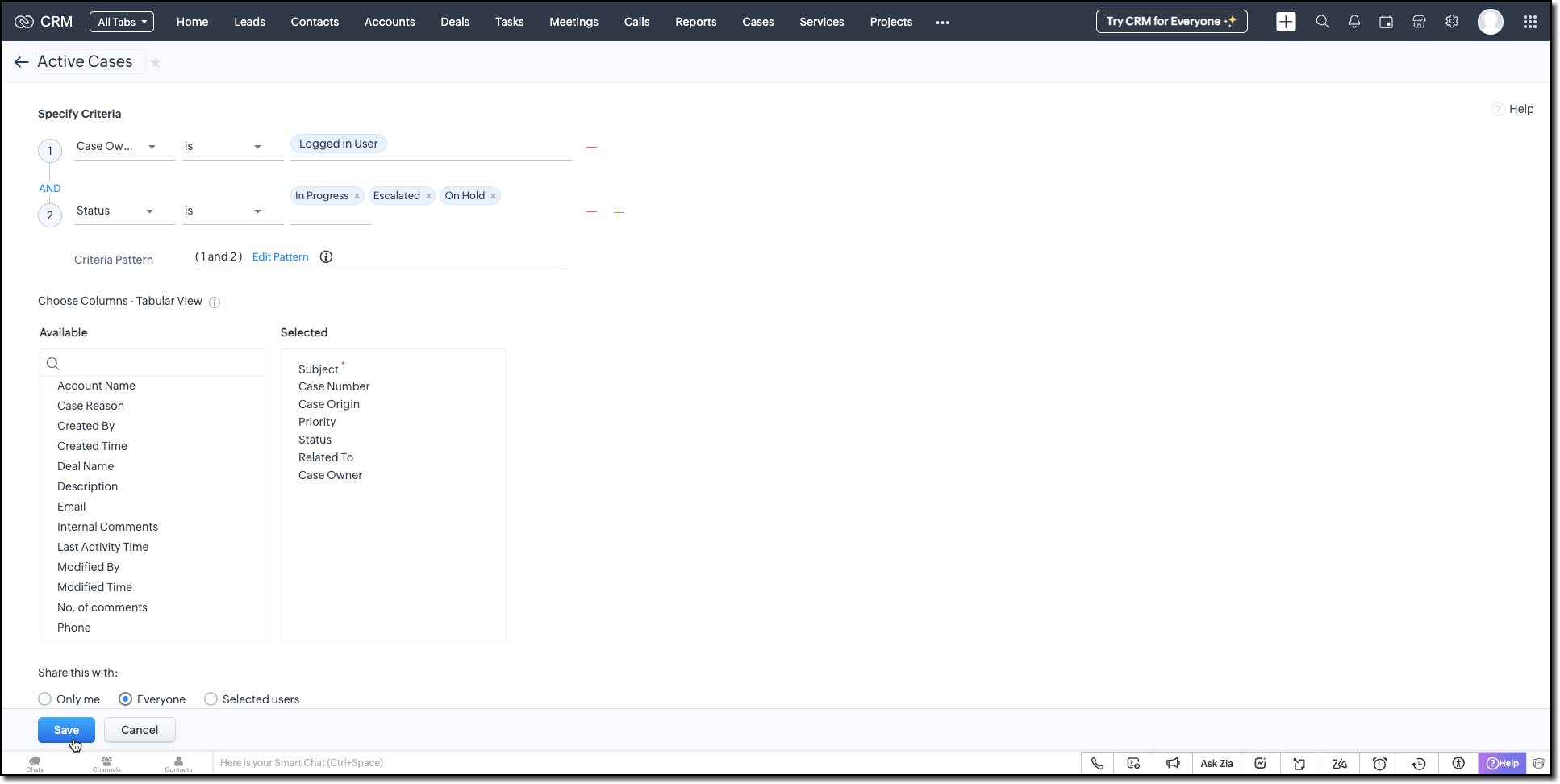
Active Cases View (Cases Module)
Create a custom view in the Cases module to list only the active tickets the logged-in user is working on. Use the following criteria tips:
- Use the Status field to filter records with values like In Progress, On Hold, or Escalated.
- Use the Case Owner field to show records that are assigned only to the currently logged-in user.
This view powers the drop-down inside the widget where users select the case they want to start the timer for.
Active Timers View (Timer Entries Module)
Set up a second custom view in the Timer Entries module to track entries where the timer has been started but not yet stopped. These represent active timers. Use the following logic for criteria:
- The End Time field is empty (i.e., timer still running).
- Timer Entry owner field matches the logged-in user.
This view is used internally by the widget to detect if a timer is already running and update the same entry once the timer is stopped.
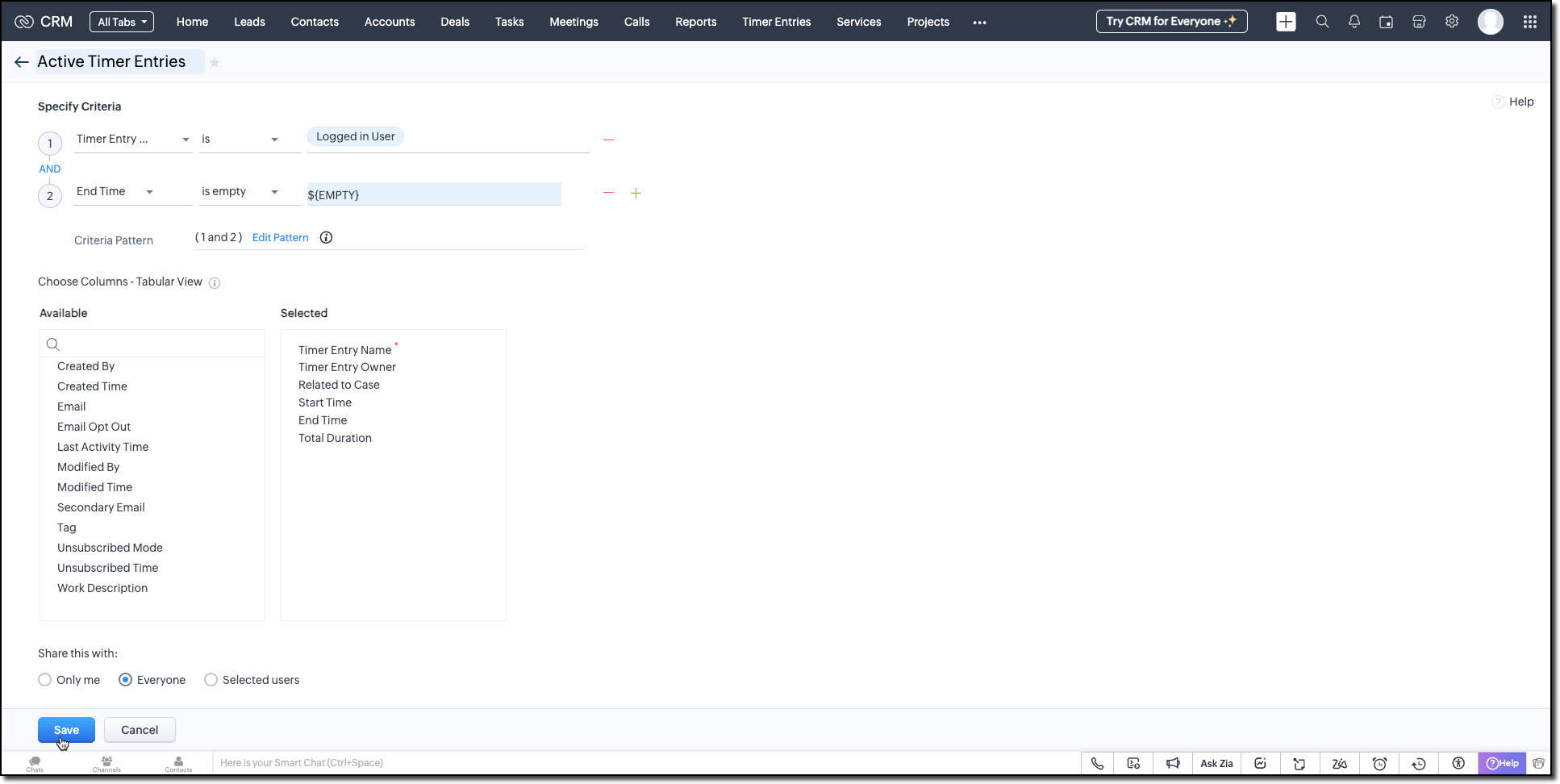
Follow the Managing List View help page and use the specifications shown in the following image.
Building the Timer Widget
Step -1: Review Basics
Refer to our earlier Kaizen on CLI Installation, Creating a Widget Project, and Internal hosting of the same.
Step 2 - Develop the Widget
After initializing your widget project using CLI, implement the timer logic:
Fetching Active Cases
On page load, the populateRecordsDropdown function initiates a Get Records API call to the Cases module, using the Active Cases custom view ID. This fetches all active case records assigned to the logged-in user.
These records are then listed in a dropdown, allowing users to quickly select the relevant case they are about to work on.
async function populateRecordsDropdown() { const recordsDropdown = document.getElementById("moduleRecords"); recordsDropdown.innerHTML = ""; try { const recordsResponse = await ZOHO.CRM.API.getAllRecords({ Entity: casesModule, cvid: casesCVID, per_page: 10 }); if (recordsResponse.data && recordsResponse.data.length > 0) { recordsResponse.data.forEach(record => { const option = document.createElement("option"); option.value = record.id; option.textContent = record.Subject || "Unnamed Record"; recordsDropdown.appendChild(option); }); } else { const placeholderOption = document.createElement("option"); placeholderOption.value = ""; placeholderOption.textContent = "No records found"; placeholderOption.disabled = true; placeholderOption.selected = true; recordsDropdown.appendChild(placeholderOption); } } catch (error) { console.error("Error fetching records:", error); } } |
Starting the Timer and Creating an Entry
Once the user starts the timer, The createRecord function triggers a Create Record API call to log the session in the Timer Entries custom module. The record captures the start time and the related case and description (if provided).
Even if no details are entered or case is selected, a timer entry is still created with the start time. This ensures that spontaneous work sessions are tracked and not lost.
async function createRecord(startTime) { try { const workDescription = document.getElementById("workDescription").value; const selectedRecordId = document.getElementById("moduleRecords").value; const selectedRecordText = document.getElementById("moduleRecords").options[ document.getElementById("moduleRecords").selectedIndex ].text; const data = { Start_Time: startTime, Owner: currentUserId, Work_Description: workDescription, Related_to_Case: selectedRecordId, Name: selectedRecordText }; const response = await ZOHO.CRM.API.insertRecord({ Entity: timerModule, APIData: data }); console.log("Start time recorded successfully"); } catch (error) { console.error("Error creating record:", error); } } |
Stopping the Timer and Updating the Entry
When the timer is stopped, the widget uses the Active Timer Entry custom view to locate the most recent Timer Entry record created by the logged-in user that does not have an end time.
The updateRecord is then triggered to update that active entry using the Update Record API call. It updates the End time of the session and the related case, descriptions, if it was not already provided when the timer was started.
async function updateRecord(endTime) { try { const workDescription = document.getElementById("workDescription").value; const selectedRecordId = document.getElementById("moduleRecords").value; const response = await ZOHO.CRM.API.getAllRecords({ Entity: timerModule, cvid: timerEntriesCVID, per_page: 1 }); const latestRecord = response.data[0]; if (latestRecord) { const recordId = latestRecord.id; const data = { id: recordId, End_Time: endTime, Work_Description: workDescription, Related_to_Case: selectedRecordId }; await ZOHO.CRM.API.updateRecord({ Entity: timerModule, APIData: data, RecordID: recordId }); console.log("End time updated successfully"); } } catch (error) { console.error("Error updating record:", error); } } |
Step 3 - Validate and Pack the Widget
- Follow the steps given in the Widget help page to validate and package the widget.
- Go to Zoho CRM > Setup > Developer Hub > Widgets and click Create New Widget.
- Fill in the required details as shown in this image and ensure to select Button as the widget type.

Step 4 - Associate it with Flyout
- Go to Setup > Developer Space > Client Script. Click New Script.
- Enter a name and description for the script. Choose Command type in Category.

- Create a Flyout and render a widget within it using its details like the API name of the widget, title, size, and animation type. You can get the Widget API name from the widget's detail page.
let allowedUserEmails = []; allowedUserEmails.push('user1_email_address'); allowedUserEmails.push('user2_email_address'); allowedUserEmails.push('user3_email_address'); let currentUserEmail = $Crm.user.email; if (allowedUserEmails.indexOf(currentUserEmail) == -1) { ZDK.Client.showMessage('Command access resticted', { type: 'error' }); return false; } ZDK.Client.createFlyout('myFlyout', {header: 'Timer', animation_type: 4, height: '600px', width: '500px', top: '10px', left: '10px', bottom: '10px', right: '10px' }); ZDK.Client.getFlyout('myFlyout').open({ api_name: 'Timer', type: 'widget' }); return true; |
Refer to Creating a Client Script help page for more details.
Try It Out!
A complete working code sample of this widget is attached to this post.
Now, let us see how this Timer widget works:
1. Start the Timer
Open the widget and select an active case from the dropdown. As soon as you start the timer, a new record will be automatically created in the Timer Entries module to capture the session.

2. Stop the Timer
When the task is complete, provide a description of the work you have done and stop the timer. The same Timer Entry record (created when the timer was started) will be updated automatically with the end time and your work description.
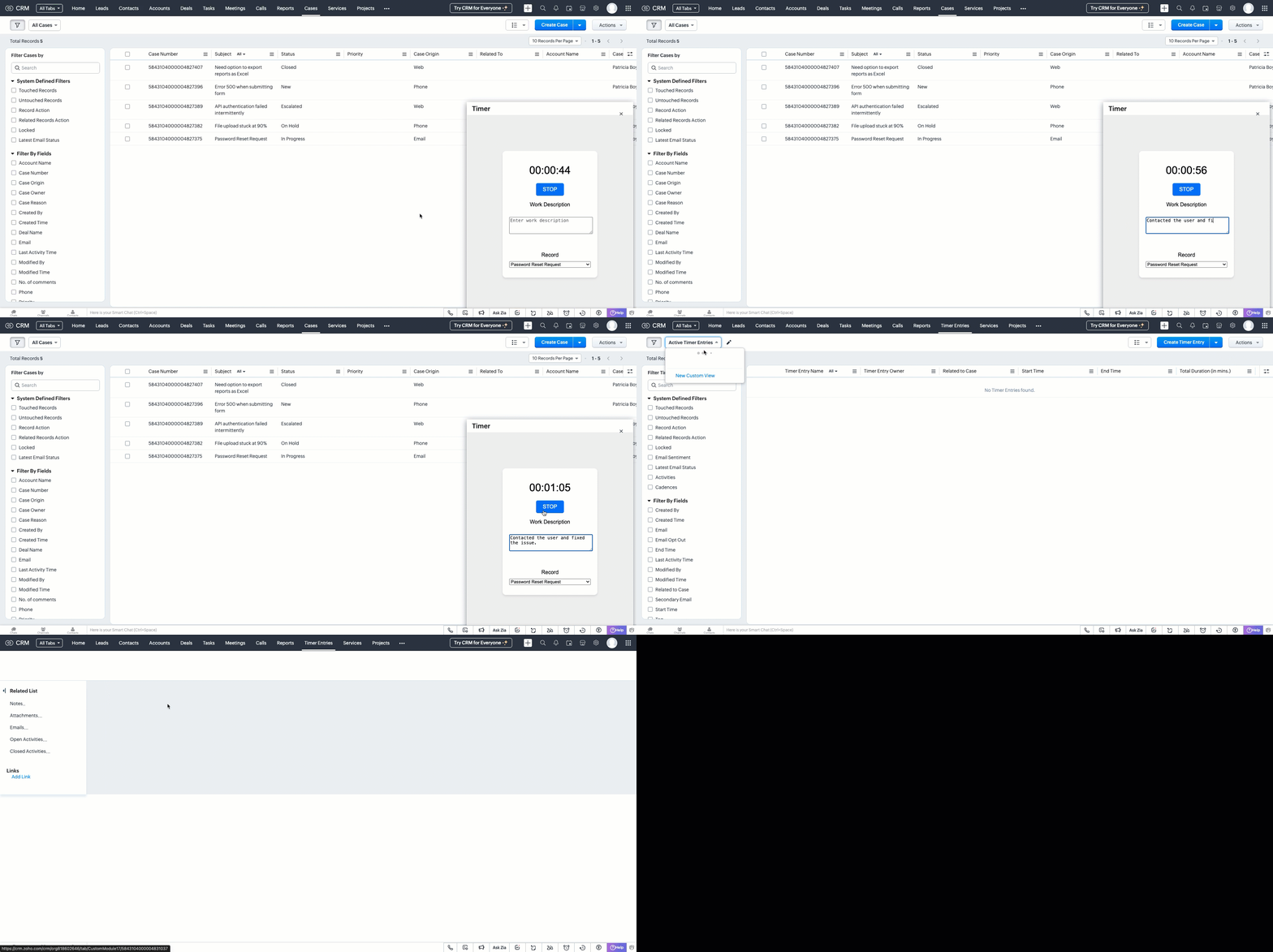
This forms the foundation for accurate time tracking at the record level.
In Part 2, we will show how to:
-> Use a workflow and Deluge function to transfer these entries into the Work Log subform inside the relevant Cases record.
-> Use CRM Reports to slice and dice work time for better SLA and productivity insights.
In the meantime, would you like us to address any of your pain-points or have a topic to discuss? Let us know in the comments or reach out to us via support@zohocrm.com.
Until next time, Happy Coding!
-----------------------------------------------------------------------------------------------------------------
Related Reading
- Custom Fields - Working with Custom Fields and Working with Picklist Field
- Widget - An Overview, CLI Installation, Working with Widgets, JS SDKs, Mobile Compatibility of Widgets and Kaizens
- Core APIs - GET Records, POST Records and UPDATE Records
- Client Script - An Overview, Creating a Client Script, Best Practices and Troubleshooting
-----------------------------------------------------------------------------------------------------------------

Previous Kaizen: Client Script Support for Subforms | Kaizen Collection: Directory
Access your files securely from anywhere
New to Zoho Recruit?

Zoho Developer Community
New to Zoho LandingPage?
Zoho LandingPage Resources
New to Zoho Survey?
New to Zoho CRM Plus?
Deliver unforgettable customer experiences
New to Zoho CRM Plus?
Deliver unforgettable customer experiences
New to Zoho Marketing Plus?
Everything you need to run your marketing
New to Zoho Marketing Plus?
Everything you need to run your marketing
New to Bigin?





Topic Participants
Kiruthiga G
Sticky Posts
Kaizen #152 - Client Script Support for the new Canvas Record Forms
Hello everyone! Have you ever wanted to trigger actions on click of a canvas button, icon, or text mandatory forms in Create/Edit and Clone Pages? Have you ever wanted to control how elements behave on the new Canvas Record Forms? This can be achievedKaizen #142: How to Navigate to Another Page in Zoho CRM using Client Script
Hello everyone! Welcome back to another exciting Kaizen post. In this post, let us see how you can you navigate to different Pages using Client Script. In this Kaizen post, Need to Navigate to different Pages Client Script ZDKs related to navigation A.Kaizen #210 - Answering your Questions | Event Management System using ZDK CLI
Hello Everyone, Welcome back to yet another post in the Kaizen Series! As you already may know, for the Kaizen #200 milestone, we asked for your feedback and many of you suggested topics for us to discuss. We have been writing on these topics over theKaizen #197: Frequently Asked Questions on GraphQL APIs
🎊 Nearing 200th Kaizen Post – We want to hear from you! Do you have any questions, suggestions, or topics you would like us to cover in future posts? Your insights and suggestions help us shape future content and make this series better for everyone.Kaizen #198: Using Client Script for Custom Validation in Blueprint
Nearing 200th Kaizen Post – 1 More to the Big Two-Oh-Oh! Do you have any questions, suggestions, or topics you would like us to cover in future posts? Your insights and suggestions help us shape future content and make this series better for everyone.
New to Zoho TeamInbox?
Zoho TeamInbox Resources
Zoho CRM Plus Resources
Zoho Books Resources
Zoho Subscriptions Resources
Zoho Projects Resources
Zoho Sprints Resources
Qntrl Resources
Zoho Creator Resources
Zoho CRM Resources
Design. Discuss. Deliver.
Zoho Show Resources

Get Started. Write Away!
Writer is a powerful online word processor, designed for collaborative work.
Zoho CRM コンテンツ
-
オンラインヘルプ
-
Webセミナー
-
機能活用動画
-
よくある質問
-
Ebook
-
-
Zoho Campaigns
- Zoho サービスのWebセミナー
その他のサービス コンテンツ
Nederlandse Hulpbronnen

ご検討中の方
Recent Topics
List of hidden features
Hi Friends, I had another support chat today and low and behold the feature that I wanted just simply needed to be "enabled". I thought I'd share, and maybe see if others had some similar experiences. 1. This one is from 5 ish years ago. I asked if thereHow to change a BAS that has been filed
I have discovered that a group of expense transactions were accidentally placed in a asset account rather than an expense account. As a result I need to adjust the transaction and consequently most of my BAS to correct the error. Because the BAS haveHow to Export PDF with a custom Template
I need to export Sales Order with a Custom Template I have created How can I do it? I see an API to export the PDF but how can I choose which template to choose to generate the PDFAssociate email with a potential or project.
I have a pivotal requirement to associate emails from various suppliers (contacts) with different potentials or projects, on an email by email basis as they come in. This question appears to have been raised before but I cannot find a definitive yes "it can be done". Could anyone please tell me, yes or no. If the later I can stop wasting time and look at alternative crm systems. I would love not to have to do this. Thanks in advance.MTA - BAD IP reputation by outlook/hotmail
Messages to Microsoft email servers are bouncing back due to poor reputation. Message: 4.7.650 The mail server [136.143.188.206] has been temporarily rate limited due to IP reputation. For e-mail delivery information see https://postmaster.live.com (S775)Function with Search Records was working until a few weeks ago, around when "Connected Records" was released
I have a custom function that has been running for nearly a year now, which suddenly stopped working around the time Zoho released the "Connected Records" update. The function is no longer finding the record using the searchRecords function. I've changedIs CRM On Premise available
Hi Zoho team, Can you please let me know that CRM Zoho is available for On Premise as well? Thanks, DevashishHow to sync from Zoho Projects into an existing Sprint in Zoho Sprints?
Hi I have managed to integrate Zoho Projects with Zoho Sprints and I can see that the integration works as a project was created in Zoho Sprints. But, what I would like to do is to sync into an existing Zoho Sprints project. Is there a way to make thatOnline Assessment or any aptitude test
This video is really helpful! I have one question — if I share an assessment form link (through email or with the application form on my career page), how does Zoho Recruit evaluate it? Can a candidate use Google or external help while taking the test,Editing the Ticket Properties column
This is going to sound like a dumb question, but I cannot figure out how to configure/edit the sections (and their fields) in this column: For example, we have a custom "Resolution" field, which parked itself in the "Ticket Information" section of thisNeed a way to secure Prefill URLs in Zoho Forms (hide or encrypt prefilled values)
Hi everyone, I often use Zoho Forms with prefilled URLs to simplify the user experience — for example: https://forms.zohopublic.com/.../form?Name=David&Amount=300 However, the problem is that all prefilled values are visible and editable in the link.Incoming Threads Report
From data to decisions: A deep dive into ticketing system reports Customers raise questions and issues through multiple channels, such as email, chat, or tickets. To monitor the number of queries received on a specific day from each channel, leads canConditional layouts - support for multi-select picklists
Hi, The documentation for conditional layouts says the following: "Layout Rules cannot be used on the following field types: Auto Number Lookup Multi Select Lookup User Lookup Formula File Upload Multi Line" I have a custom module with a multi-pick listSamsung Keyboard Issues with Notebook
Dear Users, We're sorry to inform you that some of our users are experiencing certain issues like scrolling, delay/lag, cursor placement especially within the text notes. This occurs mainly due to Samsung Keyboard compatibility with Android 13 and someHow to apply customized Zoho Crm Home Page to all users?
I have tried to study manuals and play with Zoho CRM but haven't found a way how to apply customized Zoho CRM Home Page as a (default) home page for other CRM users.. How that can be done, if possible? - kipi Moderation Update: Currently, each user hasCloudflare Turnstile is now available in Zoho Forms!
Hello form builders! We have added a new layer of protection to help you keep your forms free from bots. Instead of forcing users to prove they are human, Cloudflare Turnstile quietly checks browser signals in the background. Your real users glide through,Power of Automation :: Unique Task & Issue Prefix Format and Sequencing Rule
Hello Everyone, A custom function is a software code that can be used to automate a process and this allows you to automate a notification, call a webhook, or perform logic immediately after a workflow rule is triggered. This feature helps to automate【Zoho CRM】キャンバス機能のアップデート
ユーザーの皆さま、こんにちは。コミュニティチームの藤澤です。 今回は「Zoho CRM アップデート情報」の中から、キャンバス機能のアップデートをご紹介します。 目次 グリッドについて フォーム表示のタブについて 1. グリッドについて ビジュアルデザインは細部の調整に手間がかかりますが、キャンバスのグリッドを使えば要素を整理し、バランスよく配置できます。 画像やデータなどの要素をグループ化せずに簡単に配置できます。 余白を調整することで、要素間の視覚的なバランスを保つのに役立ちます。 「表示切り替え基準の幅」を設定すると、デザインをレスポンシブに調整できます。Deleting unwanted ticket replies
Hello, In a Zoho Desk Ticket thread, sometimes one of the recipients has auto-reply activated. This creates a new message in the Ticket thread that not only pollutes the thread, but most importantly cannot be replied properly because usually auto-reply e-mails don't do "reply all", so the other recipients are not included. I want to delete such a message in the Ticket thread. I searched the help of Zoho Desk, but only found a way to mark as Spam (https://help.zoho.com/portal/kb/articles/marking-support-tickets-as-spam)Issue: Ticket Export Does Not Include Ticket Threads
Dear Zoho Desk Support Team, I hope you’re doing well. I wanted to bring to your attention that the current ticket export feature in Zoho Desk does not seem to include the ticket threads or conversation history. When exporting tickets, only the summaryAbility to Set Client Name During Portal Invitation
Hi Zoho Team, We would like to suggest an important enhancement to the Zoho Creator Client Portal functionality. Zoho Creator recently introduced the option to set a client’s display name in the Client Portal settings, which is very helpful for creatingスマホでキャンペンメールを見ると正しく表示されない
キャンペーンのメール(HTML)を作成しましたが、スマホ表示に切り替えると正しく表示されません(添付参照)過去に作成したキャンペーンでは特に意識してませんでしたが、問題なく表示されていたようです。うまく表示される場合とされない場合の違いは何でしょうか?136.143.188.51 blocked by spamcop
Zoho mailserver seems to be blocked by spamcop. Cant send mail to my customer. Not sure what to do.Zoho Calendar Integrated Into CRM?
I've searched around the forums but couldn't find anything addressing this . . . Is there a plan to integrate Zoho's stand alone calendar solution into Zoho CRM? The CRM calendar does an OK job but is very basic and the Zoho calendar is great, but I've only figured out to subscribe to my CRM calendar within ZCalendar - there is no 2-way sync. My preferred solution would be for ZCal to become the default calendar/event solution within Z CRM. Is this on the roadmap? ThanksCan I Create Different Page Layouts Based on a Specified Module Pick List Field
I am trying to work out how to create different page layouts based on a specified module pick list field value, like the Salesforce feature where you can define multiple record types and then create custom page layouts for each record type. This is a super important feature as for almost all the modules we are using (Leads, Potentials, Accounts) we need to be able only show fields relevant to the record type. E.g. We need a very different page layout for a consumer lead Vs a commercial lead, sameScheduling Tasks in Relation to Project End Date
I use Zoho project to help manage tasks that relate to a number of specific business events that take place. I would like to be able to have my project end date be the date of the event and then work "back" from that date to say... Add a task 2 weeks before the project end date to remind me to XYZ. Does anyone know if there is a way to base task timings back from a project due date rather than a project start date?What formula to use in computing total hrs and decimal hrss
So , my data includes log im column , 2 breaks with 2 columns that says back and lunch and 1 column that says back and logged out. What formula should i use to be able to automatically have my total hours as I input time in each column? ThankyouNotes of Tasks in Zoho CRM
Hello, Is there a way to filter the Notes that appear on a Task to only show the notes related to that specific Task and not display all the Notes of the objects related to that Task (Accounts, Contacts, Deal, etc). In essence, our team struggles to understandPassing the CRM
Hi, I am hoping someone can help. I have a zoho form that has a CRM lookup field. I was hoping to send this to my publicly to clients via a text message and the form then attaches the signed form back to the custom module. This work absolutely fine whenHow to next stage blueprint in Zoho Creator
Hello, I have question, its possible to next stage blueprint? in case, Start - (first stage) Leader 1 (with condition 1) - (second stage) Leader 2 (with condition 2) - (third stage) Leader 3 (with condition 3) - (fourth stage) After first stage, i wantFeature Request: Email Follow-Up Sequences Similar to Zoho CRM
I’m wondering if Zoho Recruit is planning to introduce a feature similar to the Email Automation – Follow-Up Sequences that is available in Zoho CRM. In CRM, this allows users to send a series of timed follow-up emails triggered by specific actions (forDuplicated Notebooks
Out of the blue, almost all of my notebooks got duplicated and the different copies contain different information. Some seem like older copies than the others. I use the linux desktop app and sometimes the Android app. I assume that the sync failed at some point and was unable to merge the two versions together. But I'm afraid to add anything else to my notebook because if it can't properly sync 5 notebooks with only a handful of notes each, what will happen when I have hundreds of notes and I loseCurrency limitation when integrating Zoho CRM & Zoho Books
Brief Video of Problem: https://www.loom.com/share/d61d1d07d0904e149d80c1901a22418e. Background · Our business is based in Australia and we have to have Zoho Books in AUD to comply with tax and reporting regulations in Australia. · We sellMulti-select Lookup does not have Advanced filter options in CRM
With much fanfare Zoho announced the advanced filter options for CRM lookup fields which was a nice addition. This feature is not available for Multi-Select lookup fields. Will it be rolled out in the next 3-6 months, considering the standard lookup filterExperience effortless record management in CRM For Everyone with the all-new Grid View!
Hello Everyone, Hope you are well! As part of our ongoing series of feature announcements for Zoho CRM For Everyone, we’re excited to bring you another type of module view : Grid View. In addition to Kanban view, List view, Canvas view, Chart view andUnable to copy into a new document
Whe I create a new Writer doc and attemp to copy and past I get this message. The only way to copy into a document is I duplicate an existing document, erase the text and save it under a different name and then paste the information. Not ideal. Can youKaizen #157: Flyouts in Client Script
Hello everyone! Welcome back to another exciting edition of our Kaizen series, where we explore fresh insights and innovative ideas to help you discover more and expand your knowledge!In this post, we'll walk through how to display Flyouts in Client ScriptCustomize User Invites with Invitation Templates
Invitation Templates help streamline the invitation process by allowing users to create customized email formats instead of sending a one-size-fits-all email. Different invitation templates can be created for portal users and client users to align withAdmin Control Over Profile Picture Visibility in Zoho One
Hello Zoho Team, We hope you are doing well. Currently, as per Zoho’s design, each user can manage the visibility of their profile picture from their own Zoho Accounts page: accounts.zoho.com → Personal Information → Profile Picture → Profile PicturePublished Course Not Reflecting In Hub
Hi! I am trying to create micro-learning courses for our team to be available for self-guided learning. I have published the courses with enrollment settings open to all users of the hub, but they don't appear to be available for enrollment. Am I missingNext Page