Level up your data collection game with the intuitive Zoho Forms mobile app!
In today's fast-paced world, mobility is essential for staying competitive. When it comes to collecting data, you need a tool that helps you gather and analyze essential information on the go. That's where Zoho Forms' mobile app comes in. With native applications for both Android and iOS, you can create and edit forms, collect data offline, scan codes and cards, and more—all from your mobile device. In this article, we'll share some tips and tricks for unlocking the full potential of Zoho Forms' mobile app. Let's dive in!
Collect data offline
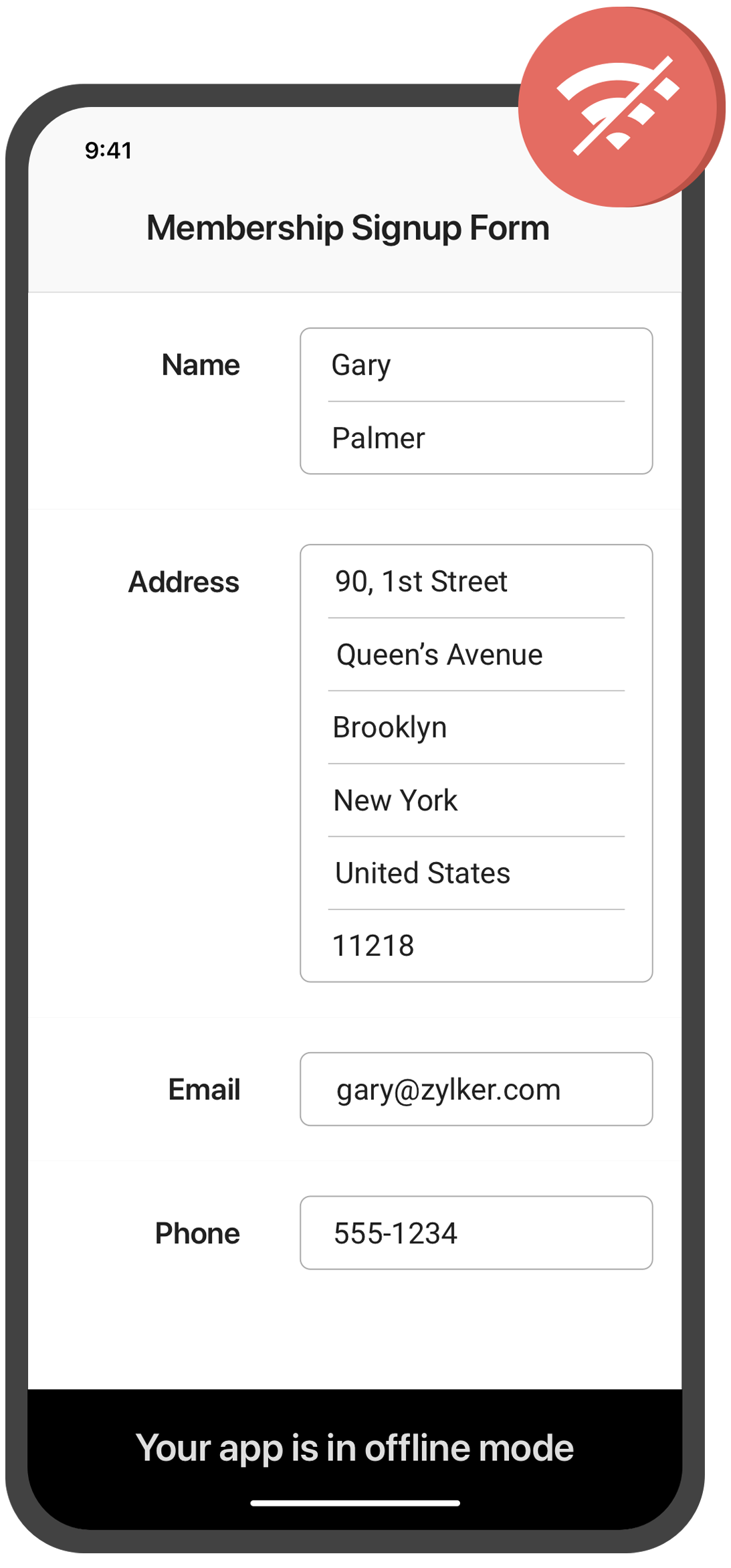
Need to collect data in remote locations with no internet connection? With the Zoho Forms mobile app, you can fill out forms and collect data even when you're offline. This feature is especially useful for field workers, surveyors, and other professionals who work in areas with poor or no connectivity. Once you're back online, your data will automatically sync with your account.
Create self-service kiosk
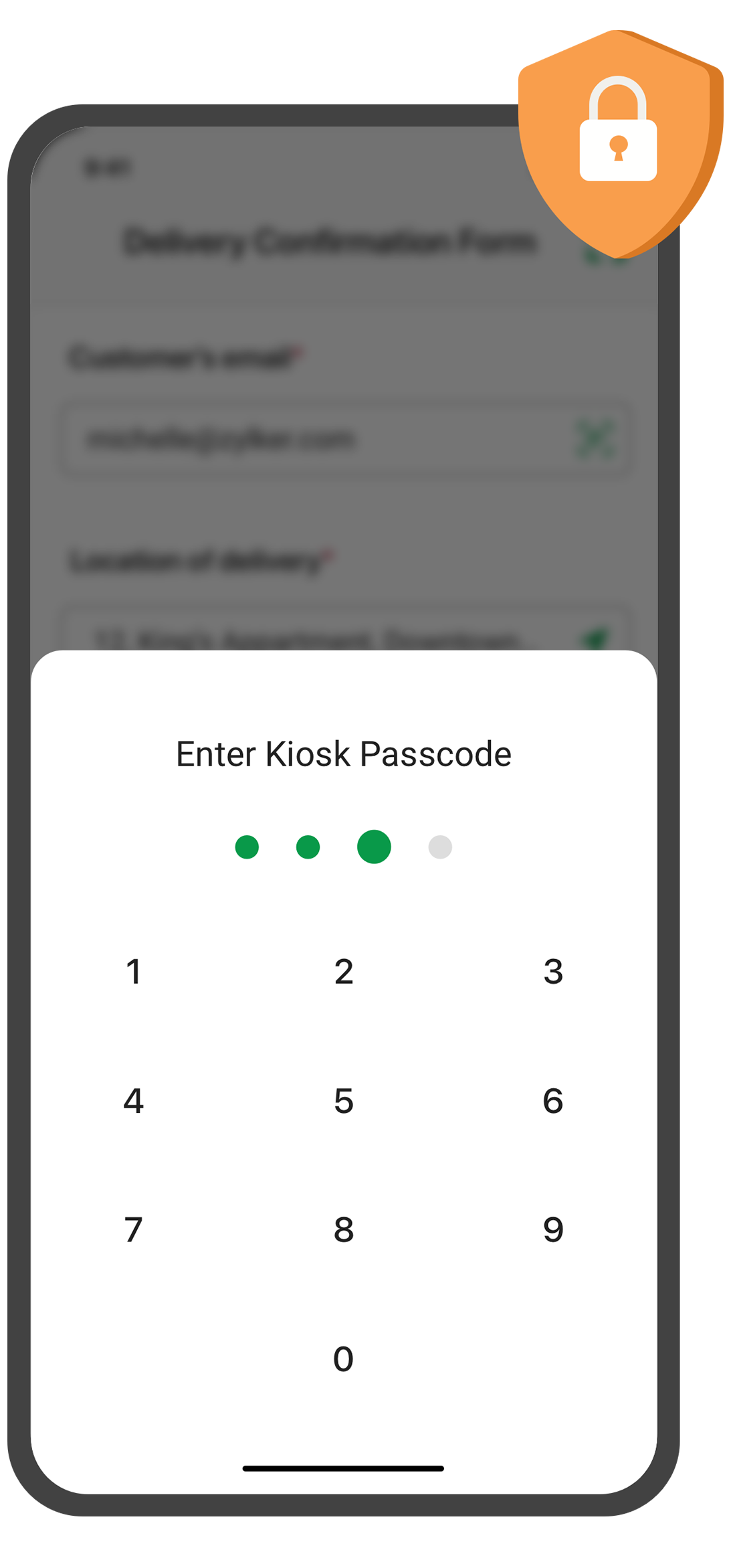
Looking for an easy way to collect data at events and trade shows, or in your store? With the Zoho Forms mobile app, you can turn your mobile device into a self-service kiosk with password protection. Effortlessly collect leads, contacts, and feedback!
Scan QR codes and barcodes
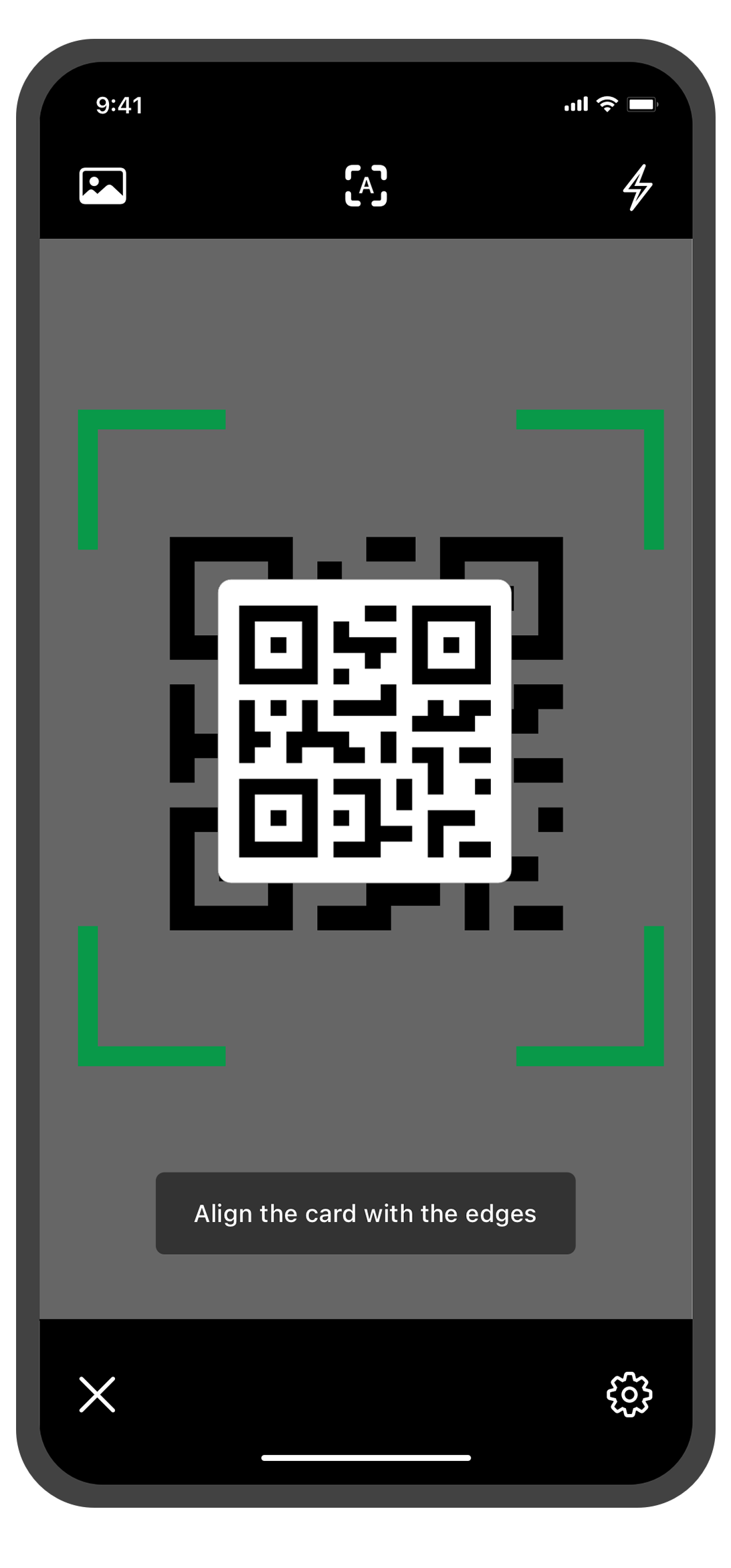
Need to enter data quickly and accurately? The Zoho Forms mobile app lets you use your device's camera to scan QR codes and barcodes. No more manual data entry errors or wasted time! This feature is especially useful for inventory management, event registration. You can customize the form fields to more accurately reflect the data you want to collect from the codes.
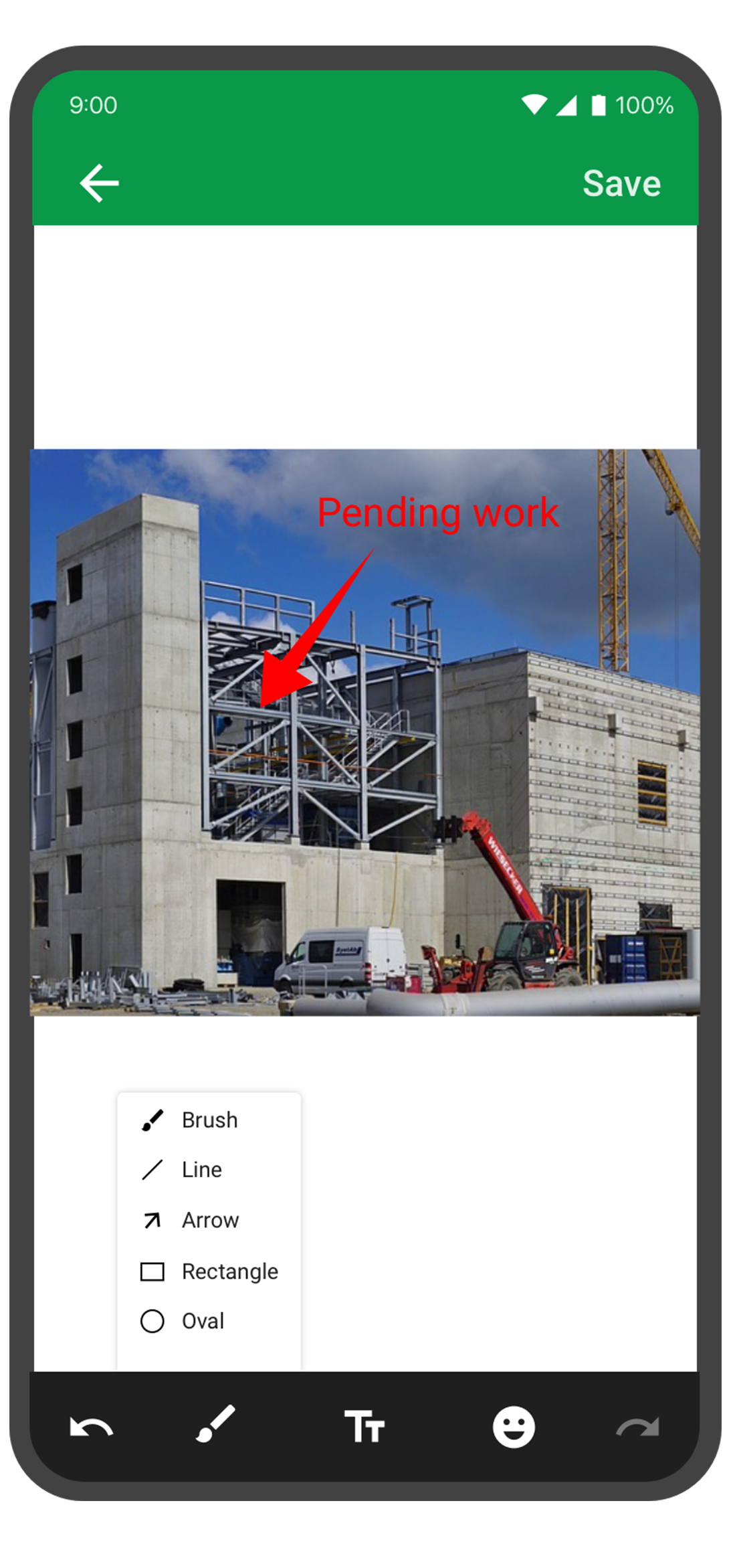
Annotate images
With the Forms mobile app, your team can capture and annotate images to make data collection more accurate and efficient. This feature is especially useful for field engineers, architects, and designers who need to capture and share information about a project. You can annotate images and mark areas of interest with text, arrows, shapes, and freehand drawings. Once the images are uploaded, you can view them under Form Submissions.
Draft entries
With this feature, you no longer have to worry about losing your progress if you need to pause or abandon filling in form. Should you experience an unexpected interruption, like a phone call or an app malfunction, the Zoho Forms app saves your progress as a draft entry. This way, you can easily pick up right where you left off at a later time without having to start from scratch. This feature can save you time and effort, and make the form-filling process more seamless and less stressful.
The Zoho Forms mobile app is a powerful tool that helps you collect data anytime, anyplace. With these tips and tricks, you can take full advantage of Forms' features and streamline your data collection process.
Try them out, and let me know how it goes! You can also send your thoughts and feedback to support@zohoforms.com.
Until next fortnight,
Niveditha
Access your files securely from anywhere
Centralize Knowledge. Transform Learning.
All-in-one knowledge management and training platform for your employees and customers.
New to Zoho Recruit?

Zoho Developer Community
New to Zoho LandingPage?
Zoho LandingPage Resources
New to Zoho Survey?
New to Zoho CRM Plus?
Deliver unforgettable customer experiences
New to Zoho CRM Plus?
Deliver unforgettable customer experiences
New to Zoho Marketing Plus?
Everything you need to run your marketing
New to Zoho Marketing Plus?
Everything you need to run your marketing
New to Bigin?





Topic Participants
Niveditha Raghuram
Sticky Posts
Easily track referrals with Zoho Forms
Referral tracking can be a powerful way for businesses to understand where their leads are coming from. With Zoho Forms, tracking the referral sources of your leads is an easy and straightforward process. Here are some tips to help you make the most of9 Ways to use Zoho Forms this Navratri
Hello form builders!Navratri is almost here! It is a time for celebration and culture in the Indian community, and organizing such a grand event can be overwhelming. But with the right tools, you can streamline the process and focus on creating unforgettableThe secret to collecting data from valid users
Collecting accurate data is crucial for making informed decisions. Zoho Forms offers two efficient ways to validate user data and ensure that you collect entries exclusively from valid users. Double Opt-in: Double Opt-in is a privacy feature that ensuresStorage space in Zoho Forms: The ultimate guide to efficiently managing your data
Are you using Zoho Forms for data collection? As with any data-intensive application, understanding how storage space is calculated is essential. That's why we've created this guide— to show you everything you need to know about managing storage spaceLinking primary form submissions to a second form submission
Let's imagine you have a form that you use to request a minimal amount of data from your users. To collect additional information, you redirect them to another form either automatically or based on a condition. During the course of redirection, you can
New to Zoho TeamInbox?
Zoho TeamInbox Resources
Zoho CRM Plus Resources
Zoho Books Resources
Zoho Subscriptions Resources
Zoho Projects Resources
Zoho Sprints Resources
Qntrl Resources
Zoho Creator Resources
Zoho CRM Resources
Design. Discuss. Deliver.
Zoho Show Resources

Get Started. Write Away!
Writer is a powerful online word processor, designed for collaborative work.
Zoho CRM コンテンツ
-
オンラインヘルプ
-
Webセミナー
-
機能活用動画
-
よくある質問
-
Ebook
-
-
Zoho Campaigns
- Zoho サービスのWebセミナー
その他のサービス コンテンツ
Nederlandse Hulpbronnen

ご検討中の方
Recent Topics
Regex in Zoho Mail custom filters is not supported - but it works!
I recently asked Zoho for help using regex in Zoho Mail custom filters and was told it was NOT supported. This was surprising (and frustrating) as regex in Zoho Mail certainly works, although it does have some quirks* To encourage others, here are 3 regexImporting a new list into campaigns
I'm in the middle of switching my email platform to campaigns. I have a list that I want to import, and it overlaps with my existing Zoho CRM list. The fields in my Zoho CTM are more robust. Will this new list that I upload into my campaigns overwritewhen I email a invoice how can i see it was sent and also were i can go to see all emails sent
when I email a invoice how can i see it was sent and also were i can go to see all emails sent?How can I see content of system generated mails from zBooks?
System generated mails for offers or invices appear in the mail tab of the designated customer. How can I view the content? It also doesn't appear in zMail sent folder.CRM Blueprint Notification by Cliq
Dear Zoho team, In Workflow, there is nofication by cliq, but in blueprint, there is no option as cliq notification. I think it is very convenient to get notified by Cliq , as there are multi modules in apps, but we will always check CliqsSync Contacts in iOS
What does the "Sync Contacts" feature in the iOS Zoho Mail app do?Live webinar: Craft the ideal sales pitch deck with Show
Every great sale starts with a great story. And your pitch deck? That’s where the story takes shape. But too often, these presentations end up looking generic, overloaded with text, or lacking structure. The good news is, it's easier to fix than you think!Project Statuses
Hi All, We have projects that sometimes may not make it through to completion. As such, they were being marked as "Cancelled". I noticed that these projects still show as "Active" though which seems counter intuitive. In fact, the only way I can get them👋 Welcome to the Zoho MCP Community
Hello all, glad to have you here! This is your space for everything AI agents, MCP tools, and intelligent business apps. This community is for you — developers, partners, creators, and businesses exploring how agents can transform work. Whether you’reDNS Manager
Where Can I find my DNS manager so I can link this to click funnels or AWEBERHow do I sync multiple Google calendars?
I'm brand new to Zoho and I figured out how to sync my business Google calendar but I would also like to sync my personal Google calendar. How can I do this so that, at the very least, when I have personal engagements like doctor's appointments, I canNeed to extract date from datetime field
I have a datetime field and need only the date part from it. I am unable to find a built-in function that would be <DateTime>.Date(). I don't think I want to go the string conversion route of converting the datetime to string and then parsing out values and create a date out of it. Any one out there has a better solution to this? Thanks in adavnce. Regards Moiz Tankiwala Smart Training & IT SolutionsNew in Cadences: WhatsApp follow-ups, upgraded limits, and options for add-ons
Hello everyone, We're rolling out two key updates to help you engage better and scale smarter with Cadences in Zoho CRM. Reach customers on WhatsApp, directly from Cadences Previously, Cadences have enabled you to automate follow-ups through emails, calls,additional accounts
If I brought 5 emails to my account. Can I later buy additional emails.Why I am unable to configure Zoho Voice with my Zoho CRM account?
I have installed Zoho Voice in my Zoho CRM, but as per the message there is some config needed in Zoho Voice interface. But when I click on the link given in the above message, I get an access denied page.Cliq Meeting Calls No Audio and Screen Share
When in a Cliq channel meeting, the audio does not work at all on pc. When i use my phone as audio source, screen share on pc does not work. I have updated audio drivers but the strangest thing is that during a 1 on 1 call, it works well. Therefore theWork anniversary and birthdays on connect
Hello, I like the idea of having employee's work anniversary and birthdays on the dashbaord. Do you have to have the employee complete this information themselves in connect settings, or does it pull from their directory settings? (ie. we use Zoho oneAlias Email Id already exists
Hi I'm trying to create an alias : contact @ yoavarielevy.co.il but i get the message Alias Email Id already exists I had an account with the same name but I deleted it. Can you help? Thanx YoavFeature Request: Ability to Set a Custom List View as Default for All Users
Dear Zoho CRM Support Team, We would like to request a new feature in Zoho CRM regarding List Views. Currently, each user has to manually select or favorite a custom list view in order to make it their default. However, as administrators, we would likeAdding Multiple Products (Package) to a Quote
I've searched the forums and found several people asking this question, but never found an answer. Is ti possible to add multiple products to a quote at once, like a package deal? This seems like a very basic function of a CRM that does quotes but I can'twebinar registration confirmation are landing in SPMA folders
I am trialing zoho webinar and do not have access to custom domains. When I test user registrations, they are working but the resulting confirmation email is landing in a spam folder. How can I avoid this?Multiple organizations under Zoho One
Hello. I have a long and complicated question. I have a Zoho One account and want to set it up to serve the needs of 6 organizations under the same company. Some of the Zoho One users need to be able to work in more than 1 organization’s CRM and otherUnbundle feature for composite items
We receive composite items from our vendors and sell them either individually or create other composite items out of them. So, there is a lot of bundling and unbundling involved with our composite items. Previously, this feature was supported in formworkflow not working in subform
I have the following code in a subform which works perfectly when i use the form alone but when i use the form as a subform within another main form it does not work. I have read something about using row but i just cant seem to figure out what to changeFetch data from another table into a form field
I have spent the day trying to work this out so i thought i would use the forum for the first time. I have two forms in the same application and when a user selects a customer name from a drop down field and would like the customer number field in theRecord comment filter
Hi - I have a calendar app that we use to track tasks. I have the calendar view set up so that the logged in user only sees the record if they are assigned to the task. BUT there are instances when someone is @ mentioned in the record when they are notHow to View Part Inventory and Warehouse Location When Creating a Work Order in Zoho FSM
Hi everyone, We’re currently setting up Zoho FSM and would like to improve how our team selects parts when creating a Work Order. Right now, when we add a part or item to a Work Order, we can select it from our Zoho Inventory list but we don’t see anyFSM too slow today !!
Anybody else with problem today to loading FSM (WO, AP etc.)?Not able to Sign In in Zoho OneAuth in Windows 10
I recently reset my Windows 10 system, after the reset when I downloaded the OAuth app and tried to Sign In It threw an error at me. Error: Token Fetch Error. Message: Object Reference not set to an instance of an object I have attached the screenshotMapping a custom preferred date field in the estimate with the native field in the workorder
Hi Zoho, I created a field in the estimate : "Preferred Date 1", to give the ability to my support agent to add a preferred date while viewing the client's estimate. However, in the conversion mapping (Estimate to Workorder), I'm unable to map my customIs there a way to request a password?
We add customers info into the vaults and I wanted to see if we could do some sort of "file request" like how dropbox offers with files. It would be awesome if a customer could go to a link and input a "title, username, password, url" all securely and it then shows up in our team vault or something. Not sure if that is safe, but it's the best I can think of to be semi scalable and obviously better than sending emails. I am open to another idea, just thought this would be a great feature. Thanks,Single Task Report
I'd like a report or a way to print to PDF the task detail page. I'd like at least the Task Information section but I'd also like to see the Activity Stream, Status Timeline and Comments. I'd like to export the record and save it as a PDF. I'd like theAuto-response for closed tickets
Hi, We sometimes have users that (presumably) search their email inbox for the last correspondence with us and just hit reply - even if it's a 6 month old ticket... - this then re-opens the 6 month old ticket because of the ticket number in the email's subject. Yes, it's easy to 'Split as new Ticket', but I'd like something automated to respond to the user saying "this ticket has already been resolved and closed, please submit a new ticket". What's the best way to achieve this? Thanks, EdHow to Push Zoho Desk time logged to Zoho Projects?
I am on the last leg of my journey of finally automating time tracking, payments, and invoicing for my minutes based contact center company - I just have one final step to solve - I need time logged in zoho desk to add time a project which is associatedCannot access KB within Help Center
Im working with my boss to customize our knowledge base, but for some reason I can see the KB tab, and see the KB categories, but I cannot access the articles within the KB. We have been troubleshooting for weeks, and we have all permissions set up, customersExport to excel stored amounts as text instead of numbers or accounting
Good Afternoon, We have a quarterly billing report that we generate from our Requests. It exports to excel. However if we need to add a formula (something as simple as a sum of the column), it doesn't read the dollar amounts because the export storeswhy my account is private?
when i post on zohodesk see only agent onlyGetting ZOHO Invoice certified in Portugal?
Hello, We are ZOHO partners in Portugal and here, all the invoice software has to be certified by the government and ZOHO Invoice still isn´t certified. Any plans? Btw, we can help on this process, since we have a client that knows how to get the software certified. Thank you.500 Internal Server Error
I have been trying to create my first app in Creator, but have been getting the 500: Internal Server Error. When I used the Create New Application link, it gave me the error after naming the application. After logging out, and back in, the application that I created was in the list, but when I try to open it to start creating my app, it gives me the 500: Internal Server Error. Please help! Also, I tried making my named app public, but I even get the error when trying to do that.Client Script | Update - Client Script Support For Portals
Dear All! We are excited to announce the highly anticipated feature: Client Script support for Portals. We understand that many of you have been eagerly awaiting this enhancement, and we are pleased to inform you that this support is now live for allNext Page