Optimiser les groupes dans votre réseau Zoho Connect

Les groupes sont l'espace idéal où les équipes peuvent partager des informations au sein de groupes particuliers ou à travers l'organisation, selon la nature desdits groupes dans Zoho Connect. Cette fonction vous permet de créer trois types de groupes.
Ouvert : tous les membres du réseau peuvent rejoindre le groupe, voir les conversations et publier des messages ou des commentaires et accéder à des modules tels que les fichiers, manuels, et événements.
Public : tous les membres du réseau peuvent voir les conversations, publier des messages et des commentaires dans le groupe. Cependant, ils n'ont pas accès aux applications intégrées et seul l'administrateur peut ajouter des membres.
Privé : seuls les membres peuvent voir le groupe et y accéder.
Le type de groupe peut être modifié à tout moment à partir de "Paramètres du groupe".
Créer un nouveau groupe
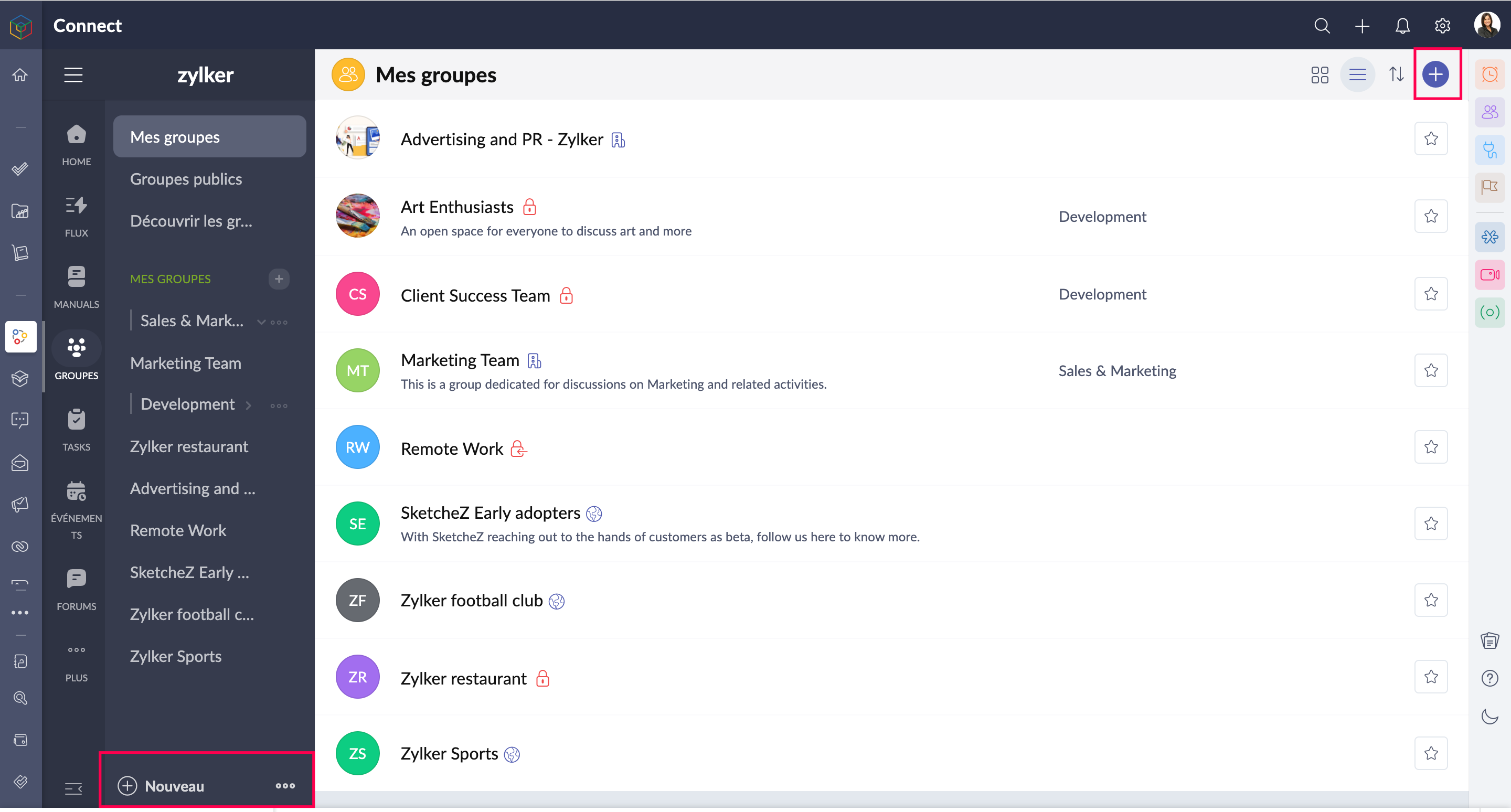
- Accédez à l'onglet "Groupes" depuis le panneau à gauche.
- Depuis le "+" en haut à droite, vous pouvez créer de nouveaux groupes.
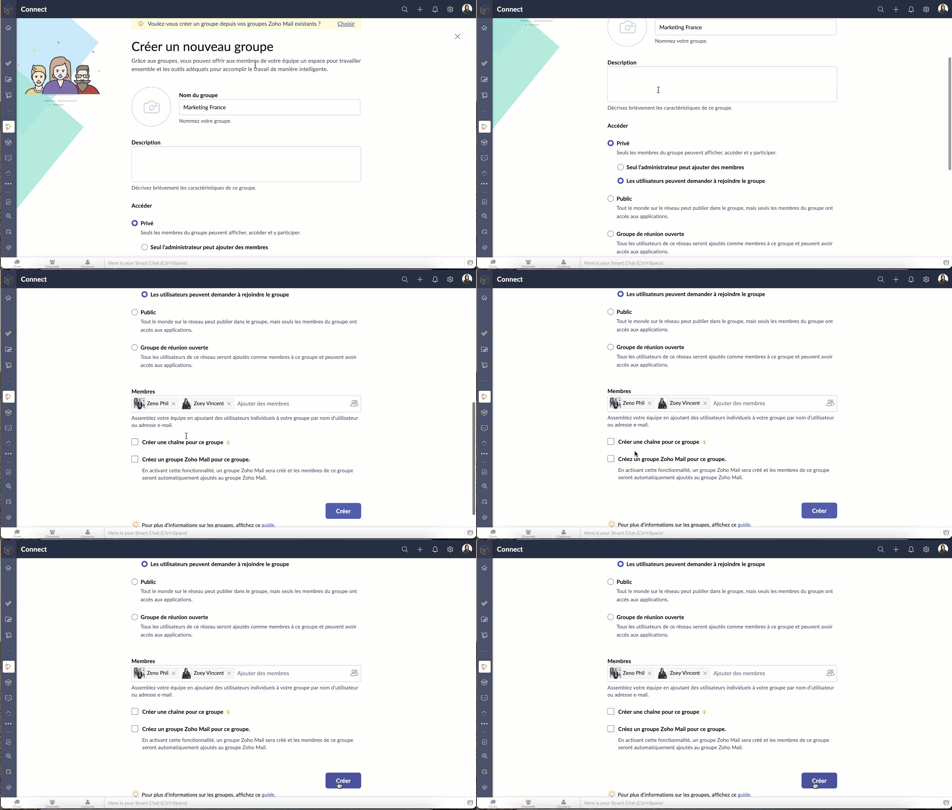
- Saisissez les informations demandées.
- Pour un groupe privé, sélectionnez une des options demandées.
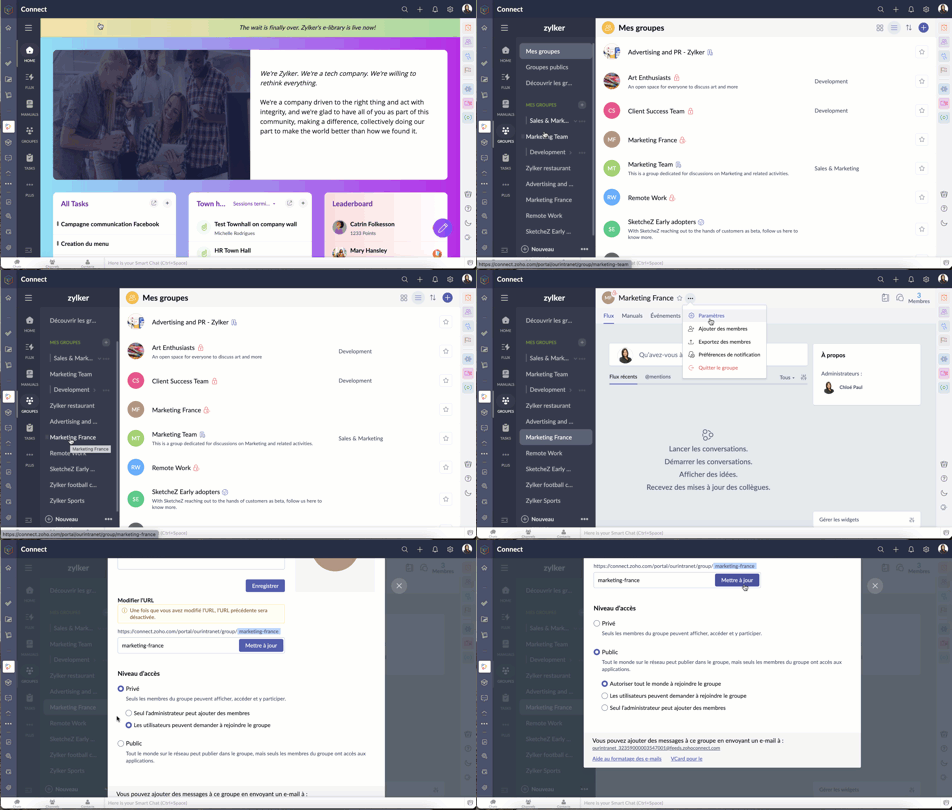
- En cas de modification ultérieure du choix ci-dessus
- Sélectionnez un groupe >> Paramètres >> Niveau d'accès.
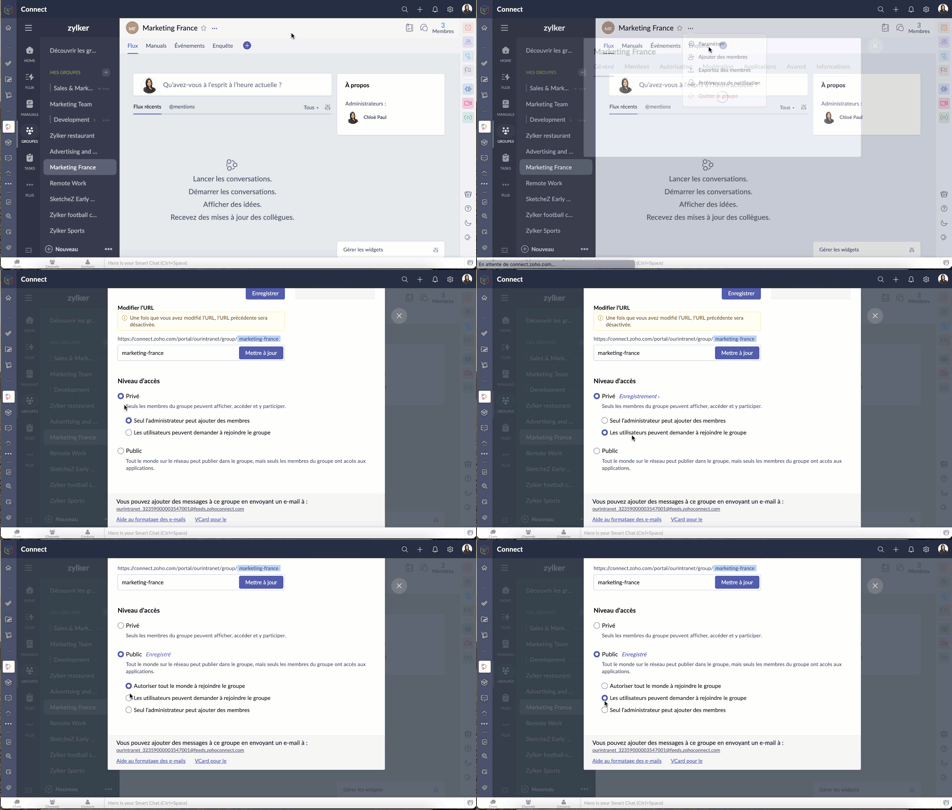
- Modifiez le niveau d'accès selon les besoins.
- Selon les politiques établies par l'administrateur, les membres du réseau peuvent ou non être autorisés à créer des groupes.
Demander à rejoindre un groupe
Pour pouvoir rejoindre un groupe, il faut que l'administrateur ait sélectionné "Les utilisateurs peuvent demander à rejoindre le groupe" lors de la création du groupe.
- Une fois cette fonction activée, les utilisateurs peuvent demander à rejoindre un groupe privé à partir de la page du groupe.
- Afin d'approuver ou de rejeter une demande de se rejoindre, les administrateurs peuvent se rendre dans l'onglet modération depuis les boutons à droite.
Créer des catégories de groupes
La création de catégories de groupes permet une navigation facile et rapide. Par exemple, vous pouvez créer une catégorie telle que "fréquemment utilisé" et y placer les groupes auxquels vous accédez le plus souvent.
- Accédez à "Groupes" à partir du panneau à gauche.
- Cliquez sur l'icône "+" à côté de la liste "Mes groupes".
- Sur la fenêtre secondaire, saisissez les informations demandées.
- Ajoutez les groupes nécessaires sous la catégorie créée et enregistrez.

Modérer les messages et les commentaires dans un groupe
Une fois que vous avez activé la modération dans le groupe, tous les messages et commentaires publiés dans le groupe devront être approuvés par le modérateur avant d'être visibles par tous. Par défaut, tous les administrateurs de groupe sont des modérateurs.
Activer la modération
- Activer la modération depuis l'onglet "Modération" qui se trouve sous le nombre de membres d'un groupe particulier.
- Lorsque vous activez la modération, vous pouvez également sélectionner les utilisateurs.
- Vous pouvez aussi ajouter les utilisateurs sur la liste verte. Elle est un ensemble d'utilisateurs à contourner la modération et partager directement des publications et commentaires.

Rôles des utilisateurs dans un groupe
Les rôles des utilisateurs dans un groupe sont les suivants : administrateur, modérateur et membre.
Administrateur : la personne qui crée le groupe est par défaut l'administrateur du groupe. Les administrateurs peuvent ajouter ou supprimer des membres à tout moment, activer ou désactiver des applications intégrées, modérer les messages et les commentaires publiés dans le groupe, et verrouiller, archiver ou supprimer le groupe.
Modérateur : le modérateur vérifie les messages et les commentaires avant qu'ils n'apparaissent sur le mur du groupe. Il peut approuver, modifier ou supprimer les messages et les commentaires publiés dans le groupe avant qu'ils ne soient visibles par tous les autres membres. Par défaut, tous les administrateurs du groupe sont modérateurs, mais n'importe quel membre du groupe peut également être ajouté en tant que modérateur.
Membres : les membres sont ajoutés au groupe par l'administrateur. Ils peuvent publier et commenter dans le groupe et accéder à toutes les applications intégrées activées.
Rétablir un groupe supprimé
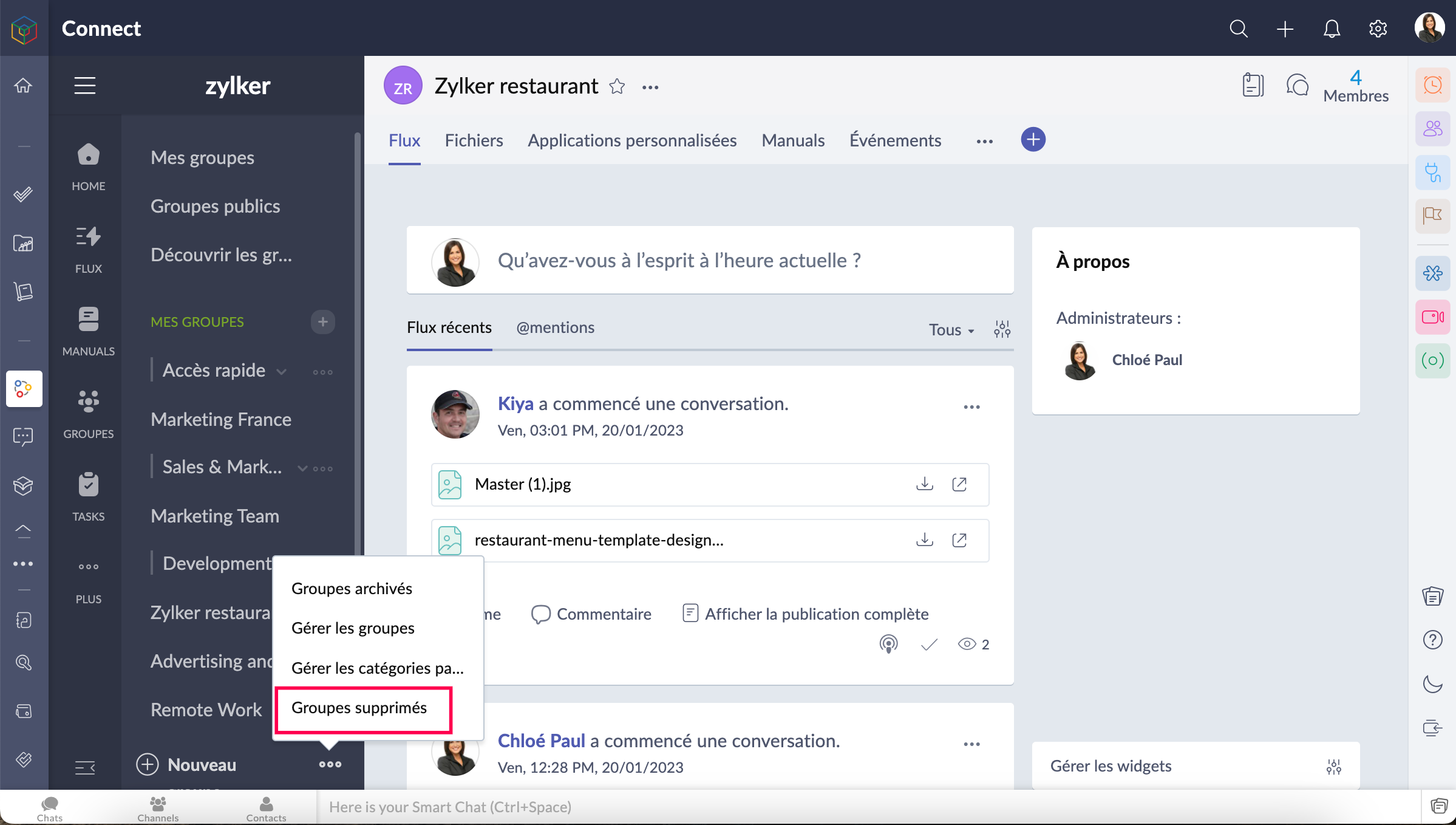
- Seuls les administrateurs de réseau peuvent restaurer un groupe supprimé.
- Les groupes supprimés sont conservés dans la corbeille pendant 90 jours. Les administrateurs pourront restaurer un groupe et son contenu pendant cette période. Après 90 jours, le groupe sera définitivement supprimé.
- Allez sur l'onglet "Groupes supprimés" depuis le panneau à gauche et restaurez le groupe selon votre besoin.
Nous espérons que ces astuces vous aideront à mieux configurer les différents groupes dans Zoho Connect.
N'hésitez pas à nous faire part de vos questions dans les commentaires
L'équipe Zoho France
Access your files securely from anywhere
Centralize Knowledge. Transform Learning.
All-in-one knowledge management and training platform for your employees and customers.
New to Zoho Recruit?

Zoho Developer Community
New to Zoho LandingPage?
Zoho LandingPage Resources
New to Zoho Survey?
New to Zoho CRM Plus?
Deliver unforgettable customer experiences
New to Zoho CRM Plus?
Deliver unforgettable customer experiences
New to Zoho Marketing Plus?
Everything you need to run your marketing
New to Zoho Marketing Plus?
Everything you need to run your marketing
New to Bigin?





Topic Participants
Kinjal Lodaya
Sticky Posts
Collaboration sans faille avec Zoho One
Bonjour à tous, Dans cet article nous allons voir comment Zoho One permet une collaboration à différents niveaux . La façon dont nous travaillons évolue. À mesure que les entreprises se mondialisent, la plupart des activités sont menées en équipe.
New to Zoho TeamInbox?
Zoho TeamInbox Resources
Zoho CRM Plus Resources
Zoho Books Resources
Zoho Subscriptions Resources
Zoho Projects Resources
Zoho Sprints Resources
Qntrl Resources
Zoho Creator Resources
Zoho CRM Resources
Design. Discuss. Deliver.
Zoho Show Resources

Get Started. Write Away!
Writer is a powerful online word processor, designed for collaborative work.
Zoho CRM コンテンツ
-
オンラインヘルプ
-
Webセミナー
-
機能活用動画
-
よくある質問
-
Ebook
-
-
Zoho Campaigns
- Zoho サービスのWebセミナー
その他のサービス コンテンツ
Nederlandse Hulpbronnen

ご検討中の方
Recent Topics
Zoho no support response.
Problem is Zoho support seems to be just a concept. Just completing my trial, am ready to purchae 3 user subscriptions pending answer to a question, submitted two suport request during my trial that weren't responded to. Gave up trying the 888 line. Hard to imagine my production data in hosting environment with no support response.Updating transaction number series for fiscal year 2026-2027 in Zoho POS
A fiscal year or financial year is a 12-month period that businesses follow to manage and track their financial activities such as expenses, revenue, and taxes. This doesn't need to match the calendar year (JAN-DEC) and varies based on region, and taxLack of Looping and Carry-Forward Functionality in Zoho Survey
Zoho Survey currently does not support looping or carry-forward functionality, meaning it is not possible to dynamically generate follow-up questions based on each option selected in a previous question or to pipe selected responses (such as {LoopingForecast in Zoho CRM Just Got Smarter with an upgraded Zia Intelligence
Hello Everyone, We are here with an interesting enhancement to Forecasts in Zoho CRM — Enhanced Zia Insights for your sales Forecast. Imagine a regional sales manager reviewing their team’s performance using forecasts in Zoho CRM. Instead of switchingUpdate TDS and TCS rates for Income Tax Act, 2025 (effective April 1, 2026)
Hello everyone, The Income-tax Rules, 2026 (G.S.R. 198(E), dated March 20, 2026) have been notified, marking a significant structural shift in India’s direct tax framework. From April 1, 2026, the Income Tax Act, 2025 replaces the Income Tax Act, 1961.Service line items
Hello Latha, Could you please let me know the maximum number of service line items that can be added to a single work order? Thanks, Chethiya.Automation Series: Auto-assign Resources as Task Owners
In Zoho Projects, task ownership can be set automatically during task creation, allowing resources to be assigned based on the task name. Resources are work equipment or tools added to the portal to monitor their usage across projects. They can be assignedZoho CRM Email Templates 100% Width No Background How?
Hi, On the Zoho CRM Email Templates in setup > customization > templates > new templates > I choose blank template, but still it puts in a gray background and a max width for the email. I just want to make an email that looks like an email I would send from gmail that has no background or max width. How do you do this?Subform edits don't appear in parent record timeline?
Is it possible to have subform edits (like add row/delete row) appear in the Timeline for parent records? A user can edit a record, only edit the subform, and it doesn't appear in the timeline. Is there a workaround or way that we can show when a userAI secretary
In our company, Claude is the secretary and creates inquiries and schedules from Gmail. You no longer have to enter them yourself. The secret is that we created an MCP server that connects to CRM. https://x.com/Mac_nishio/status/19179545625663286945 small changes to Recruit that make a big difference
Sometimes, the biggest improvements aren’t new features, they’re small changes that make everyday actions feel smoother. Over the past few weeks, we’ve made a few such updates across Zoho Recruit. They’re subtle, but together, they remove friction fromProject Management Bulletin: March, 2026
We are passionate about equipping our users with efficient solutions that help them run their businesses successfully. Our collective efforts over the past 2 years have culminated in the launch of Sprints 3.0— built with reliable features, impactful integrations,New security enhancements for portal users: MFA and password management
Hello everyone, We are excited to announce three major security enhancements that are now available to portal users in Zoho CRM: Organization-wide multi-authentication for portal users - Admins can enforce multi-factor authentication across the entire[Free Webinar] Learning Table Series 2026 – Customer agreement & contract management using Zoho Creator
Hello everyone, We’re excited to announce the next session in Learning Table Series 2026, where we will continue with our purpose-driven approach—focusing on how Zoho Creator’s features help solve real-world business challenges. Each session in this seriesZoho Payroll's USA and KSA editions are available in Zoho One!
Greetings! We’re excited to share that Zoho Payroll, currently available only in India and the UAE, is now introducing the KSA (Kingdom of Saudi Arabia) edition and the USA (United States of America) edition, and these editions are now available in ZohoLooking for Guidance on Building a Zoho Website
I'm exploring the possibility of building a custom website with specific features using Zoho as an alternative platform. My goal is to create something similar to https://gtasandresapk.com , with the same kind of functionality and user experience. I'dMultilingual website feature
Would be a great feature to have. I saw that this feature was available for backstage. I think it could be done for zoho sites too.[Webinar] Modernize your sales engine with agentic analytics
Traditional sales decision-making methods aren't cut out for modern businesses. Leveraging AI in sales helps businesses actively respond to the changing dynamics of the market. Agentic AI is letting sales teams across industries make better decisionsBuilt-in Date Functions in Zoho Analytics Query Tables
I have a doubt about whether Zoho Analytics Query Tables provide built-in functions for start date, end date, and the current monthZoho Commerce in multiple languages
When will you be able to offer Zoho Commerce in more languages? We sell in multiple markets and want to be able to offer a local version of our webshop. What does the roadmap look like?Nimble enhancements to WhatsApp for Business integration in Zoho CRM: Enjoy context and clarity in business messaging
Dear Customers, We hope you're well! WhatsApp for business is a renowned business messaging platform that takes your business closer to your customers; it gives your business the power of personalized outreach. Using the WhatsApp for Business integrationConnectivity issues with Google Calendar and third-party integrations
Description: We are currently experiencing a critical failure with Zoho CRM third-party connections. This issue is heavily affecting our primary workflow. Symptoms: Sync Failure: Existing Zoho CRM to Google Calendar connections have been failing for approximatelyDynamic image in form works in the app but not on the customer portal.
img = frm_Fichas[ID == input.Nombre].Foto; imgno = Nophoto[ID2 = 1].Image; if(len(img) > 1) { img = img.replaceAll("/sharedBy/appLinkName/",zoho.appuri); img = img.replaceAll("viewLinkName","Fichas_de_personal_public"); img = img.replaceAll("fieldName","Foto");Incorrect Functioning of Time Logs API (Version 3)
We need to fetch the list of time logs for each task for our company internal usage. We are trying to achieve it by using the next endpoint: https://projects.zoho.com/api-docs#bulk-time-logs#get-all-project-time-logs Firstly, in the documentation theHow can I export all Deluge code across the application?
I’m working on a application with multiple forms, reports, and HTML views, where Deluge scripts are used across workflows, field actions, and custom functions. Is there a way to export all Deluge scripts into a single file for easier search?First Name in Mail
While sending a mail/message to the user, I want only the first name to be displayed—for example: “Hi John” instead of the full name using "Hi ${Name_Field}"Can you import projects into Zoho Projects yet?
I see some very old posts asking about importing project records into Zoho Projects. But I can't find anything up to date about the topic. Has this functionality been added? Importing tasks is helpful. But we do have a project where importing projectsUpdating Sales orders on hold
Surely updating irrelevant fields such as shipping date should be allowed when sales orders are awaiting back orders? Maybe the PO is going to be late arriving so we have to change the shipment date of the Sales order ! Not even allowed through the api - {"code":36014,"message":"Sales orders that have been shipped or on hold cannot be updated."}Zoho Social API for generating draft posts from a third-party app ?
Hello everyone, I hope you are all well. I have a question regarding Zoho Social. I am developing an application that generates social media posts, and I would like to be able to incorporate a feature that allows saving these posts as drafts in Zoho Social.Deleting unwanted ticket replies
Hello, In a Zoho Desk Ticket thread, sometimes one of the recipients has auto-reply activated. This creates a new message in the Ticket thread that not only pollutes the thread, but most importantly cannot be replied properly because usually auto-reply e-mails don't do "reply all", so the other recipients are not included. I want to delete such a message in the Ticket thread. I searched the help of Zoho Desk, but only found a way to mark as Spam (https://help.zoho.com/portal/kb/articles/marking-support-tickets-as-spam)Issue updating Multi-Select Picklist via API (saves as string instead of checking boxes)
Hi everyone, I'm hoping someone can point out what I'm doing wrong here. I'm stuck trying to update a custom multi-select field via the Desk API and it's driving me a bit crazy. I have a multi-select picklist called "Buy years" with options like 2023,Page variable not receiving URL parameter in Creator 6 HTML snippet Deluge — Canada DC
I have a Creator 6 app on Canada DC. I'm trying to pass a URL parameter to an HTML snippet page via Deluge but the variable always returns empty. Setup: Page: MYC_Meeting_Tool Page variable declared: submission_id, type Text Page Script tab contains:Zoho Campaigns API endpoint for contact details
there is some REST API support for Zoho Campaigns, however, I am not able to find an endpoint for "get contact details". in particular, I'd like to access contact's subscription status and also their topic. ideally there is all profile available includingMigrating Documentation from Notion to Zoho Help Centre
Hi there, We have a large chunk of documentation that currently sits on Notion. However, we are eager to move this into our Zoho Help Centre/Knowledge Base. What is the most efficient way of achieving this?Can't add attachment on email template
The attachment does show up. This is my template. Hi ${Cases.Assigned Programmers}, Please be reminded about the following task that has been assigned to you. Subject : ${Cases.Subject} Description : ${Cases.Description} Ticket # : ${Cases.Request Id}Edit a previous reconciliation
I realized that during my March bank reconciliation, I chose the wrong check to reconcile (they were for the same amount on the same date, I just chose the wrong check to reconcile). So now, the incorrect check is showing as un-reconciled. Is there any way I can edit a previous reconciliation (this is 7 months ago) so I can adjust the check that was reconciled? The amounts are exactly the same and it won't change my ending balance.Custom CSS for Zoho CRM Team Bookings embeded widget
Hello, we are adding Zoho CRM Team Bookings (crm.zoho.com) in our public website. We know that we can change Theme Color, Font Color and Background Color: Zoho CRM Booking Styling But is it possible to change other CSS attributes e.g. Font Family, likeStandard practice rerun updated deluge function over existing recordes
Hi folks, we have a function which is triggered via webhook from a third-party solution which then calls another api with a contact-id and gets a json payload back and then parses that data to custom fields in our CRM to the record id. As requirementsSpecifying time increments on a Date/Time field
Hi all, Im using a Date/Time field in my CRM module. At the moment the increments are 30 minutes. How can I change these to be 15 minutes? ThanksSort by Project Name?
How the heck do you sort by project name in the task list views??? Seems like this should be a no-brainer?Next Page