Présentons RouteIQ pour Zoho CRM - Économiser du temps et de l'essence avec notre solution de cartographie intelligente
Au cours de vos déplacements professionnels, vous connaissez l'évolution constante de l'emploi du temps des membres de votre équipe. Ils se déplacent souvent, rendent visite à des clients et s'occupent d'une multitude de tâches. La gestion et l'organisation de leurs activités dans ce contexte en constante évolution peuvent s'avérer complexes et rendre leur productivité souvent difficile.
En effet, ils passent trop de temps à planifier et à se déplacer, ce qui entraîne une augmentation des frais de déplacement, une diminution du nombre de visites aux clients et une baisse de la productivité par agent.
Cela présente un gros problème pour vos équipes de vente, de service et de livraison et pourrait se transformer en un problème onéreux au fil du temps.
Nous sommes ravis de vous présenter RouteIQ pour Zoho CRM, une solution de cartographie intelligente qui a été conçue pour résoudre ce problème.
Visualisation cartographique
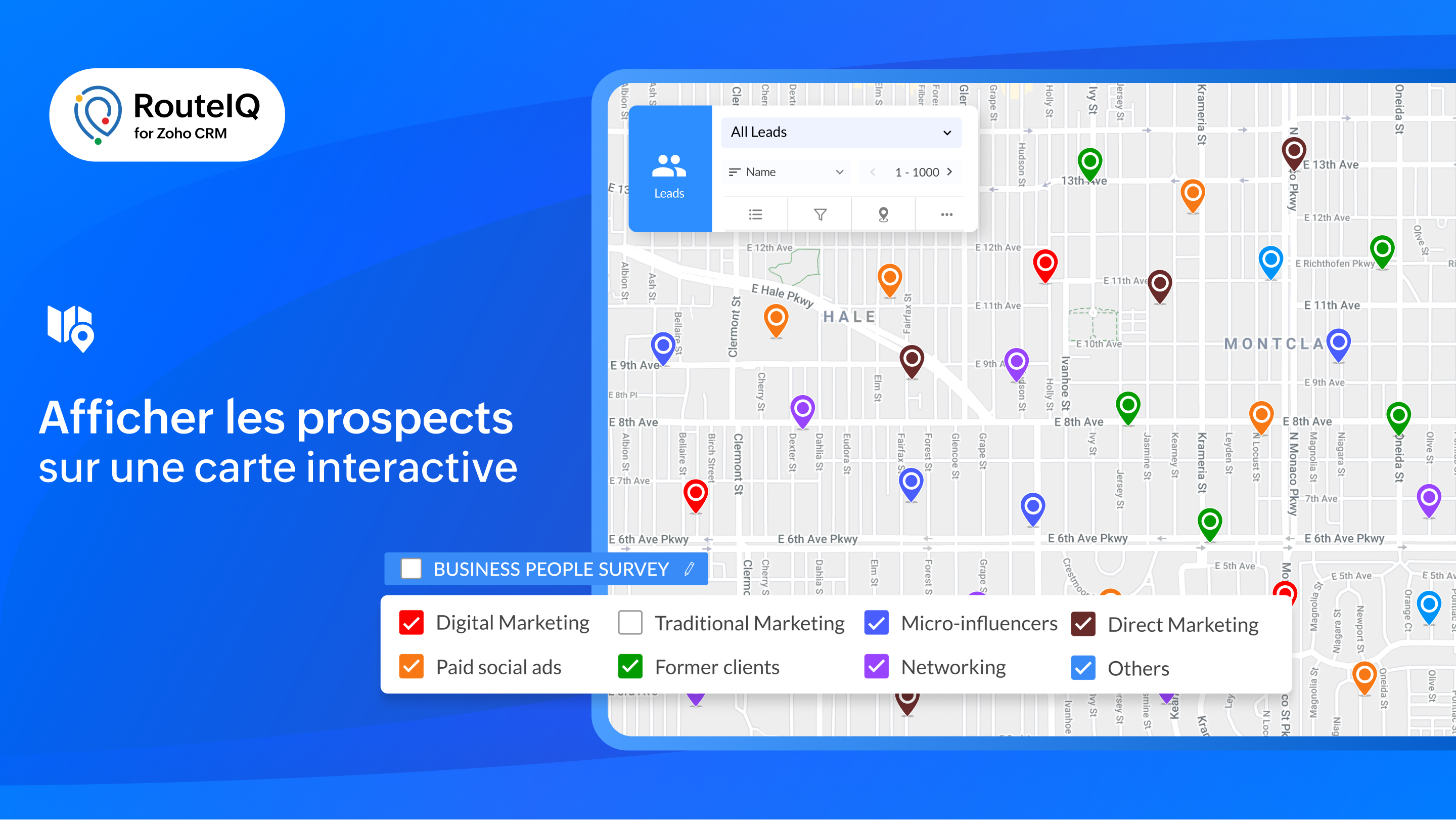
- Présentation des données CRM : affichez vos prospects sur une carte interactive pour obtenir une vue d'ensemble géographique de vos clients potentiels et de vos comptes.
- Explorer : consultez simultanément les contacts de plusieurs modules situés à un emplacement donné.
- Affichage en couleur : attribuez un code couleur à vos prospects en fonction de paramètres tels que le chiffre d'affaires, la date de la dernière visite, la priorité, et bien plus encore, afin de vous permettre de mieux planifier votre journée.
- À proximité : lors d'annulations de dernière minute, recherchez rapidement des prospects près de vous afin de remplacer les visites annulées.
Tracé des parcours
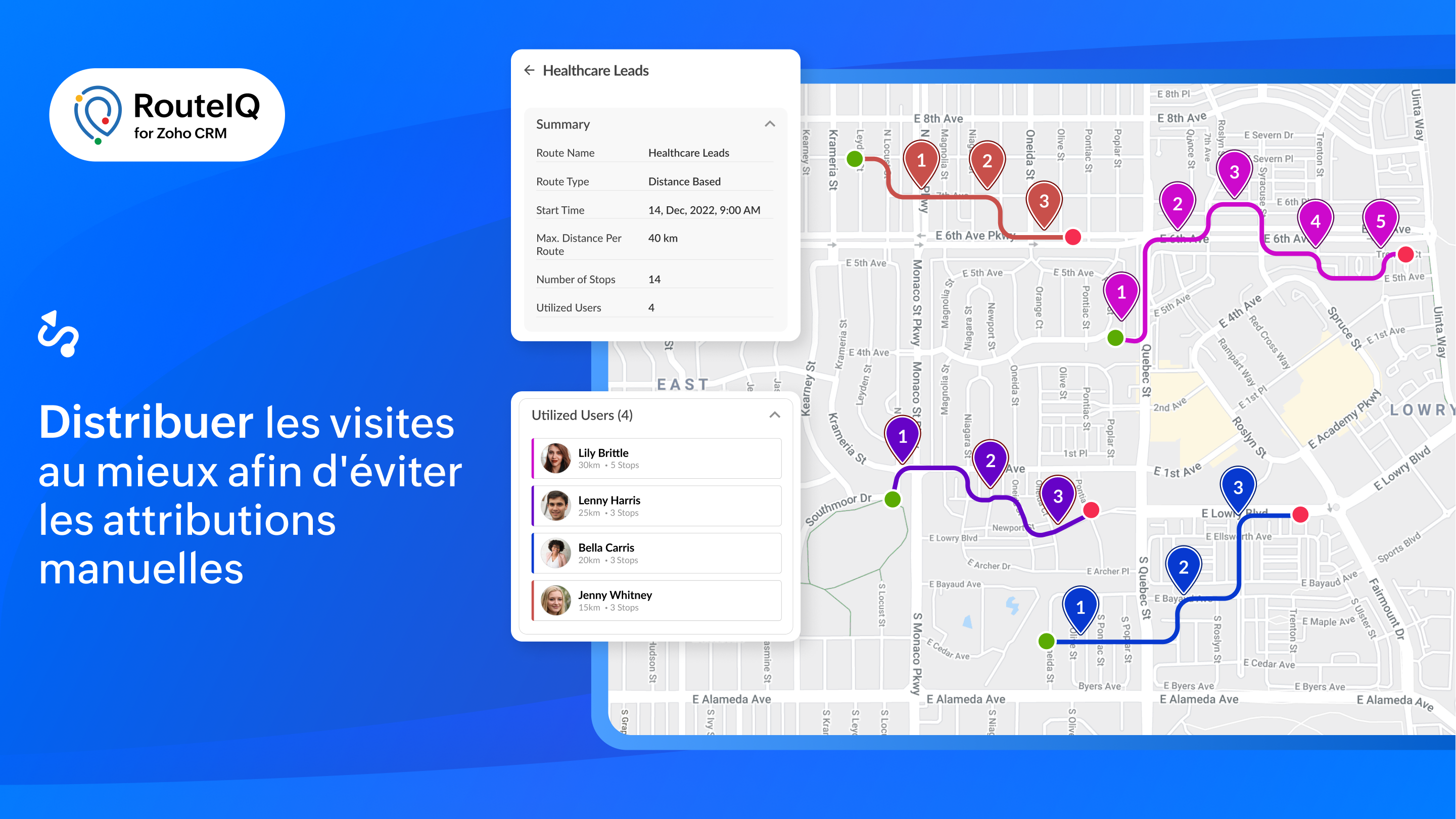
- Parcours flexibles et organisés : créez des parcours optimisés en fonction du temps ou de la durée de vos étapes.
- Distribution des routes : RouteIQ répartit de manière optimale toutes vos visites, vos travaux et vos livraisons entre les membres de votre équipe afin d'économiser du temps.
- Programmation automatique de la route : créez automatiquement des parcours chaque jour pour vos réunions quotidiennes.
- Recherche tout au long du parcours : permettez à l'équipe d'identifier les clients potentiels qui se trouvent sur leur chemin.
Suivi
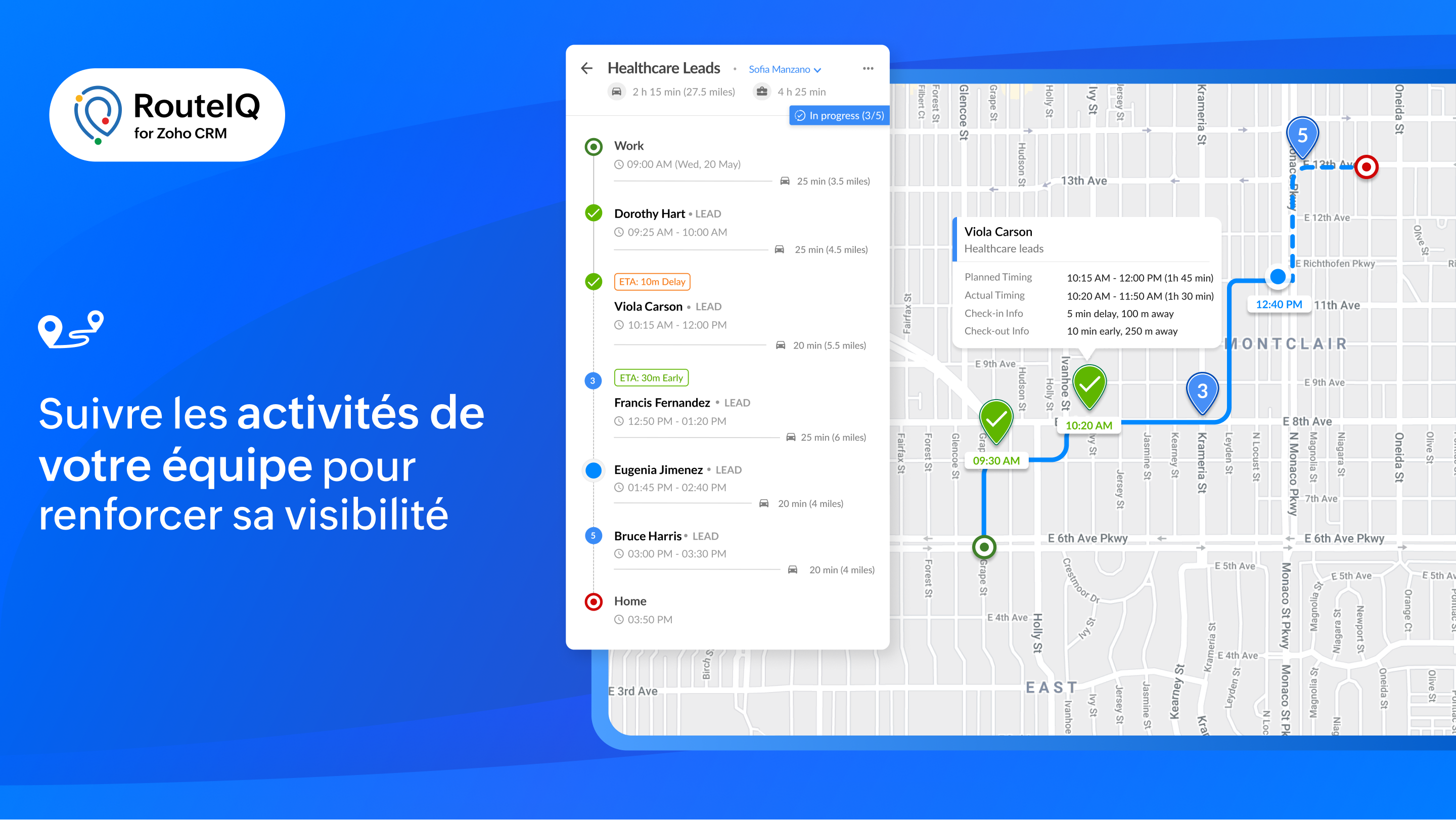
- Suivre le progrès de la route : affichez les progrès effectués sur les parcours de votre équipe en vous basant sur leurs pointages et leurs départs. RouteIQ suit également leur kilométrage et le temps passé.
- Suivi des visites : affichez les visites d'un agent en fonction de la date, y compris le suivi des visites et les écarts.
- Suivi du temps et du kilométrage : suivez la distance parcourue et le temps passé à rendre visite à des clients potentiels en vous basant sur les pointages et les départs.
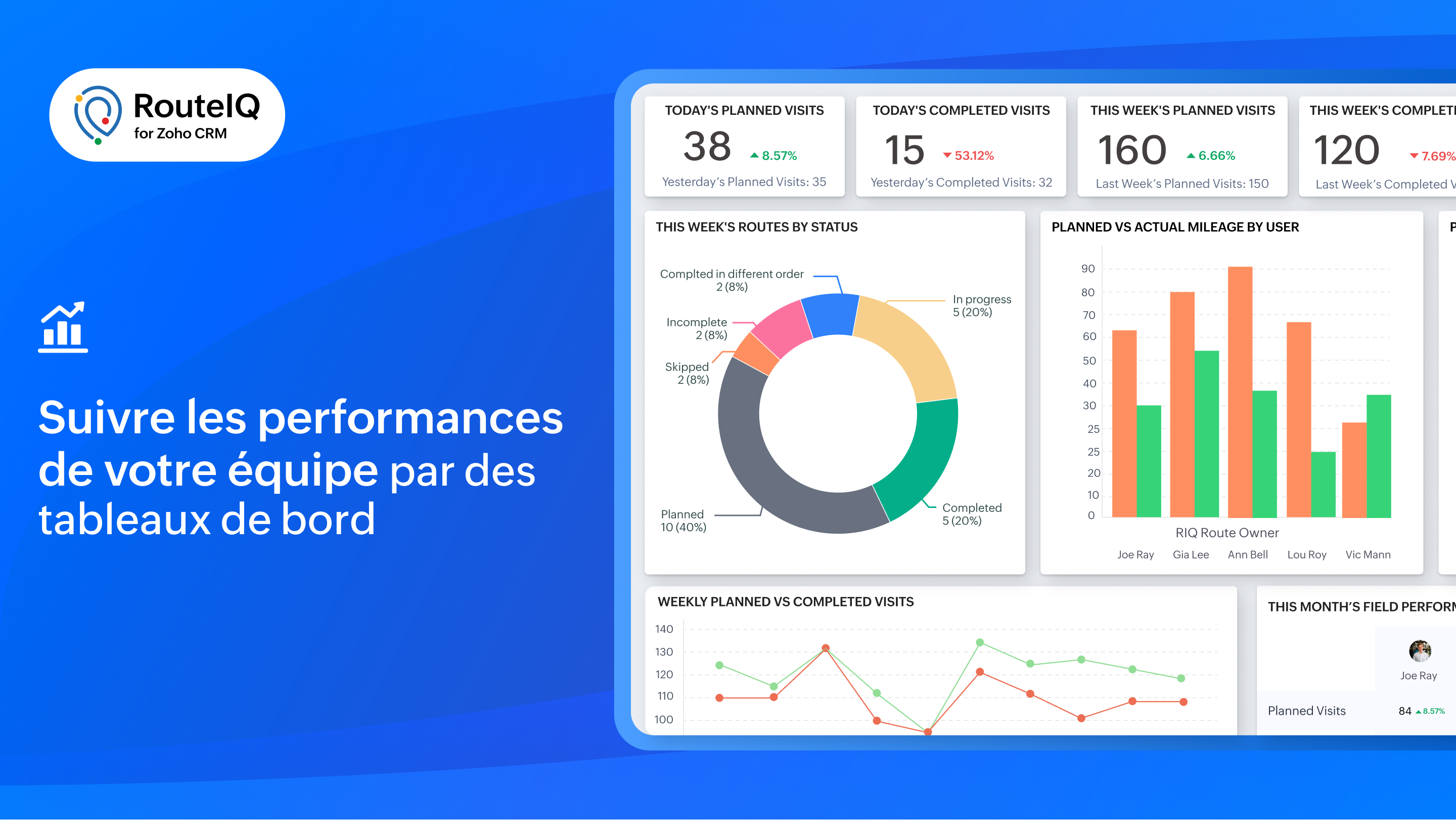
Rapports et tableaux de bord
Profitez d'une visibilité sur les performances de votre équipe grâce à des indicateurs tels que le statut des parcours, les visites achevées, la distance parcourue, la durée, les déviations et bien plus encore.
RouteIQ en déplacement
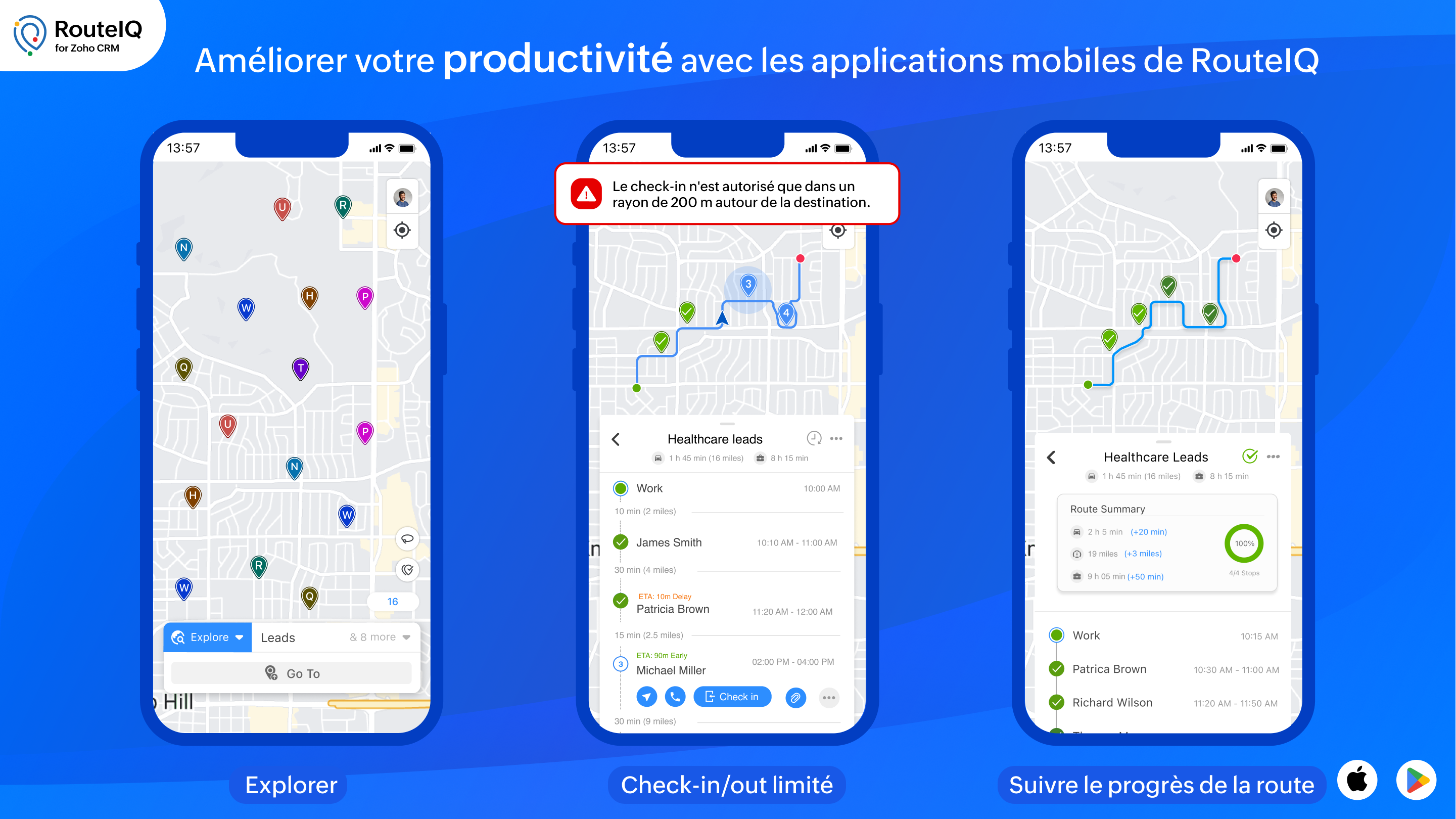
Il est essentiel d'avoir une solution mobile de cartographie pour augmenter la productivité de votre équipe. Voici quelques unes des fonctionnalités particulières de RouteIQ sur mobile, disponibles sur iOS et Android :
- Navigation : parcourez les arrêts avec vos applications de navigation préférées telles que Google Maps, Waze ou Apple Maps.
- Check-in, Check-out, et preuve de livraison : enregistrez les informations d'arrivée et de départ de vos arrêts (heures d'arrivée et de départ, dates, déviations) et saisissez la preuve de livraison.
- Check-in/out limité : autorisez vos agents à s'enregistrer uniquement s'ils se trouvent sur le lieu du rendez-vous.
- Check-in/out automatisé : RouteIQ vous notifie ou enregistre automatiquement votre arrivée et votre départ lorsque vous arrivez ou quittez le lieu d'un client potentiel.
Intégrer RouteIQ pour votre Zoho CRM
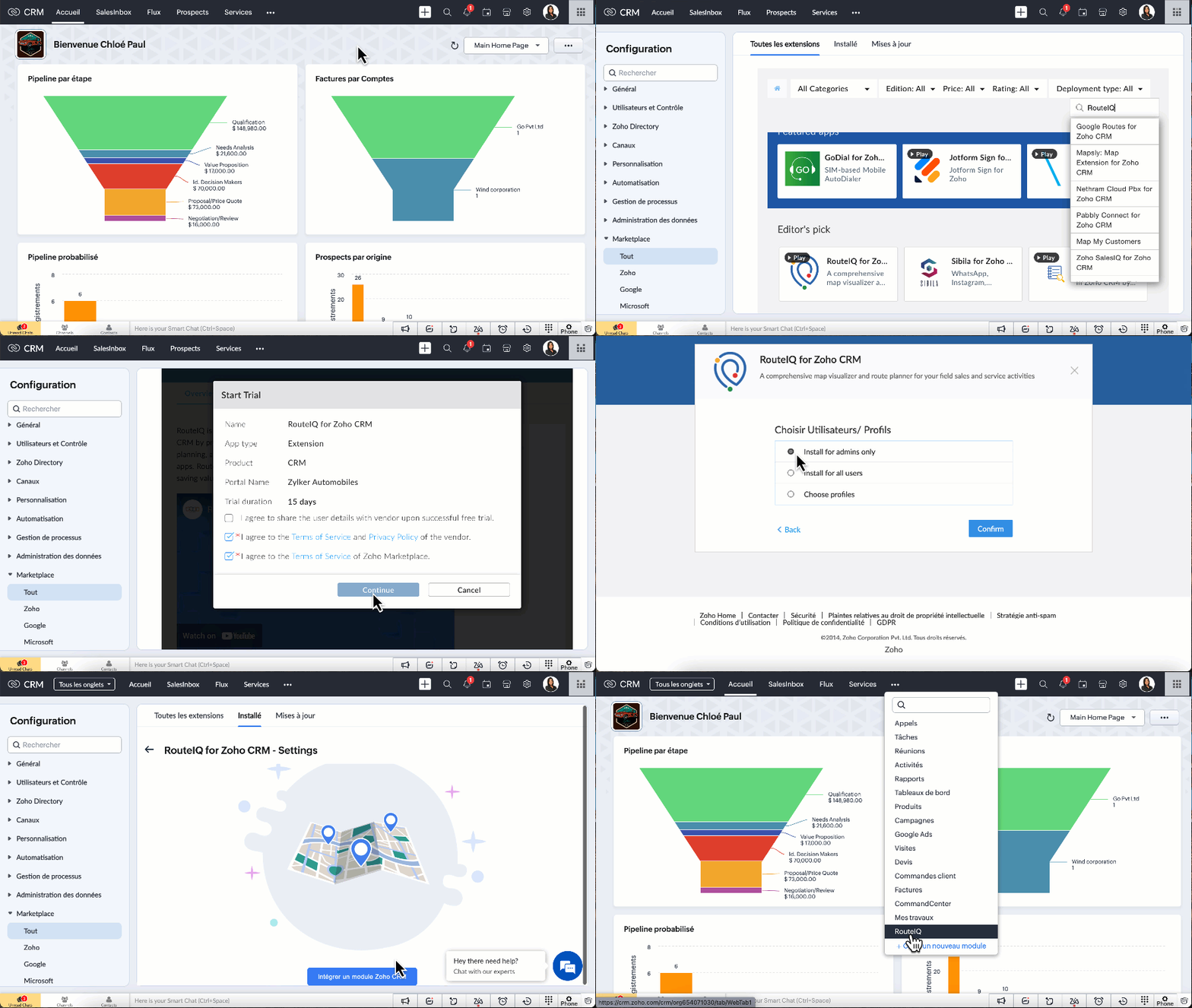
- Vous devez être un utilisateur payant de Zoho CRM pour installer l'extension RouteIQ pour Zoho CRM.
- Paramètres >> Marketplace >> Tout >> chercher "RouteIQ for CRM"
- Suivez les étapes affichées et profitez de la période d'essai de 15 jours.
N'hésitez pas à poser vos questions dans la section des commentaires ci-dessous.
L'équipe Zoho France
Access your files securely from anywhere
Centralize Knowledge. Transform Learning.
All-in-one knowledge management and training platform for your employees and customers.
New to Zoho Recruit?

Zoho Developer Community
New to Zoho LandingPage?
Zoho LandingPage Resources
New to Zoho Survey?
New to Zoho CRM Plus?
Deliver unforgettable customer experiences
New to Zoho CRM Plus?
Deliver unforgettable customer experiences
New to Zoho Marketing Plus?
Everything you need to run your marketing
New to Zoho Marketing Plus?
Everything you need to run your marketing
New to Bigin?





Topic Participants
Kinjal Lodaya
Sticky Posts
CRM - Astuce #5 : Effectuer des actions en masses
Bonjour à tous, Au programme du jour : éviter les répétitions grâce à la fonction "en masse". Gagnez du temps sur ces actions simples pour vous concentrez sur votre entreprise. Allez dans le module concerné et cliquer sur les : (...) Suppression enZoho CRM - Il y a du nouveau chez les modèles d'e-mails
Bonjour à tous, Nous sommes ravis d'annoncer que les modèles d'email dans Zoho CRM sont désormais adaptés au design pour tous les ordinateurs et mobiles. Le responsive design désigne une méthode selon laquelle les pages sont conçues pour s'afficherNouveautés Zoho CRM : la page d'accueil et le tableau de bord actualisés !
Bonjour à tous, Nous avons apporté quelques améliorations à la page d'accueil des utilisateurs et à l'onglet Tableau de bord, en voici un aperçu. Des composants supplémentaires dans la page d'accueil pour les nouveaux inscrits : Dans l'onglet Accueil,CRM Blueprint #5: Glossaire
Bonjour à tous, Voici le dernier volet de notre série sur les Blueprints : un glossaire pour comprendre tous les termes nécessaire à l'automatisation de votre process. État : fait référence à chaque étape de votre processus. Par exemple : qualification,CRM : Ajoutez de la couleur à vos balises CRM
Bonjour à tous, Les tags sont des identifiants uniques qui peuvent être associés à différents enregistrements ce qui permet de rechercher, trier, catégoriser, filtrer et segmenter efficacement les enregistrements. Cette nouvelle amélioration a pour but
New to Zoho TeamInbox?
Zoho TeamInbox Resources
Zoho CRM Plus Resources
Zoho Books Resources
Zoho Subscriptions Resources
Zoho Projects Resources
Zoho Sprints Resources
Qntrl Resources
Zoho Creator Resources
Zoho CRM Resources
Design. Discuss. Deliver.
Zoho Show Resources

Get Started. Write Away!
Writer is a powerful online word processor, designed for collaborative work.
Zoho CRM コンテンツ
-
オンラインヘルプ
-
Webセミナー
-
機能活用動画
-
よくある質問
-
Ebook
-
-
Zoho Campaigns
- Zoho サービスのWebセミナー
その他のサービス コンテンツ
Nederlandse Hulpbronnen

ご検討中の方
Recent Topics
How do I sync multiple Google calendars?
I'm brand new to Zoho and I figured out how to sync my business Google calendar but I would also like to sync my personal Google calendar. How can I do this so that, at the very least, when I have personal engagements like doctor's appointments, I canCannot get code to work with v2.mergeAndStore!
Please can someone help me pass subform items into a repeating mail merge table row using v2.mergeAndStore? I have a mail merge template created in Writer and stored in Workdrive. This template is referenced by a custom CRM function which merges all ofZoho Analytics Dashboard - How to hide the user filter
I am using the same dashboard template across different external clients and applying a user filter to the data by site URL. How can I hide the user filter in View Mode so the external client won't see the list of other clients in the drop-down menu?Ability to Disable System Banner Messages in Chat Flow Control
Dear Zoho SalesIQ Team, Greetings, We would like to request an enhancement related to the system banner messages in Zoho SalesIQ chat flow control. Current Behavior: SalesIQ allows configuring various automatic banner/system messages such as: WaitingHow do you do ticket add ons in Backstage?
Hi Everyone, If you wanted to have general admin tickets and allow for add ons, like camping, or car or Carbon offset. What would you do? Peace RobinIdle Chat Reminders for Agent-Handled Conversations
Dear Zoho SalesIQ Team, Greetings, We would like to request an enhancement to the Idle Chat Handling functionality in Zoho SalesIQ—specifically for chats that are handled by human agents after a bot-to-agent transfer. Current Behavior: In Zobot settings,Layout Adjustment.
Hello Latha, Hope you are doing well. I wanted to check with you about adjusting the layout columns in the Service Report from the backend, as currently there is no capability for us to customize the layout from our end. Below is the output that I amSnapchat
Are there any plans to add Snapchat to Zoho Social or is there any API that we can use to integrate into Zoho.Admin asked me for Backend Details when I wanted to verify my ZeptoMail Account
Please provide the backend details where you will be adding the SMTP/API information of ZeptoMail Who knows what this means?Zoho Sign "An unexpected error occured" when clients trying to sign documents
We are unable to have clients sign our documents. When attempting to complete the process an error appears saying "an unexpected error occured" and in the document history just shows "signing failure." We are at a complete standstill with no response¡Vuelven los Workshops Certificados de Zoho a España!
¡Hola usuarios de Español Zoho Community! Hace ya unos días que hemos dado la bienvenida al 2026, y promete ser un año de lo más emocionante. Y es que nos gustaría haceros nuestro particular regalo de Reyes, aunque lleguemos un poco tarde. 🎁 ¡Nos gustaríaCancel Subscription
Hi , Im want to cancel my account but without success please help me to do itDeprecation Notice: OpenAI Assistants API will be shut down on August 26, 2026
I recieved this email from openAI what does it means for us that are using the integration and what should we do? Earlier this year, we shared our plan to deprecate the Assistants API once the Responses API reached feature parity. With the launch of Conversations,How to list services on quote instead of products
I need to create a customer facing estimate that displays our services. The default quote layout only allows products to be listed. Is there a way to correct this?Making an email campaign into a Template
I used a Zoho Campaign Template to create an email. Now I want to use this email and make it a new template, but this seems to be not possible. Am I missing something?Syncing calendar with Google Calendar doesn't work when events are sent to auto repeat
Hi... The ZOHO CRM -- GOOGLE CALENDAR sync is broken. If I create a single event on either side, sync works, but if I create an event with auto repeat on either side it doesn't work. Furthermore, events created before the sync don't show up in the calendar.Invoice status on write-off is "Paid" - how do I change this to "Written off"
HI guys, I want to write off a couple of outstanding invoices, but when I do this, the status of the invoices shows as "Paid". Clearly this is not the case and I need to be able to see that they are written off in the customer's history. Is there a wayZoho Books - France
L’équipe de Zoho France reçoit régulièrement des questions sur la conformité de ses applications de finances (Zoho Books/ Zoho Invoice) pour le marché français. Voici quelques points pour clarifier la question : Zoho Books est un logiciel de comptabilitéCRM gets location smart with the all new Map View: visualize records, locate records within any radius, and more
Hello all, We've introduced a new way to work with location data in Zoho CRM: the Map View. Instead of scrolling through endless lists, your records now appear as pins on a map. Built on top of the all-new address field and powered by Mappls (MapMyIndia),Creating meetings from an email
Hi. Similar to Outlook, it would be helpful if a meeting can be scheduled from an email so that the attendees need not be manually entered every time it's created.Please, make writer into a content creation tool
I'm tired of relying on Google Docs. I'm actually considering moving to ClickUp, but if Writer were a good content creation tool instead of just a word processor, I would finally be able to move all my development within the Zoho ecosystem, rather thanZohoSalesIQ.Chat cannot send messages
Chat cannot send messages. Our app implements the customer service chat window functionality by integrating the Mobilisten SDK. Recently, we encountered an issue: after successful SDK initialization and visitor registration, when the `startWithQuestion`Missed chats on WhatsApp closing after one minute
Hi, we have added WhatsApp as a channel. However, if a chat is not picked up within 2mins, the chat is marked as missed and is closed within a minute. Why are they not staying in our "missed" queue for 24 hours as per our WhatsApp preference settings?Feature Request: Add Tax ID Display on Event Tickets
Hello Backstage Team, I’ve had several clients bring up an issue regarding tax compliance when creating events. For tax purposes, they are required to show their Tax ID on the event tickets. Currently, this isn’t an option, so they have to manually generateRelease Notes | January 2026
We have rolled out a set of powerful new enhancements across Zoho Vertical Studio that bring several long-awaited capabilities to your applications. These updates focus on deeper customization, smarter automation, better reporting, and improved usabilityEmail Alias: To keep emails flowing without disruption
Email Alias acts like a nickname for a user’s primary email address, allowing multiple email addresses to deliver messages into the same mailbox. Consider the scenario where an employee manages multiple responsibilities, such as responding to sales inquiries,Zoho Sites - General Feedback
Hi Everyone-- Quick question for discussion: is it me or is working with Zoho Sites like entering the Twilight Zone? I've built many sites over the years, but this platform seems impossible. I've spent an entire day and a half trying to get a simple one-colorArchive Option in Conversation View
Hello, I have a suggestion\request to add an "Archive Thread" button in conversation view of Zoho Mail. The best suggestion I have is to put an "Archive Thread" button next to the "Label Entire Thread" button in conversation view. Most users don't justCollapsing and expanding of lists and paragraphs
hello Would you ever implement Collapsing and expanding of lists and paragraphs in zoho writer ? Best regardsAutomatic Refresh on Page?
Hi everyone, We use a page as a dashboard which shows data for the laboratory and tasks pending etc. Is there a way to set the page to automatically refresh on a X time? Many thanks TOGInventory "Bulk Actions" button - add more fields to "Bulk Update > Select a field"
Can we not get a lot more actions that are commonly used by customers into the "More Actions" button on the Inventory list? More fields listed in the Bulk Update > Select A Field? Possible Bulk update Fields Preferred Supplier ( to quickly move itemsBulk upload image option in Zoho Commerce
I dont know if I am not looking into it properly but is there no option to bulk upload images along with the products? Like after you upload the products, I will have to upload images one by one again? Can someone help me out here? And what should I enterFunction #11: Apply unused credits automatically to invoices
Today, we bring you a custom function that automatically applies unused credits from excess payments, credit notes, and retainer payments to an invoice when it is created. Prerequisites: Create a Connection named "zbooks" to successfully execute the function.Tip #60- Exploring Technician Console: Screen Resolution- 'Insider Insights'
Hello Zoho Assist Community! Have you ever started a remote session and felt the screen quality wasn’t sharp enough for detailed work? A new user recently explored Zoho Assist after installing the trial version and running a few initial tests. While theRight Moment, Right Message, Right Operator: Never Miss a High-Intent Lead
Ever been on a website or app, thinking “Should I buy this or not?” and suddenly a friendly message “Hi! How can I help you?” pops up at the perfect moment? That’s not luck. That’s timing done right. Engaging right visitors at the right moment, with theCRM x WorkDrive: We're rolling out the WorkDrive-powered file storage experience for existing users
Release plan: Gradual rollout to customers without file storage add-ons, in this order: 1. Standalone CRM 2. CRM Plus and Zoho One DCs: All | Editions: All Available now for: - Standalone CRM accounts in Free and Standard editions without file storageZoho CRM Workflow Automation: Activate & Deactivate Workflows Using API
Zoho has now enabled: ✅ Activate / Deactivate workflows using API ✅ Schedule workflow activation & deactivation This is extremely useful for real-world automation use cases 💡 🧩 My Use Case I created a scheduled automation that: ☀️ Activates workflows{Action Required} Re-authenticate your Google Accounts to Continue Data Sync
Hello Users! To align with Google’s latest updates on how apps access files in Google Drive, we’ve enhanced our integration to comply with the updated security and privacy standards, ensuring safer and more reliable access to your data. With this update,Function #53: Transaction Level Profitability for Invoices
Hello everyone, and welcome back to our series! We have previously provided custom functions for calculating the profitability of a quote and a sales order. There may be instances where the invoice may differ from its corresponding quote or sales order.Project-Based Inventory Consumption and Proforma Invoice in Zoho ERP
While working with customers across different industries, we have identified a few functional questions and gaps that commonly arise—especially for project-based and service-oriented businesses. Many organizations, such as those in shipping, construction,Next Page