Unlock seamless data-capturing with QR codes
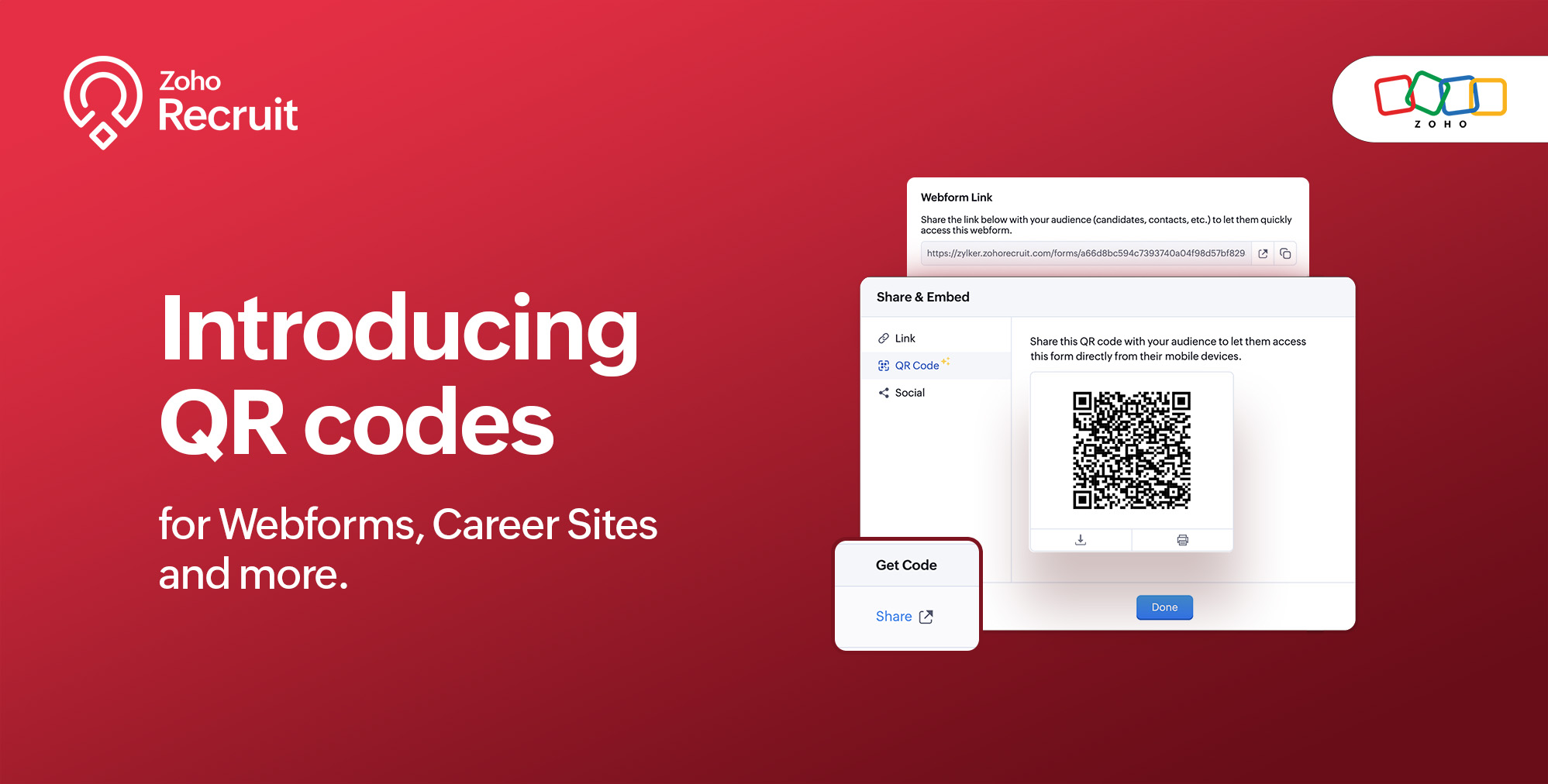
We're thrilled to share a groundbreaking enhancement that will reshape the way you connect with candidates. In our continuous efforts to enhance your recruiting experience, we proudly present the QR Code feature for Webforms, Career Sites and more. This exciting addition aims to simplify and amplify the way you engage with potential hires, promising a more efficient and seamless process.
Benefits
Unleash the full spectrum of advantages that QR Codes bring to your recruitment toolkit.
Effortless Sharing
Simplify the distribution of application forms and job listings by sharing QR codes effortlessly. Whether you're networking at an event, collaborating with partners, or reaching out through various channels, the QR codes make the process seamless. Recruiters can now disseminate vital information with just a scan, facilitating quicker connections with potential candidates.
Enhanced Candidate Experience
Elevate the candidate journey by providing swift and hassle-free access to application forms. The convenience of scanning a QR code enables candidates to engage with your opportunities instantly, reducing friction in the application process. This enhancement aims to leave a positive and lasting impression on candidates, reflecting your commitment to a user-centric recruitment experience.
Time-saving Recruitment
Say goodbye to manual data entry woes. The QR Code feature significantly reduces the time and effort invested in data collection. Candidates can efficiently fill out forms, and recruiters can focus on analyzing and selecting the best-fit talent. This time-saving aspect not only boosts overall productivity but also allows recruiters to invest more energy in strategic aspects of the recruitment process.
Streamlined Data Collection
Embrace a new era of streamlined data collection. With QR codes seamlessly linking candidates to your forms, you eliminate the need for manual information input. This not only reduces the risk of errors but also ensures that your database is populated with accurate and relevant candidate information. Streamlining data collection is a pivotal step towards creating a more efficient and error-free recruitment process.
Use Cases
Explore the various ways in which QR Codes can be seamlessly integrated into your recruitment strategy, catering to diverse scenarios and enhancing your overall outreach.
Event Recruiting
Picture a bustling career fair or industry conference where capturing candidates' attention is crucial. Utilizing QR codes to provide instant access to your Webforms and Career Sites, turns casual interactions with candidates into potential job applications. This empowers recruiters to make a lasting impression at events, fostering a bridge between in-person engagement and online application processes.
Printed Materials
Enrich your printed marketing materials, such as brochures, posters, or promotional handouts, with QR codes. Instead of directing candidates to lengthy URLs, a quick scan seamlessly guides them to relevant application forms or job listings. This not only simplifies the candidate's journey but also transforms your print materials into interactive gateways, blending the physical and digital realms for a more engaging experience.
Onboarding Efficiency
Beyond the recruitment phase, leverage QR codes to streamline the onboarding process for new hires. Include QR codes in onboarding materials, facilitating quick access to essential forms, training materials, and relevant documentation. This enhances the efficiency of the onboarding journey, ensuring a smooth transition for new employees and reinforcing a positive impression from the start.
Cross-Platform Consistency
Achieve cross-platform consistency by incorporating QR codes across various channels. Whether engaging candidates at events, through printed materials, or in the digital landscape, the QR Code feature ensures a unified application experience. This consistency not only reinforces your brand identity but also simplifies the candidate journey, making it seamless and accessible, regardless of the engagement platform.
How to get started?
Zoho Recruit automatically generates QR codes for your Webforms and Career Sites, which you can directly print or download with a click of a button. Given below are step-by-step instructions on how to find the generated QR codes.
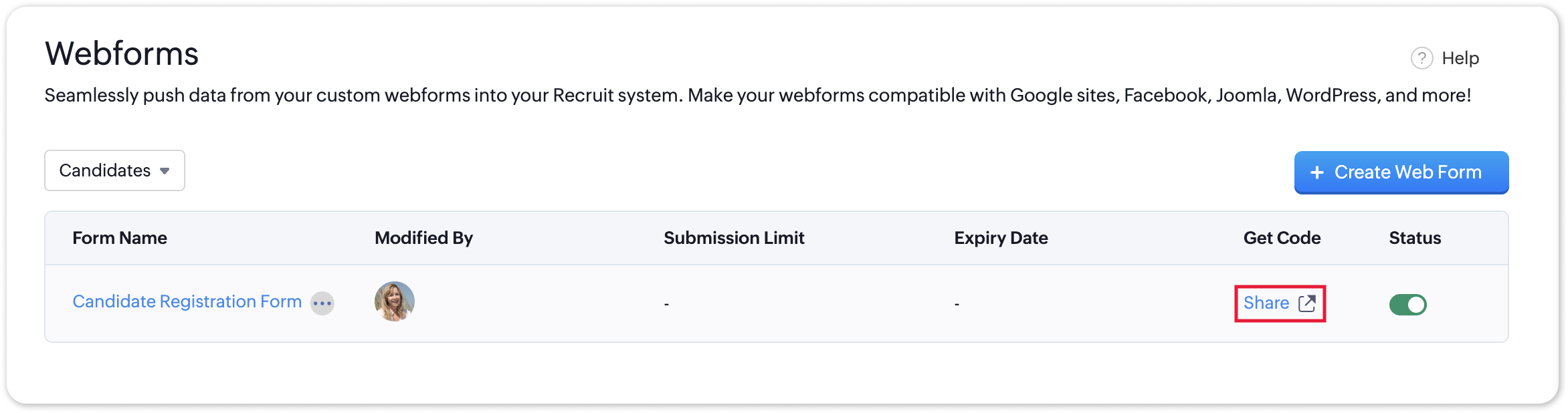
To access the QR code of a webform;
- Navigate to Setup > Career Website > Webforms and click the Share button for the webform of your choosing.
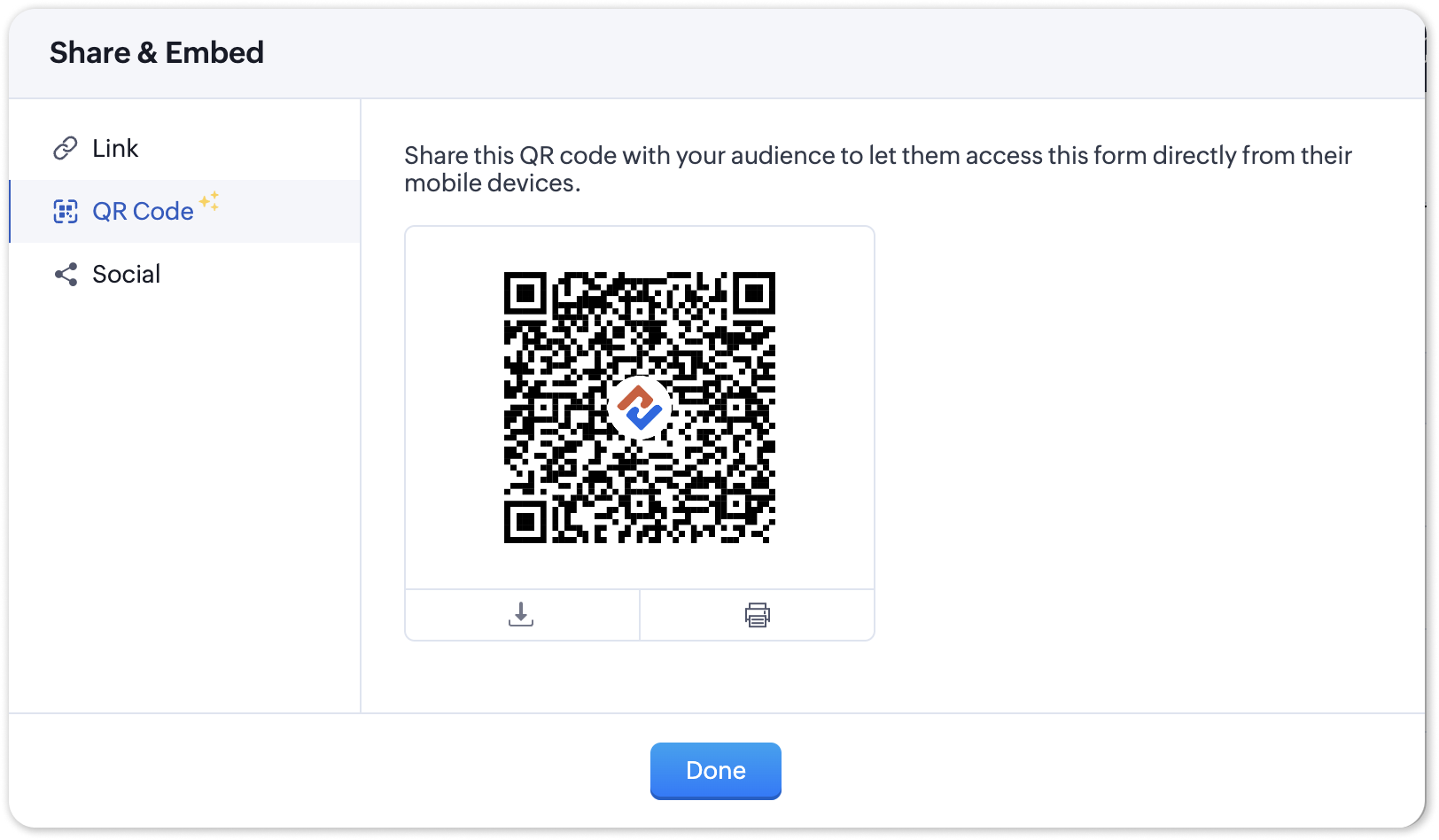
- In the Share & Embed pop-up, select the QR section.
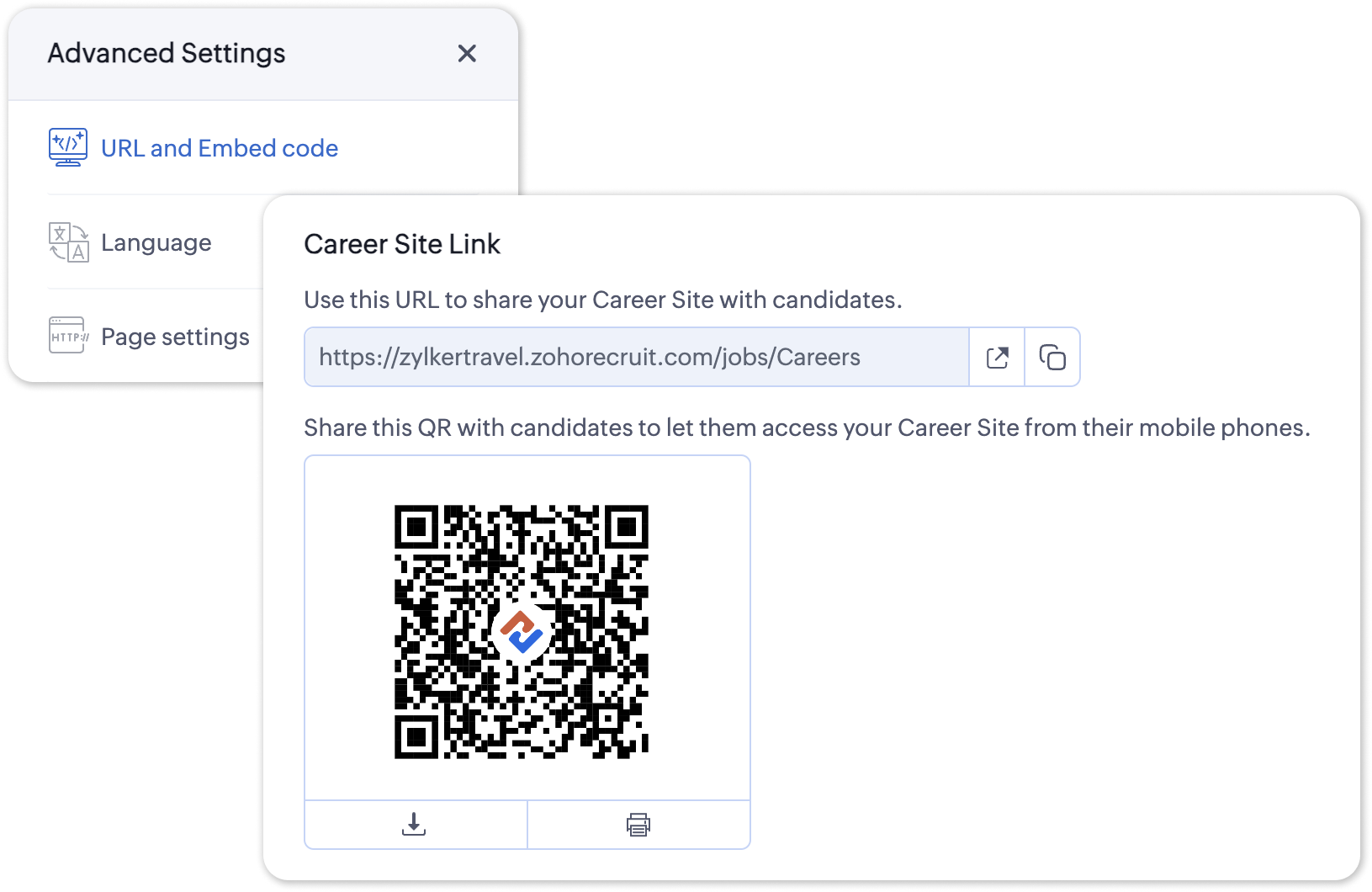
To access the QR code for your Career Site;
- Navigate to Setup > Career Website > Career Site and Customize a career site of your choosing.
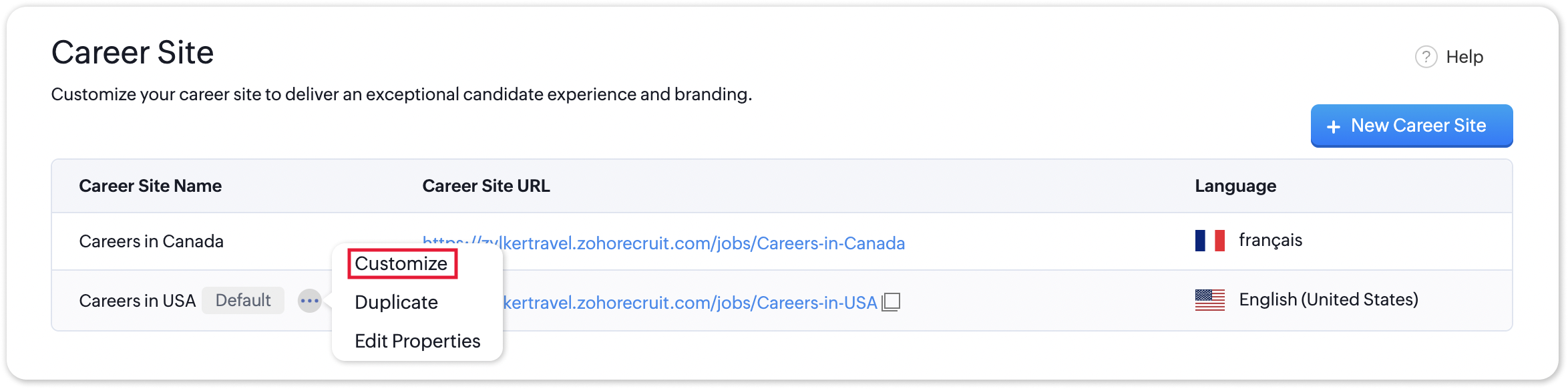
- Under the Advanced Settings section, select URL and Embed Code. The QR code for the selected career site will be displayed here.
Additional Details
Zoho Recruit generates QR codes for every individual job listing added to your Career Site. Follow the steps given below to access the generated QR code for a published job opening.
To access the QR code for a specific Career Site job listing;
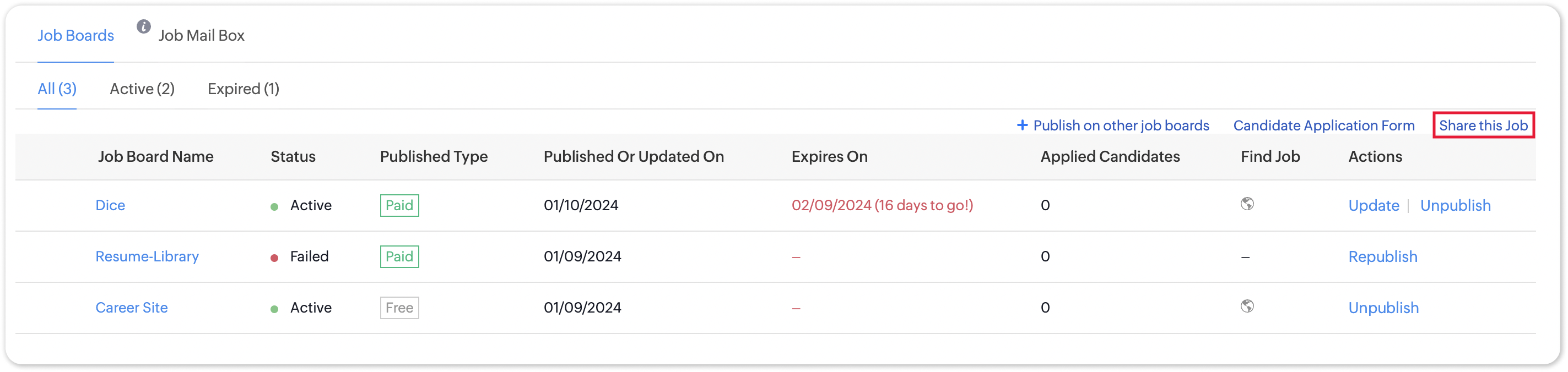
- Navigate to the published job opening and click Sourcing Summary from the Quick Access panel on the left. In the sourcing summary section, click Share this Job.
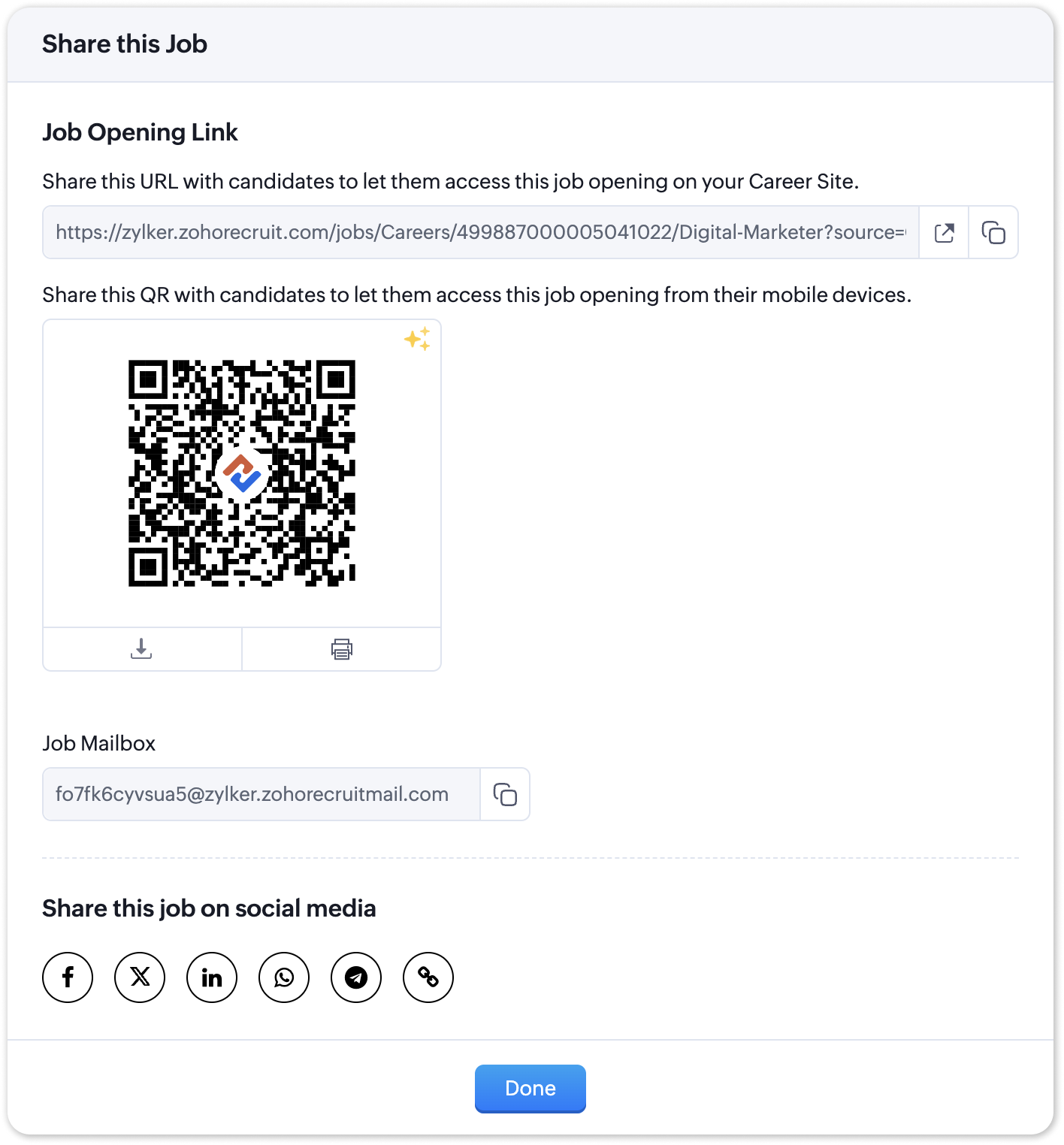
- In the pop-up that is displayed, you will be able to access the QR code for the job's Career Site listing and other key information.

Note:
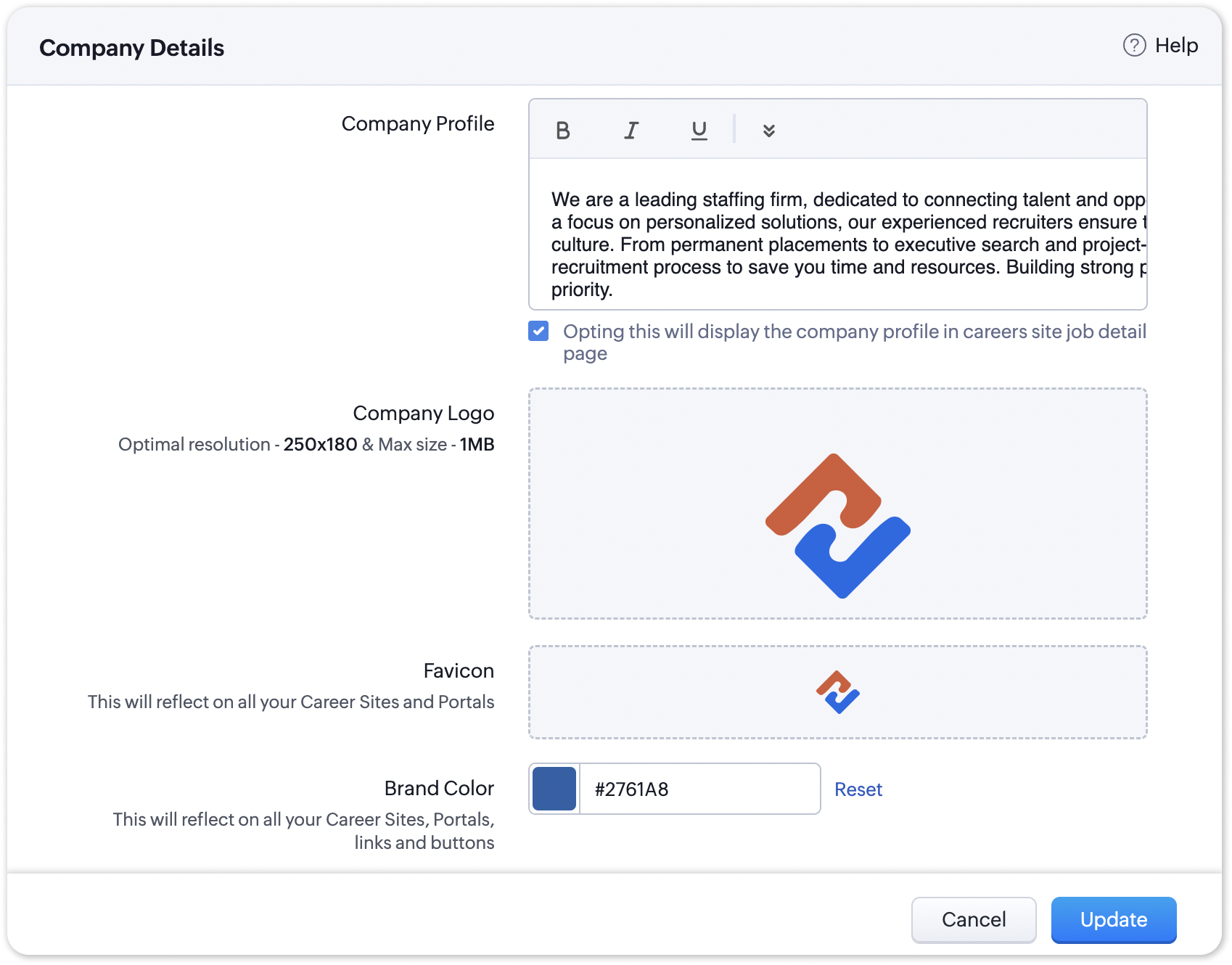
The favicon you upload during the Company Profile Verification stage will be added to your generated QR codes.
Join us in transforming recruitment into a streamlined, dynamic experience—where QR codes open doors, candidates find their path, and your team discovers a new era of efficiency.
Questions? Suggestions? Leave a comment below or reach out to our customer support team at support@zohorecruit.com.
Regards,
Team Zoho Recruit
Team Zoho Recruit
Access your files securely from anywhere
Centralize Knowledge. Transform Learning.
All-in-one knowledge management and training platform for your employees and customers.
New to Zoho Recruit?

Zoho Developer Community
New to Zoho LandingPage?
Zoho LandingPage Resources
New to Zoho Survey?
New to Zoho CRM Plus?
Deliver unforgettable customer experiences
New to Zoho CRM Plus?
Deliver unforgettable customer experiences
New to Zoho Marketing Plus?
Everything you need to run your marketing
New to Zoho Marketing Plus?
Everything you need to run your marketing
New to Bigin?





Topic Participants
Pradyumn K
Sticky Posts
Zoho Recruit Community Meetup - London 🇬🇧
Hello Recruiters! We’re excited to announce that the Zoho Recruit team is coming to the UK for an in-person Zoho User Group (ZUG) Meetup in London! This is your chance to connect with fellow Zoho users, learn from experts, and walk away with actionableAn update to improve email delivery | Email Authentication & Relay
Update Rollout Latest Update: Enterprise users (8th July, 2025) This update is now live for Enterprise plan users in all regions. This includes People Plus, but not Zoho One, which will be covered in an upcoming update. Professional users (31st May 2025)Zoho Recruit User Group Meet-up | INDIA 2025 (Venue Finalised)
Hello Zoho Recruit users from India, We’re pleased and excited to announce our 2025 edition of Zoho user group meet-up in India in five cities! In this meet-up, our team of experts will help you understand the intricate nuances to use Zoho Recruit better,Zoho Recruit is coming to the UK | Zoho Community Learning Series
Customers from the United Kingdom, Exciting news: We will be in London for the Zoho Recruit user meet up. Our team will help you better understand the intricate nuances of Zoho Recruit to help you hire faster, inform about new and upcoming features, andAsk the experts - A live Q & A discussion on Zoho Recruit
We are delighted to come back with another edition of Ask the Experts community series. This edition, we'll be focusing on everything about Zoho Recruit. The topics will focus on the features that are used/asked by the majority of users and also based
New to Zoho TeamInbox?
Zoho TeamInbox Resources
Zoho CRM Plus Resources
Zoho Books Resources
Zoho Subscriptions Resources
Zoho Projects Resources
Zoho Sprints Resources
Qntrl Resources
Zoho Creator Resources
Zoho CRM Resources
Design. Discuss. Deliver.
Zoho Show Resources

Get Started. Write Away!
Writer is a powerful online word processor, designed for collaborative work.
Zoho CRM コンテンツ
-
オンラインヘルプ
-
Webセミナー
-
機能活用動画
-
よくある質問
-
Ebook
-
-
Zoho Campaigns
- Zoho サービスのWebセミナー
その他のサービス コンテンツ
Nederlandse Hulpbronnen

ご検討中の方
Recent Topics
How to calculate separate totals for Product Line Items filtered by category in Quotes?
Hello! I'm working with Quotes in Zoho CRM and need help calculating conditional totals for line items. Current setup: I have two tables in my Quote template (Zoho Writer), both displaying Quoted Line Items Table 1 (top): Shows all products where ProductZoho Desk API Documentation missing a required field
We are trying to create a section using this information. Even after preparing everything based on that page, we still get an error. The error we get is this: {"errorCode":"INVALID_DATA","message":"The data is invalid due to validation restrictions","errors":[{"fieldName":"/translations","errorType":"missing","errorMessage":""}]}Fetch Subform values through a lookup of a lookup
Hi, I'm having an issue fetching the values of a subform through a lookup field through another lookup field. The code works perfectly to show me the subform row ID, but the second I try to get any readable data, it says "Error occurred. Please contactTurn Decision Box to a button
Dear all, I need your help on CSS to turn a Decision Box to a Button. I have a Decision Box like: Turn on/off to refresh the information. (on User Input, either True or False, will refresh the information) Now I want to simulate to treat it like a RefreshEmails not being received from a particular domain
Cannot receive any emails sent from atco.com Domain is in the spam whitelist so should be no reason for it not to be coming through. Have filed a ticket and besides a generic response of we are looking at it - it seems there is no actual support workersStock Count
The stock count is a nice new feature, but we cannot figure out how to: 1. Use it without assigning to a person, we have a team or one of multiple do stock counts as do most any company. 2. Add any extra fields to what the "counter" sees. The most importantSend Whatsapp message from Whatsapp template with custom variables
Hi, I'm trying to do some basic integration for sending WhatsApp messages from Zoho CRM using Zoho Desk whatsapp templates. When creating new whatsapp template in Zoho Desk we can choose ticket related fields as variables but it's not clear how to useOutgoing blocked: Unusual activity detected.
I just made payment for my Zohomail Today and have been debited so i will like to be Unblocked because this is what it says (Outgoing blocked: Unusual activity detected) Thank you i await your swift responsesIntegrating with My Own Application and ZOHO CRM Simultaneously
I have my own WhatsApp bot that uses my WhatsApp business account. I want to use the same phone number to integrate with ZOHO as well. What is the recommended way to do that? Should I integrate my application with ZOHO, forwarding messages whenever theAccount for Cryptocurrency Holdings in Zoho Books/Custom Currencies?
Hello, I've recently started using Zoho to run my small business and I've really been enjoying all of its features. However, I've been struggling to find a way to account for cryptocurrencies in Zoho Books. My company mines a Cryptocurrency token calledTransferring CRM Attachments to Workdrive
relatedrecords = zoho.crm.getRelatedRecords("Attachments","Conditions",conId); attachid = List(); for each ele in relatedrecords { attachementId = ele.get("id"); attachid.add(attachementId); } for each ele in attachid { counter = 1; downloadFile = invokeurl [ url: "https://www.zohoapis.com/crm/v2/Conditions/" + conId + "/Attachments/" + ele type: GET connection : "work_drive" ]; resp2 = zoho.crm.attachFile("Deals",dealId,downloadFile); resp3 = zoho.workdrive.uploadFile(downloadFile, dealWD, "PlaceHolder"+counter+"",New Customization options in the module builder: Quick Create and Detail view
Hello everyone, We have introduced two new components to the module builder: Quick create and Detail view. The Quick Create Component It is a mini form used to create a record and associate it to the parent record from a lookup field. For example, if you have a Deals lookup in the Contacts module, then you can associate existing deals or create a deal and associate it with the contact. You can customize this Quick Create form by adding standard as well as custom fields. There is no limit to the numberunblock my zoho mail account. outlines@zoho.com
please unblock my zoho mail account, outlines@zoho.comSMTP email sending problem
Hello, I've sent emails before, but you haven't responded. Please respond. My work is being disrupted. I can't send emails via SMTP. Initially, there were no problems, but now I'm constantly receiving 550 bounce errors. I can't use the service I paidMailk got blocked / Inquiry About Email Sending Limits and Upgrade Options
Dear Zoho Support Team, My name is Kamr Elsayed I created this account to use for applying for vocational training in Germany. As part of this process, I send multiple emails to different companies. However, after sending only 8 emails today, I receivedForwarder
Hi, I tried to add a forwarder from which emails are sent to my main zoho account email . However, it asks me for a code that should be received at the forwarder email, which is still not activated to send to my zoho emial account. So how can I get theNo chat option
Chat option is not supported.Direct “Add to Google Calendar” Option in Zoho Meeting
Hello Zoho Meeting Team, Hope you are doing well. We would like to request an enhancement related to the “Add to Calendar” functionality in Zoho Meeting. Currently, when we open Zoho Meeting and view our meetings under My Calendar, there is an Add toDKIM cannot be enabled for the domain as no verified default selector present
Hi Support Team, For Domain DKIM record trying to enable status. but showing error "DKIM cannot be enabled for the domain as no verified default selector present" So, please resolve the issue. Thank you.unable to send message reason 554 5.1.8 Email outgoing blocked
unable to send message reason 554 5.1.8 Email outgoing blockedI can't log in to my account on Thunderbird
I've just had to rebuild my PC (calamitous mess from Microsoft with Win10/Win 11 'upgrade' - they confirmed I had to start with a new build). I have used Zoho mail for years via Mozilla Thunderbird, but now I've had to download the latest version of TBird,Should I Use DMARC?
When I configure Zoho Mail's DMARC settings, it's mandatory to fill in the RUA and RUF (Aggregate notification email address*, Forensic notification email address*) addresses. When we enter an email address in these fields, we receive reports from theIntroducing Profile Summary: Faster Candidate Insights with Zia
We’re excited to launch Profile Summary, a powerful new feature in Zoho Recruit that transforms how you review candidate profiles. What used to take minutes of resume scanning can now be assessed in seconds—thanks to Zia. A Quick Example Say you’re hiringBooks API Receiving an Error that Doesn't Make Sense when Creating Credit Note - trying to use 'ignore_auto_number_generation' argument
Hello, I'm working on a newly created routine and I'm getting an error that doesn't make sense when trying to create a new Credit Note. Here is my POST request. Endpoint: https://www.zohoapis.com/books/v3/creditnotes?organization_id=########## Body: {How to move emails to Shared Mailbox?
Hello, I created a Shred Mailbox instead of using a distribution group. But I cannot move previous emails to certain shared mailbox. Is it possible move some emails from inbox to shared mailbox?Collaboration with free plan user.
Hello. Do both users need to be on Pro plan to collaborate? Or can a Pro user share a note with a free plan user with the ability to edit?Connection to other user
Zoho Cliq handles sharing of Custom OAuth Connections that require individual user logins.Analytics Portal
I have the "standard plan" and want to explore the portal option; I activated the 15-day trial but do not see the pricing for the add-on. How can I get the price under "Upgrade add-ons." Thanks RudyCan I filter a Lookup field to only show related records from another Lookup in Zoho CRM?
In our Leads module, we have two Lookup fields: Recruitment Agency – the agency that the lead came from Recruiter – the individual contact from that agency who sent us the lead Both fields link correctly to their respective records in CRM. However, ourZoho Books API invoice email bouncing with 'relaying-issues' error
I have waited over 30 days for zoho books uk to assist with the following and i have had no replies or tickets erronously closed. The service has been terrible - very unlike zoho! So i am raising this here hoping that a community member can assist: Hello,How do I filter contacts by account parameters?
Need to filter a contact view according to account parameter, eg account type. Without this filter users are overwhelmed with irrelevant contacts. Workaround is to create a custom 'Contact Type' field but this unbearable duplicity as the information alreadyZoho Writer to Zoho Sign Template Misalignment – Request for Community
We are currently facing a critical issue impacting our live business operations due to a misalignment problem between Zoho Writer templates and Zoho Sign output. Issue Summary: We have an automated workflow in Zoho CRM using Deluge scripts that generatesMigration Tool Download
Since apparently you have to ask for the migration tool to download (why?), I need the download for the migration tool for exchange servers. Please forward link, thanks.IF Formula
Hi, I'm having trouble setting up a custom formula in a field. Can you help me with it? The formula should do the following: If the created date is less or equal to 30 days the field should display a string New in pieline or Exisitng pipeline if aboveAutorespond to one specific sender
Is there any way to create a rule or filter that sends an automatic reply to messages from one specific email address? I really need to set up something like a "vacation response" but only for one "received from" address.View comprehensive logs of all actions in Custom Module History
Hello everyone, We are happy to announce our new feature, Detail View in Custom Module History, which enhances visibility, control and accountability over your records. Users can now access a detailed timeline of every action that has been performed onTrack ZohoForm Conversion using Postmessage event
Hi, I’ve been using a third-party lead tracking tool to capture leads from my website along with their source. Earlier, with the HubSpot form, the third-party script was able to detect the postMessage event that iframe forms typically send back to theEmail task creator when task is updated/marked complete
I am looking for a way to notify the creator of a task in zoho todo when - Task is updated Task is closed Comments entered 1 and 2 are critical, and I cannot find a zoho flow to do this. There is no way that as a manager I will know when someone has completedEmail Recall Feature In Zoho Mail Which Should Also Work For Outside Organisation Members
Add a feature to recall or undo sending an email within a configurable short time window (e.g., 30 seconds to 2 minutes) after hitting send, similar to Gmail’s undo send. Currently the sent email can not be recall If the recipient is not from within yourhow to treat a same person as customer and vendor in zoho
hi team, in my company, few persons acting as creditors as well as debtors (which means sometimes we pay them... some times we paid by them). in that case i would like to maintain a same ledger for that person.in zoho books it is treating creditor andNext Page