Unveiling Zoho CRM's New User Interface - The NextGen UI
Hello Everyone,
Last Wednesday, May 14th,2025, we announced the public release of Zoho CRM For Everyone, our most significant update yet. This release brings a modernized CRM experience with a redesigned user interface, new capabilities for cross-functional collaboration, and greater flexibility for users across your organization.
Read our PR announcement, our forum announcement, and the blog post to know more about this release.
To help you get the most out of these updates, we’ll be publishing a series of announcements that walk you through the major enhancements now available to all Zoho CRM users.
We’re kicking off this series by spotlighting one of the most noticeable changes — the new and improved user interface, Zoho CRM's Nextgen UI.
What’s New in the NextGen UI?
- A reorganized menu option
- The sidebar
- Teamspaces
- Additional Module Views
- Interactions Tab
- Enhanced Themes and
- Night Mode
Watch this video to get an idea of how your CRM could look!
Let's dive into each of these features in detail :
Reorganization of menu options from the top band to the left-hand side vertical sidebar.
Previously, Zoho CRM housed the menu bar on the top where most of the navigation took place, as shown below.

Now, We moved the top bar to the left with a vertical sidebar that is expandable as shown below. This not only declutters the top space but also makes it easier to access your modules and features with minimal clicks.

The Sidebar
The new sidebar is now an extremely functional piece of the UI with contextual shortcuts for quick settings, neat folders for better organization of modules, and more. Learn more.
The top portion of the Sidebar houses icons to view and work with Modules, Reports, Dashboards, Requests, Marketplace, and Global Search.

The bottom portion of the sidebar now contains intuitive utility icons such as Quick create record, Mail magnet, Calendar, and more. (originally located on the top right corner of the UI).

Expanding the sidebar opens up quick-controls contextual to what you've chosen to work on. This is collapsible in order to allow you to maximize your right-hand side work area.

Contextual Shortcuts through the sidebar
You have contextual shortcuts to Setup options from here, like creating new modules or folders. While the backend Setup is still intact, these options from the sidebar options offer a quick shortcut.
Create Modules
You can create either org modules or team modules from the sidebar. This option makes it easy for users to quickly create their own modules and
configure processes instead of navigating to the setup menu every time.
Create folders
You can create modules or folders right from this location without having to navigate to the backend Setup. Folders are a great way to organize or group modules in different categories. Say you are part of the Sales teamspace and you have certain sales activities that you need to perform to touch base with customers like creating tasks, scheduling calls or meetings. So you can group Tasks, Meetings, Calls into a "Sales Activities" folder for easy access and a clutter free side bar. Learn more.

You can also directly create layouts, webforms, wizards, canvas pages, etc from the sidebar.

Organized Teamspaces for Focused Work
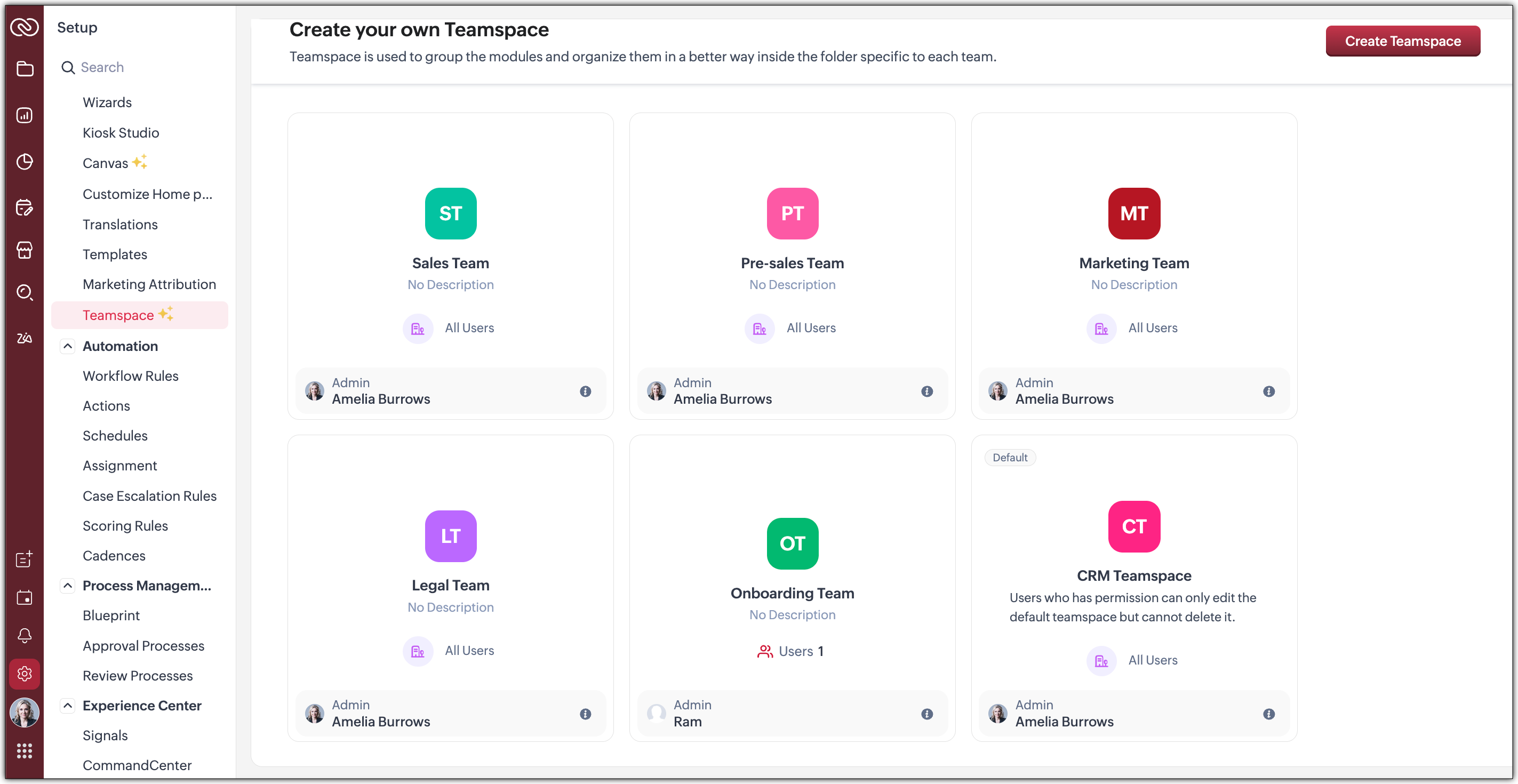
Tab Groups have been transformed into what we now call Teamspaces. If your CRM is used by multiple teams, organizing and managing their work and data can quickly become complex.
We offer a solution by giving each team a dedicated, folder-like space where all their related modules are grouped together. This setup ensures clear separation between teams, making collaboration more focused, and preventing the risk of teams crossing over or accessing modules that are not meant for them.
Hence, Teamspaces are dedicated workspaces for each department or function to organize their work. Whether you're in sales, support, or marketing, Teamspaces help reduce noise and keep your workspace relevant to your role. Learn more.

You have the option to create teamspaces from the bottom of the sidebar or from the Setup menu. The org admin would generally be the one who creates teamspaces, assigns users as teamspace admins and adds users to a teamspace.
Note : Users with the Manage teamspace permission enabled will be able to create and manage teamspaces in an org.
Teamspace Admin
A teamspace admin is generally the head of a department or a team. For example, a Sales Director could be assigned as the Sales Teamspace's Admin. Once a user becomes a teamspace admin, they can add or remove users, allow reports and dashboards to be created for modules within a teamspace.
Note : If a user is a Teamspace admin but does not have the "Manage Teamspace" permission enabled, they can only manage the specific Teamspace they’ve been assigned to as an admin. They won't be able to create new Teamspaces or manage any others.
Features offered as part of this enhanced UI
- Additional Module Views have been added to provide you with more flexibility, better insights, and improve productivity when working with module data. Thee view added are :
--> Chart View : Get a visual representation of your module data with this View
--> Grid View : Convert your module data into a spreadsheet-like interface where you can edit and manage records directly without having to open each record individually.
--> Timeline View : Look at how your module is created by viewing data plotted over a specific period of time.
--> Split View : Split your module data based on picklist fields /users or criteria to segment them for further inferences. - Interaction tab : This feature displays a timeline of a customer's journey and their engagements across different channels within your CRM.
 We will post individual announcements for each of the above features in the upcoming days.
Themes
The new UI introduces a refreshed theming experience with 13 vibrant colour options to personalize your workspace. These themes go beyond just cosmetic changes: the selected theme isn't limited to the sidebar; it flows throughout the product interface.
Once you choose a theme, the colour is consistently applied across key areas of the CRM, including buttons, tabs, menus, and other interactive elements. This cohesive design enhances visual clarity and gives your team a more engaging, unified experience tailored to their preferences.
If you want to match your brand colours or give your CRM tool a refreshed appearance, the new themes bring both customization and character to your work environment.
Dark-Mode
With the new UI, we’re excited to bring Dark Mode to your CRM experience. This feature was designed with both comfort and usability in mind.
Dark Mode offers a visually soothing alternative to the standard light interface, reducing eye strain during long hours of work, especially in low-light environments. It's not just a cosmetic change; it’s about enhancing usability and making your workspace more comfortable.
Once enabled, Dark Mode is applied consistently across the entire product, including the new UI elements like the left sidebar, buttons, forms, and interaction panels. Whether you're viewing records, managing tasks, or collaborating within Teamspaces, the darker interface ensures clarity without compromising on aesthetics or function.
This addition is part of our effort to make Zoho CRM more adaptable to user preferences and modern work styles. You can switch to Dark Mode at any time from your profile settings and choose what works best for you. Learn more.
What can you choose in this implementation?
Day : Prefer a brighter interface? Day Mode offers a clean, crisp, and classic appearance of your CRM, making it not just functional but also visually pleasing.

Night : Enjoy a sleek, modern look with reduced eye strain, especially in low-light environments. Darker UI minimizes glare and helps reduce fatigue, making it easier to work for longer periods.

Auto : Let the system decide! Auto Mode automatically switches between dark and light themes based on your device settings.

Resources
We invite you to explore these exciting updates and see how productivity increases in your CRM journey. Stay tuned for our upcoming announcements where we’ll dive deeper into each feature, helping you make the most of everything the NextGen UI has to offer.
Regards,
Serena Woolridge
Access your files securely from anywhere
Centralize Knowledge. Transform Learning.
All-in-one knowledge management and training platform for your employees and customers.
New to Zoho Recruit?

Zoho Developer Community
New to Zoho LandingPage?
Zoho LandingPage Resources
New to Zoho Survey?
New to Zoho CRM Plus?
Deliver unforgettable customer experiences
New to Zoho CRM Plus?
Deliver unforgettable customer experiences
New to Zoho Marketing Plus?
Everything you need to run your marketing
New to Zoho Marketing Plus?
Everything you need to run your marketing
New to Bigin?





Topic Participants
Serena Woolridge
Andréa Kérébel
Andrew
Ishwarya SG
K'an Thomas
Sticky Posts
Introducing Multiple Sandbox Types and Support for Module's Data Population
Register here for the upcoming Focus Group webinar on Multiple Sandbox | Help documentation to learn more about the new enhancements Hello everyone, Sandbox in CRM is a testing environment for users to create and test new configurations like workflowGood news! Calendar in Zoho CRM gets a face lift
Dear Customers, We are delighted to unveil the revamped calendar UI in Zoho CRM. With a complete visual overhaul aligned with CRM for Everyone, the calendar now offers a more intuitive and flexible scheduling experience. What’s new? Distinguish activitiesVoC in Zoho CRM is now data savvy: Explore response drilldown, summary components and participation in CRM criteria
VoC has all the goods when it comes to customer intelligence—which is why we're constantly enhancing it. We recently added the following: A customer drilldown component that shows you the list of prospects and customers behind a chart's attribute ExpandedWrapping up 2025 on a high note: CRM Release Highlights of the year
Dear Customers, 2025 was an eventful year for us at Zoho CRM. We’ve had releases of all sizes and impact, and we are excited to look back, break it down, and rediscover them with you! Before we rewind—we’d like to take a minute and sincerely thank youPresenting ABM for Zoho CRM: Expand and retain your customers with precision
Picture this scenario: You're a growing SaaS company ready to launch a powerful business suite, and are looking to gain traction and momentum. But as a business with a tight budget, you know acquiring new customers is slow, expensive, and often delivers
New to Zoho TeamInbox?
Zoho TeamInbox Resources
Zoho CRM Plus Resources
Zoho Books Resources
Zoho Subscriptions Resources
Zoho Projects Resources
Zoho Sprints Resources
Qntrl Resources
Zoho Creator Resources
Zoho CRM Resources
Design. Discuss. Deliver.
Zoho Show Resources

Get Started. Write Away!
Writer is a powerful online word processor, designed for collaborative work.
Zoho CRM コンテンツ
-
オンラインヘルプ
-
Webセミナー
-
機能活用動画
-
よくある質問
-
Ebook
-
-
Zoho Campaigns
- Zoho サービスのWebセミナー
その他のサービス コンテンツ
Nederlandse Hulpbronnen

ご検討中の方
Recent Topics
We should have an option to Toggle Off KB Article Links in AI Answer Bot Replies
Hi everyone, I'm creating this topic to share a feature idea that I think would improve the customer experience when using the AI Answer Bot for self-service. The Current Behavior (The Problem) Currently, when the AI Answer Bot generates a summary orBoot Loop After Removing Service from Client via Admin
We have multiple laptops experiencing a boot loop / unable to login after the Zoho Remote service was removed from their machine remotely via the desktop client. The Windows sign-in screen is not available, and users are unable to login. This seems likeRequest Backend Correction — Domains Mapped to Same Help Center (Multi-Brand Setup Failure)
Hello Zoho Desk Support Team, I need assistance correcting a domain-to-brand mapping issue in our Zoho Desk instance (The Blue Ribbon Project). Both of our verified domains currently point to the same Help Center instead of separate brand portals. Currentis there any option to enable the participants interact - can write on the screen, while the screen is shared by the host?
this is most expected features - for teaching children. is there any option to enable the participants interact - can write on the screen, while the screen is shared by the host?How to disable the Login button in Desk Helpcenter
Hey there, I'm testing out whether the help center within Zoho Desk could replace our existing Customer FAQ. I tried to customize the themes for the public help center frontend, but stumbled across the login button in the navigation bar. Is there anyFull Text Customization & Translation in SalesIQ Chat Widget Settings
Dear Zoho SalesIQ Team, Greetings, We would like to request an important enhancement to the chat widget customization options in Zoho SalesIQ. Current Limitation: At the moment, only some of the text shown in the chat widget is editable or translatableBest way to display complex Bookings Consultation Descriptions on Zoho Site?
I am a new user so apologies if this has been asked before. I couldn't find any answers in the forum. We offer 18 complex Consultations to our subscribers. Our current platform lets me put detail on these Consultations thoroughly (200-300 words) duringGmail is ramping up its email sender policy as of November 2025
Hello marketers, As you may be aware, Gmail introduced a guideline for bulk senders starting February 2024. If not, here's a quick refresher straight from Google: After this policy was announced first in 2023 and soft-implemented in February 2024, weModifying iframe data of Zoho booking iframe
Hello, I have integrated a Zoho Bookings embedded iframe into my website. Currently, I am pre-filling the booking form with default values as part of our process flow. However, I want to ensure that if an input field is already populated with a defaultZoho CRM Workflow and Function Backup Options
Hi everyone! I have been able to make several backups of my CRM data and noticed that the Workflows and Functions are not included in these backups. To my knowledge, there is no backup feature for workflows and functions, which is problematic in of itself.Is or will be possible to associate meeting transcription and summary, made by Zia, to meeting/contact/account record in CRM?
Would be useful to keep context and track jobs, better if it will be autoDesk Field Not Showing in Analytics
Hi there, I recently added a field to our Zoho Desk Ticket Information. I went and added the data retrospectively to the tickets. It is also marked as required, so all new tickets cannot be closed off without it being filled in. When I try to run a reportExport data using advanced export options and customizable settings
Hello everyone, The user interface for exporting data has been revamped with updates to make data exports more flexible and efficient for users. These updates not only enhance usability but also bring advanced capabilities to help users extract preciseMoving data from one pipeline to another
Hey all, I've got some complex pipelines to build and I'd like to seperate them into seperate pipelines rather than have one mammoth one. If I create 2 pipelines, is there any easy way to use the output of Pipeline1 to be the input into Pipeline2? OrHow to export/find all deluge code.
Hi, I have a large app wich contains several forms, reports, html views, I need to find thow my application if any contains specific word, I could find it manually by editing app and see on every section(field code, on succes, on load, etc) but I would like to do it faster. Is there a way to at least export it to a file the whole deluge code on my application?Have Some Bugs in Zoho CRM Ask Zia Assistant
Hi Support Team, I have found some bugs in Zoho CRM Ask Zia Feature Please Check below screenshot, insight option is showing twice i think its in early access that's why its have some bugs .COD with Partial payment
Two reasons why we need COD with partial payment option. 1) Since we deal heavy weight products our shipping costs are too high. If shipment is rejected by customer we incur huge loss. 2) Some competitors place fake orders with different names and returnSlicers are now available in Zoho Sheet—filter your data interactively
At Zoho Sheet, we diligently track user requests and feedback. In line with this, based on extensive user requests, we've integrated Slicers to pivot tables and are delighted to announce its release. Slicers are interactive visual filters that have add,Resizing a Record Template Background Inage
Hi everyone, I have an issue which I can't seem to resolve: Basically, I'm designing a record template in certificate form. I've specified A5 landscape. I've set my background image the same dimensions with total pixels at 443,520. Whatever I try, whenIntroducing Data Bars: Graphically represent changes in data within the cells
Conditional formatting has helped millions of spreadsheet users analyze and highlight their data more efficiently. In addition to the classic rules, color scales, and icon sets available in Zoho Sheet, you can now apply Data Bars, a convenient methodDefault Font Size in Desk
How do I set my default font size in Desk? It takes me about 45 minutes to find the place to set it, then, when I sign out of Zoho and log back in, it's back to font 10 again. Seems like this would be simple, but like everything with Zoho, it's buriedTip #19 - Create checkbox tracker in your spreadsheet
Hello Sheet users! We are here with yet another tip to help you get the most out of Zoho Sheet. Spreadsheets can be used to handle a variety of tasks, but ever tried using checkboxes to track the progress of your action items dynamically? Here's a sampleTip #20 - Three things you probably didn't know you can do with picklists
Hello Zoho Sheet users! We’re back with another quick tip to help you make your spreadsheets smarter. Picklists are a great tool to maintain consistency in your spreadsheet. Manually entering data is time-consuming and often leaves typos and irregularPer Level Approval for admins
We need Process admins like Zoho CRM in Zoho Books for per stage approval Currently in books, admins only have the option for Final Approval But for example, in cases like when an employee is on leave, we can't just approval one level we only have optionFeature enhancement: Highlight rows based on a cell value
Hello Sheet users, We're excited to announce a new feature enhacement, shaped directly by your valuable feedback! As you might know, conditional formatting is a great tool for anyone dealing with large data sets. Previously, if you’ve ever wanted to drawUpdating custom fields in Zoho Projects
Hi I am wondering if anyone has experience with custom fields in Zoho Projects. I am struggling to update the field using either deluge or the api endpoint. My code is: //custom_Map = map(); custom_Map = {"UDF_DOUBLE_1":"0.27"}; update_Map = map(); update_Map.put("custom_fields",custom_Map.toList());Markdown for Desk?
Hi, my company wants to use markdown for formatting text in Desk (in all modules there, especially Tickets and Helpcenter). Zoho already offers use of markdown in several products (see https://help.zoho.com/portal/en/kb/backstage/microsite-guide/formatting-with-markdown/articles/formatting-with-markdo)Change Currency symbol
I would like to change the way our currency displays when printed on quotes, invoices and purchase orders. Currently, we have Australian Dollars AUD as our Home Currency. The only two symbol choices available for this currency are "AU $" or "AUD". I wouldCalendar not working
Are we the only ones. On any browser we cannot click on any of our calendar appointments and get them to open. They just make the browser loop. WE have reached out and have been told they are working on it. The office staff are really stuck. The pointWhatsApp Message Template Quick Reply Buttons
Hello, I created my first Message Template to overcome the 24-hr messaging window and it was approved by WhatsApp/Meta. When I go to Meta, I also see that template brought from Zoho Desk, and used it via Zoho Desk IM. However, I notice that when in Meta'sAccount in Quick View Filter
I have a report that I often run against a specific Account. Every time, I have to go into the edit menu and change the Advanced Filter. I would prefer to use the Quick View Filter, but it does not allow me to use the one and only field that makes anySet Display for Numbers/Currency/etc with Client Script/Customization in Canvas List Page
Is it possible to set a display mask for a number/currency field using Client Script or customization? I have custom fields that I would like to keep the decimal places for calculation purposes, but do not need them displayed to the user. So 101.3568136.143.188.51 blocked by spamcop
Zoho mailserver seems to be blocked by spamcop. Cant send mail to my customer. Not sure what to do.🚀 WorkDrive 5.0: Evolving from a file sharing app to an intelligent content management platform: Phase 2
Hello everyone, WorkDrive's primary focus has always been to provide an intelligent and secure content management platform, simplify collaboration, and be the central repository of files for all Zoho apps. In our previous announcement, we unveiled thei keep see there is a connetion issue connecting 3rd party api on zoho when using zia
hi there , i have set up open ai api to zoho zia (copied and pasted to zoho zia) but I keep getting notificaiton "there is a connetion issue connecting 3rd party api on zoho" when using zia on top when click zia and try to type in word thereDeleting Fields in CRM Deletes Views in Analytics
Hey friends! I'm having some issues when we modify some fields within ZohoCRM. There are times where we need to sunset a field and eventually completely remove it. In these instances, it seems like a lot of views are removed in Analytics. This rangesZoho Desk Android and iOS app update: Access multilingual templates on the IM module
Hello everyone! We have introduced multilingual templates on the IM module of the Zoho Desk mobile app allowing you to send IM template messages in translated versions. iOS: Android: Please update the app to the latest version directly from the App Store/Does Zoho offer a full WhatsApp Marketing Platform (like WATI / GallaBox)?
lm exploring WhatsApp marketing and I’d like to understand what options are available within the Zoho ecosystem. Currently, I see: Zoho SalesIQ has a broadcast option, but it seems very limited — for example, it doesn’t support uploading contacts viaCustom buttons
Getting Error "You can only create 10 custom buttons per module" ! I already have more than 10 for 1 module before trying to create another. Is this a new restriction brought about by the all knowing what's best for businesses Zoho guru ? It would beThe Social Wall: October 2025
Hello everyone, As we head toward the end of the year, we’re bringing you a few updates to help give your social media efforts a strong finish. This month, we’re rolling out new enhancements across both the web and mobile app. Post Preview Have you everNext Page