Unveiling Zoho CRM's New User Interface - The NextGen UI
Hello Everyone,
Last Wednesday, May 14th,2025, we announced the public release of Zoho CRM For Everyone, our most significant update yet. This release brings a modernized CRM experience with a redesigned user interface, new capabilities for cross-functional collaboration, and greater flexibility for users across your organization.
Read our PR announcement, our forum announcement, and the blog post to know more about this release.
To help you get the most out of these updates, we’ll be publishing a series of announcements that walk you through the major enhancements now available to all Zoho CRM users.
We’re kicking off this series by spotlighting one of the most noticeable changes — the new and improved user interface, Zoho CRM's Nextgen UI.
What’s New in the NextGen UI?
- A reorganized menu option
- The sidebar
- Teamspaces
- Additional Module Views
- Interactions Tab
- Enhanced Themes and
- Night Mode
Watch this video to get an idea of how your CRM could look!
Let's dive into each of these features in detail :
Reorganization of menu options from the top band to the left-hand side vertical sidebar.
Previously, Zoho CRM housed the menu bar on the top where most of the navigation took place, as shown below.

Now, We moved the top bar to the left with a vertical sidebar that is expandable as shown below. This not only declutters the top space but also makes it easier to access your modules and features with minimal clicks.

The Sidebar
The new sidebar is now an extremely functional piece of the UI with contextual shortcuts for quick settings, neat folders for better organization of modules, and more. Learn more.
The top portion of the Sidebar houses icons to view and work with Modules, Reports, Dashboards, Requests, Marketplace, and Global Search.

The bottom portion of the sidebar now contains intuitive utility icons such as Quick create record, Mail magnet, Calendar, and more. (originally located on the top right corner of the UI).

Expanding the sidebar opens up quick-controls contextual to what you've chosen to work on. This is collapsible in order to allow you to maximize your right-hand side work area.

Contextual Shortcuts through the sidebar
You have contextual shortcuts to Setup options from here, like creating new modules or folders. While the backend Setup is still intact, these options from the sidebar options offer a quick shortcut.
Create Modules
You can create either org modules or team modules from the sidebar. This option makes it easy for users to quickly create their own modules and
configure processes instead of navigating to the setup menu every time.
Create folders
You can create modules or folders right from this location without having to navigate to the backend Setup. Folders are a great way to organize or group modules in different categories. Say you are part of the Sales teamspace and you have certain sales activities that you need to perform to touch base with customers like creating tasks, scheduling calls or meetings. So you can group Tasks, Meetings, Calls into a "Sales Activities" folder for easy access and a clutter free side bar. Learn more.

You can also directly create layouts, webforms, wizards, canvas pages, etc from the sidebar.

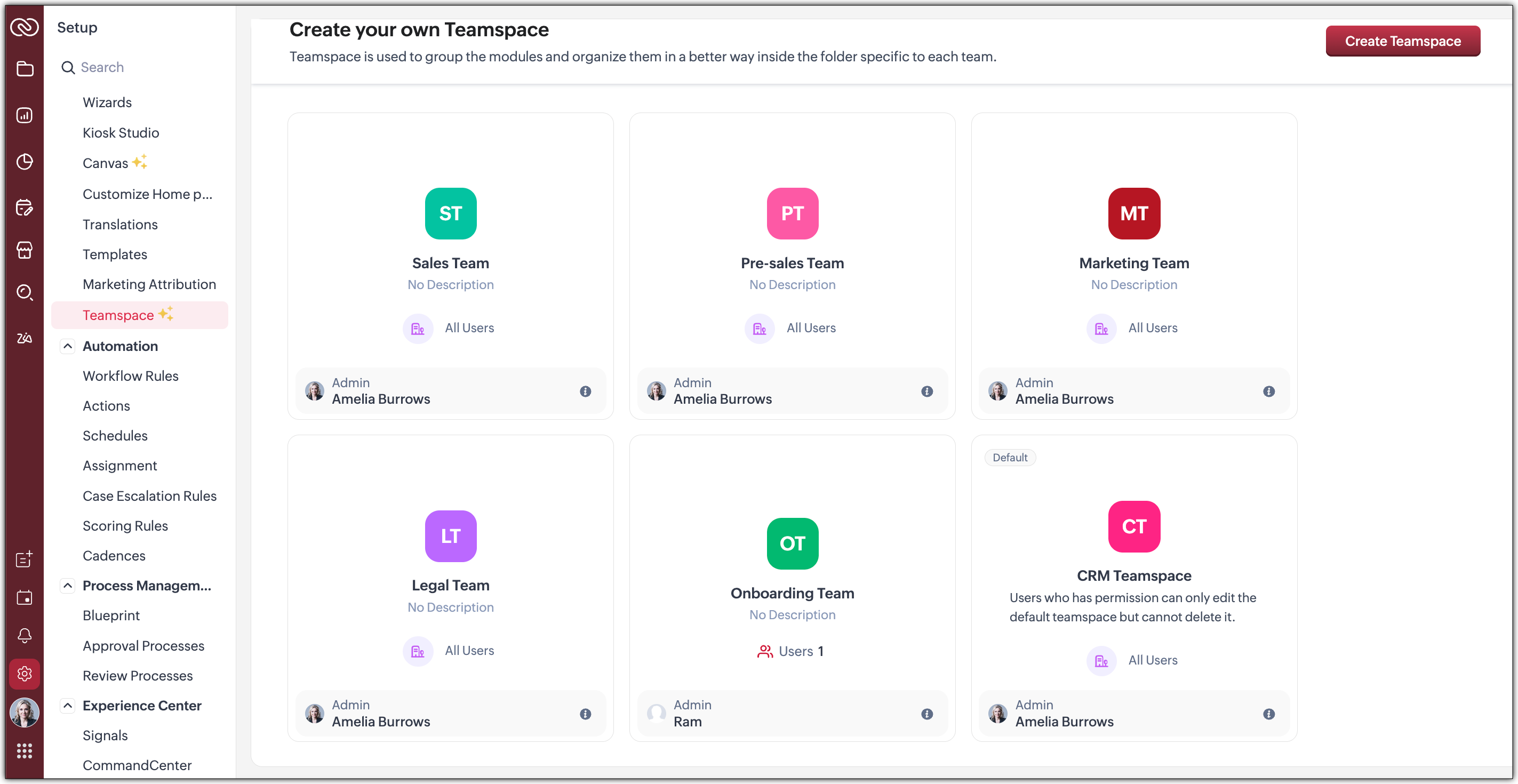
Organized Teamspaces for Focused Work
Tab Groups have been transformed into what we now call Teamspaces. If your CRM is used by multiple teams, organizing and managing their work and data can quickly become complex.
We offer a solution by giving each team a dedicated, folder-like space where all their related modules are grouped together. This setup ensures clear separation between teams, making collaboration more focused, and preventing the risk of teams crossing over or accessing modules that are not meant for them.
Hence, Teamspaces are dedicated workspaces for each department or function to organize their work. Whether you're in sales, support, or marketing, Teamspaces help reduce noise and keep your workspace relevant to your role. Learn more.

You have the option to create teamspaces from the bottom of the sidebar or from the Setup menu. The org admin would generally be the one who creates teamspaces, assigns users as teamspace admins and adds users to a teamspace.
Note : Users with the Manage teamspace permission enabled will be able to create and manage teamspaces in an org.
Teamspace Admin
A teamspace admin is generally the head of a department or a team. For example, a Sales Director could be assigned as the Sales Teamspace's Admin. Once a user becomes a teamspace admin, they can add or remove users, allow reports and dashboards to be created for modules within a teamspace.
Note : If a user is a Teamspace admin but does not have the "Manage Teamspace" permission enabled, they can only manage the specific Teamspace they’ve been assigned to as an admin. They won't be able to create new Teamspaces or manage any others.
Features offered as part of this enhanced UI
- Additional Module Views have been added to provide you with more flexibility, better insights, and improve productivity when working with module data. Thee view added are :
--> Chart View : Get a visual representation of your module data with this View
--> Grid View : Convert your module data into a spreadsheet-like interface where you can edit and manage records directly without having to open each record individually.
--> Timeline View : Look at how your module is created by viewing data plotted over a specific period of time.
--> Split View : Split your module data based on picklist fields /users or criteria to segment them for further inferences. - Interaction tab : This feature displays a timeline of a customer's journey and their engagements across different channels within your CRM.
 We will post individual announcements for each of the above features in the upcoming days.
Themes
The new UI introduces a refreshed theming experience with 13 vibrant colour options to personalize your workspace. These themes go beyond just cosmetic changes: the selected theme isn't limited to the sidebar; it flows throughout the product interface.
Once you choose a theme, the colour is consistently applied across key areas of the CRM, including buttons, tabs, menus, and other interactive elements. This cohesive design enhances visual clarity and gives your team a more engaging, unified experience tailored to their preferences.
If you want to match your brand colours or give your CRM tool a refreshed appearance, the new themes bring both customization and character to your work environment.
Dark-Mode
With the new UI, we’re excited to bring Dark Mode to your CRM experience. This feature was designed with both comfort and usability in mind.
Dark Mode offers a visually soothing alternative to the standard light interface, reducing eye strain during long hours of work, especially in low-light environments. It's not just a cosmetic change; it’s about enhancing usability and making your workspace more comfortable.
Once enabled, Dark Mode is applied consistently across the entire product, including the new UI elements like the left sidebar, buttons, forms, and interaction panels. Whether you're viewing records, managing tasks, or collaborating within Teamspaces, the darker interface ensures clarity without compromising on aesthetics or function.
This addition is part of our effort to make Zoho CRM more adaptable to user preferences and modern work styles. You can switch to Dark Mode at any time from your profile settings and choose what works best for you. Learn more.
What can you choose in this implementation?
Day : Prefer a brighter interface? Day Mode offers a clean, crisp, and classic appearance of your CRM, making it not just functional but also visually pleasing.

Night : Enjoy a sleek, modern look with reduced eye strain, especially in low-light environments. Darker UI minimizes glare and helps reduce fatigue, making it easier to work for longer periods.

Auto : Let the system decide! Auto Mode automatically switches between dark and light themes based on your device settings.

Resources
We invite you to explore these exciting updates and see how productivity increases in your CRM journey. Stay tuned for our upcoming announcements where we’ll dive deeper into each feature, helping you make the most of everything the NextGen UI has to offer.
Regards,
Serena Woolridge
Access your files securely from anywhere
Centralize Knowledge. Transform Learning.
All-in-one knowledge management and training platform for your employees and customers.
New to Zoho Recruit?

Zoho Developer Community
New to Zoho LandingPage?
Zoho LandingPage Resources
New to Zoho Survey?
New to Zoho CRM Plus?
Deliver unforgettable customer experiences
New to Zoho CRM Plus?
Deliver unforgettable customer experiences
New to Zoho Marketing Plus?
Everything you need to run your marketing
New to Zoho Marketing Plus?
Everything you need to run your marketing
New to Bigin?





Topic Participants
Serena Woolridge
Andréa Kérébel
Andrew
Ishwarya SG
K'an Thomas
Sticky Posts
Introducing Multiple Sandbox Types and Support for Module's Data Population
Register here for the upcoming Focus Group webinar on Multiple Sandbox | Help documentation to learn more about the new enhancements Hello everyone, Sandbox in CRM is a testing environment for users to create and test new configurations like workflowGood news! Calendar in Zoho CRM gets a face lift
Dear Customers, We are delighted to unveil the revamped calendar UI in Zoho CRM. With a complete visual overhaul aligned with CRM for Everyone, the calendar now offers a more intuitive and flexible scheduling experience. What’s new? Distinguish activitiesVoC in Zoho CRM is now data savvy: Explore response drilldown, summary components and participation in CRM criteria
VoC has all the goods when it comes to customer intelligence—which is why we're constantly enhancing it. We recently added the following: A customer drilldown component that shows you the list of prospects and customers behind a chart's attribute ExpandedWrapping up 2025 on a high note: CRM Release Highlights of the year
Dear Customers, 2025 was an eventful year for us at Zoho CRM. We’ve had releases of all sizes and impact, and we are excited to look back, break it down, and rediscover them with you! Before we rewind—we’d like to take a minute and sincerely thank youPresenting ABM for Zoho CRM: Expand and retain your customers with precision
Picture this scenario: You're a growing SaaS company ready to launch a powerful business suite, and are looking to gain traction and momentum. But as a business with a tight budget, you know acquiring new customers is slow, expensive, and often delivers
New to Zoho TeamInbox?
Zoho TeamInbox Resources
Zoho CRM Plus Resources
Zoho Books Resources
Zoho Subscriptions Resources
Zoho Projects Resources
Zoho Sprints Resources
Qntrl Resources
Zoho Creator Resources
Zoho CRM Resources
Design. Discuss. Deliver.
Zoho Show Resources

Get Started. Write Away!
Writer is a powerful online word processor, designed for collaborative work.
Zoho CRM コンテンツ
-
オンラインヘルプ
-
Webセミナー
-
機能活用動画
-
よくある質問
-
Ebook
-
-
Zoho Campaigns
- Zoho サービスのWebセミナー
その他のサービス コンテンツ
Nederlandse Hulpbronnen

ご検討中の方
Recent Topics
Unable to Receive Emails on Zoho Mail After Office 365 Coexistence Setup – Error: 553 Relaying Disallowed
Hello, My domain name is bigniter.com, and I’ve been using Zoho Mail as my email service provider without any issues. Recently, I followed the steps outlined in the Zoho documentation to enable Coexistence with Office 365: 🔗 https://www.zoho.com/mail/help/adminconsole/coexistence-with-office365.html#multi-serverCandidate Registration/Invitation
It would be great to include the 'invite' candidate functionality into some of the automation functions - ether through a custom function trigger or webhook or accessible through an email template. Currently there is no way to add this functionality into any workflows or blueprint steps which, I find limits the ability to invite candidates to engage with us directly through our candidate portal.[Free Webinar] Learning Table Series - Creator for Infrastructure Management | A Partner-driven collaborative session
Hello Everyone! We’re excited to invite you to another edition of Learning Table Series, where we showcase how Zoho Creator empowers industries with innovative and automated solutions. About the Learning Table Series The Learning Table Series is a free,I have error AS101 when I try to add paypal@mydomain.com to Zoho
Please help me with this. I tried to call the help line 4 times but don't get any response.VAT on Multiple Expenses
Firstly, might I say I am based in Ireland, and I'm not an accountant, and therefore my understanding of procedures could be somewhat limited. Scenario. An employee pays for items throughout a month, and therefore their claim for expenses includes multiple items - some of the items are VAT deductible (eg, an IT product) and some are not (eg, a client lunch). Discovery The odd thing in ZBooks, is that whilst it seems possible to add a VAT rate to a one-off item of expense, it is not possible to addAgent assignment filter?
Godo day, We are starting to play with FSM to see if it's going to work for our needs. Now so far we have found that it's very restrcitve in the field department you you have layout rules or can't even hide fields depending on the users roles. We can'tKiosk Page Refresh
We have a Kiosk running from a button in contacts to update values and also add related lists, which works great, but when the kiosk is finished the page does not refresh to show the changes. Is there a way to force the contact to refresh/update whenTips & tricks: Make SalesIQ automations work for you
Every day, thousands of visitors land on your website. Some browse, some buy, and some leave without a word. But, wouldn’t it be great if you could automatically know who’s interested, engage them at the right moment, and never miss a lead, and all thisDigest Octobre - Un résumé de ce qui s'est passé le mois dernier sur Community
Chers utilisateurs, Faisons le point sur les temps forts du mois d'octobre au sein de notre Community Zoho France. Partager des informations sensibles, comme des mots de passe, peut vite devenir compliqué et risqué. Les données circulent par email ouHow do I fully delete a user account
Hi, I have two old accounts on my CRM which are inactive and show as 'Closed' in the list of users. BUT they are basically still there. How do I fully delete these accounts? They appear in some parts of CRM still such as the on the contact record emailsAutomatically Add Recurring Zoho Meeting Events to Zoho Calendar / Zoho Meeting Calendar
Hello Zoho Meeting Team, Hope you are doing well. We would like to request an enhancement regarding recurring meetings created inside Zoho Meeting. At the moment, when we schedule a recurring meeting in Zoho Meeting, it does not appear in Zoho CalendarCredit Management: #6 Tackling Common Mistakes in Credit Based Billing
Businesses extend credit to build relationships, make buying easy, and drive more sales. But somewhere between extending and collecting, things begin to slip. A few late payments here and there, an overlooked invoice, and a backlog make cash flow feelUpdating Blueprint stage from my Deluge function
Hi all, I need to update the blueprint stage. Its almost working, but ONLY if the current Deal stage is 'Closed Lost'. On any of my custom stages that Ive specified in the pipeline it doesnt work! My code: dealmap = Map(); deal_stage = deal.get("Stage");Canvas: is it possible to have a fixed header?
Hello. Does Canvas provide the option to have a fixed header, similar to the standard view? It would also be interesting for other parts of the interface, like the header or sidebar of the tab section. Thanks!Limited layout rules in a module
There is a limit of 10 layout rules per module. Is there a way to get that functionality through different customization or workflow + custom function (easily accessible), etc. Having just 10 is limiting especially if module contains a lot of data. AreUsing Contains as a filter
We are using Zoho Reports, ServiceDesk Plus analytics. I do not see how to create a report filter using Contains comparison of a string values, is one string contained in another. For example, Task Title contains the word Monitor. Is this possible in Zoho Reports? This reporting feature is available in SDP reporting. Thanks in advance, Craig RiceSet off Unearned Revenue
Hi, I would like to get a clarification on the below. I have an opening balance of BD.725/- in my Unearned Revenue A/c which includes the overpayments of 6 clients. No One of my clients settled his invoices by paying the value of the invoice less theHow Zoho Desk contributes to the art of savings
Remember the first time your grandmother gave you cash for a birthday or New Year's gift, Christmas gift, or any special day? You probably tucked that money safely into a piggy bank, waiting for the day you could buy something precious or something youAdd Webhook Response Module to Zoho Flow
Hi Zoho Flow Team, We’d like to request a Webhook Response capability for Zoho Flow that can return a dynamic, computed reply to the original webhook caller after / during the flow runs. What exists today Zoho Flow’s webhook trigger can send custom acknowledgementsWhen moments in customer support get "spooky"
It’s Halloween again! Halloween is celebrated with spooky symbols and meanings based on history and traditions, with each region adding its own special touch. While we were kids, we would dress up in costumes along with friends, attend parties, and enjoyHow to backdate record payment for the invoice
I would like to record a payment which happened 2 days ago, but I am not able to select any date later than today. I backdated the invoice, too, but it doesn't change anythingQuestions about Zoho mail
Hello, I had up until recently, the free version. I got a warning message that said, "The user account (Redacted email address) 6.02 GB in your organization is almost nearing the allocated storage of 5.00 GB. If the storage exceeds the allowed limit,How can I delete duplicate transactions?
I want to delete the duplicates not simply exclude them. I have duplicates, because I had automatic bank feeds turned on (had to make sure this critical functionality was working before migrating to Zoho). Now when I import my csv's exported from Wave,Multiple email addresses
Multiple email addresses: I understand there is the ability to add an additional email field to a contact, but the functionality here needs to be drastically revised. Currently, this second email address does not log under the contact email history, nor is it available as a send address when using the Send Mail button within CRM. We recently migrated from GoldMine. I hate GoldMine, but there is one thing they did well: Email. I suggest copying them. Change the email field to an editable picklist,ViewID and Zoho Desk API
I'm looking at the documentation for Listing contacts and it looks like you can filter by ViewID. I assume this is views created in a department or all departments. Is this correct? And if so, how do I find the ViewID for that view? EDIT: I see the viewPrint Tickets
We have field engineers who visit customers. We would like the option to print a job sheet with full details of the job and account/contact details.Zoho Desk integration with Power BI
Hi, I want to be able to create a Power BI report which has live updates of ticket data from zoho desk, is this possile at all? Thanks JackAbility to Attach Images When Reporting Issues to Zoho Projects from Zoho Desk
Hi Zoho Desk Team, Hope you’re doing well. We’re using the Zoho Desk–Zoho Projects integration to report bugs directly from support tickets into the Zoho Projects issue tracker. This integration is extremely useful and helps us maintain smooth coordinationAbility to Choose Task List and Add Subtasks When Creating Tasks from Zoho Desk
Hi Zoho Desk Team, Hope you’re doing well. We’re using the Zoho Desk–Zoho Projects integration to seamlessly connect customer tickets with project tasks. While the integration works great overall, we noticed two important limitations that affect our workflowSync Task Status from Zoho Projects to Zoho Desk
Hi Zoho Desk Team, Hope you’re doing well. We’re actively using the Zoho Desk–Zoho Projects integration, which helps our support and project teams stay aligned. However, we noticed that when we change a task’s status in Zoho Projects, the change is notDefault/Private Departments in Zoho Desk
1) How does one configure a department to be private? 2) Also, how does one change the default department? 1) On the list of my company's Zoho Departments, I see that we have a default department, but I am unable to choose which department should be default. 2) From the Zoho documentation I see that in order to create a private department, one should uncheck "Display in customer portal" on the Add Department screen. However, is there a way to change this setting after the department has been created?Zoho CRM IP Addresses to Whitelist
We were told to whitelist IP addresses from Zoho CRM. (CRM, not Zoho Mail.) What is the current list of IP Addresses to whitelist for outbound mail? Is there a website where these IP addresses are published and updated? Everything I could find is overColor of Text Box Changes
Sometimes I find the color of text boxes changed to a different color. This seems to happen when I reopen the same slide deck later. In the image that I am attaching, you see that the colors of the whole "virus," the "irology" part of "virology," andThe difference between Zoho Marketing Automation and Zoho Campaigns
Greetings Marketers! This post aims to differentiate between Zoho Marketing Automation and Zoho Campaigns. By the time you get to the end of the post, you will be able to choose a product that objectively suits you. What is Zoho Marketing Automation?Zoho Mail Android app update - View emails shared via Permalink on the app.
Hello everyone! In the latest version(v2.8.2) of the Zoho Mail Android app update, we have brought in support to access the emails shared via permalink within the app. Earlier, when you click the permalink of an email, you'll be redirected to a mobileHow to create a Zoho Mail extension similar to Outlook's OnSend add-in?
Hi, I want to create a Zoho Mail extension similar to Outlook’s OnSend add-in. The extension should: Let the user select headers and footers from a taskpane while composing an email. When the user clicks Send, the extension should: Automatically insertHow to display Motivator components in Zoho CRM home page ?
Hello, I created KPI's, games and so but I want to be able to see my KPI's and my tasks at the same time. Is this possible to display Motivator components in Zoho CRM home page ? Has someone any idea ? Thanks for your help.Introducing Record Summary: smarter insights at your fingertips
Hello everyone, We’re excited to introduce the Record Summary feature. This powerful addition makes use of Zia to simplify how you interact with your CRM data, providing a seamless, consolidated view of critical record information. Scrolling through theDelegates should be able to delete expenses
I understand the data integrity of this request. It would be nice if there was a toggle switch in the Policy setting that would allow a delegate to delete expenses from their managers account. Some managers here never touch their expense reports, andFunction #9: Copy attachments of Sales Order to Purchase Order on conversion
This week, we have written a custom function that automatically copies the attachments uploaded for a sales order to the corresponding purchase order after you convert it. Here's how to configure it in your Zoho Books organization. Custom Function: HitNext Page