Voice-based forecast analysis in Zoho CRM | Public Early Access 2023

Voice-based forecast analysis in Zoho CRM | Public Early Access 2023

Hello Everyone!

We are happy to introduce you to yet another exciting update from Zoho CRM. This time, it's about the addition of a valuable dashboard component in Voice of the Customer called "Voice based forecast analysis"

This feature is a sequel to the previously announced VoC feature. If you already registered for the Voice of the Customer (VoC) Early Access, you do not need to register again as the enhancement will automatically apply to your account. You can learn more about the VoC function by reading this post if you haven't already.

This is available in a public early access mode, which means this feature will be enabled for you upon request. To start with, To submit your request for this feature, kindly fill out this form.

As the feature is currently in EA, we eagerly look forward to your feedback. Do try it out and post your feedback in the comments section.

Let's have a quick look

As you may already be aware, Forecasts in Zoho CRM help you set and achieve sales targets for your teams by a specific period (by month, by quarter, etc). By creating and working with forecasts, you are effectively able to use the knowledge of current sales progress to set and meet future sales goals for your teams.

The challenge with the current forecast setup is that, while the system will actively help you monitor sales progress, it does not capture specific feedback from customers on your sales efforts, that lead up to a winning or losing deal.

For instance, in the cases of failure to meet the set target, you may not exactly know what your customers have to say about the deal. Or for that matter, you may not know what it is that you are doing well, that is giving you winning deals. So, knowledge of this winning/losing pattern along with contextual feedback from customers will help you set better goals and also meet them better.

This is where VoC enters the picture. With our new Voice based analysis dashboard, you are provided with real-time insights about your customers' feedback across the sales process, offered to you in the context of your sales forecasts.
 
 
This way you are effectively able to understand what went right/wrong with deals in a specific forecast category, which will
 
a) Potentially help you take corrective actions for deals on a losing path, before their target period is over, with the help of contextual feedback from customers.
b)  Set and meet better data-driven sales targets with VoC insights at your disposal for future sales goals.


Voice-based forecast analysis— An overview

Zoho CRM will now include a dedicated dashboard in its Voice of the Customer solution, called "Voice-based forecast analysis" in order to present intelligent insights about customer feedback presented in the context of forecast categories configured in the CRM.
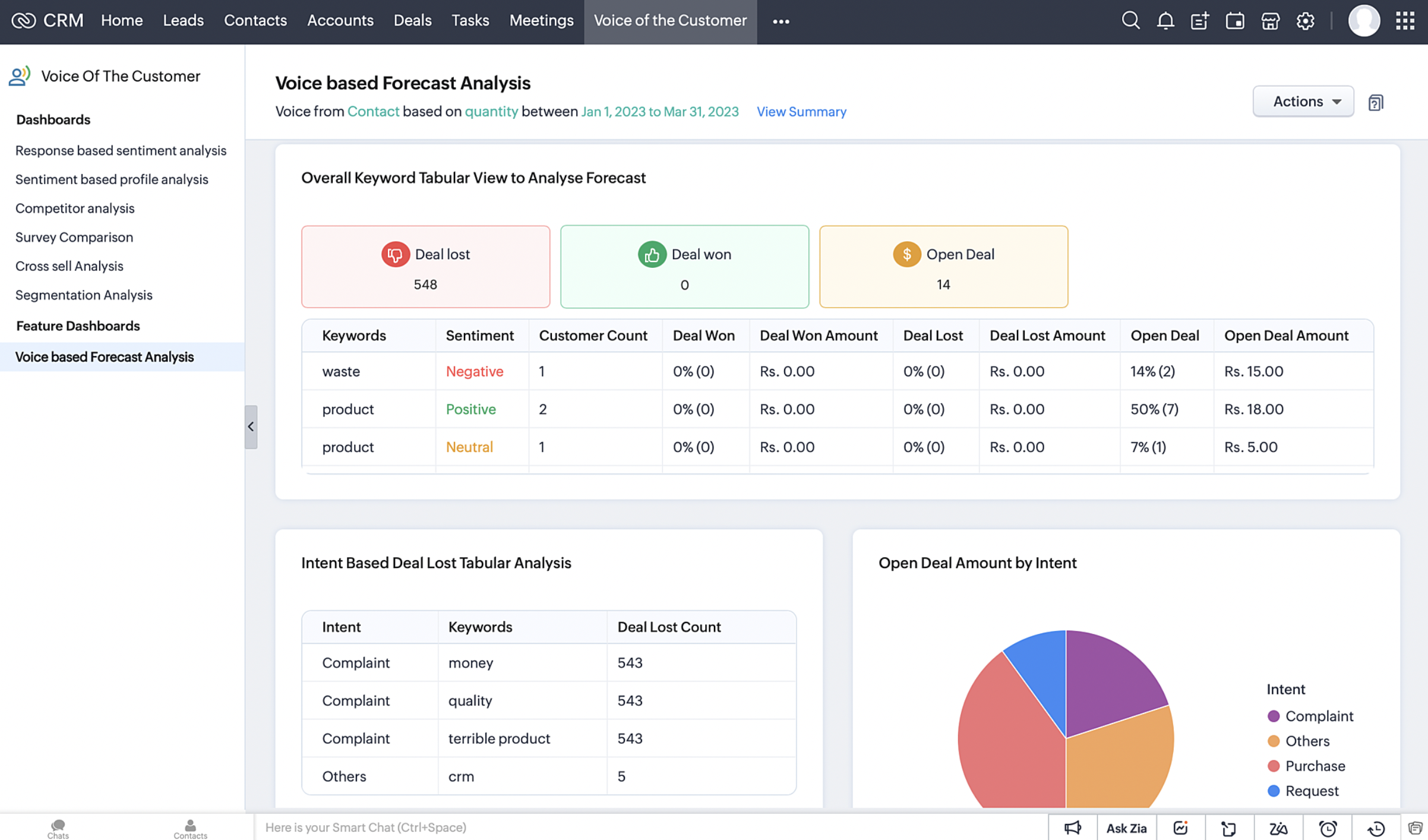


Let's say Zylker Tech uses Zoho CRM to keep a track of their sales efforts. Currently in their CRM, the Forecasts module projects a target of $10000 for sales team for the upcoming quarter.
 

In this context, with insights in the Voice based forecast analysis, they can observe real-time, key takeaways from customer feedback plotted in the context of forecast details.

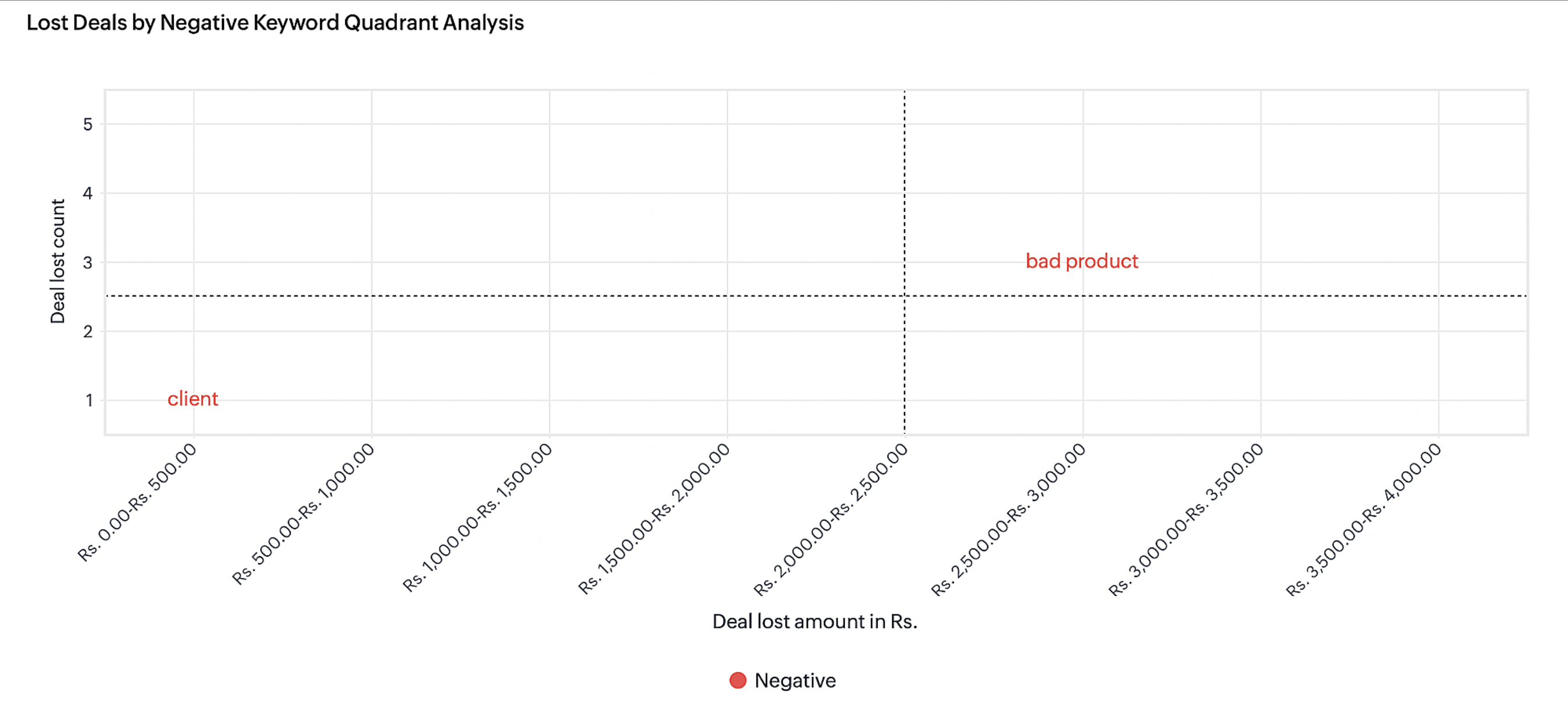
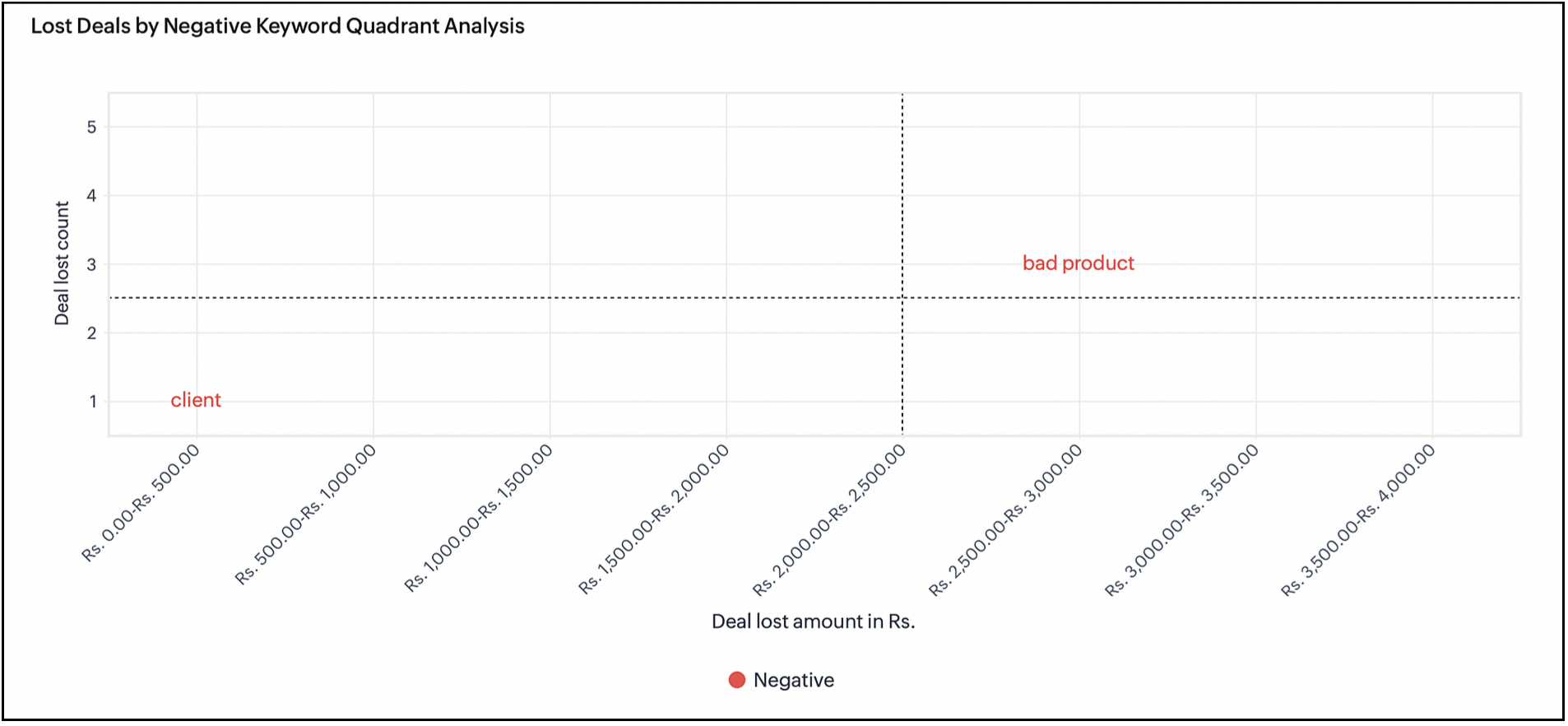
For example, here you can see that there are three customers in the 2500-3000 deal lost category, who've mentioned the term "bad product" in some of their conversations with the organization. If a handful of customers have been lost because of their feedback that a "product is bad", this could immediately call for corrective actions from the organization as a whole, in terms of revisiting the quality of their offerings, and also reaching out to these lost customers to make remedies.
 

This will also help sales teams to plan future conversations with such customers to meet their targets better.


There are several more chart components in this dashboard, and they are outlined in the following sections in this post. This is just an example to indicate the value from just one particular chart. To summarize, the insights in this dashboard will help you in the following ways.

  • To observe real-time feedback from customers in the context of sales forecasts, which will help you meet your sales targets better. 
  • To recognize a winning/losing path for deals across a projected target period and use the insights to increase the chances of successful deals within the target period.

To learn from what went wrong and apply the learning to future sales targets.

How does Voice based forecast analysis work

Zia captures all types of voice-related attributes such as keywords spoken by customers and the intent and sentiment with which the keywords were spoken. This information in conjugation with many other CRM features will give insightful dashboards for customers.
 
For every role in an organization, you can set a deal amount or deal revenue that needs to be delivered/achieved in a particular period (quarterly or monthly). You can see the performance trends and comparisons across periods.


Key components in forecast analysis are:

Forecast type: In Zoho CRM, forecast analysis is based on the deal count (Deal Quantity) or the deal amount (Deal Revenue).

Forecast period - You can set the forecast based on Quarterly (Quarter 1, Quarter 2,.... Quarter n) or Monthly (Month 1, Month 2, Month n) period.

It is incomplete when we stop with just viewing the numbers. It turns out to be useful and important only when we question the reasoning for the gaps. It is at this juncture that VOC will help us analyze these forecast for our customers based on their constantly uttered keywords and the intent of these keywords before and after a deal win or deal loss.

It is reasoning out everything based on the Voice of the Customer. What was spoken by the customer before a deal was won or lost? How many deals were open when they were spoken?...We already have umpteen number of charts inside VOC to cater to these needs. What is new is that, CRM has now curated a certain set of charts based on forecast attributes and deliver these insights as dashboards within VOC.

How to configure voice based Forecast Analysis dashboard


To set the dashboard configuration:

  1. Go to Voice Of The Customer module.
  2. Select Voice-based Forecast Analysis dashboard from the left pane.
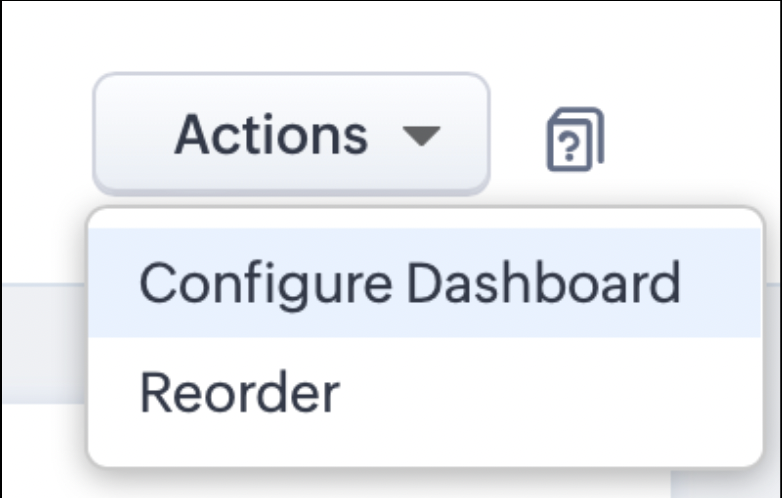
  3. Select Configure Dashboard from Actions option on the upper-right corner of the page
  4.           


  5. In the displayed dialog box, set the following options:

      1. Select Forecast - Select a forecast that you configured on the Forecast module. It is to be noted that the computations are based on forecasts for the current quarter or month only.
      2. Select Modules - Select the module where you want to execute forecast analysis.
      3. Keyword Preferences - You can choose to include all keywords or exclude certain keywords.
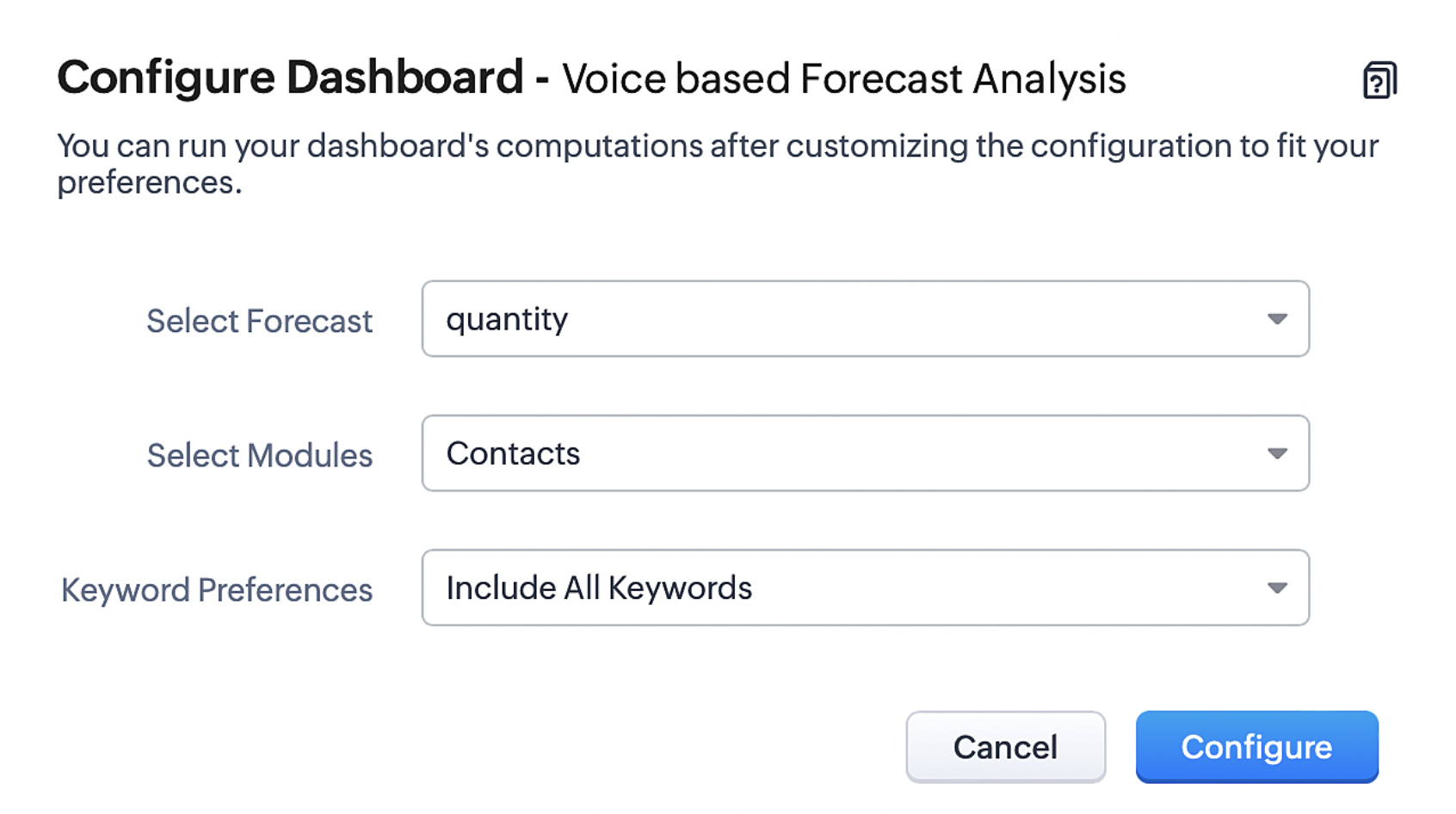


7. Click Configure to complete the configuration.

Type of Charts for Voice-based Forecast Analysis  


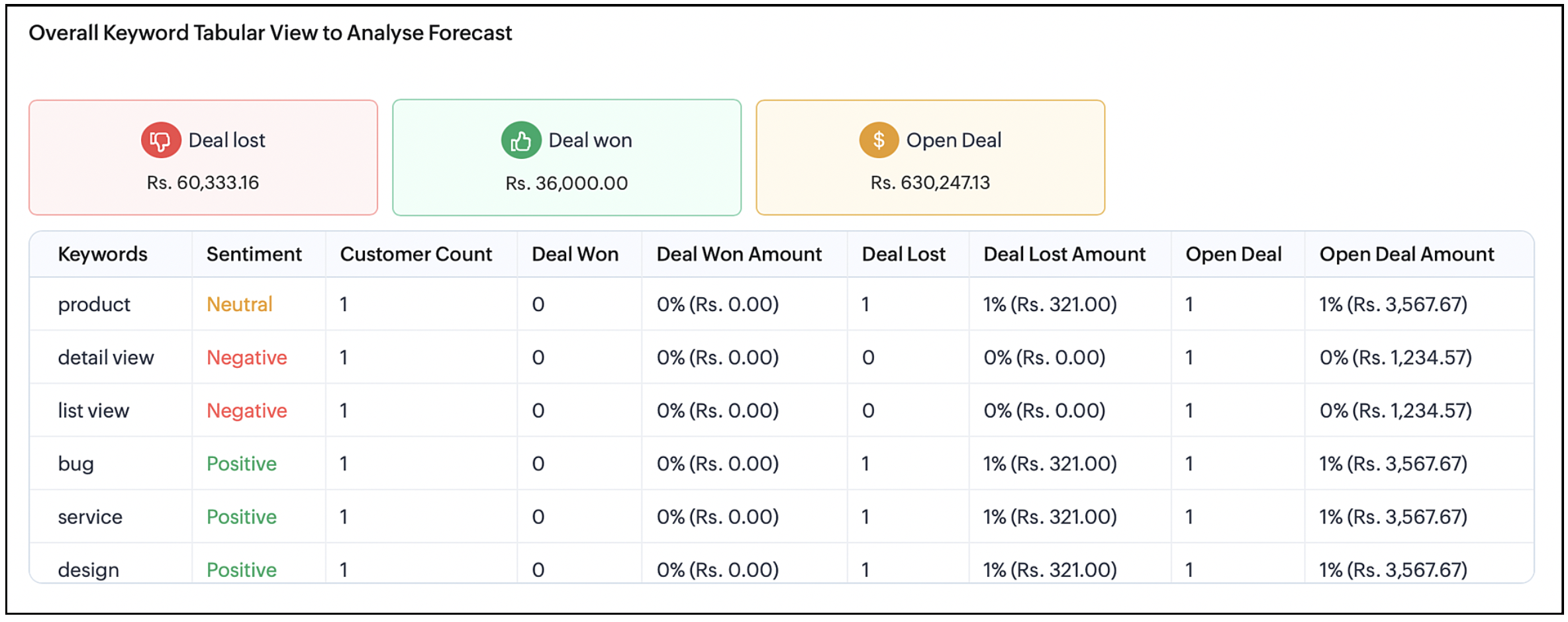
Overall Keyword tabular view 

This analysis covers details on how many deals were lost, won or open for the targeted period. The type of keyword mentioned by the customers for that month or quarter before a deal loss or deal won or any open deals. You can view the most commonly spoken keywords before every stage of a sales cycle.


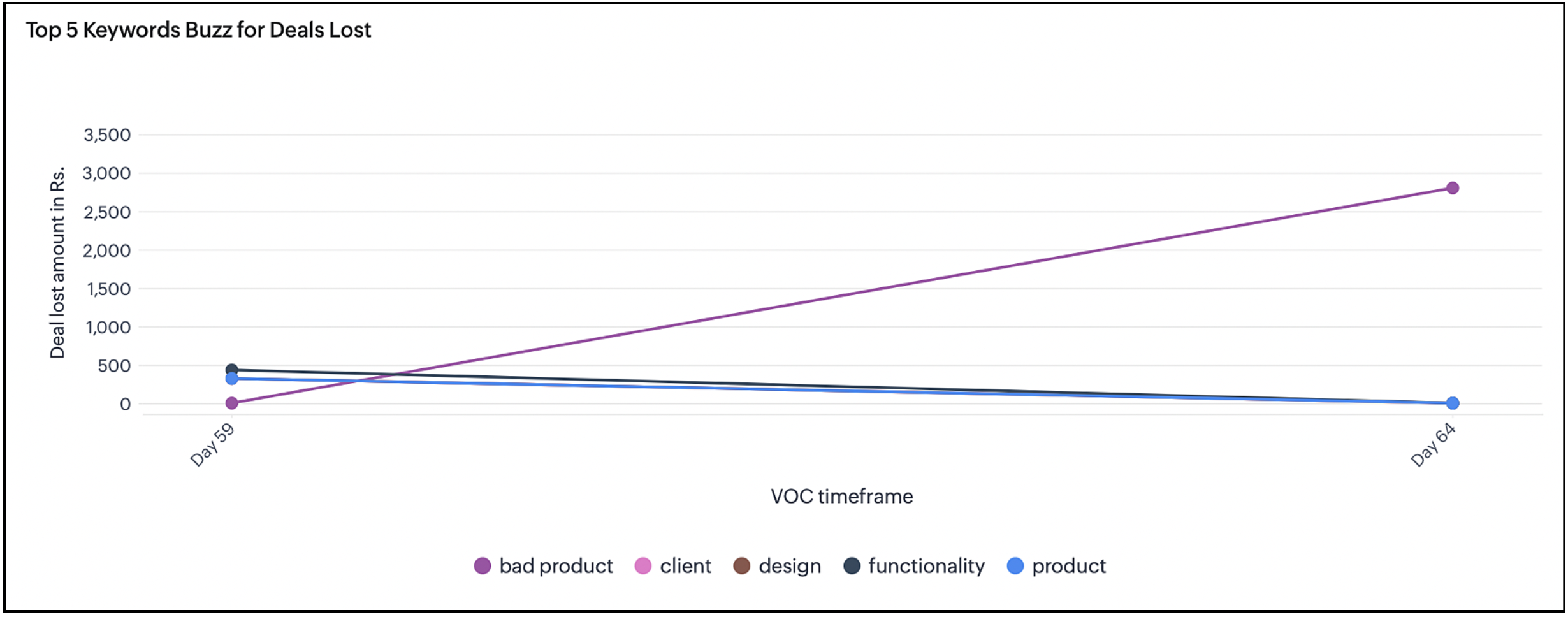
Top 5 Keyword Buzz for lost deals

Displays the deal loss percentage for every month or quarter. The number of lost deals where the top keywords were spoken over the chosen period. This will help understand the keywords that led to losing the deal and not being able to achieve the target.


Keyword quadrant analysis for lost deals

Latest keywords with negative intent mentioned before lost deals is plotted against quadrants. This helps the user to avoid using those keywords for upcoming deals and prioritize the issues to avoid more deal loss. This helps achieve the set target for a period by analyzing the gap and avoiding such keywords that lead to deal loss.


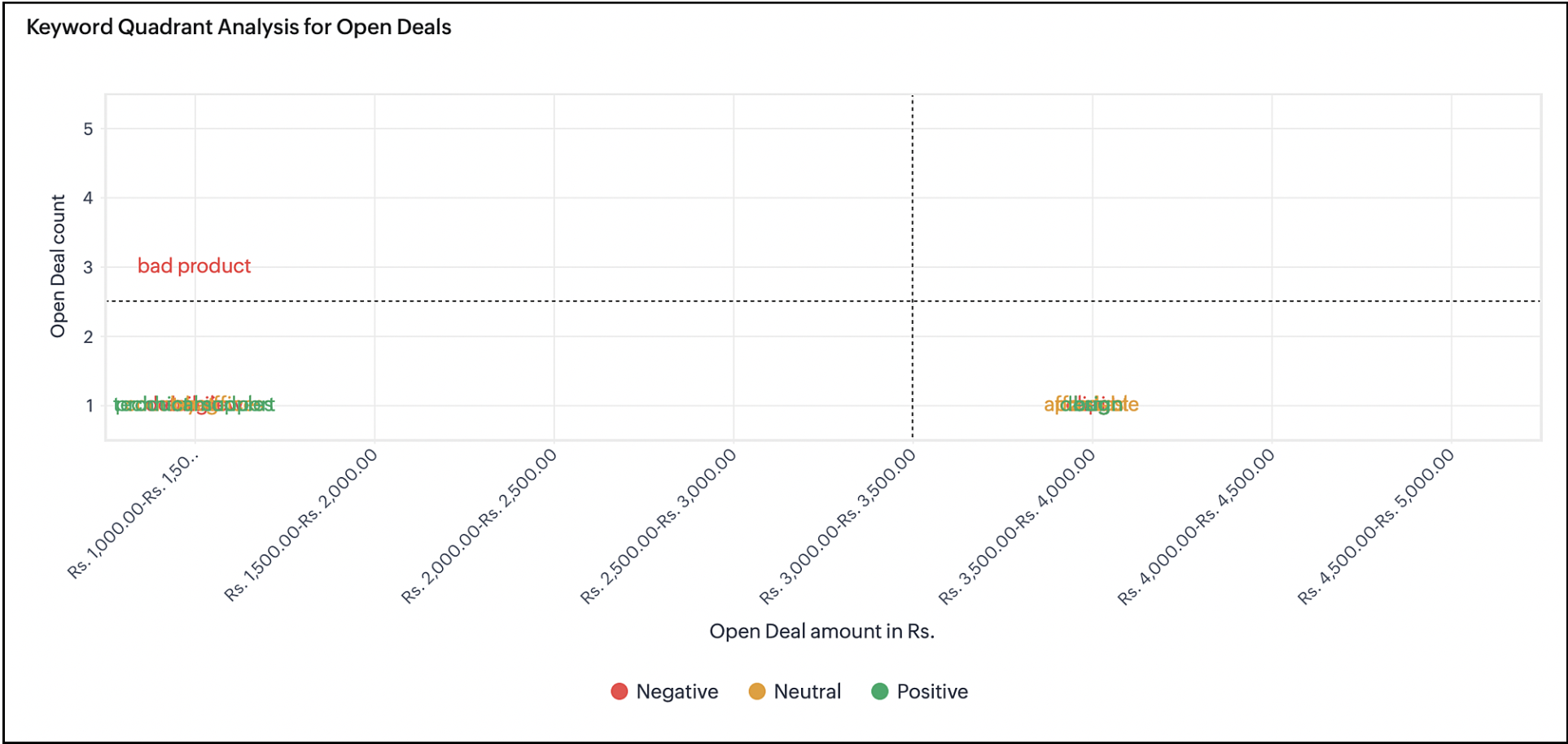
Keyword quadrant analysis for open deals

Latest keywords that were uttered during an open deal are plotted in this chart. You can compare this chart with the previous chart to find out similarities and the trajectory to lose a deal. This will help you to plan your conversations with a customer who uses keywords mentioned in the previous chart that lead to deal loss.


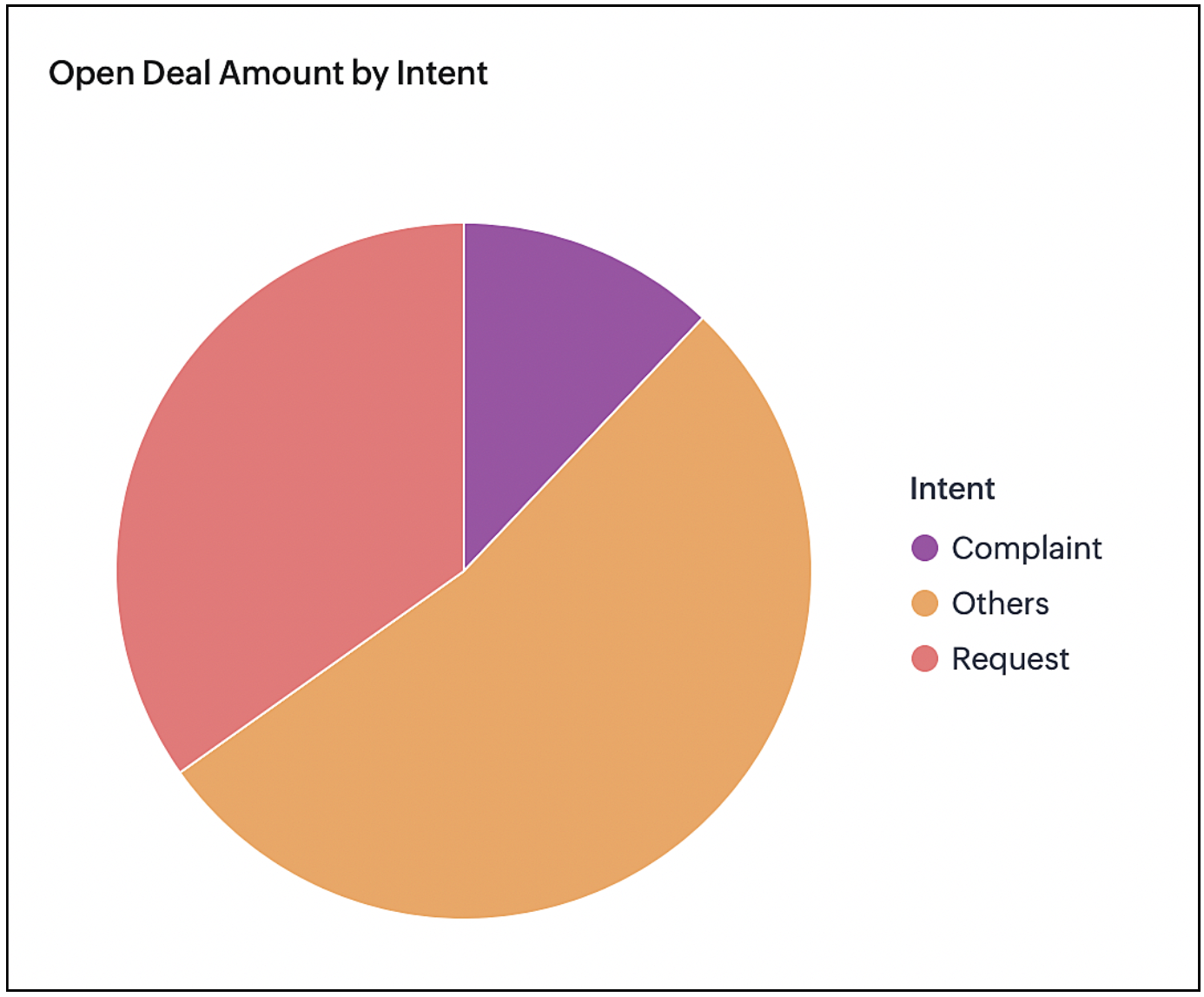
Open deal amount by intent

Deals that are open are analyzed by the intent and the keywords associated with the intent. The chart gives the user a perspective on what the state of the deal would be at the end and how it will affect the target.


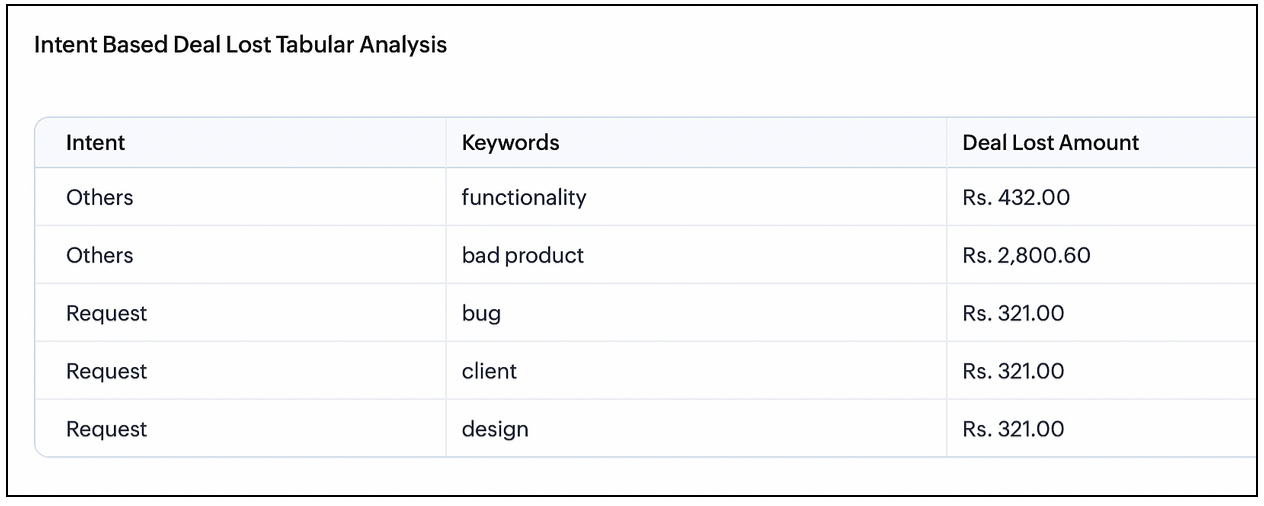
Intent-based deal lost tabular analysis

Keywords mentioned by customers are grouped based on the intent of the keywords. For example, the groups can be a complaint, request, dissatisfaction and so on. You can see the deal revenue that is lost for an intent and what keywords are associated with that intent. This is similar to the previous chart but this chart gives detailed understanding in the tabular view.


To learn more about VoC and what it offers, please refer to this guide.

That's all about this enhancement. Let us know you're feedback in the comment section.


Thank You :)

    Access your files securely from anywhere


                          Zoho Developer Community


                                                • Desk Community Learning Series


                                                • Digest


                                                • Functions


                                                • Meetups


                                                • Kbase


                                                • Resources


                                                • Glossary


                                                • Desk Marketplace


                                                • MVP Corner


                                                • Word of the Day


                                                • Ask the Experts


                                                          Manage your brands on social media


                                                                Zoho TeamInbox Resources


                                                                    Zoho CRM Plus Resources

                                                                      Zoho Books Resources


                                                                        Zoho Subscriptions Resources

                                                                          Zoho Projects Resources


                                                                            Zoho Sprints Resources


                                                                              Qntrl Resources


                                                                                Zoho Creator Resources


                                                                                    Zoho CRM Resources

                                                                                    • CRM Community Learning Series

                                                                                      CRM Community Learning Series


                                                                                    • Kaizen

                                                                                      Kaizen

                                                                                    • Functions

                                                                                      Functions

                                                                                    • Meetups

                                                                                      Meetups

                                                                                    • Kbase

                                                                                      Kbase

                                                                                    • Resources

                                                                                      Resources

                                                                                    • Digest

                                                                                      Digest

                                                                                    • CRM Marketplace

                                                                                      CRM Marketplace

                                                                                    • MVP Corner

                                                                                      MVP Corner


                                                                                        Design. Discuss. Deliver.

                                                                                        Create visually engaging stories with Zoho Show.

                                                                                        Get Started Now


                                                                                          Zoho Show Resources

                                                                                            Zoho Writer

                                                                                            Get Started. Write Away!

                                                                                            Writer is a powerful online word processor, designed for collaborative work.

                                                                                              Zoho CRM コンテンツ


                                                                                                Nederlandse Hulpbronnen


                                                                                                    ご検討中の方


                                                                                                          • Recent Topics

                                                                                                          • Employment Contract / HRMS Documents - Zoho People

                                                                                                            How do I create customized HR documents for disbursal from Zoho People ? Example, say offer letters ? appointment letters ? Memos ? We want to be able to preset these in one or ther other form and issue them to employees who are in Zoho People.
                                                                                                          • Is it possible to create a word cloud chart in ZoHo Analystics?

                                                                                                            Hi there, I have a volume of transaction text that I would like to analyse using word cloud (or other approcah to detect and present word frequency in a dataset). For example, I have 50,000 records describing menu items in restaurants. I want to be able
                                                                                                          • Playback and Management Enhancements for Zoho Quartz Recordings

                                                                                                            Hello Zoho Team, We hope you're all doing well. We would like to submit a feature request related to Zoho Quartz, the tool used to record and share browser sessions with Zoho Support. 🎯 Current Functionality As of now, Zoho Quartz allows users to record
                                                                                                          • Zia Profile Summary now supports six languages and responds faster

                                                                                                            After numerous customer requests, we’ve expanded Zia Profile Summary to do more than just summarize resumes quickly. It can now summarize them in six different languages and deliver results even faster. What’s New 1. Extended language support Zia can
                                                                                                          • Kaizen #216 - Actions APIs : Email Notifications

                                                                                                            Welcome to another week of Kaizen! For the last three weeks, we have been discussing Zylker's workflows. We successfully updated a dormant workflow, built a new one from the ground up and more. But our work is not finished—these automated processes are
                                                                                                          • Facturation électronique 2026 - obligation dès le 1er septembre 2026

                                                                                                            Bonjour, Je me permets de réagir à divers posts publiés ici et là concernant le projet de E-Invoicing, dans le cadre de la facturation électronique prévue très prochainement. Dans le cadre du passage à la facturation électronique pour les entreprises,
                                                                                                          • Your bot just got smarter: AI-Powered routing that reads between the lines

                                                                                                            What if your bot could tell the difference? Between a visitor who just needs a quick answer, someone actively comparing options, and a frustrated customer one click away from leaving? Most bots can't. They deliver the same response to everyone, missing
                                                                                                          • Weekly Tips : Master Keyboard Shortcuts in Zoho Mail

                                                                                                            If you spend a lot of time managing emails, switching between your mouse and keyboard can slow you down. Whether you are replying to clients, organizing your inbox, or searching for messages, every second counts. So, how can you streamline your email
                                                                                                          • Introducing custom lookup fields in the Tickets, Contacts, and Accounts modules

                                                                                                            Hello all, We are excited to announce a new enhancement that will empower you to further customize the Tickets, Contacts, and Accounts modules. Now, you will be able to create custom lookup fields in your Tickets, Contacts, and Accounts layouts for more
                                                                                                          • Contacts per department

                                                                                                            Hello, Is it possible to limit Contacts to a Department? Thanks
                                                                                                          • How to restrict user/portal user change canvas view

                                                                                                            Hi , I would like to restrict user / portal user change their canvas view because I hide some sensitive field for them. I dont want my user switch the canvas view that do not belong to them But seems Zoho do not provide this setting?
                                                                                                          • Draft & Schedule Emails Directly in Bigin

                                                                                                            Greetings, I hope all of you are doing well. We're happy to announce a few recent enhancements we've made to email in Bigin. We'll go over each one in detail, but here's a quick overview: Previously, you couldn't draft or schedule emails in Bigin, but
                                                                                                          • Collections Management: #3 Tackling Payment Failures

                                                                                                            Sam refreshed the dashboard. "Payment failed". Same customer. Same subscription. This is happening for the third time. He sends a usual email: "Your renewal payment failed again. Could you please check and retry?" A couple of days passed, and there was
                                                                                                          • How do I increase the email attachment size in Zoho CRM ?

                                                                                                            It looks like I'm limited to 10MB when sending an attachment using the email widget on a record in Zoho CRM. Is there a way to increase the size? Or can I use some other tool? From what I'm reading online, I'm maxed out at 10MB. Any insight would be greatly
                                                                                                          • Custom Field in Zoho Projects pulling into Analytics

                                                                                                            We have a client that we have built our their new business process using Zoho Projects, and we have build a lot of custom fields with their their Projects where they are capturing specific data points that we want to be able to track and pull data, as
                                                                                                          • WhatsApp Channels in Zoho Campaigns

                                                                                                            Now that Meta has opened WhatsApp Channels globally, will you add it to Zoho Campaigns? It's another top channel for marketing communications as email and SMS. Thanks.
                                                                                                          • Zoho sign and creator error message {"code":9043,"error_param":"Checked by","message":"Extra key found","status":"failure"}

                                                                                                            Good day, I receive the error message: {"code":9043,"error_param":"Checked by","message":"Extra key found","status":"failure"} when running below code from creator to sign, void TestForSign(int ID) { //Fetch Template Details (Optional, for dynamic mapping)
                                                                                                          • Download a writer template as .docx instead of .pdf.

                                                                                                            I have been trying to implement a feature to download a writer template as a .docx and got it working partly but it isn't good. Earlier I checked our code and I saw openurl("https://crm.zoho.com/crm/org121314/specific/Template.do?action=print&step=pdfPreview&id="
                                                                                                          • Allow the usage of Multi-Select fields as the primary field on "Layout Rules"

                                                                                                            We want to force our users to enter some explanation strings when a multi-select field has been utilized. I can't understand the reason for the usage restriction of Multi-Select fields as a primary field. This is a simple "Display hidden mandatory field
                                                                                                          • Ask the Experts 25: Experience the full spectrum of Zoho Desk’s autumn and spring releases for 2025

                                                                                                            Hello Everyone, We’re on the 25th episode of our ATE series! It's a true milestone in our live community interactions! It’s been an amazing journey since we started in October 2018. Zoho Desk has come a long way, evolving with the support of a wonderful
                                                                                                          • WriterTh

                                                                                                            After every space Writer goes to capital letters mode in my Android tablet. The cap mode stays till the second letter is typed in the word then it comes to normal mode.
                                                                                                          • Extract Archived Projects using Zoho Projects API

                                                                                                            In my organization we archive the projects when they are already completed, charged, invoiced, so that only those that are still pending process remain active. I need to access all projects (active and archived) from an external system, but the API v3
                                                                                                          • Pincode based Product Restriction

                                                                                                            we have different types of products. 1) Very bulky items like plywood. 2) Too delicate items like glass These type of products we want to sell to local customers. Other products we want to supply all over India. There should be an option to restrict products
                                                                                                          • Ask the Experts: Five-hour live Q&A session with Zoho WorkDrive product experts

                                                                                                            Have questions about WorkDrive 5.0? Let’s talk! We recently launched Zoho WorkDrive 5.0, packed with powerful updates to help your team work smarter, stay secure, and get more value from your business content. From content-centric workflows and AI-powered
                                                                                                          • File upload support for subforms

                                                                                                            Dear All, Subforms help you add and track data related to your CRM records. We've always supported most of the commonly used field types in subforms, so as to cater to your business requirements. Now we're happy to extend support to file upload fields.
                                                                                                          • Circular record relationship in CRM

                                                                                                            Given there is a lookup in custom module Transactions creating a related list on the chosen Contact record. I. e. a lookup field on Transactions module points to Contacts. The related list on a Contact record can thus have have many transaction records.
                                                                                                          • Multi-currency and Products

                                                                                                            One of the main reasons I have gone down the Zoho route is because I need multi-currency support.  However, I find that products can only be priced in the home currency, We sell to the US and UK.  However, we maintain different price lists for each. 
                                                                                                          • Is it possible to pull the Zoho desk data into Zoho analytics in real time

                                                                                                            Hi - I am looking to add more dashboards and reports of Zoho Desk in analytics. I see there is a schedule to pull the data into analytics, but I'm wondering if there is an option to pull the data in real time instead of a specific interval?
                                                                                                          • Enhance productivity with the revamped Zoho Sheet View

                                                                                                            Hello folks, For some time now, you've been able to use the Zoho Sheet View to quickly edit multiple records or to insert a batch of new records. Its tabular interface allows users to engage in these tasks productively. Despite this, the existing Sheet
                                                                                                          • How to set value of dropdown field to variable

                                                                                                            For the life of me, I can't figure out why the following code won't set input.status to the previousSelection. Steps to reproduce: 1. Click input.complete 2. input.status dropdown updates from '1-Backlog' to '4-Done' 3. Click input.complete again to deselect
                                                                                                          • [Product Update] TimeSheets module is now renamed as Time Logs in Zoho Projects.

                                                                                                            Dear Zoho Analytics customers, As part of the ongoing enhancements in Zoho Projects, the Timesheets module has been renamed to Time Logs. However, the module name will continue to be displayed as Timesheets in Zoho Analytics until the relevant APIs are
                                                                                                          • Issue in Annual Leave

                                                                                                            We created a policy to credit 21 days at the Start of the Year An employee has taken 16 days of leaves thought the year, so we expect to see 5 Leaves remaining right? But Zoho People is Showing 12 Days of Leave Balance Available If we check the Leave
                                                                                                          • [WEBINAR][MEA] Learn how to control your inventory and multi-channel sales with the Zoho Inventory & Zoho Books integration

                                                                                                            Hello there, We are hosting an exclusive live webinar tailored for businesses across the Middle East and African countries, where you'll learn how to take full control of your inventory and multi-channel sales while keeping your accounting perfectly in
                                                                                                          • Less clicks, more connection – the usability edge of Zoho Desk

                                                                                                            Imagine joining a new workplace, eager to prove your skills, partner with peers, learn new tools, and build a strong foundation for your career. The standards you've set could drive pressure into your head. You now discover the organization is using Zoho
                                                                                                          • Tip #3 Automating total item weight calculation for your sales orders in Zoho Inventory

                                                                                                            Hello, Hope the day is treating you well. Last week, we saw how we could automate the calculation of total shipping charges from numerous shipments for your sales orders and invoices. This week, we will see how you can automate the calculation of total item weight for your sales orders.  How does this work? First, you are required to capture the weight of all your items using a custom field. And when you create a sales order, you can either have the system display the individual weights for you or
                                                                                                          • Why Format section gets disabled when we create Merge Template over PDF

                                                                                                            I need some assistance I have a Client who is going to give certificates to users who passes his exam. So, I am using mail merge but in ZOHO writer after I upload the PDF and create merge Template over PDF the format Section gets disabled. My problem
                                                                                                          • Whatsapp Integration on Zoho Campaign

                                                                                                            Team: Can the messages from Zoho Campaign delivered through Whatsapp... now customers no longer are active on email, but the entire campaign module is email based.... when will it be available on whatsapp.... are there any thirdparty providers who can
                                                                                                          • How to calculate separate totals for Product Line Items filtered by category in Quotes?

                                                                                                            Hello! I'm working with Quotes in Zoho CRM and need help calculating conditional totals for line items. Current setup: I have two tables in my Quote template (Zoho Writer), both displaying Quoted Line Items Table 1 (top): Shows all products where Product
                                                                                                          • I Need Help Verifying Ownership of My Zoho Help Desk on Google Search Console

                                                                                                            I added my Zoho desk portal to Google Search Console, but since i do not have access to the html code of my theme, i could not verify ownership of my portal on Google search console. I want you to help me place the html code given to me from Google search
                                                                                                          • Zoho Desk API Documentation missing a required field

                                                                                                            We are trying to create a section using this information. Even after preparing everything based on that page, we still get an error. The error we get is this: {"errorCode":"INVALID_DATA","message":"The data is invalid due to validation restrictions","errors":[{"fieldName":"/translations","errorType":"missing","errorMessage":""}]}
                                                                                                          • Next Page