Zoho Inventory - Les premiers pas de la configuration
Le contrôle des stocks permet une visibilité de tous les produits qu'une entreprise possède à un moment donné. Le contrôle des stocks comprend la gestion des nouveaux stocks et ceux vendus. Lorsqu'une entreprise a une vue d'ensemble plus détaillée, elle est en mesure de répondre à la demande des clients plus efficacement et de réduire les coûts associés à la détention de stocks. C'est à dire le contrôle des stocks, la gestion des commandes, des chaînes de distribution et la valeur des stocks.
Dans cet article, nous allons découvrir quelques-unes des configurations de base de Zoho Inventory qui vous permettront de gérer le stock de votre entreprise depuis n'importe où.
Tableau de bord
Le tableau de bord vous donne une image précise des ventes et du rapport de stock de votre entreprise, notamment les commandes que vous avez générées, les articles les plus vendus, le stock acheté auprès de votre fournisseur pour la période sélectionnée et plus encore.
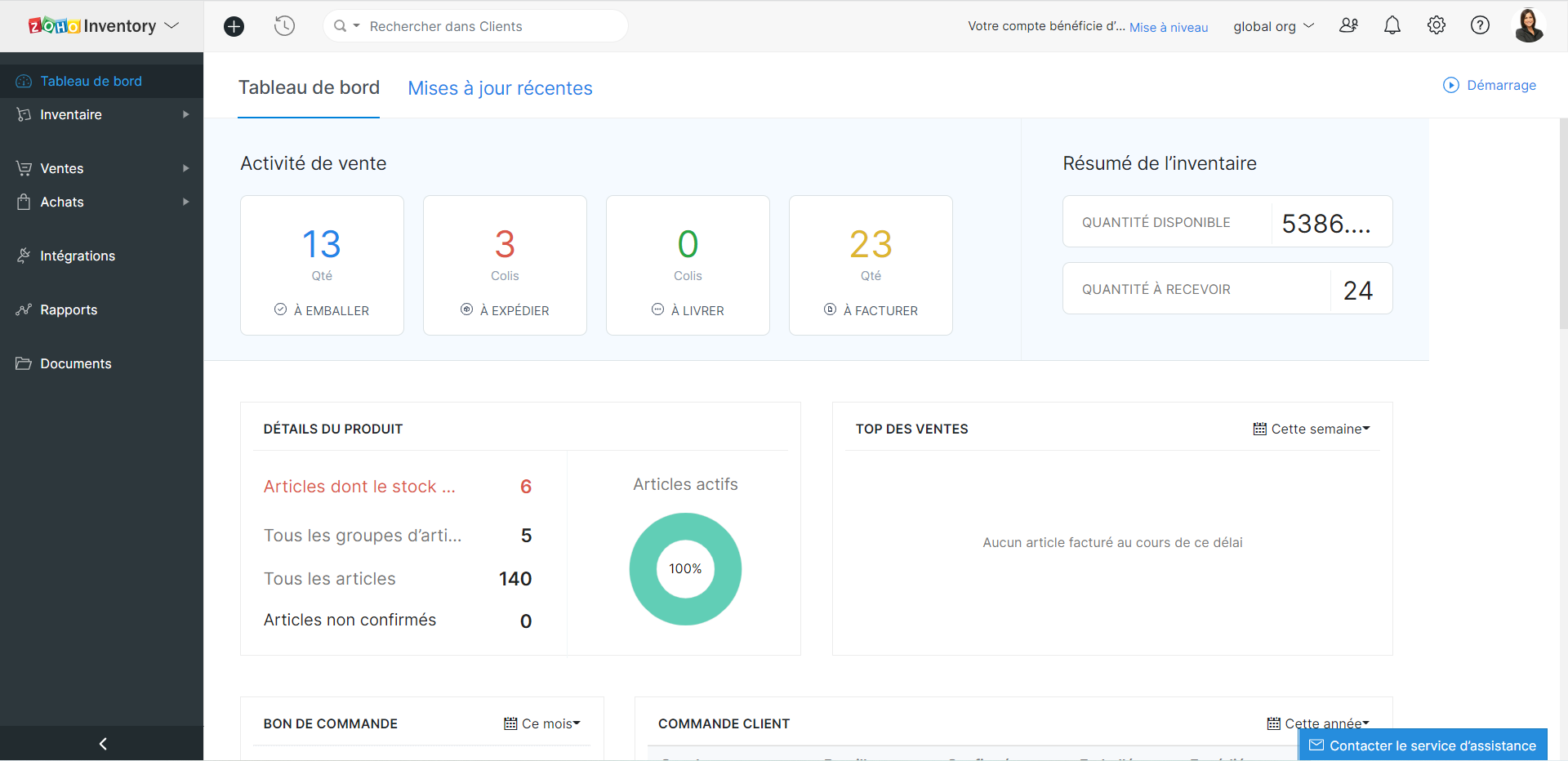
Astuces - Lorsque vous avez intégré Zoho Inventory avec Zoho Books, le tableau de bord de Zoho Inventory inclura également les données de Zoho Books.
Profil de l'organisation
Les informations sur l'organisation sont automatiquement enregistrées lorsque vous faites partie de l'écosystème Zoho One. Néanmoins, pour toute modification ou ajout, vous pouvez le faire depuis l'onglet "Profil de l'organisation" sous l'onglet "Paramètres".
Utilisateurs et rôles
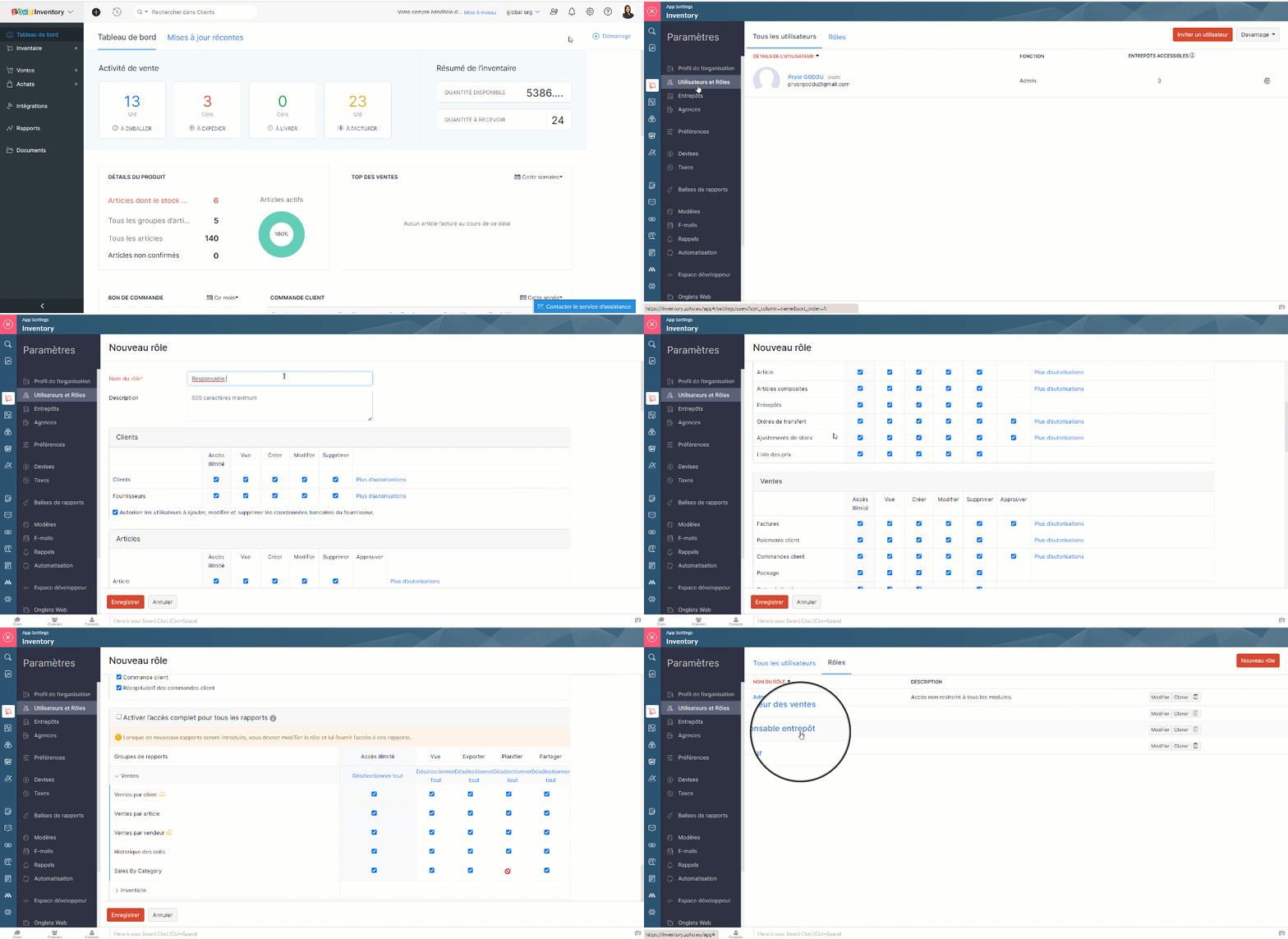
Les utilisateurs peuvent accéder aux modules en fonction de leur rôle. Par défaut, Zoho Inventory vous propose le rôle d'administrateur. Les autres rôles peuvent être créés en définissant les niveaux d'accès et les permissions dans Zoho Inventory.
Créer des rôles d'utilisateur personnalisés
- Paramètres >> Utilisateurs et Rôles >> Rôles >> Nouveau rôle
- Saisisez le nom du rôle, configurez les permissions et enregistrez
Ajouter les utilisateurs
- Paramètres >> Utilisateurs et Rôles >> Tous les utilisateurs >> Inviter un utilisateur
- Saisissez les détails demandés, enregistrez.
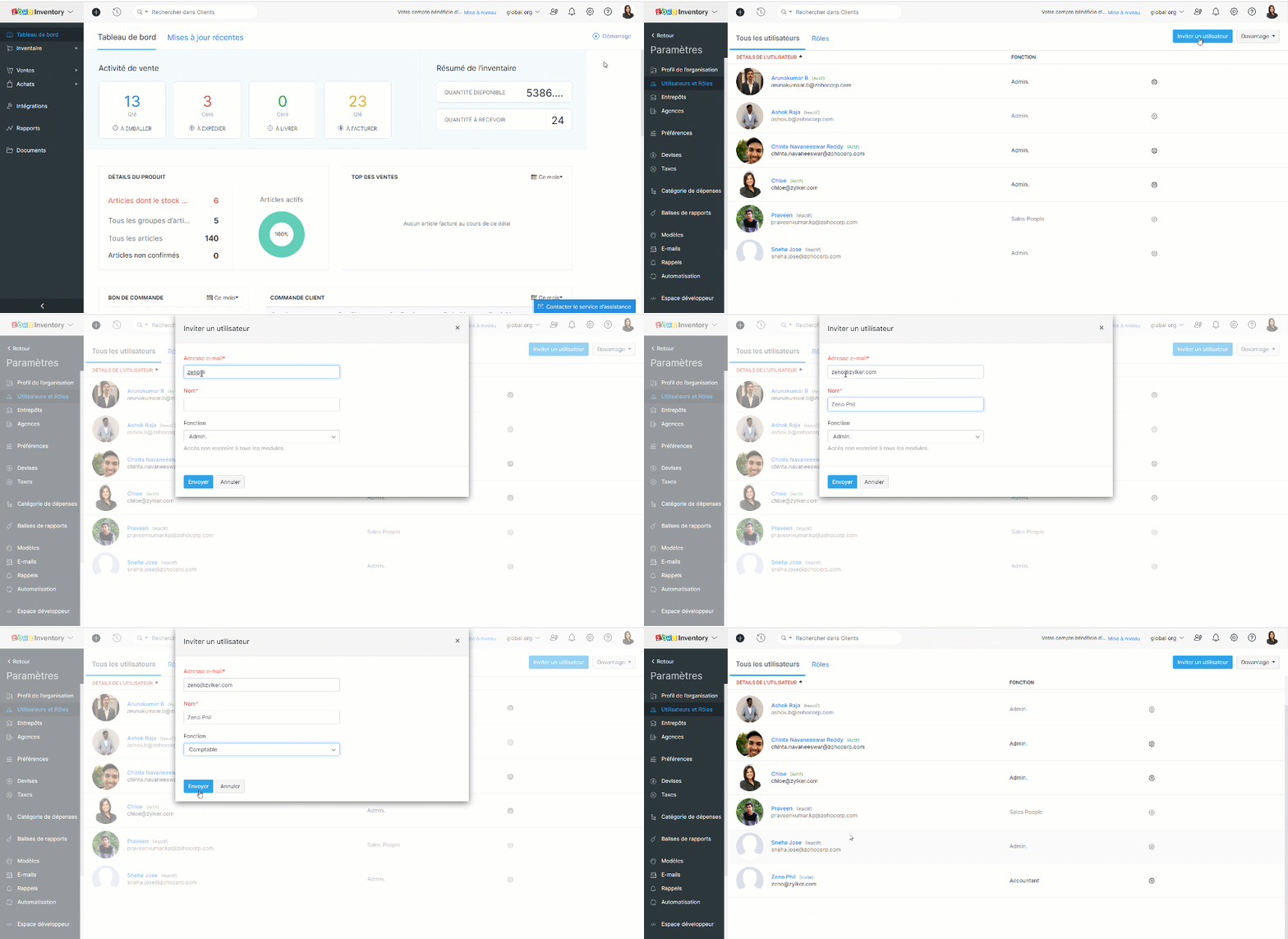
Une invitation est envoyée par e-mail et lorsque l'utilisateur clique sur le lien "Join Account", il peut accéder au portail Zoho Inventory de votre organisation.
Devises
Traitez-vous avec des clients et des fournisseurs de plusieurs pays ? Il est désormais facile de gérer toutes les devises. Il vous suffit de les ajouter ainsi queet les taux de change à votre compte Zoho Inventory.
Devise de base
Il s'agit de votre devise de fonctionnement par rapport à laquelle les taux de change sont proposés dans un pays donné. C'est vous qui la définissez lorsque vous créez votre organisation. La devise de base sera appliquée aux prix de vos articles, à vos transactions (pour autant que le contact ait la même devise) et à vos rapports.
Bon à savoir
Vous ne pouvez pas supprimer votre devise de base à tout moment. Cependant, vous pouvez la changer s'il n'y a pas de transactions dans votre compte Zoho Inventory. Dès que vous commencez à effectuer des transactions, la devise de base est appliquée de façon permanente à votre organisation.
Ajouter une nouvelle devise
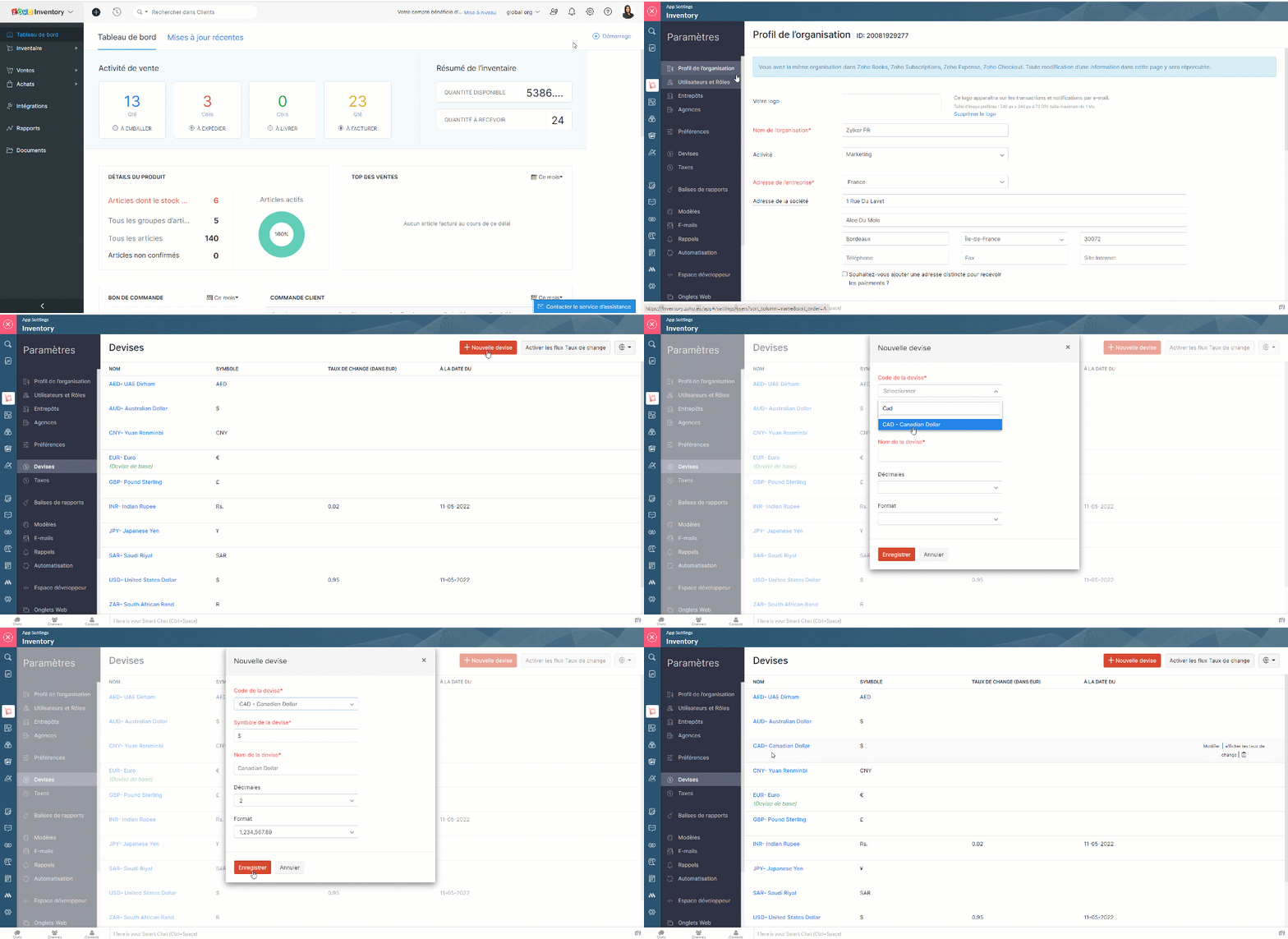
- Zoho Inventory >> Paramètres >> Devises >> + Nouvelle devise
- Choisissez la devise, saisissez la symbole, le nom, décimales et enregistrez.
Associer des devises à un contact
Lorsque vous ajoutez un client ou un fournisseur à vos contacts, vous disposez d'un champ de devise dans lequel vous pouvez associer le contact à une devise spécifique. Dans le cas d'un client ou d'un vendeur du même pays que vous, la devise qui lui est associée sera votre devise de base. Par contre, si le client ou le vendeur est d'un autre pays, vous pouvez associer leur devise respective. Elle sera appliquée aux transactions que vous effectuez avec eux.
Activer le taux de change automatique
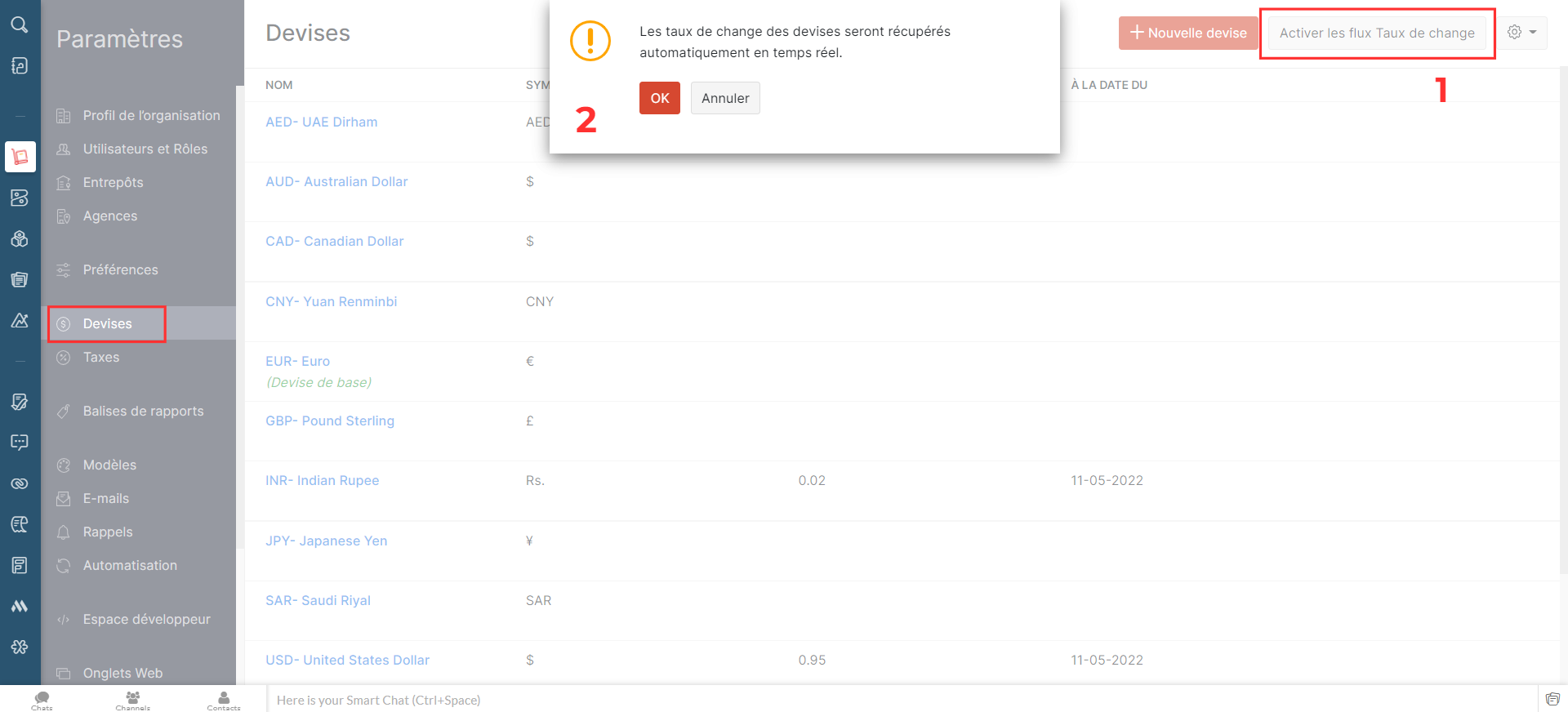
- Paramètres >> Devises >> Activer les taux de change
- Une fenêtre pop-up s'affichera, cliquez sur "OK" et vous avez activé les champs de taux de change.
Ajouter les taux de change de façon manuelle
Pour ajouter le taux de change,
- Passez sur la devise pour laquelle vous souhaitez ajouter le taux de change.
- A droite, cliquez sur "afficher les taux de change"
- Sélectionnez "Ajouter un taux de change"
- Saisissez les détails demandés, enregistrez
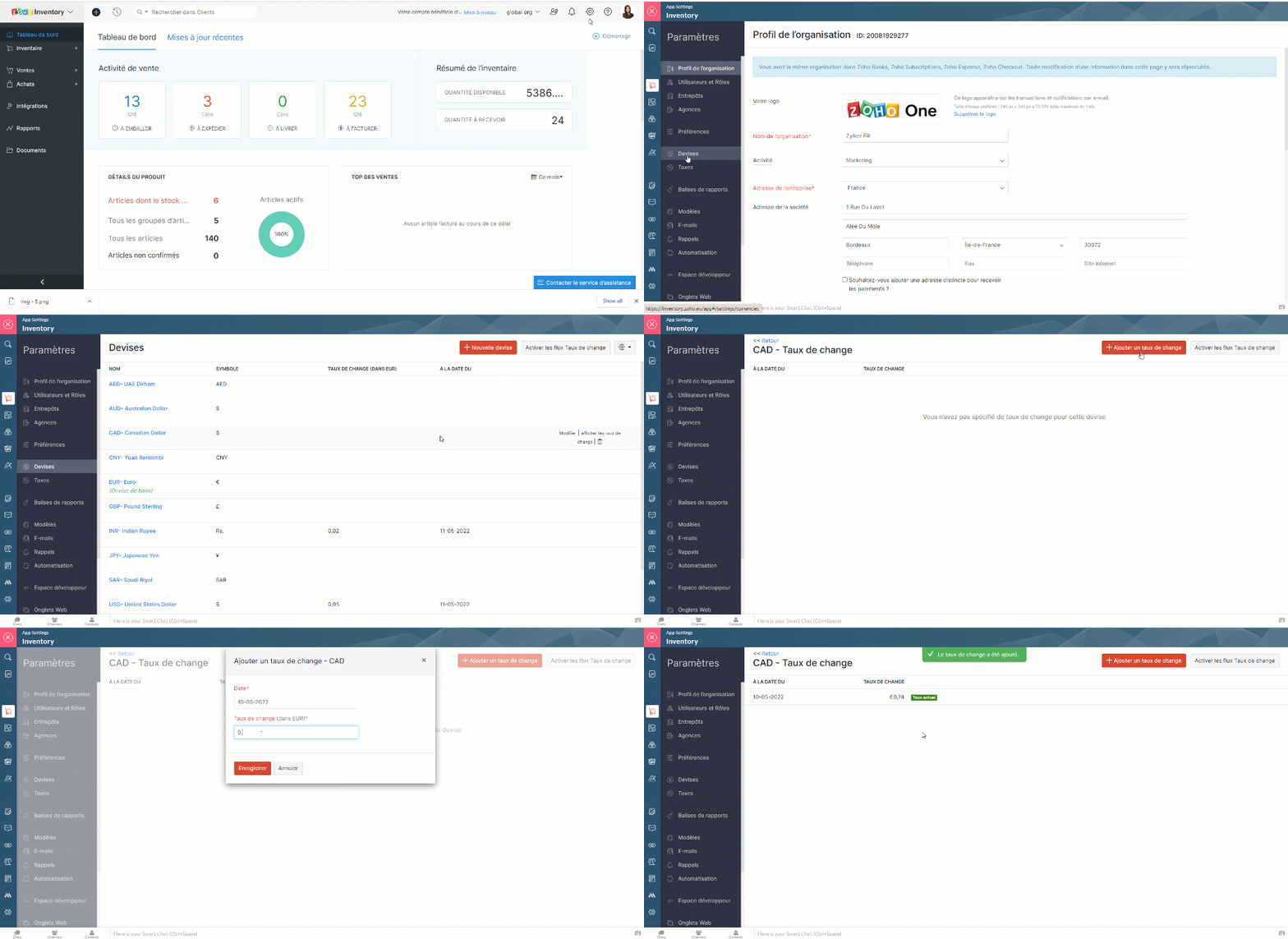
- Cela peut donner un bon aperçu des fluctuations des taux de change. Vous pouvez également supprimer un taux existant à partir de cette page.
Entrepôts
Zoho Inventory vous permet d'ajouter plusieurs entrepôts. Lors de la création de commandes, vous pouvez choisir l'entrepôt de/vers lequel vous voulez expédier (ventes) ou recevoir (achat) le stock. Vous pouvez également transférer des stocks entre vos différents entrepôts.
Gérer les multi-entrepôts
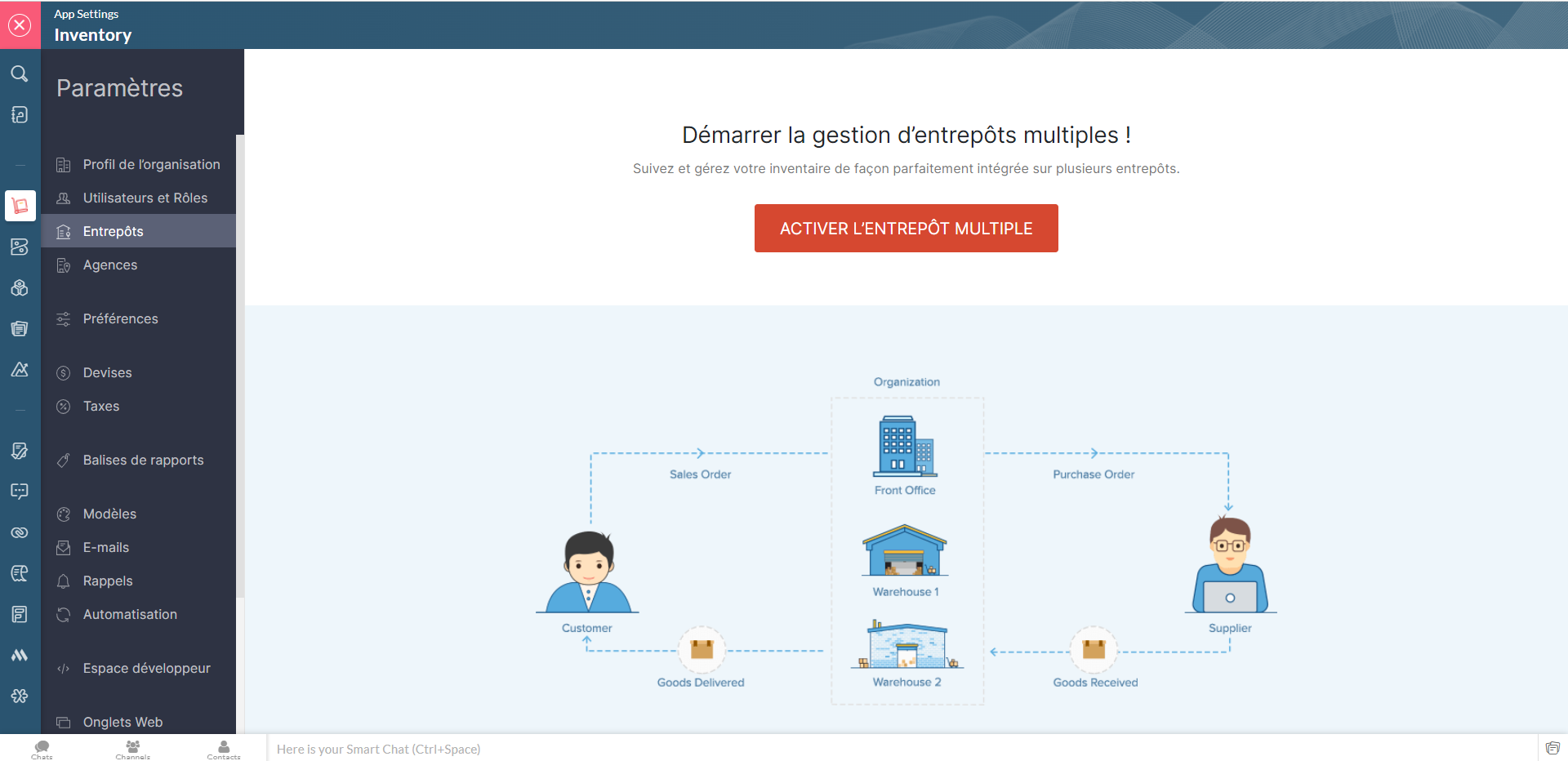
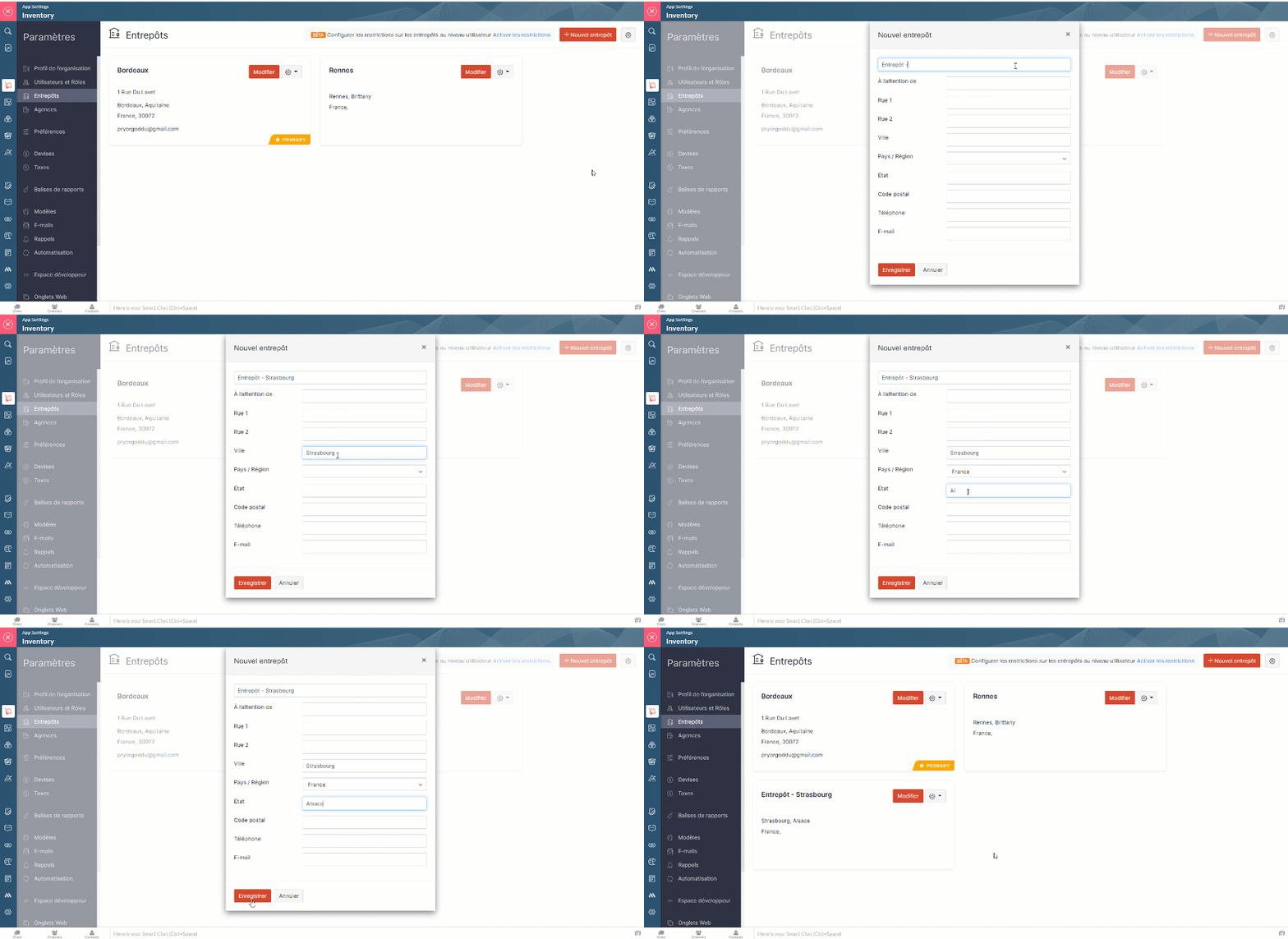
- Zoho Inventory >> Paramètres >> Entrepôts >>Activer l'entrepôt multiple
- Cette section, vous permet d'ajouter les nouveaux entrepôts, de modifier les informations attribuer sous chaque entrepôts, de supprimer celui qui est inactif et de modifier son statut (actif ou inactif).
Limitations des entrepôts
Lorsque vous activez la gestion multi-entrepôts dans Zoho Inventory, tous les entrepôts seront initialement accessibles aux utilisateurs. Pour limiter leurs droits d'accès, vous pouvez mettre en place des limitations et associer les utilisateurs à des entrepôts spécifiques, afin qu'ils ne puissent voir que les détails de ces entrepôts.
Activer les droits d'accès
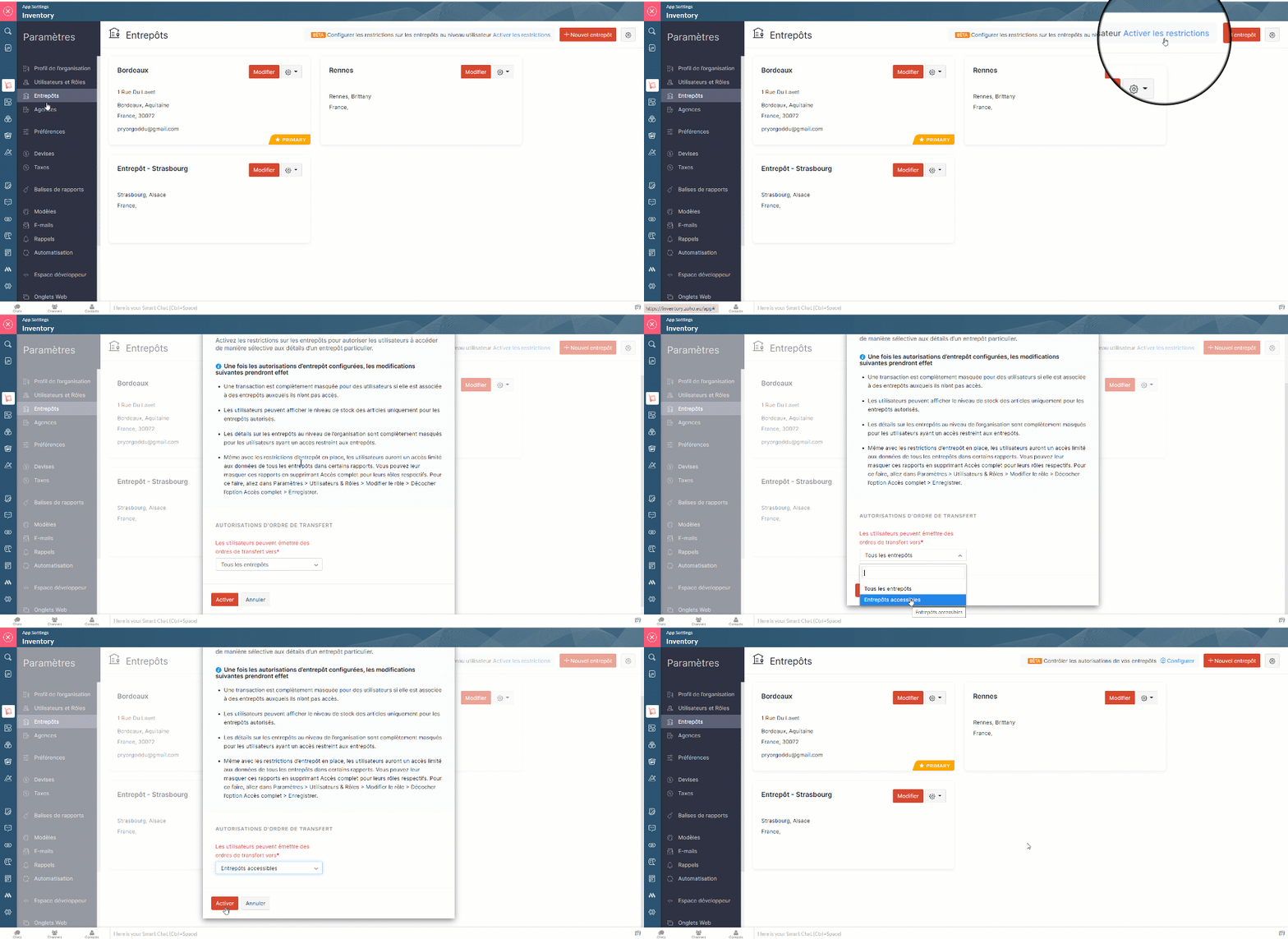
- Paramètres >> Entrepôts >> Activer l'entrepôt multiple >> Activer les limites. Seuls les utilisateurs avec l'accès administrateur peuvent activer cette fonction.
- A partir de la fenêtre pop-up qui s'affiche, choisissez si les utilisateurs peuvent émettre des ordres de transfert vers tous les entrepôts ou seulement vers ceux qui sont autorisés.
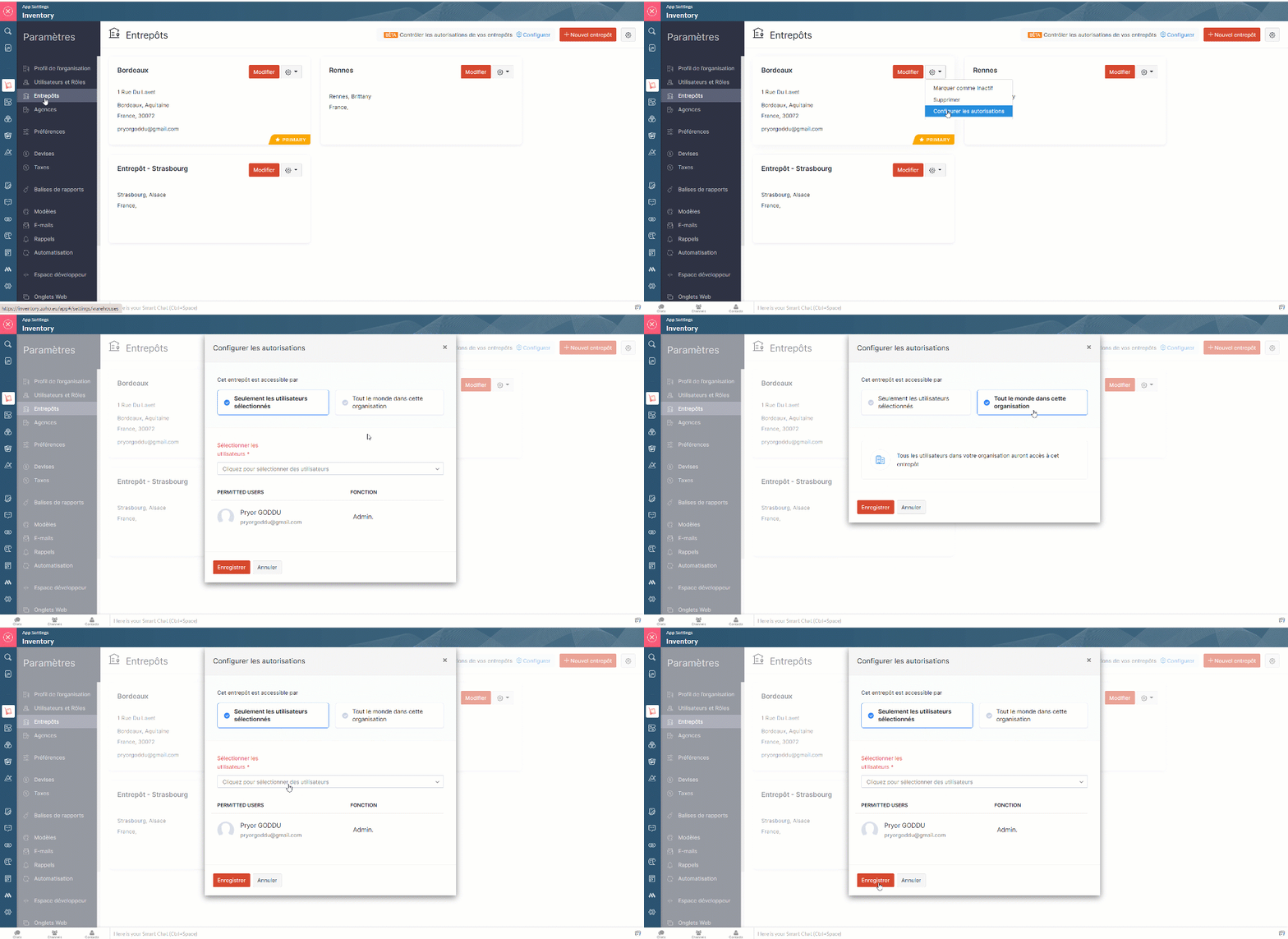
- Allez sur "Configurer les autorisations" depuis l'onglet "Paramètres" à partir d'entrepôt particulier.
- Dans la fenêtre pop-up, sélectionnez l'option "Seulement les utilisateurs sélectionnés" et depuis la liste déroulante attribuez les utilisateurs auxquels vous souhaitez donner accès à cet entrepôt précis.
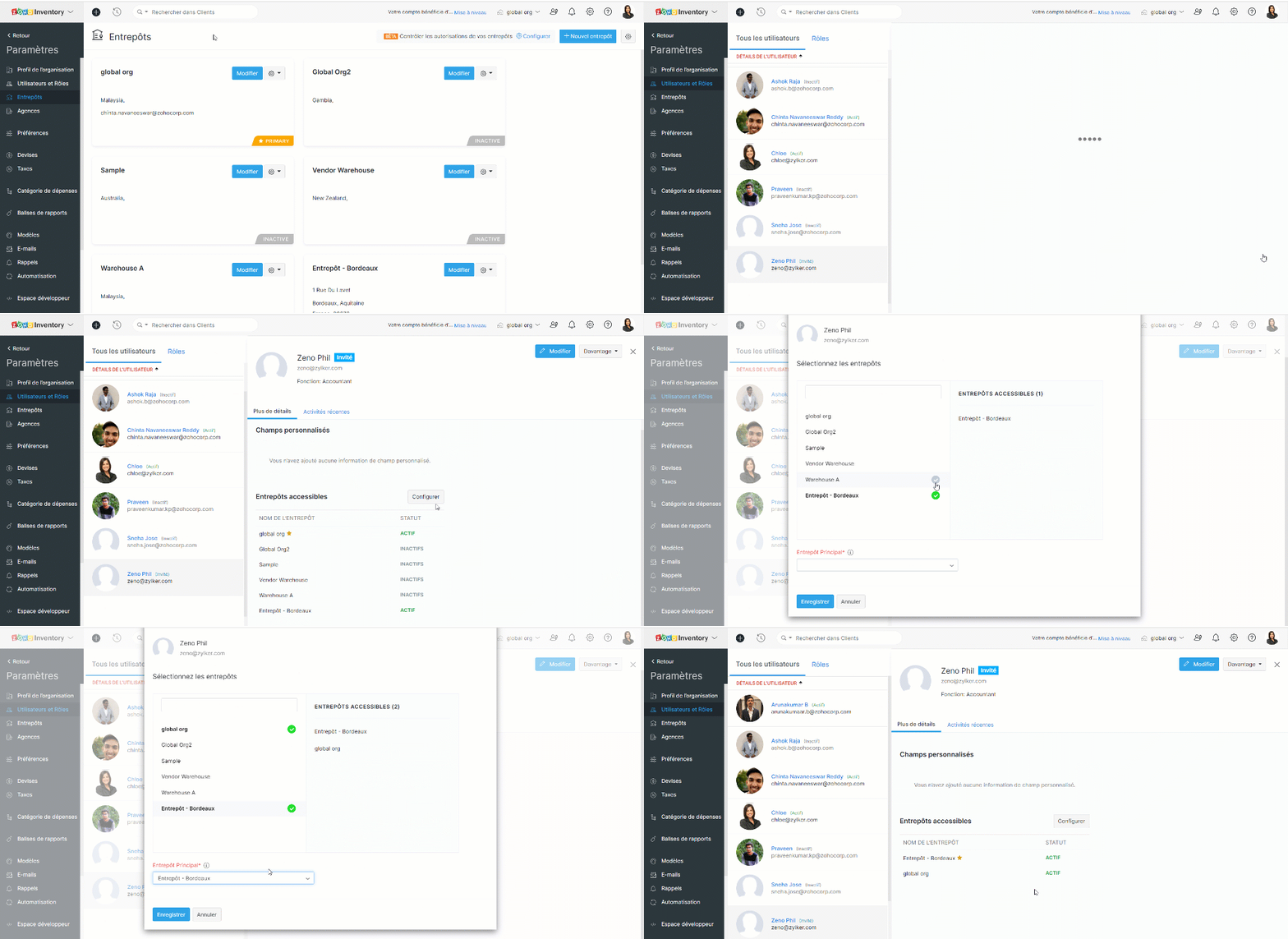
- Vous pouvez également attribuer les entrepôts depuis la section de "Utilisateurs et Rôles".
Lorsque vous avez configuré les autorisations, les changements ci-dessous sont effectifs :
- Le tableau de bord et les rapports restent non modifiés pour les utilisateurs ayant accès à tous les entrepôts, tandis que, les utilisateurs restreints peuvent uniquement voir les informations sur les ventes et les achats dans le tableau de bord et les rapports des entrepôts autorisés.
- Les utilisateurs peuvent visualiser les transactions dans la page de liste si celle-ci inclut au moins un entrepôt autorisé. Cependant, ils ne peuvent pas ouvrir une transaction s'ils n'ont pas accès à tous les entrepôts de la liste.
- Les utilisateurs à accès limité ne peuvent pas voir les détails du stock global dans la page de la liste des articles.
- Les organisations qui ont des limitations d'entrepôt activées sont indiquées par une icône de verrou à côté de leur nom d'organisation.
- Les utilisateurs non admins ayant les droits de créer/modifier des entrepôts peuvent :
- Créer des entrepôts et y attribuer des utilisateurs autorisés.
- Modifier la liste des utilisateurs autorisés pour les entrepôts auxquels ils ont accès.
L'équipe Zoho France
Access your files securely from anywhere
New to Zoho Recruit?

Zoho Developer Community
New to Zoho LandingPage?
Zoho LandingPage Resources
New to Zoho Survey?
New to Zoho CRM Plus?
Deliver unforgettable customer experiences
New to Zoho CRM Plus?
Deliver unforgettable customer experiences
New to Zoho Marketing Plus?
Everything you need to run your marketing
New to Zoho Marketing Plus?
Everything you need to run your marketing
New to Bigin?





Topic Participants
Kinjal Lodaya
Sticky Posts
Collaboration sans faille avec Zoho One
Bonjour à tous, Dans cet article nous allons voir comment Zoho One permet une collaboration à différents niveaux . La façon dont nous travaillons évolue. À mesure que les entreprises se mondialisent, la plupart des activités sont menées en équipe.
New to Zoho TeamInbox?
Zoho TeamInbox Resources
Zoho CRM Plus Resources
Zoho Books Resources
Zoho Subscriptions Resources
Zoho Projects Resources
Zoho Sprints Resources
Qntrl Resources
Zoho Creator Resources
Zoho CRM Resources
Design. Discuss. Deliver.
Zoho Show Resources

Get Started. Write Away!
Writer is a powerful online word processor, designed for collaborative work.
Zoho CRM コンテンツ
-
オンラインヘルプ
-
Webセミナー
-
機能活用動画
-
よくある質問
-
Ebook
-
-
Zoho Campaigns
- Zoho サービスのWebセミナー
その他のサービス コンテンツ
Nederlandse Hulpbronnen

ご検討中の方
Recent Topics
Adding non-Indian billing address for my Zoho subscription
Hey Need help with adding a non-Indian billing address for my Zoho subscription, trying to edit the address to my Singapore registered company. Won't let me change the country. Would appreciate the help. Regards, RishabhMove record from one custom module to another custom module
Is it possible to create a button or custom field that will transfer a record from one custom module to another? I already have the 'Leads' module used for the Sr. Sales department, once the deal is closed they convert it to the 'Accounts' module. I would like to create a 'Convert' button for a custom module ('Locations') for the department that finds locations for each account. Once the location is secured, I want to move the record to another custom module called 'Secured Locations'. It's basicallyNotes Not Saving
Hello, My notes are continuously not saving. I make sure to save them, I know the process to save them. It is not operator error. I go back into a Leads profile a while later and do not see the previous notes that I have made. I then have to go back and do unnecessary research that would have been in the notes in the first place. Not a good experience and it is frustrating. Slows me down and makes me do unnecessary work. Please resolve. As a quick heads up, deleting cookies is not a fixPrefill form with CRM/Campaigns
I created a form in zForms and created prefill fields. I added this to the CRM and selected the fields so when sending from the CRM, the form works great. However, I want to use the same form in Campaigns and I want it to pull the data from CRM (whichTriggering a campaign automation from a Form
I used Forms to create a lead form that is accessed by a button on my website. The field information flows into the CRM. However, I am trying to figure out how to use Campaign automations to start a workflow (series of campaign emails) that is triggeredEmployee Appraisal Applicability - Why is Date of Joining Hard-Coded?
In the new (to me, at least) Performance Appraisal Cycle wizard, it's possible to set criteria to determine for whom the appraisal process should apply. This makes sense on its face. However, one MUST use the Date of Joining criterion as a filter. WhyFormula fields
Zoho People now supports formula fields. This post illustrates it. Formula fields are fields whose value is calculated instead of being entered by the user. Using this, number, decimal and date manipulations can be done. The value of this field could be numeric or date depending on the output of the formula. In date manipulations, the result will be given in milliseconds, which you can format as per you need. The operators we support are +, - , *, /. Formula fields get recalculated automaticallyCopy paste from word document deletes random spaces
Hello Dear Zoho Team, When copying from a word document into Notebook, often I face a problem of the program deleting random spaces between words, the document become terribly faulty, eventhough it is perfect in its original source document (and withoutIs it possible to use module field filters via URL parameters?
It would be really convenient if I could quickly link to a filter. For reference, this is the filter functionality I'm referring to: https://help.zoho.com/portal/en/kb/crm/customize-crm-account/advanced-filters/articles/advanced-filters For example: MyTransitioning FESCO Bill Project to Zoho Sheets and Integration Options
Hello Zoho Support, I'm considering transitioning my FESCO bill project from Google Sheets to Zoho Sheets and wanted to know if there are integration options to seamlessly migrate our existing work. You can view our platform here, any guidance would beSupport for Custom Fonts in Zoho Recruit Career Site and Candidate Portal
Dear Zoho Recruit Team, I hope you're doing well. We would like to request the ability to use custom fonts in the Zoho Recruit Career Site and Candidate Portal. Currently only the default fonts (Roboto, Lato, and Montserrat) are available. While theseLightbox Pop-up form
I would like to embed my form using the lightbox pop up. I don't want it to load automatically. I want it to load when some clicks the button. I can see this option, however when I use the "show pop-up launch button" on the website, the button automaticallyData Processing Basis
Hi, Is there a way to automate the data processing for a candidate every time an application arrives from job boards, without requiring manual intervention? That is, to automatically acquire consent for data processing. I've seen a workflow that allowsLightbox Pop-up form
I would like to embed my form using the lightbox pop up. I don't want it to load automatically. I want it to load when some clicks the button. I can see this option, however when I use the "show pop-up launch button" on the website, the button automaticallyCustomer Management: #5 Never Let the Customer Slip
When Rahul started Knight's Watch Consulting, his focus was simple: deliver good work and keep clients happy. He offered one-time consulting projects, monthly advisory retainers and usage-based support for growing clients. Business was steady, and customersDeluge date time issue
The deluge function info zoho.currentdate.toString("MMM/YYYY") returns Dec 2026 instead of 2025Zoho Projects Android and iOS app update: Mobile device permission based on user profiles
Hello everyone! We have brought in support for mobile device permissions based on the user profiles which are configured in organization level. Administrators can now configure the permissions on the web app(projects.zoho.com) by following the steps mentionedtreatment for rehires
Hello, we are aware of the fact that Zoho People at the moment does not has a provision for rejoining exited employees. But is there any quick fix or hack to this? It will be appreciated a lot.Zoho Projects Android and iOS app update: Timesheet module is now renamed as 'Time Logs', delete option has been renamed to 'Trash'.
Hello everyone! We have now renamed the Timesheet module as Time Logs and the delete option as 'Trash' on the Zoho Projects Android and iOS app. Time Logs Android: Time Logs iOS: Trash option Android: Trash option iOS: Please update the app to the latestZoho Mail app update: Manage profile picture, Chinese (Traditional) language support
Hello everyone! In the latest version (v3.1.9) of the Zoho Mail app update, we have brought in support to manage profile picture. You can now set/ modify the profile picture within the app. To add a new profile picture, please follow the below steps:Reminders for Article Approval
Is there a way to send reminders for approvers to review articles and approve/deny them? I'm not seeing that option anywhere.To print Multiple delivery notes in batches
In Zoho Books, we can print a Delivery Note from an Invoice using the Print Delivery Note option, but it is non-editable and always prints all line items from the invoice. Our requirement is to deliver invoiced items in batches and print delivery notesAdd Full-Screen Viewing for Quartz Recordings in the Client Interface
Hi Zoho Team, We would like to request an enhancement to the Zoho Quartz client interface when viewing submitted recordings. Current Limitation: When viewing a Quartz recording from the client (user) interface, there is currently no option to switch the2025 Recap: A Year to Remember | Zoho Inventory
Important Update : Pipedrive deprecated fields no longer supported in Zoho Analytics
Dear Pipedrive users, We would like to inform you about a recent update related to your Pipedrive integration with Zoho Analytics. The Pipedrive team has deprecated certain fields from their application. You can find more details in the official PipedriveProduct Updates in Zoho Workplace applications | November 2025
Hello Workplace Community, Let’s take a look at the new features and enhancements that went live across all Workplace applications this November. Zoho Mail Format comments easily using Slash Commands With Slash commands, you can easily format text, insertRight-Click Pipeline to Open in New Tab
Please add the ability to right-click on a pipeline to open it in a new tabAdjusting Physical Inventory
Not getting very far with support on this one, they say they are going to fix it but nothings happened since November. Please give this a thumbs up if you would like to see this feature or comment if you have some insight. Use Case: Inventory set to beSending automated messages that appear in the ticket's conversation thread
Good morning, esteemed Zoho Desk community, warm greetings Today I am here to raise the following problem, seeking a solution that I can implement: I need to implement an automation that allows me to send reminder messages to customers when I am waitingsync views to sheet
Im looking to sync my views aka reports in analytics to zoho sheets, when data is updated in analytics it also should be updated in sheets, till now zoho sheets only offer raw data connection and it is not enough as these reports are difficult to re-doHow to update the Status in a custom module?
Hi, I have a custom module "cm_payment_registry" in Billing, I am trying to change the status which is "Draft" with: array = {"custom_status":"Approved"}; zoho.billing.update("cm_payment_registry",organization.get("organization_id"), XXXXXXXXXXXXXX, array,"connectionname");Replace Zoho Invoice with QuickBooks
We are implementing Zoho FSM for a cleaning business in the US with 50+ field workers. This business has been using Quickbooks for accounting for decades and will not migrate to Zoho Books. A major issue in the integration is the US sales tax calculation.2025 Highlights: A Year of Steady Progress and Significant Developments
As we come to the end of 2025, let's take a moment to reflect on the significant progress and developments we've made to improve your travel and expense management. In the Spotlight Introducing Online Booking (US edition only - Early access) Enable onlinee-mail bloqueado
Estou com meu e-mail lucas@peplus.me bloqueado, preciso desbloquear para retorno de usos em minhas atividades.Function #42: Show the actual rate of items on invoices
Hello everyone, and welcome back to our series! In Zoho Books, you have the ability to create Price Lists, wherein you can mark up and mark down the item rates by a specific percentage or set custom rates. Generally, when you apply a price list to anAbility to Set Text Direction for Individual Cells in Zoho Sheet
Dear Zoho Sheet Team, We hope you are doing well. We would like to request an enhancement in Zoho Sheet that allows users to set the text direction (right-to-left or left-to-right) for individual cells, similar to what is available in Google Sheets. UseNew in CRM: Dynamic filters for lookup fields
Last modified on Oct 28, 2024: This feature was initially available only through Early Access upon request. It is now available to all users across all data centers, except for the IN DC. Users in the IN DC can temporarily request access using this formWarehouse fast processing
Hey guys, would anyone be interested in something like the attached image ? If there's any interest I'd be willing to develop it further for others to use, it's much faster than using Zohos native solutions, it can part pack, pack in full, part ship,Translation of Tooltip Messages
The descriptive help messages should be available to provide translations for.Can I create a CODE 128 custom field for my items in Zoho Inventory and then use it for generating Sales Orders?
Can anyone helps me, I don't want to use the SKU code for scanning my products. Because all my products have a CODE-128 label attached.Next Page