Bidirectional sync between Zoho Bookings and Zoho CRM - Part 1
Hey, community members!
The default integration between Zoho CRM and Zoho Bookings is unidirectional, which means that any appointments booked, rescheduled, or deleted in Zoho Bookings will be reflected in Zoho CRM. However, any modifications made to events in Zoho CRM that originated from Zoho Bookings will not be reflected back in Zoho Bookings. Hence, as we're announcing in this community post, we've made the sync bidirectional.
This community post will cover the process of configuring appointment bookings from Zoho CRM in Zoho Bookings, as well as managing appointment statuses such as Canceled, No Show and Completed. We have addressed the rescheduling action in a separate post. To view it, please click on the following link: Reschedule Action
This community post will be beneficial for active Zoho CRM users who handle all their meetings within Zoho CRM. Additionally, you can use this community post as a reference to explore various automation possibilities tailored to your business requirements. For instance, with this post's guidance, when you update a booking's status field to "Completed" in Zoho CRM, it will automatically sync with Zoho Bookings and trigger an automated "Mark as completed" email to customers. This enhancement will improve your Zoho Bookings and Zoho CRM synchronization experience, making appointment management easier.
Prerequisites of bidirectional sync:
- Zoho Bookings Premium subscription
- Zoho CRM paid subscription
- Enable Zoho CRM integration within Zoho Bookings
The purpose of enabling the Zoho CRM integration within Zoho Bookings is to transfer booking details from Zoho Bookings to Zoho CRM. In this configuration, the mandatory field is the Booking ID, which is passed from Zoho Bookings to Zoho CRM through the integration. Whenever an appointment is booked, customer details will be sent to the designated CRM module, and a corresponding record will be created in the Meetings module within Zoho CRM, which will help in automating the workflow.
Here's the complete demo video that covers all the configurations discussed in the community post below:
Timestamps for your reference:
0:35 - Purpose of this community post
Here's the complete demo video that covers all the configurations discussed in the community post below:
Timestamps for your reference:
0:35 - Purpose of this community post
1:26 - Zoho CRM plugin installation
4:43 - Custom field creation
7:20 - Function creation
9:22 - Connection creation
10:24 - Configuring arguments
11:06 - Workflow creation
13:33 - Argument mapping
14:41 - Output verification
17:41 - Conclusion
How we're approaching this bidirectional sync
1. Booking an appointment from Zoho CRM
Install the Zoho Bookings for Zoho CRM plugin within your Zoho CRM application. This plugin enables the creation of a "New Appointment" button within the Zoho CRM Leads and Contacts module, which enables you to select the desired booking page you wish to open. You can choose from various workspace, service, or staff booking pages. After configuration, you can initiate the process of scheduling bookings directly from within your Zoho CRM account.
- Guide on Zoho Bookings and Zoho CRM plugin installation: Booking page selection for Zoho CRM plugin
2. Booking status: Completed or No Show
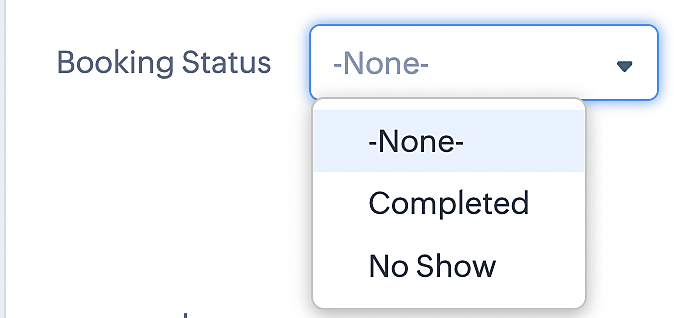
To update a booking's status (Completed or No Show), we've added a new picklist properties field named "Booking Status" in the Meetings module and configured it with two options: "completed" and "no show". Depending on the booking status chosen, the corresponding booking in Zoho Bookings will be updated.
- Details on how to add a custom field to the Meetings module : Customizing modules
- Here's a video that demonstrates how to add a field to a module in Zoho CRM: Adding fields
Reference:
3. Booking status: Canceled
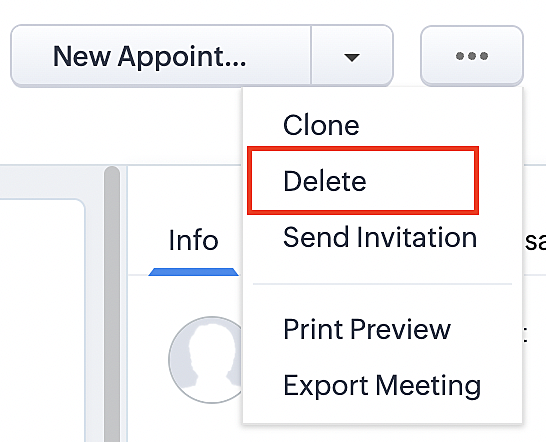
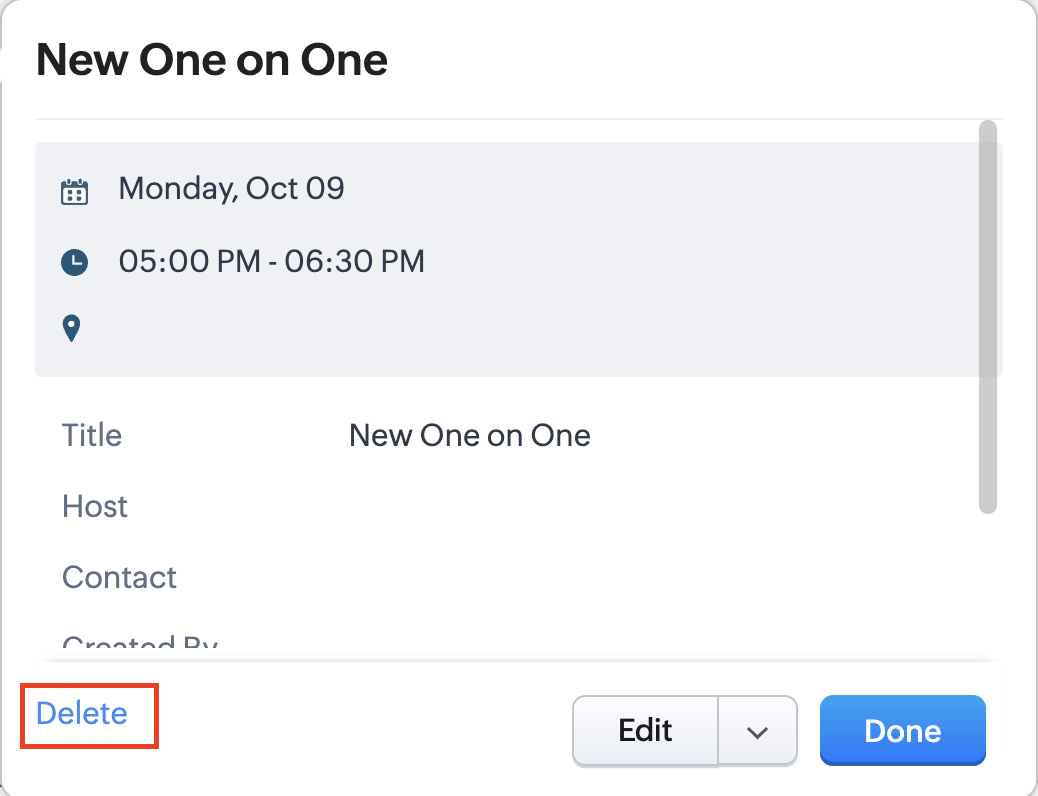
Whenever a meeting is deleted from the Meetings module, the corresponding booking in the Zoho Bookings app will also be canceled automatically. The meeting can be deleted either from the Meetings module or directly from the calendar.
To enable bidirectional sync between Zoho CRM and Zoho Bookings
Complete these steps in Zoho CRM.
Step 1: Creating connections
You first need to establish a connection between Zoho CRM and Zoho Bookings. Zoho Bookings is listed as one of the default connections in Zoho CRM, making it simple to set up. Select the Zoho Bookings connection, define the connection name and scope, and you'll be all set. This connection will enable you to link both applications and facilitate the seamless transfer of data.
Read here for more details on how to create connection in Zoho CRM: Connections
Step 2: Creating functions
In this context, we'll be creating three functions: one for marking appointments as completed, another for canceling appointments, a third for marking appointments as no shows, and a fourth for rescheduling appointments. For each function, we must also configure arguments, which pass values or data into a function when making a call. Here, we'll pass the booking ID to the function as an argument to update the necessary booking status.
i. To create a function for marking appointments as completed:
1. Go to Setup > Developer Space > Functions.
2. In the Functions page, click + Create New Function.

3. Configure the function name, display name, and description.
4. Set the category as automation.
This opens the Deluge script page.
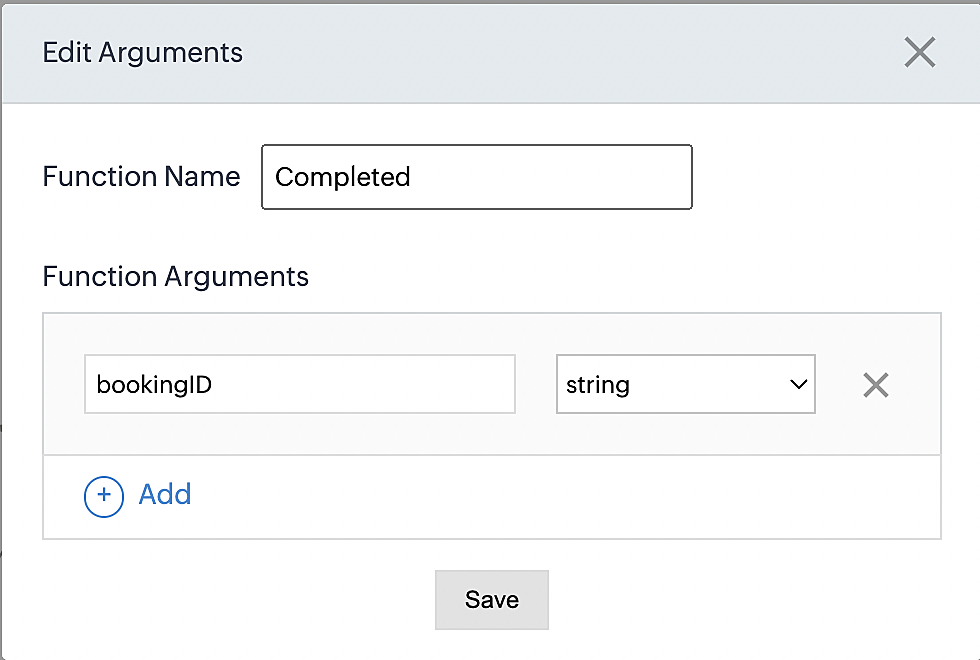
5. Next, configure the function's arguments:
A. Click on Edit Arguments on the Deluge script page.

B. Set the Parameter Name as bookingID. (Please note that the "bookingID" value is case sensitive and must match
the term used in the code).
C. Set the type as string.
Reference:
Please configure the below code in the Deluge script page.
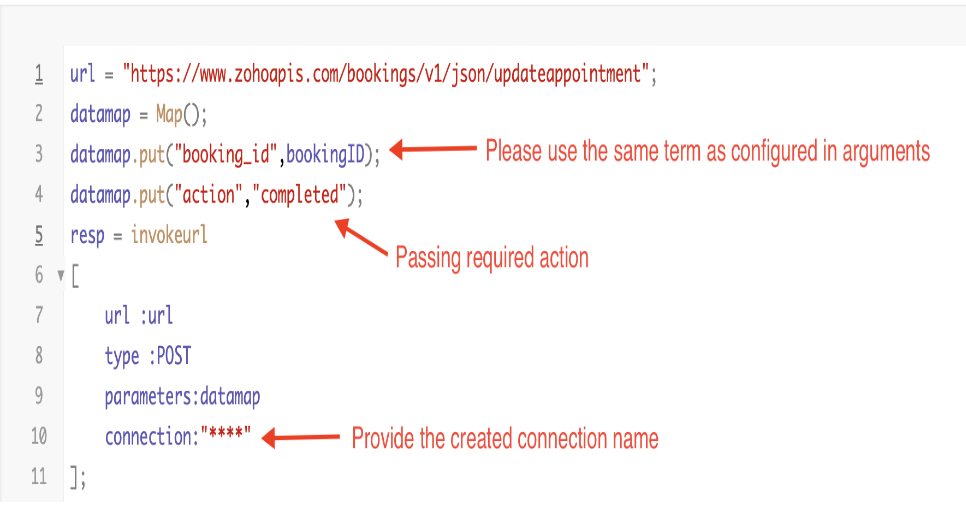
By completing these steps, we've configured a function that will mark appointments as completed.
ii. To create a function for marking appointments as no shows
1. Go to Setup > Developer Space > Functions.
2. In the Functions page, click + Create New Function.

3. Configure the function name, display name, and description.
4. Set the category as automation.
This opens the Deluge script page.
5. Next, configure the function's arguments:
A. Click on Edit Arguments on the Deluge script page.

B. Set the Parameter Name as bookingID. (Please note that the "bookingID" value is case sensitive and must match
the term used in the code).
C. Set the type as string.
Reference:
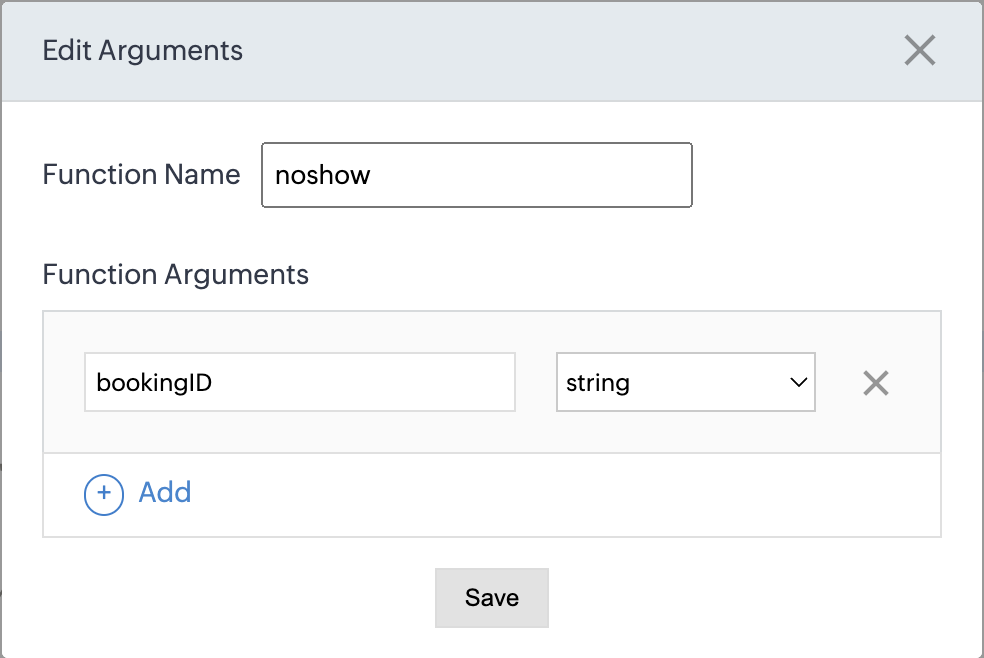
Please configure the below code on the Deluge script page.
Code link: No show
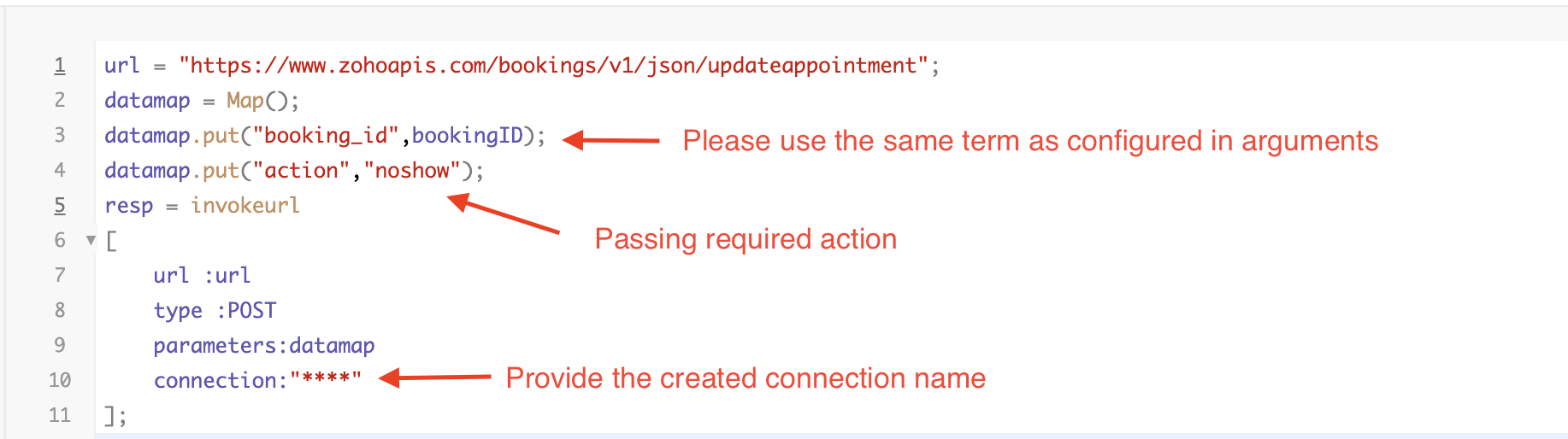
By completing these steps, we've configured a function that marks appointments as no shows.
iii. To create a function for marking appointments as canceled
1. Go to Setup > Developer Space > Functions.
2. In the Functions page, click + Create New Function.

3. Configure the function name, display name, and description.
4. Set the category as automation.
This opens the Deluge script page.
5. Next, configure the function's arguments:
A. Click on Edit Arguments on the Deluge script page.

B. Set the Parameter Name as bookingID. (Please note that the "bookingID" value is case sensitive and must match
the term used in the code).
C. Set the type as string.
Reference
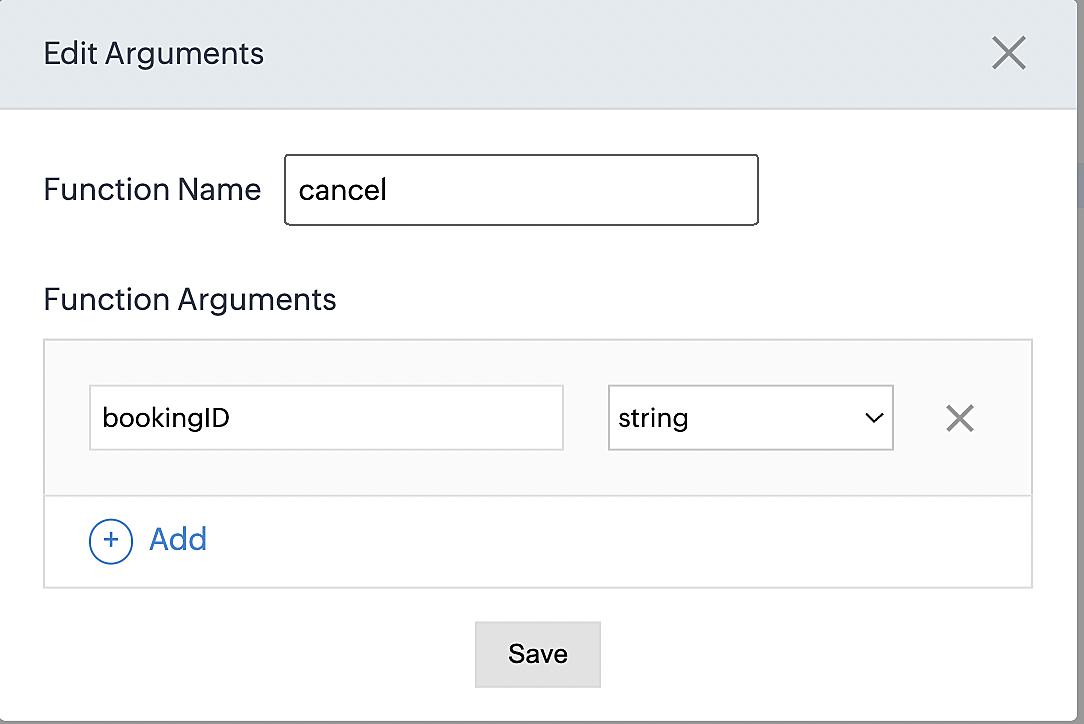
Please configure the below code on the Deluge script page.
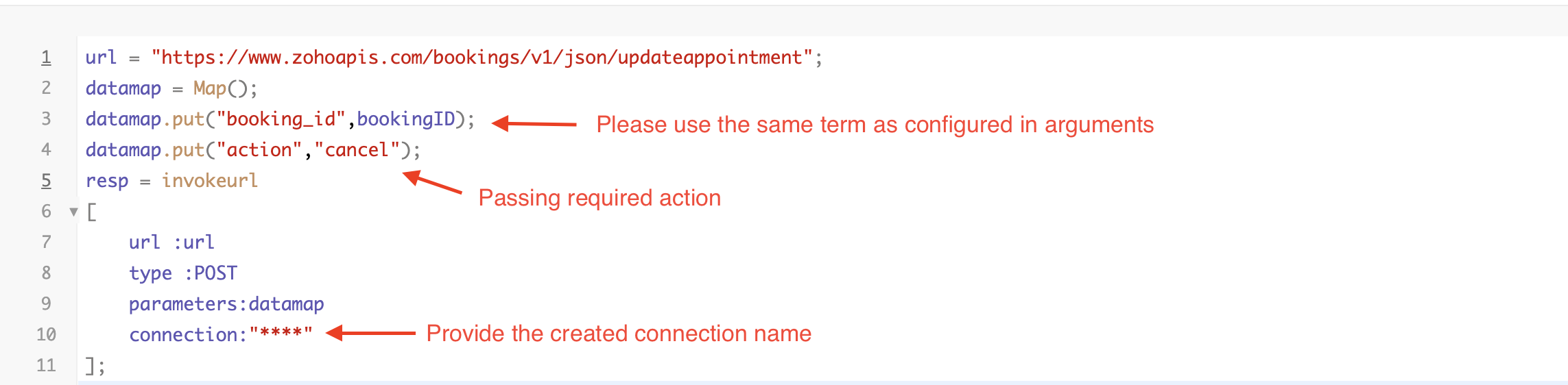
By completing these steps, we've configured a function that marks appointments as canceled.
Code explanation
Below is an explanation of the code that covers all the configurations present in the three functions mentioned above (cancel, mark as completed, and mark as no show).
Line 1: Based on the Zoho Bookings account's data center, we're setting up the API endpoint URL configuration.
Lines 2 - 4: To update appointments, we utilize the Zoho Bookings API. Within the update appointment API, there are two mandatory fields that need to be included: BookingID and action (completed/cancel/noshow).
Lines 5 - 10: We use the invokeURL task for API calls. To learn more about the invokeURL task, please refer to the following document: InvokeURL task for API calls
Now, let's proceed and learn about the process of creating a workflow and linking the established functions to it. This will enable us to automate the entire appointment status updating process.
Step 3: Creating a workflow
Workflow rules are sets of actions (email notifications, tasks and field updates) that are executed when specified conditions are met. Here, we'll generate workflow rules for each action to activate the respective function, thereby automating the appointment status updating process.
i. Creating a workflow for "canceling" appointments in Zoho Bookings when a meeting is deleted in Zoho CRM
Part 1: Creating the rule
1. Go to Setup > Automation > Workflow Rules.
2. In the Workflow Rules page, click Create Rule.

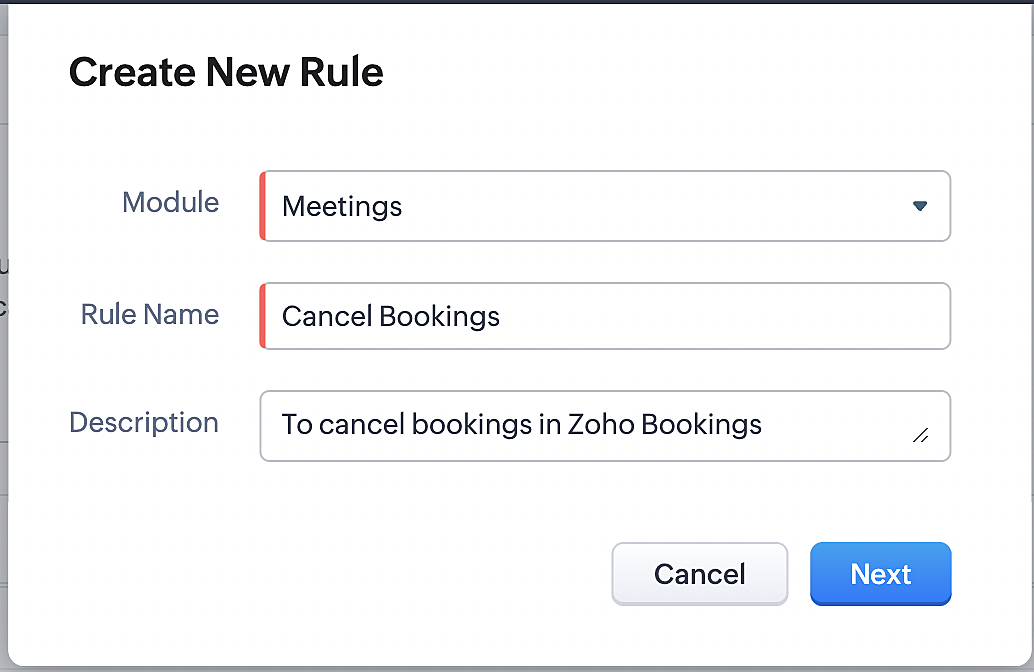
3. Select "Meetings" under Module and configure rule name and description as required.
More details: Create Rule
Reference:
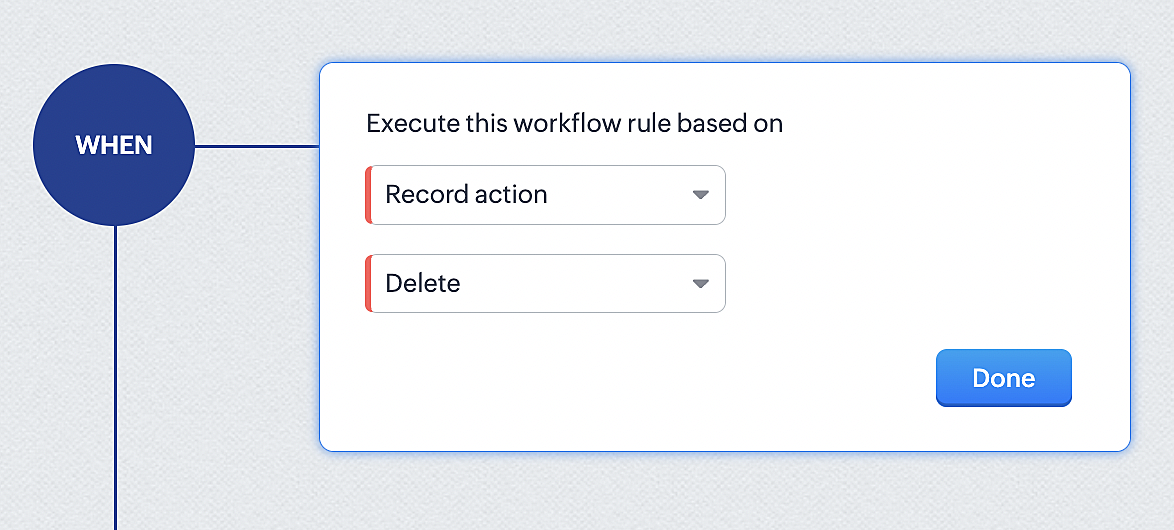
1. Select Record Action > Delete > Done to execute the rule when meetings are deleted.
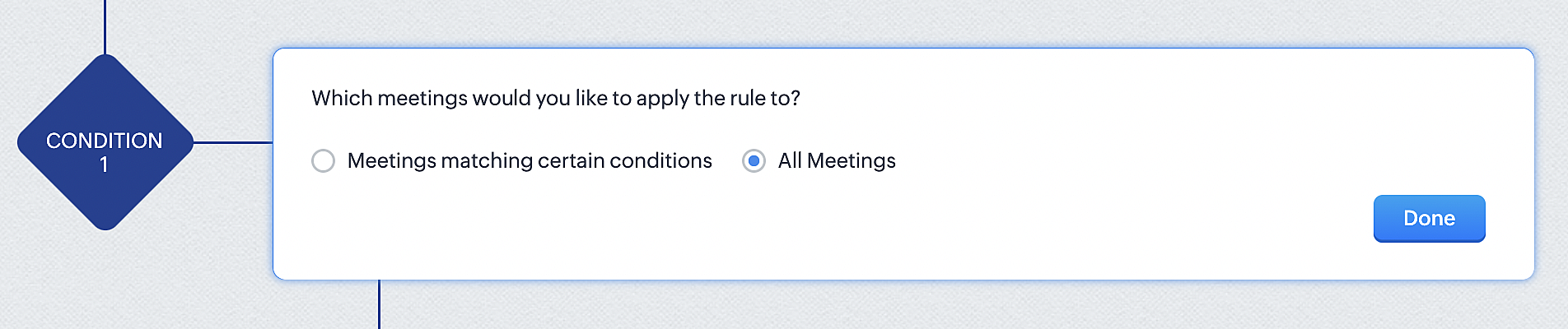
2. Configure condition > All Meetings.
3. Instant Actions > Function.
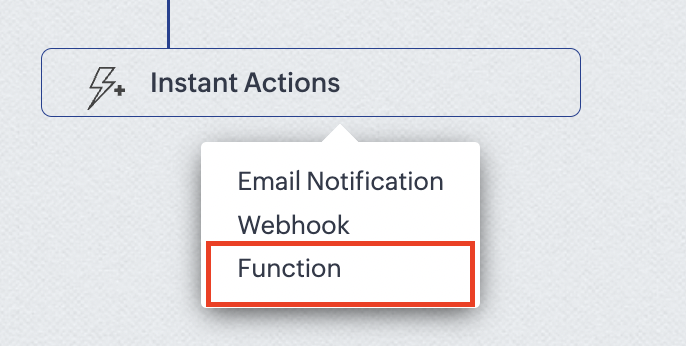
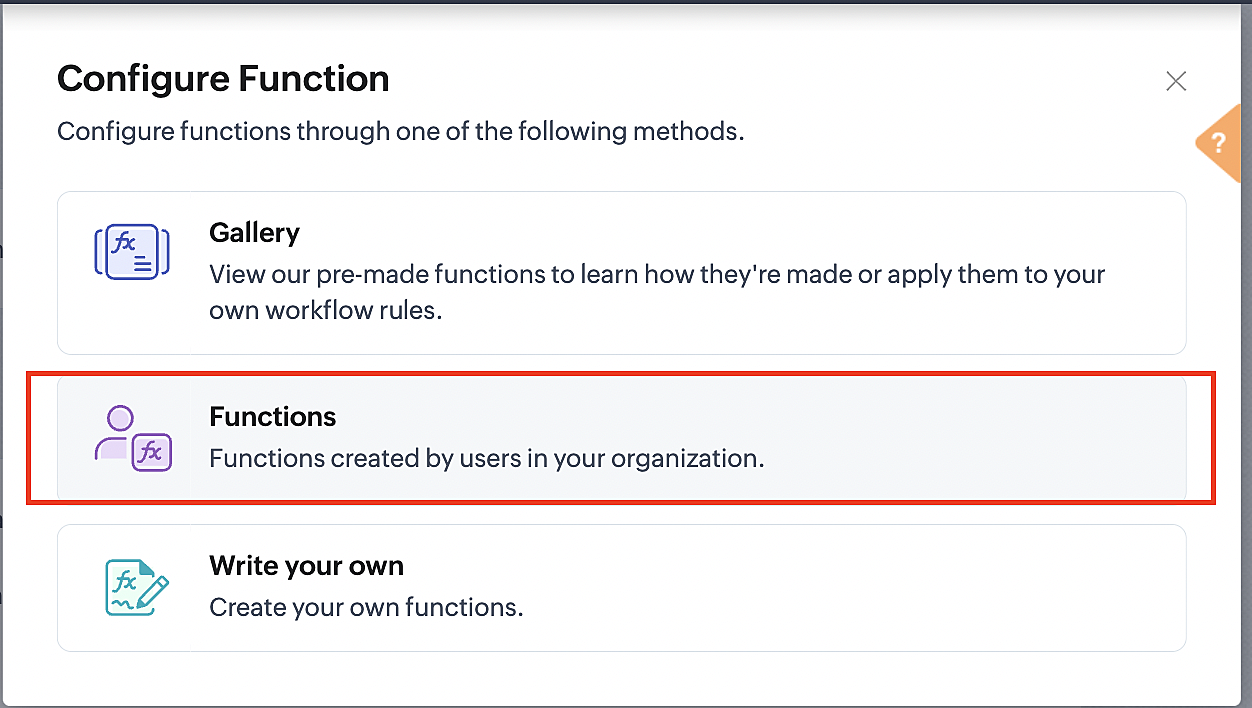
4. Click the New Function button.

5. In the Configure custom function page, select the "cancel" function you created from among the functions users in your organization have created.
Part 3: Argument mapping
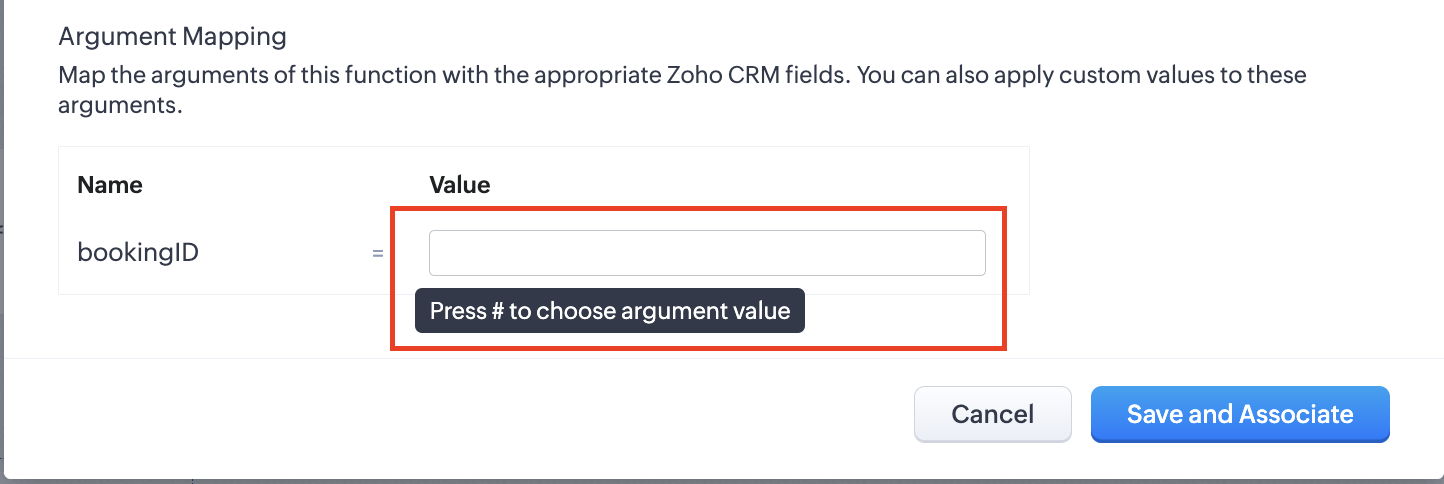
1. Press # to choose an argument value.
2. Select Meetings under Module and BookingId in the field.
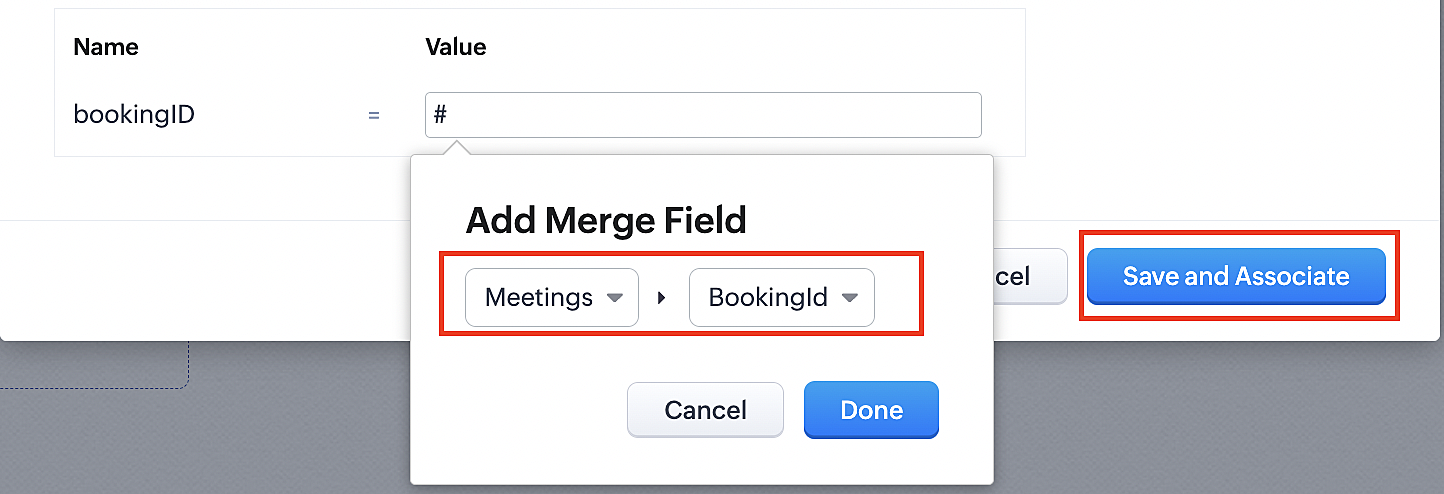
3. Click the Save and Associate button.
Reference:
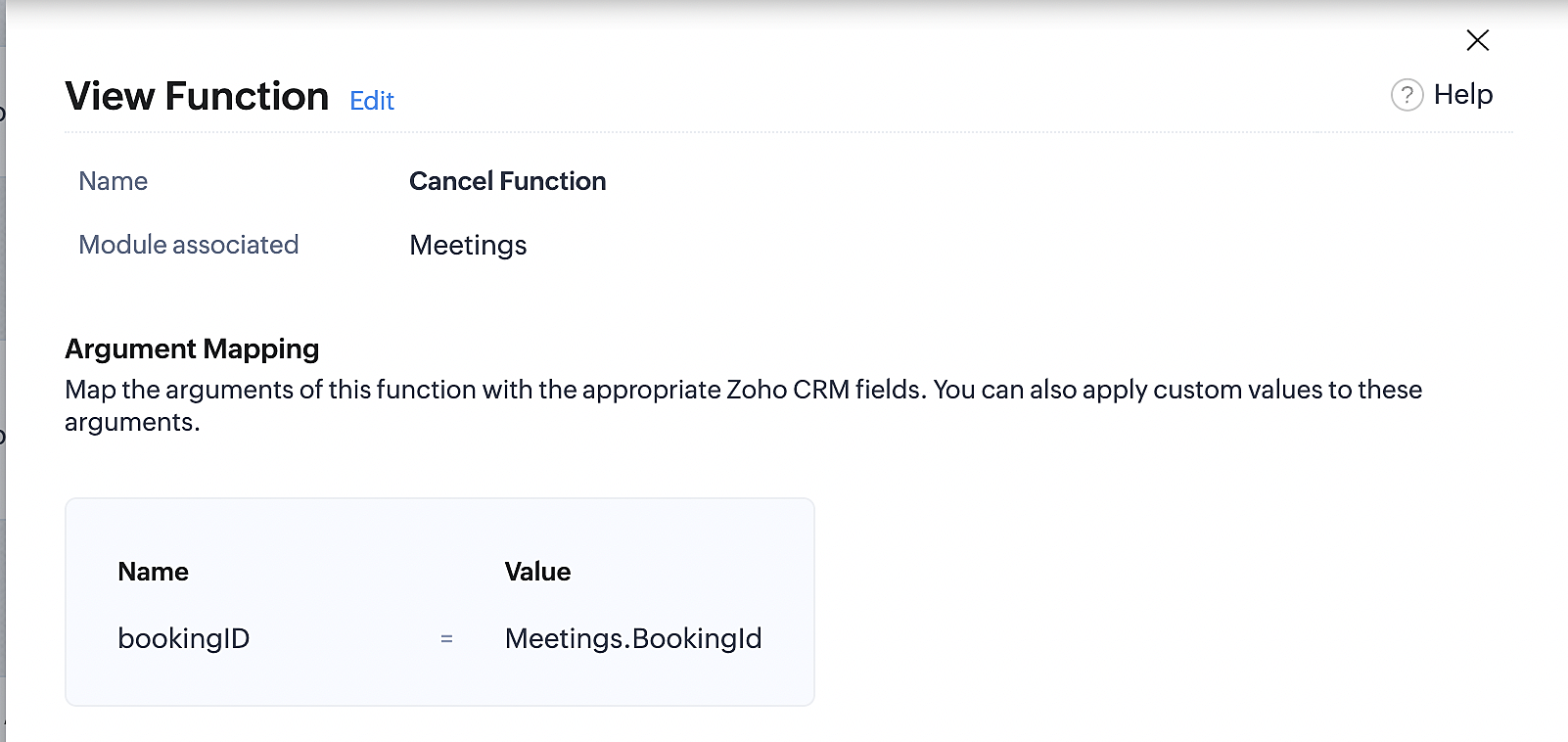
Below is the final flow of the cancel booking workflow:
At the end of Part 3, we will have created a workflow that will be executed automatically when meetings are deleted in Zoho CRM. Simultaneously, the bookings associated with the meeting will also be canceled in Zoho Booking.
ii. Creating workflow for updating an appointment's status as "no show" in Zoho Bookings when the meeting's booking status is marked as no show in Zoho CRM
Part 4: Creating the rule
1. Go to Setup > Automation > Workflow Rules.
2. In the Workflow Rules page, click Create Rule.

3. Select Meetings under Module and configure the rule name and description as required.
Reference:
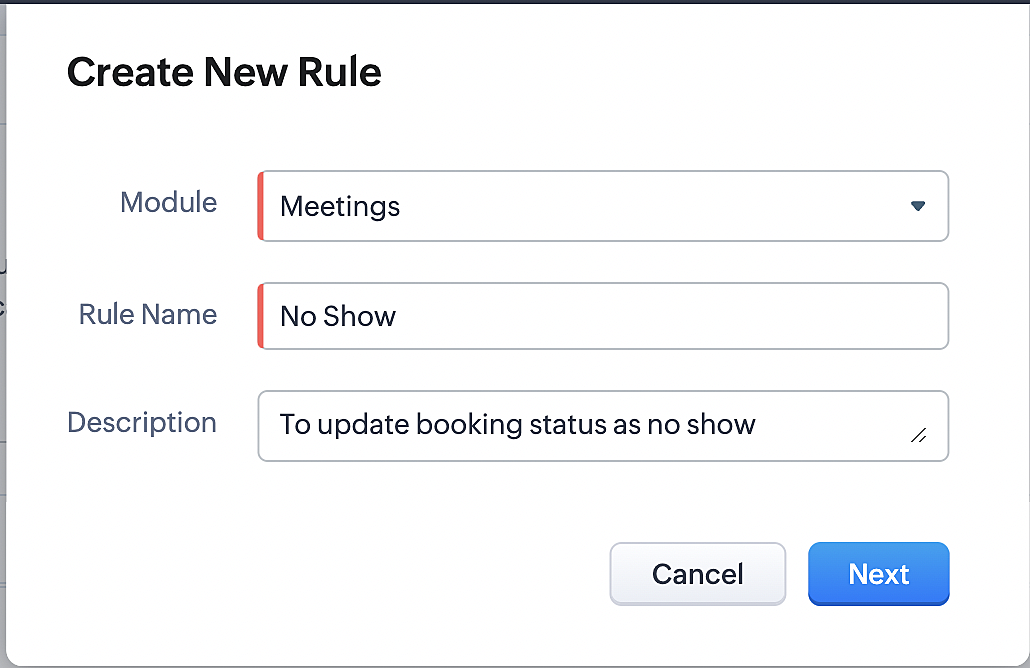
Part 5: Specifying the rule trigger
If you encounter difficulties while navigating through the steps mentioned below, please refer to Part 2 above, where we have provided step-by-step screenshots for clarification.
1. Record Action > Edit.

2. Enable the Specific field(s) gets modified and configure it per the screenshot below.
a. This is to ensure that the workflow is executed only when the booking status under the meeting module is
updated to "No Show".
updated to "No Show".
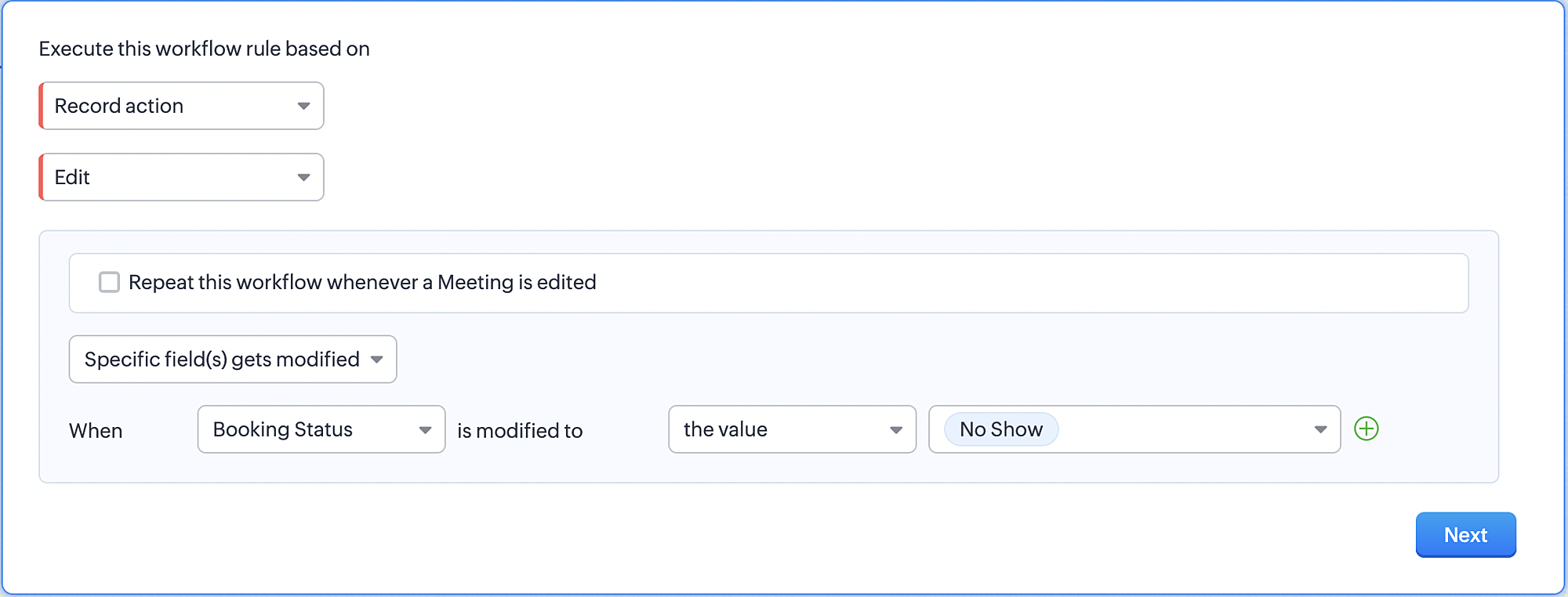
3. Configure condition > All Meetings.
4. Instant Actions > Function > New Function.
5. In the Configure custom function page, select the "no show" function you created from among the functions
users in your organization have created.
users in your organization have created.
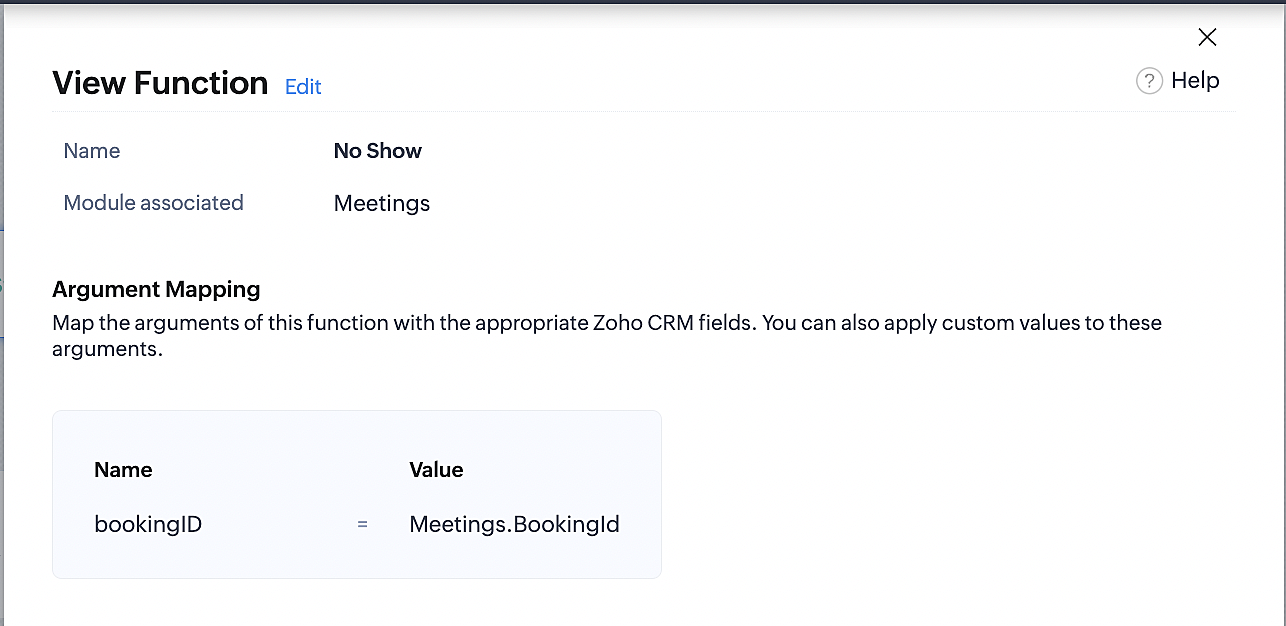
Part 6: Argument mapping:
If you encounter difficulties while navigating through the steps mentioned below, please refer to Part 3 above, where we have provided step-by-step screenshots for clarification.
1. Press # to choose an argument value.
2. Select Meetings under Module and configure the field as "BookingId".
3. Click Save and Associate button.
Reference:
Below is the final flow of the "No Show" booking status workflow:
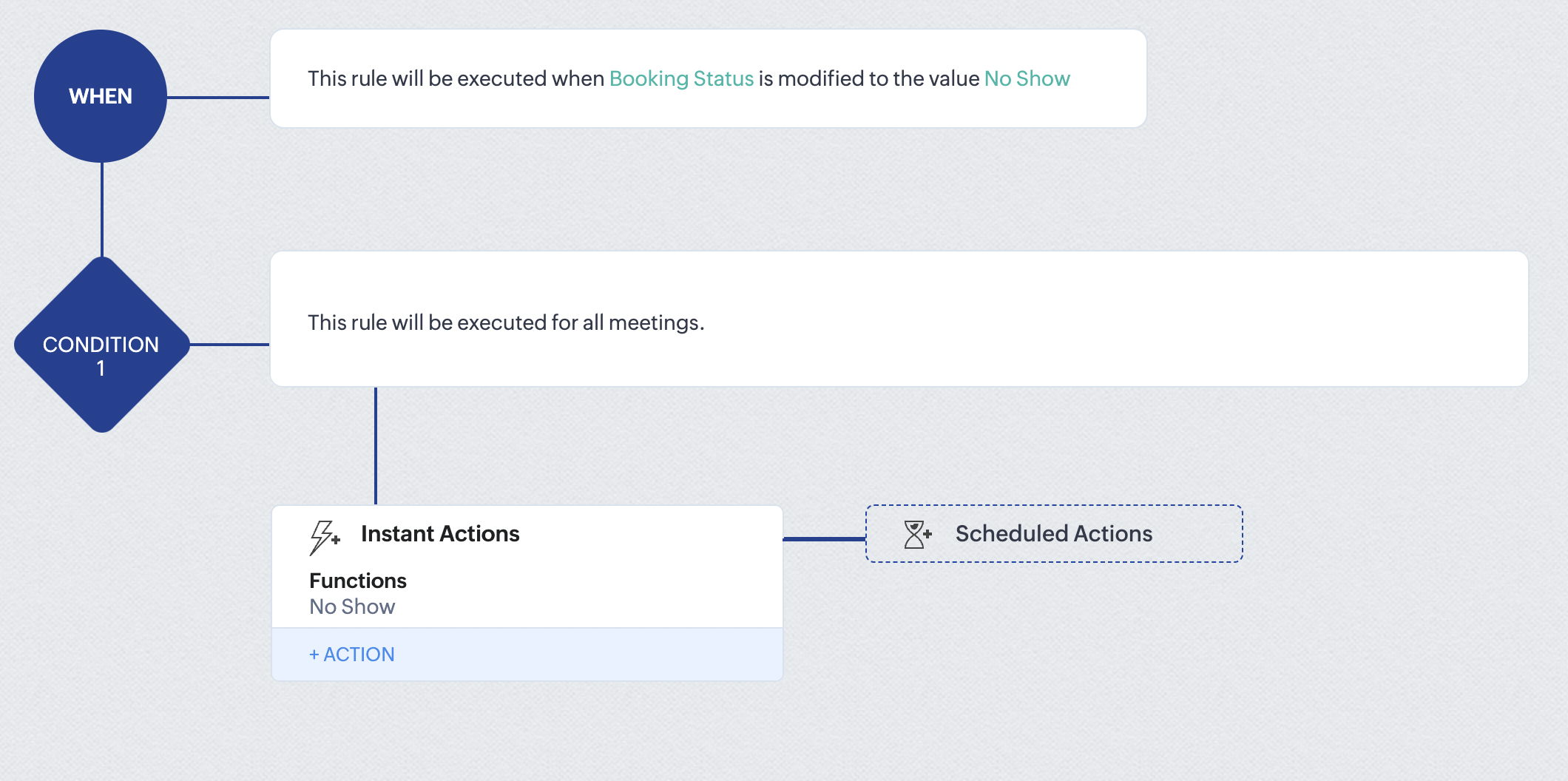
At the end of part 6, we will have created a workflow that automatically executes when the booking status field within the Zoho CRM Meetings module is updated to "No Show." This action will result in the associated bookings for that meeting also being marked as "No Show" in Zoho Bookings.
iii. Creating workflow for updating appointment status as "Completed" in Zoho Bookings when the booking status field of the meeting is marked as completed in Zoho CRM.
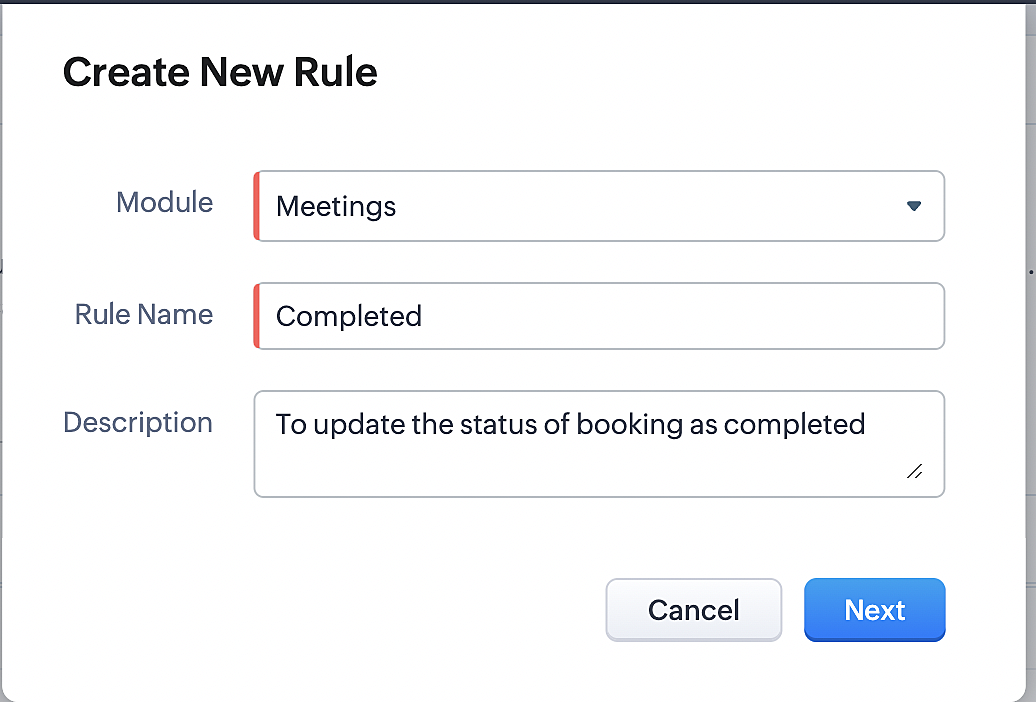
Part 7: Creating the rule
1. Go to Setup > Automation > Workflow Rules.
2. In the Workflow Rules page, click Create Rule.

3. Select Meetings under Module and configure rule name and description as required.
Reference:
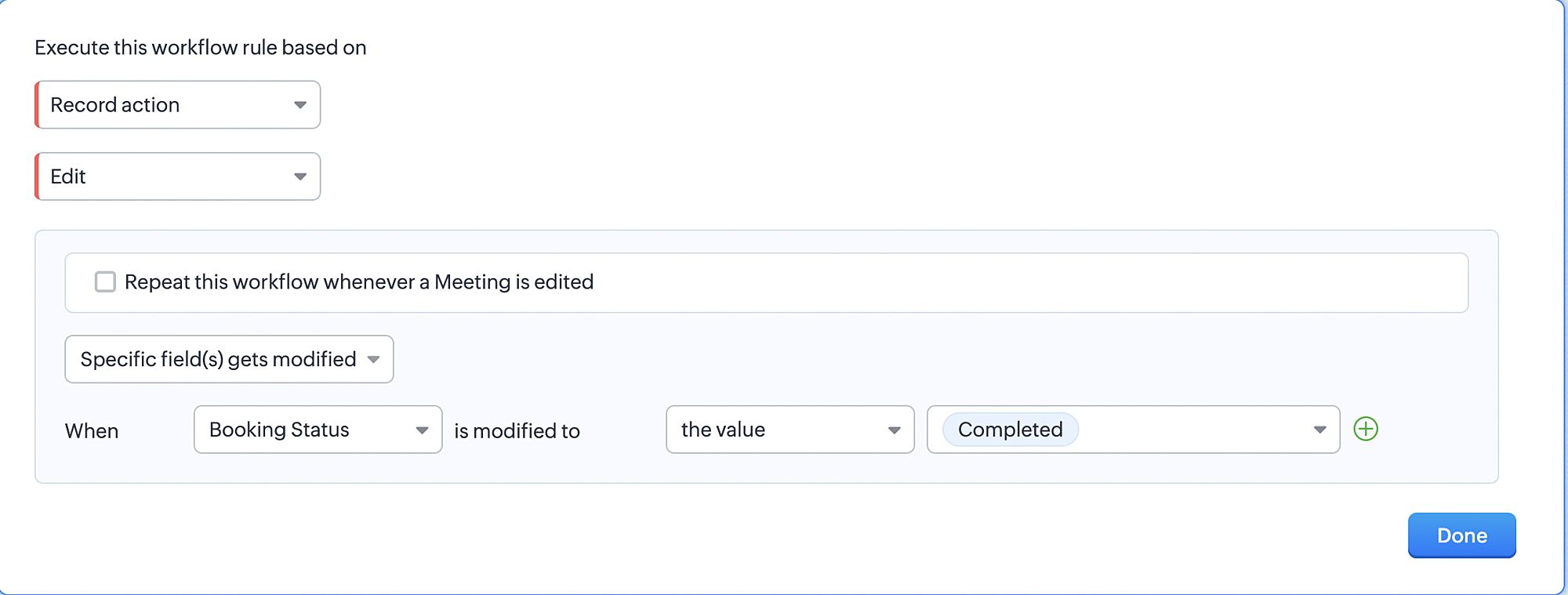
Part 8: Specifying the rule trigger
If you encounter difficulties while navigating through the steps mentioned below, please refer to Part 2 above, where we have provided step-by-step screenshots for clarification.
1. Record Action > Edit.

2. Enable the Specific field(s) gets modified setting and configure it per the screenshot below.
a. This serves to ensure that the workflow is executed only when the booking status under the Meetings module is
updated to "Completed".
3. Configure condition > All Meetings.
4. Instant Actions > Function > New Function.
5. In the Configure custom function page, select the "completed" function you created from among the functions users
in your organization have created.
Part 9: Argument mapping:
If you encounter difficulties while navigating through the steps mentioned below, please refer to Part 3 above, where we have provided step-by-step screenshots for clarification.
1. Press # to choose an argument value.
2. Select Meetings under Module and configure the field as "BookingId".
3. Click Save and Associate button.
Reference:
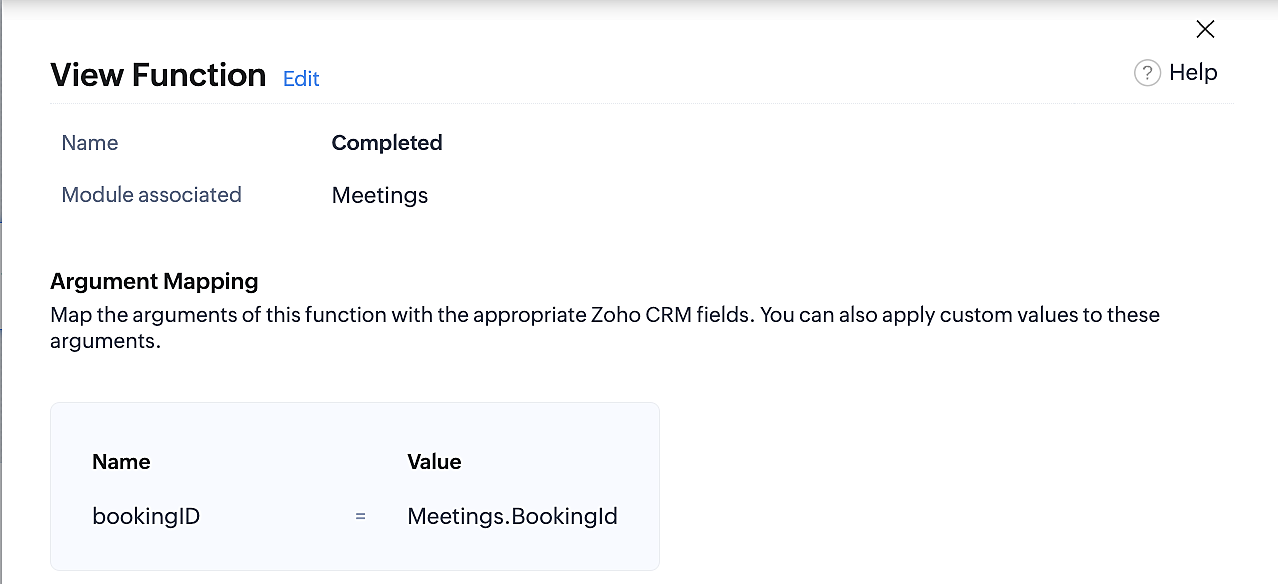
Below is the final flow of the "Completed" booking status workflow:
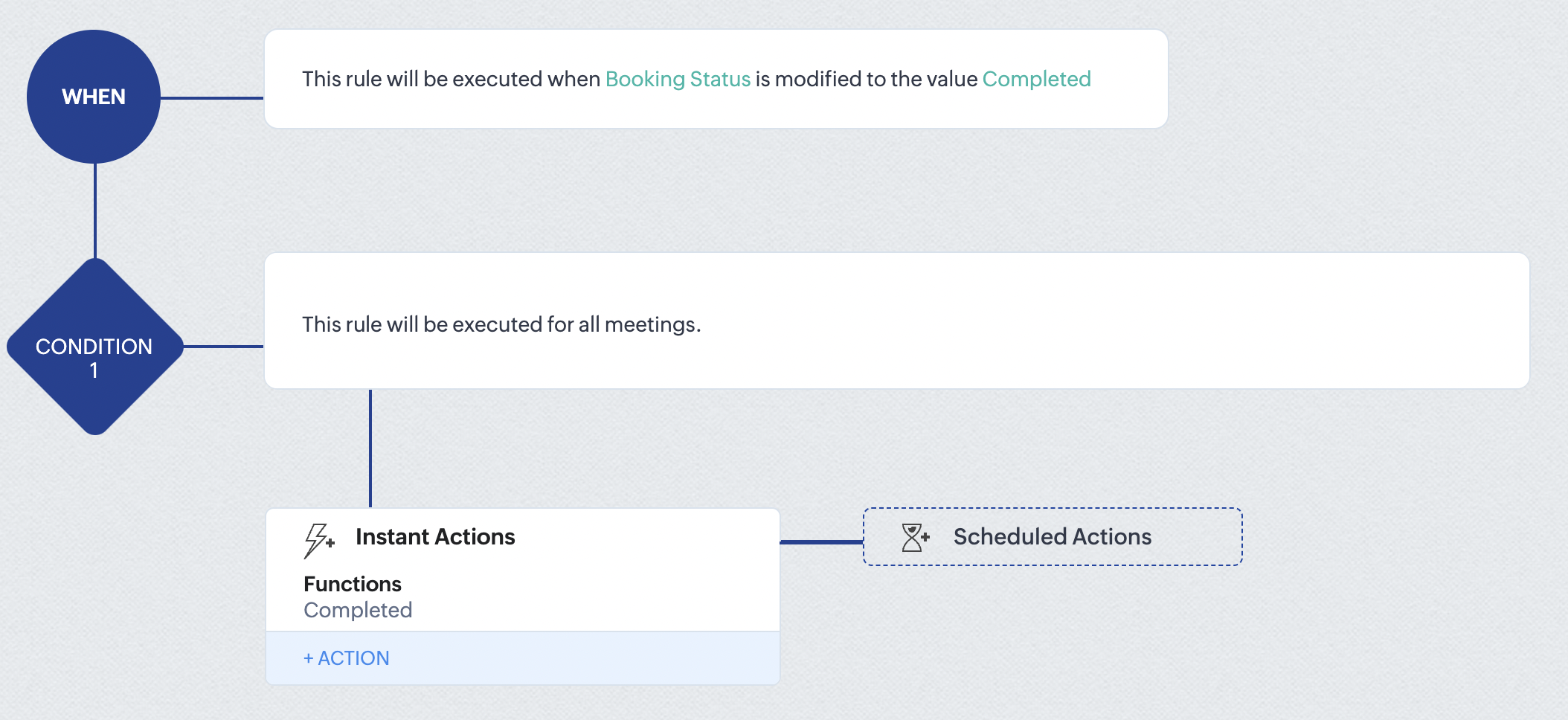
At the end of part 9, we will have created a workflow that is automatically executed when the booking status field within the Zoho CRM Meetings module is updated to "Completed." As a result, the associated bookings for that meeting will also be marked as "Completed" in Zoho Bookings.
Conclusion
We've reached the end of this community post. With the integration mentioned above in place, you'll be able to book, cancel, and update the status of appointments in Zoho Bookings directly from your Zoho CRM application. This will help you effectively manage your appointments in one place. As mentioned above, we've covered the rescheduling action in a separate post, which you can access by clicking on the following link: Reschedule Action
Furthermore, we've outlined a method for automating appointment statuses in detail. You can use this document as a reference to explore the various possibilities that suit your needs.
If you have any questions or need assistance with your configuration, please email us at hello@zohobookings.com or support@zohobookings.com.
Access your files securely from anywhere
New to Zoho Recruit?

Zoho Developer Community
New to Zoho LandingPage?
Zoho LandingPage Resources
New to Zoho Survey?
New to Zoho CRM Plus?
Deliver unforgettable customer experiences
New to Zoho CRM Plus?
Deliver unforgettable customer experiences
New to Zoho Marketing Plus?
Everything you need to run your marketing
New to Zoho Marketing Plus?
Everything you need to run your marketing
New to Bigin?





Topic Participants
Kaushik S
bruce
Ishwarya SG
PrismaNote Support
Sticky Posts
Presenting ABM for Zoho CRM: Expand and retain your customers with precision
Picture this scenario: You're a growing SaaS company ready to launch a powerful business suite, and are looking to gain traction and momentum. But as a business with a tight budget, you know acquiring new customers is slow, expensive, and often deliversGood news! Calendar in Zoho CRM gets a face lift
Dear Customers, We are delighted to unveil the revamped calendar UI in Zoho CRM. With a complete visual overhaul aligned with CRM for Everyone, the calendar now offers a more intuitive and flexible scheduling experience. What’s new? Distinguish activitiesCreate and populate a record in an instant: Introducing zero-shot field prompting to Zia's ICR
A couple of months ago, we upgraded our in-house AI image detection and validation tool, Zia Vision, with intelligent character recognition (ICR). By training Zia with sample images, you could create and enrich CRM records with data extracted from standardIn-person ZUG Meetups for Real Estate Professionals - US Q1 2026
The Real Estate Zoho User Group is going on a multi-city, in-person meetup tour across the US, and we’d love to see you there! These meetups are a great opportunity to: Connect with fellow real estate professionals using Zoho Share challenges and discoverNimble enhancements to WhatsApp for Business integration in Zoho CRM: Enjoy context and clarity in business messaging
Dear Customers, We hope you're well! WhatsApp for business is a renowned business messaging platform that takes your business closer to your customers; it gives your business the power of personalized outreach. Using the WhatsApp for Business integration
New to Zoho TeamInbox?
Zoho TeamInbox Resources
Zoho CRM Plus Resources
Zoho Books Resources
Zoho Subscriptions Resources
Zoho Projects Resources
Zoho Sprints Resources
Qntrl Resources
Zoho Creator Resources
Zoho CRM Resources
Design. Discuss. Deliver.
Zoho Show Resources

Get Started. Write Away!
Writer is a powerful online word processor, designed for collaborative work.
Zoho CRM コンテンツ
-
オンラインヘルプ
-
Webセミナー
-
機能活用動画
-
よくある質問
-
Ebook
-
-
Zoho Campaigns
- Zoho サービスのWebセミナー
その他のサービス コンテンツ
Nederlandse Hulpbronnen

ご検討中の方
Recent Topics
Bookings to Books automation using Flow
I'm using Zoho Flow to automate a process between Bookings and Books. When someone uses Bookings to schedule time with me I use Flow to automatically add the person as a customer in books, then create a Quote in Books for the type of consultation theyDifferent Canvas for Different account type
I would like to have a separate canvas for Customers and Resellers that auto-applies when I enter an ACCOUNT. Is this do-able?IMAP sync issues in Zoho CRM
We are using the Zoho CRM for a while, and we sync (via IMAP) our Google Apps email system. The sync works properly when looking at emails per account, contact or deal, etc. However, it does not function well in the "Messages" and "SalesSigns" features.Reporting tags for custom modules
Hi, it could be very useful. At field level and at sub table level. Thanks, EduardoCan't pass Dates and use date filtered Charts in Pages?
I don't mess with pages very much, but I'm trying to build a dashboard. I have a search element and several charts that need to be filtered. I also have a stateless form for a start/end date picker I am trying to use to filter data for the charts. HereZOHO FSM Trial - Assets
Hi I am currently using Zoho CRM and looking at adding FSM. I am trialing FSM at the moment, to potentially move away from my current programme (SimPro) but have a query on the Asset system within FSM It looks like you can only create 1 asset "type";Sending Email with Attachment (PDF, Excel file)
Hi, I'm new to Zoho CRM and I'm setting up a flow to send an Email with Attachment when user reaching a certain stage of a Deal. In detail, I've created a Blueprint which requires user to attach a PDF file when reaching a certain point of the stage andBased on the Assign To time task want to trigger also reminder for the task still move form fresh lead
If the leads is assigned To 1 am to 10.55 am task want to create 11am Then reminder want to go the person at 4pm If lead status not moved from fresh lead. From next on wards Reminder want to go 11 Am and 4pm Every day still the person moved to fresh leadEmails Not Sending
This has happened before. I contacted Zoho and it seemed to work, but now my emails are not sending or taking a long time to send and half the time attachments don't attach. It just keeps saying Sending... and I have to keep clicking it to make it send.[Free Webinar] Learning Table Series - AI-Enhanced Logistics Management in Zoho Creator
Hello Everyone! We’re excited to invite you to another edition of Learning Table Series, where we showcase how Zoho Creator empowers industries with innovative and automated solutions. About Learning Table Series Learning Table Series is a free, 45-60WhatsApp pricing changes: Pay per message starting July 1, 2025
Starting July 1, 2025, WhatsApp is shifting from conversation-based pricing to per-message billing. That means every business-initiated message you send will count. Not just the first one in a 24-hour window. Pricing updates on the WhatsApp Business PlatformCreate a button that converts Sales Order into a Custom Module
I am looking for a way of creating a button on Sales Orders that would automatically create a record in a custom module I have created called Contracts. The custom destination module "Contracts" has the following fields that I would need to populate [Contracts Name] populate with SalesOrderID [Account Name] populate with related Account Name [Contract Start Date] populate with the date that the record was created Could someone help or point me in the right direction? ThanksRemove all of the junk data that comes with the trial
How would I go about removing all of the junk data that comes with the trial of zoho crm?Video Interview Feature
Please add a text option as well while sending invitations to candidates for video interviews, candidates are missing out on the email. They are more convenient in text and it really helps Hope you would understand, thanksSingapore DBS Bank
Is there any schedule corresponding to DBS of Singapore?Including Contact and Account Information in Zoho Projects.
In Zoho Projects I have created a custom layout which already includes a 'Client Information' section. The 'Client Information' section already includes integrated fields (integrated with CRM) for various account and contact details. Here's what I wantUnable to Download CRM Contact Data: WorkDrive Integration Issues
## Problem Description We need to let users download contact information from CRM as CSV files to their local computers. Since we couldn't implement a direct download option, we're trying to use WorkDrive as a workaround - but we're encountering issuesApp Spotlight : PagerDuty for Zoho Cliq
App Spotlight brings you hand-picked apps to enhance the power of your Zoho apps and tools. Visit the Zoho Marketplace to explore all of our apps, integrations, and extensions. In today's fast-paced world, seizing every moment is essential for operationalCampaigns going to spam folder, how to build so that it goes to inbox
Hello, New to campaigns, now have it functioning correctly. In my test group of 10 email addresses 100% of the emails went to spam/junk folder and/or were blocked/captured by spam filters. What is the process to building a message or format that doesIntegrate QuickBooks with Bigin and streamline your sales and accounting!
If your business relies on Bigin for customer management and QuickBooks for accounting and invoicing, this new integration is here to make your operations more efficient. By connecting these two platforms, you can now manage your CRM and financial processesWhen a ticket is merged, the merged ticket's link should redirect to the remaining ticket.
Zoho Desk deletes merged tickets. Which is not ideal. The issue is if you have a link bookmarked, or even in your inbox from a ticket that was merged, when you visit you receive an error because merging tickets actually deletes the ticket that was merged.Pass data from a Zoho Desk ticket to a Zoho Form as pre-fill data?
Hello, I'm trying to pre-fill a Zoho form with client data based on the Zoho Desk ticket data that would be associated. Work flow i'm trying to create: 1. Ticket created for a sales order 2. order requires a site survey 3. link inside ticket links toGoods total weight in Sales Orders
Hello everyone, We want to automatically calculate the total weight in Sales Orders based on the weight data specified in the Items. Could you please suggest the simplest way to achieve this in Zoho Inventory? I would greatly appreciate any advice andProblem with pagination in Zoho Inventory API
Hello, I'm having an issue with the Zoho Inventory API when I try to use the pagination. When I send a request to https://inventory.zoho.com/api/v1/items?authtoken=XXXXXXXXXX&organization_id=YYYYYY&page=1&per_page=50, I get back 200 items. And when I send the same request for the second page, https://inventory.zoho.com/api/v1/items?authtoken=XXXXXXXXXX&organization_id=YYYYYY&page=2&per_page=50 I'm getting back the same 200 items I get with the first request. So I think neither the page parameterCan a user be assigned to an Account based on email domain?
Hi ZohoDesk, If I have a customer Account already configured is there any way I can use a domain matching rule to assign a new user to the correct account when logging a ticket by email? Many thanks RichCan't track conversions using GTM
We had to move the installation of the SalesIQ widget from GTM to directly do it in our wordpress site. The SalesIQ widget was being blocked by Adblockers which caused a lot of our visitors to not be able to see it. This issue was fixed from deletingWhatsApp Message Pricing Changes (Effective July 1, 2025)
Starting July 1, 2025, Meta will introduce a per-message pricing model on the WhatsApp Business Platform, replacing the current conversation-based billing. This update affects all WhatsApp messages sent through Zoho Marketing Automation. We’ve brokenParent-Child Tickets using API or Deluge
Hi Everyone, We are looking at the parent-child ticketing features in Zoho Desk. We want to be able to create a parent ticket at customer level and nest child tickets underneath. The issue we are facing is to be able to automate this. I'm checking theBlueprint transitions on locked records
We use the ability to automatically lock records (quotes, sales orders, etc.) based on criteria, such as stage. For instance, if a quote has been sent to a client, the quote is then locked for further edits. Our ideal quote stage process is: Draft>Sent>Won.CC from mail client to Zoho CRM
Hi, Is it possible to have emails sent outside of CRM use a CC that sends them into the CRM and attaches to the record? ThanksDepartment e-mail signatures
Hello everyone, We're just in the process of evaluating various help desk software alternatives and Zoho is looking pretty good to us at the moment. Our set up is a bit strange and I was wondering if this is possible. We have one tech who looks afterHow can I hide "My Requests" and "Marketplace" icon from the side menu
Hello everybody, We recently started using the new Zoho CRM for Everyone. How can I hide "My Requests" and "Marketplace" from the side menu? We don't use these features at the moment, and I couldn't find a way to disable or remove them. Best regards,Sites Speed and Performance Grades
I noticed that there are no recent inquiries or complaints about load speed or performance issues with Zoho Sites websites. However, I wanted to understand what Zoho has done to ensure that speed remains optimized, images are compressed and lazy loaded,Include Audio in Zoho Assist Session Recordings
Hello Zoho Assist Team, We hope you're doing well. We’d like to formally submit a feature request regarding session recordings in Zoho Assist. 🎯 Current Limitation When conducting a Zoho Assist session that includes voice and/or video chatting, the recordingUnable to update Created Date/Time even via upsert
hi all --- running a demo version and "recreating" some data from hubspot. I had tried the method to automatically move data over but it missed A TON of fields and some stuff wouldn't even map correctly so i am simply creating new Deal records to testBlockchain Feature?
Since I'm not an expert in this technology, is there any reason why you would not want to add this option to your Zoho SIgn documents? Is there a downside?Kaizen #196 - Zoho CRM Queries - Best Practices
Nearing 200th Kaizen Post – We want to hear from you! Do you have any questions, suggestions, or topics you would like us to cover in future posts? Your insights and suggestions help us shape future content and make this series better for everyone. GotBest way to account for shipping charges to customer
I have been allocating all our shipping expenses to the "postage" account, but I realise that is probably incorrect, as for the most part, we pass on shipping charges to our customers. So I should probably add the shipping charges into the "shipping charges"Zoho Flow s’enrichit avec les subflows et les actions Webhook
Nous sommes ravis d’annoncer deux ajouts importantsà Zoho Flow : les subflows et les webhooks sortants. Ces nouvelles fonctionnalités ont été conçues pour vous aider à créer des workflows plus facilement et à automatiser davantage de tâches répétitives.How to assign canvas view for portal user
Hi , as a portal user, I can switch to another canvas view, however, I cannot find any field to configure a default canvas view for portal user. May I ask how to set it up in CRM? And if I can view list by sheet view as a portal user?Next Page