Bidirectional sync between Zoho Bookings and Zoho CRM - Part 1
Hey, community members!
The default integration between Zoho CRM and Zoho Bookings is unidirectional, which means that any appointments booked, rescheduled, or deleted in Zoho Bookings will be reflected in Zoho CRM. However, any modifications made to events in Zoho CRM that originated from Zoho Bookings will not be reflected back in Zoho Bookings. Hence, as we're announcing in this community post, we've made the sync bidirectional.
This community post will cover the process of configuring appointment bookings from Zoho CRM in Zoho Bookings, as well as managing appointment statuses such as Canceled, No Show and Completed. We have addressed the rescheduling action in a separate post. To view it, please click on the following link: Reschedule Action
This community post will be beneficial for active Zoho CRM users who handle all their meetings within Zoho CRM. Additionally, you can use this community post as a reference to explore various automation possibilities tailored to your business requirements. For instance, with this post's guidance, when you update a booking's status field to "Completed" in Zoho CRM, it will automatically sync with Zoho Bookings and trigger an automated "Mark as completed" email to customers. This enhancement will improve your Zoho Bookings and Zoho CRM synchronization experience, making appointment management easier.
Prerequisites of bidirectional sync:
- Zoho Bookings Premium subscription
- Zoho CRM paid subscription
- Enable Zoho CRM integration within Zoho Bookings
The purpose of enabling the Zoho CRM integration within Zoho Bookings is to transfer booking details from Zoho Bookings to Zoho CRM. In this configuration, the mandatory field is the Booking ID, which is passed from Zoho Bookings to Zoho CRM through the integration. Whenever an appointment is booked, customer details will be sent to the designated CRM module, and a corresponding record will be created in the Meetings module within Zoho CRM, which will help in automating the workflow.
Here's the complete demo video that covers all the configurations discussed in the community post below:
Timestamps for your reference:
0:35 - Purpose of this community post
Here's the complete demo video that covers all the configurations discussed in the community post below:
Timestamps for your reference:
0:35 - Purpose of this community post
1:26 - Zoho CRM plugin installation
4:43 - Custom field creation
7:20 - Function creation
9:22 - Connection creation
10:24 - Configuring arguments
11:06 - Workflow creation
13:33 - Argument mapping
14:41 - Output verification
17:41 - Conclusion
How we're approaching this bidirectional sync
1. Booking an appointment from Zoho CRM
Install the Zoho Bookings for Zoho CRM plugin within your Zoho CRM application. This plugin enables the creation of a "New Appointment" button within the Zoho CRM Leads and Contacts module, which enables you to select the desired booking page you wish to open. You can choose from various workspace, service, or staff booking pages. After configuration, you can initiate the process of scheduling bookings directly from within your Zoho CRM account.
- Guide on Zoho Bookings and Zoho CRM plugin installation: Booking page selection for Zoho CRM plugin
2. Booking status: Completed or No Show
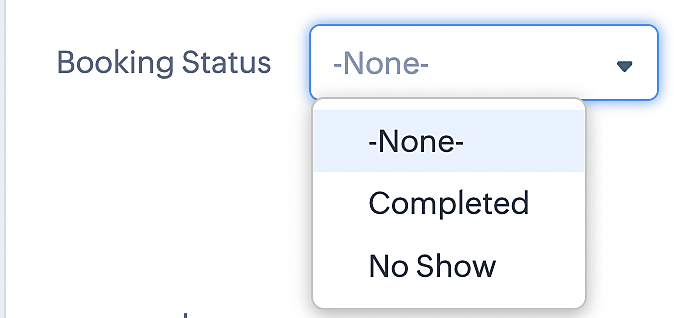
To update a booking's status (Completed or No Show), we've added a new picklist properties field named "Booking Status" in the Meetings module and configured it with two options: "completed" and "no show". Depending on the booking status chosen, the corresponding booking in Zoho Bookings will be updated.
- Details on how to add a custom field to the Meetings module : Customizing modules
- Here's a video that demonstrates how to add a field to a module in Zoho CRM: Adding fields
Reference:
3. Booking status: Canceled
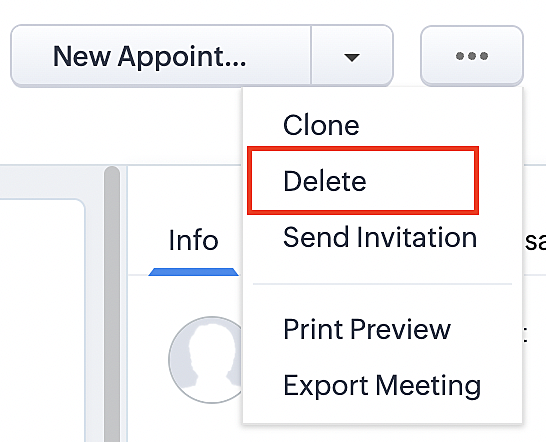
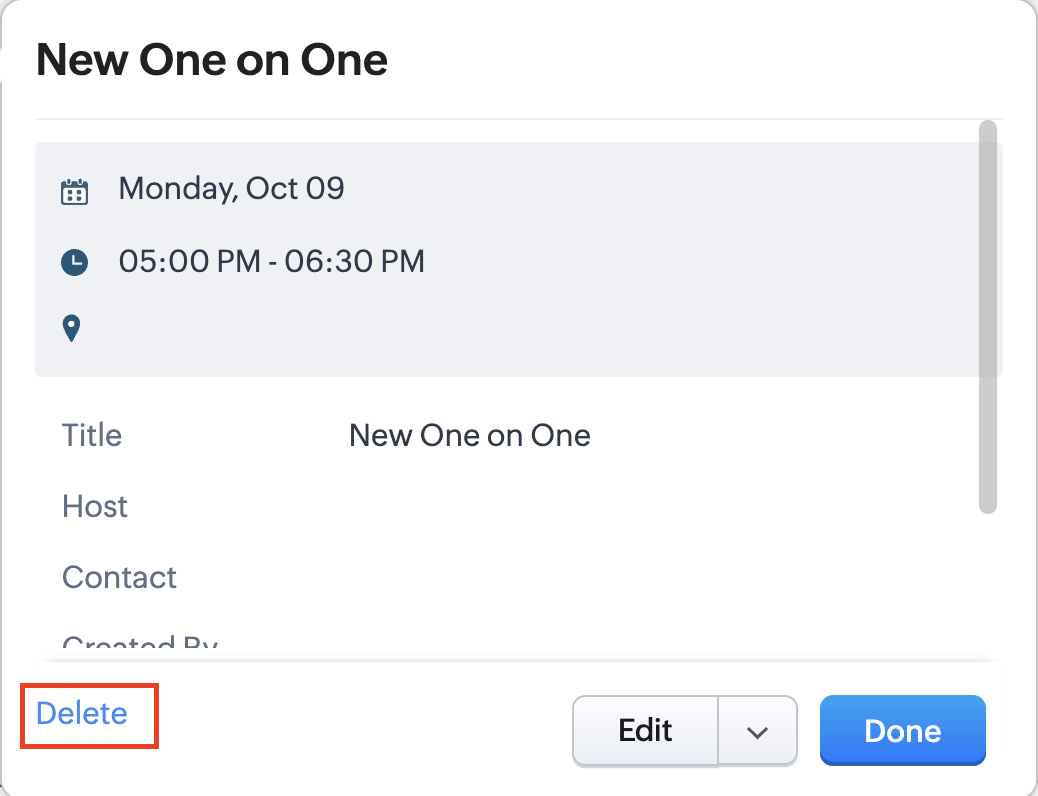
Whenever a meeting is deleted from the Meetings module, the corresponding booking in the Zoho Bookings app will also be canceled automatically. The meeting can be deleted either from the Meetings module or directly from the calendar.
To enable bidirectional sync between Zoho CRM and Zoho Bookings
Complete these steps in Zoho CRM.
Step 1: Creating connections
You first need to establish a connection between Zoho CRM and Zoho Bookings. Zoho Bookings is listed as one of the default connections in Zoho CRM, making it simple to set up. Select the Zoho Bookings connection, define the connection name and scope, and you'll be all set. This connection will enable you to link both applications and facilitate the seamless transfer of data.
Read here for more details on how to create connection in Zoho CRM: Connections
Step 2: Creating functions
In this context, we'll be creating three functions: one for marking appointments as completed, another for canceling appointments, a third for marking appointments as no shows, and a fourth for rescheduling appointments. For each function, we must also configure arguments, which pass values or data into a function when making a call. Here, we'll pass the booking ID to the function as an argument to update the necessary booking status.
i. To create a function for marking appointments as completed:
1. Go to Setup > Developer Space > Functions.
2. In the Functions page, click + Create New Function.

3. Configure the function name, display name, and description.
4. Set the category as automation.
This opens the Deluge script page.
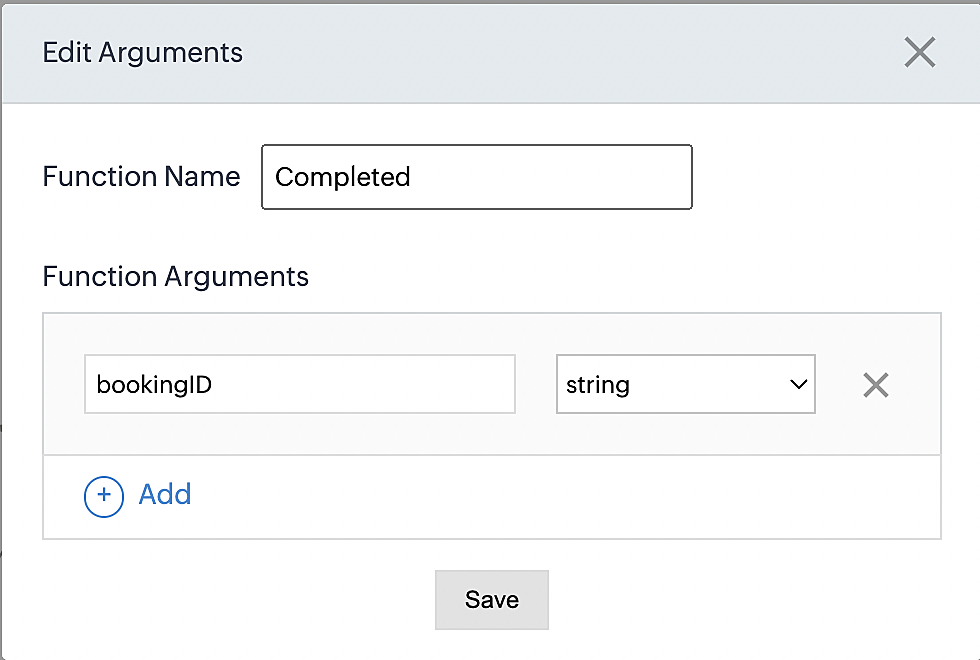
5. Next, configure the function's arguments:
A. Click on Edit Arguments on the Deluge script page.

B. Set the Parameter Name as bookingID. (Please note that the "bookingID" value is case sensitive and must match
the term used in the code).
C. Set the type as string.
Reference:
Please configure the below code in the Deluge script page.
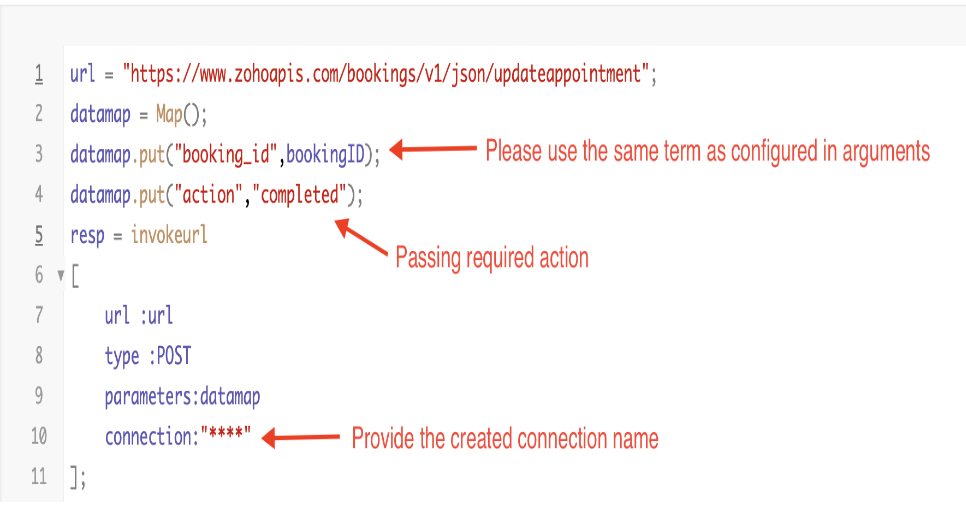
By completing these steps, we've configured a function that will mark appointments as completed.
ii. To create a function for marking appointments as no shows
1. Go to Setup > Developer Space > Functions.
2. In the Functions page, click + Create New Function.

3. Configure the function name, display name, and description.
4. Set the category as automation.
This opens the Deluge script page.
5. Next, configure the function's arguments:
A. Click on Edit Arguments on the Deluge script page.

B. Set the Parameter Name as bookingID. (Please note that the "bookingID" value is case sensitive and must match
the term used in the code).
C. Set the type as string.
Reference:
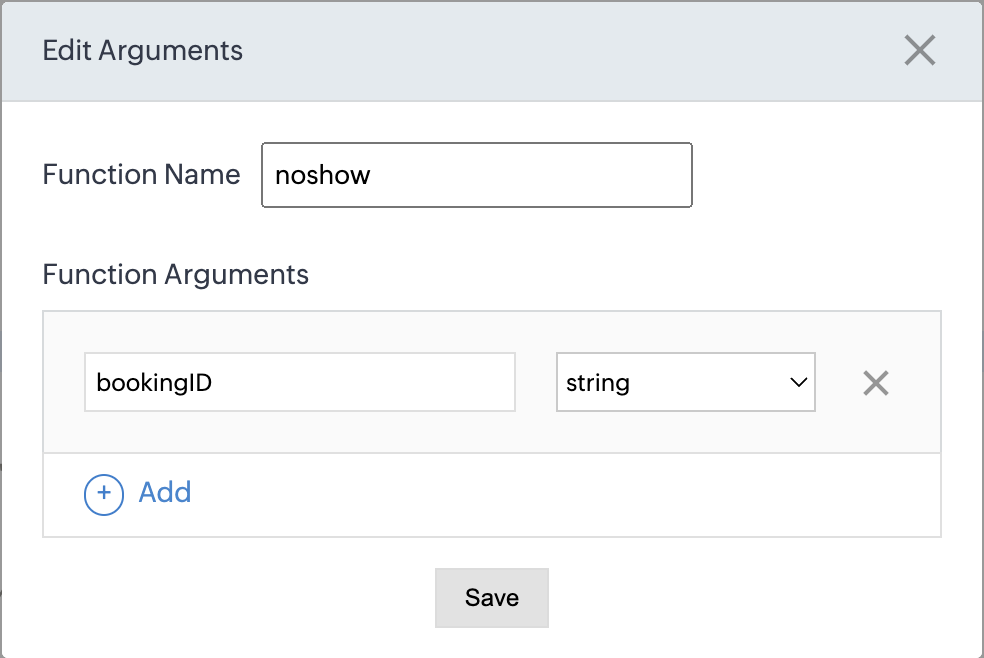
Please configure the below code on the Deluge script page.
Code link: No show
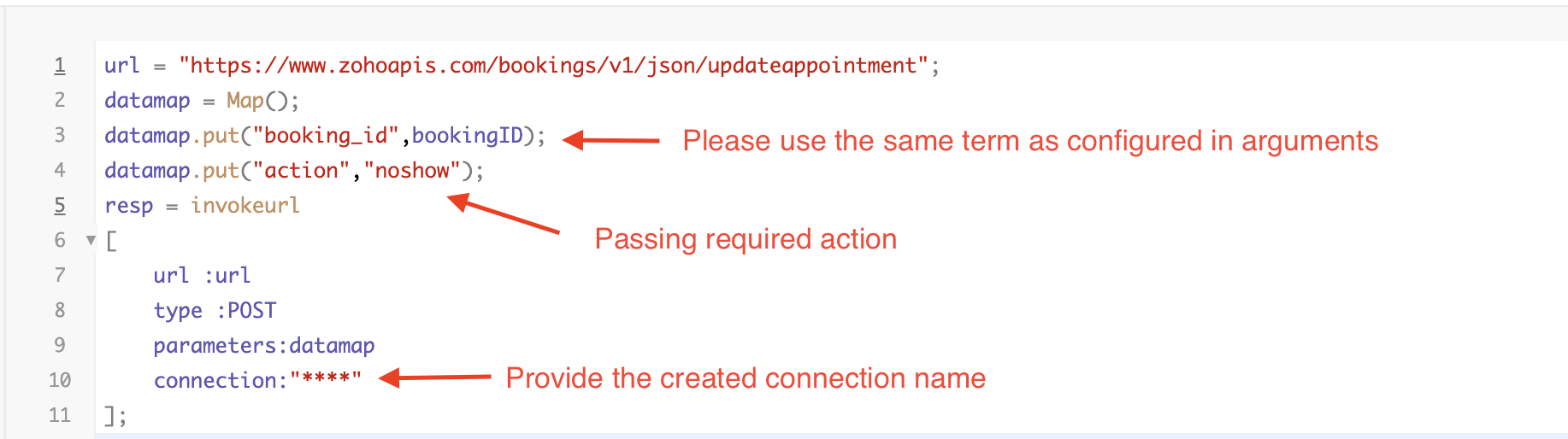
By completing these steps, we've configured a function that marks appointments as no shows.
iii. To create a function for marking appointments as canceled
1. Go to Setup > Developer Space > Functions.
2. In the Functions page, click + Create New Function.

3. Configure the function name, display name, and description.
4. Set the category as automation.
This opens the Deluge script page.
5. Next, configure the function's arguments:
A. Click on Edit Arguments on the Deluge script page.

B. Set the Parameter Name as bookingID. (Please note that the "bookingID" value is case sensitive and must match
the term used in the code).
C. Set the type as string.
Reference
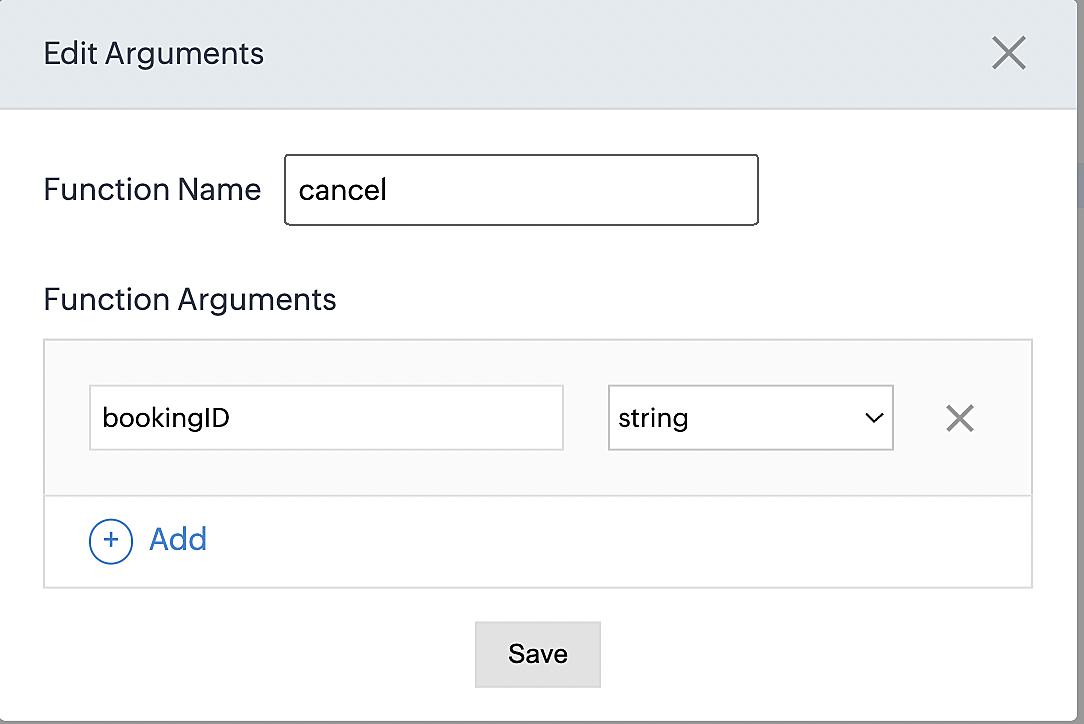
Please configure the below code on the Deluge script page.
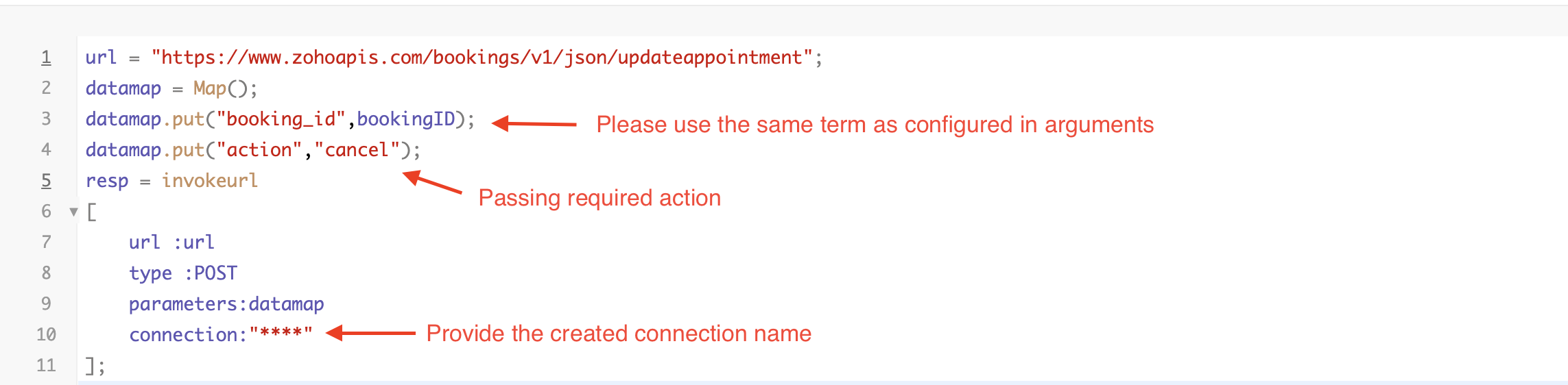
By completing these steps, we've configured a function that marks appointments as canceled.
Code explanation
Below is an explanation of the code that covers all the configurations present in the three functions mentioned above (cancel, mark as completed, and mark as no show).
Line 1: Based on the Zoho Bookings account's data center, we're setting up the API endpoint URL configuration.
Lines 2 - 4: To update appointments, we utilize the Zoho Bookings API. Within the update appointment API, there are two mandatory fields that need to be included: BookingID and action (completed/cancel/noshow).
Lines 5 - 10: We use the invokeURL task for API calls. To learn more about the invokeURL task, please refer to the following document: InvokeURL task for API calls
Now, let's proceed and learn about the process of creating a workflow and linking the established functions to it. This will enable us to automate the entire appointment status updating process.
Step 3: Creating a workflow
Workflow rules are sets of actions (email notifications, tasks and field updates) that are executed when specified conditions are met. Here, we'll generate workflow rules for each action to activate the respective function, thereby automating the appointment status updating process.
i. Creating a workflow for "canceling" appointments in Zoho Bookings when a meeting is deleted in Zoho CRM
Part 1: Creating the rule
1. Go to Setup > Automation > Workflow Rules.
2. In the Workflow Rules page, click Create Rule.

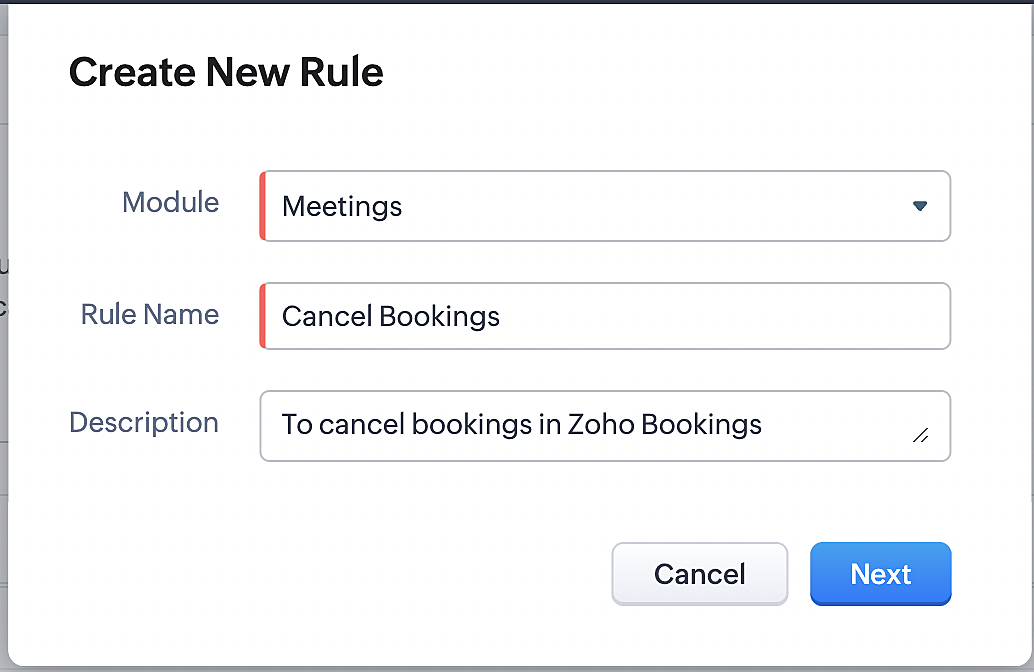
3. Select "Meetings" under Module and configure rule name and description as required.
More details: Create Rule
Reference:
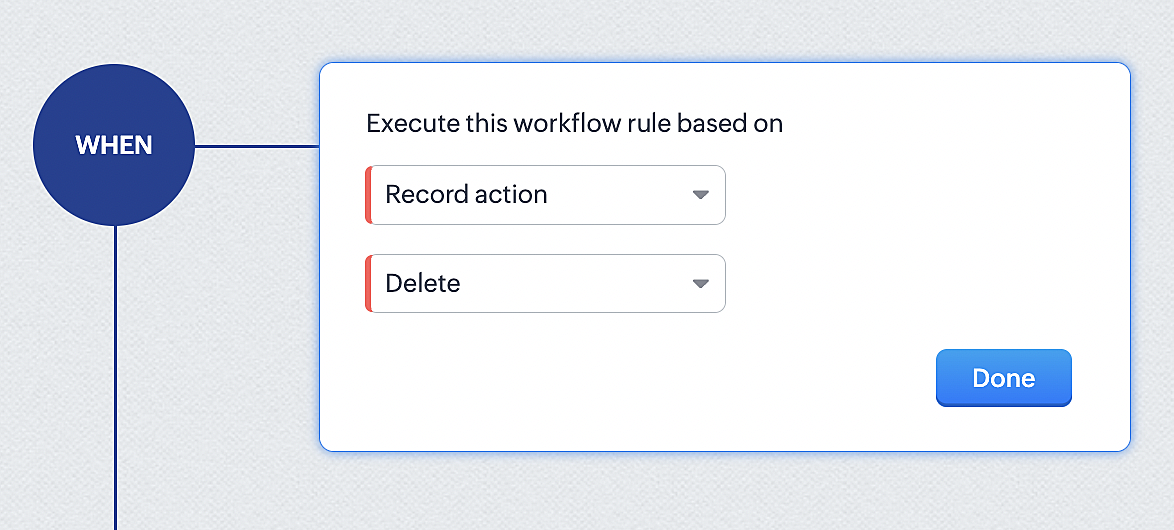
1. Select Record Action > Delete > Done to execute the rule when meetings are deleted.
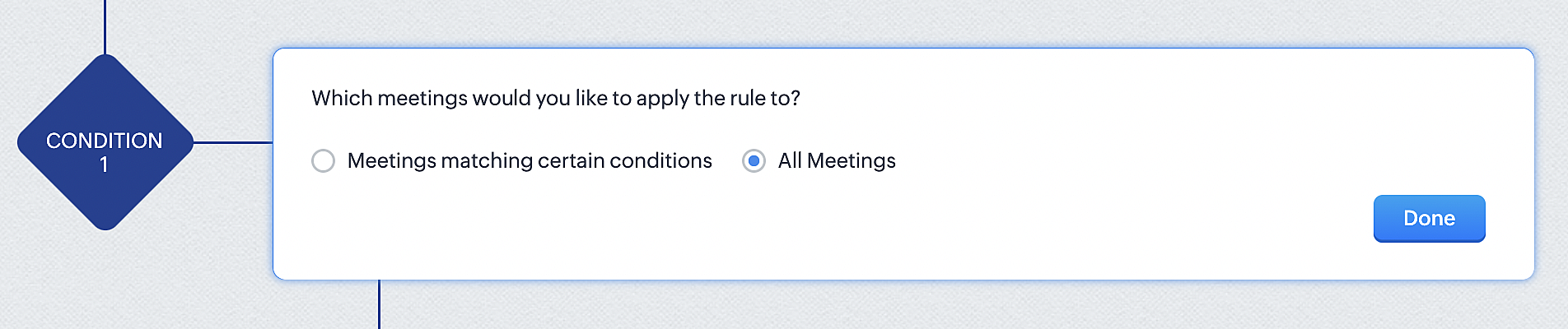
2. Configure condition > All Meetings.
3. Instant Actions > Function.
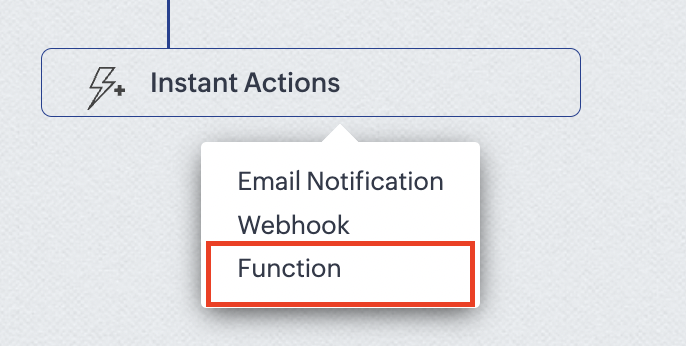
4. Click the New Function button.

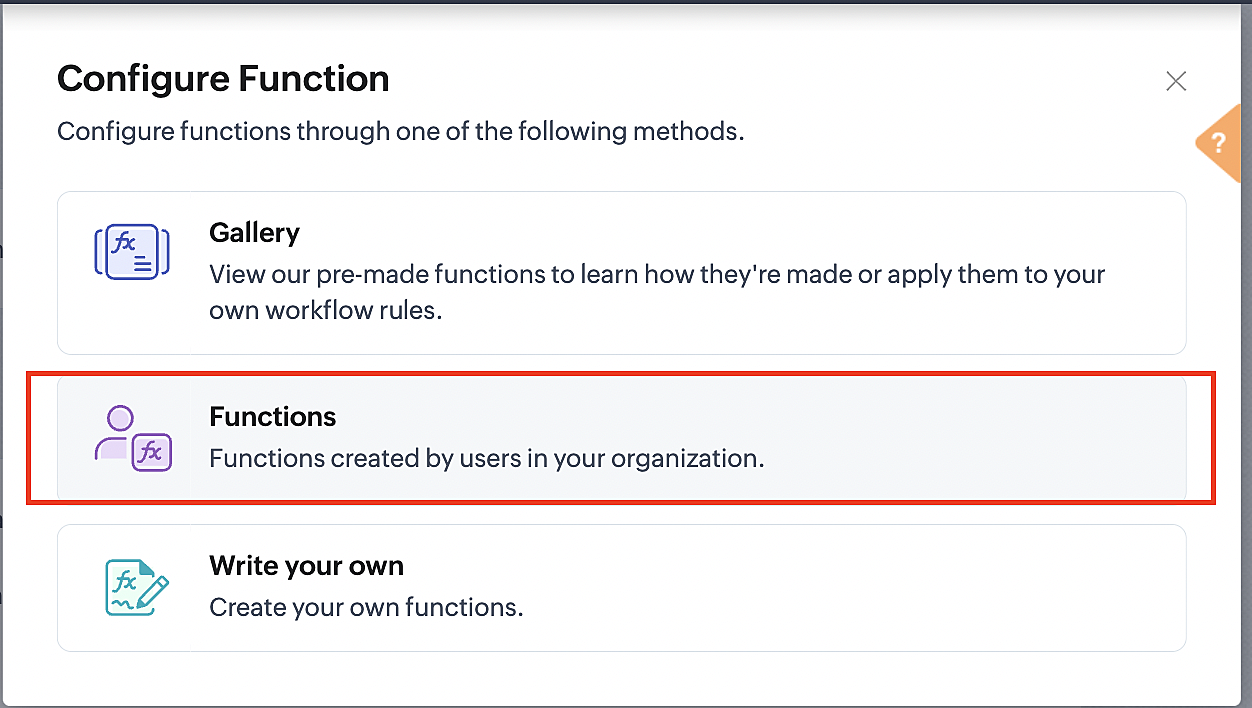
5. In the Configure custom function page, select the "cancel" function you created from among the functions users in your organization have created.
Part 3: Argument mapping
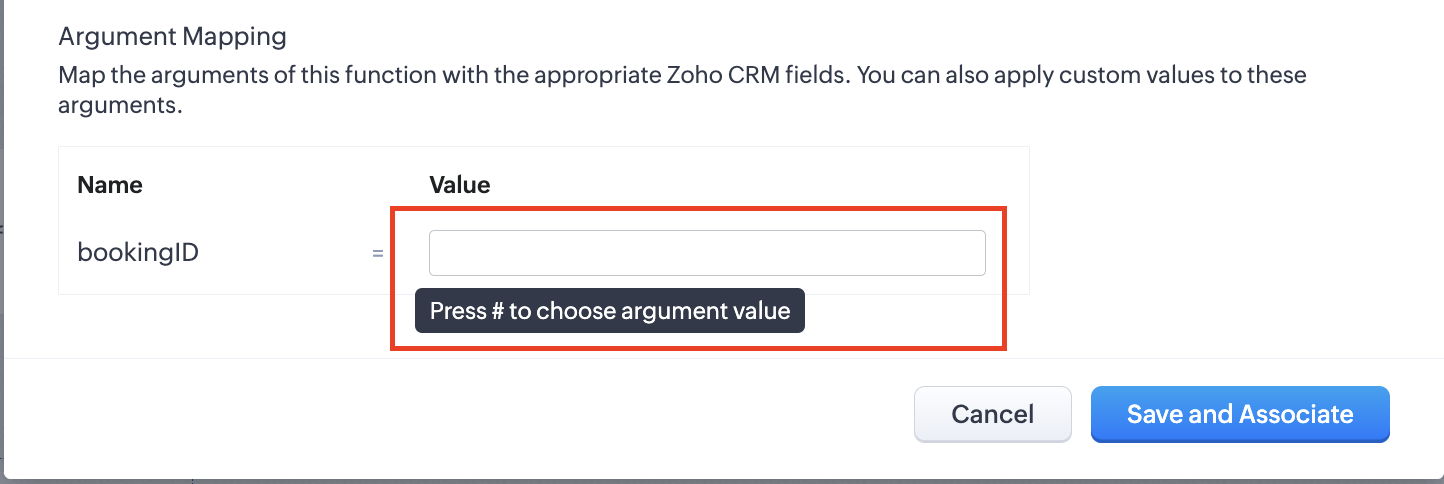
1. Press # to choose an argument value.
2. Select Meetings under Module and BookingId in the field.
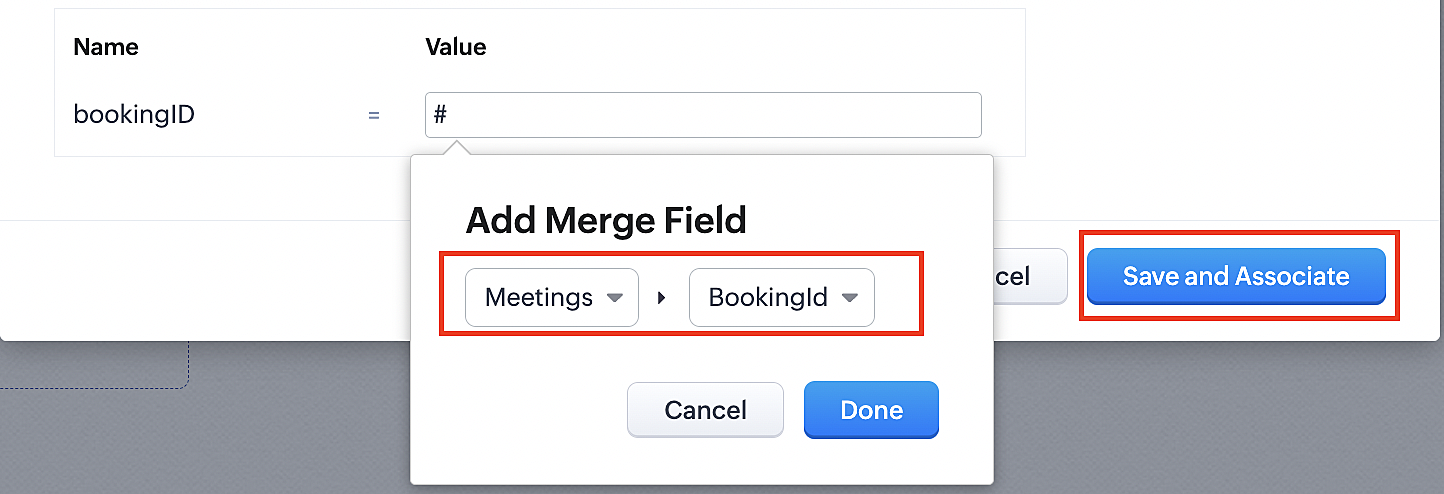
3. Click the Save and Associate button.
Reference:
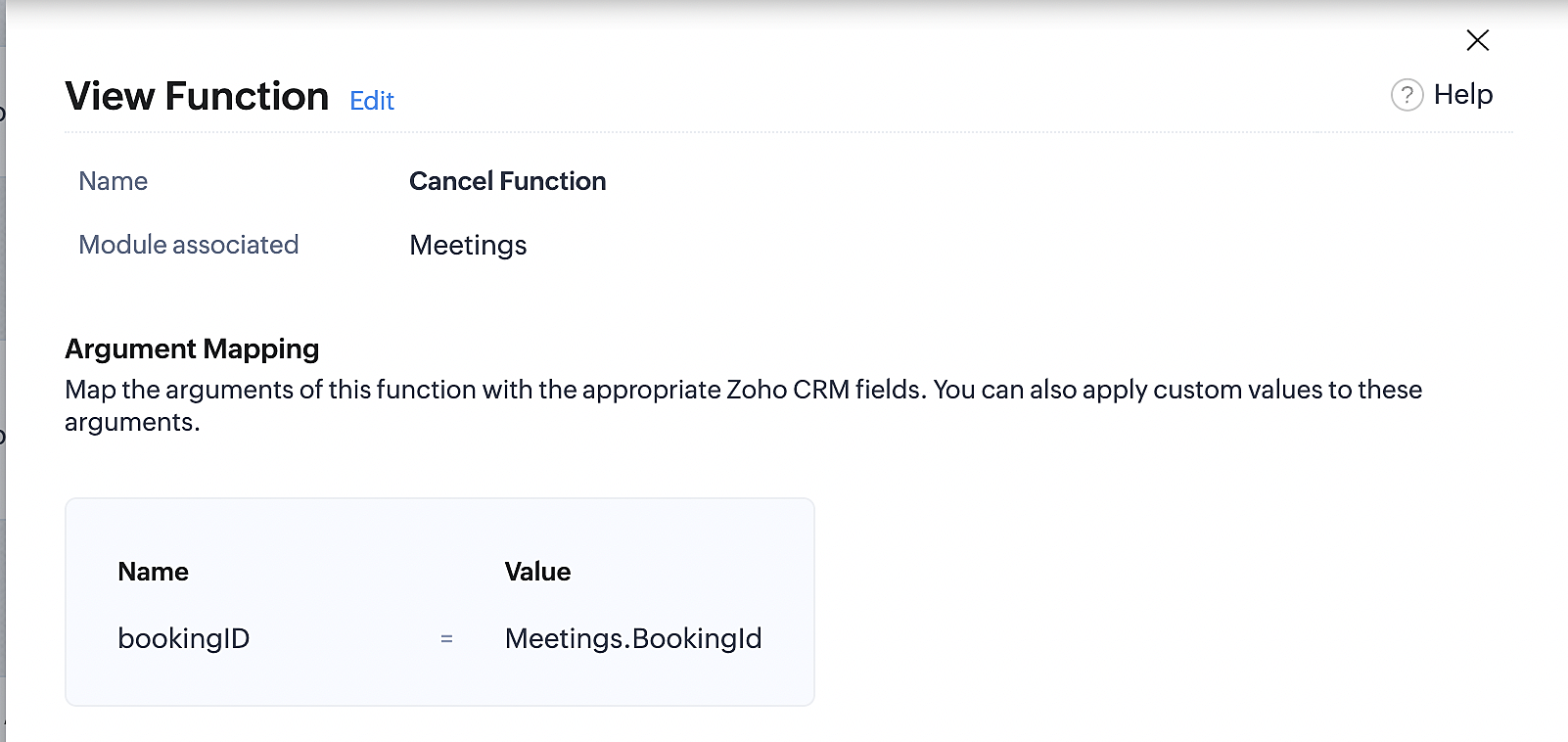
Below is the final flow of the cancel booking workflow:
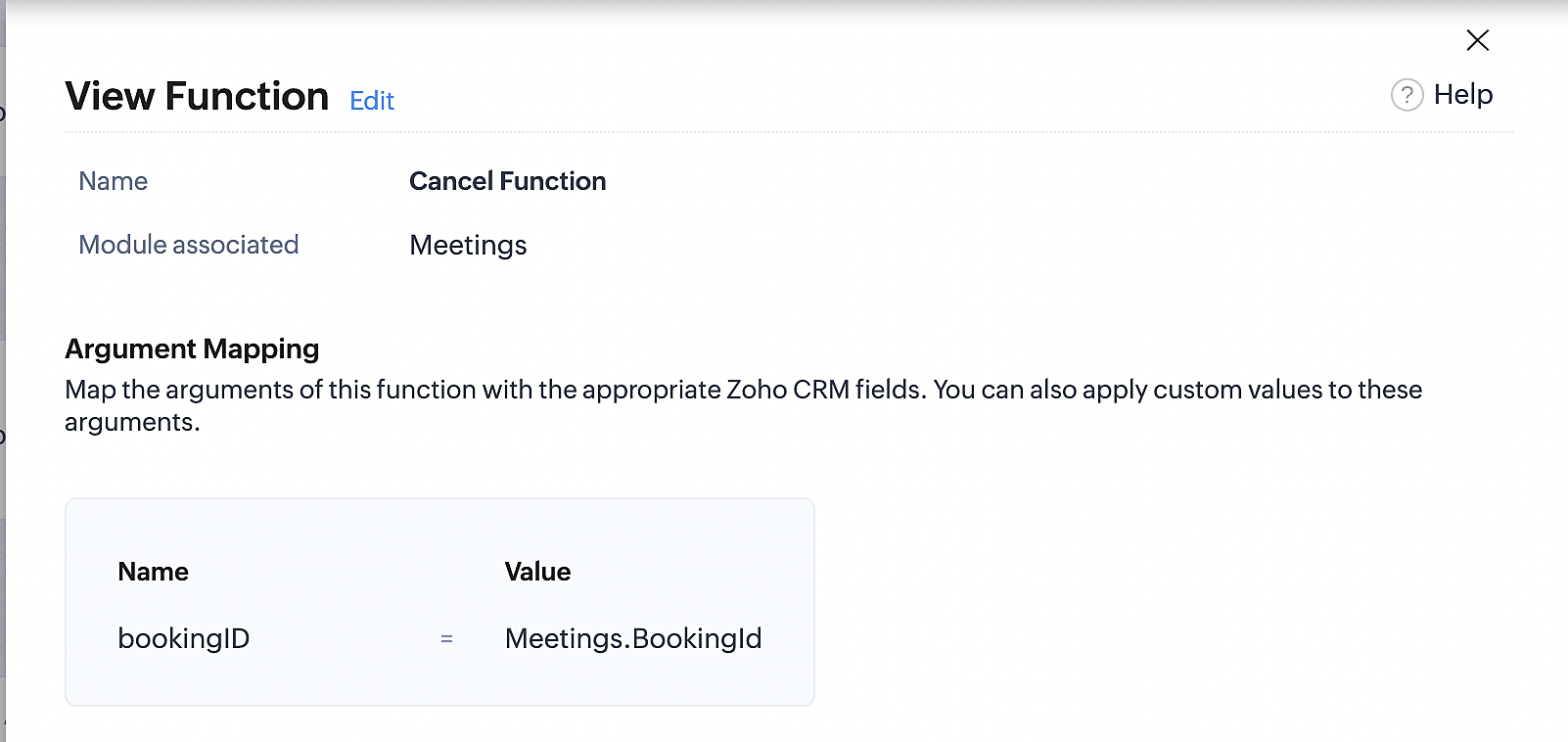
At the end of Part 3, we will have created a workflow that will be executed automatically when meetings are deleted in Zoho CRM. Simultaneously, the bookings associated with the meeting will also be canceled in Zoho Booking.
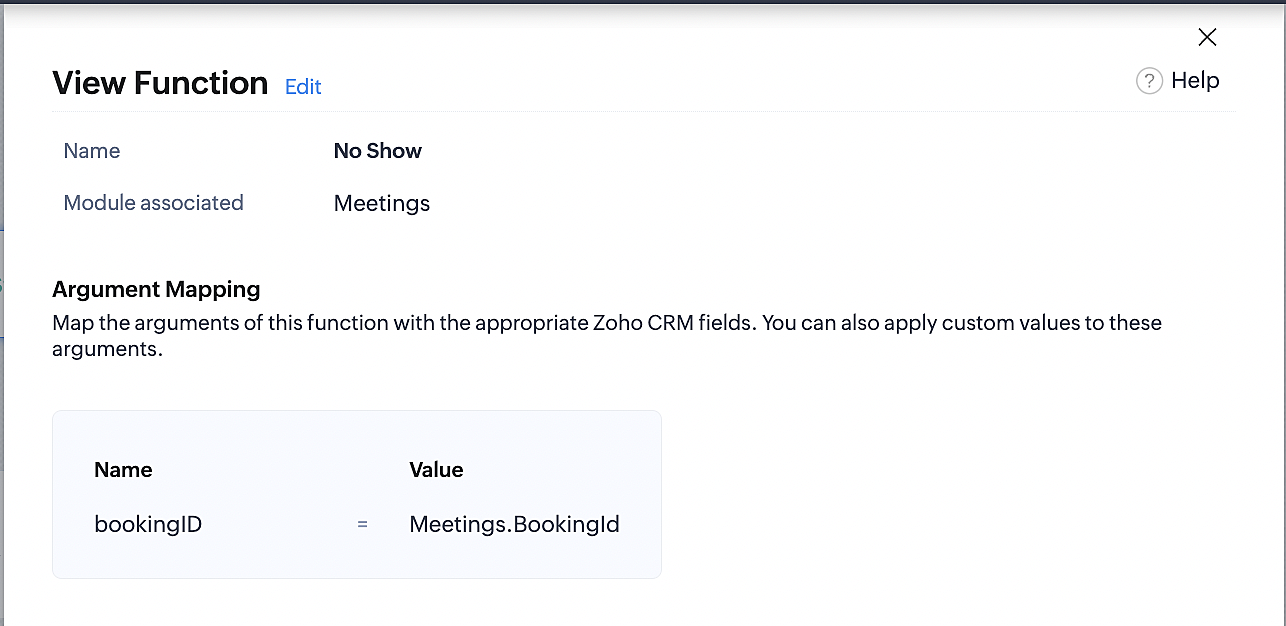
ii. Creating workflow for updating an appointment's status as "no show" in Zoho Bookings when the meeting's booking status is marked as no show in Zoho CRM
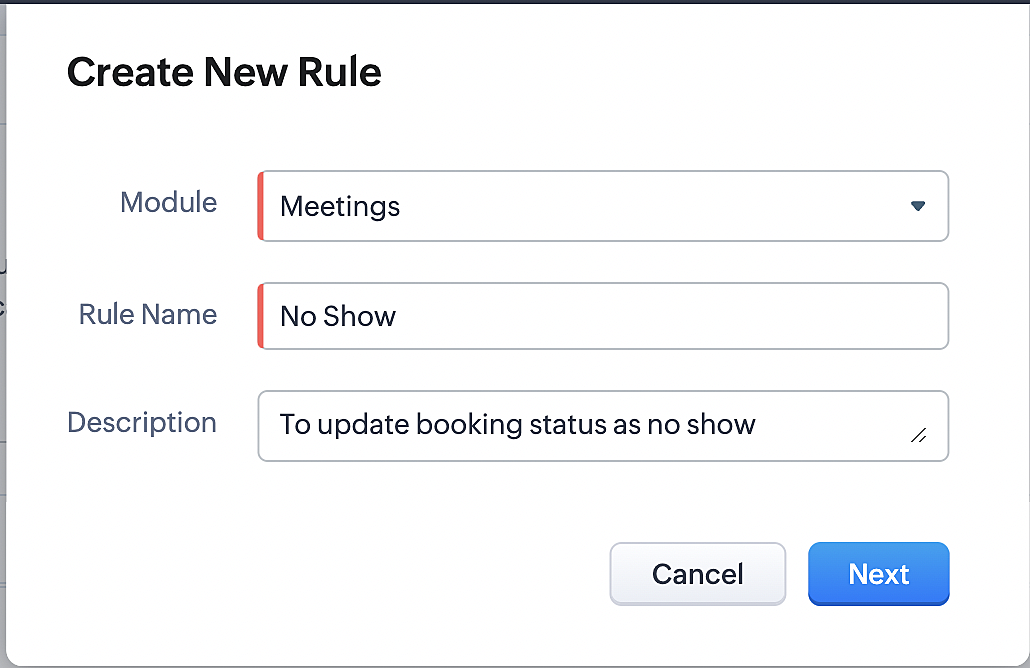
Part 4: Creating the rule
1. Go to Setup > Automation > Workflow Rules.
2. In the Workflow Rules page, click Create Rule.

3. Select Meetings under Module and configure the rule name and description as required.
Reference:
Part 5: Specifying the rule trigger
If you encounter difficulties while navigating through the steps mentioned below, please refer to Part 2 above, where we have provided step-by-step screenshots for clarification.
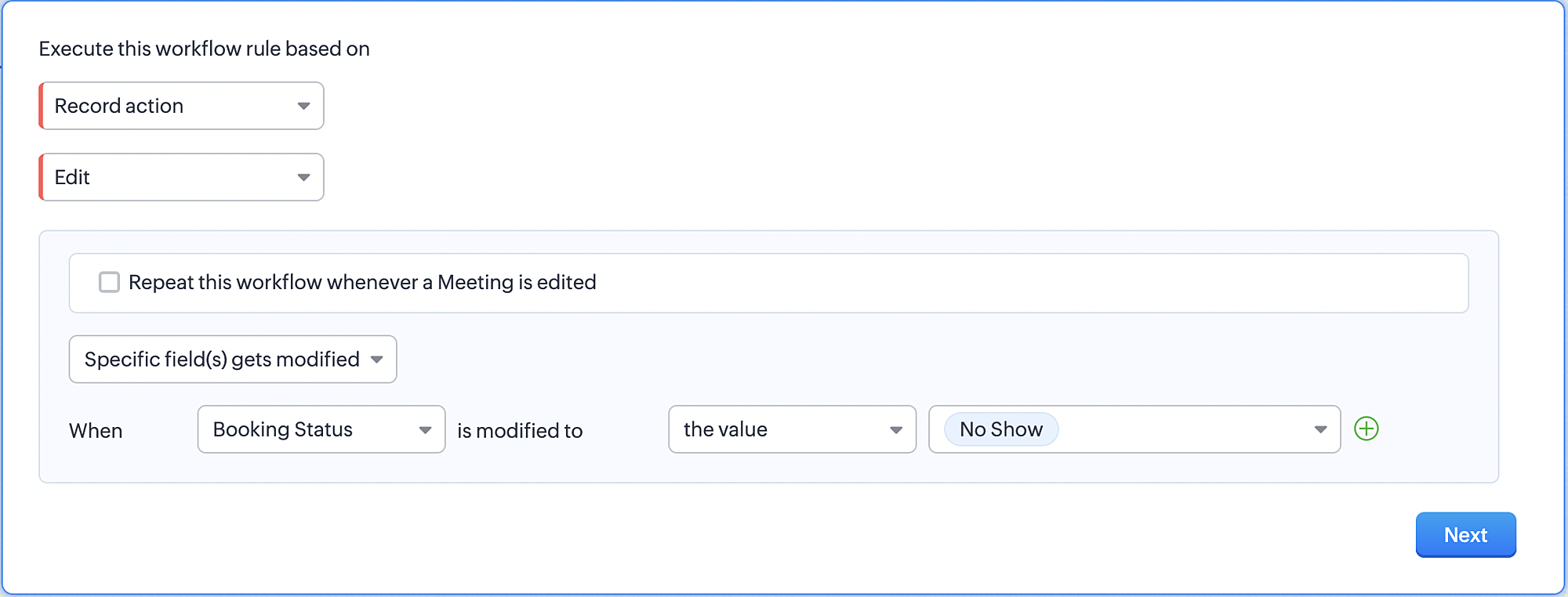
1. Record Action > Edit.

2. Enable the Specific field(s) gets modified and configure it per the screenshot below.
a. This is to ensure that the workflow is executed only when the booking status under the meeting module is
updated to "No Show".
updated to "No Show".
3. Configure condition > All Meetings.
4. Instant Actions > Function > New Function.
5. In the Configure custom function page, select the "no show" function you created from among the functions
users in your organization have created.
users in your organization have created.
Part 6: Argument mapping:
If you encounter difficulties while navigating through the steps mentioned below, please refer to Part 3 above, where we have provided step-by-step screenshots for clarification.
1. Press # to choose an argument value.
2. Select Meetings under Module and configure the field as "BookingId".
3. Click Save and Associate button.
Reference:
Below is the final flow of the "No Show" booking status workflow:
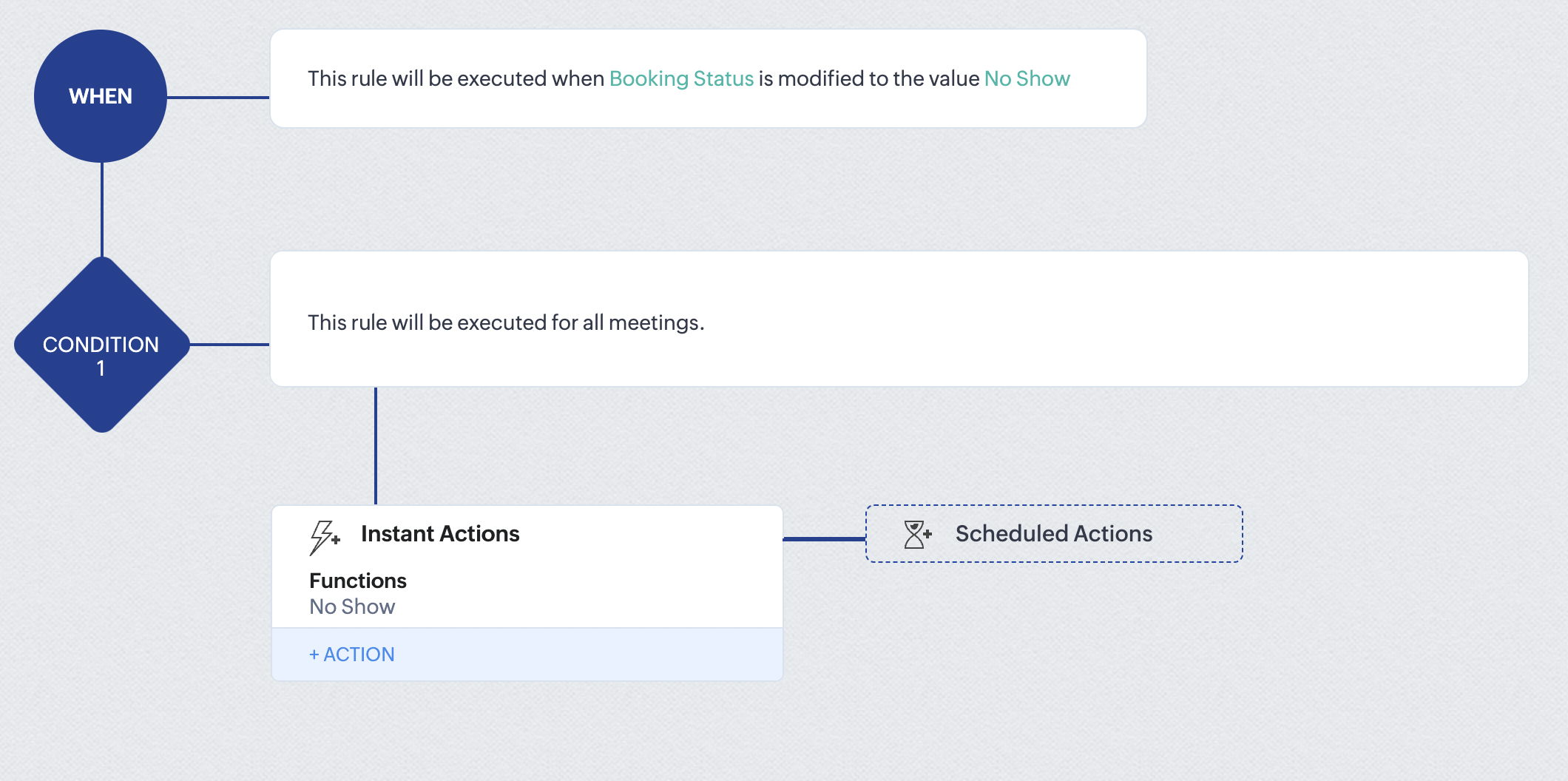
At the end of part 6, we will have created a workflow that automatically executes when the booking status field within the Zoho CRM Meetings module is updated to "No Show." This action will result in the associated bookings for that meeting also being marked as "No Show" in Zoho Bookings.
iii. Creating workflow for updating appointment status as "Completed" in Zoho Bookings when the booking status field of the meeting is marked as completed in Zoho CRM.
Part 7: Creating the rule
1. Go to Setup > Automation > Workflow Rules.
2. In the Workflow Rules page, click Create Rule.

3. Select Meetings under Module and configure rule name and description as required.
Reference:
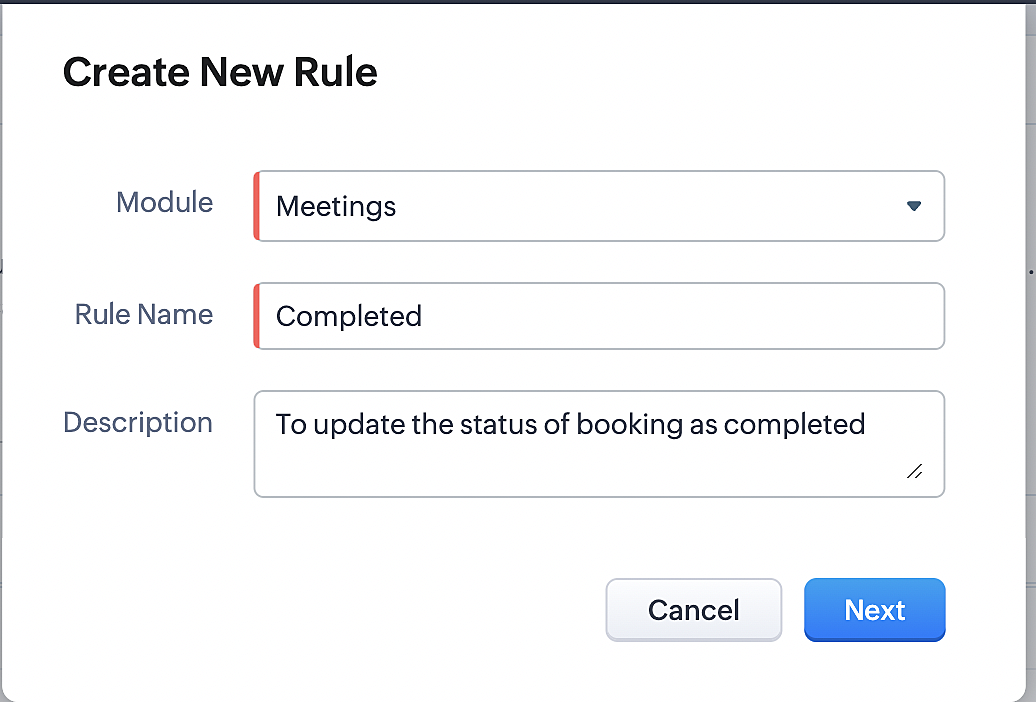
Part 8: Specifying the rule trigger
If you encounter difficulties while navigating through the steps mentioned below, please refer to Part 2 above, where we have provided step-by-step screenshots for clarification.
1. Record Action > Edit.

2. Enable the Specific field(s) gets modified setting and configure it per the screenshot below.
a. This serves to ensure that the workflow is executed only when the booking status under the Meetings module is
updated to "Completed".
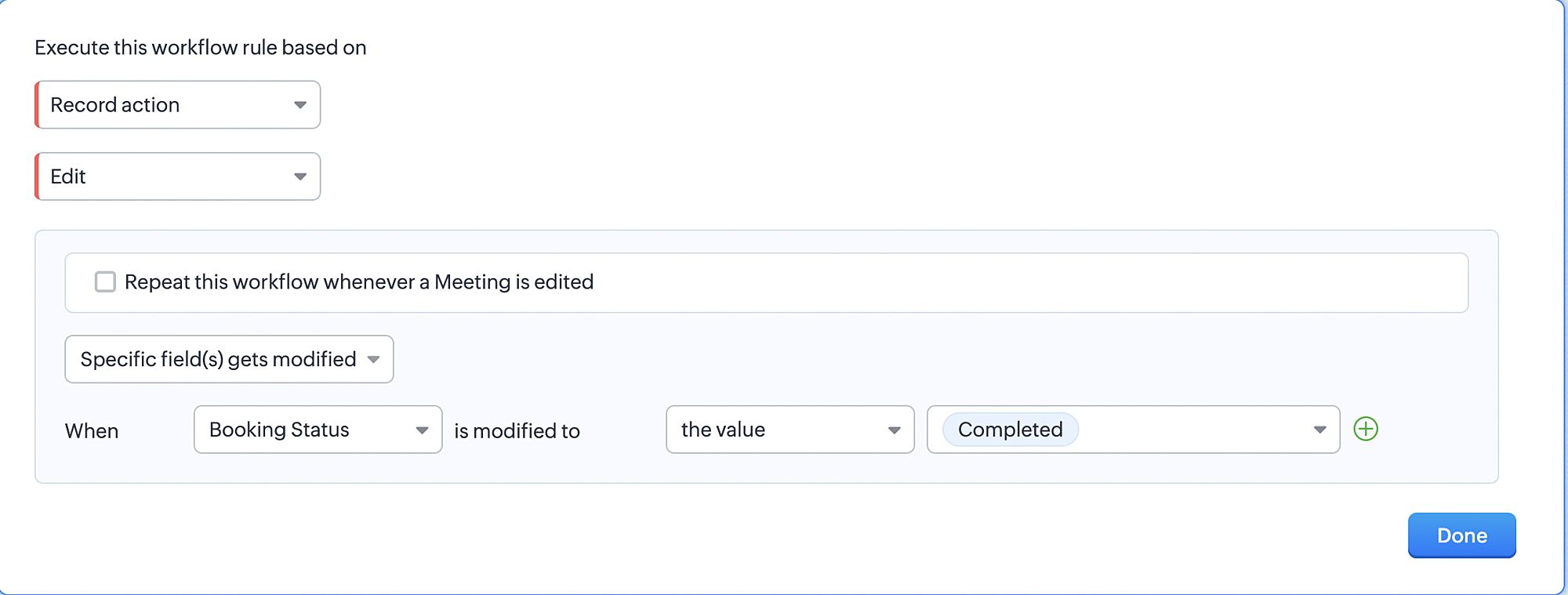
3. Configure condition > All Meetings.
4. Instant Actions > Function > New Function.
5. In the Configure custom function page, select the "completed" function you created from among the functions users
in your organization have created.
Part 9: Argument mapping:
If you encounter difficulties while navigating through the steps mentioned below, please refer to Part 3 above, where we have provided step-by-step screenshots for clarification.
1. Press # to choose an argument value.
2. Select Meetings under Module and configure the field as "BookingId".
3. Click Save and Associate button.
Reference:
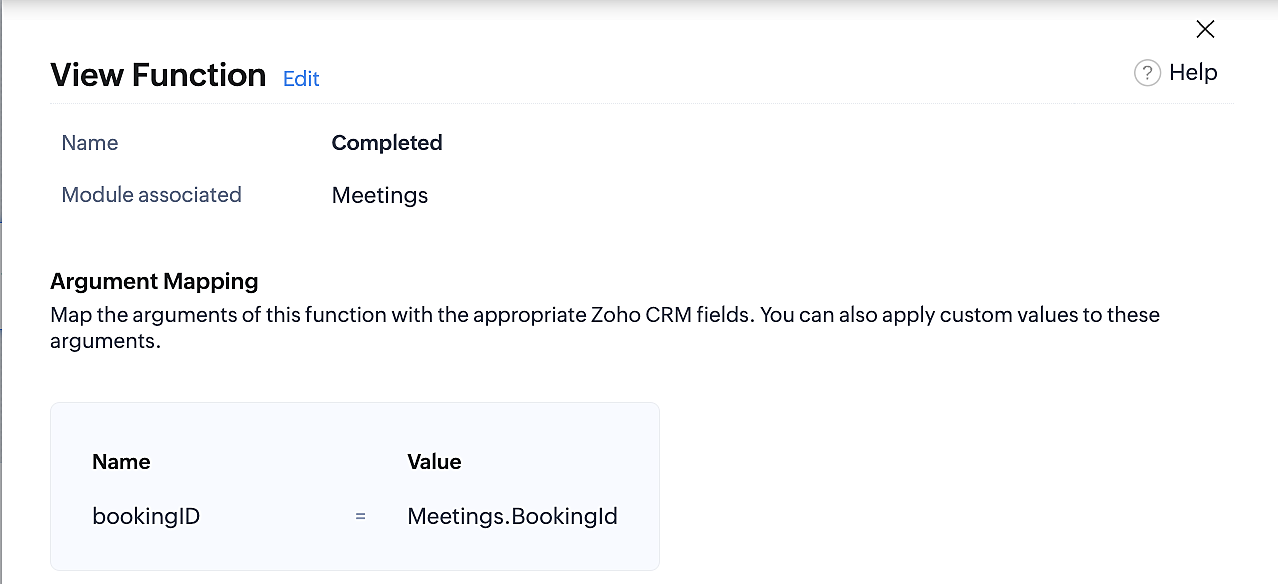
Below is the final flow of the "Completed" booking status workflow:
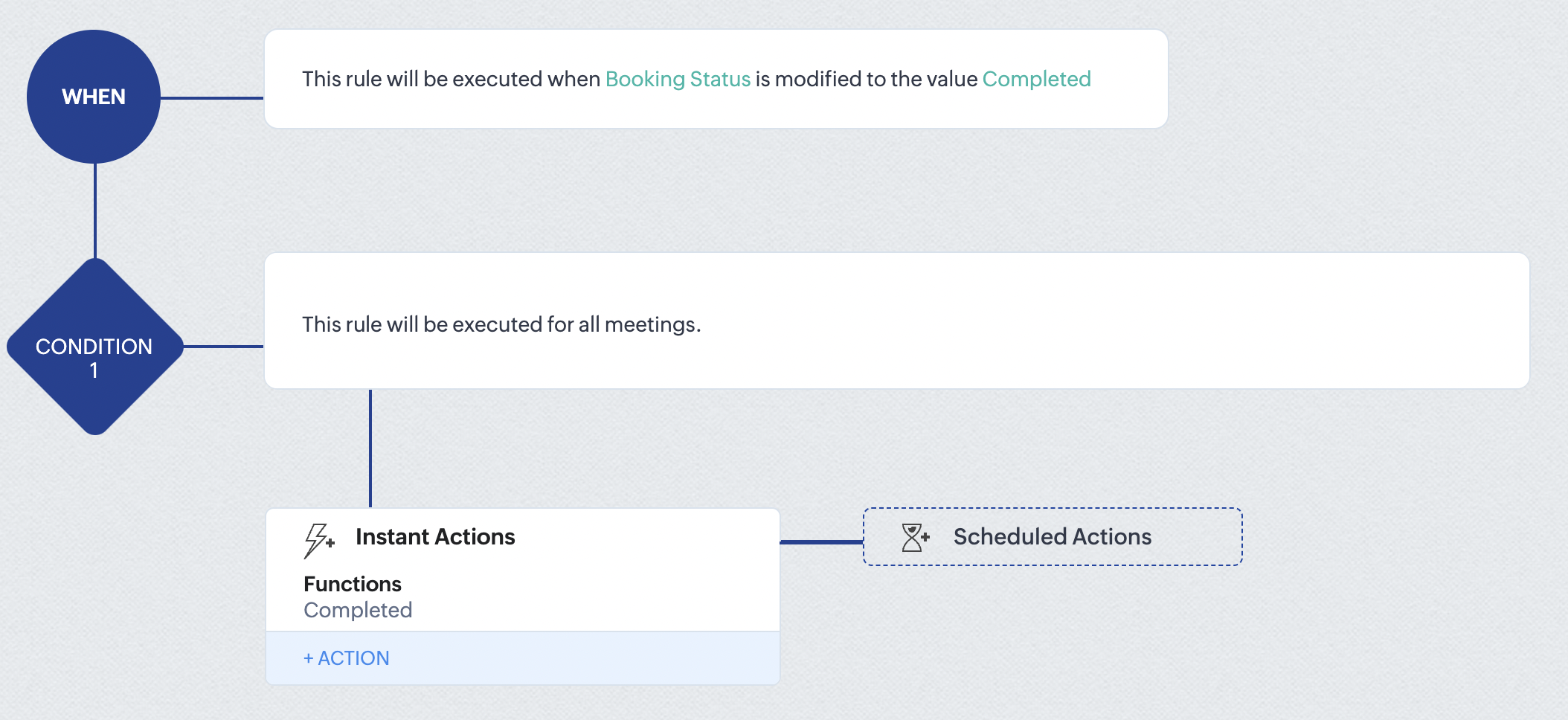
At the end of part 9, we will have created a workflow that is automatically executed when the booking status field within the Zoho CRM Meetings module is updated to "Completed." As a result, the associated bookings for that meeting will also be marked as "Completed" in Zoho Bookings.
Conclusion
We've reached the end of this community post. With the integration mentioned above in place, you'll be able to book, cancel, and update the status of appointments in Zoho Bookings directly from your Zoho CRM application. This will help you effectively manage your appointments in one place. As mentioned above, we've covered the rescheduling action in a separate post, which you can access by clicking on the following link: Reschedule Action
Furthermore, we've outlined a method for automating appointment statuses in detail. You can use this document as a reference to explore the various possibilities that suit your needs.
If you have any questions or need assistance with your configuration, please email us at hello@zohobookings.com or support@zohobookings.com.
Access your files securely from anywhere
New to Zoho Recruit?

Zoho Developer Community
New to Zoho LandingPage?
Zoho LandingPage Resources
New to Zoho Survey?
New to Zoho CRM Plus?
Deliver unforgettable customer experiences
New to Zoho CRM Plus?
Deliver unforgettable customer experiences
New to Zoho Marketing Plus?
Everything you need to run your marketing
New to Zoho Marketing Plus?
Everything you need to run your marketing
New to Bigin?





Topic Participants
Kaushik S
bruce
Ishwarya SG
PrismaNote Support
Sticky Posts
Presenting ABM for Zoho CRM: Expand and retain your customers with precision
Picture this scenario: You're a growing SaaS company ready to launch a powerful business suite, and are looking to gain traction and momentum. But as a business with a tight budget, you know acquiring new customers is slow, expensive, and often deliversGood news! Calendar in Zoho CRM gets a face lift
Dear Customers, We are delighted to unveil the revamped calendar UI in Zoho CRM. With a complete visual overhaul aligned with CRM for Everyone, the calendar now offers a more intuitive and flexible scheduling experience. What’s new? Distinguish activitiesCreate and populate a record in an instant: Introducing zero-shot field prompting to Zia's ICR
A couple of months ago, we upgraded our in-house AI image detection and validation tool, Zia Vision, with intelligent character recognition (ICR). By training Zia with sample images, you could create and enrich CRM records with data extracted from standardIn-person ZUG Meetups for Real Estate Professionals - US Q1 2026
The Real Estate Zoho User Group is going on a multi-city, in-person meetup tour across the US, and we’d love to see you there! These meetups are a great opportunity to: Connect with fellow real estate professionals using Zoho Share challenges and discoverNimble enhancements to WhatsApp for Business integration in Zoho CRM: Enjoy context and clarity in business messaging
Dear Customers, We hope you're well! WhatsApp for business is a renowned business messaging platform that takes your business closer to your customers; it gives your business the power of personalized outreach. Using the WhatsApp for Business integration
New to Zoho TeamInbox?
Zoho TeamInbox Resources
Zoho CRM Plus Resources
Zoho Books Resources
Zoho Subscriptions Resources
Zoho Projects Resources
Zoho Sprints Resources
Qntrl Resources
Zoho Creator Resources
Zoho CRM Resources
Design. Discuss. Deliver.
Zoho Show Resources

Get Started. Write Away!
Writer is a powerful online word processor, designed for collaborative work.
Zoho CRM コンテンツ
-
オンラインヘルプ
-
Webセミナー
-
機能活用動画
-
よくある質問
-
Ebook
-
-
Zoho Campaigns
- Zoho サービスのWebセミナー
その他のサービス コンテンツ
Nederlandse Hulpbronnen

ご検討中の方
Recent Topics
Zoho Flow s’enrichit avec les subflows et les actions Webhook
Nous sommes ravis d’annoncer deux ajouts importantsà Zoho Flow : les subflows et les webhooks sortants. Ces nouvelles fonctionnalités ont été conçues pour vous aider à créer des workflows plus facilement et à automatiser davantage de tâches répétitives.How to assign canvas view for portal user
Hi , as a portal user, I can switch to another canvas view, however, I cannot find any field to configure a default canvas view for portal user. May I ask how to set it up in CRM? And if I can view list by sheet view as a portal user?Restrict Leave Application Based on Attendance Cycle (24th to 23rd)
Hi Zoho Team, Our organization follows a custom attendance cycle from 24th of the current month to 23rd of the next month. I would like to configure the system so that: Employees should not be able to apply backdated leave for any date after the attendanceHow do I assign a parent to an existing campaign?
I created a campaign but now I'd like to make that existing campaign a child of another. How can I do this?Categorize Tickets Through The App
I used to be able to categorize and assign tickets through the app without any issues. However, for the past year, whenever I try to edit a ticket, select a category, and click save, it doesn’t actually save the changes. As a result, I haven’t been ableCan't add picture to email template. Says I'm over the character limit.
I tried creating an email template with a picture and it says I'm over the character limit. The picture is pretty small. What can I do?Allow breakdown of per diem for meals provided
Would it be possible to break the per diem down into what you get for each meal. The reason for this is we want to offer per diem but if a meal is provided by a customer or sales we need to remove this from the per diem bucket for that day. We break downAutomatically moving Leads into their corresponding buckets
Hi, I have developed a lead pipeline and created different cadences for various lead segments. After enrolling leads into their respective cadences, each lead goes through a series of follow-ups (in my case, three emails). If a lead does not respond afterTracking Email Template usage
I'd like to be able to track how many times agents/users send an email from Templates. This is so we can track their activity in relation to Campaigns in CRM. ThanksGet employee id of authenticated user via API
Hi, For adding timetracking records an employee id is required. Is there an API Route available to get the employee ID of the current authenticated user? or something like /users/me Currently using https://people.zoho.com/people/api/forms/employee/getRecordsCollect in-app feedback with richer context and granular insights
Hello, Apptics community! From GenAI chatbots to one-tap checkouts, user experience standards keep rising—yet 96% of unhappy users never explain what went wrong; they simply leave. Introducing in-app feedback 2.0 banner In-app feedback 2.0 is here toTemporary restiction
My account says You have been temporarily restricted from publishing jobs from Zoho Recruit.Click here to request a one-time approval to publish your jobs and when I go to click it shows error. Kindly assist.Help with Quote template for peer review
We are wanting to do peer review of quotes/proposals, however the quote templates dont have product cost, profit margins, etc. It is difficult for a manager to approve a quote without ensuring nothing is going out at improper margins, etc. I have notHow many AR fields We can add in a form?
I want to add at least 10-15 AR fields in a form. I just want to know is there any limit on the AR fields or do I need to pay extra money for using 10-15 AR fields. Thanks in advance.Agent working hours
Hi, I know it is possible to set company business hours but is it possible so that agents can have different ones? I.e. some agents cover later hours on specific weeks - can these be set so those agents that are "working" get notified about tickets etc.Disallow CLOSE if tags field is empty
I want to introduce a mandatory condition that NEW tickets (not prior closed tickets) cannot enter the CLOSED state without first having an entry in the tags field. Is there a way I can do this?Central de Ajuda - Restringir visualização de tickets
Estou tentando configurar o Zoho Desk para que determinados usuários dentro de uma mesma conta consigam visualizar apenas os tickets criados por usuários específicos dessa conta — e não todos os tickets ou apenas os seus próprios. Até onde sei, existeBusiness Hours with lunch break
Our business hours are: mon - fri 08:30 - 13:00, 15:00 - 18:30. How can I handle the lunch break? If I use 8:30 - 18:30 it obviously breaks SLA. ThanksAsk the Experts 21: Power up your support game with Zoho Desk Automation
" In every business, there are tasks to automate, Zoho Desk helps with features that integrate Assignments to manage tickets and teams to align,Macros for quick actions and workflows to streamline Contracts and schedules to hold things tight, Plans runIf leads are assigned to a person before 4:00 PM and the stage is "Fresh Lead", then an email should be triggered at 4:00 PM to all assigned users. If leads are assigned after 4:00 PM and the stage is
If leads are assigned to a person before 4:00 PM and the stage is "Fresh Lead", then an email should be triggered at 4:00 PM to all assigned users. If leads are assigned after 4:00 PM and the stage is "Fresh Lead", then the email should be triggered theMultiselect lookup in subform
It would be SO SO useful if subforms could support a multiselect look up field! Is this in the works??Tasks as calendar events? What about a way to verify a meeting actually happened?
I'm not sure how to best ask this, but i'm looking to add some guard-rails into zoho for the end-user. However for guardrails to be effective they can't really add extra steps for the end-user. i.e. every step that's added for the user, is another placeAttachments should sync between Zoho Finance in CRM and Zoho Books
It would EXTREMELY helpful and practical if the attachments added to an invoice via Zoho Finance in CRM synced with the invoice updates in Zoho Books. Currently, attachments to an invoice updated in CRM DO NOT appear as attachments when viewing the sameIntroducing a new home page view and UI enhancements for Dashboards
Hello everyone, In CRM, the home pages provide a quick view of the various happenings in a business with the help of dashboards. The home pages also help to organize one's and the team's day's work. There are three views in the home tab: Classic User'sCall result pop up on call when call ends
I’d like to be able to create a pop up that appears after a call has finished that allows me to select the Call Result. I'm using RingCentral. I have seen from a previous, now locked, thread on Zoho Cares that this capability has been implemented, butData Template Amending
Hi, is it possible to remove data templates once you have applied them in Workdrive? Also, once I have added a new field to a data template can I mass update multiple files who have already been allocated that template and amend just that one addedZoho Flow y subformularios de Zoho CRM
Buenas tardes, En mi empresa vamos a empezar a usar los subformularios de zoho crm pero estos los voy a tener que rellenar con zoho flow ya que va a ser el encargado de rellenar dichos campos del subformulario. El problema es que a la hora de intentarRecurring Invoices
We are looking at moving our invoices to ZOHO Billing, I have started the trial period and like that I can et up for four different companies. The one feature we need which is mentioned in the documentation is Recurring Invoices so we can send our RentImplement Meeting Polls in Zoho Bookings
Dear Zoho Bookings Support Team, We'd like to propose a feature enhancement related to appointment scheduling within Zoho Bookings. Current Functionality: Zoho Bookings excels at streamlining individual appointment scheduling. Users can set availabilityZoho Projects App update: Arabic and Hebrew language support
Hello everyone! In the latest version(v3.10) of the Zoho Projects iOS app update, we have brought in support to access the app in RTL(Right to Left) languages (Arabic and Hebrew). Note: RTL is yet to be supported on the Calendar and Gantt charts modulesI want to cancel @mention group in the notes in Zoho CRM
Hi Everybody, I want to prevent people from mentioning a specific group in notes in Zoho CRM. We have one group called Team Sales, and although we've asked users not to mention groups, they still mention the group name. My workaround is to change theKaizen #193: Creating different fields in Zoho CRM through API
🎊 Nearing 200th Kaizen Post – We want to hear from you! Do you have any questions, suggestions, or topics you would like us to cover in future posts? Your insights and suggestions help us shape future content and make this series better for everyone.How to install node packages in Zoho Creator cloud functions
I wanted to create some functions which requires node packages like axios, fetch, multer etc., How and where can i install the node packages in Zoho creator to use it in Zoho creator Nodejs function.Session "Ask Me Anything" Zoho France - Le 26 Juin 2025 14h à 17h (en Français
Chers Utilisateurs, Vous cherchez à mieux comprendre Zoho CRM ou Zoho Desk ? Nos experts seront disponibles pour répondre à toutes vos questions lors de notre session Ask Me Anything. Rejoignez-nous ici pour en discuter en ligne. Pendant trois heures,Option to Crop Existing Agent Image in Zoho One Directory
Hello Zoho Team, We hope you're all doing well. We would like to request a small but useful enhancement to the Zoho One Directory. 🎯 Current Limitation At present, the system allows cropping an agent image only during the initial upload of an agent'sIntroducing Sub-Accounts in Zoho Books!
Hello Everyone, Sub-Accounts is LIVE! Yes, you read it right. The much needed and most requested feature is now live in Zoho Books. The sub-accounts feature in Zoho Books will help you to classify your accounts further which will give you a more detailed view of your accounts while running reports. You can create sub-accounts for the below Accounts: Asset Cost of Goods Sold Expense Liability Fixed Asset Other Asset Other Current Asset Long Term Liability Other Current Liability Other Liability OtherSesión "Ask me anything" Zoho en Español - 26 de junio de 2025, de 14:00 a 17:00 (en español)
¡Hola Comunidad! ¿Quieres entender mejor Zoho CRM o Zoho Desk? Nuestros expertos estarán disponibles para responder a todas tus preguntas durante nuestra sesión "Ask me anything". Puedes comentar este artículo y durante tres horas, nuestro equipo estaráUI Update: We've Reorganized Invoice Settings
Dear users, We’ve reorganized invoice settings to offer you a streamlined and intuitive experience when managing your subscriptions. Starting from 2 July 2025, subscription-related invoice settings will be accessible from a new page called Billing PreferencesMarketer’s Space – Automate Subscription Management for CRM Contacts Using Workflows in Zoho Campaigns
Hello, marketers! Welcome back to Marketer’s Space. In this week’s post, we’ll look at how to simplify subscription management using Workflows for contacts synced from Zoho CRM in Zoho Campaigns. There are multiple ways to assign topics to your contacts:WhatsApp to shift to per-message billing from July 1, 2025
Greetings Recruiters, If you’re using WhatsApp to connect with candidates through Zoho Recruit, there’s an important pricing change coming up that you’ll want to plan for. What’s changing? Starting July 1, 2025, WhatsApp is moving away from conversation-basedNext Page