Bidirectional sync between Zoho Bookings and Zoho CRM - Part 1
Hey, community members!
The default integration between Zoho CRM and Zoho Bookings is unidirectional, which means that any appointments booked, rescheduled, or deleted in Zoho Bookings will be reflected in Zoho CRM. However, any modifications made to events in Zoho CRM that originated from Zoho Bookings will not be reflected back in Zoho Bookings. Hence, as we're announcing in this community post, we've made the sync bidirectional.
This community post will cover the process of configuring appointment bookings from Zoho CRM in Zoho Bookings, as well as managing appointment statuses such as Canceled, No Show and Completed. We have addressed the rescheduling action in a separate post. To view it, please click on the following link: Reschedule Action
This community post will be beneficial for active Zoho CRM users who handle all their meetings within Zoho CRM. Additionally, you can use this community post as a reference to explore various automation possibilities tailored to your business requirements. For instance, with this post's guidance, when you update a booking's status field to "Completed" in Zoho CRM, it will automatically sync with Zoho Bookings and trigger an automated "Mark as completed" email to customers. This enhancement will improve your Zoho Bookings and Zoho CRM synchronization experience, making appointment management easier.
Prerequisites of bidirectional sync:
- Zoho Bookings Premium subscription
- Zoho CRM paid subscription
- Enable Zoho CRM integration within Zoho Bookings
The purpose of enabling the Zoho CRM integration within Zoho Bookings is to transfer booking details from Zoho Bookings to Zoho CRM. In this configuration, the mandatory field is the Booking ID, which is passed from Zoho Bookings to Zoho CRM through the integration. Whenever an appointment is booked, customer details will be sent to the designated CRM module, and a corresponding record will be created in the Meetings module within Zoho CRM, which will help in automating the workflow.
Here's the complete demo video that covers all the configurations discussed in the community post below:
Timestamps for your reference:
0:35 - Purpose of this community post
Here's the complete demo video that covers all the configurations discussed in the community post below:
Timestamps for your reference:
0:35 - Purpose of this community post
1:26 - Zoho CRM plugin installation
4:43 - Custom field creation
7:20 - Function creation
9:22 - Connection creation
10:24 - Configuring arguments
11:06 - Workflow creation
13:33 - Argument mapping
14:41 - Output verification
17:41 - Conclusion
How we're approaching this bidirectional sync
1. Booking an appointment from Zoho CRM
Install the Zoho Bookings for Zoho CRM plugin within your Zoho CRM application. This plugin enables the creation of a "New Appointment" button within the Zoho CRM Leads and Contacts module, which enables you to select the desired booking page you wish to open. You can choose from various workspace, service, or staff booking pages. After configuration, you can initiate the process of scheduling bookings directly from within your Zoho CRM account.
- Guide on Zoho Bookings and Zoho CRM plugin installation: Booking page selection for Zoho CRM plugin
2. Booking status: Completed or No Show
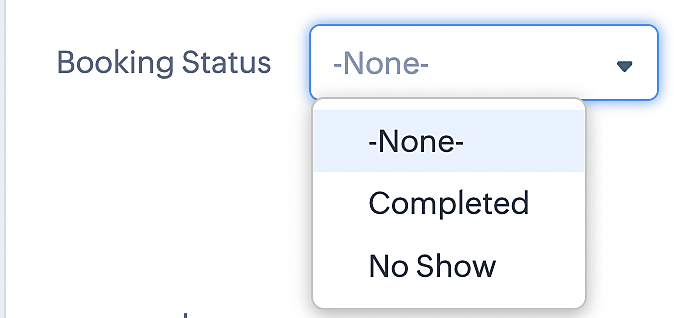
To update a booking's status (Completed or No Show), we've added a new picklist properties field named "Booking Status" in the Meetings module and configured it with two options: "completed" and "no show". Depending on the booking status chosen, the corresponding booking in Zoho Bookings will be updated.
- Details on how to add a custom field to the Meetings module : Customizing modules
- Here's a video that demonstrates how to add a field to a module in Zoho CRM: Adding fields
Reference:
3. Booking status: Canceled
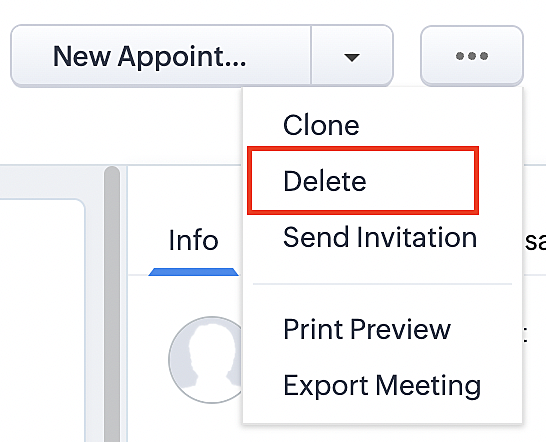
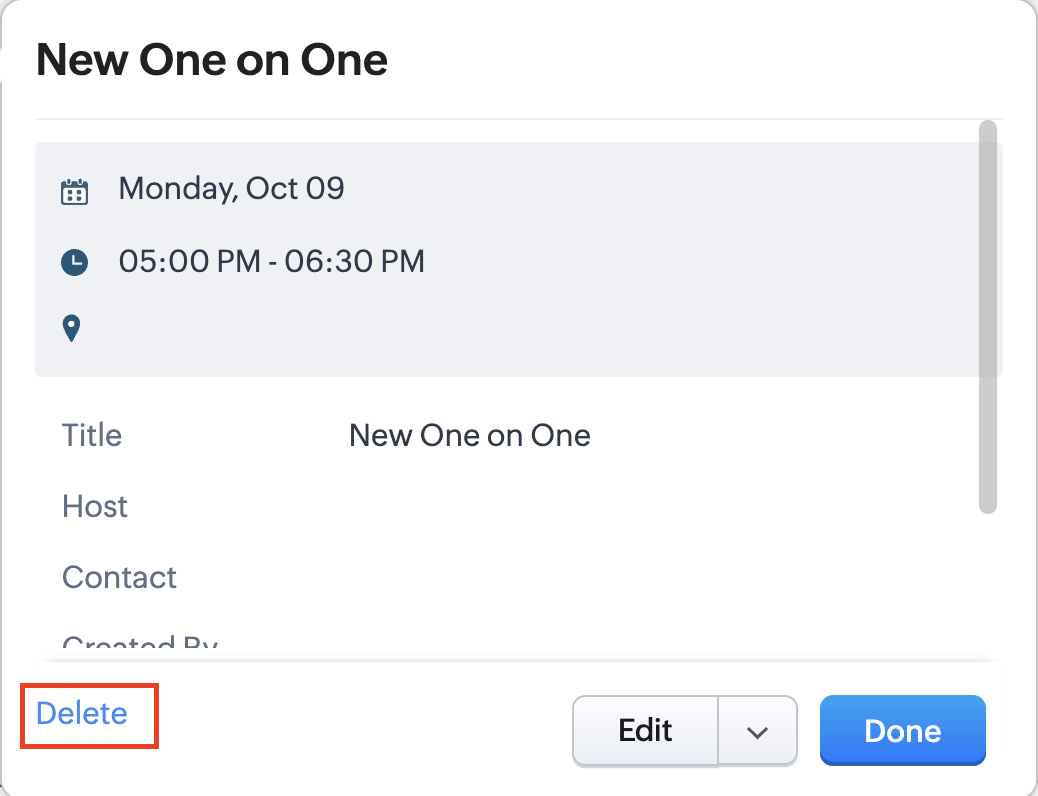
Whenever a meeting is deleted from the Meetings module, the corresponding booking in the Zoho Bookings app will also be canceled automatically. The meeting can be deleted either from the Meetings module or directly from the calendar.
To enable bidirectional sync between Zoho CRM and Zoho Bookings
Complete these steps in Zoho CRM.
Step 1: Creating connections
You first need to establish a connection between Zoho CRM and Zoho Bookings. Zoho Bookings is listed as one of the default connections in Zoho CRM, making it simple to set up. Select the Zoho Bookings connection, define the connection name and scope, and you'll be all set. This connection will enable you to link both applications and facilitate the seamless transfer of data.
Read here for more details on how to create connection in Zoho CRM: Connections
Step 2: Creating functions
In this context, we'll be creating three functions: one for marking appointments as completed, another for canceling appointments, a third for marking appointments as no shows, and a fourth for rescheduling appointments. For each function, we must also configure arguments, which pass values or data into a function when making a call. Here, we'll pass the booking ID to the function as an argument to update the necessary booking status.
i. To create a function for marking appointments as completed:
1. Go to Setup > Developer Space > Functions.
2. In the Functions page, click + Create New Function.

3. Configure the function name, display name, and description.
4. Set the category as automation.
This opens the Deluge script page.
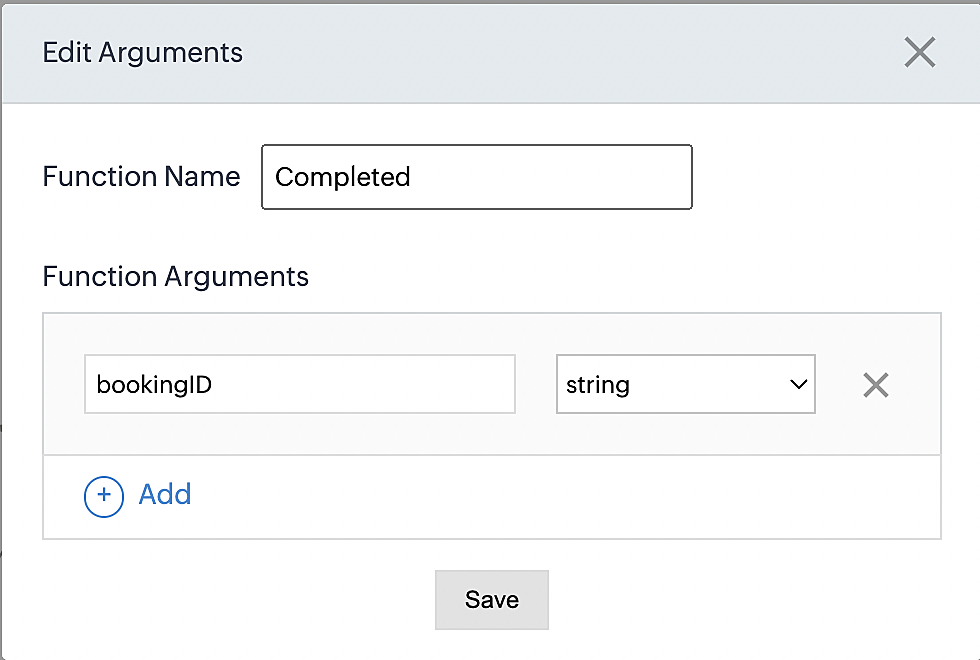
5. Next, configure the function's arguments:
A. Click on Edit Arguments on the Deluge script page.

B. Set the Parameter Name as bookingID. (Please note that the "bookingID" value is case sensitive and must match
the term used in the code).
C. Set the type as string.
Reference:
Please configure the below code in the Deluge script page.
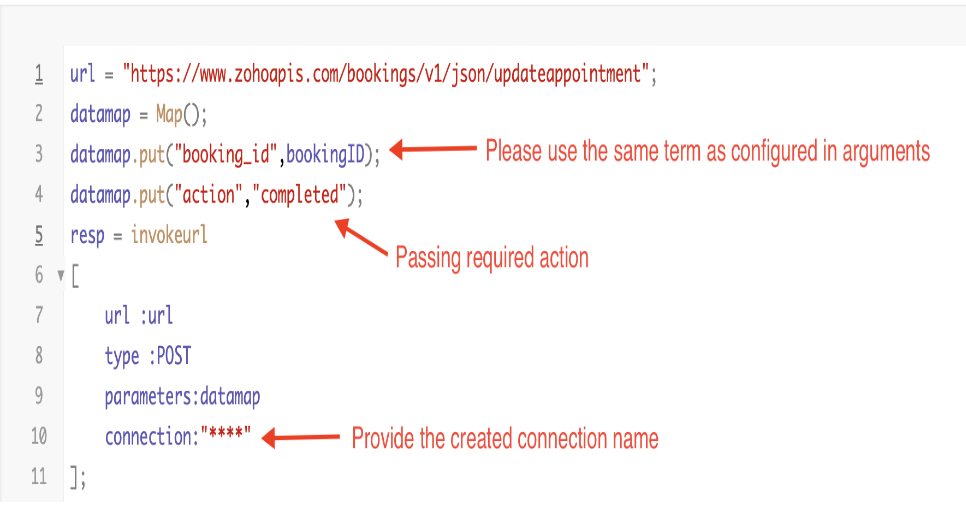
By completing these steps, we've configured a function that will mark appointments as completed.
ii. To create a function for marking appointments as no shows
1. Go to Setup > Developer Space > Functions.
2. In the Functions page, click + Create New Function.

3. Configure the function name, display name, and description.
4. Set the category as automation.
This opens the Deluge script page.
5. Next, configure the function's arguments:
A. Click on Edit Arguments on the Deluge script page.

B. Set the Parameter Name as bookingID. (Please note that the "bookingID" value is case sensitive and must match
the term used in the code).
C. Set the type as string.
Reference:
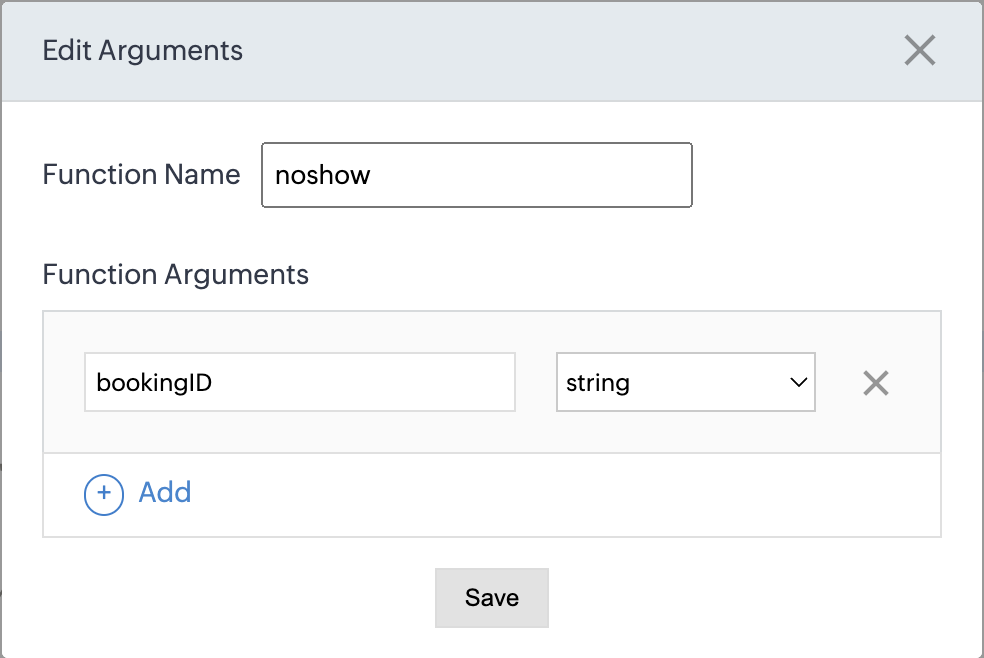
Please configure the below code on the Deluge script page.
Code link: No show
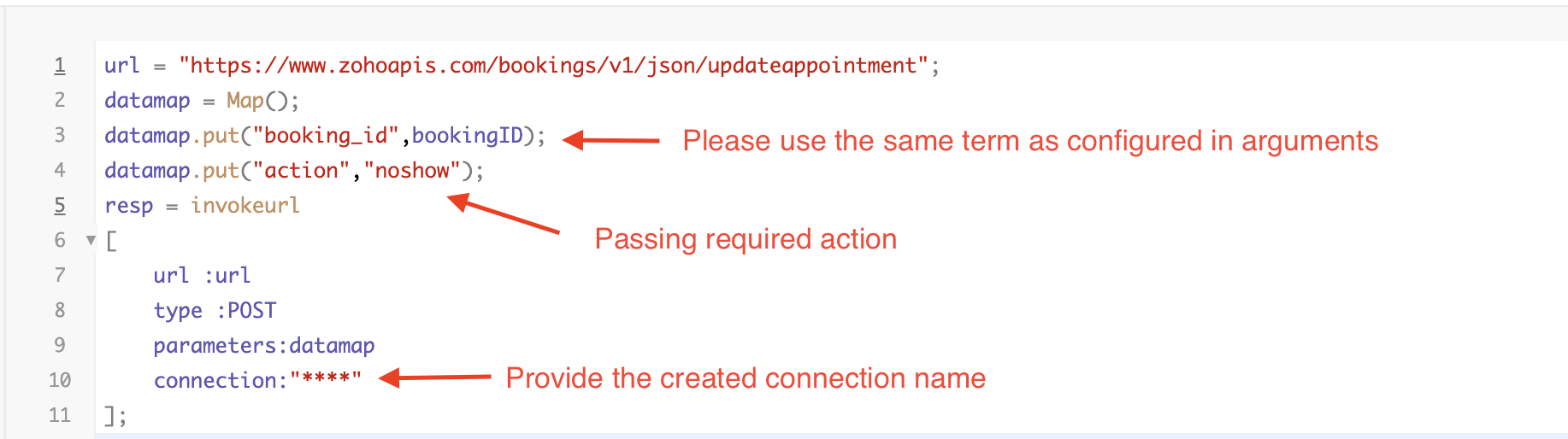
By completing these steps, we've configured a function that marks appointments as no shows.
iii. To create a function for marking appointments as canceled
1. Go to Setup > Developer Space > Functions.
2. In the Functions page, click + Create New Function.

3. Configure the function name, display name, and description.
4. Set the category as automation.
This opens the Deluge script page.
5. Next, configure the function's arguments:
A. Click on Edit Arguments on the Deluge script page.

B. Set the Parameter Name as bookingID. (Please note that the "bookingID" value is case sensitive and must match
the term used in the code).
C. Set the type as string.
Reference
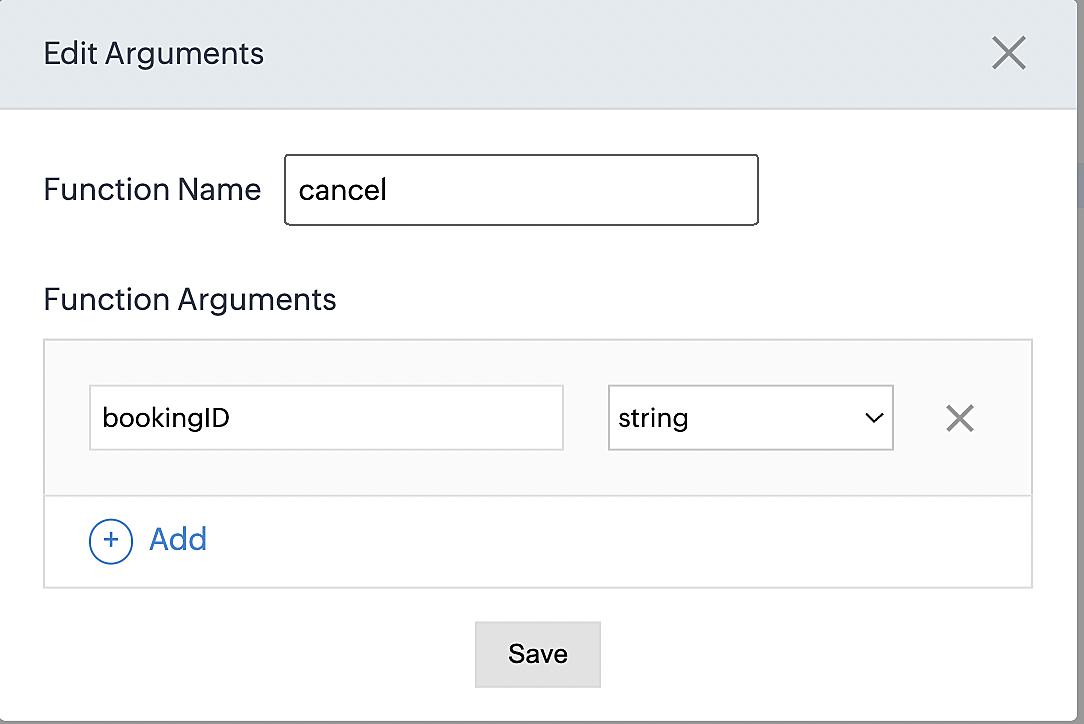
Please configure the below code on the Deluge script page.
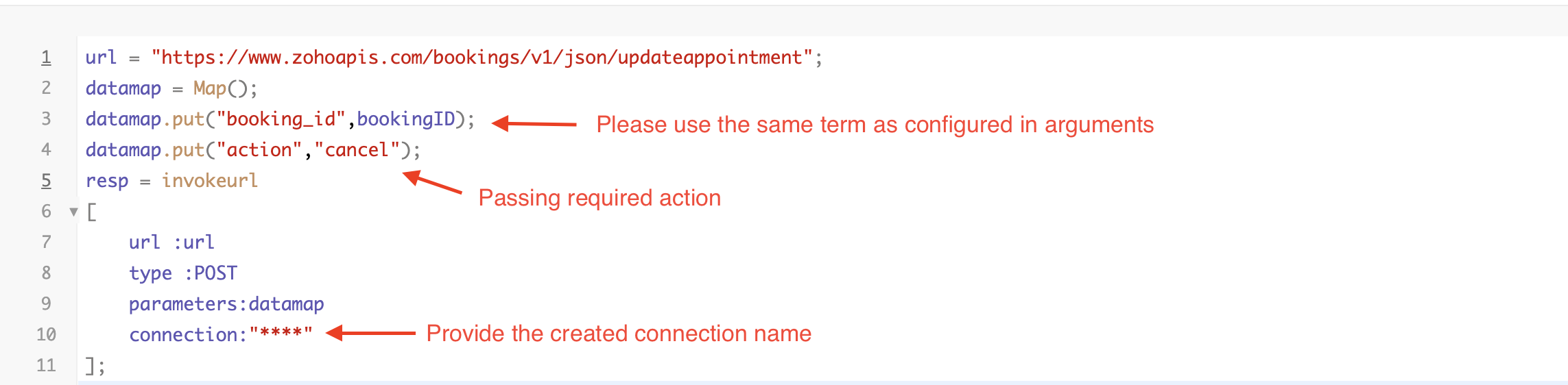
By completing these steps, we've configured a function that marks appointments as canceled.
Code explanation
Below is an explanation of the code that covers all the configurations present in the three functions mentioned above (cancel, mark as completed, and mark as no show).
Line 1: Based on the Zoho Bookings account's data center, we're setting up the API endpoint URL configuration.
Lines 2 - 4: To update appointments, we utilize the Zoho Bookings API. Within the update appointment API, there are two mandatory fields that need to be included: BookingID and action (completed/cancel/noshow).
Lines 5 - 10: We use the invokeURL task for API calls. To learn more about the invokeURL task, please refer to the following document: InvokeURL task for API calls
Now, let's proceed and learn about the process of creating a workflow and linking the established functions to it. This will enable us to automate the entire appointment status updating process.
Step 3: Creating a workflow
Workflow rules are sets of actions (email notifications, tasks and field updates) that are executed when specified conditions are met. Here, we'll generate workflow rules for each action to activate the respective function, thereby automating the appointment status updating process.
i. Creating a workflow for "canceling" appointments in Zoho Bookings when a meeting is deleted in Zoho CRM
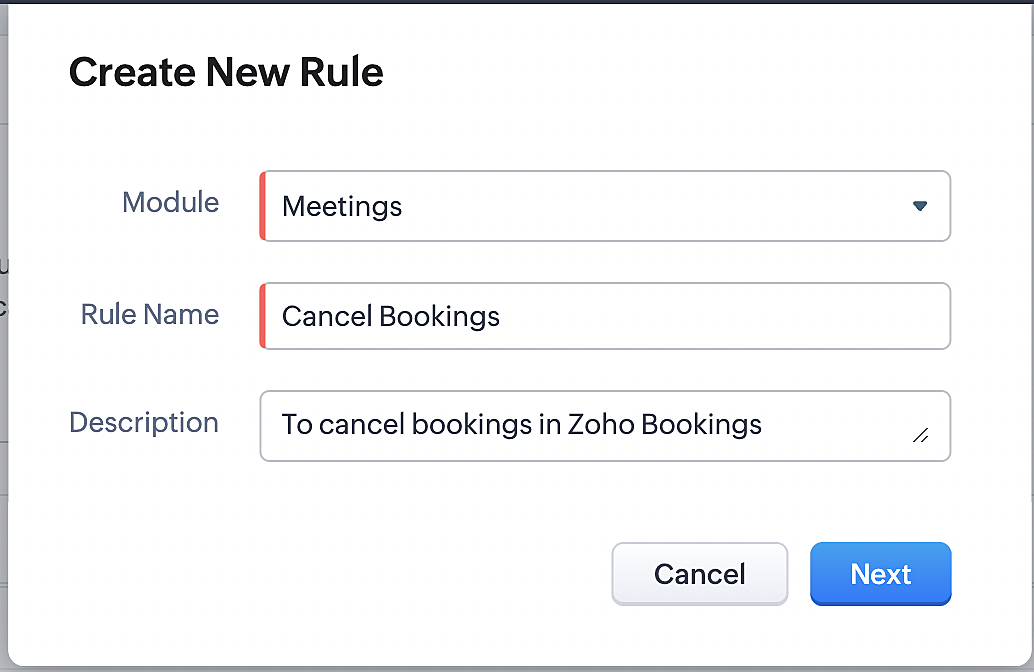
Part 1: Creating the rule
1. Go to Setup > Automation > Workflow Rules.
2. In the Workflow Rules page, click Create Rule.

3. Select "Meetings" under Module and configure rule name and description as required.
More details: Create Rule
Reference:
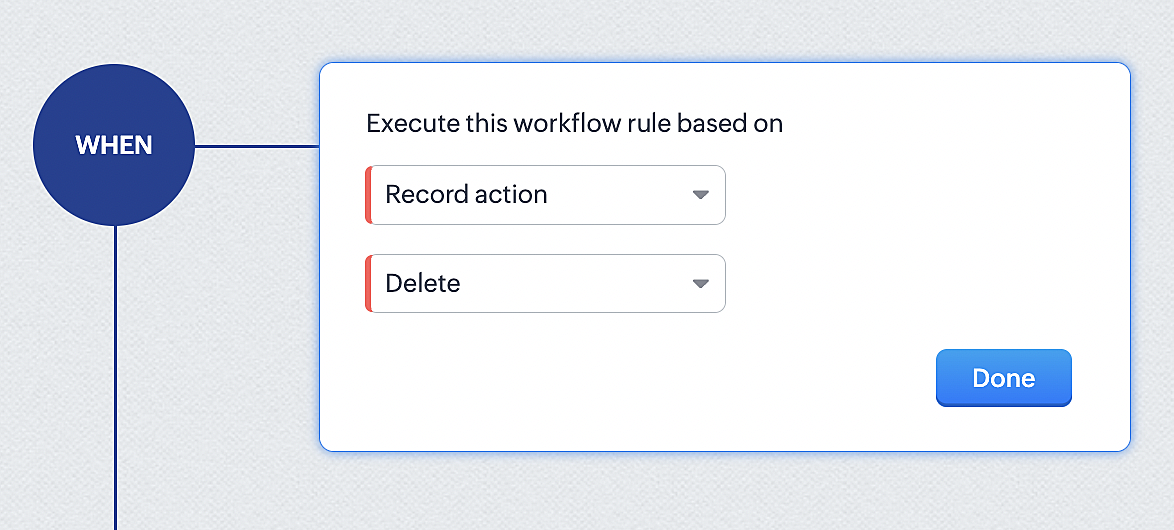
1. Select Record Action > Delete > Done to execute the rule when meetings are deleted.
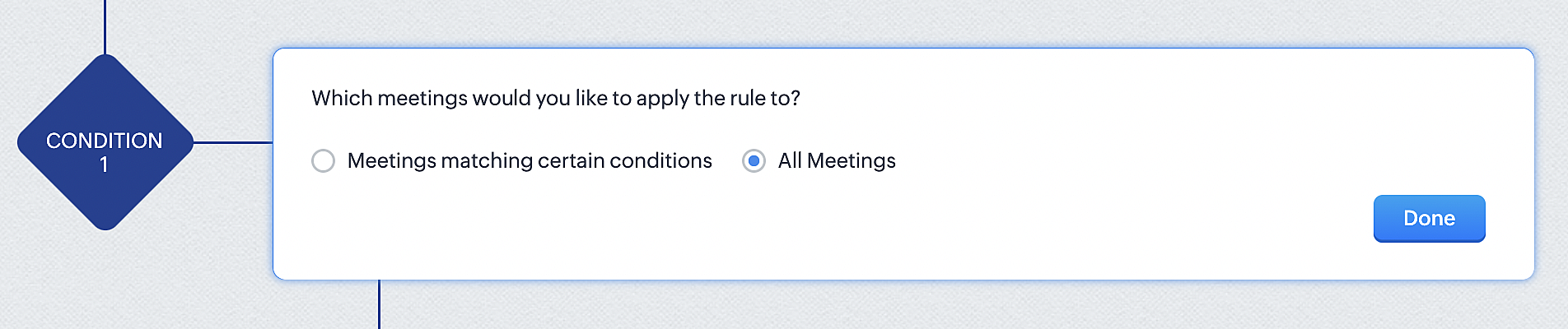
2. Configure condition > All Meetings.
3. Instant Actions > Function.
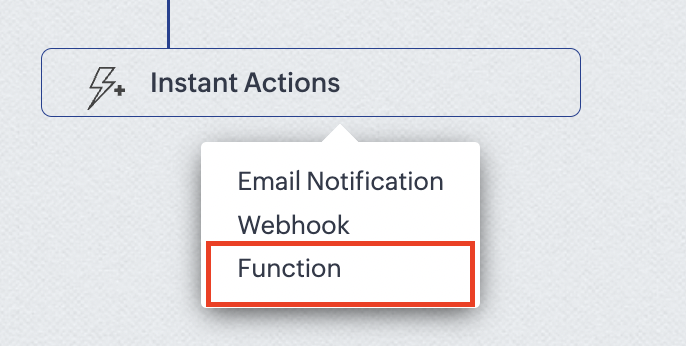
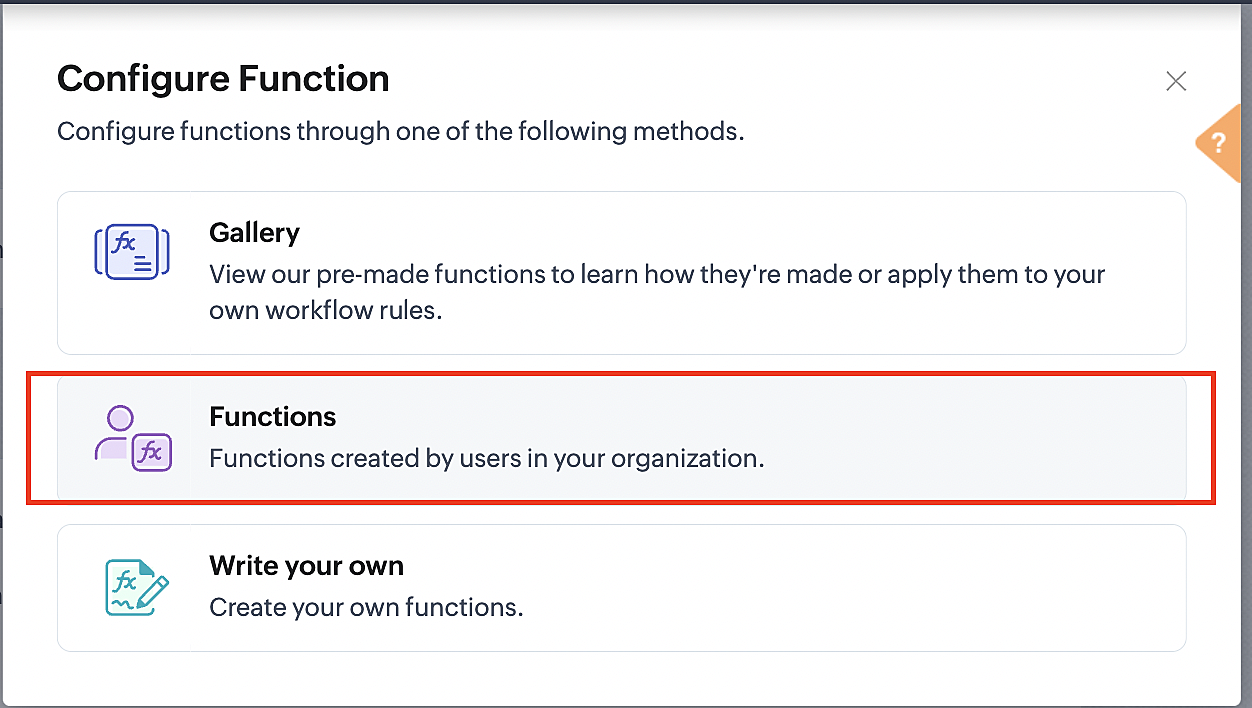
4. Click the New Function button.

5. In the Configure custom function page, select the "cancel" function you created from among the functions users in your organization have created.
Part 3: Argument mapping
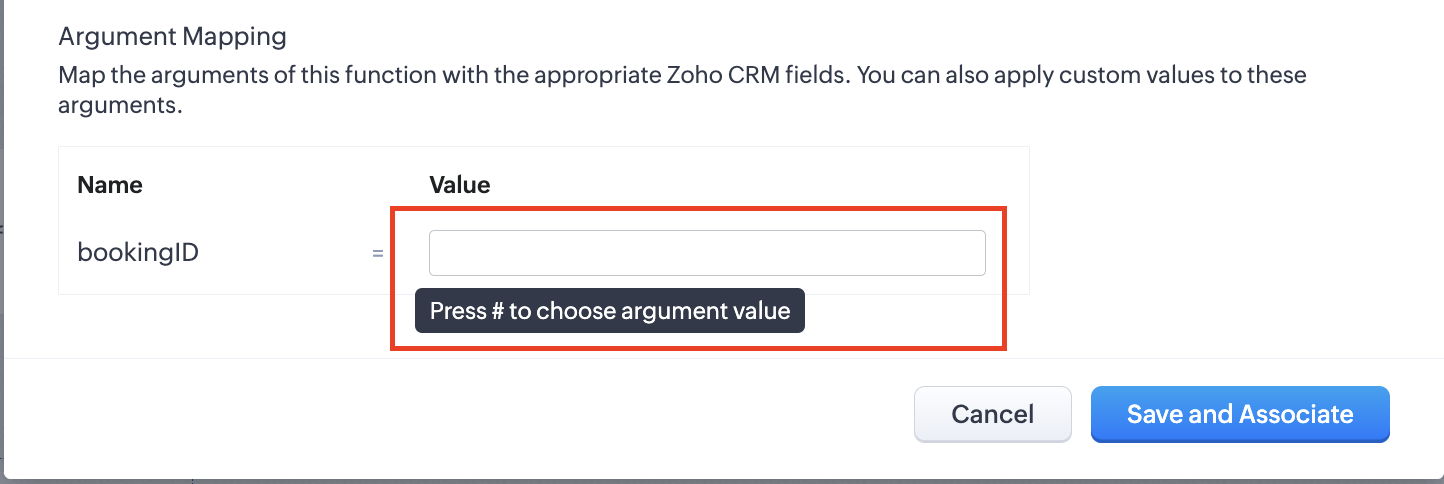
1. Press # to choose an argument value.
2. Select Meetings under Module and BookingId in the field.
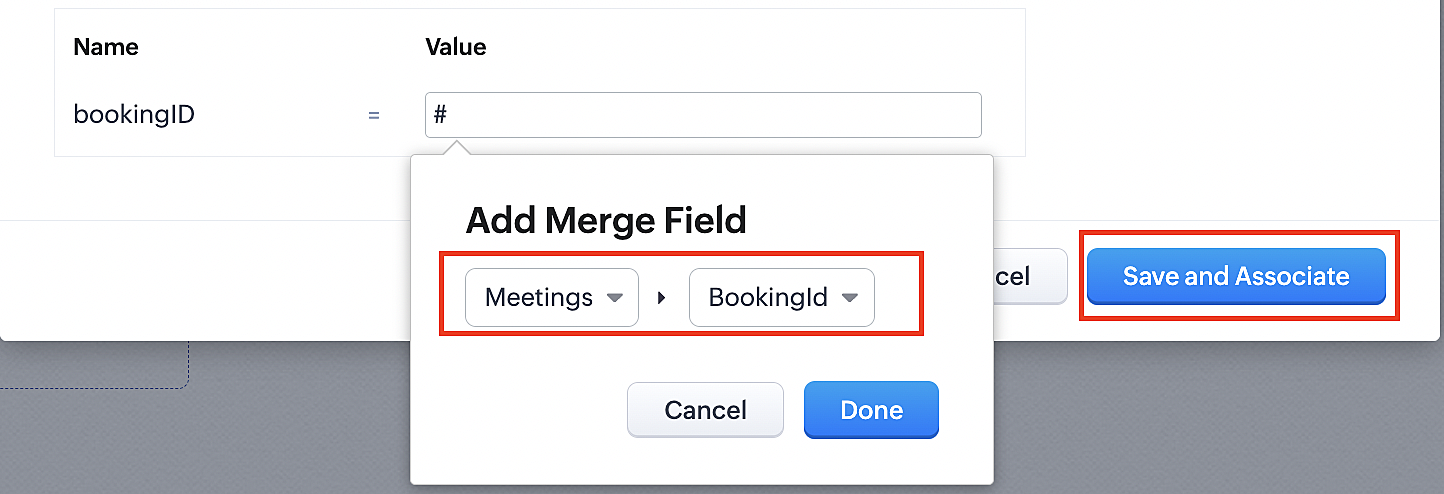
3. Click the Save and Associate button.
Reference:
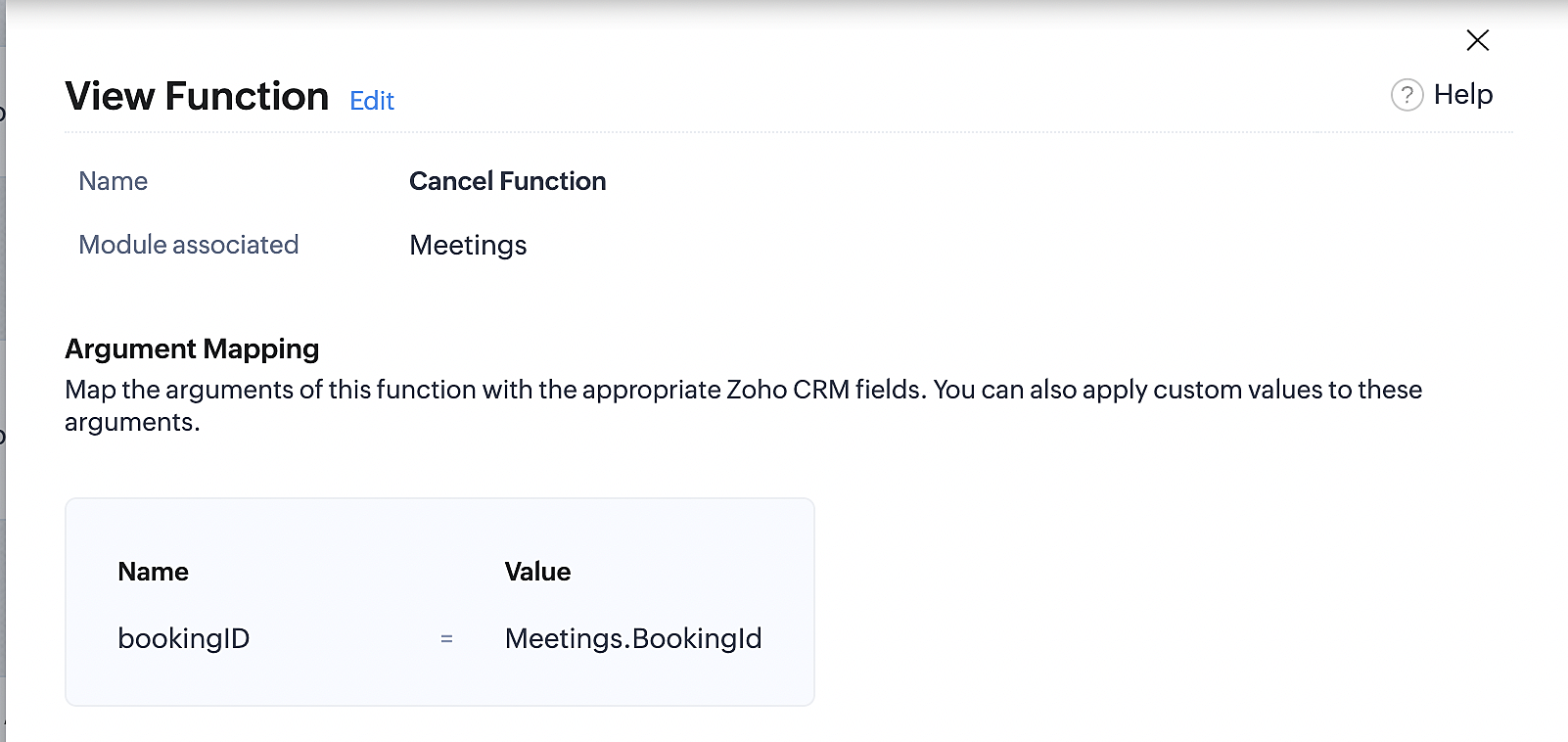
Below is the final flow of the cancel booking workflow:
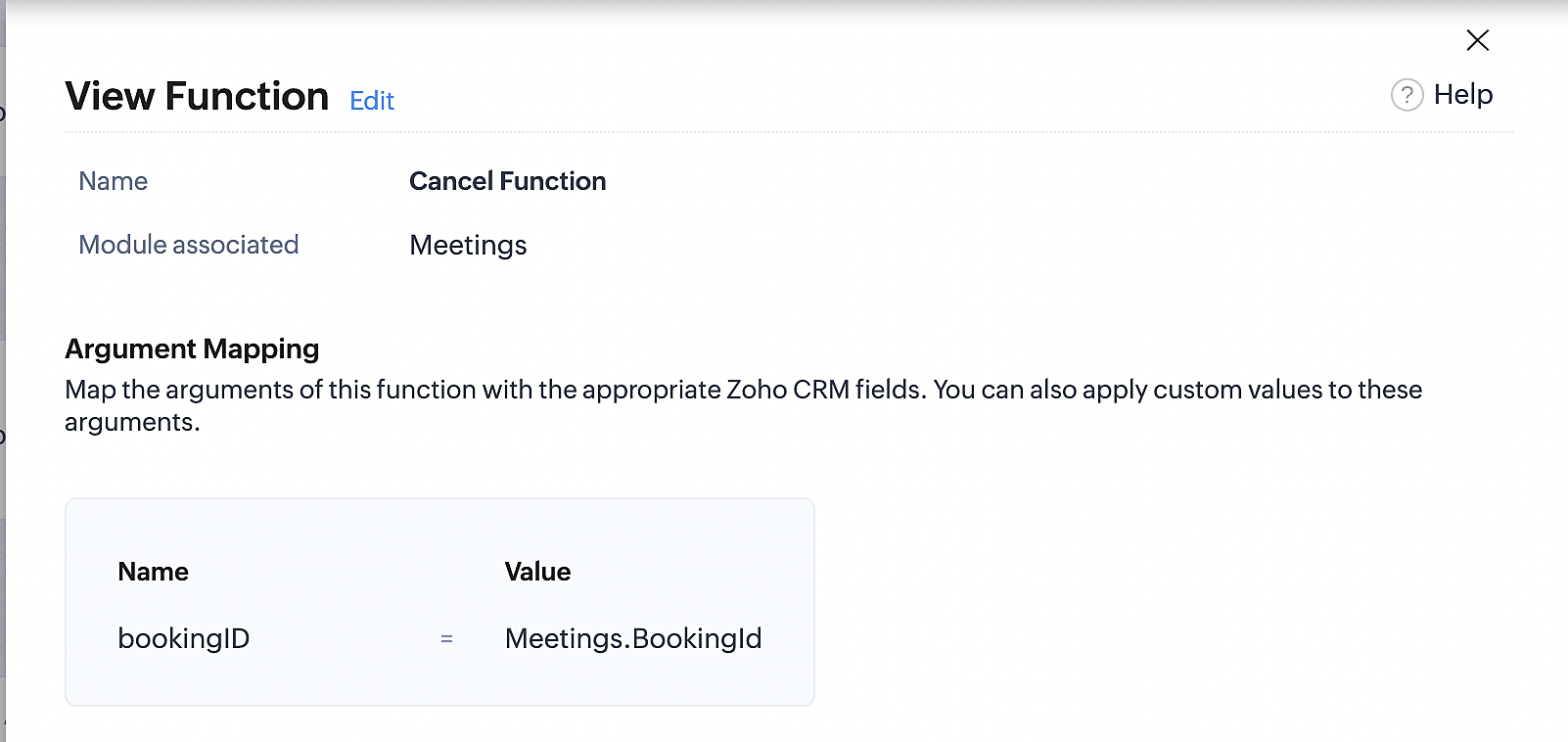
At the end of Part 3, we will have created a workflow that will be executed automatically when meetings are deleted in Zoho CRM. Simultaneously, the bookings associated with the meeting will also be canceled in Zoho Booking.
ii. Creating workflow for updating an appointment's status as "no show" in Zoho Bookings when the meeting's booking status is marked as no show in Zoho CRM
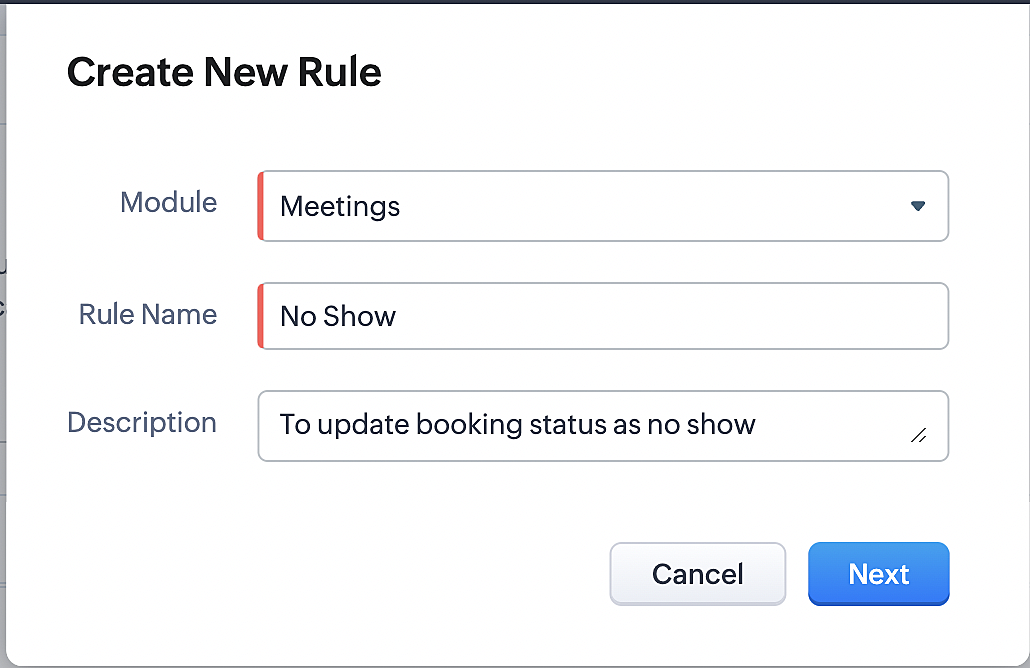
Part 4: Creating the rule
1. Go to Setup > Automation > Workflow Rules.
2. In the Workflow Rules page, click Create Rule.

3. Select Meetings under Module and configure the rule name and description as required.
Reference:
Part 5: Specifying the rule trigger
If you encounter difficulties while navigating through the steps mentioned below, please refer to Part 2 above, where we have provided step-by-step screenshots for clarification.
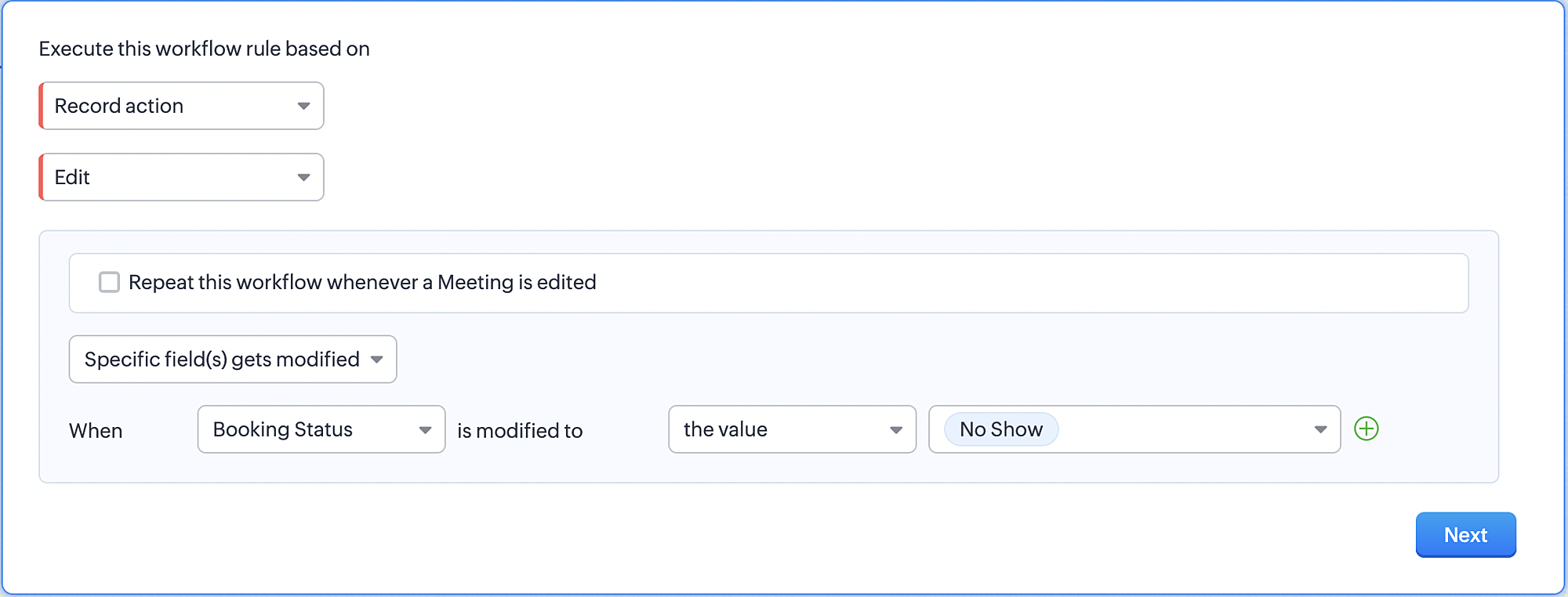
1. Record Action > Edit.

2. Enable the Specific field(s) gets modified and configure it per the screenshot below.
a. This is to ensure that the workflow is executed only when the booking status under the meeting module is
updated to "No Show".
updated to "No Show".
3. Configure condition > All Meetings.
4. Instant Actions > Function > New Function.
5. In the Configure custom function page, select the "no show" function you created from among the functions
users in your organization have created.
users in your organization have created.
Part 6: Argument mapping:
If you encounter difficulties while navigating through the steps mentioned below, please refer to Part 3 above, where we have provided step-by-step screenshots for clarification.
1. Press # to choose an argument value.
2. Select Meetings under Module and configure the field as "BookingId".
3. Click Save and Associate button.
Reference:
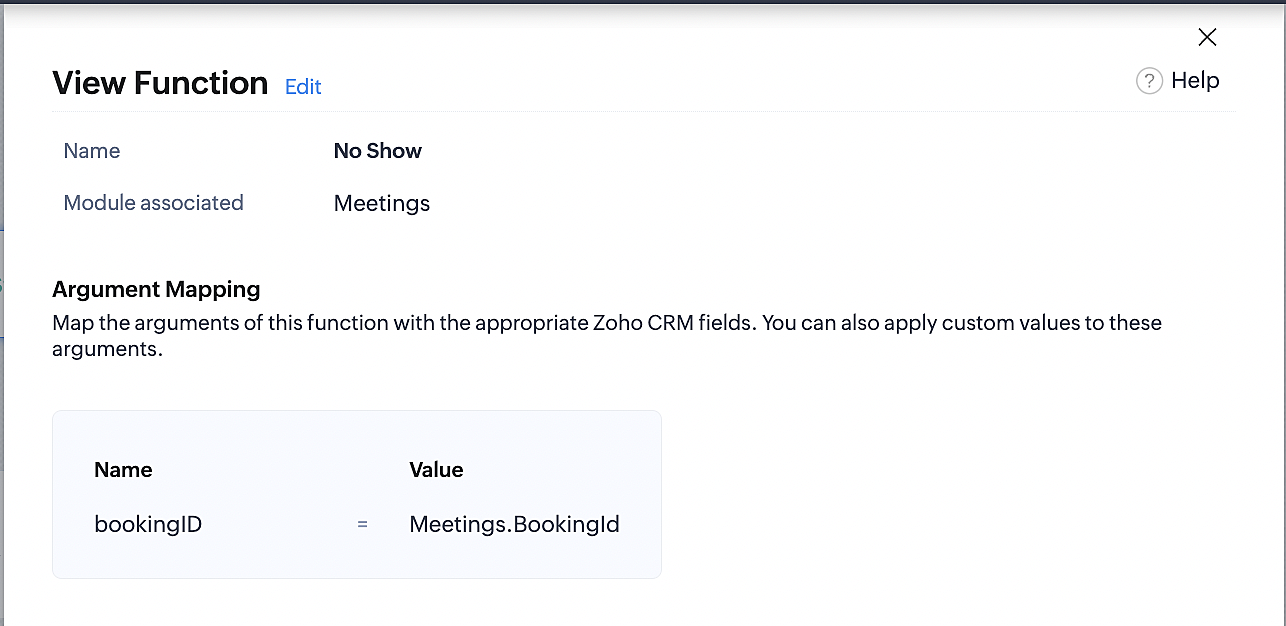
Below is the final flow of the "No Show" booking status workflow:
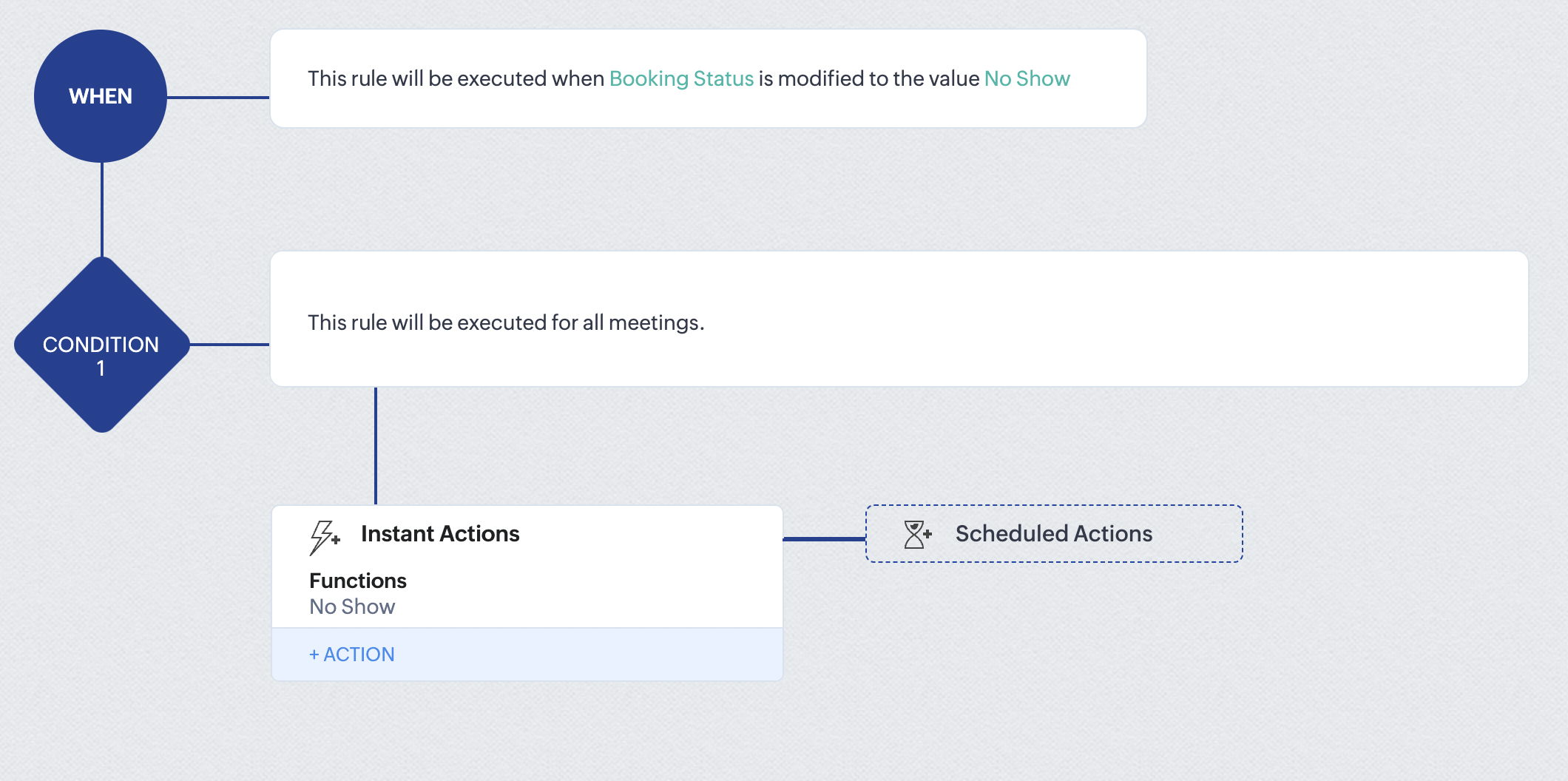
At the end of part 6, we will have created a workflow that automatically executes when the booking status field within the Zoho CRM Meetings module is updated to "No Show." This action will result in the associated bookings for that meeting also being marked as "No Show" in Zoho Bookings.
iii. Creating workflow for updating appointment status as "Completed" in Zoho Bookings when the booking status field of the meeting is marked as completed in Zoho CRM.
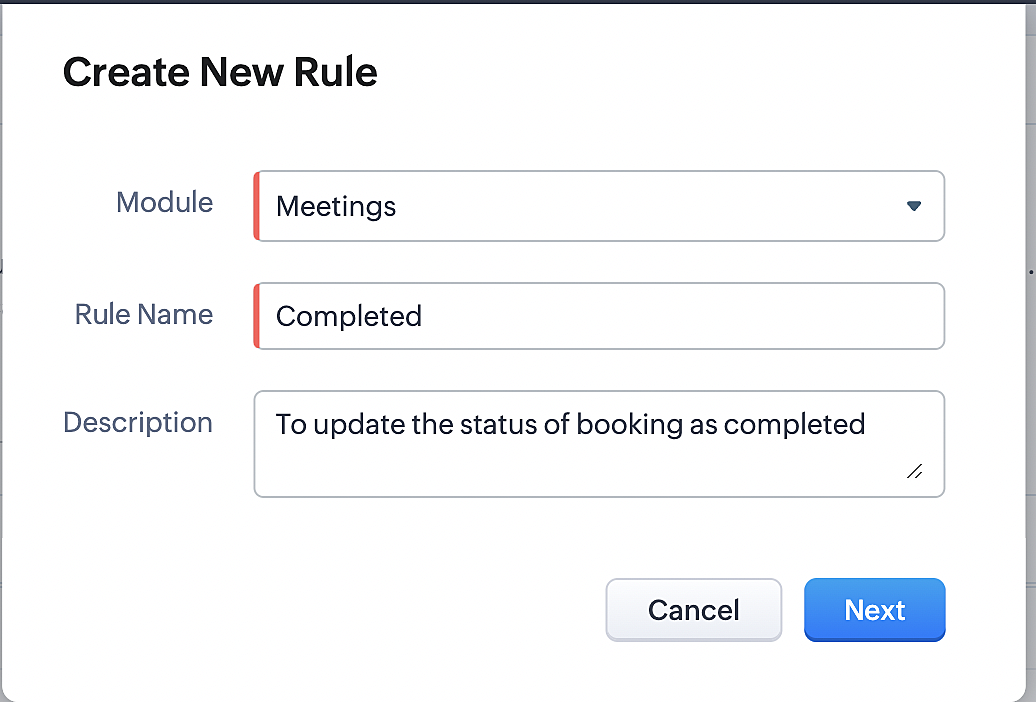
Part 7: Creating the rule
1. Go to Setup > Automation > Workflow Rules.
2. In the Workflow Rules page, click Create Rule.

3. Select Meetings under Module and configure rule name and description as required.
Reference:
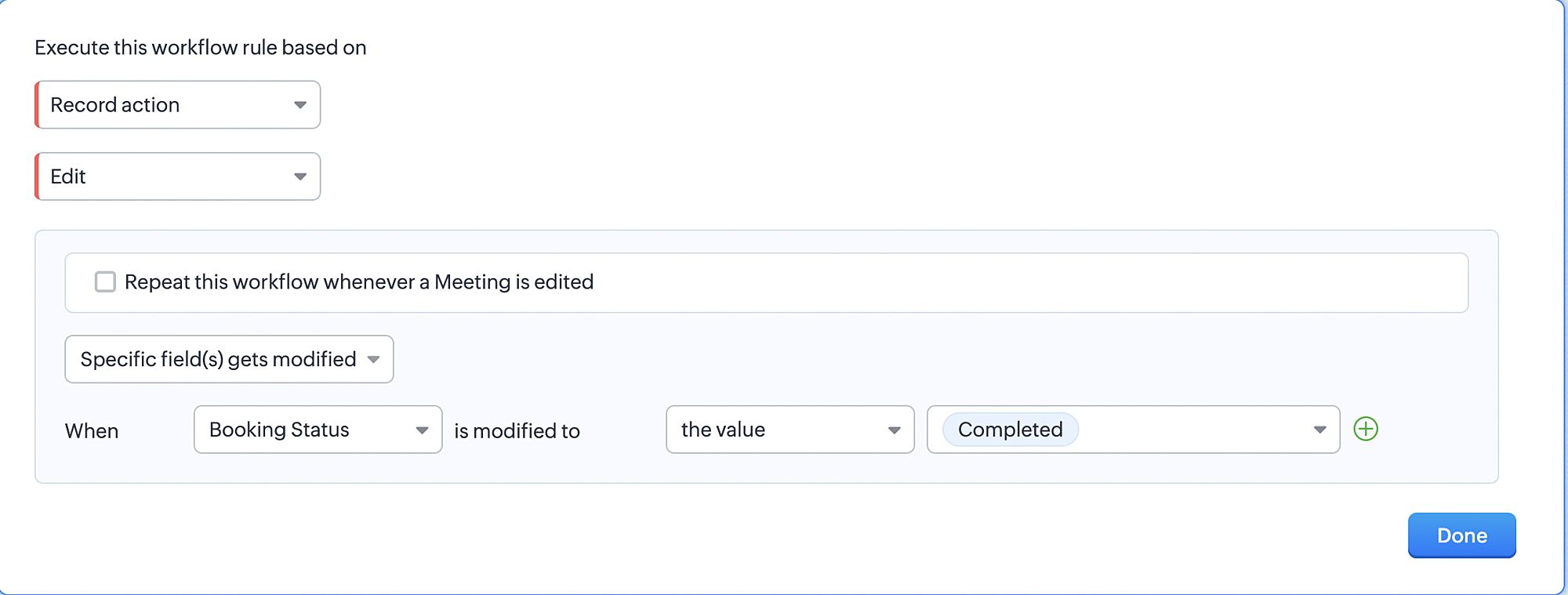
Part 8: Specifying the rule trigger
If you encounter difficulties while navigating through the steps mentioned below, please refer to Part 2 above, where we have provided step-by-step screenshots for clarification.
1. Record Action > Edit.

2. Enable the Specific field(s) gets modified setting and configure it per the screenshot below.
a. This serves to ensure that the workflow is executed only when the booking status under the Meetings module is
updated to "Completed".
3. Configure condition > All Meetings.
4. Instant Actions > Function > New Function.
5. In the Configure custom function page, select the "completed" function you created from among the functions users
in your organization have created.
Part 9: Argument mapping:
If you encounter difficulties while navigating through the steps mentioned below, please refer to Part 3 above, where we have provided step-by-step screenshots for clarification.
1. Press # to choose an argument value.
2. Select Meetings under Module and configure the field as "BookingId".
3. Click Save and Associate button.
Reference:
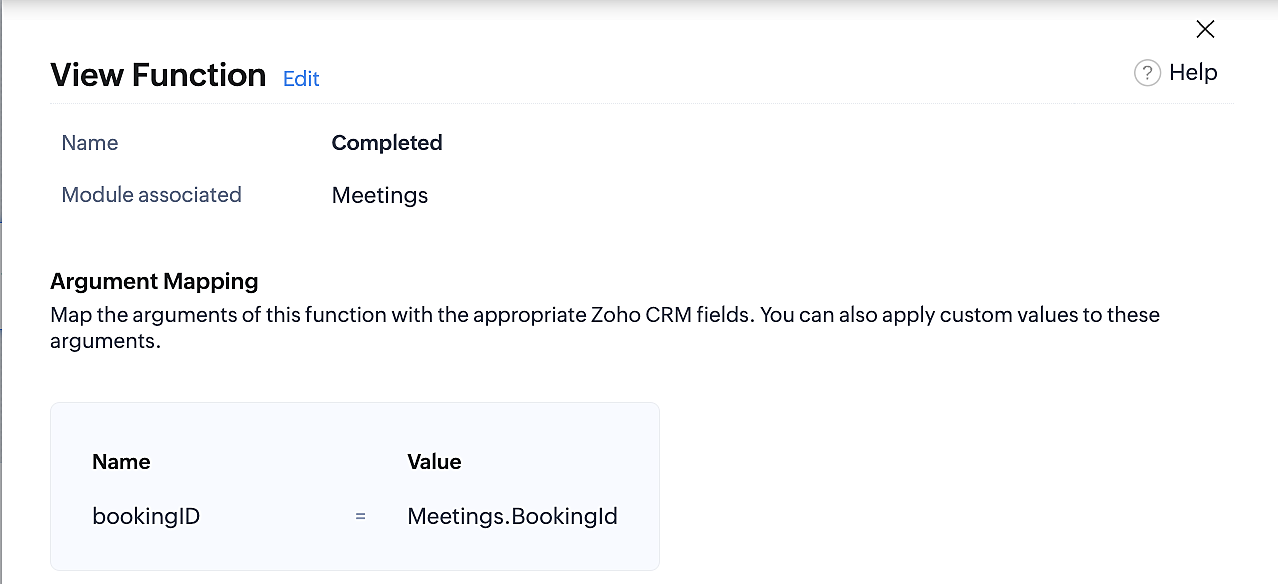
Below is the final flow of the "Completed" booking status workflow:
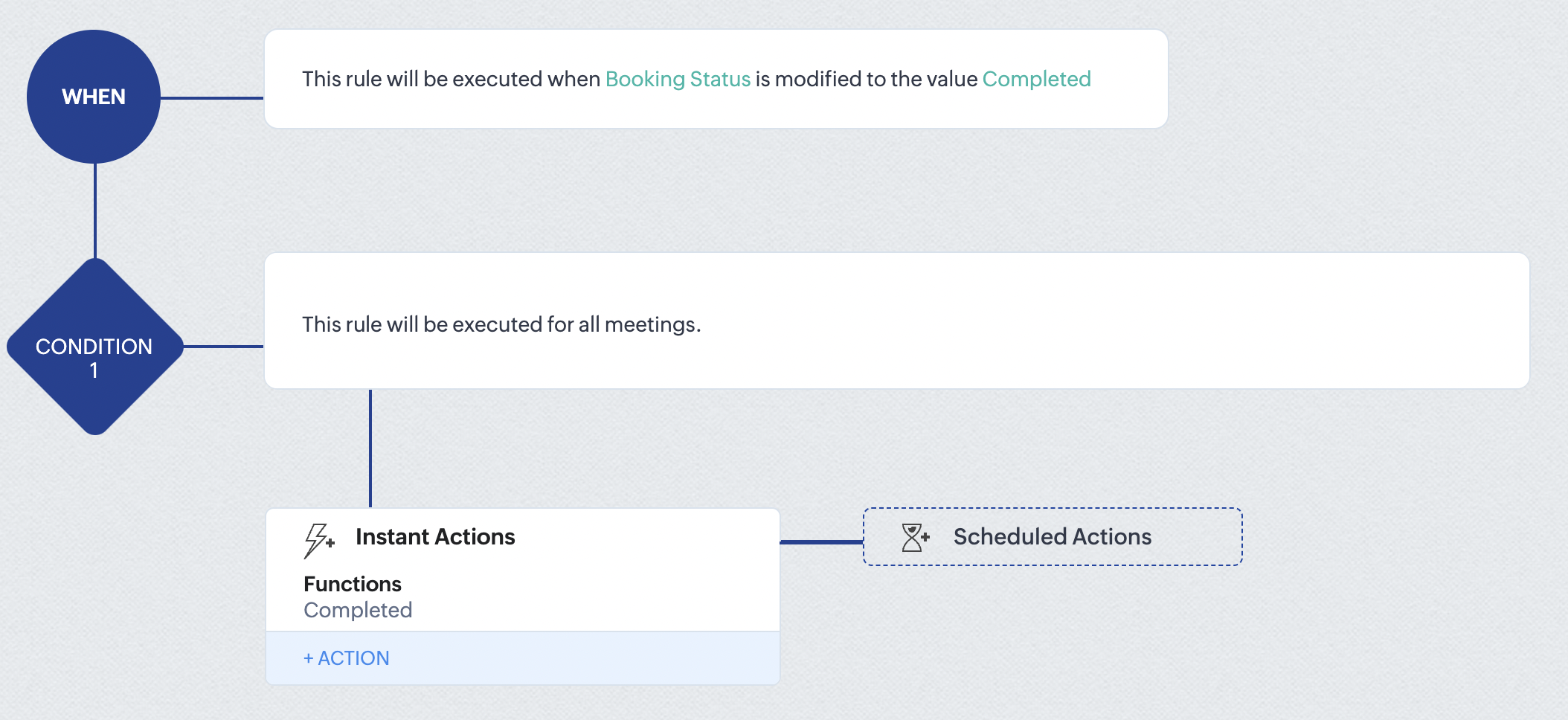
At the end of part 9, we will have created a workflow that is automatically executed when the booking status field within the Zoho CRM Meetings module is updated to "Completed." As a result, the associated bookings for that meeting will also be marked as "Completed" in Zoho Bookings.
Conclusion
We've reached the end of this community post. With the integration mentioned above in place, you'll be able to book, cancel, and update the status of appointments in Zoho Bookings directly from your Zoho CRM application. This will help you effectively manage your appointments in one place. As mentioned above, we've covered the rescheduling action in a separate post, which you can access by clicking on the following link: Reschedule Action
Furthermore, we've outlined a method for automating appointment statuses in detail. You can use this document as a reference to explore the various possibilities that suit your needs.
If you have any questions or need assistance with your configuration, please email us at hello@zohobookings.com or support@zohobookings.com.
Access your files securely from anywhere
New to Zoho Recruit?

Zoho Developer Community
New to Zoho LandingPage?
Zoho LandingPage Resources
New to Zoho Survey?
New to Zoho CRM Plus?
Deliver unforgettable customer experiences
New to Zoho CRM Plus?
Deliver unforgettable customer experiences
New to Zoho Marketing Plus?
Everything you need to run your marketing
New to Zoho Marketing Plus?
Everything you need to run your marketing
New to Bigin?





Topic Participants
Kaushik S
bruce
Ishwarya SG
PrismaNote Support
Sticky Posts
Presenting ABM for Zoho CRM: Expand and retain your customers with precision
Picture this scenario: You're a growing SaaS company ready to launch a powerful business suite, and are looking to gain traction and momentum. But as a business with a tight budget, you know acquiring new customers is slow, expensive, and often deliversGood news! Calendar in Zoho CRM gets a face lift
Dear Customers, We are delighted to unveil the revamped calendar UI in Zoho CRM. With a complete visual overhaul aligned with CRM for Everyone, the calendar now offers a more intuitive and flexible scheduling experience. What’s new? Distinguish activitiesCreate and populate a record in an instant: Introducing zero-shot field prompting to Zia's ICR
A couple of months ago, we upgraded our in-house AI image detection and validation tool, Zia Vision, with intelligent character recognition (ICR). By training Zia with sample images, you could create and enrich CRM records with data extracted from standardIn-person ZUG Meetups for Real Estate Professionals - US Q1 2026
The Real Estate Zoho User Group is going on a multi-city, in-person meetup tour across the US, and we’d love to see you there! These meetups are a great opportunity to: Connect with fellow real estate professionals using Zoho Share challenges and discoverNimble enhancements to WhatsApp for Business integration in Zoho CRM: Enjoy context and clarity in business messaging
Dear Customers, We hope you're well! WhatsApp for business is a renowned business messaging platform that takes your business closer to your customers; it gives your business the power of personalized outreach. Using the WhatsApp for Business integration
New to Zoho TeamInbox?
Zoho TeamInbox Resources
Zoho CRM Plus Resources
Zoho Books Resources
Zoho Subscriptions Resources
Zoho Projects Resources
Zoho Sprints Resources
Qntrl Resources
Zoho Creator Resources
Zoho CRM Resources
Design. Discuss. Deliver.
Zoho Show Resources

Get Started. Write Away!
Writer is a powerful online word processor, designed for collaborative work.
Zoho CRM コンテンツ
-
オンラインヘルプ
-
Webセミナー
-
機能活用動画
-
よくある質問
-
Ebook
-
-
Zoho Campaigns
- Zoho サービスのWebセミナー
その他のサービス コンテンツ
Nederlandse Hulpbronnen

ご検討中の方
Recent Topics
Problem with signature in a forwarded mail
Dear All, In my email account I created a signature and I unchecked the 'Place signature above the quoted text for relies and forwards' My question is, when I am trying to forward an email, sometimes I need to insert my signature so I select it from theOut of Office not working
I have set up out of office on zoho mail, however, it does not reply to every mail sent to it. I have tested it by sending several test messages from multiple different email accounts, I will get a response to some of them, but not all of them this isError message that says only images and no text
I filled out a template for a weekly newsletter with text and images throughout but when I click save and next an error message comes up that says "Campaign content has only images and no text" which is not true at all. I have no idea how to fix this issue and don't know where the problem is.Contacts Don't Always Populate
I've noticed that some contacts can easily be added to an email when I type their name. Other times, a contact doesn't appear even though I KNOW it is in my contact list. It is possible the ones I loaded from a spreadsheet are not an issue and the onesCannot add zoho email to gmail acc
I'm trying to set up my zoho mail to connect to my gmail acc but no matter what I try I always get this problem. What should I do now? Password is up-to-date. Authentication failed. Please check your username/password. [Server response: 535 Authentication553 Relaying disallowed - Invalid Domain
I have this error "553 Relaying disallowed. Invalid Domain" when sending an email to any email address. But I still receiving email from other emails. I checked MX, DKIM, SPF and it's ok. Could you check and help? ThanksTurn off Organization Contact List
We need to be able to turn off the Organization Contact list for some of our staff. Once the Organization Contact list is turned off for a user, we would then like to be able to create a list of contacts on per user basis that would not be editable byUnable to send massage Reason 553/ Relaying Disallowed. Invalid Domain
Cant sed massages from my email. All massages from my domain received the same issue Unable to send massage Reason 553/ Relaying Disallowed. Invalid DomainKaizen #194 : Trigger Client Script via Custom buttons
Hello everyone! Welcome back to another interesting and useful Kaizen post. We know that Client Scripts can be triggered with Canvas buttons and we discussed this with a use case in Kaizen#180. Today, let us discuss how to trigger Client Script when aMake record entry more organized with the Sections component in Wizards
Hello everyone! Wizards in Zoho CRM have always helped you break long record-detail pages or large sets of fields into multiple screens, making data entry smoother and more user-friendly. Now, we’re taking a major step forward with a new Sections component—givingGSTIN Public Search API
Does zohobooks have an api using which i can search GST numbers and get their details?External @zoho.com mail stopped working today, yesterday no issues
Hello, Over a sudden mail stopped being delivered to inbox. Domain is standard zoho.com worked no problem yesterday, today nothing in inbox. Sent several test emails from corporate account & from gmail.com, logs show acceptance by zoho mail server, butSuggestion: Smart Purchasing Module for Zoho Inventory and Zoho Books
Suggestion: Smart Purchasing Module for Zoho Inventory and Zoho Books As an active user of Zoho Inventory and Zoho Books, I’ve noticed that the suite already provides valuable tools for managing inventory, analyzing trends, and processing purchase orders.Adding bank details to the contact through API
How to add bank-related information to the contact while creating it using API? The account number needs to be encrypted before sending it through API but not sure how to encrypt and get those values. Please guide me in this.average cost display
Hello there, I'm using the average cost valuation method, and the cost price shown in the Items menu should reflect the latest WAC (Weighted Average Cost). However, it doesn't update automatically. Is there a way to display the current average cost withoutApple Mail issues
Dear Sir or Madam, I am trying to configure my Zoho mail account to Apple Mail. It is not working. It seems to need more information (perhaps a path prefix?) than is shown in your tutorial (<www.zoho.com/mail/help/apple-mac-imap.html>). After pluggingAssistance Required for Migrating Data from Odoo Inventory to Zoho Inventory
Hi Team, I previously used Odoo Inventory to manage my stock and transactions, and I’ve now moved to Zoho Inventory. I’d like to migrate my data from Odoo—including product details, stock, purchase, and vendor information- into Zoho Inventory for continuityI need my entire Zoho Account (mail/organization) deleted!
Hey! I used zoho for my email aaron@aaronglass.me with domain forwarding/mx all that. I got rid of the mx info on my godaddy account and still Google won't let me sign up with my aaron@aaronglass.me email. (I'm moving to Google for business) SO! I wasError: "Invalid Element warehouse_id" when sending order to Zoho
i'm getting the error "Invalid Element warehouse_id" when trying to send an order to Zoho via API. Has anyone faced this issue before? How can I fix it?No way to sell individual and case units smoothly in Zoho
Currently, Zoho Inventory handles inventory primarily at the case level, which can be challenging for businesses that frequently need to break down cases into individual units for retail sales or smaller shipments. Although Zoho Inventory currently supportsHow to handle multiple languages (Resume parser, Job opening, job board, career site) ?
We are looking to bring Zoho Recruit to a market that needs to support 2 languages. The first thing we need to make sure is that the Candidate be flag with the language they speak. This is easy enough make a custom field that as the desire languages.Shipping Labels
Hi, Can we generate Packing Labels for manual shipping same as the format as Airway Bill in zoho books or inventory?Unit Measurement Sign,
Dear Zoho Support Team, I hope you are doing well. We recently purchased Zoho Inventory based on recommendations of your team that “it would be a great fit for our Shopify operations”. However, we are currently facing several urgent issues that requireLeadchain into a custom module
Hello ZOHO Community ! is it possible to put the leads collected by leadchain into a custom module instaed of leads module ? Best wishes NielsUrgent: How to Bulk Upload Images in Zoho Inventory? Any Workarounds?
We are currently onboarding 5,000+ items from Shopify into Zoho Inventory, but we’re struggling with the lack of a bulk image upload feature. Right now, we have to manually upload and assign images one by one, which is extremely time-consuming and inefficient.Can I automatically update COGS and Inventory account when creating an item?
I have been trying to get Zoho to update the other two fields when I update one (Sales Account, COGS account, and Inventory Account). I know this seems like not a huge time saver, but I am all about efficiency and being an independent taproom, I createI'm looking for a Microsoft List alternative in Zoho One to manage large lists of repetitive tasks
I've used Microsoft Lists to manage lots of tasks that need to be completed several times for different users. We started with a large spreadsheet and then discovered lists, which worked pretty well. I was wondering if there is a similar products in Zoho,Zoholics Europe and UK Awards 2025: Honouring our loyal customers!
We're excited to announce that at this year's Zoholics events across Europe, we're holding customer awards for the first time ever! This is your chance to shout about the amazing things you've created, connected, or achieved with Bigin! And if you win,How to store API keys in zoho?
Hi everyone, I'm currently building an integration using Zoho Flow and I need to securely store several API keys that will be used to make external service calls from my flows. I would not like to hardcode the values in the code of custom function. What'sZoho RPA is now available in your Zoho One bundle!
Hello All! Of late, it's been quite a stint of new app integrations in Zoho One. This announcement pertains to the addition of another Zoho application, the most sought-after Zoho RPA - Robotic Process Automation, to the bundle. What is Zoho RPA? Zohois there an easy way to embed a zoho analytics report into a widget (or inside the "account" page) of Zoho CRM
Hi, I have built a report that is specific to an account in Zoho CRM but I would like this to be built into the Zoho CRM front-end. I have looked at the widget concept but it seems quite complicated (see attached screenshot but I need to filter this viewBigin iOS app update - Introducing Card Scanner and initiating WhatsApp conversations using pre-approved templates.
Hello everyone! In the latest iOS (v1.11.3) version of the Bigin app, we have introduced the following features: Card Scanner Initiating WhatsApp conversations. Card Scanner: Our new Card Scanner feature extracts contact information from business cards.Introducing card scanner in Bigin Android app
Hello everyone! We are excited to introduce the card scanner feature on the latest Android version(1.7.26) of the Bigin app as well. Card scanner extracts contact information from business cards and allows you to save them as contacts in Bigin. You canFull RTL and Hebrew Translation Support for Zoho Creator User Portal (Including All System Pages, Templates, and MFA Screens)
Dear Zoho Creator Team, We kindly request comprehensive support for right-to-left (RTL) languages, particularly Hebrew, across the entire Zoho Creator user portal. This includes system-generated pages, templates, and multi-factor authentication (MFA)ZUG real estate virtual meetup 2025: Sign documents, collect payments, and automate workflows with Zoho Sign
Hi there! Are you in real estate and looking for a secure, compliant way to manage all your paperwork? In such a fast-paced industry, timing, compliance, and client trust are everything. Handling paperwork has always been a challenge, whether you're finalizingOCR (Optical Character Recognition), automatisation des PDF et autres améliorations de Zoho RPA
Zoho RPA est une plateforme d'automatisation des processus robotiques conçue pour accélérer et simplifier vos workflows. Elle permet de connecter facilement vos applications cloud à vos systèmes existants, même ceux qui ne disposent pas d’API, afin d’automatiser📞 Call + 💬 WhatsApp + 📲 SMS in Zoho CRM – All in One Place!
We’re excited to introduce HelloSend, a powerful communication extension for Zoho CRM that brings SMS, WhatsApp, and Voice Calling directly into your CRM workspace. Whether you're in sales, support, or service delivery, HelloSend helps you connect withAutomation#24: Auto-Update custom field from Accounts to Tickets
Hello Everyone! Welcome back to the Community Learning Series! This episode dives into how Zylker Techfix streamlines account-related ticket references. Previously, employees had to manually check account details to retrieve specific customer information,Product Updates in Zoho Workplace applications | May 2025
Hello Workplace Community, Let’s take a look at the new features and enhancements that went live across all Workplace applications this May. Zoho Mail Increased Preset Limit for Reminder and Snooze Options Preset limits for the Reminder and Snooze optionsOutlook 365 ('classic') won't connect to Zoho email
New computer, fresh install of Office desktop. On the old computer Outlook was working fine with Zoho, retrieving/sending mail, etc. On the new one I can't connect the accounts in Outlook--Outlook just keeps popping up the box asking for a password. AllNext Page