Bidirectional sync between Zoho Bookings and Zoho CRM - Part 1
Hey, community members!
The default integration between Zoho CRM and Zoho Bookings is unidirectional, which means that any appointments booked, rescheduled, or deleted in Zoho Bookings will be reflected in Zoho CRM. However, any modifications made to events in Zoho CRM that originated from Zoho Bookings will not be reflected back in Zoho Bookings. Hence, as we're announcing in this community post, we've made the sync bidirectional.
This community post will cover the process of configuring appointment bookings from Zoho CRM in Zoho Bookings, as well as managing appointment statuses such as Canceled, No Show and Completed. We have addressed the rescheduling action in a separate post. To view it, please click on the following link: Reschedule Action
This community post will be beneficial for active Zoho CRM users who handle all their meetings within Zoho CRM. Additionally, you can use this community post as a reference to explore various automation possibilities tailored to your business requirements. For instance, with this post's guidance, when you update a booking's status field to "Completed" in Zoho CRM, it will automatically sync with Zoho Bookings and trigger an automated "Mark as completed" email to customers. This enhancement will improve your Zoho Bookings and Zoho CRM synchronization experience, making appointment management easier.
Prerequisites of bidirectional sync:
- Zoho Bookings Premium subscription
- Zoho CRM paid subscription
- Enable Zoho CRM integration within Zoho Bookings
The purpose of enabling the Zoho CRM integration within Zoho Bookings is to transfer booking details from Zoho Bookings to Zoho CRM. In this configuration, the mandatory field is the Booking ID, which is passed from Zoho Bookings to Zoho CRM through the integration. Whenever an appointment is booked, customer details will be sent to the designated CRM module, and a corresponding record will be created in the Meetings module within Zoho CRM, which will help in automating the workflow.
Here's the complete demo video that covers all the configurations discussed in the community post below:
Timestamps for your reference:
0:35 - Purpose of this community post
Here's the complete demo video that covers all the configurations discussed in the community post below:
Timestamps for your reference:
0:35 - Purpose of this community post
1:26 - Zoho CRM plugin installation
4:43 - Custom field creation
7:20 - Function creation
9:22 - Connection creation
10:24 - Configuring arguments
11:06 - Workflow creation
13:33 - Argument mapping
14:41 - Output verification
17:41 - Conclusion
How we're approaching this bidirectional sync
1. Booking an appointment from Zoho CRM
Install the Zoho Bookings for Zoho CRM plugin within your Zoho CRM application. This plugin enables the creation of a "New Appointment" button within the Zoho CRM Leads and Contacts module, which enables you to select the desired booking page you wish to open. You can choose from various workspace, service, or staff booking pages. After configuration, you can initiate the process of scheduling bookings directly from within your Zoho CRM account.
- Guide on Zoho Bookings and Zoho CRM plugin installation: Booking page selection for Zoho CRM plugin
2. Booking status: Completed or No Show
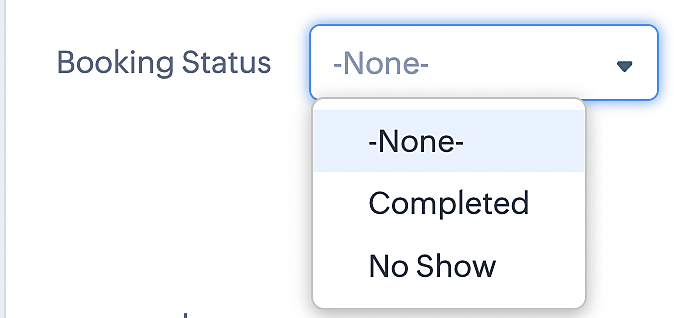
To update a booking's status (Completed or No Show), we've added a new picklist properties field named "Booking Status" in the Meetings module and configured it with two options: "completed" and "no show". Depending on the booking status chosen, the corresponding booking in Zoho Bookings will be updated.
- Details on how to add a custom field to the Meetings module : Customizing modules
- Here's a video that demonstrates how to add a field to a module in Zoho CRM: Adding fields
Reference:
3. Booking status: Canceled
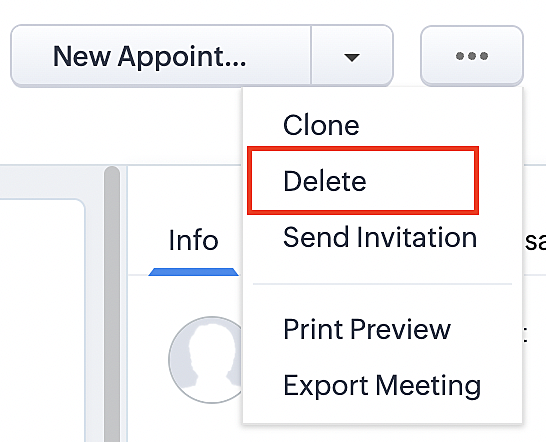
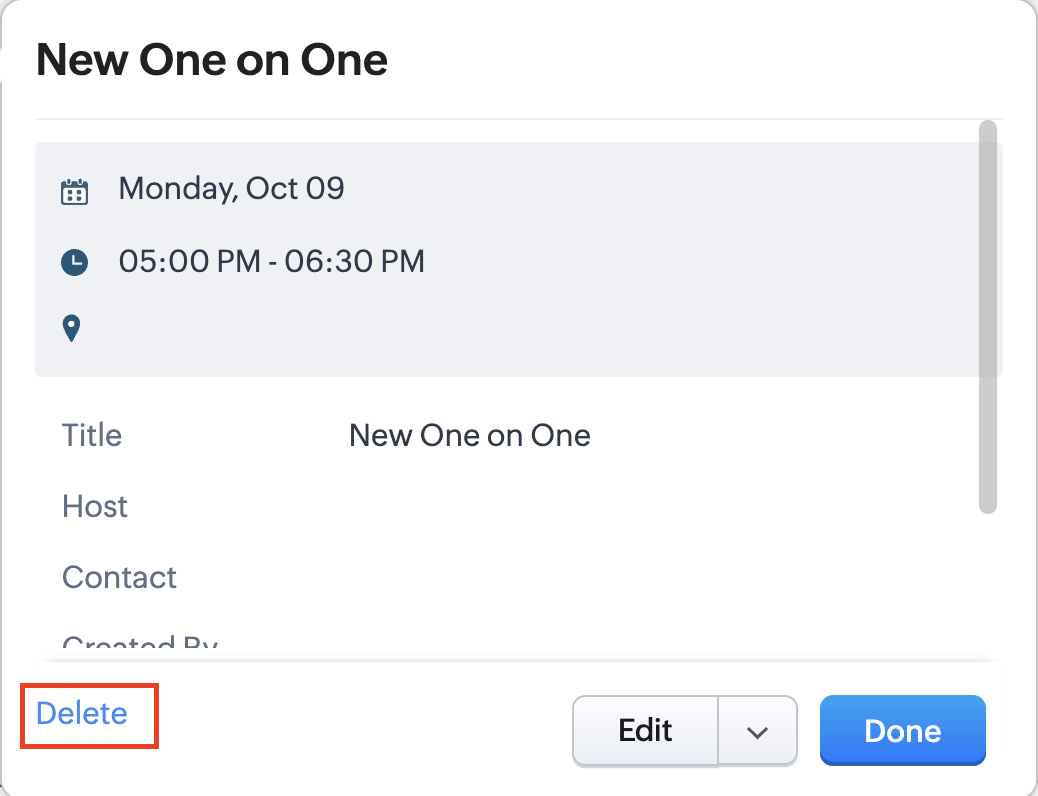
Whenever a meeting is deleted from the Meetings module, the corresponding booking in the Zoho Bookings app will also be canceled automatically. The meeting can be deleted either from the Meetings module or directly from the calendar.
To enable bidirectional sync between Zoho CRM and Zoho Bookings
Complete these steps in Zoho CRM.
Step 1: Creating connections
You first need to establish a connection between Zoho CRM and Zoho Bookings. Zoho Bookings is listed as one of the default connections in Zoho CRM, making it simple to set up. Select the Zoho Bookings connection, define the connection name and scope, and you'll be all set. This connection will enable you to link both applications and facilitate the seamless transfer of data.
Read here for more details on how to create connection in Zoho CRM: Connections
Step 2: Creating functions
In this context, we'll be creating three functions: one for marking appointments as completed, another for canceling appointments, a third for marking appointments as no shows, and a fourth for rescheduling appointments. For each function, we must also configure arguments, which pass values or data into a function when making a call. Here, we'll pass the booking ID to the function as an argument to update the necessary booking status.
i. To create a function for marking appointments as completed:
1. Go to Setup > Developer Space > Functions.
2. In the Functions page, click + Create New Function.

3. Configure the function name, display name, and description.
4. Set the category as automation.
This opens the Deluge script page.
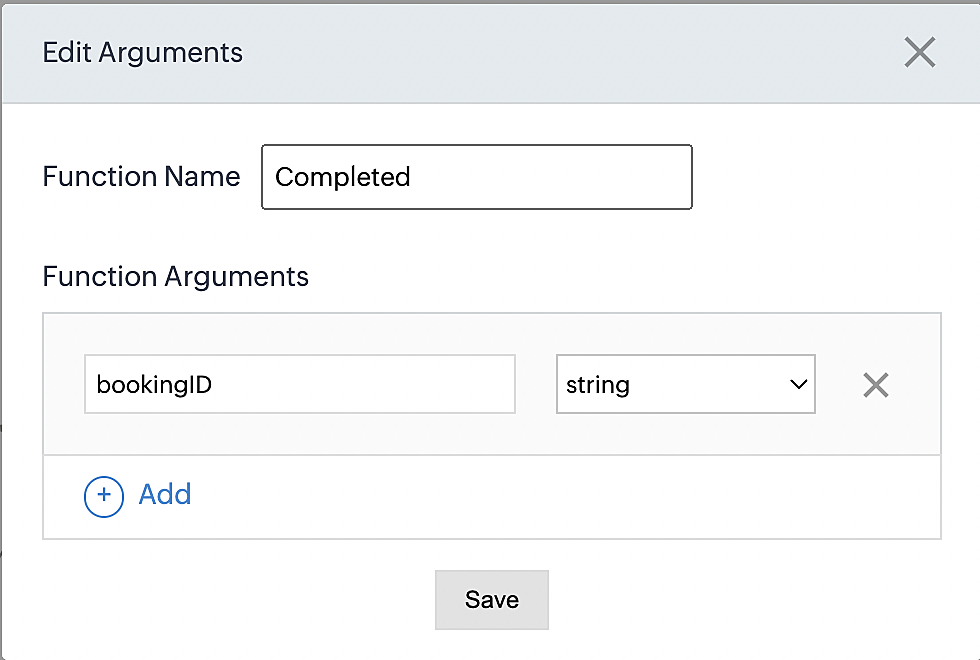
5. Next, configure the function's arguments:
A. Click on Edit Arguments on the Deluge script page.

B. Set the Parameter Name as bookingID. (Please note that the "bookingID" value is case sensitive and must match
the term used in the code).
C. Set the type as string.
Reference:
Please configure the below code in the Deluge script page.
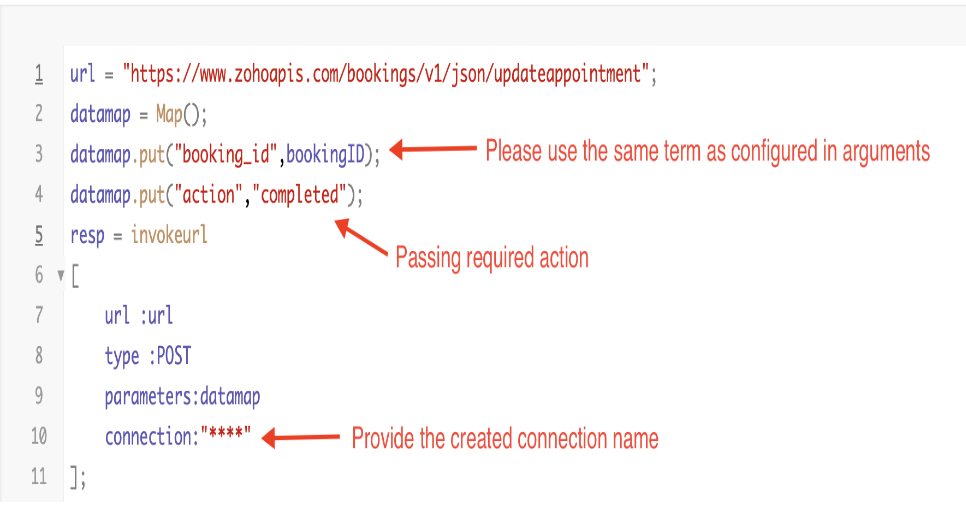
By completing these steps, we've configured a function that will mark appointments as completed.
ii. To create a function for marking appointments as no shows
1. Go to Setup > Developer Space > Functions.
2. In the Functions page, click + Create New Function.

3. Configure the function name, display name, and description.
4. Set the category as automation.
This opens the Deluge script page.
5. Next, configure the function's arguments:
A. Click on Edit Arguments on the Deluge script page.

B. Set the Parameter Name as bookingID. (Please note that the "bookingID" value is case sensitive and must match
the term used in the code).
C. Set the type as string.
Reference:
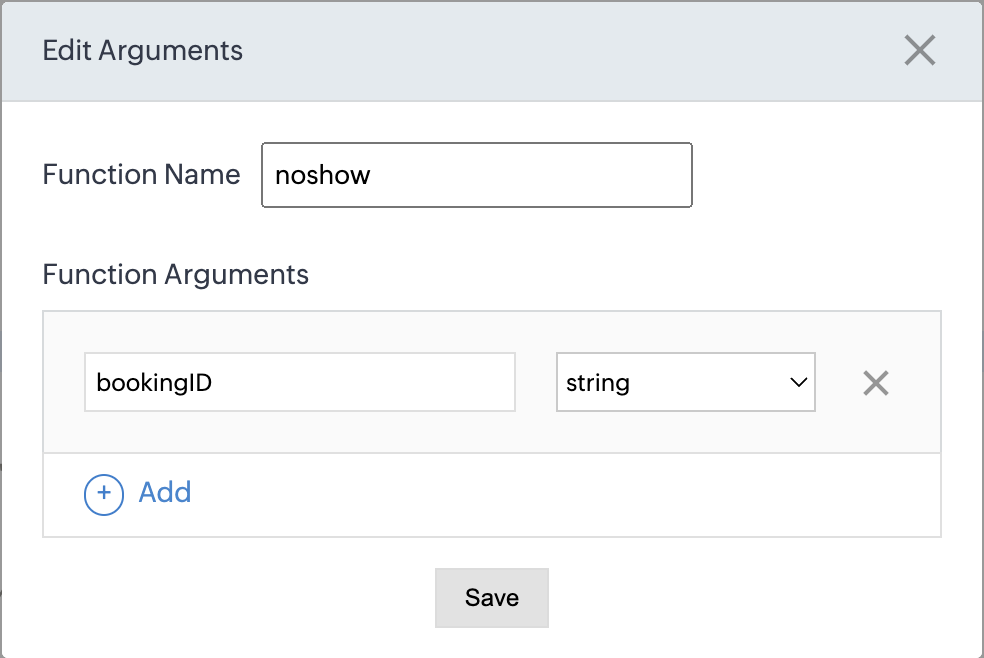
Please configure the below code on the Deluge script page.
Code link: No show
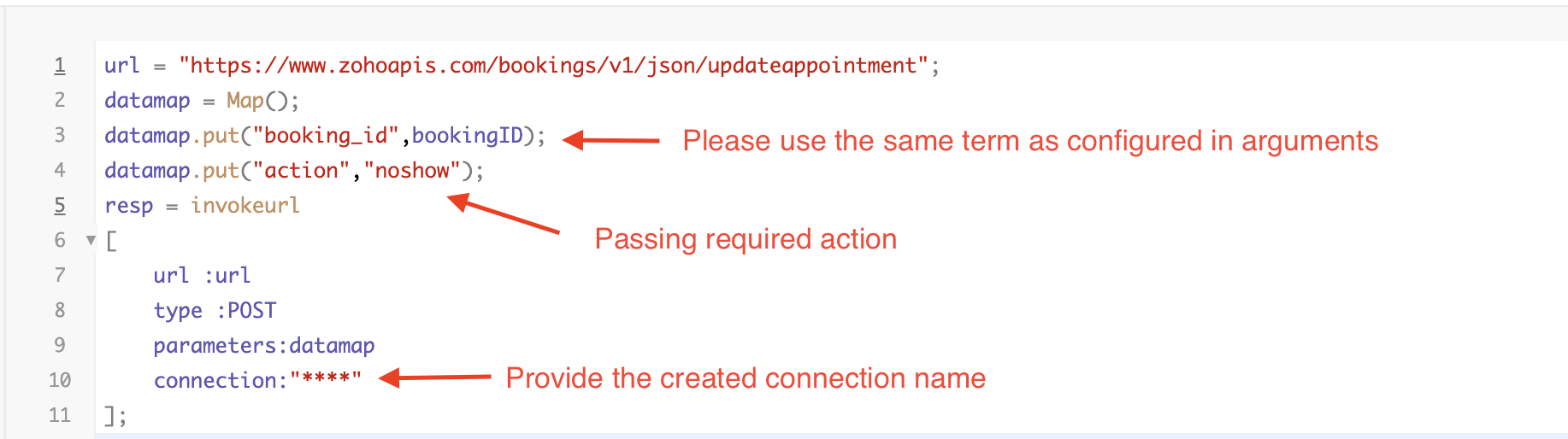
By completing these steps, we've configured a function that marks appointments as no shows.
iii. To create a function for marking appointments as canceled
1. Go to Setup > Developer Space > Functions.
2. In the Functions page, click + Create New Function.

3. Configure the function name, display name, and description.
4. Set the category as automation.
This opens the Deluge script page.
5. Next, configure the function's arguments:
A. Click on Edit Arguments on the Deluge script page.

B. Set the Parameter Name as bookingID. (Please note that the "bookingID" value is case sensitive and must match
the term used in the code).
C. Set the type as string.
Reference
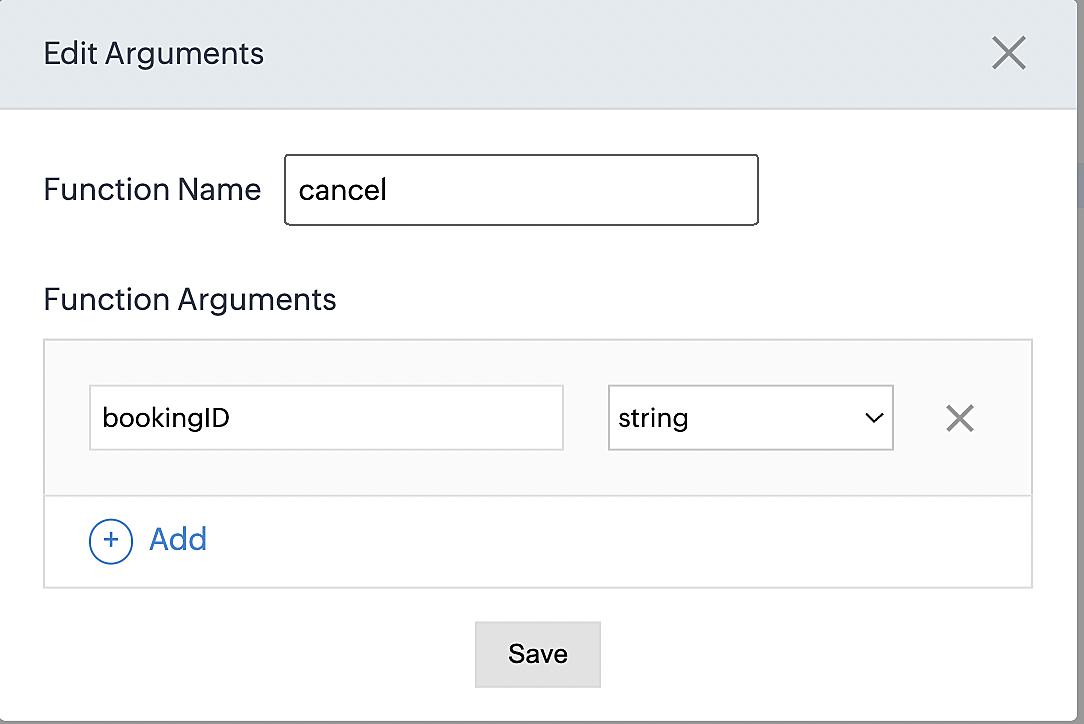
Please configure the below code on the Deluge script page.
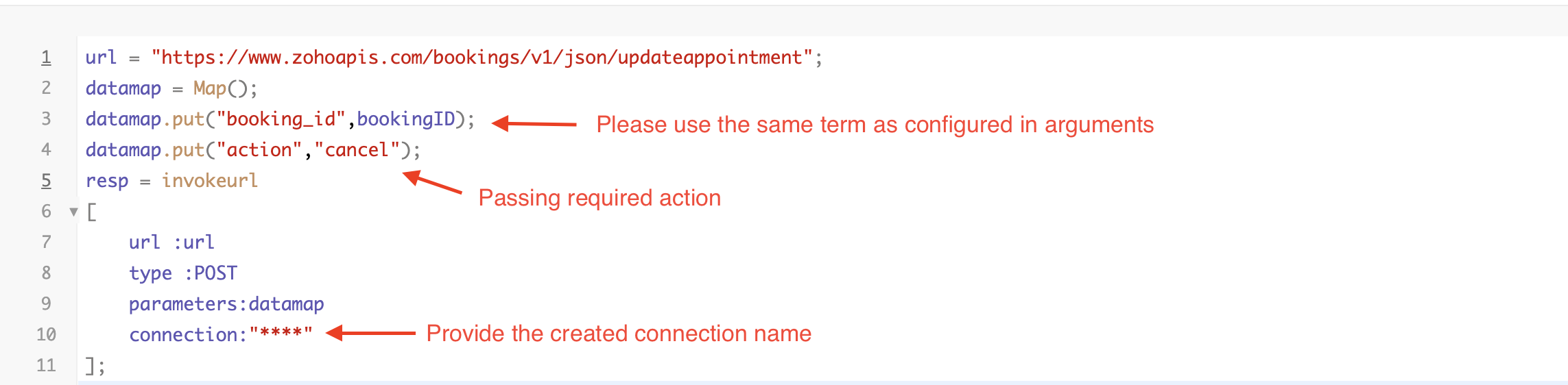
By completing these steps, we've configured a function that marks appointments as canceled.
Code explanation
Below is an explanation of the code that covers all the configurations present in the three functions mentioned above (cancel, mark as completed, and mark as no show).
Line 1: Based on the Zoho Bookings account's data center, we're setting up the API endpoint URL configuration.
Lines 2 - 4: To update appointments, we utilize the Zoho Bookings API. Within the update appointment API, there are two mandatory fields that need to be included: BookingID and action (completed/cancel/noshow).
Lines 5 - 10: We use the invokeURL task for API calls. To learn more about the invokeURL task, please refer to the following document: InvokeURL task for API calls
Now, let's proceed and learn about the process of creating a workflow and linking the established functions to it. This will enable us to automate the entire appointment status updating process.
Step 3: Creating a workflow
Workflow rules are sets of actions (email notifications, tasks and field updates) that are executed when specified conditions are met. Here, we'll generate workflow rules for each action to activate the respective function, thereby automating the appointment status updating process.
i. Creating a workflow for "canceling" appointments in Zoho Bookings when a meeting is deleted in Zoho CRM
Part 1: Creating the rule
1. Go to Setup > Automation > Workflow Rules.
2. In the Workflow Rules page, click Create Rule.

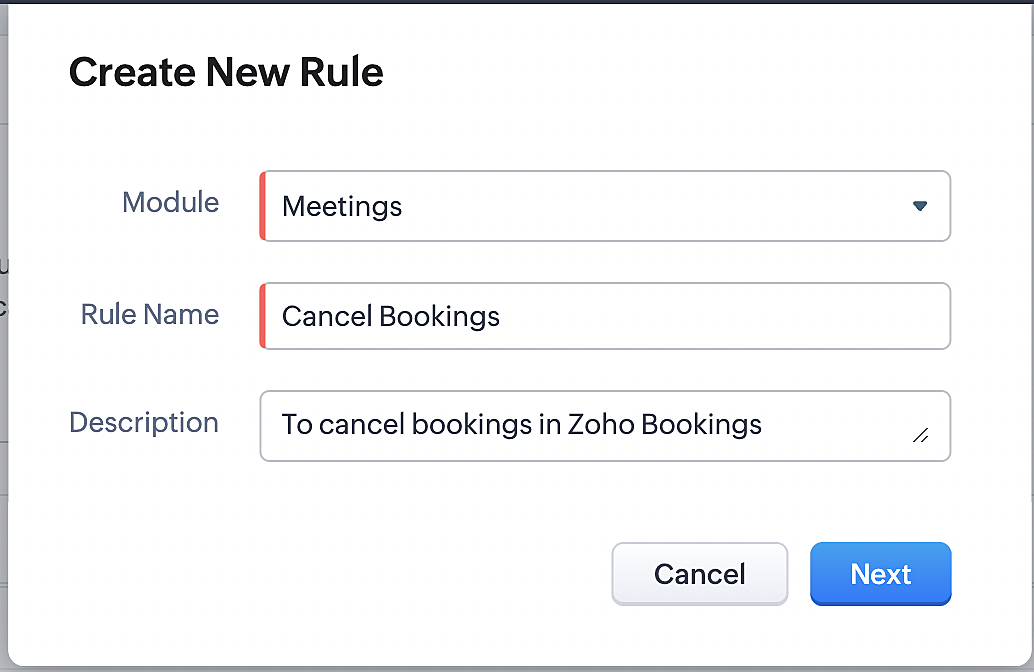
3. Select "Meetings" under Module and configure rule name and description as required.
More details: Create Rule
Reference:
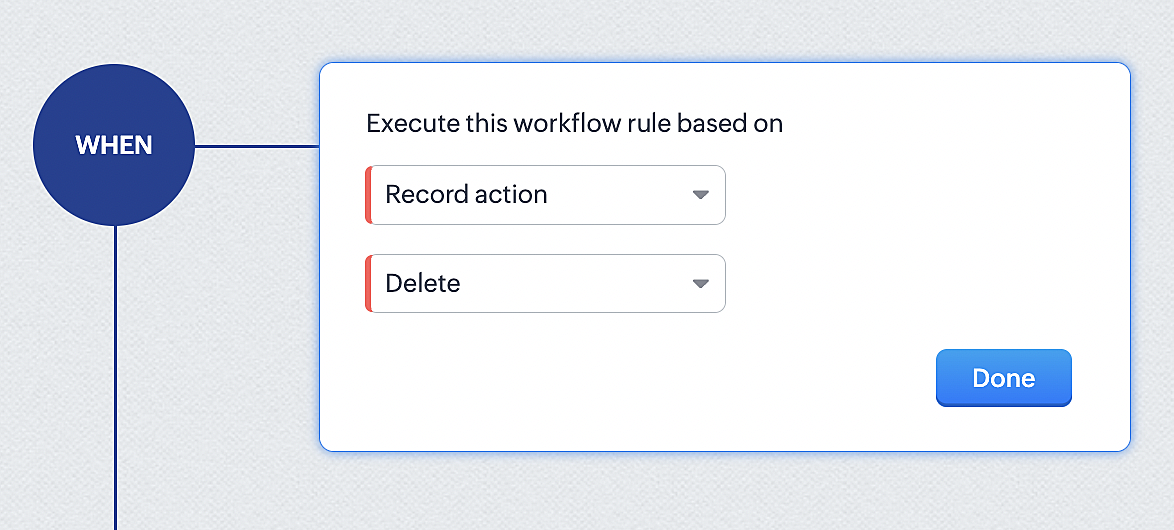
1. Select Record Action > Delete > Done to execute the rule when meetings are deleted.
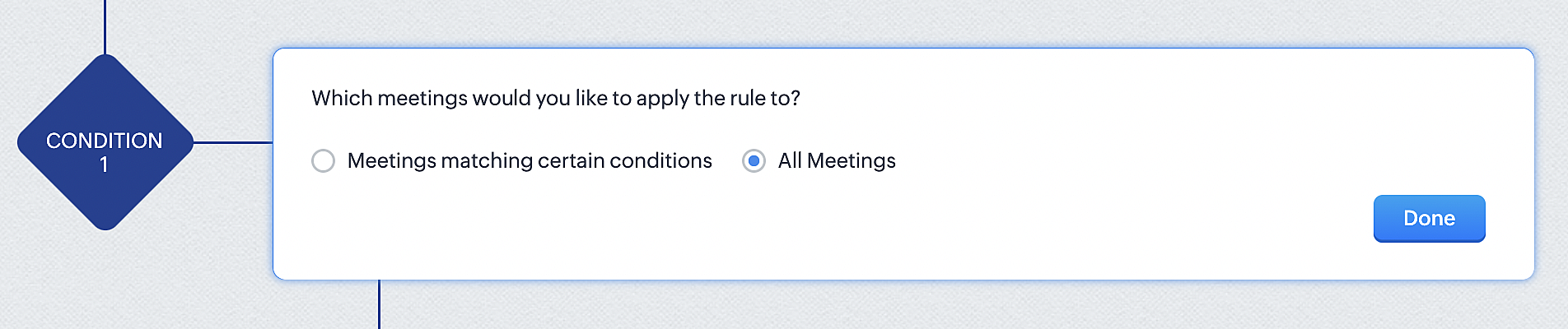
2. Configure condition > All Meetings.
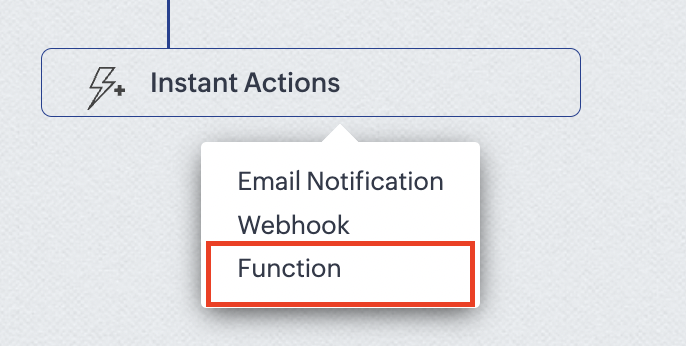
3. Instant Actions > Function.
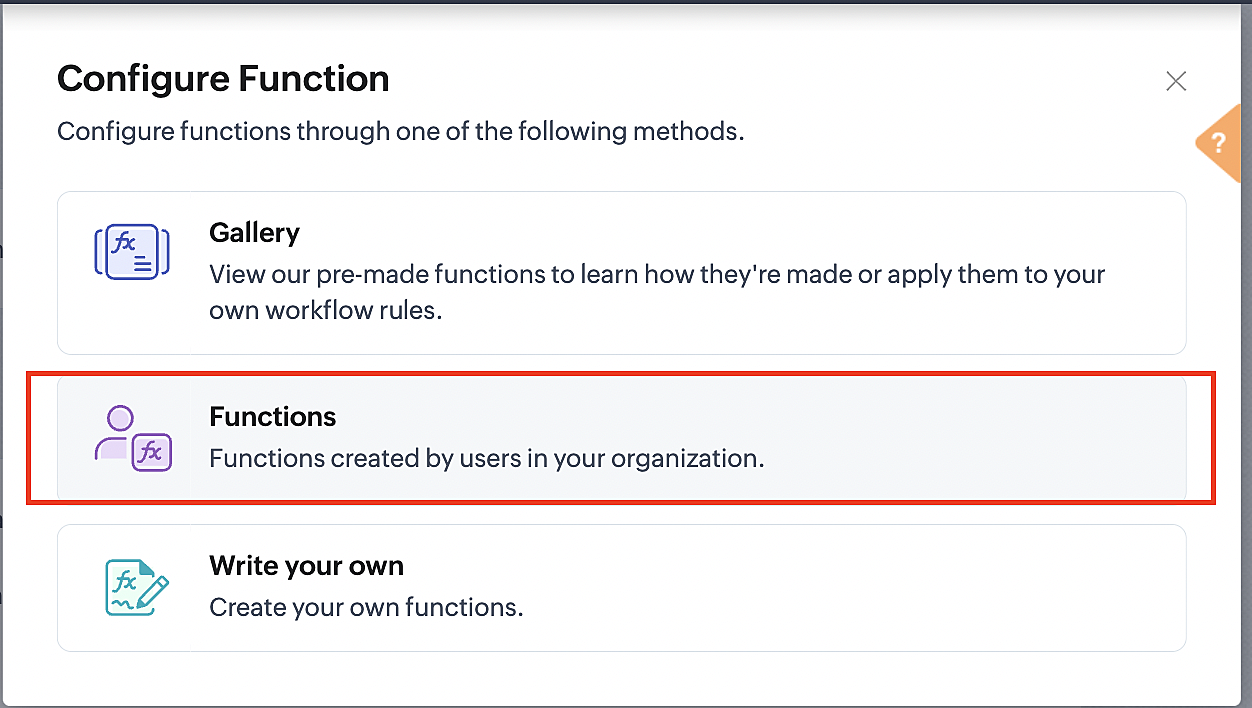
4. Click the New Function button.

5. In the Configure custom function page, select the "cancel" function you created from among the functions users in your organization have created.
Part 3: Argument mapping
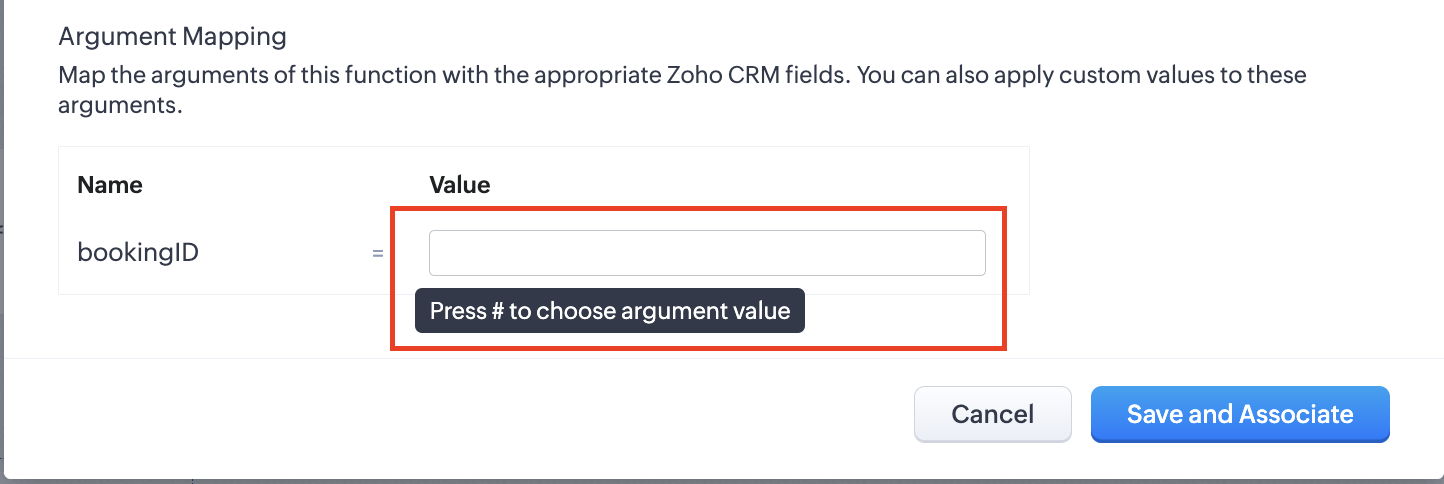
1. Press # to choose an argument value.
2. Select Meetings under Module and BookingId in the field.
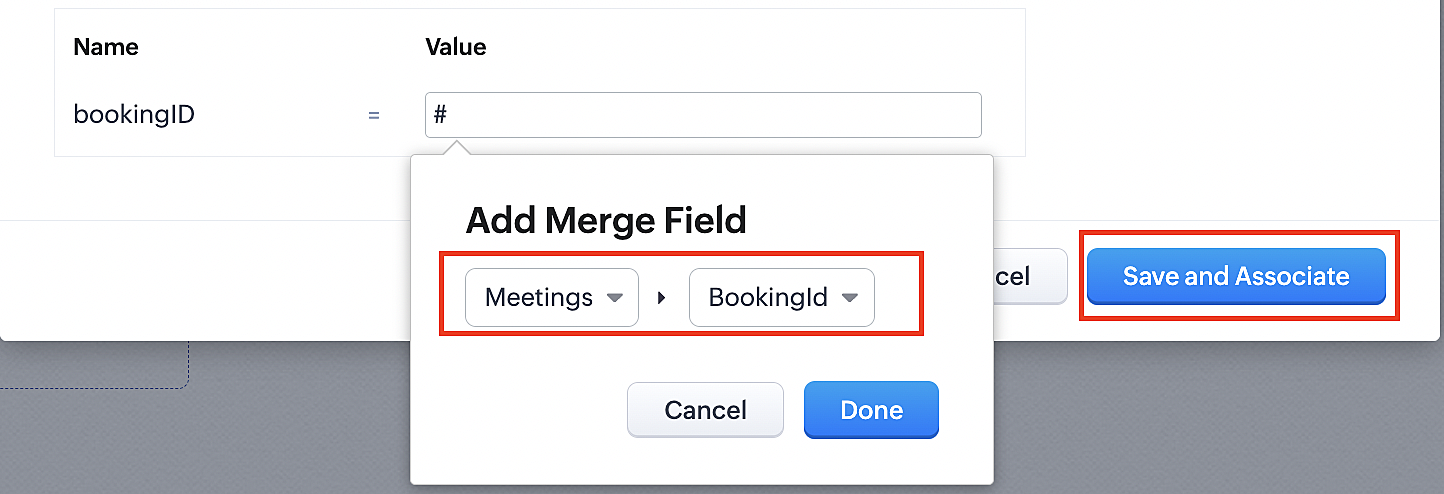
3. Click the Save and Associate button.
Reference:
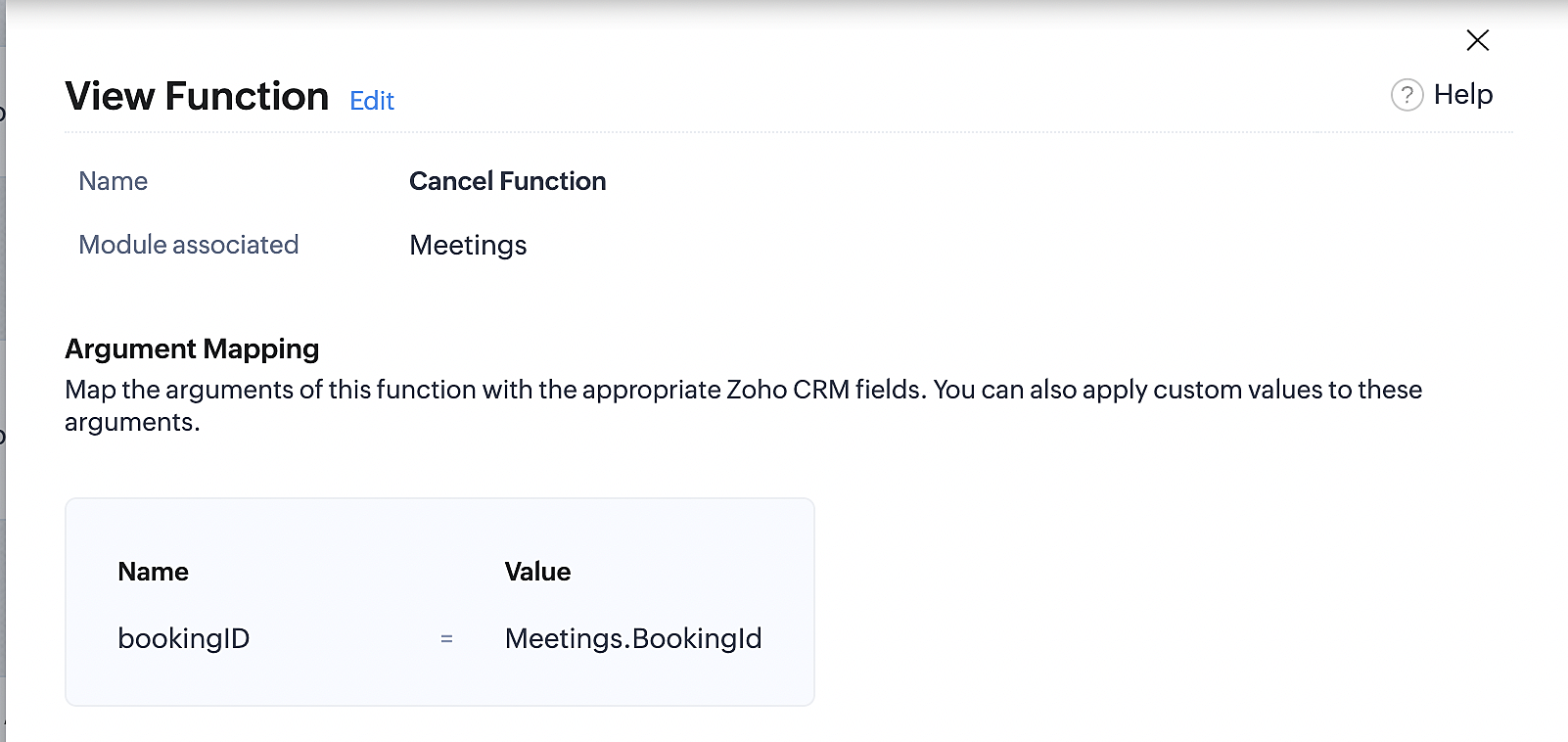
Below is the final flow of the cancel booking workflow:
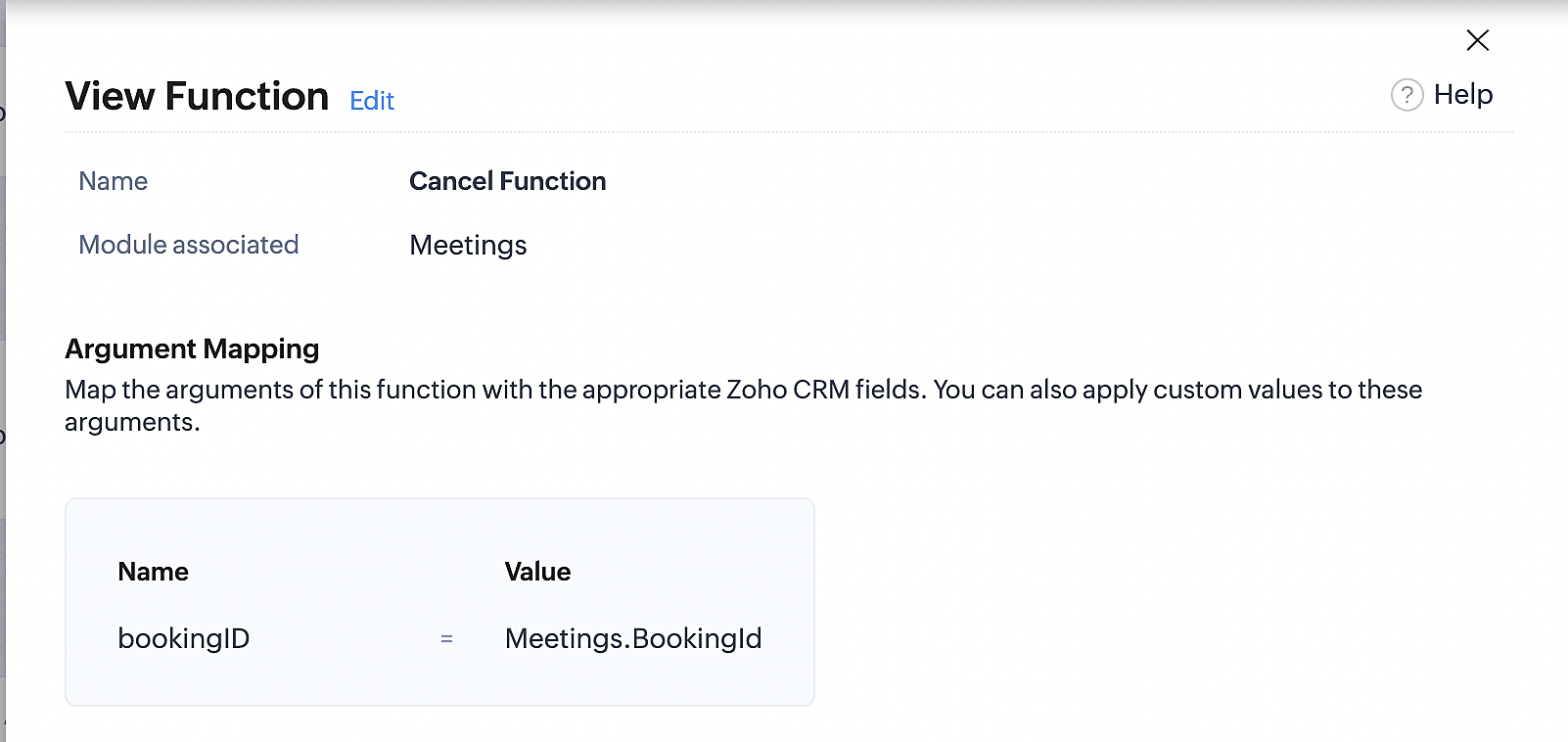
At the end of Part 3, we will have created a workflow that will be executed automatically when meetings are deleted in Zoho CRM. Simultaneously, the bookings associated with the meeting will also be canceled in Zoho Booking.
ii. Creating workflow for updating an appointment's status as "no show" in Zoho Bookings when the meeting's booking status is marked as no show in Zoho CRM
Part 4: Creating the rule
1. Go to Setup > Automation > Workflow Rules.
2. In the Workflow Rules page, click Create Rule.

3. Select Meetings under Module and configure the rule name and description as required.
Reference:
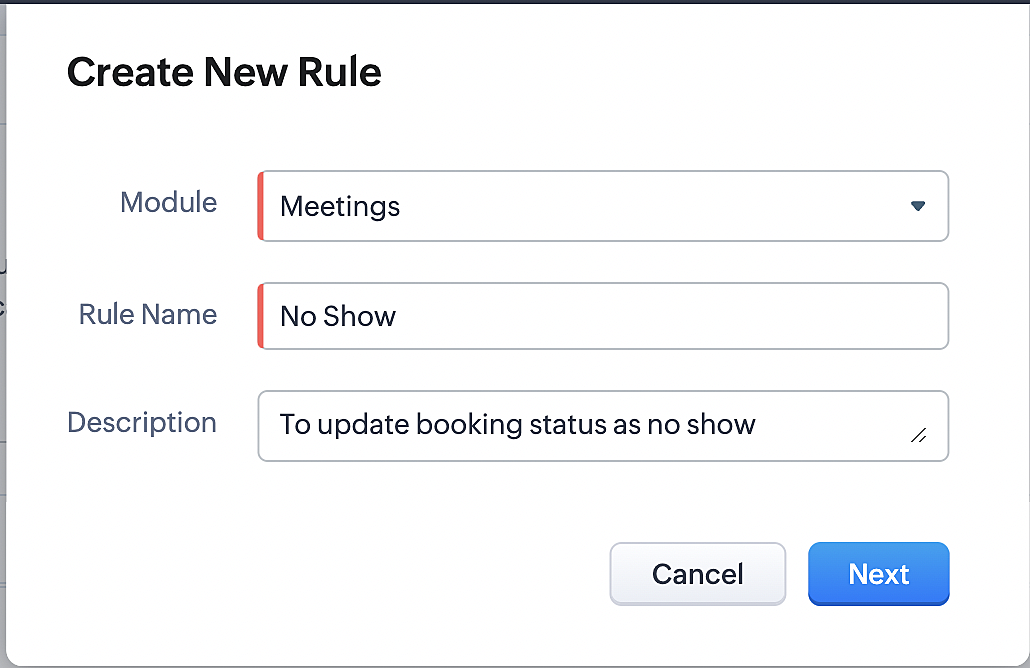
Part 5: Specifying the rule trigger
If you encounter difficulties while navigating through the steps mentioned below, please refer to Part 2 above, where we have provided step-by-step screenshots for clarification.
1. Record Action > Edit.

2. Enable the Specific field(s) gets modified and configure it per the screenshot below.
a. This is to ensure that the workflow is executed only when the booking status under the meeting module is
updated to "No Show".
updated to "No Show".
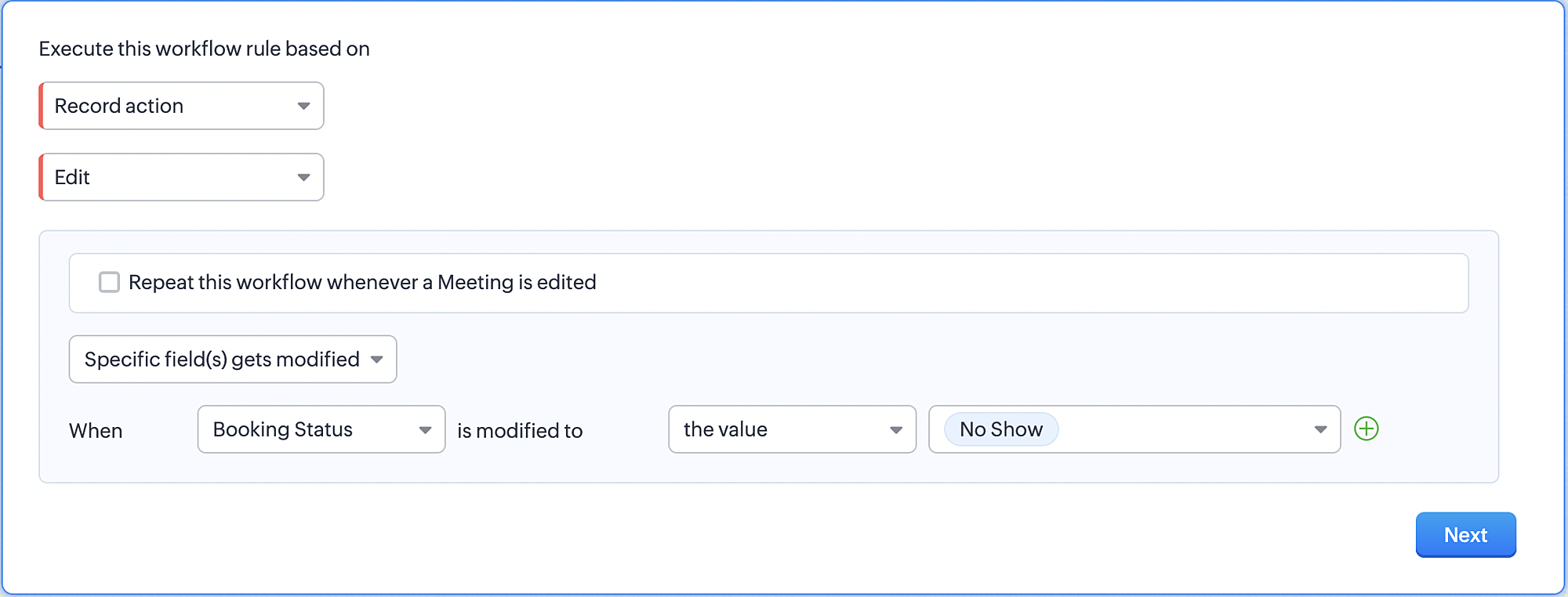
3. Configure condition > All Meetings.
4. Instant Actions > Function > New Function.
5. In the Configure custom function page, select the "no show" function you created from among the functions
users in your organization have created.
users in your organization have created.
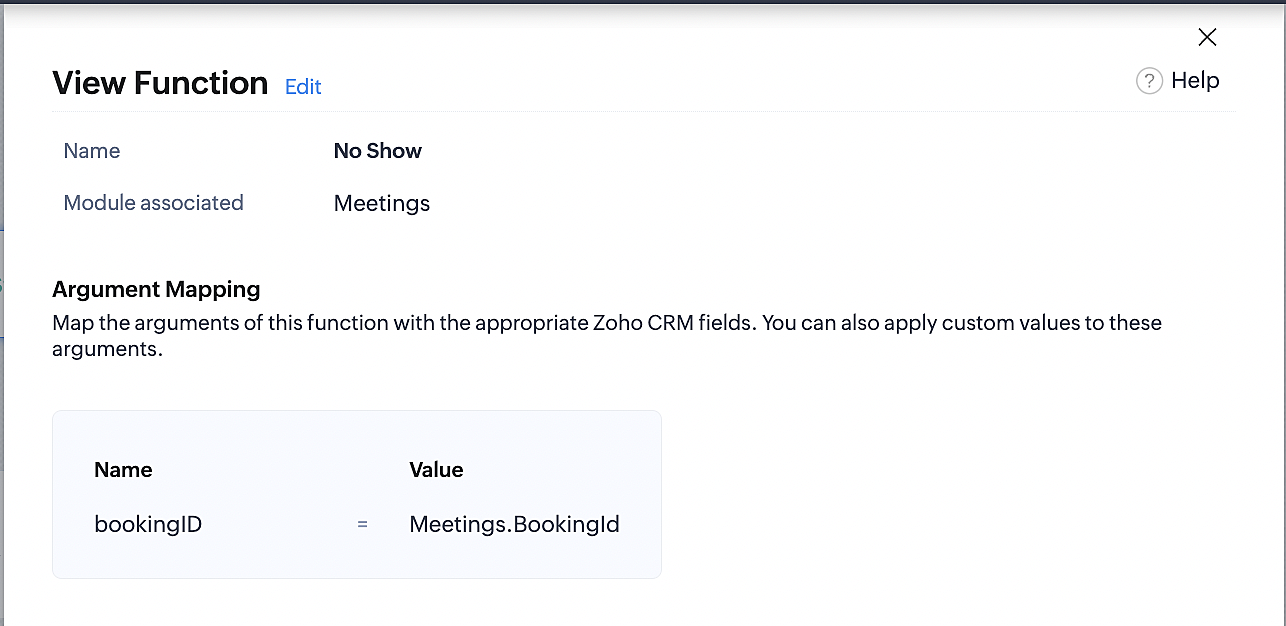
Part 6: Argument mapping:
If you encounter difficulties while navigating through the steps mentioned below, please refer to Part 3 above, where we have provided step-by-step screenshots for clarification.
1. Press # to choose an argument value.
2. Select Meetings under Module and configure the field as "BookingId".
3. Click Save and Associate button.
Reference:
Below is the final flow of the "No Show" booking status workflow:
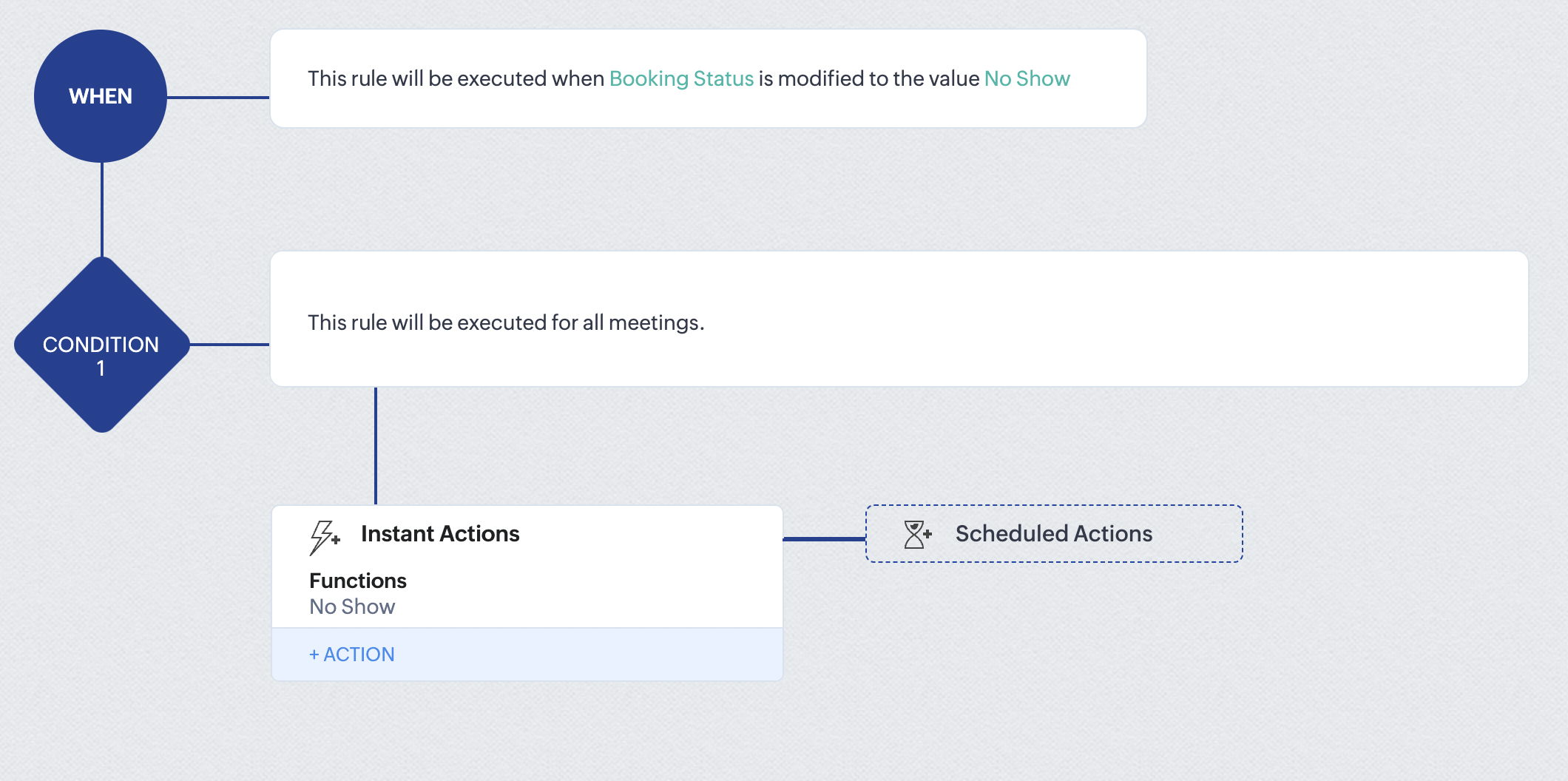
At the end of part 6, we will have created a workflow that automatically executes when the booking status field within the Zoho CRM Meetings module is updated to "No Show." This action will result in the associated bookings for that meeting also being marked as "No Show" in Zoho Bookings.
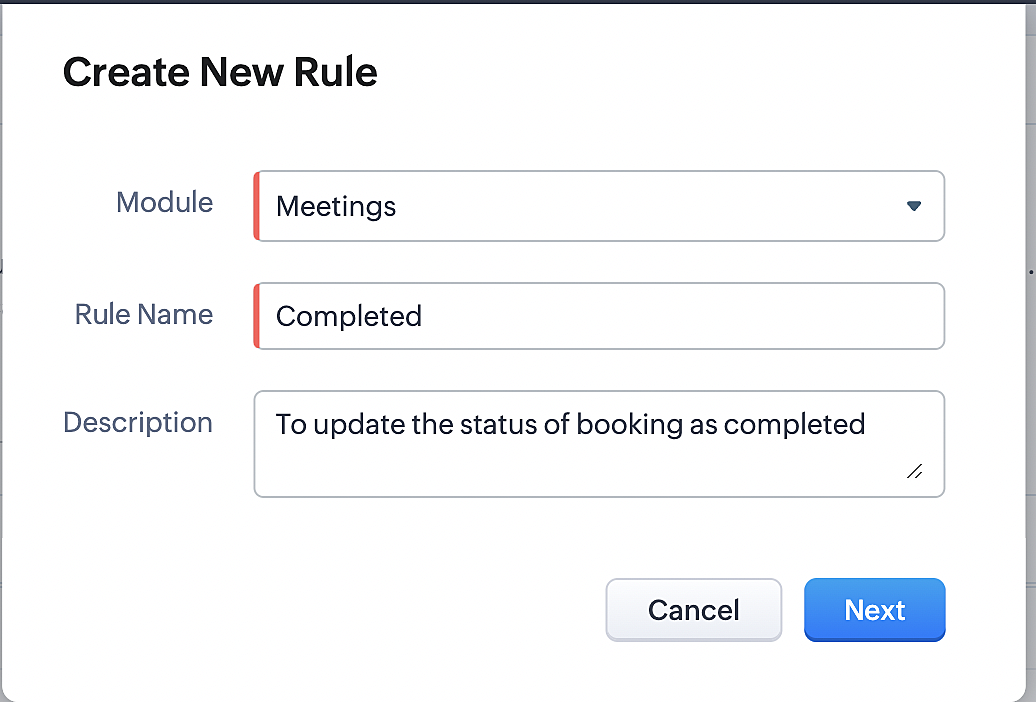
iii. Creating workflow for updating appointment status as "Completed" in Zoho Bookings when the booking status field of the meeting is marked as completed in Zoho CRM.
Part 7: Creating the rule
1. Go to Setup > Automation > Workflow Rules.
2. In the Workflow Rules page, click Create Rule.

3. Select Meetings under Module and configure rule name and description as required.
Reference:
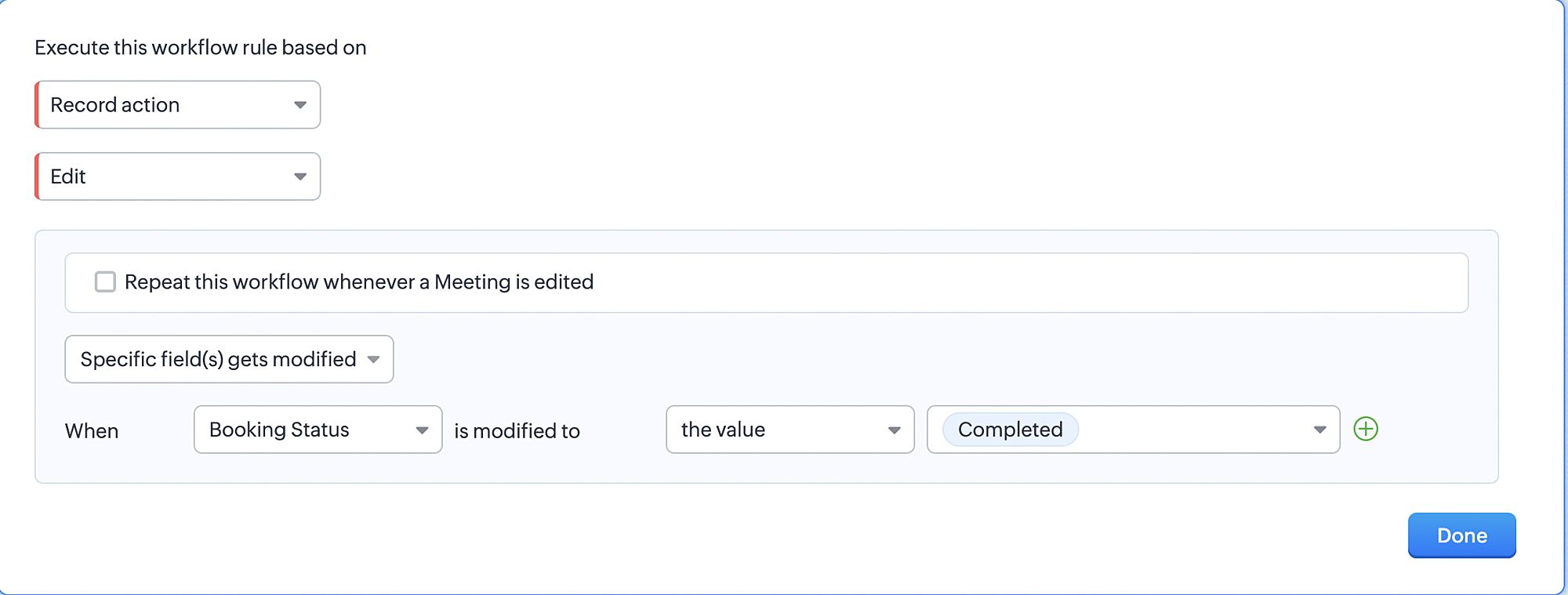
Part 8: Specifying the rule trigger
If you encounter difficulties while navigating through the steps mentioned below, please refer to Part 2 above, where we have provided step-by-step screenshots for clarification.
1. Record Action > Edit.

2. Enable the Specific field(s) gets modified setting and configure it per the screenshot below.
a. This serves to ensure that the workflow is executed only when the booking status under the Meetings module is
updated to "Completed".
3. Configure condition > All Meetings.
4. Instant Actions > Function > New Function.
5. In the Configure custom function page, select the "completed" function you created from among the functions users
in your organization have created.
Part 9: Argument mapping:
If you encounter difficulties while navigating through the steps mentioned below, please refer to Part 3 above, where we have provided step-by-step screenshots for clarification.
1. Press # to choose an argument value.
2. Select Meetings under Module and configure the field as "BookingId".
3. Click Save and Associate button.
Reference:
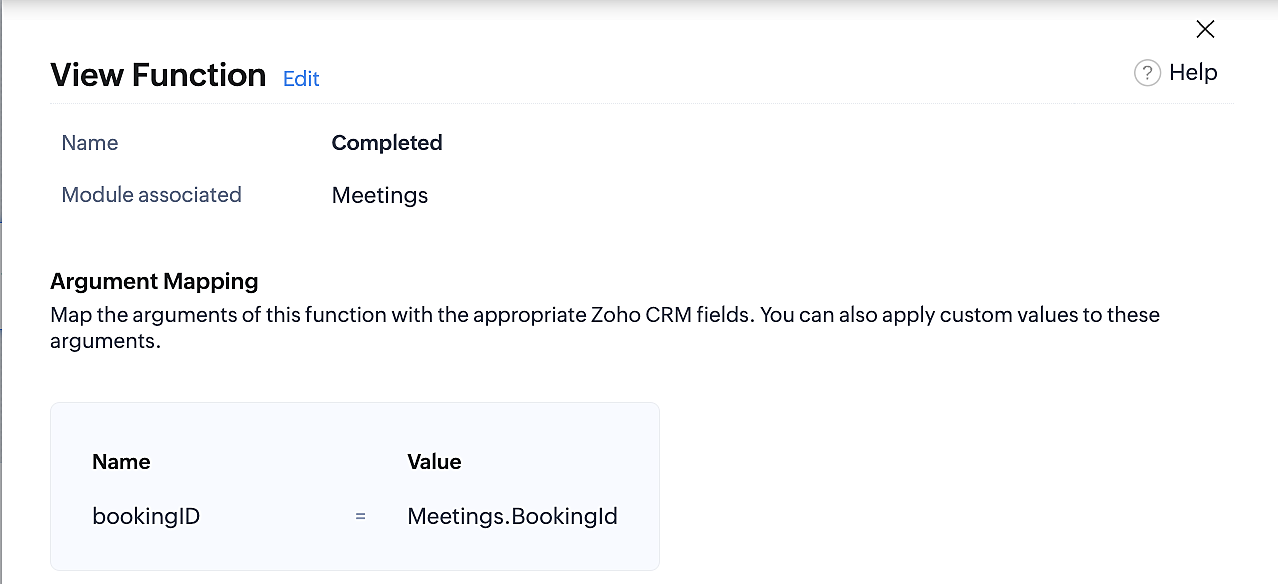
Below is the final flow of the "Completed" booking status workflow:
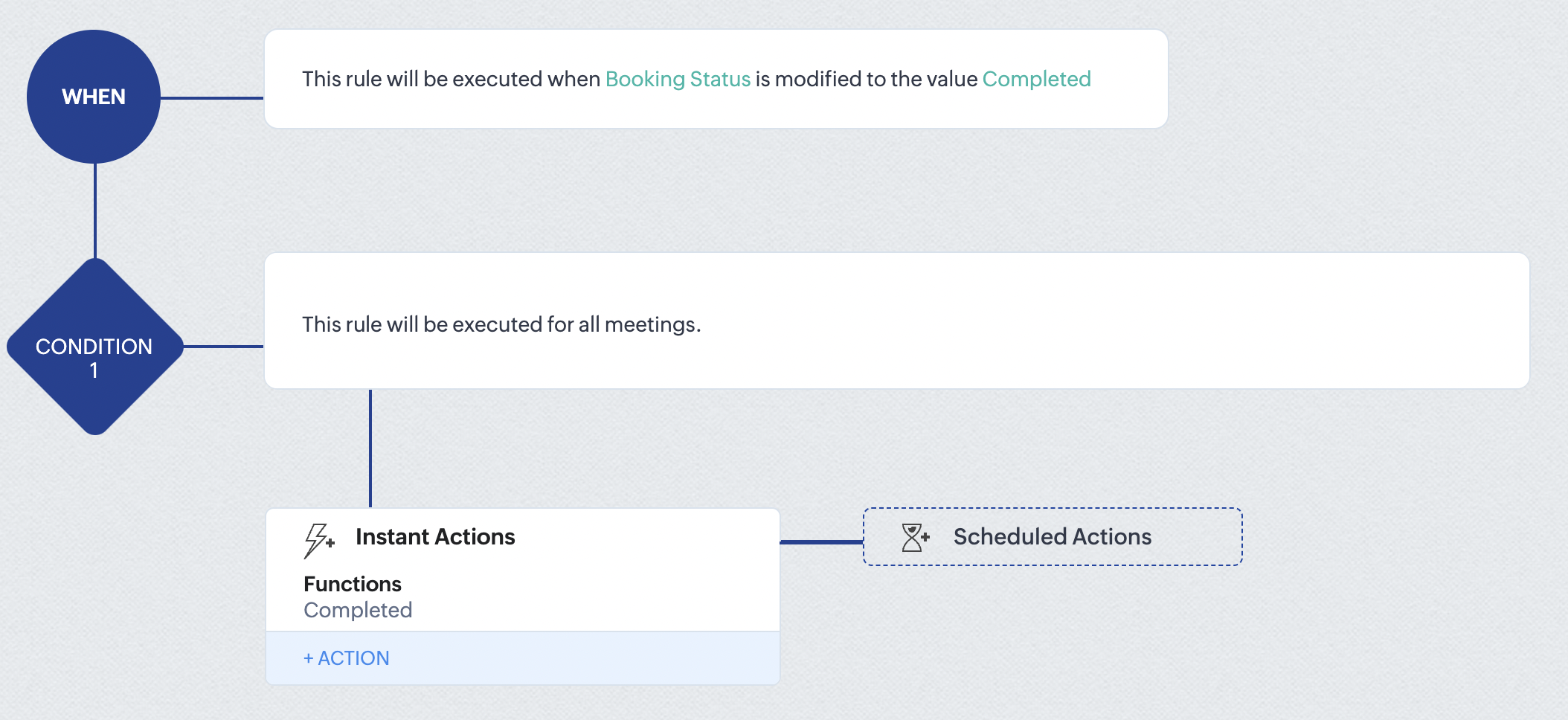
At the end of part 9, we will have created a workflow that is automatically executed when the booking status field within the Zoho CRM Meetings module is updated to "Completed." As a result, the associated bookings for that meeting will also be marked as "Completed" in Zoho Bookings.
Conclusion
We've reached the end of this community post. With the integration mentioned above in place, you'll be able to book, cancel, and update the status of appointments in Zoho Bookings directly from your Zoho CRM application. This will help you effectively manage your appointments in one place. As mentioned above, we've covered the rescheduling action in a separate post, which you can access by clicking on the following link: Reschedule Action
Furthermore, we've outlined a method for automating appointment statuses in detail. You can use this document as a reference to explore the various possibilities that suit your needs.
If you have any questions or need assistance with your configuration, please email us at hello@zohobookings.com or support@zohobookings.com.
Access your files securely from anywhere
New to Zoho Recruit?

Zoho Developer Community
New to Zoho LandingPage?
Zoho LandingPage Resources
New to Zoho Survey?
New to Zoho CRM Plus?
Deliver unforgettable customer experiences
New to Zoho CRM Plus?
Deliver unforgettable customer experiences
New to Zoho Marketing Plus?
Everything you need to run your marketing
New to Zoho Marketing Plus?
Everything you need to run your marketing
New to Bigin?





Topic Participants
Kaushik S
bruce
Ishwarya SG
PrismaNote Support
Sticky Posts
Presenting ABM for Zoho CRM: Expand and retain your customers with precision
Picture this scenario: You're a growing SaaS company ready to launch a powerful business suite, and are looking to gain traction and momentum. But as a business with a tight budget, you know acquiring new customers is slow, expensive, and often deliversGood news! Calendar in Zoho CRM gets a face lift
Dear Customers, We are delighted to unveil the revamped calendar UI in Zoho CRM. With a complete visual overhaul aligned with CRM for Everyone, the calendar now offers a more intuitive and flexible scheduling experience. What’s new? Distinguish activitiesCreate and populate a record in an instant: Introducing zero-shot field prompting to Zia's ICR
A couple of months ago, we upgraded our in-house AI image detection and validation tool, Zia Vision, with intelligent character recognition (ICR). By training Zia with sample images, you could create and enrich CRM records with data extracted from standardIn-person ZUG Meetups for Real Estate Professionals - US Q1 2026
The Real Estate Zoho User Group is going on a multi-city, in-person meetup tour across the US, and we’d love to see you there! These meetups are a great opportunity to: Connect with fellow real estate professionals using Zoho Share challenges and discoverNimble enhancements to WhatsApp for Business integration in Zoho CRM: Enjoy context and clarity in business messaging
Dear Customers, We hope you're well! WhatsApp for business is a renowned business messaging platform that takes your business closer to your customers; it gives your business the power of personalized outreach. Using the WhatsApp for Business integration
New to Zoho TeamInbox?
Zoho TeamInbox Resources
Zoho CRM Plus Resources
Zoho Books Resources
Zoho Subscriptions Resources
Zoho Projects Resources
Zoho Sprints Resources
Qntrl Resources
Zoho Creator Resources
Zoho CRM Resources
Design. Discuss. Deliver.
Zoho Show Resources

Get Started. Write Away!
Writer is a powerful online word processor, designed for collaborative work.
Zoho CRM コンテンツ
-
オンラインヘルプ
-
Webセミナー
-
機能活用動画
-
よくある質問
-
Ebook
-
-
Zoho Campaigns
- Zoho サービスのWebセミナー
その他のサービス コンテンツ
Nederlandse Hulpbronnen

ご検討中の方
Recent Topics
ABA Files payment description
Hi, is there a way to automate the payment description on the ABA file creation. When you paying many vendors having to put this in each time is very time-consuming. I couldn't see if there was a way to workflow this to automate using deluge.GDPR Contd. - Handling Lawful Bases for Your Customers using Zoho CRM.
Hello folks, Continuing from our previous GDPR post, we bring to you the first cut of GDPR centric enhancements that are released for handling lawful bases for your customers in Zoho CRM. For your understanding we have split the entire process into three sections: Identifying Data Processing Basis Updating the Data Processing Basis in Zoho CRM Consent Management in Zoho CRM 1. Identifying Data Processing Basis The fundamental principle to handle the personal data of your data subjects is to processUpgrade the Lato font to the Lato 2 font
While there's not a major difference, I noticed that Zoho doesn't use the upgraded Lato 2 font but it instead uses the standard one. Lato 2 enhances the look of letters and numbers when you italicize them, among little things that get tweaked. Is it possibleMasked Field Type with Permission-Controlled Visibility in Zoho CRM
Dear Zoho CRM Team, Greetings, We would like to request a new feature that would enhance data security and access control within Zoho CRM, especially when handling sensitive internal information. Use Case: Our team occasionally needs to store sensitiveHow to properly setup Databridge on Linux Server?
Hello guys, i am running a Linux server on which I am installing the Zoho Databridge via command line. The Zoho tutorial ( https://help.zoho.com/portal/en/kb/analytics/user-guide/import-connect-to-data/databases-and-datalakes/articles/postgresql-3-3-2021#1_How_do_I_install_Zoho_DatabridgeHaven't used banking function for years and now want to reconcile and clean up my account
I'm in the UK and have been using Zoho Books for my private mental health practice since 2018. Up until recently, I've entered everything manually and not reconciled any items with my bank account. Every year, I run a report for that year and use thatinvalid element hsn_or_SAC
Hi, I am trying to record expense in Zoho expense. when submitting I am facing this issue invalid "element hsn_or_SAC" please help me with this. Regards, Abdul Hameed MPlug Sample #14: Automate Invoice Queries with SalesIQ Chatbot
Hi everyone! We're back with a powerful plug to make your Zobot smarter and your support faster. This time, we're solving a common friction point for finance teams by giving customers quick access to their invoices. We are going to be automating invoiceRecap - Desk Story Series
In our exploration of the Wheels of Ticketing Series, we kicked things off by diving into a fundamental element of Desk Ticketing: the fields. These fields serve as the building blocks that gather essential information about tickets, customers, organisations,Tip of the Week #60– Reduce response time with shared inboxes!
When customer messages are scattered across different platforms and team members aren't sure who's responding, delays are inevitable. Slow responses frustrate customers and create a poor experience for your brand, especially when expectations are high.Hybrid project management in IT and software development services
Project management models serve a wide range of audience, however the highest takers for Agile project management methodology are the IT and software services industry. The flexibility to develop and release software iteratively with continuous improvement,Introducing Forms in Zoho Sheet
We hereby bring you the power of forms in Zoho Sheet. Now, build and create your own customized forms using Zoho Sheet. Be it compiling a questionnaire or rolling out a survey, Zoho Sheet can do it all for you. Forms is an excellent feature that helps you collect information in the simplest of ways and having it in Zoho Sheet takes it a notch higher. Build Simple yet Powerful forms Building forms using Zoho Sheet is fairly simple. The exclusive 'Form' tab lets you create one quickly. Whether youWhat's New in Zoho Inventory | January - March 2025
Hello users, We are back with exciting new enhancements in Zoho Inventory to make managing your inventory smoother than ever! Check out the latest features for the first quarter of 2025. Watch out for this space for even more updates. Email Insights forOverdue payments pending approval max
I needed to validate update the email to pay for goods sold out, travel expenses and cars and vehicles for office, office supplies, properties purchase etcHow do I mass edit time entries?
Since you can not filter or sort time entries by what has and has not been invoiced (you can only see the icon but not separate invoiced from non-invoiced), I would like all time to initially be entered in as un-billable and I can change to billable as I bill them. (since you can see this separation) So my question is HOW do I mass edit this? Can it be done?Zoho Booking Page Footer
Is there any option available to add social media, like LinkedIn, on the Zoho Booking page?Custom SMTP is now available in Zoho Sign
Hi there! Want to send Zoho Sign emails from your organization's or personal email server? Look no further! Zoho Sign has introduced custom Simple Mail Transfer Protocol (SMTP) for Enterprise users across all data centers. By enabling custom SMTP, youHelp with SEO
Hi There, I have recently published a site and added some Keywords in the SEO settings. Searching Google I currently don't find my site though. When do these settings take effect? In the SEO settings there is also a section "Sitemap" I can change settings for "frequency" and "Priority" What do these settings do? Kind regardsReport Level Button
Currently I couldn't find a way to add a report level button I think currently we can only add buttons/actions for records, but having custom report level button would be really beneficial Usecases Click to import/sync Data from On Prem Systems ClickCreate collection from start integer to end integer
I want create some ticket number. Starts at 1 and end at 10. I want the result to be a string 1 - 2 - 3 - 4 - 5 - 6 - 7 - 8 - 9 - 10. Trying something like this but need the correct way write the start and end part. start = 1; end = 3; sequence = List();Importing Subform Data is Removed in Zoho Creator 6
Previously It was possible to import Data to the Subform in Creator 5 This basic and mandatory Feature was completely removed from Creator 6 with no Timeline to add support for it How are we supposed to add our data if we want to use Creator? Manually?Function #50: Send Mass emails to your customers
Hello everyone, and welcome back to our series! We have reached a milestone of 50 Functions, which means that we have automated 50 different tasks in Zoho Books. Every Friday, we have shared a nifty function aimed at either automating a task or streamliningSmart Document Automation:: From Zoho Projects to Zoho Writer – Merge, Edit, and Share
Hello Everyone, A custom function is a software code that can be used to automate a process and this allows you to automate a notification, call a webhook, or perform logic immediately after a workflow rule is triggered. This feature helps to automateHow to remove an Instagram post on Zoho Social?
Hi there, I wanted to delete yesterday's post on all social platform and managed to do so for Twitter and Facebook. I couldn't for Instagram as there is no option for delete. How can I delete successfully?【開催報告】東京 ユーザー交流会 Vol.2 2025/6/13 CRM Plus/Formsの活用におけるポイントやおすすめ機能を紹介
ユーザーの皆さま、こんにちは。コミュニティチームの藤澤です。 6月13日(金)に東京で「ユーザー交流会 Vol.2」を開催し、16名の方にご参加いただきました。ご参加くださった皆さま、ありがとうございました。 この投稿では、当日のセッションの様子や使用した資料を紹介しています。残念ながら当日お越しいただけなかった方も、ぜひご覧ください。 ユーザー活用事例セッション:マーケ・営業・サポートをつないで顧客体験を向上させる!Zoho CRM Plusのおすすめサービス活用事例 Zoho ChampionNo Real DANE Support
The issue in https://help.zoho.com/portal/en/community/topic/will-zoho-implement-dane was closed today claiming DANE was implemented. You never implemented DANE correctly, even if you think you did. DANE requires DNSSEC to work properly, you never addedApplying Price List to All Customers
I just created a new price list as we have several items that have volume price breaks. To create my price lists, I followed the instructions in this article: https://www.zoho.com/us/inventory/help/items/price-list.html When it comes to applying my priceWhat's wrong with this deluge code to create a Bill?
I know that all the data in the map is correct. The line items are pulled directly from a purchase order. // Add the purchase order ID to the bill billPOIds.add(poID); // Retrieve and merge the line items poLineItems = purchaseOrder.get("line_items");2 Ideas, Clone timesheet entry from monthly view and Notes in Weekly view
While i love timekeeping I am finding some things slow me down. Slow to the point of considering writing my own API call to do this. It would be so useful to be able to clone a timesheet entry from the monthly view. It is somewhat painful to have toZoho Workdrive API call to find public external Link for a Folder
Hi all, I can create new external share links for a WD Folder using this API call https://workdrive.zoho.com.au/api/v1/links . This works fine, however if there is already an external link created for a given folder, trying to create a new one fails (whichConverting Sales Order to Purchase Order
Hi All, Firstly, this code works to convert a sales order(SO) to a purchase order (PO) via a button, however I am running into an issue when I convert the SO where the values from the line items are not pulled across from the SO to the PO. The ones inAccessing and Using Formula Field
Hi There, I created a formula field called 'Day of the Week' in the Leads module that takes the record created time and transforms it into the day of the week. The formula field returns the correct values. However, I am unable to find or use the field🇺🇸 🇨🇦 🇲🇽 Ask the Experts: A Live Q&A Session
Session Closed Thank you to everyone who participated in this Ask the Experts session! Your questions, insights, and engagement made it a valuable discussion for the entire Zoho Recruit community. The comment section is now closed, but feel free to browseRequest For Quotation (RFQ) module
Hello, Do you have any plans to implement a RFQ module in to ZOHO Inventory? I would like to chose items that I require a price for, select a number of different suppliers to e-mail and have them submit there pricing online. I would then like to see aAbility to Append or Prepend specific signer name field to all documents in an envelope
We use templates regularly and have a need to be able to rename the individual pdf documents contained in an envelope, such that a signer's name is appended or prepended (e.g. Form1 - SignerName). This is critical for us, because of how we process documentsExport an email as an HTML file?
How do we export an email in Zoho Marketing Automation as an HTML file? We have an advertising partner that needs our campaign email as an HTML file. We can't find any way to do this. If this is not possible, please explain why. It doesn't make senseFunction #30: Display list of associated PO on SO details screen
Hello everyone, welcome back to our series! Imagine having the ability to effortlessly access and view details of all purchase orders linked to a sales order directly from the sales order itself. Well, today's script is designed to do just that for you.Custom Print Button in Page/Stateless Form
[Zoho Creator] Unable to Add Custom Print Button to Page or Stateless Form We need the ability to add a custom print button on a page or stateless form in Zoho Creator to print a templated or formatted output (e.g., appointment confirmation, summary slip).Page Variable Not Passed from Report to Form
[Zoho Creator] Page Variable (Resource) Not Passed from Report to Form in Appointment Module We are facing a limitation in our Appointment Module related to the handling of page-level variables. We are using a page variable to select a resource, whichCreating Layout Rule With Formula Field
By The Grace Of G-D. Hi, I see that i cannot use Layout Rules to show/hide Formula Fields. Is that something you plan on adding sometime soon?Next Page