Bidirectional sync between Zoho Bookings and Zoho CRM - Part 1
Hey, community members!
The default integration between Zoho CRM and Zoho Bookings is unidirectional, which means that any appointments booked, rescheduled, or deleted in Zoho Bookings will be reflected in Zoho CRM. However, any modifications made to events in Zoho CRM that originated from Zoho Bookings will not be reflected back in Zoho Bookings. Hence, as we're announcing in this community post, we've made the sync bidirectional.
This community post will cover the process of configuring appointment bookings from Zoho CRM in Zoho Bookings, as well as managing appointment statuses such as Canceled, No Show and Completed. We have addressed the rescheduling action in a separate post. To view it, please click on the following link: Reschedule Action
This community post will be beneficial for active Zoho CRM users who handle all their meetings within Zoho CRM. Additionally, you can use this community post as a reference to explore various automation possibilities tailored to your business requirements. For instance, with this post's guidance, when you update a booking's status field to "Completed" in Zoho CRM, it will automatically sync with Zoho Bookings and trigger an automated "Mark as completed" email to customers. This enhancement will improve your Zoho Bookings and Zoho CRM synchronization experience, making appointment management easier.
Prerequisites of bidirectional sync:
- Zoho Bookings Premium subscription
- Zoho CRM paid subscription
- Enable Zoho CRM integration within Zoho Bookings
The purpose of enabling the Zoho CRM integration within Zoho Bookings is to transfer booking details from Zoho Bookings to Zoho CRM. In this configuration, the mandatory field is the Booking ID, which is passed from Zoho Bookings to Zoho CRM through the integration. Whenever an appointment is booked, customer details will be sent to the designated CRM module, and a corresponding record will be created in the Meetings module within Zoho CRM, which will help in automating the workflow.
Here's the complete demo video that covers all the configurations discussed in the community post below:
Timestamps for your reference:
0:35 - Purpose of this community post
Here's the complete demo video that covers all the configurations discussed in the community post below:
Timestamps for your reference:
0:35 - Purpose of this community post
1:26 - Zoho CRM plugin installation
4:43 - Custom field creation
7:20 - Function creation
9:22 - Connection creation
10:24 - Configuring arguments
11:06 - Workflow creation
13:33 - Argument mapping
14:41 - Output verification
17:41 - Conclusion
How we're approaching this bidirectional sync
1. Booking an appointment from Zoho CRM
Install the Zoho Bookings for Zoho CRM plugin within your Zoho CRM application. This plugin enables the creation of a "New Appointment" button within the Zoho CRM Leads and Contacts module, which enables you to select the desired booking page you wish to open. You can choose from various workspace, service, or staff booking pages. After configuration, you can initiate the process of scheduling bookings directly from within your Zoho CRM account.
- Guide on Zoho Bookings and Zoho CRM plugin installation: Booking page selection for Zoho CRM plugin
2. Booking status: Completed or No Show
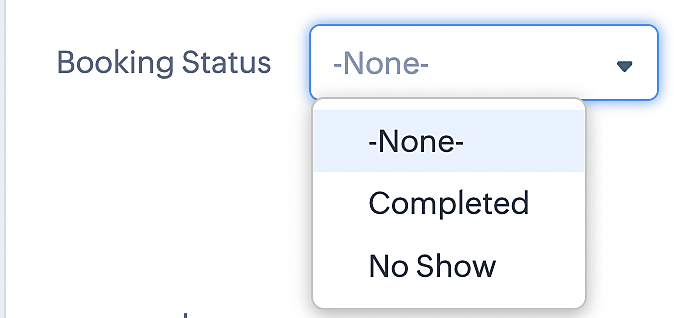
To update a booking's status (Completed or No Show), we've added a new picklist properties field named "Booking Status" in the Meetings module and configured it with two options: "completed" and "no show". Depending on the booking status chosen, the corresponding booking in Zoho Bookings will be updated.
- Details on how to add a custom field to the Meetings module : Customizing modules
- Here's a video that demonstrates how to add a field to a module in Zoho CRM: Adding fields
Reference:
3. Booking status: Canceled
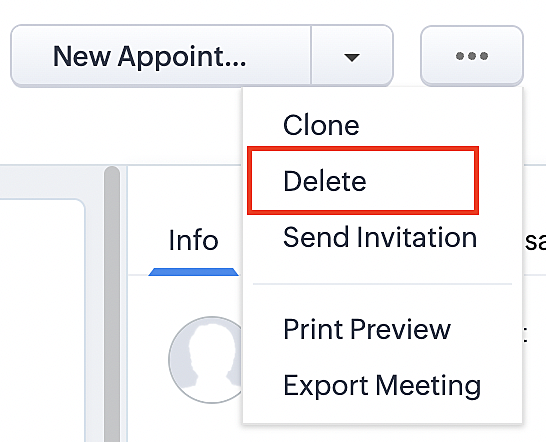
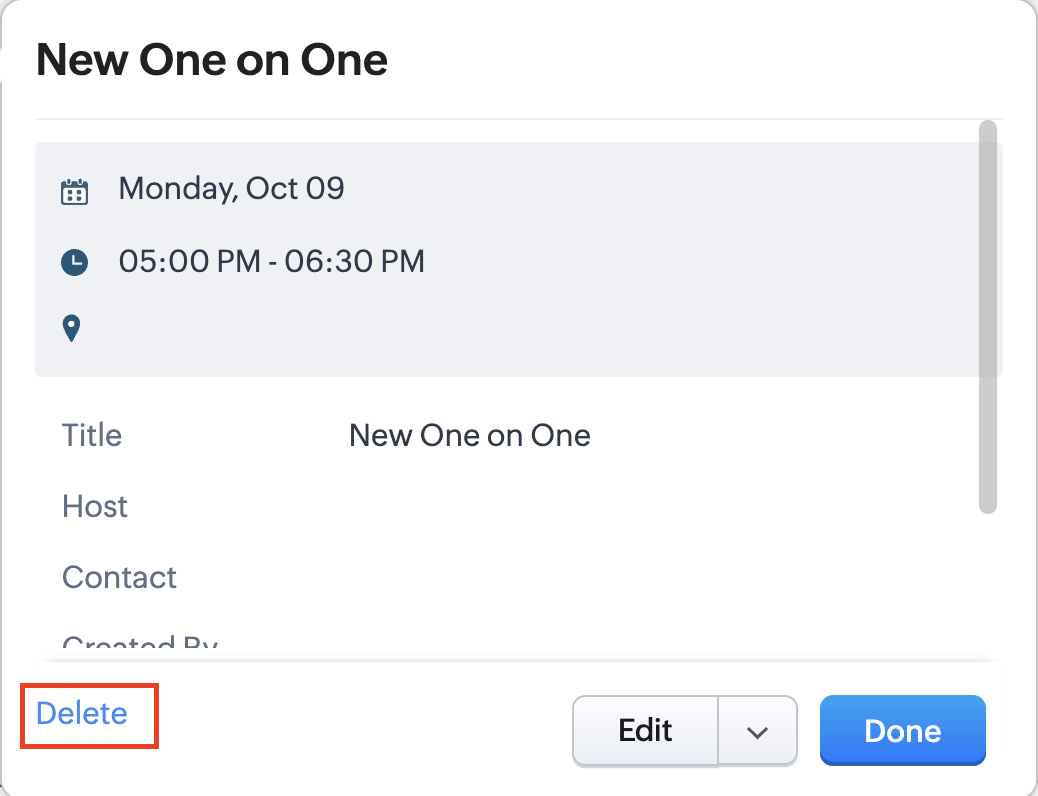
Whenever a meeting is deleted from the Meetings module, the corresponding booking in the Zoho Bookings app will also be canceled automatically. The meeting can be deleted either from the Meetings module or directly from the calendar.
To enable bidirectional sync between Zoho CRM and Zoho Bookings
Complete these steps in Zoho CRM.
Step 1: Creating connections
You first need to establish a connection between Zoho CRM and Zoho Bookings. Zoho Bookings is listed as one of the default connections in Zoho CRM, making it simple to set up. Select the Zoho Bookings connection, define the connection name and scope, and you'll be all set. This connection will enable you to link both applications and facilitate the seamless transfer of data.
Read here for more details on how to create connection in Zoho CRM: Connections
Step 2: Creating functions
In this context, we'll be creating three functions: one for marking appointments as completed, another for canceling appointments, a third for marking appointments as no shows, and a fourth for rescheduling appointments. For each function, we must also configure arguments, which pass values or data into a function when making a call. Here, we'll pass the booking ID to the function as an argument to update the necessary booking status.
i. To create a function for marking appointments as completed:
1. Go to Setup > Developer Space > Functions.
2. In the Functions page, click + Create New Function.

3. Configure the function name, display name, and description.
4. Set the category as automation.
This opens the Deluge script page.
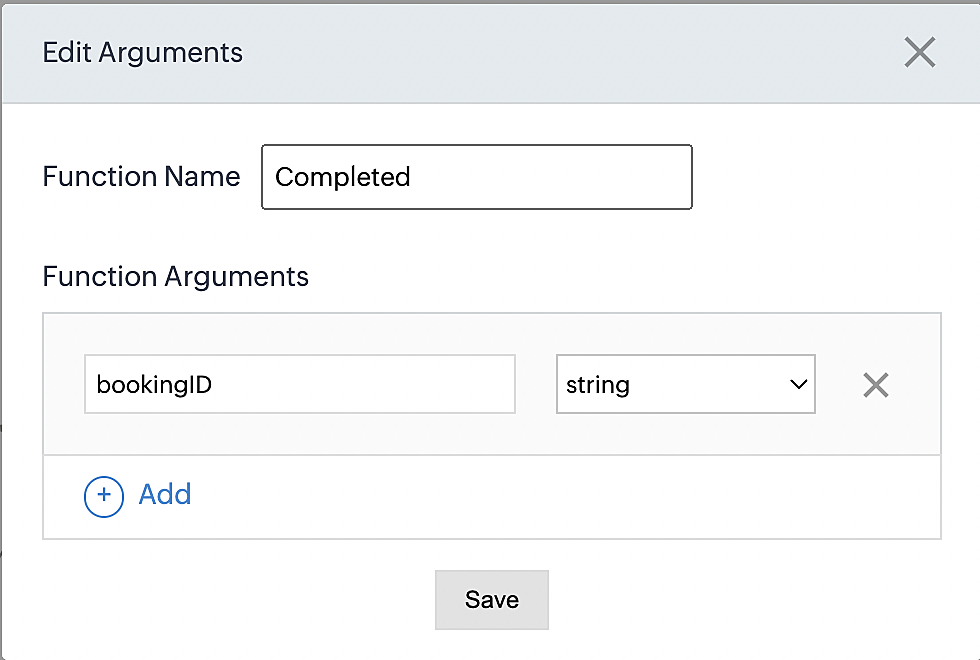
5. Next, configure the function's arguments:
A. Click on Edit Arguments on the Deluge script page.

B. Set the Parameter Name as bookingID. (Please note that the "bookingID" value is case sensitive and must match
the term used in the code).
C. Set the type as string.
Reference:
Please configure the below code in the Deluge script page.
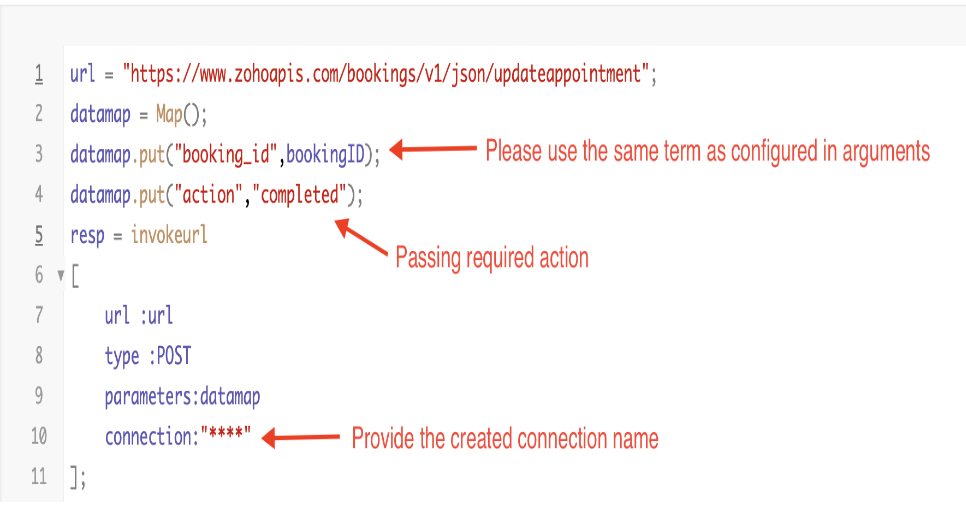
By completing these steps, we've configured a function that will mark appointments as completed.
ii. To create a function for marking appointments as no shows
1. Go to Setup > Developer Space > Functions.
2. In the Functions page, click + Create New Function.

3. Configure the function name, display name, and description.
4. Set the category as automation.
This opens the Deluge script page.
5. Next, configure the function's arguments:
A. Click on Edit Arguments on the Deluge script page.

B. Set the Parameter Name as bookingID. (Please note that the "bookingID" value is case sensitive and must match
the term used in the code).
C. Set the type as string.
Reference:
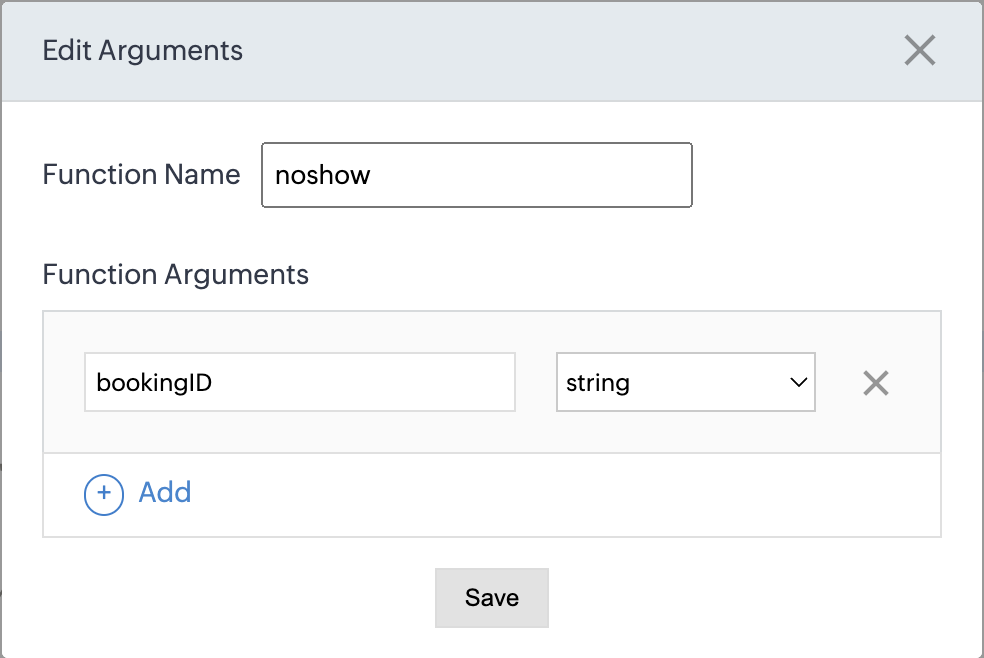
Please configure the below code on the Deluge script page.
Code link: No show
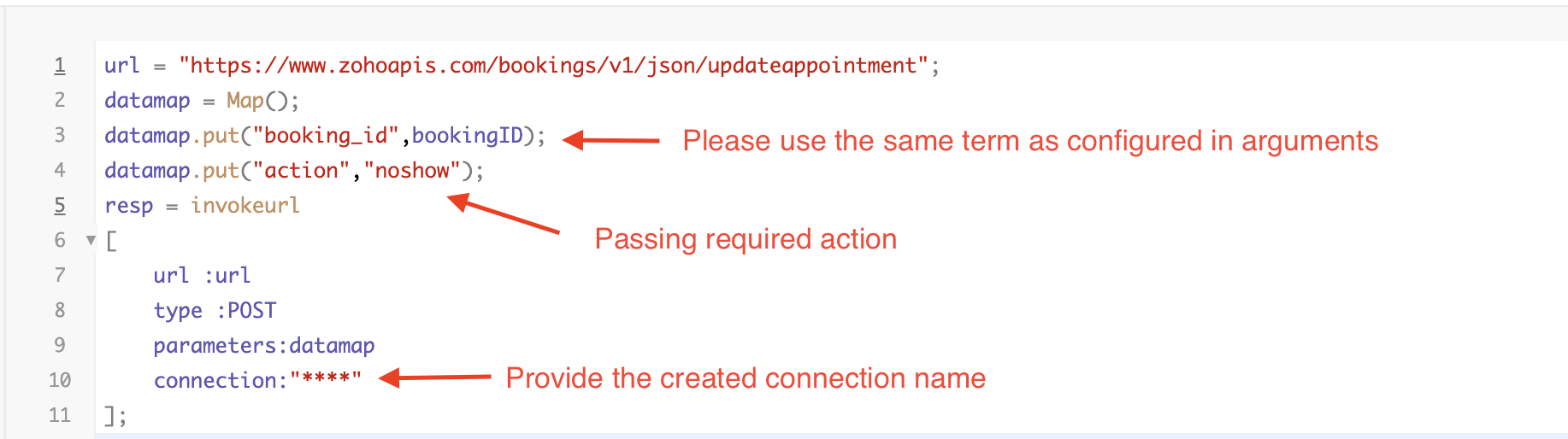
By completing these steps, we've configured a function that marks appointments as no shows.
iii. To create a function for marking appointments as canceled
1. Go to Setup > Developer Space > Functions.
2. In the Functions page, click + Create New Function.

3. Configure the function name, display name, and description.
4. Set the category as automation.
This opens the Deluge script page.
5. Next, configure the function's arguments:
A. Click on Edit Arguments on the Deluge script page.

B. Set the Parameter Name as bookingID. (Please note that the "bookingID" value is case sensitive and must match
the term used in the code).
C. Set the type as string.
Reference
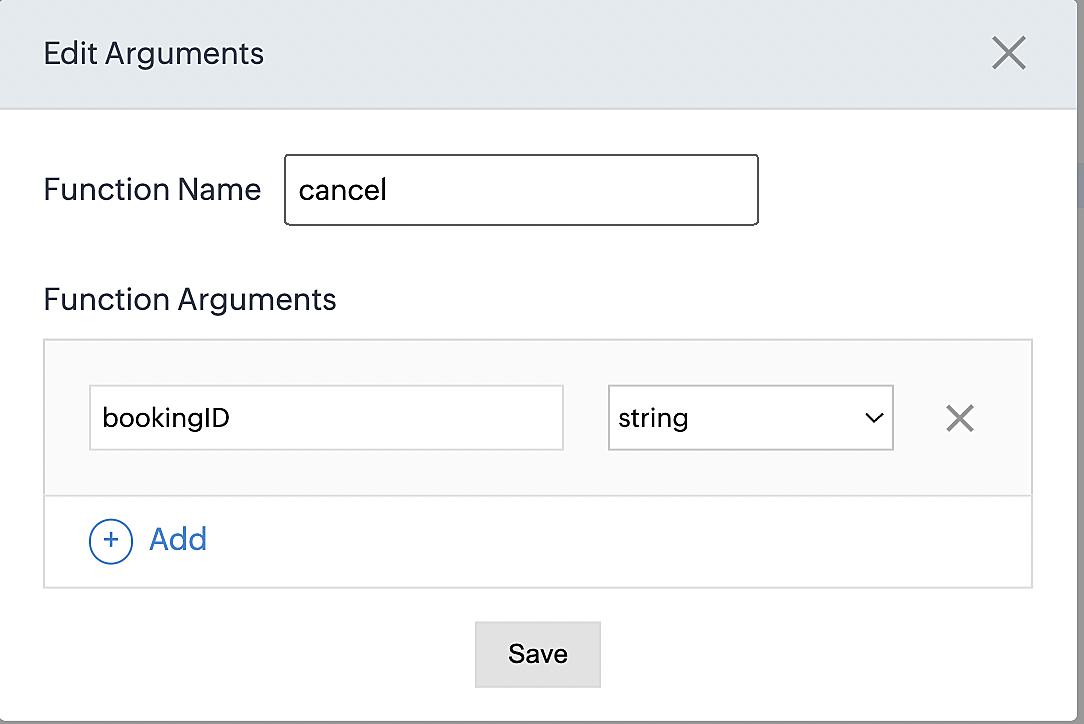
Please configure the below code on the Deluge script page.
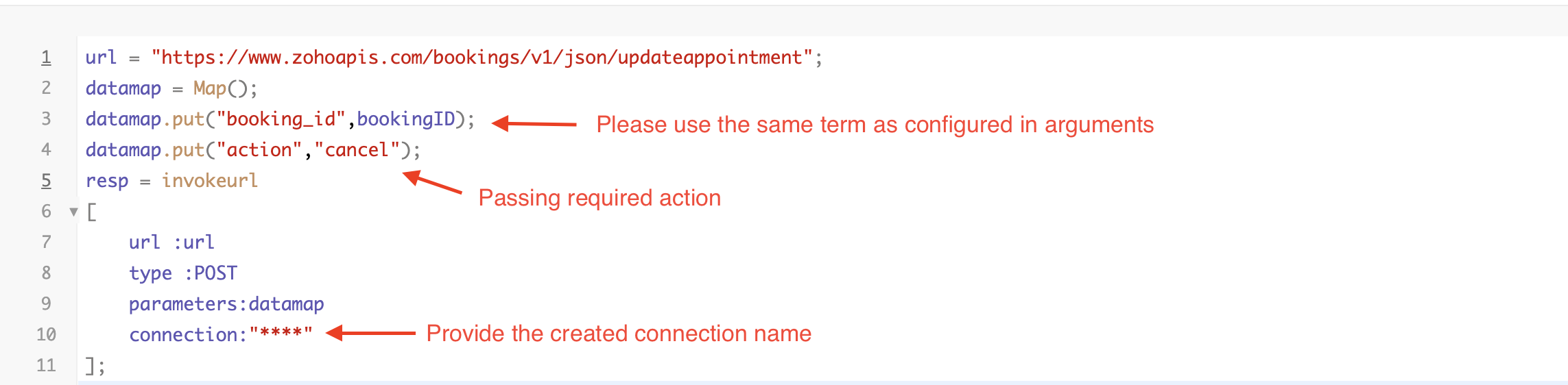
By completing these steps, we've configured a function that marks appointments as canceled.
Code explanation
Below is an explanation of the code that covers all the configurations present in the three functions mentioned above (cancel, mark as completed, and mark as no show).
Line 1: Based on the Zoho Bookings account's data center, we're setting up the API endpoint URL configuration.
Lines 2 - 4: To update appointments, we utilize the Zoho Bookings API. Within the update appointment API, there are two mandatory fields that need to be included: BookingID and action (completed/cancel/noshow).
Lines 5 - 10: We use the invokeURL task for API calls. To learn more about the invokeURL task, please refer to the following document: InvokeURL task for API calls
Now, let's proceed and learn about the process of creating a workflow and linking the established functions to it. This will enable us to automate the entire appointment status updating process.
Step 3: Creating a workflow
Workflow rules are sets of actions (email notifications, tasks and field updates) that are executed when specified conditions are met. Here, we'll generate workflow rules for each action to activate the respective function, thereby automating the appointment status updating process.
i. Creating a workflow for "canceling" appointments in Zoho Bookings when a meeting is deleted in Zoho CRM
Part 1: Creating the rule
1. Go to Setup > Automation > Workflow Rules.
2. In the Workflow Rules page, click Create Rule.

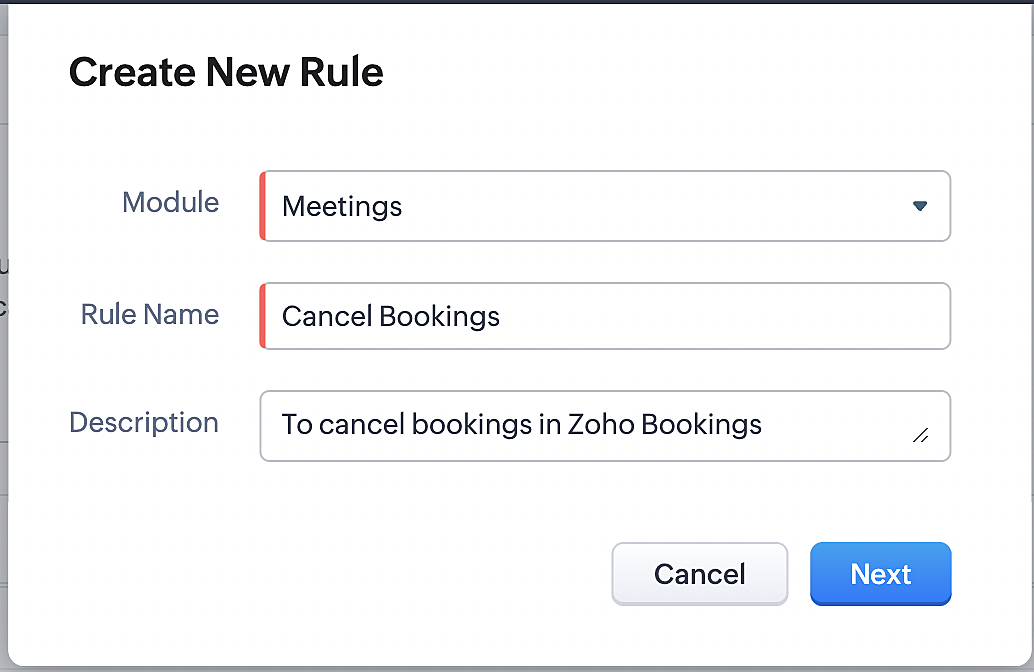
3. Select "Meetings" under Module and configure rule name and description as required.
More details: Create Rule
Reference:
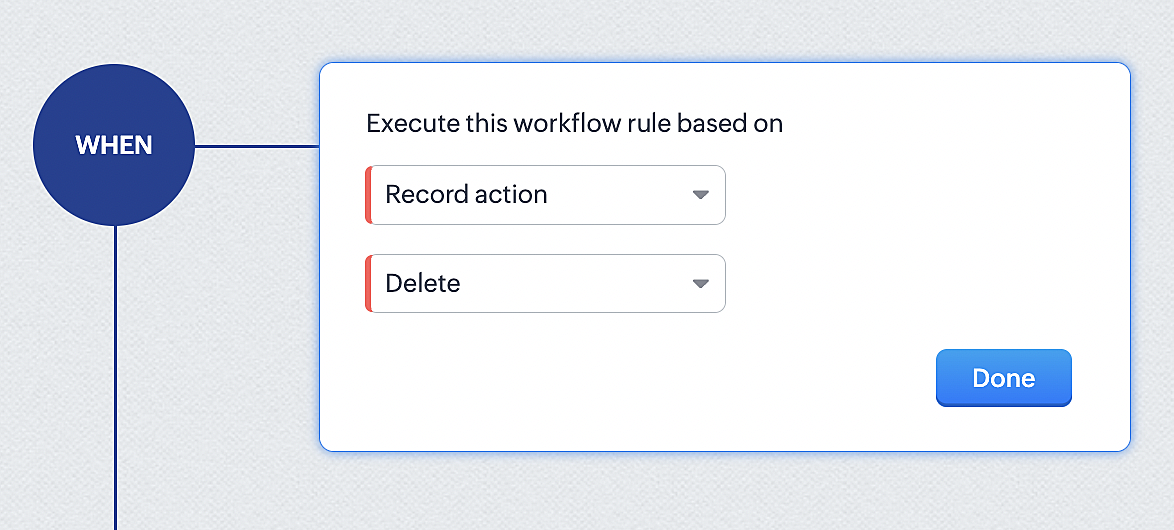
1. Select Record Action > Delete > Done to execute the rule when meetings are deleted.
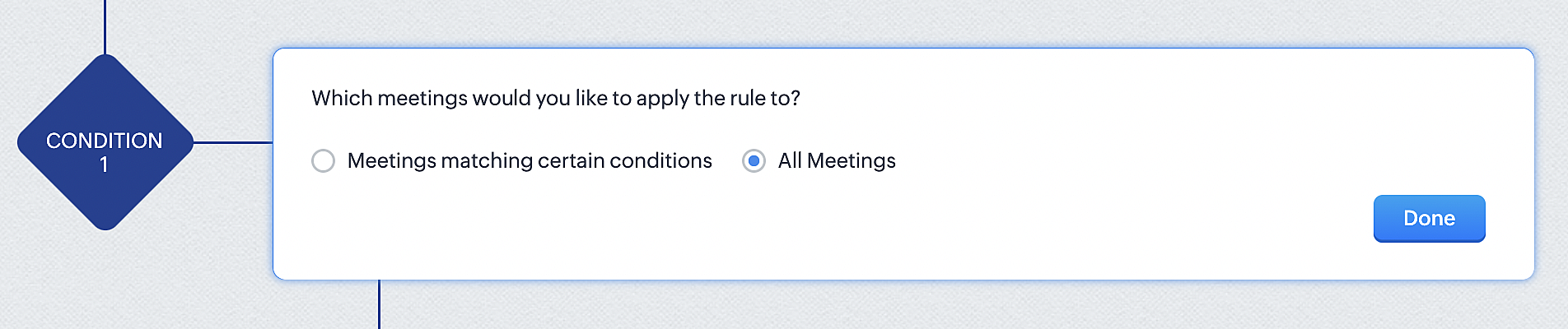
2. Configure condition > All Meetings.
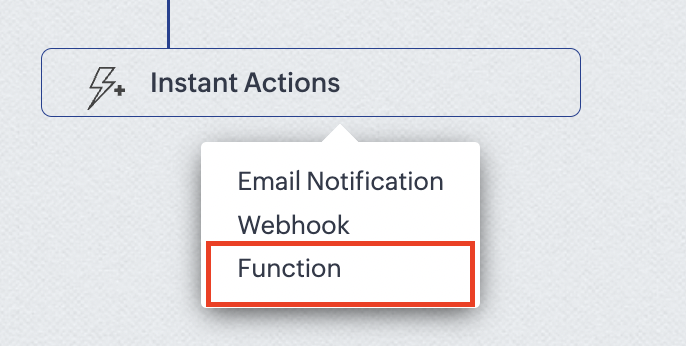
3. Instant Actions > Function.
4. Click the New Function button.

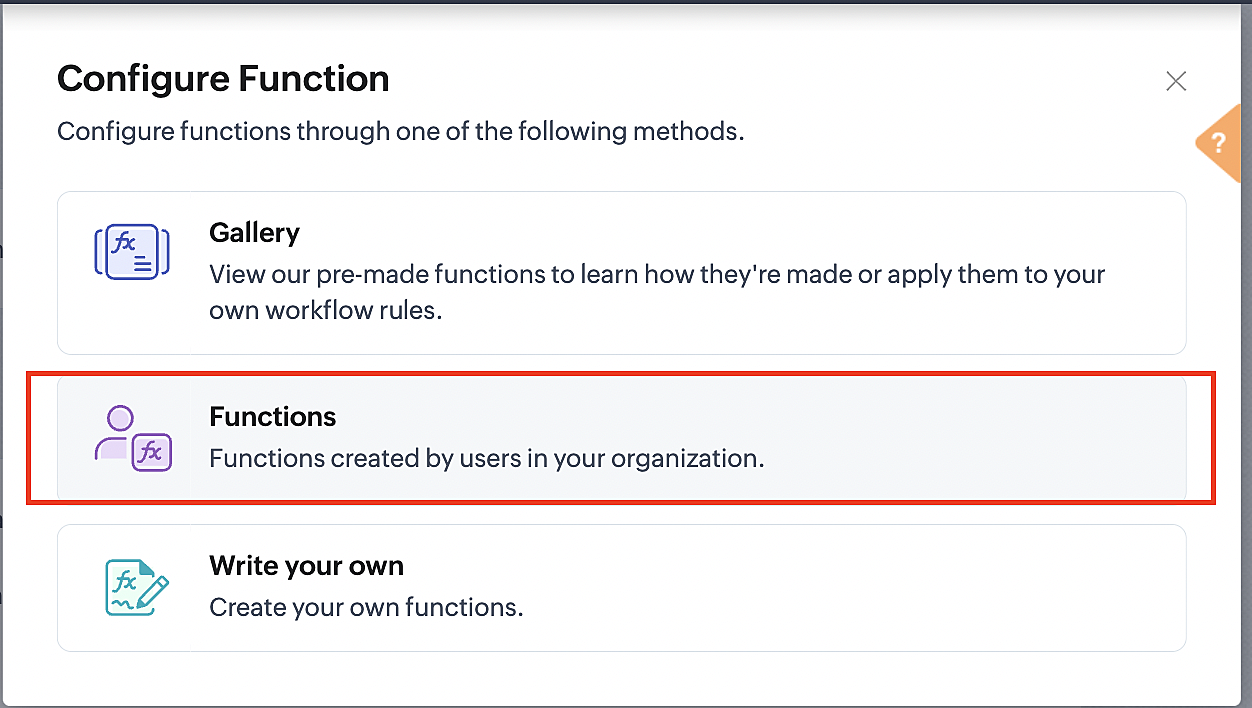
5. In the Configure custom function page, select the "cancel" function you created from among the functions users in your organization have created.
Part 3: Argument mapping
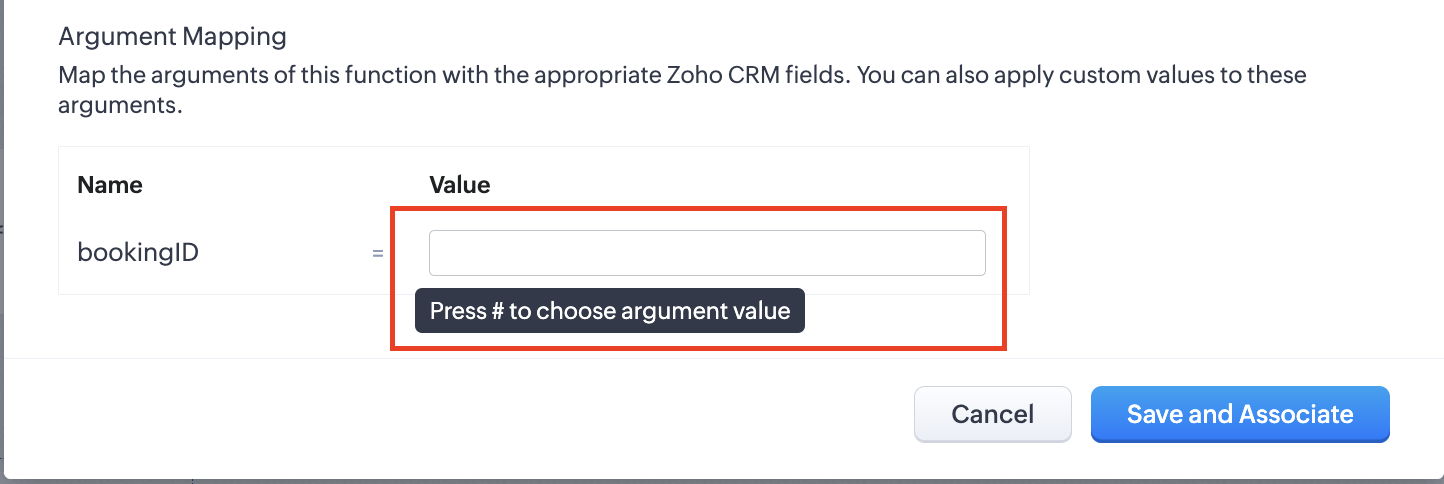
1. Press # to choose an argument value.
2. Select Meetings under Module and BookingId in the field.
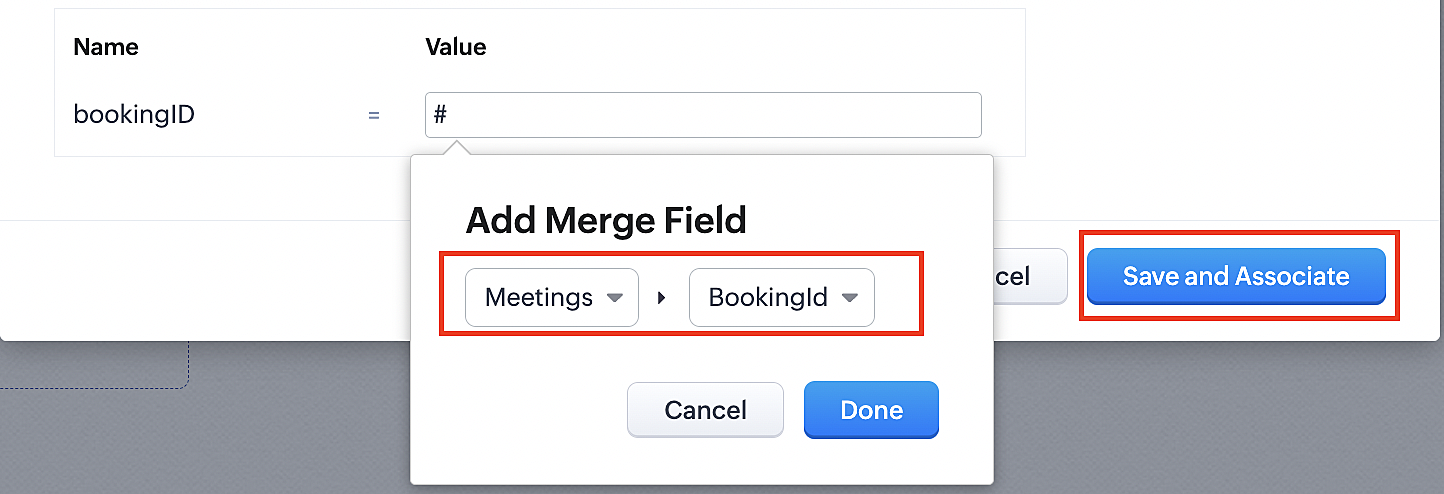
3. Click the Save and Associate button.
Reference:
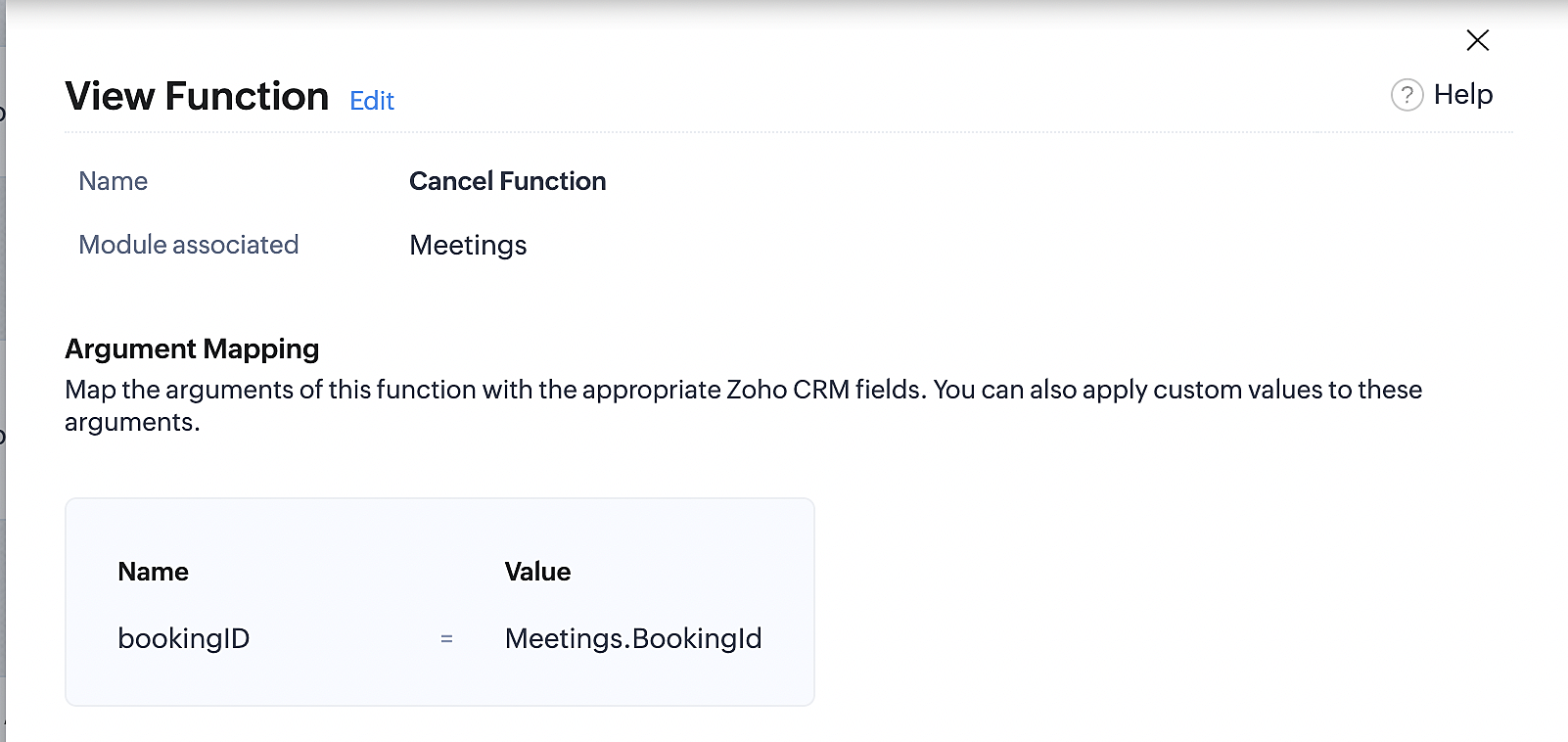
Below is the final flow of the cancel booking workflow:
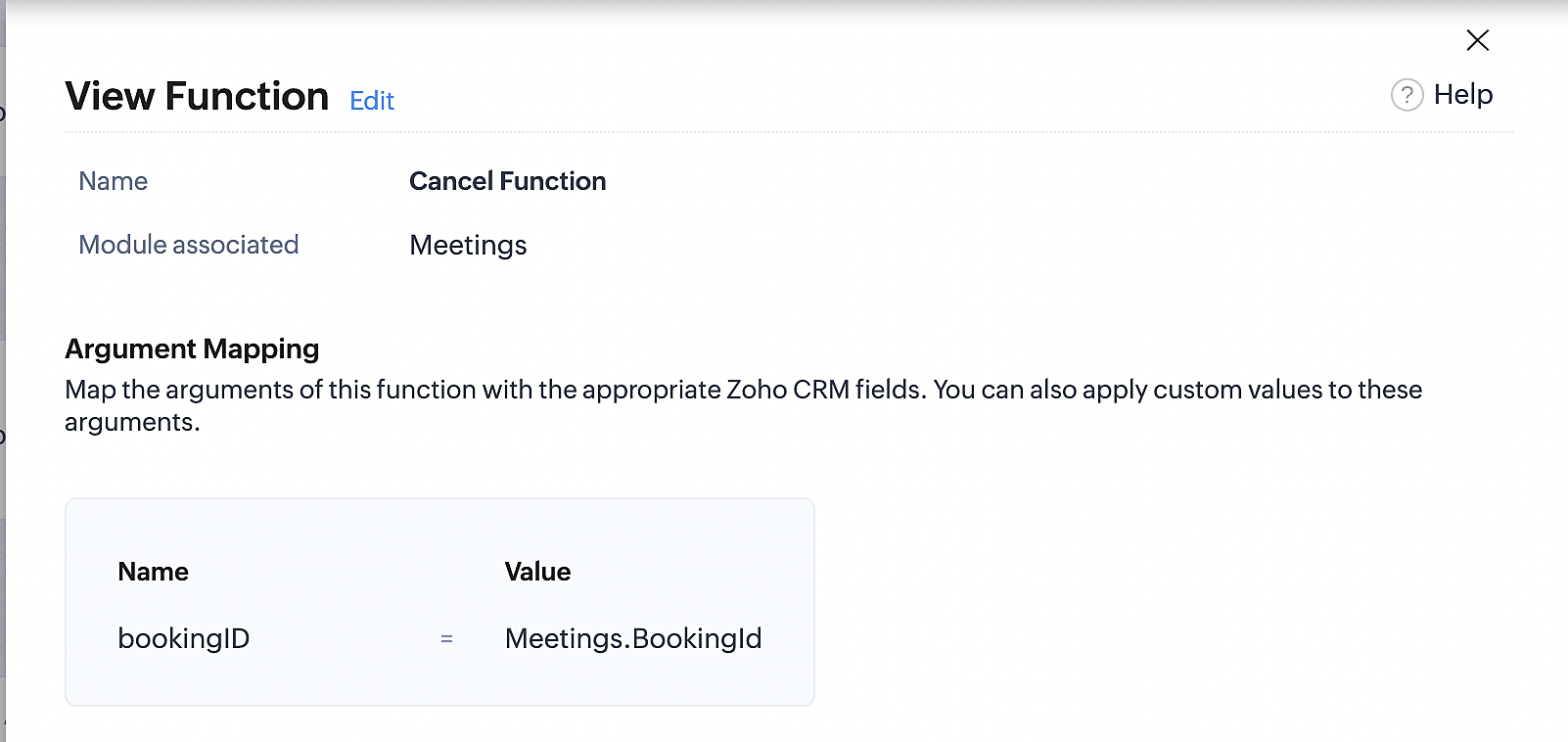
At the end of Part 3, we will have created a workflow that will be executed automatically when meetings are deleted in Zoho CRM. Simultaneously, the bookings associated with the meeting will also be canceled in Zoho Booking.
ii. Creating workflow for updating an appointment's status as "no show" in Zoho Bookings when the meeting's booking status is marked as no show in Zoho CRM
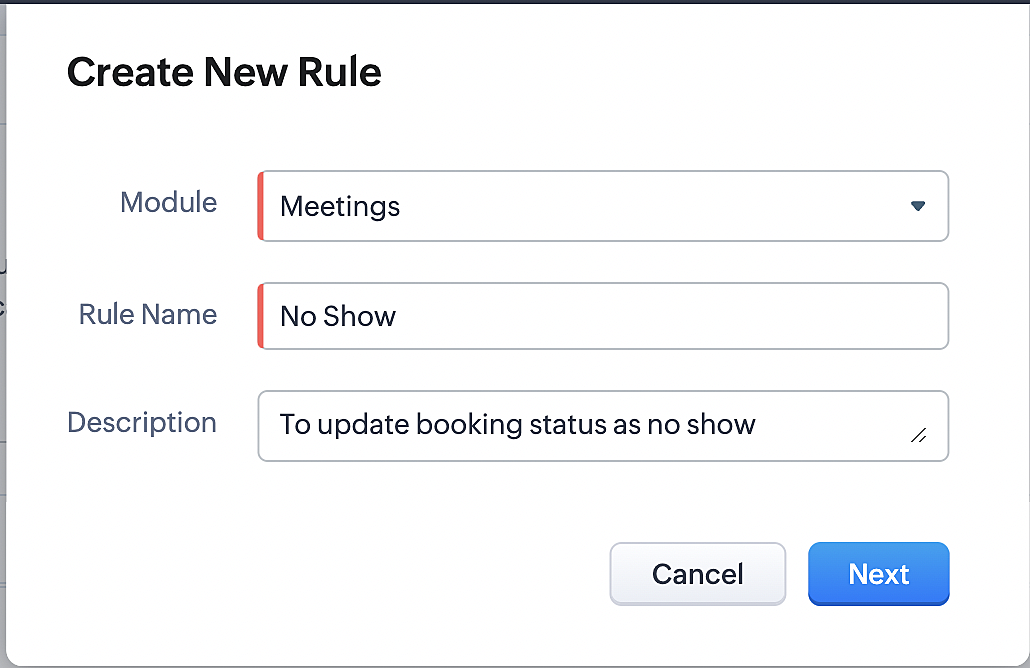
Part 4: Creating the rule
1. Go to Setup > Automation > Workflow Rules.
2. In the Workflow Rules page, click Create Rule.

3. Select Meetings under Module and configure the rule name and description as required.
Reference:
Part 5: Specifying the rule trigger
If you encounter difficulties while navigating through the steps mentioned below, please refer to Part 2 above, where we have provided step-by-step screenshots for clarification.
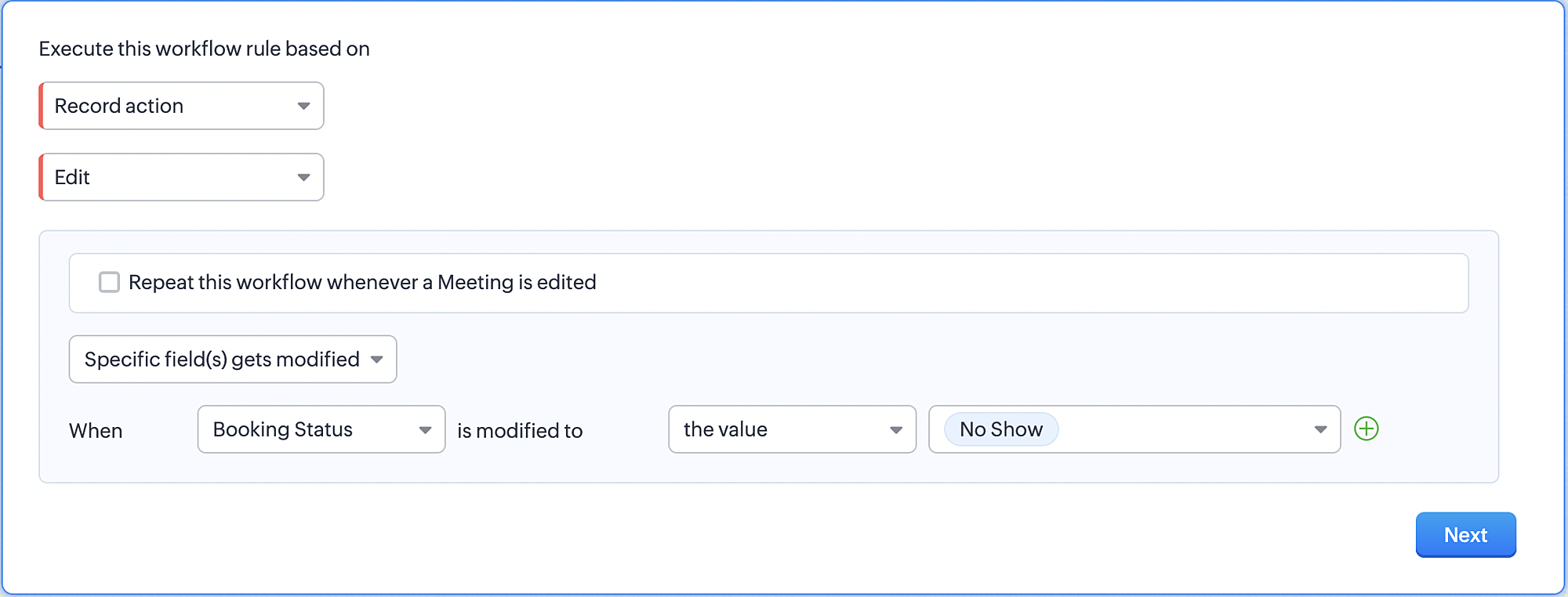
1. Record Action > Edit.

2. Enable the Specific field(s) gets modified and configure it per the screenshot below.
a. This is to ensure that the workflow is executed only when the booking status under the meeting module is
updated to "No Show".
updated to "No Show".
3. Configure condition > All Meetings.
4. Instant Actions > Function > New Function.
5. In the Configure custom function page, select the "no show" function you created from among the functions
users in your organization have created.
users in your organization have created.
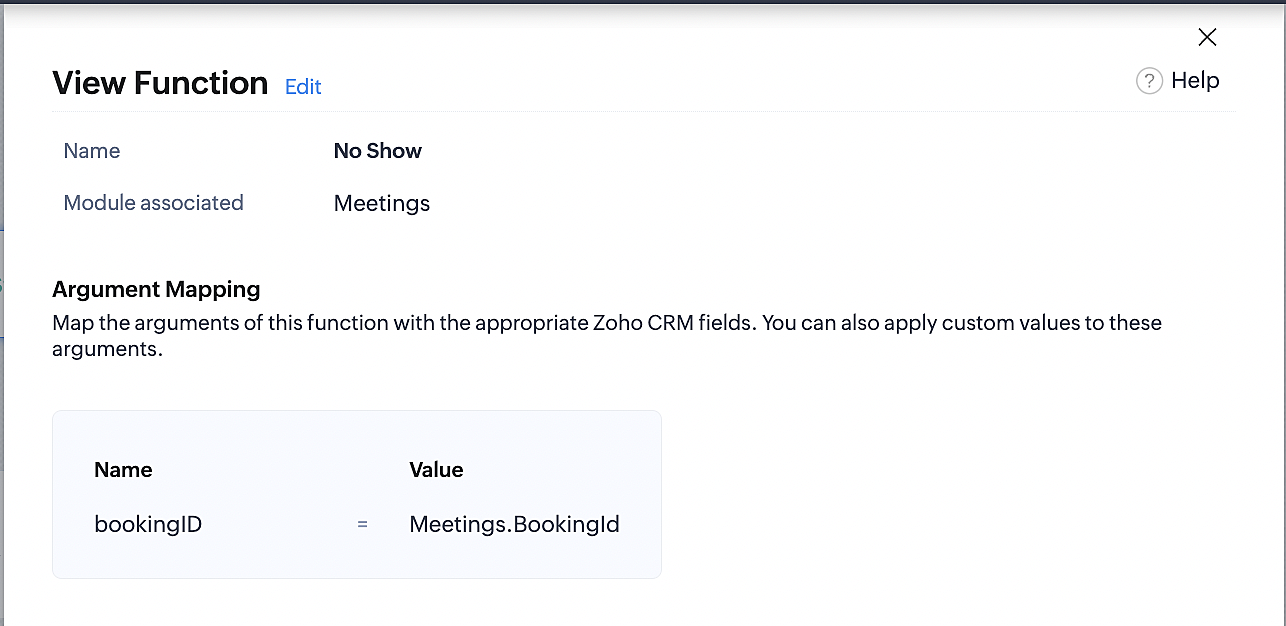
Part 6: Argument mapping:
If you encounter difficulties while navigating through the steps mentioned below, please refer to Part 3 above, where we have provided step-by-step screenshots for clarification.
1. Press # to choose an argument value.
2. Select Meetings under Module and configure the field as "BookingId".
3. Click Save and Associate button.
Reference:
Below is the final flow of the "No Show" booking status workflow:
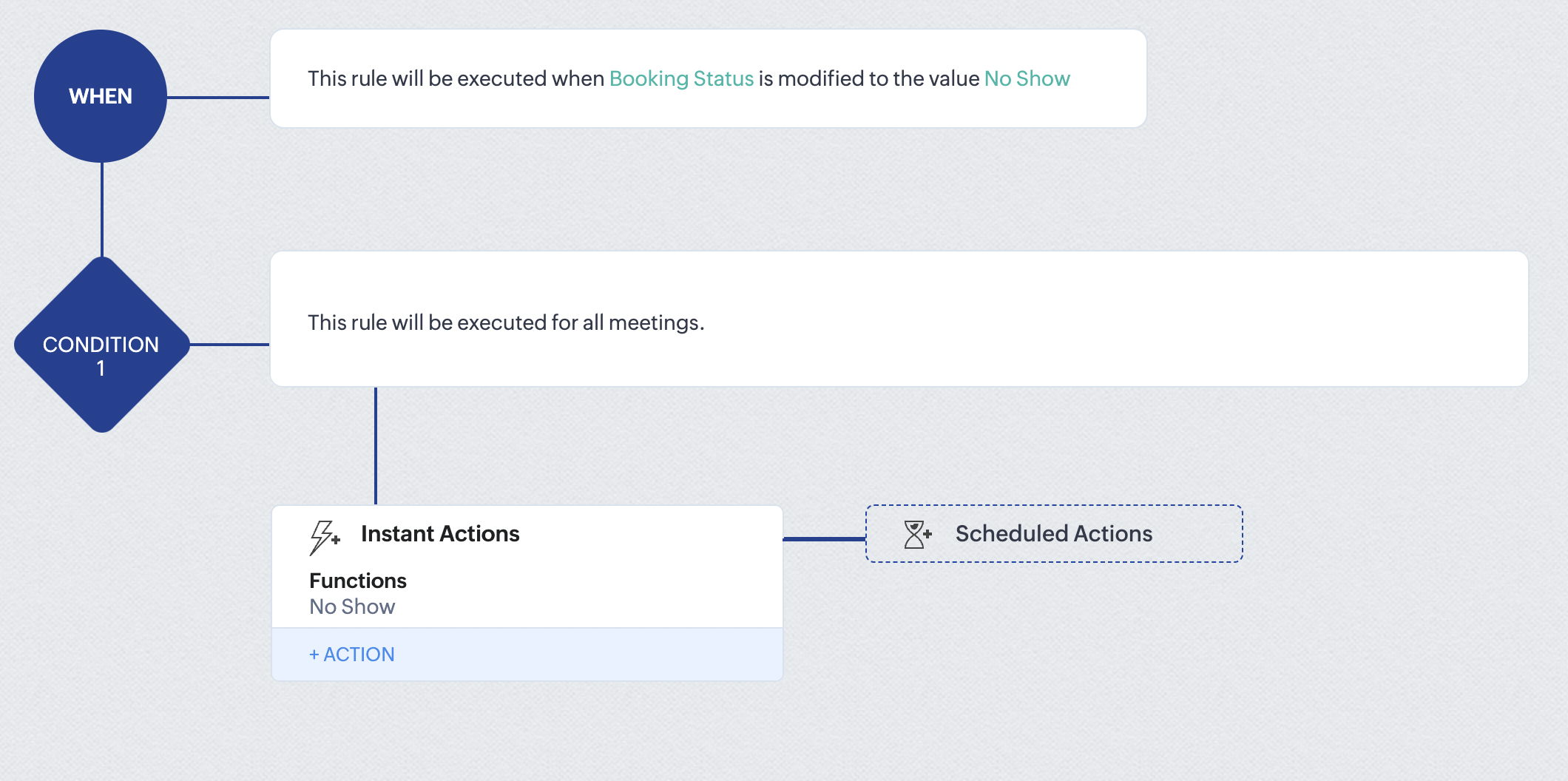
At the end of part 6, we will have created a workflow that automatically executes when the booking status field within the Zoho CRM Meetings module is updated to "No Show." This action will result in the associated bookings for that meeting also being marked as "No Show" in Zoho Bookings.
iii. Creating workflow for updating appointment status as "Completed" in Zoho Bookings when the booking status field of the meeting is marked as completed in Zoho CRM.
Part 7: Creating the rule
1. Go to Setup > Automation > Workflow Rules.
2. In the Workflow Rules page, click Create Rule.

3. Select Meetings under Module and configure rule name and description as required.
Reference:
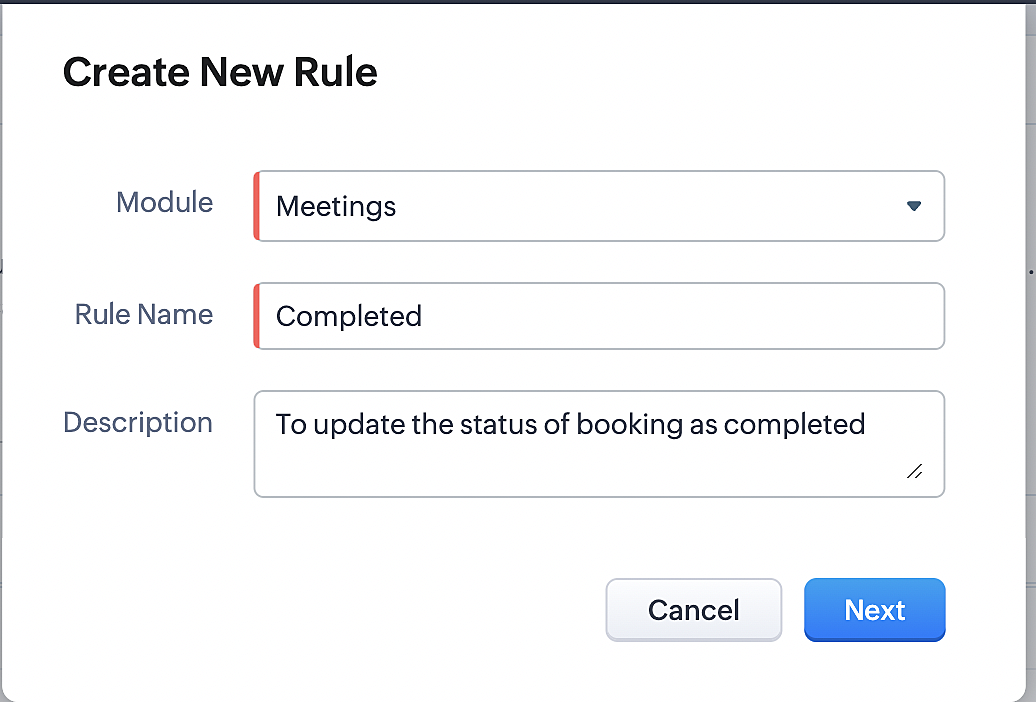
Part 8: Specifying the rule trigger
If you encounter difficulties while navigating through the steps mentioned below, please refer to Part 2 above, where we have provided step-by-step screenshots for clarification.
1. Record Action > Edit.

2. Enable the Specific field(s) gets modified setting and configure it per the screenshot below.
a. This serves to ensure that the workflow is executed only when the booking status under the Meetings module is
updated to "Completed".
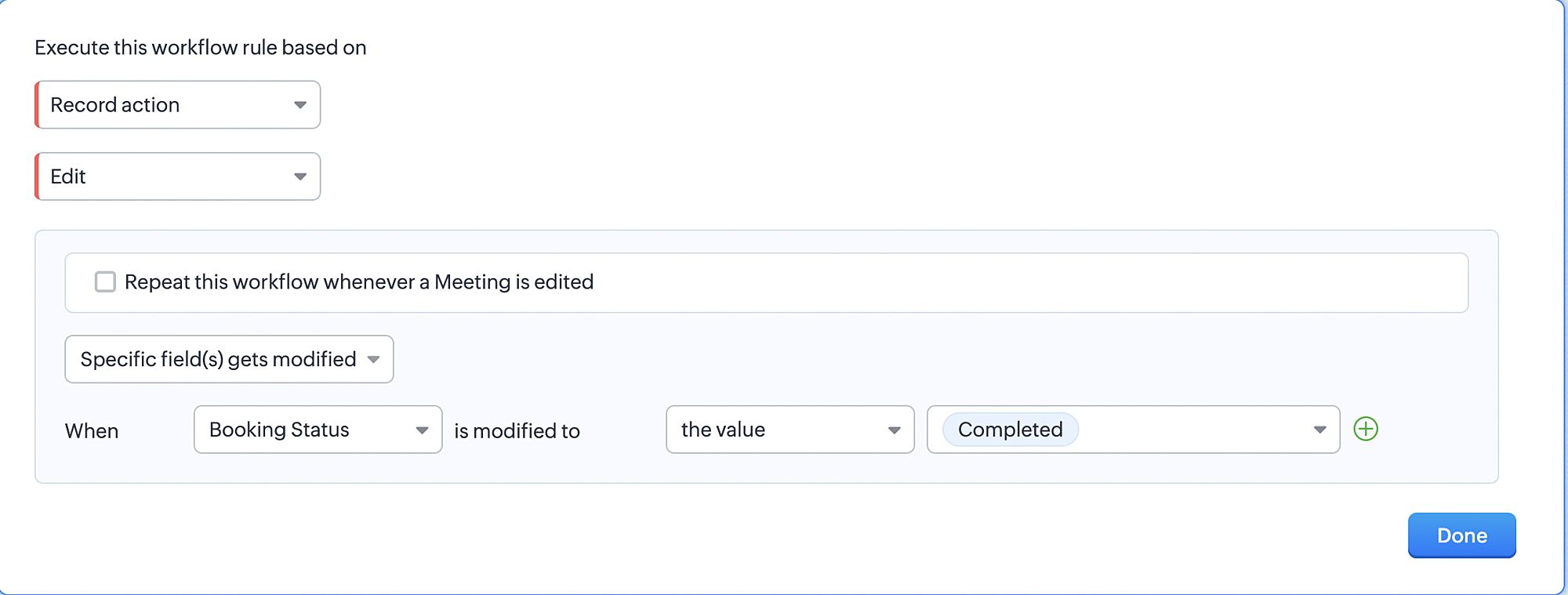
3. Configure condition > All Meetings.
4. Instant Actions > Function > New Function.
5. In the Configure custom function page, select the "completed" function you created from among the functions users
in your organization have created.
Part 9: Argument mapping:
If you encounter difficulties while navigating through the steps mentioned below, please refer to Part 3 above, where we have provided step-by-step screenshots for clarification.
1. Press # to choose an argument value.
2. Select Meetings under Module and configure the field as "BookingId".
3. Click Save and Associate button.
Reference:
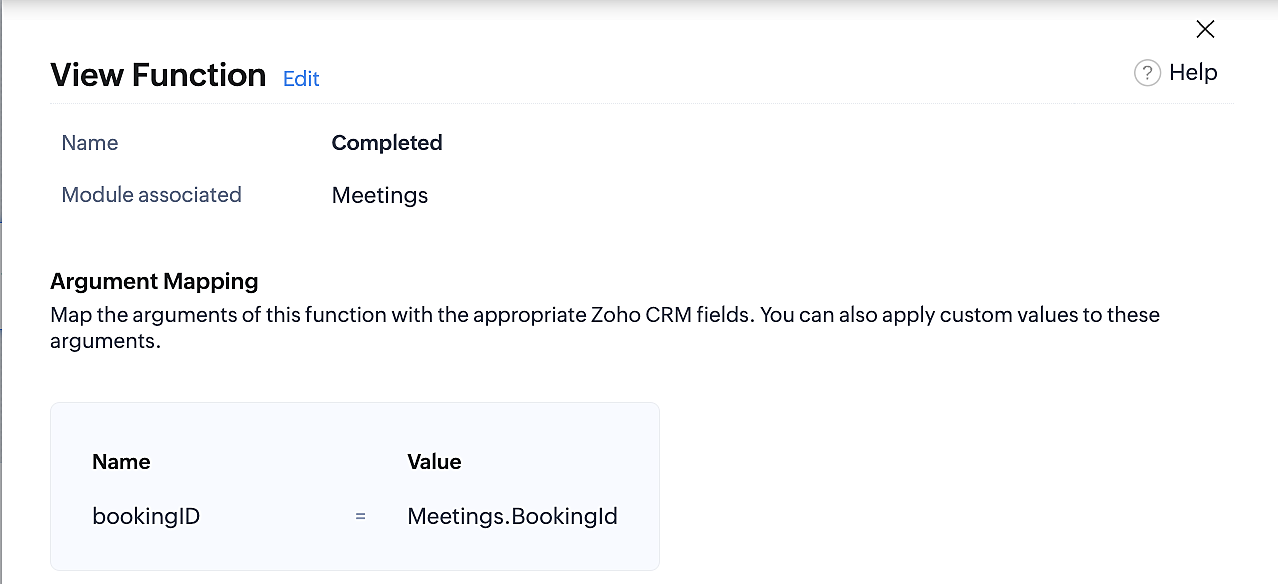
Below is the final flow of the "Completed" booking status workflow:
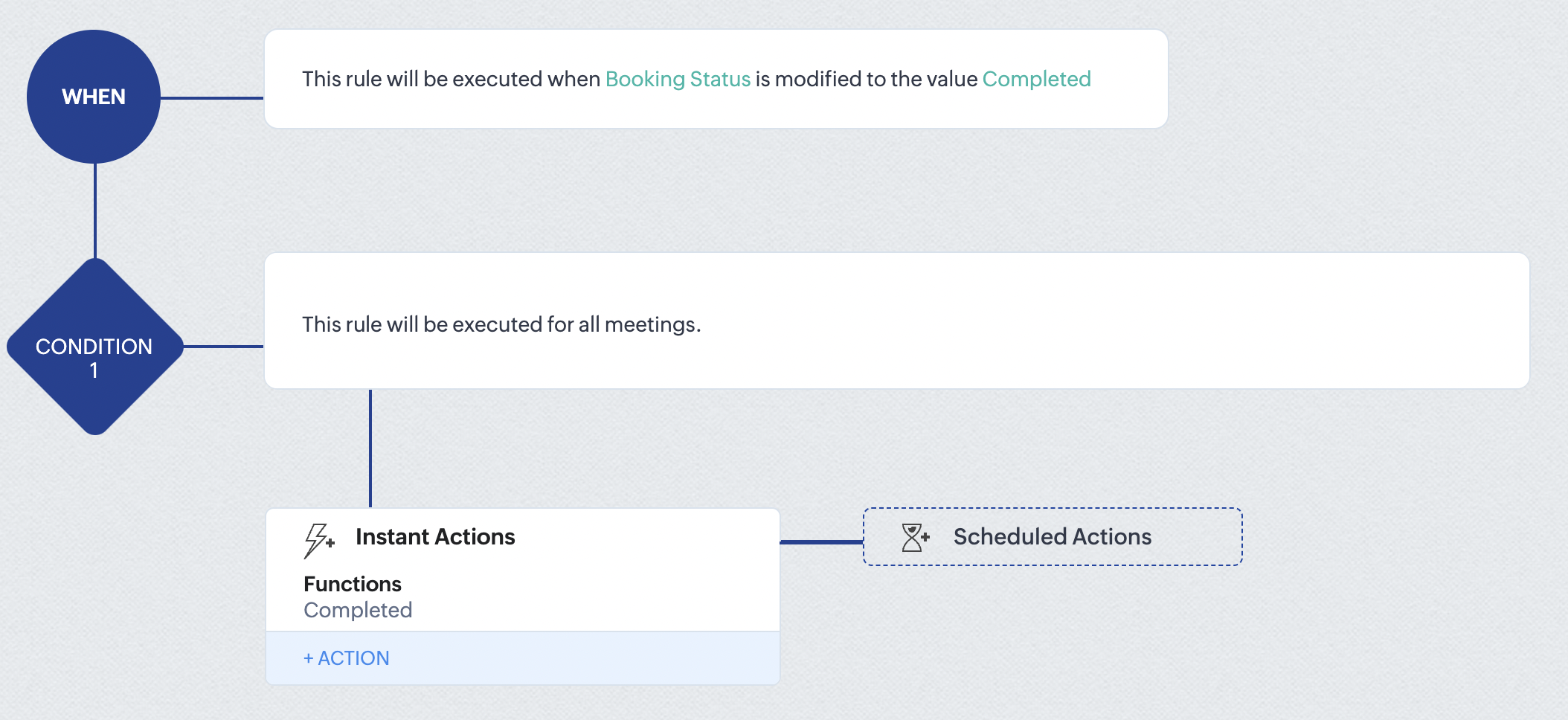
At the end of part 9, we will have created a workflow that is automatically executed when the booking status field within the Zoho CRM Meetings module is updated to "Completed." As a result, the associated bookings for that meeting will also be marked as "Completed" in Zoho Bookings.
Conclusion
We've reached the end of this community post. With the integration mentioned above in place, you'll be able to book, cancel, and update the status of appointments in Zoho Bookings directly from your Zoho CRM application. This will help you effectively manage your appointments in one place. As mentioned above, we've covered the rescheduling action in a separate post, which you can access by clicking on the following link: Reschedule Action
Furthermore, we've outlined a method for automating appointment statuses in detail. You can use this document as a reference to explore the various possibilities that suit your needs.
If you have any questions or need assistance with your configuration, please email us at hello@zohobookings.com or support@zohobookings.com.
Access your files securely from anywhere
New to Zoho Recruit?

Zoho Developer Community
New to Zoho LandingPage?
Zoho LandingPage Resources
New to Zoho Survey?
New to Zoho CRM Plus?
Deliver unforgettable customer experiences
New to Zoho CRM Plus?
Deliver unforgettable customer experiences
New to Zoho Marketing Plus?
Everything you need to run your marketing
New to Zoho Marketing Plus?
Everything you need to run your marketing
New to Bigin?





Topic Participants
Kaushik S
bruce
Ishwarya SG
PrismaNote Support
Sticky Posts
Presenting ABM for Zoho CRM: Expand and retain your customers with precision
Picture this scenario: You're a growing SaaS company ready to launch a powerful business suite, and are looking to gain traction and momentum. But as a business with a tight budget, you know acquiring new customers is slow, expensive, and often deliversGood news! Calendar in Zoho CRM gets a face lift
Dear Customers, We are delighted to unveil the revamped calendar UI in Zoho CRM. With a complete visual overhaul aligned with CRM for Everyone, the calendar now offers a more intuitive and flexible scheduling experience. What’s new? Distinguish activitiesCreate and populate a record in an instant: Introducing zero-shot field prompting to Zia's ICR
A couple of months ago, we upgraded our in-house AI image detection and validation tool, Zia Vision, with intelligent character recognition (ICR). By training Zia with sample images, you could create and enrich CRM records with data extracted from standardIn-person ZUG Meetups for Real Estate Professionals - US Q1 2026
The Real Estate Zoho User Group is going on a multi-city, in-person meetup tour across the US, and we’d love to see you there! These meetups are a great opportunity to: Connect with fellow real estate professionals using Zoho Share challenges and discoverNimble enhancements to WhatsApp for Business integration in Zoho CRM: Enjoy context and clarity in business messaging
Dear Customers, We hope you're well! WhatsApp for business is a renowned business messaging platform that takes your business closer to your customers; it gives your business the power of personalized outreach. Using the WhatsApp for Business integration
New to Zoho TeamInbox?
Zoho TeamInbox Resources
Zoho CRM Plus Resources
Zoho Books Resources
Zoho Subscriptions Resources
Zoho Projects Resources
Zoho Sprints Resources
Qntrl Resources
Zoho Creator Resources
Zoho CRM Resources
Design. Discuss. Deliver.
Zoho Show Resources

Get Started. Write Away!
Writer is a powerful online word processor, designed for collaborative work.
Zoho CRM コンテンツ
-
オンラインヘルプ
-
Webセミナー
-
機能活用動画
-
よくある質問
-
Ebook
-
-
Zoho Campaigns
- Zoho サービスのWebセミナー
その他のサービス コンテンツ
Nederlandse Hulpbronnen

ご検討中の方
Recent Topics
Announcing new features in Trident for Windows (v.1.27.4.0)
Hello Community, Trident for Windows is here with exciting new features to elevate your communication and enhance productivity. Let’s dive into what’s new! Smart Sign-in. You can now sign in to Trident with Smart Sign-in. With this new addition, you canAdd Lookup Field in Tasks Module
Hello, I have a need to add a Lookup field in addition to the ones that are already there in the Tasks module. I've seen this thread and so understand that the reason lookup fields may not be part of it is that there are already links to the tables (Time Entry : Auto fill fields Hours minutes seconds
Hello world, Do someone know a script (for workflow rules) which fill automatically fields hours spent, minutes spent, seconds spent when we fill Executed time and End time Formula should start from (End time - Executed time) Thx in advanceZoho Forms - edit the settings of the Zoho CRM field to change the integration with CRM
I've created a Zoho CRM field in my form to pre-populate selected CRM details into the form, following the instructions here https://help.zoho.com/portal/en/kb/crm/integrations/zoho/zoho-forms/articles/zoho-forms-crm-integration#Step_2_-_Add_Zoho_CRM_Field_in_the_formAbility to add notes to an appointment and add notes/attach docs to a consultation
As an idea for the future, it would be helpful to be able to add notes to an existing appointment--there is a place to add notes for the customer, but I don't see one for the appointment. It would also be helpful to be able to add notes or attach documentsIm trying to white list domain dynamically in zoho desk extension
Im trying to white list domain dynamically in zoho desk extension. But it show error Error: {errMsg: 'No entry found in plugin-manifest whiteListedDomains for requested URL'} syntax "config": [ { "displayName":"Shopify Admin API access token ", "name":Zoho Payroll: Product Updates for India - May 2025
This May, we are glad to unveil new capabilities in Zoho Payroll that simplify your payroll activities. Here's the list: Let Employees Choose Their Tax Deduction Method for One-Time Payments Calculate variable earnings based on percentage of CTC CarryBulk Update Tasks/Task Lists/Milestones
Is there a way to bulk update tasks/task lists/milestones? We have several projects that are in the same template, and our staff complete them tasks at a time - and would like to go in an bulk update all related tasks/task lists/milestones at once. But you can't do this. I remember in an old version you could export your tasks, update the excel doc and reimport. But it doesn't seem like that option is available anymore. Can someone provide a solution/idea? Otherwise we are spending a lot of timeSync failed: Invalid Date value
Hi, I have a local .sqlite database. After importing one table through the Databridge, and produced my dashboards, I cannot sync. I get an error regarding the date column: [Line: 2 Field: 4] (2018-07-12) -ERROR: Invalid Date value The data found at theOffice 365 is marking us as "bulk"
All of a sudden (like a couple of days ago) all of our customers who are on Office 365 are getting our mails in their junk email. This is not the case with Gmail or other random mail servers, nor between us. We got a 10/10 score on mail-tester.com. Also,Zoho Assist
Hi, We are using zoho assist unattended access in some windows server 2012 and recently the agent lets you connect but not let you do anything on the remote machine. Sometimes you can click on something but nothing happens. There's a issue with this newModify workflow from "ON CREATE & EDIT" to "ON CREATE" only
Salut, Is there a way to easilly change my choice of trigger of workflow from on create & edit to on create only, or do I have to re-do the whole worklow from scratch ? SylvainAccess custom modules via API?
Is it possible to access a custom module in Zoho Inventory via the API? I can not find any reference to this in the API docs.Welcome to the Zoho Service Plus community
Hey everyone, We are excited to welcome you to be a part of the Zoho Service Plus community. Here's a quick overview of what Service Plus is all about and how the community can help us work together. What's Zoho Service Plus? Zoho Service Plus is a unifiedRestrict Zoho Cliq Webinars and Announcements to Admins Only
Hi Zoho Team, We hope you're doing well. We would like to raise a feature request regarding in-app announcements in Zoho Cliq, such as the recent webinar popup about the Cliq Developer Platform: While these announcements are useful, they are not alwaysShare Notebook with group created in Zoho One
I have created a group in Zoho One for a section in my company. Is it possible to share a notebook with that Zoho One Group? Currently, it seems only possible to share to emails. Unfortunately for large teams, this will mean we are constantly having toCreate Tasks in arbitrary Zoho Project triggered from CRM [Zoho Flow]
Community, hello What I'm trying to do is to create a Zoho Project when a Deal is created in CRM and then to be able to add tasks to this Project also from Zoho CRM with the trigger (Blueprint/ Workflow). I succeeded in creating Project using Zoho Flow,Outlook Add-in security times out needs to login 10 times a day
hi we've just switched the Zoho. We use Azure SSO. All users have stopped using it. Sometimes it asks every 5 minutes. What should I lot at to solve this?Simplify Zoho API integration with Deluge’s invokeAPI task
Hello all! Happy New Year! As we kick off 2025, we’re excited to share some of the latest updates to enhance your Deluge experience. While Deluge already offered robust API integration capabilities, we’ve taken it to the next level with the introductionSimplify Zoho API integration with Deluge’s invokeAPI task
Hello all! Happy New Year! As we kick off 2025, we’re excited to share some of the latest updates to enhance your Deluge experience. While Deluge already offered robust API integration capabilities, we’ve taken it to the next level with the introductionAttention: Display Issues on Chromium Browsers with Intel® Core™ Ultra Processors
Dear Customers, We've recently identified a display-related issue that may affect some of our Zoho Assist users, particularly technicians using devices powered by Intel® Core™ Ultra Processors. What’s Happening? If you're running a Chromium-based browserIs the "schedule 10 mass emails/module" limit a per user or per organization limit?
For scheduling emails out of Zoho CRM, there is a 10 scheduled mass emails per module limit according to Zoho documentation (https://help.zoho.com/portal/en/kb/crm/faqs/emails/articles/how-to-schedule-mass-emails-in-zoho-crm). Is this limit per user orHow do I show file uploads in my Zoho Creator approval workflow?
As far as I can tell I'm not able to add the file upload field to the approval workflow show fields list. As a work around I'm making a plain text field that links to the files URL. But I'm not sure how to get a link to that url that will me to previewZoho Bookings - variable appointments
Hello, I am looking to see if its possible for zoho bookings to recognise booking slots in the calendar or a way to do this. I would like appointments only booked in at certain times of the day and this could vary per host. I have provided a calendarBest Practices - Extensions for Zoho Finance Suite
With Sigma, the extension developer platform, you can create custom extensions that enhance the functionality of Zoho Finance apps like Zoho Books, Zoho Billing, Zoho Inventory, Zoho Expense, and Zoho Invoice. Here’s how to get started: Sign up: CreateQR code image is not exported in PDFs
The new QR code field works fine when I include it in a report template and I choose the print option: https://creatorapp.zoho.com/<username>/<app_link_name>/record-print/<report_link_name>/<record_ID>/ But when I try to save the document to a .pdf fileZoho Form to Zoho Form Integration
I've created an application form that asks for references. I would like the submission of the application form to trigger a form to the reference using the email id and name entered in the first form. In the reference form that is triggered I need toCRM: related table using module queries, are links possible?
Hello. I was exploring the possibility of using a module query to get a filtered related list. For example, I'm using a Canvas custom details page and if an account has an open deal I'd like it to appear at the very beginning of the account page, with【開催報告】名古屋 ユーザー交流会 Vol.1 2025/6/6 Zohoで社内システム管理を実現するユーザー事例の共有
ユーザーの皆さま、こんにちは。コミュニティチームの藤澤です。 6/6(金)に名古屋 ユーザー交流会 Vol.1を開催しました。当日は11名の皆さまにご参加いただきました。 本投稿では、当日実施したセッションの様子と投影資料をご紹介します。会場にお越しいただけなかった方も、ぜひご覧ください。 ユーザー活用事例セッション:Zoho CRM Plusによる引合~見積~受注までのプロセス統合 日本アイリッヒ株式会社の清水裕さんに登壇いただきました。以下に一部抜粋して掲載しています。ぜひご覧ください。 セッションの後半は、清水さんの環境を投影いただき、実際の画面上で操作しながらご説明いただいたため、本記事では掲載しておりません。予めご了承ください。Better reorder point functionality?
1. How about having item reorder point warehouse level instead branch? 2. Considering committed stock and to be received quantity also as reorder point calculation? 3. Considering associated items as committed when sales order created on composite iBatch tracking updates
I applaud the Zoho team for their recent updates to batch tracking information and even though I have 'chatted' to the Zoho team, I'm still batteling to understand the reasoning on the below. We buy stock in bulk and it is received into the Bulk Warehouse.Custom Button in Shipments
Custom buttons feature is very much needed in shipments. Please work on this feature request!Zoho Support is Dysfunctional & Don't Know Their Own Support Hours
Seeking clarification on Zoho support hours and contact numbers please. We have been trying to phone Zoho support on +61 2 8066 2898 at 9:20am AEDT for the second day in a row, and gotten a message on Zoho's support line: "support is open monday throughWhat are the knowledge database limit for AnswerBot and which app its integrate?
1) Can AnswerBot be integrated in Trainer Central? 2) Can AnswerBot learn from external websites and excel spreadsheets? 3) Is there a limit size or number of documents for the knowledge based content to train AnswerBot? ThanksReports showing 24hr days instead of business hours
I am not sure what I am missing, I created a report to look at resolution times in business hours but it is displaying hours based on 24hr days. I have business hours set (7am-5pm) and all that functionality is working, the reports are displaying 2 daysSkip Pages - Zoho form
Hi Team, I need help with skipping pages based on the below logic in Zoho form: If field number of borrowers is 1 and field number of dependants is 0 then do not show page borrower 2 and 3 If field number of borrowers is 2 and field number of dependantsHow to print blank form and also how to use form offline
I have created a form in PC and want to use the form in the field to gather information. Can I use the form offline in PC - in case I have no internet access? As a fail safe, I'd like to print the blank form ut just in case the PC form doesnt work forUsing Marketing Automation Journey to associate lead record with a campaign?
Hello, I am trying to push people from a Marketing Automation Journey to a CRM campaign so I can track lead journeys and lead conversions however I am hitting a roadblock. When a lead hits particular scores or does specific actions in marketing automationExpose FIFO COGS in Invoice API
Currently, in the Invoice API, the line_items array contains the purchase_rate field. Unfortunately, this purchase_rate field is the Cost Price of the Item, not the FIFO cost journaled into COGS for that sale. There seems to be no current way to get theDrag-and-Drop Customization Interface for Help Center in Zoho Desk
Hi Zoho Desk Team, We hope you're doing well. We’d like to submit a feature request regarding the customization of the Help Center in Zoho Desk. 🔧 Current Limitation: At present, Help Center customization options are quite limited through the Zoho DeskNext Page