Bidirectional sync between Zoho Bookings and Zoho CRM - Part 1
Hey, community members!
The default integration between Zoho CRM and Zoho Bookings is unidirectional, which means that any appointments booked, rescheduled, or deleted in Zoho Bookings will be reflected in Zoho CRM. However, any modifications made to events in Zoho CRM that originated from Zoho Bookings will not be reflected back in Zoho Bookings. Hence, as we're announcing in this community post, we've made the sync bidirectional.
This community post will cover the process of configuring appointment bookings from Zoho CRM in Zoho Bookings, as well as managing appointment statuses such as Canceled, No Show and Completed. We have addressed the rescheduling action in a separate post. To view it, please click on the following link: Reschedule Action
This community post will be beneficial for active Zoho CRM users who handle all their meetings within Zoho CRM. Additionally, you can use this community post as a reference to explore various automation possibilities tailored to your business requirements. For instance, with this post's guidance, when you update a booking's status field to "Completed" in Zoho CRM, it will automatically sync with Zoho Bookings and trigger an automated "Mark as completed" email to customers. This enhancement will improve your Zoho Bookings and Zoho CRM synchronization experience, making appointment management easier.
Prerequisites of bidirectional sync:
- Zoho Bookings Premium subscription
- Zoho CRM paid subscription
- Enable Zoho CRM integration within Zoho Bookings
The purpose of enabling the Zoho CRM integration within Zoho Bookings is to transfer booking details from Zoho Bookings to Zoho CRM. In this configuration, the mandatory field is the Booking ID, which is passed from Zoho Bookings to Zoho CRM through the integration. Whenever an appointment is booked, customer details will be sent to the designated CRM module, and a corresponding record will be created in the Meetings module within Zoho CRM, which will help in automating the workflow.
Here's the complete demo video that covers all the configurations discussed in the community post below:
Timestamps for your reference:
0:35 - Purpose of this community post
Here's the complete demo video that covers all the configurations discussed in the community post below:
Timestamps for your reference:
0:35 - Purpose of this community post
1:26 - Zoho CRM plugin installation
4:43 - Custom field creation
7:20 - Function creation
9:22 - Connection creation
10:24 - Configuring arguments
11:06 - Workflow creation
13:33 - Argument mapping
14:41 - Output verification
17:41 - Conclusion
How we're approaching this bidirectional sync
1. Booking an appointment from Zoho CRM
Install the Zoho Bookings for Zoho CRM plugin within your Zoho CRM application. This plugin enables the creation of a "New Appointment" button within the Zoho CRM Leads and Contacts module, which enables you to select the desired booking page you wish to open. You can choose from various workspace, service, or staff booking pages. After configuration, you can initiate the process of scheduling bookings directly from within your Zoho CRM account.
- Guide on Zoho Bookings and Zoho CRM plugin installation: Booking page selection for Zoho CRM plugin
2. Booking status: Completed or No Show
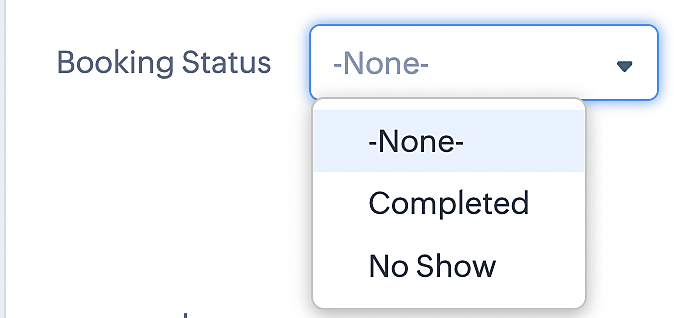
To update a booking's status (Completed or No Show), we've added a new picklist properties field named "Booking Status" in the Meetings module and configured it with two options: "completed" and "no show". Depending on the booking status chosen, the corresponding booking in Zoho Bookings will be updated.
- Details on how to add a custom field to the Meetings module : Customizing modules
- Here's a video that demonstrates how to add a field to a module in Zoho CRM: Adding fields
Reference:
3. Booking status: Canceled
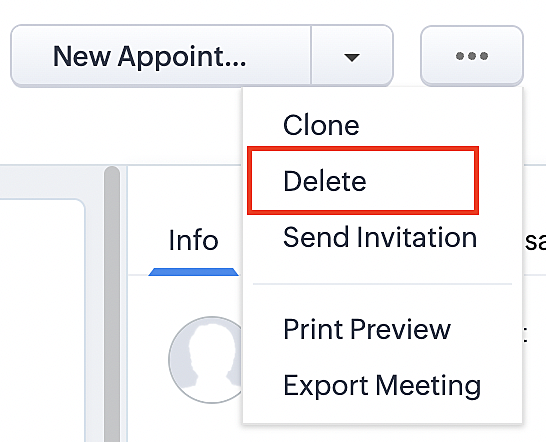
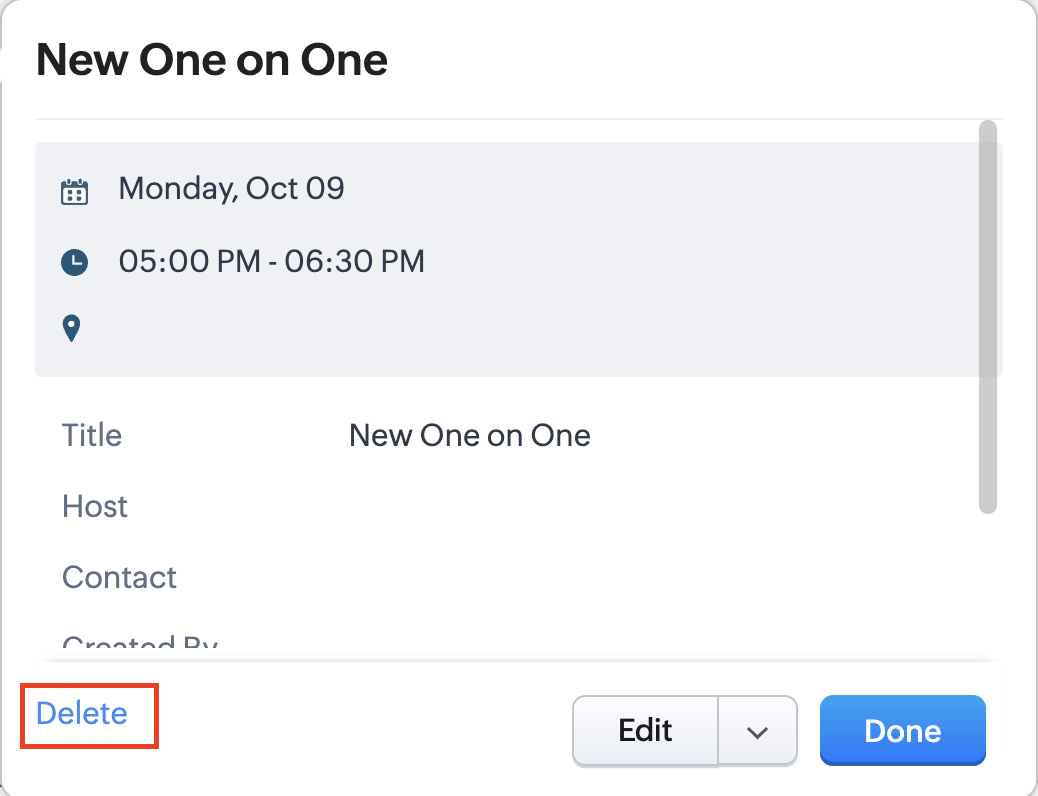
Whenever a meeting is deleted from the Meetings module, the corresponding booking in the Zoho Bookings app will also be canceled automatically. The meeting can be deleted either from the Meetings module or directly from the calendar.
To enable bidirectional sync between Zoho CRM and Zoho Bookings
Complete these steps in Zoho CRM.
Step 1: Creating connections
You first need to establish a connection between Zoho CRM and Zoho Bookings. Zoho Bookings is listed as one of the default connections in Zoho CRM, making it simple to set up. Select the Zoho Bookings connection, define the connection name and scope, and you'll be all set. This connection will enable you to link both applications and facilitate the seamless transfer of data.
Read here for more details on how to create connection in Zoho CRM: Connections
Step 2: Creating functions
In this context, we'll be creating three functions: one for marking appointments as completed, another for canceling appointments, a third for marking appointments as no shows, and a fourth for rescheduling appointments. For each function, we must also configure arguments, which pass values or data into a function when making a call. Here, we'll pass the booking ID to the function as an argument to update the necessary booking status.
i. To create a function for marking appointments as completed:
1. Go to Setup > Developer Space > Functions.
2. In the Functions page, click + Create New Function.

3. Configure the function name, display name, and description.
4. Set the category as automation.
This opens the Deluge script page.
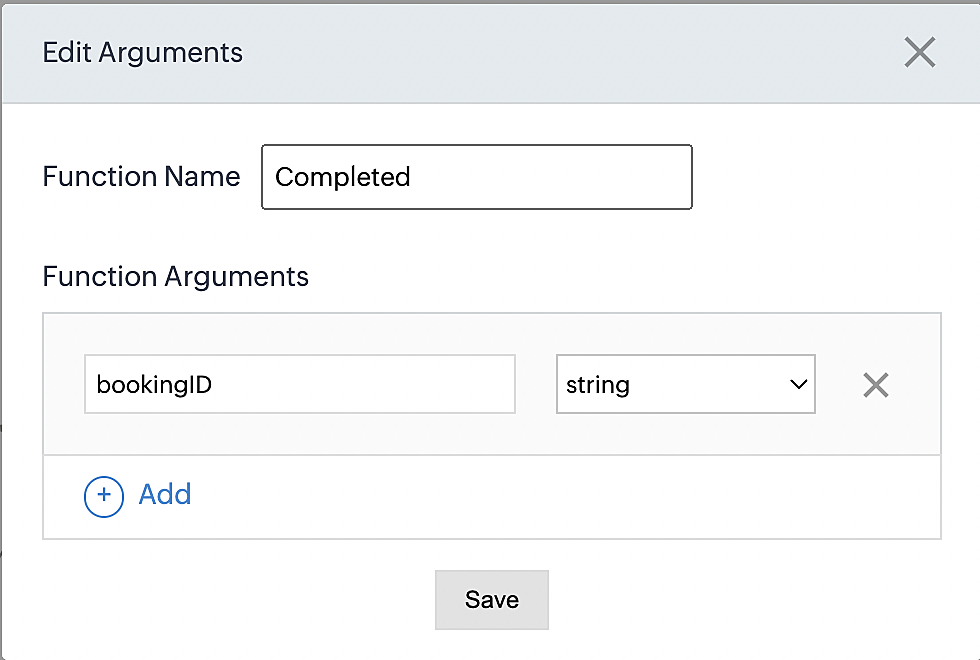
5. Next, configure the function's arguments:
A. Click on Edit Arguments on the Deluge script page.

B. Set the Parameter Name as bookingID. (Please note that the "bookingID" value is case sensitive and must match
the term used in the code).
C. Set the type as string.
Reference:
Please configure the below code in the Deluge script page.
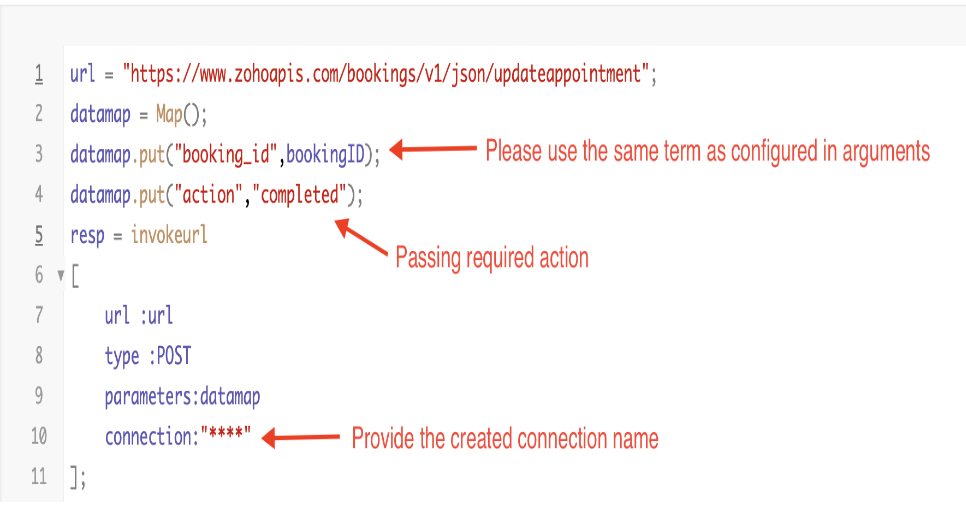
By completing these steps, we've configured a function that will mark appointments as completed.
ii. To create a function for marking appointments as no shows
1. Go to Setup > Developer Space > Functions.
2. In the Functions page, click + Create New Function.

3. Configure the function name, display name, and description.
4. Set the category as automation.
This opens the Deluge script page.
5. Next, configure the function's arguments:
A. Click on Edit Arguments on the Deluge script page.

B. Set the Parameter Name as bookingID. (Please note that the "bookingID" value is case sensitive and must match
the term used in the code).
C. Set the type as string.
Reference:
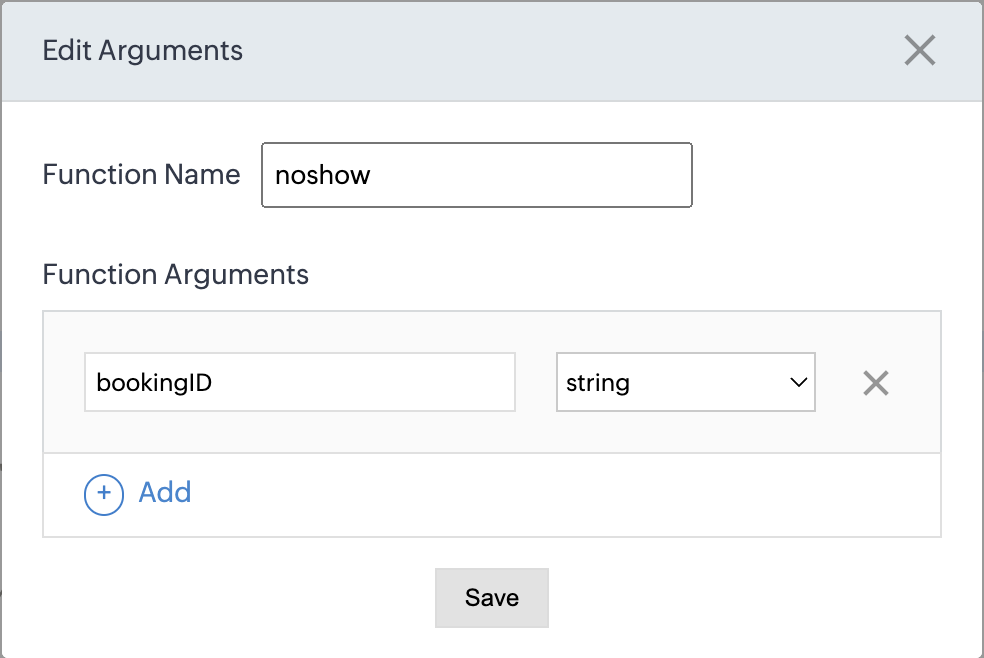
Please configure the below code on the Deluge script page.
Code link: No show
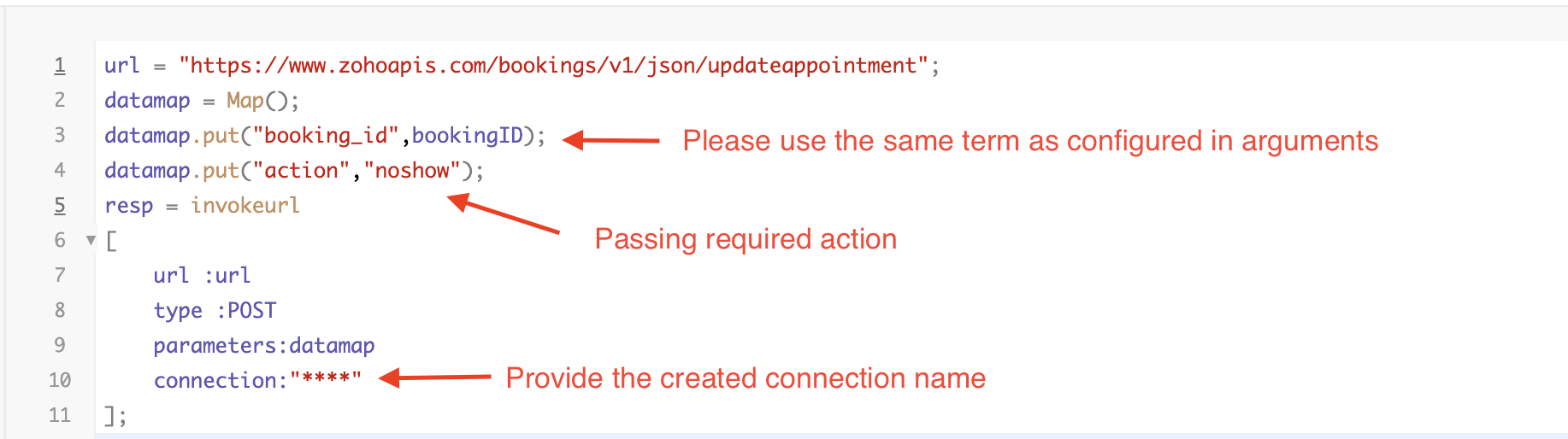
By completing these steps, we've configured a function that marks appointments as no shows.
iii. To create a function for marking appointments as canceled
1. Go to Setup > Developer Space > Functions.
2. In the Functions page, click + Create New Function.

3. Configure the function name, display name, and description.
4. Set the category as automation.
This opens the Deluge script page.
5. Next, configure the function's arguments:
A. Click on Edit Arguments on the Deluge script page.

B. Set the Parameter Name as bookingID. (Please note that the "bookingID" value is case sensitive and must match
the term used in the code).
C. Set the type as string.
Reference
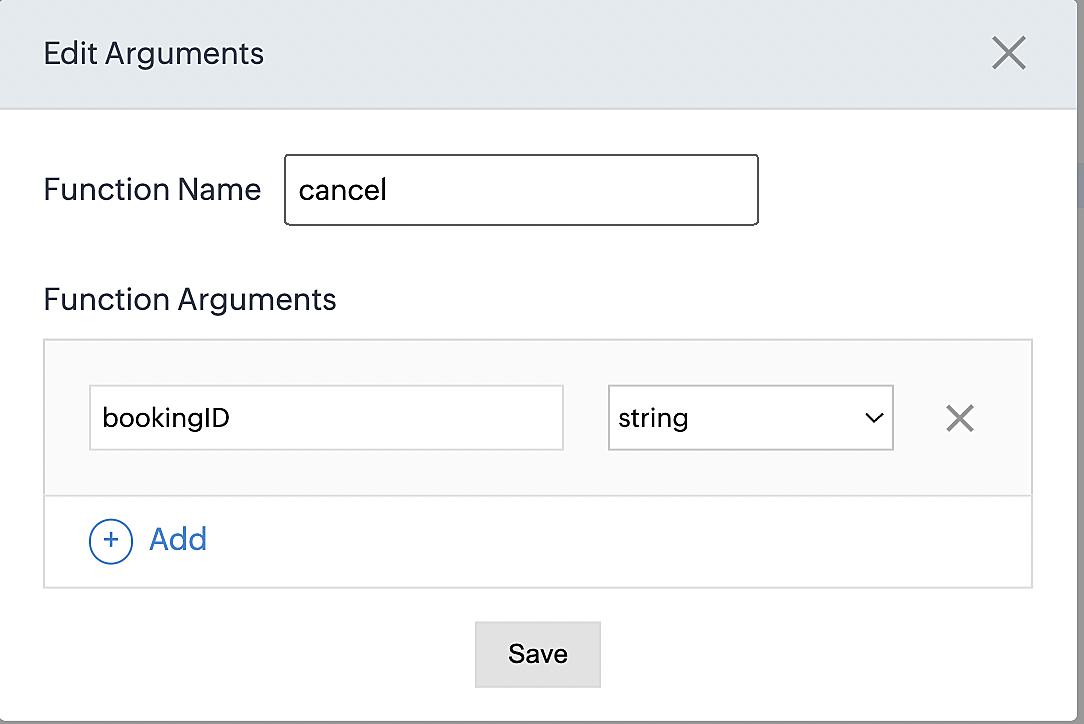
Please configure the below code on the Deluge script page.
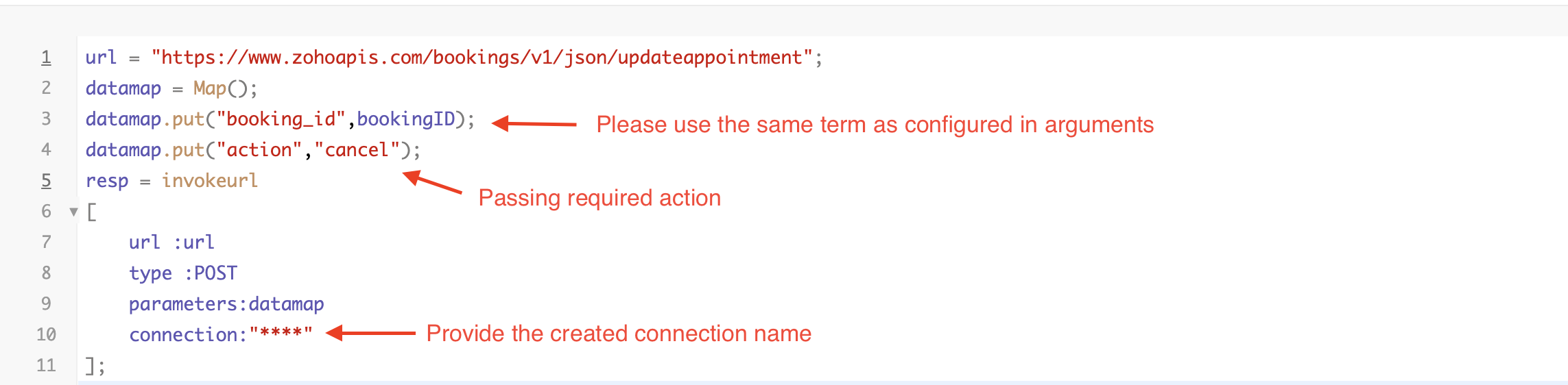
By completing these steps, we've configured a function that marks appointments as canceled.
Code explanation
Below is an explanation of the code that covers all the configurations present in the three functions mentioned above (cancel, mark as completed, and mark as no show).
Line 1: Based on the Zoho Bookings account's data center, we're setting up the API endpoint URL configuration.
Lines 2 - 4: To update appointments, we utilize the Zoho Bookings API. Within the update appointment API, there are two mandatory fields that need to be included: BookingID and action (completed/cancel/noshow).
Lines 5 - 10: We use the invokeURL task for API calls. To learn more about the invokeURL task, please refer to the following document: InvokeURL task for API calls
Now, let's proceed and learn about the process of creating a workflow and linking the established functions to it. This will enable us to automate the entire appointment status updating process.
Step 3: Creating a workflow
Workflow rules are sets of actions (email notifications, tasks and field updates) that are executed when specified conditions are met. Here, we'll generate workflow rules for each action to activate the respective function, thereby automating the appointment status updating process.
i. Creating a workflow for "canceling" appointments in Zoho Bookings when a meeting is deleted in Zoho CRM
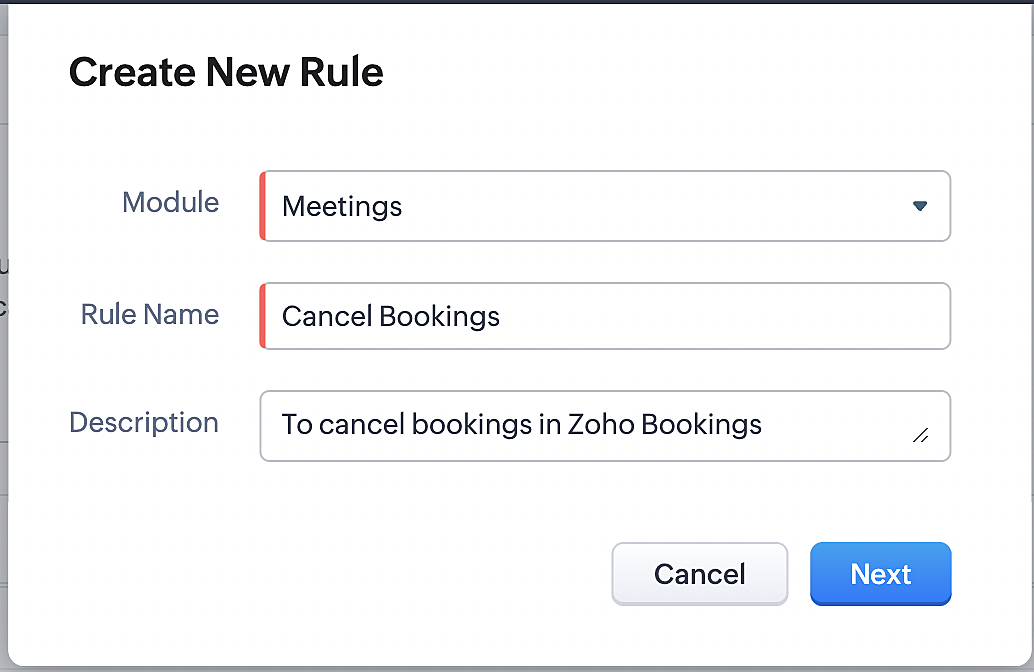
Part 1: Creating the rule
1. Go to Setup > Automation > Workflow Rules.
2. In the Workflow Rules page, click Create Rule.

3. Select "Meetings" under Module and configure rule name and description as required.
More details: Create Rule
Reference:
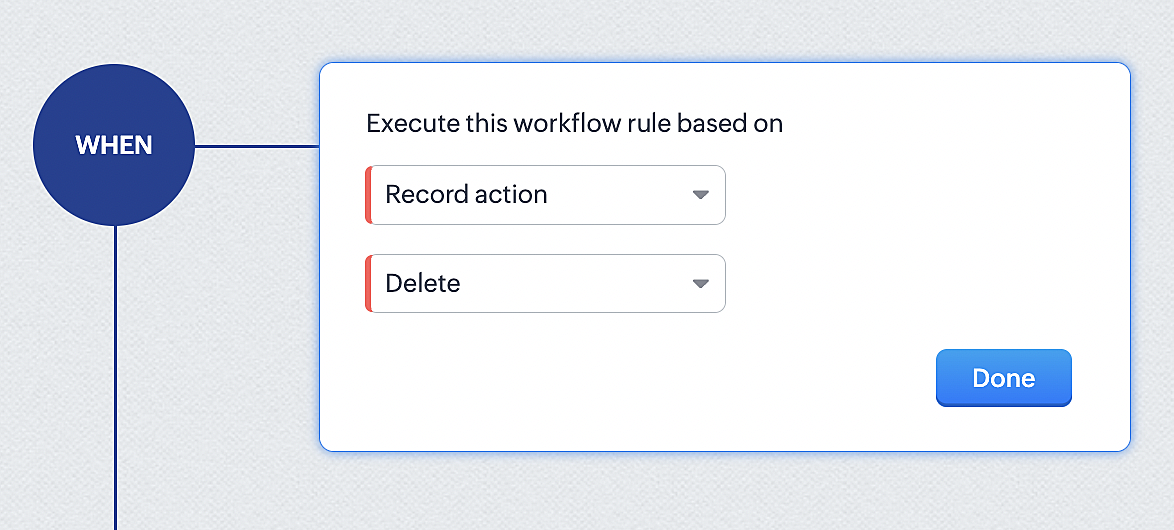
1. Select Record Action > Delete > Done to execute the rule when meetings are deleted.
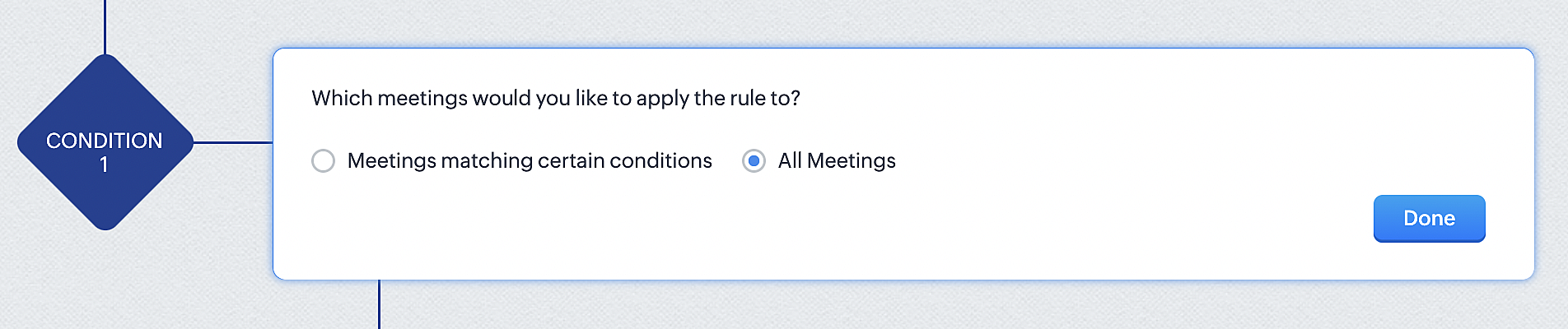
2. Configure condition > All Meetings.
3. Instant Actions > Function.
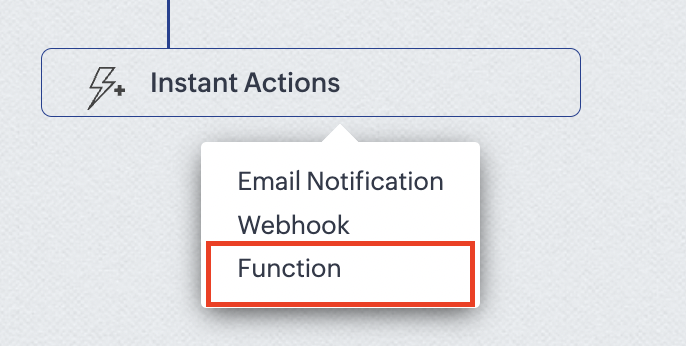
4. Click the New Function button.

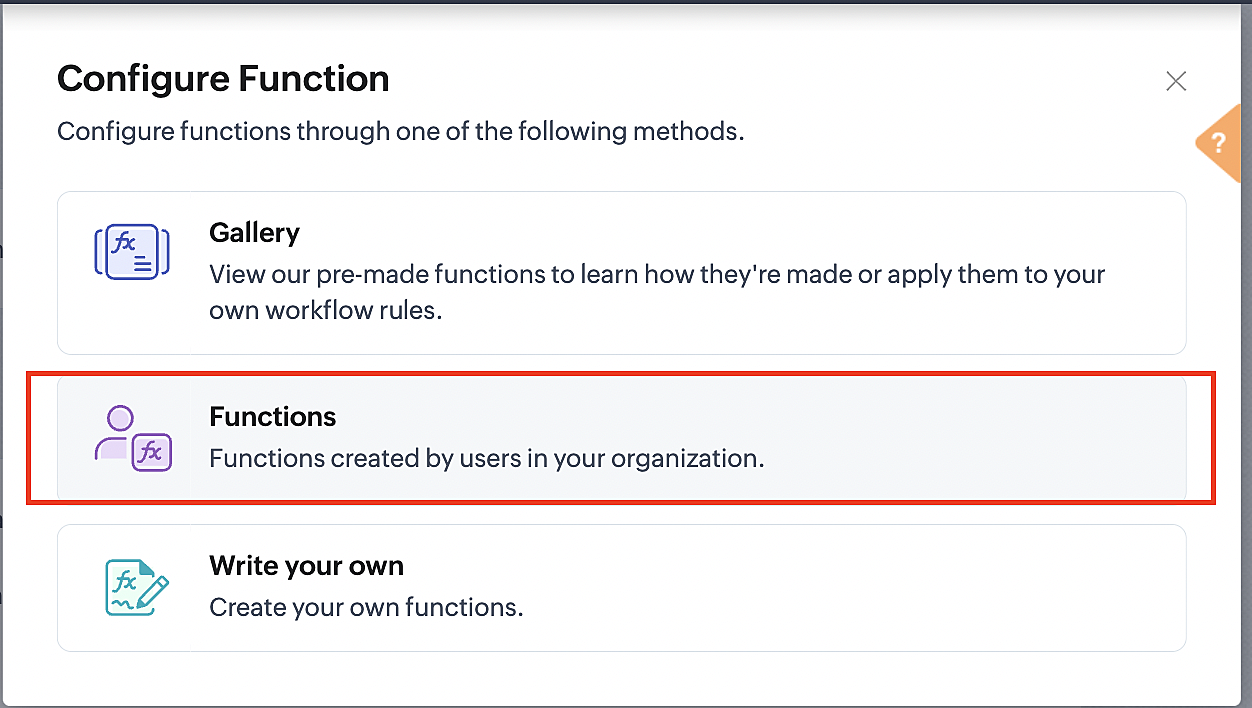
5. In the Configure custom function page, select the "cancel" function you created from among the functions users in your organization have created.
Part 3: Argument mapping
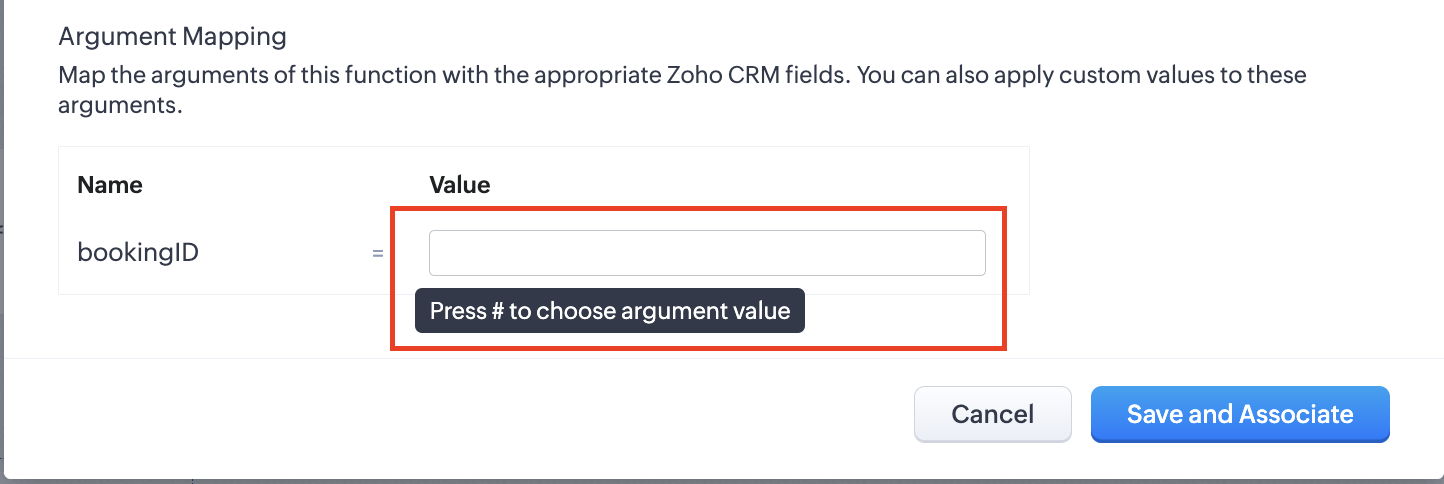
1. Press # to choose an argument value.
2. Select Meetings under Module and BookingId in the field.
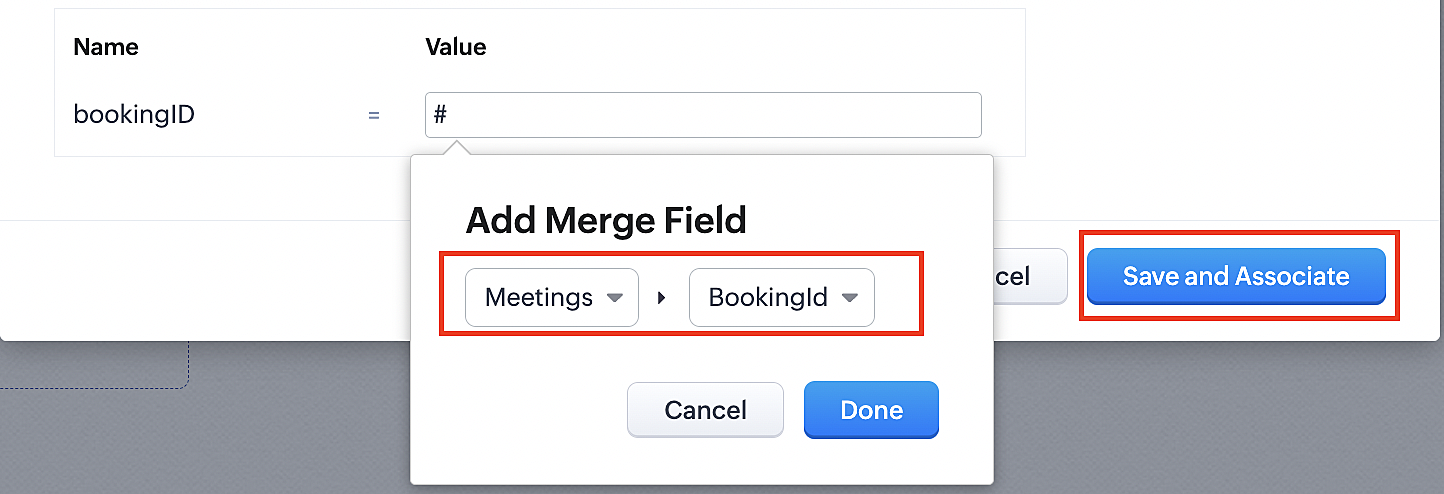
3. Click the Save and Associate button.
Reference:
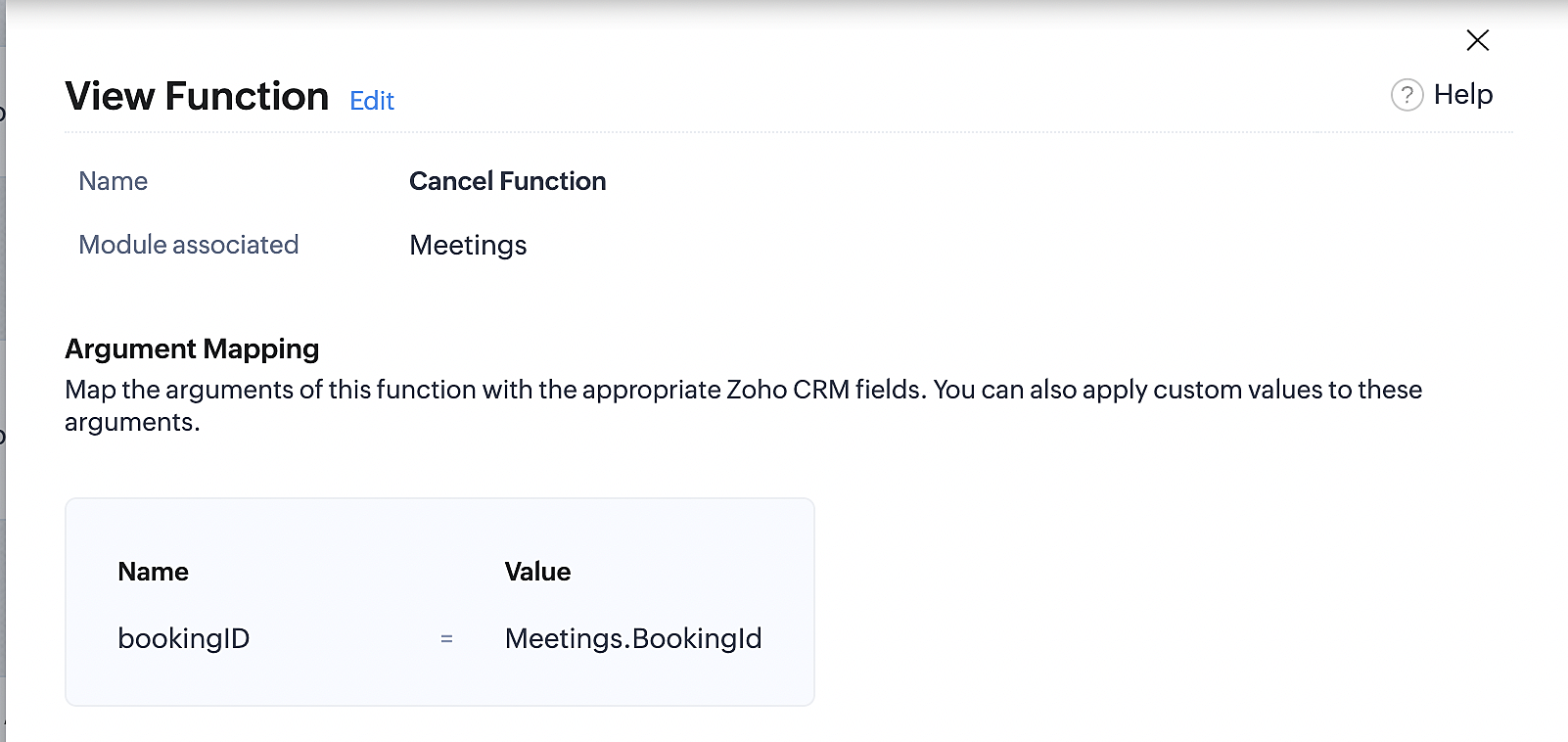
Below is the final flow of the cancel booking workflow:
At the end of Part 3, we will have created a workflow that will be executed automatically when meetings are deleted in Zoho CRM. Simultaneously, the bookings associated with the meeting will also be canceled in Zoho Booking.
ii. Creating workflow for updating an appointment's status as "no show" in Zoho Bookings when the meeting's booking status is marked as no show in Zoho CRM
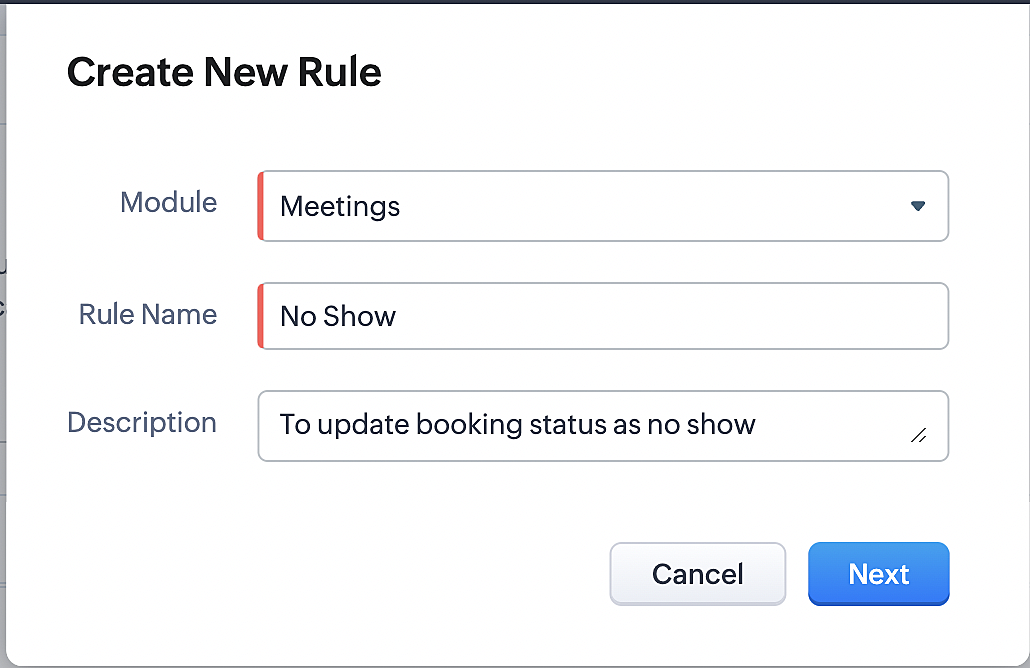
Part 4: Creating the rule
1. Go to Setup > Automation > Workflow Rules.
2. In the Workflow Rules page, click Create Rule.

3. Select Meetings under Module and configure the rule name and description as required.
Reference:
Part 5: Specifying the rule trigger
If you encounter difficulties while navigating through the steps mentioned below, please refer to Part 2 above, where we have provided step-by-step screenshots for clarification.
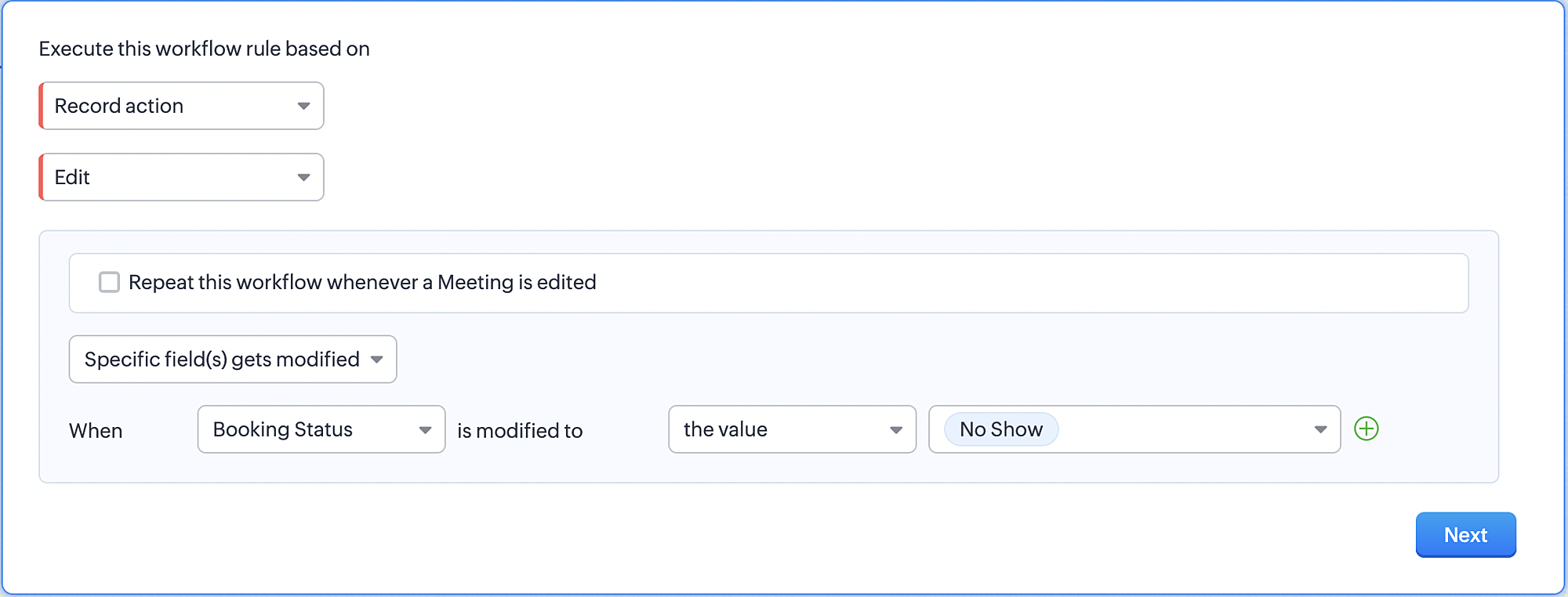
1. Record Action > Edit.

2. Enable the Specific field(s) gets modified and configure it per the screenshot below.
a. This is to ensure that the workflow is executed only when the booking status under the meeting module is
updated to "No Show".
updated to "No Show".
3. Configure condition > All Meetings.
4. Instant Actions > Function > New Function.
5. In the Configure custom function page, select the "no show" function you created from among the functions
users in your organization have created.
users in your organization have created.
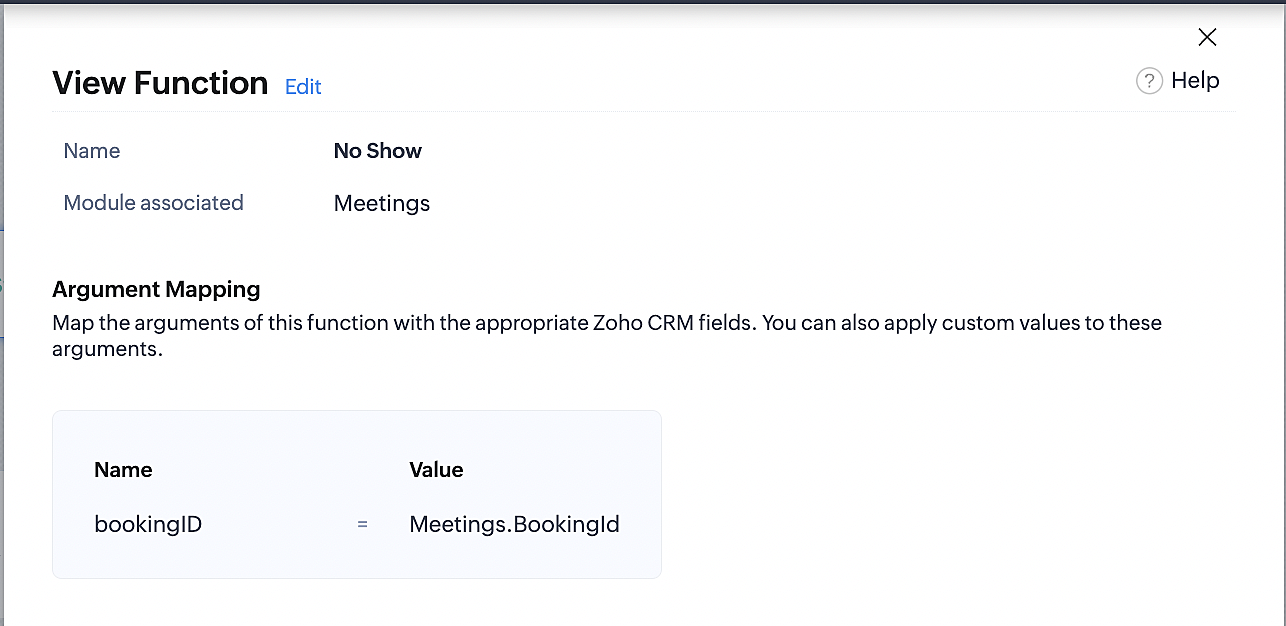
Part 6: Argument mapping:
If you encounter difficulties while navigating through the steps mentioned below, please refer to Part 3 above, where we have provided step-by-step screenshots for clarification.
1. Press # to choose an argument value.
2. Select Meetings under Module and configure the field as "BookingId".
3. Click Save and Associate button.
Reference:
Below is the final flow of the "No Show" booking status workflow:
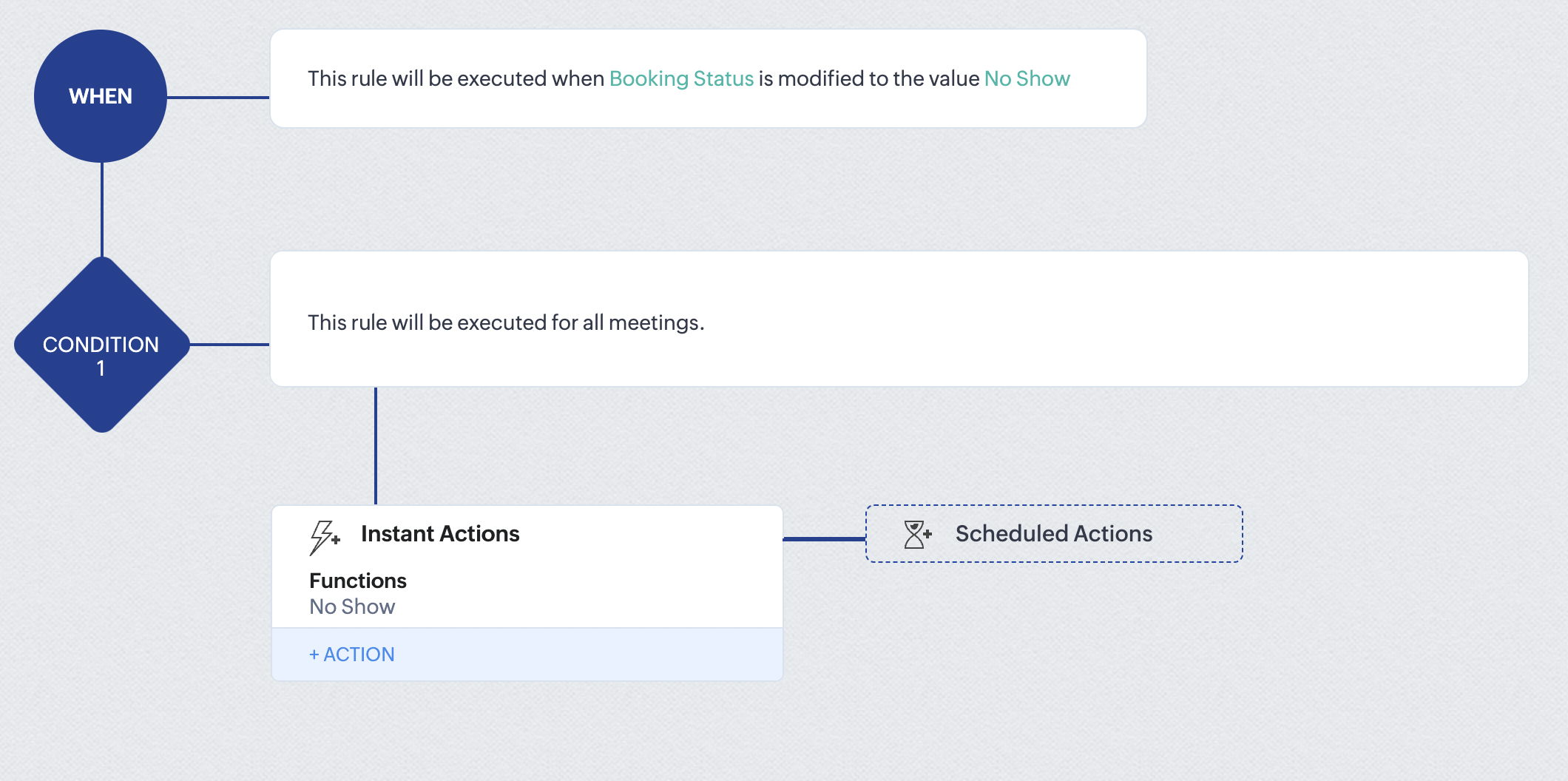
At the end of part 6, we will have created a workflow that automatically executes when the booking status field within the Zoho CRM Meetings module is updated to "No Show." This action will result in the associated bookings for that meeting also being marked as "No Show" in Zoho Bookings.
iii. Creating workflow for updating appointment status as "Completed" in Zoho Bookings when the booking status field of the meeting is marked as completed in Zoho CRM.
Part 7: Creating the rule
1. Go to Setup > Automation > Workflow Rules.
2. In the Workflow Rules page, click Create Rule.

3. Select Meetings under Module and configure rule name and description as required.
Reference:
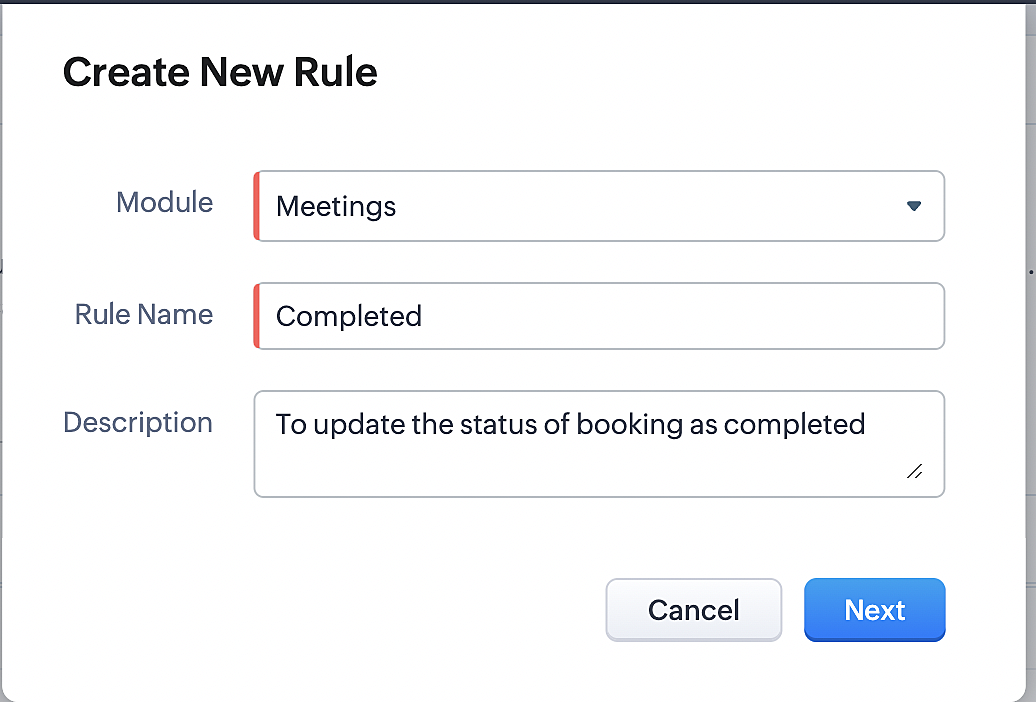
Part 8: Specifying the rule trigger
If you encounter difficulties while navigating through the steps mentioned below, please refer to Part 2 above, where we have provided step-by-step screenshots for clarification.
1. Record Action > Edit.

2. Enable the Specific field(s) gets modified setting and configure it per the screenshot below.
a. This serves to ensure that the workflow is executed only when the booking status under the Meetings module is
updated to "Completed".
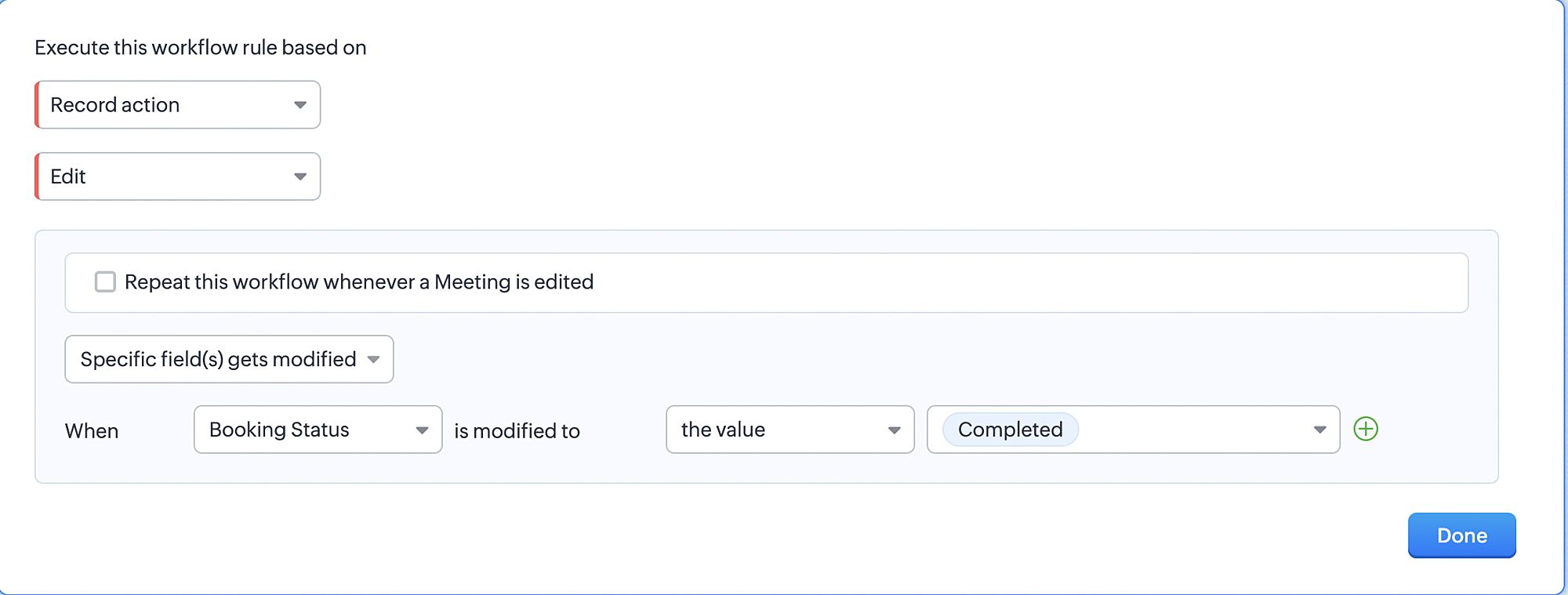
3. Configure condition > All Meetings.
4. Instant Actions > Function > New Function.
5. In the Configure custom function page, select the "completed" function you created from among the functions users
in your organization have created.
Part 9: Argument mapping:
If you encounter difficulties while navigating through the steps mentioned below, please refer to Part 3 above, where we have provided step-by-step screenshots for clarification.
1. Press # to choose an argument value.
2. Select Meetings under Module and configure the field as "BookingId".
3. Click Save and Associate button.
Reference:
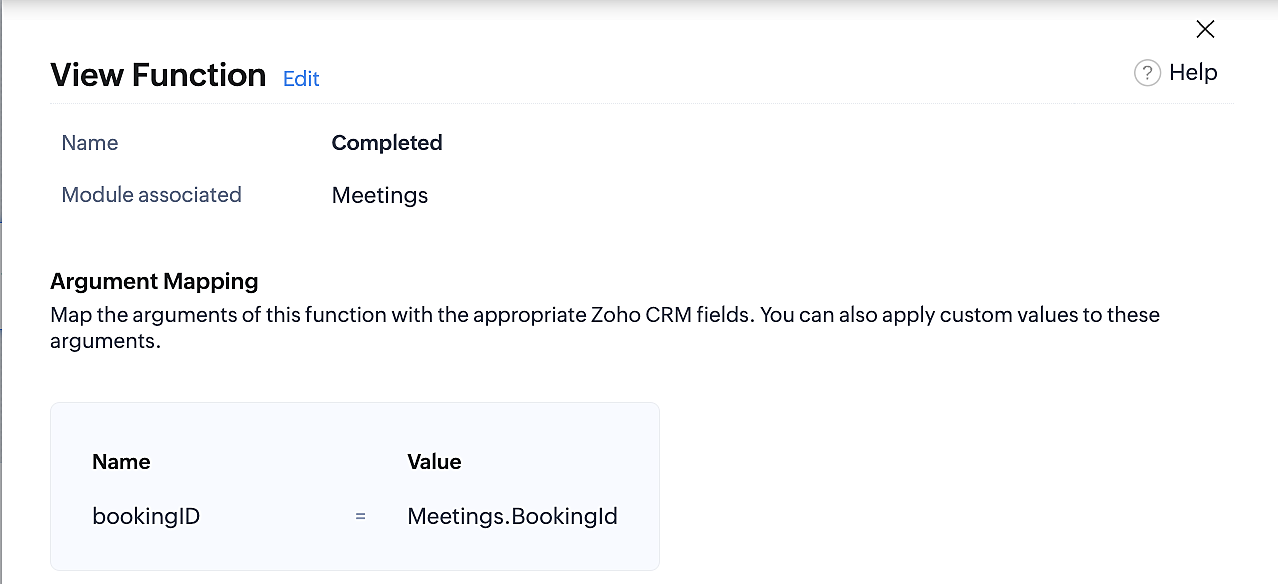
Below is the final flow of the "Completed" booking status workflow:
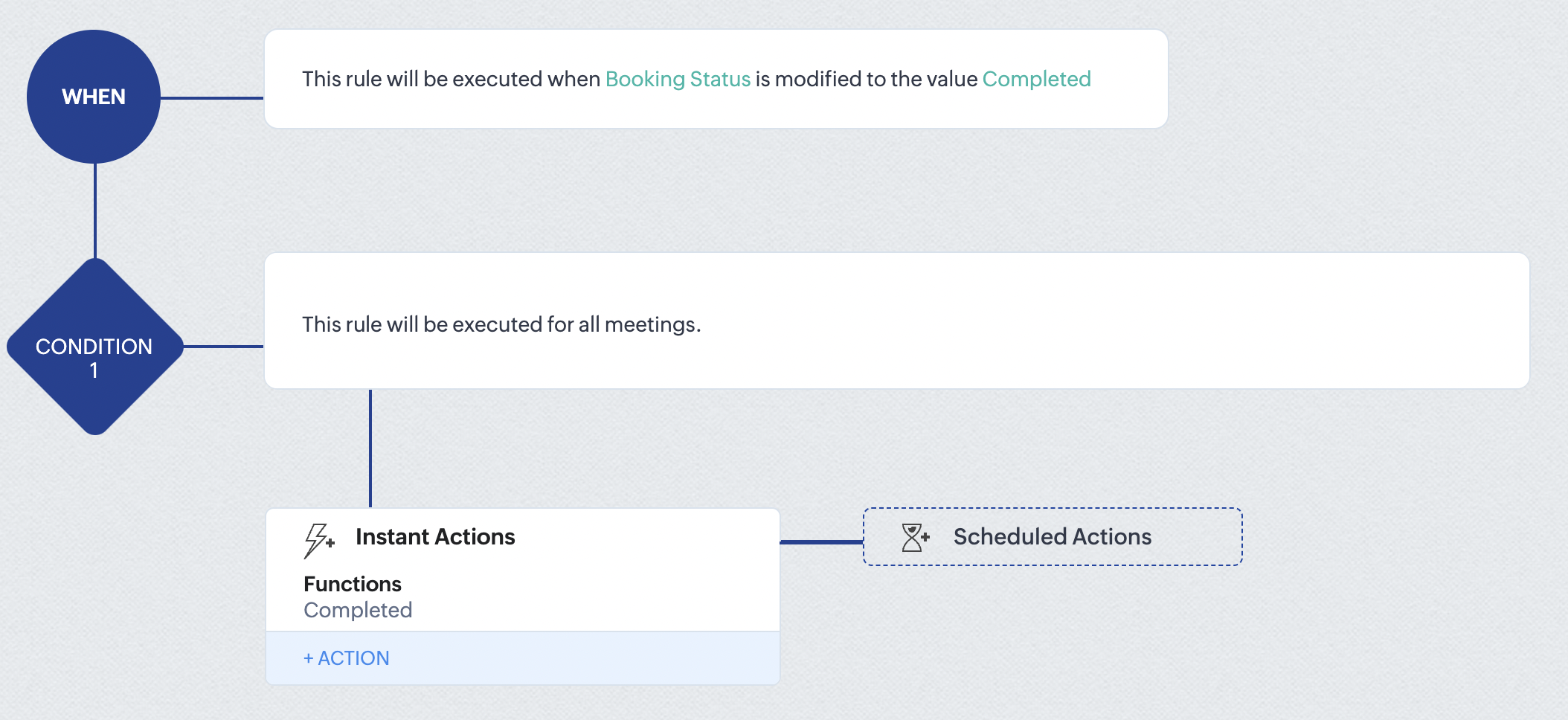
At the end of part 9, we will have created a workflow that is automatically executed when the booking status field within the Zoho CRM Meetings module is updated to "Completed." As a result, the associated bookings for that meeting will also be marked as "Completed" in Zoho Bookings.
Conclusion
We've reached the end of this community post. With the integration mentioned above in place, you'll be able to book, cancel, and update the status of appointments in Zoho Bookings directly from your Zoho CRM application. This will help you effectively manage your appointments in one place. As mentioned above, we've covered the rescheduling action in a separate post, which you can access by clicking on the following link: Reschedule Action
Furthermore, we've outlined a method for automating appointment statuses in detail. You can use this document as a reference to explore the various possibilities that suit your needs.
If you have any questions or need assistance with your configuration, please email us at hello@zohobookings.com or support@zohobookings.com.
Access your files securely from anywhere
New to Zoho Recruit?

Zoho Developer Community
New to Zoho LandingPage?
Zoho LandingPage Resources
New to Zoho Survey?
New to Zoho CRM Plus?
Deliver unforgettable customer experiences
New to Zoho CRM Plus?
Deliver unforgettable customer experiences
New to Zoho Marketing Plus?
Everything you need to run your marketing
New to Zoho Marketing Plus?
Everything you need to run your marketing
New to Bigin?





Topic Participants
Kaushik S
bruce
Ishwarya SG
PrismaNote Support
Sticky Posts
Presenting ABM for Zoho CRM: Expand and retain your customers with precision
Picture this scenario: You're a growing SaaS company ready to launch a powerful business suite, and are looking to gain traction and momentum. But as a business with a tight budget, you know acquiring new customers is slow, expensive, and often deliversGood news! Calendar in Zoho CRM gets a face lift
Dear Customers, We are delighted to unveil the revamped calendar UI in Zoho CRM. With a complete visual overhaul aligned with CRM for Everyone, the calendar now offers a more intuitive and flexible scheduling experience. What’s new? Distinguish activitiesCreate and populate a record in an instant: Introducing zero-shot field prompting to Zia's ICR
A couple of months ago, we upgraded our in-house AI image detection and validation tool, Zia Vision, with intelligent character recognition (ICR). By training Zia with sample images, you could create and enrich CRM records with data extracted from standardIn-person ZUG Meetups for Real Estate Professionals - US Q1 2026
The Real Estate Zoho User Group is going on a multi-city, in-person meetup tour across the US, and we’d love to see you there! These meetups are a great opportunity to: Connect with fellow real estate professionals using Zoho Share challenges and discoverNimble enhancements to WhatsApp for Business integration in Zoho CRM: Enjoy context and clarity in business messaging
Dear Customers, We hope you're well! WhatsApp for business is a renowned business messaging platform that takes your business closer to your customers; it gives your business the power of personalized outreach. Using the WhatsApp for Business integration
New to Zoho TeamInbox?
Zoho TeamInbox Resources
Zoho CRM Plus Resources
Zoho Books Resources
Zoho Subscriptions Resources
Zoho Projects Resources
Zoho Sprints Resources
Qntrl Resources
Zoho Creator Resources
Zoho CRM Resources
Design. Discuss. Deliver.
Zoho Show Resources

Get Started. Write Away!
Writer is a powerful online word processor, designed for collaborative work.
Zoho CRM コンテンツ
-
オンラインヘルプ
-
Webセミナー
-
機能活用動画
-
よくある質問
-
Ebook
-
-
Zoho Campaigns
- Zoho サービスのWebセミナー
その他のサービス コンテンツ
Nederlandse Hulpbronnen

ご検討中の方
Recent Topics
error : Object code : 6500
b3 = map(); b3.put("name", "Test Project Name"); updateprojects2 = invokeurl [ url :"https://projectsapi.zoho.eu/restapi/portal/era0130/projects/169495000000928007/" type :PUT parameters: b3 connection:"in2" ]; info b3 ; info updateprojects2; ------------I got unknown charge from Zoho
Good day, I need help disputing a charge I don't know from, zoho. I have ZohoMail and ZeptoMail. I purchase credits for ZeptoMail, and for ZohoMail I am not subcribed.Function 56: Automatically enable the option for customers to pay via bank account
Hello everyone and welcome back to our series! One of the key features of Zoho Books is its integration with multiple payment gateways, allowing you to receive online payments for your invoices. This ensures faster payments, automates payment trackingAttach Files to Your Notecards and share them on the go!
Hey everyone! We’re excited to share a feature many of you have been asking for — you can now attach files directly to your text notecards and share with ease! 🙌 This update was built with your feedback in mind, especially for those who wanted a simpleHow to searchByCriteria records that are under approval?
I need to search for both approved and pending approval records Is that possible with this method? Or I need to a different method? var priceReqID = $Page.record_id; log(priceReqID); var records = ZDK.Apps.CRM.Price_List_Item.searchByCriteria("Price_Request:equals:"How to add Simple Analytics to Zoho Pages?
I have a website with Zoho Pages, how do I add Simple Analytics on it? They seem to have code they need to be embedded https://docs.simpleanalytics.com/scriptCant seem to delete an email account
Hello, I have researching for 4 days how to delete an email account and I am absolutely without a clue. The email account I am trying to delete is support<AT>fyshoes<dot>com. It's the first email account I made and it (is???) was associated with the super user (me). I have since changed it to adming<AT>fychoes<dot>com and I see the support email in my list but I just cant seem to get rid of it. Ultimately I want to associate that email account with another user that I want to add. This is reallyImport data into Multi-Select lookup field from CSV/Excel
How to import data into a multi-select lookup field from the CSV/Excel Sheet? Let's say I have an Accounts multi-select lookup field in the Deals module and I want to import the Deals with Accounts field. Steps:- 1. Create/edit a multi-select lookup fieldScript that deletes a record?
We're using WP Plugin "Integration for WooCommerce and Zoho Pro", and have created a couple of Feeds to send data to Zoho. We are trying to create Contact records, but only based upon condition. Tried to make it with small Deluge function and Workflow,A formula that capitalises the first letter of each word
Hi all, is there a zoho formula that can capitalise the first letter of each word in a string? INITCAP only capitalises the first letter of the first word.Quotes in Commerce?
In Zoho Ecommerce, I need to be able to generate quotes, negotiate with customers, and then generate invoices. Currently, I plan to integrate Zoho CRM to generate quotes. After negotiation and confirmation, I will push the details to Zoho Ecommerce toZoho Commerce - Mobile Application
Does Zoho Commerce have a mobile application for customers to place an order?Register user through Phone Number by Generating OTP
In zoho commerce , I am developing website on online food store Inilialy the user get verification code to their email for registering there account for login. But I need to login using phone number by generating OTP automatically rather than verificationCustom Buttons for Mass Actions
Hello everyone, We’ve just made Custom Buttons in Zoho Recruit even more powerful! You can now create Bulk Action Buttons that let you perform actions on multiple records at once, directly from the List View. What’s new? Until now, custom buttons wereZoho Vault Passwords
Is there a way to consume Zoho Vault Manager passwords using the API? Thanks in advance.Is the ChatGPT Assistant integration capable of recognizing WhatsApp voice messages?
I was wondering: if a visitor sends me a voice message on WhatsApp, would the assistant be able to transcribe it and reply to them?Zoho Creator to Zoho CRM Images
Right now, I am trying to setup a Notes form within Zoho Creator. This Notes will note the Note section under Accounts > Selected Account. Right now, I use Zoho Flow to push the notes and it works just fine, with text only. Images do not get sent (there【Zoho CRM】レポート機能のアップデート
ユーザーの皆さま、こんにちは。コミュニティチームの藤澤です。 今回は「Zoho CRM アップデート情報」の中から、レポート機能のアップデートをご紹介します。 目次 1. レポートのエクスポート時のレコードIDの表示について 2. 通貨項目の表示について 3. レポートの削除の監査ログへの反映について 1. レポートのエクスポート時のレコードIDの表示について これまで、レポートをエクスポートするとファイルにレコードIDが必ず含まれていました。レコードIDが識別子として役立つ場合もありますが、実際には多くの企業で参照されることはありません。Translation in zoho bookings
We cant translate zoho booking emails. The general text we can change. But what about text like: ""Here a link to join the meeting online:"" and "Add to Zoho Calendar" and "Add to Google Calendar"? No professional business have mixed languages. Its lookingIs there any way to bill one client in different currencies on different invoices?
I have some customers who have their currency set as USD and most of their billing is done in USD. However, from time to time I have a need to bill them in my base currency GBP for some specific invoices, but there seems to be no way of doing this that I can see. The only workaround that I can see is to create two client records for the same client, one for USD billing and one for GBP billing, but this is not an ideal situation. Is it likely that the (hopefully!) soon to arrive multi-currency supportAPI name for all fields in Zoho Project (Standard or custom)
Hi! I struggle to find easily all API name of all field in Zoho Project to build my API rest with other services. We can find them very fast in CRM but not in PRoject. Could you share a function to get the list of all API Name of any field of an AppDisappearing Mouse cursor in Zoho Mail / Windows 11 (Chrome + Edge)
I'm seeing an issue when writing mails with the light theme with the mouse cursor being white and the document area also being white - making it nearly impossible to see the mouse cursor. I see the problem on Windows 11 under Chrome and Edge. (Yet toZoho Assist not rendering NinjaTrader chart properly
Hi everyone. Just installed and testing Zoho Assist. I want to display my laptop' screen (Windows 11) on a monitor connected to my Mac mini. The laptop is running a stock trading program called NinjaTrader. Basically, when running, this program displaysLink(s) between Notes
Hello Everyone, It would be great if links could be created between notes. Let's say we have 5 Notes A, B, C , D, E. I would like to be able to link Note A to Note B but not in other way, so no link appears in Note B linking to Note A. An so on, linkingFeature Request: Assign Documents to Already Entered Bills, Expenses, Invoices, etc.
Hi Zoho Team, We are regular users of the Documents module in Zoho Books and appreciate its ability to keep financial records well-organized. However, we’ve noticed a limitation: There is no way to attach a document from the "Documents > Files" sectionI don't see any WITHDRAWL transaction at all
Hi I manually imported my bank statement to Zoho books today and I am a complete newbie. I have been reading the knowledgebase but unable to fix this. I only see "Uncategorized 91 DEPOSIT transactions". I don't see any WITHDRAWL transaction at all. Also,Shared inbox unable to see replies
Hi we are a small company me and someone else, we have a shared inbox for our sale@ and contact@ however we have this issue where by if i reply to an email or the other person reply to the email, it does not show it to them and therefore we end up replying404 error at checkout
Our customers are getting a 404 error at checkout. Anyone else with the same problem?FONT Sizing in Notebook
Hi Kishore - What is the status of adding font sizing to the application? I have several things that I have pasted directly into Notebook and the fonts are HUGE! I would like the ability to highlight them and reduce the font to a legible size. NothingCan managers Upload documents to their direct rapports?
Admin employees have the ability to upload documents to employees' files; however, managers do not have add/manage button - is it possible for managers to upload their direct reports' documents, such as absence documents or 121 documents. Is there somethingLeave balance display for next year
Is there a way to not have a rollover or not limit the leave balance depending on the date. For example an employee has 10 days leave balance and wants to apply for January leave in December. They cant because the rollover doesnt show the leave balancePlease add an “Auto-Apply Unused Credits” toggle
Hello — please add a simple org-level option to automatically apply unused credits (credit notes, excess payments, retainers) to new invoices and/or bills. An ON/OFF toggle with choices “invoices”, “bills”, or “both” would save lots of manual work forZoho Books not working/loading
Hi! I haven't been able to access/load Zoho Books for the past hours. I get a time out (and it is not due to my internet connection). Could you please check this asap? Thank you!Custom Fields with Data Types for Expense and Payments Received in Zoho Books
Hi all, We are glad to present to you, the option to create Custom Fields for the Expense and Payments received modules in Zoho Books. This also comes with an icing on top of it - Yes, the custom fields can now be created with different data types. Types like Text, Number, Decimal, Amount, Auto Number and Check Box are supported as of now. Rush to the gear icon at the top right corner, select 'More Settings', choose 'Preferences' in the left pane. Click the Expense/Payment preferences where you canZoho Cliq - Incident alert (Server outage - IN DC) | August 28
We've received server down alerts and are currently investigating the issue (IN DC) to find the root cause. Our team is actively working to restore normal operations at the earliest. Status: Under investigation Start time: 09:44:21 AM IST Affected location:Claude + MCP Server + Zoho CRM Integration – AI-Powered Sales Automation
Hello Zoho Community 👋 I’m excited to share a recent integration we’ve worked on at OfficehubTech: ✅ Claude + MCP Server + Zoho CRM This integration connects Zoho CRM with Claude AI through our custom MCP Server, enabling intelligent AI-driven responsesHow can I see content of system generated mails from zBooks?
System generated mails for offers or invices appear in the mail tab of the designated customer. How can I view the content? It also doesn't appear in zMail sent folder.Limitations on editing a message in Cliq
Hi I've checked the documentations and there's no mention of how many times a message can be edited. When trying with code, I get various numbers such as ~1000 edits or so. Please mention if there's a limit on how many times one can change a message viaNarrative 10: Assignment Rules - Streamlining Ticket Management
Behind the scenes of a successful ticketing system: BTS Series Narrative 10: Assignment Rules - Streamlining Ticket Management In the complex world of customer support, a flood of incoming tickets can hit the help desk in seconds. Businesses must do moreCustom form - Duplicate Value Present
I am new to Zoho People. I create a new form on Zoho People quite simple. A date (by default the current date) and a radio button with 3 options (Yes, No, Not applicable) I defined the date as ‘No duplicate’ as only one entry by date is allowed. I added:Next Page