Bidirectional sync between Zoho Bookings and Zoho CRM - Part 1
Hey, community members!
The default integration between Zoho CRM and Zoho Bookings is unidirectional, which means that any appointments booked, rescheduled, or deleted in Zoho Bookings will be reflected in Zoho CRM. However, any modifications made to events in Zoho CRM that originated from Zoho Bookings will not be reflected back in Zoho Bookings. Hence, as we're announcing in this community post, we've made the sync bidirectional.
This community post will cover the process of configuring appointment bookings from Zoho CRM in Zoho Bookings, as well as managing appointment statuses such as Canceled, No Show and Completed. We have addressed the rescheduling action in a separate post. To view it, please click on the following link: Reschedule Action
This community post will be beneficial for active Zoho CRM users who handle all their meetings within Zoho CRM. Additionally, you can use this community post as a reference to explore various automation possibilities tailored to your business requirements. For instance, with this post's guidance, when you update a booking's status field to "Completed" in Zoho CRM, it will automatically sync with Zoho Bookings and trigger an automated "Mark as completed" email to customers. This enhancement will improve your Zoho Bookings and Zoho CRM synchronization experience, making appointment management easier.
Prerequisites of bidirectional sync:
- Zoho Bookings Premium subscription
- Zoho CRM paid subscription
- Enable Zoho CRM integration within Zoho Bookings
The purpose of enabling the Zoho CRM integration within Zoho Bookings is to transfer booking details from Zoho Bookings to Zoho CRM. In this configuration, the mandatory field is the Booking ID, which is passed from Zoho Bookings to Zoho CRM through the integration. Whenever an appointment is booked, customer details will be sent to the designated CRM module, and a corresponding record will be created in the Meetings module within Zoho CRM, which will help in automating the workflow.
Here's the complete demo video that covers all the configurations discussed in the community post below:
Timestamps for your reference:
0:35 - Purpose of this community post
Here's the complete demo video that covers all the configurations discussed in the community post below:
Timestamps for your reference:
0:35 - Purpose of this community post
1:26 - Zoho CRM plugin installation
4:43 - Custom field creation
7:20 - Function creation
9:22 - Connection creation
10:24 - Configuring arguments
11:06 - Workflow creation
13:33 - Argument mapping
14:41 - Output verification
17:41 - Conclusion
How we're approaching this bidirectional sync
1. Booking an appointment from Zoho CRM
Install the Zoho Bookings for Zoho CRM plugin within your Zoho CRM application. This plugin enables the creation of a "New Appointment" button within the Zoho CRM Leads and Contacts module, which enables you to select the desired booking page you wish to open. You can choose from various workspace, service, or staff booking pages. After configuration, you can initiate the process of scheduling bookings directly from within your Zoho CRM account.
- Guide on Zoho Bookings and Zoho CRM plugin installation: Booking page selection for Zoho CRM plugin
2. Booking status: Completed or No Show
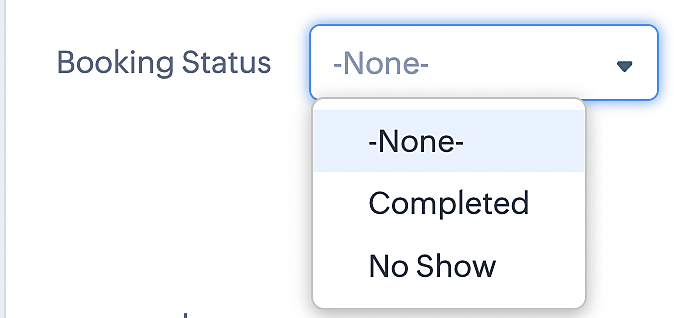
To update a booking's status (Completed or No Show), we've added a new picklist properties field named "Booking Status" in the Meetings module and configured it with two options: "completed" and "no show". Depending on the booking status chosen, the corresponding booking in Zoho Bookings will be updated.
- Details on how to add a custom field to the Meetings module : Customizing modules
- Here's a video that demonstrates how to add a field to a module in Zoho CRM: Adding fields
Reference:
3. Booking status: Canceled
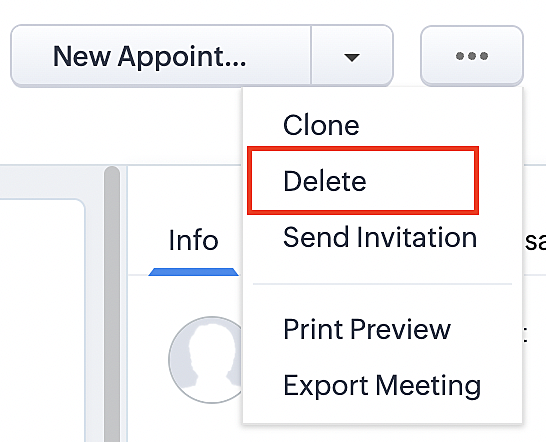
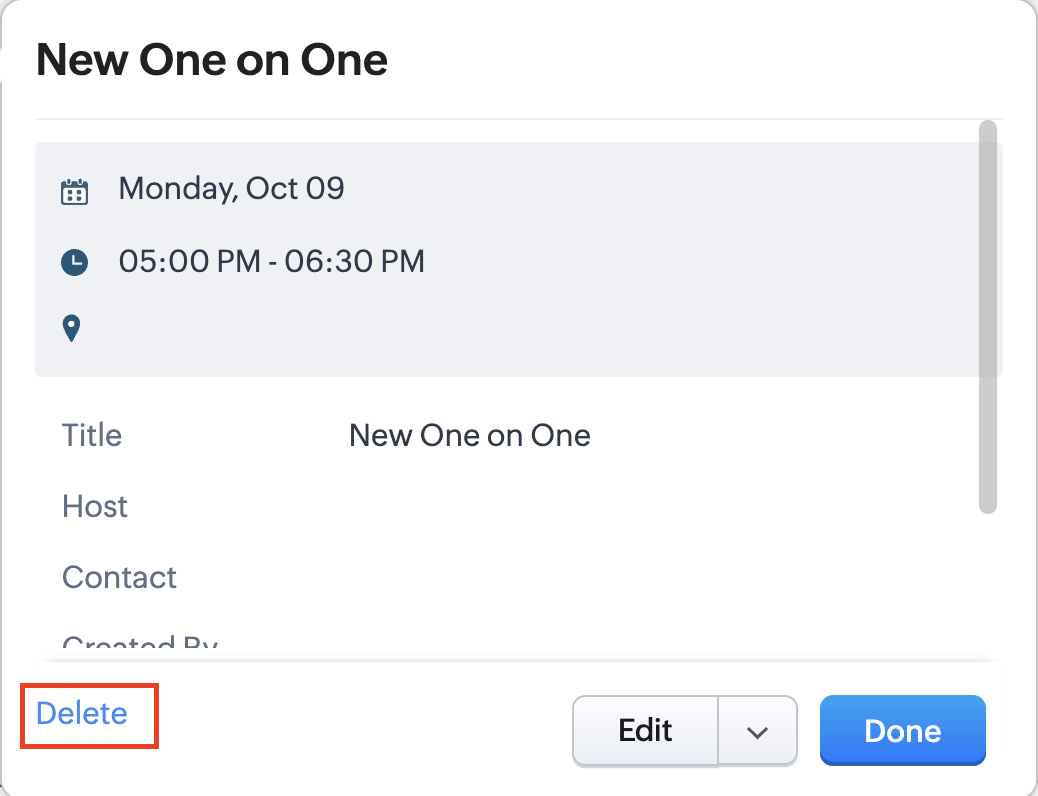
Whenever a meeting is deleted from the Meetings module, the corresponding booking in the Zoho Bookings app will also be canceled automatically. The meeting can be deleted either from the Meetings module or directly from the calendar.
To enable bidirectional sync between Zoho CRM and Zoho Bookings
Complete these steps in Zoho CRM.
Step 1: Creating connections
You first need to establish a connection between Zoho CRM and Zoho Bookings. Zoho Bookings is listed as one of the default connections in Zoho CRM, making it simple to set up. Select the Zoho Bookings connection, define the connection name and scope, and you'll be all set. This connection will enable you to link both applications and facilitate the seamless transfer of data.
Read here for more details on how to create connection in Zoho CRM: Connections
Step 2: Creating functions
In this context, we'll be creating three functions: one for marking appointments as completed, another for canceling appointments, a third for marking appointments as no shows, and a fourth for rescheduling appointments. For each function, we must also configure arguments, which pass values or data into a function when making a call. Here, we'll pass the booking ID to the function as an argument to update the necessary booking status.
i. To create a function for marking appointments as completed:
1. Go to Setup > Developer Space > Functions.
2. In the Functions page, click + Create New Function.

3. Configure the function name, display name, and description.
4. Set the category as automation.
This opens the Deluge script page.
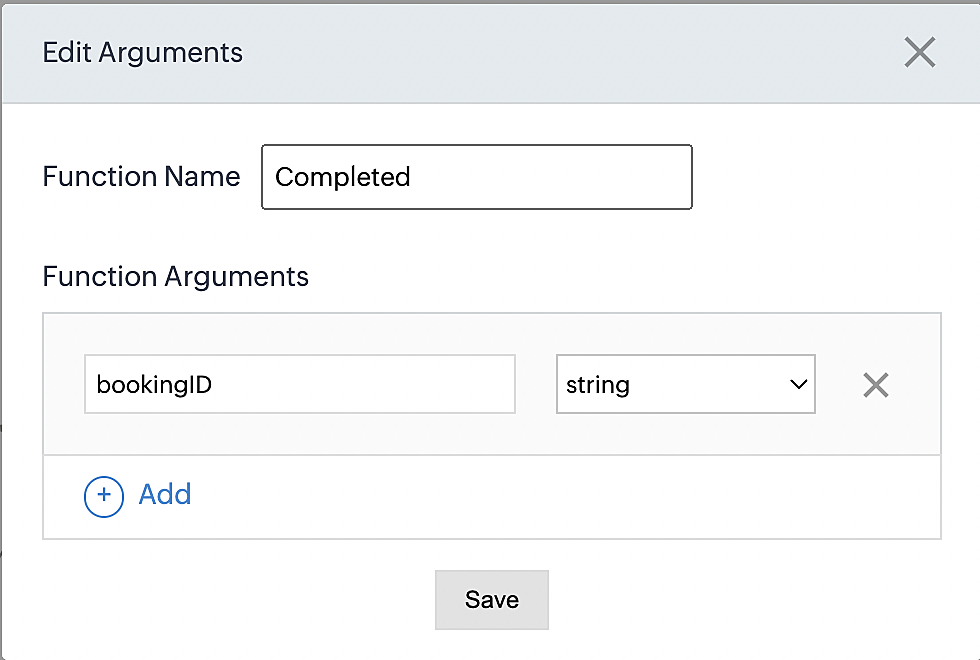
5. Next, configure the function's arguments:
A. Click on Edit Arguments on the Deluge script page.

B. Set the Parameter Name as bookingID. (Please note that the "bookingID" value is case sensitive and must match
the term used in the code).
C. Set the type as string.
Reference:
Please configure the below code in the Deluge script page.
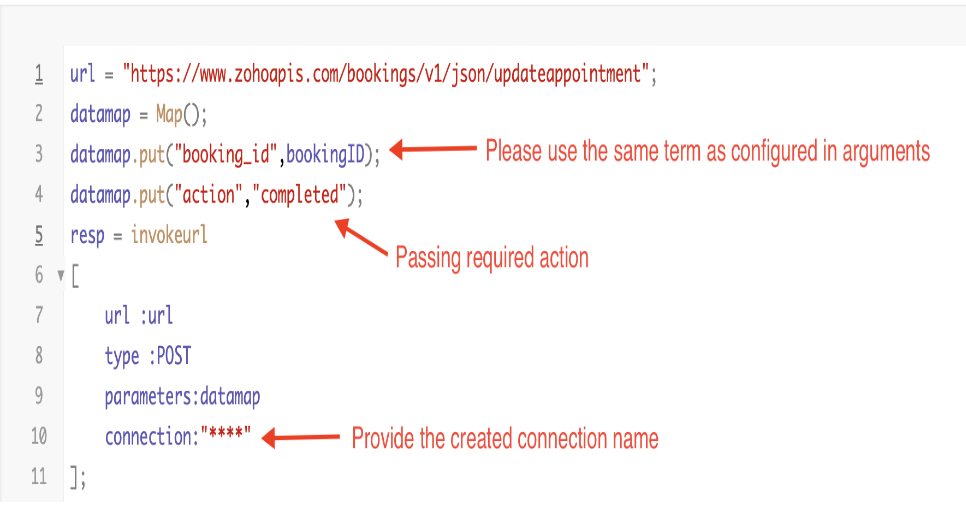
By completing these steps, we've configured a function that will mark appointments as completed.
ii. To create a function for marking appointments as no shows
1. Go to Setup > Developer Space > Functions.
2. In the Functions page, click + Create New Function.

3. Configure the function name, display name, and description.
4. Set the category as automation.
This opens the Deluge script page.
5. Next, configure the function's arguments:
A. Click on Edit Arguments on the Deluge script page.

B. Set the Parameter Name as bookingID. (Please note that the "bookingID" value is case sensitive and must match
the term used in the code).
C. Set the type as string.
Reference:
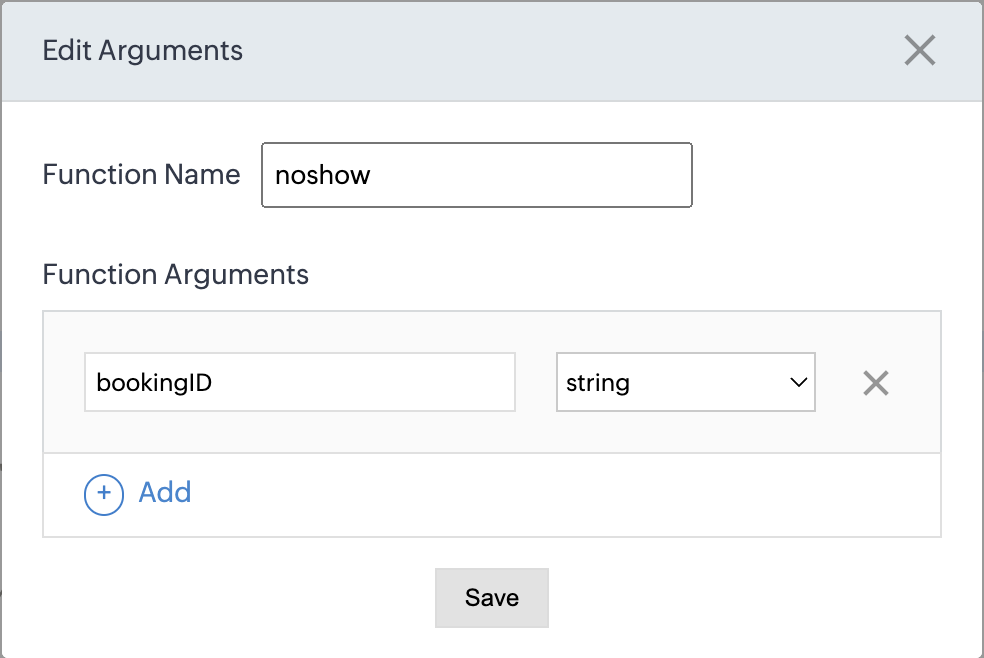
Please configure the below code on the Deluge script page.
Code link: No show
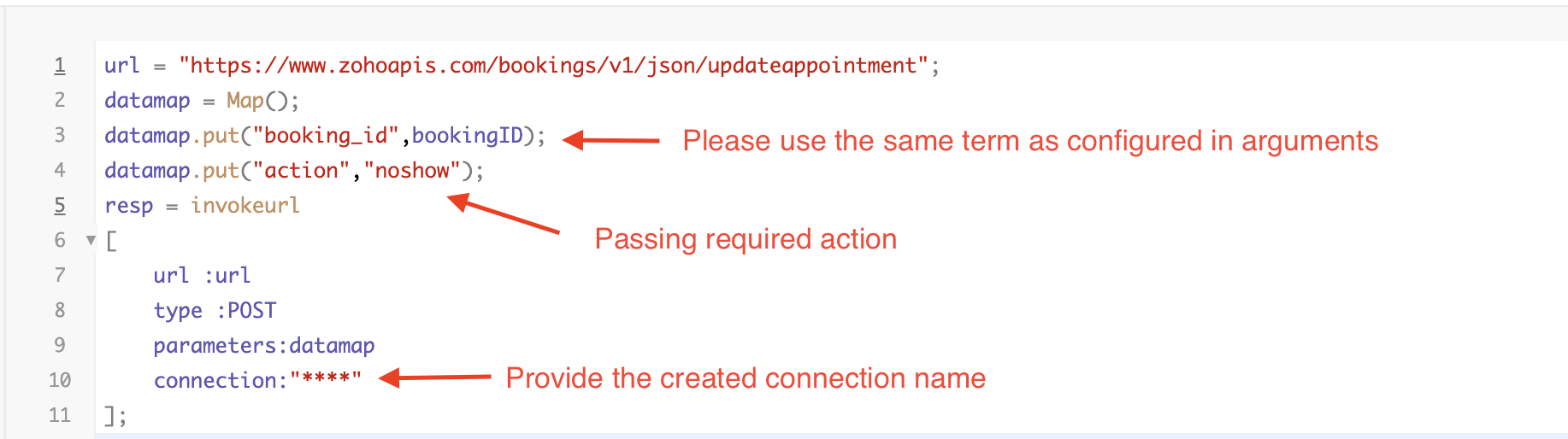
By completing these steps, we've configured a function that marks appointments as no shows.
iii. To create a function for marking appointments as canceled
1. Go to Setup > Developer Space > Functions.
2. In the Functions page, click + Create New Function.

3. Configure the function name, display name, and description.
4. Set the category as automation.
This opens the Deluge script page.
5. Next, configure the function's arguments:
A. Click on Edit Arguments on the Deluge script page.

B. Set the Parameter Name as bookingID. (Please note that the "bookingID" value is case sensitive and must match
the term used in the code).
C. Set the type as string.
Reference
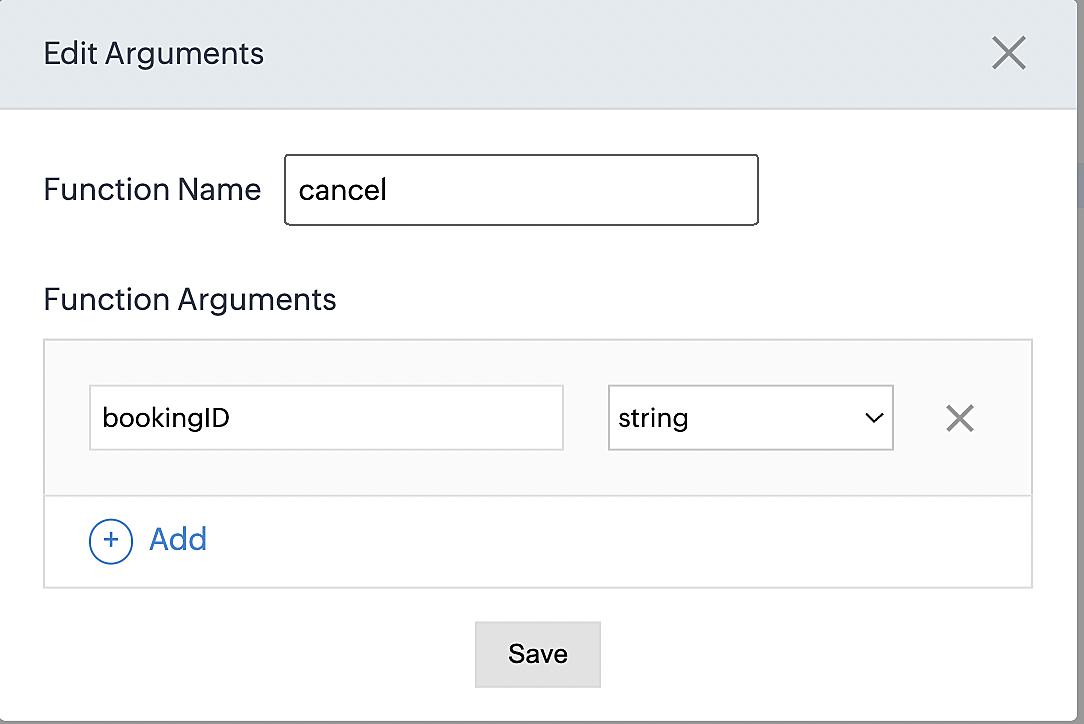
Please configure the below code on the Deluge script page.
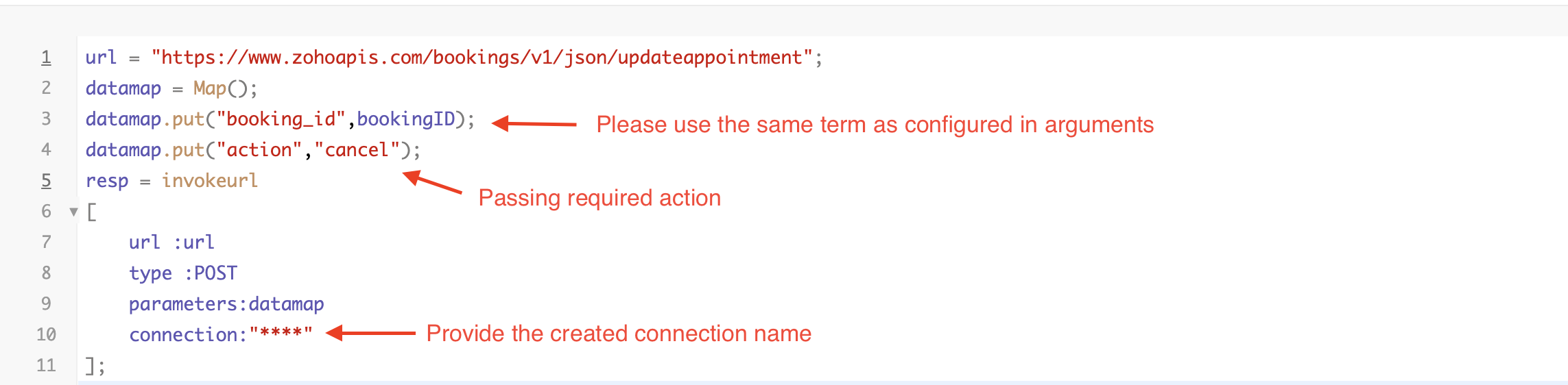
By completing these steps, we've configured a function that marks appointments as canceled.
Code explanation
Below is an explanation of the code that covers all the configurations present in the three functions mentioned above (cancel, mark as completed, and mark as no show).
Line 1: Based on the Zoho Bookings account's data center, we're setting up the API endpoint URL configuration.
Lines 2 - 4: To update appointments, we utilize the Zoho Bookings API. Within the update appointment API, there are two mandatory fields that need to be included: BookingID and action (completed/cancel/noshow).
Lines 5 - 10: We use the invokeURL task for API calls. To learn more about the invokeURL task, please refer to the following document: InvokeURL task for API calls
Now, let's proceed and learn about the process of creating a workflow and linking the established functions to it. This will enable us to automate the entire appointment status updating process.
Step 3: Creating a workflow
Workflow rules are sets of actions (email notifications, tasks and field updates) that are executed when specified conditions are met. Here, we'll generate workflow rules for each action to activate the respective function, thereby automating the appointment status updating process.
i. Creating a workflow for "canceling" appointments in Zoho Bookings when a meeting is deleted in Zoho CRM
Part 1: Creating the rule
1. Go to Setup > Automation > Workflow Rules.
2. In the Workflow Rules page, click Create Rule.

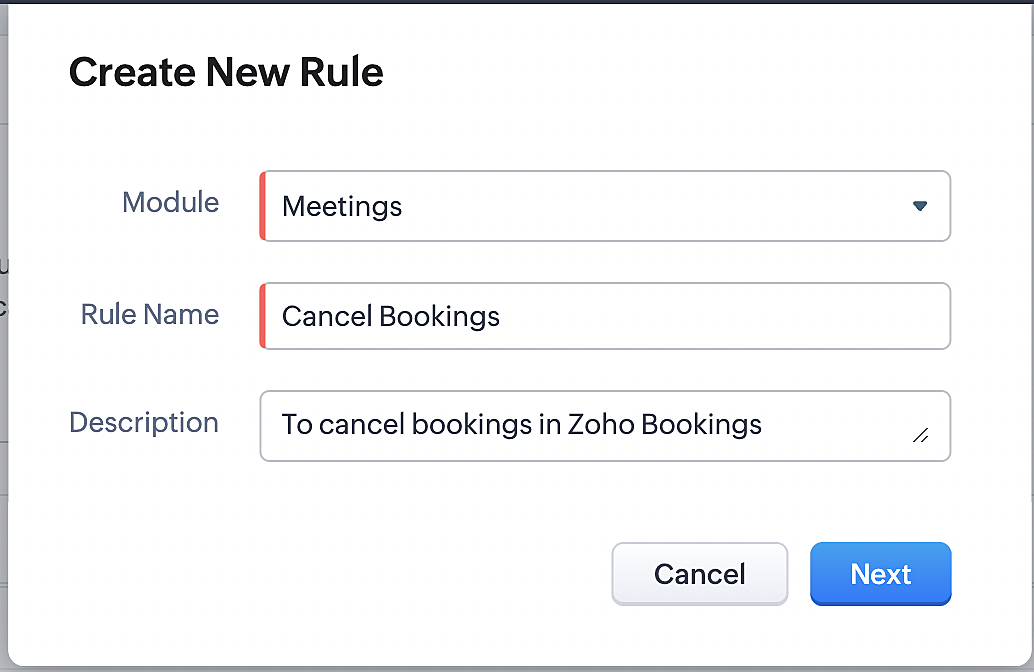
3. Select "Meetings" under Module and configure rule name and description as required.
More details: Create Rule
Reference:
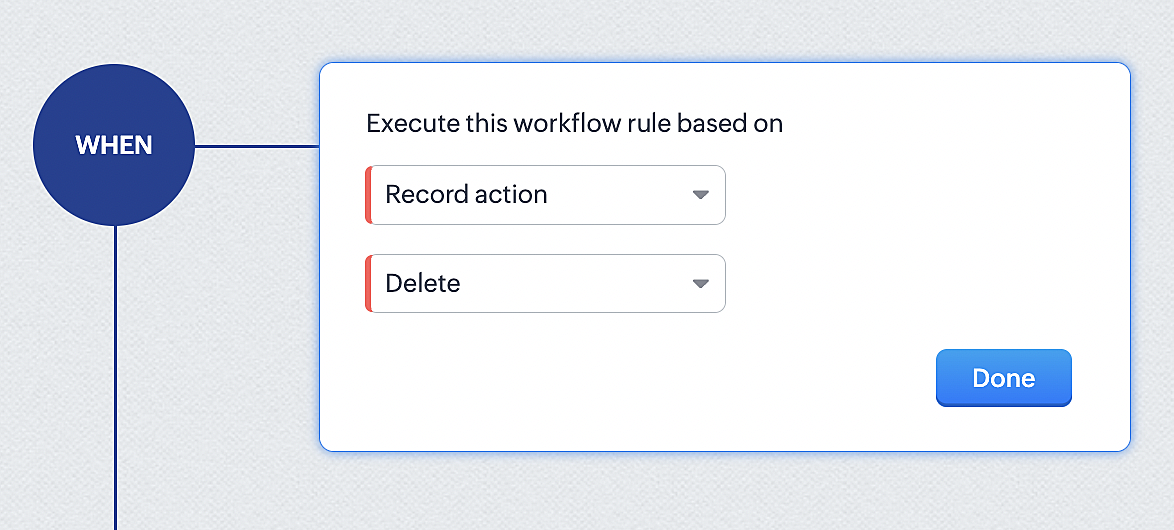
1. Select Record Action > Delete > Done to execute the rule when meetings are deleted.
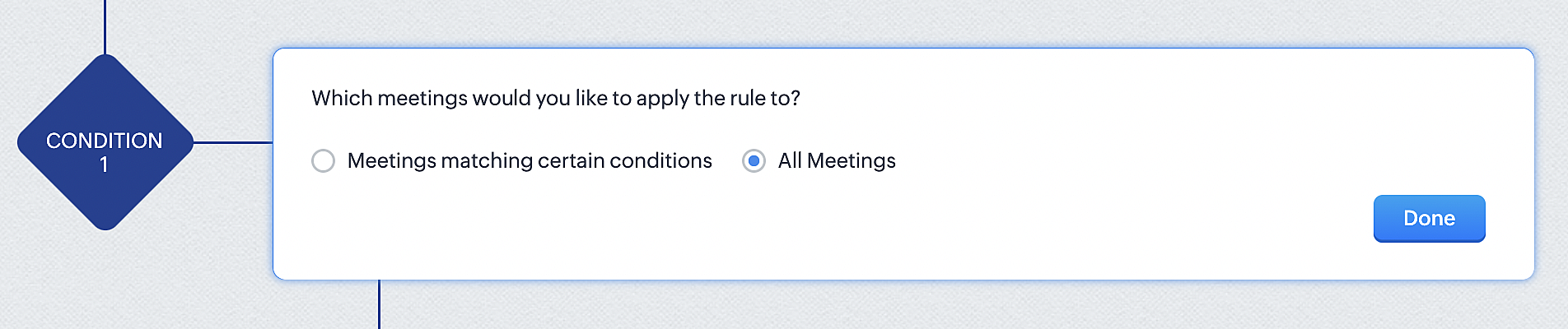
2. Configure condition > All Meetings.
3. Instant Actions > Function.
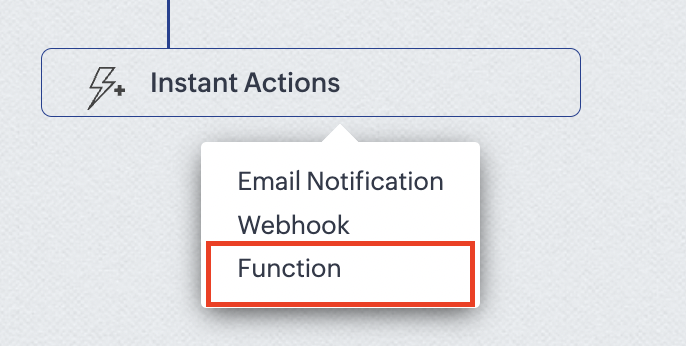
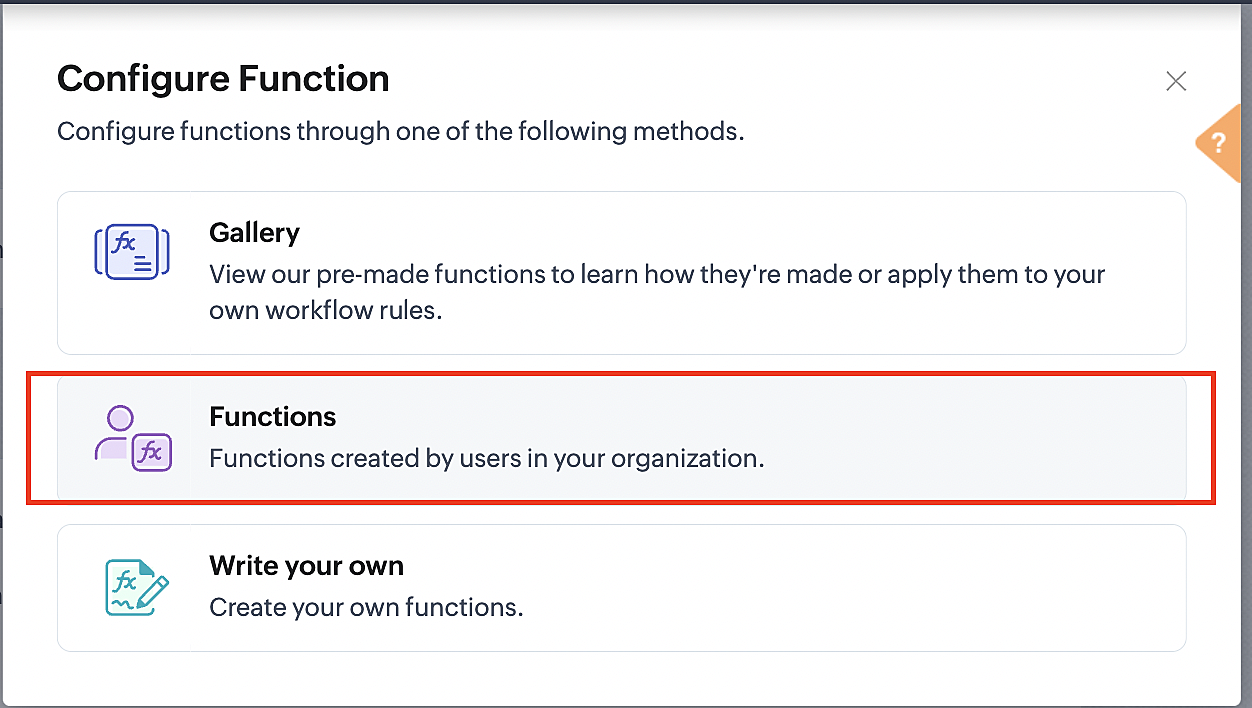
4. Click the New Function button.

5. In the Configure custom function page, select the "cancel" function you created from among the functions users in your organization have created.
Part 3: Argument mapping
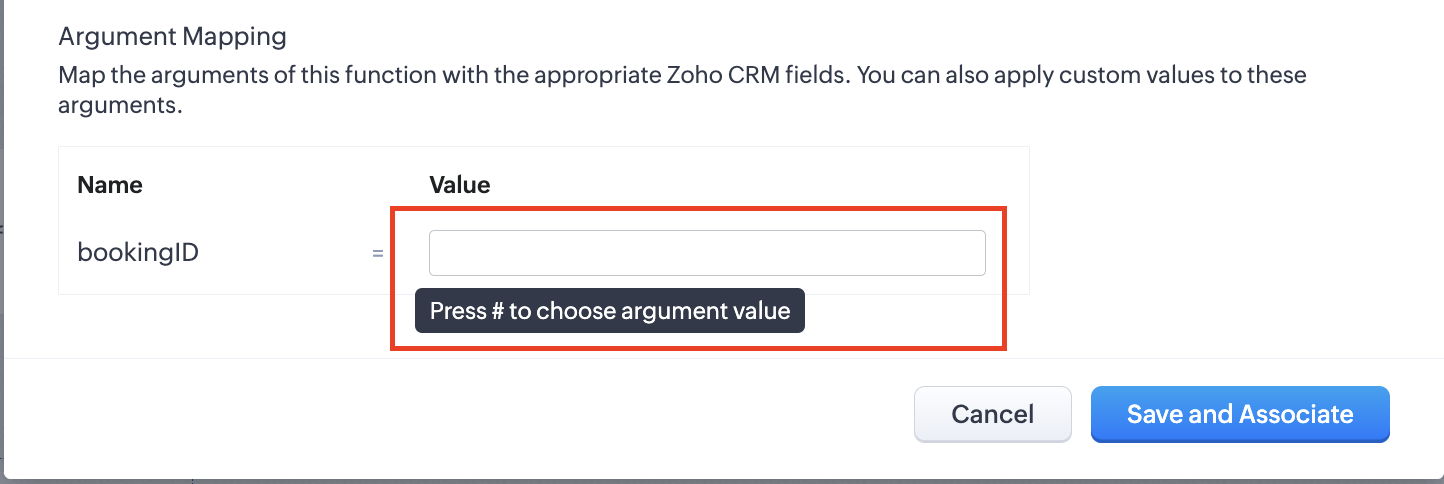
1. Press # to choose an argument value.
2. Select Meetings under Module and BookingId in the field.
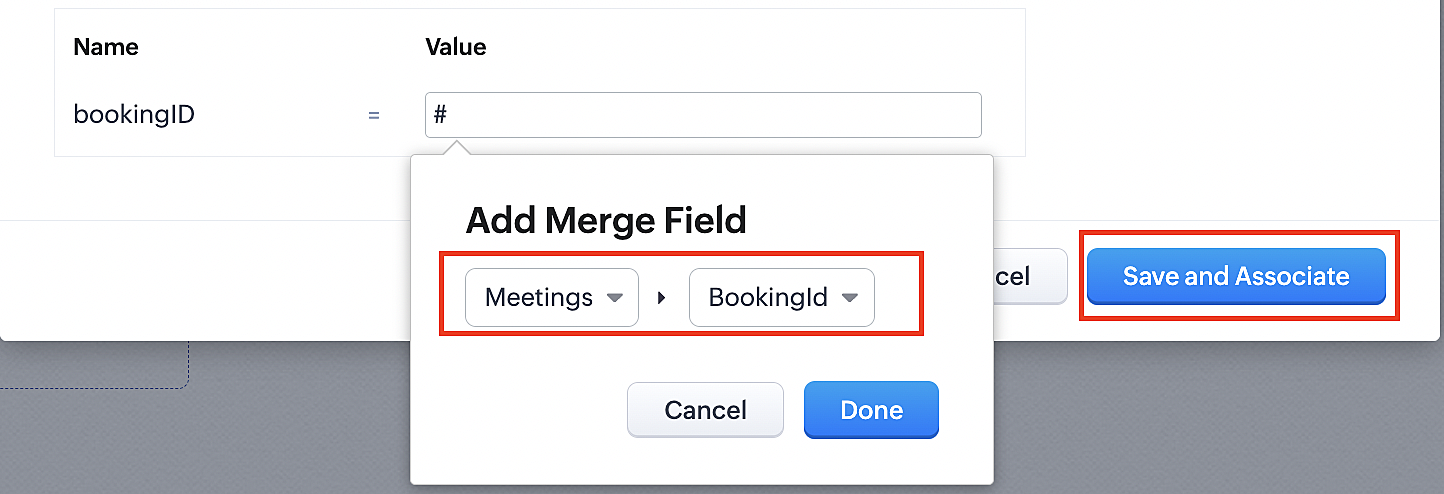
3. Click the Save and Associate button.
Reference:
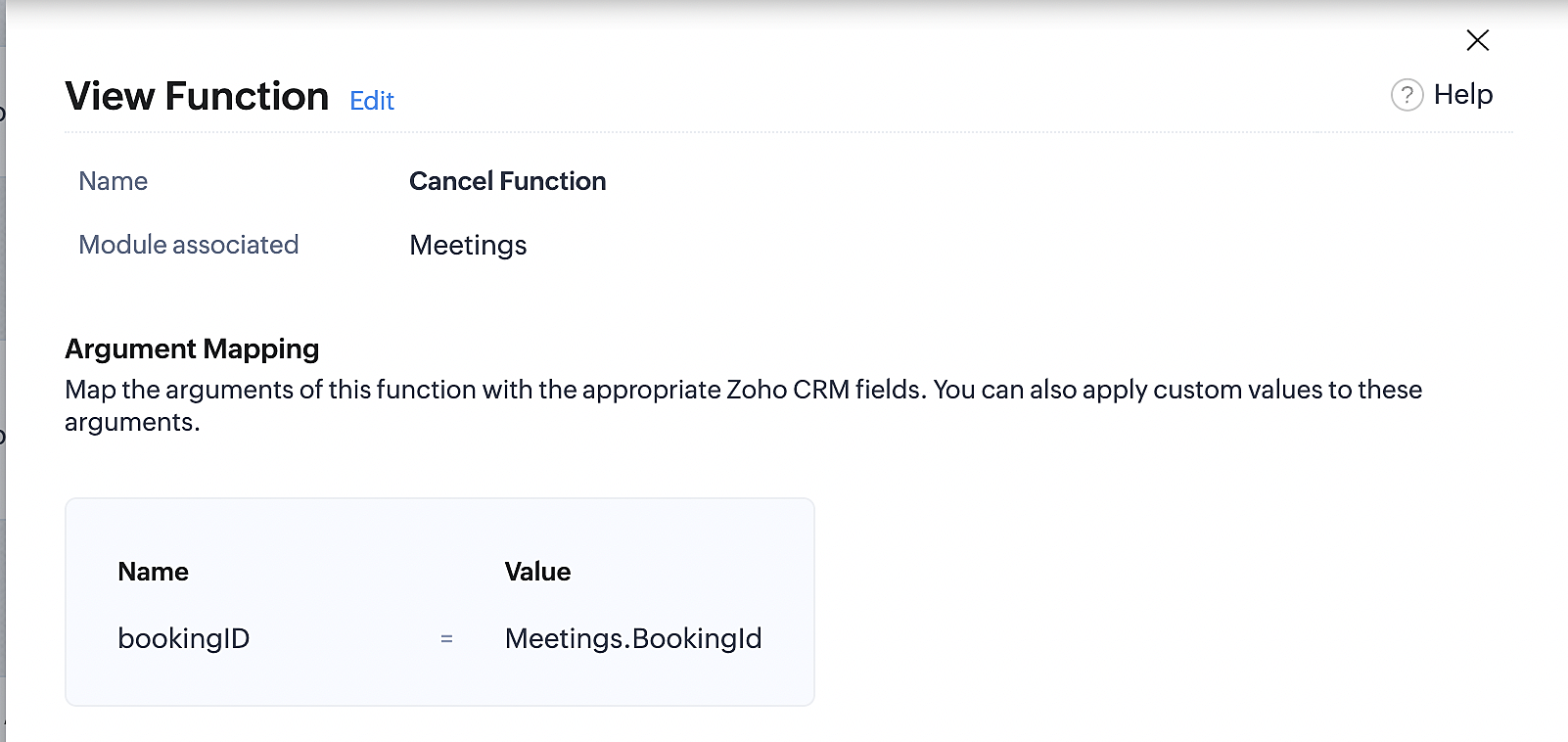
Below is the final flow of the cancel booking workflow:
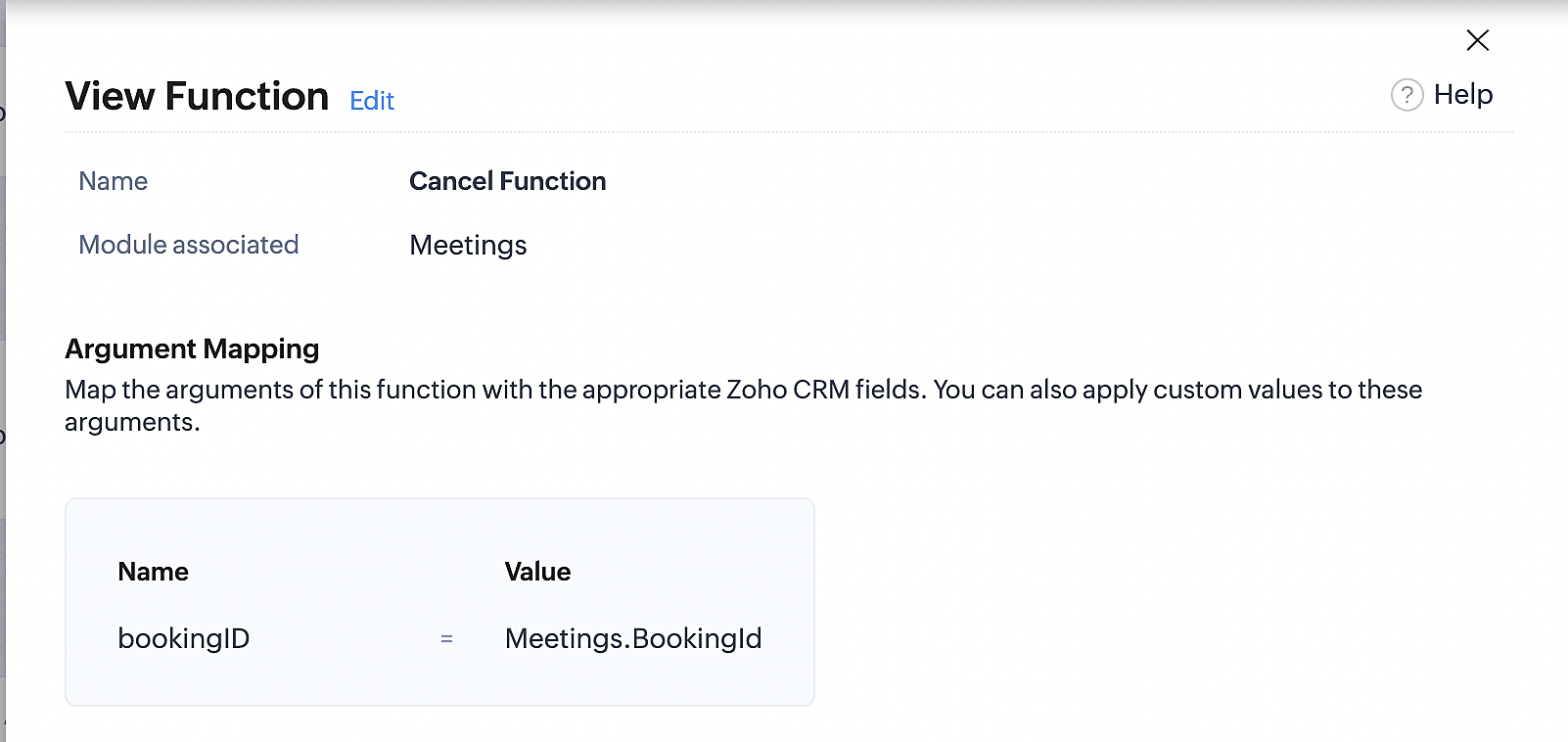
At the end of Part 3, we will have created a workflow that will be executed automatically when meetings are deleted in Zoho CRM. Simultaneously, the bookings associated with the meeting will also be canceled in Zoho Booking.
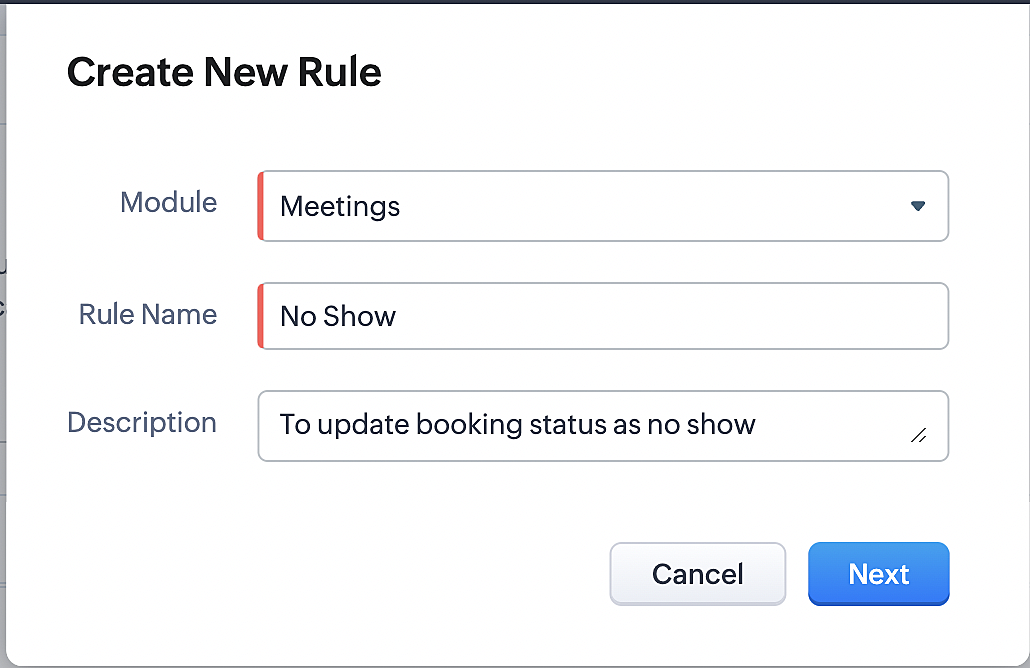
ii. Creating workflow for updating an appointment's status as "no show" in Zoho Bookings when the meeting's booking status is marked as no show in Zoho CRM
Part 4: Creating the rule
1. Go to Setup > Automation > Workflow Rules.
2. In the Workflow Rules page, click Create Rule.

3. Select Meetings under Module and configure the rule name and description as required.
Reference:
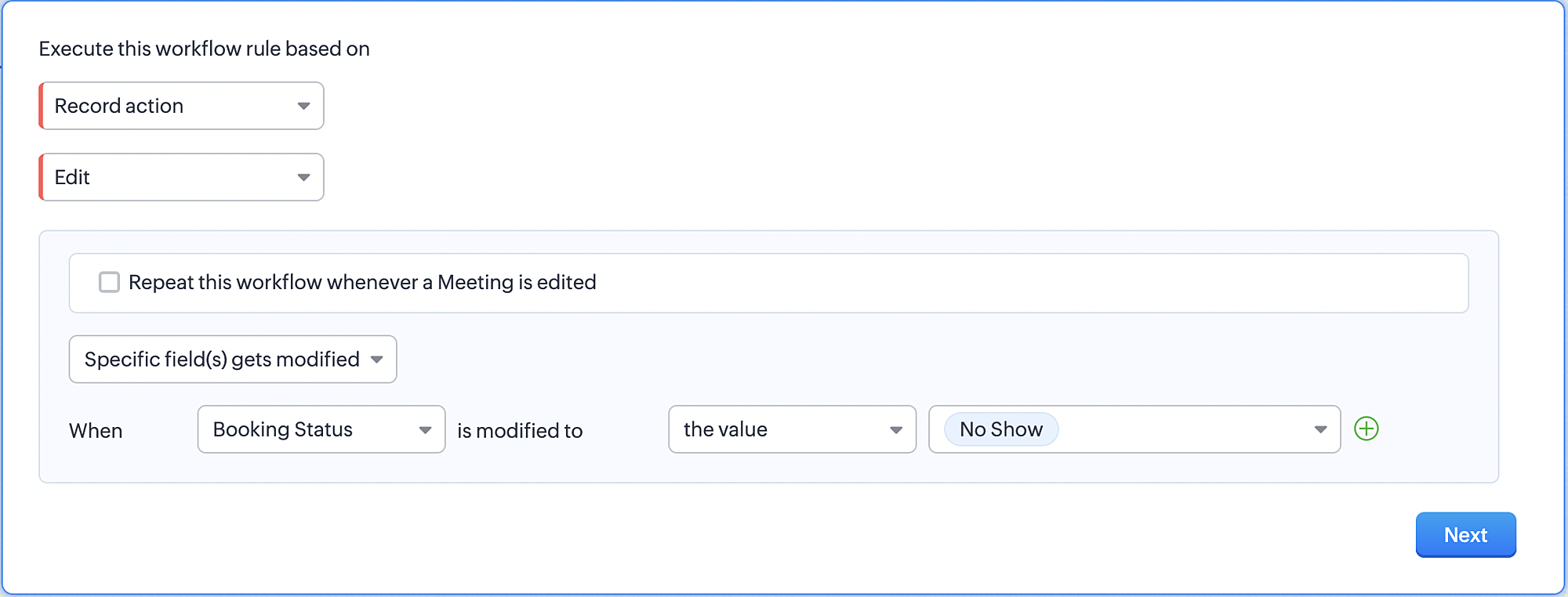
Part 5: Specifying the rule trigger
If you encounter difficulties while navigating through the steps mentioned below, please refer to Part 2 above, where we have provided step-by-step screenshots for clarification.
1. Record Action > Edit.

2. Enable the Specific field(s) gets modified and configure it per the screenshot below.
a. This is to ensure that the workflow is executed only when the booking status under the meeting module is
updated to "No Show".
updated to "No Show".
3. Configure condition > All Meetings.
4. Instant Actions > Function > New Function.
5. In the Configure custom function page, select the "no show" function you created from among the functions
users in your organization have created.
users in your organization have created.
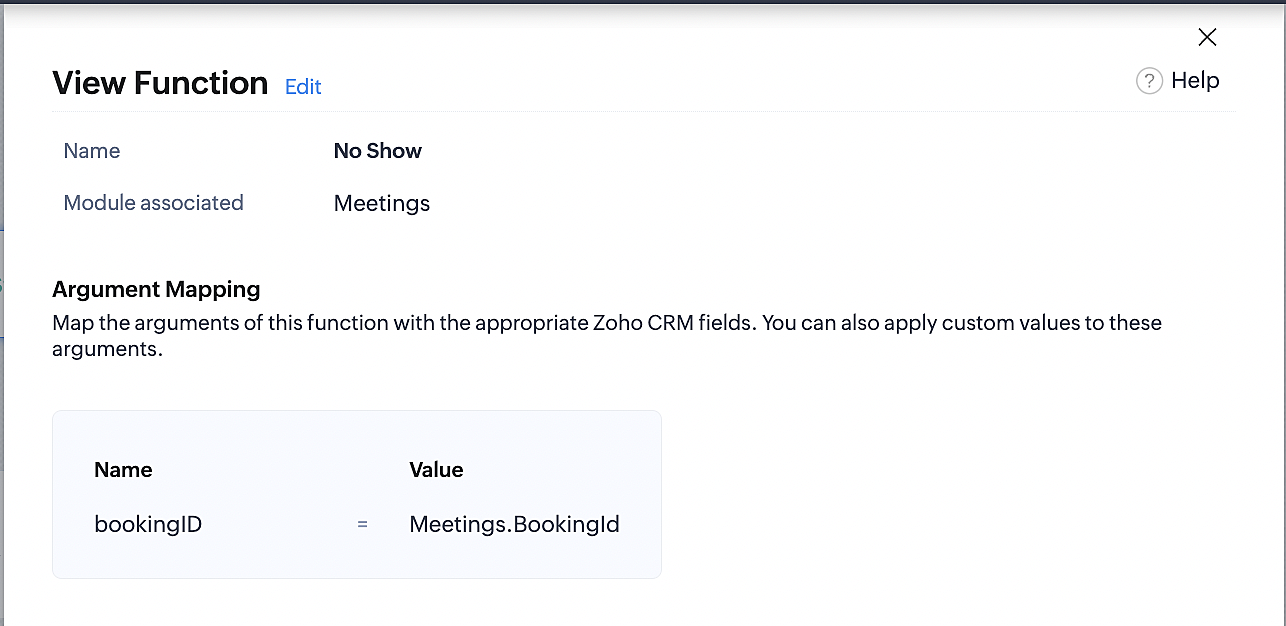
Part 6: Argument mapping:
If you encounter difficulties while navigating through the steps mentioned below, please refer to Part 3 above, where we have provided step-by-step screenshots for clarification.
1. Press # to choose an argument value.
2. Select Meetings under Module and configure the field as "BookingId".
3. Click Save and Associate button.
Reference:
Below is the final flow of the "No Show" booking status workflow:
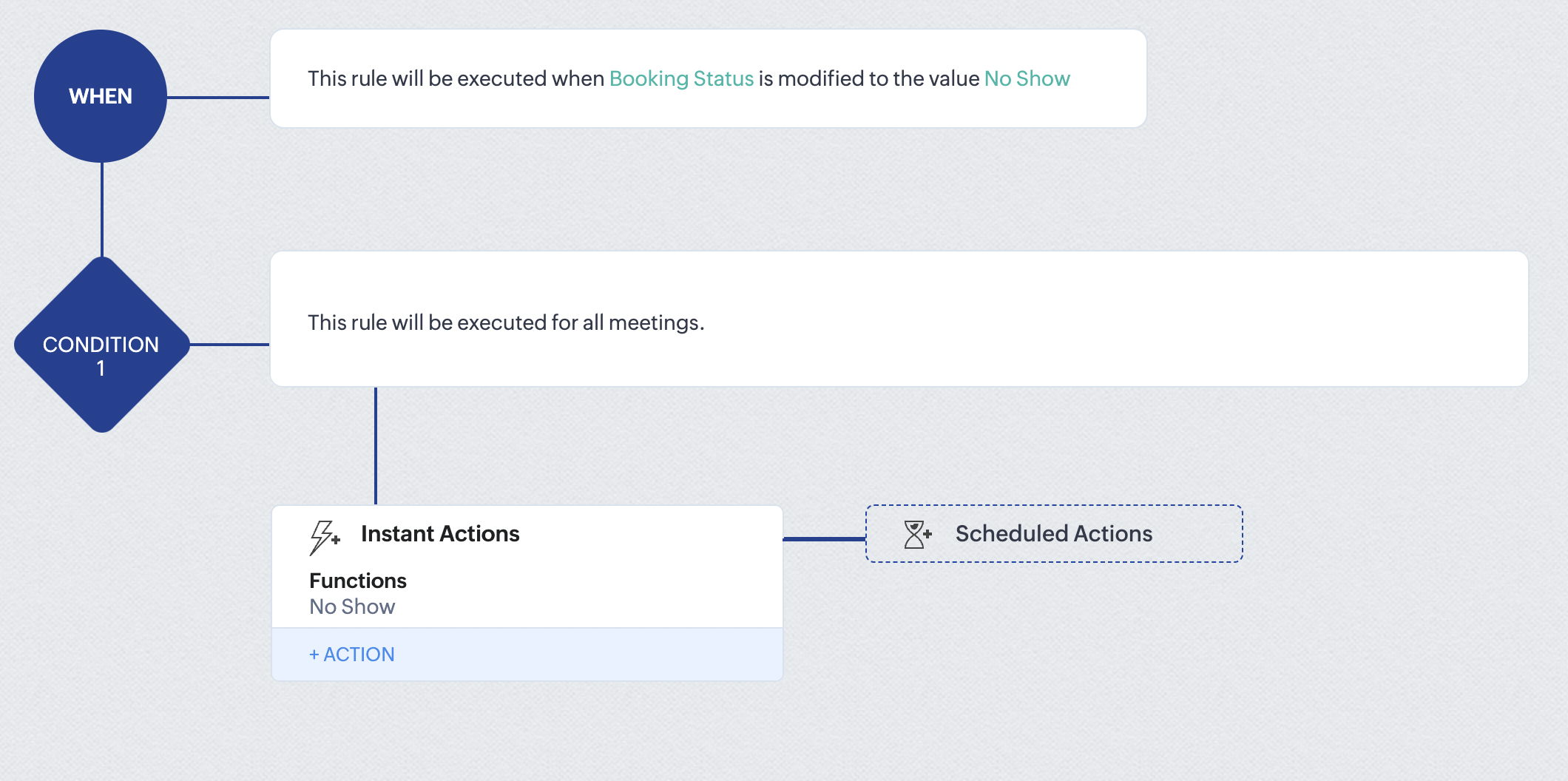
At the end of part 6, we will have created a workflow that automatically executes when the booking status field within the Zoho CRM Meetings module is updated to "No Show." This action will result in the associated bookings for that meeting also being marked as "No Show" in Zoho Bookings.
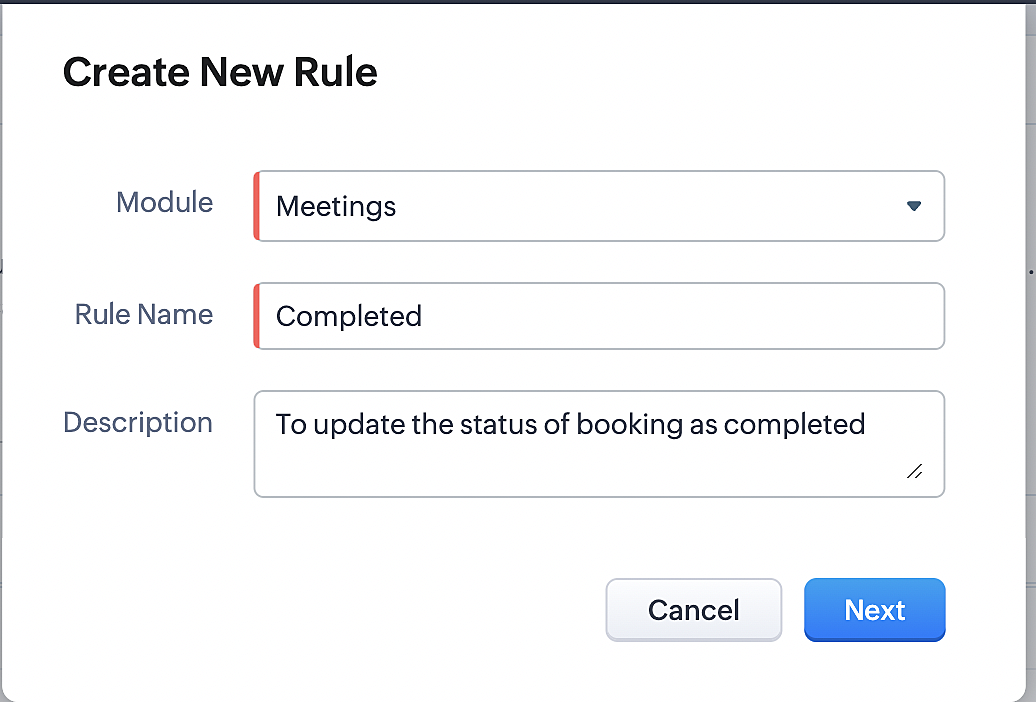
iii. Creating workflow for updating appointment status as "Completed" in Zoho Bookings when the booking status field of the meeting is marked as completed in Zoho CRM.
Part 7: Creating the rule
1. Go to Setup > Automation > Workflow Rules.
2. In the Workflow Rules page, click Create Rule.

3. Select Meetings under Module and configure rule name and description as required.
Reference:
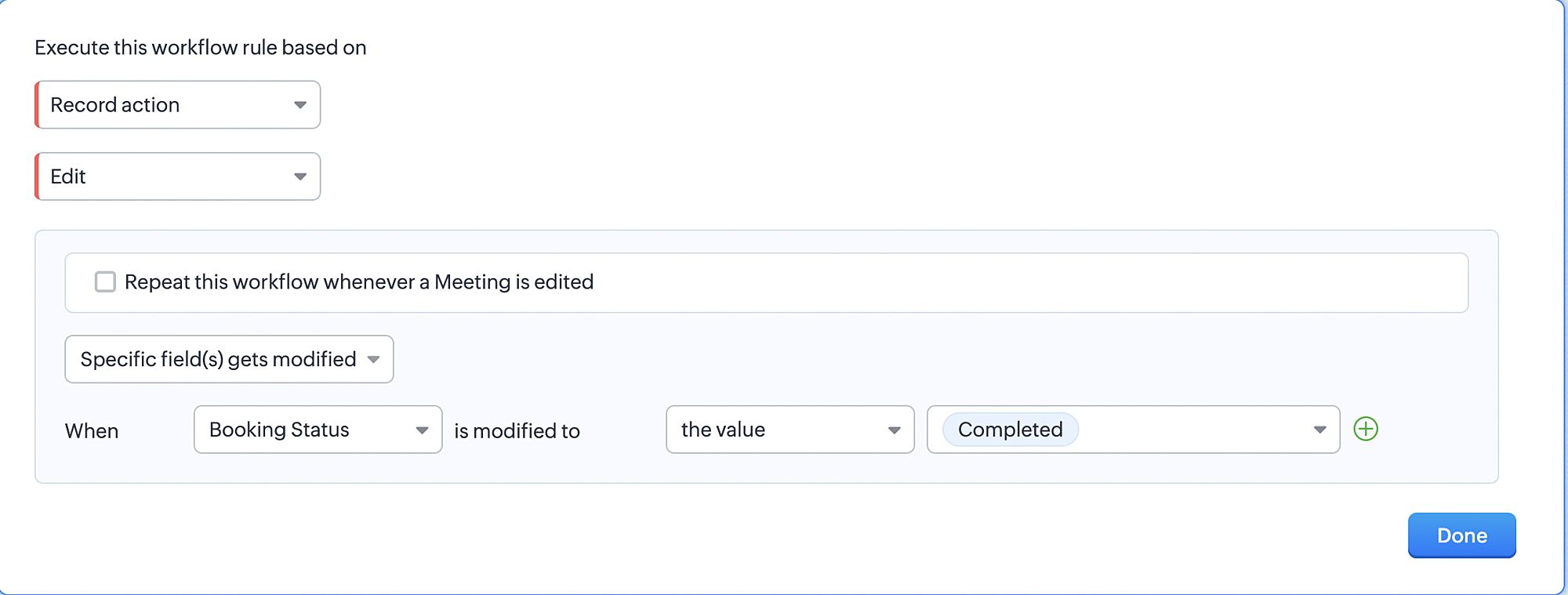
Part 8: Specifying the rule trigger
If you encounter difficulties while navigating through the steps mentioned below, please refer to Part 2 above, where we have provided step-by-step screenshots for clarification.
1. Record Action > Edit.

2. Enable the Specific field(s) gets modified setting and configure it per the screenshot below.
a. This serves to ensure that the workflow is executed only when the booking status under the Meetings module is
updated to "Completed".
3. Configure condition > All Meetings.
4. Instant Actions > Function > New Function.
5. In the Configure custom function page, select the "completed" function you created from among the functions users
in your organization have created.
Part 9: Argument mapping:
If you encounter difficulties while navigating through the steps mentioned below, please refer to Part 3 above, where we have provided step-by-step screenshots for clarification.
1. Press # to choose an argument value.
2. Select Meetings under Module and configure the field as "BookingId".
3. Click Save and Associate button.
Reference:
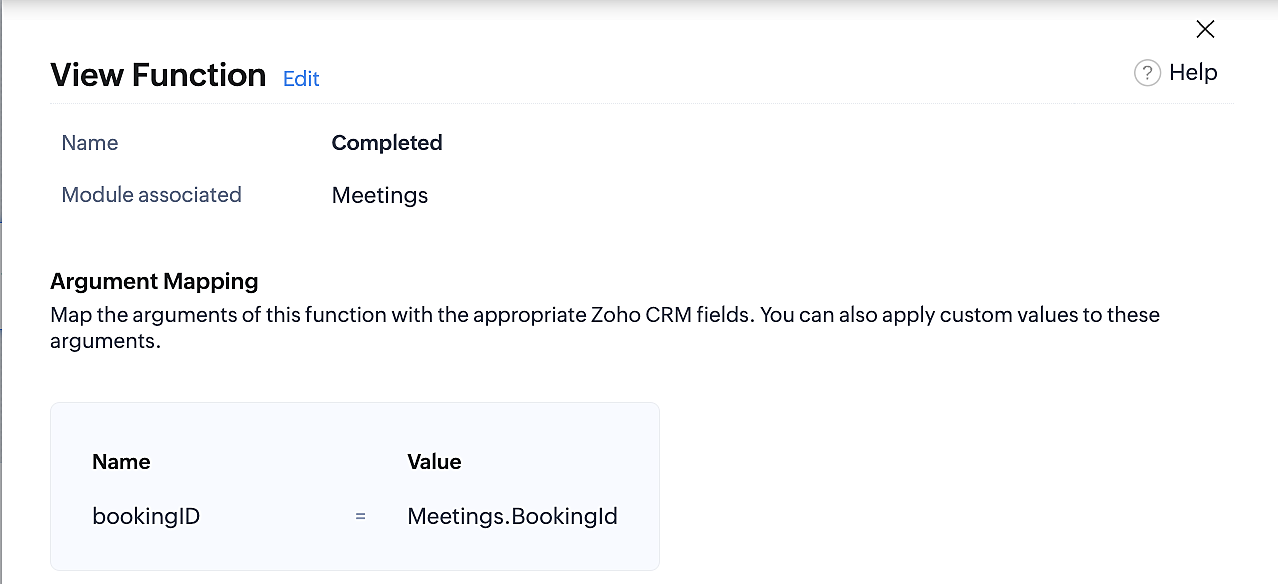
Below is the final flow of the "Completed" booking status workflow:
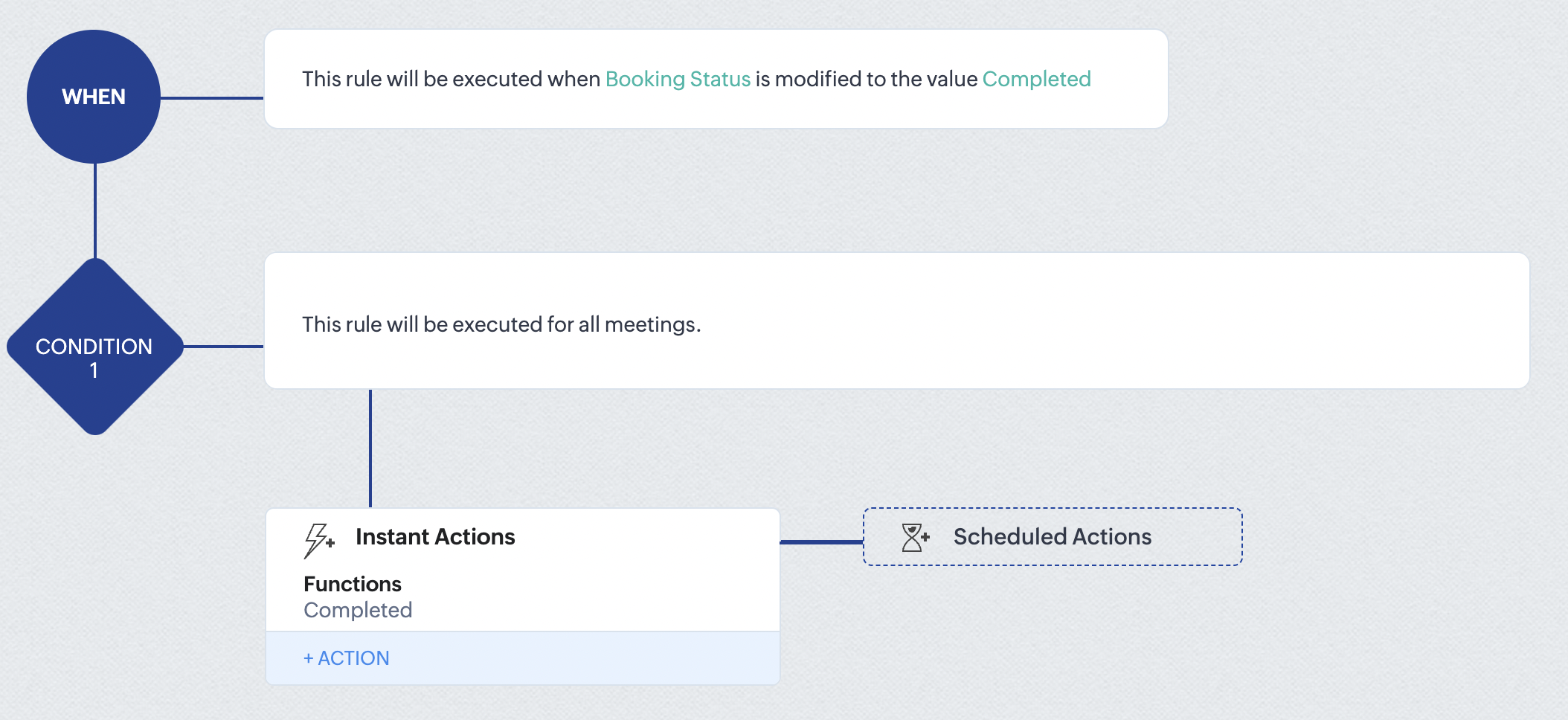
At the end of part 9, we will have created a workflow that is automatically executed when the booking status field within the Zoho CRM Meetings module is updated to "Completed." As a result, the associated bookings for that meeting will also be marked as "Completed" in Zoho Bookings.
Conclusion
We've reached the end of this community post. With the integration mentioned above in place, you'll be able to book, cancel, and update the status of appointments in Zoho Bookings directly from your Zoho CRM application. This will help you effectively manage your appointments in one place. As mentioned above, we've covered the rescheduling action in a separate post, which you can access by clicking on the following link: Reschedule Action
Furthermore, we've outlined a method for automating appointment statuses in detail. You can use this document as a reference to explore the various possibilities that suit your needs.
If you have any questions or need assistance with your configuration, please email us at hello@zohobookings.com or support@zohobookings.com.
Access your files securely from anywhere
New to Zoho Recruit?

Zoho Developer Community
New to Zoho LandingPage?
Zoho LandingPage Resources
New to Zoho Survey?
New to Zoho CRM Plus?
Deliver unforgettable customer experiences
New to Zoho CRM Plus?
Deliver unforgettable customer experiences
New to Zoho Marketing Plus?
Everything you need to run your marketing
New to Zoho Marketing Plus?
Everything you need to run your marketing
New to Bigin?





Topic Participants
Kaushik S
bruce
Ishwarya SG
PrismaNote Support
Sticky Posts
Presenting ABM for Zoho CRM: Expand and retain your customers with precision
Picture this scenario: You're a growing SaaS company ready to launch a powerful business suite, and are looking to gain traction and momentum. But as a business with a tight budget, you know acquiring new customers is slow, expensive, and often deliversGood news! Calendar in Zoho CRM gets a face lift
Dear Customers, We are delighted to unveil the revamped calendar UI in Zoho CRM. With a complete visual overhaul aligned with CRM for Everyone, the calendar now offers a more intuitive and flexible scheduling experience. What’s new? Distinguish activitiesCreate and populate a record in an instant: Introducing zero-shot field prompting to Zia's ICR
A couple of months ago, we upgraded our in-house AI image detection and validation tool, Zia Vision, with intelligent character recognition (ICR). By training Zia with sample images, you could create and enrich CRM records with data extracted from standardIn-person ZUG Meetups for Real Estate Professionals - US Q1 2026
The Real Estate Zoho User Group is going on a multi-city, in-person meetup tour across the US, and we’d love to see you there! These meetups are a great opportunity to: Connect with fellow real estate professionals using Zoho Share challenges and discoverNimble enhancements to WhatsApp for Business integration in Zoho CRM: Enjoy context and clarity in business messaging
Dear Customers, We hope you're well! WhatsApp for business is a renowned business messaging platform that takes your business closer to your customers; it gives your business the power of personalized outreach. Using the WhatsApp for Business integration
New to Zoho TeamInbox?
Zoho TeamInbox Resources
Zoho CRM Plus Resources
Zoho Books Resources
Zoho Subscriptions Resources
Zoho Projects Resources
Zoho Sprints Resources
Qntrl Resources
Zoho Creator Resources
Zoho CRM Resources
Design. Discuss. Deliver.
Zoho Show Resources

Get Started. Write Away!
Writer is a powerful online word processor, designed for collaborative work.
Zoho CRM コンテンツ
-
オンラインヘルプ
-
Webセミナー
-
機能活用動画
-
よくある質問
-
Ebook
-
-
Zoho Campaigns
- Zoho サービスのWebセミナー
その他のサービス コンテンツ
Nederlandse Hulpbronnen

ご検討中の方
Recent Topics
Zoho Website Site Speed Up & Setting
We are experiencing slow loading speeds on our Zoho website and would like assistance in optimizing its performance. Kindly review the site and suggest or implement necessary improvements to enhance speed, especially related to: > Caching mechanisms >No option for pick up in Zoho Books / Inventory but yes on commerce
Is it planned to release soon on books/inventory?Accessing Zoho form enteries via API
Hi As a user I can view enteries to a form at: https://forms.zoho.com/<myOrganisation>/report/<myReportName>/records/web How do I access these entries via API? I don't have any problem with scope and getting tokens. But I have no idea what the API callBlueprint Issue - Being able to set a subform field as mandatory
I'm creating a blueprint. My record involves a subform which is only shown once field is set but the field gets set in step two of the process. My problem - I can't save the record as the subform field is set to mandatory - If I unset the mandatory field,Blueprint - Mandatory file upload field
Hi, File upload (as we as image upload) field cannot be set as mandatory during a blueprint transition. Is there a workaround? Setting attachments as mandatory doesn't solve this need as we have no control over which attachments are added, nor can weZoho Books - Include Quote Status in Workflow Field Triggers
Hi Zoho Books team, I recently tried to create a Workflow rule based on when a Quote is Accepted by the customer. This is something which I thought would be very easy to do, however I discovered that Status is not listed as a field which can be monitoredZoho Books - Show Related Sales Orders on Quotes
Hi Books team, I've noticed that the Quotes don't show show the related Sales Order. My feature request is to also show related Sales Orders above the Quote so it's easy to follow the thread of records in the sales and fulfilment process. Below screenshotAdd VAT/Tax line to bank adjustments
When categorising transactions and matching bank feeds with transactions such as customer payments, we use the "Add Adjustment" to add things like fees/bank fees. It would be useful to choose a VAT/Tax rate here. Whilst there is a bank charges option when adding a payment, this goes into the default bank charges account. We use the adjustments so that we can choose the account and separate our fees. We use different card providers and Worldpay charges VAT so we are stuck. We cannot integrate withNew Menu Layout Feedback
I'd really like to see the banking item back on the top of the menu. I'm sure part of it is just because that's what I'm accustomed to. However, for a bookkeeping program, I think there's a logic to having banking be on top. Not a giant issue, but somethingForm Accessibility
Hi, is there an update on the accessibility standard of Zoho forms? Are the forms WCAG 2.1 AA compliant?Cannot schedule report delivery
The only 'send option' available when exporting reports is 'immediately' The option to schedule the report is missing.adding attachment in sendmail script where attachment is in a CRM field
Hi all, I have a custom field of type 'File Upload' in one of my modules in my CRM. I want to include the file in that field as an attachment to an email - which is done from a button on the 'Results' module. I have created a script and a button to initiate an email from that module. The Deluge scripting window has allowed me to add arguments for all the fields I need to use except for the one file upload type field. My script currently looks like the below (content of the email omitted). As you[Free Webinar] Learning Table Series - AI-Enhanced Insurance Claim Management in Zoho Creator
Hello Everyone! We’re excited to invite you to another edition of Learning Table Series, where we showcase how Zoho Creator empowers industries with innovative and automated solutions. Struggling with lengthy claim processes, a lack of visibility intoNot sure how to use credits to my account
Hi I have a $50 credit to my account. I'm just wondering how I can apply that to either a current invoice or to try a new service. Any advice would be great, thanks. Kind Regards ChrisControl who sees Timeline and Interactions in Zoho CRM through Profiles
The feature has been enabled for all DCs (except US, EU, and IN DCs). We will be rolling it out to the other DCs in the upcoming days. Dear All, In a CRM, not all users would require access to the history of a record. For instance, a Marketing OperationsZoho Desk Integration - Add the option to send the estimate from the Zoho Desk Ticket Integration
Hi, Currently in the Zoho Desk integration, the user is able to create an estimate from a ticket, once the estimate is created the user can see the estimate under the ticket (see screenshot below), but is not able to send that estimate from Zoho Desk.CRM Validation Rules Support Only Single Condition
Simply put, CRM validation rules support only a single condition for each field on "All Records". You also cannot specify additional validation rules on the same field because it has already been used in an existing validation rule. The ONLY solutionUnapproved Leaves are hard to distinguish in Attendance View
This is a an unapproved leave request It appears in the Attendance view without any visual indicator if its approved or not For a whole day request this might be manageable but for hourly requests it gets very hard to know which are approved, which arePerformance Appraisal Probation Period
Hello All, Is there any possible way to create an appraisal cycle for new staff members, at the end of probation period? Many thanks!Zoho Creatorの一括操作における処理の同期/非同期について
現在、Creatorのレポート機能を利用して、複数のレコードに対して一括で処理を実行しようとしていますが、処理の実行順序について確認したいことがあります。 レポート内の複数レコードに一括で処理を実行した際、処理は同期的に行われるのでしょうか?それとも非同期的に行われるのでしょうか? 【同期処理の場合】 レコード①に対する処理が開始され、終了後にレコード②に対する処理が開始され、最後にレコード③に対する処理が実行されるように、処理が順番に行われる場合。 【非同期処理の場合】 レコード①、レコード②、レコード③の処理が一斉に開始され、それぞれ並行して処理が行われ、全処理が終了する場合。Mail Delivery Failed
Good morning, I have just set up an account with 5 users, however each time a message is sent to 1 user a m'mail delivery failed' message is generated. See below. Any ideas Thanks Rob This message was created automatically by mail delivery software. A message that you sent could not be delivered to one or more of its recipients. This is a permanent error. The following address(es) failed: robb@thesmartgroup.ae mailbox is full: retry timeout exceeded ------ This is a copy of the message,Delete commerce website
I need to delete a commerce website, but the only option is to click on settings, REQUEST DELETE, choose an urgency notice, add a message....AND THEN nothing, no way to send the request. Why is nothing simple!?!?! I just want to delete the store. TheAdding external users to Zoho Social under Zoho ONE licence - how to best achieve this
My client has a small business, and we are looking to implementing Zoho ONE with a single flexible user licence as that is all they really need and offers the best pricing for the range of modules we eventually wish to set them up with, one of which willThis mobile number has been marked spam. Please contact support.
Problem Description: One of our sales agents in our organization is unable to sign in to Zoho Mail. When attempting to log in, the following message appears: This mobile number has been marked as spam. Please contact support at as@zohocorp.com @zohocorpWhat’s New in Zoho Inventory | April 2025
Hello users, April has been a big month in Zoho Inventory! We’ve rolled out powerful new features to help you streamline production, optimise stock management, and tailor your workflows. While several updates bring helpful enhancements, three major additionsPass current date to a field using Zoho Flow
I am trying to generate an invoice automatically once somebody submits a record in Zoho CRM. I get an error in the invoice date. I have entered {{zoho.currentdate}} in the Date field. When I test the flow, I get "Zoho Books says "Invalid value passedAPI: Mark Sales Order as Open + Custom Status
Hi, it's possible to create Custom Status (sub-status actually) states for the Sales Order. So you have Open, Void. Then under Open you can have Open, and create one called Order Paid, Order Shipped, etc etc...which is grouped under Open. I can use theZoho Quartz Screen Recording
Hello, can we get access to Quartz, please, as a standalone solution? It would be great for creating training videos for current and future staff on how to use Zoho software according to our company requirements. Thank youTip 26: How to hide the "Submit" button from a form
Hi everyone, Hope you're staying safe and working from home. We are, too. By now, we at Zoho are all very much accustomed to the new normal—working remotely. Today, we're back with yet another simple but interesting tip--how to hide the Submit button from your forms. In certain scenarios, you may want to hide the submit button from a form until all the fields are filled in. Use case In this tip, we'll show you how to hide the Submit button while the user is entering data into the form, and thenHow do I move Notes around within a Group?
It says here: " You can now sort notes by title (alphabetically), or by date modified and date created. You can even organize your notes by dragging and dropping them into a particular order. To sort your notes, simply go to Settings and tap “Sort By.” Please note: all sort settings will be saved and synced across devices, except for custom sorting. Custom sorting will be device specific."However, I am unable to 'custom sort' in either Notebook for Mac or on the Web. In addition, I can't find theZoho Sign: need to leave document pending for up to a year, or maybe there's a better way?
I have zoho one, maybe there's a better way to do this with another service than sending a zoho sign template from zoho crm. At the end of the day this requirement is due to regulations, no matter how dumb it may seem. I'm just looking for a way of gettingSeparate Items & Services
Hi, please separate items and services into different categories. Thank youUnable to edit or delete email address
I signed up for free Zoho today. I usually am pretty good at understanding and configuring things like this, but your interface baffles me, and your online help is cryptic to say the least. I have spent hours just trying to set up a couple of email accounts in Zoho before pointing my domain MX records to Zoho. I solved some other issues on my own, but I can't figure out this latest problem: I have created two email addresses in Zoho. Let's call the first one myname@mydomain.com and the second oneMastering Zia Match Scores | Let's Talk Recruit
Feeling overwhelmed by hundreds of resumes for every job? You’re not alone! Welcome back to Let’s Talk Recruit, where we break down Zoho Recruit’s features and hiring best practices into simple, actionable insights for recruiters. Imagine having an assistantWe are unable to process your request now. Please try again after sometime or contact support@zohoaccounts.com
I cannot sign up and return the error of we are unable to process your request now. Please try again after sometime or contact support@zohoaccounts.comMulti-currency - What's cooking ?
Hi, We have been doing this feature for sometime and we would like to give you some glimpses of it. Working with Multi Currency : Multicurrency support gives you the ability to handle business transactions in multiple currencies. You can define a base currency for your organization and add more currencies with exchange rates based on the base currency. Setup : From the setup page, you can manage all the currencies supported by your organization. Currencies pageHow to reduce programmatically the image uploaded by user?
I need a function that will automatically reduce the pixel dimension to 800 x 600 pixels / 180 resolution or (approx. 1.37MB) of image uploaded by user from digital camera, for example, 2271 x 1704 pixels /180 resolution or approx. 11.1MB. After the user selected the image, the function will able to detect if pixels is above 800x600, process the photo (crop/ reduce) and resume upload. Need help...Dark mode for Zoho Creator / Zoho CRM Code editor
Hi Team, Is there any plans for Dark mode in Zoho creator / Zoho Crm code editor and development pages in pipeline?Is there a way to make a button scroll down?
Looking to have a button on a landing page scroll down to another section on the page. Any recomendations outside of coding?ZOHO Android Client
Hi, I installed the Android app, but it had an issue, so I reinstalled it. I was able to add multiple accounts, but now when I add the next account, it just duplicates the one I already have and will not even allow me to enter the info for another account.Next Page