Building extensions #7: Create custom widgets for a simplified end-user experience
Discover the benefits of using widgets!
We explored the significance of widgets, prerequisites, and the availability of JS SDK methods as part of our previous post. In this post, let's go over a detailed example of using widgets along with certain Zoho Projects JS SDK methods.
Use case: A developer is working on a Zoho Projects task and wants to know if there are any existing references that could be used to get a head start on their work.
Goal: Our goal here is to simplify the developer's job by presenting them with articles that are relevant to the task at hand.
Solution: Widgets! To achieve this goal, it would be ideal for the developer to have access to relevant Zoho Desk articles from a tab on the Task Details page. This can be accomplished by developing a custom widget.
Required components:
- A connection between Zoho Projects and Zoho Desk.
- An extension configuration process that includes:
A. Creating an extensionB. Configuring the plugin manifestC. Setting up the widget code to display the Zoho Desk articles on the Zoho Projects Task Details tab
We have already explored the steps to establish a connection, create an extension, and configure the plugin-manifest.json file as part of our earlier posts. You can refer to those resources for detailed guidance. In this case, we have already completed most of these steps (screenshots below).
1. Connection
We have created a connection to establish a secure integration between Zoho Projects and Zoho Desk.
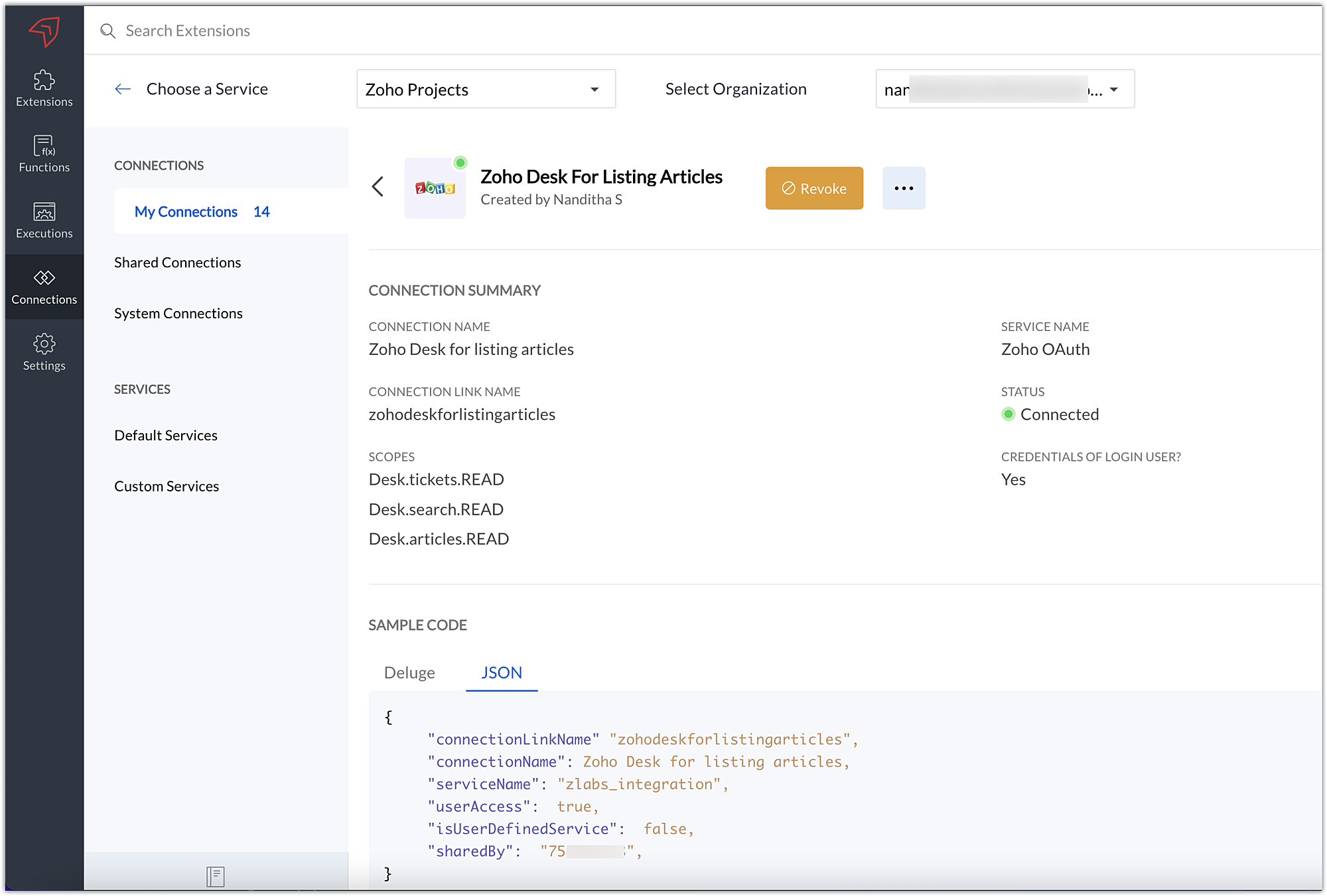
2. Extension Configuration
A. Extension creation: We have created a new extension for Zoho Projects.
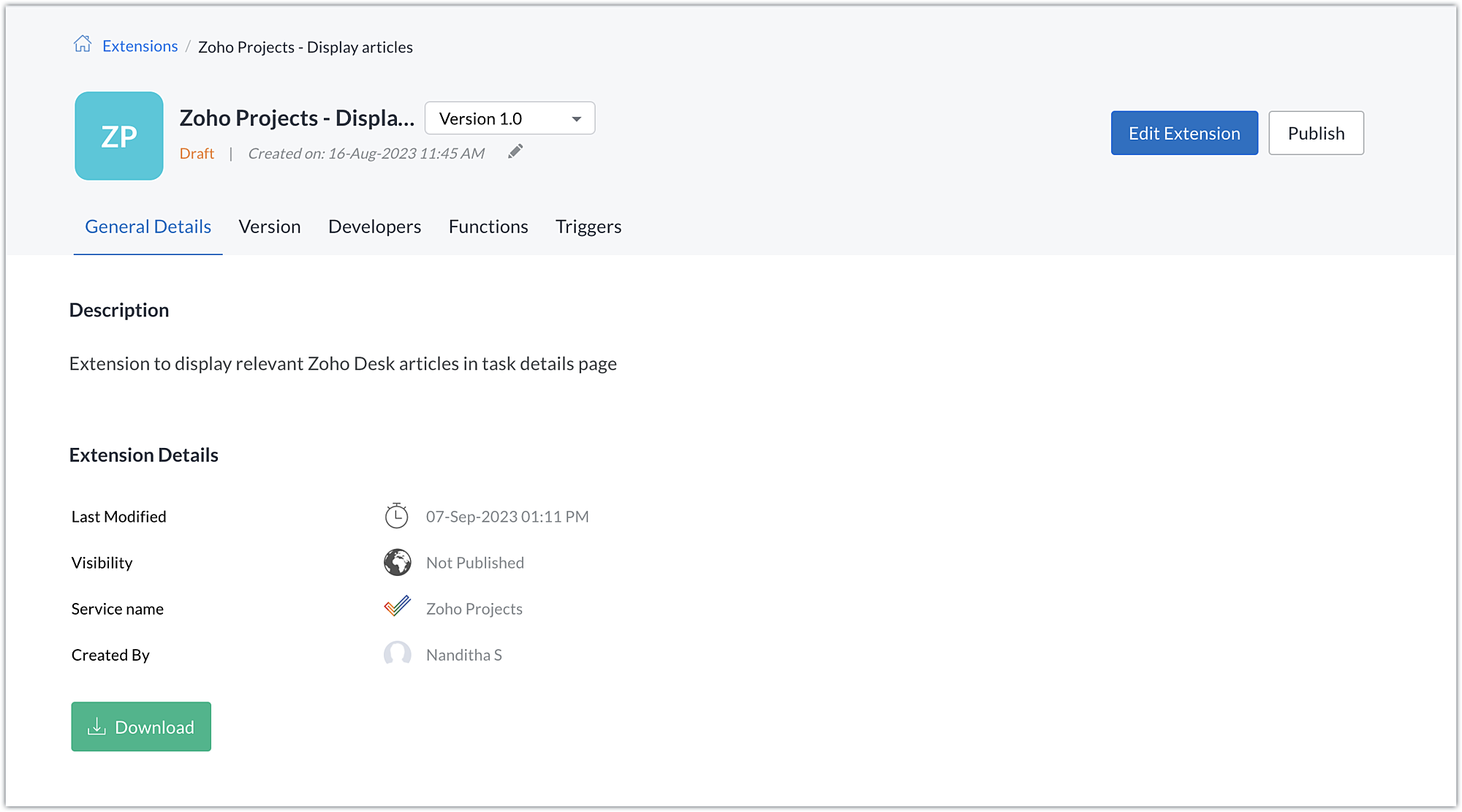
B. Plugin-manifest.json configuration: Once the extension is created, we next configure the plugin-manifest.json file to include the created connection and a widget.
For our extension use case, the plugin-manifest.json file is configured as shown in the below screenshot.
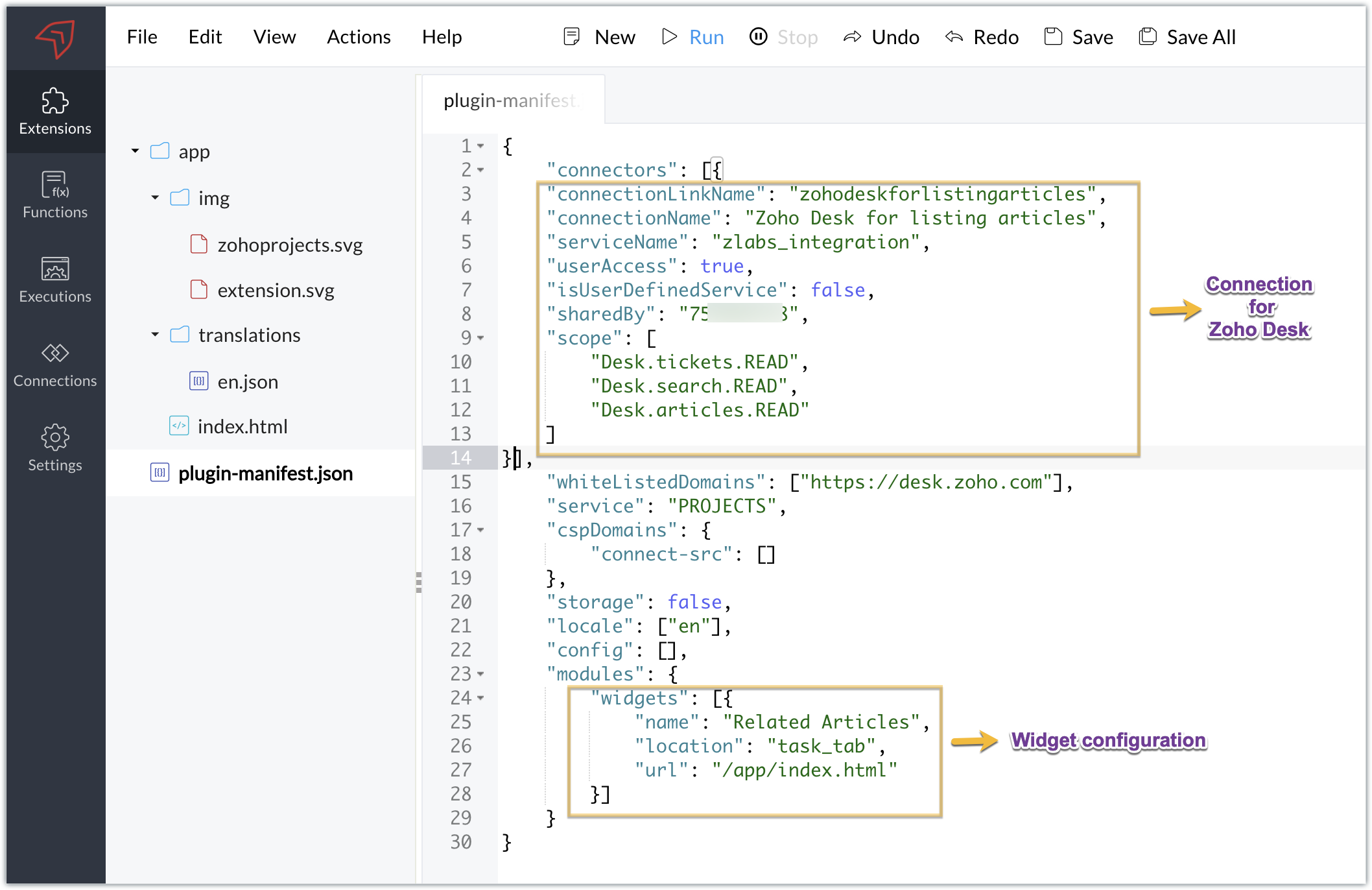
C. Setting up the widget code:
Now that we have the connection established, the extension created, and the plugin-manifest.json configured, let's go ahead and set up the custom widget code to achieve our goal.
Index.html - Widget code
<!DOCTYPE html> <html> <head> <title>App Default Screen</title> <script src="" target="_blank">https://js.zohocdn.com/projects/js/client_sdk.min.js"></script> <script src="" target="_blank">https://code.jquery.com/jquery-1.12.4.min.js"></script> <style> div.a { line-height: 200%; } </style> </head> <body> <div class="a"> <ul id="demo" style="font-size:20px"> <b>Article Details</b></ul> </div> </body> <script> var subject = ""; Util = {}; zohoprojects.init().then(function() { //Fetching the task subject using the Zoho Projects JS SDK method zohoprojects.get("task.name").then(function(response) { subject = response.data; var articledetails = { type: "GET", headers: { "orgId": "xxxxxxx", "Content-Type": "application/json" } }; var url = "https://desk.zoho.com/api/v1/articles/search?title=" + subject + "*"; //Using the request JS SDK method to invoke and get the Desk articles matching the task subject using the connection zohoprojects.request(url, articledetails, "zohodeskforlistingarticles").then(function(response) { var list = document.getElementById('demo'); var a = document.createElement("a"); var result = response.result; var data = result.data; //Looping through the articles for (i = 0; i < data.length; i++) { var title = data[i].title; var author = data[i].author; var authorname = author.name; var weburl = data[i].webUrl; var entry = document.createElement('li'); entry.innerHTML = title.link(weburl) + " by " + authorname; list.appendChild(entry); } }); }); }); </script> </html> |
- Here, we utilized the Zoho Projects JS SDK method to extract the task name, which is the task subject.
- We then used the Zoho Projects Request method to invoke the Zoho Desk API to search for articles.
- The Request method is used to make requests to third-party applications. It must be invoked with the belowparameters:
- Third-party API URL: This is the URL of the third-party application's API that needs to be invoked. In our case, we need to fetch articles from Zoho Desk based on a search value, so we used the Zoho Desk Articles Search API. We've included a search query parameter in the API as the title of the help article (wildcard search), and we've set the value of the search query parameter (title) as the task's subject. As a result, the API will look for any Zoho Desk help articles that satisfy a wildcard match with the task subject.
- Data object: Depending on the type of action being performed, each API requires a method type, body, header, and/or parameters to be invoked. To invoke the third-party application API, a data object with the necessary API details must be created. In our scenario, a header providing the Zoho Desk org ID is required to call the Zoho Desk article search API, which we have hardcoded.
- Connection: To work on the data of a third-party application safely, we would need to connect to that application. The link name of the connection created for the third-party application is the value of the connection parameter. This value will be available in the JSON code generated when the third-party application connection is established. This connection allows you to invoke the Zoho Desk API securely.
- Once the API is invoked by providing the necessary parameters for the Request method, the response for the invoked Zoho Desk search articles API is returned. We extract the information we require from the response, like the title, author name, and web URL. We then list and display this data in the Zoho Projects task details widget, Related Articles.
Sample output
- Access your Zoho Projects portal and enter into a task.
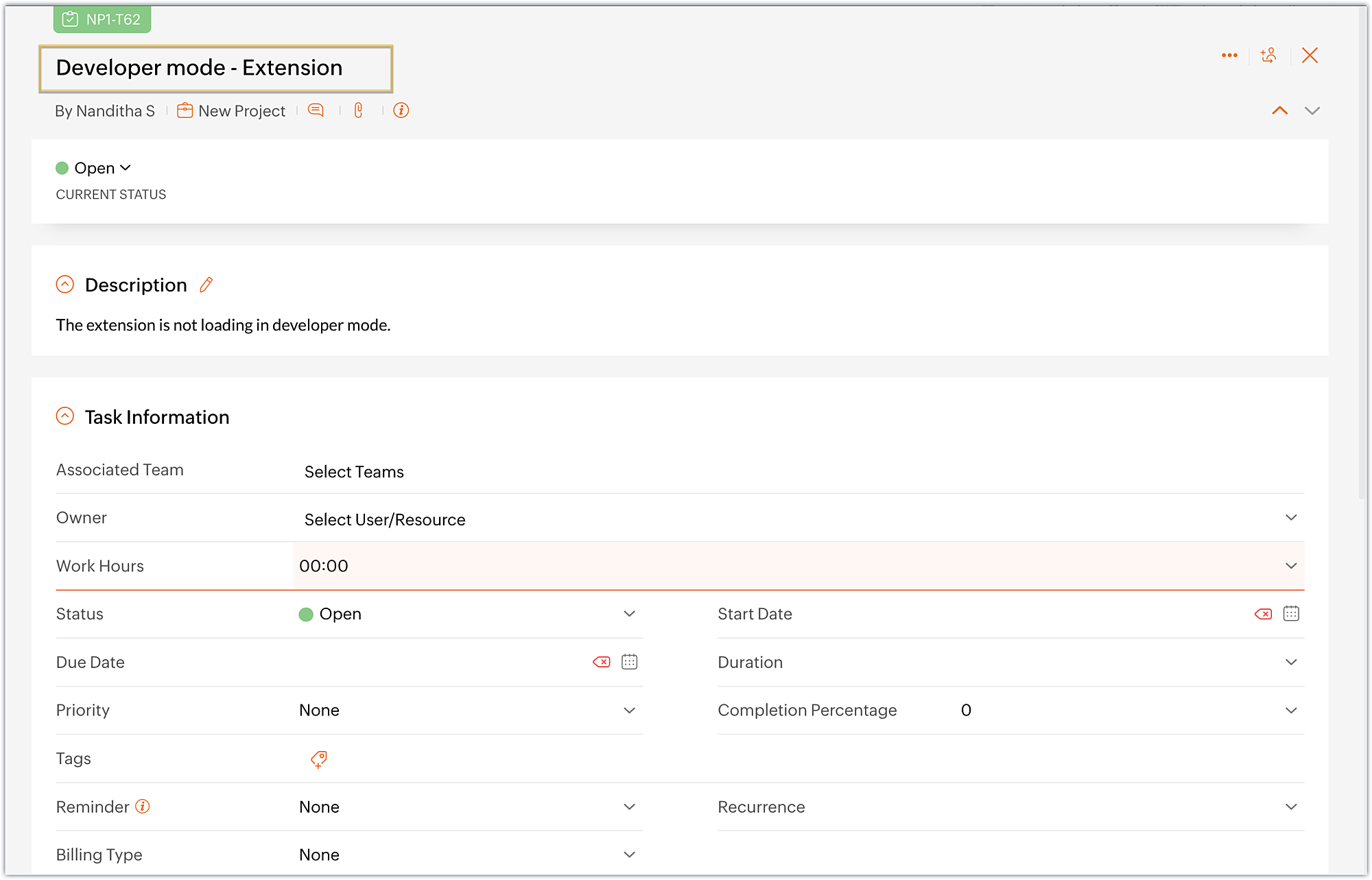
- Choose the Related Articles task tab, which is the widget we created.
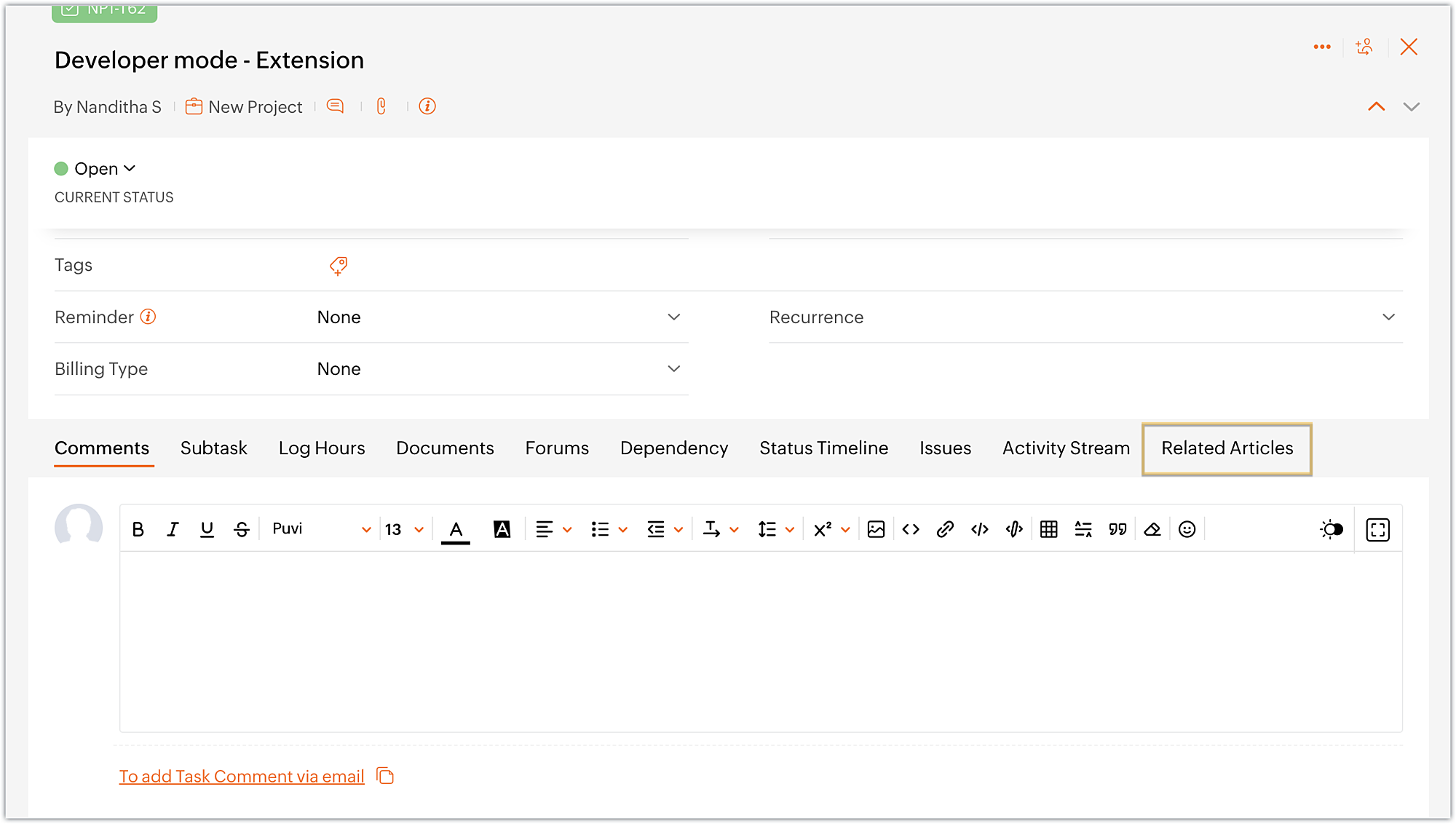
- The widget displays the available Zoho Desk articles that are related to the task at hand.
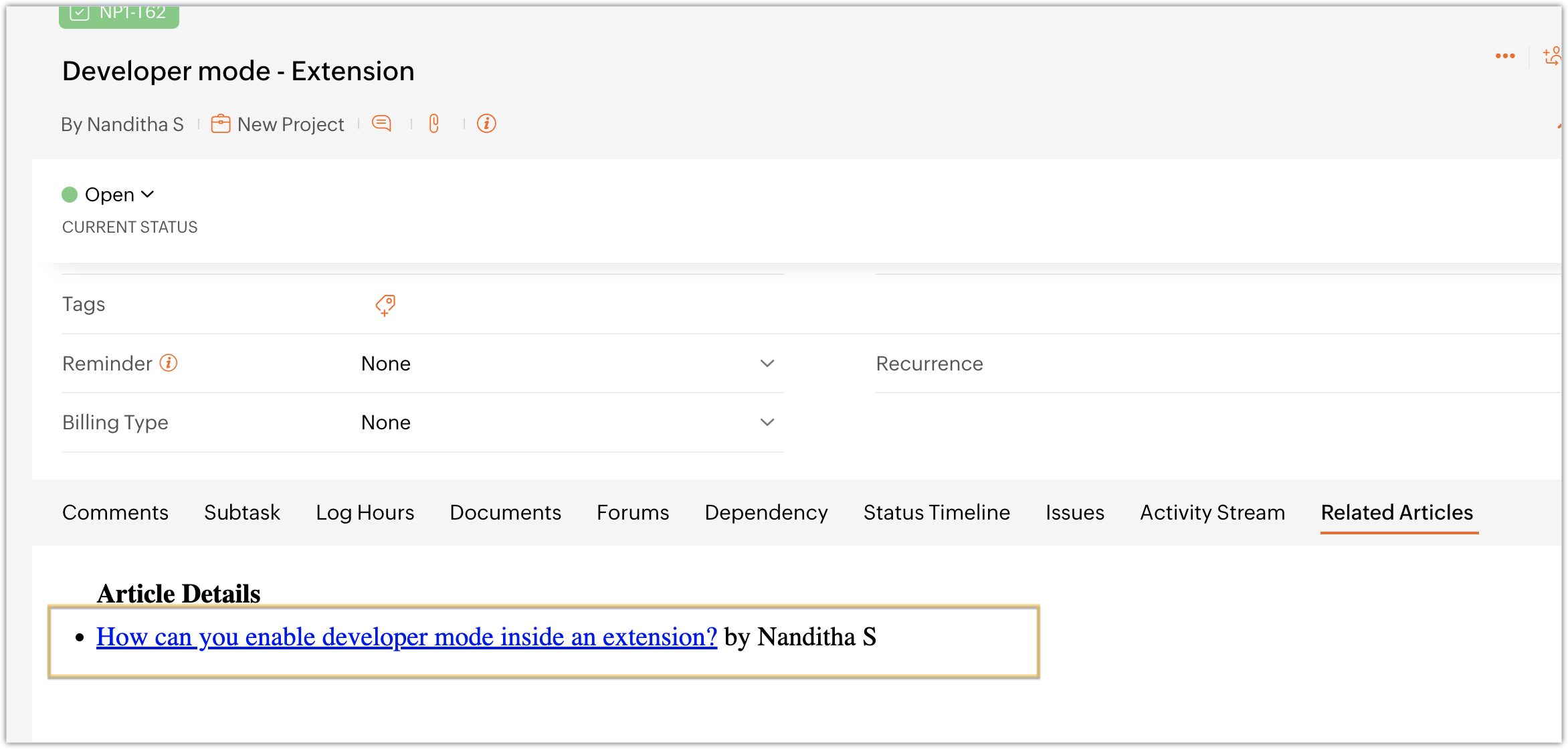
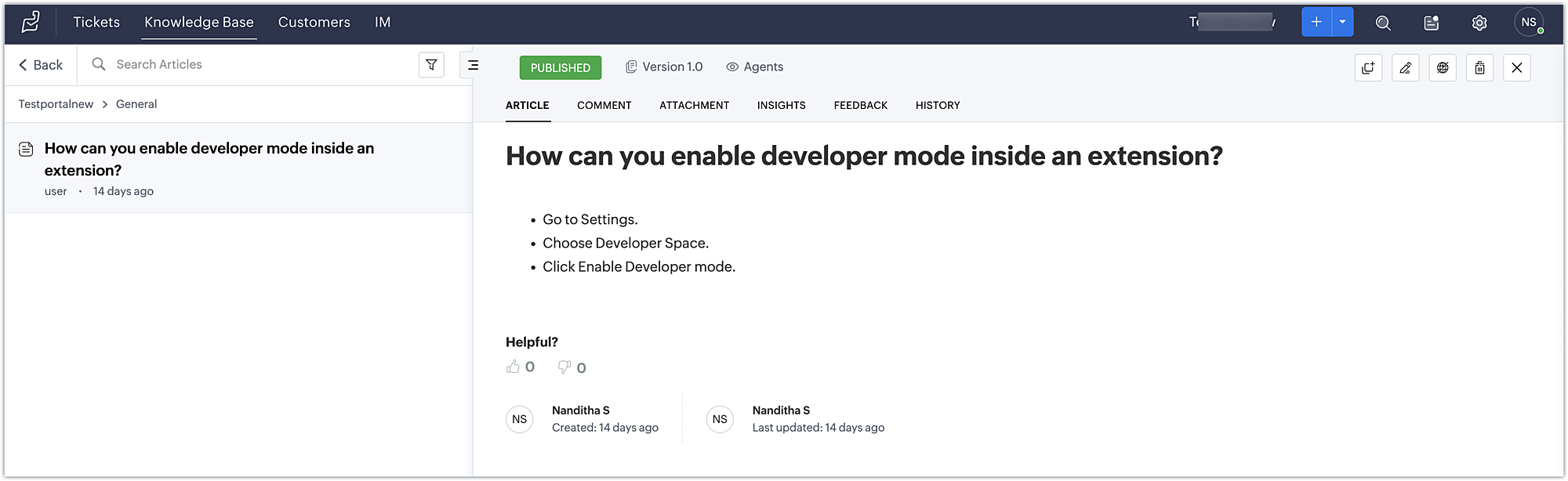
- Finally, click on an article to view its detailed information in Zoho Desk.
Using this method, developers working on Zoho Projects tasks can discover relevant articles and get helpful information to troubleshoot problems.
You can further enhance this use case by including a text box in the widget that allows the developer to enter a keyword and search for related articles using the Zoho Desk search articles API.
You can also accomplish use cases such as creating a task tab widget to associate data with a task. Every time the task loads, task-specific data can be displayed on the Task tab. To accomplish these kind of use cases, the data storage feature is available in Zoho Projects. We look forward to exploring the data storage feature,, and other use cases for custom widgets, in future posts.
We hope you found this information useful. Follow this space for further updates!
 Sign up for a Zoho Developer account and start developing extensions for Zoho products using Sigma.
SEE ALSO
Access your files securely from anywhere
New to Zoho Recruit?

Zoho Developer Community
New to Zoho LandingPage?
Zoho LandingPage Resources
New to Zoho Survey?
New to Zoho CRM Plus?
Deliver unforgettable customer experiences
New to Zoho CRM Plus?
Deliver unforgettable customer experiences
New to Zoho Marketing Plus?
Everything you need to run your marketing
New to Zoho Marketing Plus?
Everything you need to run your marketing
New to Bigin?





Topic Participants
Nanditha Somasundaram Somasundaram
Sticky Posts
Building extensions #10: Fetch customized user inputs, store them globally at the app level, and access them across entities
This data storage concept enables you to store data related to your extension for both entity properties and extension properties. In our previous piece, we looked at how to store data for entities using entity properties. In this post, we'll look atBuilding extensions #9: Store, retrieve, and access entity-specific data in widgets using data storage
Data storage - Overview Storing data related to the extension you are working on is essential. It can be saved as key-value pairs for an entity or extension, known as entity and extension properties, respectively. Data can be saved for the following entitiesBuilding extensions #7: Create custom widgets for a simplified end-user experience
Discover the benefits of using widgets! We explored the significance of widgets, prerequisites, and the availability of JS SDK methods as part of our previous post. In this post, let's go over a detailed example of using widgets along with certain ZohoBuilding extensions #6: Custom user interfaces with Widgets
Welcome to our post on Widgets for Zoho Projects! In our last post, we explored the significance of the connections feature, showed how to use it, and provided an example use case. In this article, we'll look at the importance of widgets, another featureBuilding extensions #5: Integrating applications with Zoho Projects through Connections
In our last post, we discussed the essential features that a Zoho Projects extension can provide. Starting with this post andin every subsequent post going forward, we'll go through each of those features in depth, one by one, with an example use case.
New to Zoho TeamInbox?
Zoho TeamInbox Resources
Zoho CRM Plus Resources
Zoho Books Resources
Zoho Subscriptions Resources
Zoho Projects Resources
Zoho Sprints Resources
Qntrl Resources
Zoho Creator Resources
Zoho CRM Resources
Design. Discuss. Deliver.
Zoho Show Resources

Get Started. Write Away!
Writer is a powerful online word processor, designed for collaborative work.
Zoho CRM コンテンツ
-
オンラインヘルプ
-
Webセミナー
-
機能活用動画
-
よくある質問
-
Ebook
-
-
Zoho Campaigns
- Zoho サービスのWebセミナー
その他のサービス コンテンツ
Nederlandse Hulpbronnen

ご検討中の方
Recent Topics
Allow Admins to Transfer Ownership of Their Own Files & Folders
Hi Zoho WorkDrive Team, Hope you are doing well. We would like to request an important enhancement to the ownership-transfer functionality in Zoho WorkDrive, specifically regarding administrator capabilities. As administrators, we have the ability toTip#46: Capture accurate log hours
Hello everyone, Use the newly introduced timer settings that will streamline the usage of timers and help admins or workspace owners to manage the time entries of the workspace users better. Check out the below mentioned timer settings added to the TimesheetMoving to app-specific authentication for Google integrations
Hello everyone, We’re making an important change to how Google integrations work in our platform. Until now, we used a common Google project across Zoho to enable integrations like Google Drive, Calendar, and more. Going forward, we’ll be moving to anLost the ability to sort by ticket owner
Hi all, in the last week or so, we have lost the ability to sort tickets by Ticket Owner. Unlike the other columns which we can hover over and click on to sort, Ticket Owner is no longer clickable. Is it just us, or are other customers seeing this too?How Can i put a form in Zobot
Hi,how can i integrate a form which has a multiple options to choose from.the form should be opened or displayed by zobot after it meets a requirement in the conversation. Thanks in advance !Playback and Management Enhancements for Zoho Quartz Recordings
Hello Zoho Team, We hope you're all doing well. We would like to submit a feature request related to Zoho Quartz, the tool used to record and share browser sessions with Zoho Support. 🎯 Current Functionality As of now, Zoho Quartz allows users to recordZoho Analytics - Feature Request For Time Based Data Source Fetch
Hi Analytics Team, I have a client using Zoho CRM and they want a weekly report at 4:30pm every Friday, emailed to the sales team showing a pie chart of Closed Won Deals for that week. This is easy to achieve in Analytics but not so easy to ensure theWhich user's capacity is used for Shared Mailbox storage?
We use shared mailboxes at our company, and their size is increasing daily. Which user(s)'s total mailbox limit is being used up by this space?Inserting the current date / time
I'd like to use Zoho Notebook as a log - so it would be great to be able to insert the current date and time at the beginning (or end) of each my log/journal entries - or wherever I want. Something simple, like pressing a button/icon to insert it wherever my text cursor is. It could be formatted like "Mon Dec 11, 2017 - 11:43p".Campaign editor overrides href value
I've been trying to insert a deep link in an email campaign so recipients can directly open a native app on their device. My deep link looks something like "myapp://". The options to insert links in the campaign editor are limited to strict urls, emails,Bug Report and Suggestions for Improvement in Zoho Applications
Hi Zoho Team, I’d like to report a few bugs and improvement suggestions I’ve noticed while using Zoho products: Zoho Cliq Video Call: The camera sometimes turns off automatically during video calls. This seems to be a bug — please check and fix it. ZohoCanvas Flex Box containers should not require a width/height.
Flexbox containers are often used as organizational concepts, to ease re-flow on mobile etc. - I cannot use % for flexbox W or H - I cannot omit W or H This means that the content cannot dictate, and a Flexbox container cannot be used merely as an organizationalZoho Desk Android app update: Filter enhancement, Save Filters
Hello everyone! We have now enhanced the filter section on the ticket listing screen of Zoho Desk Android app as it is on the web(desk.zoho.com). Also, we have introduced an option to save filters for tickets on the mobile app. You can easily apply, rename,Very long loading times | bad performance [ZOHO DC: EU]
Hello there, we have recently noticed that the loading times have become extremely long when retrieving tickets and ticket details. For example, I open any ticket and get the following view. The subject and standard information (ticket owner, status etc.)Zia Profile Summary now supports six languages and responds faster
After numerous customer requests, we’ve expanded Zia Profile Summary to do more than just summarize resumes quickly. It can now summarize them in six different languages and deliver results even faster. What’s New 1. Extended language support Zia canIntroducing Zoho Show Android 3.0
Good ideas need the right space to grow. They deserve tools that move as fast as your thoughts and make creating feel effortless. And that is why we are bringing you Zoho Show Android 3.0! From a brand-new look and smoother navigation to improved collaborationProperly Capture Dropdowns & Hover Elements When Recording a Window/Tab
Hi Zoho WorkDrive Team, Hope you are doing great. We encountered a limitation when recording a selected window or browser tab: Certain UI elements, such as dropdown lists, hover menus, and overlays, are not captured unless we record the entire screen.Peppol integration zoho invoicefu
Hi, Belgium will require Peppol invoicing as of 2026. I found that this is being prepared for Zoho books, to be released in Sep 2025. Will Zoho Invoice get this functionality too? I like the Invoice app for my part-time side business as bike mechanicAllow Recording Only a Selected Portion of the Screen
Hi Zoho WorkDrive Team, Hope you are doing well. We would like to request a more flexible recording option in Zoho WorkDrive. At the moment, we can record either the entire screen or a specific window/tab — but not a custom selected portion of the screenRestricting Calendar View to Working Hours
Hi: I'm trying to implement a calendar which displays all of my customer appointments. Currently, the calendar shows all 24 hours of the day. Is there a way to restrict the hours to simply the times my business is open? Thanks!Add Camera Background Blur During Recording
Hi Zoho WorkDrive Team, Hope everything is well. We would like to request an enhancement to the video recording feature in Zoho WorkDrive. Currently, the camera preview displayed during a recording does not support background blur. This is an essentialAmazon FBA integration - Handle invoice reconciliation under different GSTINs,
Dear Zoho Community, Thank you for the clarification regarding the Amazon FBA integration, default warehouse, and GSTIN mapping in Zoho Inventory. I understand that Zoho currently supports only one warehouse for Amazon FBA, and that all FBA orders areWhatsapp Integration questions
Hi Questions: 1. Whatsapp messages are not reaching our CRM, is there a delay? 2. Is there any way to create a whatsapp catalog on a number that is integrated with ZOHO? 3. How do I configure my profile picture on a number that is integrated with ZOAllow Font Size 11 in Editors...
That is basic functionality...link mail.zoho.com/UnblockMe to unblock
Could you please unblock my account heloisa.bomfim@expansaodenegocios.comUnblocked me
Please can you help unblocked my account thanks materiauxjcbrunet2000@zohomail.comIntegrating External Portal Tickets Into Zoho Desk
A B2B travel company has a customer portal where clients can raise and submit tickets related to their bookings. These tickets need to be handled and managed in the backend through Zoho Desk. Ticket updates and replies from Zoho Desk should also be visibleSend WhatsApp voice messages from Bigin
Greetings, I hope all of you are doing well. We're happy to announce this enhancement we've made to Bigin. Bigin's WhatsApp integration now supports audio messages, so you can record and send voice messages. This makes it easier to handle customer questionsCUSTOM FUNCTION GIVE ERROR #EVAL!
CUSTEM FUNCTION CREATE KYA ZOHOSHEET ME US FUNCTION KO USE KIYA LEKIN DATA TO SAHI HAI LAKIN DATA SHEET ME NAHI LAG LAHA HAI KRUPYA SOLVE KARE MY CODE IS float ADDTWO_TWO(float NO1, float NO2) { ADD = NO1 + NO2; return ADD; }Samsung Keyboard Issues with Notebook
Dear Users, We're sorry to inform you that some of our users are experiencing certain issues like scrolling, delay/lag, cursor placement especially within the text notes. This occurs mainly due to Samsung Keyboard compatibility with Android 13 and someZoho Books | Product updates | September 2025
Hello users, We’ve rolled out new features and enhancements in Zoho Books. From PayNow payment method to applying journal credits to invoices and bills in other locations, explore the updates designed to enhance your bookkeeping experience. IntegrateZoho Workdrive for Office, "vsto runtime not found"
Hi all, I have been trying to get ZohoWorkdrive_MS-addin_1.4.exe installed, but I keep getting the error "VSTO Runtime Not Found!" - even though I have installed it ... Anyone else hear had problems with the MS addin? FYI, I am using O365 on A Dell laptop running Win 10 Home - fully patched and up-to-date. I have tried compatibility modes and running explicitly as Administrator - the usual steps. Any advice would be appreciated.Can no longer export as pdf
In NOTEBOOK I am no longer able to export notes to pdfs as I used to be able to. When I hit that command it asks where I want to send it, but no matter what I chose there is no pdf attachment that shows up in order to send. Nothing happens.How can I prevent the Zoho Vault extension from automatically logging me out?
Hi, I want the Zoho Vault Chrome extension to never log out. How can I do this? It only allows me to log out for 1 week, and the same applies to the Android app.Zoho CRM App - Links
Hi Is there are plan for making Custom Links available in the Zoho CRM Android App? I can't see them being added? Thanks GeneTemplates
Trying to sort out / get rid of unwanted invoice templates, the error msgs are not at all helpful. Surely it's easy to amend the error msg by including a list of the names of the customers / vendors that use it, denying deletion or making it inactiveContacts limit in basic vs standard - what counts? Are customers contacts?
I’ve been using books for a number years for my small business. I only ever work with 20 clients at any given time. I do purchase services from a number of vendors to run my business, so there are some comtacts there too. I used to use the basic package,Finding missing records
I have a challenge and I am not really sure where to start with it. I can't find any similar threads on here, can anyone help: I have two forms, FormA and FormB. Both forms have records that contain a field called Job_Number. What I am trying to achieveUpdates for Zoho Campaigns: Merge tag, footer, and autoresponder migration
Hello everyone, We'd like to inform you of some upcoming changes with regard to Zoho Campaigns. We understand that change can be difficult, but we're dedicated to ensuring a smooth transition while keeping you all informed and engaged throughout the process.What's New in Zoho Inventory | August – October 2025
Hello customers, The last quarter has been incredibly productive! We've released a powerful slate of new features and enhancements in Zoho Inventory designed to give you better control, greater efficiency, and expanded functionality across your inventoryNext Page