Extension pointers for integrating Zoho CRM with Zoho products #6: Handle and track your Zoho Bugtracker issues easily from within Zoho CRM
Switching between multiple applications to keep track of data is a time-consuming and laborious process. Having visibility into all related data in one application makes work easier and more efficient, and helps mitigate errors.
Zoho Projects and Zoho Bugtracker are integrated in multiple ways. Syncing data between Zoho CRM and Zoho Projects or Zoho Bugtracker enables you to track all project-related data—including issues—across both applications. In a previous post, we showed how to integrate the Cases module in Zoho CRM with Zoho Projects. You can find the full post here.
In this post, we'll look at how to access and manage Zoho Bugtracker issue-related data within Zoho CRM. Let's say you manage your company's sales process and handle your software application deliverables using Zoho CRM, and that one of your leads has been converted to a deal and has therefore successfully moved to the Qualification stage.
Assume that whenever a deal is qualified in Zoho CRM, a new project with the same name is created in Zoho Bugtracker, and the newly created Bugtracker project's ID is updated in a custom field on the deal's details page in Zoho CRM. This helps users keep track of and have full control over the continuous process of implementing deal requirements.
Note: In order to proceed with the use case described below, the project creation scenario detailed above must be implemented with the necessary scopes of Bugtracker. You can view a similar example implemented for Zoho Projects here for reference.
Following implementation—during testing—there may be one or more issues that need to be resolved, which will be recorded as issues in Zoho Bugtracker. In our example, let's retrieve all the bugs associated with the project and add them as a related list in our specific Zoho CRM deal so that all relevant data is available in a single window.
Creating a connector for Zoho Bugtracker and adding connector APIs
- Create a new connector in your extension for Zoho Bugtracker using the Connectors feature under Utilities in the left panel of the Zoho Developer console.
Note: Zoho Bugtracker follows OAuth 2.0 protocols for authentication. You can see how to register Zoho products and retrieve your client credentials here.
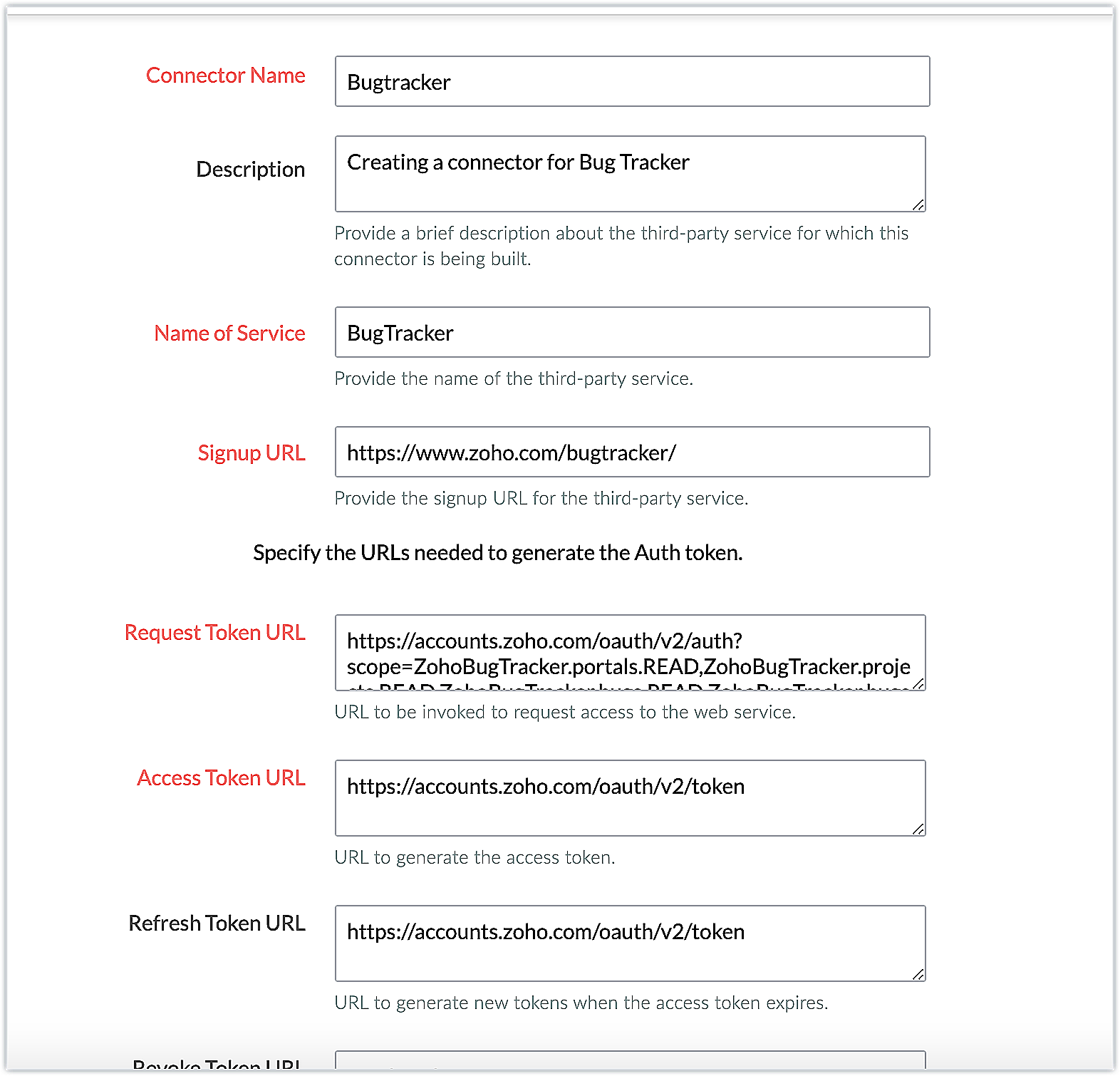
The connector details for our example are as follows:
Request Token URL | https://accounts.zoho.com/oauth/v2/auth?scope=ZohoBugTracker.portals.READ,ZohoBugTracker.projects.READ,ZohoBugTracker.bugs.READ,ZohoBugTracker.bugs.READ&access_type=offline |
Access Token URL | https://accounts.zoho.com/oauth/v2/token |
Refresh Token URL | https://accounts.zoho.com/oauth/v2/token |
Scopes | ZohoBugTracker.portals.READ,ZohoBugTracker.projects.READ,ZohoBugTracker.bugs.READ,ZohoBugTracker.bugs.READ |
- Add the necessary connector APIs for your functionality. Please refer to the Zoho Bugtracker API guide for details.

The Zoho Bugtracker REST APIs we added for our example are as follows:
Connector API Name | Method type | URL |
Get Portals | GET | https://bugtracker.zoho.com/restapi/portals/ |
Get Projects | GET | https://bugtracker.zoho.com/restapi/portal/${portalid}/projects/ |
Get Bugs | GET | https://bugtracker.zoho.com/restapi/portal/${portalid}/projects/${projectid}/bugs/ |
Note: You can refer to this post to see the detailed steps involved in creating a connector, adding the connector APIs, and associating them with the extension.
Obtaining the portal ID
- Per our example, the new projects will be created in Zoho Bugtracker under a specific portal. Because the portal ID variable's value is user-specific, it can be obtained from the user during extension installation and saved in a CRM variable to be easily retrieved when needed.
- The variable Portal ID is therefore created as a CRM variable with the Variable Status set as Hidden in the extension. Here's how the value is obtained:
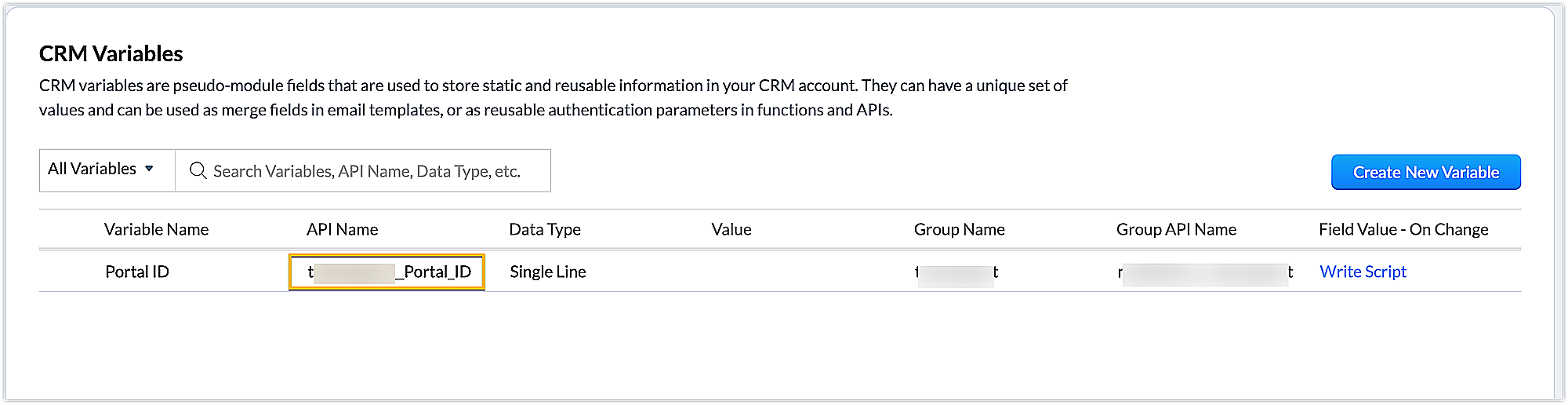
➤ Creating a settings widget: We have created a settings widget in our extension in order to retrieve the user-specific portal ID, and to set the value of the CRM variable.
Settings widget JS code snippet
Util={}; var portalidvalue; var projectidvalue; //Subscribe to the EmbeddedApp onPageLoad event before initializing the widget ZOHO.embeddedApp.on("PageLoad",function(data) { var data = { } //Invoking the connector API to get the user's portal IDs and populate them in a select list ZOHO.CRM.CONNECTOR.invokeAPI("xxx.bugtracker.getportals",data) .then(function(dataa){ response = dataa.response; responsejson=JSON.parse(response); portal=responsejson.portals; for (i = 0; i < portal.length; i++) { portalid=portal[i].id_string; portalname=portal[i].name; var portallist = document.getElementById("portallist"); var option = document.createElement("OPTION"); option.innerHTML = portalname; option.value = portalid; portallist.appendChild(option); } }) //*Updating the value of the portal ID selected in the select list to the CRM variable Util.getvalues=function() { portalidvalue=document.getElementById("portallist").value; var variableMap = { "apiname": "xxx__Portal_ID", "value": portalidvalue}; ZOHO.CRM.CONNECTOR.invokeAPI("crm.set", variableMap); } }) |
Creating a related list in the Deals module and associating a custom related list to it
- Create a related list called Bugs using the Add Related List button under Related Details, available in the Components section of the Zoho Developer console. Then write a function to perform the desired action.
Bugs related list code
//Retrieving the deal record and fetching the deal name response = zoho.crm.getRecordById("Deals",deal.get("Deals.ID").toLong()); dealprojectid = response.get("xxx__Project_ID"); info dealprojectid; dynamic_map = Map(); portalid = zoho.crm.getOrgVariable("xxx__Portal_ID"); dynamic_map.put("portalid",portalid); //Invoking the Get Project API to fetch the project ID response1 = zoho.crm.invokeConnector("xxx.bugtracker.getprojects",dynamic_map); projectresponse = response1.get("response"); projectdata = projectresponse.get("projects"); finalresponse = ""; for each item in projectdata { projectid = item.get("id"); info projectid; if(dealprojectid == projectid) { dynamic_map = Map(); portalid = zoho.crm.getOrgVariable("xxx__Portal_ID"); dynamic_map.put("portalid",portalid); dynamic_map.put("projectid",projectid); // Invoking the Get Bugs API to fetch the bug-related data response2 = zoho.crm.invokeConnector("xxx.bugtracker.getbugs",dynamic_map); bugresponse = response2.get("response"); bugdata = bugresponse.get("bugs"); info bugdata; count = 1; if(bugdata != null) { recordsXmlStr = "<record>"; for each value in bugdata { status = value.get("status"); recordsXmlStr = recordsXmlStr + "<row no='" + count + "'>"; recordsXmlStr = recordsXmlStr + "<FL val='Title'>" + value.get("title") + "</FL>"; recordsXmlStr = recordsXmlStr + "<FL val='Assignee Name'>" + value.get("assignee_name") + "</FL>"; recordsXmlStr = recordsXmlStr + "<FL val='Reported Person'>" + value.get("reported_person") + "</FL>"; recordsXmlStr = recordsXmlStr + "<FL val='Reported Email'>" + value.get("reporter_email") + "</FL>"; recordsXmlStr = recordsXmlStr + "<FL val='Status Type'>" + status.get("type") + "</FL>"; recordsXmlStr = recordsXmlStr + "</row>"; count = count + 1; } recordsXmlStr = recordsXmlStr + "</record>"; finalresponse = finalresponse + recordsXmlStr; } else { finalresponse = finalresponse + "<error>=><message>No bugs associated with this project.</message></error>"; } } } return finalresponse; |
- The ID of the new project created in Zoho Bugtracker is fetched and added to the custom field "Project ID" inside the Deals module for that particular deal according to the premise of this example.
- As a result, the project ID in the custom field is compared to the project retrieved from the "Get Projects" API.
- Based on the result of the comparison, the bugs are retrieved and displayed in the related list, or the appropriate error message is displayed.
- Now that the functionality is defined, the extension is published and installed in Zoho CRM account using the private installation URL.
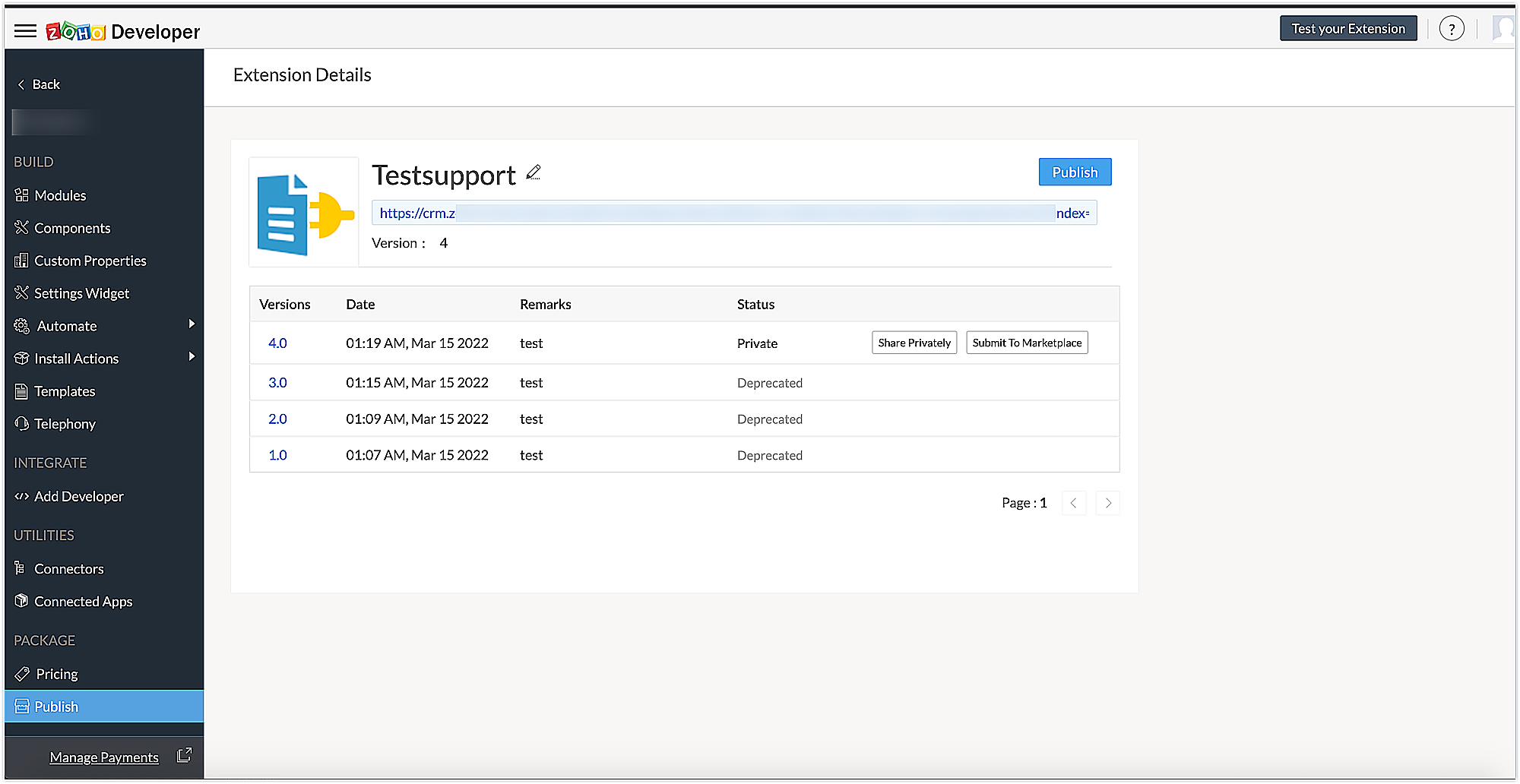
Sample output
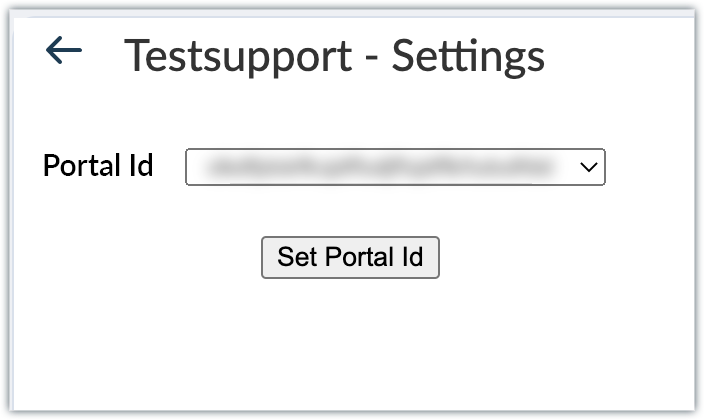
- After installing the extension, authorize the Zoho Bugtracker connector and click the Settings button to navigate to the Settings Widget page, where you can select the portal where project and bug details are available.
- Select the portal of your choice, then click the Set Portal ID button to assign the portal ID to the appropriate CRM variable.
- Once the portal ID is set, go to the Deals module. Click on the Bugs related list. The relevant details of the bugs that were fetched through the code are displayed in the form of a related list.
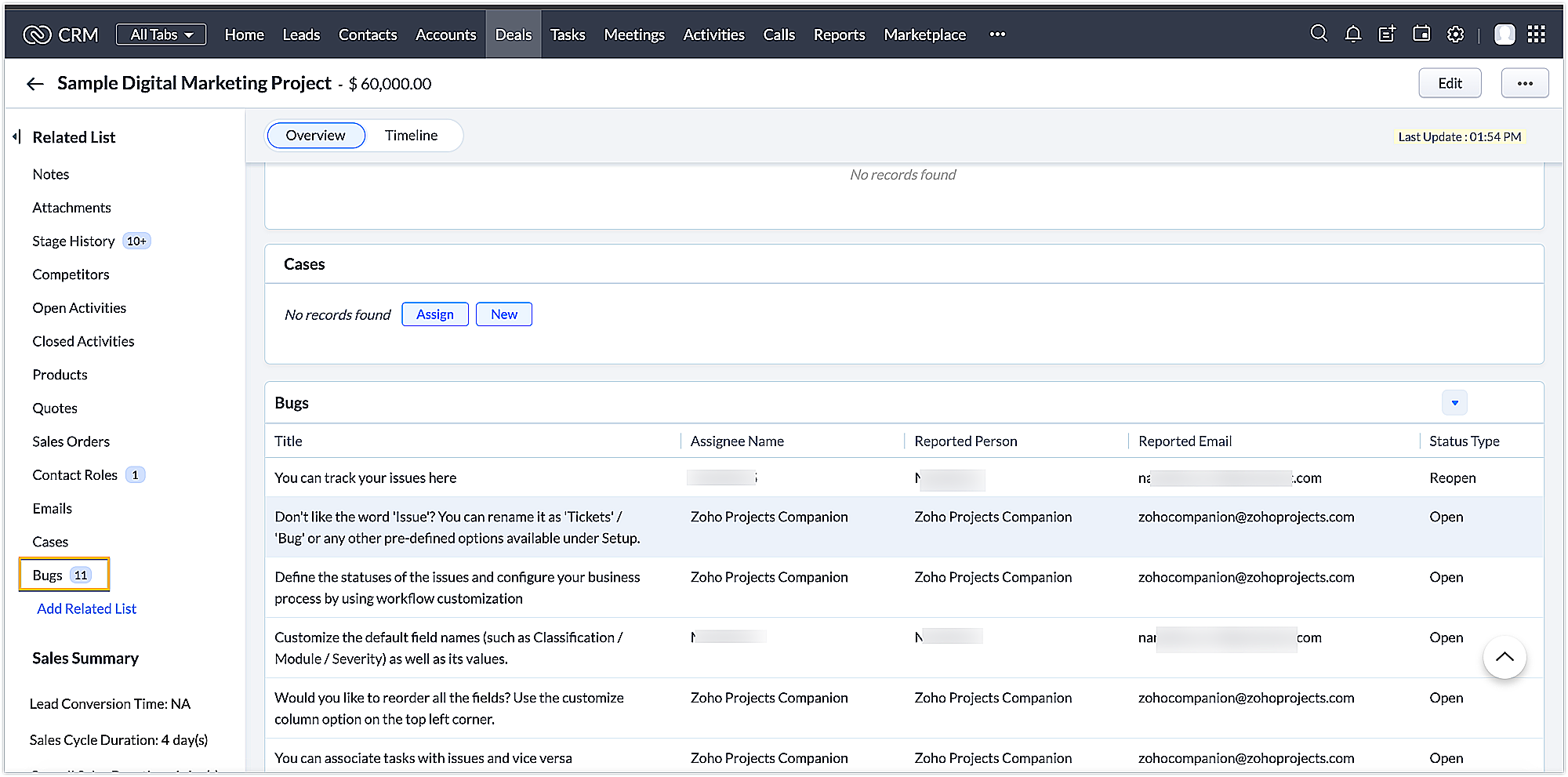
Using this method, you can integrate Zoho CRM and Zoho Bugtracker via an extension and perform functionalities per your business requirements. We hope you find this information useful. Keep following this space for more advice!
SEE ALSO
Access your files securely from anywhere
Centralize Knowledge. Transform Learning.
All-in-one knowledge management and training platform for your employees and customers.
New to Zoho Recruit?

Zoho Developer Community
New to Zoho LandingPage?
Zoho LandingPage Resources
New to Zoho Survey?
New to Zoho CRM Plus?
Deliver unforgettable customer experiences
New to Zoho CRM Plus?
Deliver unforgettable customer experiences
New to Zoho Marketing Plus?
Everything you need to run your marketing
New to Zoho Marketing Plus?
Everything you need to run your marketing
New to Bigin?





Topic Participants
Nanditha Somasundaram Somasundaram
Sticky Posts
Kaizen #198: Using Client Script for Custom Validation in Blueprint
Nearing 200th Kaizen Post – 1 More to the Big Two-Oh-Oh! Do you have any questions, suggestions, or topics you would like us to cover in future posts? Your insights and suggestions help us shape future content and make this series better for everyone.Kaizen #226: Using ZRC in Client Script
Hello everyone! Welcome to another week of Kaizen. In today's post, lets see what is ZRC (Zoho Request Client) and how we can use ZRC methods in Client Script to get inputs from a Salesperson and update the Lead status with a single button click. In thisKaizen #222 - Client Script Support for Notes Related List
Hello everyone! Welcome to another week of Kaizen. The final Kaizen post of the year 2025 is here! With the new Client Script support for the Notes Related List, you can validate, enrich, and manage notes across modules. In this post, we’ll explore howKaizen #217 - Actions APIs : Tasks
Welcome to another week of Kaizen! In last week's post we discussed Email Notifications APIs which act as the link between your Workflow automations and you. We have discussed how Zylker Cloud Services uses Email Notifications API in their custom dashboard.Kaizen #216 - Actions APIs : Email Notifications
Welcome to another week of Kaizen! For the last three weeks, we have been discussing Zylker's workflows. We successfully updated a dormant workflow, built a new one from the ground up and more. But our work is not finished—these automated processes are
New to Zoho TeamInbox?
Zoho TeamInbox Resources
Zoho CRM Plus Resources
Zoho Books Resources
Zoho Subscriptions Resources
Zoho Projects Resources
Zoho Sprints Resources
Qntrl Resources
Zoho Creator Resources
Zoho CRM Resources
Design. Discuss. Deliver.
Zoho Show Resources

Get Started. Write Away!
Writer is a powerful online word processor, designed for collaborative work.
Zoho CRM コンテンツ
-
オンラインヘルプ
-
Webセミナー
-
機能活用動画
-
よくある質問
-
Ebook
-
-
Zoho Campaigns
- Zoho サービスのWebセミナー
その他のサービス コンテンツ
Nederlandse Hulpbronnen

ご検討中の方
Recent Topics
How to map fields from Zoho Recruit to Zoho People
I've got these fields from my Job Offer that I'm trying to map to the Work information fields in Zoho People, but they arent showing up. For example, how do I get the department name field (in the job post) to map to the work information field in ZohoUTM in zoho campaigns
Helloo everybody!!! Someone know how IF ZOHO CAMPAIGNS has UTM for tracking the url of any campaigns. thank uFull Context of Zoho CRM Records for Zia in Zoho Desk for efficient AI Usage
Hello everyone, I have a question regarding the use of Zia in Zoho Desk in combination with CRM data. Is it possible to automatically feed the complete context of a CRM record into Zia, so that it can generate automated and highly accurate responses forKnowledge base printing
I saw a posting about printing the knowledge base as I was looking for the answer, but we would like the ability to print out the entire knowledge base with a click, keeping the same organization format. Bonus would include an index of keywords andSearch not working!
I have items in my notebook tagged but when I search for a tag nothing comes up! Any fix for this?Zoho Books | Product updates | January 2026
Hello users, We’ve rolled out new features and enhancements in Zoho Books. From e-filing Form 1099 directly with the IRS to corporation tax support, explore the updates designed to enhance your bookkeeping experience. E-File Form 1099 Directly With theUpdates for Zoho Campaigns: Merge tag, footer, and autoresponder migration
Hello everyone, We'd like to inform you of some upcoming changes with regard to Zoho Campaigns. We understand that change can be difficult, but we're dedicated to ensuring a smooth transition while keeping you all informed and engaged throughout the process.File Upload field not showing in workflow
Hi, I have added a field on Zoho CRM. I want to use it in a workflow where that particular field is updated based on another field, however it is not showing up in the field list to select it in the workflow. Why is this please?Drag 'n' Drop Fields to a Sub-Form and "Move Field To" Option
Hi, I would like to be able to move fields from the Main Page to a Sub-Form or from a Sub-Form to either the Main Page or another Sub-Form. Today if you change the design you have to delete and recreate every field, not just move them. Would be nice toSharing my portal URL with clients outside the project
Hi I need help making my project public for anyone to check on my task. I'm a freelance artist and I use trello to keep track on my client's projects however I wanted to do an upgrade. Went on here and so far I'm loving it. However, I'm having an issue sharing my url to those to see progress. They said they needed an account to access my project. How do I fix this? Without them needing an account.How do i integrate google analytics to Zoho Campaigns?
Looking to track Zoho Traffic from email Current topic is outdatedHow do teams manage meeting follow-ups across Zoho tools?
We’re using Zoho tools for collaboration and tracking, but managing meeting notes, action items, and follow-ups across teams is still challenging. Curious how others are handling this within Zoho workflows. Are there best practices or integrations thatPassing the image/file uploaded in form to openai api
I'm trying to use the OpenAI's new vision feature where we can send image through Api. What I want is the user to upload an image in the form and send this image to OpenAI. But I can't access this image properly in deluge script. There are also some constraintsZoho Sprint Backlog View, filter by item status
Hello, In Zoho Sprints, it would be great to be able filter out specific items in the Backlog based on their status. We would like to track items that were Removed from our backlog without seeing them constantly in the Backlog view, as this view shouldCustomize Colors used on graphs and charts according to users desire.
It would be great if we could customize the graph's colors as we see fit. I hate that yellow is always the default color!Let us view and export the full price books data from CRM
I quote out of CRM, some of my clients have specialised pricing for specific products - therefore we use Price Books to manage these special prices. I can only see the breakdown of the products listed in the price book and the specialised pricing forMejoras urgentes para ZOHO MEETING
Tengo unos meses usando Zoho Meeting. En general, es buena, pero hay cosas vitales que no logra cumplir con mínima calidad. 1) Calidad de audio y video: urge mejoras. Audio con retraso, imagen borrosa, mal recorte de silueta con fondos virtuales. Además,Multiple header in the quote table???
Hello, Is it possible in Zoho CRM to add multiple headers or sections within the Quote product table, so that when the quote is printed it shows separate sections (for example “Products” and “Services”)? To clarify, I’m asking because: This does not appearSaving sent email campaign as PDF
I'm looking to add all campaigns sent to an archive folder in sharepoint. Is there anyway to accomplish this in Zoho Flow ? I'm falling at the first hurdle ... can I automatically save a sent campaign as a PDF to a folder location ?Exporting All Custom Functions in ZohoCRM
Hello, All I've been looking for a way to keep about 30 functions that I have written in Zoho CRM updated in my own repository to use elsewhere in other instances. A github integration would be great, but a way to export all custom functions or any wayHow can Data Enrichment be automatically triggered when a new Lead is created in Zoho CRM?
Hi, I have a pipeline where a Lead is created automatically through the Zoho API and I've been trying to look for a way to automatically apply Data Enrichment on this created lead. 1) I did not find any way to do this through the Zoho API; it seems likeConditional Layouts On Multi Select Field
How we can use Conditional Layouts On Multi Select Field field? Please help.Appreciation to Qntrl Support Team
We are writing this topic to appreciate the outstanding level of support from Qntrl Team. We have been using Qntrl since 2022 after shifting from another similar platform. Since we joined Qntrl, the team has shown a high level of professionalism, support,How can I hide "My Requests" and "Marketplace" icon from the side menu
Hello everybody, We recently started using the new Zoho CRM for Everyone. How can I hide "My Requests" and "Marketplace" from the side menu? We don't use these features at the moment, and I couldn't find a way to disable or remove them. Best regards,Whatsapp Integration on Zoho Campaign
Team: Can the messages from Zoho Campaign delivered through Whatsapp... now customers no longer are active on email, but the entire campaign module is email based.... when will it be available on whatsapp.... are there any thirdparty providers who canMandatory Field - but only at conversion
Hello! We use Zoho CRM and there are times where the "Lead Created Date & Time" field isn't populated into a "Contractor" (Account is the default phrase i believe). Most of my lead tracking is based on reading the Lead Created field above, so it's importantDifferent Task Layouts for Subtasks
I was wondering how it would be possible for a subtask to have a different task layout to the parent task.Enable Free External Collaboration on Notecards in Zoho Notebook
Hi Zoho Notebook Team, I would like to suggest a feature enhancement regarding external collaboration in Zoho Notebook. Currently, we can share notes with external users, and they are able to view the content without any issue. However, when these externalUsing data fields in Zoho Show presentations to extract key numbers from Zia insights based on a report created
Is it possible to use data fields in Zoho Show presentations along with Zoho Analytics to extract key numbers from Zia insights based on a report created? For example, using this text below: (note that the numbers in bold would be from Zia Insights) RevenueFree webinar: AI-powered agreement management with Zoho Sign
Hi there! Does preparing an agreement feel like more work than actually signing it? You're definitely not alone. Between drafting the document, managing revisions, securing internal approvals, and rereading clauses to make sure everything still reflectsWhatsApp Channels in Zoho Campaigns
Now that Meta has opened WhatsApp Channels globally, will you add it to Zoho Campaigns? It's another top channel for marketing communications as email and SMS. Thanks.CRM For Everyone - Bring Back Settings Tile View
I've been using CRM for Everyone since it was in early access and I just can't stand the single list settings menu down the left-hand side. It takes so much longer to find the setting I need. Please give users the option to make the old sytle tile viewLets have Dynamics 365 integration with Zohobooks
Lets have Dynamics 365 integration with ZohobooksAdd notes in spreadsheet view
It would be great if we could Add/edit notes in the spreadsheet view of contacts/leads. This would enable my sales teams to greatly increase their number of calls. Also viewing the most recent note in the Contact module would also be helpful.Opening balances - Accounts Receivable and Payable
Our accounting year starts on 1st August 2013 and I have a Trial Balance as at that date, including Accounts Receivableand Accounts Payable balances, broken down by each customer and supplier. Q1 - do I show my opening balance date as 31st July 2013 orAnnouncing Kiosk 1.1 - Customize screen titles, configure new fields & actions, use values from your Kiosk to update fields, and more.
Hello all We are back again with more enhancements to Kiosk. So what's new? Enhancements made to the Components Add titles for your Kiosk screens and adjust its width to suit your viewing preferences. Three new fields can be added to your screen: Percentage,Limited System because of Limited Number of Fields for Car Dealership
Dear Zoho Support, we want to have all the information about a car inside of a car record. We want to have Zoho CRM as our single source of truth for our data, but the limited number of fields are not allowing that. The data consist of: technical dataCancel Subscription
Hi , Im want to cancel my account but without success please help me to do itMaking an email campaign into a Template
I used a Zoho Campaign Template to create an email. Now I want to use this email and make it a new template, but this seems to be not possible. Am I missing something?Direct Access and Better Search for Zoho Quartz Recordings
Hi Zoho Team, We would like to request a few enhancements to improve how Zoho Quartz recordings are accessed and managed after being submitted to Zoho Support. Current Limitation: After submitting a Quartz recording, the related Zoho Support ticket displaysNext Page