Get your emails from Zoho Mail delivered in Cliq
With a major part of communication happening over emails, it becomes quite a task to keep up with a large amount of email threads. But when a huge portion of your everyday conversation happens in a messaging platform like Zoho Cliq, why not bring in important email notifications into your chats as well?
This forum post will walk you through on connecting your Zoho Mail with Cliq so you can get your emails straight away through your chats.
First, let's see how bringing in an email from Zoho Mail to Cliq can be useful.
Scenarios:
- The support team in every organization receives a substantial amount of emails on a daily basis. There are chances that a high priority email might slip through. So, to overcome this you can create a filter and funnel the high priority email to your team's support channel in Cliq or have a dedicated support bot that will bring in your highly important email.
- Similarly, you can keep a track of all the payments made by your customers and also track down specific emails from your partners and vendors directly from Cliq chat.
Steps:
Follow the simple steps given below to bring in your emails from Zoho Mail to Cliq and centralize them.
1. Log in to your Zoho Mail and click on the settings icon, which is located at the top of the right hand panel.
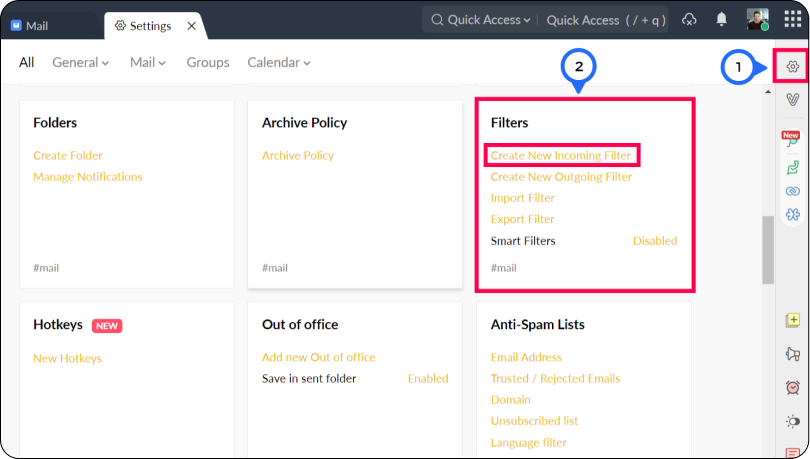
2. The second step involves creating a new incoming filter.
- Go to the filters card and click on create a new filter.
- Give your filter a name - (this is the name the filter will be identifed with).
- Condition Type - Specifies the combination of various conditions that needs to be checked for (OR, AND and All Incoming emails)
- Conditions - The parameters that needs to be satisfied by the emails
- Actions- Actions that will be performed on the emails that match the conditions
- In the actions, select Custom function(creator) from the drop down.
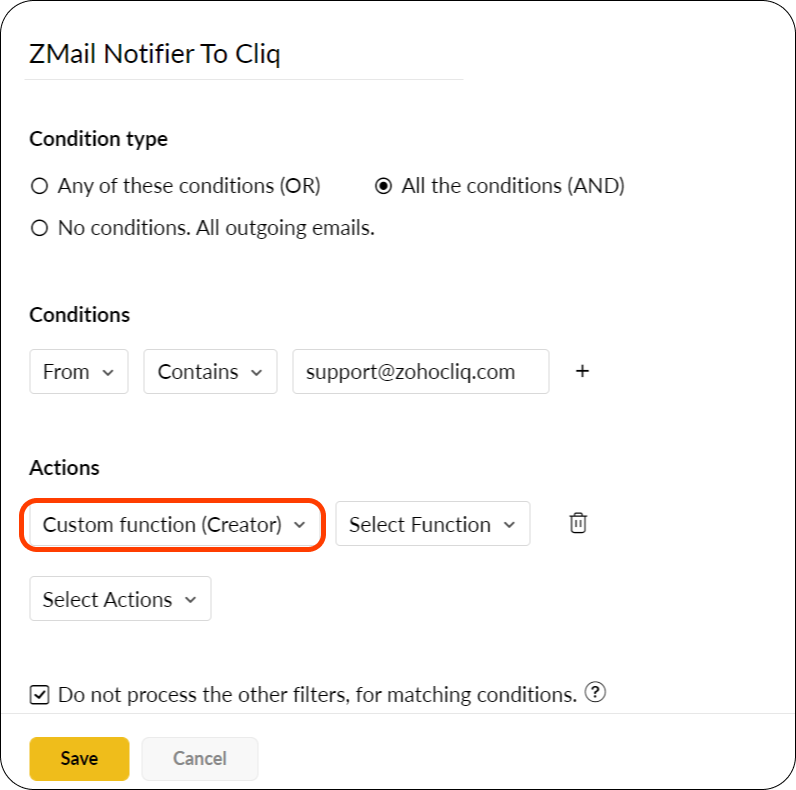
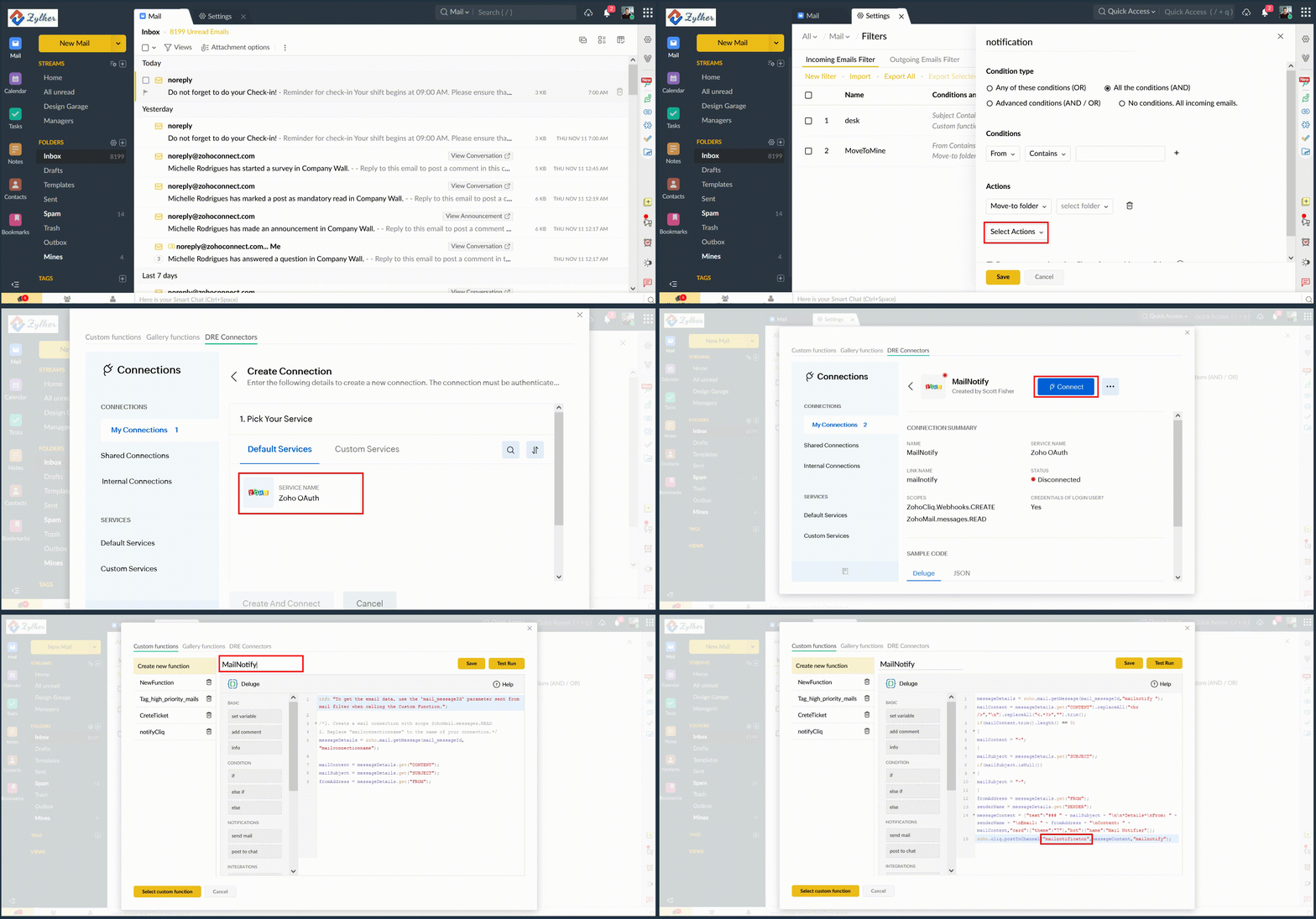
- Select Function to view the deluge script editor pop up.
- Go to the DRE Connectors tab and in My Connections, click on the Create Connection button.
- Select the Zoho OAuth service and enter your preferred connection and connection link name.
- For scopes, select the checkboxes for ZohoCliq.Webhooks.CREATE and ZohoMail.messages.READ .
- Now go back to the custom functions tab and paste the following code in the scipt editor :
- messageDetails = zoho.mail.getMessage(mail_messageId,"CONNECTION LINK NAME");
- mailContent = messageDetails.get("CONTENT").replaceAll("<br />","\n").replaceAll("<.*?>","").trim();
if(mailContent.trim().length() == 0)
{
mailContent = "-";
}
mailSubject = messageDetails.get("SUBJECT");
if(mailSubject.isNull())
{
mailSubject = "-";
}
fromAddress = messageDetails.get("FROM");
senderName = messageDetails.get("SENDER");
messageContent = {"text":"### " + mailSubject + "\n\n*Details*\nFrom: " + senderName + "\nEmail: " + fromAddress + "\nContent: " + mailContent,"card":{"theme":"7"},"bot":{"name":"Mail Notifier"}};
zoho.cliq.postToChannel("CHANNEL UNIQUE NAME",messageContent,"CONNECTION LINK NAME");
 (NOTE : Replace "CONNECTION LINK NAME" with the name of the connection link that you have created, and "CHANNEL UNIQUE NAME" with the unique name of the channel in which you want the mail posted as a chat).
3. Give your custom function a name and click on the Save button to save it.
You can also check if the function works by selecting the Test Run button to execute the code. You will be prompted to enter a message ID for the check which can be retrieved from the URL. Open any mail you want to test it on and copy the last digits in the URL, paste it in the message ID text box and proceed. Sample Response
Note: In case you want to post a response to a bot use the following syntax:
Also you can post the response in a channel (organizational, personal, team or external) using the following syntax:
Retrieving a channel's unique name :
You can retrieve the unique name of a channel by the follwing steps :
1. Hover over to the channel in the left hand side panel and select more info.
2. Click on the connectors tab
3. The API Endpoint URL contains the channel's unique name in block letters.

There you go! We hope this brief example helped you understand in bringing an email from Zoho Mail to Zoho Cliq.
In case of any queries please comment below. We'd be happy to assist you.
Regards
Divya P
Zoho Cliq
Access your files securely from anywhere
New to Zoho Recruit?

Zoho Developer Community
New to Zoho LandingPage?
Zoho LandingPage Resources
New to Zoho Survey?
New to Zoho CRM Plus?
Deliver unforgettable customer experiences
New to Zoho CRM Plus?
Deliver unforgettable customer experiences
New to Zoho Marketing Plus?
Everything you need to run your marketing
New to Zoho Marketing Plus?
Everything you need to run your marketing
New to Bigin?





Topic Participants
Divya Parameswaran
Bruce Eisenberg
Anu Anu
Peter Deleon
jithin
Sticky Posts
Automating Employee Birthday Notifications in Zoho Cliq
Have you ever missed a birthday and felt like the office Grinch? Fear not, the Cliq Developer Platform has got your back! With Zoho Cliq's Schedulers, you can be the office party-cipant who never forgets a single cake, balloon, or awkward rendition ofCustomer payment alerts in Zoho Cliq
For businesses that depend on cash flow, payment updates are essential for operational decision-making and go beyond simple accounting entries. The sales team needs to be notified when invoices are cleared so that upcoming orders can be released. In contrast,Accelerate Github code reviews with Zoho Cliq Platform's link handlers
Code reviews are critical, and they can get buried in conversations or lost when using multiple tools. With the Cliq Platform's link handlers, let's transform shared Github pull request links into interactive, real-time code reviews on channels. ShareApp Spotlight : PagerDuty for Zoho Cliq
App Spotlight brings you hand-picked apps to enhance the power of your Zoho apps and tools. Visit the Zoho Marketplace to explore all of our apps, integrations, and extensions. In today's fast-paced world, seizing every moment is essential for operationalAutomate your status with Cliq Schedulers
Imagine enjoying your favorite homemade meal during a peaceful lunch break, when suddenly there's a PING! A notification pops up and ruins your moment of zen. Even worse, you might be in a vital product development sprint, only to be derailed by a "quick
New to Zoho TeamInbox?
Zoho TeamInbox Resources
Zoho CRM Plus Resources
Zoho Books Resources
Zoho Subscriptions Resources
Zoho Projects Resources
Zoho Sprints Resources
Qntrl Resources
Zoho Creator Resources
Zoho CRM Resources
Design. Discuss. Deliver.
Zoho Show Resources

Get Started. Write Away!
Writer is a powerful online word processor, designed for collaborative work.
Zoho CRM コンテンツ
-
オンラインヘルプ
-
Webセミナー
-
機能活用動画
-
よくある質問
-
Ebook
-
-
Zoho Campaigns
- Zoho サービスのWebセミナー
その他のサービス コンテンツ
Nederlandse Hulpbronnen

ご検討中の方
Recent Topics
Live webinar: Explore WorkDrive's seamless integrations with key Zoho apps
Hello everyone, We’re excited to invite you to our upcoming live webinar, where we'll delve into the seamless integration of WorkDrive with other key Zoho applications! This is a fantastic opportunity to enhance your productivity and streamline your workflowsLive webinar: Getting the most out of WorkDrive in Zoho Workplace
Hello everyone, We’re excited to invite you to our upcoming live webinar, where we’ll explore how to maximize your use of WorkDrive as part of the Zoho Workplace bundle. This is a fantastic opportunity to elevate your productivity and streamline yourLive webinar: Mastering data migration, organization, and team collaboration
Hello everyone, We’re excited to invite you to our upcoming live webinar! Discover how to seamlessly migrate your data, optimize file organization, and boost team collaboration using Zoho WorkDrive’s powerful features. This is a fantastic opportunityJoin our live webinar: Explore the WorkDrive TrueSync application!
Hello everyone, We are thrilled to invite you to a live webinar focused on mastering the WorkDrive TrueSync application. Discover how to seamlessly sync your content between the cloud and your computer, ensuring smooth and efficient file management. OurZoho Creator customer portal limitation | Zoho One
I'm asking you all for any feedback as to the logic or reasoning behind drastically limiting portal users when Zoho already meters based on number of records. I'm a single-seat, Zoho One Enterprise license holder. If my portal users are going to add records, wouldn't that increase revenue for Zoho as that is how Creator is monetized? Why limit my customer portal to only THREE external users when more users would equate to more records being entered into the database?!? (See help ticket reply below.)Envio de mails
Hola! No puedo enviar mails pero si recibirlos. No se como solucionarlo! Mi dominio es chidobebes.com.arERROR CODE :554 - Your access to this mail system has been rejected due to poor reputation of a domain used in message transfer
In my email configuration: The domain's MX Records are pointed to Zoho The domain's SPF Records have been pointed out successfully DKIM is enabled. DMARC Record is pointed for the domain. The domain name is digioorja.in. Still facing the issue of Error:This Operation has been restricted. Please contact support-as@zohocorp.com for further details
l tried to verify my domain (casalimpaeperfumada.com.br) and its shows this error: This Operation has been restricted. Please contact support-as@zohocorp.com for further details.SLOW EMAILS
Is there an issue with the Zoho server? For two days now I've been having issues with very long buffering. Please advise. Thank you.POP3 authentication error - SOLVED
Just in case others are as forgetful as me ... As Zoho has changed the POP server for personal and free organisational users, I needed to change the POP server on my email client. This failed persistently but eventually I remembered that I had chosenAdd Zoho One Groups/Departments to Shared Mailbox Access
Hi, I hope you're doing well. Currently, in Zoho Mail, I can manually add specific users or the entire organization to a shared mailbox. However, there is no option to add Zoho One groups or departments. Feature Request: We would like the ability to assignAllow Filters with Only Special Characters in Zoho Mail
Hi Zoho Mail Team, I hope you're doing well. We have noticed that currently, Zoho Mail does not allow creating filter criteria using only special characters, such as = or #. However, there are scenarios where such a filter is necessary. For example: FilteringHow to save email as PDF?
I saw 2 previous threads about this. One is from 14 years ago. The other was closed as "answered" a year ago but the feature was never implemented: https://help.zoho.com/portal/en/community/topic/how-to-download-save-emails-as-pdf Is the "save as PDF"Flexible plans
Hi, I have a Workplace Standard subscription. On Zoho's website, it mentions that with the annual plan it's possible to have multiple plans under the same organization—for example, Workplace Standard and Mail Lite. However, I can’t find a way to do thisWeekly Tips : Teamwork made easy with Multiple Assignees
Let's say you are working on a big project where different parts of a single task need attention from several people at the same time—like reviewing a proposal that requires input from sales, legal, and finance teams. Instead of sending separate remindersCannot give public access to Html Snippet in Zoho Creator Page
Hi, I created a form in Zoho Creator and published it. The permalink works but I want to override the css of the form. (style based URL parameters is not good enough) So I created a page and added an Html snippet. I can now override the css, which isWeekly Tips : Customize your Compose for a smoother workflow
You are someone who sends a lot of emails, but half the sections in the composer just get in your way — like fields you never use or sections that clutter the space. You find yourself always hunting for the same few formatting tools, and the layout justAccounting on the Go Series-43:Enhancing Your Reporting Efficiency with Dashboard Filter State Retention
Hello everyone! Welcome back to our series on Zoho Books mobile app features. Today, we will talk about a feature that yet again helps you focus on work that really matters-Dashboard Filter State Retention. Imagine you're working on your Zoho Books dashboard,Zoho books/payroll tax payment
I accidentally made a second payment to my taxes for $300 which is reflected in my bank account and therefore on Zoho books but I can not match it to any transactions because its not reflected in payroll as a tax payment. Is there a way to add an extraI can't renew the Finance Plus subscription
I tried to renew the Finance Plus subscription but it keeps reloading the same page over and over when ever I click on "Renew Subscription" buttonEstimate vs Quote
they are different. Quote is for 1 piece price + other charges. Estimate is for total quantity to be ordered. The gross total amount of the Estimate is the amount payable. Replacing Estimate as Quote is not understandable because they are different. InAccounting on the Go Series-47: Effortless GSTIN Management- Auto Populate TaxPayer Details in Zoho Books Mobile App
Hello everyone, Welcome back! Today, we're focusing on a feature specifically designed for our Indian users in the Zoho Books-Indian edition, particularly those who deal with GST compliance regularly. We understand the importance of accurate and efficientAccounting on the Go Series-48: Enhance Accuracy with Custom Work Week Start Days in Zoho Books iOS app
Hello everyone, Welcome back! We’re here with another feature spotlight that might seem small but can have a big impact on your daily routine: setting the first day of the work week in the Zoho Books iOS app. Imagine this: You’re a business owner whoTime to Get Paid Report in ZBooks
Hello, One of our customers who has 25 different companies around the world gets 60 days to make payments. Unfortunately, the subject report does not report an average time to get paid (in days) or the ability to look at a custom period of time. CurrentlyHow to prepare a balance sheet for a company that has no operations yet?
.Project Billing Method from Zoho People
Normaly our customers use Zoho Projects to manage projects and timesheet that are being charge to the customer. Using the integration from Zoho Project we can have projects base on different billing method. For example most of our customer use HourlyZoho Books-Accounting on the Go Series!
Dear users, Continuing in the spirit of our 'Function Fridays' series, where we've been sharing custom function scripts to automate your back office operations, we're thrilled to introduce our latest initiative – the 'Zoho Books-Accounting on the Go Series'.Zoho Books | Product updates | July 2025
Hello users, We’ve rolled out new features and enhancements in Zoho Books. From plan-based trials to the option to mark PDF templates as inactive, explore the updates designed to enhance your bookkeeping experience. Introducing Plan Based Trials in ZohoZoho Books | Product updates | August 2025
Hello users, We’ve rolled out new features and enhancements in Zoho Books. From the right sidebar where you can manage all your widgets, to integrating Zoho Payments feeds in Zoho Books, explore the updates designed to enhance your bookkeeping experience.Update or Upsert Records Using Unique Custom Fields
Hello customers, We've enhanced the process of updating records via API. You can now: Update records using unique custom fields Upsert records using unique custom fields Note: Both the features are available in the Zoho Books and Zoho Inventory apps.[Webinar] Understanding the New Invoice Management Systems
Join industry expert CA Pritam Mahure as he discusses the importance of the new Invoice Management System (IMS) and its impact on taxpayers. Topics Covered: - Concept of IMS and pre-requisites - Applicability and Restrictions on Invoices/Records for IMSAccounting on the Go Series-51: Effortless Transactions: Create and Manage Directly from Uploaded Documents
Hello everyone, We’re back with another useful feature that makes working with Zoho Books even easier! This time, we’re simplifying the process of creating transactions directly from uploaded documents. Imagine you’re out meeting clients, and you receive[WEBINAR] Effortless migration to the VAT-ready South Africa edition of Zoho Books
Hello there, If you are one of our early users from South Africa using the older edition of Zoho Books, this webinar is for you! We have now launched a new South Africa edition with VAT support, to which you can migrate your existing data. Join this session,Accounting on the Go Series-52: Capture Receipts on the Go, Right from Your Lock Screen.
Hello everyone, We’re excited to introduce a feature that will make your life so much easier—especially for those constantly on the move! With iOS 18, Zoho Books now allows you to capture receipts directly from your lock screen using Locked Camera Capture.AT - Austrian Accountant familiar with ZOHO
Hello, as I have just migrated to ZOHO and unfortunately have to change my accountant next year, I am looking for an accountant (for Austria) who already has experience with Zoho or who already manages clients using Zoho books. Is there anyone here fromZoho Workflow issue
Dear Zoho Users, I have Zoho Books premium subscription, I have created a email alerts workflow for Invoices and following are the configurations for the same: 1. Workflow for Invoice module 2. Choose when to tigger - created or edited 3. Filter the triggersAccounting on the Go Series-53: Swift Transactions at Your Fingertips-Zoho Books in Your Control Center
Hello again, We’ve all had those moments where you need to get something done quickly, but the process of unlocking your phone, finding the app, and navigating through menus slows you down. Now, with Zoho Books integrated into the iOS 18 Control Center,Update on PDF Download Issues Caused by Antivirus Software
Hello users, Antivirus software is designed to protect your computer from malicious software and threats. However, they may mistakenly identify legitimate files and software as threats at times. This is known as a false positive. We have received reportsAccounting on the Go Series-54: Effortlessly Find Your Zoho Books Customers in Your Phone’s Contact List
Hello Zoho Books users! How are you all ? We’re happy to share a handy new feature in Zoho Books mobile app. Now, you can access your Zoho Books customers right from your phone's contact list, making it easier to stay connected on the go. How this canIntegration of Phase 2 -e-invoicing- KSA
Zoho Team, I want to get a training of integration of phase 2 invoicing KSA in zoho step by step.Next Page