Introducing AI Modeler—a no-code approach to adding AI to your business applications

Introducing AI Modeler—a no-code approach to adding AI to your business applications

Forward-thinking businesses today are embracing AI to make life easier for themselves, their employees, and their customers. But if you haven't started yet, you might be concerned that your business will be left behind. Or maybe you're worried because you don't know much about AI, machine learning, or data science. Well, you can now relax—we've got you covered on all counts!
 
We've been hard at work lately, incorporating AI into Creator without deviating from our long-held low-code philosophy. The result of this hard work is an exciting new feature we're announcing today: AI Modeler.
 
What do you mean by "AI"?
Artificial intelligence is the ability of software to replicate human intellect, such as learning from experience and applying lessons learned while making decisions. While sci-fi enthusiasts and media like to portray artificial intelligence as a scary thing that'll take over the world, the reality is that we haven't reached that stage (yet!).
 
Instead, the current generation of AI technologies has been adopted in many ways, like providing specific benefits to different industries. In general terms, an AI model provides specific intelligence based on trained data, and can be customized to automate or optimize your business process—all with minimal human interference.
 
What's in it for me?
Our AI modeler includes a no-code AI builder that helps you harness the power of AI without having knowledge of programming. The AI Modeler feature will be available under the Microservices section. From there, you can jump into the world of AI with our ready-to-use models, which we've prebuilt and rigorously tested for your use. You'll only have to choose the application name and the form name to deploy these models—it's that easy!
 
Custom models allow you to build customized AI models tailor-made for your business, by providing it with unique data based on which it can work. Here, you'll need to provide the model with sample datasets relevant to your business for it to get familiarized with—this is called training —and then you can test whether it works as intended before deploying it.

Interesting. Tell me more!
While the uses of AI are endless, we've zeroed in on a handful of popularly used models, which we believe will add immense value to your business.

The key capabilities of our AI models are:
  • Prediction
  • OCR (optical character recognition)
  • Object detection
  • Keyword extraction
  • Sentiment analysis 

Prediction (Custom)
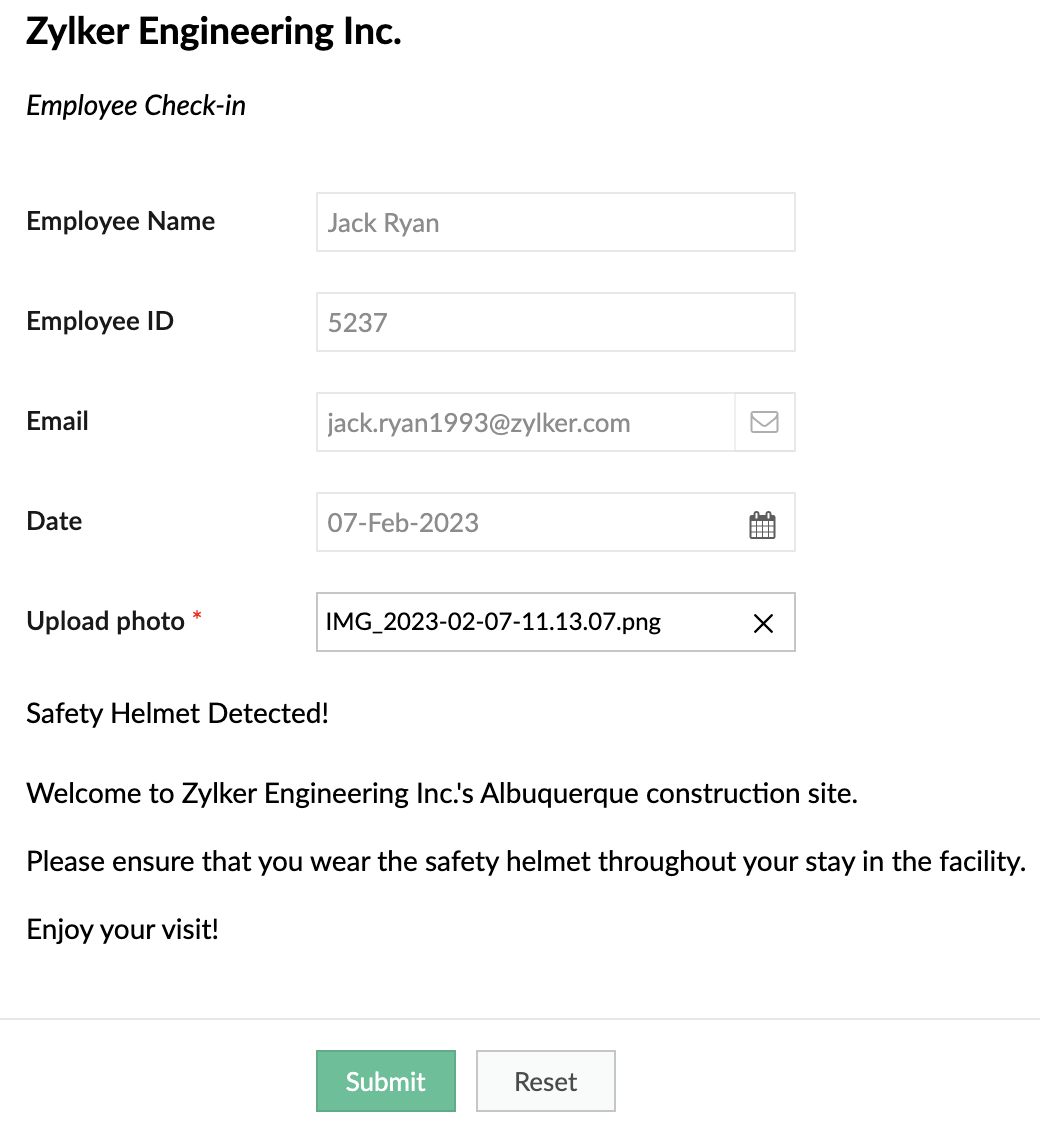
Prediction models process known results from historical data, and try to forecast future outcomes. It allows you to use data from an existing form or CSV file and predict future outcomes with just a few clicks.
 
Example: A store can calculate how much inventory they need in order to meet demand during a particular sales period by providing previous years' sales data.


OCR (Ready-to-use and custom)
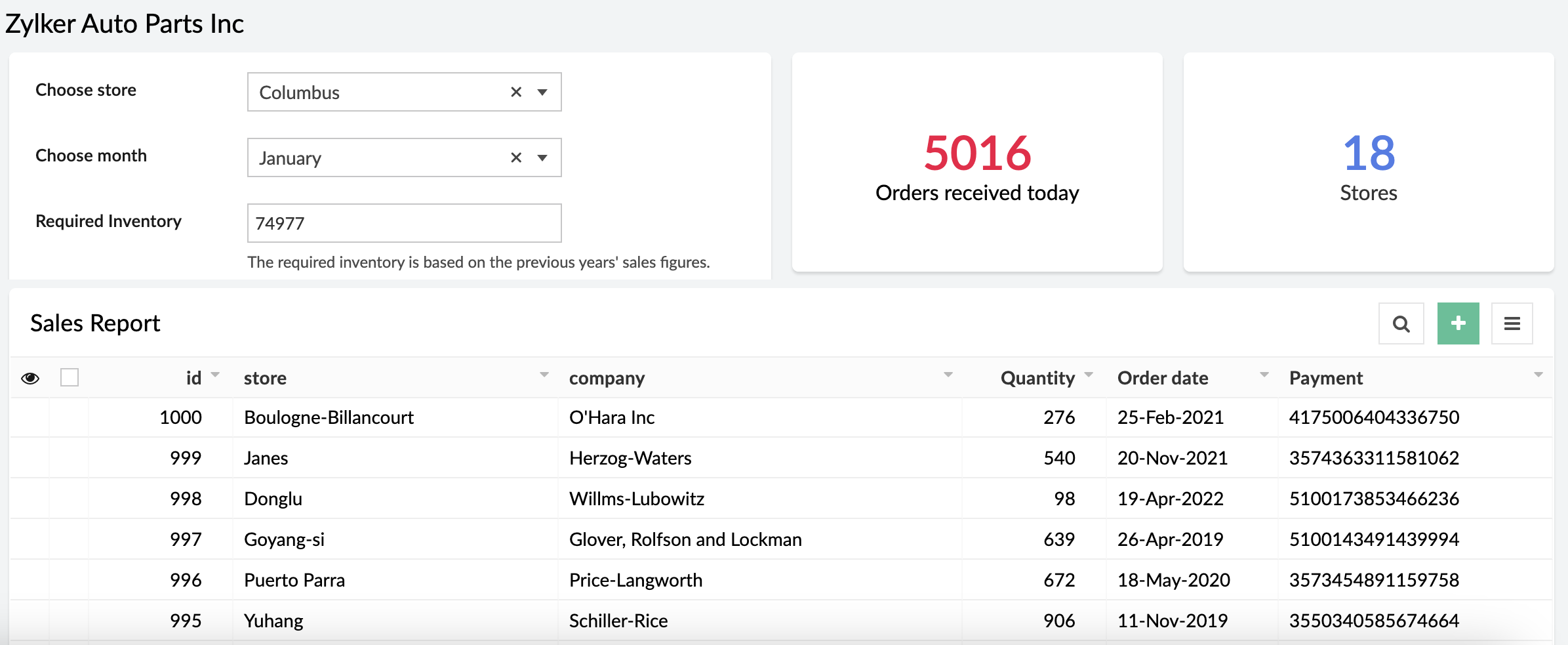
Optimize operations, eliminate repetitive manual tasks, and digitize your business by using our OCR model to extract text from images. The ready-to-use OCR model will extract all the text it identifies in the image, while you can build a custom OCR to extract specific text from images into fields in your forms. Tag the fields to the corresponding values once and eliminate manual data entry forever.

Example: It's 2023, but many people still prefer to settle payments using checks. A business can use our custom OCR to extract details—like the bank name, check number, amount, date, and more—from the checks.

Object detection (Ready-to-use and custom)
Object detection models are used to identify specific objects in images and use them to optimize business processes. Our ready-to-use model is trained to identify common objects (like people, dogs, cars, etc). Otherwise, you can build a custom model and provide it with the training data for the objects you want to identify.
 
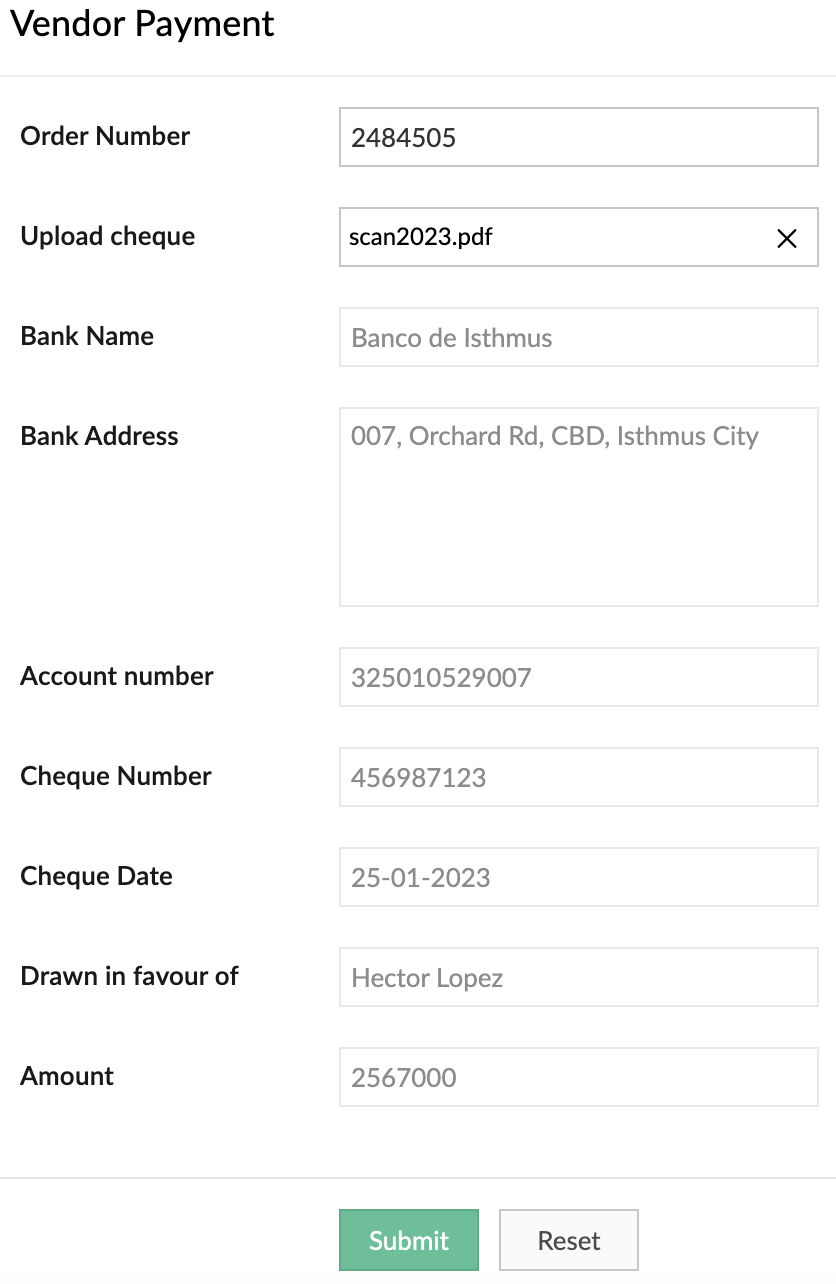
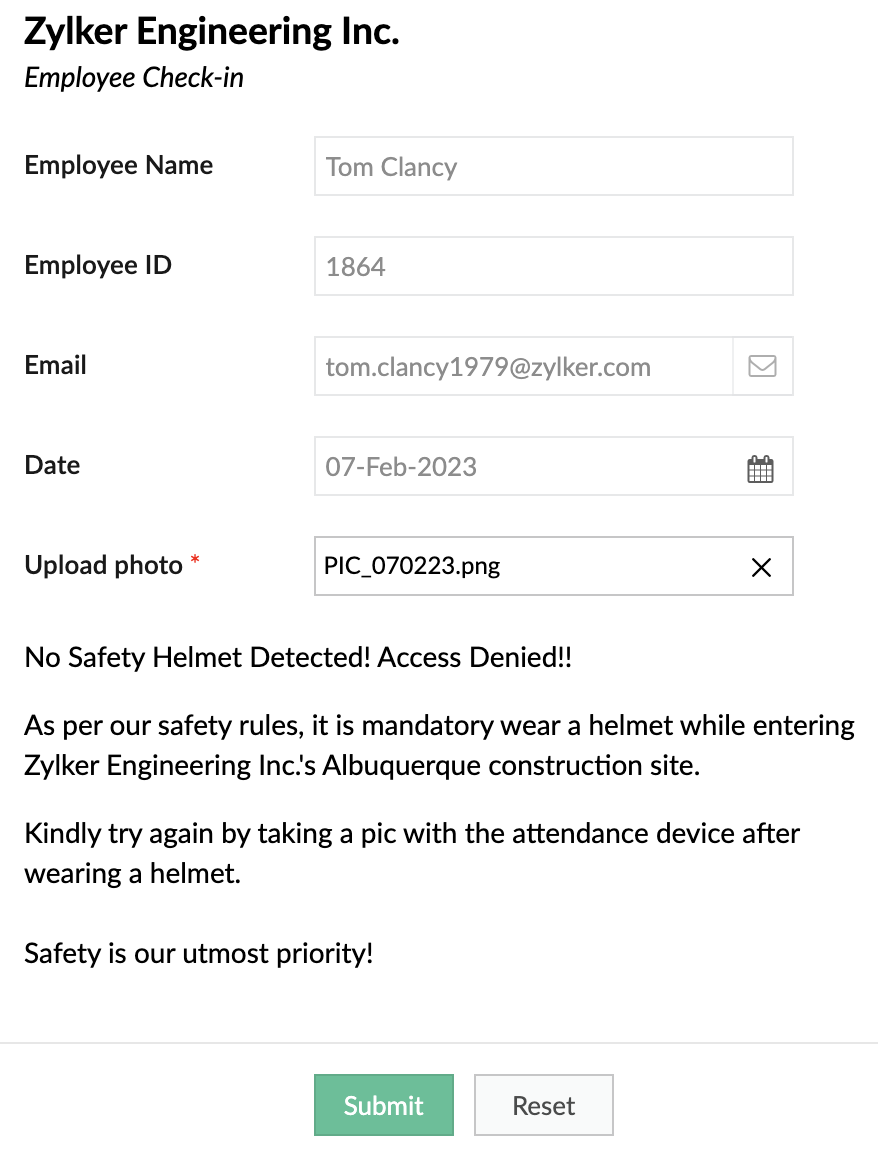
Example: A safety-focused company can use OD models to detect things like whether its employees are wearing a helmet while entering a construction site. 
When helmet is detected


When helmet is not detected:

Keyword extraction (Ready-to-use)
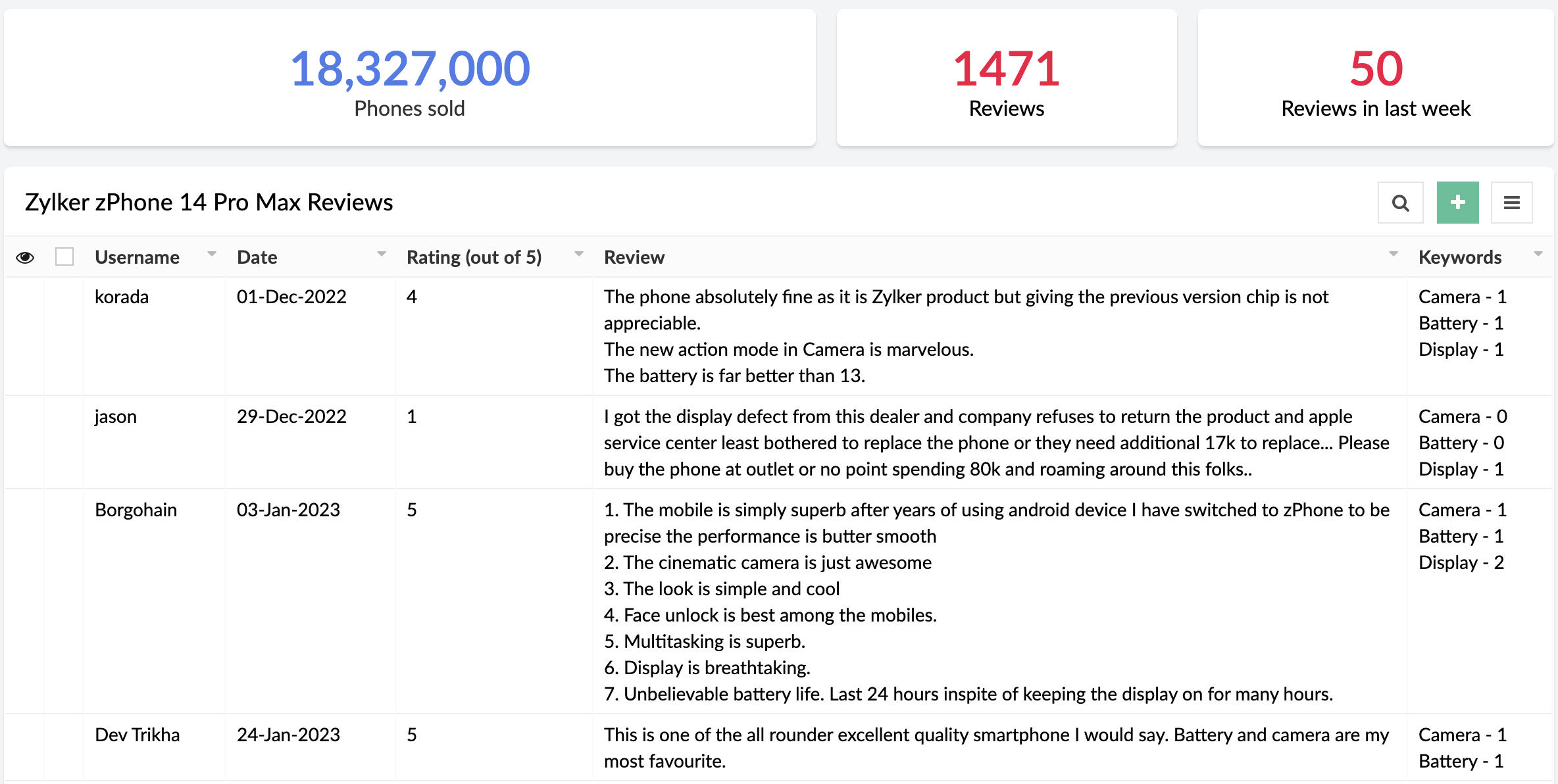
This functionality extracts the most important, representative words/phrases from large amounts of text data. In consumer facing industries, keyword extraction is quite helpful in analyzing customer responses, without having to go through each response manually.
 
Example: An e-commerce site that sells mobile phones allows its customers to post reviews after purchase. Instead of manually going through each of the reviews, the site can use keyword extraction to gain insights automatically. They could choose to extract words like "camera", "battery", and "display" to learn more about the most discussed attributes of the product. 

Sentiment analysis (Ready-to-use)
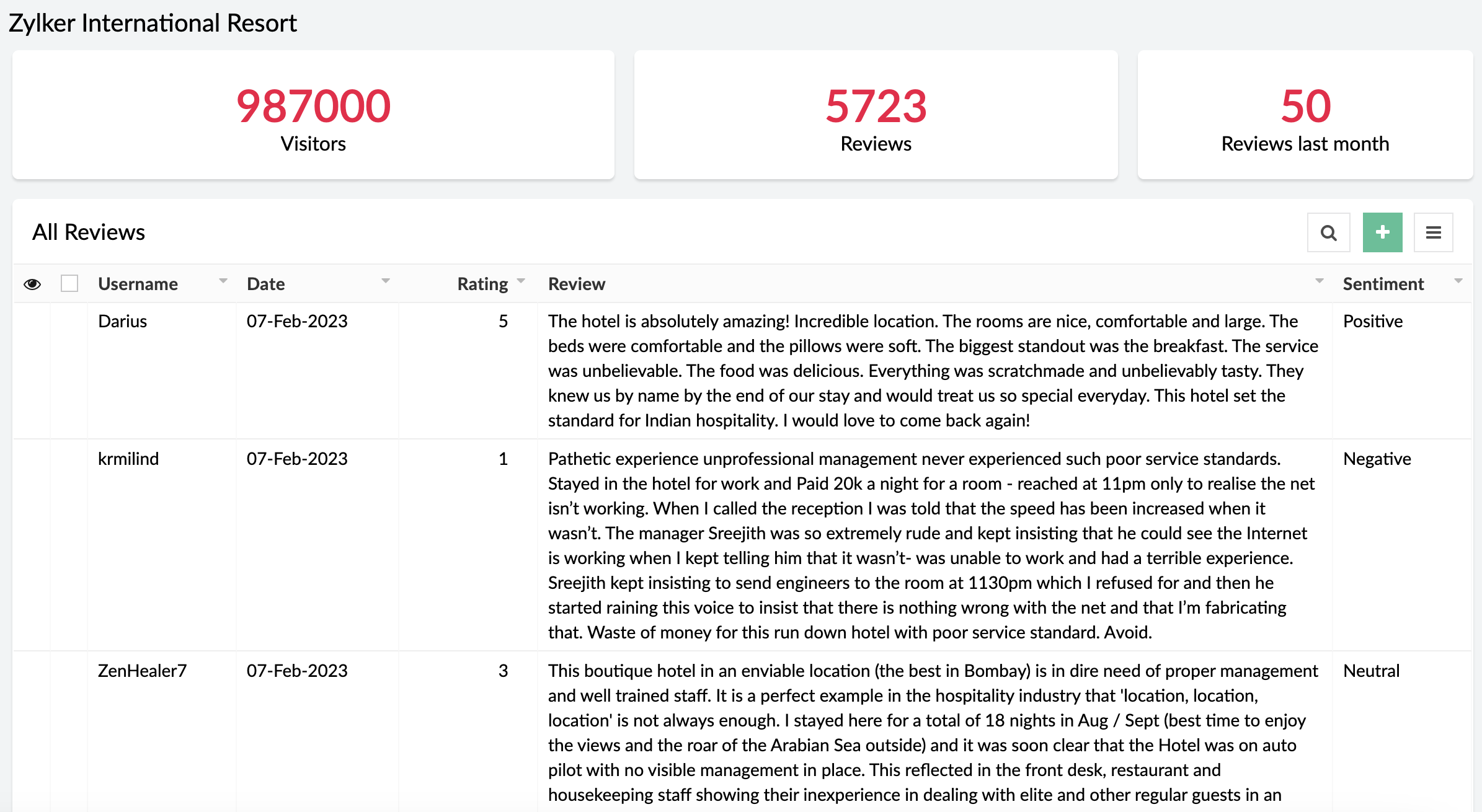
The sentiment analysis model analyzes text and predicts the sentiment expressed (positive, negative, or neutral). Sentiment analysis is widely used across industries to assist in analyzing customer feedback, customer support management, and social media monitoring.

Example: A business receives a large amount of feedback on its products. It can use sentiment analysis to gather whether its products have been well-received or not.

When can I get my hands on it?
Pretty soon! We're as excited as you are and will be rolling out AI Modeler to C6 users on February 20, 2023. Once live, we'll pop in a comment below this post and also update our Release Notes page.
 
Versions - C5  (Ready-to-use models only. Use them via the AI fields in the form builder),
                  C6  (Both custom and ready-to-use models as Microservices)
 
Pricing - Ultimate & Professional
               100 custom models & 250 ready-to-use with 1,000 free AI calls per month
               After exhausting the free AI calls, you'll have to get monthly add-ons for more AI calls. You can choose from the $50(50000 AI Calls / Month), $100(120000 AI Calls / Month), and $200(250000 AI Calls / Month) add-ons based on your requirement.
   
DCs - US, EU, AU, IN, CN

Help documentation
In the meantime, you can go through our comprehensive set of help docs to learn the nitty-gritty of our AI models.
   

Our inbox is always open. Feel free to send your feedback to support@zohocreator.com!
 
Regards,
Zoho Creator Team

    Access your files securely from anywhere


                            Zoho Developer Community


                                                  • Desk Community Learning Series


                                                  • Digest


                                                  • Functions


                                                  • Meetups


                                                  • Kbase


                                                  • Resources


                                                  • Glossary


                                                  • Desk Marketplace


                                                  • MVP Corner


                                                  • Word of the Day


                                                  • Ask the Experts


                                                            • Sticky Posts

                                                            • Introducing Zoho Creator's 2025 Release Projection 2

                                                              Hello Creators! I'm Prakash, from the Creator product management team, and today I'm delighted to unveil our next set of features as part of Release Projection 2 for 2025. With thoughtful analysis and planning, we've curated powerful new capabilities
                                                            • Zoho Creator - 2023 Release Projection 1

                                                              Hello everyone! A very Happy New Year to you and your family. Hope you're all good and having a great time using Zoho Creator to make your lives easier and your businesses prosper. 2022 was an action-packed year for us at Creator, and we hope to continue
                                                            • Zoho Creator User Group meetups in a city near you! - Oct - Nov, 2023

                                                              Greetings from the Zoho Creator team! We're hosting a series of Zoho Creator meetups in various cities across the globe, and we'd love to meet you there! Our meetups are a great opportunity to network with industry peers, exchange ideas and best practices,
                                                            • Zoho Creator - 2023 Release Projection 2

                                                              Hello everyone! Time truly flies when you're having an incredible journey, and today we mark the completion of an eventful and action-packed six months. It feels like just yesterday when we embarked on this adventure together with the launch of our new
                                                            • Upcoming Updates - August 2022

                                                              Hi all, Greetings from the Zoho Creator team! Today we've got news for you on some exciting updates. And rest assured— there’s more to come! In this post, we'll be going over the upcoming features and improvements for this month as mentioned below. A


                                                            Manage your brands on social media


                                                                  Zoho TeamInbox Resources


                                                                      Zoho CRM Plus Resources

                                                                        Zoho Books Resources


                                                                          Zoho Subscriptions Resources

                                                                            Zoho Projects Resources


                                                                              Zoho Sprints Resources


                                                                                Qntrl Resources


                                                                                  Zoho Creator Resources


                                                                                      Zoho CRM Resources

                                                                                      • CRM Community Learning Series

                                                                                        CRM Community Learning Series


                                                                                      • Kaizen

                                                                                        Kaizen

                                                                                      • Functions

                                                                                        Functions

                                                                                      • Meetups

                                                                                        Meetups

                                                                                      • Kbase

                                                                                        Kbase

                                                                                      • Resources

                                                                                        Resources

                                                                                      • Digest

                                                                                        Digest

                                                                                      • CRM Marketplace

                                                                                        CRM Marketplace

                                                                                      • MVP Corner

                                                                                        MVP Corner


                                                                                          Design. Discuss. Deliver.

                                                                                          Create visually engaging stories with Zoho Show.

                                                                                          Get Started Now


                                                                                            Zoho Show Resources

                                                                                              Zoho Writer

                                                                                              Get Started. Write Away!

                                                                                              Writer is a powerful online word processor, designed for collaborative work.

                                                                                                Zoho CRM コンテンツ


                                                                                                  Nederlandse Hulpbronnen


                                                                                                      ご検討中の方


                                                                                                              • Recent Topics

                                                                                                              • Ask the Experts 26: Brighten every customer interaction with Zoho Desk all year long

                                                                                                                Hello everyone, Greetings and welcome to Ask the Experts 26. As we wrap up 2025, we are excited to invite you to the 26th episode of our Ask the Expert series. 🎄The Merry Metrics Edition = Best of Zoho Desk [Best Practices + Holiday Automation + Year-End
                                                                                                              • Pricing calculator

                                                                                                                Alright, so I'm trying to create a pricing calculator/pricing report generator to use in a cabinet shop. I did all the logic and such, and the calculator works. I have a few other things that I would need it to be able to do though, I'll do my best to
                                                                                                              • Bug Details

                                                                                                                In the Bug detail the milestoneid is missing
                                                                                                              • Group by Owner/ Owner Kanban /Group by Custom Field

                                                                                                                Hi, We are missing the option of viewing Tasks grouped by their owner, as it is an essential function for us to manage our employees' working tasks. We find it hard to inspect what are the tasks that our employees are working on.  We are seeking an option
                                                                                                              • Stop completed task lists from disappearing?

                                                                                                                Is there any way to stop projects from making tasks lists disappear when all the tasks in the list are completed? That's one of those little things where we're constantly fighting the product. For instance we have some projects which are ongoing - no start and end date. We use Kanban view to show the various task lists. We don't want the kanban list to disappear every time the items on it happen to be closed out. Thanks
                                                                                                              • SMS to customers from within Bigin

                                                                                                                Hi All, Is there anyone else crying out for Bigin SMS capability to send an SMS to customers directly from the Bigin interface? We have inbuilt telephony already with call recordings which works well. What's lacking is the ability to send and receive
                                                                                                              • Exciting Updates to the Kiosk Studio Feature in Zoho CRM!

                                                                                                                Hello Everyone, We are here again with a series of new enhancements to Kiosk Studio, designed to elevate your experience and bring even greater efficiency to your business processes. These updates build upon our ongoing commitment to making Kiosk a powerful
                                                                                                              • Passing a form object to a function

                                                                                                                Suppose I have a sort_order field in multiple tables and I want to increment it by +1 onCreate of a new record. Is there a way to pass the form object as an argument into the function to keep things DRY? The following function from Zia works, but I'd
                                                                                                              • Change of Blog Author

                                                                                                                Hi, I am creating the blog post on behalf of my colleague. When I publish the post, it is showing my name as author of the post which is not intended and needs to be changed to my colleague's name. How can I change the name of the author in the blogs?? Thanks, Ramanan
                                                                                                              • Allow customers to choose meeting venue and meeting duration on booking page

                                                                                                                My business primarily involves one-to-one meetings with my clients. Given the hybrid-work world we now find ourselves in, these meetings can take several forms (which I think of as the meeting "venue"): In-person Zoom Phone call I currently handle these
                                                                                                              • Booking outside of scheduled availability

                                                                                                                Is there a way for staff (such as the secretary) to book appointments outside of the scheduled availability? Right now to do this special hours must be set each time. There should be a quicker way. Am I missing something?
                                                                                                              • Operation Questions.

                                                                                                                Hello, I hope you are well. To explain a little, we are a company that sells services and products with a technical team responsible for installation and maintenance. Zoho FSM can be useful for the technical team, namely for the technical coordinator
                                                                                                              • Direct Access and Better Search for Zoho Quartz Recordings

                                                                                                                Hi Zoho Team, We would like to request a few enhancements to improve how Zoho Quartz recordings are accessed and managed after being submitted to Zoho Support. Current Limitation: After submitting a Quartz recording, the related Zoho Support ticket displays
                                                                                                              • Update date & time when a cell is edited

                                                                                                                Hi All, I am desiring to have a cell update with the current date and time when another cell is edited. Any ideas?  Thank you
                                                                                                              • Add "Groups" to "Share With" on Reports & All Entries

                                                                                                                Hi, On Forms we can share Publicly, with Specific Users And/Or Specific Groups or All Users. With Reports and All Entries we lack the "Groups" option, please add this as with many users this saves a lot of work. Thanks Dan
                                                                                                              • Add Pause / Resume Option to Zoho Quartz Recordings

                                                                                                                Hi Zoho Team, We would like to request an enhancement to Zoho Quartz recordings: the ability to pause and resume an ongoing recording. Current Limitation: At the moment, when recording an issue with Zoho Quartz, the recording continues even when we are
                                                                                                              • Custom Fields Not Showing Up in Invoice PDF Template Document Information

                                                                                                                I have added 2 custom fields under Sales > Invoices > Manage Custom Fields. They are set to show in all PDFs. However when I am editing my Invoice PDF template, i do not see the custom fields under Document Information.
                                                                                                              • Tracking Non-Inventory Items

                                                                                                                We have several business locations and currently use zoho inventory to track retail items (sales and purchase orders). We were hoping to use zoho inventory to track our non-inventory items as well (toilet paper, paper towels, etc). I understand that we
                                                                                                              • Can I use a Standalone CRM Function as the Callback URL For Async Export Data API?

                                                                                                                I am creating an export job using this API https://www.zoho.com/analytics/api/v2/bulk-api/export-data-async/create-export/view-id.html There is a "callbackUrl" key in the CONFIG object. I tried copying the URL for a standalone function in CRM which can
                                                                                                              • ZOHO Books

                                                                                                                Hi there, Why after I upgrade my Zoho invoice > Books then i wanted to add plugin which i cannot do. Please advise.
                                                                                                              • How is Your eCommerce Experience w/Zoho Inventory?

                                                                                                                First off, I'm SUPER grateful for the advent of Zoho Inventory and now the Zoho Commerce Suite. Overall, Inventory is a great product, especially for customers without an eCommerce presence. For eCommerce companies (especially those shipping more than ~10 packages/day), however, there are certain drawbacks that keep my clients from moving over to Zoho Inventory: Cons: 1. Invoice + Package Creation from Shopify/Other eCommerce Integrations: Zoho Inventory makes the somewhat perplexing decision to
                                                                                                              • Cliq iOS can't see shared screen

                                                                                                                Hello, I had this morning a video call with a colleague. She is using Cliq Desktop MacOS and wanted to share her screen with me. I'm on iPad. I noticed, while she shared her screen, I could only see her video, but not the shared screen... Does Cliq iOS is able to display shared screen, or is it somewhere else to be found ? Regards
                                                                                                              • Error AS101 when adding new email alias

                                                                                                                Hi, I am trying to add apple@(mydomain).com The error AS101 is shown while I try to add the alias.
                                                                                                              • Simplify Mass Replies with Predefined Templates and Snippets

                                                                                                                Hello everyone, We are happy to introduce a new enhancement to Mass Reply that helps agents respond to customers quickly and consistently. With the addition of Email Templates and Snippets in the reply window, agents can use predefined messages while
                                                                                                              • Add "Groups" above "Users" in the Zoho Forms Left Menu

                                                                                                                Hi, We have Groups but you have to go to a Form and Share or use the Directory App to manage them, please add "Groups" above "Users" in the Zoho Forms Left Menu so you can manage them in 1 place within Zoho Forms too. Thanks Dan
                                                                                                              • Mapping custom fields from one module to another

                                                                                                                I have a custom field, "Subscription Period" that appears as a required field in every Opportunity (Potential). I want that field to appear on any Quotes derived from that Opportunity (and have created a custom field of the same name in Quotes for that
                                                                                                              • Inquiry on Help Centre Tab Customisation

                                                                                                                Hi Zoho team, I’m wondering if it’s possible to further customise the Help Center tabs, specifically the descriptions under Knowledge Base, Community, and Tickets. While the current setup allows customising tab names, being able to tailor the descriptions
                                                                                                              • Passing the CRM

                                                                                                                Hi, I am hoping someone can help. I have a zoho form that has a CRM lookup field. I was hoping to send this to my publicly to clients via a text message and the form then attaches the signed form back to the custom module. This work absolutely fine when
                                                                                                              • The Social Wall: November 2025

                                                                                                                We’re nearing the end of the year, and the holiday season is officially kicking in! It’s that time when sales peak and your social media game needs to be stronger than ever. We’re back with exciting new updates across AI, analytics, and the mobile app
                                                                                                              • Item name special charaters <>

                                                                                                                Im trying to input speical characters such as < and > into item name and item description but comes up with following error: Invalid value passed for Item Name and Invalid value passed for Item Description How do i allow speical characters?
                                                                                                              • How to update Multi File upload field

                                                                                                                Assume that i have a multi file upload field,how can i update the same field again?
                                                                                                              • Customer Address Not on Standard Invoice when Address is on Contact Record

                                                                                                                Hi,  I entered the customer billing and shipping address in Zoho CRM. I created an invoice in Zoho Books with the same customer contact. The contact is correctly in Zoho Books with the billing and shipping address. The invoice for the customer does not
                                                                                                              • Auto-Invite Users to Portals in Zoho CRM based on Conditions

                                                                                                                Hello Everyone, You can now automate portal invitations in Zoho CRM with the new Auto-Invite users feature in Portal management. No more manually enabling portal access one by one. With this enhancement, you can automatically send invites for users to
                                                                                                              • Apply partial payments to invoices from the Banking Module

                                                                                                                We need this! Why is this not possible?
                                                                                                              • Welcome to the Zoho Show Community Forums page!

                                                                                                                Hello everyone, The Zoho Show community is a place for you to discuss and share anything and everything related to Zoho Show Presentations, our online presentation software. It includes users from all over the globe and all walks of life. Our community helps answer your Zoho Show questions with responses from other knowledgeable community members to give you the best experience creating and designing exciting presentations. Along the way, you'll meet recognized experts from our software team and
                                                                                                              • Regarding the integration of Apollo.io with Zoho crm.

                                                                                                                I have been seeing for the last 3 months that your Apollo.io beta version is available in Zoho Flow, and this application has not gone live yet. We requested this 2 months ago, but you guys said that 'we are working on it,' and when we search on Google
                                                                                                              • How can I convert an existing contact into a lead?

                                                                                                                I imported many contacts into ZOHO CRM. In order to select a few of them as leads, I want to mark or convert a few hundred as Leads. Who can I do that?
                                                                                                              • Introducing Dedicated Modules for Plans, Addons, and Coupons in Zoho Billing

                                                                                                                We’ve enhanced the way you manage Plans, Addons, and Coupons in Zoho Billing. Previously, all three grouped together under Subscription Items. Now, each one has its own dedicated module, giving you a cleaner and more intuitive experience. This update
                                                                                                              • Price book functionality enhancement

                                                                                                                A common use of price books is to create a price book for a given customer level or contract with a specific company. Given that this is done at a company/customer level it would be great to see a way to associate a price book to a given customer and
                                                                                                              • Tracking Emails sent through Outlook

                                                                                                                All of our sales team have their Outlook 365 accounts setup with IMAP integration. We're trying to track their email activity that occurs outside the CRM. I can see the email exchanges between the sales people and the clients in the contact module. But
                                                                                                              • Next Page