Introducing Client Portal For Recruitment Agencies. It's Everything You've Been Asking For!

Having a great relationship with clients is critical for a recruiter’s financial success, but it’s equally important to cut down on lengthy email conversations to ensure smooth and easy collaboration. To help you with this, we’ve been working on one of the most-requested features from our partners and customers: Client Portal.
Currently, users carry out all client-facing communications through multiple email threads, whether it’s a new job requisition from your clients, giving feedback for candidates, or making important hiring decisions.
Today, with lots of feedback from our customers and partners, we’re thrilled to announce Client Portal, a special edition of Zoho Recruit that caters to the needs of recruitment agencies managing multiple clients.
Introducing Client Portal in Zoho Recruit
Starting today, not only can you give your clients more control, but you also have the power and flexibility to collaborate with them in order to land the best candidates. This means you can add notes, share resumes and files, schedule calls, and let your clients self-manage every stage of the recruiting process.
If you’re a recruitment agency, here’s what makes Zoho Recruit a great fit for you.
1) Put your brand first:
Establishing your employer brand, both to candidates and clients, is an essential part of recruitment. By mapping your subdomain with
Zoho Recruit
and adding your company logo to the interface, you’ll always stay in sync with your company’s brand. Additionally, all of this will appear on custom client invite emails and your clients’ login page.
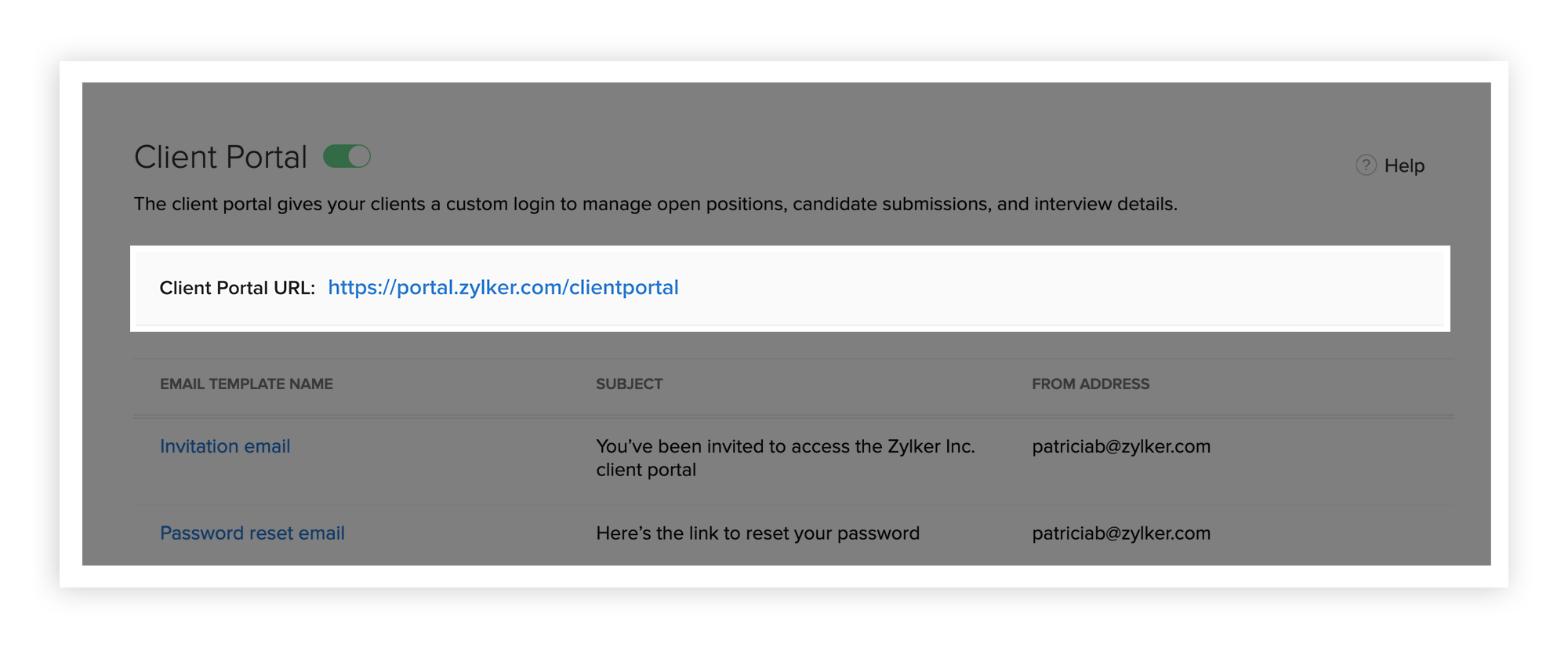
2) Take control of what clients can see:
We know it’s important to control what permissions you give to clients. That’s why we have “Client Administrators” and “Client Interviewers”. While Administrators can access everything in their portal, interviewers can only access records assigned to them.
3) Evaluate applicants together:
Team-up with your colleagues and clients when you evaluate candidates. Assign interviews to your contacts and add notes to make your hiring process more collaborative and organized.
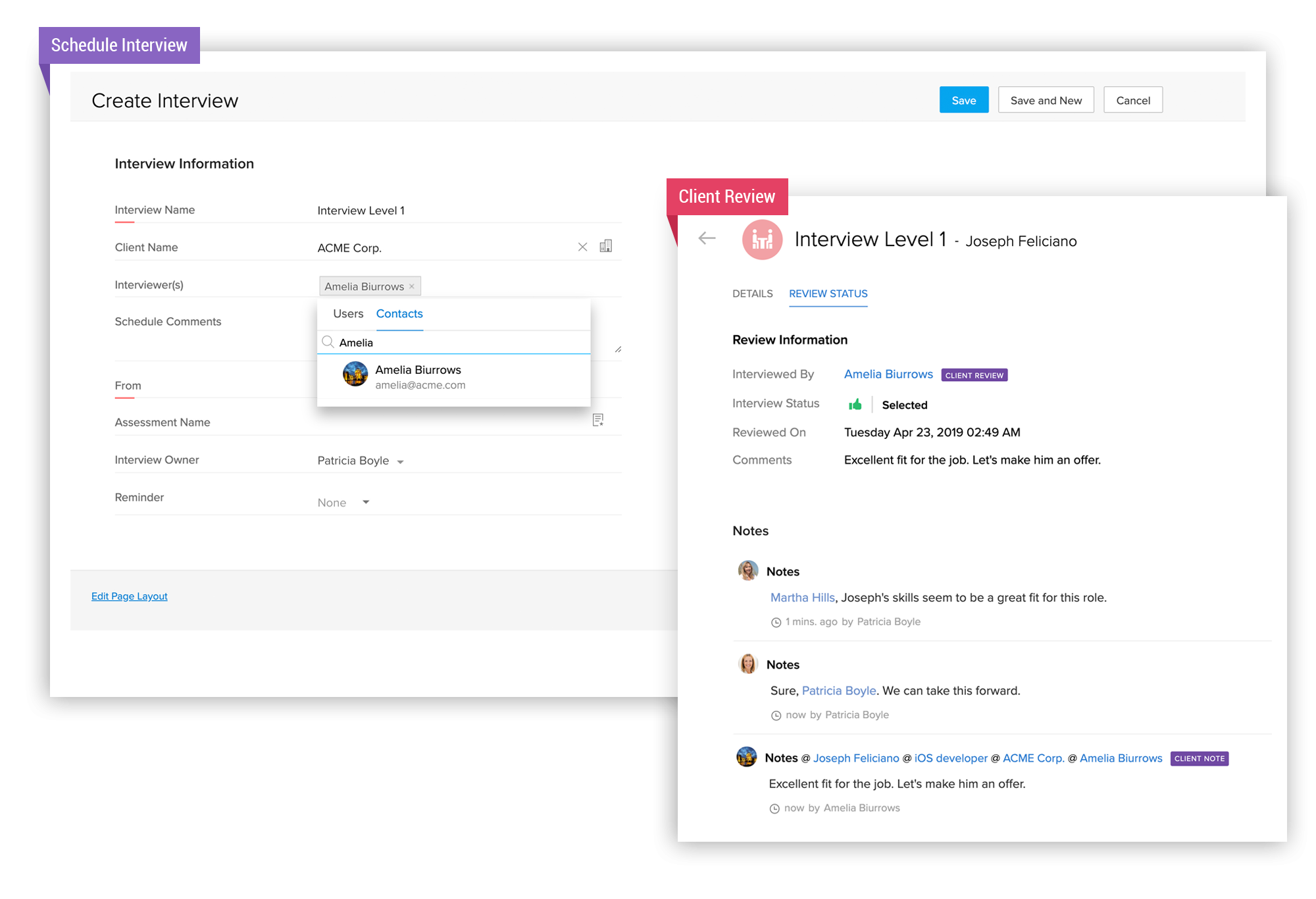
4) Bring important feeds to focus:
With the Activity Log, you can see a running history of activities happening. Be it an interview feedback for that perfect motion graphics designer, a new job requisition for an iOS developer (added by your client), or a star rating for a candidate.
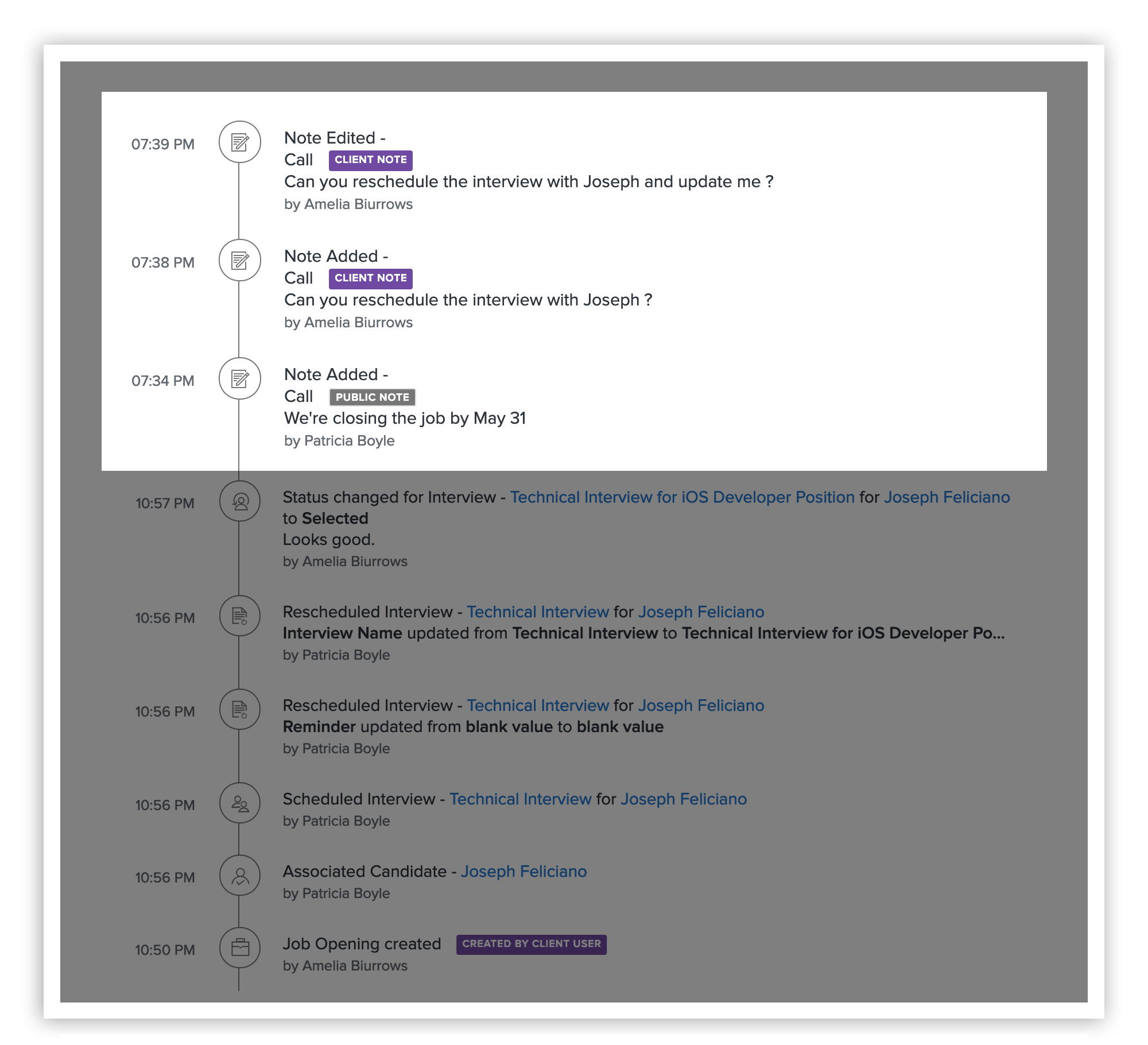
5) Let your clients self-manage:
Free yourself from actions like adding jobs and shortlisting them based on interview performance. Now, clients will have access and can perform all of these activities in the portal.
What's in it for my clients?
1) See Everything on the Dashboard:
The dashboard gives your clients a summary of stats such as jobs in the pipeline, yet-to-start, and filled, while also letting you dive deeper into each of these modules. Going a step further, they can also view the Candidates and Interview details on their respective pages.
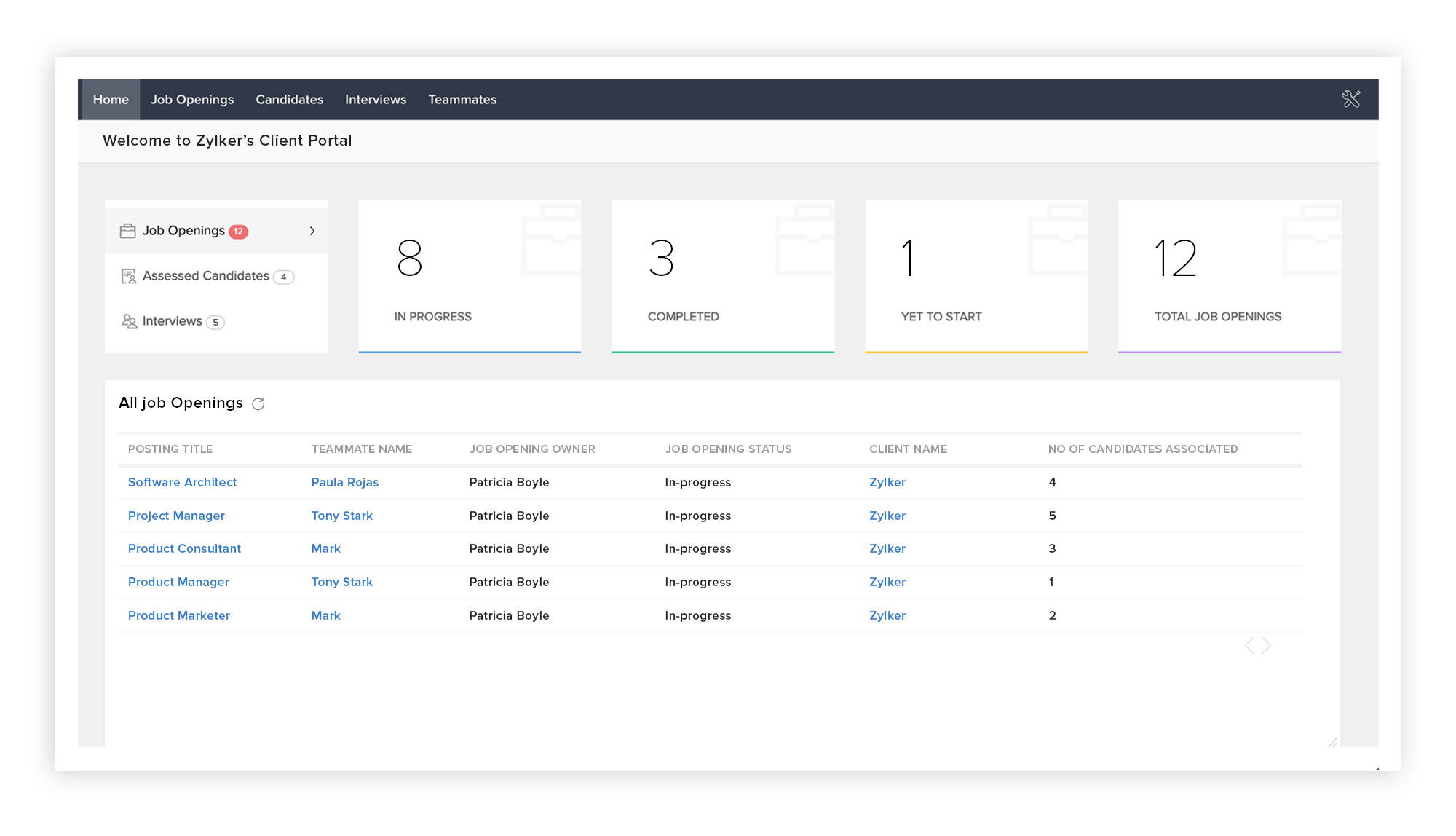
2) Rate Candidates:
Your clients can weigh in and give their opinions on all candidates you submit. Now, you can easily keep track of candidates, ranging from “Excellent”, “Good”, to “Poor” and make informed decisions when shortlisting candidates.
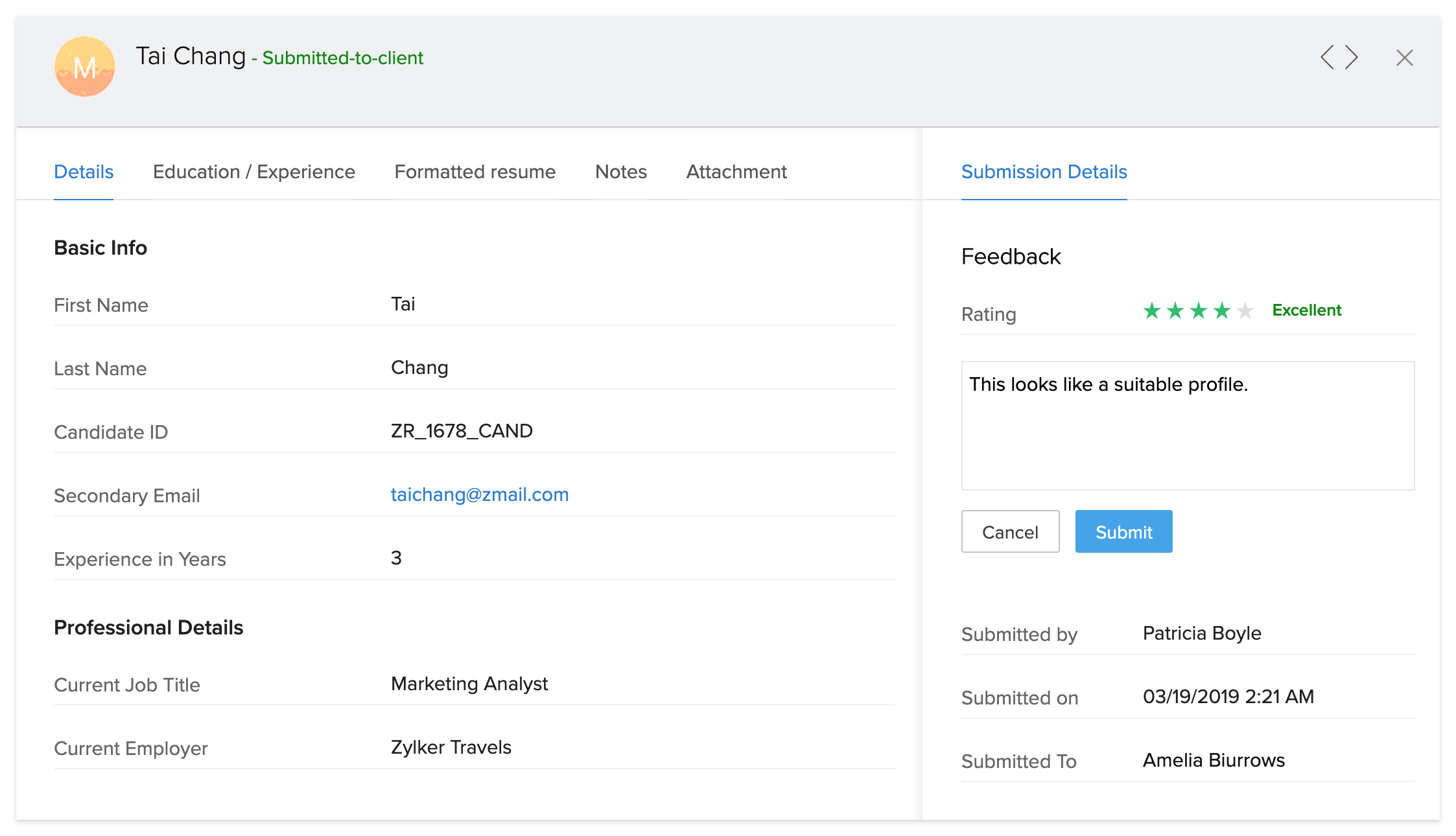
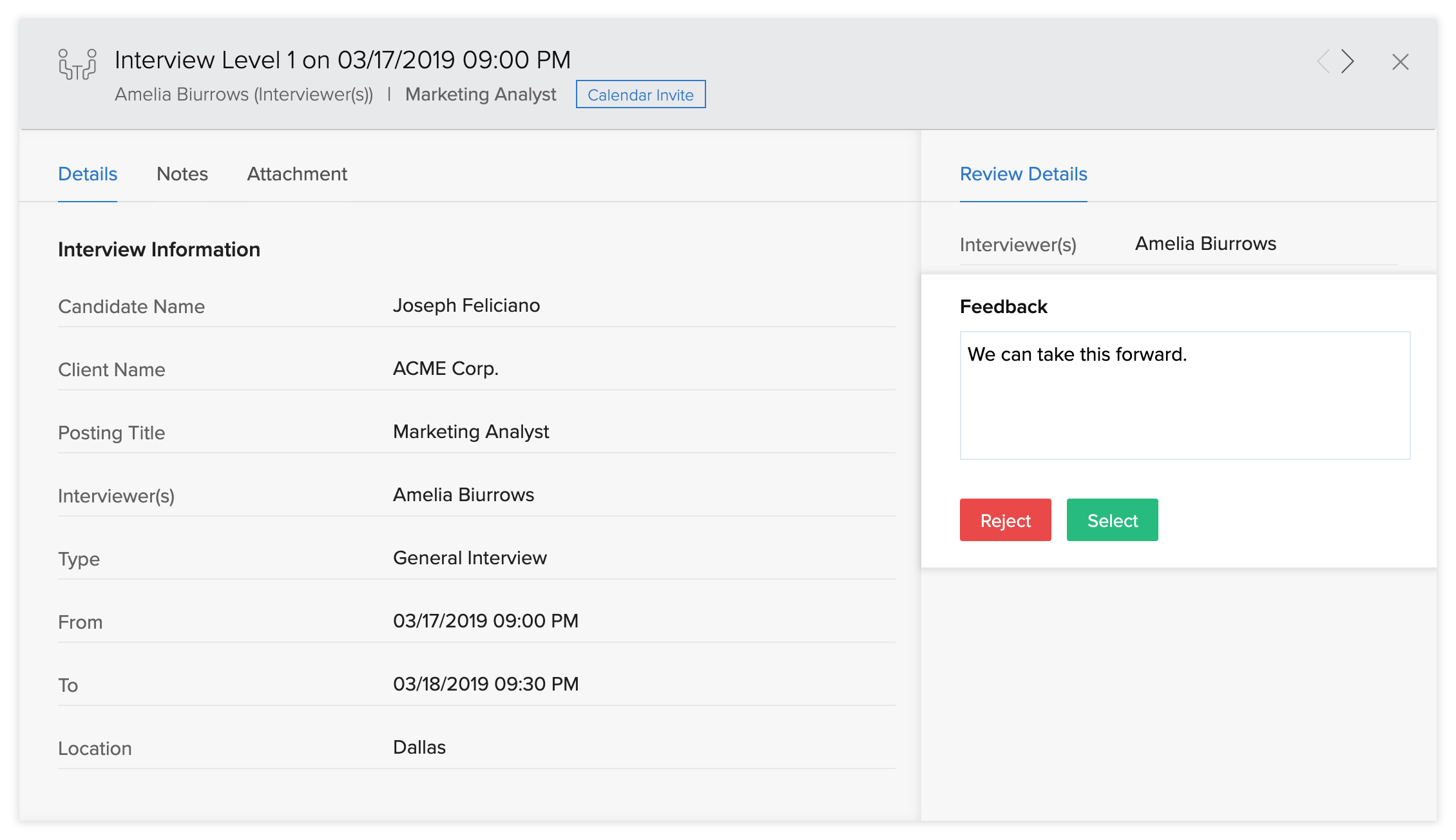
3) Submit Interview Feedback:
Submitting candidate profiles and getting interview feedback from clients is a big part of a recruiter’s job. With the Interviews module in the client portal, your clients can see a complete list of interviews and provide interview decision right away.
Here's a brief video to help you get familiar with the feature.
We are excited to introduce the
Client Portal
and are eager to see how it improves the client experience. If you have questions or comments, don’t hesitate to post them below.
Access your files securely from anywhere
New to Zoho Recruit?

Zoho Developer Community
New to Zoho LandingPage?
Zoho LandingPage Resources
New to Zoho Survey?
New to Zoho CRM Plus?
Deliver unforgettable customer experiences
New to Zoho CRM Plus?
Deliver unforgettable customer experiences
New to Zoho Marketing Plus?
Everything you need to run your marketing
New to Zoho Marketing Plus?
Everything you need to run your marketing
New to Bigin?





Topic Participants
Pradyumn K
kinleyames
Marichamy
greg
Aruna M
Sticky Posts
An update to improve email delivery | Email Authentication & Relay
Update Rollout Latest Update: Enterprise users (8th July, 2025) This update is now live for Enterprise plan users in all regions. This includes People Plus, but not Zoho One, which will be covered in an upcoming update. Professional users (31st May 2025)Zoho Recruit User Group Meet-up | INDIA 2025 (Venue Finalised)
Hello Zoho Recruit users from India, We’re pleased and excited to announce our 2025 edition of Zoho user group meet-up in India in five cities! In this meet-up, our team of experts will help you understand the intricate nuances to use Zoho Recruit better,Zoho Recruit is coming to the UK | Zoho Community Learning Series
Customers from the United Kingdom, Exciting news: We will be in London for the Zoho Recruit user meet up. Our team will help you better understand the intricate nuances of Zoho Recruit to help you hire faster, inform about new and upcoming features, andAsk the experts - A live Q & A discussion on Zoho Recruit
We are delighted to come back with another edition of Ask the Experts community series. This edition, we'll be focusing on everything about Zoho Recruit. The topics will focus on the features that are used/asked by the majority of users and also basedRestriction on 'From' addresses with a public domain
Dear Zoho Recruit Community, We hope this message finds you well. This post is to inform you about some important updates regarding email restrictions within Zoho Recruit. Effective post 31st March 2025, we will be implementing changes to the use of email
New to Zoho TeamInbox?
Zoho TeamInbox Resources
Zoho CRM Plus Resources
Zoho Books Resources
Zoho Subscriptions Resources
Zoho Projects Resources
Zoho Sprints Resources
Qntrl Resources
Zoho Creator Resources
Zoho CRM Resources
Design. Discuss. Deliver.
Zoho Show Resources

Get Started. Write Away!
Writer is a powerful online word processor, designed for collaborative work.
Zoho CRM コンテンツ
-
オンラインヘルプ
-
Webセミナー
-
機能活用動画
-
よくある質問
-
Ebook
-
-
Zoho Campaigns
- Zoho サービスのWebセミナー
その他のサービス コンテンツ
Nederlandse Hulpbronnen

ご検討中の方
Recent Topics
[Free Webinar] Learning Table Series - Creator for Infrastructure Management | A Partner-driven collaborative session
Hello Everyone! We’re excited to invite you to another edition of Learning Table Series, where we showcase how Zoho Creator empowers industries with innovative and automated solutions. About the Learning Table Series The Learning Table Series is a free,I have error AS101 when I try to add paypal@mydomain.com to Zoho
Please help me with this. I tried to call the help line 4 times but don't get any response.VAT on Multiple Expenses
Firstly, might I say I am based in Ireland, and I'm not an accountant, and therefore my understanding of procedures could be somewhat limited. Scenario. An employee pays for items throughout a month, and therefore their claim for expenses includes multiple items - some of the items are VAT deductible (eg, an IT product) and some are not (eg, a client lunch). Discovery The odd thing in ZBooks, is that whilst it seems possible to add a VAT rate to a one-off item of expense, it is not possible to addAgent assignment filter?
Godo day, We are starting to play with FSM to see if it's going to work for our needs. Now so far we have found that it's very restrcitve in the field department you you have layout rules or can't even hide fields depending on the users roles. We can'tDKIM Now Mandatory - Changes to Zoho Forms Email Policies
Hello Zoho Forms Users, This post is to inform you about an important update regarding the authentication of all email domains in your Zoho Forms account. This year, we are doubling down on our commitment to deliver a secure, seamless, and empoweringis it possible to add more than one Whatsapp Phone Number to be integrated to Zoho CRM?
so I have successfully added one Whatsapp number like this from this User Interface it seems I can't add a new Whatsapp Number. I need to add a new Whatsapp Number so I can control the lead assignment if a chat sent to Whatsapp Phone Number 1 then assignKiosk Page Refresh
We have a Kiosk running from a button in contacts to update values and also add related lists, which works great, but when the kiosk is finished the page does not refresh to show the changes. Is there a way to force the contact to refresh/update whenTips & tricks: Make SalesIQ automations work for you
Every day, thousands of visitors land on your website. Some browse, some buy, and some leave without a word. But, wouldn’t it be great if you could automatically know who’s interested, engage them at the right moment, and never miss a lead, and all thisDigest Octobre - Un résumé de ce qui s'est passé le mois dernier sur Community
Chers utilisateurs, Faisons le point sur les temps forts du mois d'octobre au sein de notre Community Zoho France. Partager des informations sensibles, comme des mots de passe, peut vite devenir compliqué et risqué. Les données circulent par email ouHow do I fully delete a user account
Hi, I have two old accounts on my CRM which are inactive and show as 'Closed' in the list of users. BUT they are basically still there. How do I fully delete these accounts? They appear in some parts of CRM still such as the on the contact record emailsAutomatically Add Recurring Zoho Meeting Events to Zoho Calendar / Zoho Meeting Calendar
Hello Zoho Meeting Team, Hope you are doing well. We would like to request an enhancement regarding recurring meetings created inside Zoho Meeting. At the moment, when we schedule a recurring meeting in Zoho Meeting, it does not appear in Zoho CalendarCredit Management: #6 Tackling Common Mistakes in Credit Based Billing
Businesses extend credit to build relationships, make buying easy, and drive more sales. But somewhere between extending and collecting, things begin to slip. A few late payments here and there, an overlooked invoice, and a backlog make cash flow feelTasks Statuses
Hi, The task status "Completed" is a final status which closes the task. We need to have a status "Cancelled". However, when the status is set to "Cancelled", the task prompt still has a blue button to Close Task. When the customer clicks that and closesUpdating Blueprint stage from my Deluge function
Hi all, I need to update the blueprint stage. Its almost working, but ONLY if the current Deal stage is 'Closed Lost'. On any of my custom stages that Ive specified in the pipeline it doesnt work! My code: dealmap = Map(); deal_stage = deal.get("Stage");Canvas: is it possible to have a fixed header?
Hello. Does Canvas provide the option to have a fixed header, similar to the standard view? It would also be interesting for other parts of the interface, like the header or sidebar of the tab section. Thanks!Limited layout rules in a module
There is a limit of 10 layout rules per module. Is there a way to get that functionality through different customization or workflow + custom function (easily accessible), etc. Having just 10 is limiting especially if module contains a lot of data. Aredealing with post dated cheques
Hi, can you help me please the best way to deal with this We sell an item of three months duration that is paid for with post dated cheques in monthly stages example - item is sold £3000 Cheque 1 is for £1000 due at time of sale (say Sept) cheque 2 is dated 25th of next month (Oct) cheque 3 is dated 25th of next month +1 (Nov) Now, with invoice number one it's simple - i send a standard invoice as usual But with the other two here's what i want zoho to do next month i want it to send an invoice onUsing Contains as a filter
We are using Zoho Reports, ServiceDesk Plus analytics. I do not see how to create a report filter using Contains comparison of a string values, is one string contained in another. For example, Task Title contains the word Monitor. Is this possible in Zoho Reports? This reporting feature is available in SDP reporting. Thanks in advance, Craig RiceSet off Unearned Revenue
Hi, I would like to get a clarification on the below. I have an opening balance of BD.725/- in my Unearned Revenue A/c which includes the overpayments of 6 clients. No One of my clients settled his invoices by paying the value of the invoice less theHow Zoho Desk contributes to the art of savings
Remember the first time your grandmother gave you cash for a birthday or New Year's gift, Christmas gift, or any special day? You probably tucked that money safely into a piggy bank, waiting for the day you could buy something precious or something youAdd Webhook Response Module to Zoho Flow
Hi Zoho Flow Team, We’d like to request a Webhook Response capability for Zoho Flow that can return a dynamic, computed reply to the original webhook caller after / during the flow runs. What exists today Zoho Flow’s webhook trigger can send custom acknowledgementsWhen moments in customer support get "spooky"
It’s Halloween again! Halloween is celebrated with spooky symbols and meanings based on history and traditions, with each region adding its own special touch. While we were kids, we would dress up in costumes along with friends, attend parties, and enjoyQuestions about Zoho mail
Hello, I had up until recently, the free version. I got a warning message that said, "The user account (Redacted email address) 6.02 GB in your organization is almost nearing the allocated storage of 5.00 GB. If the storage exceeds the allowed limit,How can I delete duplicate transactions?
I want to delete the duplicates not simply exclude them. I have duplicates, because I had automatic bank feeds turned on (had to make sure this critical functionality was working before migrating to Zoho). Now when I import my csv's exported from Wave,Multiple email addresses
Multiple email addresses: I understand there is the ability to add an additional email field to a contact, but the functionality here needs to be drastically revised. Currently, this second email address does not log under the contact email history, nor is it available as a send address when using the Send Mail button within CRM. We recently migrated from GoldMine. I hate GoldMine, but there is one thing they did well: Email. I suggest copying them. Change the email field to an editable picklist,ViewID and Zoho Desk API
I'm looking at the documentation for Listing contacts and it looks like you can filter by ViewID. I assume this is views created in a department or all departments. Is this correct? And if so, how do I find the ViewID for that view? EDIT: I see the viewAbility to Link Reported Issues from Zoho Desk to Specific Tasks or Subtasks in Zoho Projects
Hi Zoho Desk Team, Hope you're doing well. When reporting a bug from Zoho Desk to Zoho Projects, we’ve noticed that it’s currently not possible to select an existing task or subtask to associate the issue with. However, when working directly inside ZohoPrint Tickets
We have field engineers who visit customers. We would like the option to print a job sheet with full details of the job and account/contact details.Zoho Desk integration with Power BI
Hi, I want to be able to create a Power BI report which has live updates of ticket data from zoho desk, is this possile at all? Thanks JackAbility to Attach Images When Reporting Issues to Zoho Projects from Zoho Desk
Hi Zoho Desk Team, Hope you’re doing well. We’re using the Zoho Desk–Zoho Projects integration to report bugs directly from support tickets into the Zoho Projects issue tracker. This integration is extremely useful and helps us maintain smooth coordinationAbility to Choose Task List and Add Subtasks When Creating Tasks from Zoho Desk
Hi Zoho Desk Team, Hope you’re doing well. We’re using the Zoho Desk–Zoho Projects integration to seamlessly connect customer tickets with project tasks. While the integration works great overall, we noticed two important limitations that affect our workflowSync Task Status from Zoho Projects to Zoho Desk
Hi Zoho Desk Team, Hope you’re doing well. We’re actively using the Zoho Desk–Zoho Projects integration, which helps our support and project teams stay aligned. However, we noticed that when we change a task’s status in Zoho Projects, the change is notDefault/Private Departments in Zoho Desk
1) How does one configure a department to be private? 2) Also, how does one change the default department? 1) On the list of my company's Zoho Departments, I see that we have a default department, but I am unable to choose which department should be default. 2) From the Zoho documentation I see that in order to create a private department, one should uncheck "Display in customer portal" on the Add Department screen. However, is there a way to change this setting after the department has been created?Zoho CRM IP Addresses to Whitelist
We were told to whitelist IP addresses from Zoho CRM. (CRM, not Zoho Mail.) What is the current list of IP Addresses to whitelist for outbound mail? Is there a website where these IP addresses are published and updated? Everything I could find is overColor of Text Box Changes
Sometimes I find the color of text boxes changed to a different color. This seems to happen when I reopen the same slide deck later. In the image that I am attaching, you see that the colors of the whole "virus," the "irology" part of "virology," andThe difference between Zoho Marketing Automation and Zoho Campaigns
Greetings Marketers! This post aims to differentiate between Zoho Marketing Automation and Zoho Campaigns. By the time you get to the end of the post, you will be able to choose a product that objectively suits you. What is Zoho Marketing Automation?How to use Rollup Summary in a Formula Field?
I created a Rollup Summary (Decimal) field in my module, and it shows values correctly. When I try to reference it in a Formula Field (e.g. ${Deals.Partners_Requested} - ${Deals.Partners_Paid}), I get the error that the field can’t be found. Is it possibleZoho Mail Android app update - View emails shared via Permalink on the app.
Hello everyone! In the latest version(v2.8.2) of the Zoho Mail Android app update, we have brought in support to access the emails shared via permalink within the app. Earlier, when you click the permalink of an email, you'll be redirected to a mobileLet us view and export the full price books data from CRM
I quote out of CRM, some of my clients have specialised pricing for specific products - therefore we use Price Books to manage these special prices. I can only see the breakdown of the products listed in the price book and the specialised pricing forHow to create a Zoho Mail extension similar to Outlook's OnSend add-in?
Hi, I want to create a Zoho Mail extension similar to Outlook’s OnSend add-in. The extension should: Let the user select headers and footers from a taskpane while composing an email. When the user clicks Send, the extension should: Automatically insertNext Page